www.mellanox.com
Mellanox Reference Architecture for
Red Hat Enterprise Linux OpenStack
Platform 4.0
Rev 1.1
NOTE:
THIS HARDWARE, SOFTWARE OR TEST SUITE PRODUCT (“PRODUCT(S)”) AND ITS RELATED DOCUMENTATION ARE PROVIDED BY MELLANOX TECHNOLOGIES “AS-IS” WITH ALL FAULTS OF ANY KIND AND SOLELY FOR THE PURPOSE OF AIDING THE CUSTOMER IN TESTING APPLICATIONS THAT USE THE PRODUCTS IN DESIGNATED SOLUTIONS. THE CUSTOMER'S MANUFACTURING TEST ENVIRONMENT HAS NOT MET THE STANDARDS SET BY MELLANOX TECHNOLOGIES TO FULLY QUALIFY THE PRODUCT(S) AND/OR THE SYSTEM USING IT. THEREFORE, MELLANOX TECHNOLOGIES CANNOT AND DOES NOT GUARANTEE OR WARRANT THAT THE PRODUCTS WILL OPERATE WITH THE HIGHEST QUALITY. ANY EXPRESS OR IMPLIED WARRANTIES, INCLUDING, BUT NOT LIMITED TO, THE IMPLIED WARRANTIES OF MERCHANTABILITY, FITNESS FOR A PARTICULAR PURPOSE AND NON INFRINGEMENT ARE
DISCLAIMED. IN NO EVENT SHALL MELLANOX BE LIABLE TO CUSTOMER OR ANY THIRD PARTIES FOR ANY DIRECT, INDIRECT, SPECIAL, EXEMPLARY, OR CONSEQUENTIAL DAMAGES OF ANY KIND (INCLUDING, BUT NOT LIMITED TO, PAYMENT FOR PROCUREMENT OF SUBSTITUTE GOODS OR SERVICES; LOSS OF USE, DATA, OR PROFITS; OR BUSINESS INTERRUPTION) HOWEVER CAUSED AND ON ANY THEORY OF LIABILITY, WHETHER IN CONTRACT, STRICT LIABILITY, OR TORT (INCLUDING NEGLIGENCE OR OTHERWISE) ARISING IN ANY WAY FROM THE USE OF THE PRODUCT(S) AND RELATED DOCUMENTATION EVEN IF ADVISED OF THE POSSIBILITY OF SUCH DAMAGE.
Mellanox Technologies
350 Oakmead Parkway Suite 100 Sunnyvale, CA 94085 U.S.A. www.mellanox.com Tel: (408) 970-3400 Fax: (408) 970-3403 Mellanox Technologies, Ltd. Beit Mellanox PO Box 586 Yokneam 20692 Israel www.mellanox.com Tel: +972 (0)74 723 7200 Fax: +972 (0)4 959 3245
© Copyright 2014. Mellanox Technologies. All Rights Reserved.
Mellanox®, Mellanox logo, BridgeX®, ConnectX®, Connect-IB®, CORE-Direct®, InfiniBridge®, InfiniHost®, InfiniScale®, MetroX®, MLNX-OS®, PhyX®, ScalableHPC®, SwitchX®, UFM®, Virtual Protocol Interconnect® and Voltaire® are registered trademarks of Mellanox Technologies, Ltd.
ExtendX™, FabricIT™, Mellanox Open Ethernet™, Mellanox Virtual Modular Switch™, MetroDX™, Unbreakable-Link™ are trademarks of Mellanox Technologies, Ltd.
Contents
1 Solution Overview ... 7
2 Storage Acceleration Using Mellanox Interconnect ... 9
3 Network Virtualization on ConnectX-3 Adapters ... 11
3.1 Performance Measurements ... 12
3.2 Seamless OpenStack Integration ... 12
4 Setup and Installation ... 14
4.1 Hardware Requirements ... 14
4.2 Software Requirements ... 15
4.3 Prerequisites ... 15
4.4 OpenStack Software installation... 15
4.5 Troubleshooting ... 16
5 Setting Up the Network ... 17
5.1 Configuration Examples ... 17
5.1.1 Creating a Network ... 17
5.1.2 Creating a Para-Virtualized vNIC Instance ... 18
5.1.3 Creating an SR-IOV Instance ... 20
5.1.4 Creating a Volume ... 22 5.1.5 Attach a Volume ... 23 5.2 Verification Examples ... 24 5.2.1 Instances Overview ... 24 5.2.2 Connectivity Check ... 24 5.2.3 Volume Check ... 25
Rev 1.1 Solution Overview
List of Figures
Figure 1: Mellanox OpenStack Architecture ... 8
Figure 2: OpenStack Based IaaS Cloud POD Deployment Example ... 9
Figure 3: RDMA Acceleration ... 10
Figure 4: eSwitch Architecture ... 11
Figure 5: Latency Comparison ... 12
Figure 6: Network Virtualization... 13
Figure 7: Mellanox MCX314A-BCBT, ConnectX-3 40GbE/FDR 56Gb/s InfiniBand Adapter ... 14
Figure 8: Mellanox SX1036, 36x 40GbE/ SX6036 36x FDR 56Gb/s InfiniBand ... 15
Figure 9: Mellanox 40GbE/FDR 56Gb/s InfiniBand, QSFP Copper Cable ... 15
Figure 10: OpenStack Dashboard, Instances ... 18
Figure 11: OpenStack Dashboard, Launch Instance ... 19
Figure 12: OpenStack Dashboard, Launch Interface - Select Network ... 19
Figure 13: OpenStack Dashboard, Volumes ... 23
Figure 14: OpenStack Dashboard, Create Volumes ... 23
Figure 15: OpenStack Dashboard, Volumes ... 23
Figure 16: OpenStack Dashboard, Manage Volume Attachments ... 24
Figure 17: VM Overview ... 24
Figure 18: Remote Console Connectivity ... 25
Figure 19: OpenStack Dashboard, Volumes ... 25
Preface
About this Document
This reference design presents the value of using Mellanox interconnect products and describes how to integrate Red Hat OpenStack technology with the end-to-end Mellanox interconnect solution.
Audience
This reference design is intended for server and network administrators.
The reader must have experience with the basic OpenStack framework and installation.
References
For additional information, see the following documents: Table 1: Related Documentation
Reference Location
Red Hat Enterprise Linux OpenStack Platform 4.0
https://access.redhat.com/products/Cloud/OpenStack/
Mellanox OFED User Manual www.mellanox.com > Products > Adapter IB/VPI SW > Linux SW/Drivers
http://www.mellanox.com/content/pages.php?pg=products_dy n&product_family=26&menu_section=34
Mellanox software source packages https://github.com/mellanox-openstack
OpenStack Website www.openstack.org
Mellanox OpenStack wiki page https://wiki.openstack.org/wiki/Mellanox-OpenStack
Mellanox Ethernet Switch Systems User Manual
http://www.mellanox.com/related-docs/user_manuals/SX10X X_User_Manual.pdf
Mellanox Ethernet adapter cards http://www.mellanox.com/page/ethernet_cards_overview
Solutions space on Mellanox community
http://community.mellanox.com/community/support/solutions
Rev 1.1 Solution Overview
Reference Location
Mellanox eSwitchd Installation for OpenFlow and OpenStack
http://community.mellanox.com/docs/DOC-1126
Troubleshooting http://community.mellanox.com/docs/DOC-1127
Mellanox OFED Driver Installation and Configuration for SR-IOV
http://community.mellanox.com/docs/DOC-1317
Revision History
Table 2: Document Revision History
Revision Date Changes
1.1 March 2014 Aligned document to Havana release.
1
Solution Overview
Deploying and maintaining a private or public cloud is a complex task – with various vendors developing tools to address the different aspects of the cloud infrastructure, management, automation, and security. These tools tend to be expensive and create integration challenges for customers when they combine parts from different vendors. Traditional offerings suggest deploying multiple network and storage adapters to run management, storage, services, and tenant networks. These also require multiple switches, cabling, and management
infrastructure, which increases both up front and maintenance costs.
Other, more advanced offerings provide a unified adapter and first level Top-of-Rack (ToR) switch, but still run multiple and independent core fabrics. Such offerings tend to suffer from low throughput because they do not provide the aggregate capacity required at the edge or in the core; and because they deliver poor application performance due to network congestion and lack of proper traffic isolation.
Several open source “cloud operating system” initiatives have been introduced to the market, but none has gained sufficient momentum to succeed. Recently OpenStack has managed to establish itself as the leading open source cloud operating system, with wide support from major system vendors, OS vendors, and service providers. OpenStack allows central management and provisioning of compute, networking, and storage resources, with
integration and adaptation layers allowing vendors and/or users to provide their own plug-ins and enhancements.
Red Hat built an industry leading certification program for their OpenStack platform. By achieving this technology certification, vendors can assure customers that their solutions have been validated with Red Hat OpenStack technology. Mellanox is the first InfiniBand and Ethernet adapter vendor to be listed on the Red Hat Certified Solution Marketplace, a directory of technologies and products which have been certified by Red Hat and are designed to optimize all offerings that include Red Hat OpenStack. Mellanox is listed in the Red Hat marketplace as a certified Hardware partner for Networking (Neutron) and Block Storage (Cinder) services. This ensures that Mellanox ConnectX-3 InfiniBand and Ethernet adapter was tested, certified, and now supported with Red Hat OpenStack technology.
Red Hat Enterprise Linux OpenStack Platform 4.0 delivers an integrated foundation to create, deploy, and scale a secure and reliable public or private OpenStack cloud. Red Hat Enterprise OpenStack Platform 4.0 combines the world’s leading enterprise Linux and the
fastest-growing cloud infrastructure to give you the agility to scale and quickly meet customer demands without compromising on availability, security, or performance.
Mellanox Technologies offers seamless integration between InfiniBand and Ethernet interconnect and OpenStack services and provides unique functionality that includes application and storage acceleration, network provisioning, automation, hardware-based security, and isolation. Furthermore, using Mellanox interconnect products allows cloud providers to save significant capital and operational expenses through network and I/O consolidation and by increasing the number of virtual machines (VMs) per server.
Mellanox provides a variety of network interface cards (NICs) supporting one or two ports of 10GbE, 40GbE, or 56Gb/s InfiniBand. These adapters simultaneously run management,
Rev 1.1 Solution Overview
network, storage, messaging, and clustering traffic. Furthermore, these adapters create virtual domains within the network that deliver hardware-based isolation and prevent cross-domain traffic interference.
In addition, Mellanox Virtual Protocol Interconnect® (VPI) switches deliver the industry’s most cost-effective and highest capacity InfiniBand or Ethernet switches (supporting up to 36 ports of 56Gb/s). When deploying large-scale, high-density infrastructures, leveraging Mellanox converged network VPI solutions translates into fewer switching elements, far fewer optical cables, and simpler network design.
Mellanox integration with OpenStack provides the following benefits:
Cost-effective and scalable infrastructure that consolidates the network and storage to a highly efficient flat fabric, increases the VM density, normalizes the storage
infrastructure, and linearly scales to thousands of nodes
Delivers the best application performance with hardware-based acceleration for messaging, network traffic, and storage
Easy to manage via standard APIs. Native integration with OpenStack Networking Neutron and Block Storage (Cinder) provisioning APIs
Provides tenant and application security/isolation, end-to-end hardware-based traffic isolation, and security filtering
2
Storage Acceleration Using Mellanox
Interconnect
Data centers rely on communication between compute and storage nodes, as compute servers read and write data from the storage servers constantly. In order to maximize the server’s application performance, communication between the compute and storage nodes must have the lowest possible latency, highest possible bandwidth, and lowest CPU utilization.
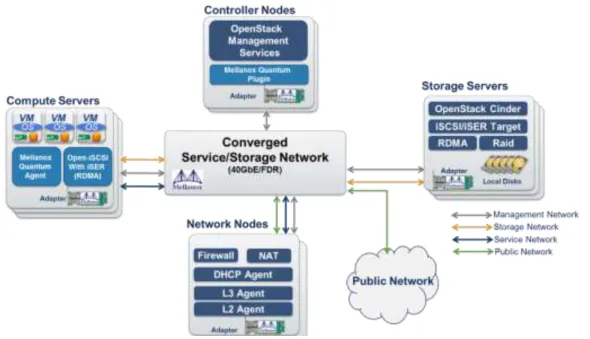
Figure 2: OpenStack Based IaaS Cloud POD Deployment Example
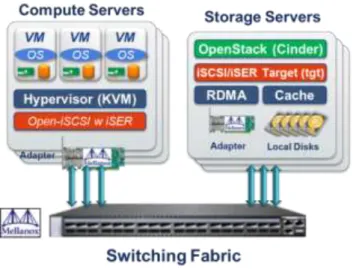
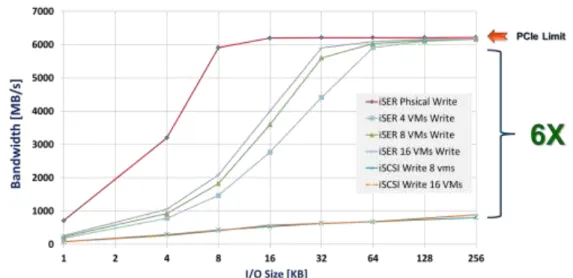
Storage applications that use iSCSI over TCP are processed by the CPU. This causes data center applications that rely heavily on storage communication to suffer from reduced CPU utilization, as the CPU is busy sending data to the storage servers. The data path for protocols such as TCP, UDP, NFS, and iSCSI all must wait in line with the other applications and system processes for their turn using the CPU. This not only slows down the network, but also uses system resources that could otherwise have been used for executing applications faster. Mellanox OpenStack solution extends the Cinder project by adding iSCSI running over RDMA (iSER). Leveraging RDMA Mellanox OpenStack delivers 5X better data throughput (for example, increasing from 1GB/s to 5GB/s) and requires up to 80% less CPU utilization (see Figure 3).
Mellanox ConnectX®-3 adapters bypass the operating system and CPU by using RDMA, allowing much more efficient data movement paths. iSER capabilities are used to accelerate hypervisor traffic, including storage access, VM migration, and data and VM replication. The use of RDMA moves data to the Mellanox ConnectX-3 hardware, which provides zero-copy message transfers for SCSI packets to the application, producing significantly faster
performance, lower network latency, lower access time, and lower CPU overhead. iSER can provide 6x faster performance than traditional TCP/IP based iSCSI. This also consolidates the efforts of both Ethernet and InfiniBand communities, and reduces the number of storage protocols a user must learn and maintain.
Rev 1.1 Storage Acceleration Using Mellanox Interconnect
The RDMA bypass allows the data path to effectively skip to the front of the line. Data is provided directly to the application immediately upon receipt without being subject to various delays due to CPU load-dependent software queues. This has three effects:
There is no waiting, which means that the latency of transactions is incredibly low. Because there is no contention for resources, the latency is consistent, which is essential
for offering end users with a guaranteed SLA.
By bypassing the OS, using RDMA results in significant savings in CPU cycles. With a more efficient system in place, those saved CPU cycles can be used to accelerate application performance.
In the following diagram, it is clear that by performing hardware offload of the data transfers using the iSER protocol, the full capacity of the link is utilized to the maximum of the PCIe limit.
To summarize, network performance is a significant element in the overall delivery of data center services. To produce the maximum performance for data center services requires fast interconnects. Unfortunately the high CPU overhead associated with traditional storage adapters prevents taking full advantage of high speed interconnects. Many more CPU cycles are needed to process TCP and iSCSI operations compared to that required by the RDMA (iSER) protocol performed by the network adapter. Hence, using RDMA-based fast interconnects significantly increases data center performance levels.
3
Network Virtualization on ConnectX-3 Adapters
Single Root IO Virtualization (SR-IOV) allows a physical PCIe device to present itself as multiple devices on the PCIe bus. This technology enables a single adapter to provide multiple virtual instances of the device with separate resources. Mellanox ConnectX®-3 adapters are capable of exposing 127 virtual instances called Virtual Functions (VFs). These virtual functions can then be provisioned separately. Each VF can be viewed as an additional device associated with the Physical Function. It shares the same resources with the Physical Function, and its number of ports equals those of the Physical Function.
SR-IOV is commonly used in conjunction with an SR-IOV enabled hypervisor to provide virtual machines with direct hardware access to network resources, thereby improving performance.
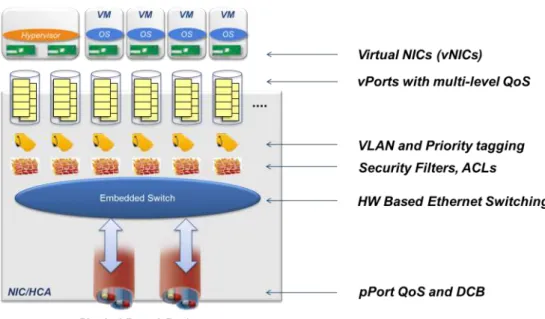
Mellanox ConnectX-3 adapters equipped with onboard embedded switch (eSwitch) are capable of performing layer-2 switching for the different VMs running on the server. Using the eSwitch will gain higher performance levels in addition to security and QoS.
Figure 4: eSwitch Architecture
eSwitch main capabilities and characteristics:
Virtual switching: creating multiple logical virtualized networks. The eSwitch offload engines handle all networking operations up to the VM, thereby dramatically reducing software overheads and costs.
Performance: The switching is handled in hardware, as opposed to other applications that use a software-based switch. This enhances performance by reducing CPU overhead. Security: The eSwitch enables network isolation (using VLANs) and anti-MAC spoofing.
Rev 1.1 Network Virtualization on ConnectX-3 Adapters
QoS: The eSwitch supports traffic class management, priority mapping, rate limiting, and scheduling. In addition, DCBX control plane can set Priority Flow Control (PFC) and FC parameters on the physical port.
Monitoring: Port counters are supported.
3.1
Performance Measurements
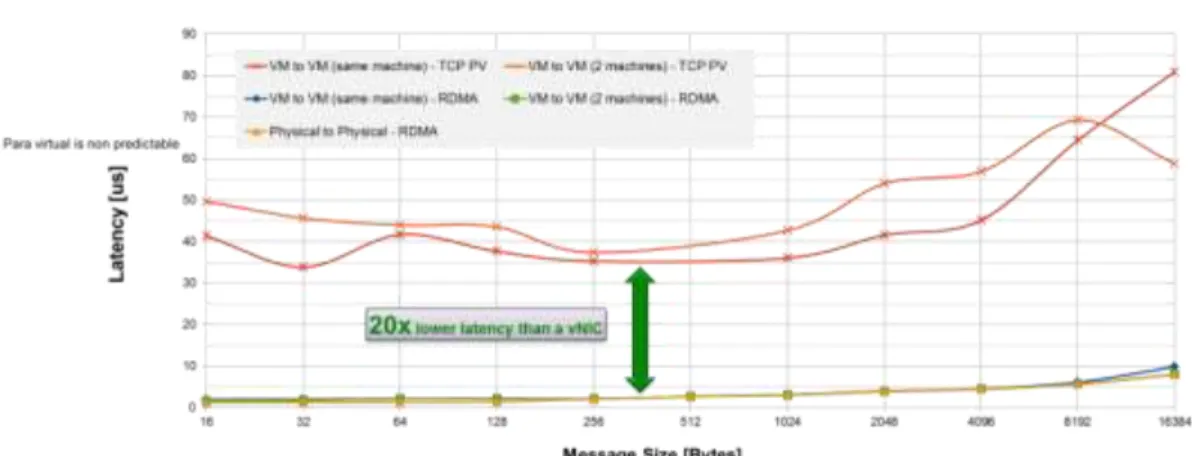
Many data center applications require lower latency network performance. Some applications require latency stability as well. Using regular TCP connectivity between VMs can create high latency and unpredictable delay behavior.
Figure 5 shows the dramatic difference (20X) when using para-virtualized vNIC running a TCP stream compared to SR-IOV connectivity running RDMA.
Due to the direct connection of the SR-IOV and the ConnectX-3 hardware capabilities, there is a significant reduction in software interference that adds unpredictable delay to the packet processing.
Figure 5: Latency Comparison
3.2
Seamless OpenStack Integration
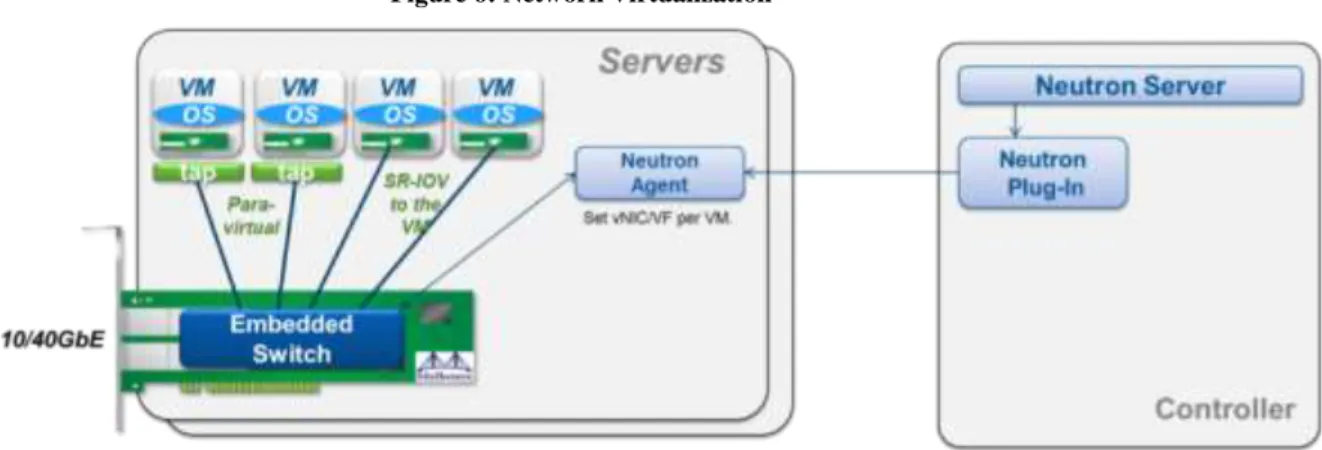
The eSwitch configuration is transparent to the Red Hat Enterprise Linux OpenStack Platform 4.0 administrator. The installed eSwitch daemon on the server is responsible for hiding the low-level configuration. The administrator will use the OpenStack dashboard for the fabric management.
Rev 1.1 Setup and Installation
4
Setup and Installation
The following setup is suggested for small scale applications.
The OpenStack environment should be installed according to the Red Hat OpenStack Enterprise Linux installation guide. Refer to
https://access.redhat.com/site/documentation/Red_Hat_OpenStack/ In addition, the following installation changes should be applied:
A controller node running the Networking (neutron) service should be installed with the Mellanox neutron plugin.
A Cinder patch should be applied to the storage servers (for iSER support).
Mellanox Neutron agent, eSwitch daemon, and Nova patches should be installed on the compute notes.
4.1
Hardware Requirements
Mellanox ConnectX-3 or ConnectX-3 Pro 10/40GbE and FDR 56Gb/s InfiniBand adapter cards
10GbE or 40GbE Ethernet or FDR 56Gb/s InfiniBand switches
Cables required for the ConnectX-3 card (typically using SFP+ connectors for 10GbE or QSFP connectors for 40GbE and FDR 56Gb/s InfiniBand)
Server nodes should comply with Red Hat Enterprise Linux OpenStack Platform 4.0 requirements.
Compute nodes should have SR-IOV capability (BIOS). SR-IOV is supported by RHEL 6.4 and above.
There are many options in terms of adapters, cables, and switches. See www.mellanox.com for additional options.
Figure 8: Mellanox SX1036, 36x 40GbE/ SX6036 36x FDR 56Gb/s InfiniBand
Figure 9: Mellanox 40GbE/FDR 56Gb/s InfiniBand, QSFP Copper Cable
4.2
Software Requirements
Red Hat Enterpise Linux OpenStack Platform 4.0 switch includes
o Red Hat OpenStack 3 or later
Red Hat Enterpise Linux 6.4 or later. The specific release is determined by the Red Hat OpenStack version.
Mellanox OFED 2.0.3 (SR-IOV support)
4.3
Prerequisites
(1) The basic setup is physically connected.
In order to reduce the number of ports in the network, two different networks can be mapped to the same physical interface on two different VLANs.
(2) Mellanox OFED 2.0.3 (SR-IOV enabled) is installed on each of the network adapters.
For Mellanox OFED installation refer to Mellanox OFED User Manual (Installation chapter).
http://www.mellanox.com/page/products_dyn?product_family=26
Visit Mellanox Community – for verification options and adaptation. http://community.mellanox.com/docs/DOC-1317
4.4
OpenStack Software installation
For Mellanox OpenStack installation, follow the Mellanox OpenStack wiki pages: Neutron: https://wiki.openstack.org/wiki/Mellanox-Neutron
Rev 1.1 Setup and Installation
For the eSwitch daemon installation, follow the OpenStack wiki pages (part of Mellanox Neutron):
4.5
Troubleshooting
Troubleshooting actions for OpenStack installation with Mellanox plugins can be found at http://community.mellanox.com/docs/DOC-1127.
5
Setting Up the Network
5.1
Configuration Examples
Once the installation is completed, it is time to set up the network. Setting up a network consists of the following steps:
(1) Creating a network
(2) Creating a VM instance. Two types of instances can be created: a. Para-virtualized vNIC
b. SR-IOV direct path connection (3) Creating a disk volume
(4) Binding the disk volume to the instance that was just created
5.1.1
Creating a Network
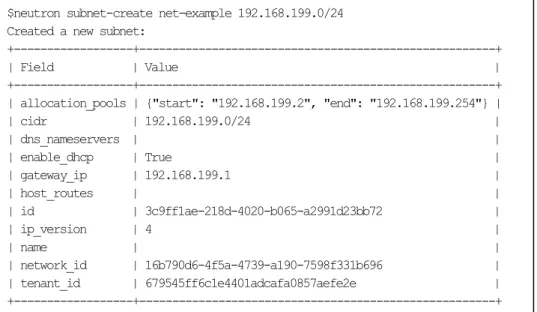
Use the commands neutron net-create and neutron subnet-create to create a
new network and a subnet (“net-example” in the example). $neutron net-create net-example
Created a new network:
+---+---+ | Field | Value | +---+---+ | admin_state_up | True | | id | 16b790d6-4f5a-4739-a190-7598f331b696 | | name | net-example | | provider:network_type | vlan | | provider:physical_network | default | | provider:segmentation_id | 4 | | shared | False | | status | ACTIVE | | subnets | | | tenant_id | 679545ff6c1e4401adcafa0857aefe2e | +---+---+
Rev 1.1 Setting Up the Network
5.1.2
Creating a Para-Virtualized vNIC Instance
(1) Using the OpenStack Dashboard, launch an instance (VM) using the Launch Instance button.
(2) Insert all the required parameters and click Launch.
This operation will create a macvtap interface on top of a Virtual Function (VF). Figure 10: OpenStack Dashboard, Instances
$neutron subnet-create net-example 192.168.199.0/24 Created a new subnet:
+---+---+ | Field | Value | +---+---+ | allocation_pools | {"start": "192.168.199.2", "end": "192.168.199.254"} | | cidr | 192.168.199.0/24 | | dns_nameservers | | | enable_dhcp | True | | gateway_ip | 192.168.199.1 | | host_routes | | | id | 3c9ff1ae-218d-4020-b065-a2991d23bb72 | | ip_version | 4 | | name | | | network_id | 16b790d6-4f5a-4739-a190-7598f331b696 | | tenant_id | 679545ff6c1e4401adcafa0857aefe2e | +---+---+
Figure 11: OpenStack Dashboard, Launch Instance
(3) Select the desired network for the vNIC (‘net3’ in the example).
Rev 1.1 Setting Up the Network
5.1.3
Creating an SR-IOV Instance
1. Use the command neutron port-create for the selected network (‘net3’ in the example) to create a port with ‘vnic_type=hostdev’.
$neutron port-create net-example --binding:profile type=dict vnic_type=hostdev Created a new port:
+---+---| | Field | Value | +---+---| | admin_state_up | True | | binding:capabilities | {"port_filter": false} | | binding:host_id | | | binding:profile | {"physical_network": "default"} | | binding:vif_type | hostdev | | device_id | | | device_owner | | | fixed_ips | {"subnet_id": "3c9ff1ae-218d-4020-b065-a2991d23bb72", | "ip_address": "192.168.199.2"} | | id | a43d35f3-3870-4ae1-9a9d-d2d341b693d6 | | mac_address | fa:16:3e:67:ad:ef | | name | | | network_id | 16b790d6-4f5a-4739-a190-7598f331b696 | | status | DOWN | | tenant_id | 679545ff6c1e4401adcafa0857aefe2e | +---+---|
2. Use the command nova boot to launch an instance with the created port attached.
5.1.4
Creating a Volume
Create a volume using the Volumes tab on the OpenStack dashboard. Click the Create Volume button.
$nova boot --flavor m1.small --image rh6.4p --nic port-id=a43d35f3-3870-4ae1-9a9d-d2d341b693d6 vm3 +---+---+ | Property | Value | +---+---+ | OS-EXT-STS:task_state | scheduling | | image | rh6.4p | | OS-EXT-STS:vm_state | building | | OS-EXT-SRV-ATTR:instance_name | instance-00000042 | | OS-SRV-USG:launched_at | None | | flavor | m1.small | | id | 161da6a9-6508-4e23-9f6f-881383461ab4 | | security_groups | [{u'name': u'default'}] | | user_id | b94edf2504c84223b58e254314528902 | | OS-DCF:diskConfig | MANUAL | | accessIPv4 | | | accessIPv6 | | | progress | 0 | | OS-EXT-STS:power_state | 0 | | OS-EXT-AZ:availability_zone | nova | | config_drive | | | status | BUILD | | updated | 2013-12-19T07:32:42Z | | hostId | | | OS-EXT-SRV-ATTR:host | None | | OS-SRV-USG:terminated_at | None | | key_name | None | | OS-EXT-SRV-ATTR:hypervisor_hostname | None | | name | vm3 | | adminPass | tiTE37tQrNBn | | tenant_id | 679545ff6c1e4401adcafa0857aefe2e | | created | 2013-12-19T07:32:41Z | | os-extended-volumes:volumes_attached | [] | | metadata | {} | +---+---+
Rev 1.1 Setting Up the Network
Figure 13: OpenStack Dashboard, Volumes
Figure 14: OpenStack Dashboard, Create Volumes
Figure 15: OpenStack Dashboard, Volumes
5.1.5
Attach a Volume
Figure 16: OpenStack Dashboard, Manage Volume Attachments
5.2
Verification Examples
5.2.1
Instances Overview
Use the Dashboard to view all configured instances.
Figure 17: VM Overview
5.2.2
Connectivity Check
There are many options for checking connectivity between difference instances, one of which is simply to open a remote console and ping the required host.
To launch a remote console for a specific instance, select the Console tab and launch the console.
Rev 1.1 Setting Up the Network
Figure 18: Remote Console Connectivity
5.2.3
Volume Check
To verify that the created volume is attached to a specific instance, click the Volumes tab. Figure 19: OpenStack Dashboard, Volumes
Additionally, run the fdisk command from the instance console to see the volume details. Figure 20: OpenStack Dashboard, Console