Rachna Kapur, Mario Briggs, Tapas Saha, Ulisses Costa,
Pedro Carvalho, Raul F. Chong, Peter Kohlmann
A book for the community by the community
First Edition (July 2010)
© Copyright IBM Corporation 2010. All rights reserved. IBM Canada
8200 Warden Avenue Markham, ON L6G 1C7 Canada
document. The furnishing of this document does not grant you any license to these patents. You can send license inquiries, in writing, to:
IBM Director of Licensing IBM Corporation
North Castle Drive Armonk, NY 10504-1785 U.S.A.
For license inquiries regarding double-byte character set (DBCS) information, contact the IBM Intellectual Property Department in your country or send inquiries, in writing, to:
Intellectual Property Licensing Legal and Intellectual Property Law IBM Japan, Ltd.
3-2-12, Roppongi, Minato-ku, Tokyo 106-8711
The following paragraph does not apply to the United Kingdom or any other country where such provisions are inconsistent with local law: INTERNATIONAL BUSINESS MACHINES CORPORATION PROVIDES THIS PUBLICATION "AS IS" WITHOUT WARRANTY OF ANY KIND, EITHER EXPRESS OR IMPLIED, INCLUDING, BUT NOT LIMITED TO, THE IMPLIED WARRANTIES OF NON-INFRINGEMENT, MERCHANTABILITY OR FITNESS FOR A PARTICULAR PURPOSE. Some states do not allow disclaimer of express or implied warranties in certain transactions, therefore, this statement may not apply to you.
This information could include technical inaccuracies or typographical errors. Changes are periodically made to the information herein; these changes will be incorporated in new editions of the publication. IBM may make improvements and/or changes in the product(s) and/or the program(s) described in this publication at any time without notice.
Any references in this information to non-IBM Web sites are provided for convenience only and do not in any manner serve as an endorsement of those Web sites. The materials at those Web sites are not part of the materials for this IBM product and use of those Web sites is at your own risk. IBM may use or distribute any of the information you supply in any way it believes appropriate without incurring any obligation to you.
applicable data for their specific environment.
Information concerning non-IBM products was obtained from the suppliers of those products, their published announcements or other publicly available sources. IBM has not tested those products and cannot confirm the accuracy of performance, compatibility or any other claims related to non-IBM products. Questions on the capabilities of non-IBM products should be addressed to the suppliers of those products.
All statements regarding IBM's future direction or intent are subject to change or withdrawal without notice, and represent goals and objectives only.
This information contains examples of data and reports used in daily business operations. To illustrate them as completely as possible, the examples include the names of individuals, companies, brands, and products. All of these names are fictitious and any similarity to the names and addresses used by an actual business enterprise is entirely coincidental.
COPYRIGHT LICENSE:
This information contains sample application programs in source language, which illustrate programming techniques on various operating platforms. You may copy, modify, and distribute these sample programs in any form without payment to IBM, for the purposes of developing, using, marketing or distributing application programs conforming to the application programming interface for the operating platform for which the sample programs are written. These examples have not been thoroughly tested under all conditions. IBM, therefore, cannot guarantee or imply reliability, serviceability, or function of these programs. The sample programs are provided "AS IS", without warranty of any kind. IBM shall not be liable for any damages arising out of your use of the sample programs.
References in this publication to IBM products or services do not imply that IBM intends to make them available in all countries in which IBM operates.
If you are viewing this information softcopy, the photographs and color illustrations may not appear.
UNIX is a registered trademark of The Open Group in the United States and other countries. Other company, product, or service names may be trademarks or service marks of others.
1.1 A brief history about open source development ... 21
1.2 The evolution of the open source movement ... 22
1.3 FLOSS - Free, libre, open source software ... 24
1.4 Advantages and disadvantages of open source ... 25
1.4.1 Pros ... 25
1.4.2 Cons ... 26
1.5 Open source trends and perspectives ... 26
1.6 Career path ... 27
1.7 Exercises ... 27
1.8 Summary ... 27
1.9 Review questions ... 28
Chapter 2 – Open source business models ... 31
2.1 Open source business models: The big picture ... 31
2.2 Dual licensing ... 33
2.3 Split open source software / commercial products ... 34
2.4 Product specialists ... 35
2.5 Platform providers ... 36
2.6 Business model relationship to license ... 37
2.7 Open source business model and proprietary software ... 38
2.8 Summary ... 39
2.9 Exercises ... 39
2.10 Review questions ... 40
Chapter 3 – Licensing ... 43
3.1 Intellectual property, copyright and licensing: The big picture ... 43
3.2 Open source licensing ... 44
3.2.1 History of open source licensing ... 44
3.2.2 Commonly used open source licenses ... 46
3.3 Choosing the right license ... 47
3.4 Exercises ... 48
3.5 Summary ... 48
3.6 Review questions ... 48
Chapter 4 – Community driven development ... 51
4.3 Exercises ... 61
4.4 Summary ... 61
4.5 Review questions ... 62
Chapter 5 – Participating in open source development ... 65
5.1 Participating in open source development: The big picture ... 65
5.2 Open source communities ... 67
5.3 Effective communication ... 70
5.3.1 Communication etiquette and guidelines ... 72
5.4 Exercises ... 73
5.5 Summary ... 73
5.6 Review questions ... 73
Chapter 6 – Starting your own open source project ... 77
6.1 Starting your own open source project: The big picture ... 77
6.2 Providing the ecosystem for your open source project... 78
6.3 Accepting contributions ... 79
6.4 Exercises ... 80
6.5 Summary ... 80
6.6 Review questions ... 80
Chapter 7 – Case Study: Contributing to an open source project ... 83
7.1 Ruby on Rails and the DB2 module... 83
7.2 The ruby forge ... 84
7.3 Submitting a bug ... 86
Chapter 8 - Case Study: A sourceForge project, Technology Explorer for IBM DB289 8.1 What is the Technology Explorer for IBM DB2? ... 89
8.2 A quick overview of the Technology Explorer for IBM DB2 ... 90
8.2.1 Requirements for setting up the TE ... 90
8.2.2 Some basic features and operations of the TE ... 91
8.3 You need a key insight to build a project ... 98
8.4 You need to support and grow a community ... 100
8.5 Make your project easy to adopt ... 100
8.6 Understand your business model ... 102
8.7 Keep your project current ... 105
Appendix A – Solutions to review questions ... 107
Appendix B – Up and running with DB2 ... 113
B.1 DB2: The big picture ... 113
B.2 DB2 packaging ... 114
References ... 129
Resources ... 131
Web sites ... 131
Books ... 134
of open source. You should read this book if you want to:
Educate yourself on the objectives of open source
Understand open source software licensing requirements
Get an introduction to the norms followed in the open source world
Join the open source movement and begin contributing.
How is this book structured?
The first chapters of this book discuss the history of open source software development and its licensing requirements. It then talks about how organizations use open source as their business model. Chapter 4 introduces the reader to the tools used in the development of an open source project. Chapters 5 and 6 take the reader into more details about how to contribute to an existing open source project. Chapter 7 provides a case study where you practice contributing to an open source project. Chapter 8 goes a bit deeper describing the Technology Explorer for IBM DB2, an open source project hosted at sourceForge.net; it also summarizes and revisits some of the concepts discussed in the previous chapters. Exercises are provided with most chapters. There are also review questions in each chapter to help you learn the material; answers to review questions are included in Appendix A.
A book for the community
This book was created by the community; a community consisting of university professors, students, and professionals (including IBM employees). The online version of this book is released to the community at no-charge. Numerous members of the community from around the world have participated in developing this book, which will also be translated to several languages by the community. If you would like to provide feedback, contribute new material, improve existing material, or help with translating this book to another language,
please send an email of your planned contribution t
Object names used in our examples are shown in bold italics. For example: The flights
table has five columns.
Italics are also used for variable names in the syntax of a command or statement. If the variable name has more than one word, it is joined with an underscore. For example:
CREATE TABLE table_name
What’s next?
We recommend you to review the following books in this book series for more details about related topics:
Getting started with DB2 Express-C
Getting started with Ruby on Rails
Getting started with PHP
Getting started with Python
Getting started with Perl
The following figure shows all the different eBooks in the DB2 on Campus book series
Tapas Saha is a graduate in electronics and communication engineering from Techno India, Kolkata, India. He joined IBM in 2007, as an open source software developer. Presently, he is working as a functional verification tester for DB2® for Linux®, UNIX®, and Windows®.
Ulisses Araújo Costa is a software engineer finishing his MSc in Formal Methods and Intelligent Systems. He loves functional programming and open source methodologies. He is a pro-active individual who loves to be connected to academic initiatives, like the open source support center at the University of Minho and the DB2 student ambassador group at the same university.
Pedro Carvalho is a Software Engineering student at the University of Minho in Portugal. Aside from school, he has developed an interest in systems administration and team leading. He has been strongly engaged in local student organizations, mainly in the creation of an open source software group. He is currently working in a research scholarship in the area of language engineering and several Web development projects. Raul F. Chong is the DB2 on Campus program manager based at the IBM Toronto Laboratory, and a DB2 technical evangelist. His main responsibility is to grow the DB2 community around the world. Raul joined IBM in 1997 and has held numerous positions in the company. As a DB2 consultant, Raul helped IBM business partners with migrations from other relational database management systems to DB2, as well as with database performance and application design issues. As a DB2 technical support specialist, Raul has helped resolve DB2 problems on the OS/390®, z/OS®, Linux®, UNIX® and Windows platforms. Raul has taught many DB2 workshops, has published numerous articles, and has contributed to the DB2 Certification exam tutorials. Raul has summarized many of his DB2 experiences through the years in his book Understanding DB2 - Learning Visually with Examples 2nd Edition (ISBN-10: 0131580183) for which he is the lead author. He has also co-authored the book DB2 SQL PL Essential Guide for DB2 UDB on Linux, UNIX, Windows, i5/OS, and z/OS (ISBN 0131477005), and is the project lead and co-author of many of the books in the DB2 on Campus book series.
Peter Kohlmann manages the DB2 for Linux, UNIX and Windows Product Planning Office. His team is responsible for requirements management, business analytics, tactical planning, technology demonstration and customer relationship management. He is also the original developer and the design lead for the Technology Explorer for IBM® DB2® open
Katsnelson Data Servers
Acknowledgements
We greatly thank the following individuals for their assistance in developing materials referenced in this book:
Martin Streicher for his article "Open source licensing" [1] published by IBM developerWorks®
Natasha Tolub for designing the cover of this book. Susan Visser for assistance with publishing this book.
Open source software development is a methodology for creating software products, from the design and development to distribution. Under this methodology the author offers access to the source code. This chapter gets you started into this fascinating software development world. It teaches you how it all started, and what the direction will be for the coming years.
In this chapter you will learn about:
A brief history about open source software development
The evolution of the open source movement
Open source versus free software
Advantages and disadvantages of open source
Trends and perspectives
Career prospective in the open source world
1.1 A brief history about open source development
The story of open source development started long before Richard Stallman created the Free Software movement. In the 50's and 60's almost all the software that existed was mostly produced by research institutes. Software was not seen as a product. In those times, computer companies were in the hardware business; and software was made freely available to encourage hardware sales. The source code was distributed with the software because users often had to change the code to fix bugs or add new features to support hardware issues. During this time software was developed and distributed by communities of user groups and no effort was needed to make it freely available.
Things started to change in the early 1970's when operating systems and compilers began to grow very fast, with the emergence of micro-processors. For almost a decade until the early 1980's computer vendors and software companies began to routinely charge for software licenses, and sell software as a product imposing legal restrictions on new software developments through copyrights, trademarks, and leasing contracts. At that time
work. This is when the real development of the open source movement began.
1.2 The evolution of the open source movement
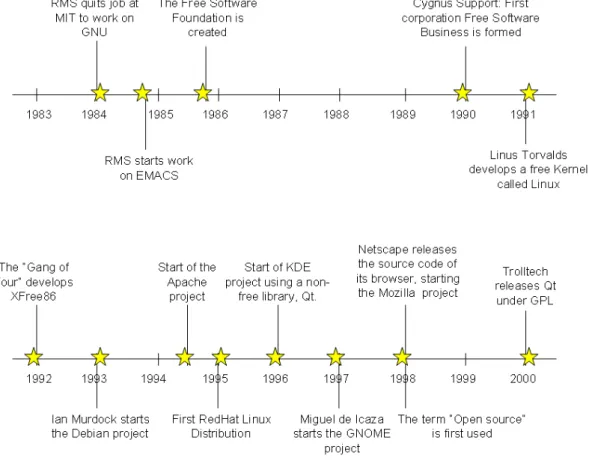
We start recording the evolution of open source development from the creation in 1986 of the Free Software Foundation by Richard Stallman (who likes to use his initials RMS). After this foundation was established, several major open source projects were initiated as shown in Figure 1.1.
not only to ensure that the software produced by GNU would remain free, but to promote the production of more and more open source software.
In 1987 Stallman created an open source compiler, the GNU C Compiler (GCC) with the idea to encourage more open source code contributions. Nowadays the GCC compiler is often chosen as the favorite to develop software that needs to be implemented in various types of hardware and supports C, C++, FORTRAN, Ada, Java™, Objective-C and Pascal. For many years, employees of Cygnus Support, a small company founded by Michael Tiemann, David Vinayak Wallace, and John Gilmore were the maintainers of several key GNU software products, including the GNU Debugger (gdb) and GNU Binutils. This company was also one of the major contributors to the GCC project.
In 1991 a student of the Department of Computer Science at the University of Helsinki in Finland, Linus Torvalds, created with the help of several volunteer programmers through Usenet the Linux® kernel. Some time after, the kernel grew with the assistance of developers around the world as open source software. A few years later a full open source operating system was available and released as GNU/Linux.
In 1993 the Debian GNU/Linux operating system was created by Ian Murdock in order to assemble all the GNU tools that existed at the time and the Linux kernel. The Debian Project grew slowly and gained notoriety when the program dpkg was released. This program is the basis of the Debian package management system and is used to install, remove, and provide information on the Debian software packages (.deb).
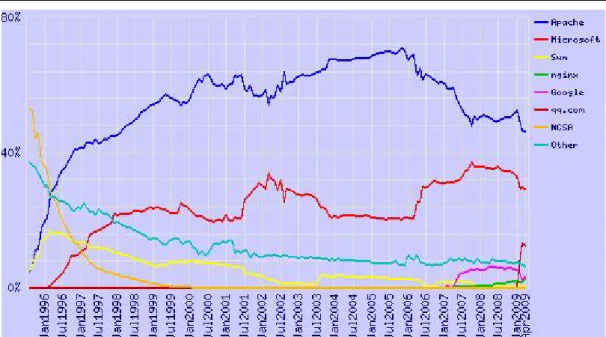
One of the most important events in open source development happened in 1994 when Robert McCool developed the Apache HTTP server. This Web server played a key role in the development of the World Wide Web, and it was the first open source alternative to the Netscape Web server. Today, more than 100 million Web sites use Apache as their Web server of choice, as shown in Figure 1.2.
Figure 1.2 – Market share for top Web servers across all domains according to
Netcraft
In 1995 Marc Ewing created his own Linux distribution called RedHat. RedHat is nowadays a major company that provides operating-system platforms along with middleware, applications, and management products, as well as support, training, and consulting services.
In 1996 the KDE and GNOME desktop environments were developed, providing basic desktop functionality for daily needs as well as development tools.
Two years later, in 1998, many software companies started to accept the open source movement when Netscape Communicator source code was made open source, and the Mozilla Foundation was established. It is in that year as well, that the term open source was first used at a conference in California. This term was created by Eric Raymond and Bruce Perens to promote the free software philosophy in the corporate world.
1.3 FLOSS - Free, libre, open source software
Until now the use of the term "open source" has many opponents. From one side Stallman and others with similar thoughts object to "open source" as they say it does not make users realize the freedom that the software in question gives to them. And when Stallman uses the term "free software", he is not referring to price as indicated by his quote, “Free software is a matter of liberty, not price. To understand the concept, you should think of 'free' as in free speech, not as in 'free beer'”. On the other hand, using the term "free software" was commonly confused with the no-charge connotation, which obviously made business organizations uneasy.
In order to end this discussion other terms have been proposed, one of them is FLOSS – Free, libre, open source software, or Free (as in libre) open source software. There are
In this book when we used the term open source, we mean FLOSS. In essence the freedom here refers to what an individual developer or user has with the code. It does not refer to a no-charge license. We discuss more details on the various connotations this phrase has in the open source world in the chapters to come.
Did you know?
The first use of the phrase “free open source software” on Usenet was in a posting on 18 March 1998, just a month after the term “open source” itself was introduced.
Did you know?
The IBM® DB2 Express-C database is free as in free beer. Check out these Web sites for more details:
1.4 Advantages and disadvantages of open source
Based on the fact that open source software is free and can be seen by everyone has great advantages. But the fact that it is being developed by a nonprofit community has some disadvantages. In this section we discuss the pros and cons of open source software maintenance and development.
1.4.1 Pros
Open source software has lower monetary costs as development, support and license costs are fairly minimal when compared to proprietary software. This does tempt many organizations to use open source software in their business model. In fact many companies do business with open source, IBM being one of them. For example, IBM offers a quality service with the Linux operating system. Another company, RedHat is selling the Linux operating system with support services.
all the people. One such example is OpenDocument Text (.odt), which is an open standard for word processor documents.
From a corporate perspective, companies that use open source do not have to worry about complicated licensing, and thus, do not suffer the risk of having illegal copies that infringe copyrights. Therefore, they don’t need anti-piracy measures, such as CD keys, product activation and serial keys.
Open Source software is community driven and community serving; a large number of bright, and generous developers work openly and with the whole community. For example when an open source program crashes it provides useful information to find the source of the error or to report a possible bug.
Open source software is independent of companies and its main authors. If the company goes bankrupt or the authors fail to maintain the program, the code continues to belong to the community. Therefore, many people believe open source software can live by itself. As long as there are passionate contributors from the community, this is indeed the case. 1.4.2 Cons
Open source software has been focused to provide solutions to servers rather than to desktop computers. As a result, adoption in the desktop arena is much slower. For example, Linux desktops are still not used as much as Microsoft® Windows®. In addition, many software is not yet compatible with open source. When a user chooses a Linux desktop he has to remove several software that are not supported on Linux, or in some cases, there is no similar nor viable open source application. A good example is the gaming industry, which is still very focused on Windows.
Excluding companies that sell open source combined with technical support; proprietary software offers better service and support. The quality and availability of assistance in an open source project is proportional to the interest and use of the program by the community. An open source tool with few users can be poorly documented and have almost no means to help you understand it.
1.5 Open source trends and perspectives
The advantages of OSS outweigh its disadvantages, this is why companies are starting to pay close attention to open source. Increasingly, many companies are using open source software tools for development and test; but open source is quickly gaining market share
companies exist is the greatest measure of the success of open source community developed software.
Chapter 2 discusses in more detail other business models used in the open source world, and more details about Eclipse too. Other chapters in this book will discuss other successful open source projects in more detail.
1.6 Career path
We don't want to undermine your intelligence by making you believe that the number of jobs in OSS is much higher than that for proprietary software. However; though smaller, it is a niche market.
Today it would be easier to get a C/C++ programmer job. In order to get developers who have programmed in newer technologies like Python, or Ruby, and who have understood the community, its trends, and its ways of working would certainly take a lot more time and effort. Just as we make correct technology choices for a software solution based on its architecture, organizations need to make choices to find the right fit for the right job. With the growing trends of involvement and usage of OSS in companies the demand for open source developers to take up this work is definitely on the rise. IBM itself has shown a lot of involvement in open source software like Eclipse, Linux, and so on.
In summary, OSS jobs are increasing. It’s still a niche area, but its growth potential makes it worth exploring. Needless to say that being an expert in a niche area always calls for a premium salary for oneself.
1.7 Exercises
Review the following link to learn about the involvement of IBM in OSS development.
1.8 Summary
In this chapter you learned about the history of open source and how it evolved over the years. You also learned about the underlying difference between the terms "free software"
3. List the pros of FLOSS 4. List the cons of FLOSS
5. Which foundation was started when Netscape Communicator software was made open source?
6. Which of the following open-source projects appears in the 90s? A. EMACS
B. XFree86 C. KDE D. Eclipse IDE E. None of the above
7. Who was the founder of the Free Software Foundation? A. Richard Stallman
B. Ian Murdock C. Miguel de Icaza D. Linus Torvalds E. None of the above
8. One of the two groups who established the roots of OSS were: A. The founders of the GNU project
B. The creators of BSD UNIX
C. The founders of the GNOME project D. A & B
E. None of the above
9. In Stallman's definition of Free Software, "Free" means: A. Free as in "Free beer"
D. B and C
You've probably heard the saying "There’s no such thing as a free lunch". Do you think this applies to open source? Are the users of open source software getting a free lunch? The answer to this question lies in the famous quote "free as in free speech, not as in free beer" discussed in Chapter 1. If the creators of open source software are giving their users a free lunch, then how do they themselves earn a living or even be profitable? In this chapter we try to understand the answers to this question.
In this chapter you will learn about:
The different business models employed by companies (not communities) involved in open source.
How the business models affect you, as a contributor to open source, if any.
You might be asking yourself "Why should this matter to me as developer?" Strictly speaking, at this point you can choose not to bother; however, from our experience, this knowledge will help you understand some of the nuances behind why communities and companies do what they do. You may use this knowledge to your advantage, and perhaps use it as a guide towards your success when you start your own open source project! Understanding the economics behind how open source operates can be interesting in itself!
2.1 Open source business models: The big picture
An open source business model is a model used by companies that are involved in the development of open source software to keep themselves financially viable and successful. In fact today these companies compete with traditional proprietary software companies for investor’s money on the stock markets. Traditional software companies get revenue by the sale of the software they create, that is, they earn money for each copy of the software sold. As illustrated in Figure 2.1, traditional software business models monetize software by
Figure 2.1- Business models for Proprietary software
Did you know?
When IBM sold the first mainframes, the software that was bundled with them was made freely available in open source. Users were allowed to modify and enhance it.
How about open source software companies? Stepping back into the evolution of open source software, it is fair enough to say that the initial roots of open source software were sowed by either community projects which had mutual sharing as their main concern (over business ambitions) as in the case of the GNU project, or funded by government contracts as in the case of BSD UNIX. However as open source software usage progressed to the extent that many of them were viable alternatives to their commercial counterparts, commercial software companies became interested in finding ways by which they could promote, develop and monetize open source software. During this period many startup companies emerged, such as Red Hat. Red Hat focuses on the development and promotion of the Linux open source software, building their revenue and profits around it. These companies began to explore new economic models, different from traditional commercial software to succeed in the competitive software market.
This phase – companies involved in the development and promotion of open source software – has lasted for around a decade or more now. Today there are probably very few domains of product software from operating systems to Business Intelligence, in which there are no commercial companies promoting open source communities and their software. Studies have been carried out by groups to find out the various economic models employed by these companies. The top four models are illustrated in Figure 2.2.
Figure 2.2- Business models for open source software
Companies that develop and promote open source software are sometimes referred to as Commercial Open Source Software companies (COSS) or Professional Open Source Software companies (POSS).
The following sections describe in detail each of the four business models shown in Figure 2.2.
2.2 Dual licensing
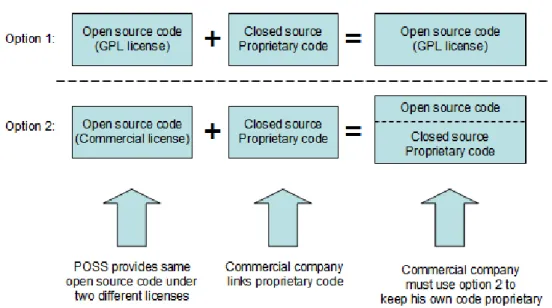
In this model, the open source software is licensed by the POSS company under both, an open source license (using GPL only, a license to discuss in detail in Chapter 3) as well as a commercial license. In this model the POSS company generates revenue when it sells the open source software under a commercial license.
Why would a consumer of open source software pay the POSS company to obtain the same software which is also available free of charge? This is needed when the consumer wants to link his own proprietary software to the open source software, but does not want this to cause its proprietary software to become open source as it would under the GPL license. According to the GPL license, when one accepts GPL licensed source code and links it with any other code (dynamic linking or static linking), the linked software also becomes open source. Thus the only way proprietary software vendors can link with GPL software without causing their own software to become GPL is by paying the POSS company. The POSS company then gives the same software to the proprietary software company under a license that excludes the need for the latter to make their proprietary software open source when they link to it. Figure 2.3 summarizes how dual licensing business model works.
Figure 2.3 - Dual licensing business model
As a developer, you may want to consider this if you are planning to make code contributions to an open source project that has dual license. You will be giving the POSS company the right to make money directly out of your contribution by commercially licensing your code. Of course if the POSS company plans to accept your contributions they will ask you to sign a legal document which states that you have given them the rights to do so.
MySQL, JBoss and SugarCRM are examples of POSS companies that employ the dual licensing business model.
2.3 Split open source software / commercial products
In this model, there is a core portion of the software which is available as open source. This core provides the base functionality. Then there are other portions or extensions that are built on top of or extend the functionality provided by the core. The latter is licensed under commercial or proprietary licenses and sold like typical proprietary software. Figure 2.4 illustrates how this model works.
Figure 2.4 - Split open source software / commercial products business model
Many POSS companies choose the Apache or Mozilla open source license when they want to follow this business model, since these licenses allow this kind of intermixing where some parts can be open source and other parts proprietary.
This model is used by many commercial software companies that participate in open source including IBM. In fact, IBM is an acknowledged leader in this space. Does this mean IBM is a POSS company? A company is considered a POSS when most of its revenue comes from open source software sales. Since this is not the case for IBM it would not be considered a POSS company by that definition. Probably the best example of IBM’s successful usage of this open source business model is Eclipse – the world’s default IDE and tooling platform.
As discussed in Chapter 1, before IBM donated Eclipse to the open source community, a number of proprietary Java IDE’s competed with each other; yet as a whole, Java IDE’s had a very small portion of the IDE market share compared to Microsoft’s Visual Studio. When IBM open sourced its VisualAge family of IDE products as Eclipse, it became the de-facto standard and was widely accepted by all. This led to a massive increase in the overall Java IDE market share compared to Visual Studio. Thus, IBM chose the right strategy with Eclipse, and is probably the biggest beneficiary financially - IBM Rational’s development tools which are commercial software products have seen a great uptake since they are based on Eclipse.
If you are a developer planning to contribute to an open source project under this business model, you can be certain that your code will never be licensed under a commercial license, since it would be part of the core, which must be open source.
2.4 Product specialists
A POSS company that nurtured an open source software project either by creating it from the start or contributing and maintaining it, can generate revenue from it by providing training and consulting services to the customers of the open source software. This is illustrated in Figure 2.5.
Figure 2.5 - The product specialists' business model
If the open source software caters to a domain that is very complex, and it achieves good adoption, there can be significant revenue to be made from providing training and consulting services. For example, this may be the case with business intelligence software (as compared to wiki software). By the very nature of being the creators and maintainers of the software, it follows that they would be the experts, and hence the best trainers and consultants in the market. The POSS can achieve this position with minimal spending on marketing efforts.
2.5 Platform providers
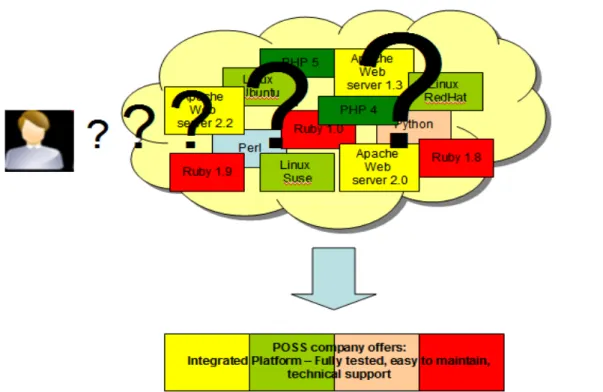
In a not so distant past software systems were monolithic. In those days one probably bought the entire system from a single vendor who provided all the software and support needed. However these are the days of concepts like Service Oriented Architecture (SOA) where software systems are built from multiple components from different software vendors and integrated into one system. And what if those multiple components were all open source?
Open source software has permeated every domain of product software. Today many software systems in production run entire software stacks consisting of open source software. However, as you can imagine, customers building this type of systems have to face many challenging decisions: Which open source software receives community support? Which ones have a diminishing number of contributors and is on the way out?. How can you determine if a given open source software will work well with another one? How can these software be integrated taking into account different versions? How many resources should be allocated to test and verify the integrated system and then upgrade and patch it in the right manner so that it still works?.
Finding the right answer to these questions can be a nightmare. For example let's say that a patch of open source software X needs Java 1.5; however, open source software Y, which is also part of the system will work only with Java 1.4.
By now, you probably understand why a customer would be willing to pay a company to deliver a tested and verified system made up of different open source software. This is the reason the platform providers business model came into existence. Figure 2.6 illustrates this idea.
Figure 2.6 - The platform providers' business model
An example of a POSS company using this business model is Zend, "the PHP company". Zend provides a platform fully tested to develop PHP applications.
2.6 Business model relationship to license
It is interesting that when we analyze the above mentioned business models, the relationship these models have is vis-à-vis to open source licenses. This is illustrated in Figure 2.7. In the bottom quadrants, the business model is tied to the license of the open source software. Dual licensing applies only when the open source software is GPL-licensed, and Split Open Source / Commercial products when the open source software is Mozilla-based. However the business models in the top quadrant have no bearing on the license of the open source software itself.
Figure 2.7 - Business model relationship to open source software license
2.7 Open source business model and proprietary software
Customers, startup companies and IT departments are finding it difficult to justify the licensing costs of proprietary software they use, and have been looking at open source software as a cost-reduction alternative. This has taken open source software adoption to new levels especially in segments like Web applications.
In order to remain competitive, several proprietary software vendors have evolved their strategies in this area. A widely used strategy is to offer no-charge versions of their fee-based products. The source code of these no-charge versions remains close. A typical example is with Database Management Systems (DBMS). Established DBMS vendors such as IBM, Oracle® and Microsoft compete today with open source DBMSs like MySQL and PostgreSQL by offering "Express" editions of their popular fee-based DBMS systems. The Express editions are free of charge, and by default have no customer support. This means that if you run into a problem such as a defect in the product, the vendor will not provide you with any support. However, vendors often optionally offer support for a fee. Thus proprietary software vendors are using the same approach as the open source business model – not charging for the software itself but generating revenue by providing support.
In addition to customer support revenue, proprietary vendors view this as an opportunity for adoption and upgrade to fee-based versions in the future. For example a startup company in its initial stages may not be in a position to spend lots of money to purchase software licenses; however, if the company grows, they would need more sophisticated product features which are generally not available in the free versions or on open source software. Therefore, an obvious choice for these companies would be to upgrade to a fee-based version of the proprietary software.
C is built using the same code base as the other DB2 editions.
For more information visit
Did you know?
When Oracle bought Sun Microsystems in 2009, MySQL became an Oracle product since MySQL had been bought by Sun a few years earlier. At the time of writing, Oracle has not made it clear what are its plans for MySQL, but there are interesting comments here:
In conclusion, using an Express version does have its merits when the product offers you low cost optional support, flexibility of use, and an easy upgrade path to more sophisticated editions in the future as your needs grow.
2.8 Summary
This chapter started with an explanation about the open source software ecosystem, and how it generates money to sustain itself. It then explained the different business models that exist in the world of open source, and how choosing a model can impact you as a contributor to open source software communities. Finally, we looked at "Express" versions of proprietary software as an alternative for companies to start with no licensing cost, the option for low cost customer support, and the possibility to easily upgrade to a version with more features.
2.9 Exercises
Review the following article which provides a brilliant analogy about a POSS company and bee-keeping.
4. Describe how DB2 Express-C is different from its competitors like Oracle XE or Microsoft SQL Server Express.
5. What is the value proposition from businesses using the Platform Providers' Business Model?
6. Which of the following is not one of the top business models used in open source: A. Dual licensing
B. Platform Providers C. OS Providers D. All of the above E. None of the above
7. Which of the following business models require specific licenses? A. Split open source / Commercial products
B. Platform providers C. OS Providers D. All of the above E. None of the above
8. Which of the following is a characteristic of DB2 Express-C? A. DB2 Express-C is a free database server by IBM
B. DB2 Express-C has no limitation on the database size or the number of users C. DB2 Express-C can run on Linux, Windows and the Mac OS
D. All of the above E. None of the above
9. What are the advantages of the express versions of some commercial products like DB2 Express-C?
A. It's free
B. It has optional fee-based support when your company grows C. It provides an easy upgrade path when your company grows
In earlier chapters you were introduced to the various business models employed by a company involved in open source, and several open source licenses were mentioned. But what makes a software license open source? This chapter provides an answer to this question.
In this chapter you will learn about:
The tenets of intellectual property, copyright and the intents of an open source license.
An explanation of what makes a license an open source license
A brief description of some of the most commonly used open source licenses
Things to keep in mind while choosing a license for a software
3.1 Intellectual property, copyright and licensing: The big picture
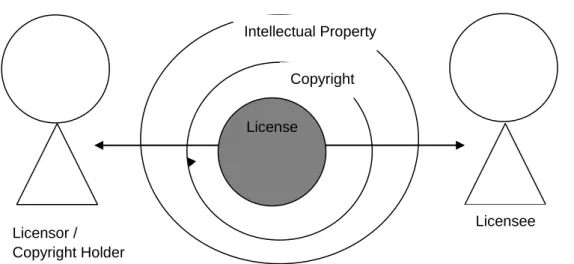
Intellectual Property (IP) are legally protected rights that one has over new ideas or creations. Common types of intellectual property include copyrights, trademarks, patents, industrial design rights and trade secrets.Copyright gives the creator of the original work exclusive rights in terms of usage, distribution and customization of the work.
Some of the privileges copyright provides to the author of software include:
The right to produce and sell copies of the work
The right to create derivative works
The right to sell, transfer or reassign any of the rights granted by copyright to others The transfer of rights by the author partly or wholly at his own terms is what we refer to as licensing. The term license means permission. The copyright holder, or licensor, grants another person, known as the licensee, specific permissions to use the work.
Figure 3.1 depicts this relationship between licensor, licensee and license. It also shows that a license is a subset of the privileges that the Copyright Act grants the licensor. The
Figure 3.1: Relationship between licensor, licensee and license
3.2 Open source licensing
This section provides a brief history about open source licensing, its intent, and a brief description of commonly used licenses.
3.2.1 History of open source licensing
The open source software movement traces its history to the formation of the Free Software Foundation ("FSF") in 1985 by Richard Stallman. As discussed in Chapter 1, Free Software is more of an ideology that emphasizes the freedom users have with the source code and not with the price one pays for the software. In essence, free software is an attempt to guarantee certain rights for both, users and developers. These freedoms include:
Freedom to execute the program for any reason
Freedom to examine the source code, see how it works and change it to do what you would like it to do
Freedom to redistribute the source and keep the money generated from it
Freedom to modify and redistribute the modified source code
In order to guarantee these freedoms the GNU General Public License (GPL) was created. In short any software licensed under GPL must include the source code. Any modifications made to a GPL source code will also be licensed under GPL. This was to ensure that software once "opened" to the community could not be "closed" at a later time.
Licensor / Copyright Holder
Licensee License
1 Licensees are free to use open source software for any purpose whatsoever.
This basically means that the licensee need not justify the usage of the open source software.
2 Licensees are free to make copies of open source software and are free to distribute those copies without payment of royalties to a licensor.
This implies that the licensee can redistribute the software at a cost or free of charge.
3 Licensees are free to create derivative works of open source software and are free to distribute those works without payment of royalties to a licensor.
This allows the licensee to modify the open source software and then redistribute it with or without charge. The licensee is in no way liable to pay any amount to the licensor for this neither can the licensor pose any restrictions on the derivative works. A pre-requisite for intention 3 to occur is the pre-existence of intention 4.
4 Licensees are free to access and use the source code of open source software.
This means the source code is freely available
5 Licensees are free to combine open source and other software.
This gives the licensee the ability to mix open source software with other software.
Table 3.1 - Intentions of open source software
We review in the next section how the GPL and MIT licenses meet the above intents of open source software.
Reciprocal licenses like the GNU General Public License (GPL), also allow software to be used for any purpose, however it enforces that the changed or modified software must also be licensed under the exact terms as the original license.
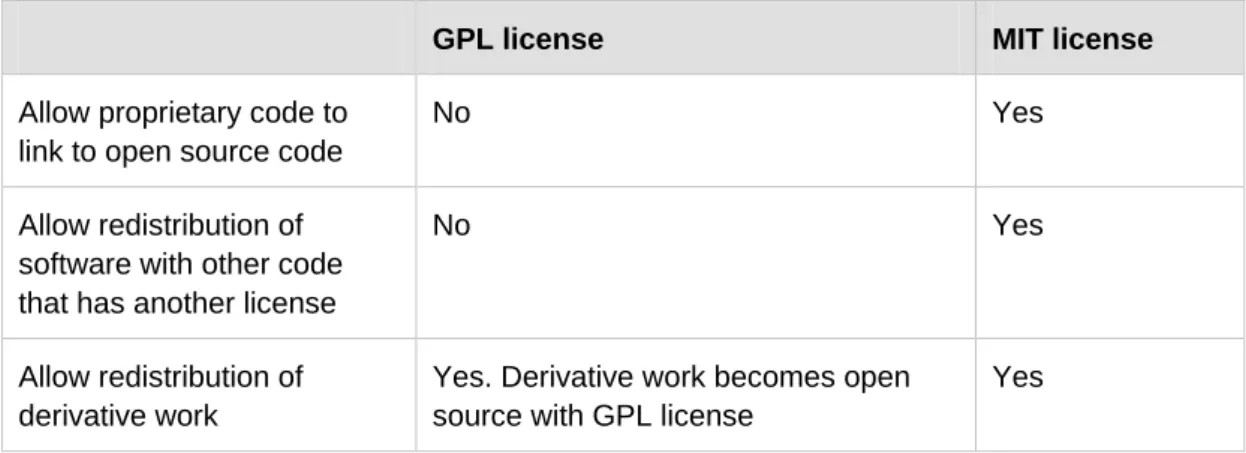
A GPL licensed code does not allow proprietary software to link to it. It also does not permit redistribution with software having a GPL non-compatible license. Also redistribution of the derivative works need to be with GPL. On the other hand MIT licensed software allows all of it. It permits proprietary code to link to it, redistribution with non-MIT license software and redistribution of derivative works with non-MIT license. Interestingly, they both are open source software licenses as they follow the open source definition specified by the OSI. Table 3.2 compares the GPL versus the MIT license.
GPL license MIT license
Allow proprietary code to link to open source code
No Yes
Allow redistribution of software with other code that has another license
No Yes
Allow redistribution of derivative work
Yes. Derivative work becomes open source with GPL license
Yes
Table 3.2 - Comparing the GPL vs. the MIT reciprocal licenses
Let's take an even closer look at the GPL and MIT licenses by reviewing excerpts of each license as shown in Listing 3.1 and 3.2 respectively. We will verify each of the licenses satisfy the five intentions explained earlier in Table 3.1
You may modify your copy or copies of the Program or any portion of it, thus forming a work based on the Program, and copy and distribute such modifications or work -- provided that you -- cause any work that you distribute or publish, that in whole or in part contains or is derived from the Program or any part thereof, to be licensed as a whole at no charge to all third parties under the terms of this License.
These requirements apply to the modified work as a whole. If identifiable sections of that work are not derived from the Program, and can be reasonably considered independent and separate works in themselves, then this License, and its terms, do not apply to those sections when you distribute them as separate works.
(Intention 2).
Copyright (c) year, copyright holders
Permission is hereby granted, free of charge, to any person obtaining a copy of this software and associated documentation files (the "Software"), to deal in the Software without restriction, including without limitation the rights to use, copy, modify, merge, publish, distribute, sublicense, and/or sell copies of the Software, and to permit persons to whom the Software is furnished to do so, subject to the following conditions:
< text that follows has been removed for the sake of brevity >
The above copyright notice and this permission notice shall be included in all copies or substantial portions of the Software.
Listing 3.2 - An excerpt of the MIT license
The phrase "permission is hereby granted, free of charge" clearly indicates that MIT permits licensees to access and use open source software for any purpose whatsoever (Intention 1). Further the phrase "rights to use, copy, modify, merge, publish, distribute, sublicense and/or sell copies" combined with "free of charge" indicates that licensees are free to make and distribute copies, access the source code, create derivative works and combine open source and other software without payment of royalties (Intention 2, 3, 4 and 5).
In conclusion, both GPL and MIT are valid open source licenses as they satisfy the same intentions though through different means, and are thereby best suited in different situations.
Did you know?
The IBM Public License (IPL) was IBM's first open source license. The Common Public License (CPL) is essentially the next version of the IPL. In 2009 CPL was superseded by the Eclipse Public License (EPL).
3.3 Choosing the right license
By now you must be feeling more of a lawyer and less of a developer. Yet, all of this information is very relevant to you: It can help you avoid a lawsuit. An interesting licensing
So what is the right open source license to use for a given software? There is no magic formula but some of the things to consider are listed below:
Is the work in question a derived work? Or would the work be redistributed with other open source software? If so, what are the license terms you have agreed as a licensee?
Do you want the software to be revenue generating? Review the different open source business models as described earlier in Chapter 2.
Do you want access to use licensees’ contributions? How do you add this clause to your license?
Review the licenses in the OSI website -
if any of the existing and approved licenses of OSI would be good for you to use. This and several other factors are things to consider while choosing an appropriate license for the software in question. Depending on the scope of the project you could get into legal discussions to help you chose an appropriate license.
3.4 Exercises
The OSI categorizes various approved licenses. Review these categories and the licenses'
terms and conditions at
3.5 Summary
In this chapter you learned about the concept of Intellectual Property and how it related to a license. You also learned about the relationship between a license, licensor and licensee. Next, the chapter explained what makes a license an open source license, and provided a description and comparison between the BSD, GPL and MIT licenses. Finally the chapter provided questions that would help you choose the most appropriate open source license for your needs.
3.6 Review questions
1. What is required for OSI license approval?
A. Yes B. No
8. Under MIT, can you link proprietary code to open source code? A. Yes
B. No
9. Intellectual property and copyright are synonyms. True or false? A. True
B. False
10. Which of the following is not an OSS license? A. GPL
B. BSD C. MIT D. EPL
Open source software is often developed by a group of people who normally have no governing authority or organizational support. What are the strategies and methods they follow? Which tools do they use at the various phases of the software development life cycle? Are these tools available for free? This chapter provides the answers to all of the above questions.
In this chapter you will learn about:
Various tools used in an open source software development project.
Processes of designing and writing the programs.
Managing different versions of the source code and creating new builds.
Methods of testing and issues tracking.
How open source software is released.
4.1 Community driven development: The big picture
A community is a diverse group of people sharing their thoughts, ideas, work, and experiences, at a common place. The term “community” as used in this chapter is not an exception to this definition. In the software industry, community driven development broadly means an initiative under which a group of technologists work together with a common vision of producing open source software.
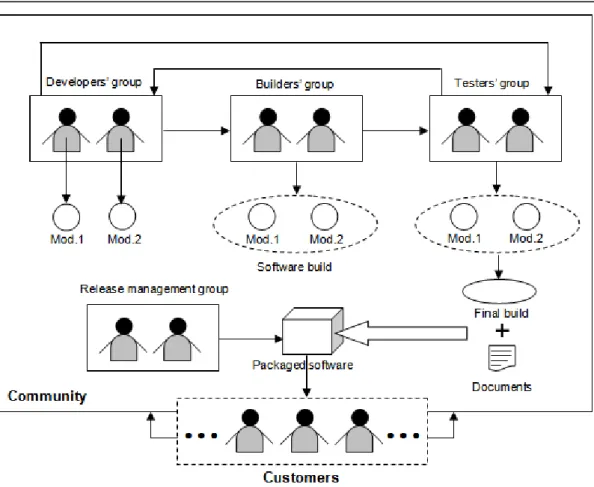
Most of the OSS development communities who are successful today, organize themselves in a similar way as a professional organization or proprietary software company. This is why in a well structured OSS community; you can find each member has a job role within the team. Groups of people performing similar jobs, form sub teams within the community. Figure 4.1 gives you an overview of such a community, where multiple sub teams collaborate to develop open source software.
Figure 4.1 – Community driven software development
As shown in the figure, the developers' group is responsible for writing code for different independent modules of the software. The builders’ group takes these modules from the developers and put them together to build a new version of the software. These software builds are internally tested by the testers' group. In case a bug or failure is found, they report back to the appropriate developer who debugs the code and includes a proper fix. This is an iterative process that repeats itself until the product satisfies all its requirements and becomes error free to the maximum possible extent. Once the objectives of the project are met, the release management group packs together the final version (final build) of the software with all the necessary documents, and then hands it over to the customers. OSS development communities, especially those which are self driven, offer their team members the flexibility of shuffling their job roles. This means that a developer may perform the role of a tester, a tester may work as a build team member, and so on. Most importantly, these communities always keep the door open for the users (customers), so that they can also contribute effectively into the project and become part of the community. Software development tools are a collection of programs that help with specific tasks during the software development life cycle. They are normally used for project management, and to perform repetitive, and time consuming tasks. There exist both, proprietary and open source development tools. For an open source project, it should be
include a list of requirements that the software is expected to fulfill. The designers’ group, which in many cases is also part of the developers' group, takes these requirements as input and writes algorithms which are cost effective and optimal in terms of performance. Software designers should be the most experienced and knowledgeable members of the community as their job requires thorough understanding of the entire system. They also must be aware of every alternative to overcome all the probable barriers of implementing the design. Following are the two most important points that a designer must analyze closely:
Hardware platform: The designer must know the capabilities of the hardware, with which the software is going to interact. Resources like number and speed of the processors, I/O device response time, available system cache, primary memory and secondary storage space etc. are the most important concerns.
Operating system: The operating system (OS) provides the environment for running applications. Process and thread handling mechanisms vary from one OS to another. Moreover, the algorithms of job scheduling, CPU time allocation, avoiding deadlock situations are also different. The designer must take these factors into account.
A perfect design should be self explanatory and easy to understand. All the algorithms and flowcharts should include detailed explanations and other necessary documentations including time-space complexity and the expected behaviors of the system under best and worst scenarios.
Unified Modeling Language (UML) is a widely accepted standard used for software design. It allows a designer to describe the structure, behavior, and interactions among different sub units of the system with the help of various simple diagrams.
Following design, the software development life cycle enters the coding phase. At this stage, the design is first sub divided into multiple smaller units. Different development groups code these sub units separately as individual modules.
Coding is the process of translating the steps of an algorithm, into multiple computer instructions, with the help of a programming language. Choosing the proper language for writing the source code is critical. A community should always encourage using languages
development typically tend to overlap with each other in a project. Developers sometimes start coding parts of a system, while other parts are yet to be designed. Although, this kind of approach of running two phases in parallel saves time; it may result in duplication of effort in the event of a change in design.
4.1.1.1 Version control
Software development is an incremental process where functionality is added or removed one by one. At any given time the code of different modules may undergo frequent modifications by different individuals or groups which create different versions of the same code. Version control (or revision control) is the mechanism to manage all of these versions in an effective way.
There are two varieties of version control systems:
Centralized Version Control System (CVCS) – This is perhaps the most widely used version control system to-date. It works in a centralized manner which means that developers and testers around the world have to connect to a server, where a central repository for the entire project is stored.
Concurrent Versions System (CVS) is a very well known open source CVCS
need to check it out from the repository. Once done with your changes, you may commit or save your work into the repository by checking the file in. CVS will automatically increment the version (or revision) number by 1 and record all the necessary information about the change in its log. If someone else had already committed some other changes to the same file, CVS will automatically merge your changes with those of the other person. This system also allows a user to track back the old versions of a file. By comparing two successive versions of a file, you can easily determine modifications introduced.
One of the main drawbacks of CVCS is that developers may interfere with each other's working environment. For example, a small bug injected through a code change, becomes a big issue when it causes various other modules of the entire code base to fail.
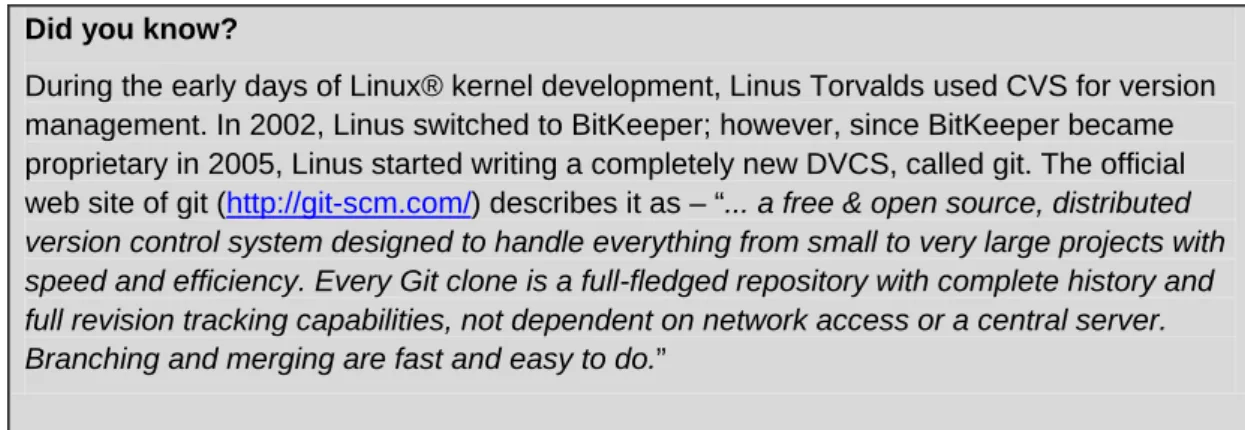
Decentralized / Distributed Version Control System (DVCS) – This type of version control allows a developer or tester to create their own code branch, that is, they can maintain versions of the code in a decentralized manner. A DVCS
4.1.2 Builders' group: Software building
Programs are normally written in smaller units that are compiled before they can be executed. The resulting object modules are then bound together in a process known as linking to form a complete software system. Software building refers to the sum of compiling and linking all the source code of a project.
Software building is a dynamic process: People constantly add, delete and modify the source code files under the project’s central repository. To make these changes effective, the modified code needs to be recompiled and linked regularly. Development communities generally have a separate build team to carry out this task. It is important to mention that the build process recompiles only those source code files which were modified since the previous build was released. For the rest of the elements which remained unchanged, the older compiled modules are picked up. Figure 4.3 illustrates this fact.
Figure 4.3 – Software builds
Build 0 (A0 + B0 + C0 + D0) Build 1 (A1 + B1 + C1 + D1) Build 2 (A2 + B1 + C2 + D1) Build 3 (A3 + B1 + C2 + D1)
Central Repository
A B C D 0 1 2 3 0 0 0 1 1 1 2C2 and D1.
Berczuk and Appleton have divided software builds into the following three distinct categories in their book “Software Configuration Management Patterns” [2], and an additional paper with Konieczka, “Build Management for an Agile Team” [3]:
Private build – A private build is a new version of a developer’s personal branch in a DVCS. Naturally, this type of build is only visible to its owner and he can access it locally even when working offline.
Integration build – An integration build is created from the compilation and linking of the main project branch and is available to all within the community for use.
Release build – A release build is the final version of the software to be shipped. It is basically a snapshot of a stable integration build which users use as a product. Frequent builds allow the source code to undergo less number of modifications. This reduces the effort needed for debugging and fixing the new errors. On the other hand, the build process involves a lot of repetitive tasks which can be automated by means of open source tools like make, ant, maven, and scons.
So far we have discussed about the building process in a project environment. However, since the code is open, at anytime users can tailor it at their own premises and get customized versions of the product. A later section discusses how you can rebuild and install open source software after changing its source code.
4.1.3 Testers' group: Software Testing
Software testing as defined by Glenford J. Myers in his book “The Art of Software Testing” [4], is “the process of executing a program with the intent of finding errors". Conventionally, there are two varieties of software testing – black box and white box.
Black box testing: In this type of testing, the actual output of the code is compared with the expected result. Testers are supposed to feed the system with a set of inputs, and note down the corresponding outputs. In case of any mismatch between the obtained and expected results they report it to the developer without analyzing the code.
White box testing: In contrast to black box, in this type of testing, testers look into the source code of the product and carry out some investigation in the event of
other to form the entire system, and tested as a whole.
System testing: This testing ensures the software is operational and satisfying all its requirements.
Alpha testing: In this stage, the software is given to the users internal to the community, to judge its performance against practical deployment.
Beta testing: After fixing the errors discovered during alpha testing, the community releases the software to the external users as a beta version, with a disclaimer that it may fail in unplanned use cases. The community expects external users to provide feedback about these unplanned scenarios.
Small scale open source software without any organizational governance may not undergo formal testing. However, this software tends to be quickly adopted because it provides a solution to a common problem. When a bug is encountered, the user will normally poke through the code to make things work again, or he can customize it to his own needs. This is the way in which many people become members of OSS communities. When the software becomes so useful and with enough followers, some users take the software to the next level by enhancing it, and formally releasing it to the community.
OSS development often spends less time and budget to test their product. Rather, they leverage the community to test and fix the code themselves; and to provide feedback for new functionality. In addition, this unique approach makes open source software very robust.
4.1.4 Release management group: Packaging
Users give preference to a product that is well packaged. In an open source software, the core item of a package is the source code. A standard package includes accessories like an installation guide, a user manual, and other information. Packages of software written in high level languages like C or C++ that require compilation of the source code, optionally may contain a pre-compiled executable version of the product. All of these elements are put together within a single directory and compressed into a single file.
The format of the compressed file depends on the operating system on which the software is meant to run. On Linux or UNIX®, packages are presented in formats like .tar, .gz etc.
4.1.5 Release management group: Releasing
Releasing software means making a completely new or upgraded version of a software available to the users. A new release introduces a product into the market and an upgraded version provides fixes for errors found in a previous released version and optionally adds new features.
To distinguish the versions from each other, each OSS community follows its own convention of using unique numbers for every release. Provided below is a template of such numbering scheme for the file names of the compressed package. The file extension is not shown, but it would be .tar, .gz, .zip and so on as discussed in the previous section:
Abcdefg x.y.z < Alpha | Beta >
In the above example, Abcdefg is the name of the software and x, y, and z represent the major, minor and micro components of the unique release number respectively. A release containing only small fixes for a previous version, is considered as a small or minor release and thus associated with the same release number as that of the previous one, incrementing its last digit (micro component) by 1. For example, if a product was released as Abcdefg 2.0.5, a small release would be represented as Abcdefg 2.0.6. A critical bug fix is implied by increasing the minor component and resetting the micro component which makes the new release to be identified as Abcdefg 2.1.0. If new functionalities are added, the version number would be upgraded to Abcdefg 3.0.0. When the software with limited functionality is made available to internal users for testing, this interim version is called Alpha as in Abcdefg 3.0.0 Alpha. An alpha version helps the development community collect error reports form the users. Depending on the count and sensitivity of the errors discovered, communities may also decide to release multiple alpha versions like Abcdefg 3.0.0 Alpha 1, Abcdefg 3.0.0 Alpha 2, and so on. When the alpha round is over, the feature complete product is given to third parties outside the community. This is called a Beta release. Following the example, the release would be called Abcdefg 3.0.0 Beta. With sufficient testing and debugging through alpha and beta cycles, the software finally becomes ready to be officially shipped. At this conclusive stage, the community announces “General Availability (GA)” of their product.
After a successful release, the developers' group work is divided in two: The first one is to maintain & support the already released version, and the second one is to further improve the product with new functionalities to be included in the next version. At this point, the central repository of the version control system is branched into two. The branch where
4.2 Installation and issue tracking
After an OSS is released and is available to users, users have to install the product. In contrast to proprietary software, OSS may require users to compile the source code, and perform some configuration before the installation. This is described in this section. The section also describes how users can provide feedback to the community using issue tracking.
4.2.1 Installation
Before a user can install the software in his system, he needs to extract it by decompressing the package. Many users often attempt to install the software without reading the instructions. It is recommended to at least review the README or INSTALL files. Typical installation steps for open source software are:
Understanding the system configuration
Compiling the source code
�