A JOURNAL FOR INFORMATION TECHNOLOGY, EDUCATION DEVELOPMENT AND TEACHING METHODS OF TECHNICAL AND NATURAL SCIENCES
Issue frequency
Twice a year – electronic and paper issue
Volume 5, Number 1, 2015.
Publisher
University of Novi Sad
Technical Faculty “Mihajlo Pupin” Zrenjanin
Department of Teaching Methods of Science and Education Technology
Chief and responsible editor
Professor Dragana Glusac, Ph.D.
Program editor
Professor Dijana Karuovic, Ph.D.
Editorial board
Professor Dragica Radosav, Ph.D. Professor Ivan Tasic, Ph.D. Docent Vesna Makitan, Ph.D. Docent Marjana Pardanjac, Ph.D.
External associates
Professor Milka Oljaca, Ph.D, Faculty of Philosophy, Novi Sad
Professor Dragoslav Herceg, Ph.D, Faulty of Natural Sciences, Novi Sad Professor Zorana Luzanin, Ph.D, Faculty of Natural Sciences, Novi Sad Professor Marta Takac, Ph.D, Teacher’s Training Faculty, Subotica
Technical preparing of the Journal Еrika Eleven, М.A.
Printed by
Printing office SAJNOS DOO
Momčila Tapavice street, no. 2, Novi Sad
ISSN 2217-7949
Circulation: 100 copies
Translator
Topic areas of the Journal
The Journal issues scientific, review and professional papers encompassing the following areas: - teaching methods of subjects and educational technology in technical and natural
sciences fields in pre-school education and training, elementary and high school, as well as colleges and faculties, and adults’ training and education,
- pedagogy, didactics, psychology of learning, organizing of school work, methodology of
pedagogical researches,
- papers of home sciences of single educational fields that is teaching subjects directed to bringing up to date the educational contents.
Fields – sections in the Journal
- Information technologies in education development
- General topics important to any teaching methods
- Sections of any teaching methods where papers from natural and technical sciences teaching methods will be published
- Foreign experiences important for teaching methods development
- New issues – professional events of current interests - Students’ papers – special methodic topics
CIP – Каталогизацијаупубликацији
БиблиотекаМатицесрпске, НовиСад
004:371.3
ITRO [Elektronski izvor]: a journal for information
technology, education development and teaching methods of technical and natural sciences / chief and responsible
editor Dragana Glušac. – [Online izd.]. - Elektronski
časopis. - Vol. 1, no. 1 (dec. 2011) .– Zrenjanin : Technical Faculty “Mihajlo Pupin”, Department of Teaching Methods of Science and Educational Technology, 2011 – Dostupno i na http://www.tfzr.uns.ac.rs/itro/journal.html ISSN 2217-7949
CONTENTS
Aleksandra STOJANOVA, Biljana ZLATANOVSKA, Mirjana KOCALEVA, Vlado GICEV
OBTAINING FUNCTIONS FROM FOURIER SERIES WITH MATLAB ... 1
Csaba SZABÓ, Henrieta TELEPOVSKÁ, Veronika SZABÓOVÁ
LESSONS LEARNED WHILE TEACHING DATABASE SYSTEMS FOR
APPLIED INFORMATICS STUDENTS ... 11
Nataša ĐALIĆ
THE EFFICIENCY OF APPLICATION OF INFORMATION TECHNOLOGIES IN
TEACHING AT HIGHER EDUCATION INSTITUTIONS IN REPUBLIC OF SRPSKA ... 18
Kristina BOGATINOVA, Sašo KOCESKI and Nataša KOCESKA
DEVELOPMENT AND EVALUATION OF VIRTUAL LABORATORY FOR
ENGINEERING EDUCATION ... 23
Dalibor DOBRILOVIĆ, Jasmina PEKEZ, Eleonora DESNICA, Miroslav LAMBIĆ
PLATFORM FOR TEACHING SOLAR POWERED WIRELESS SENSOR
NETWORKS IN UNIVERSITY COURSES ... 34
Marija BLAGOJEVIĆ
ASSOCIATION RULES IN DETECTING USERS’ BEHAVIOUR PATTERNS IN
ONLINE ENVIRONMENTS ... 41
Marina POPOVIĆ, Dragan CVETKOVIĆ, Marjan KRAŠNA, Ivan TASIĆ
DEVELOPMENT AND EVALUATION OF
VIRTUAL LABORATORY FOR
ENGINEERING EDUCATION
UDK: 371.3:53]:004.738.5 Original Research
Kristina BOGATINOVA, Sašo KOCESKI and Nataša KOCESKA Goce Delchev University, Stip, Republic of Macedonia
[email protected], [email protected], [email protected] Paper received: 22.10.2015.; Paper accepted: 29.10.2015.
Abstract – Practical component is often considered as one of the most important characteristics of the engineering education. In this context engineering education laboratories play very important role, by helping the students to test theoretically acquired knowledge, enabling them collaborative environment, trial and error learning approach and offline analysis of the experimental results. However, permanent availability of the laboratory and the equipment is one of the main problems in the process of learning. Sometimes, they are even completely missing.
The rapid development of information and communication technologies in the last decades has made a huge impact on the education system with a special emphasis on the engineering subjects. The advances of web technologies on the other hand have also significantly improved online and collaborative learning, and students’ learning experience in general.
This paper presents a developed virtual online laboratory that aims at helping high school students in learning physics. It consists of several virtual benches developed as separate fully interactive web modules. The benches ware developed to follow the high school curricula of the physics courses in Macedonia. The design and development technologies and system architecture are also presented. The laboratory has been evaluated from both students and teachers. The results of the evaluation are also presented in the paper and conclusions are drawn.
Keywords: engineering education, knowledge, Virtual Laboratory, education I. INTRODUCTION
The project described in this paper explores how to create a virtual lab environment that would be interesting, interactive, easy to understand and accessible to students and teachers in order to facilitate the study of physical phenomena in certain areas.
Macedonian education reforms were applied on several occasions, but the conventional teaching, books, blackboards and notebooks generally retained its place at most classes. In addition, there is a very small proportion of schools with modern and highly equipped laboratories; at most schools the laboratory equipment is outdated, and at some there are no labs at all. To enable a modern laboratory, a large budget for the schools is needed. In R. Macedonia a very small portion of schools operate this budget and those are mostly private schools, whereas the majority of the education is provided by public schools with very small budget. To solve these problems, an alternative and better approach is taken, that is design and implementation of virtual laboratories.
Also in the framework of this project, the students are provided with self-evaluation questionnaire and exercises.
Assistance for the laboratory is provided in text format as well as a theoretical support for the topic that the laboratory exercise presents.
24
II. MAIN OBJECTIVE AND THEORETICAL BACKGROUND
A.Discovery learning and Constructivism
Discovery learning is a very common way of learning new things. By means of learning through research, people acquire knowledge without being aware of it. It is an inquiry-based, constructivist learning theory that takes place in problem solving situations where the learner draws on his or her own past experience and existing knowledge to discover facts and relationships and new truths to be learned. Learning through research and discovery is almost without any effort for the student.
Discovery learning takes place in a problem solving situations where students interact with the world by exploring and manipulating objects, asking questions, or performing experiments. As a result, students are more likely to remember concepts and knowledge discovered on their own. The models that are based upon discovery learning model include: guided discovery, problem-based learning, simulation-based learning, case-based learning, and incidental learning among others.
In our case, emphasis is placed on simulationbased learning.
The development philosophy of learning argues that the most important role of the teacher is to provide students an environment in which they can engage in spontaneous exploration and exploitation. This environment should provide opportunities that will motivate and activate the students. All students have different development processes and should gain understanding and knowledge through their own experiences.
The act of learning is an active process in which errors and problems emerge which needs to be resolved. Both students and adults are involved in something called constructivist learning method, if the originality of what they are learning is close enough to their real world experience.
Constructivism includes active participation and involvement of students in the practical experience of activities at some stage in order to make the learning experience more real. Constructivism should be used in the design of simulations for learning. For interactions in simulations it should:
• help students to understand the relationship between the objects, issues, causes and effects. • make and keep students engaged and motivated.
• improve students understanding of what is simulated [1].
B.Observations and theoretical approach
Conducted observations have shown that simulations can be very interesting educational tools. However this requires the interaction of students with the simulation to be directed and governed by the interests and questions of the students. The simulations can be effective for teaching all ages of students from primary and secondary school, to university students [2].
Also it is found that the simulations help students overcome cognitive limitations that come from personal, often erroneous, systems of belief to natural phenomena derived from their own life experience [3].
Simulations reduce the cognitive load on students and makes learning more efficient by allowing students to avoid the language barrier of high technological terminology that is common in the classroom. Students feel more comfortable and more accurate when describing the physics with the help of simulations, instead of using the terminology of the textbook [4].
This means that the design and implementation of simulations should be taken to ensure that the student fully understands the simulation, the student should not get the wrong impression or be misled when simulation is finished [5].
In general, students who have highly developed abstract reasoning benefit more from learning based on simulations. But also necessary steps should be taken to enable students who have less developed abstract reasoning to handle and understand these simulations [6].
III. DESIGN OF VIRTUAL LABORATORY
In the design of the simulation two specific things are considered: Coherence Principle and Consistency. Coherent principle argues that simulations may not contain unnecessary material that distract the student thus disrupts the learning process. Consistency between simulations is also very important. Users who have more experience with simulations will learn to use simulations faster if they have a consistent design [1].
With the simulations, students are provided with animated visual model for easier understanding of the physical phenomenon. By doing interaction with the simulation, the student can participate in changing the parameters and analysis of results. Therefore, it is necessary to take into account the design of the simulations, because students give equal importance to the overall visual design [7].
Simulations are not supposed to reflect the reality in details, but to maintain the concept of the physical area that they simulate. For simulation to be sufficiently realistic it is necessary to:
• implement connections and principles of the system which simulates;
• contain components with enough detail for the user to connect to the same components from the real world;
• allow the user to change parameters like in the real system;
• give the user the feeling that he or she directly controls the components of the simulation without any intermediate steps.
In short, the simulation should function as the actual system. Moreover, it should offer: • a single and clear goal for the user;
• objects that can be interacted to successfully complete the simulation; • environment that provide an appropriate context in the simulation;
• interactions, reactions, challenges, situations and effects that are equivalent to those of the real experiment;
• a feedback after the simulation or the task is completed successfully;
• opportunities for returning simulation in initial state or to a previous state, such as back button or restart;
• allow users to have a sense that they control the application.
The interface should be as consistent as possible, but some simulations may require variations. The basic structure is a large working area and a control panel. Working area contains animations and objects that can be manipulated directly, while the control panel contains other control devices such as sliders, radio buttons, text fields and so on. The difference between the working area and control panel is clearly visible, with a different background color and borders [6].
In the design of the control panel, attention has been devoted to the limited amount of tools and their schedule.
Text is avoided in the work area or it is reduced only in short label.
The background of the simulation is usually in one or two colors not to cause too revocation of the student's.
Keys for controlling the simulation - start, pause, stop or resume are simple animated and large enough for easy navigation [6].
Students should not have to think much about how to use the simulation. To make it easy to understand the developer should provide the following:
• Useful feedback in response to user input.
• Understandable and intuitive ways to interact with the environment. • Clear and easily understood instructions.
26
Controls in the simulation should be intuitive and easy to use; otherwise the students can be directed and focused on understanding the controls and how to work with them, rather than on how to deal with the concept presented by the simulation.
The most natural way for students when working with mouse is by clicking and dragging. This means that the student will first try to click or grab an object in the simulation. [6]
Using the point-and-click interaction, proved to be much more effective, especially in applications where such interactions are many.
Generally grabble objects, sliders associated with numerical values and radio buttons for switching on and off are functionalities that are understandable for students.
Sliders should be used in conjunction with a numerical value that students can change directly using keyboard input, as using the slider. Usually students would start working with slider to see what effect it has on simulation. But later, when, for example perform lab assignments, students sometimes prefer to enter specific numerical values through a digital input.
Students also immediately understand the use of radio buttons, but check boxes can sometimes cause confusion. [6]
It is important toolbar interface to be more consistent as possible for different simulations, otherwise experienced students may become confused if the same group of tools in two different simulations do not look alike [6].
The help should also be as short and concise as possible. Some researchers found that help provided in several steps is ineffective, therefore help for the laboratory needs to be clear and concise but it is also important not to make it too prominent which may lead to users not exploring the environment by themselves. It is also required to remain on screen while the student continues to interact with the simulation but must not interfere with the interaction in any way.
In the simulations, "help for the simulation" is provided for the use of simulation. The "read more" provides assistance to theoretical entity that describes laboratory exercise and gives more information about the theoretical aspect and what should be learned from the simulation. Both are optional and appear on students’ request.
For encouraging exploration, a “check your knowledge” button is provided with a self-evaluation question mark [6].
"Check your knowledge", is a short quiz that asks questions and offers answers. Through the quiz the student have the opportunity to use the simulation, and thus to check all the possibilities it offers in order to accurately answer the question, or select the correct answer. Students have to answer all questions. Once questions are answered, the student is given the opportunity to check whether there are answered correctly or not. If not, the correct answers are presented. This is to avoid frustration by answering a questionnaire multiple times to obtain all correct answers.
IV. IMPLEMENTATION OF VIRTUAL LABORATORY A.General imlementation issues. Used Tools
There are various types of applications with the same purpose, but they are generally made in older technologies or technologies that are not very used (in extinction), some are made as multimedia applications that require a portable disk (CD, DVD or USB flash drive) or installation. Online simulations offer some foreign websites that are not on the preferred language, nor designed in order to attract the attention of the students and help them.
In the creation and implementation of the laboratory are used newer web technologies such as HTML5, CSS3 and JavaScrip programming language. These technologies are selected for their abilities and the direction in which web technology moves. These technologies are available and free to use. According to the browsers statistic [8] most used browsers support all the definition for HTML5 and CSS3 and because of their great implementation in web browsers, the simulations made in these technologies allow 99% availability and accessibility, except for some older browsers that do not support these technologies.
An exception is made in graphic design of the simulations, the working area is on top, and control panel is below the working area, and it can be fully visible on the small size screens like laptop (15 inch) and multimedia devices - tablets with screen sizes of 10 inches. The application is not designed for mobile devices, because the screen is too small. However this is not a disadvantage because the purpose of this simulations is for education.
Virtual laboratory that is implemented consists of multiple simulations from different areas of physics, in order to provide conditions for performing experiments by the students of secondary education (Figure 1).
It is a web site with a structure which is represented in Figure 2. The simulations are presented with a picture and a text description of the topic they represent. The image and text are linked to the page where simulation can be directly started.
Figure 1. Site diagram for Virtual laboratory
Figure 2. Site diagram for Virtual laboratory
In the following we will describe three simulations that are part of the laboratory. The simulations are designed following the recommendations given in the previous topic.
B.Simulation: Elastic and inelastic collision. Law of preservation of momentum
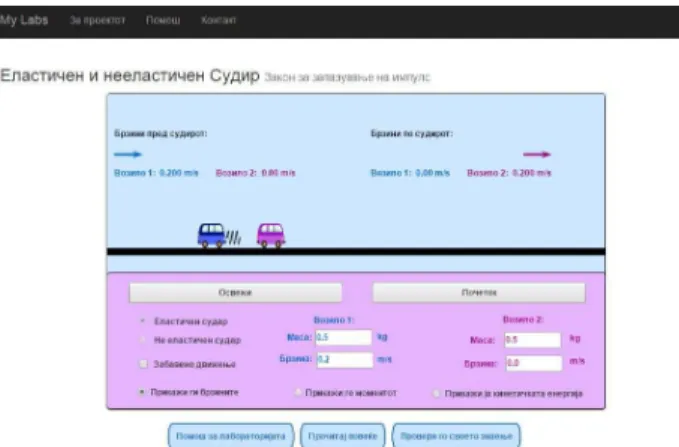
This simulation is designed to describe the physical law of preservation of momentum (Figure 3).
Figure 3. User interface for the elastic and inelastic collision lab excersise
By clicking on the image or the title in the homepage of the website, loading of the web page begins with a scene that has work area and a control panel for the implementation of the exercise. The work area
28
digital inputs are the fields for entering the mass and speed of vehicle 1 and vehicle 2. The controls for the selection of elastic and inelastic collision, as well as output details for speed, momentum and kinetic energy before and after the conflicts in the panel are represented by radio buttons. The possibility of "Slow motion" is a check box, to be distinguished from the other options because its functionality is independent of the description of physical phenomenal, it only slows the animation 10 times in order to analyze the type of collision slower.
Buttons for start and reset of the simulation are with simple mouse over animation and are with sufficient size to be readily visible.
Under the panel the buttons for "help for the simulation", "read more" and "check your knowledge" are placed.
On load of the site, default values are set for the parameters needed for simulation to function.
Extreme cases are limited to certain values of the masses and speeds of the vehicles, but they realistically reflect the desired outcome.
1)Use case diagram
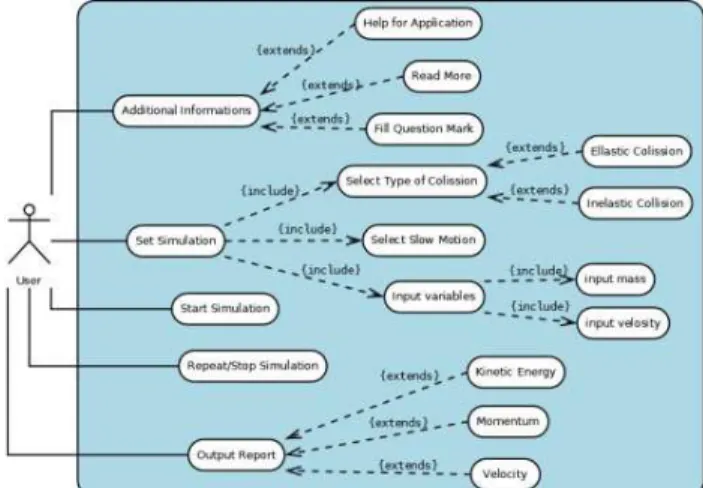
Use Case diagram for this simulation is shown in the Figure 4. This diagram is a representation of a user's interaction with the system that shows the relationship between the user and the different use cases in which the user is involved.
Figure 4. Use case diagram for simulation elastic and inelastic collision
The use case shows that the student can get additional information about the application, help about its usage or fill a question mark.
The student can also set the simulation by selecting the type of collision, movement speed and filling the input variables about the mass and the velocity of the objects. After the initial setting of the simulation the user can start it, repeat it or stop it.
Output reports serve to get information about the simulation.
2)Activity diagram
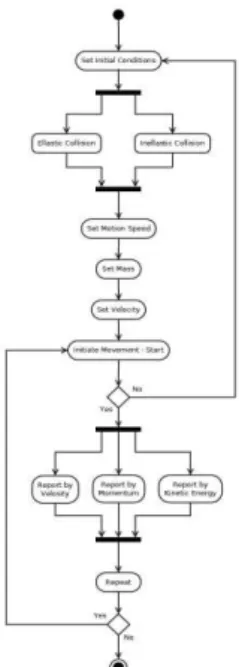
Activity diagram for this simulation is shown in the Figure 5.
This diagram is graphical representations of workflows of stepwise activities and actions.
First activity that the user should do is setting the initial conditions, choosing the type of collision, speed of the movement as well as setting the mass and velocity of both objects. After setting the Initial conditions the student can either start the simulation or reset the initial conditions. If the user chooses to start the simulation he has to chose the type of report output from the movements of both objects.
Figure 5. Activity diagram diagram for simulation elastic and inelastic collision
Output report can be divided in three ways, by velocity, by momentum or by kinetic energy. After the simulation ends and the output report is shown, the student can end the simulation, restart the simulation with the same initial conditions or start from the beginning of the simulation.
C.Simulation: Motion with Constant Acceleration
This simulation is designed to describe the physical law of “Motion with Constant
Acceleration” (Figure 6). It shows vehicle moving with constant acceleration. The control panel contains text fields where students can vary the values of initial position, initial velocity and acceleration. By using the buttons at the top of the control panel, students can bring back the car to its initial position or stop and resume the simulation. If students choose the option "Slow motion", the movement will be ten times slower.
Three digital clocks, placed in the working area, indicate the time elapsed since the start. As soon as the vehicle has reached the blue respectively violet ramp with its front bumper, the corresponding clock will stop. Both ramps are adjustable by dragging the mouse with pressed mouse button.
On the working area are placed two diagrams that illustrate the motion of the vehicle: position x versus time t and velocity v versus time t.
Figure 6. User interface for the motion with constant acceleration lab excersise
1)Use case diagram
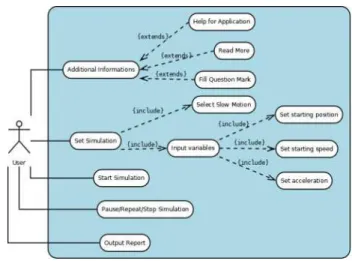
Use Case diagram for this simulation is shown in the Figure 7. The student can set the simulation by selecting input variables. After the initial setting of the simulation the user can start it, repeat it, stop it or resume it.
30
Figure 7. Use case diagram for Motion with Constant Acceleration Output reports serve to get information about the simulation.
2)Activity diagram
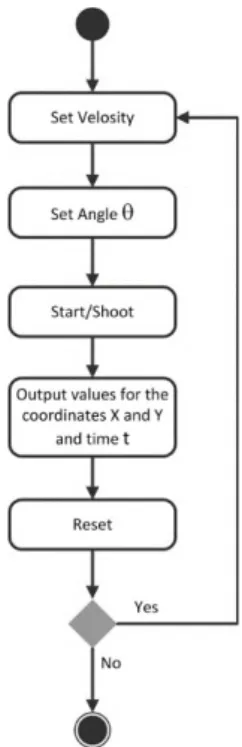
Activity diagram for this simulation is shown in the Figure 8.First activity that the student should do is setting the initial conditions and adjusting the ramps positions.
After setting the Initial conditions the student can either start the simulation or reset the initial conditions. After the simulation is finished, students can read the output values for the time.
Figure 8. Activity diagram for Motion with Constant Acceleration
D.Simulation: Horizontal Shot
Simulation "Horizontal shot" provides a visual display of a horizontal shot thru a cannon in a field (Figure 9). The work area is located at the top and it contains the animation of the cannon and a ball, placet in a field. The control panel contains the controls for input and output data. Input parameters can be set with a slider control for the speed of the shot and the angle at which the ball should be ejected. The section for output data is presented with text fields and the student may read output values for the position of the shot at a certain time. When the web page with the simulation is loaded, initial condition are set for the speed and the angle. The simulation is started by pressing the "Fire" button. By pressing the "Reset" button, the output results are resetted.
Figure
1)Activity diagram
Activity diagram is shown in Figure 10. The diagram shows that do is setting the initial conditions
simulation finishes, output parameters for position and time completed it can be reset or terminated.
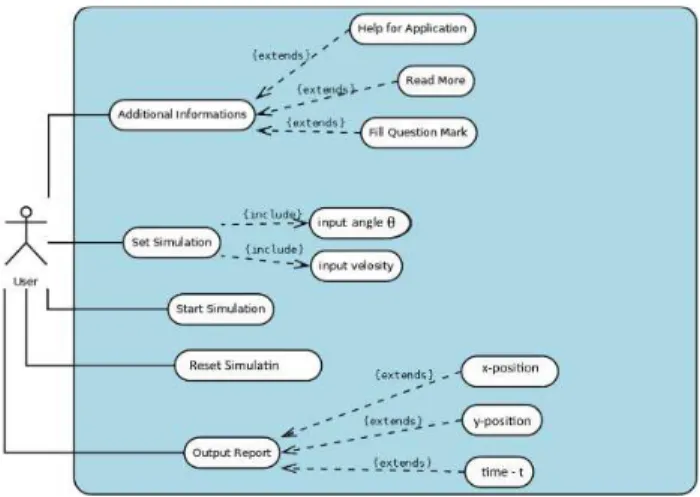
2)Use case diagram
Use case diagram is shown in th
The student can set the simulation by entering the input parameters. Then the student can begin the simulation. Once the animation is finished
can get more information by chooseing one of th
Figure 9. User interface for the horizontal shot lab excersise
shown in Figure 10. The diagram shows that first activity that the student should do is setting the initial conditions by adjusting the speed and angle, then run the simulation
output parameters for position and time can be readed. Once can be reset or terminated.
Figure 10. Activity diagram for Horizontal Shot
is shown in th Figure 11.
The student can set the simulation by entering the input parameters. Then the student can begin the animation is finished student can read the output report or reset outputs.
can get more information by chooseing one of the additional informations.
irst activity that the student should the speed and angle, then run the simulation. After the . Once the simulation is
The student can set the simulation by entering the input parameters. Then the student can begin the or reset outputs. Student also
32
Figure 11. Use case diagram for Horizontal Shot
V. EVALUATION AND RESULTS
The developed virtual laboratory was evaluated by 5 teachers and 100 students from two secondary school students (50 males and 50 females). Half of the students were thought the lessons through the classical way of teaching and the second half were using the developed virtual lab.
The students were chosen in a way that the average grades in both groups were almost the same. The evaluation methodology for students is composed of three phases: the first one is dedicated to system explanation, the second one is aimed at self-learning using theoretical materials which are accompanying each of the lab exercises and experimentation, as well as self-evaluation. The last phase is regarding the evaluation of the acquired knowledge using standard/classic test method and using a survey method. The teachers were asked to answer some questions regarding their personal opinion and observation for virtual laboratory usage. The results from the evaluation are presented in the following.
TABLE I. RESULTS AFTER TESTING
Group type Average grade after evaluation
(on the scale 1-5) 1 Virtual lab group 4.86 2 Control group 4.11
TABLE II. PERSONAL OPINIONS ABOUT THE VIRTUAL LAB USFULNESS (AVERAGE ANSWERS ON THE SCALE 1-5)
Group type Students Teachers
1 Do you consider the
virtual lab useful? 4.80 5 2 Did you find the virtual
lab user friendly? 4.98 5 3
Do you think it could be a possible substitution of the real lab (when the one is missing)?
5 5
VI. CONSLUSION
This paper presents a developed virtual online laboratory that aims at helping high school students in learning physics. It consists of several virtual benches developed as separate fully interactive web modules. The benches ware developed to follow the high school curricula of the physics courses in Macedonia. The design and development technologies and system architecture are also presented. The laboratory has been evaluated from both students and teachers perspective and the results obtained are promising.
REFERENCES
[1] C. Juwah (2006). Interaction in Online Education: Implications for theory and practice. Routledge: Taylor & Francis Group. ISBN 978-0-415-35741-8.
[2] A. Jimoyiannis, V. Komis (2001). Computer simulations in physics teaching and learning: a case study on students' understanding of trajectory motion. Computers and Education, 36 (2). 183204. Elsevier.
[3] W. K. Adams, S. Reid, R. LeMaster, S.B. McKagan, K. K. Perkins, M. Dubson and C. E. Wieman (2008). A Study of Educational Simulations Part I“ Engagement and Learning. Journal of Interactive Learning Research, 19 (3). 1-31. AACE Chesapeake, VA.
[4] C. E. Wieman, K. K. Perkins, W. K. Adams (2007). Interactive simulations for teaching physics: What works, what doesn't and why. American Journal of Physics, 76. 393-399. The American Association of Physics Teachers.
[5] S. Yeo, R. Loss, M. Zadnik, A. Harrison, D. Treagust (2004). What do students really learn from interactive multimedia? A physics case study. American Journal of Physics, 72. 1351-1358.
[6] W. K. Adams, S. Reid, R. LeMaster, S.B. McKagan, K. K. Perkins, M. Dubson and C. E. Wieman (2008). A Study of Educational Simulations Part II“ Interface Design. Journal of Interactive Learning Research, 19 (4). 1-31. AACE Chesapeake, VA.
[7] Kuo-En Chang, Yu-lung Chen, He-Yan Lin, Yao-Ting Sung (2008). Effects of Learning Support in Simulation-based Physics Learning. Computers and Education, 51 (4). 1486-1498. Elsevier.