© 2018, IRJET | Impact Factor value: 6.171 | ISO 9001:2008 Certified Journal | Page 2012
A SYSTEM FOR INDOOR NAVIGATION: GUIDEIT - PERSONAL ASSISTANT
Shraddha Gajul
1, Kapil Pamecha
2, Amar Panchal
3, Urvi Sanghvi
4, Lukesh Kadu
5,
Bhavesh Patel
61,2,3,4 Students, Department of Information Technology, Shah & Anchor Kutchhi Engineering College,
Maharashtra, India.
5Assistant Professor, Department of Information Technology, Shah & Anchor Kutchhi Engineering College,
Maharashtra, India.
6Principal, Shah & Anchor Kutchhi Engineering College, Maharashtra, India.
---***---Abstract -
With the increase in huge and complex indoorinfrastructures, the need of indoor location-based services has risen. Traversing in an indoor structure is as puzzling as traversing in outdoor environments. Global Positioning System accurately helps to navigate in outdoor environments. However it cannot determine the accurate location within the confines of an indoor environment where the GPS signals become weak and attenuated due to a huge number of obstacles. This makes people resort to the traditional maps or floor plans provided in various places like shopping malls, university campuses. The proposed paper is set to provide an Android application which will create an indoor navigation system using step count and step detection methods and Augmented Reality (AR). Acting as a virtual guide, mobile sensors like GPS and accelerometer will be coupled while developing the application which will assist in navigating inside an indoor environment.
Key Words: Indoor navigation, GPS, android application, step count, step detection.
1. INTRODUCTION
Most of the navigation systems use satellites to determine the user’s position which functions well in an outdoor environment due to the global positioning system [8]. However, due to the inability of GPS to penetrate through the walls of buildings indoor navigation concepts have been put in place with the advancements in technology. Development of various smartphone components like GPS, compass, gyroscope, accelerometer, magnetometer, barometer have assisted in navigating indoors. These mobile components along with the installations of various devices like Bluetooth Beacons, RFIDs and methods like triangulation, fingerprinting have been an aid for facilitating location-based services. The use of such components and devices also come with their limitations. Hence, this area of technology has spurred many new challenges to find an effective and efficient mechanism to overcome the limitation of GPS [2]. Contrary to GPS, a so called “indoor-GPS” will enable to determine the actual floor level and user’s location thus, helping the user to accurately locate a path.
The purpose of this application is to deliver to the users an indoor navigating experience with the adjunct of Augmented Reality along with the already integrated mobile sensors like GPS and accelerometer. This will be a low-cost solution to the indoor navigation problem. The Guide It Application will act as a virtual guide directing the user in a complex indoor environment to their desired destinations. Also the user experience will be enhanced with access of real-time data constantly provided by the application.
With the increasing use of smartphones in daily life an Android application is the best bet as the necessary components and sensors can be integrated with the help of Android Studio. Android Studio is used to develop and deploy the said mobile application. The project will act as a framework providing the ability to navigate indoors in various complex infrastructures like hospitals, supermarkets, university campus, museums etc.
Accelerometer and GPS will be the sensors which will collect information for detecting and counting user steps for a particular path which will be stored in the database. As a framework the project will support multiple complexes to create and store their own paths which will be fetched in the real time depending on the user input.
Augmented Reality is a technology which refers to overlaying the computer generated information in real world [7]. Image recognition techniques will be applied to find out the source and destination points. Developed by Qualcomm, Vuforia SDK is an AR solution providing image recognition providing and processing capabilities along with Unity 3D for the GuideIt application [2]. The user using image recognition will identify it’s current position and the application will guide the user to the desired location. Step detection and step counting algorithms will aid the user in moving towards the right destination. Pre-calculated number of steps will be provided to the users which will acts as distance measured between start and end points.
© 2018, IRJET | Impact Factor value: 6.171 | ISO 9001:2008 Certified Journal | Page 2013
2. RELATED WORK
Indoor positioning technology is new and promising field of research and development. This is majorly because of the incompetence of GPS to deliver such an accurate system indoors. Many indoor localization methods are available like Bluetooth beacons, RFID tags and QR codes. Below we study all these methods and technologies which are in relation to our application.
A. QR Codes
A QR (Quick Response) code is a type of matrix barcode which stores the encoded data. It is a 2-dimensional square matrix and the embedded information can be accessed by scanning the QR code using barcode reader or a mobile device’s camera. It can encode various type of information like text, URL, videos, numbers, images. Four types of encoding modes are supported viz. numeric, alpha-numeric, binary and kanji. Nowadays most of mobile devices have cameras making it easier to read such codes. QR codes can also be used in positioning system where they provide location of the user, thereby functioning as location-markers.
Along with that additional information can also be provided by it. Research in this area has been done and experiments have also been performed. There is an example of QR code based navigation system for closed building. Here the QR codes are used for providing the user, the floor layout of indoor location by overlaying the floor plan on the actual geo-location map and to then provide the location details to the users [10]. But the challenges come in precisely positioning the QR code for optimum usability. Also in the system if proposed floor layout changes, it would lead in recreating the floor map and repositioning of QR codes in optimal location.
On the other hand, the Guide It application recognizes the physical object instead the QR code. It recognize the real life object to provide the user location such as start points which acts as location marker using the Vuforia SDK for image recognition. This eliminates the need of positioning QR code everywhere in building and also helps in reducing the overall cost.
B. Bluetooth Beacons
Beacons are small Bluetooth transmitters used for repeatedly transmitting signals to devices like smartphones. In the previously designed system [19] Bluetooth beacons are positioned in an area which are scanned by the mobile application. The application makes use of the integrated mobile sensors like gyroscope and compass to identify the direction of the user. This application works in two phases. The first phase, which is the setup phase where the user will setup the position of the beacons within the maps by tapping on the point where they are physically located. After the beacons are configured, the user moves to the next phase - the
navigation phase, where the distances of every configured beacon will be calculated to demonstrate the user position. Once the user’s initial position is calculated he/she will be directed by the application the walk towards the destination.
As against this our proposed system will eliminate the need of using these beacons thereby, setting them up and configuring them. Also the need of finding the access points and positioning the beacons precisely in the indoor environment is reduced. The overall cost of project is also reduced as there is no hardware requirement.
C. Radio Frequency Identification Tags
Radio Frequency Identification (RFID) tags are seen as another approach in indoor navigation. It is considered as a promising technology in positioning system. RFID tags use radio waves to capture and exchange information. They mainly identify and track the tags which are attached to the objects. RFID as an important tool for detecting objects that are occluded from satellite visibility. RFID is very popular as it has high research interest due to its ability to provide a low-cost and high output capacity. RFID tag is simply designed with immensely low power consumption and thereby lowering the cost of the system [20].
One such approach to RFIDs is the LANDMARC system [16] which uses RFIDs as reference tags which serve as reference points and help in location sensing by providing the location of the user. The advantage of this system is that there is no need of using expensive RFID readers. Thus, the overall cost of the system is reduced. However, the LANDMARC system faces a few challenges like there is variation in the power level detected by two tags for the same location, radio signal multipath effects [2]. All this affects the accuracy and latency of the system.
© 2018, IRJET | Impact Factor value: 6.171 | ISO 9001:2008 Certified Journal | Page 2014 3. SYSTEM DESIGN
A. Hardware Requirements
The basic system component requirements that are needed for the GuideIt application to function effectively include an accelerometer and camera. The purpose of the camera is to provide input in visual imagery format. And accelerometer will detect the user’s movement by using step count method. The data from these sensors are retrieved and analyzed through the Android Application Programming Interface (API). So the basic hardware requirements include an android smartphone.
B. Proposed System Design
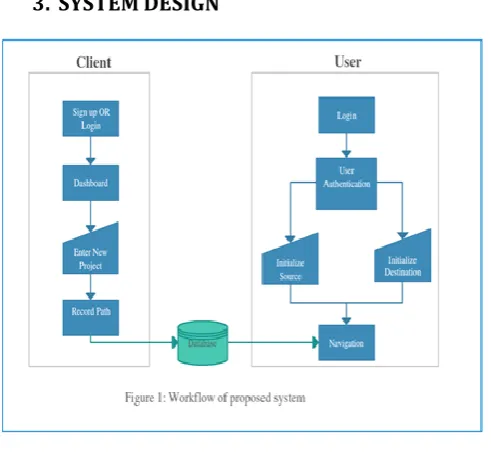
The system is designed to enhance user experience in terms of indoor navigation. In Fig. 1 represents the major workflow of the Guide It system. The workflow of the system is divided into two parts: client and user which is explained in detail as follows:
1. Client Side
Client is no one but the administrator of the organizing intending to use the application framework to provide navigation services to the users in his/her organization. The application begins by opening up a splash screen.
The first application screen will be common to both the user and the client. The client will feed the data in the system database of an application. As shown in the fig. the client enters into the application by first signing up. Next, the client will be led to a dashboard wherein the client will be asked to create a profile of the project i.e. the organization. Once the details of the project are filled the client can begin by recording the path as well as the path information. Recording a path means manually tracing the whole route of all the places within the organization. The traced path will be recorded in the form of number of steps taken by the user by using the step count method. After all the paths are traced and recorded, the route information
must be provided, certain images as well as description of the routes. Entire data is sent to database in the form of Array <String> and is stored in key value pair. Such stored data helps to render the information faster when a call back is made to the key. Admin login is created so that he can customize the project depending on the organization requirement. Route information includes the details such as the route name, its category for example labs, rooms or offices as well as the image of that particular entity say for example a lab 301. Now, this information forms the bases of all the available options from which the user can set the start and end points. This is the basic workflow for the client side.
Recording path is where the client will trace his paths with the help of step counts according to which the user will be later navigated. The application screen will display number of steps that the client takes from the start point, his left and right turns as well as the level change (example level 1, level 2 and so on). Steps are calculated using Android’s inbuilt sensors. The accelerometer is used to detect step motion, the Step Detector function gives binary value as output. If the sensor detects a motion the function returns 1 else it returns 0. The Sensor Manager package of android is used to count steps that the admin will take. In order to count the steps we need to first register Sensor Event Listener and get systems service from SENSOR_SERVICE. When the sensor detects a change, this event is passed as an input. The value of the event is then stored in the form of an array which increments its value by 1, whenever the Sensor Detector=1. Value[position] is considered as the step count output. If the admin moves left he needs to click the left movement button, on this click itself the recording data is sent to database and later fetched in the textbox of recycler view This textbox has the following entries:
A- step count B- left or right turn C- level up or down.
For example if the admin has clicked right button after 20 steps the textbox will display “20 steps has been taken take right”. After a series of such inputs in the same route the admin has finally reached his destination. Now he has 2 choices:
[image:3.595.38.284.84.310.2]1- include this entry OR 2- delete this entry. 2. User Side
© 2018, IRJET | Impact Factor value: 6.171 | ISO 9001:2008 Certified Journal | Page 2015 guided based on the number of steps provided by the
client by the detecting and matching the number of user and client steps. Voice commands such as “Turn Left”, “Turn Right”, “Go straight” will run continuously. On reaching the destination, the user using image recognition with the help of the mobile camera will end the navigation. Thus indoor navigation is achieved.
4. CONCLUSION AND FUTURE WORK
In this paper, the Guide It application has demonstrated that accuracy in indoor navigation can be achieved using step count method. The application was successfully implemented having a agreeable navigation system framework which is friendly to both Users and Clients with the help of Android Studio. As a demo, this application was tested within a college campus for the college students with the college being the client. The step count method implemented provided a greater deal of accuracy as compared to other methods keeping the overall cost low. This system is an aid to all the users having challenges in finding paths in complex infrastructures. Also, the user experience is enhanced due to the voice output commands.
Future work of the system lies there in the efficient indoor navigation system which can be useful in many places. Few features and functionalities are suggested for it’s future development which enhance the user as well as client experience.
Providing cross platform functionalities: Development of the application for other mobile operating system like Apple’s IOS.
Enabling the user to also record path: Permitting the user to record the path for a particular organization and updating it in the database.
Sharing of paths and path information: Providing the access to share the user’s indoor location, path information and description to others via mediums like WhatsApp or SMS.
Enhancing user experience: Delivering improved user experience by appending data, description and images about the different places in the organization.
Maximizing accuracy: Maximizing the accuracy to the highest degree by using PDR algorithm and Wi-Fi methods.
Adding multiple language support: Adding the support for multiple languages making it user friendly.
5. REFERENCES
[1] Sunjida Sultana, Mahdia Tahsin,Tasmia Reza and Md. Hossam-E-Haider “An Innovative Implementation of Indoor Positioning System Using GPS” , 2016
[2] C.G. Low, Y.L.Lee “SUNMAP+: An Intelligent Location-based Virtual Indoor Navigation System Using Augmented Reality” , 2014
[3] Thomas Moder, Karin Wisiol, Petra Hafner, Manfred Wieser “Smartphone-based Indoor Positioning Utilizing Motion Recognition”, 2015 Jinki Jung, Suwon Lee, Hyeopwoo Lee, Hyun S. Yang, Luis Weruaga, Jamal Zemerly “Real-time Sensor-fusion based Indoor Localization for Mobile Augmented Reality”,2014
[4] Meng-Shiuan Pan, Member, IEEE, and Hsueh-Wei Lin “A Step Counting Algorithm for Smartphone Users: Design and Implementation”,2015
[5] Ahmad Abadleh, Eshraq Al-Hawari, Esra’a Alkafaween, Esra’a Alkafaween “Step Detection Algorithm For Accurate Distance Estimation Using Dynamic Step Length”,2017
[6] Fuqiang Gu; Kourosh Khoshelham; Jianga Shang; Fangwen Yu; Zhuo Wei “Robust and Accurate Smartphone-Based Step Counting for Indoor Localization”, 2017
[7] D. Schmalstieg, T. Langlotz and M. Billnghurst, "Augmented Reality 2.0", Virtual Realities, Springer-Verlag/Wien, p.13-37, 2011.
[8] Umair Rehman and Shi Cao, “Augmented-Reality-Based Indoor Navigation: A Comparative Analysis of Handheld Devices Versus Google Glass”, 2017.
[9] R. Mautz, “Indoor positioning technologies,” Doctoral dissertation, Dept. Civil, Environ. Geomatic Eng., Inst.Geodesy Photogramm., ETHZurich, Zurich, Switzerland, 2012.
[10] Rahul Raj C. P, SeshuBabu Tolety, and Catheine Immaculate, ”QR code based navigation system for closed building using smart phones”, 2013.
[11] K. Fitzpatrick, M. Brewer, and S. Turner, “Another look at pedestrian walking speed,” Transp. Res. Rec., J. Transp. Res. Board, vol. 1982, pp. 21–29, Jan. 2006.
[12] A. Ye, Y. Ling, L. Xu, and X. Yang, “An Improved RFID-Based Localization Algorithm for Wireless Sensor Networks”, International Journal of Distributed Sensor Networks, pp.1-5, (2013).
[13] J. W. Kim, H. J. Jang, D.-H. Hwang, and C. Park, "A step, stride and heading determination for the pedestrian navigation system", Journal of Global Positioning Systems, 3, pp.273 -279, (2004).
© 2018, IRJET | Impact Factor value: 6.171 | ISO 9001:2008 Certified Journal | Page 2016 [15] S. Bell, W. R. Jung, and V. Krishnakumar.
“WiFi-based enhanced positioning systems: accuracy through mapping, calibration, and classification”. In Proc. ISA, pp. 3–9, 2010.
[16] L. M. Ni, Y. Liu, Y. C. Lau, and A. P. Patil, “LANDMARC: indoor location sensing using active RFID”, Wireless Networks, 10, pp. 701-710, (2004).
[17] T. Ishikawa, H. Fujiwara, O. Imai, and A. Okabe, “Way finding with a GPS-based mobile navigation system: A comparison with maps and direct experience,” J. Environ. Psychol., vol. 28, no. 1, pp. 74– 82, Mar. 2008.
[18] M. Shchekotov, "Indoor Localization Method Based on Wi-Fi Trilateration Technique", in Proceeding of the 16th conference of fruct association, 2014.
[19] Milan Herrera Vargas, “Indoor Navigation Using Bluetooth Low Energy (BLE) Beacons”, Bachelor’s Thesis, 2016.