AN INVESTIGATION ON METALIB USAGE BY CHINESE
STUDENTS IN LOUGHBOROUGH UNIVERSITY
1,2YANG ZHONGHUA 2ZHANG LING
1School of Management, Huazhong University of Science and Technology, Wuhan, P.R.China 2 School of Management, Wuhan University of Science and Technology, Wuhan, P.R.China
E-mail: [email protected], [email protected]
ABSTRACT
The main purpose of this article is to investigate MetaLib usage by Chinese students in Loughborough University. MetaLib is a library portal which provides a consolidated search environment for remote information resources, helping users find the information they need quickly and effectively. In this study, the researcher intended to investigate how students use MetaLib; including what problems they experienced, how they dealt with those problems and possible solutions; and used a combination of literature research, observation and interview with the Chinese students in the Loughborough University.
Keywords: MetaLib, Investigation, Advantage, Disadvantages, Improvement
1. INTRODUCTION
At present, full text electronic information sources, e-journals, electronic books, locally digitized content and links to free resources have tended to be managed in UK academic libraries separately from ‘‘traditional media’’ such as books, journals and other stock [1] . Moreover, such information continues to shift towards electronic formats, the number of remote information resources available to users is increasing at a rapid pace. Therefore it raises a problem that users have been directed to search information collections of e-content outside the OPAC.
Academic libraries have bought more and more electronic information sources and larger and larger collections of e-journals; hence the manager has great desire to offer users tools to discover the appropriate resources, to conduct the search and to guide them to locating the full text. Library portals are just the proper tools to meet this objective, which typically provide a gateway to an institution’s resources by listing them for users and creating a direct link to the native interface of each resource.
Various scholars have described the concept of portal in different ways. They have presented varied nomenclature as per the features and the services, as: Boss defines a portal as “a single user interface for access to a wide variety of electronic resources both within and outside the library. [3]” Morgan presented his view of “user-customizable library
portals” [4]. Ramsden provides a good review of several of the known products [5]. Cox and Yeates reviewed library portal solutions provided by library management system suppliers [1]. Sadeh and Walker reviewed individual products, such as MetaLib [6].
MetaLib is one of the library portals which is the perfect platform for managing a hybrid library environment, including both the emerging electronic collection with its digital resources and the traditional library with its print resources. MetaLib serves as a gateway to local and remote databases [7]. MetaLib streamlines the discovery process by presenting users with content from multiple information providers in one clear, familiar user interface. By eliminating the need to learn different search methods and interfaces, MetaLib transforms the user experience from tiring to inspiring. Through this library portal users can be presented with a choice of electronic resources ‘at a glance’, in a way that was not previously possible using only the OPAC or static web pages. If it is true that most users limit their use of electronic resources to those with which they are familiar, then MetaLib helps to address this problem by highlighting other resources too [9] .
provide therefore, subject lists of the 170 databases to which it subscribes and readers can often search more than one database at a time. MetaLib has ability to mark and save, receive results by e-shelf for e-mailing, etc.MetaLib also includes SFX, Ex Libris’s context-sensitive linkage software [10], adding an additional range of options that provide direct links to the full text of e-journals or to the catalogue record of print journals to which the Library subscribes, either from MetaLib or other databases that utilize OpenURL functionality. Thereby, more and more universities have chosen MetaLib/ SFX as their library portal, e.g. Loughborough University, The British Library, King’s College London, University of East Anglia, Anglia Polytechnic, Nottingham University, Royal Holloway and Bedford College, University of Westminster, York University, Canterbury Christ Church University College, University of Bradford and Newcastle University, etc [5] .
Though much attention has been paid on web portal and library portal, there is seldom research about evaluation of MetaLib in school. The Joint Information and Systems Committee (JISC) has commissioned the Library and Information Statistics Unit (LISU) to conduct a case study of the implementation of the library-oriented portal known as MetaLib at the University Library at Loughborough. The case describes the implementation of MetaLib and SFX at Loughborough in the period from March 2002 to September 2002 and the on-going development and evaluation of this library portal.
The purpose of the paper is to understand users’ interaction with MetaLib, and this paper chooses the experience of Chinese students which in Loughborough university as data. Through interview questions and observing students’ behaviors to understand how students use MetaLib to find important information and what problems they meet. At last, the paper give the suggest solutions that could be implemented at the interface and to the system.
2. METHODOLOGY
In this paper, the author used qualitative analysis as the methodology. The use of multiple methods to obtain the most complete, rich, and in-depth data is fundamental to qualitative research. The following methodology was chosen: (1) Interviews which included some general questions about MetaLib.
2.1 Participants
We have chosen the 115 students of the University of Loughborough as the object of our study, 85 of them as participants to interview. Ten participants were random chosen for the pilot study and 75participants did the final formal interview. Those students were recruited to do the research because they had some experiences with usage of MetaLib. Some of them have accepted the training course of MetaLib. Hence, most of them were familiar with the MetaLib and could give some valuable suggestions about how to improve the system.
2.2 Procedures
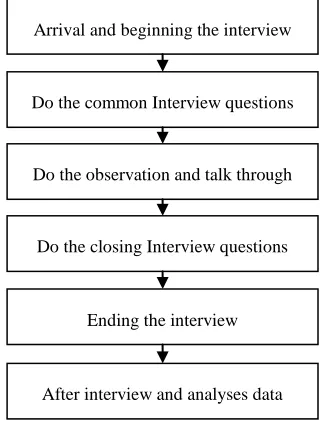
[image:2.612.340.500.429.641.2]In this research, some participants were interviewed in the lab because of the need of Internet and others use their personal computer at home. Qualitative analysis was selected as research instrument in this study due to the fact that it matched the goals and requirements of this study. The methodology in this research includes interview, observation and talk though. Participants were able to answer each part of the interview questions and use a variety of search strategies to do two tasks. The stages of the interview and observation were illustrated shown below and it could help researcher to direct participants through them.
Figure 1: Interview And Observation Stages
Although these qualitative methods were a little complex, author still thought it were good ways to do the research and collect available data. The interview was semi-structured and was interactive
Arrival and beginning the interview
After interview and analyses data Do the common Interview questions
Do the observation and talk through
Do the closing Interview questions
questions. At the same time, the interviewer used a range of probes and other techniques to achieve depth of answer in terms of penetration, exploration and explanation. In addition, an initial response was often at a fairly ‘surface’ level and the interviewer used follow-up questions to obtain a deeper and fuller understanding of the participants’ meaning.
The participant observation method was used to monitor two tasks—the first required users to find articles about two topics in MetaLib. The researcher
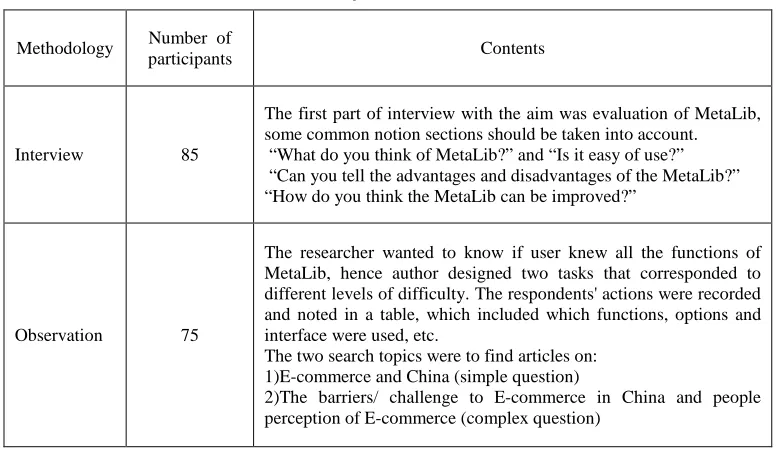
[image:3.612.112.501.236.462.2]observed the users’ decision, and noted their operations. In the process of doing tasks to capture students’ thoughts and the author would encourage the respondent to talk through the testing continuously and verbalizes their thoughts while working on a problem. The verbal data gathered from the subjects’ problem solving were recorded and analyzed to find the goal-setting cognitive structures employed problem solution. The detail interview questions and search tasks were showed as below (Table 1).
Table 1: Contents Of Interviews And Observation
Methodology Number of
participants Contents
Interview 85
The first part of interview with the aim was evaluation of MetaLib, some common notion sections should be taken into account.
“What do you think of MetaLib?” and “Is it easy of use?” “Can you tell the advantages and disadvantages of the MetaLib?” “How do you think the MetaLib can be improved?”
Observation 75
The researcher wanted to know if user knew all the functions of MetaLib, hence author designed two tasks that corresponded to different levels of difficulty. The respondents' actions were recorded and noted in a table, which included which functions, options and interface were used, etc.
The two search topics were to find articles on: 1)E-commerce and China (simple question)
2)The barriers/ challenge to E-commerce in China and people perception of E-commerce (complex question)
3. FINDINGS
In this research, the researcher evaluated the advantages and disadvantages of MetaLib, and gives some good suggestions to improve MetaLib from the interviews, observations and two-task performance results.
3.1 Advantages
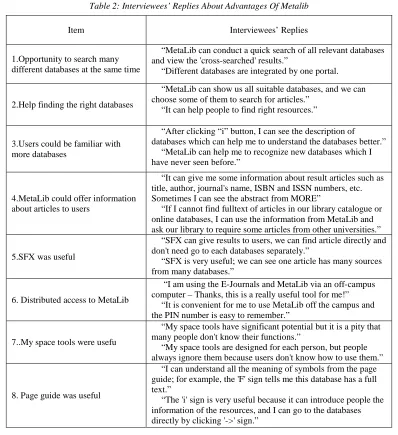
MetaLib provides users with a coherent and friendly environment for metasearching-simultaneously searching heterogeneous remote resources from a single search interface. Users can view the retrieved results in a manageable, unified format. For evaluating MetaLib in this research, the researcher asked questions about the advantages of MetaLib. Many interviewees replied that MetaLib was really an advanced portal for searching articles in different databases.
Table 2: Interviewees’ Replies About Advantages Of Metalib
Item Interviewees’ Replies
1.Opportunity to search many different databases at the same time
“MetaLib can conduct a quick search of all relevant databases and view the 'cross-searched' results.”
“Different databases are integrated by one portal.
2.Help finding the right databases
“MetaLib can show us all suitable databases, and we can choose some of them to search for articles.”
“It can help people to find right resources.”
3.Users could be familiar with more databases
“After clicking “i” button, I can see the description of databases which can help me to understand the databases better.”
“MetaLib can help me to recognize new databases which I have never seen before.”
4.MetaLib could offer information about articles to users
“It can give me some information about result articles such as title, author, journal's name, ISBN and ISSN numbers, etc. Sometimes I can see the abstract from MORE”
“If I cannot find fulltext of articles in our library catalogue or online databases, I can use the information from MetaLib and ask our library to require some articles from other universities.”
5.SFX was useful
“SFX can give results to users, we can find article directly and don't need go to each databases separately.”
“SFX is very useful; we can see one article has many sources from many databases.”
6. Distributed access to MetaLib
“I am using the E-Journals and MetaLib via an off-campus computer – Thanks, this is a really useful tool for me!”
“It is convenient for me to use MetaLib off the campus and the PIN number is easy to remember.”
7..My space tools were usefu
“My space tools have significant potential but it is a pity that many people don't know their functions.”
“My space tools are designed for each person, but people always ignore them because users don't know how to use them.”
8. Page guide was useful
“I can understand all the meaning of symbols from the page guide; for example, the 'F' sign tells me this database has a full text.”
“The 'i' sign is very useful because it can introduce people the information of the resources, and I can go to the databases directly by clicking '->' sign.”
3.2 Disadvantages
Although MetaLib has many benefit, some students still complained that MetaLib is difficult to use. Its disadvantages were presented as followings (Table 3) .There are many disadvantages of MetaLib from the survey.
First of all, many users complained that the interface of MetaLib was not friendly; it hadn't a simple interface which students could master without training. Most of the users didn't understand the meaning of functions. For many students, it is not an easy task to master the skills of
has important influence in learning skill on use of MetaLib too.
In addition, the interviewees also reflect many defects, including:
The HELP didn't look helpful and many users didn't like using it because of its poor interface and messy contents.
Many people though resource categories were too detailed to choose the right resources to search for articles.
Search engine efficiency is very low, and it is time-consuming operation to conduct a search task.
It was troublesome for users that MetaLib always logged out within a short time.
MetaLib allowed few search terms in the interface.
Many databases had no click boxes and couldn't be chosen to search for articles.
Some databases were often time out or not available.
Some buttons were not intuitive.
Table3: Interviewee’s Replies About Disadvantage Of Metalib
Item Interviewee’s Replies
1.General problems (Difficult to use)
“MetaLib is difficult for users to use it the first time, but users can accept it after frequently use.”
“I don't think MetaLib is easy to use, when people use it for the first time, they may not use it well because of the confused functions.”
2.Interface problems
“Interface is a mess, people are always confused about it's functions.”
“The interface is more complex than other databases and search engines. It is beautiful but not practical. If users master the skill to use all the functions of it, MetaLib it could be called a very good e-resource portal.”
3..Help system problems
“The color of the words in HELP were too light” “Words were too small”
“Headings were thin” “Too many words in HELP”
“Lack of blank line”
4.Function problems 4.1Some interviewees were not satisfied with the relevance of search results
4.2Users couldn't find fulltext articles online
4.3 Resource categories were too detailed
4.4 Long search time 4.6 Lack of search terms
“Sometimes the results articles are not the search key words.” “MetaLib cannot search articles exactly. The results do not match the key words the user inputs.”
“I couldn't find fulltext articles online”
“The resource categories are too detailed and users always have to choose the different resource categories to find the same topics.”
“The searching time is too slow when people find too many resources.” “Response time is too long.”
The problem I always met is that MetaLib has a lack of search boxes. “MetaLib should add basic and advanced search.”
5.Databases' problems 5.1 Some databases were always searching timeout or not available
5.2 Some button problems
“The problem always arises that the databases are not available or timeout when I was searching for articles. I don't know if this problem comes from MetaLib itself or databases providers.”
“I must click 'go' after choosing the category in the resource categories, but I always forget to click it”.
3.3 Improvement
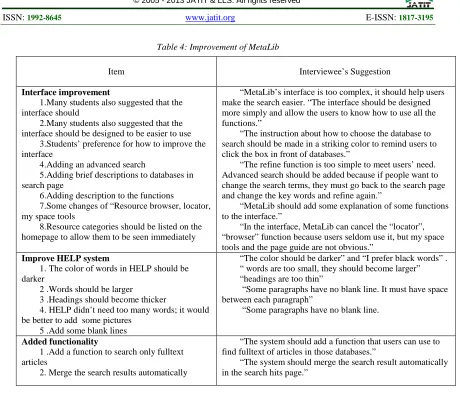
In this research, some design recommendations for future version of MetaLib were considered and suggested from both the learners' and researchers'
Table 4: Improvement of MetaLib
Item Interviewee’s Suggestion
Interface improvement
1.Many students also suggested that the interface should
2.Many students also suggested that the interface should be designed to be easier to use
3.Students’ preference for how to improve the interface
4.Adding an advanced search
5.Adding brief descriptions to databases in search page
6.Adding description to the functions
7.Some changes of “Resource browser, locator, my space tools
8.Resource categories should be listed on the homepage to allow them to be seen immediately
“MetaLib’s interface is too complex, it should help users make the search easier. “The interface should be designed more simply and allow the users to know how to use all the functions.”
“The instruction about how to choose the database to search should be made in a striking color to remind users to click the box in front of databases.”
“The refine function is too simple to meet users’ need. Advanced search should be added because if people want to change the search terms, they must go back to the search page and change the key words and refine again.”
“MetaLib should add some explanation of some functions to the interface.”
“In the interface, MetaLib can cancel the “locator”, “browser” function because users seldom use it, but my space tools and the page guide are not obvious.”
Improve HELP system
1.The color of words in HELP should be darker
2 .Words should be larger 3 .Headings should become thicker
4.HELP didn’t need too many words; it would be better to add some pictures
5 .Add some blank lines
“The color should be darker” and “I prefer black words” . “ words are too small, they should become larger” “headings are too thin”
“Some paragraphs have no blank line. It must have space between each paragraph”
“Some paragraphs have no blank line.
Added functionality
1 .Add a function to search only fulltext articles
2. Merge the search results automatically
“The system should add a function that users can use to find fulltext of articles in those databases.”
“The system should merge the search result automatically in the search hits page.”
From the data, some suggestions for improvement have been given.
First of all, the interface should be friendlier: Firstly, the notice that reminded people to click boxes in front of databases should be designed strikingly. Secondly, MetaLib should add an advanced search and add more search boxes. Thirdly, MetaLib should add some brief descriptions near databases to let people know the features of each resource. Fourthly, many functions in MetaLib should be explained. Fifthly, all the resource categories should be listed on the homepage.
In addition, the HELP system should be improved: (1) the interface of HELP should be better designed; (2) HELP could add an online tutorial with pictures and words ;( 3) It was better to add a search box in HELP, and (4) HELP could include two frames (all the headings on the left
On aspect of function, some important functions should be enhanced. (1) It should add a function to search all the fulltext of articles; (2) it was better to merge search results automatically.
4. CONCLUSION
students want to find the fulltext of articles in the electronic resources. They said that they would rather download the fulltext of articles online rather than find a paper version in the library. This was born out by people's suggestion to add a function to MetaLib that could only find fulltext of articles by cross searching. The most important suggestion was that library should hold more/better advertised training courses or offer online tutorials to all the students in the university. Because a lot of students didn't understand the function of MetaLib and their lack of search skills, these factors may affect users' search results.
This paper summarized search query analyses and reported on users’ satisfaction measures, and the use of the findings for further modification of the MetaLib’s interface and configuration. In further research, the researcher can do a broader and deeper investigation on a larger population both international and local students in University. In respect of methodology ,the methodology could add quantitative analysis to the qualitative analysis, such as sending questionnaires to all the students in the university. In addition, it would be better to interview some library staffs.
ACKNOWLEDGMENTS
This work was supported by Humanity and Social Science Youth foundation of Ministry of Education under Grant No.12YJC630266 and by Social Science Research Foundation of Education Bureau of Hubei Province under Grant No.2011jyty130.
REFRENCES:
[1] Andrew Cox and Robin Yeates, “Library portal solutions”, Aslib Proceedings, Vol. 55, No.3, 2003, pp.155-165.
[2] Glenn Haya, Else Nygren and Wilhelm Widmark, “Metalib and Google Scholar: a user study”, Online Information Review, Vol.31, No.3, 2007, pp.365 – 375.
[3] Boss, R.W., “Library portals”, 2006, available at: www.ala.org/ala/pla/plapubs/technotes/libraryweb portals.htm (accessed May 2, 2012).
[4] Morgan, K., Reade, T., “Pioneering portals: MyLibrary@NCState”, Information Technology and Libraries, Vol. 19, No.4, 2000, pp.191-198. [5] Ramsden, A., “The library portal marketplace”, Vine,
Vol. 33 No.1, 2003, pp.17-24.
[6] Sadeh, T., Walker, J., “Library portals: toward the semantic web”, New Library World, Vol. 104, No.1184/1185, 2003, pp.11-19.
[7] Glenn Haya, Else Nygren and Wilhelm Widmark. , “Metalib and Google Scholar: a user study”.
Online Information Review, Vol.31, No.3, 2007, pp.365 – 375.
[8] Ex Libris Group, “MetaLib: Reach Out and Discover Remote Resources”, available at: http://www.exlibrisgroup.com/category/MetaLi bOverview (accessed 2012-12-10)
[9] N.Lewis, “Talking about a revolution? First impressions of Ex Libris’s MetaLib”, available at: http://www.ariadne.ac.uk/issue32/metalib/ (accessed 2012-7-26)