Comparative Study between Civil Engineering Softwares
Pallavi Dandwate
1Dr. Pankaj Singh
21
M. Tech. Scholar
2Head of the Department
1,2Department of Civil Engineering
1,2
SRK University, Bhopal, India
Abstract— A significant revolution with computers’ usagein civil engineering business and construction process has been presented. Computers reduce all the extensive work specifically through the introduction of programs and software. Lately, software development has effectively contributed in various civil engineering disciplines, as it provides engineers with the ability to perform variety of complex calculations, modeling, drafting, designing practice and several analysis processes for civil engineering infrastructure. Many commercial companies that provide users with thousands of software are available today in the markets. However, the recent requirement is to select the suitable software that can perform multi engineering tasks efficiently and satisfy more specific users’ demands. In this regard, this paper presents lists of common software that is used in civil engineering field with their contributions in civil engineering applications.
Key words: Analysis processes, Civil engineering
disciplines, Computers’ usage, Contributions, Software development
I. INTRODUCTION
Software plays a central role in almost all aspects of daily life. It can be defined as the instructions, which provide functionality of the program that requires performing a specific type of data processing in a professional manner to accomplish a task. The number, size, and application domains of computer programs have grown dramatically. As a result, hundreds of billions are being spent on software development, and the livelihood and lives of most people depend on the effectiveness of this development [1].
Recently, many software developer companies are available in the international markets such as: Autodesk, Inc., Bentley Systems, S-FRAME Software Inc., GEO-SLOPE International Ltd., SoilVision Systems Ltd. etc. These companies provide variety of software packages exclusively for different disciplines of civil engineering that serve design, construction, and operation of the world’s infrastructure. Engineers, architects, constructors, and owner-operators are practicing their work in specialized subsets in civil engineering, like geotechnical / structural / hydraulic / transportation / environmental engineering, project and construction management and land surveying. Accordingly, they become more efficient and productive by using comprehensive engineering and architecture software solutions for construction and the sustaining activities.
The applications of civil engineering software can be applied for many essential work like designing huge structures (for example: factories, bridges, highway systems, water treatment plants, energy efficient buildings, …etc), virtual reality, predicting the behavior of engineering structures, solving equations for optimization of resources tender bidding, earth-work estimation, cost estimation, project management, structural drawing, predictive model
making and others. Computers also aid in satellite surveying, data transfer; its interpretation and analysis. Furthermore, it helps in making maps and deciding on highways alignment [2]. Software applications facilitate engineers’ tasks and enhance the quality of design, modeling and analysis process for civil engineering infrastructure. In addition, software’s general features make the work easier and faster to be performed, more accurate, time saving, as well as reducing the total cost, the workload and manpower compared to the work that is done manually.
Software users always have questions about the selection of the suitable software solution to a specific case. The choice of software depends on four things: the case study which engineer have, the available collected data (inputs), analysis method which is programmed and the required solutions to be achieved. In this regard, this paper discusses the contributions of software applications in various civil engineering disciplines that improve engineers' work performance. This paper also reviews the commonly-used software programs in the relevant fields with their features.
II. CIVIL ENGINEERING DRAFTING AND DESIGN SOFTWARE
The engineering graphics is a language in which engineers can communicate with. In the past, engineers had spend long working hours to draft a hand drawing using pencils, pens, compasses, protractors, triangles, and other drafting devices. Until late twentieth century, the engineering and architectural drawings were hand-operated creating. From the 1980s through 1990s, significant evolution occurred by replacing the board drawing with a newly developed system called CAD (Computer Aided Drafting).
CAD, or computer-aided drafting and design (CADD) can be defined as the use of computer systems to assist in the creation, modification, analysis or optimization of a design [3]. The CAD software consists of the computer programs to implement computer graphics on the system plus application programs to facilitate the engineering functions of the user company [3]. It is well known that CAD system is faster than traditional manual design process which leads to reduce the time for developing conceptual design. Therefore, it helps to increase the productivity of design. Furthermore, the usage of design analysis software which is available in a CAD system (for example: finite element and kinematics analysis) can help in reducing time and civil engineer’s workload as it improves the design accuracy that the human mind cannot easily find.
A. AutoCAD software
AutoCAD is the world’s most popular computer-aided drafting package for the personal computer. It is a fully functional 2D and 3D CAD program. As a fully functional drafting program, AutoCAD can achieve anything that can be drawn on a drawing board [5]. The main benefits of CAD come from the ability of editing and exchanging the drawing information rapidly unlike the drawing board. The AutoCAD drawing is a database of information [5]. AutoCAD produced by Autodesk and first released in 1982. It is used mainly by drafters, engineers, surveyors and architects to create blueprints for buildings, bridges and computer chips as well as further solutions for a broad range of project types, including land development, transportation, and environmental [6]. AutoCAD has grown more complex over the years, in part to keep up with the increasing complexity of the design and drafting processes that AutoCAD is intended to serve [7].
Many engineers, surveyors, drafters and designers prefer to use AutoCAD because it’s a multi-features program, flexible, speed, accurate, familiar to engineers and users, reduces drafting errors, provides a complete solution, saves time and money, explores and visualizes 3D concepts with a powerful set of intuitive design tools and exchanges ideas with colleagues using cloud-based connected design technologies, as it has advanced design and documentation tool and easy-use interface.
In addition to AutoCAD program, different drafting software packages are available today in the global markets that support Building Information Modeling (BIM) workflows, as each of them has different strong points enabling drafters and users to be more productive. The following software are commonly used in their respective area as listed in Table 1.
Software name Description
Vectorworks
This software developed by Nemetschek Vector works, Inc. in 1985. It is a computer aided design (CAD) and (BIM) software program that is used for drafting, technical drawing and 3D modeling. Vector works
provides 2D, 3D, production management, and presentation capabilities for all phases of the design process.
Autodesk Maya
Maya is one of the world’s leading software applications for 3D computer graphics, firstly developed by Alias Systems Corporation and currently owned and developed by Autodesk, Inc. It is used to create interactive 3D applications, including video games, animated film, TV series, or visual effects. Civil
engineers use it in their modeling work and graphic design. Rhinoceros
(Rhino)
Rhino is a 3D computer graphics and computer-aided design (CAD) application software developed by Robert McNeel and Associates. It’s very easy to use in designing graphics.
SketchUp SketchUp is a free CAD packages and it provides one of the simplest 3D design interfaces.
Sweet Home 3D
(SH3D) is a software package for home modeling including furnishings, floors and walls. DraftSight It is a very basic 2D drafting package of CAD system which used for basic sketches only. It provides the drafting
tools that needed for generating professional looking plans.
DraftSight It is a very basic 2D drafting package of CAD system which used for basic sketches only. It provides the drafting tools that needed for generating professional looking plans.
Table 1: drafting software used by civil engineers
III. GEOTECHNICAL AND ENVIRONMENTAL SOFTWARE
A. Geotechnical engineering software
Geotechnical engineering is the branch of civil engineering that deals with rocks, soils and underground water, and their influences in the design, construction and operation of engineering projects [8]. Such projects include earthworks structures for buildings, roads, tunneling excavation, bridges and dams, static and seismic stability of natural and excavated slopes, earthquakes problems, earth support systems, ground modification technology, numerical modeling, disposal of waste products by burial in the earth and many other types of projects. In this context, a geotechnical study seeks to design soil stabilization systems which provide safety for humans and buildings.
Before the computer era, stability analysis was carried out in a graphic way or with hand-held calculator. Nowadays, engineers have many facilities that help them in using analysis software ranging from the simplest techniques of limit equilibrium method via computational limit analysis approaches (for example: finite element limit analysis, discontinuity layout optimization) to complex and sophisticated numerical solutions (finite-/distinct-element codes) [9]. The great majority of early stability analysis
programs were in-house with very little software being available commercially. Today, every engineer and geologist has access to a personal computer that can undertake with relative ease complex numerical analysis of rock slopes [9].
The use of geotechnical programs in general, allows testing the structure or infrastructure for the project even within complicated conditions. This would facilitate the process of maintenance and repair of mistakes during or after the establishment of the project. Civil, structural and environmental engineers as well as urban planners and architects may use these software for a structure site planning or a public works project in a specific location.
develop practical scheme for various projects, taking into account the manpower and time.
Due to the recent development of acknowledgment, numerous effective engineering programs appeared to the public domain that used to solve various problems related to soil and civil engineering constructions such as PLAXIS, FLAC and GeoStudio. Concepts and features of each of these software are given in addition to a specific comparison has been conducted between them.
1) PLAXIS
PLAXIS is two-dimensional geotechnical software which has been developed specifically for the analysis of deformation behavior of soils and stability in geotechnical engineering project such as excavations, soil reinforcement, foundations, dikes, tunnels, slopes and embankments. The simple graphical input procedures enable a quick generation of complex finite element models, while the enhanced output facilities provide a detailed presentation of computational results [10].
PLAXIS 3D was released in 2010 that is considered as a flexible 3D tool for geotechnical engineers, who are not necessarily numerical specialists, to perform practical analysis [11]. PLAXIS has been processed with features to handle various aspects of complicated geotechnical structures and construction processes by designing a powerful and theoretically sound computational proceeding. These features as summarized by PLAXIS bv are: user friendly 3D geotechnical software, flexible and interoperable geometry, realistic simulation of construction stages, robust and reliable calculation kernel, comprehensive and detailed post-processing, logical geotechnical workflow, easy-to-use graphical user interface, borehole wizard for soil modeling and real 3D interaction [12] [13].
2) FLAC
FLAC (Fast Lagrangian Analysis of Continua) is a powerful two-dimensional continuum code. Firstly was introduced in 1986 by ITASCA C.G., as well for FLAC 3D. This general analysis and design tool; is a software based on the finite different method, which utilized for modeling soil, rock and structural behavior by geotechnical, civil, and mining engineers and can be applied to a broad range of engineering problems. It uses the recent advances in modeling multi-stage geomechanical problems, such as sequential excavation, backfilling and loading, as its code relies on the
formulation of finite differences. The formulations can assimilation large displacements and strains and non-linear material behavior even if yield or failure occurs over a wide area or in the event of a total collapse. It offers thirteen built-in material models, groundwater flow, coupled mechanical-flow calculation, inclusion of structural elements, plotting statistical distribution of any property, optional automatic remeshing during solution and a built-in scripting language to customize or automate virtually all aspects of program operation, including user-defined properties and other variables [14]. FLAC accommodates a number of complex behaviors do not fit easily to FEM codes. It includes the problems that are composed of several stages, large displacements and strains, the behavior of non-linear material and unstable systems (even cases of yield/failure over large areas, or total collapse). FLAC3D has general features quite similar to FLAC. It is a numerical modelling code used for advanced geotechnical analysis of soil, rock, and structural support in three dimensions. 3) GeoStudio
GeoStudio software is a product suite for a broad variety of geotechnical, geoenvironmental, civil, and mining engineering projects and their problem analysis. This software developed by GEO-SLOPE International Ltd, Calgary, Alberta, Canada. It is mostly used for finite element analysis, slope stability, seepage analysis and so on. It includes eight software products: SLOPE/W for slope stability, SEEP/W for groundwater seepage, SIGMA/W for stress-deformation, QUAKE/W for dynamic earthquake, TEMP/W for geothermal, CTRAN/W for contaminant transport, AIR/W for air flow and VADOSE/W for vadose zone and soil cover analysis [15].
GeoStudio applications are integrated; they allow using the results of the analysis of one product in another. This unique and powerful feature greatly expands the different type of problems that can be analyzed. These eight integrated applications are equipped with special features to address several aspects of many geotechnical and geo-environmental engineering modeling of structures and the interaction between the structures and the soil. In addition to the advantages mentioned, it’s easily learned and user friendly. Table 2 shows a particular comparison between PLAXIS, FLAC and GeoStudio.
Point of
consider PLAXIS FLAC GeoStudio
Developer 1) Developed by PLAXIS BV.
1) Developed by ITASCA C.G. in 1986.
1) Developed by GEO-SLOPE International Ltd.
User Interface 2) Simple and practical. 2) More complicated. 2) Simple to use. Types of
Results 3) Acceptable results. 3) Good results. 3) Acceptable results.
Features
4) Robust calculation procedures, user-friendly input and output
facilities.
4) More advantage because it
is basic. 4) One tool and many analyses.
Working Theory
5) Finite element programs with implicit integration used for design.
5) It's a finite difference program without a stiffness matrix.
5) Mostly used for finite element analysis, slope stability (Limit Equilibrium Method). Types of
Analysis
6) Used for dynamic analysis.
6) The best for dynamic analysis.
Other Analysis
7) Used in embankment and slopes analysis. Also can be used in tunnel.
7) Better to use FLAC 2D and 3D for tunnel modeling.
7) Mostly for embankments, earth dam and slopes.
Working Platforms
8) Can be considered as the lowest tier amongst these software codes.
8) FALC provides the actual solution with the Finite Strain theory.
8) Eight integrated applications.
Cost of
[image:4.595.42.556.66.162.2]Software 9) Expensive. 9) Free, on line download. 9) Expensive. Table 2: comparison between PLAXIS, FLAC and GeoStudio
The numerical calculations using the previous software have been performed by many researchers. Numerous studies were conducted applying FEM program (FLAC, SEEP/W and GEO-SLOPE) to study the seepage, liquefaction and failure analysis of several earth embankment dams. Results indicated a good ability of the mathematical models to describe, simulate, analyze and predict many dynamic and hydraulic properties of the studied earth dams [16].
Factors such as the property of the soil and its ability to support heavy loads as well as the slope of the land itself can be tested against the specifications of a design or plan with geotechnical software. This testing can help prevent costly design modifications or safety failures. One of the most important challenges of these software users in geotechnical engineering is the presence of differences in results from estimation and evaluation of a project regarding the different modeling ways [17]. Results found by Esmaeili-Falak and Hajialilue-Bonab [17] show that compared to limit equilibrium method (Geostudio-Slope/W software), finite elements method (FLAC and PLAXIS) gives less safety factors against the increase in slope gradient. This variation in the obtained results is based on the analytical method that is adopted for each program. In the other hand, it should be noted that evaluation of the accuracy of results obtained from each programs is one of the most important measuring items for safety. Generally, the suitability of each program to a specific condition is varying from one to another. For that the choice of program depends on the case dealt with. Thus, the choice of the best software will depend on the required accuracy of the results and the confidence in the input data.
B. Geoenvironmental engineering software
Geoenvironmental engineering can be defined as the application of earth science principles to the solution of land environmental problems [18]. Consequently, geoenvironmental engineering goes a little further than geotechnical engineering, it covers ground investigations, water and air pollution, mitigating and evaluation of the natural hazards, offering the resolution of waste contamination, also design municipal water supply and industrial wastewater treatment systems, and the like. Therefore, there is several existing geoenvironmental software in the markets produced by the relevant companies that enable users to achieve the desired target with principles to improve the natural environment.
The computer graphics generated from geotechnical program are excellent tools that seek to provide a realistic view of how a completed project will give the impression of being on a particular plot of land or stretch of landscape as well as for road works or any relevant projects. Furthermore, geotechnical software graphics are able to offer different consulting solutions for existing infrastructure or buildings, and this will lead to avoid costly structural mistakes by exploring the worst-case planning with site-specific geophysical and climatic considerations.
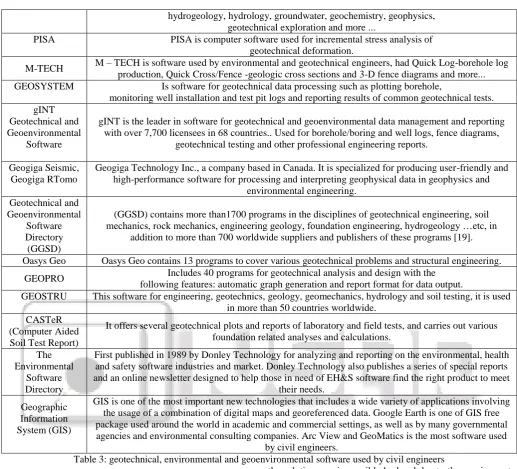
It is worth mentioning that geotechnical software can be utilized by environmental engineers to determine the best-use practices for existing conditions as well as improvements to the site, ground, or under the earth's surface. Table 3 shows a collection of engineering software specializing in geotechnical, environmental and geoenvironmental engineering with a brief explanation of their usage in diverse areas of civil engineering.
Software name Description
GEO5 Geotechnical
software
User-friendly interface, simple and powerful software relies on traditional analytical methods and Finite Element Methods (FEM). Contains of a package of individual programs used for a different geotechnical problems;mexcavation design, stability analysis, retaining wall design, foundation design,
soil settlement analysis, digital terrain model and analysis of advanced geotechnical tasks (FEM).
ABAQUS
ABAQUS standard are powerful finite element programs with implicit integration. ABAQUS is popular with academic and research institutions. It provides scalable, high-quality realistic simulation and used
in the automotive, aerospace, industrial product industries, energy and life sciences. Thus it used to explore the real-world physical behavior of products and materials, in order to improve performance,
reliability and safety, while reducing development time.
SoilVision Office
SoilVision provides numerical modeling solutions (with 1D/2D/3D) to geotechnical engineers especially to soils database. Modeling analyses
include groundwater and seepage, fate and transport, stress deformation, geothermal, and slope stability. New technologies such as automatic mesh refinement, unsaturated soils, and 3D analysis are currently
available.
hydrogeology, hydrology, groundwater, geochemistry, geophysics, geotechnical exploration and more ...
PISA PISA is computer software used for incremental stress analysis of geotechnical deformation.
M-TECH M – TECH is software used by environmental and geotechnical engineers, had Quick Log-borehole log production, Quick Cross/Fence -geologic cross sections and 3-D fence diagrams and more... GEOSYSTEM Is software for geotechnical data processing such as plotting borehole,
monitoring well installation and test pit logs and reporting results of common geotechnical tests. gINT
Geotechnical and Geoenvironmental
Software
gINT is the leader in software for geotechnical and geoenvironmental data management and reporting with over 7,700 licensees in 68 countries.. Used for borehole/boring and well logs, fence diagrams,
geotechnical testing and other professional engineering reports.
Geogiga Seismic, Geogiga RTomo
Geogiga Technology Inc., a company based in Canada. It is specialized for producing user-friendly and high-performance software for processing and interpreting geophysical data in geophysics and
environmental engineering. Geotechnical and
Geoenvironmental Software Directory (GGSD)
(GGSD) contains more than1700 programs in the disciplines of geotechnical engineering, soil mechanics, rock mechanics, engineering geology, foundation engineering, hydrogeology …etc, in
addition to more than 700 worldwide suppliers and publishers of these programs [19].
Oasys Geo Oasys Geo contains 13 programs to cover various geotechnical problems and structural engineering.
GEOPRO Includes 40 programs for geotechnical analysis and design with the following features: automatic graph generation and report format for data output.
GEOSTRU This software for engineering, geotechnics, geology, geomechanics, hydrology and soil testing, it is used in more than 50 countries worldwide.
CASTeR (Computer Aided Soil Test Report)
It offers several geotechnical plots and reports of laboratory and field tests, and carries out various foundation related analyses and calculations.
The Environmental
Software Directory
First published in 1989 by Donley Technology for analyzing and reporting on the environmental, health and safety software industries and market. Donley Technology also publishes a series of special reports and an online newsletter designed to help those in need of EH&S software find the right product to meet
their needs.
Geographic Information System (GIS)
GIS is one of the most important new technologies that includes a wide variety of applications involving the usage of a combination of digital maps and georeferenced data. Google Earth is one of GIS free package used around the world in academic and commercial settings, as well as by many governmental agencies and environmental consulting companies. Arc View and GeoMatics is the most software used
[image:5.595.38.556.58.527.2]by civil engineers.
Table 3: geotechnical, environmental and geoenvironmental software used by civil engineers
IV. STRUCTURAL ENGINEERING SOFTWARE
Structural engineering is the branch of civil engineering that deals with the analysis and design of structure that will support or resist the stresses, forces and loads. Throughout the history, civil engineers have made an important contribution to improve the environment by designing and construction major structures and facilities. The profession requires a lot of accuracy because most of the time; the final result of any project will directly or indirectly affect people’s lives and safety. As a result, software usage in this industry reduces the complexity of lost of challenging projects [20].
Many changes happened to the requirements of structural analysis due to the introduction of computer software. In the past, the required skill for analysis was the capability to simplify the complex structural systems so they could be analyzed by hand. This meant that an analyst would have a number of methods which might be applied to a specific problem. The choice of which method to use was very important, since the incorrect choice could mean that
the solution was impossible by hand due to the requirement of large number of equations to be solved. On the other hand, analysis process recently has an array of powerful computer programs which can handle most structural problems that an engineer is likely to face [21].
Nowadays, software of structural design is used mostly for the analytical purpose in the detailed design phase, and becoming more versatile. They are being applied to all phases of the design process, from the generation of design conceptions (design topologies, or layouts), through preliminary design (design shape specification), and finally in the detailed process (sizing of structure members) [22].
to know what type of loads are the components weighing. By applying these software, structural engineers accomplish more than they ever could before, both in quantity and quality. Today there are so many software and programs used in this discipline. The most respected and widely used programs are STAAD and SAP2000. A brief explanation about properties and features of these two software are revised in addition to a specific comparison has been conducted between them as shown in Table 4.
A. STAAD program
STAAD (Structural Analysis and Design Program) is a general structural and design program with applications primarily in the building industry-commercial buildings, bridges and highway structures, industrial structures, chemical plant structures, dams, retaining walls, turbine foundations, culverts and other embedded structures [23]. STAAD supports several steel, concrete and timber design codes. It offers various analysis methods such as the traditional 1st order static analysis, 2nd order P-delta analysis, geometric nonlinear analysis and the buckling analysis. It can also analyze various type of dynamic analysis start from model extraction to time history and response spectrum analysis [24]. STAAD is fast, efficient, easy to use and accurate platform, conformation with many standard codes and qualified to solve any type of problem. These features had made the STAAD the professional’s
choice. Today, STAAD is one of the most popular structural engineering software products.
B. SAP2000
SAP2000 (Structural Analysis Program) is one of the most popular structural analysis programs available for civil/structural engineers. SAP2000 program has many capabilities; for example: fast equation solvers, force and displacement loading, non-prismatic frame elements, tension-only braces, post-tensioning tendons, highly accurate shell elements, Eigen and Ritz model analysis, multiple coordinate systems for skewed geometry, many different constraint options, the ability to merge independently defined meshes, a fully-coupled 6-by 6 spring stiffness and the option to combine or envelope multiple dynamic analysis in the same run [25]. This program mainly used by structural engineers to design and analyze various civil structures such as dams, communication towers, stadiums, buildings, and any type of structures. Using SAP2000 program in structures engineering helps civil engineers in saving time and efforts, simplifying the complex calculation process, offering flexible data modification during the solution and providing a good level of accuracy even for the complex design. According to that, SAP2000 program became more efficient and user friendly. Table 4: comparison between STAAD and SAP2000
Point of
consider SAP2000 STAAD ETABS
Developer 1) Developed by Computer and Structure, Inc.(CSI).
1) Developed by Bentley Systems.
1) Developed by Computer and Structure, Inc. (CSI).
Used In Places
2) It is widely used in Latin America, Portugal, Italy and Spain.
2) It is widely used in Asia and United Kingdom.
2) It is widely used in Latin America, Portugal, Italy and Spain India.
Features 3) More efficient in dynamic and seismic analysis.
3) Less efficient in dynamic and seismic analysis.
3) More efficient in linear and seismic analysis.
License Cost
4) License of SAP2000 is more expensive.
4) License of STAAD is cheaper.
4) License of ETABS is more expensive.
Type of Analysis
5) Modeling analysis including P-delta, large displacement and construction effect.
5) It does not have this feature.
5) Modeling analysis including P-delta, Linear Static Analysis Nonlinear Static Analysis.
Preferable
6) SAP2000 is less preferable for the construction steel structure.
6) STAAD is more preferable for the construction steel structure.
6) ETABS is more preferable for the Design and analysis of highrise rcc structure.
Many researches and studies were conducted by using the previous software in different fields of structural engineering such as design and analysis industrial building by using pre-engineering building and conventional steel building concepts. Moreover, evaluating the seismic performance for different types of structures, analysis and
modeling steel, wood and concrete structures; the results showed a high ability of these software to model, analyze and design such kind of structures [26, 27, 28, 29]. Below is a selection of some of the most commonly used structural engineering software as displayed in table 5.
Software name Description
SAFE This software is based on finite element method, it is used to analyze them components of reinforced- concrete, and post- tensioned slabs, beams and foundations.
RISA 3D It is 3D dimensional analysis and design software used for design and analysis all kinds of structures and all common structural materials, including concrete, steel, aluminum and wood.
ETABS Engineers are using this program to perform various analysis start from linear, nonlinear, static to dynamic analysis. Furthermore, it is used to design building systems. It was used to create the
analysis in addition to complex, nonlinear and transient dynamic analysis.
GT STRUDL Engineers are using this program to analysis and design variety of complicated structures such as nuclear, conventional power generation, onshore and offshore facilities.
LUSAS It is used for civil, structural offshore and seismic engineering. Engineers using it in analyzing bridges, tunnels and assessment of all types of structures.
Tekla It is a versatile 3D modeling used to manage detailing, fabrication and erection of steel structures such as industrial plants, commercial buildings,
etc.
STRAP This software is a powerful tool for analysis and design of a wide range of skeletal and continuum structures such as buildings, bridges, shells, towers, floor slabs, beams, columns and foundations. Struds It is a structural analysis, design and detailing software. It is used in designing all building components
including slabs, beams, columns, shear walls and foundations.
MicroStation
MicroStation is the world’s leading 2D and 3D CAD and information modeling software for the architecture, engineering, construction, and operation of utility systems, roads and rail, bridges, buildings, communications networks, water and wastewater networks, process plants, mining, and
[image:7.595.38.560.64.267.2]more. 3D models can be created using parametric or direct modeling features. Table 5: structural engineering software used by civil engineers
V. CONSTRUCTION ENGINEERING AND MANAGEMENT SOFTWARE
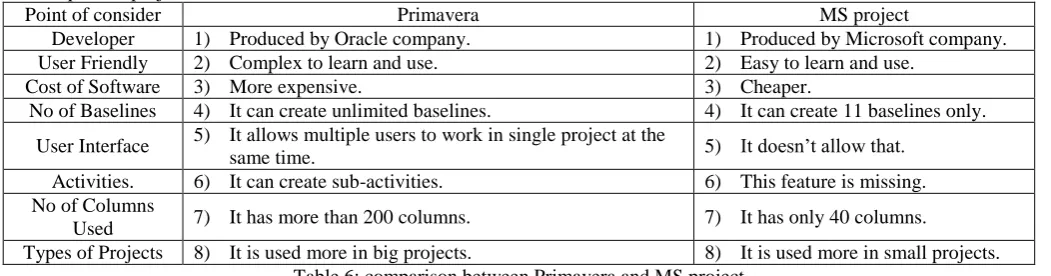
Construction engineering and management is the art of bringing the project on time and within budget in spite of all the variables and specialties within a project as well as the high fragmentation within the construction industry [30]. From the days of the Egyptian pyramids were built till the early eighteenth century, the architect was the master builder. He performed the main activities through the preconstruction phase, such as project design, materials purchasing, and craftsmen hiring. Due to the simple technology, less diversity of construction materials, and owner's lack of sophistication in the delivery of projects, his role expended to involve the management of construction process [31]. Nowadays, the construction industry has become more complicated than ever before due to the new business requirements and challenges. Hence, it is necessary for engineers to use the available new technologies such as computer programs to achieve those requirements. The rapid developments of computer program led to appear many programs which are used in projects management, for example, the most common software are MS project and Primavera. The main functions, usages and benefits of these software are reviewed as well a specific comparison has been performed between them in table 6.
A. Primavera program
Primavera is the application of scholarships, skills, tools and techniques to project activities in order to meet or exceed
stakeholder’s needs and expectation. It includes all functionalities which enable users to set up a specified planning. This program is provided with elaborate earned value options, user-friendly baseline management tools, in addition to integrated reporting options. Primavera program is used to scheduling, controlling and estimating all types of projects. Using Primavera program in civil engineering field has contributed in making the projects management easier and more efficient, helped civil engineers in creating strategic decision, controlled the time until the accomplishment of project and determined the optimal use of resources.
B. Microsoft project program
Microsoft project is a project management software which is designed to assist project managers in developing plans, assign resources to tasks, track progress, manage budgets and analyze workloads [32]. The main functions of Microsoft project are creating project templates, developing budgets and schedules, delegating tasks and resources, and analyzing project success. Microsoft project is used to manage several projects at the same time, determine factors that cause delays, organize the daily tasks and produce Gantt charts and network diagram. Using Microsoft project in civil engineering contribute in making the managing of projects more easily and quickly, helping project managers in various industries in the development and execution of professional projects and preparing the reports of project.
Point of consider Primavera MS project
Developer 1) Produced by Oracle company. 1) Produced by Microsoft company.
User Friendly 2) Complex to learn and use. 2) Easy to learn and use.
Cost of Software 3) More expensive. 3) Cheaper.
No of Baselines 4) It can create unlimited baselines. 4) It can create 11 baselines only.
User Interface 5) It allows multiple users to work in single project at the
same time. 5) It doesn’t allow that.
Activities. 6) It can create sub-activities. 6) This feature is missing. No of Columns
Used 7) It has more than 200 columns. 7) It has only 40 columns.
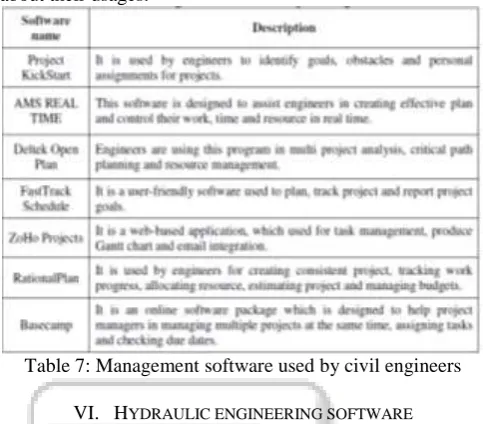
[image:7.595.38.564.613.751.2]The results of evaluation of the previous software (Primavera and Microsoft project) show that these software have an acceptable level of quality in terms of quality and general system characteristics [33]. Consequently, these software are used in numerous studies in order to improve the quality, productivity and efficiency of projects management. Table 7 includes a summary of basic types of project management software with a simplified clarification about their usages.
Table 7: Management software used by civil engineers
VI. HYDRAULIC ENGINEERING SOFTWARE
Hydraulics is a branch of civil engineering related to the science of water in motion and the interactions between the fluids and the surrounding environment [34]. Hydraulic projects include design of water supply network, pipelines, drainage facilities (bridges, dams, channels, culverts, levees, storm sewers), and canals. The important progress made in the numerical techniques and abilities of the computers has enabled hydraulic engineers and researchers to obtain solutions of more difficult and complex problems, which were considered unsuitable for numerical solutions only a short time ago [35]. Software played very significant roles in all fields of hydraulic engineering, such as water distribution system, which is one of the most important fields in the hydraulic engineering. These systems are vital in supplying communities with their water demand include pipes, pumps, valves and reservoirs and are designed to deliver water at adequate discharge and pressure according to demands and with specific quality [36].
Before the use of computerized models, water distribution system analysis using hand-held calculators slide rules involved many simplifying assumption and approximation. Consequently, designs were often more conservative and expensive than necessary [37]. On the contrary, using computer model contributed in making the processes of analyze and design of the water distribution system faster and more accurate than ever before.
A computer model uses mathematical equations to help explain and predict physical events. Modeling of water distribution system can allow you to determine system pressure and flow rates under a variety of different conditions [38]. There are many software used in the field of water distribution system, as an example: WaterCAD and WaterGEMS.
A. WaterCAD
WaterCAD is hydrologic software for modeling water distribution systems in order to evaluate pressure at key locations and to obtain the hydraulic grade for entire system [39]. It is used to design and analyze water distribution system, size of pipes and pumps, rehabilitation and vulnerability studies and master planning. Furthermore, it analyzes fire protection system and performs energy cost analysis. WaterCAD has the ability to produce graphs, profiles and tabular reports, as well importing and exporting data from and to AutoCAD and ArcInfo. These capabilities help civil engineers in analyzing, designing and optimizing water distribution systems, reducing the required time and human resources and making decisions to analyze and manage distribution networks with more accuracy and efficiency.
B. WaterGEMS
WaterGEMS is a hydraulic and water quality modeling solution for water distribution systems with advanced interoperability, geospatial model-building, optimization, and asset management tools [40]. WaterGEMS is used in analyzing and designing water distribution systems, managing the infrastructure capital cost, fire flow analysis, water quality analysis and energy consumption management. It has many abilities for instance; working seamlessly in ArcGIS, AutoCAD and MicroStation, displaying multiple graphs, tables and profiles at the same time, calibrating with Darwin, exporting the results easily to Google Earth, qualitative modeling and relevant analysis. Accordingly, using WaterGEMS in civil engineering field contributed in making the process of management and maintenance of water distribution system more easily and professionally, reducing calculations regarding geographical interpretation, detecting the leak in distribution systems and help in making the accurate decisions. Table 8 shows a brief comparison between the features of WaterCAD and WaterGEMS software.
Point of
consider WaterGEMS WaterCAD
Cost Of
Software 1) More expensive. 1) Cheaper.
Features 2) It runs inside ArcGIS.
2) It doesn’t have this features.
Export to Google
Earth.
3) It has the ability to export to Google Earth.
3) It has limited ability to export to Google Earth.
Other Features
4) It can extract elevation data from digital elevation model.
4) It doesn’t have this feature.
Tools Used
5) It contains Darwin tools (Calibrator, Designer and Scheduler).
5) It doesn’t contain Darwin tools.
Table 8:
and decrease the water losses, assess the existing water networks and planning for future growing. Results obtained from several studies confirmed the accuracy of the previous software (WaterCAD and WaterGEMS) and proved the capabilities of these software to qualitative modeling, relevant analyses and providing results similar to those obtained from a laboratory experiment [41, 42]. Table 9 displays a group of hydraulic engineering software with a brief explanation of their usage.
Table 9: Hydraulic software are used by civil engineers Road design and transportation infrastructure software provide civil engineers with targeted solutions for surveying, construction and maintenance projects, involving: land development, transportation, water projects and especially for road design (including: bridges, tunnels, railroads, airports, transit systems, port and harbor). Software capability provides automatically computing of the geometry for the plan, stations, profile, cross-sections and 3D model of road in conjunction with the surrounding terrain in every change in alignment geometry. This functionality comes due to the enormous software development that has been invested into getting the users’ demands. Road design and transportation related software are listed below as shown in table 10.
Table 10: Transportation software used by civil engineers
VII. CONCLUSION
Software is an extremely powerful tool and can be adapted to specific needs in order to serve the intended purpose of any project. The principle intention of this paper is to demonstrate the huge development of software contribution that is applied by civil engineers, which aims at improving the quality of earth civilization. Many programming companies are available today and interested in providing the global market with thousands of software as well as the supporting features needed to make them user-friendly, better suited, more flexible and effective. Software performance in multiple and complex calculations has successful contributions due to their principles. The principles of the software, which always stands out as a valuable asset, are saving time, reducing the civil engineer’s workload and manpower, lowering total cost and ensuring a high level of accuracy. It can be concluded from the forgoing that civil engineering software is contributing effectively in order to facilitate many research and practical applications. As a consequence, civil engineers have become able to accomplish and achieve what they have not been able to accomplish previously in terms of quantity and quality.
REFERENCES
[1] Software Engineering 2004, Curriculum guidelines for undergraduate degree programs in software engineering, A Volume of the Computing Curricula Series, The Joint Task Force on Computing Curricula, IEEE Computer Society Association for Computing Machinery, August 23, 2004.
[2] H. J. Sreenivasa and Nagaraj Sitaram, Computer diligence for civil engineers, engineeringcivil.com, http://www.engineeringcivil.com/computer-diligence-for-civilengineers html.
[3] Narayan, K. Lalit, Computer aided design and manufacturing (New Delhi: Prentice Hall of India, 2008). p. 3. ISBN 812033342X.
[4] Autodesk Inc., 2014.
http://www.autodesk.com/solutions/cad-software [5] T.J. McCarthy, AutoCAD for windows express
(Springer-Verlag London Limited, 1994).
[6] Autodesk, AutoCAD civil 2009 and AutoCAD civil 3D 2009, road design basics with AutoCAD civil, (2008). [7] D. Byrnes and B. Fane, AutoCAD 2013 for dummies
(Hoboken, New Jersey, Wiley & Sons, Inc., 2012). [8] C. Carranza-Torres, Career opportunities in
geotechnical engineering, Minnesota Minerals Education Workshop 2011, University of Minnesota, Duluth, (USA, Minnesota, 2011).
[9] E. Eberhardt, Rock slope stability analysis - Utilization of advanced numerical techniques, Vancouver, Canada: Earth and Ocean Sciences, University of British Columbia, 2003.
[10] PLAXIS 2D (2012), Tutorial Manual. Retrieved September, 2014 http://www.plaxis.nl/manuals/
[image:9.595.48.286.553.721.2][12] PLAXIS 3D, Product Information. Retrieved September, 2014. Http:// www.plaxis.nl.
[13] PLAXIS 3D (2013) - Tutorial Manual. Retrieved September, 2014. http://w ww.pla xis.nl /plaxis3d/manuals/
[14] Itasca Consulting Group, Inc., FLAC VERSION 7.0, Advanced two dimensional continuum modeling for geotechnical analysis of rock, soil, and structural
support. Retrieved August, 2014.
http://www.itascacg.com/software/flac
[15] Geo-Slope International Ltd., Calgary, Canada, "GEO-STUDIO - Suite of software for geotechnical modelling , retrieved August 2014. ", http://www.geo-slope.com [16] Suhail. A. A. Khattab, Stability analysis of Mosul dam
under saturated and unsaturated soil condition, Al-Rafidain Engineering, Vol.18, No.1 (2010), 13-27. [17] M. Esmaeili-Falak, M. Hajialilue-Bonab. Numerical
studying the effects of gradient degree on slope stability analysis using limit equilibrium and finite element methods. International Journal of Academic Research Part A; 2012; 4(4), 216-222.
[18] A.M.O. Mohamed, H.E. Antia, Geoenvironmental engineering (Elsevier Science, 1998), ISBN: 0 444 89847 6.
[19] Geotechnical & Geoenvironmental Software Directory
(GGSD), retrieved October 2014,
http://www.ggsd.com/
[20] Y. M. Chow, Computer-aided engineering methodology for structural optimization and control, Master thesis, Massachusetts Institute of Technology, Cambridge, USA, 2000.
[21] L. May, and D. Johnson, The teaching of structural analysis (Ova Arup Foundation, London, UK, 2008). [22] R. Kicinger, T. Arciszewski and K. Jong, Evolutionary