145
7
Usability Testing of Video
Game Controllers
A Case Study
G. W. Young, A. Kehoe, and D. Murphy
CONTENTS
Executive Summary 146
Organization/Institution Background 146
Introduction 147
Background 147
Case Study Description: Device Evaluation Techniques 150
Controller Variables for Consideration 152
Description of Controllers for Analysis 154
Logitech G303 Daedalus Apex Mouse and Corsair K60 Vengeance Keyboard 154
Logitech Touchpad T650 and Logitech Ultrathin Keyboard 155
Steam Controller 156
Sony DualShock 4 157
Case Study 1: Functionality Testing of Video Game Controllers 157
Participants 157
Experimental Procedure 157
Results and Discussion 158
Pointing Task Results 158
Move Time 160
Errors 161
Linear Regression 162
Usability: Pointing 162
Smoothness of Operation 163
Mental Effort Exerted during the Task 165
Accuracy of the Device in Pointing 165
Speed of the Cursor Movement 166
EXECUTIVE SUMMARY
This chapter presents an investigation that compares the performance of game controllers in two-dimensional pointing tasks as defined in the international standard that specifies the requirements for nonkeyboard input devices, ISO 9241-9. In addition, we discuss the evalu-ation of usability and user experience with these devices during gameplay. We compared performance measurements for controllers while varying the user’s exposure to the different feedback elements contained within each controller device. We assessed the performance of the controllers according to the ISO 9241-9 evaluation recommendations. The devices used in the study included a Logitech mouse and keyboard, a Logitech Bluetooth Touchpad and keyboard, a Sony Playstation DualShock 4 controller, and Valve’s first-generation Steam controller. Besides performance testing, we measured user experiences with the controllers while playing a popular first-person video game. Participants were asked to complete game levels for each type of controller and answer questions outlining their experience.
ORGANIZATION/INSTITUTION BACKGROUND
The case studies contained within this chapter were undertaken at the Logitech Design Lab in Cork, Ireland, in collaboration with the Department of Computer Science at University College Cork. Logitech is a world leader in products that connect people to the digital experiences they care about. Their products span multiple computing, communication, and entertainment platforms. Logitech-gaming products include mice, keyboards, head-sets, and gaming controllers. University College Cork was founded in 1845 and is the aca-demic home of the founder of Boolean Logic, George Boole.
Q1
User Experience: Pointing 166
Case Study 2: In-Game Testing of Video Game Controllers 168
Participants 168
Experimental Procedure 168
In-Game Results 169
Usability In-Game 169
Evaluation of Physical Force Required for Moving 169
Difficulty in Accurately Moving and Aiming 169
Overall In-Game Evaluation 169
User Experience: In-Game 171
Differences between Pointing and In-Game Analysis 172
Significant Variations in Usability Testing 172
Significant Variations in User Experience Testing 175
Conclusions 175
Challenges, Solutions, and Recommendations 176
References 176
List of Additional Sources 178
Biographies 178
Key Terms and Definitions 179
INTRODUCTION
Currently, there is a considerable range of research into the development of contemporary game controllers, while there is relatively little research being conducted to explore the rela-tionship between pointing performance and in-game user experiences (The Entertainment Software Association, 2014). The choice of a controller used can have a major impact on the player’s experience of a game (Birk and Mandryk, 2013). The performance of a user while playing a game can also be strongly influenced by the type of controller used (Watson et al., 2013). Certain platforms are synonymous with particular types of controllers, while others are transferrable across platforms. The effects of any one of the varieties of control methods used in a smartphone or tablet device are also potentially viable control methods for new console or PC controller devices. Fortunately, there is a large body of well-documented research in human–computer interaction (HCI) and game console controller analysis, and the associated frameworks and models of these can be applied in the development and evaluation of new forms of game controller interaction.
In terms of in-game control, the relationships between the action–feedback cycle and the central role it has in game play are important aspects of game controller integration. The user must have a sense of control that directly relates to their actions; this in turn works to reduce potential frustrations and enhances the user’s participation in the game. The con-trol of a game is after all, the product of a well-designed interaction with game concon-trollers. Historically, the technological limitations of the era were responsible for shaping controller designs. All in-game interactions, such as running, shooting, and kicking, among others, were represented by arbitrary button presses and gestures that were not intrinsic or relat-able to the overall gameplay design. In comparison, with today’s gesture capabilities, we can now physically manipulate wireless devices to directly control in-game components that may correspond with real-world equivalent operations. This level of correspondence between the artificial and real-world control interactions reduces the learning curve for players, making it more “intuitive” and increases the user’s immersion in the game. The mapping of control to in-game actions has been shown to correlate with total immersion experienced by a user (Jennett et al., 2008). Also, the role of interactivity in gaming enjoy-ment has been observed as declining when efficacy experiences are finite (Klimmt et al., 2007). Therefore, we can conclude that the control mechanisms of gaming interfaces are influential in some way to the greater, overall gaming experience.
BACKGROUND
anytime gaming.” Examples of this trend include the Grand Theft Auto series, which is now available across a number of very different platforms, from Google Android devices to the Microsoft Xbox console. Increased availability and a variety of gaming platforms presents new challenges, and highlights limitations of both game design and the conventional con-sumption models, issues that did not exist on older static platforms.
The development of controllers for platform- specific games has historically been restricted by the system’s processing power and speed. Consequently, in static gaming, the graphics-processing units of platforms are superior in performance to address the demands of high-end game engines. In comparison, the ability to perform multiple tasks on a mobile device takes precedence over pure gaming performance. For example, a smart-phone must possess the ability to make smart-phone calls, text, e-mail, etc., in addition to its game-processing capabilities. The limitations of mobile devices have resulted in the devel-opment of novel interaction methods, which are now becoming common in conventional game controller interfaces. For example, the use of virtual thumbstick widgets in lieu of physical thumbstick controllers, touch-sensitive surfaces, and built-in speakers. The com-pact form factor of mobile devices incorporating a host of various sensors has opened up new and interesting avenues of game interaction. These include, but are not limited to, gesture-controlled touchscreens, accelerometers, gyroscopes, magnetrons, cameras, and microphone interfaces to name a few, which are rarely implemented or to be found in a PC or console platforms (a notable exception to this being the Wii console).
Notwithstanding this array of adaptable input choices for game developers to choose from, there are still some traditional gaming styles that are struggling to adapt to mul-tiple platforms. For example, First- Person Shooter (FPS) games, such as Wolfenstein and Doom (widely considered among the first three-dimensional [3D] FPS games), would have to rethink how user input would control game characters if they were to release the same game today (id Software, 1992, 1993). Control adaptations are increasing in popularity, such as those seen in games like The Drowning (DeNA Co., 2014); however, this can some-times result in a deviation from traditional FPS physical interfaces and losing the associ-ated affordances of controllers that consumers of this genre have become accustomed to. In addition, specific game genres rely on these standardized and accepted control schemes.
or controller experience more usability issues and consider themselves more challenged during that transition phase (Gerling, 2011). When designing a new controller, it is very important to consider the users’ expectations of device affordances and their applicability to the particular game genre.
Many of the innovative changes in game controller design are associated with a specific gaming platform and in the first generation of commercial controllers, the technological constraints of the platform limited input gestures to small finger movements and button presses. Playing early arcade/video games involved minimum movement to trigger an in-game response. However, recent trends in large-scale controller movements have resulted in comparable levels of engagement and enjoyment in game play. For example, in their work on controller movement, Zhang et al. found that participants responded positively to increased physical exertion in certain gaming conditions (Zhang et al., 2009). Moreover, large-scale actions have been incorporated into popular contemporary games, through the use of advanced controllers, for example, the Microsoft Kinect, Sony Move, and Nintendo Wiimote. However, the size, number, and rate of gestures, bounded by limitations of the controller, the size of the required gesture, and/or the overall level of physical interaction (exertion), do not necessarily have any impact on the gaming experience.
In-game experiments have shown that tilting controls have substantially increased user immersion when applied to associated steering tasks, such as driving (Cairns, 2014). In addition, a slipping mechanism (sliding a finger over a touch-sensitive input device) can achieve deeper immersion than single-touching gestures alone. Participants have been
observed moving fingers in sympathy to character motion, suggesting that users were
experiencing a direct connection with the game via finger contact. The role of natural
mapping, such as these, promotes a deeper immersive experience and is more fun, even if performance is not as good on initial use (Brown et al., 2010). Older gamers have been reported to perform best with a mixed button and gesture controller (such as the Wii) (Pham, 2012). This study showed that the older generation of gamers performed better with a combined button/gesture device in terms of completion time, when compared to these two control elements presented individually. Therefore, when designing new game controller devices, we should consider the importance of combining different modalities of gesture capture as equally important factors.
In most contemporary console game controllers, the inclusion of analog thumbsticks has become an industry standard as the thumbstick naturally implies direction. The through-put (TP) of a thumbstick is generally equivalent to that of the analog joystick. Targeting tasks are common on most nontouchscreen systems and can be interpreted by a device in a number of ways, such as selecting a file to open on a PC or targeting an on-screen enemy during gameplay. Specific to gaming, these two types of tasks (movement and selection) are combined together to create position and rate control of on-screen actions. The ability to accurately point at a target (on a standard X–Y Cartesian plane) and to control the rate of movement (Z plane) has become the norm in gesture design.
CASE STUDY DESCRIPTION: DEVICE EVALUATION TECHNIQUES
The evaluation of nonkeyboard input devices in computing is strongly influenced by the ISO 9241-9 standard (ISO, 2000), a standardized approach to interface evaluation. This includes performance, comfort, and overall analysis techniques for a multitude of potential functions. Fitts’ index of performance (Fitts, 1954; MacKenzie, 1992) is used to assess the functionality of a controller and evaluate the effectiveness of its implementation. However, no single-evaluation technique suits the multiparametric control input that occurs during gameplay. Therefore, in our study, a number of validated techniques were included to analyze the individual devices. The assessment of comfort rating, as described in ISO 9241-9, and additional open-ended questioning were used to rate pointing ability, comfort, usability, and user experience.
Multiple experiments that analyze input devices have been used in the validation of ISO 9241-9. Indeed, these findings were used to inform our best- practice methodology in our experimental design. One such evaluation undertaken to assess the techniques incorpo-rated in ISO 9241-9 used comparisons of joystick and Touchpad performance and com-fort, finding a 27% increase in joystick TP over the Touchpad (Douglas et al., 1999). The
most important deviations from the ISO standard suggested by Douglas et al. included
using 12 participants for between-subject conditions instead of the recommended 25; they suggested that their experiment methods be adopted as an alternative approach; a multi-directional task is more ecologically valid; more open-ended questioning is required for comfort. For our experiments, these factors were considered to be important for the valid-ity of our study. Additional points were also derived from the recommendations made by Soukoreff and MacKenzie (2004). Specifically
1. The Shannon formulation for index of difficulty (ID) should be applied (Equation 7.1).
2. A wide and representative range of ID values are to be used. 3. Error rates should be incorporated for individual ID values.
4. Adjustments for accuracy should be made to convert ID values into index of difficulty with error correction (IDe) (Equations 7.4 and 7.5).
5. Linear regressions should be calculated to ensure a goodness of fit and to verify a
small intercept value (<400 ms for positive regressions and > − 200 ms for negative,
6. No predictions should be made beyond the range of IDe.
7. The dependent measure of TP is to be calculated via the mean of means for each device.
ID Log D/W 1= 2( + ) (7.1)
MT a b= + ×log A/W 12( + ) (7.2)
TP ID/MT= (7.3)
IDe Log D/We 1= 2( + ) (7.4)
We W 2 66/z(1 Err/2) if Err 49
W 589otherwise
= × − >
= ×
. . %
.
0 0 00
0 0 (7.5)
While there are many advantages to using the standardized Fitts’ Law and ISO-testing methods, they do not accurately portray targeting tasks in gaming situations (e.g., FPS gaming). Game controllers offer multiparametric controls for translating gestures into on-screen action; accordingly, the analysis of control in these circumstances should be augmented to better fit targeting tasks in three dimensions. Simulation and analysis of 3D Fitts’ testing has highlighted increased performance of mice and traditional console con-trollers over open-gesture capture devices (such as the Microsoft Kinect and Sony Move). These devices were also shown to require a heightened spatial awareness than that of the traditional mouse and controller interface (Zaranek, 2014) and were therefore not con-sidered for our experiment. Here, we have concerned ourselves with the 3D application of control in in-game environments, which also requires consideration of the zero- and first-system ordering of sensor modalities that are distributed between the left and right effectors of the body.
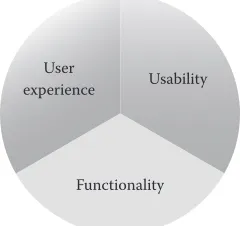
Additional elements of game controller evaluation included in this case study are derived from the theoretical framework provided by McNamara and Kirakowski (2006), providing further insight into human-technology interactions (see Figure 7.1) (McNamara and Kirakowski, 2006). This model has been applied to many human–computer evalua-tions that have allowed researchers to clearly understand the interacevalua-tions between humans
and controllers. Three codependent factors are modeled to represent these interactions.
Specifically, functionality, usability, and user experience measures are used to quantify the various features of an interface and the impact that they may have upon a user.
user satisfaction. Assessing a user’s experience is a relatively new and innovative area of investigation within the field of HCI. Measurements are difficult to quantify and can be dependent on a number of contributing factors, including psychological or social factors.
These three types of tests, although unique, do not operate independently of each other. For example, we do not consider usability as a defining-device characteristic. However, the physicality of a device, in terms of its functionality and how the user operates it, directly influences its usability. Also, a system’s aesthetic beauty can influence the user’s percep-tion of usability and their physical experience with the device before actually using it (Tractinsky et al., 2000). Finally, a device’s usability directly influences the user’s experi-ence, as poor usability will almost certainly lead to a negative user experience. Therefore, we can see that the assessment of each of these areas of concern is achieved through the application of multiple HCI techniques and is not focused on one alone.
CONTROLLER VARIABLES FOR CONSIDERATION
The cognitive load on users to operate game controllers can be categorized in an increasing order of complexity (Proctor, 2011). Teather and MacKenzie recently found that the order of control is a greater determinant of performance than the actual input method. In their experiment for both position-control modes (tilt and touch), participants reached game levels roughly twice as high as with the velocity-control modes (Teather and MacKenzie, 2014). In addition, human effectors are capable of making gestures that apply either force/
torque or displacement/rotation to a control device. The controller responds to each
respectively, corresponding to the input gesture applied. An isometric device connects the effector to the controller and its control is derived through the forces or torques applied. In an isometric system, the cursor moves in response to the forces applied to the controller with little or no displacement. The opposite of this is an isotonic device, which operates by capturing this movement alone. In an isotonic system, the cursor moves in direct response to movement of the controller. Many joystick applications are designed to respond to this force/movement with a spring-like resistance that is proportional to the force required to displace it. After the movement is concluded, the joystick returns to a neutral position when this force is removed. This type of system allows the user to perceive proprioceptive Q2
User
experience Usability
Functionality
FIGURE 7.1 (From McNamara N., and J. Kirakowski. Functionality, usability, and user
experi-ence: Three areas of concern. Interactions, 13(6), 2006: 26–28.)
[image:8.546.213.333.90.203.2]and kinaesthetic feedback from the controller in addition to the visual feedback of the cursor moving on-screen. In gaming, the PC keyboard and mouse interface combines the
zero-order/positional control of the mouse with the first-order/rate control of the
key-board. However, in console controllers, the minijoysticks operate with only first-order/rate control.
While interaction figures for the mouse may be superior to other pointing control meth-ods, they may not be representative of what is best for game control on differing platforms. A mouse requires a stable surface on which to operate, but most mobile or console-gaming experiences are less fixed, for example, reclining on a sofa or waiting for an appointment. This is conducive toward a home entertainment setting rather than a restrictive desktop arrangement. Even though the mouse is conventionally superior for pointing tasks, it is not necessarily the most appropriate for mobile/home entertainment or console-gaming situations. Recent generations of game consoles have each attempted to introduce some form of spatial gesture capture mechanism. The development of such interfaces has been in response to negative findings from complex user interface (UI) navigation with console game controllers. The need for more affective transparent interfaces (ATIs) has developed in recent times. One potential solution is to use common devices such as smartphones/ tablets as controllers for console games. Examples of this type of device adaptation in other domains include the smartphone being used to control home automation, SmartTVs, and other entertainment services. Developers have added certain types of game controller functionalities to smartphones, effectively creating a wireless mobile game controller (Leu and Tung, 2014). As this is an emerging trend, at this moment, there is a lack of appropriate testing frameworks to assess the effectiveness of such virtual controllers.
Another factor to acknowledge between the four control methods is the role of haptic feedback in device operations. When considering haptic sensing and control in a gaming performance context, we have to recognize the importance of the multimodal mediation of all our supporting senses in combination. The amalgamation of visual, proprioceptive, kinaesthetic, and tactile feedback all serve to reinforce the user’s ego location, in relation to their own position in space and with respect to other objects or persons around them. The user is now able to orientate, evaluate, regulate, and rectify their gestures to support the output of their input device. The removal of haptics shifts and encumbers the supporting information derived from the visual and proprioceptive senses. This moves away from the input–output arrangement in real-world interactions, to one of reaction, and not interac-tion. To become interactive, a haptic system must adhere to the expectations of signaling for the human body’s various senses.
interaction, for example, the force required to activate a key (passive), or feedback that is produced in response to the input action (active), take, for example, a vibratory response.
DESCRIPTION OF CONTROLLERS FOR ANALYSIS
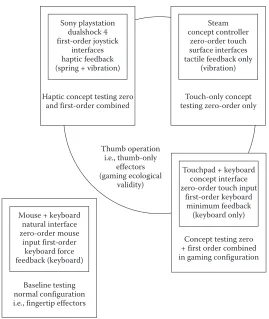
In this study, we compared four types of game controller interfaces: a Logitech G303 Daedalus Apex mouse and Corsair K60 Vengeance keyboard, a prototype Touchpad inter-face and keyboard combination (Logitech Touchpad T650 and Logitech Ultrathin key-board), a concept controller (Steam controller), and a familiar console controller (Sony DualShock 4) (see Figure 7.2). Each of the controllers used during this experiment display certain control order and haptic qualities that serve to further distinguish themselves from each other, for a brief description of operation factors (see Figure 7.3).
Logitech G303 Daedalus Apex Mouse and Corsair K60 Vengeance Keyboard
The mouse and keyboard were used in our experiment to serve as a baseline for our analy-sis. The mouse and keyboard interface is very popular among FPS gamers and has over 50 years of research behind it. The mouse controls the player’s X–Y (Cartesian plane) targeting cursor (position rate) and the “WASD” key combination functions to derive the Z direction of travel (control rate). The left and right mouse buttons perform different tasks depending on the game being played, but usually they are primary and secondary weapon fire. The
baseline mechanisms of the mouse operate as an isotonic zero-order input device. The
mouse is also operated on a solid surface, with its movement controlled not only by the hand, but also in tandem with the wrist, forearm, and shoulder displacement. The com-bination of multiple joint movements is conducive with increased accuracy and comfort ratings due to our ability to combine small movements in each of these joints for coarse and fine movements during tasks. There is usually very little in terms of tactile indication of task completion during the normal operation of a mouse and a keyboard in gaming sys-tems. However, there are force elements that can affect performance, as are present here in our mouse and mechanical keyboard.
With the mouse, the surface of operation (a wood-veneer desktop in our study here) may cause a noticeable drag upon the smoothness of movement. For the Logitech G303, the glide
dynamic coefficient of friction = 0.11 μ (k) and the static coefficient of friction = 0.17 μ (s).
In addition, the weight of the mouse is also considered as an important design feature. For
the Logitech G303, the mouse-only weight = 87 g, and the mouse plus cable = 127 g. The
[image:10.546.74.472.91.160.2]force” elements. These combine both force and tactile cues to indicate that a button has been pressed or clicked and an activation point has been reached. The forces required to cause a button to travel can be seen in force graphs, which indicate the point of key acti-vation and return. Keyboards with mechanical elements apply springs and dampers to provide users with additional tactile information through clicks or bumps to indicate their activation point. The Logitech G303 mouse contains a metal spring button-tensioning sys-tem that keeps the left and right buttons precisely positioned, reducing pretravel, back-lash, and delivering optimal response and feel, ensuring that in-game actions remain fast and accurate. The Corsair K60 contains Cherry MX red switches that require only 45 g of force to actuate. The mouse and keyboard are now regarded as the most familiar of all UIs in HCI, with most of all PCs requiring at least one of these interfaces for operation. This increase in familiarity affects the user’s ability to complete tasks as they are already acquainted with the device and its operation style.
Logitech Touchpad T650 and Logitech Ultrathin Keyboard
The Logitech Touchpad T650 is a smooth flat glass surface that is touch sensitive. It is mul-tiplatform, including gesture recognition for OSX and Windows 8. It is proficient in terms
Sony playstation dualshock 4 first-order joystick
interfaces haptic feedback (spring + vibration)
Steam concept controller
zero-order touch surface interfaces tactile feedback only
(vibration)
Haptic concept testing zero
and first-order combined testing zero-order onlyTouch-only concept
Thumb operation i.e., thumb-only
effectors (gaming ecological
validity)
Touchpad + keyboard concept interface zero-order touch input
first-order keyboard minimum feedback (keyboard only) Mouse + keyboard
natural interface zero-order mouse
input first-order keyboard force feedback (keyboard)
Concept testing zero + first order combined in gaming configuration
[image:11.546.139.408.81.400.2]Baseline testing normal configuration i.e., fingertip effectors
of precision, comparable to that of most mice, according to Logitech, but is isometric rather than isotonic. It is also customizable within the Logitech SetPoint software. Practical deci-sions were made to change the normal operational parameters of the device. The Touchpad was arranged and presented to the user as a thumb-operated input device for cursor move-ments, as opposed to the index finger; it was also to be held in the subject’s hands rather than placed on a flat surface. These changes were made to maintain ecological continuity in gesture input styles between the other console-based game controller devices.
The Touchpad and keyboard-combined interface was the first of our concept control-ler types. It combined an isometric touch surface with a zero-order control process and a first-order keyboard device for Z-plane manipulation. The Cartesian plane was manipu-lated via thumb motions over the Touchpad surface. The surface itself was sensitive to
input across its 134 mm × 129-mm area and has a weight = 210 g. The Touchpad also
inte-grates a “dead zone” that allows the user to rest their finger upon its glass surface without moving the cursor. Because the surface is smooth, the Touchpad relays very little tactile information to the user via the thumb. Users were encouraged to use the tap function for selecting a target. However, it was also possible to “click” the device by pressing down anywhere on its surface. The accompanying Ultrathin keyboard was selected for its slim design (weight = 355 g) and a relatively light button force functionality. For users to locate the WASD keys without looking away from the screen, small rubber domes were applied to tactilely indicate thumb location upon the keyboard. Underneath the keyboard, we added an additional right-click and spacebar button for ease of use during multiparamet-ric operations.
Steam Controller
The Steam controller is the second of the concept controllers tested. This controller is a
prototype input device from Valve (Valve Corporation, 2014). The controller
incorpo-rates a combination of interfaces that are gesture sensitive and clickable. The most
dis-tinctive difference between this device and the traditional controller is the introduction of circular Touchpads instead of joysticks. Steam is attempting to bridge PC and console genres by increasing the fidelity of thumb-based movements to that of those achieved by
a mouse in zero-order control input situations. The thumb-operated touch surfaces are
Sony DualShock 4
The proliferation of console gaming has led to the familiar form factors and designs used by the Microsoft Xbox and Sony PlayStation (Microsoft, 2014; Sony, 2014). In particular, these console game controller shapes and interface types have become the most recogniz-able of all game interfaces. These controllers incorporate a combination of joysticks with button and trigger input mechanisms. In the most recent Sony PlayStation controller, the design and construction elements of the gamepad have changed. The concave analog sticks have been upgraded, along with the introduction of a new Touchpad surface between the thumbsticks, with additional accelerometer and gyroscope motion controls. The overall robustness of the PS4 controller has also been improved upon in comparison to previ-ous generations, while maintaining a total weight of 210 g. The DualShock 4 operates as a first-order elastic interface that maintains a spring force upon the thumb during opera-tion. The spring force is directional and relates back to the central return position of the stick at rest. The movement of the thumbstick during operation follows a convex shape. In addition to this force feedback, the DualShock 4 is capable of stimulating the user’s tactile system through controlled vibrotactile feedback. The spring and vibrational elements of these gamepads deliver a unique and somewhat controllable haptic feedback to the user.
CASE STUDY 1: FUNCTIONALITY TESTING
OF VIDEO GAME CONTROLLERS
The aim of our first experiment was to investigate the targeting performance of the chosen game controllers and compare the functionality, usability, and user experience data that were collected and highlighted to the various controller input configurations. The accuracy of the controllers was measured using a two-dimensional (2D) Fitts’ Law assessment and the pointing experience-dependent measures were calculated using validated scales for posttask testing.
Participants
Participants in experiment one (Group A) consisted of 10 males and two females. The
participants in Group A were aged 22–41 (M = 28.42; SD = 7.08). All participants in this
group had daily experience of using a mouse as a pointing device. Only 50% of partici-pants used a Touchpad every day; 42% once a week; and 8% once a month. 98% of the par-ticipants considered themselves as gamers: who play at least every day or once a week (36% respectively); several times a month (18%); and once a month (8%). The preferred platform for gaming was PC gaming (65%), followed by mobile platforms (27%), and finally con-soles (8%).
Experimental Procedure
measuring discrete pointing tasks with total time-only measurements, as calibrated in Table 7.1. For all except the mouse, participants were asked to use their right-hand thumb to manipulate the X–Y targeting cursor. Each trial presented all combinations of targeting
and selecting (3 × 2 ×δ) as can be seen in Table 7.1, with the home square being randomly
located on the screen at each step. The experiment consisted of one trial per block, with four blocks in total carried out for each controller. With the preset variables, the modi-fied Shannon formulation was used to calculate the IDe for each block of the experiment (Equations 7.4 and 7.5). Participants were asked to complete a short posttask questionnaire to evaluate the different design aspects of the controller. More open-ended questioning and an informal verbal discussion of their experiences followed this.
RESULTS AND DISCUSSION
The data collected from the WinFitts program and user questioning were used to quantify the functionality of the devices in terms of TP, move time (MT), and errors made. We then performed linear regressions to validate these findings. Participants completed a usability
questionnaire to gather posttask usability data. These questions were based on the ISO
9241-9 document mentioned earlier. Finally, users were asked to describe their experience, which was done in two ways. First, users were asked posttask to report on their experiences with each controller type. Second, post experiment verbal questioning was used to elicit more specific user experiences with each of the controller types.
Pointing Task Results
Throughput
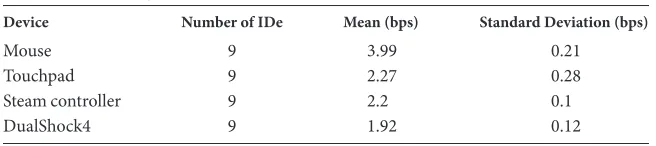
User activity with the controller is assessed using a measure of TP in bits per second (bps). For the four devices, we calculated and compared the respective TP rates over the ID derived from the test parameters defined earlier (see Equation 7.3). As expected, the TP
rate of the mouse considerably outperformed the other devices as a pointing tool. The
mean TP of the devices per IDe value is listed in Table 7.2.
[image:14.546.81.466.99.142.2]These statistics are illustrated as boxplots in Figure 7.4. As was mentioned earlier, the inclusion of the mouse as a pointing device was to serve as a baseline for comparison. The Q3
TABLE 7.1 Experiment Design
Target distance (mm) 40 80 140 Target diameter (mm) 4 8 16
[image:14.546.110.438.611.684.2]Target angle (deg) 0 45 90 135 180 225 270 315
TABLE 7.2 Throughput
Device Number of IDe Mean (bps) Standard Deviation (bps)
Mouse 9 3.99 0.21
Touchpad 9 2.27 0.28
Steam controller 9 2.2 0.1
other controllers were evaluated as handheld input devices that did not require a desktop to support them, differentiating them from the mouse in physical operation.
In terms of TP, the other devices performed poorly in comparison to the mouse. The second highest TP was acquired with the Touchpad, with an average TP of 2.27 bps, 43% less bps than the mouse. The Steam controller, with a mean TP of 2.2 bps, 45%, followed this closely less than the mouse and 3% lower than the Touchpad. Finally, the DualShock 4 controller had an average TP of 1.92 bps, 52% lower than the mouse, 15% lower than the Touchpad, and 12% lower than the Steam controller. The reduced TP rate over the IDe range for each of the input devices increased users’ dissatisfaction with the device for pointing tasks, as discussed later. This can be seen in the overall user assessment of each controller in Figure 7.8.
A one-way analysis of variance was conducted to explore the impact of input device on TP, as identified in the Fitts’ test. There was an overall statistically significant difference
at the p < 0.05 level in TP between the four controllers: F (3, 32) = 191.47, p < 0.000. The
overall effect size was as large as 0.92, calculated using eta squared. Post hoc comparisons using the Tukey HSD (honest significant difference) test indicated that the mean TP for the mouse was significantly different from the Touchpad, Steam, and DualShock 4 controllers (see Table 7.3). In addition, significant mean differences at the p < 0.05 level were noted between the DualShock 4 and the mouse, Touchpad, and Steam controller. Despite reach-ing an overall statistical difference, post hoc testreach-ing has highlighted the small size of the actual differences in mean scores between Touchpad and Steam controllers and hence they were not deemed statistically significant (p = 0.85).
4.50
4.00
3.50
3.00
Th
roughput
2.50
2.00 8
Mouse Touchpad
Device
Steam DualShock4
[image:15.546.125.420.84.324.2]1.50
Move Time
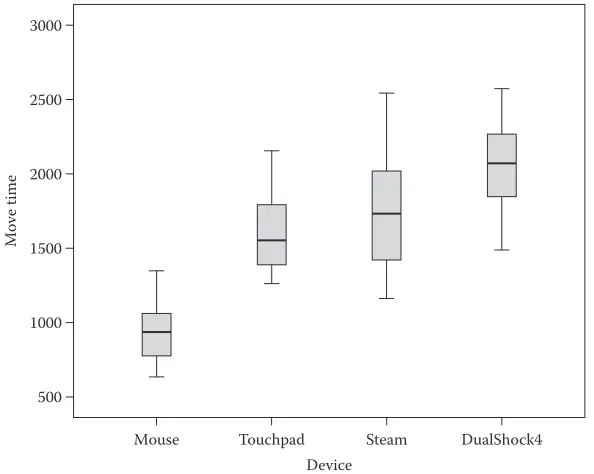
The mean MT for each device also followed a similar pattern as seen in the TP results (see Figures 7.5 and 7.6). The mouse outperformed all devices with a mean MT of 954.25 ms across the IDe variables outlined earlier. The Touchpad device followed with an
aver-age MT of 1625.65 ms, 70% slower than the mouse. The Steam controller was next,
3000
2500
2000
1500
Move time
1000
500
Mouse Touchpad
Device
[image:16.546.100.448.101.305.2]Steam DualShock4
FIGURE 7.5 MT boxplots for each device. TABLE 7.3 Post Hoc Tests for TP
Tukey HSD Multiple Comparisons 95% Confidence Interval
(I) Devices (J) Devices Difference (I–J) Standard Error SigniMean ficance BoundLower BoundUpper
Mouse Touchpad 1.71* 0.096 0.00 1.45 1.97
Steam 1.79* 0.096 0.00 1.53 2.05
DualShock 4 2.06* 0.096 0.00 1.8 2.33 Touchpad Mouse − 1.71* 0.096 0.00 − 1.97 − 1.45
Steam 0.08 0.096 0.85 − 0.18 0.34
DualShock 4 0.35* 0.096 0.00 0.09 0.61 Steam Mouse − 1.79* 0.096 0.00 − 2.05 − 1.53 Touchpad − 0.08 0.096 0.85 − 0.34 0.18 DualShock 4 0.27* 0.096 0.00 0.01 0.53 DualShock 4 Mouse − 2.06* 0.096 0.00 − 2.33 − 1.8
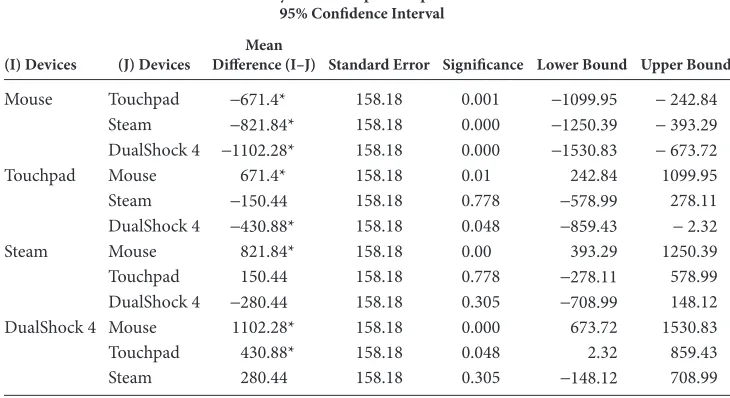
[image:16.546.126.423.421.658.2]with an average MT of 1776.09 ms, 86% slower than the mouse and 9% slower than the Touchpad. Finally, the DualShock 4 controller presented an average MT of 2056.52 ms, 116% slower than the mouse, and 27% slower than the Touchpad and 16% slower than the Steam controller. A one-way analysis of variance was carried out to explore the impact of the controller type on MT. A statistically significant difference (p < 0.05) was found in MT scores for the four controllers: F (3, 32) = 17.51, p < 0.000. The overall effect size, calculated using eta squared, was 0.62. Post hoc comparisons using the Tukey HSD test indicated that the mean MT score for the mouse (M = 954.25, SD = 220.41) was signifi-cantly different from the Touchpad (M = 1625.65, SD = 288.96, and p = 0.001), the Steam controller (M = 17760.9, SD = 452.6, and p < 0.000), and the DualShock 4 (M = 2056.52, SD = 336.78, and p < 0.000) (see Table 7.4). The difference in mean MT scores between
Touchpad and DualShock 4 controllers were also significant (p = 0.048). The
differ-ence in mean MT scores between Steam and DualShock 4 controllers were insignificant (p = 0.305).
Errors
The TP and MT measurements from the Fitts’ test provided a good measure of the accu-racy and time taken by the participants to complete pointing tasks with each controller. However, they do not clearly indicate the success rate of the tasks alone. To accurately eval-uate the controllers, the number of errors was measured per ID value and processed using the Shannon formulation. As was seen in the TP and the MT analysis, the mouse outper-formed the other devices with the least amount of errors (6%), followed by the Touchpad (8%), then the Steam controller (9%), and finally the DualShock 4 (10%).
3000
y = 400.79x + 599.43
R2 = 0.96282 y = 535.83x – 119.79
R2 = 0.912
y = 274.11x + 641.25 R2 = 0.9695
y = 240.51x + 89.861 R2 = 0.9497
DualShock 4 Steam Touchpad Mouse 2500
2000
1500
Move time (ms)
1000
500
0
1.5 2.0 2.5 3.0 3.5 IDe (bits)
[image:17.546.89.459.89.316.2]4.0 4.5 5.0 5.5
Linear Regression
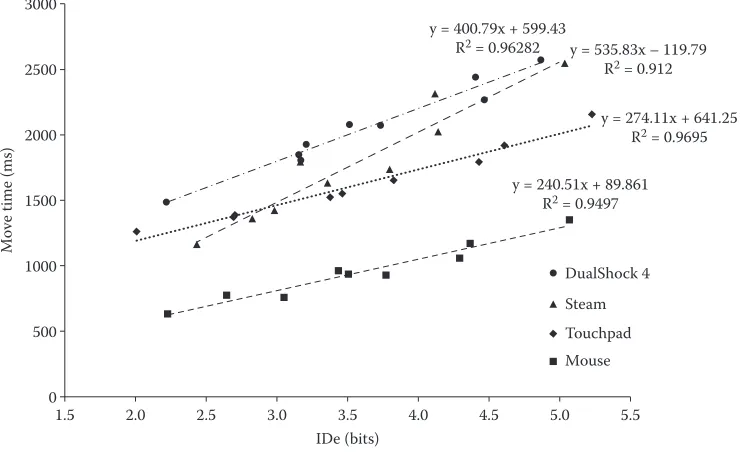
In addition to the above analyses, we performed a least-squares linear regression to find the intercept and the slope parameters of Equation 7.2. This test highlighted the linear
relationship between MT and ID, and validated our results as highly correlated (R2). For all
positive intercept values, we maintained regression values under 400 ms. Negative
inter-cept values did occur, but did not exceed −200 ms. These measurements for each IDe are
shown in Tables 7.5 through 7.8.
Usability: Pointing
[image:18.546.89.454.110.309.2]As well as quantifying the pointing efficiency of the four devices, we also asked users to complete a questionnaire to evaluate usability and user experiences with these controllers for pointing tasks. Almost all participants expressed dissatisfaction with the DualShock 4 as a pointing device, causing some participants to feel that the task was too difficult to complete. Kruskal–Wallis testing revealed some statistically significant differences in question responses across the four different controllers. Four specific usability areas were
TABLE 7.4 Post Hoc Tests for MT
Tukey HSD Multiple Comparisons 95% Confidence Interval
(I) Devices (J) Devices Difference (I–J) Standard Error SigniMean ficance Lower Bound Upper Bound
Mouse Touchpad −671.4* 158.18 0.001 −1099.95 − 242.84 Steam −821.84* 158.18 0.000 −1250.39 − 393.29 DualShock 4 −1102.28* 158.18 0.000 −1530.83 − 673.72 Touchpad Mouse 671.4* 158.18 0.01 242.84 1099.95 Steam −150.44 158.18 0.778 −578.99 278.11 DualShock 4 −430.88* 158.18 0.048 −859.43 − 2.32 Steam Mouse 821.84* 158.18 0.00 393.29 1250.39 Touchpad 150.44 158.18 0.778 −278.11 578.99 DualShock 4 −280.44 158.18 0.305 −708.99 148.12 DualShock 4 Mouse 1102.28* 158.18 0.000 673.72 1530.83 Touchpad 430.88* 158.18 0.048 2.32 859.43 Steam 280.44 158.18 0.305 −148.12 708.99 * The mean difference is significant at the 0.05 level.
TABLE 7.5 Mouse-Pointing Results Including MT Linear Regressions (y–ŷ)
Mouse
IDe 2.23 3.05 2.64 3.50 3.44 3.77 4.29 4.37 5.07 TP 3.67 4.23 3.66 3.99 3.95 4.27 4.18 3.93 3.99 MT 634.81 763.32 775.71 936.31 962.97 927.22 1062.60 1175.52 1349.77 Error rate 0.02 0.02 0.04 0.04 0.07 0.04 0.07 0.08 0.11 y = 240.51 ×+89.861 625.29 823.13 725.79 932.22 916.14 995.67 1121.83 1140.21 1308.06 y–ŷ 15.69 − 12.36 8.61 4.23 − 58.76 15.78 26.80
[image:18.546.80.468.577.685.2]identified, including smoothness of operation, mental effort exerted during the task, the accuracy of the device in pointing, and the speed of the cursor movement. The overall evaluation of the individual devices showed statistical significance in the answers given for each of the four controllers. A diverging stacked bar chart comparison between these devices for each of the questions can be seen in Figure 7.7. The significance of these differ-ences shall also be discussed (Table 7.9).
Smoothness of Operation
[image:19.546.78.470.99.207.2]First, significant differences in the users’ evaluation of smoothness of operation were mea-sured. The mouse was deemed the smoothest of the four controllers with 67% of users agreeing that it was fairly smooth or too smooth in its operation. The overall user percep-tion of smoothness decreased from here for the individual controllers. 50% of users found Q4
TABLE 7.8 DualShock 4-Pointing Results Including MT Linear Regressions (y–ŷ)
DualShock 4
IDe (bps) 2.22 3.15 3.17 3.73 3.21 3.51 4.47 4.40 4.86
MT (ms) 1487.64 1847.29 1807.30 2072.43 1929.84 2079.97 2268.27 2442.71 2573.26 Error rate (%) 0.02 0.03 0.04 0.03 0.17 0.04 0.04 0.09 0.15 TP (bits) 1.79 1.92 2.03 2.08 1.69 1.89 2.05 1.90 1.95 y = 535.83x −119.79 624.00 848.26 852.10 987.25 860.98 934.18 1164.02 1148.41 1259.00 y–ŷ −1.89 −15.95 −62.34 −22.42 45.40 73.55 −121.16 79.29 25.56
[image:19.546.77.471.247.354.2]RSQ 0.96
TABLE 7.7 Steam-Pointing Results Including MT Linear Regressions (y–ŷ)
Steam
IDe (bps) 2.43 2.98 2.83 3.36 3.16 3.80 4.14 4.12 5.03 MT (ms) 1162.07 1422.92 1360.49 1632.76 1790.28 1734.99 2020.82 2315.77 2544.69 Error rate (%) 0.01 0.03 0.05 0.04 0.11 0.03 0.07 0.11 0.10 TP (bits) 2.26 2.15 2.23 2.24 2.10 2.36 2.21 1.98 2.24 y = 535.83x −119.79 674.91 807.07 769.44 897.08 850.95 1002.86 1084.82 1080.20 1300.20 y–ŷ −21.57 −55.16 −33.76 −45.86 214.44 −179.29 −76.05 229.20 −32.02
[image:19.546.75.474.394.501.2]RSQ 0.91
TABLE 7.6 Touchpad-Pointing Results Including MT Linear Regressions (y–ŷ)
Touchpad
IDe 2.01 2.71 2.69 3.38 3.82 3.46 4.43 4.60 5.23
TP 1.69 2.00 2.08 2.31 2.31 2.33 2.60 2.55 2.57
MT 1262.36 1390.77 1370.22 1525.92 1653.85 1553.24 1793.90 1923.03 2157.51 Error rate 0.04 0.05 0.06 0.06 0.04 0.07 0.04 0.03 0.05 y = 274.11 ×+641.25 573.09 740.47 736.64 901.92 1009.43 922.10 1154.52 1197.16 1347.10 y–ŷ 70.38 8.01 −8.16 −40.83 −35.44 −36.51 −60.75 19.79 83.38
Roug
h
Smo
othness of movemen
t Ment al effo rt to p oin t Acc urac
y of p
ointing Sp eed of movemen t O verall ev aluation Mous e To
uchpad Stea
m Du alSho ck 4 Mous e Touchpad St ea m Du alSho ck 4 Mous e Touchpad St ea m Du alSho ck 4 Mous e Touchpad St ea m Du alSho ck 4 Mous e To
uchpad Stea
m Du alSho ck 4 Smo ot h Lo w Easy Slow Easy
to use
Hig
h
Difficult Fast Difficult to use
that the Touchpad was somewhat smooth or fairly smooth. User perception of smoothness
for the Steam controller was evaluated as fairly smooth or too smooth by 33% of users.
Interestingly, 17% of users thought the movement of the Steam controller was too rough. Finally, the DualShock 4 was considered too rough or fairly rough by 50% of users.
Mental Effort Exerted during the Task
Then, significant differences in the users’ evaluation of the mental effort required to point
were measured. The mouse received a relatively neutral overall rating of 50% for
men-tal effort in operation. The Touchpad received a similar rating, but it was weighted more toward a somewhat high rating of mental effort. The Steam controller was more evenly split across the neutral or somewhat rating of mental effort, with 50% of its user ratings. However, the DualShock 4 received 67% of reports highlighting it as requiring too high or fairly high amounts of mental effort for pointing tasks.
Accuracy of the Device in Pointing
Next, the significant differences in the users’ evaluation of the difficulty in accurately point-ing with each of the four controllers were calculated. As with the evaluation of smoothness, the mouse was deemed the easiest of the four controllers for pointing, with 88% of users
regarding it as fairly easy or too easy. The overall user perception of difficulty increased
[image:21.546.98.449.99.345.2]from here respectively for the different controllers. The Touchpad was seen to be fairly easy or too easy to use by 50% of users. The Steam controller was measured as being somewhat difficult or fairly difficult by 42% of users. Finally, the DualShock 4 was judged as being too difficult for pointing tasks by 83% of users.
TABLE 7.9 Significant Chi-Squared Results from Pointing Usability Data
Question Device Md x2 for (3, n= 47) p
Smoothness Mouse (n= 12) Touchpad (n= 12) Steam (n= 11) DualShock 4 (n= 12)
6 5 3 2.5
13.02 0.05
Mental effort Mouse (n= 12) Touchpad (n= 12) Steam (n= 11) DualShock 4 (n= 12)
4 3.5 4 2
9.82 0.000
Accuracy Mouse (n= 12) Touchpad (n= 12) Steam (n= 11) DualShock 4 (n= 12)
6.5 5.5 3 1
32.84 0.000
Speed Mouse (n= 12) Touchpad (n= 12) Steam (n= 11) DualShock 4 (n= 12)
4 4 4 2
9.45 0.025
Overall Mouse (n= 12) Touchpad (n= 12) Steam (n= 11) DualShock 4 (n= 12)
6.5 5 5 1.5
Speed of the Cursor Movement
The majority of users evaluated the mouse and Touchpad relatively neutral for speed, 42% and 50% respectively. The Steam controller was deemed to be somewhat fast by 50% of par-ticipants, but notably, 17% found it too slow. The DualShock was evaluated as being either fairly fast or too fast (59%) by the majority of users; however, some users thought it was too
slow (17%). The users whose evaluations were deemed too slow were further questioned
on their answers and they indicated that the process of selecting the target was too slow
overall, not the actual speed of the task. This may highlight a flaw in the wording of this
question in the literature.
Overall Evaluation
Finally, significant differences in the user’s overall evaluation of the four controllers at pointing tasks were computed. The final question was a single ease question (SEQ), which was used to establish the user’s overall rating of the controller’s ease of use. Users clearly preferred the mouse over the other three devices, with 75% of users rating it as fairly or too easy to use. With respect to the Touchpad and the Steam controller, users indicated a verbal preference for the Steam controller due to their familiarity with similar controller interfaces. When further questioned, users were uncertain of the thumb-based operating style of the Touchpad. This may be attributed to the transparency of these devices in com-parison to conventional pointing interfaces—the Touchpad is never operated with a thumb and is very rarely used in gaming. 42% of participants judged the Touchpad as being fairly easy to use and 25% thought it was fairly or somewhat difficult to use. The DualShock 4 was deemed the most difficult to use for pointing tasks, with 88% of users gauging it as fairly to too difficult to use.
User Experience: Pointing
dissatisfaction with the click mechanism. Finally, the DualShock 4 controller had the greatest user dissatisfaction in pointing tasks. Users found that the sensitivity was unpre-dictable and unsuitable for small movements. Large or macromovements were easy, but smaller, microadjustments were deemed impossible for some users. Some users were so frustrated with the pointing performance of this controller that they were reluctant to FIGURE 7.8 Tag cloud from questioning for experiment one (left–right; mouse, Touchpad, Steam, and DualShock 4).
Mouse TouchPad
DualShock 4 Negative,
37%
Negative, 53%
Negative, 57% Negative,
53%
Positive, 37%
Positive, 27%
Positive,
23% Positive,23%
Neutral, 26%
Neutral, 20%
Neutral, 20% Neutral,
24% Steam
[image:23.546.111.434.315.578.2]continue the experiment after only two blocks. However, all users rated the click-to-select trigger most favorably.
Further analysis of the feedback questionnaire revealed the following information about how the users experienced pointing with these devices. As can be seen in Figure 7.9, the mouse was the most positively rated for pointing tasks, followed by the Touchpad, with both the Steam and DualShock 4 controllers receiving the same percentage of positive remarks. The DualShock 4 received the highest number of negative comments, jointly fol-lowed by the Touchpad and Steam controller, with the mouse receiving the least number of negative comments. Positive and negative remarks toward the devices were reflective of the user ratings mentioned above.
CASE STUDY 2: IN-GAME TESTING OF VIDEO GAME CONTROLLERS
For the second stage of the experiment, participants were asked to use the same controllers in an FPS game. The game “Half Life 2” was used for this study. This game, developed by Valve Corporation, is an FPS with occasional puzzle-based tasks. The user’s in-game expe-riences and self-evaluation were captured at each controller stage via Likert-scale ques-tioning and an open-ended questionnaire. Personal comments were also recorded by the researcher using informal note taking in-game and postgame. The aim of this study was to evaluate the altered in-game usability and user experiences that may have occurred due to the altered state of controller feedback.
Participants
The second group of participants, randomly selected, was composed of seven males and five females. All participants were recruited in Cork (Ireland) and the surrounding com-munity area. The participants in Group B were aged 13–43 (M = 26.18; SD = 8.98). 42% of participants played video games on a daily basis, 33% once a week, 17% once a month, and 8% played less regularly. The preferred platform for gaming was the PC (33%), followed by
the PlayStation and other platforms (25% respectively), and finally the Xbox (17%). The
preferred game controller was the mouse and keyboard (42%), followed by the PlayStation controller (25%), while 17% of the participants preferred the Xbox controller, and the same number of participants preferred other interfaces (such as gesture controllers and touch-screens). All participants in Group B were familiar with a range of different game genres, including MMO, FPS, RTS, RPG, sports, and others. There was also no decisive preference of the current favorite game.
Experimental Procedure
IN-GAME RESULTS
Here, we present the results of the study based on the game “Half Life 2.” Initially, in-game deaths were recorded to quantify controller functionality, but did not reveal significant differences due to random variations in gameplay stages, and controller functionality was not the focus of this particular study. The counterbalanced ordering of controllers, the individual gamer’s previous experiences, and their skill level required the measurement of complex factors such as simultaneous multiparametric control, timing, flow, and previous training. As in Case Study 1, a usability questionnaire was presented to participants to gather posttask usability data. Finally, users were asked to describe their experience after each controller stage using open-ended questioning.
Usability In-Game
Kruskal–Wallis testing revealed some statistically significant differences in question responses across the four different controller stages. Specifically, questions about the forces required for moving and aiming, the accuracy of the controller for moving and aiming, and the overall user evaluation of respective controllers showed statistical significance in answers for each of the four devices. A diverging stacked bar chart comparison between these devices for each of the questions can be seen in Figure 7.10 (Table 7.10).
Evaluation of Physical Force Required for Moving
Kruskal–Wallis testing revealed significant differences in the user’s evaluation of physical force required for moving the character and aiming the crosshair. The mouse, Touchpad, and DualShock 4 have shown, on average, to require a relatively neutral amount of force for character movement and aiming. However, the user evaluation of perceived force required for the Steam controller was measured as being fairly low or too low by 33% of users.
Difficulty in Accurately Moving and Aiming
The same test also revealed significant differences in the user’s evaluation of the difficulty in accurately moving and aiming with each of the four controllers. As with the evaluation of force, the mouse was found to be the most accurate of the four controllers for pointing, with 41% of users judging it to be too easy to use. The Touchpad followed this, with 50% of users evaluating it as somewhat easy to fairly easy. The DualShock 4 was evaluated as being fairly hard to use for aiming and moving the character by 42% of users. Finally, the Steam controller was assessed as being too difficult to use by 58% of users. The statistical impor-tance of the overall user perception of accuracy in-game was particularly interesting as it was also found to have the same importance as in Case Study 1. However, in pointing tasks, the DualShock 4 was found to be significantly more difficult to move and aim accurately when compared to the Steam controller.
Overall In-Game Evaluation
Finally, the Kruskal–Wallis test revealed significant differences in the user’s overall in-game evaluation of the four controllers. Users clearly preferred the mouse to the other
Hig
h
Lo
w
Easy
Easy
to us
e
Fo
rce to move Mous
e
Touchpad
St
ea
m
Mous
e
Touchpad
St
ea
m
Mous
e
Touchpad
St
ea
m
Du
alSho
ck
4
Du
alSho
ck
4
Du
alSho
ck
4
To
o
To
o
Fairly
Fairly
Some
wha
tN
eutral
Some
wha
t
O
verall
ev
aluatio
n
Acc
urac
y in task
Difficult Difficult to us
e
FI
G
U
R
E 7
.1
0
St
at
ist
ic
al
ly s
ig
ni
fi
ca
nt u
ser r
at
ings f
ro
m i
n-ga
m
e a
na
ly
sis
The Touchpad and DualShock 4 controller appeared to be subjected to individual user preference. The Likert scaling for the Touchpad was rated positively by 58% of users and the DualShock 4 received only 29% positive reviews. Moreover, further questioning high-lighted the influence of an individual’s previous experiences with game controllers. 17% of users rated the DualShock 4 too easy to use, as it was their existing controller, which may have biased them somewhat against the Touchpad. The Steam controller was deemed the most difficult to use in-game. 67% of users gave it a negative rating, with 33% of the total ratings deeming it fairly difficult to use. These results were also statistically significant in the user evaluation of controllers for pointing tasks. However, the user’s ranking of the devices found the Steam controller more favorable than the DualShock 4.
User Experience: In-Game
[image:27.546.90.460.99.255.2]Test participants were asked to evaluate each controller via open-ended questioning at the end of each in-game testing block. The general feedback for all devices presented notable similarities made apparent in the usability questioning above. In addition, some interest-ing deviations could also be seen with the user’s evaluation of controllers in experiment one. The mouse was evaluated most positively, with users expressing that they found it easy to use for aiming the on-screen crosshair. Some users were unsure about the key-board arrangement, but they felt that they could quickly adjust and adapt to the new con-trol method. The second most-favored devices were the DualShock 4 and the Touchpad. Several users expressed that they were satisfied with both devices’ capability to accurately move and aim the crosshair. Smooth movements were possible with the DualShock 4; how-ever, users noted that they had to glide their right thumb over the Touchpad to look around quickly. In addition, users commented on the lack of ergonomic form in the design of the Touchpad and keyboard combination. These comments possibly represent the current prototype’s shortcomings, but should be given greater consideration when further develop-ing the device. Users also commented on the feedback mechanisms of the DualShock 4. The spring mechanisms in the thumbsticks provided users with force feedback informa-tion that assisted them in posiinforma-tioning the thumb within its operainforma-tional area. Several users
TABLE 7.10 Significant Chi-Squared Results from In-Game Usability Data
Question Device Md x2 for (3, n= 48) p
Force Mouse (n= 12) Touchpad (n= 12) Steam (n= 11) DualShock 4 (n= 12)
4 4 5 4
12.35 0.006
Accuracy Mouse (n= 12) Touchpad (n= 12) Steam (n= 11) DualShock 4 (n= 12)
5.5 4 1 2.5
8.34 0.04
Overall Mouse (n= 12) Touchpad (n= 12) Steam (n= 11) DualShock 4 (n= 12)
5.5 5 3 5
highlighted that they preferred to use this controller for their own gaming. Finally, the Steam controller registered the greatest user dissatisfaction in in-game operation. Similar comments were made about the Steam controller involving gliding and lift-off. Users were not able to accurately move toward a target, often overshooting. The sensitivity was also commented upon as being too high. Users found that their movements were erratic and jarring for actions that required precision.
An analysis of the questionnaire feedback revealed the following data about how users experienced in-game scenarios with these devices. As can be seen in Figures 7.11, 7.12, and in the Appendices, the mouse was most favorably rated for in-game tasks, followed by the Touchpad, the DualShock 4, and finally the Steam controller. Both the DualShock 4 and the Touchpad received nearly the same percentage of positive remarks. The Steam controller received the highest number of negative comments, followed by the DualShock 4 controller, the Touchpad, and finally the mouse. Positive and negative remarks toward the devices were reflective of the user ratings mentioned above.
DIFFERENCES BETWEEN POINTING AND IN-GAME ANALYSIS
Owing to the noticeable variation in controller evaluations, it was necessary to analyze and compare both sets of data from experiments one and two together. Functionality testing of pointing tasks is easily undertaken; however, these fail to show any meaningful data for the analysis of in-game scenarios. Also, the usability of game controllers for pointing was found to be problematic for game controllers, mainly due to the mixed zero-/first-order input strategies of each of the devices (Table 7.11).
Significant Variations in Usability Testing
Kruskal–Wallis testing was used to discover where variations between pointing and in-game usability testing occurred, as seen in Figure 7.13. For the mouse and Touchpad,
[image:28.546.77.468.469.646.2]no significant variations occurred between user evaluation ratings for each experiment. However, for the Steam controller, a significant variation was found between the user’s evaluation of mental effort required for pointing and moving the character/aiming. For the DualShock 4, significant differences were noted between smoothness of operation, per-ceived accuracy of the device and the speed of operation, finger fatigue, and the overall evaluation of the controller for gaming.
TABLE 7.11 Significant Chi-Squared Variations between Pointing and In-Game Usability Testing
Question Device Experiment Md x2 for (1, n= 23) p
Mental effort Steam Pointing
In-game 46 6.18 0.013
Smoothness DualShock 4 Pointing
In-game 2.54.67 8.34 0.03 Accuracy DualShock 4 Pointing
In-game 75.5 11.99 0.01
Speed DualShock 4 Pointing
In-game 24.5 5.64 0.02
Fatigue DualShock 4 Pointing
In-game 41 4.98 0.03
Mouse Touchpad
DualShock 4 Negative,
22%
Negative, 42%
Negative, 49% Negative,
63%
Positive, 50%
Positive, 28%
Positive,
10% Positive,
27% Neutral,
28%
Neutral, 30%
Neutral, 24% Neutral,
27% Steam
[image:29.546.90.459.545.684.2]Hig
h
In-game In-game In-game In-game In-game In-game
Roug h Difficult Difficult to us e Slow Hig h Lo w Smo ot h
Easy Fast None
Easy to us e To o To o Fairly Fa irly Some wha tS ome wha t Neutral St ea m mental effo rt re quir ed to comple te ta sk Du alSho ck 4 smo
othness of movemen
t pointing Du alSho ck 4 sp eed of op eration
pointing DualSho
Given the changes in user evaluations, it was not unexpected that the overall evaluation of the DualShock 4 controller was significantly different in-game than for pointing tasks (Table 7.12).
Significant Variations in User Experience Testing
With respect to the user experience tests, participants were considerably less positive about the Steam controller in the user experience interviews. The Steam controller received a much higher percentage of negative comments and a significantly lower number of positive remarks in the in-game experience reviews compared to the pointing evaluation. Many of the par-ticipants were familiar with the DualShock 4 metaphor of game control; some even indicated early on that it was their preferred controller for gaming outside the experiment. However, when questioned about the difficulties that they were experiencing with the Steam controller, many of the participants expressed that they would likely become familiar with the control-ler if given more time. When evaluating the controlcontrol-lers, novice gamers said that they pre-ferred the Steam device over the other game controllers tested; intermediate players prepre-ferred the DualShock 4; and advanced users preferred the mouse and keyboard. This trend may be reflective of the natural affordances of the thumbstick in a console/PC-gaming scenario.
CONCLUSIONS
In this chapter, we have presented two case studies that compared the performance of game controllers in pointing tasks, and collected data pertaining to the usability and user experiences in in-game scenarios. Our main investigation was focused on console-based game controllers and their comparison to a traditional mouse and keyboard. In particu-lar, we focused on a well-known game controller (Sony PlayStation DualShock 4) and two lesser-known models of a handheld game controller. Specifically, Valve’s Steam control-ler and a prototype Touchpad were used to represent emergent controlcontrol-ler-based methods of interaction. Our investigation first presented previous research and methodologies of game interaction that were relevant to our examination. We then conducted two experi-ments that sought to capture functionality, usability, and user experience data to evaluate each controller in tasks that were representative of FPS gaming. In many FPS games, there is “snap to target” assistance, with coarse and fine-grained targeting options. These were removed for the pointing tasks; however, they were retained for the in-game scenario tests.
Case Study 1 measured the subjective-pointing ability of our participants across the four con-trollers. It was found that the mouse was the most effective targeting device, followed by the Touchpad and Steam controller. The Steam controller and the Touchpad performed compara-tively well. The DualShock 4 controller was found to be the least effective at targeting tasks and
ranked very low in the usability and user experience data analysis for pointing functionality. The
[image:31.546.84.463.99.139.2]experiment provided a quantifiable measure of each controller’s effectiveness when used to seek TABLE 7.12 Overall Rating Chi-Squared Variations between Pointing and In-Game Usability Testing Question Device Experiment Md x2 for (1, n= 23) p Overall DualShock 4 Pointing
and select targets that varied in distance, angle, and size. The poor performance of the DualShock 4 may be attributed to the control system ordering of the joystick as a pointing device.
In Case Study 2, we continued our analysis of the same four controllers, but focused our attention to the usability and user experience within game play. We did not collect quantifiable data with this particular experiment, as it would have required a very complex experiment design to account for the numerous subject variables. Usability and user experience data were gathered to give quantitative and qualitative data results. Again, the mouse was rated the most favorable in testing, while the other controllers produced quite different and varied results in usability and user experiences. The DualShock 4 controller was assessed as being superior to both the Steam and Touchpad controllers. This may in part be attributed to the prevalence of console-based FPS games, where participants are already familiar with the control mecha-nisms used for targeting. Although the Steam and Touchpad were shown to function as supe-rior targeting mechanisms, they were rated less preferable as in-game controllers.
To conclude, we compared the collected data from both experiments and found that these two case studies combined show how the amalgamation of qualitative and quantita-tive methods, both in and out of gameplay, can be used together to measure functional-ity, usabilfunctional-ity, and to better understand the users’ overall experience. Specifically, we have shown that functionality testing alone is not sufficient when trying to establish a device’s usability and its effects on user experience.
CHALLENGES, SOLUTIONS, AND RECOMMENDATIONS
Limitations in our studies include the relatively short duration of the tests, and the focus being on the initial user experience of the devices. The first experiences of using a new con-troller can be a predictor of longer-term experience. That said, it is also possible that addi-tional problems and/or opportunities may be revealed with extended use (Karapanos, 2008). As a result, longitudinal use, considering the impact of learning and adaptation over time, are especially important considerations in evaluating new controllers (Kujala et al., 2011).
Another limitation of the studies is the limited consideration of the impact of control-ler aesthetics. The study involved the use of one prototype device (Touchpad), which was evaluated against other established available controllers. The established controllers have the advantage of optimized ergonomics and refined aesthetics (colors, material textures). Researchers have demonstrated relationships between product usability and product aes-thetics (Hassenzahl, 2004; Tractinsky et al., 2000).
The data collected in the studies consist of both data collected from the devices (with logging software), and data collected afterward as participants completed questionnaires. In future, it would be useful to complement this in-game data with biometric and video capture data (with emphasis on facial expressions and body movement). These data may complement the information collected postgame play in the questionnaires, and lead to a more complete understanding of the user experience.
REFERENCES
Birk, M. and R. L. Mandryk. Control your game-self: Effects of controller type on enjoyment,
moti-vation, and personality in game. CHI’13, ACM, 2013: 685–694.
Q5