Research Issues on Windows Event Log
P. K. Sahoo
1Professor, Department of Computer Science and Engineering, Visvesvaraya College of Engineering and Technology,
Hyderabad-501510, A. P., India.
R. K. Chottray
2Professor (Retd.), Department of Computer Science and Engineering, National Institute
of Technology, Rourkela, Odisha- 769008, India
S. Pattnaiak.
3Professor, Postgraduate Department of I & C T, Fakir
Mohan University, Vyasa Vihar, Balasore,
Odisha-756019, India,
ABSTRACT
Due to the rapidly increasing connectivity and dependency over the internet by individuals and corporations to carry out their businesses, security breaches are increasing day by day. Security and privacy are becoming a greater concern for the modern world. The report of loss of critical data, cyber attacks, denial of service attacks, hacking of websites and systems etc. are becoming the headlines in news channels. In this context, log data are very useful as it is used to track the history of an intruder in day to day work and providing evidence for further investigation. Audit log data, which are produced by windows operating systems, are in binary format and are not compatible with the log format of other log sources, which makes the log management very complicated and most challenging. The windows event log stays locally in the host system and the centralization of logging process is not possible due to its distributed design. This paper outlines a brief overview of the various processes involved in the windows event logging environment and stressed to centralize the logging process. This research work implements the Winsyslog server as the central server to centralize the storage of log data and event reporter for translation of windows event log data from binary format to syslog format. The proposed architecture to centralize the storage of log data helps the system administrator in a great way by simplifying the logging process and also enhances the security to log data, which are most important for forensic investigation.
Keywords
Information Security; Cyber Attacks; Audit Log; Syslog; Event Reporter; Winsyslog
1.INTRODUCTION
Now a day’s Viruses, Worm attacks, Denial of Service attacks, and Phishing attacks are becoming the headline topics in many news channels. The increasing attacks over the internet shows; how far the offensive techniques outpace the defensive techniques? As society grows increasingly dependent on the Internet for commerce, banking, and mission-critical applications, the ability to detect and neutralize network attacks is becoming increasingly significant
[1]. There are constant occurrences of Internet security problems due to rapid development
[2]. Network anomalies can arise due to various causes such as malfunctioning of network devices, network overload, malicious denial of service attacks, and network intrusions that disrupt the normal functioning of network services. Denial of service attacks occur when the services offered by a network are hijacked by some malicious entity. The offending party could disable a vital service such as domain name server (DNS) lookups and cause a virtual shutdown of the network [3, 4]. In case of network intrusions, the malicious entity
could hijack network bandwidth by flooding the network with unnecessary traffic, thus starving other legitimate users [5, 6]. In such a scenario computer audit logs, which contain descriptions of important events such as crashes of system programs, system resource exhaustion, failed login attempts, etc. are very useful for cyber security? Logs offer an endless well of valuable information about systems, networks, and the applications. Not only through logs and audit records, information systems often give signs that something is broken or will be broken soon but also reveal larger weaknesses that might affect regulatory compliance and even corporate governance. Many of these events are critical for post-mortem analysis after a break-in. In recent years, it has become important for researchers, security incident responders and educators to share network logs and many log tools and techniques have been developed to sanitize this sensitive data source in order to enable more collaboration. Unfortunately, many more attacks have been created, in parallel that try to exploit weakness in the process
[7]. The first target of an experienced attacker will be the audit log system: the attacker wishes to erase traces of the compromise, to elude detection as well as to keep the method of attack secret so that the security holes exploited will not be detected and fixed by the system administrators. Today log traces are widely used to identify and prevent violations of corporate information systems
[8]. At the very highest level, logs are a vehicle of accountability. Audit logs which are being considered as one of the most important parts of modern computer systems, provides information about the current and past states of systems
[9]. Event logging and event logs play an important role in modern IT systems. Logs are one of the most fundamental resources to any security professional. It is widely recognized by the government and industry that it is both beneficial and desirable to share logs for the purpose of security research [10]. Today, many applications, operating systems, network devices, and other system components are able to log their events to a local or remote log server. In most of companies or organizations, logs play important role in information security [11]. For this reason, event logs are an excellent source for determining the health status of the system. An audit log is the simplest, yet also one of the most effective forms of tracking temporal information. The idea is that any time something significant happens you write some record indicating what happened and when it happened
[12]. Log-files are important sources of forensic information because they usually connect a certain event to a particular point in time
management also involves protecting the confidentiality, integrity and availability of logs. Hence log management is very essential for any organization, as it is a helping hand to combat cyber security by protecting the log files from the attackers, who are trying to alter/erase the log files in order to wipe out evidence of his trespass out of those files.
2.
EVENT LOGGING PROCESS IN
WINDOWS ENVIRONMENT
The event logging process in windows environment is implemented as a system service. In the Win32 operating system, a service is a process that runs in the background and is controlled by the Service Control Manager (SCM) and performs the necessary actions. The event logging service is responsible for governing all access to the windows event logs. Applications and drivers are not allowed to directly read and write the event logs. They must request the SCM that the event logging service retrieve and write event data for them and perform the basic log maintenance operations (such as
backup, clear, etc.) on behalf of them. Having a single access point to the event logs insures that all operations on the logs will always be correctly performed, through a single uniform API required by all the processes to access the log information and users with insufficient privileges will not be allowed access the log data.
2.1
Architecture of the Windows Event
Logging Process
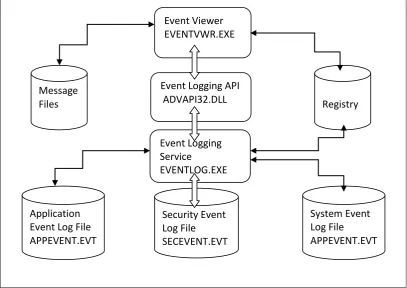
[image:2.595.94.502.267.555.2]The windows event logging process consists of a number of components, with the event logging service itself at the heart of the process. Event log files, the registry, event viewer, message resource files and an event logging API library are all required to read, write, and maintain event log in windows environment. The diagram given below shows the interaction of all of the components of the windows event logging process with a Win32 application (EVENTVWR.EXE).
Fig 1: shows the interaction of a Win32 program with the event logging service components When windows operating system boots, it starts the SCM,
which in turn starts all of the services configured for automatic start-up. One of these services is the Event Logging service (EVENTLOG.EXE). When an user-process require to access the event logs, it must make an explicit request to the event logging service in order to perform the desired operation (read, write, back up, query, or clear). The request is made by calling one or more of the functions defined by the event logging API. The API is made available to WIN32
processes in the
%SystemRoot%\SYSTEM32\ADVAPI32.DLL, the Dynamic Link Library. This is the DLL that contains several other APIs, including those of the Service Control Manager and the registry. The event logging API is therefore the gateway to the information stored in the log files. When the operating system, device driver or application reports an event, it is actually sending the report to the event logging service. The event logging service in turns stores the information associated with each event as a record in one of the three
event log files located on the local system disk. The registry also plays a very important role in event logging. All event sources must be registered with the registry to be properly recognized by the service. The event logging service uses each source's registration information to find the localized strings for each of the event message. The Windows Registry keeps a track of recently accessed files/folders, user's preferences. This Registry Key stores information about the recently typed commands from the run window. Windows stores the entire contents of the Registry in two files: System.dat and User.dat. These are the binary files that no one can able to view using a text editor. Windows also turns on the read-only and hidden attributes of System.dat and User.dat so that no one can accidentally replace, change, or delete these files. System.dat contains computer-specific configuration data and User.dat contains user-specific data. Registry is considered a central repository for configuration data. The Registry serves dozens of innovative purposes, allowing features that were difficult, at best, to implement in previous
Event Logging API
ADVAPI32.DLL
Event Logging
Service
EVENTLOG.EXE
Message
Files
Registry
Application
Event Log File
APPEVENT.EVT
System Event
Log File
APPEVENT.EVT
Security Event
Log File
SECEVENT.EVT
versions of Windows. It keeps a track of the software’s that are installed on the computer and how programs are related.
Registry Editor: the program that allows the user to edit the window registry. It shows the registry as a single unit, even though Windows stores the registry in two files.
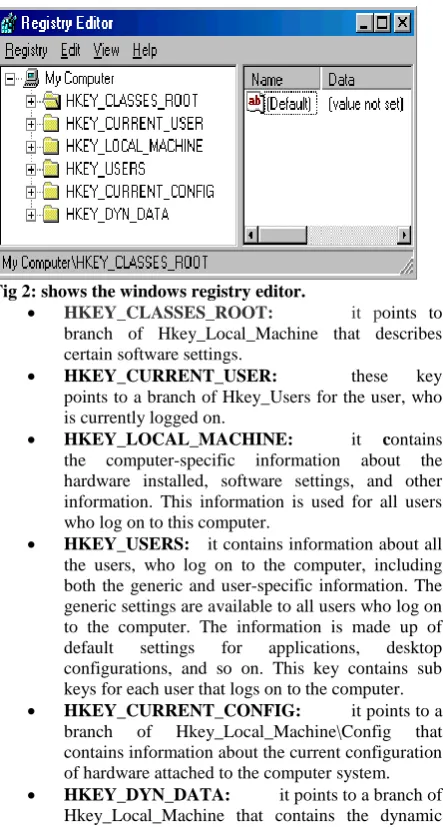
HKEY: Windows divides the registry into six sections called HKEY_Name are given in figure 2. HKEY means handle to a key.
Key: similar to a folder in Windows Explorer. It can contain additional folders and one or more values. Think of a key as sections within an outline.
Sub key: a child key that appears under another key (the parent key). This concept is similar to folders and subfolders in Windows Explorer.
Branch: represents a particular sub key and everything it contains. A branch can start at the very top of the registry but it usually describes a key and all of its contents.
Value entry: an order pair has a name and a value.
Default value: every key has a default value that may or may not contain data.
[image:3.595.58.280.353.767.2]To get into the Windows 95/98or Windows XP registry, click Start/Run/type regedit, then one can able to see the Windows Registry Editor as shown in the below screen.
Fig 2: shows the windows registry editor.
HKEY_CLASSES_ROOT: it points to
branch of Hkey_Local_Machine that describes certain software settings.
HKEY_CURRENT_USER: these key
points to a branch of Hkey_Users for the user, who is currently logged on.
HKEY_LOCAL_MACHINE: it contains
the computer-specific information about the hardware installed, software settings, and other information. This information is used for all users who log on to this computer.
HKEY_USERS: it contains information about all the users, who log on to the computer, including both the generic and user-specific information. The generic settings are available to all users who log on to the computer. The information is made up of default settings for applications, desktop configurations, and so on. This key contains sub keys for each user that logs on to the computer.
HKEY_CURRENT_CONFIG: it points to a
branch of Hkey_Local_Machine\Config that contains information about the current configuration of hardware attached to the computer system.
HKEY_DYN_DATA: it points to a branch of
Hkey_Local_Machine that contains the dynamic
status information for various devices as part of the Plug and Play information. The information for each device includes the related hardware key and the device's current status, including problems.
These are the information are very important for the purpose of log management. The event logs captures data related to all of the events which may or may not affect the system, e.g. change of permission, user logon/logoff etc. The Windows operating system has many places from where evidence can be extracted [14-15].
2.2
Limitations of the Existing Windows
Event Logging Process
Windows operating systems (Windows NT, 2000, XP) and applications produce audit log data that are written to the Windows event log in a binary format. The Event log service is by design a distributed system and there are no native Windows tools available to facilitate the centralization of logging functions. The window event log is incapable of handling messages from network devices such as routers and firewalls and also not compatible with other operating system logging functions. Incorporating auditing log data from network devices into a unified database of network event messages is therefore not possible using native Windows tools. The window event viewer application supports only basic functionality and is inadequate for monitoring audit log files for medium to large size network. In addition to this, the failure to be accepted to any external logging format makes it impossible to be compatible with the logging functions of other operating systems or network devices. This makes centralizing logging is a really challenging task.
3.
SYSLOG
IS
A
KNOWN
STANDARDIZED FORMAT
running on another host, which makes the log management most straightforward and efficient. Syslog uses message priorities to determine which messages should be handled more quickly than others, such as forwarding higher-priority messages more quickly than lower-priority ones. Many log analysis engines support the direct pulling of Event Log data but the mechanism to do so is generally very cumbersome, requiring a batch process to run continuously on the background that periodically connects to a share computer and transfers a copy of the entire log file. Such a process is
inefficient when the log files are very large and does not provide the benefit of having the logs moved to a log sever in real time. Logs sent to a separate log server are not having a risk of being lost in the event of software or hardware failure or logical attack on the Windows server. Syslog has been widely implemented by many hardware device vendors; consequently syslog is the de-facto standard for collecting messages from the majority of devices found on modern networks including servers, workstations, printers, routers, switches, etc.
4.PROPOSED SOLUTION
This paper demonstrates the use of Event Reporter in translating windows event log in binary format to syslog format. To centralize the collection of log data from various log sources, this research work implements the winsyslog as the central server, event reporter for translation of log data and monitor ware console to generate the reports. Event Reporter retrieves data from Windows event logs by polling log data at regular intervals, translate these event logs in binary format to syslog format and sends the log data to a central log server. The central server (Winsyslog server) then writes the log data into a database as per the rule set specified in the Winsyslog configuration. By default, syslog messages are sent to the local host (127.0.0.1) interactive server via port 10514. Once the WinSyslog service is configured, it operates
[image:4.595.123.370.344.598.2]in the background and performs the configured duties. Most importantly, this includes receiving Syslog messages, processing them via the rule base and storing them in a database. Syslog messages can be displayed with the help of Windows GUI, by Interactive Syslog Server or by using monitor ware console. To view Syslog messages interactively, the WinSyslog service forwards them to the Interactive server. By default, this is done via the nonstandard port 10514 over UDP. Winsyslog receives syslog messages from all the log sources. It can therefore be used to collect and centralize messages for an entire network including Windows and Unix hosts, printer, backup devices, routers, etc. The monitor ware console read the data from the database and automatically generates reports for the monitor servers.
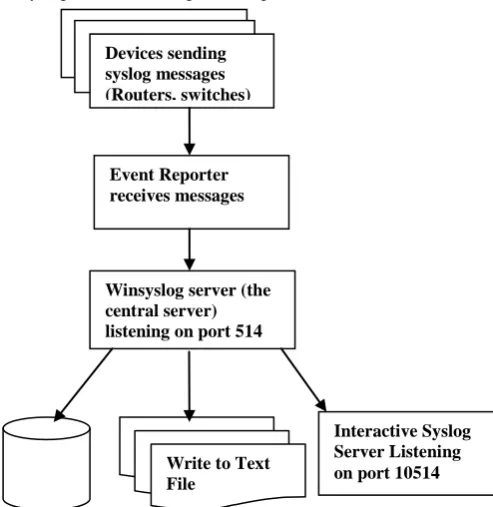
Fig 3: shows winsyslog server receives syslog messages from the various network devices.
The diagram shown above in figure 3 is the architectural diagram for the proposed work. The event reporter receives the messages from the various log sources such as routers, switches and host systems and translate these messages into
the syslog messages and then forward to the winsyslog (the central server) for further processing. The configuration of the event reporter as shown below in figure 4 use the forward syslog rule set to forward the syslog messages to the server. Devices sending
syslog messages (Routers, switches)
Event Reporter receives messages
Winsyslog server (the central server) listening on port 514
Interactive Syslog Server Listening on port 10514 Write to Text
.
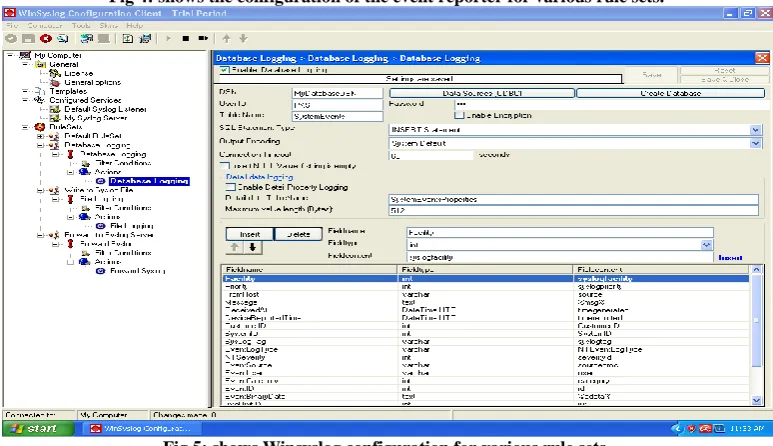
Fig 4: shows the configuration of the event reporter for various rule sets.
Fig 5: shows Winsyslog configuration for various rule sets.
As seen form the figure 5 above the winsyslog is configured to act as a syslog server using the service My Syslog Server, which recieves the syslog messages from the event reporter and send these messages to a database having the system dsn MyDatabaseDSN and User Id PKS using the rule set Database
[image:5.595.104.491.303.526.2]Fig 6: Interactive SyslogViewer showing the syslog messages stored in the database.
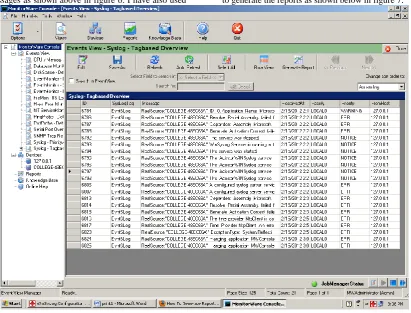
The Interactive Syslog server is used to view the current syslog messages as shown above in figure 6. I have also used
monitor ware console to view the current syslog messages and to generate the reports as shown below in figure 7.
[image:6.595.93.505.408.721.2]4.1
The Advantages of the Proposed
Centralizing Logging Process
By using the standard syslog format makes the logging process compatible to all the operating systems and all the log sources.
Winsyslog can be configured to write log data to a database or text files.
The central storage provides a secure and forensically sound storage of the logs, where it is far difficult for an attacker to alter or destroy log files.
Event Reporter translates the windows event log in binary form to standard Syslog form, which makes the logging process very efficient.
Events which are collected from the various sources and stored on the server remain on the central storage for a period of time, even if the sending system fails or the logs on it are accidentally erased.
5.
CONCLUSION
Cyber security is becoming one of the most critical issues that predominates the modern society. Securities of critical data are becoming a great concern for the today’s world. Security log data is being considered as one of the vital component of cyber security. Log data provides endless support to cyber security need to be protected from the hackers. The proposed architectural model is very efficient by centralizing the storage of log data. This research work has successfully incorporated the winsyslog as a central syslog server and event reporter in our Institution campus network to centralize the storage of log data. The work successfully implemented the event reporter in translating the windows event log in binary format to syslog format. The distributed nature of windows event log is easily overcome in the proposed solution. This model can be easily extended to other devices also in the future
.
6.
REFERENCES
[1]. David Watson, Matthew Smart and G. Robert Malan, “Protocol Scrubbing: Network Security Transparent Flow Modification”, IEEE/ACM transactions on Networking, vol. 12, no. 2, April 2004.
[2]. I-Long Lin Hong-Cheng Yang Guo-Long Gu Lin, Proceedings of 37th IEEE International Carnahan Conference on Security Technology, pages 14-16, October 2003.
[3]. G. Vigna and R.A.Kemmerer, “Netstat: A network based intrusion detection approach”, in the Proceedings of ACSAC, 1998.
[4]. J. Yang, P. Ning, X. S. Wang, and S. Jajodia, “Cards: A distributed system for detecting coordinated attacks,” in the Proceedings of SEC, Pages 171-180, 2000.
[5]. H. Wang, D. Zhang, and K. G. Shin, “Detecting syn flooding attacks,” in the Proceedings of IEEE INFOCOM, 2002.
[6]. S. Savage, D. Wetherall, A. R. Karlin, and T. Anderson, “Practical network support for ip traceback,” in the Proceedings of ACM SIGCOMM, Pages 295-306, 2000.
[7]. Honolulu, Hawaii, Proceedings of the 2009 ACM symposium on Applied Computing, pages 1286-1293, 2009.
[8]. Forte, D.V. Maruti, C. Vetturi, M.R. Zambelli “SecSyslog: an approach to secure logging based on covert channels”, IEEE first International workshop on Systematic Approaches to Digital Forensic Engineering, page 248, November 2005.
[9]. Annual IEEE Computer Security Applications Conferences, Issue ii, Pages: 219-228, 2009. [10]. Slagell A., Yurcik W., “Sharing computer network
logs for security and privacy: a motivation for new methodologies of anonymization”, IEEE 1st International Conference on Security and Privacy for Emerging Areas in Communication Networks, pages 80-89, September 2005.
[11]. Ya-Ting Fan Shiuh-Jeng Wang “Intrusion Investigations with Data-Hiding for Computer Log-File Forensics”, Proceedings of the IEEE 5th International Conference on Future Information Technology, pages 1-6, May 2010.
[12]. Mihir Bellare, Bennet S. Yeey, Forward Integrity for Secure Audit Logs, Novemebre23, 1997. [13]. Deborah A. Frincke, “IEEE Computer and
Reliability Societies, June 2009.
[14]. Huebner, E., and Henskens, F., “The role of operating systems in computer forensics”, SIGOPS Oper. Syst.Rev., 42(3), 1-3., 2008.
[15]. “Forensic investigation on Windows Logs,”
[Online]. Available:
http://www.icranium.com/blog/?p=194 [Accessed: Jun.02, 2010].
[16] National Institute of Standards and Technology Special Publication 800-122(Draft), 58 pages, January 2009.
[17]. C. Lonvick, “the bsd syslog protocol”, Cisco Systems, August 2001.
[18]. D. new and M. Rose, “Reliable Delivery for Syslog”, Dover Beach Consulting Inc., Nov. 2001.