Honeywell
SERIES 600
GECOS
Honeywell
GECOS
TIME-SHARING SYSTEM
GENERAL INFORMATION MANUAL
SUBJ ECT:
SERIES 600
General Description of the Time-Sharing System Including the Command Language, Files, Terminal Usage, and Service Subsystems.
SPECIAL INSTRUCTIONS:
This manual supersedes GE-600 Line GECOS III Time-Sharing System General Information Manual, CPB-1643, dated October 1969. Technical changes and additions from the previous edition are indicated by change bars in the margins. This manual includes features implemented in SDL 3.2G.
This manual is intended to provide information that is common to all users of the Time-Sharing System. As such, i t is a guide to other Series 600 Time-Sharing documentation, and contains descriptions of the command language and time-sharing files. This manual includes features implemented in Systems Development Letter 3.2G and 3.3.
The manual is also designed to provide specific information on service/utility subsystems and batch programs, and on terminal usage, some of which will not be pertinent to or identical for all time-sharing terminal installations.
~ 1969, 1970, General Electric Company
GE-600 LINE TSS GENERAL INFORMATION
Contents
1. INTRODUCTION TO THE GE-600 TIME-SHARING SYSTEM
GENERAL.
SCOPE OF MANUAL.
2. TIME-SHARING COMMAND LANGUAGE AND FILE USAGE
DEFINITIONS. • • • • • • • • • • • • • FILE DESIGNATION • • • • • • •
FILE NAMES, CATALOG NAMES, AND PASSWORDS • • • • • COMMANDS • • • • • • • • •
3. TIME-SHARING ERROR MESSAGES EXPLANATION
'"% •
~rr-.'!\4'T':7'
:-.1.~l\.l.."J.~~"4.6"'l...I...J ~SACE
GENERAL. • • • • • • • • • • • • • • • • • •
TELETYPEWRITER AND TYPEWRITER TERMINAL OPERATION • • • • • Correction of Typing Errors • • • • • • •
Log-On Procedure • • • • • • • • • • • • • • Entering Build-Mode Input • • • • • • • • •
Correction or Modification of Line-Numbered Files • Automatic Terminal Disconnections • • •
Log-Off Procedure • • • • • • • • • • • • Terminating an Output Process • • • • • • • Paper Tape Input in Build-Mode • • • • • • • Building File from Non-USASCII Paper Tape Automatic Paper Tape Input. • • • • • • • • DATANET 760 KEYBOARD/DISPLAY TERMINAL OPERATION • •
General Characteristics • • • • • • • • • Keyboard Module • • • • •
Alphanumeric Key Group. • Command Key Group • • • •
Display Module. • • • • • • • • • • • Log-On, Log-Off, Break, and Disconnection Procedures • • • EXCEPTIONS TO STANDARD SUBSYSTEM USAGE • • • • • • • • • •
Continuation Lines . • • . • • • • . • • • • • Order of Evaluation and Use of Parentheses • • • Mode and Precision of Calculation • • •
GECOS III FILE SYSTEM AND ACCESS SUBSYSTEM GECOS III File System •
ACCESS Subsystem. • . • • • ACCESS Functions • • • • • • • RECOVERY SUBSYSTEM • • • • • • •
Recovery Subsystem Operation. • • Questions and Responses • • • Error Messages • • • • • • • • • Error Messages with Response.
TIME-SHARING MEDIA CONVERSION PROGRAM. • • • • • Operational Description •
Defini tions • • • •
Errors • • • . . • • Binary Card Format. • . Sample Deck Setups . • FORTRAN TRANSLATOR SUBSYSTEM •
General Usage • • • • • • • • • Detailed Usage • . • • • •
Fatal Errors During Translation • Sample Translated Statements • • Sample Non-Translatable Statements. WRITING SUBPROGRAMS IN ASSEMBLY LANGUAGE •
Relocation. • • . • • • • • • • Subroutine Linkage • • • • • • • • Inter-Subroutine Communication. • Creating and Loading Binary Files • Macro Package • • • • • • • • • • SAMPLE PROGRAM • • . • • • • • • • • •
TIME-SHARING FORTRAN LIBRARY GENERATOR PROGRAM/LIBRARY EDITOR SUBSYSTEM • • • • • •
Library Generator Program Library Editor Subsystem.
Example of Combined LIBED and TSLG Usage • .
Error Messages . . . .
GE-600 LINE TSS GENERAL INFORMATION
1. Introduction to the GE-600 Line
Time-Sharing System
GENERAL
The GE-600 Line Time-Sharing System operates under the direction of the
GE-600 Line Comprehensive Operating Supervisor (GECOS III), and
constitutes one dimension of an integrated 3-dimensional information
system. Under GECOS III, the three processing dimensions batch,
remote-batch and time-sharing carryon their activities
simultaneously, with intercommunication existing between the three
processing dimensions. This feature of intercommunication has
considerable significance for the user of a time-sharing terminal.
The 'rime-Sharing System (TSS) consists of a TiLle-Sharing Executive and a
number of independent processing subsystems which
Executive and a common command language. The major
Time-Sharing System include the following:
operate under
subsystems of
the the
•
BASIC an algebraic-language compiler/executor,for the user with numerical problems
relatively small amounts of data.
designed involving
• TSS FORTRAN -- an algebraic-language compiler/loader with
extended capabilities for subprogramming, chain
overlays, and peripheral I/O, providing full batch-type programming capabilities.
• Text EDITOR and
maintaining, description.
RUNOFF a facility
and reformatting text
for bui lding ,
files of any
• ABACUS a "desk-calculator" facility featuring
sophisticated algebraic capabilities such as functions, summation operator, and remembered variables.
Other subsystems, providing service and utility functions for the
Time~Sharing System, are as follows:
• ACCESS -- a file system manipulation subsystem that allows
the user to create, delete, and modify file system
I
•
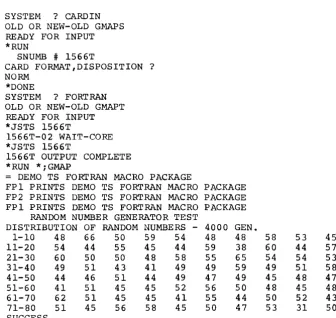
CARDIN -- a facility for submitting of a batch job at a time-sharing terminal for batch-world process~ng; job status information is available on demand. The SCAN subsystem complements CARDIN with its facilities that scan job output.• FDUMP -- a remote-terminal, word-oriented file inspection and maintenance facility for permanent files, regardless of their format. The files may have been generated in either batch, remote-batch, or time-sharing environments.
• FORTRAN TRANSLATOR permits the user to translate a time-sharing FORTRAN file into batch FORTRAN. The user may design and debug a program in time-sharing FORTRAN
and then optimize its processing by converting i t to batch FORTRAN.
• HELP -- supplies the user, at his terminal, with a detailed explanation of any system error message.
• JOUT -- provides a means for manipulating output from batch jobs. The batch job could be a CARDIN job with a disposition code of J or JOUT, a remote terminal batch job (GERTS), or a job submitted at the central site.
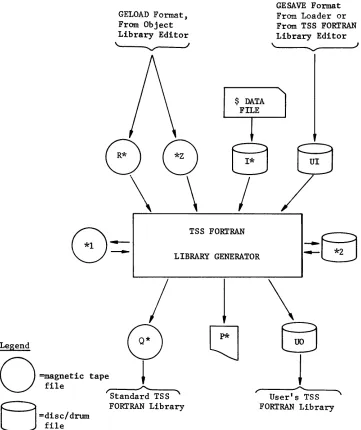
• Library Editor (LIBED) is specifically intended for editing of time-sharing FORTRAN subroutine library files, such files to be subsequently processed by the Library Generator (TSLG) program.
• Library Generator (TSLG) -- permits a user to produce his own library file of time-sharing FORTRAN subroutines, complete with directory, in a form that is acceptable to the time-sharing FORTP~~ loader.
•
LODX -- a means by which the user can program from a permanent file into System for purposes of checkout. checkout of user system software can is integrated into the command Time-Sharing System.load a subsystem the Time-Sharing Thus, a thorough be made before i t structure of the
GE-600 LINE TSS GENERAL INFORMATION
• RBUG -- a conversational debug routine that can be used in
conlunction with CARDIN. RBUG has all of the
cap~bilities of the DEBUG routine of the batch world,
permitting the user to monitor execution of his
program, insert and remove breakpoints, and alter
contents of memory locations and registers dyn~aically
-- all in an interactive manner.
• SABT -- retrieves specific locations of the ABRT file for
I
printing at the user's terminal. The file named ABRT
must have been created by the user and entered into his
Available File Table (AFT). When the system aborts the
user's program, the core storage area containing the
program is written to the ABRT file.
• SCAN -- provides a means of examining output of a batch job
from a time-sharing terminal; the batch job may have
been Submitted through CARDIN, remote-batch, or as
standard-central-site job with its output placed into
the file system.
• Terminal Debug Subroutine (TDS) -- permits the user to gain
control of a time-sharing subsystem, during checkout,
at selected locations within the subsystem. The user
may then display and/or patch selected areas, display
and/or modify registers, and either return to the
subsystem normally or to a specified location within
the subsystem.
The primary functions of the time-sharing command language are as
follows:
• Initiation of processing within a subsystem (e.g., LIST and RUN
commands)
• Storage, retrieval, and purge of permanent files (e.g., SAVE and
OLD commands)
• Request for operations on temporary time-sharing files (e.g.,
NEW and RESEQUENCE commands)
• Request for pertinent operating information (e.g., HELP and
STATUS commands)
• Direction of flow of control within the subsystem (e.g., DONE
and BYE commands)
A description of the command language is contained in Chapter 2 along
The GE-600 Line Time-Sharing user has not only the "normal" time-sharing facilities at his disposal, such as those described above, but also has access to traditional batch/remote-batch facilities. This capability is provided by a group of functionally-interrelated subsystems called the Terminal/Batch Interface Facility. The time-sharing terminal user has the ability to perform the following operations:
• Access and modify a file of information created in the batch or remote-batch dimension.
• Submit a job, such as a GMAP assembly and batch dimension and inspect the output
terminal.
execution, to the directly from his
• Establish conversational communication between a batch program and the user's terminal.
• Use an adjacent remote-batch terminal as a high-volume, hard-copy output device, and, indirectly, as a high-volume input device.
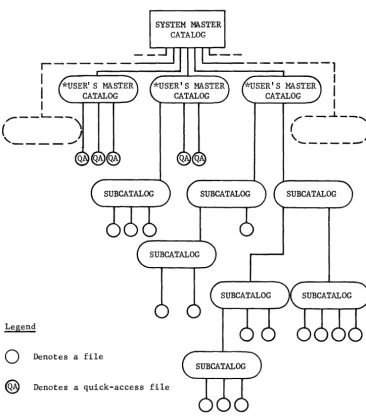
The basis for this communication between the several processing dimensions is (1) the GECOS III File System, which provides a common data-base for all users of the system, and (2) the common interface provided by the GECOS III Comprehensive Operating Supervisor. The file system provides automatic storage and retrieval of symbolically-named permanent files on high-capacity storage devices. These files are readily accessible in any processing mode. As a byproduct, the use of physical file volumes, such as card decks and tape reels, actually handled and stored by the user is considerably de-emphasized.
GE·600 LINE TSS GENERAL INFORMATION
The Time-Sharing System is completely modular and open-ended in that i t is explicitly designed to allow user-implemented subsystems, tailored for a specific application, to be added to L~e GE-supplied subsystems. This implementation of subsystems can be done readily, with no disturbance to the system. Specialized debugging facilities are provided
for the checkout of new subsystems simultaneous with normal time-sharing
operation.
SCOPE OF MANUAL
This manual is intended to provide the following:
• Information common to all users of the GE-600 Line GECOS III Time-Sharing System, including related documentation.
• Information concerning the general use of types of terminals available to the time-sharing system user.
• Information pertaining to the use of command language and time-sharing files.
•
~niurrnaLlon perLalnlng to and batch programs which System user.specl~lc servlce/utlLlty subsystems
are meaningful to the Time-Sharing
Note
GE-600 LINE TSS GENERAL INFORMATION
2. Time-Sharing Command Language and
Fi Ie Usage
Operation of time-sharing subsystems is controlled by means of a command
language--a set of orders or instructions with which a user requests
functions to be performed (e.g., LIST, RUN), manages the flow of control
for his session at the terminal (e.g., BYE, DONE), and directs file
usage (e.g., OLD, NEW).
The BASIC, TSS FORTRAN, and CARDIN subsystems accept, or recognize,
virtually all of time-sharing command language. Other subsystems, Text
EDITOR for example, recognize little or no command language (as opposed
to subsystem IIcommandsll or conversation). Again, a few commands, (PRINT,
for example) are applicable to only one or two subsystems. These
variations from the general commonality are summarized in the table
"Applicability of Commands By Subsystem,1I that appears on page 28. When
using a particular subsystem, the applicability or non-applicability of
a cornrnand will usually be sel£=evident, given an understanding of the
nature of the subsystem and the command in question, and of the
.1istinctiv.t. between "J.:.,u.ild-moue" uI!u "LiirecL-rnoue.!I
Time-sharing commands, strictly speaking, can only be given when a
subsystem is in build-mode, a mode in which the subsystem is expecting
either file-building input or commands recognized by that subystem.
Build-mode is indicated by a system-supplied asterisk at the beginning
of each new input line. The alternative mode is direct-mode, in which
the subsystem either recognizes specialized subsystem commands (e.g.,
the EDITOR commands) or conducts a conversational question/answer
sequence (as in CARDIN). The RUN command, where applicable, always
implies a change to direct-mode. A number of minor subsystems, primarily
of the service type, have no build-mode phase and go into direct-mode
immediately upon selection. Therefore they recognize no command
language.
In the specialized command structures of some subsystems, certain
time-sharing commands (e.g., SAVE and DONE) are duplicated, both in
syntax and function, at the direct-mode level. These may be loosely
considered as time-sharing commands, but are not truely such because
they are not recognized in the build-mode of some subsystems; e.g., the
DEFINITIONS
• Line Numbers
Line numbers are required by the BASIC, TSS FORTRAN and
subsystems for line sequencing purposes. In the case of
line numbers are also used as statement numbers. A line
consists of one to eight numeric characters terminated
nonnumeric character (including a blank) •
• Manual Mode
CARDIN BASIC, number
by a
In manual mode, the user must provide (type) the line numbers
for each line.
• Automatic .Hode
In automatic mode, the system provides the line numbers. They
are printed as the build-mode request for input (asterisk) is
issued. The number is written onto the collector file as a part
of the statement.
• New File
A new file is a temporary file created for the user when he uses the command or response NEW. It is assumed the user will build a
file which then may be saved, thus creating an old file. A new
file is created by a (destructive) reinitialization of the
current file.
• Old File
An old file is a previously built and saved file which the user
selects with the OLD command or response, naming the desired
file. The old file is copied onto the current file where i t is
available to the user for processing or modification.
• Current File
The current file is a temporary file assigned to the user, on
which a new file is built or on which the selected old file is
copied. Regardless of the intervening commands or subsystem
selections, the current file contains the last NEW or OLD
selection, with whatever modifications that may have been
entered. The modifications are, therefore, temporary until the
GE-600 LINE TSS GENERAL INFORMATION
• Collector File
The collector file is a temporary file assigned to each user
when he logs on. All input which is not a recognizable command
is gathered onto this file -- for example! numbered statements:
Then, when the file becomes full or a command is typed,
depending upon the subsystem, the collector file is merged with
the current file and the entire current file is edited and
sorted if necessary. For example, when the commands RUN, LIST,
or SAVE are encountered in the BASIC subsystem, and data exists
in the collector file, i t is merged with the current file in
sort order. (The collector file is normally transparent to the
user. )
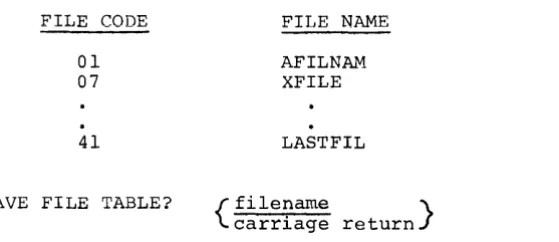
• Available File Table
An available file table (AFT) is provided for each Time-Sharing
System user. This table holds a finite number of file names
(currently set at 20) which are entered in the AFT when the
files are initially accessed (opened). The advantages of the AFT are:
1= File~ requiriY1g Fass~\1'crds ... .J- :0::; catu.lcs,'fi:c
descriptions may be referenced by file name alone, once they have been entered in the table.
2. Files used repeatedly remain readily available,
reducing the overhead time and cost of accessing
file each time.
thus the
The following commands cause the named permanent files to be
placed in the AFT.
RUN filename(s)
LIST filename(s)
OLD filename(s)
SAVE/RESAVE filename(s)
GET filename(s)
PRINT filename(s)
Because the AFT is of finite length, i t can become full. If
this happens and a command is given which requires a new
filename to be placed in the AFT, the command subsystem will
print an error message indicating that the AFT is full. At this
point, the user must remove any unneeded files from the AFT in
order to continue. The STATUS FILES command produces a listing
of all of the user's files in the AFT. The REMOVE command can
be used to remove specified files from the AFT. The files are
not purged or altered in any way; only the name is removed from the AFT and the file is set not-busy.
FILE DESIGNATION
The designation of permanent files in the following discussion of
commands is specified in the following formats:
a. filename
b. filedescr
1. filename
where the file name only is required.
where the full file description may be used, in any of the following formats:
2. filename$password
3. userid/catalog$password •••
/catalog$password/filename$password
If a required password is not given (format 1), the system will
explicitly ask for the password.
If a required password is omitted in the string format (format 3), a
REQUEST DENIED message will be issued.
If the file was previously opened (e.g., with a GET), only the filename
need be given regardless of its full description. If the requested file
is not already open, i t must emanate directly from the user's master
catalog (quick-access type file) in order for formats 1 and 2 to be
GE-600 LINE TSS GENERAL INFORMATION
Where desired-permissions and/or alternate-name are applicable, they are specified in the following format:
or
filedescr"altname",permissions
where:
permissions may be anyone or combination of the following,
separated by commas:
READ (or R)
WRITE (or W)
EXECUTE (or E)
APEND (or A)
altname may be a valid file name (one to eight characters),
enclosed in double-quote signs.
Where a desired-permissions specification is applicable,
~ermissions field implies READ and WRITE permissions; i.e., the 1nterpretation for desired permissions is R,W.
a null
default
If a file-segment specification, of the form (i,j) where i and j are
line numbers, is given in addition to desired-permissions and/or
alternate-name, i t must appear last in the specification string; e.g.:
filedescr,permissions(~,i)
or
filedescr"altname",permissions(~,i)
Examples:
OLD FILl$GOGO,R
SAVE /CATICAT2$MAYI/FILO$HERE
LIST FILE2$HOHO(1,lOO)
FILE NAMES, CATALOG NAMES, AND PASSWORDS
File names for time-sharing usage must be eight characters length, and may be composed of alphanumerics, periods, and Catalog names and passwords may be up to 12 characters in composed of the same characters as file names.
or less in minus-signs. length, and
If a batch-world file with a name longer than eight characters (12 characters maximum) is to be accessed, i t must be g~ven an alternate name (altname) from one to eight characters in length. The renaming is local and temporary. An altname may also be used to temporarily rename one or more of several duplicately-named time-sharing files the user wishes to have accessed concurrently. (Permanent files may be duplicately named so long as they emanate from different catalogs or subcatalogs. )
COMMANDS
Following is a description of the Time-Sharing System commands. Although the command words are spelled out completely in the following descriptions, in general usage those exceeding four characters may be shortened to the first four characters (e.g., RESEQUENCE). Refer to the
I
table Applicability of Commands By Subsystem on Page 28 for applications of the commands to particular subsystems.• ABC
Calls the ABACUS subsystem for algebraic-expresswon evaluation.
• ACCESS
Calls the ACCESS subsystem for time-sharing interface with the file system.
• ASCBCD ascfil;bcdfil
GE-600 LINE TSS GENERAL INFORMATION
• AUTOMATIC
1) AUTor·1ATIC
Causes the automatic creation of line numbers, by the system, at the point at which the automatic mode is entered (or re-entered), with line numbers initially starting at 010 and incrementing by 10 (or, on re-entry, resuming where the previous automatic numbering left off). These line numbers appear in the terminal copy, and are written in the file, just as though the user had typed them.
2} AUTOMATIC n,m
Causes the automatic creation of line numbers, as above, but starting with line number n and incrementing by m.
3} AUTOMATIC ,m AUTOMATIC n,
Causes automatic creation of line numbers beginning at 10 and incrementing by m, or beginning at n and incrementing by 10 (on re-entry, the line numbering resumes where i t l~ft
off) •
Normally the line number will be followed by a blank. Any nonblank, nonnumeric character affixed to the end of the command AUTOMATIC will cause the blank to be suppressed. For example: AUTONB or AUTOMATICX.
No commands are recognized while in automatic mode is cancelled by immediately following the issuance number by the system.
• BCDASC bcdfil; ascfil
the automatic mode. The giving a carriage return of an asterisk and line
GE-600 LINE TSS GENERAL INFORMATION
• BPUNCH ascfil • BPRINT ascfil
Under CARDIN, the contents of the ASCII time-sharing file specified by ascfil is converted to BCD and is punched or orinted. resoectivelv. at the central computer site; following a
que~tio~/a~s~e~-seq~~~ce-i~iti~t~d-by these commands if the file does not contain first-line reformatting information. These commands allow the user to create hard-copy backup (cards) for his TSS files, and to list long files on a high-speed printer. Ascfil may be simply a file name or a full file description, as required. The ascfil field may also specify the current file by an asterisk.
• BYE
Causes the computation of the user's system-usage charges during the session and disconnection of the terminal.
Depending upon the last-selected subsystem, the AFT may first be
scanned for user's temporary files. A message is issued as to
the number of temporary files, then the user is queried as to
the disposition. Each filename is printed followed by a question mark. The user may respond as follows:
1) carriage return - implies the file is to be released; pass
to next file.
2) NONE - implies all of the succeeding files are to be
released.
3) SAVE filedescr - specifies that the file is to be saved on
the permanent file described by filedescr. (Refer to the
PERM command.)
• CATALOG
1) CATALOG
Lists all catalog and file names which emanate from the
user's own master catalog.
2) CATALOG #LIB
Lists all file names in the library.
3) CATALOG filename
Prints a list of the attributes of the file specified. The
file must emanate from the user's catalog.
4) CATALOG /catalogl/catalog2
Prints a list of all catalog and file names which emanate
from the specified catalog (catalog2 in this case).
5) CATALOG /catalogl/catalog2*
Prints a detailed list of catalog2's attributes.
Passwords need not be given in these catalog commands. However,
CATALOG applies only to strings which originate from the user's
GE-600 LINE TSS GENERAL INFORMATION
• DELETE
1) DELETE a,b,c,d, •••
2) DELETE a-b,c-d
Lines numbered a through b and ~ through d are deleted from the current file.
3) DELETE a,b ,c-d,e, f-g I • • •
Lines numbered a,b,c through ~'~I and f through ~ are deleted from the current file.
4) DELETE-n
Acceptable only as first argument, since i t implies deletion of lines from beginning of current file to line n.
5) DELETE
n-Acceptable only as last argument, since i t implies deletion af lines n end af current file.
6) DELETE ~
*
Causes deletion of all lines in current file.
• DONE
Causes exit from the selected subsystem to permit a new subsystem selection.
• EDIT
Causes the Text EDITOR subsystem to Following the READY message, the user may text-editing capabilities available subsystem. The current file is modification.
be called into use. exercise any of the in the Text-EDITOR the recipient of any
• ERASE filedescr l;filedescr 2; .•• ;filedescr n
Erases (overwrites) the file space associated with the specified file(s) I but does not release the file(s) from the file system.
(Refer to PURGE and RELEASE commands.)
• FDUMP
• GET filedescr lifiledescr 2i ••• ifiledescr n (permissions and altname applicable)
The permanent file(s} designated by filedescr i will be accessed and the filename(s} placed in the AFT. This is a simple means by which common data files emanating from other user's master catalogs may be opened.
• HELP
Calls the HELP subsystem, in order to obtain an error message explanation. For example, if the error message
009 - SYSTEM UNKNOWN
were issued, the user could call HELP and respond to the request
PLEASE ENTER MESSAGE
NUMBER-with 9, if he desired an error message explanation.
• HOLD
Prevents any console or master-user issued warning or information message from appearing at the terminal, either in printer or paper-tape output, until a subsequent SEND command is given. The user assumes responsibility for any warnings he may miss while the HOLD is in effect. This command is used primarily during output of listings for display or reproduction purposes.
(Refer to the SEND command.)
• JABT snurnb (Job Abort)
Under CARDIN, causes the batch-processing job specified by snurnb (and submitted from the same terminal) to be aborted, with an Xl abort-code assigned.
• JDAC name (Job Direct Access)
Under CARDIN or at the subsystem level, allows a time-sharing terminal user to establish direct access communication (DAC) with a slave program running in the GE-600 system. The DAC is initiated at the subsystem level by
GE-600 LINE TSS GENERAL INFORMATION
Under the CARDIN subsystem JDAC is level by
initiated at the command
SYSTEM? CARDIN OLD OR NEW-NEW READY
*JDAC name
Name refers to the name of a user supplied DAC slave program
(e7g.,
the GE-600 Time-Sharing System is a DAC slave program). If the program name is not provided in the initial call to JDAC, the system will request a program name. When the direct access program terminates, the return is to the appropriate level(SYSTEM? or build input mode) •
• JOUT snumb
Permits manipulating, from a time-sharing terminal (via a call to JOUT subsystem), the output of certain types of batch jobs.
Under CARDIN, BASIC, and FORTRAN, causes the batch-processing status of the job specified by snumb 0005T) to be printed at the terminal, in plain
text-.---• LENGTH
l) LENGTH
current (e.g.,
GE-600 LINE TSS GENERAL INFORMATION
2) LENGTH filedescr
Generates a report of the type, current size, and content length of the permanent file specified by filedescr. Size and content lengb~ are given In units of 320-word blocks.
• LIB filename
File filename from the library becomes the current file.
• LIST
1) LIST
Lists the current file on the terminal.
2) LIST i,j
Lists all lines of the current file whose line numbers are greater than or equal to i and less than or equal to
i.
In the case of concatenated files where no sor~ or resequence has been performed, multiple sets of lines numbered between i and j mayor may not be listed, if such exist. Either i orI
may be omitted. Line numbers 1 or 99999999 respectively will be assumed. If j is omitted, the comma may also beomitted.
-3) LIST filedescr (permissions and altname applicable)
Lists the file specified by filedescr on the terminal, without altering the current file. Filedescr must include at
least one alpha character if i t consists of filename only.
4) LIST filedescr(i,j) 1; ••• ;filedescr(i,j) n (permissions and altname applicable)
-Adjoins and lists the specified files or file-segments on the terminal. The current file is not altered. The current file may be included in the list under the name
*
If the list is greater than one line in length, i t may be continued on the next line provided the last nonblank character on the first line is a (leading) delimiter.5) LISTH
I
6) LISTEnnn (no intervening blanks allowed)
List the file(s) as specified by the operand; but with all lines to be "broken" or "folded" at the character position (nnn) specified. Listing of the line will be continued on succeeding line(s). If nnn is omitted, the value 72 is assumed. LIST formats (~through (4) may also use the LISTEnnn form in place of LIST. Files containing overlength lines (records) may be listed in this manner.
7) LISTS n ,n ,n , ••• ,n
List only the specified line(s) n from the current file.
8) LIST 99999999
If LIST is given with a line number greater than the last line number on the current file, then the last line number of the current file will be printed.
• LUCID
This is used instead of the TAPE command for non-USASCII paper tape input. The input is stored on the time-sharing TAP* file as unaltered eight-bit codes. The TAP* file is left open (unedited in the user's AFT). When a pause greater than one second stops the tape read, the system returns to the subsystem selection (SYSTEM?) level. This command will not function when data communication is via a Low Speed Line Adapter (LSLA) on a DATANET 355. In the EDITOR subsystem, this command takes the form #LUCID.
• NEW
1) A new file (empty current file) is started. (The system will return to the build mode.) The current file is cleared of any prior content.
2) NEWP filedescr (permissions applicable)
GE-600 LINE TSS GENERAL INFORMATION
3) NEWP# filedescr (permission applicable)
GE-600 LINE TSS GENERAL INFORMATION
• NEWUSER
1) NEWUSER
Causes the computation or tne user!s system-usage charges during the session and initiates a new log-on sequence.
2) NEWUSER account number
• OLD
Causes the computation of charges for user's previous account number, this account number to be closed, and the new account number specified to replace the old. Accounting data is reinitialized as for a new user but the log-on sequence is bypassed; i.e., the previous user-id and password are assumed •
1) OLD filedescr (permissions and altname applicable)
File filedescr becomes the current file.
2) OLD filedescr(i,j) (permissions and altname applicable)
Lines ~ and
i
of file filedescr become the current file. Filedescr must be a line-numbered file.3) OLD f(~,i) 1; ••• ;!(~,i) n applicable)
(permissions and altname
The n files or file segments are adjoined in the order listed and become the current file, where f is a filedescr. Adjoining of BASIC files should be done with caution (sequence numbers are also statement numbers). The asterisk designating the contents of the current file (or segment thereof) may appear as a filedescr anywhere in the file list.
I
4) OLD !(!,i)
l:!(!,i) 2: ••• :!(!,i)
n (permissions andappl~cabre) altname
The n files or file segments are merged together by line numbers, and become the current file, where f is a filedescr (colon-separated). If duplicately numbered statements appear in two or more files, each such statement will appear in the order specified by the file list. The asterisk designating the contents of the current file (or segment thereof) may appear as a filedescr anywhere in the file list.
5) OLD !(!,1) l;!(!,i) 2:f(!,i) 3; ••• :f(!,i) n
(permiss~ons and altname applicablef
A combination of forms (3) and (4). Concatenation or merging is performed
in
the order (from left to right) indicated by the file list.If the file list
is
too long for one line, the OLD subsystem will request more input if a delimiteris
the last non-blank character before the carriage return.6) OLDP filedescr (permissions applicable)
7)
The OLDN subsystem determines if a current file (*SRC) and/or the file specified in filedescr have been accessed previously. If this file(s) has been accessed, OLDN will deaccess them. The specified permanent file will then be accessed with an alternate name of *SRC and thus becomes the current file. This file will be the user's current file until another form of the OLD or NEW command is given.
OLDP# filedescr (permissions applicable)
Execution is the same as for the OLDP command, except that this file remains the user's current file until log-off, or until another OLDP, OLDP#, NEWP, or NEWP# command is given. The normal OLD or NEW commands use this file (i.e. the file specified by OLDP# or NEWP#) as the current file.
NOTE: The OLDN subsystem
is
calledin
when the commands OLD, NEW or LIB (normal forms) are given by the user. If a NEWP or OLDP command was issued and then one of the normalforms was typed in, OLDN will deaccess the permanent *SRC file and assign a new temporary *SRC file to the user. The permanent file remains in the user's catalog until he releases it.
GE-600 LINE TSS GENERAL INFORMATION
If a NEWP# or OLDP# command was issued and then followed by
I
another NEWP# or OLDP# command, the OLDN subsystem will
deaccess the present *SRC file and then create and/or access the newly specified *SRC file.
• PARITY/NOPARITY
1) PARITY
The data sent from the GE-600 system to a terminal in direct
access mode is normally in seven-bit, even parity code. The
PARITY command is only used to return to this mode of
operation from a NOPARITY mode of operation.
2) When the NOPARITY (NOPA) command is given, all data sent
from the GE-600 to a terminal in direct access mode is in
eight-bit, parity independent code. This command may be used
at the system level or at the command level in BASIC,
FORTRAN and CARDIN. The NOPARITY (NOPA) command can only be used with a Type 4 terminal.
• PERM tempfileifiledescr
The temporary file tempfile (created by a user's FORTRAN
program) is copied onto the permanent file described by
filedescr. If the file does not already exist, i t will be
created with general read permission. The temporary file name is
removed from the AFT and the permanent file accessed (name
placed in AFT).
Under CARDIN, print at the terminal all or any part of a source
file or concatenation of source files, reformatting the file by use of format-options and/or tab characters, if desired.
1) PRINT
The entire current file will be reformatted and printed.
2) PRINT filedescr(i,i) lifiledescr(i,i) 2; ••• ;
filedescr(i,i>
n-
-The specified file(s) or file-segment(s) will be adjoined,
reformatted, and printed. The current file may be included
in the string of files by the name * The current file,
however, will not be affected. If the list is longer than
Following a PRINT command, if the named file does not carry reformatting information, a series of questions are asked of the terminal user. Responses to CARD FORMAT? are:
HOVE - implies line numbers are present and are to be moved to the sequence-number field and printed.
STRIP - implies line numbers are present and are not to be printed.
ASIS - implies line numbers are not present in the file, or that the file is to be printed "as is", except for tab spacing.
NORM - implies HOVE option and the standard tab character and settings:
:,8,16,32,73
If the response was not NORM, the question TAB CHARACTER AND SETTINGS? is asked. Responses are NORM or a series of tab characters and settings of the form:
• PURGE filedescr l;filedescr 2; ••• ;filedescr n
Releases the specified file(s) from the file system and overwrites the released file space.
(Refer to RELEASE and ERASE COMMANDS.)
• RECOVER filename $ password (password optional)
The permanent file designated by filename will be created and/or accessed, and i t will become the input collector file emanating from the user's master catalog. The permanent file will be created without general permissions assigned. (The command is #RECOVER when given in the EDITOR subsystem.)
• #RECOVER filename $ password (password optional)
GE-600 LINE TSS GENERAL INFORMATION
• RELEASE filedescr l;filedescr 2; ••• ;filedescr n
Releases the specified file(s) from the file system, but without overwriting the associated file space. (Refer to PURGE and ERASE conunands • )
• REMOVE filename l;filename 2; ••• ;filename n
Removes the specified file name(s) deaccesses the named file(s).
from the AFT, i.e.,
• REMOVE CLEARFILES
Removes all files from the AFT including the current file.
• RESAVE filedescr 1; filedescr 2; ••• ;filedescr n
The contents of the current file are saved on the previously existing permanent file(s) specified by filedescr i, replacing any prior content thereof. Sorting by line number is or is not done according to subsystem requlrements.
conunand. )
• RESEQUENCE
1) RESEQUENCE
(Refer to the SAVE
The line numbers of the current file are resequenced. The resequencing begins with line number 10 and continues in increments of 10. If BASIC is the selected subsystem, the file is resequenced and statement number references in the program are modified correspondingly (GOTO, GOSUB, IF, ON, Print USING). If FORTRAN or CARDIN was selected, statement number references are not affected.
2) RESEQUENCE n,m,x-y
The line numbers of the current ~ile are resequenced and modifications made according to the subsystem selection. The resequencing begins with line number n and continues in increments of m.
In general, any blanks preceding a line number are stripped off. Unnumbered lines are accepted, except under the BASIC subsystem,
and such lines will have line numbers added, as implied or
specified in the command. Care should be taken in resequencing
concatenated BASIC files as line numbers are also statement
numbers, and statement references, after resequencing, may
become invalid.
3) RESEX n,m
Line numbers are inserted at the beginning of each and every
line in the current file, regardless of whether or not line
numbers already exist. The numbering begins with nand
increments by m, or optionally, begins with 10 and
increments by 10, if n,m are not specified. If the first
character of the existing line is a numeric, a blank is
inserted following the generated line nU1!'ber. If the first
character of the existing line is not numeric, no such blank is inserted.
4) RESE# n,m
Line numbers are inserted at the beginning of each line in
the current file, even if line numbers already exist. This
numbering begins with n and increments by m, or optionally
begins with 10 and increments by 10 if n, m are not
specified. If the first character of the existing-line is a
numeric, a pount sign (#) is inserted following the
generated line number. If the first character of the
existing line is not numeric, the pound sign is not
inserted.
• ROLLBACK filename$password (password optional)
The permanent file designated by filename is accessed with
general read and write permissions assigned. This file becomes
the input collector file emanatinq from the user's master
catalog. When accessed, the permanent file is read and any data
on the file is copied to the current working file, and the last
line of good data on that file is printed out at the terminal as follows:
LAST LINE OF SAVED DATA IS:
GE-600 LINE TSS GENERAL INFORMATION
• #ROLLBACK filename$password (password optional)
The permanent file designated oy filename is general read and write permissions assigned. This
the input collector file emanating from the
accessed with file becomes user's master catalog. wilen accessed, the permanent file is read and any data on the file is copied to the current working file, and the last line of good data on that file is printed out at the terminal as follows:
LAST LINE OF SAVED DATA IS:
followed by the last line of good data (this command applies only to the EDITOR subsystem) •
• RUN
1) RUN
Executes the selected subsystem. The source input is current file. (If BASIC is the subsystem selection and variation of the RUN command is given, only the current will be executed; i.e., any information appended after
RUN corrunand is ignored.)
2) RUN filedescr (permisswons and altname applicable)
the any file the
Under FORTRAN, compiles and executes the file filedescr. Under CARDIN, converts and passes file to GEIN.
specified by the specified
3) RUN
=
filedescr=
(option 1, ••• ,option n)(permissions and altname applicable if file already exists.)
Under FORTRAN, compiles and executes the current file using the specified options. Save the object program on the file specified by fi1edescr. If this file does not already exist, i t will be created (with general read permission) •
4) RUN filedescr 1; ••• ;fi1edescr(i,j) n
= fi1edescr x (option l, ••• ,option n)
(permissions and a1tname applicable to already existent files)
Under FORTRAN, the specified files or file-segments are adjoined and compiled/executed according to the options specified, and the object program saved as file filedescr.
The compile options and saving of object file are optional.
GE-600 LINE TSS GENERAL INFORMATION
The current file may be indicated by an asterisk in the file list. caution must- be exercised -to ascertain that the current file contains that which is expected.
If a list is too long to be typed on one line, the subsystem will request more input i f a delimiter is the last nonblank character before the carriage return.
5) RUN fs
=
fh; fc(opt) ulib #feUnder the Y FORTRAN and JOVIAL subsystems, this command calls in the RUN subsystem to compile and execute, using the parameters and options specified in the command. The format definition is as follows:
fs - set of file descriptors for input to the compiler and/or loader.
fh - single file descriptor pointing to a random file used to save the system loadable file produced by GELOAD if the compilation is successful.
fc - single file descriptor pointing to a file in which the compiler places deck(s) from the compilation(s).
the binary
fe - set of file descriptors for files required for execution.
opt - set of options to compilation/execution.
be used in the
ulib - sequence of file descriptors pointing to random files containing user libraries.
Refer to Series 600 FORTRAN Y Reference Manual, CPB-1686, for procedures for-us~ng this RUN command.
6) RUNH
Executes the selected subsystem and prints a header (date and time) at the top of the program-execution report. RUN formats (1), (2), (3), and (4) may all use the RUNH form in place of RUN.
• SAVE filedescr l,permissions,size;
filedescr 2,perm~ss~ons,size; •••• filedescr n
• SCAN filedescr (permissions and altname applicable)
Under CARDIN, the SCAN subsystem -- batch-output scanner is initiated to scan the file described by filedescr. The desired functions are defined by the question/answer sequence that follows the use of this command.
• SEND
Cancels the effect of a previous HOLD command, and causes the last message previously withheld to appear at the terminal.
(Refer to the HOLD command.)
• STATUS
1) STATUS
Lists the user's status as to processor time used, number of file I/O's, and characters output to the terminal; and lists the files that are open.
2) STATUS FILES
Lists only the names of the user's open files.
• SYSTEM name
Exits from the current subsystem and calls the named subsystem, or, if no name is given, returns control to the subsystem-selection level (SYSTEM?). This command permits the user to bypass the normal DONE--SYSTEM? sequence.
• TAPE
GE-600 LINE TSS GENERAL INFORMATION
• # TAPE
The current file will be built or extended with input from paper
tape. Neither line feeds nor rubouts are supplied by the
Time-Sharing System. This command is only applicable to the
Applicability of Commands By Subsystem
Command BASIC FORTRAN CARDIN EDITOR
ABC Yes Yes Yes No
ACCESS Yes Yes Yes Yes*
ASCBCD No No Yes No
**AUTOMATIC Yes Yes Yes No
BCDASC No No Yes No
BPRINT No No Yes No
BPUNCH No No Yes No
BYE Yes Yes Yes Yes*
CATALOG Yes Yes Yes Yes*
**DELETE Yes Yes Yes No
DONE Yes Yes Yes Yes*
EDIT Yes Yes Yes No
**ERASE Yes Yes Yes Yes*
FDUMP No No Yes No
GET Yes Yes Yes No
HELP Yes Yes Yes No
HOLD Yes Yes Yes No
JABT No No Yes No
I
JDAC No No Yes NoJOUT No No Yes No
JSTS Yes Yes Yes No
**LENGTH Yes Yes Yes Yes*
**LIB Yes Yes Yes No
**LIST Yes Yes Yes No
I
**LUCID Yes Yes Yes No**#LUCID No No No Yes
**NEW Yes Yes Yes No
NEWUSER Yes Yes Yes No
NOPARITY Yes Yes Yes No
**OLD Yes Yes Yes Yes*
PARITY Yes Yes Yes No
**PERM No Yes No No
**PRINT No No Yes No
**PURGE Yes Yes Yes Yes*
RECOVER Yes Yes Yes No
**#RECOVER No No No Yes
* * RELEASE Yes Yes Yes Yes*
REMOVE Yes Yes Yes Yes*
**RESAVE Yes Yes Yes Yes*
**RESEQUENCE Yes Yes Yes No
* * ROLLBACK Yes Yes Yes No
**#ROLLBACK No No No Yes
**RUN Yes Yes Yes No
* * SAVE Yes Yes Yes Yes*
SCAN No No Yes No
SEND Yes Yes Yes No
STATUS Yes Yes Yes Yes*
**SYSTEM Yes Yes Yes No
**TAPE Yes Yes Yes No
**#TAPE No No No Yes
GE-600 LINE TSS GENERAL INFORMATION
3. Time-Sharing Error Messages Explanation
Error messages generated by the various time-sharing subsystems and by the time-sharing Executive fall into two classes, from the viewpoint of explanations:
• Error messages that are considered self-explanatory.
• Error messages that, due to the need for reasonable terseness in conversational messages, may require further explanation for a given user the first few times that the message is encountered.
All messages falling into the second class are prefixed by a message number, usually enclosed by carets (i.e., <nn> , or in some cases <nn<). Further explanation of these messages is i~~ediatcly available at the terminal through the HELP subsystem. HELP may be called for either at
the StlDsystem-c;plprt-i 0"" lpVpl (SYSTEM?' '"'r 3+- +-~p cnrnm.3Y'c1 !p",Tpl uY"de:
most major subsystems.
HELP message explanations are listed below, indexed under the associated error message(s). These error messages, in turn, fall into two categories from the viewpoint of origin and applicability.
• Error messages originating from the time-sharing Executive, most of which be received only by an implementor of a new, not fully debugged, time-sharing subsystem during its checkout. These messages are numbered between I and 49, inclusive.
• Error messages originating from the various time-sharing subsystems, which would be received by a user (as opposed to modifier) of the system, and would indicate faulty usage or, possibly, system malfunction. These user-directed messages are numbered beginning with 50.
Note
On some types of terminals, the carets enclosing the error message number are reproduced as parentheses.
In the description below, generated error messages and their HELP subsystem error message explanations are listed in order message numbers.
001 - INCORRECT PRIMITIVE
AN ILLEGAL PRIMITIVE HAS OCCURRED IN A 20MMAND LIST. CHECK THE COMMAND LIST POINTER IN THE PROGRAM DESCRIPTOR AND THE COMMAND LIST FORMAT AND PRIMITIVES.
002 - BAD FILE I/O COMMAND
IN THE CALLING SEQUENCE OF A DRL FOR FILE I/O, THE COMMAND WORD IS INCORRECT. CHECK THE SUBSYSTEM CODE.
003 - BAD DCW
IN THE CALLING SEQUENCE OF A DRL FOR FILE I/O, A
new
IS INCORRECT. CHECK THE SUBSYSTEM CODE.004 - location ADDRESS OUT OF RANGE
THE ADDRESS OF A DRL ARGUMENT IS OUTSIDE THE RANGE OF THE PROGRAM. THE NUMBER GIVEN IN THE COMMENT IS THE DERAIL LOCATION. CHECK THE SUBSYSTEM CODE FOR IMPROPER INITIALIZATION.
005 - BAD DRL CODE
THE ADDRESS OF A DRL CODE IS OUT OF THE RANGE OF USABLE CODES OR ILLEGAL FOR THIS SUBSYSTEM. CHECK THE SUBSYSTEM CODE.
006 - LEVEL OF CONTROL TOO DEEP
THE MAXIMUM NUMBER OF CALLS IN THE PROGRAM STACK OR THE CALLSS STACK HAS BEEN EXCEEDED. IN THE CASE OF THE PROGRAM STACK, THIS MEANS THAT THE SELECTED SYSTEMS PRIMITIVE LIST CONTAINED A CALLP, AND IN TURN, THAT SUBSYSTEMS PRIMITIVE LIST CONTAINED A CALLP, ETC. UNTIL THE LENGTH OF THE PROGRAM STACK WAS EXCEEDED. LIKEWISE, IN THE CASE OF THE CALLSS STACK OF SUBSYSTEMS CALLING OTHER SUBSYSTEMS BY MEANS OF THE DRL CALLSS I
THE TABLE LIMIT WAS EXCEEDED. REVIEW THE SUBSYSTEM AND DEPTH OF CALLS.
007 - BAD PROG. DESCRIPTION
IN THE PROGRAM DESCRIPTOR, THE POINTER TO THE COMMAND LIST IS ZERO OR POINTS TO NON-COMMAND LANGUAGE DATA. CHECK THE PROGRAM DESCRIPTOR AND COMMAND LANGUAGE LIST.
008 - LOOP IN PRIMITIVES
GE-600 LINE TSS GENERAL INFORMATION
009 - SYSTEM UNKNOWN
THE REQUESTED SUBSYSTEM IS UNKNOWN TO TSS OR IS NOT INCLUDED IN THE SYSTEM FOR THIS INSTALLATION. CHECK THE NAME FOR SPELLING TOO.
010 - PROGRAM TOO LARGE TO SWAP
A SUBSYSTEM IS SO LARGE THAT THE NUMBER OF DCW'S REQUIRED TO LOAD OR SWAP THE PROGRAM EXCEED THE MAXIMUM NUMBER OF DeW'S WHICH CAN BE BUILT. CHECK THE SIZE OF THE SUBSYSTEM. PERHAPS THE SUBSYSTEM EXPANDS ITS CORE LIMITS WITH A DRL ADDMEM. CHECK ALL DRL ADDMEM REQUESTS. SEE • LA DeW DEFINED IN COMMUNICATION REGION FOR MAXIMUM NUMBER OF DCW'S ALLOWED.
011 - INCORRECT CORE FILE USAGE
A REQUEST TO MOVE CORE FILE SPECIFIES MORE THAN TEN WORDS TO BE MOVED. CHECK ALL DRL CORFIL REQUESTS.
012 - PROGRAM NOT ALLOWED USE OF THIS I/O
PRIVILEGED FILE I/O IS RESERVED FOR SUBSYSTEMS WHICH SPECIFICALLY REQUIRE INFORMATION FROM FILES ALLOCATED TO THE TIME-SHARING SYSTEM.
PLEASE REVIEW THE NEED FOR PRIVILEGED FILE IIO AND ,JUSTIFY IT WITH THE
COMPUTING CENTER.
013 - DRL ALLOWED ONLY BY LOGON
THE DRL USER ID CAN BE USED ONLY BY THE LOGON SUBSYSTEM. CHECK THE SUBSYSTEM CODE.
014 - NOT CURRENTLY ASSIGNED
015 - CANNOT RESET ID
THE LOGON SUBSYSTEM IS EXECUTING A DRL USER ID, BUT THE ID OF THE SPECIFIED U.S.T. IS NON-ZERO. A TERMINATE MUST BE EXECUTED FOR THAT USER BEFORE THE U.S.T. CAN BE REUSED. TRY TO DETERMINE WHY THE TERMINATE WAS BYPASSED, OR WHY NEW SYSTEM WAS SELECTED AFTER LOGON.
016 - location OVERFLOW FAULT
THE SUBSYSTEM IN EXECUTION ENCOUNTERED AN OVERFLO~v CONDITION AT THE DESIGNATED LOCATION AND THE SUBSYSTEM DID NOT SPECIFY A FAULT VECTOR. MASTER
MUST FAULT FOR THE LOCATION IS RELATIVE TO ZERO (SEE EDIT MAP) UNLESS IT IS A
SUBSYSTEM. THEN THE LOCATION IS RELATIVE TO TSS ZERO, AND ONE DETERMINE THE LOAD ADDRESS OF THE SUBSYSTEM TO DETERMINE THE LOCATION IN THE MASTER SUBSYSTEM. REVIEW YOUR PROGRAM INPUT INCORRECT DATA BEFORE REQUESTING HELP FROM THE COMPUTING CENTER.
017 - location ILLEGAL OP CODE
THE SUBSYSTEM IN EXECUTION ENCOUNTERED AN ILLEGAL (OR ZERO) OP CODE OR A MME OPERATION AT THE DESIGNATED LOCATION, AND THE SUBSYSTEM DID NOT SPECIFY A FAULT VECTOR.
THE LOCATION IS RELATIVE TO SUBSYSTEM ZERO (SEE EDIT MAP) UNLESS IT IS A MASTER SUBSYSTEM, THEN THE LOCATION IS RELATIVE TO TSS ZERO. ONE MUST DETERMINE THE LOAD ADDRESS OF THE SUBSYSTEM TO DETERMINE THE FAULT LOCATION IN THE MASTER SUBSYSTEM.
REVIEW YOUR PROGRAM CODE AND INPUT FOR INCORRECT DATA BEFORE REQUESTING HELP FROM COMPUTING CENTER.
018 - location MEMORY FAULT
THE SUBSYSTEM IN EXECUTION ENCOUNTERED A MEMORY FAULT AT THE DESIGNATED LOCATION, AND THE SUBSYSTEM DID NOT SPECIFY A FAULT VECTOR.
THE LOCATION IS RELATIVE TO SUBSYSTEM ZERO (SEE EDIT MAP) UNLESS IT IS A MASTER SUBSYSTEM, THEN THE LOCATION IS RELATIVE TO TSS ZERO. ONE MUST DETERMINE THE LOAD ADDRESS OF THE SUBSYSTEM TO DETERMINE THE FAULT LOCATION IN THE MASTER SUBSYSTEM.
REVIEW THE PROGRAM CODE AND INITIALIZATION OF ADDRESS OR INDEX REGISTERS AS WELL AS THE PROGRAM INPUT FOR INCORRECT DATA BEFORE REQUESTING HELP FROM THE COMPUTING CENTER.
019 - location FAULT TAG FAULT
THE SUBSYSTEM IN EXECUTION ENCOUNTERED A FAULT TAG FAULT AT THE DESIGNATED LOCATION, AND THE SUBSYSTEM DID NOT SPECIFY A FAULT VECTOR.
THE LOCATION IS RELATIVE TO SUBSYSTEM ZERO (SEE EDIT MAP) UNLESS IT IS A MASTER SUBSYSTEM, THEN THE LOCATION IS RELATIVE TO TSS ZERO. ONE MUST DETERMINE THE LOAD ADDRESS OF THE SUBSYSTEM TO DETERMINE THE FAULT LOCATION IN THE MASTER SUBSYSTEM.
REVIEW THE PROGRAM CODE AND INITIALIZATION OF ADDRESS OR INDEX REGISTERS AS WELL AS THE PROGRAM INPUT FOR INCORRECT DATA BEFORE REQUESTING HELP FROM THE COMPUTING CENTER.
020 - location DIVIDE CHECK FAULT
THE SUBSYSTEM IN EXECUTION ENCOUNTERED A DIVIDE CHECK FAULT AT THE DESIGNATED LOCATION, AND THE SUBSYSTEM DID NOT SPECIFY A FAULT VECTOR.
THE LOCATION IS RELATIVE TO SUBSYSTEM ZERO (SEE EDIT MAP) UNLESS IT IS A MASTER SUBSYSTEM, THEN THE LOCATION IS RELATIVE TO TSS ZERO. ONE MUST DETERMINE THE LOAD ADDRESS OF THE SUBSYSTEM TO DETERMINE THE FAULT LOCATION IN THE MASTER SUBSYSTEM.
REVIEW YOUR PROGRAM INPUT FOR INCORRECT DATA BEFORE REQUESTING HELP FROM THE COMPUTING CENTER.
021 - BAD STATUS SWAP OUT #S
GE-600 LINE TSS GENERAL INFORMATION
022 - BAD STATUS SWAP IN #S
A B~~ I/O STATUS HAS BEEN RECEIVED ON A READ DRUM FILE #S, THE SWAP FILE. TRY AGAIN. IF PROBLEM PERSISTS, THE TSS WILL ALERT OPERATIONS. THE PARENTHESIZED NUMBER IS THE STATUS CODE.
023 - BAD STATUS LOAD #P
A BAD I/O STATUS HAS BEEN RECEIVED ON A READ DRUM FILE #P, THE TSS FILE. TRY AGAIN. IF PROBLEM PERSISTS, THE TSS WILL ALERT OPERATIONS. THE PARENTHESIZED NUMBER IS THE STATUS CODE.
024 - BIT POSITION
>
35THE DESIGNATED BIT POSITION IN AN IF TRUE OR IF FALSE PRIMITIVE IS GREATER THAN 35. CHECK THE COMMAND LIST AND PRIMITIVES OF THE SUBSYSTEM.
ERROR-CODE 25 NOT CURRENTLY ASSIGNED.
ERROR-CODE 26 NOT CURRENTLY ASSIGNED.
ERROR-CODE 27 NOT CURRENTLY ASSIGNED.
028 - USER TRIED TO SPACE A RANDOM FILE
A RANDOM FILE CANNOT BE SPACED IN THIS MANNER. USAGE OF THE RANDOM FILE IN THE CORRECT MANNER WILL CLEAR UP THE PROBLEM.
029 - ILLEGAL SYSTEM SELECTION
SOME SYSTEMS, NAMELY THE MASTER SUBSYSTEMS, HAVE RESTRICTED THEIR AVAILABILITY TO CERTAIN USERS. YOU DO NOT HAVE PERMISSION TO USE THE SELECTED SUBSYSTEM. SELECT ANOTHER.
ERROR CODES 30-49 NOT CURRENTLY ASSIGNED.
<50> FILE filename
<50< FILE filename
reason text
reason text
(The two messages above refer to permanent files.)
<50> CURRENT FILE -- reason text
<50> COLLECTOR FILE -- reason text
The possible reason texts for all the above messages are as follows:
STATUS 01
I/O ERROR, STATUS 02 NO PERMISSION, STATUS 03 FILE BUSY, STATUS 04
NONEXISTENT FILE, STATUS 05 STATUS 06
DEVICE TYPE UNDEFINED, STATUS 07 STATUS 10
NON-UNIQUE NAME, STATUS 11 MAX. SIZE ERROR, STATUS 12 NO FILE SPACE, STATUS 13 INVALID PASSWORD, STATUS 14 STATUS 15 THRU 33, AND 35 ILLEGAL CHAR., STATUS 34 FILE TABLE FULL, STATUS 36 DUPLICATE NAME, STATUS 37 SYSTEM LOADED, STATUS 40
ERROR-MESSAGE 50 EXPLANATION: FILE-SYSTEM ERRORS.
THIS MESSAGE IS ISSUED FOR EITHER ONE OF TWO CASES: (1) THE NAMED PERMANENT FILE COULD NOT BE ACCESSED-- < 50>, OR COULD NOT BE
CREATED--<so
<OR (2) A REQUIRED TEMPORARY FILE COULD NOT BE OBTAINED OR EXPANDED.THE REASON GIVEN IN THE MESSAGE IS FURTHER EXPLAINED BELOW:
STATUS 01: THE SPECIFIED USER'S-MASTER-CATALOG DOES NOT EXIST. CHECK USER-ID.
I/O ERROR, STATUS 02: THE FILE SYSTEM HAS ENCOUNTERED AN UNRECOVERABLE INTERNAL I/O ERROR. (THIS DOES NOT IMPLY AN ERROR ON YOUR FILE SPACE.) REPORT THE STATUS TO THE CENTRAL COMPUTER SITE. ALSO RETRY.
NO PERMISSION, STATUS 03: THE NAMED FILE COULD NOT BE ACCESSED BECAUSE YOU HAVE NOT BEEN ALLOWED THE PERMISSION(S) REQUESTED.
FILE BUSY, STATUS 04: ANOTHER USER HAS ALREADY ACCESSED THIS FILE WITH AN ACCESS-MODE PERMISSION THAT LOGICALLY EXCLUDES YOUR REQUESTED PERMISSION; I.E., A GRANTED WRITE PERMISSION EXCLUDES ANY OTHER CONCURRENT ACCESSES AND A GRANTED READ PERMISSION EXCLUDES ANY OTHER ACCESS WITH WRITE PERMISSION. THE FILE, THEREFORE, IS TEMPORARILY BUSY TO SOME OR ALL OTHER USERS. (MULTIPLE CONCURRENT ACCESSES OF A FILE WITH READ PERMISSION, ONLY, IS ALLOWED.)
GE-600 LINE TSS GENERAL INFORMATION
STATUS 06: THE FILE SYSTEM HAS EXHAUSTED ITS SPACE FOR NEW CATALOGS AND FILE DESCRIPTORS. REPORT THE STATUS TO THE CENTRAL COMPUTER SITE, AND TRY AGAIN LATER.
DEVICE TYPE UNDEFINED, STATUS 07: THE DEVICE TYPE THAT YOU SPECIFIED FOR YOUR FILE IS UNDEFINED TO THE SYSTEM.
STATUS 10: THE SYSTEM HAS TEMPORARILY EXI\AUSTED THE AVAILABLE FILE SPACE. TRY AGAIN LATER. (ALSO, PURGE ANY UNNEEDED FILES.)
NON-UNIQUE NAME, STATUS 11: THE NEW NAME THAT YOU HAVE SPECIFIED FOR THE CATALOG OR FILE TO BE MODIFIED IS A DUPLICATE OF A CATALOG OR FILE NAME EXISTING AT THE SAME LEVEL.
!1AX. SIZE ERROR, STATUS 12: THE NEW MAXIMUM-SIZE SPECIFIED FOR THE FILE TO BE 140DIFIED IS LESS THAN ITS CURRENT SIZE. (MAXIMUM SIZE UNCHANGED.)
NO FILE SPACE, STATUS 13: YOU HAVE USED UP ALL THE PHYSICAL SPACE ALLOTTED TO YOU FOR THE CREATION OF FILES. YOU MUST EITHER PURGE ONE OR MORE UNNEEDED FILES, OR OBTAIN A LARGER FILE-SPACE ALLOCATION.
INVALID PASSWORD, STATUS 14: A REQUIRED PASSWORD EITHZR HAS BEEN GIVEN INCORRECTLY OR NOT AT ALL. THE GENERAL FORM FOR SUPPLYING PASSWORDS IN A CATALOG/FILE DESCRIPTION IS: NAME$PASSWORD E.G.: /CATl$ABC/FILl$XYZ.
STATUS 15 THRU 33, AND 35: SYSTEM ~ffiLFUNCTION. REPORT THE STATUS TO THE CENTRAL COMPUTER SITE, AND RETRY.
ILLEGAL CHAR., STATUS 34: YOU HAVE GIVEN A CATALOG OR FILE NAME, OR A PASSWORD, CONTAINING A CHARACTER OTHER THAN AN ALPHANUMERIC, PERIOD, OR A DASH, WHICH ARE THE ONLY LEGAL CHARS. FOR IDENTIFIERS.
FILE TABLE FULL, STATUS 36: THE NAMED FILE CANNOT BE ACCESSED BECAUSE YOU PRESENTLY HAVE TOO MANY FILES ALREADY ACCESSED (I.E., OPENED). YOU MUST DEACCESS ONE OR MORE OF THESE OPENED FILES. USE THE COMMANDS STATUS FILES, AND REMOVE.
DUPLICATE NAME, STATUS 37: THE FILE NAME SHOWN DUPLICATES A NAME
~LFEADY IN YOUR AVAILABLE-FILE-T~~LE, I.E., ~~ ~LFEADY ACCESSED FILE. IF
APPROPRIATE, ASSIGN AN ALTERNATE NAME.