(Dot Matrix Liquid Crystal Display Controller/Driver)
Description
The HD44780U dot-matrix liquid crystal display controller and driver LSI displays alphanumerics, Japanese kana characters, and symbols. It can be configured to drive a dot-matrix liquid crystal display under the control of a 4- or 8-bit microprocessor. Since all the functions such as display RAM, character generator, and liquid crystal driver, required for driving a dot-matrix liquid crystal display are internally provided on one chip, a minimal system can be interfaced with this controller/driver.
A single HD44780U can display up to one 8-character line or two 8-character lines.
The HD44780U has pin function compatibility with the HD44780S which allows the user to easily replace an LCD-II with an HD44780U. The HD44780U character generator ROM is extended to generate 208 5 × 8 dot character fonts and 32 5 × 10 dot character fonts for a total of 240 different character fonts.
The low power supply (2.7V to 5.5V) of the HD44780U is suitable for any portable battery-driven product requiring low power dissipation.
Features
• 5 × 8 and 5 × 10 dot matrix possible
• Low power operation support:
2.7 to 5.5V
• Wide range of liquid crystal display driver power
3.0 to 11V
• Liquid crystal drive waveform
A (One line frequency AC waveform)
• Correspond to high speed MPU bus interface
2 MHz (when VCC = 5V)
• 4-bit or 8-bit MPU interface enabled
• 80 × 8-bit display RAM (80 characters max.)
• 9,920-bit character generator ROM for a total of 240 character fonts
• 64 × 8-bit character generator RAM
8 character fonts (5 × 8 dot)
4 character fonts (5 × 10 dot)
• 16-common × 40-segment liquid crystal display driver
• Programmable duty cycles
1/8 for one line of 5 × 8 dots with cursor
1/11 for one line of 5 × 10 dots with cursor
1/16 for two lines of 5 × 8 dots with cursor
• Wide range of instruction functions:
Display clear, cursor home, display on/off, cursor on/off, display character blink, cursor shift, display shift
• Pin function compatibility with HD44780S
• Automatic reset circuit that initializes the controller/driver after power on
• Internal oscillator with external resistors
• Low power consumption
Ordering Information
Type No. Package CGROM
HD44780UA00FS HCD44780UA00 HD44780UA00TF
FP-80B Chip TFP-80F
Japanese standard font
HD44780UA02FS HCD44780UA02 HD44780UA02TF
FP-80B Chip TFP-80F
European standard font
HD44780UBxxFS HCD44780UBxx HD44780UBxxTF
FP-80B Chip TFP-80F
Custom font
HD44780U Block Diagram
Display data RAM (DDRAM) 80× 8 bits
Character generator ROM (CGROM) 9,920 bits Character generator RAM (CGRAM) 64 bytes Instruction register (IR) Timing generator Common signal driver 16-bit shift register Segment signal driver 40-bit latch circuit 40-bit shift register Parallel/serial converter and attribute circuit LCD drive voltage selector Address counter MPU inter-face Input/ output buffer Data register (DR) Cursor and blink controller CPG CL1 CL2 M D RS R/W
DB4 to DB7 E
Instruction decoder
OSC1 OSC2
COM1 to COM16
SEG1 to SEG40 8 8 8 7 40 5 5 7 8 7 8 7 VCC GND
V1 V2 V3 V4 V5
HD44780U Pin Arrangement (FP-80B)
1 2 3 4 5 6 7 8 9 10 11 12 13 14 15 16 17 18 19 20 21 22 23 2480 79 78 77 76 75 74 73 72 71 70 69 68 67 66 65
64 63 62 61 60 59 58 57 56 55 54 53 52 51 50 49 48 47 46 45 44 43 42 41
25 26 27 28 29 30 31 32 33 34 35 36 37 38 39 40
FP-80B (Top view) SEG39 SEG40 COM16 COM15 COM14 COM13 COM12 COM11 COM10 COM9 COM8 COM7 COM6 COM5 COM4 COM3 COM2 COM1 DB7 DB6 DB5 DB4 DB3 DB2 SEG22 SEG21 SEG20 SEG19 SEG18 SEG17 SEG16 SEG15 SEG14 SEG13 SEG12 SEG11 SEG10 SEG9 SEG8 SEG7 SEG6 SEG5 SEG4 SEG3 SEG2 SEG1 GND OSC1
SEG23 SEG24 SEG25 SEG26 SEG27 SEG28 SEG29 SEG30 SEG31 SEG32 SEG33 SEG34 SEG35 SEG36 SEG37
OSC2
V1 V2 V3 V4 V5
CL1 CL2 VCC M
HD44780U Pin Arrangement (TFP-80F)
1 2 3 4 5 6 7 8 9 10 11 12 13 14 15 16 17 18 19 2080 79 78 77 76 75 74 73 72 71 70 69 68 67 66 65 64 63 62 61
60 59 58 57 56 55 54 53 52 51 50 49 48 47 46 45 44 43 42 41
21 22 23 24 25 26 27 28 29 30 31 32 33 34 35 36 37 38 39 40
TFP-80F (Top view) COM16 COM15 COM14 COM13 COM12 COM11 COM10 COM9 COM8 COM7 COM6 COM5 COM4 COM3 COM2 COM1 DB7 DB6 DB5 DB4 SEG20 SEG19 SEG18 SEG17 SEG16 SEG15 SEG14 SEG13 SEG12 SEG11 SEG10 SEG9 SEG8 SEG7 SEG6 SEG5 SEG4 SEG3 SEG2 SEG1
SEG21 SEG22 SEG23 SEG24 SEG25 SEG26 SEG27 SEG28 SEG29 SEG30 SEG31 SEG32 SEG33 SEG34 SEG35 SEG36 SEG37 SEG38 SEG39 SEG40
GND
OSC1 OSC2
V1 V2 V3 V4 V5
CL1 CL2 VCC M D
RS
R/W
E
HD44780U Pad Arrangement
HD44780U
Type code
23
X Y
42
2 1 80 63
Chip size: Coordinate: Origin: Pad size:
HCD44780U Pad Location Coordinates
Coordinate Coordinate
Pad No. Function X (um) Y (um) Pad No. Function X (um) Y (um)
1 SEG22 –2100 2313 41 DB2 2070 –2290
2 SEG21 –2280 2313 42 DB3 2260 –2290
3 SEG20 –2313 2089 43 DB4 2290 –2099
4 SEG19 –2313 1833 44 DB5 2290 –1883
5 SEG18 –2313 1617 45 DB6 2290 –1667
6 SEG17 –2313 1401 46 DB7 2290 –1452
7 SEG16 –2313 1186 47 COM1 2313 –1186
8 SEG15 –2313 970 48 COM2 2313 –970
9 SEG14 –2313 755 49 COM3 2313 –755
10 SEG13 –2313 539 50 COM4 2313 –539
11 SEG12 –2313 323 51 COM5 2313 –323
12 SEG11 –2313 108 52 COM6 2313 –108
13 SEG10 –2313 –108 53 COM7 2313 108
14 SEG9 –2313 –323 54 COM8 2313 323
15 SEG8 –2313 –539 55 COM9 2313 539
16 SEG7 –2313 –755 56 COM10 2313 755
17 SEG6 –2313 –970 57 COM11 2313 970
18 SEG5 –2313 –1186 58 COM12 2313 1186
19 SEG4 –2313 –1401 59 COM13 2313 1401
20 SEG3 –2313 –1617 60 COM14 2313 1617
21 SEG2 –2313 –1833 61 COM15 2313 1833
22 SEG1 –2313 –2073 62 COM16 2313 2095
23 GND –2280 –2290 63 SEG40 2296 2313
24 OSC1 –2080 –2290 64 SEG39 2100 2313
25 OSC2 –1749 –2290 65 SEG38 1617 2313
26 V1 –1550 –2290 66 SEG37 1401 2313
27 V2 –1268 –2290 67 SEG36 1186 2313
28 V3 –941 –2290 68 SEG35 970 2313
29 V4 –623 –2290 69 SEG34 755 2313
30 V5 –304 –2290 70 SEG33 539 2313
31 CL1 –48 –2290 71 SEG32 323 2313
32 CL2 142 –2290 72 SEG31 108 2313
33 VCC 309 –2290 73 SEG30 –108 2313
34 M 475 –2290 74 SEG29 –323 2313
35 D 665 –2290 75 SEG28 –539 2313
36 RS 832 –2290 76 SEG27 –755 2313
37 R/W 1022 –2290 77 SEG26 –970 2313
38 E 1204 –2290 78 SEG25 –1186 2313
Pin Functions
Signal
No. of
Lines I/O
Device
Interfaced with Function
RS 1 I MPU Selects registers.
0: Instruction register (for write) Busy flag: address counter (for read)
1: Data register (for write and read)
R/W 1 I MPU Selects read or write.
0: Write 1: Read
E 1 I MPU Starts data read/write.
DB4 to DB7 4 I/O MPU Four high order bidirectional tristate data bus pins. Used for data transfer and receive between the MPU and the HD44780U. DB7 can be used as a busy flag.
DB0 to DB3 4 I/O MPU Four low order bidirectional tristate data bus pins. Used for data transfer and receive between the MPU and the HD44780U.
These pins are not used during 4-bit operation. CL1 1 O Extension driver Clock to latch serial data D sent to the extension
driver
CL2 1 O Extension driver Clock to shift serial data D
M 1 O Extension driver Switch signal for converting the liquid crystal drive waveform to AC
D 1 O Extension driver Character pattern data corresponding to each segment signal
COM1 to COM16 16 O LCD Common signals that are not used are changed to non-selection waveforms. COM9 to COM16 are non-selection waveforms at 1/8 duty factor and COM12 to COM16 are non-selection waveforms at 1/11 duty factor.
SEG1 to SEG40 40 O LCD Segment signals
V1 to V5 5 — Power supply Power supply for LCD drive
VCC –V5 = 11 V (max) VCC, GND 2 — Power supply VCC: 2.7V to 5.5V, GND: 0V
OSC1, OSC2 2 — Oscillation
resistor clock
Function Description
Registers
The HD44780U has two 8-bit registers, an instruction register (IR) and a data register (DR).
The IR stores instruction codes, such as display clear and cursor shift, and address information for display data RAM (DDRAM) and character generator RAM (CGRAM). The IR can only be written from the MPU.
The DR temporarily stores data to be written into DDRAM or CGRAM and temporarily stores data to be read from DDRAM or CGRAM. Data written into the DR from the MPU is automatically written into DDRAM or CGRAM by an internal operation. The DR is also used for data storage when reading data from DDRAM or CGRAM. When address information is written into the IR, data is read and then stored into the DR from DDRAM or CGRAM by an internal operation. Data transfer between the MPU is then completed when the MPU reads the DR. After the read, data in DDRAM or CGRAM at the next address is sent to the DR for the next read from the MPU. By the register selector (RS) signal, these two registers can be selected (Table 1).
Busy Flag (BF)
When the busy flag is 1, the HD44780U is in the internal operation mode, and the next instruction will not be accepted. When RS = 0 and R/W = 1 (Table 1), the busy flag is output to DB7. The next instruction must be written after ensuring that the busy flag is 0.
Address Counter (AC)
The address counter (AC) assigns addresses to both DDRAM and CGRAM. When an address of an instruction is written into the IR, the address information is sent from the IR to the AC. Selection of either DDRAM or CGRAM is also determined concurrently by the instruction.
After writing into (reading from) DDRAM or CGRAM, the AC is automatically incremented by 1 (decremented by 1). The AC contents are then output to DB0 to DB6 when RS = 0 and R/W = 1 (Table 1).
Table 1 Register Selection
RS R/W Operation
Display Data RAM (DDRAM)
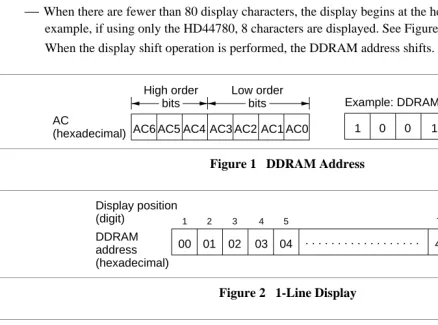
Display data RAM (DDRAM) stores display data represented in 8-bit character codes. Its extended capacity is 80 × 8 bits, or 80 characters. The area in display data RAM (DDRAM) that is not used for display can be used as general data RAM. See Figure 1 for the relationships between DDRAM addresses and positions on the liquid crystal display.
The DDRAM address (ADD) is set in the address counter (AC) as hexadecimal.
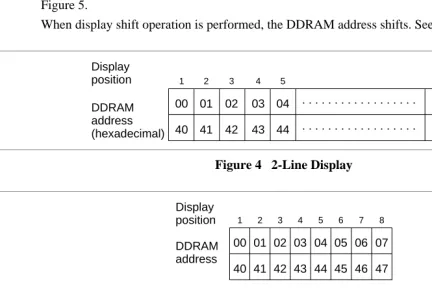
• 1-line display (N = 0) (Figure 2)
When there are fewer than 80 display characters, the display begins at the head position. For example, if using only the HD44780, 8 characters are displayed. See Figure 3.
When the display shift operation is performed, the DDRAM address shifts. See Figure 3.
AC6 AC5 AC4 AC3 AC2 AC1 AC0 1 0 0 1 1 1 0
AC
(hexadecimal)
Example: DDRAM address 4E High order
bits
Low order bits
Figure 1 DDRAM Address
00 01 02 03 04 4E 4F
DDRAM address (hexadecimal) Display position
(digit) 1 2 3 4 5 79 80
. . . .
Figure 2 1-Line Display
DDRAM address Display
position 1 2 3 4 5 6 7 8
00 01 02 03 04 05 06 07
For shift left For
shift right 00 01 02 03 04 05 06 01 02 03 04 05 06 07 08
[image:10.612.18.457.223.548.2]4F
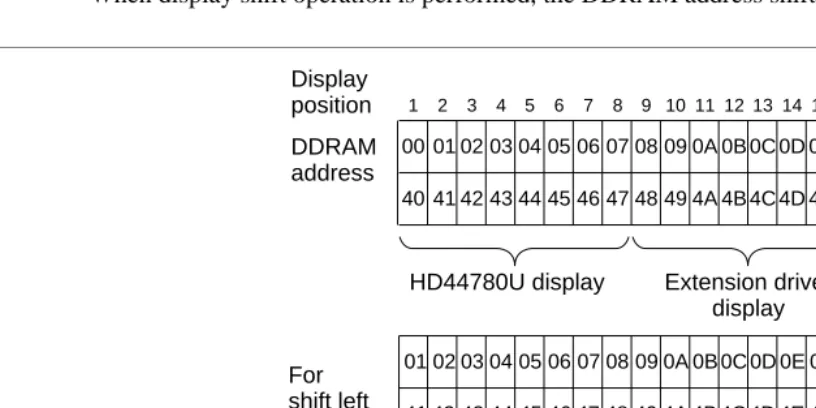
• 2-line display (N = 1) (Figure 4)
Case 1: When the number of display characters is less than 40 × 2 lines, the two lines are displayed from the head. Note that the first line end address and the second line start address are not
consecutive. For example, when just the HD44780 is used, 8 characters × 2 lines are displayed. See Figure 5.
When display shift operation is performed, the DDRAM address shifts. See Figure 5.
00 01 02 03 04 26 27
DDRAM address (hexadecimal) Display
position 1 2 3 4 5 39 40
. . . .
[image:11.612.22.455.129.429.2]40 41 42 43 44 . . . 66 67
Figure 4 2-Line Display
DDRAM address Display
position 1 2 3 4 5 6 7 8
00 01 02 03 04 05 06 07
For shift left
For shift right
40 41 42 43 44 45 46 47
01 02 03 04 05 06 07 08 41 42 43 44 45 46 47 48
00 01 02 03 04 05 06 40 41 42 43 44 45 46 27
67
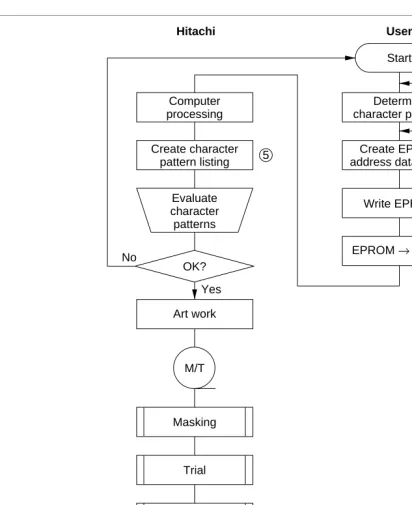
Case 2: For a 16-character × 2-line display, the HD44780 can be extended using one 40-output extension driver. See Figure 6.
When display shift operation is performed, the DDRAM address shifts. See Figure 6.
DDRAM address Display
position 1 2 3 4 5 6 7 8 9 10 11 12 13 14 15 16 00 01 02 03 04 05 06 07 08 09 0A 0B 0C 0D 0E 0F
For shift left
00 01 02 03 04 05 06 07 08 09 0A 0B 0C 0D 0E 27
40 41 42 43 44 45 46 47 48 49 4A 4B 4C 4D 4E 4F
HD44780U display Extension driver display
02
01 03 04 05 06 07 08 09 0A 0B 0C 0D 0E 0F 10
For shift right
41 42 43 44 45 46 47 48 49 4A 4B 4C 4D 4E 4F 50
[image:12.612.18.426.103.307.2]40 41 42 43 44 45 46 47 48 49 4A 4B 4C 4D 4E 67
Character Generator ROM (CGROM)
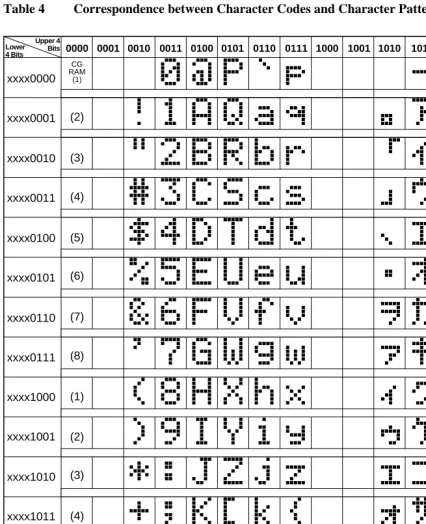
The character generator ROM generates 5 × 8 dot or 5 × 10 dot character patterns from 8-bit character codes (Table 4). It can generate 208 5 × 8 dot character patterns and 32 5 × 10 dot character patterns. User-defined character patterns are also available by mask-programmed ROM.
Character Generator RAM (CGRAM)
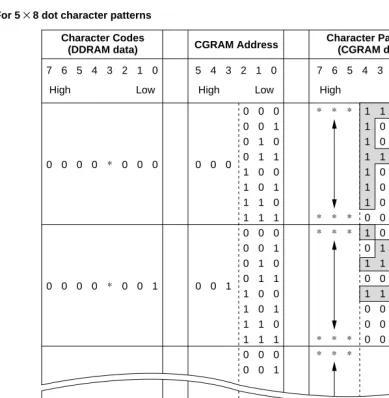
In the character generator RAM, the user can rewrite character patterns by program. For 5 × 8 dots, eight character patterns can be written, and for 5 × 10 dots, four character patterns can be written.
Write into DDRAM the character codes at the addresses shown as the left column of Table 4 to show the character patterns stored in CGRAM.
See Table 5 for the relationship between CGRAM addresses and data and display patterns.
Areas that are not used for display can be used as general data RAM.
Modifying Character Patterns
• Character pattern development procedure
The following operations correspond to the numbers listed in Figure 7:
1. Determine the correspondence between character codes and character patterns. 2. Create a listing indicating the correspondence between EPROM addresses and data. 3. Program the character patterns into the EPROM.
4. Send the EPROM to Hitachi.
5. Computer processing on the EPROM is performed at Hitachi to create a character pattern listing, which is sent to the user.
Determine character patterns
Create EPROM address data listing
Write EPROM
EPROM→ Hitachi Computer
processing
Create character pattern listing
Evaluate character patterns
OK?
Art work
Sample evaluation
OK? Masking
Trial
Sample No
Yes
No
Yes M/T
1
3 2
4 5
6
Note: For a description of the numbers used in this figure, refer to the preceding page.
User Hitachi
Mass production
[image:14.612.26.438.45.550.2]Start
• Programming character patterns
This section explains the correspondence between addresses and data used to program character patterns in EPROM. The HD44780U character generator ROM can generate 208 5 × 8 dot character patterns and 32 5 × 10 dot character patterns for a total of 240 different character patterns.
Character patterns
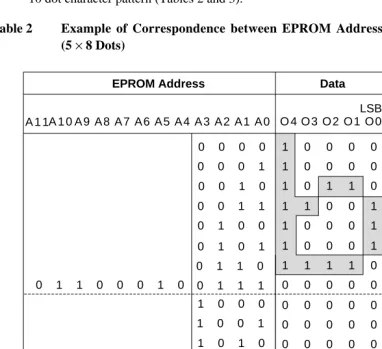
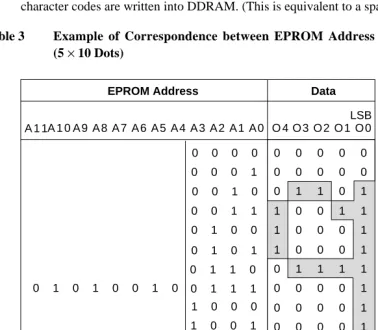
[image:15.612.34.417.175.524.2]EPROM address data and character pattern data correspond with each other to form a 5 × 8 or 5 × 10 dot character pattern (Tables 2 and 3).
Table 2 Example of Correspondence between EPROM Address Data and Character Pattern (5 × 8 Dots)
Data
O 4 O 3 O 2 O 1 O 0
0 0 0 1 0 0 1 0 0 0 1 1 0 1 0 0
0 1 1 0 0 0 1 0
EPROM Address
Character code Line
position
LSB
0 1 0 1 0 1 1 0 0 1 1 1 0 0 0 0
1 0 0 1 1 0 1 0 1 0 1 1 1 1 0 0 1 1 0 1 1 1 1 0 1 1 1 1 1 0 0 0
1 1 0 0 1 1 0 0 0 1 1 0 0 0 1 1 0 0 0 0 1 0 0 0 0 1 0 1 1 0
Cursor position 1 1 1 1 0
0 0 0 0 0
0 0 0 0 0 0 0 0 0 0 0 0 0 0 0
0 0 0 0 0 0 0 0 0 0 0 0 0 0 0 0 0 0 0 0 0 0 0 0 0 A 1 0 A 9 A 8 A 7 A 6 A 5 A 4 A 3 A 2 A 1 A 0
A 1 1
Notes: 1. EPROM addresses A11 to A4 correspond to a character code.
2. EPROM addresses A3 to A0 specify a line position of the character pattern. 3. EPROM data O4 to O0 correspond to character pattern data.
4. EPROM data O5 to O7 must be specified as 0. 5. A lit display position (black) corresponds to a 1.
Handling unused character patterns
1. EPROM data outside the character pattern area: Always input 0s.
2. EPROM data in CGRAM area: Always input 0s. (Input 0s to EPROM addresses 00H to FFH.) 3. EPROM data used when the user does not use any HD44780U character pattern: According to the user
application, handled in one of the two ways listed as follows.
a. When unused character patterns are not programmed: If an unused character code is written into DDRAM, all its dots are lit. By not programing a character pattern, all of its bits become lit. (This is due to the EPROM being filled with 1s after it is erased.)
[image:16.612.42.421.223.554.2]b. When unused character patterns are programmed as 0s: Nothing is displayed even if unused character codes are written into DDRAM. (This is equivalent to a space.)
Table 3 Example of Correspondence between EPROM Address Data and Character Pattern (5 × 10 Dots)
A 1 0 A 9 A 8 A 7 A 6 A 5 A 4 A 3 A 2 A 1 A 0
Data
O 4 O 3 O 2 O 1 O 0
0 0 0 1 0 0 1 0 0 0 1 1 0 1 0 0
0 1 0 1 0 0 1 0
EPROM Address
Character code Line
position
LSB
0 1 0 1 0 1 1 0 0 1 1 1
0 0 0 0 0 0 0 0 0 0 0 1 1 0 1 1 0 0 1 1 1 0 0 0 1 1 0 0 0 1 0 0 0 0
A 1 1
1 0 0 1 1 0 1 0 1 0 1 1 1 1 0 0 1 1 0 1 1 1 1 0 1 1 1 1 1 0 0 0
Cursor position 0 0 0 0 0
0 0 0 0 0 0 0 0 0 0 0 0 0 0 0 0 0 0 0 0 0 0 0 0 0 0 0 0 0 1 0 0 0 0 1 0 0 0 0 1 0 1 1 1 1
Notes: 1. EPROM addresses A11 to A3 correspond to a character code.
2. EPROM addresses A3 to A0 specify a line position of the character pattern. 3. EPROM data O4 to O0 correspond to character pattern data.
4. EPROM data O5 to O7 must be specified as 0. 5. A lit display position (black) corresponds to a 1.
Table 4 Correspondence between Character Codes and Character Patterns (ROM Code: A00)
xxxx0000
xxxx0001
xxxx0010
xxxx0011
xxxx0100
xxxx0101
xxxx0110
xxxx0111
xxxx1000
xxxx1001
xxxx1010
xxxx1011
xxxx1100
xxxx1101
xxxx1110
xxxx1111
0000 0010 0011 0100 0101 0110 0111 1010 1011 1100 1101 1110 1111
Upper 4 Bits Lower 4 Bits
CG RAM
(1)
(2)
(3)
(4)
(5)
(6)
(7)
(8)
(1)
(2)
(3)
(4)
(5)
(6)
(7)
(8)
0001 1000 1001
Table 4 Correspondence between Character Codes and Character Patterns (ROM Code: A02)
xxxx0000
xxxx0001
xxxx0010
xxxx0011
xxxx0100
xxxx0101
xxxx0110
xxxx0111
xxxx1000
xxxx1001
xxxx1010
xxxx1011
xxxx1100
xxxx1101
xxxx1110
xxxx1111
0000 0010 0011 0100 0101 0110 0111 1010 1011 1100 1101 1110 1111
Upper 4 Bits Lower 4 Bits
CG RAM
(1)
(2)
(3)
(4)
(5)
(6)
(7)
(8)
(1)
(2)
(3)
(4)
(5)
(6)
(7)
(8)
Table 5 Relationship between CGRAM Addresses, Character Codes (DDRAM) and Character Patterns (CGRAM Data)
Character Codes
(DDRAM data) CGRAM Address
Character Patterns (CGRAM data)
7 6 5 4 3 2 1 0
0 0 0 0 * 0 0 0
0 0 0 0 * 0 0 1
0 0 0 0 * 1 1 1
5 4 3 2 1 0
0 0 0
0 0 1
1 1 1
7 6 5 4 3 2 1 0
0 0 0 0 1 1 1 1 0 0 0 0 1 1 1 1 0 0 1 1 1 1 0 0 1 1 0 0 1 1 0 0 1 1 0 0 1 1 0 0 0 0 1 1 0 1 0 1 0 1 0 1 0 1 0 1 0 1 0 1 0 1 0 1 0 1 * * * * * * * * * * * * * * * * * *
High Low High Low High Low
Character pattern (1) Cursor position 1 1 1 1 1 1 1 0 1 0 1 0 1 0 0 0 0 1 1 0 0 0 1 0 1 0 1 0 1 0 0 0 1 0 0 1 0 0 0 0 0 1 1 0 1 0 0 0 1 0 0 1 1 0 0 0 0 0 1 1 1 1 1 0 1 0 0 1 0 1 0 0 0 1 1 0 1 0 0 0 Character pattern (2) Cursor position
For 5 ×8 dot character patterns
Notes: 1. Character code bits 0 to 2 correspond to CGRAM address bits 3 to 5 (3 bits: 8 types). 2. CGRAM address bits 0 to 2 designate the character pattern line position. The 8th line is the
cursor position and its display is formed by a logical OR with the cursor.
Maintain the 8th line data, corresponding to the cursor display position, at 0 as the cursor display. If the 8th line data is 1, 1 bits will light up the 8th line regardless of the cursor presence.
3. Character pattern row positions correspond to CGRAM data bits 0 to 4 (bit 4 being at the left). 4. As shown Table 5, CGRAM character patterns are selected when character code bits 4 to 7 are
all 0. However, since character code bit 3 has no effect, the R display example above can be selected by either character code 00H or 08H.
Table 5 Relationship between CGRAM Addresses, Character Codes (DDRAM) and Character Patterns (CGRAM Data) (cont)
Character Codes
(DDRAM data) CGRAM Address
Character Patterns (CGRAM data)
7 6 5 4 3 2 1 0
0 0 0 0 * 0 0
0 0 0 0 1 1
5 4 3 2 1 0
0 0
1 1
7 6 5 4 3 2 1 0
* * * * * * * * * * * * * * * * * * * * * * * *
High Low High Low High Low
Character pattern Cursor position 0 0 0 0 1 1 1 1 0 0 0 0 1 1 1 1 0 0 0 0 0 1 1 1 1 0 0 1 1 0 0 1 1 0 0 1 1 0 0 1 1 0 0 0 1 1 0 0 1 1 0 1 0 1 0 1 0 1 0 1 0 1 0 1 0 1 0 1 1 0 1 0 1 0 1 0 0 0 0 0 0 0 0 1 1 1 1 1 1 1 1 0 0 1 1 1 1 1 1 1 * * * * * * * 0 0 1 1 1 1 1 1 1 1 0 0 0 0 1 0 0 1 0 0 0 0 0 0 1 0 0 0 1 0 0 0 0 0 0 1 0 0 0 1 0 0 0 0 0 0 0 1 1 1 0 0 0 0 0 * * * * * * * * * * * * * * * *
For 5 × 10 dot character patterns
Notes: 1. Character code bits 1 and 2 correspond to CGRAM address bits 4 and 5 (2 bits: 4 types). 2. CGRAM address bits 0 to 3 designate the character pattern line position. The 11th line is the
cursor position and its display is formed by a logical OR with the cursor.
Maintain the 11th line data corresponding to the cursor display positon at 0 as the cursor display. If the 11th line data is „1“, „1“ bits will light up the 11th line regardless of the cursor presence. Since lines 12 to 16 are not used for display, they can be used for general data RAM. 3. Character pattern row positions are the same as 5 × 8 dot character pattern positions. 4. CGRAM character patterns are selected when character code bits 4 to 7 are all 0.
However, since character code bits 0 and 3 have no effect, the P display example above can be selected by character codes 00H, 01H, 08H, and 09H.
Timing Generation Circuit
The timing generation circuit generates timing signals for the operation of internal circuits such as DDRAM, CGROM and CGRAM. RAM read timing for display and internal operation timing by MPU access are generated separately to avoid interfering with each other. Therefore, when writing data to DDRAM, for example, there will be no undesirable interferences, such as flickering, in areas other than the display area.
Liquid Crystal Display Driver Circuit
The liquid crystal display driver circuit consists of 16 common signal drivers and 40 segment signal drivers. When the character font and number of lines are selected by a program, the required common signal drivers automatically output drive waveforms, while the other common signal drivers continue to output non-selection waveforms.
Sending serial data always starts at the display data character pattern corresponding to the last address of the display data RAM (DDRAM).
Since serial data is latched when the display data character pattern corresponding to the starting address enters the internal shift register, the HD44780U drives from the head display.
Cursor/Blink Control Circuit
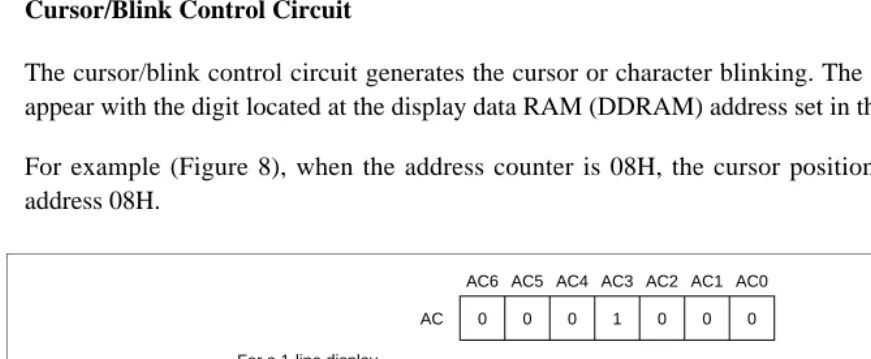
The cursor/blink control circuit generates the cursor or character blinking. The cursor or the blinking will appear with the digit located at the display data RAM (DDRAM) address set in the address counter (AC).
For example (Figure 8), when the address counter is 08H, the cursor position is displayed at DDRAM address 08H. AC6 0 AC5 0 AC4 0 AC3 1 AC2 0 AC1 0 AC0 0 1 00 2 01 3 02 4 03 5 04 6 05 7 06 8 07 9 08 10 09 11 0A 1 00 40 2 01 41 3 02 42 4 03 43 5 04 44 6 05 45 7 06 46 8 07 47 9 08 48 10 09 49 11 0A 4A AC cursor position cursor position Display position DDRAM address (hexadecimal) Display position DDRAM address (hexadecimal) For a 1-line display
For a 2-line display
[image:21.612.13.448.421.600.2]Interfacing to the MPU
The HD44780U can send data in either two 4-bit operations or one 8-bit operation, thus allowing interfacing with 4- or 8-bit MPUs.
• For 4-bit interface data, only four bus lines (DB4 to DB7) are used for transfer. Bus lines DB0 to DB3 are disabled. The data transfer between the HD44780U and the MPU is completed after the 4-bit data has been transferred twice. As for the order of data transfer, the four high order bits (for 8-bit operation, DB4 to DB7) are transferred before the four low order bits (for 8-bit operation, DB0 to DB3).
The busy flag must be checked (one instruction) after the 4-bit data has been transferred twice. Two more 4-bit operations then transfer the busy flag and address counter data.
• For 8-bit interface data, all eight bus lines (DB0 to DB7) are used.
RS
R/W
E
IR7
IR6
IR5
IR4
BF
AC6
AC5
AC4 DB7
DB6
DB5
DB4
Instruction register (IR) write
Busy flag (BF) and address counter (AC) read
Data register (DR) read
IR3
IR2
IR1
IR0
AC3
AC2
AC1
AC0
DR7
DR6
DR5
DR4
DR3
DR2
DR1
[image:22.612.23.436.219.436.2]DR0
Reset Function
Initializing by Internal Reset Circuit
An internal reset circuit automatically initializes the HD44780U when the power is turned on. The following instructions are executed during the initialization. The busy flag (BF) is kept in the busy state until the initialization ends (BF = 1). The busy state lasts for 10 ms after VCC rises to 4.5 V.
1. Display clear 2. Function set:
DL = 1; 8-bit interface data N = 0; 1-line display
F = 0; 5 × 8 dot character font 3. Display on/off control:
D = 0; Display off C = 0; Cursor off B = 0; Blinking off 4. Entry mode set:
I/D = 1; Increment by 1 S = 0; No shift
Note: If the electrical characteristics conditions listed under the table Power Supply Conditions Using Internal Reset Circuit are not met, the internal reset circuit will not operate normally and will fail to initialize the HD44780U. For such a case, initial-ization must be performed by the MPU as explained in the section, Initializing by Instruction.
Instructions
Outline
Only the instruction register (IR) and the data register (DR) of the HD44780U can be controlled by the MPU. Before starting the internal operation of the HD44780U, control information is temporarily stored into these registers to allow interfacing with various MPUs, which operate at different speeds, or various peripheral control devices. The internal operation of the HD44780U is determined by signals sent from the MPU. These signals, which include register selection signal (RS), read/
write signal (R/W), and the data bus (DB0 to DB7), make up the HD44780U instructions (Table 6). There are four categories of instructions that:
• Designate HD44780U functions, such as display format, data length, etc.
Normally, instructions that perform data transfer with internal RAM are used the most. However, auto-incrementation by 1 (or auto-decrementation by 1) of internal HD44780U RAM addresses after each data write can lighten the program load of the MPU. Since the display shift instruction (Table 11) can perform concurrently with display data write, the user can minimize system development time with maximum programming efficiency.
When an instruction is being executed for internal operation, no instruction other than the busy flag/address read instruction can be executed.
Because the busy flag is set to 1 while an instruction is being executed, check it to make sure it is 0 before sending another instruction from the MPU.
[image:24.612.21.452.288.635.2]Note: Be sure the HD44780U is not in the busy state (BF = 0) before sending an instruction from the MPU to the HD44780U. If an instruction is sent without checking the busy flag, the time between the first instruction and next instruction will take much longer than the instruction time itself. Refer to Table 6 for the list of each instruc-tion execution time.
Table 6 Instructions
Code Execution Time(max) (when f
cp or Instruction RS R/W DB7 DB6 DB5 DB4 DB3 DB2 DB1 DB0 Description fOSC is 270 kHz)
Clear display
0 0 0 0 0 0 0 0 0 1 Clears entire display and
sets DDRAM address 0 in address counter.
Return home
0 0 0 0 0 0 0 0 1 — Sets DDRAM address 0 in
address counter. Also returns display from being shifted to original position. DDRAM contents remain unchanged.
1.52 ms
Entry mode set
0 0 0 0 0 0 0 1 I/D S Sets cursor move direction
and specifies display shift. These operations are performed during data write and read.
37 µs
Display on/off control
0 0 0 0 0 0 1 D C B Sets entire display (D) on/off,
cursor on/off (C), and blinking of cursor position character (B).
37 µs
Cursor or display shift
0 0 0 0 0 1 S/C R/L — — Moves cursor and shifts
display without changing DDRAM contents.
37 µs Function
set
0 0 0 0 1 DL N F — — Sets interface data length
(DL), number of display lines (N), and character font (F).
37 µs Set
CGRAM address
0 0 0 1 ACG ACG ACG ACG ACG ACG Sets CGRAM address. CGRAM data is sent and received after this setting.
37 µs Set
DDRAM address
0 0 1 ADD ADD ADD ADD ADD ADD ADD Sets DDRAM address. DDRAM data is sent and received after this setting.
37 µs Read busy
flag & address
0 1 BF AC AC AC AC AC AC AC Reads busy flag (BF)
indicating internal operation is being performed and reads address counter contents.
Table 6 Instructions (cont)
Code Execution Time(max) (when f
cp or
Instruction RS R/W DB7 DB6 DB5 DB4 DB3 DB2 DB1 DB0 Description fOSC is 270 kHz)
Write data to CG or DDRAM
1 0 Write data Writes data into DDRAM or
CGRAM.
37 µs tADD = 4 µs*
Read data from CG or DDRAM
1 1 Read data Reads data from DDRAM or
CGRAM.
37 µs tADD = 4 µs*
I/D = 1: Increment I/D = 0: Decrement
S = 1: Accompanies display shift S/C = 1: Display shift
S/C = 0: Cursor move R/L = 1: Shift to the right R/L = 0: Shift to the left DL = 1: 8 bits, DL = 0: 4 bits N = 1: 2 lines, N = 0: 1 line F = 1: 5 × 10 dots, F = 0: 5 × 8 dots BF = 1: Internally operating
BF = 0: Instructions acceptable
DDRAM: Display data RAM CGRAM: Character generator
RAM
ACG: CGRAM address ADD: DDRAM address (corresponds to cursor address)
AC: Address counter used for both DD and CGRAM addresses
Execution time changes when frequency changes Example:
When fcp or fOSC is 250 kHz,
37 µs ×270 = 40 µs 250
Note: — indicates no effect.
* After execution of the CGRAM/DDRAM data write or read instruction, the RAM address counter is incremented or decremented by 1. The RAM address counter is updated after the busy flag turns off. In Figure 10, tADD is the time elapsed after the busy flag turns off until the address counter is updated.
Busy state Busy signal
(DB7 pin)
Address counter (DB0 to DB6 pins)
tADD
A A + 1
Note: t depends on the operation frequency t = 1.5/(f or f ) seconds
ADD
ADD cp OSC
Instruction Description
Clear Display
Clear display writes space code 20H (character pattern for character code 20H must be a blank pattern) into all DDRAM addresses. It then sets DDRAM address 0 into the address counter, and returns the display to its original status if it was shifted. In other words, the display disappears and the cursor or blinking goes to the left edge of the display (in the first line if 2 lines are displayed). It also sets I/D to 1 (increment mode) in entry mode. S of entry mode does not change.
Return Home
Return home sets DDRAM address 0 into the address counter, and returns the display to its original status if it was shifted. The DDRAM contents do not change.
The cursor or blinking go to the left edge of the display (in the first line if 2 lines are displayed).
Entry Mode Set
I/D: Increments (I/D = 1) or decrements (I/D = 0) the DDRAM address by 1 when a character code is
written into or read from DDRAM.
The cursor or blinking moves to the right when incremented by 1 and to the left when decremented by 1. The same applies to writing and reading of CGRAM.
S: Shifts the entire display either to the right (I/D = 0) or to the left (I/D = 1) when S is 1. The display does
not shift if S is 0.
If S is 1, it will seem as if the cursor does not move but the display does. The display does not shift when reading from DDRAM. Also, writing into or reading out from CGRAM does not shift the display.
Display On/Off Control
D: The display is on when D is 1 and off when D is 0. When off, the display data remains in DDRAM, but
can be displayed instantly by setting D to 1.
C: The cursor is displayed when C is 1 and not displayed when C is 0. Even if the cursor disappears, the
function of I/D or other specifications will not change during display data write. The cursor is displayed using 5 dots in the 8th line for 5 × 8 dot character font selection and in the 11th line for the 5 × 10 dot character font selection (Figure 13).
B: The character indicated by the cursor blinks when B is 1 (Figure 13). The blinking is displayed as
switching between all blank dots and displayed characters at a speed of 409.6-ms intervals when fcp or fOSC
Cursor or Display Shift
Cursor or display shift shifts the cursor position or display to the right or left without writing or reading display data (Table 7). This function is used to correct or search the display. In a 2-line display, the cursor moves to the second line when it passes the 40th digit of the first line. Note that the first and second line displays will shift at the same time.
When the displayed data is shifted repeatedly each line moves only horizontally. The second line display does not shift into the first line position.
The address counter (AC) contents will not change if the only action performed is a display shift.
Function Set
DL: Sets the interface data length. Data is sent or received in 8-bit lengths (DB7 to DB0) when DL is 1,
and in 4-bit lengths (DB7 to DB4) when DL is 0.When 4-bit length is selected, data must be sent or received twice.
N: Sets the number of display lines.
F: Sets the character font.
Note: Perform the function at the head of the program before executing any instructions (except for the read busy flag and address instruction). From this point, the function set instruction cannot be executed unless the interface data length is changed.
Set CGRAM Address
Set CGRAM address sets the CGRAM address binary AAAAAA into the address counter.
Code Note: Don’t care.* Code Code Code RS 0 R/W 0 DB7 0 DB6 0 DB5 0 DB4 0 DB3 0 DB2 0 DB1 0 DB0 1 RS 0 R/W 0 DB7 0 DB6 0 DB5 0 DB4 0 DB3 0 DB2 0 DB1 1 DB0 * RS 0 R/W 0 DB7 0 DB6 0 DB5 0 DB4 0 DB3 0 DB2 1 DB1 I/D DB0 S RS 0 R/W 0 DB7 0 DB6 0 DB5 0 DB4 0 DB3 1 DB2 D DB1 C DB0 B Return home Clear display Entry mode set Display on/off control RS 0 R/W 0 DB7 0 DB6 0 DB5 0 DB4 1 DB3 S/C Code DB2 R/L
DB1 DB0
Code Code Higher order bit Lower order bit * Cursor or display shift Function set Set CGRAM address * RS 0 R/W 0 DB7 0 DB6 0 DB5 1 DB4 DL DB3 N DB2 F
DB1 DB0
* * RS 0 R/W 0 DB7 0 DB6 1 DB5 A DB4 A DB3 A DB2 A
DB1 DB0
A A
[image:28.612.30.450.49.417.2]Note: Don’t care.*
Set DDRAM Address
Set DDRAM address sets the DDRAM address binary AAAAAAA into the address counter.
Data is then written to or read from the MPU for DDRAM.
However, when N is 0 (1-line display), AAAAAAA can be 00H to 4FH. When N is 1 (2-line display), AAAAAAA can be 00H to 27H for the first line, and 40H to 67H for the second line.
Read Busy Flag and Address
Read busy flag and address reads the busy flag (BF) indicating that the system is now internally operating on a previously received instruction. If BF is 1, the internal operation is in progress. The next instruction will not be accepted until BF is reset to 0. Check the BF status before the next write operation. At the same time, the value of the address counter in binary AAAAAAA is read out. This address counter is used by both CG and DDRAM addresses, and its value is determined by the previous instruction. The address contents are the same as for instructions set CGRAM address and set DDRAM address.
Table 7 Shift Function
S/C R/L
0 0 Shifts the cursor position to the left. (AC is decremented by one.) 0 1 Shifts the cursor position to the right. (AC is incremented by one.) 1 0 Shifts the entire display to the left. The cursor follows the display shift. 1 1 Shifts the entire display to the right. The cursor follows the display shift.
Table 8 Function Set
N F
No. of Display
Lines Character Font
Duty
Factor Remarks
0 0 1 5 × 8 dots 1/8
0 1 1 5 × 10 dots 1/11
Cursor 5 8 dot
character font
5 10 dot character font
× × Alternating display
[image:30.612.17.459.51.384.2]Blink display example Cursor display example
Figure 12 Cursor and Blinking
RS
0 R/W
0 DB7
1 DB6
A DB5
A DB4
A DB3
A Code
DB2
A DB1
A DB0
A
Higher order bit
Lower order bit
RS
0 R/W
1 DB7
BF DB6
A DB5
A DB4
A DB3
A Code
DB2
A DB1
A DB0
A
Higher order bit
Lower order bit Set DDRAM
address
Read busy flag and address
Write Data to CG or DDRAM
Write data to CG or DDRAM writes 8-bit binary data DDDDDDDD to CG or DDRAM.
To write into CG or DDRAM is determined by the previous specification of the CGRAM or DDRAM address setting. After a write, the address is automatically incremented or decremented by 1 according to the entry mode. The entry mode also determines the display shift.
Read Data from CG or DDRAM
Read data from CG or DDRAM reads 8-bit binary data DDDDDDDD from CG or DDRAM.
The previous designation determines whether CG or DDRAM is to be read. Before entering this read instruction, either CGRAM or DDRAM address set instruction must be executed. If not executed, the first read data will be invalid. When serially executing read instructions, the next address data is normally read from the second read. The address set instructions need not be executed just before this read instruction when shifting the cursor by the cursor shift instruction (when reading out DDRAM). The operation of the cursor shift instruction is the same as the set DDRAM address instruction.
After a read, the entry mode automatically increases or decreases the address by 1. However, display shift is not executed regardless of the entry mode.
Note: The address counter (AC) is automatically incremented or decremented by 1 after the write instructions to CGRAM or DDRAM are executed. The RAM data selected by the AC cannot be read out at this time even if read instructions are executed. Therefore, to correctly read data, execute either the address set instruction or cursor shift instruction (only with DDRAM), then just before reading the desired data, execute the read instruction from the second time the read instruction is sent.
RS
1 R/W
1 DB7
D DB6
D DB5
D DB4
D DB3
D Code
DB2
D DB1
D DB0
D
Higher order bits
Lower order bits RS
1 R/W
0 DB7
D DB6
D DB5
D DB4
D DB3
D Code
DB2
D DB1
D DB0
D
Higher order bits
Lower order bits
[image:31.612.22.458.416.557.2]Read data from CG or DDRAM Write data to CG or DDRAM
Interfacing the HD44780U
Interface to MPUs
• Interfacing to an 8-bit MPU
See Figure 16 for an example of using a I/O port (for a single-chip microcomputer) as an interface device.
In this example, P30 to P37 are connected to the data bus DB0 to DB7, and P75 to P77 are connected to E, R/W, and RS, respectively.
#
)*
0
% & ,
+ ,
RS
R/W
E
Internal operation
DB7
Functioning
Data Busy Busy
Not
busy Data
Instruction write
Busy flag check
Busy flag check
Busy flag check
Instruction write
Figure 15 Example of Busy Flag Check Timing Sequence
P30 to P37
P77 P76 P75
16
40
H8/325 HD44780U
8
DB0 to DB7
E RS R/W
LCD COM1 to
COM16
SEG1 to SEG40
• Interfacing to a 4-bit MPU
The HD44780U can be connected to the I/O port of a 4-bit MPU. If the I/O port has enough bits, 8-bit data can be transferred. Otherwise, one data transfer must be made in two operations for 4-bit data. In this case, the timing sequence becomes somewhat complex. (See Figure 17.)
See Figure 18 for an interface example to the HMCS4019R.
Note that two cycles are needed for the busy flag check as well as for the data transfer. The 4-bit operation is selected by the program.
# $ *
' . / ! " ( ) RS
R/W E
Internal operation
DB7 IR7 IR3 Busy AC3
Not
busy AC3 D7 D3
Instruction write
Busy flag check
Busy flag check
Instruction write Note: IR7 , IR3 are the 7th and 3rd bits of the instruction.
AC3 is the 3rd bit of the address counter.
Functioning
Figure 17 Example of 4-Bit Data Transfer Timing Sequence
D15 D14 D13
R10 to R13
RS R/W E
DB4 to DB7
COM1 to COM16
SEG1 to SEG40
4 40
16
LCD
HMCS4019R HD44780
Interface to Liquid Crystal Display
Character Font and Number of Lines: The HD44780U can perform two types of displays, 5 × 8 dot and 5 × 10 dot character fonts, each with a cursor.
Up to two lines are displayed for 5 × 8 dots and one line for 5 × 10 dots. Therefore, a total of three
types of common signals are available (Table 9).
The number of lines and font types can be selected by the program. (See Table 6, Instructions.)
Connection to HD44780 and Liquid Crystal Display: See Figure 19 for the connection examples.
Table 9 Common Signals
Number of Lines Character Font Number of Common Signals Duty Factor
1 5 × 8 dots + cursor 8 1/8
1 5 × 10 dots + cursor 11 1/11
2 5 × 8 dots + cursor 16 1/16
COM1
COM8
SEG1
SEG40
COM1
COM11
SEG1
SEG40 HD44780
Example of a 5 × 8 dot, 8-character × 1-line display (1/4 bias, 1/8 duty cycle)
[image:34.612.19.424.292.594.2]Example of a 5 × 10 dot, 8-character × 1-line display (1/4 bias, 1/11 duty cycle) HD44780
Since five segment signal lines can display one digit, one HD44780U can display up to 8 digits for a 1-line display and 16 digits for a 2-line display.
The examples in Figure 19 have unused common signal pins, which always output non-selection waveforms. When the liquid crystal display panel has unused extra scanning lines, connect the extra scanning lines to these common signal pins to avoid any undesirable effects due to crosstalk during the floating state.
COM1
COM8
SEG1
SEG40 HD44780
COM9
COM16
[image:35.612.16.425.143.349.2]Example of a 5 × 8 dot, 8-character × 2-line display (1/5 bias, 1/16 duty cycle)
Connection of Changed Matrix Layout: In the preceding examples, the number of lines correspond to the
scanning lines. However, the following display examples (Figure 20) are made possible by altering the matrix layout of the liquid crystal display panel. In either case, the only change is the layout. The display characteristics and the number of liquid crystal display characters depend on the number of common signals or on duty factor. Note that the display data RAM (DDRAM) addresses for 4 characters × 2 lines and for 16 characters × 1 line are the same as in Figure 19.
COM1
COM8
SEG1
SEG40
COM9
COM16 HD44780
[image:36.612.16.438.134.352.2]5 × 8 dot, 16-character × 1-line display (1/5 bias, 1/16 duty cycle)
Power Supply for Liquid Crystal Display Drive
Various voltage levels must be applied to pins V1 to V5 of the HD44780U to obtain the liquid crystal display drive waveforms. The voltages must be changed according to the duty factor (Table 10).
[image:37.612.25.455.327.547.2]VLCD is the peak value for the liquid crystal display drive waveforms, and resistance dividing provides voltages V1 to V5 (Figure 21).
Table 10 Duty Factor and Power Supply for Liquid Crystal Display Drive
Duty Factor
1/8, 1/11 1/16
Bias
Power Supply 1/4 1/5
V1 VCC–1/4 VLCD VCC–1/5 VLCD
V2 VCC–1/2 VLCD VCC–2/5 VLCD
V3 VCC–1/2 VLCD VCC–3/5 VLCD
V4 VCC–3/4 VLCD VCC–4/5 VLCD
V5 VCC–VLCD VCC–VLCD
VCC V1
V4 V5 V2 V3
VCC V1 V2 V3 V4 V5 R
R
R R
VR –5 V VCC (+5 V)
–5 V VCC (+5 V)
R R R R R
VR
VLCD VLCD
1/4 bias
(1/8, 1/11 duty cycle)
1/5 bias
(1/16, duty cycle)
Relationship between Oscillation Frequency and Liquid Crystal Display Frame
Frequency
The liquid crystal display frame frequencies of Figure 22 apply only when the oscillation frequency is 270 kHz (one clock pulse of 3.7 µs).
1 2 3 4 8 1 2
1 2 3 4 11 1 2
1 2 3 4 16 1 2
400 clocks
400 clocks
200 clocks 1 frame
1 frame
1 frame 1/8 duty cycle
1/11 duty cycle
1/16 duty cycle VCC
V1
V2 (V3)
V4
V5
VCC
V1
V2 (V3)
V4
V5
VCC
V1
V2
V3
V4
V5 COM1
COM1
COM1
1 frame = 3.7 µs × 400 × 8 = 11850 µs = 11.9 ms
Frame frequency = = 84.3 Hz1 11.9 ms
1 frame = 3.7 µs × 400 × 11 = 16300 µs = 16.3 ms
Frame frequency = = 61.4 Hz1 16.3 ms
1 frame = 3.7 µs × 200 × 16 = 11850 µs = 11.9 ms
[image:38.612.21.417.125.607.2]Frame frequency = = 84.3 Hz1 11.9 ms
Instruction and Display Correspondence
• 8-bit operation, 8-digit × 1-line display with internal reset
Refer to Table 11 for an example of an 8-digit × 1-line display in 8-bit operation. The HD44780U functions must be set by the function set instruction prior to the display. Since the display data RAM can store data for 80 characters, as explained before, the RAM can be used for displays such as for advertising when combined with the display shift operation.
Since the display shift operation changes only the display position with DDRAM contents unchanged, the first display data entered into DDRAM can be output when the return home operation is performed.
• 4-bit operation, 8-digit × 1-line display with internal reset
The program must set all functions prior to the 4-bit operation (Table 12). When the power is turned on, 8-bit operation is automatically selected and the first write is performed as an 8-bit operation. Since DB0 to DB3 are not connected, a rewrite is then required. However, since one operation is completed in two accesses for 4-bit operation, a rewrite is needed to set the functions (see Table 12). Thus, DB4 to DB7 of the function set instruction is written twice.
• 8-bit operation, 8-digit × 2-line display
For a 2-line display, the cursor automatically moves from the first to the second line after the 40th digit of the first line has been written. Thus, if there are only 8 characters in the first line, the DDRAM address must be again set after the 8th character is completed. (See Table 13.) Note that the display shift operation is performed for the first and second lines. In the example of Table 13, the display shift is performed when the cursor is on the second line. However, if the shift operation is performed when the cursor is on the first line, both the first and second lines move together. If the shift is repeated, the display of the second line will not move to the first line. The same display will only shift within its own line for the number of times the shift is repeated.
Table 11 8-Bit Operation, 8-Digit × 1-Line Display Example with Internal Reset
Step Instruction
No. RS R/W DB7 DB6 DB5 DB4 DB3 DB2 DB1 DB0 Display Operation
1 Power supply on (the HD44780U is initialized by the internal reset circuit)
Initialized. No display.
2 Function set
0 0 0 0 1 1 0 0 * *
Sets to 8-bit operation and selects 1-line display and 5 × 8 dot character font. (Number of display lines and character fonts cannot be changed after step #2.)
3 Display on/off control
0 0 0 0 0 0 1 1 1 0 _
Turns on display and cursor. Entire display is in space mode because of initialization.
4 Entry mode set
0 0 0 0 0 0 0 1 1 0 _
Sets mode to increment the address by one and to shift the cursor to the right at the time of write to the DD/CGRAM. Display is not shifted.
5 Write data to CGRAM/DDRAM
1 0 0 1 0 0 1 0 0 0 H_
Writes H. DDRAM has already been selected by initialization when the power was turned on. The cursor is incremented by one and shifted to the right.
6 Write data to CGRAM/DDRAM
1 0 0 1 0 0 1 0 0 1 HI_
Writes I.
7 ·
· · · ·
· · · · ·
8 Write data to CGRAM/DDRAM
1 0 0 1 0 0 1 0 0 1 HITACHI_
Writes I.
9 Entry mode set
0 0 0 0 0 0 0 1 1 1 HITACHI_
Sets mode to shift display at the time of write.
10 Write data to CGRAM/DDRAM
1 0 0 0 1 0 0 0 0 0 ITACHI _
Table 11 8-Bit Operation, 8-Digit × 1-Line Display Example with Internal Reset (cont)
Step Instruction
No. RS R/W DB7 DB6 DB5 DB4 DB3 DB2 DB1 DB0 Display Operation
11 Write data to CGRAM/DDRAM
1 0 0 1 0 0 1 1 0 1 TACHI M_
Writes M.
12 ·
· · · ·
· · · · ·
13 Write data to CGRAM/DDRAM
1 0 0 1 0 0 1 1 1 1 MICROKO_
Writes O.
14 Cursor or display shift
0 0 0 0 0 1 0 0 * * MICROKO _
Shifts only the cursor position to the left.
15 Cursor or display shift
0 0 0 0 0 1 0 0 * * MICROKO _
Shifts only the cursor position to the left.
16 Write data to CGRAM/DDRAM
1 0 0 1 0 0 0 0 1 1 ICROCO _
Writes C over K.
The display moves to the left.
17 Cursor or display shift
0 0 0 0 0 1 1 1 * * MICROCO _
Shifts the display and cursor position to the right.
18 Cursor or display shift
0 0 0 0 0 1 0 1 * * MICROCO_
Shifts the display and cursor position to the right.
19 Write data to CGRAM/DDRAM
1 0 0 1 0 0 1 1 0 1 ICROCOM_
Writes M.
20 ·
· · · ·
· · · · ·
21 Return home
0 0 0 0 0 0 0 0 1 0 HITACHI _
Table 12 4-Bit Operation, 8-Digit × 1-Line Display Example with Internal Reset
Step Instruction
No. RS R/W DB7 DB6 DB5 DB4 Display Operation
1 Power supply on (the HD44780U is initialized by the internal reset circuit)
Initialized. No display.
2 Function set
0 0 0 0 1 0
Sets to 4-bit operation. In this case, operation is handled as 8 bits by initializa-tion, and only this instruction completes with one write.
3 Function set
0 0 0 0 1 0
0 0 0 0 * *
Sets 4-bit operation and selects 1-line display and 5 × 8 dot character font. 4-bit operation starts from this step and resetting is necessary. (Number of display lines and character fonts cannot be changed after step #3.)
4 Display on/off control
0 0 0 0 0 0
0 0 1 1 1 0
_ Turns on display and cursor. Entire display is in space mode because of initialization.
5 Entry mode set
0 0 0 0 0 0
0 0 0 1 1 0
_ Sets mode to increment the address by one and to shift the cursor to the right at the time of write to the DD/CGRAM. Display is not shifted.
6 Write data to CGRAM/DDRAM
1 0 0 1 0 0
1 0 1 0 0 0
H_ Writes H.
The cursor is incremented by one and shifts to the right.
Table 13 8-Bit Operation, 8-Digit × 2-Line Display Example with Internal Reset
Step Instruction
No. RS R/W DB7 DB6 DB5 DB4 DB3 DB2 DB1 DB0 Display Operation
1 Power supply on (the HD44780U is initialized by the internal reset circuit)
Initialized. No display.
2 Function set
0 0 0 0 1 1 1 0 * *
Sets to 8-bit operation and selects 2-line display and 5 × 8 dot character font.
3 Display on/off control
0 0 0 0 0 0 1 1 1 0 _
Turns on display and cursor. All display is in space mode because of initialization.
4 Entry mode set
0 0 0 0 0 0 0 1 1 0 _
Sets mode to increment the address by one and to shift the cursor to the right at the time of write to the DD/CGRAM. Display is not shifted.
5 Write data to CGRAM/DDRAM
1 0 0 1 0 0 1 0 0 0 H_
Writes H. DDRAM has already been selected by initialization when the power was turned on. The cursor is incremented by one and shifted to the right.
6 ·
· · · ·
· · · · ·
7 Write data to CGRAM/DDRAM
1 0 0 1 0 0 1 0 0 1 HITACHI_
Writes I.
8 Set DDRAM address
0 0 1 1 0 0 0 0 0 0 HITACHI
_
Table 13 8-Bit Operation, 8-Digit × 2-Line Display Example with Internal Reset (cont)
Step Instruction
No. RS R/W DB7 DB6 DB5 DB4 DB3 DB2 DB1 DB0 Display Operation
9 Write data to CGRAM/DDRAM
1 0 0 1 0 0 1 1 0 1 HITACHI
M_
Writes M.
10 ·
· · · ·
· · · · ·
11 Write data to CGRAM/DDRAM
1 0 0 1 0 0 1 1 1 1 HITACHI
MICROCO_
Writes O.
12 Entry mode set
0 0 0 0 0 0 0 1 1 1 HITACHI
MICROCO_
Sets mode to shift display at the time of write.
13 Write data to CGRAM/DDRAM
1 0 0 1 0 0 1 1 0 1 ITACHI
ICROCOM_
Writes M. Display is shifted to the left. The first and second lines both shift at the same time.
14 ·
· · · ·
· · · · ·
15 Return home
0 0 0 0 0 0 0 0 1 0 HITACHI
MICROCOM
Initializing by Instruction
If the power supply conditions for correctly operating the internal reset circuit are not met, initialization by instructions becomes necessary.
Refer to Figures 23 and 24 for the procedures on 8-bit and 4-bit initializations, respectively.
Power on
Wait for more than 15 ms after VCC rises to 4.5 V
Wait for more than 4.1 ms
Wait for more than 100 µs RS 0 R/W 0 DB7 0 DB6 0 DB5 1 DB4 1
DB3DB2 DB1 DB0
* * * * RS 0 R/W 0 DB7 0 DB6 0 DB5 1 DB4 1
DB3 DB2 DB1 DB0
* * * * RS 0 R/W 0 DB7 0 DB6 0 DB5 1 DB4 1
DB3 DB2 DB1
* * * DB0 * RS 0 R/W 0 DB7 0 DB6 0 DB5 1 DB4 1 DB3 N DB2 F DB1 DB0 * * 0 0 0 0 0 0 0 0 0 0 0 0 0 0 0 0 0 0 1 0 0 0 0 1 0 0 I/D 0 1 S Initialization ends
BF cannot be checked before this instruction.
Function set (Interface is 8 bits long.)
BF cannot be checked before this instruction.
Function set (Interface is 8 bits long.)
BF cannot be checked before this instruction.
Function set (Interface is 8 bits long.)
BF can be checked after the following instructions. When BF is not checked, the waiting time between instructions is longer than the execution instuction time. (See Table 6.)
Function set (Interface is 8 bits long. Specify the number of display lines and character font.) The number of display lines and character font cannot be changed after this point.
Display off
Display clear
[image:45.612.17.446.129.589.2]Entry mode set Wait for more than 40 ms after VCC rises to 2.7 V
Initialization ends Wait for more than 15 ms
after VCC rises to 4.5 V
Wait for more than 40 ms after VCC rises to 2.7 V
BF cannot be checked before this instruction.
Function set (Interface is 8 bits long.)
BF cannot be checked before this instruction.
Function set (Interface is 8 bits long.)
BF cannot be checked before this instruction.
Function set (Interface is 8 bits long.) DB7 0 DB6 0 DB5 1 DB4 1 RS 0 R/W 0
Wait for more than 4.1 ms
DB7 0 DB6 0 DB5 1 DB4 1 RS 0 R/W 0
Wait for more than 100 µs
DB7 0 DB6 0 DB5 1 DB4 1 RS 0 R/W 0 DB7 0 DB6 0 DB5 1 DB4 0 RS 0 R/W 0 0 N 0 1 0 0 0 0 0 F 0 0 0 0 0 1 1 0 0 0 0 0 I/D 0 0 0 0 1 0 S 0 0 0 0 0 0 0 0 0 0 0 0 0 0 0 0 * *
BF can be checked after the following instructions. When BF is not checked, the waiting time between instructions is longer than the execution instuction time. (See Table 6.)
Function set (Set interface to be 4 bits long.) Interface is 8 bits in length.
Display off
Display clear
Entry mode set
Function set (Interface is 4 bits long. Specify the number of display lines and character font.) The number of display lines and character font cannot be changed after this point.
[image:46.612.22.443.50.501.2]Power on
Absolute Maximum Ratings*
Item Symbol Value Unit Notes
Power supply voltage (1) VCC–GND –0.3 to +7.0 V 1
Power supply voltage (2) VCC–V5 –0.3 to +13.0 V 1, 2
Input voltage Vt –0.3 to VCC +0.3 V 1
Operating temperature Topr –30 to +75 °C
Storage temperature Tstg –55 to +125 °C 4
DC Characteristics (V
CC= 2.7 to 4.5 V, T
a= –30 to +75
°
C*
3)
Item Symbol Min Typ Max Unit Test Condition Notes*
Input high voltage (1) (except OSC1)
VIH1 0.7VCC — VCC V 6
Input low voltage (1) (except OSC1)
VIL1 –0.3 — 0.55 V 6
Input high voltage (2) (OSC1)
VIH2 0.7VCC — VCC V 15
Input low voltage (2) (OSC1)
VIL2 — — 0.2VCC V 15
Output high voltage (1) (DB0–DB7)
VOH1 0.75VCC — — V –IOH = 0.1 mA 7
Output low voltage (1) (DB0–DB7)
VOL1 — — 0.2VCC V IOL = 0.1 mA 7
Output high voltage (2) (except DB0–DB7)
VOH2 0.8VCC — — V –IOH = 0.04 mA 8
Output low voltage (2) (except DB0–DB7)
VOL2 — — 0.2VCC V IOL = 0.04 mA 8
Driver on resistance (COM)
RCOM — 2 20 kΩ ±Id = 0.05 mA,
VLCD = 4 V 13
Driver on resistance (SEG)
RSEG — 2 30 kΩ ±Id = 0.05 mA,
VLCD = 4 V 13
Input leakage current ILI –1 — 1 µA VIN = 0 to VCC 9
Pull-up MOS current (DB0–DB7, RS, R/W)
–Ip 10 50 120 µA VCC = 3 V
Power supply current ICC — 150 300 µA Rf oscillation,
external clock VCC = 3 V, fOSC = 270 kHz
10, 14
LCD voltage VLCD1 3.0 — 11.0 V VCC–V5, 1/5 bias 16
VLCD2 3.0 — 11.0 V VCC–V5, 1/4 bias 16
AC Characteristics (V
CC= 2.7 to 4.5 V, T
a= –30 to +75
°
C*
3)
Clock Characteristics
Item Symbol Min Typ Max Unit Test Condition Note*
External External clock frequency fcp 125 250 350 kHz 11
clock External clock duty Duty 45 50 55 %
operation
External clock rise time trcp — — 0.2 µs External clock fall time tfcp — — 0.2 µs Rf
oscillation
Clock oscillation frequency fOSC 190 270 350 kHz Rf = 75 kΩ, VCC = 3 V
12
Note: * Refer to the Electrical Characteristics Notes section following these tables.
Bus Timing Characteristics
Write Operation
Item Symbol Min Typ Max Unit Test Condition
Enable cycle time tcycE 1000 — — ns Figure 25
Enable pulse width (high level) PWEH 450 — —
Enable rise/fall time tEr, tEf — — 25
Address set-up time (RS, R/W to E) tAS 60 — —
Address hold time tAH 20 — —
Data set-up time tDSW 195 — —
Data hold time tH 10 — —
Read Operation
Item Symbol Min Typ Max Unit Test Condition
Enable cycle time tcycE 1000 — — ns Figure 26
Enable pulse width (high level) PWEH 450 — —
Enable rise/fall time tEr, tEf — — 25
Address set-up time (RS, R/W to E) tAS 60 — —
Address hold time tAH 20 — —
Data delay time tDDR — — 360
Interface Timing Characteristics with External Driver
Item Symbol Min Typ Max Unit Test Condition
Clock pulse width High level tCWH 800 — — ns Figure 27
Low level tCWL 800 — —
Clock set-up time tCSU 500 — —
Data set-up time tSU 300 — —
Data hold time tDH 300 — —
M delay time tDM –1000 — 1000
Clock rise/fall time tct — — 200
Power Supply Conditions Using Internal Reset Circuit
Item Symbol Min Typ Max Unit Test Condition
Power supply rise time t r CC 0.1 — 10 ms Figure 28
DC Characteristics (V
CC= 4.5 to 5.5 V, T
a= –30 to +75
°
C*
3)
Item Symbol Min Typ Max Unit Test Condition Notes*
Input high voltage (1) (except OSC1)
VIH1 2.2 — VCC V 6
Input low voltage (1) (except OSC1)
VIL1 –0.3 — 0.6 V 6
Input high voltage (2) (OSC1)
VIH2 VCC–1.0 — VCC V 15
Input low voltage (2) (OSC1)
VIL2 — — 1.0 V 15
Output high voltage (1) (DB0–DB7)
VOH1 2.4 — — V –IOH = 0.205 mA 7
Output low voltage (1) (DB0–DB7)
VOL1 — — 0.4 V IOL = 1.2 mA 7
Output high voltage (2) (except DB0–DB7)
VOH2 0.9 VCC — — V –IOH = 0.04 mA 8
Output low voltage (2) (except DB0–DB7)
VOL2 — — 0.1 VCC V IOL = 0.04 mA 8
Driver on resistance (COM)
RCOM — 2 20 kΩ ±Id = 0.05 mA,
VLCD = 4 V
13
Driver on resistance (SEG)
RSEG — 2 30 kΩ ±Id = 0.05 mA,
VLCD = 4 V
13
Input leakage current ILI –1 — 1 µA VIN = 0 to VCC 9
Pull-up MOS current (DB0–DB7, RS, R/W)
–Ip 50 125 250 µA VCC = 5 V
Power supply current ICC — 350 600 µA Rf oscillation,
external clock VCC = 5 V, fOSC = 270 kHz
10, 14
LCD voltage VLCD1 3.0 — 11.0 V VCC–V5, 1/5 bias 16
VLCD2 3.0 — 11.0 V VCC–V5, 1/4 bias 16
AC Characteristics (V
CC= 4.5 to 5.5 V, T
a= –30 to +75
°
C*
3)
Clock Characteristics
Item Symbol Min Typ Max Unit Test Condition Notes*
External External clock frequency fcp 125 250 350 kHz 11
clock External clock duty Duty 45 50 55 % 11
operation
External clock rise time trcp — — 0.2 µs 11
External clock fall time tfcp — — 0.2 µs 11
Rf oscillation
Clock oscillation frequency fOSC 190 270 350 kHz Rf = 91 kΩ VCC = 5.0 V
12
Note: * Refer to the Electrical Characteristics Notes section following these tables.
Bus Timing Characteristics
Write Operation
Item Symbol Min Typ Max Unit Test Condition
Enable cycle time tcycE 500 — — ns Figure 25
Enable pulse width (high level) PWEH 230 — —
Enable rise/fall time tEr, tEf — — 20
Address set-up time (RS, R/W to E) tAS 40 — —
Address hold time tAH 10 — —
Data set-up time tDSW 80 — —
Data hold time tH 10 — —
Read Operation
Item Symbol Min Typ Max Unit Test Condition
Enable cycle time tcycE 500 — — ns Figure 26
Enable pulse width (high level) PWEH 230 — —
Enable rise/fall time tEr, tEf — — 20
Address set-up time (RS, R/W to E) tAS 40 — —
Address hold time tAH 10 — —
Data delay time tDDR — — 160
Interface Timing Characteristics with External Driver
Item Symbol Min Typ Max Unit Test Condition
Clock pulse width High level tCWH 800 — — ns Figure 27
Low level tCWL 800 — —
Clock set-up time tCSU 500 — —
Data set-up time tSU 300 — —
Data hold time tDH 300 — —
M delay time tDM –1000 — 1000
Clock rise/fall time tct — — 100
Power Supply Conditions Using Internal Reset Circuit
Item Symbol Min Typ Max Unit Test Condition
Power supply rise time trCC 0.1 — 10 ms Figure 28
Electrical Characteristics Notes
1. All voltage values are referred to GND = 0 V.
VCC
A
B
A 1.5 V B 0.25 × A
≥ ≤
The conditions of V1 and V5 voltages are for proper operation of the LSI and not for the LCD output level. The LCD drive voltage condition for the LCD output level is specified as LCD voltage VLCD.
A = B =
VCC –V5 VCC –V1 V1
V5
2. VCC≥ V1 ≥ V2 ≥ V3 ≥ V4 ≥ V5 must be maintained.
3. For die products, specified at 75°C.
4. For die products, specified by the die shipment specification.
5. The following four circuits are I/O pin configurations except for liquid crystal display output.
PMOS
NMOS
VCC VCC
PMOS
NMOS (pull up MOS)
PMOS
VCC
PMOS
NMOS
VCC
NMOS
NMOS VCC
PMOS
NMOS
(output circuit) (tristate)
Output enable Data (pull-up MOS)
I/O Pin
Pins: DB0 –DB7 (MOS with pull-up) Input pin
Pin: E (MOS without pull-up) Pins: RS, R/W (MOS with pull-up)
Output pin
Pins: CL1, CL2, M, D
VCC (input circuit)
PMOS PMOS
6. Applies to input pins and I/O pins, excluding the OSC1 pin. 7. Applies to I/O p