MODSECURITY
HANDBOOK
The Complete Guide to the Popular
Open Source Web Application Firewall
Ivan Ristić
To purchase the full book, go to:
https://www.feistyduck.com
FINE TECHNOLOGY BOOKS
MODSECURITY
HANDBOOK
The Complete Guide to the Popular Open Source Web Application Firewall
Ivan Ristiæ
ModSecurity Handbook
ModSecurity Handbook: Getting Started
by Ivan Ristić
Copyright © 2010-2013 Feisty Duck Limited. All rights reserved.
ISBN: 978-1-907117-06-0
Development version (revision 654).
First published in March 2010. Fully revised in April 2012.
Feisty Duck Limited www.feistyduck.com [email protected]
Address:
6 Acantha Court Montpelier Road London W5 2QP United Kingdom
Production editor: Jelena Girić-Ristić Copyeditor: Nancy Kotary
Cover design: Peter Jovanović Cover illustration: Maja Veselinović Technical reviewer: Brian Rectanus
All rights reserved. No part of this publication may be reproduced, stored in a retrieval system, or transmitted, in any form or by any means, without the prior permission in writing of the publisher.
The author and publisher have taken care in preparation of this book, but make no expressed or implied warranty of any kind and assume no responsibility for errors or omissions. No liability is assumed for incidental or consequential damages in connection with or arising out of the use of the information or programs contained herein.
ModSecurity is a registered trademark of Trustwave Holdings, Inc. All other trademarks and copyrights are the property of their respective owners.
Feisty Duck Digital Book Distribution www.feistyduck.com
Licensed for the exclusive use of:
Table of Contents
Preface to the Free Edition . . . vii Preface . . . ix
Scope and Audience ix
Contents x
Updates xiii
Feedback xiii
About the Author xiii About the Technical Reviewer xiv Acknowledgments xiv I. User Guide 1
1. Introduction . . . 3
Brief History of ModSecurity 3 What Can ModSecurity Do? 4 Guiding Principles 6 Deployment Options 7 Is Anything Missing? 8 Getting Started 9 Hybrid Nature of ModSecurity 9 Main Areas of Functionality 10 What Rules Look Like 11 Transaction Lifecycle 11 Impact on Web Server 16 What Next? 17
Resources 18
General Resources 19 Developer Resources 20 AuditConsole 20
Summary 21
iv
Installation from Source 24 Downloading Releases 24 Downloading from Repository 25 Installation on Unix 27 Installation from Binaries 30 Fedora Core, CentOS, and Red Hat Enterprise Linux 30 Debian and Ubuntu 31 Installation on Windows 31
Summary 32
3. Configuration . . . 33
Folder Locations 34 Configuration Layout 36 Adding ModSecurity to Apache 37 Powering Up 37 Request Body Handling 38 Response Body Handling 40 Filesystem Locations 42 File Uploads 42
Debug Log 43
Audit Log 44
Miscellaneous Options 44 Default Rule Match Policy 45 Handling Processing Errors 45 Verifying Installation 47
Summary 48
4. Logging . . . 51
Debug Log 51
Debugging in Production 52
Audit Log 54
Advanced Logging Configuration 68 Increasing Logging from a Rule 69 Dynamically Altering Logging Configuration 69 Removing Sensitive Data from Audit Logs 69 Selective Audit Logging 71
Summary 71
vii
Preface to the Free Edition
Preface
I didn’t mean to write this book, I really didn’t. Several months ago I started to work on the second edition of Apache Security, deciding to rewrite the ModSecurity chapter first. A funny thing happened: the ModSecurity chapter kept growing and growing. It hit 40 pages. It hit 80 pages. And then I realized that I was nowhere near the end. That was all the excuse I needed to put Apache Security aside—for the time being—and focus on a ModSecurity book instead.
I admit that I couldn’t be happier, although it was an entirely emotional decision. After spend-ing years workspend-ing on ModSecurity, I knew it had so much more to offer, yet the documenta-tion wasn’t there to show the way. But it is now, I am thrilled to say. The package is complete: you have an open source tool that is able to compete with the best commercial products out there, and you have the documentation to match.
With this book I am also trying something completely new—continuous writing and publish-ing. You see, I had published my first book with a major publisher, but I never quite liked the process. It was too slow. You write a book pretty much in isolation, you publish it, and then you never get to update it. I was never happy with that, and that’s why I decided to do things differently this time.
Simply said, ModSecurity Handbook is a living book. Every time I make a change, a new digital version is made available to you. If I improve the book based on your feedback, you get the improvements as soon as I make them. If you prefer a paper book, you can still get it of course, through the usual channels. Although I can’t do anything about updating the paper version of the book, we can narrow the gap slightly by pushing out book updates even between editions. That means that, even when you get the paper version (as most people seem to prefer to), it is never going to be too much behind the digital version.
Scope and Audience
x Preface too. I felt a responsibility to write this book and show how ModSecurity can compete with commercial web application firewalls, in spite of being the underdog. Now that the book is finished, I feel I’ve done a proper job with ModSecurity.
If you are interested in application security, you are my target audience. Even if you’re not interested in application security as such, and only want to deal with your particular problems (it’s difficult to find a web application these days that’s without security problems), you are still my target audience.
You don’t need to know anything about ModSecurity to get started. If you just follow the book from the beginning, you will find that every new chapter advances a notch. Even if you are a long-time ModSecurity user, I believe you will benefit from a fresh start. I will let you in on a secret—I have. There’s nothing better for completing one’s knowledge than having to write about a particular topic. I suspect that long-time ModSecurity users will especially like the second half of the book, which discusses many advanced topics and often covers substantial new ground.
But, there is only so much a book can cover. ModSecurity Handbook assumes you already know how to operate the Apache web server. You don’t have to be an expert, but you do need to know how to install, configure, and run it. If you don’t know how to do that already, you should get my first book, Apache Security. I wrote it five years ago, but it’s still remarkably fresh. (Ironically, it is only the ModSecurity chapter in Apache Security that is completely obsolete. But that’s why you have this book.)
On the other end, ModSecurity Handbook will teach you how to use ModSecurity and write good rules, but it won’t teach you application security. In my earlier book, Apache Security, I included a chapter that served as an introduction to application security, but, even then, I was barely able to mention all that I wanted, and the chapter was still the longest chapter in the book. Since then, the application security field has exploded and now you have to read several books and dozens of research papers just to begin to understand it.
Contents
Once you go past the first chapter, which is the introduction to the world of ModSecurity, the rest of the book consists of roughly three parts. In the first part, you learn how to install and configure ModSecurity. In the second part, you learn how to write rules. As for the third part, you could say that it contains the advanced stuff—a series of chapters each dedicated to one important aspect of ModSecurity.
At the end of the book is the official reference documentation, reproduced with the permission from Breach Security.
chapter goes under the hood of ModSecurity to give you an insight into how it works, and finishes with an overview of the key areas you will need to learn in order to deploy it. The end of the chapter lists a series of resources (sites, mailing lists, tools, etc.) that you will find useful in your day-to-day work.
Chapter 2, Installation, teaches you how to install ModSecurity, either compiling from source (using one of the released versions or downloading straight from the development repository), or by using one of the available binary packages, on Unix and Windows alike.
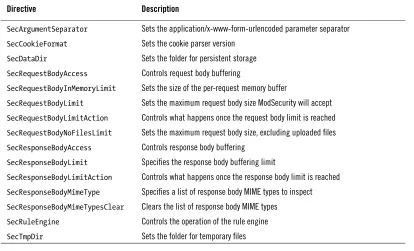
Chapter 3, Configuration, explains how each of the available configuration directives should be used. By the end of the chapter, you get a complete overview of the configuration options and will have a solid default configuration for all your ModSecurity installations.
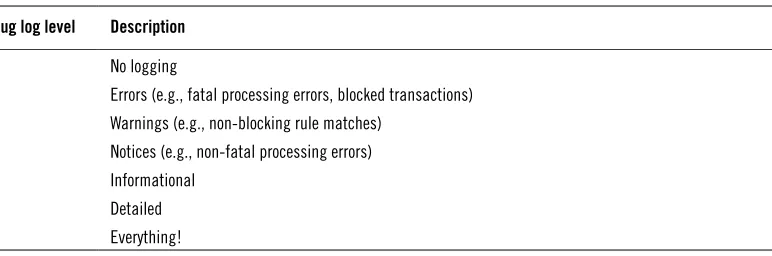
Chapter 4, Logging, deals with the logging features of ModSecurity. The two main logging facilities explained are the debug log, which is useful in rule writing, and the audit log, which is used to log complete transaction data. Special attention is given to remote logging, which you’ll need to manage multiple sensors, or to use any of the user-friendly tools for alert man-agement. File interception and validation is covered in detail. The chapter ends with an ad-vanced section of logging, which explains how to selectively log traffic, and how to use the sanitation feature to prevent sensitive data from being stored in the logs.
Chapter 5, Rule Language Overview, is the first of the three chapters that deal with rule writing. This chapter contains an overview of the entire rule language, which will get you started as well as give you a feature map to which you can return whenever you need to deal with a new problem.
Chapter 6, Rule Language Tutorial, teaches how to write rules, and how to write them well. It’s a very fun chapter that adopts a gradual approach, introducing the features one by one. By the end of the chapter, you will know everything about writing individual rules.
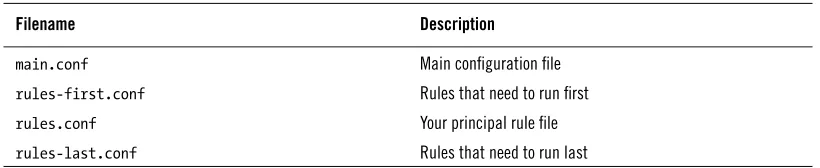
Chapter 7, Rule Configuration, completes the topic of rule writing. It takes a step back to view the rules as the basic block for policy building. You first learn how to put a few rules together and add them to the configuration, as well as how the rules interact with Apache’s ability to use different configuration contexts for different sites and different locations within sites. The chapter spends a great deal of time making sure you take advantage of the inheritance feature, which helps make ModSecurity configuration much easier to maintain.
xii Preface Chapter 9, Practical Rule Writing, is, as the name suggests, a tour through many of the practical activities you will perform in your day-to-day work. The chapter starts by covering whitelist-ing, virtual patchwhitelist-ing, IP address reputation and blacklisting. You then learn how to integrate with other Apache modules, with practical examples that show how to perform conditional logging and fix insecure session cookies. Special attention is given to the topic of blocking; several approaches, starting from the simple to the very sophisticated, are presented. A section on regular expressions gets you up to speed with the most important ModSecurity operator. The chapter ends with a discussion of rule sets, discussing how to use the rule sets others have written, as well as how to write your own.
Chapter 10, Performance, covers several performance-related topics. It opens with an overview of where ModSecurity usually spends its time, a list of common configuration mistakes that should be avoided, and a list of approaches that result in better performance. The second part of the chapter describes how to monitor ModSecurity performance in production. The third part tests the publicly available rule sets in order to give you a taste of what they are like, as well as document a methodology you can use to test your own rules. The chapter then moves to rule set benchmarking, which is an essential part of the process of rule writing. The last part of this chapter gives very practical advice on how to use regular expressions and parallel matching, comparing several approaches and explaining when to use them.
Chapter 11, Content Injection, explains how to reach from ModSecurity, which is a server-side tool, right into a user’s browser and continue with the inspection there. This feature makes it possible to detect the attacks that were previously thought to be undetectable by a server-side tool, for example DOM-based cross-site scripting attacks. Content injection also comes in handy if you need to communicate with your users—for example, to tell them that they have been attacked.
Chapter 12, Writing Rules in Lua, discusses a gem of a feature: writing rules using the Lua programming language. The rule language of ModSecurity is easy to use and can get a lot done, but for the really difficult problems you may need the power of a proper programming language. In addition, you can use Lua to react to events, and it is especially useful when integrating with external systems.
Chapter 13, Handling XML, covers the XML capabilities of ModSecurity in detail. You get to learn how to validate XML using either DTDs or XML Schemas, and how to combine XPath expressions with the other features ModSecurity offers to perform both whitelist- and blacklist-based validation. The XML features of ModSecurity have traditionally been poorly documented; here you will find details never covered before. The chapter ends with an XML validation framework you can easily adapt for your needs.
open source, you can extend it directly at any point, but when you use the official APIs, you avoid making a custom version of ModSecurity (which is generally time consuming because it prevents upgrades).
Updates
If you purchased this book directly from Feisty Duck, your purchase includes access to newer digital versions of the book. Updates are made automatically after I update the manuscript, which I keep in DocBook format in a Subversion repository. At the moment, there is a script that runs every hour, and rebuilds the book when necessary. Whenever you visit your personal digital download link, you get the most recent version of the book.
I use a dedicated Twitter account (@modsecuritybook) to announce relevant changes I make to the book. By following that account you’ll find out about the improvements pretty much as they happen. You can also follow my personal Twitter account (@ivanristic) or subscribe to my blog, if you are about computer security in general.
In the first two years of its life, I kept ModSecurity Handbook up-to-date with every ModSe-curity release. There was a full revision in February 2012, which made the book essentially as good and as current as it was on day of the first release back in 2010. Don’t take my past performance as a guarantee of what is going to happen in the future, however. At the launch in 2010 I offered a guarantee that the book will be kept up-to-date for at least a year from your purchase. I dropped that promise at the end of 2011, because I could see the possibility that I would stop with the updates at some point. I will keep my promise until the end of 2012, but I don’t know what will happen after that.
Feedback
To get in touch with me please write to [email protected]. I would like to hear from you very much, because I believe that a book can fulfill its potential only through the interaction among its author(s) and the readers. Your feedback is particularly important when a book is continuously updated, like this one is. When I change the book as a result of your feedback, all the changes are immediately delivered back to you. There is no more waiting for years to see the improvements!
About the Author
xiv Preface is an active participant in the application security community, a member of the Open Web Application Security Project (OWASP), and an officer of the Web Application Security Con-sortium (WASC).
About the Technical Reviewer
Brian Rectanus is a developer turned manager in the web application security field. He has worked in the past on various security software related projects such as the IronBee open source WAF framework, the ModSecurity open source WAF and the Suricata open source IDS/IPS. Brian is an open source advocate and proud `NIX loving, Mac using, non-Windows user who has been writing code on various `NIX platforms with vi since 1993. Today he still does all his development work in the more modern vim editor—like there is any other—and loves every bit of it. Brian has spent the majority of his career working with web technology from various perspectives, be it manager, developer, administrator or security assessor. Brian has held many certifications in the past, including GCIA and GCIH certification from the SANS Institute and a BS in computer science from Kansas State University.
Acknowledgments
To begin with, I would like to thank the entire ModSecurity community for their support, and especially all of you who used ModSecurity and sent me your feedback. ModSecurity wouldn’t be what it is without you. Developing and supporting ModSecurity was a remarkable experience; I hope you enjoy using it as much as I enjoyed developing it.
I would also like to thank my former colleagues from Breach Security, who gave me a warm welcome, even though I joined them pretty late in the game. I regret that, due to my geo-graphic location, I didn’t spend more time working with you. I would especially like to thank —in no particular order—Brian Rectanus, Ryan Barnett, Ofer Shezaf, and Avi Aminov, who worked with me on the ModSecurity team. Brian was also kind to work with me on the book as a technical reviewer, and I owe special thanks to him for ensuring I didn’t make too many mistakes.
I mustn’t forget my copyeditor, Nancy Kotary, who was a pleasure to work with, despite having to deal with DocBook and Subversion, none of which is in the standard copyediting repertoire.
I
User Guide
3
1
Introduction
ModSecurity is a tool that will help you secure your web applications. No, scratch that. Actu-ally, ModSecurity is a tool that will help you sleep better at night, and I will explain how. I usu-ally call ModSecurity a web application firewall (WAF), because that’s the generusu-ally accepted term to refer to the class of products that are specifically designed to secure web applications. Other times I will call it an HTTP intrusion detection tool, because I think that name better describes what ModSecurity does. Neither name is entirely adequate, yet we don’t have a bet-ter one. Besides, it doesn’t really matbet-ter what we call it. The point is that web applications— yours, mine, everyone’s—are terribly insecure on average. We struggle to keep up with the security issues and need any help we can get to secure them.
The idea to write ModSecurity came to me during one of my sleepless nights—I couldn’t sleep because I was responsible for the security of several web-based products. I could see how most web applications were slapped together with little time spent on design and little time spent on understanding the security issues. Furthermore, not only were web applications insecure, but we had no idea how insecure they were or if they were being attacked. Our only eyes were the web server access and error logs, and they didn’t say much.
ModSecurity will help you sleep better at night because, above all, it solves the visibility prob-lem: it lets you see your web traffic. That visibility is key to security: once you are able to see HTTP traffic, you are able to analyze it in real time, record it as necessary, and react to the events. The best part of this concept is that you get to do all of that without actually touch-ing web applications. Even better, the concept can be applied to any application—even if you can’t access the source code.
Brief History of ModSecurity
released in November 2002, but a few more months were needed before the tool became use-ful. Other people started to learn about it, and the popularity of ModSecurity started to rise.
Initially, most of my effort was spent wrestling with Apache to make request body inspection possible. Apache 1.3.x did not have any interception or filtering APIs, but I was able to trick it into submission. Apache 2.x improved things by providing APIs that do allow content in-terception, but there was no documentation to speak of. Nick Kew released the excellent The Apache Modules Book (Prentice Hall) in 2007, which unfortunately was too late to help me with the development of ModSecurity.
By 2004, I was a changed man. Once primarily a software developer, I became obsessed with web application security and wanted to spend more time working on it. I quit my job and started treating ModSecurity as a business. My big reward came in the summer of 2006, when ModSecurity went head to head with other web application firewalls, in an evaluation con-ducted by Forrester Research, and came out very favorably. Later that year, my company was acquired by Breach Security. A team of one eventually became a team of many: Brian Rectanus came to work on ModSecurity, Ofer Shezaf took on the rules, and Ryan C. Barnett the com-munity management and education. ModSecurity 2.0, a complete rewrite, was released in late 2006. At the same time we released ModSecurity Community Console, which combined the functionality of a remote logging sensor and a monitoring and reporting GUI.
I stopped being in charge of ModSecurity in January 2009, when I left Breach Security. Brian Rectanus subsequently took the lead. In the meantime, Ryan C. Barnett took charge of the ModSecurity rules and produced a significant improvement with CRS v2. In 2010, Trustwave acquired Breach Security and promised to revitalize ModSecurity. The project is currently run by Ryan C. Barnett and Breno Silva, and there are indeed some signs that the project is getting healthier. I remain involved primarily through my work on this book.
Something spectacular happened in March 2011: Trustwave announced that they would be changing the license of ModSecurity from GPLv2 to Apache Software License (ASLv2). This is a great step toward a wider use of ModSecurity because ASL falls into the category of per-missive licenses. Later, the same change was announced for the Core Rule Set project (which is hosted with OWASP).
What Can ModSecurity Do?
ModSecurity is a toolkit for real-time web application monitoring, logging, and access con-trol. I like to think about it as an enabler: there are no hard rules telling you what to do; in-stead, it is up to you to choose your own path through the available features. That’s why the title of this section asks what ModSecurity can do, not what it does.
What Can ModSecurity Do? 5 extends to the ability to customize and extend the tool itself to make it fit your needs. It’s not a matter of ideology, but of practicality. I simply don’t want my tools to restrict what I can do.
Back on the topic of what ModSecurity can do, the following is a list of the most important usage scenarios:
Real-time application security monitoring and access control
At its core, ModSecurity gives you access to the HTTP traffic stream, in real-time, along with the ability to inspect it. This is enough for real-time security monitoring. There’s an added dimension of what’s possible through ModSecurity’s persistent storage mech-anism, which enables you to track system elements over time and perform event cor-relation. You are able to reliably block, if you so wish, because ModSecurity uses full request and response buffering.
Virtual patching
Virtual patching is a concept of vulnerability mitigation in a separate layer, where you get to fix problems in applications without having to touch the applications themselves. Virtual patching is applicable to applications that use any communication protocol, but it is particularly useful with HTTP, because the traffic can generally be well understood by an intermediary device. ModSecurity excels at virtual patching because of its reliable blocking capabilities and the flexible rule language that can be adapted to any need. It is, by far, the activity that requires the least investment, is the easiest activity to perform, and the one that most organizations can benefit from straight away.
Full HTTP traffic logging
Web servers traditionally do very little when it comes to logging for security purposes. They log very little by default, and even with a lot of tweaking you are not able to get everything that you need. I have yet to encounter a web server that is able to log full transaction data. ModSecurity gives you that ability to log anything you need, including raw transaction data, which is essential for forensics. In addition, you get to choose which transactions are logged, which parts of a transaction are logged, and which parts are sanitized.
Continuous passive security assessment
Security assessment is largely seen as an active scheduled event, in which an indepen-dent team is sourced to try to perform a simulated attack. Continuous passive security assessment is a variation of real-time monitoring, where, instead of focusing on the behavior of the external parties, you focus on the behavior of the system itself. It’s an early warning system of sorts that can detect traces of many abnormalities and security weaknesses before they are exploited.
Web application hardening
similar restrictions, either directly, or through collaboration with other Apache mod-ules. They all fall under web application hardening. For example, it is possible to fix many session management issues, as well as cross-site request forgery vulnerabilities.
Something small, yet very important to you
Real life often throws unusual demands to us, and that is when the flexibility of Mod-Security comes in handy where you need it the most. It may be a security need, but it may also be something completely different. For example, some people use ModSecu-rity as an XML web service router, combining its ability to parse XML and apply XPath expressions with its ability to proxy requests. Who knew?
Note
I often get asked if ModSecurity can be used to protect Apache itself. The answer is that it can, in some limited circumstances, but that it isn’t what it is designed for. You may sometimes be able to catch an attack with ModSecurity before it hits a vulnerable spot in Apache or in a third-party module, but there’s a large quantity of code that runs before ModSecurity. If there’s a vulnerability in that area, ModSecurity won’t be able to do anything about it.
What Are Web Application Firewalls, Anyway?
I said that ModSecurity is a web application firewall, but it’s a little known fact that no one really knows what web application firewalls are. It is generally understood that a web application firewall is an intermediary element (implemented either as a software add-on or process, or as a network device) that enhances the security of web applications, but opinions differ once you dig deeper. There are many theories that try to explain the different views, but the best one I could come up with is that, unlike anything we had before, the web application space is so complex that there is no easy way to classify what we do security-wise. Rather than focus on the name, you should focus on what a particular tool does and how it can help.
If you want to learn more about the topic, there are two efforts that focus on understanding web application firewalls:
• Web application firewall evaluation criteria (WAFEC) is a project of the Web Application Security Consortium (WASC). It’s an older effort (which has been inactive for a couple of years now) that focuses on the technical features of web application firewalls.
• Best practices: Web Application Firewalls is a project of Open Web Application Security Project (OWASP) that focuses largely on the practicalities of WAF deployment, which is an important aspect that is often overlooked.
Guiding Principles
Deployment Options 7
Flexibility
I think that it’s fair to say that I built ModSecurity for myself: a security expert who needs to intercept, analyze, and store HTTP traffic. I didn’t see much value in hard-coded functionality, because real life is so complex that everyone needs to do things just slightly differently. ModSecurity achieves flexibility by giving you a powerful rule language, which allows you to do exactly what you need to, in combination with the ability to apply rules only where you need to.
Passiveness
ModSecurity will take great care to never interact with a transaction unless you tell it to. That is simply because I don’t trust tools, even the one I built, to make decisions for me. That’s why ModSecurity will give you plenty of information, but ultimately leave the decisions to you.
Predictability
There’s no such thing as a perfect tool, but a predictable one is the next best thing. Armed with all the facts, you can understand ModSecurity’s weak points and work around them.
Quality over quantity
Over the course of six years spent working on ModSecurity, we came up with many ideas for what ModSecurity could do. We didn’t act on most of them. We kept them for later. Why? Because we understood that we have limited resources available at our disposal and that our minds (ideas) are far faster than our implementation abilities. We chose to limit the available functionality, but do really well at what we decided to keep in.
There are bits in ModSecurity that fall outside the scope of these four principles. For example, ModSecurity can change the way Apache identifies itself to the outside world, confine the Apache process within a jail, and even implement an elaborate scheme to deal with a once-infamous universal XSS vulnerability in Adobe Reader. Although it was I who added those features, I now think that they detract from the main purpose of ModSecurity, which is a reliable and predictable tool that allows for HTTP traffic inspection.
Deployment Options
ModSecurity supports two deployment options: embedded and reverse proxy deployment. There is no one correct way to use them; choose an option based on what best suits your circumstances. There are advantages and disadvantages to both options:
Embedded
is a great choice for those who already have their architecture laid out and don’t want to change it. Embedded deployment is also the only option if you need to protect hun-dreds of web servers. In such situations, it is impractical to build a separate proxy-based security layer. Embedded ModSecurity not only does not introduce new points of failure, but it scales seamlessly as the underlying web infrastructure scales. The main challenge with embedded deployment is that server resources are shared between the web server and ModSecurity.
Reverse proxy
Reverse proxies are effectively HTTP routers, designed to stand between web servers and their clients. When you install a dedicated Apache reverse proxy and add ModSe-curity to it, you get a “proper” network web application firewall, which you can use to protect any number of web servers on the same network. Many security practition-ers prefer having a separate security layer. With it you get complete isolation from the systems you are protecting. On the performance front, a standalone ModSecurity will have resources dedicated to it, which means that you will be able to do more (i.e., have more complex rules). The main disadvantage of this approach is the new point of fail-ure, which will need to be addressed with a high-availability setup of two or more re-verse proxies.
Is Anything Missing?
ModSecurity is a very good tool, but there are a number of features, big and small, that could be added. The small features are those that would make your life with ModSecurity easier, perhaps automating some of the boring work (e.g., persistent blocking, which you now have to do manually). But there are really only two features that I would call missing:
Learning
Defending web applications is difficult, because there are so many of them, and they are all different. (I often say that every web application effectively creates its own commu-nication protocol.) It would be very handy to have ModSecurity observe application traffic and create a model that could later be used to generate policy or assist with false positives. While I was at Breach Security, I started a project called ModProfiler as a step toward learning, but that project is still as I left it, as version 0.2.
Passive mode of deployment
ModSecurity can be embedded only in Apache 2.x, but when you deploy it as a reverse proxy, it can be used to protect any web server. Reverse proxies are not everyone’s cup of tea, however, and sometimes it would be very handy to deploy ModSecurity passively, without having to change anything on the network.
Getting Started 9
Getting Started
In this first practical section in the book, I will give you a whirlwind tour of the ModSecurity internals, which should help you get started.
Hybrid Nature of ModSecurity
ModSecurity is a hybrid web application firewall engine that relies on the host web server for some of the work. The only supported web server at the moment is Apache 2.x, but it is possible, in principle, to integrate ModSecurity with any other web server that provides sufficient integration APIs.
Apache does for ModSecurity what it does for all other modules—it handles the infrastructure tasks:
1. Decrypts SSL
2. Breaks up the inbound connection stream into HTTP requests 3. Partially parses HTTP requests
4. Invokes ModSecurity, choosing the correct configuration context (<VirtualHost>, <Location>, etc.)
5. De-chunks request bodies as necessary
There a few additional tasks Apache performs in a reverse proxy scenario:
1. Forwards requests to backend servers (with or without SSL) 2. Partially parses HTTP responses
3. De-chunks response bodies as necessary
The advantage of a hybrid implementation is that it is very efficient—the duplication of work is minimal when it comes to HTTP parsing. A couple of disadvantages of this approach are that you don’t always get access to the raw data stream and that web servers sometimes don’t process data in the way a security-conscious tool would. In the case of Apache, the hybrid approach works reasonably well, with a few minor issues:
Request line and headers are NUL-terminated
This is normally not a problem, because what Apache doesn’t see cannot harm any module or application. In some very rare cases, however, the purpose of the NUL-byte evasion is to hide things, and this Apache behavior only helps with the hiding.
Request header transformation
Quick request handling
Apache will handle some requests quickly, leaving ModSecurity unable to do anything but notice them in the logging phase. Invalid HTTP requests, in particular, will be re-jected by Apache without ModSecurity having a say.
No access to some response headers
Because of the way Apache works, the Server and Date response headers are invisible to ModSecurity; they cannot be inspected or logged.
Main Areas of Functionality
The functionality offered by ModSecurity falls roughly into four areas:
Parsing
ModSecurity tries to make sense of as much data as available. The supported data for-mats are backed by security-conscious parsers that extract bits of data and store them for use in the rules.
Buffering
In a typical installation, both request and response bodies will be buffered. This means that ModSecurity usually sees complete requests before they are passed to the applica-tion for processing, and complete responses before they are sent to clients. Buffering is an important feature, because it is the only way to provide reliable blocking. The downside of buffering is that it requires additional RAM to store the request and re-sponse body data.
Logging
Full transaction logging (also referred to as audit logging) is a big part of what ModSe-curity does. This feature allows you to record complete HTTP traffic, instead of just rudimentary access log information. Request headers, request body, response header, response body—all those bits will be available to you. It is only with the ability to see what is happening that you will be able to stay in control.
Rule engine
The rule engine builds on the work performed by all other components. By the time the rule engine starts operating, the various bits and pieces of data it requires will all be prepared and ready for inspection. At that point, the rules will take over to assess the transaction and take actions as necessary.
Note
What Rules Look Like 11
to process the offending requests altogether. Attempting to sanitize merely opens a new battlefield where your attackers don’t have anything to lose, but everything to win. You, on the other hand, don’t have anything to win, but everything to lose.
What Rules Look Like
Everything in ModSecurity revolves around two things: configuration and rules. The configuration tells ModSecurity how to process the data it sees; the rules decide what to do with the processed data. Although it is too early to go into how the rules work, I will show you a quick example here just to give you an idea what they look like.
For example:
SecRule ARGS "<script>" log,deny,status:404
Even without further assistance, you can probably recognize the part in the rule that specifies what we wish to look for in input data (<script>). Similarly, you will easily figure out what will happen if we do find the desired pattern (log,deny,status:404). Things will become more clear if I tell you about the general rule syntax, which is the following:
SecRule VARIABLES OPERATOR ACTIONS
The three parts have the following meanings:
1. The VARIABLES part tells ModSecurity where to look. The ARGS variable, used in the ex-ample, means all request parameters.
2. The OPERATOR part tells ModSecurity how to look. In the example, we have a regular expression pattern, which will be matched against ARGS.
3. The ACTIONS part tells ModSecurity what to do on a match. The rule in the example gives three instructions: log problem, deny transaction and use the status 404 for the denial (status:404).
I hope you are not disappointed with the simplicity of this first rule. I promise you that by combining the various facilities offered by ModSecurity, you will be able to write very useful rules that implement complex logic where necessary.
Transaction Lifecycle
Request headers (1)
The request headers phase is the first entry point for ModSecurity. The principal pur-pose of this phase is to allow rule writers to assess a request before the costly request body processing is undertaken. Similarly, there is often a need to influence how Mod-Security will process a request body, and this phase is the place to do it. For example, ModSecurity will not parse an XML request body by default, but you can instruct it do so by placing the appropriate rules into phase 1.
Request body (2)
The request body phase is the main request analysis phase and takes place immediately after a complete request body has been received and processed. The rules in this phase have all the available request data at their disposal.
Response headers (3)
The response headers phase takes place after response headers become available, but before a response body is read. The rules that need to decide whether to inspect a re-sponse body should run in this phase.
Response body (4)
The response body phase is the main response analysis phase. By the time this phase begins, the response body will have been read, with all its data available for the rules to make their decisions.
Logging (5)
The logging phase is special in more ways than one. First, it’s the only phase from which you cannot block. By the time this phase runs, the transaction will have finished, so there’s little you can do but record the fact that it happened. Rules in this phase are run to control how logging is done.
Lifecycle Example
To give you a better idea what happens on every transaction, we’ll examine a detailed debug log of one POST transaction. I’ve deliberately chosen a transaction type that uses the request body as its principal method to transmit data, because following such a transaction will exercise most parts of ModSecurity. To keep things relatively simple, I used a configuration without any rules, removed some of the debug log lines for clarity, and removed the timestamps and some additional metadata from each line.
Note
Transaction Lifecycle 13 The transaction I am using as an example in this section is very straightforward. I made a point of placing request data in two different places, parameter a in the query string and parameter b in the request body, but there is little else of interest in the request:
POST /?a=test HTTP/1.0
Content-Type: application/x-www-form-urlencoded Content-Length: 6
b=test
The response is entirely unremarkable:
HTTP/1.1 200 OK
Date: Sun, 17 Jan 2010 00:13:44 GMT Server: Apache
Content-Length: 12 Connection: close Content-Type: text/html
Hello World!
ModSecurity is first invoked by Apache after request headers become available, but before a request body (if any) is read. First comes the initialization message, which contains the unique transaction ID generated by mod_unique_id. Using this information, you should be able to pair the information in the debug log with the information in your access and audit logs. At this point, ModSecurity will parse the information on the request line and in the request headers. In this example, the query string part contains a single parameter (a), so you will see a message documenting its discovery. ModSecurity will then create a transaction context and invoke the REQUEST_HEADERS phase:
[4] Initialising transaction (txid SopXW38EAAE9YbLQ).
[5] Adding request argument (QUERY_STRING): name "a", value "test" [4] Transaction context created (dcfg 8121800).
[4] Starting phase REQUEST_HEADERS.
Assuming that a rule didn’t block the transaction, ModSecurity will now return control to Apache, allowing other modules to process the request before control is given back to it.
In the second phase, ModSecurity will first read and process the request body, if it is present. In the following example, you can see three messages from the input filter, which tell you what was read. The fourth message tells you that one parameter was extracted from the re-quest body. The content type used in this rere-quest (application/x-www-form-urlencoded) is one of the types ModSecurity recognizes and parses automatically. Once the request body is processed, the REQUEST_BODY rules are processed.
[4] Input filter: Reading request body.
[9] Input filter: Bucket type HEAP contains 6 bytes. [9] Input filter: Bucket type EOS contains 0 bytes. [5] Adding request argument (BODY): name "b", value "test" [4] Input filter: Completed receiving request body (length 6). [4] Starting phase REQUEST_BODY.
The filters that keep being mentioned in the logs are parts of ModSecurity that handle request and response bodies:
[4] Hook insert_filter: Adding input forwarding filter (r 81d0588). [4] Hook insert_filter: Adding output filter (r 81d0588).
There will be a message in the debug log every time ModSecurity sends a chunk of data to the request handler, and one final message to say that there isn’t any more data in the buffers.
[4] Input filter: Forwarding input: mode=0, block=0, nbytes=8192 … (f 81d2228, r 81d0588).
[4] Input filter: Forwarded 6 bytes. [4] Input filter: Sent EOS.
[4] Input filter: Input forwarding complete.
Shortly thereafter, the output filter will start receiving data, at which point the RESPONSE_HEADERS rules will be invoked:
[9] Output filter: Receiving output (f 81d2258, r 81d0588). [4] Starting phase RESPONSE_HEADERS.
Once all the rules have run, ModSecurity will continue to store the response body in its buffers, after which it will run the RESPONSE_BODY rules:
[9] Output filter: Bucket type MMAP contains 12 bytes. [9] Output filter: Bucket type EOS contains 0 bytes.
[4] Output filter: Completed receiving response body (buffered full - 12 bytes). [4] Starting phase RESPONSE_BODY.
Again, assuming that none of the rules blocked, the accumulated response body will be for-warded to the client:
[4] Output filter: Output forwarding complete.
Finally, the logging phase will commence. The LOGGING rules will be run first to allow them to influence logging, after which the audit logging subsystem will be invoked to log the trans-action if necessary. A message from the audit logging subsystem will be the last transtrans-action message in the logs. In this example, ModSecurity tells us that it didn’t find anything of in-terest in the transaction and that it sees no reason to log it:
Transaction Lifecycle 15
[4] Starting phase LOGGING.
[4] Audit log: Ignoring a non-relevant request.
File Upload Example
Requests that contain files are processed slightly differently. The changes can be best under-stood by again following the activity in the debug log:
[4] Input filter: Reading request body.
[9] Multipart: Boundary: ---2411583925858 [9] Input filter: Bucket type HEAP contains 256 bytes.
[9] Multipart: Added part header "Content-Disposition" "form-data; name=\"f\"; … filename=\"eicar.com.txt\""
[9] Multipart: Added part header "Content-Type" "text/plain" [9] Multipart: Content-Disposition name: f
[9] Multipart: Content-Disposition filename: eicar.com.txt [4] Multipart: Created temporary file: …
/opt/modsecurity/var/tmp/20090819-175503-SowuZ38AAQEAACV-Agk-file-gmWmrF [9] Multipart: Changing file mode to 0600: …
/opt/modsecurity/var/tmp/20090819-175503-SowuZ38AAQEAACV-Agk-file-gmWmrF [9] Multipart: Added file part 9c870b8 to the list: name "f" file name … "eicar.com.txt" (offset 140, length 68)
[9] Input filter: Bucket type EOS contains 0 bytes. [4] Reqest body no files length: 96
[4] Input filter: Completed receiving request body (length 256).
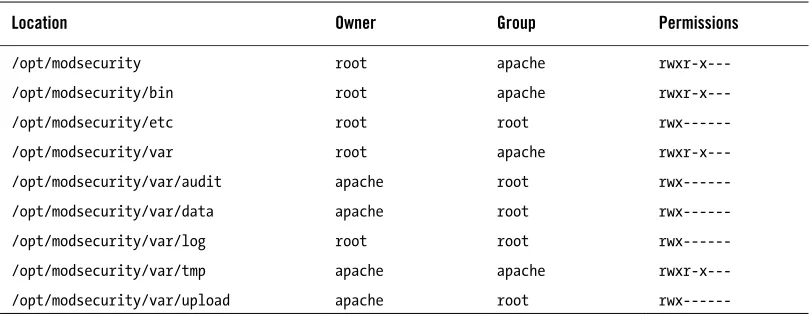
In addition to seeing the multipart parser in action, you see ModSecurity creating a temporary file (into which it will extract the upload) and adjusting its privileges to match the desired configuration.
Then, at the end of the transaction, you will see the cleanup and the temporary file deleted:
[4] Multipart: Cleanup started (remove files 1). [4] Multipart: Deleted file (part) …
"/opt/modsecurity/var/tmp/20090819-175503-SowuZ38AAQEAACV-Agk-file-gmWmrF"
The temporary file will not be deleted if ModSecurity decides to keep an uploaded file. Instead, it will be moved to the storage area:
[4] Multipart: Cleanup started (remove files 0). [4] Input filter: Moved file from …
"/opt/modsecurity/var/tmp/20090819-175503-SowuZ38AAQEAACV-Agk-file-gmWmrF" to … "/opt/modsecurity/var/upload/20090819-175503-SowuZ38AAQEAACV-Agk-file-gmWmrF".
[9] Input filter: Bucket type HEAP contains 8000 bytes. [9] Input filter: Bucket type HEAP contains 8000 bytes. [9] Input filter: Bucket type HEAP contains 8000 bytes. [9] Input filter: Bucket type HEAP contains 8000 bytes. [9] Input filter: Bucket type HEAP contains 8000 bytes. [9] Input filter: Bucket type HEAP contains 8000 bytes. [9] Input filter: Bucket type HEAP contains 8000 bytes. [9] Input filter: Bucket type HEAP contains 1536 bytes. [9] Input filter: Bucket type HEAP contains 8000 bytes. [9] Input filter: Bucket type HEAP contains 8000 bytes. [9] Input filter: Bucket type HEAP contains 8000 bytes. [9] Input filter: Bucket type HEAP contains 576 bytes. [9] Input filter: Bucket type HEAP contains 8000 bytes. [9] Input filter: Bucket type HEAP contains 8000 bytes. [9] Input filter: Bucket type HEAP contains 8000 bytes. [9] Input filter: Bucket type HEAP contains 8000 bytes. [9] Input filter: Bucket type HEAP contains 8000 bytes. [9] Input filter: Bucket type HEAP contains 8000 bytes.
[4] Input filter: Request too large to store in memory, switching to disk.
A new file will be created to store the entire raw request body:
[4] Input filter: Created temporary file to store request body: …
/opt/modsecurity/var/tmp//20090819-180105-Sowv0X8AAQEAACWAArs-request_body-4nZjqf [4] Input filter: Wrote 129559 bytes from memory to disk.
This file is always deleted in the cleanup phase:
[4] Input filter: Removed temporary file: …
/opt/modsecurity/var/tmp//20090819-180105-Sowv0X8AAQEAACWAArs-request_body-4nZjqf
Impact on Web Server
The addition of ModSecurity will change how your web server operates. As with all Apache modules, you pay for the additional flexibility and security ModSecurity gives you with in-creased CPU and RAM consumption on your server. The exact amount will depend on your configuration of ModSecurity and the usage of your server. Following is a detailed list of the various activities that increase resource consumption:
• ModSecurity will add to the parsing already done by Apache, and that results in a slight increase of CPU consumption.
• Complex parsers (e.g., XML) are more expensive.
• The handling of file uploads may require I/O operations. In some cases, inbound data will be duplicated on disk.
What Next? 17 • Request bodies and response bodies are usually buffered in order to support reliable
blocking.
• Every rule in your configuration will use some of the CPU time (for the operator) and RAM (to transform input data before it can be analyzed).
• Some of the operators used in the rules (e.g., the regular expression operator) are CPU-intensive.
• Full transaction logging is an expensive I/O operation.
In practice, this list is important because it keeps you informed; what matters is that you have enough resources to support your ModSecurity needs. If you do, then it doesn’t matter how expensive ModSecurity is. Also, what’s expensive to someone may not be to someone else. If you don’t have enough resources to do everything you want with ModSecurity, you will need to monitor the operation of your system and remove some of the functionality to reduce the resource consumption. Virtually everything that ModSecurity does is configurable, so you should have no problems doing that.
It is generally easier to run ModSecurity in reverse proxy mode, because then you usually have an entire server (with its own CPU and RAM) to play with. In embedded mode, ModSecurity will add to the processing already done by the web server, so this method is more challenging on a busy server.
For what it’s worth, ModSecurity generally uses the minimal necessary resources to perform the desired functions, so this is really a case of exchanging functionality for speed: if you want to do more, you have to pay more.
What Next?
The purpose of this section is to map your future ModSecurity activities and help you deter-mine where to go from here. Where you will go depends on what you want to achieve and how much time you have to spend. A complete ModSecurity experience, so to speak, consists of the following elements:
Installation and configuration
This is the basic step that all users must learn how to perform. The next three chapters will teach you how to make ModSecurity operational, performing installation, general configuration, and logging configuration. Once you are done with that, you need to decide what you want to do with it. That’s what the remainder of the book is for.
Rule writing
and users, for example), implement policy decisions (use the available information to make the decisions to warn or block), write virtual patches, and even to check on the status of ModSecurity itself.
It is true that the attack detection rules are in a class of its own, but that’s mostly be-cause, in order to write them successfully, you need to know so much about application security. For that reason, many ModSecurity users generally focus on using third-party rule sets for the attack detection. It’s a legitimate choice. Not everyone has the time and inclination to become an application security expert. Even if you end up not using any inspection rules whatsoever, the ability to write virtual patches is reason enough to use ModSecurity.
Rule sets
The use of existing rule sets is the easiest way to get to the proverbial low hanging fruit: invest small effort and reap big benefits. Traditionally, the main source of ModSecurity rules has been the Core Rule Set project, now hosted with OWASP. On the other hand, if you are keen to get your hands dirty, I can tell you that I draw great pleasure from writing my own rules. It’s a great way to learn about application security. The only drawback is that it requires a large time investment.
Remote logging and alert management GUI
ModSecurity is perfectly usable without a remote logging solution and without a GUI (the two usually go together). Significant error messages are copied to Apache’s error log. Complete transactions are usually logged to the audit log. With a notification sys-tem in place, you will know when something happens, and you can visit the audit logs to investigate. For example, many installations will divert Apache’s error log to a central logging system (via syslog).
The process does become more difficult with more than one sensor to manage. Fur-thermore, GUIs make the whole experience of monitoring much more pleasant. For that reason you will probably seek to install one of the available remote centralization tools and use their GUIs. The available options are listed in the Resources section, which follows.
Resources
General Resources 19
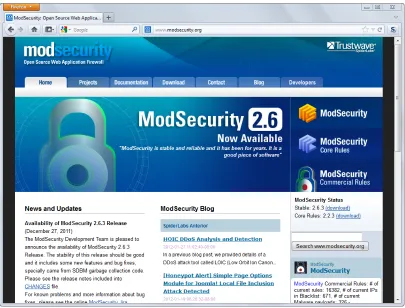
Figure 2-1. The homepage of www.modsecurity.org
General Resources
The following resources are the bare essentials:
ModSecurity web site
ModSecurity’s web site is probably going to be your main source of information. You should visit the web site from time to time, as well as subscribe to receive the updates from the blog.
Official documentation
The official ModSecurity documentation is maintained in a wiki, but copies of it are made for inclusion with every release.
Issue tracker
to help resolve your problem. Providing as much information as you can will help the developers understand and replicate the problem, and provide a fix (or a workaround) quickly.
Users’ mailing list
The users’ mailing list ([email protected]) is a general-purpose mailing list where you can discuss ModSecurity. Feel free to ask questions, propose improvements, and discuss ideas. That is the place where you’ll hear first about new ModSecurity versions.
ModSecurity@Freshmeat
If you subscribe to the users’ mailing list, you will generally find out about new versions of ModSecurity as soon as they are released. If you care only about version releases, however, you may consider subscribing to the new version notifications at the ModSe-curity page at Freshmeat.
Core Rules mailing list
Starting with version 2, the Core Rules project is part of OWASP, and has a separate mailing list ([email protected]).
Developer Resources
If you are interested in development work, you will need these:
Developers’ mailing list
The developers’ mailing list is generally a lonely place, but if you do decide to start playing with the ModSecurity source code, this list is the place to go to discuss your work.
Source code access
The source code of ModSecurity is hosted at a Subversion repository at SourceForge, which allows you to access it directly or through a web-based user interface.
FishEye interface
If you are not looking to start developing immediately but still want to have a look at the source code of ModSecurity, I recommend that you use the ModSecurity FishEye interface, which is much better than the stock interface available at SourceForge.
AuditConsole
Summary 21 AuditConsole is free and provides the following features:
• Event centralization from multiple remote ModSecurity installations
• Event storage and retrieval
• Support for multiple user accounts and support for different views
• Event tagging
• Event rules, which are executed in the console
Summary
This chapter was your ModSecurity orientation. I introduced ModSecurity at a high level, discussed what it is and what it isn’t, and what it can do and what it cannot. I also gave you a taste of what ModSecurity is like and described common usage scenarios, as well as covered some of the interesting parts of its operation.
2
Installation
Before you can install ModSecurity, you need to decide if you want to compile it from source or use a binary version—either one included with your operating system or one produced by a third party. Each of the options comes with its advantages and disadvantages, as listed in
Table 2.1, “Installation options”.
Table 2.1. Installation options
Installation type Advantages Disadvantages
Operating system version • Fully automated installation
• Maintenance included
• May not be the latest version
Third-party binary • Semi-automated installation • May not be the latest version
• Manual download and updates
• Do you trust the third party?
Source code • Can always use the latest version
• Can use experimental versions
• Can make changes, apply patches, and make emergency security fixes
• Manual installation and maintenance required
• A lot of work involved with rolling your own version
In some cases, you won’t have a choice. For example, if you’ve installed Apache from source, you will need to install ModSecurity from source too (you will be able to reuse the system packages, of course). The following questions may help you to make the decision:
• Do you intend to use ModSecurity seriously?
• Are you comfortable compiling programs from source?
• Do you have enough time to spend on the compilation and the successive maintenance of a custom-installed program?
24 Chapter 2: Installation I generally try to use binary packages when they are available (and they are available on De-bian, which is currently my platform of choice). When I build dedicated reverse proxy instal-lations, however, I tend to build everything from source, because that allows me access to the latest Apache and ModSecurity versions, and makes it easier to tweak things (by changing the source code of either Apache or ModSecurity) when I want to.
Installation from Source
Installing from source is the preferred approach to installing ModSecurity, mostly because that way you get the latest (and best) version, and because you are able to make any changes you want.
Downloading Releases
To download ModSecurity, go to its web site or the SourceForge project page. You will need both the main distribution and the cryptographic signature:
$ wget http://www.modsecurity.org/download/modsecurity-apache_2.5.10-dev2.tar.gz $ wget http://www.modsecurity.org/download/modsecurity-apache_2.5.10-dev2.tar.gz.asc
Verify the signature before doing anything else. That will ensure that the package you’ve just downloaded does not contain a trojan horse planted by a third party and that it hasn’t been corrupted during transport.
$ gpg --verify modsecurity-apache_2.5.10-dev2.tar.gz.asc
gpg: Signature made Wed 12 Aug 2009 23:27:06 BST using DSA key ID E77B534D gpg: Can't check signature: public key not found
Your first attempt may not provide the expected results, but that can be solved easily by im-porting the referenced key from a key server:
$ gpg --recv-keys E77B534D
gpg: requesting key E77B534D from hkp server keys.gnupg.net gpg: /home/guest/.gnupg/trustdb.gpg: trustdb created
gpg: key E77B534D: public key "Brian Rectanus (work) <[email protected]>" … imported
gpg: no ultimately trusted keys found gpg: Total number processed: 1 gpg: imported: 1
Now you can try again:
$ gpg --verify modsecurity-apache_2.5.10-dev2.tar.gz.asc
gpg: Good signature from "Brian Rectanus (work) <[email protected]>" gpg: aka "Brian Rectanus <[email protected]>"
gpg: aka "Brian Rectanus (personal) <[email protected]>" gpg: WARNING: This key is not certified with a trusted signature!
gpg: There is no indication that the signature belongs to the owner.
While this warning might look serious, it generally isn’t a problem, and has to do with the way gpg expects you to verify the identity of an individual. The warning basically tells you that you’ve downloaded Brian’s key from somewhere, but that you don’t really know that it belongs to him. The only way to be sure, as far as gpg is concerned, is to meet Brian in real life, or to meet someone else who knows him personally. If you want to learn more, look up web of trust on Wikipedia.
Downloading from Repository
If you want to be on the cutting edge, downloading the latest development version directly from the Subversion (the source code control system used by the ModSecurity project) repos-itory is the way to go. When you do this, you’ll get new features days and even months before they make it into an official stable release. Having said that, however, there is a reason why we call some versions “stable.” When you use a repository version of ModSecurity, you need to accept that there is no guarantee whatsoever that it will work correctly. For what it’s worth, I am currently running a development version in production, and I am confident that it will not bring my server down.
26 Chapter 2: Installation
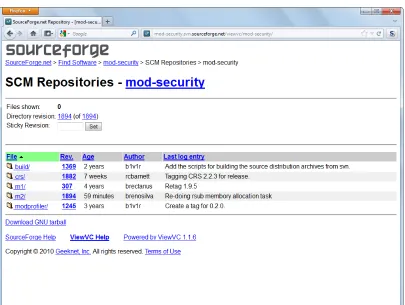
Figure 2-1. ModSecurity repository root
What you probably want is located in the m2/ directory, which houses ModSecurity 2.x. Within that directory, you will find a directory structure that you will find familiar if you’ve worked with Subversion before:
m2/
branches/ 2.1.x/ 2.5.x/ 2.6.x/ experimental/
[some stuff you won't care about] tags/
[all releases, one per directory] trunk/
Once you have determined the location of the version of ModSecurity that you wish to use, you can get it using the export command of Subversion, like this:
$ svn export https://mod-security.svn.sourceforge.net/svnroot/mod-security/… m2/trunk modsecurity-trunk
What you will get in the folder modsecurity-trunk is almost the same as what you get when you download a release. The documentation might not be in sync, however. Starting with ModSecurity 2.6, the master documentation is kept in a wiki, with copies of the wiki included with releases.
Installation on Unix
Before you can start to compile ModSecurity, you must ensure that you have a complete devel-opment toolchain installed. Refer to the documentation of the operating system you are using for instructions. If you’ll be adding ModSecurity to an operating system–provided Apache, you are likely to need to install a specific Apache development package, too. For example, on Debian and Ubuntu, you need to use apache2-prefork-dev or apache2-threaded-dev, de-pending on which deployment model (process-based or thread-based) you chose.
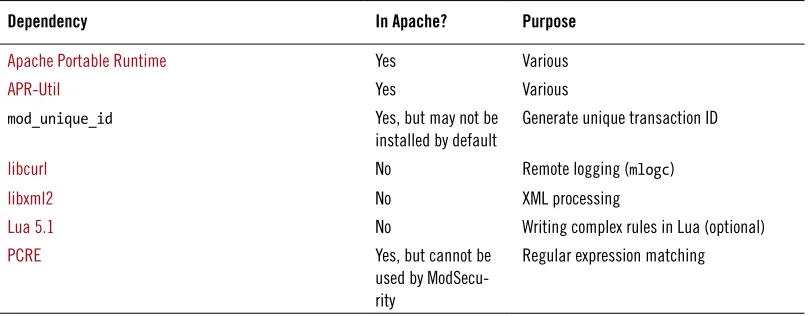
[image:39.540.70.474.370.528.2]In the next step, ensure that you have resolved all the dependencies before compilation. The dependencies are listed in Table 2.2, “ModSecurity dependencies”.
Table 2.2. ModSecurity dependencies
Dependency In Apache? Purpose
Apache Portable Runtime Yes Various
APR-Util Yes Various
mod_unique_id Yes, but may not be installed by default
Generate unique transaction ID
libcurl No Remote logging (mlogc)
libxml2 No XML processing
Lua 5.1 No Writing complex rules in Lua (optional)
PCRE Yes, but cannot be
used by ModSecu-rity
Regular expression matching
28 Chapter 2: Installation If you’re installing from source, go to the packages’ web sites, and download and install the tarballs. If you’re using managed packages, you just need to determine what the missing pack-ages are called. On Debian Lenny, the following command installs the missing packpack-ages:
# apt-get install libcurl3-dev liblua5.1-dev libxml2-dev
Refer to the documentation of the package management system used by your platform to determine how to search the package database.
Note
Libcurl, which is used for remote logging, can be compiled to use OpenSSL or GnuT-LS. You are advised to use OpenSSL because there have been complaints about re-mote logging problems when GnuTLS was used.
The process should be straightforward from here on. Execute the following commands in succession:
$ ./configure $ make
This set of commands assumes that you don’t need any compile-time options. If you do, see the following section. Before ModSecurity 2.6, the making of mlogc was optional and you had to execute another make mlogc to do it.
Note
Running additional tests after compilation (make test and make test-regression) is always a good idea, and is an especially good idea when using a development version of ModSecurity. If you are going to have any problems, you want to have them before installation, rather than after.
After ModSecurity is built, one more step is required to install it:
$ sudo make install
This command adds the module to your Apache installation, but does not activate it—you must do that manually. (While you are there, confirm that mod_unique_id is enabled; Mod-Security requires it.) The command will also create a folder (/usr/local/modsecurity by de-fault) and store the various run-time files in it. Here’s what you get:
bin/ mlogc
mlogc-batch-load.pl rules-updater.pl lib/
Compile-Time Options
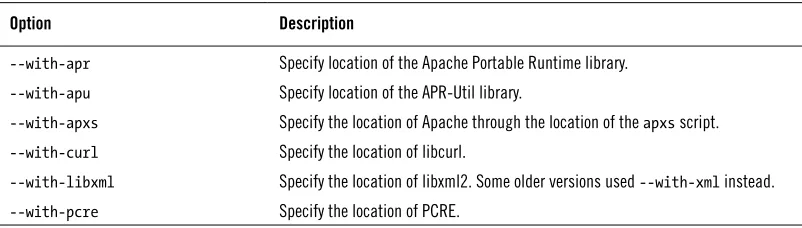
[image:41.540.69.470.166.280.2]The configuration example from the previous section assumed that the dependencies were all installed as system libraries. It also assumed that the configure script will figure everything out on its own. It may or may not, but chances are good that you will occasionally need to do something different; this is where the compile-time options, listed in Table 2.3, “Main compile-time options”, come in handy.
Table 2.3. Main compile-time options
Option Description
--with-apr Specify location of the Apache Portable Runtime library.
--with-apu Specify location of the APR-Util library.
--with-apxs Specify the location of Apache through the location of the apxs script.
--with-curl Specify the location of libcurl.
--with-libxml Specify the location of libxml2. Some older versions used --with-xml instead.
--with-pcre Specify the location of PCRE.
Custom-Compiled Apache Installations
Using ModSecurity with a custom-compiled version of Apache is more work than it should be because of a dependency problem that we have to resolve manually. PCRE, which ModSecurity uses for pattern matching, is a very popular library that is integrated into many operating systems. The problem is that Apache bundles PCRE and uses the bundled version by default when you compile it from source. Unless you take care to avoid conflicts, you’ll probably end up with Apache using the bundled version of PCRE and ModSecurity using the one provided by the operating system. The solution to this problem is to build Apache to use the external PCRE version too, which requires just one change to the way you build Apache.
The configure option you need (remember, this is the configure of Apache, not ModSecurity) is --with-pcre, and it is used like this:
$ ./configure \
--with-pcre=/usr/bin/pcre-config \ --enable-unique-id
We are also enabling the mod_unique_id module, which is required for ModSecurity’s full transaction log. Now you need to again compile and install Apache.
To configure ModSecurity, use the --with-apxs compile-time option to specify the location of your Apache installation. In the following example, I am assuming Apache is installed in /home/ivanr/apache:
$ ./configure \
30 Chapter 2: Installation From here you install ModSecurity as described in the previous section.
After both Apache and ModSecurity are installed, you should confirm that both products link to the same PCRE library, using ldd:
$ ldd ~/apache/bin/httpd | grep pcre
libpcre.so.3 => /usr/lib/libpcre.so.3 (0xb7d3f000)
You should get the same result when you compile ModSecurity:
$ ldd ~/apache/modules/mod_security2.so | grep pcre libpcre.so.3 => /usr/lib/libpcre.so.3 (0xb7f4c000)
Tip
Mac OS X does not have ldd, but you can obtain the equivalent functionality by running otool with option -L.
It is quite possible to have a configuration in which Apache uses its bundled PCRE and Mod-Security another PCRE version available on the system. This is probably the most commonly reported issue on the users’ mailing list because it not only prevents ModSecurity from work-ing but also crashes Apache.
Starting with version 2.6, ModSecurity reports at startup (in the error log) the detected library version numbers and compares them to those used at compile time. One or more warnings will be issued if a mismatch is found. This feature is especially handy for troubleshooting PCRE library collisions.
[notice] ModSecurity for Apache/2.6.0-rc1 (http://www.modsecurity.org/) configured. [notice] ModSecurity: APR compiled version="1.3.8"; loaded version="1.3.8"
[notice] ModSecurity: PCRE compiled version="8.12"; loaded version="8.12 2011-01-15" [notice] ModSecurity: LIBXML compiled version="2.7.3"
Installation from Binaries
As previously discussed, using a binary version of ModSecurity is often the easiest option, be-cause it just works. Unfortunately, what you gain in ease of installation you lose by sometimes being able to use only an older version. Further, packagers often do not include mlogc, which is essential for remote log centralization. For that reason, I don’t recommend installation from binaries unless there is no other way. If you do decide to check out what is available in bina-ry form, the list of available binabina-ry packages is available from http://www.modsecurity.org/ download/.
Fedora Core, CentOS, and Red Hat Enterprise Linux
# yum install mod_security
On CentOS and Red Hat Enterprise Linux, you have two options. One is to use the packages from EPEL (Extra Packages for Enterprise Linux), which is a volunteer effort and part of the Fedora community. The other option is to use the custom packages built by Jason Litka. Either way, the available packages support CentOS/RHEL 4.x and 5.x, on the i386 and x86_64 architectures. The installation process is the same as for Fedora Core.
Debian and Ubuntu
Debian was the first distribution to include ModSecurity, but also the first distribution to kick it out due to a licensing issue. The ModSecurity license was clarified in version 2.5.6 with the addition of an open source exception, and that opened the door for it to get back into Debian.