David F. Brailsford Leon Harrison
Electronic Publishing Research Group Department of Computer Science
University of Nottingham NOTTINGHAM NG7 2RD
E-mail [email protected] [email protected]
ABSTRACT
The available technologies for publishing journals ‘electronically’ are surveyed. They range from abstract representations, such as SGML,
con-cerned largely with the structure of the document, to formats such as
PostScript which faithfully model the layout and the appearance. The
issues are discussed in the context of choosing a format for electronically
publishing the journal: Electronic Publishing — Origination, Dissemination
and Design. PostScript is neither widely enough available nor standar-dised enough to be suitable; a ‘bitmapped pages’ approach suffers from being resolution-dependent in terms of the visual quality achievable. Rea-sons are put forward for the final choice of Adobe’s new PDF document standard for creating ‘electronic’ versions of the journal.
1. Introduction
Electronic documents have been the subject of lively debate and much research activity for more than ten years. A large part of this debate has focused around the question of what constitutes the essence of a document — is it structure, or appearance, or some combination of the two? The answer to this question influences what sort of features need to be presented on screen when showing a document in electronic form. If it is
structure that is important (i.e. the identification of components such as headings, tables, paragraphs and the cross-referencing relationships within and between docu-ments) then one can take the view that precise details of presentation and layout do not matter too much. Viewers for such systems tend to concentrate more heavily on the hypertextual link structure than on any notion of page fidelity with respect to some printed version of the document. A good example of this approach — which employs structured markup, while achieving acceptable standards of display quality — is the Internet-based World Wide Web (WWW) [1] in which the SGML-like markup, called HTML, allows documents to specify not only structural elements such as paragraphs but also hypertextual links. These links are embedded in the document and indicate whereabouts on the internet the target document is located. Many other examples of structured document systems have been developed in previous years (but without WWW’s cross-Internet links) including Dynatext [2], Grif [3] and Guide [4].
predictable, mapping between screen images and page images. A naive way to bring this about is to construct electronic document systems based on scanned page images. This
is the approach adopted by Knowledge Set Corporation’s Knowledge Retrieval System
and in the Right Pages project at AT&T [5]. But there are many difficulties with this
approach. A 300 dots per inch A4-size page occupies about 1 Mbyte unless compression techniques are used. By dropping the resolution to 150 dpi, as in Group 4 FAX, and applying compression algorithms, such a page can be stored in as little as 2.5 Kbytes but the image quality is poor and colour is out of the question.
An additional difficulty is that searching on bitmap pages for a particular word or phrase cannot be done directly. It is necessary to keep ‘shadow’ files in some near-ASCII format so that pointers from strings of ASCII text can point to the appropriate area of the corresponding bitmapped pages. Moreover, since the bitmap page is the ultimate physical representation, and has no abstract knowledge whatsoever of the underlying document structure, it follows that any form of added value in terms of hypertextual information, tables of contents and so on (particularly, where these are based on struc-tural elements of the document) is very difficult to provide.
If we regard electronic documents as being located on a spectrum between the extremes of the ‘structure’ and ‘page image’ approaches that we have just described, then we can legitimately ask if there is a middle ground, which combines a powerful high-quality imaging model with some degree of structural navigation. Such a system may well retain the page paradigm but would be offering a more sophisticated imaging model than a mere bitmap for the screen rendering of the page.
Among the recent systems attempting to satisfy this need we can identify the
WorldView system from Interleaf which uses a proprietary internal format, called Prin-terleaf, but accepts material in a range of graphic formats including CGM (Computer
Graphics Metafile). Other systems include Common Ground from the No Hands
Cor-poration Replica from Farallon and Envoy from the Word Perfect Corporation. All of
these systems use proprietary formats internally but will run in both the PC/Windows and Macintosh environments by making use of GDI and Quickdraw primitives appropri-ate to those platforms. This approach has the advantage that the use of such system primitives makes it easy to capitalise on the windowing display software already present in the operating system. On the other hand it also means that they are tied to specific hardware platforms in the first instance.
The systems just described are acceptable, to varying degrees, for turning simple documents from word processors into an electronic form. Where they are found wanting is in those documents which need sophisticated graphics, and access to techniques rang-ing from device-independent colour to scaleable resolution-independent font families. What is needed is a rendering model with the power of Display PostScript but with lower-than-ever performance penalties and the added value of hypertextual navigation.
Late in 1992 Adobe Systems announced just such a product, called Acrobat, which is described more fully in the next section.
2. Acrobat and PDF
PDF is at once both a subset and a superset of Level 2 PostScript. Facilities relevant
only to high-quality hardcopy (e.g. the setscreen operator) and some of the
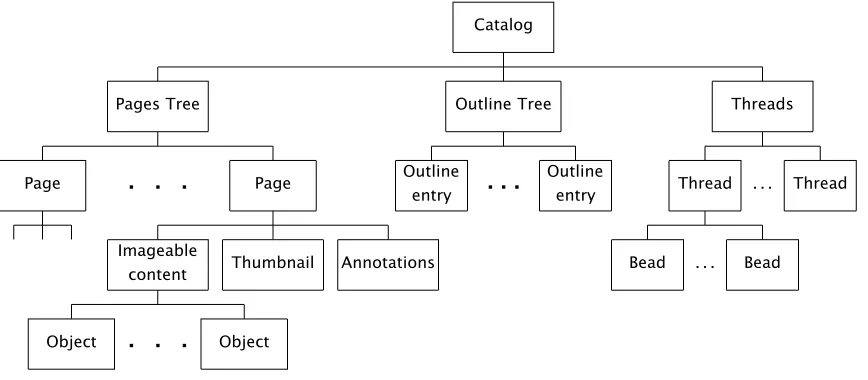
program-ming constructs of PostScript, such as loops, are missing from pDF. On the other hand features for annotations and hypertext have been added. Perhaps the major difference is that PostScript is primarily a serial program listing which is obeyed from start to finish, whereas PDF incorporates imageable objects and hypertextual objects into a tree-based data structure.
Catalog
Pages Tree
Page
. . .
PageImageable
content Thumbnail Annotations
Object
. . .
ObjectOutline Tree
Outline entry
. . .
Outline entry
Threads
Thread . . . Thread
[image:3.594.74.508.170.360.2]Bead . . . Bead
Figure 1: Structure of a PDF document
Figure 1 shows the page-based tree-structured electronic document format that PDF gives. In addition to the imageable content on each page there are ‘annotations’ (in the form of hypertext links and electronic ‘yellow stickers’) together with ‘thumbnail’ icons of the pages.
Turning first to the thumbnails, these are miniaturised JPEG-compressed bitmaps of the pages and so each one is unique. By using the Acrobat viewer option whereby thumbnails can be displayed down the left-hand side of the screen one finds sufficient detail for a page to be recognisable by the layout of its thumbnail. Furthermore, they greatly facilitate fast browsing and random access: one can jump from the page displayed on the screen to any distant page by clicking on the appropriate thumbnail for the destination page.
Within the general class called ‘Annotations’ the most straightforward objects are the ‘yellow stickers’, which are an electronic version of the coloured adhesive notes commonly attached to paper-based memoranda. These notes can be set up in a range of colours and each of them can have a header to indicate the author of the note. In this way members of any group or organisation can attach their comments to a document so that the author can, perhaps, incorporate their suggestions in the next revision.
The ‘link’ form of annotation is used for implementing hypertext links. These can be either inter- or intra-document and they work in the usual way — a mouse click on the button denoting the source of the link will cause a jump to a certain destination. The page-based approach of PDF, and the underlying rendering model of PostScript, means that the links, too, are very ‘bottom up’ and ‘physical’ in the way they are implemented. In particular, links are attached to a fixed page number; the button is denoted by the bounding box of a region with a fixed offset from the bottom left-hand corner of the page and the destination of the link is some fixed view of a fixed destination page.
pDF the ‘Outlines’ (or ‘Bookmarks’) sub-tree gives a means of creating a hypertextual Table of Contents for a book or an article. All sections and subsections can be entered into this hierarchical outline but, again, each entry in the Outline tree is a link to some predefined view of a fixed page within the document (it is, essentially, a set of cross-links from the Outline tree to the Pages tree).
Finally we come to the ‘Threads’, or ‘article flows’ which are a new feature in release 2.0 of Acrobat and PDF. They are, to put it simply, nothing more than linked lists of various views of a document’s pages; each of these views is called a ‘bead’. Article flows provide a way for ‘guided tours’ of a document to be set up: by joining the appropriate thread one enters a route which may omit some of the material in the full document or may ensure that the reading of a multi-column document flows smoothly from the bottom of one column to the top of the next.
The remaining question is how these PDF hyperfacilities can be denoted inside a
stream of PostScript. A new PostScript procedure, called pdfmark is used. The
PostScript file, with pdfmarks added either directly into the PostScript or by passing
them down from ‘front-end’ text-processing software, is finally handed to the Distiller program (see next section) for conversion into PDF.
2.1. Acrobat viewers and the Distiller
Acrobat is currently supported on IBM-compatible PC (MS-DOS and MS-Windows) on the Macintosh and on SUN UNIX platforms. Two versions of Acrobat viewer software
are available. The Reader, which is available free for all the platforms just mentioned,
can be obtained from the FTP site ftp.adobe.com in the directory
/pub/adobe/Applications/Acrobat. It provides facilities for browsing existing PDF documents and for printing them out. If the document has already been enhanced with hypertext links these can be followed but they cannot be altered in any way. By contrast the Exchange version of the viewer permits a degree of editing with respect to the the various ‘hyper-features’ and it also allows complete pages from other PDF documents to be interleaved with those already present. In what follows we shall use the general phrase ‘viewer’ to mean either the Reader or Exchange versions.
A program called the Distiller converts PostScript into PDF; in doing so it unfolds loop structures and generally tries to optimise the PostScript in terms of performance
and file size. The Distiller also transforms any pdfmarks in the PostScript stream into
the corresponding PDF hyperfeatures. If the document preparation software cannot
insert the pdfmarks into its PostScript output then another option would be to use an
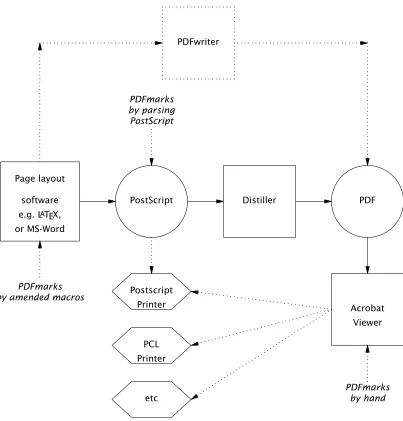
editor to insert them at the correct point in the PostScript once it is complete. If neither of these options is viable then the Exchange viewer can also acts as an editor for hyper-text annotations, thereby allowing links, bookmarks, threads etc. to be inserted “by
hand”. All of these possibilities for inserting pdfmarks are indicated in Figure 2 which
also shows the stages in creating a PDF document for Acrobat use, starting from any DTP or page-makeup software capable of producing PostScript. The topmost box in the
figure shows how a separate printer-driver module, called PDFwriter, allows PDF to be
created directly from simple word processor software such as Word or WordPerfect.
3. The EP-odd journal and the CAJUN project
In 1987 one of us (DFB) founded a journal called Electronic Publishing —
It might be thought that a journal with such a title would be refereed and dissem-inated electronically from the very outset, but there were a number of difficulties in finding a suitable electronic format. Although scanned-page, bitmap, formats were rejected out of hand it is certainly true that structure-based document systems such as Guide or Dynatext would have enabled us to ‘go electronic’ many years ago, but at the expense of page fidelity and page quality. Lest it be thought that these were minor objec-tions it is important to remember that the journal publishes articles on topics such as type design and grey-scale fonts, which require high-quality screen rendering from any ‘electronic’ format that is adopted. A further complication arose because the hardware platforms used by the subscribers spanned at least three systems (IBM PC, Macintosh and UNIX). How could we provide viewer software which retained compatibility with these three systems and with the PostScript that we were determined to use for the printed version? There was no immediate solution to the difficulty. Display PostScript was considered for a time but had to be rejected because of unwieldy file sizes and per-formance problems with early releases of the software. All we were able to do to plan for a truly electronic journal was to save the source code and PostScript for every pub-lished paper in the hope that a suitable electronic format would emerge.
software Page layout
e.g. LATEX,
or MS-Word
PostScript Distiller PDF
. . . . . . . . . . . . . . . . . . . . . . . . . . . . . . . . .
.. . . PDFwriter
. . . ... . . . . . . . . . . . . . . . . . . .. . . . . . . . . . . . . . . . . . . . .. . . . . . . . . . . . . . . . . . . . . . . . . . . . . . . . . . . . . . . . . . . . . . . . . . . . . . . . . . . . Acrobat Viewer . . . . . . . . . . . Postscript
Printer ....
PCL Printer . . . . . . . . . . . . . . . . . . . . . . . . . . . . . . . . . . . . . . . . . etc . . . . . . . . . . . . . . . . . . . . . . . . . . . . . . . . . . . . . . . . . . . . . . . . . . . . . . . . . . PDFmarks by amended macros
[image:5.594.86.489.284.705.2]. . . . . . . . . . . PostScript by parsing PDFmarks . . . . . . . . . . . PDFmarks by hand
From as early as 1992, when Acrobat was still being talked about under its initial working title of Carousel, it seemed clear that it would be a useful ‘middle ground’
for-mat for a journal such asEP-odd. High-quality colour, and resolution independence, are
an integral part of Acrobat’s PostScript Level 2 foundations; moreover its Super ATM
font-rendering mechanisms made it theonlyelectronic document technology capable of
rendering type design well enough to satisfy those authors working in the field of digital typography. In addition to the fonts available to the viewer from Adobe Type Manager it is also possible to embed fonts, during the distillation process, to ensure that the reci-pient of the document sees exactly the correct effect and release 2.0 of the Distiller is careful to embed only those characters that are actually used. One of the most impres-sive aspects of the Acrobat viewers is to select the ‘magnifying glass’ icon and to enlarge a portion of text to the maximum degree possible. The image quality remains excellent at all magnifications, with the details of stems and serifs being clearly discernible; the only limitation, in the end, is the resolution of the screen itself.
The remaining question was whether Acrobat’s hypertextual features would be
ade-quate for readers at the other end of EP-odd’s spectum i.e. those working in structured
documents, multimedia and hypertext. In this community there are many who feel strongly that electronic documents must break away, as soon as possible, from the
confines of a page-based model. On the other hand, given that the EP-odd archive of
source text and PostScript, related to existing, conventionally published, material the page-based nature of Acrobat was not seen as a drawback — at least for the initial stages of our investigations. More disappointing was the fact that Acrobat’s hypertextual features, as already indicated, lack any kind of abstract qualities. Fortunately it is possi-ble to discern within PDF the framework of an object-based model which will eventually enable the format to break free of page-based constraints for imageable objects and hyperlinks. For the moment, though, link anchors have to be placed absolutely in terms of bounding boxes of source and destination areas on fixed pages; the bounding boxes of beads, for article flows, have to be calculated at the very last moment of page makeup when the fine details of page layout are known. Small wonder, then, that the automated placement of these hypertextual elements in absolute ‘page space’ has called for multi-pass delayed-binding link-edit techniques (see section 3.1)
Having decided to fix on Acrobat for our experiments, funding was obtained from John Wiley Ltd and Chapman & Hall for a two-year project to be carried out in the
Elec-tronic Publishing Group at Nottingham. This project is called CAJUN (CD-ROM A
CRO-BAT JournalsUsingNetworks). In addition to the WileyEP-oddjournal, Chapman & Hall
have contributed material from their journalOptical and Quantum Electronics(OQE) and
have committed themselves to producing a new journal, Collaborative Computing (CC),
using PostScript and PDF formats.
3.1. Automating the PDF hyperlinks
The principal source of experimental material for the CAJUN project has been the
archive of source text, and final PostScript, for everything published in EP-oddsince its
launch in 1988. This gave us the option of using the Distiller on the PostScript archive
or of regenerating the PostScript for distillation (complete with inserted pdfmarks for
the links) from the marked-up source text, using new, enhanced, macro sets.
It was hoped to use this latter strategy on all of the material we possessed. Unfor-tunately we hit a problem which now seems depressingly obvious: although much of our
tagged source text was in LATEX format we had omitted to archive the exact version of
LATEX, and the associated macros, which had been used to typeset the material.
Re-processing the old source text with the most recent version of LATEX led to different
pagi-nation and diagram placement. Thus, for the first four volumes of EP-odd, we had no
alternative but to edit the archived PostScript for the papers so as to insert the desired
the existingtroff and LATEX macros forEP-odd so that, for example, a call-out of a
refer-ence automatically passed down apdfmarkfor a PDF ‘hot-link’, into the final PostScript.
After a second-pass the citation became automatically linked to the ‘References’ page. A
similar strategy for \sectionin LATEX and for .NHintroffallowed the Outline Table of
Contents to be set up automatically. The inherent multi-pass nature of LATEX was
employed in implementing the PDF links for references and footnotes. Furthermore, the LATEX \label and \ref mechanisms could be used to devise methods for linking phrases such as “. . . see Figure 1” so that a mouse click on that phrase caused the viewer to zoom in on Figure 1.
The structure of a PDF file as a tree has already been discussed but within the file itself each object is identified by a unique number. A cross-reference table, at the end of the file, keeps track of where the objects are in byte-offset terms. Link objects are owned (i.e. ‘pointed at’) by page objects and the indirect referencing via object number means that the links can be gathered together anywhere in the PDF file. Unfortunately this flexibility for locating the links anywhere in the PDF file was not passed on to users in
version 1.0 of thepdfmarkfor links. The format of this procedure call is:
[/Rect [llx lly urx ury] /Border [bx by c] /Page pagenum /View [x y zoom] /LNK pdfmark
Notice that the pagenum field refers to the destination page of the link. It was
thought quite adequate that the source page should be denoted implicitly, by requiring
that the link pdfmark be emitted on that page. This restriction, if related to classical
compilation of programs for virtual memory architectures, is rather like insisting that certain machine code instructions cannot be flexibly relocated — they must reside at fixed addresses inside fixed page numbers. Filling in the missing arguments on absolutely-positioned instructions of this kind is extremely tricky, though reference [9] shows how this can be accomplished, without having to remember the position of the
pdfmarkinstruction itself. A hybrid scheme was adopted which uses PostScript position
coordinates at the source of a forward link and LATEX ortroffcoordiantes at the
destina-tion. Fortunately, a new version of the link pdfmark has now been released, with an
extra /SrcPg key. This enables a more elegant processing technique to be employed.
During initial text-processing by LATEX, troff, or any other suitably configured package,
all sources and destinations for links are made to post down commands, into the PostScript output stream, which cause the current page position to be stored in variables in PostScript’s global dictionary space. A suitable naming scheme allows sources and destinations to be matched, bounding boxes for buttons to be calculated, and all
neces-sary values to be prepared on the stack for insertion into the link pdfmarks, which are
now all gathered together at the end of the PostScript file. As far as the front-end
software is concerned no extra passes are needed. The processing of the pdfmarks, by
the PostScript interpreter at the heart of the Distiller, invokes a standard set of pro-cedures in a revised PostScript prologue. In effect, the extra processing pass is now
car-ried out by the Distiller itself, using delayed binding of coordinates into the pdfmark
calls. An additional advantage of this approach is that it becomes independent of the particular front-end text processor in use. Any package can be used so long as it can be persuaded to emit the appropriate link-processing procedure calls, at the right time, into the PostScript output stream.
3.2. Dissemination on CD-ROM and over networks
A single CD-ROM can hold more than 600 Mbytes of information, making it an excellent archiving medium. The decreasing cost of CD-ROM drives will enable sub-scribers to receive regular updates of ‘electronic’ journals in this form. CD-ROM can act as a useful complement to networked dissemination, or as an alternative to it, if network bandwidth is limited.
Turning to network dissemination itself, we have recently set up an experimental service on a journal server at Nottingham which is accessible over the Internet. Seven files in PDF form are currently available from the EP-odd journal including one which describes the automated hyperlink techniques developed in the CAJUN project so far [9].. To make use of this service the user needs an Acrobat viewer of some sort, access to the Internet and a copy of either Gopher or FTP or World Wide Web (WWW) software. The details for access over Internet are:
Gopher: quill.cs.nott.ac.uk (128.243.23.12)
FTP: ftp.cs.nott.ac.uk
Files are in /ep/pub/pdf
WWW: http://quill.cs.nott.ac.uk
While Gopher and FTP are well suited for users with basic Internet access facilities, the most exciting developments are undoubtedly occurring around the World Wide Web with its cross-network hyperlinks, its HTML specification language and its highly popular (and free !) Mosaic [10] viewer. The viewer technology implemented by Mosaic is quite sophisticated; Links to remote documents are clearly shown and the screen fonts, while small in number, are pleasing to the eye. Nevertheless, it remains the case that the Mosaic viewer was not designed to render hundreds of fonts accurately, nor to be faith-ful to printed pages — let alone to cope with the problems of high-resolution device-independent colour. Conversely, Acrobat can handle all of these issues with ease but, for the moment, it has only a very crude, ‘physical’, page-based, notion of what a hyper-link can be. Is it going to be possible to reconcile these two extremes; to combine the sophisticated rendering technology of Acrobat with the cross-network links of WWW?
Our group at Nottingham has been conducting some experiments to answer these questions and similar experiments are under way at Adobe Systems Inc. and elsewhere. At Nottingham we have an experimental system which provides a WWW gateway into a subset of the EP-odd PDF documents [11]. The Mosaic viewer can be configured to work in tandem with an Acrobat viewer so that the latter is started up every time a PDF file is retrieved by following an HTML link. Release 2.0 of Acrobat, with its API facilities, allows the PDF inter-document link action, and its consequent file-opening routine, to be reprogrammed, so that cross-network HTML-style hyperlinks can be intercepted and implemented seamlessly. This points the way to future versions of the Reader and Exchange viewers which could integrate Acrobat’s device-independent high-quality rendering with Mosaic’s ability to traverse the Internet. It is significant that Adobe regards Acrobat/HTML compatibility as being sufficiently important for them to devote significant engineering efforts to this work.
3.3. PDF over e-mail
censorship of electronic ‘letters’ as one of life’s great pleasures. A typical problem is software which sees CR/LF and says “this is a UNIX box so we won’t need those CRs. Let’s throw them away!”. Since PDF locates its objects via byte offsets within the files this arbitrary discarding of characters is unfortunate to say the least. In practice the Acrobat viewer can easily reconstruct files where simple changes of this sort have occurred but a much bigger problem arises if one’s mail travels via IBM mainframes, on Bitnet, where ASCII/EBCDIC/ASCII character set conversions can cause havoc. The MIME proposals from the electronic mail community address this problem by devising a binary format using a safe ASCII-64 subset. Once all e-mail software is upgraded for MIME compliance then the problem will be solved but in the meantime it has to be
accepted that PDF transmission via e-mail is usually all right but cannot be absolutely
guaranteed.
4. The Acrobat API and multimedia documents.
In version 2.0 of Acrobat, released in November 1994, the viewer software has been re-written in modular form, to allow various components of the viewer functionality to be rewritten via an Applications Programmer Interface (API). These extra or replacement software modules are called ‘plug ins’. A good example of the ‘plug in’ approach in action is provided by looking at the way PDF documents can be indexed and searched. Standard search-engine and cataloguing software, from the Verity Corporation, is shipped with Acrobat version 2.0 but this can be substitued by any other search software provided it has been written to conform to the appropriate system calls of the API.
Yet another use of the API is to cater for those instances where platform-dependent extensions to PDF need to be provided. Now it is one of the major strengths of Acrobat electronic documents that they have cross-platform compatibility. The Acrobat viewers are available for MS-Windows, MS-DOS, Macintosh and Sun UNIX systems (with an HP-UNIX version being under development). Moreover, the content of the PDF files is also the same across all platforms provided the file contents represent text and binary images. In essence the ISO character sets and the font encodings used by PostScript are
the standard way of representing text and the PostScriptimage format is the method of
representing bitmaps. However, an electronic document, in the fullest sense, can be far more than just text and images. Multimedia documents will contain video sequences, sound bites etc. and it would be useful indeed if there were internationally agreed and adopted cross-platform multimedia standards. Unfortunately this is not the case. The proprietary standard on MS-Windows is Video for Windows and on Macintoshes it is Quicktime. The protagonists of these two systems are eager to claim them as cross-platform standards and it is certainly true, for example, that Quicktime has now been ported to MS-Windows as well as Macintosh. But this is a far cry from saying that these
are universally recognised, cross-platform de facto standards in the same way that
PostScript could claim to be. The nearest approximation to an international standard is that from the Motion Picture Experts Group (MPEG). Software viewers for MPEG are widely available and a hopeful pointer to the future is that the Philips Company is now making available add-on boards to enable its Video CD-I format to be played back on a wide range of hardware. Since CD-I uses MPEG as its encoding methodology the add-on boards for CD-I will potentially provide a means for making MPEG replay available on all platforms at hardware speeds.
Release 2.0 of Acrobat with its ‘plug-ins’ has enabled hot links to be implemented which allow the user to click on the word ‘Mozart’, for example, and to see a clip from
the movie ‘Amadeus’ or to click on the phrase ‘Overture to the Magic Flute’ and hear
5. Towards Revisable Object-Oriented PDF
In previous sections we have described the physical co-ordinate nature of hypertext links and article threads within the current version of PDF. The binding of annotations and threads to hard-coded page numbers, and to absolute Cartesian co-ordinates within those pages, causes enormous problems. By the nature of things the precise layout of objects on pages is not known until very late on in the pagination sequence and yet
pdfmarks require a precise specification for locations of bounding boxes, etc. Section 3.1 has shown in some detail how the binding of links to places on a page can be
achieved with either troff or LATEX macros by letting placements be calculated by the
PostScript interpreter within the Distiller. Having grappled with these problems it becomes very clear that the hypertextual linking process needs to take place between objects that are far more abstract than mere bounding boxes on fixed pages. If PDF were arranged on a ‘block’ or ‘object’ model — where these entities are roughly at the granu-larity of a paragraph, a table, a diagram, etc. — then everything would become much easier. A hypertext link from the phrase “see figure 1” in the middle of the first para-graph, to the figure itself, should be encoded as a link from the object “paragraph 1” to the object uIn other words the same object-based considerations underlying Microsoft’s
OLEand Apple’sOpenDoc apply with equal force to PDF documents. If every object in a
document had a unique identifier (preferably unique across the entire Internet) then documents could be confected dynamically from suitable objects collected from various machines around the world.
Figure 1 has already showed us that the structure of a PDF page allows its image-able content to be sub-divided into various objects. Each of these objects is, in actual
fact, a PDFstreamof imageable material but each stream has attached to its head a PDF
dictionary. These dictionaries, like their PostScript counterparts, are based on sets of key-value pairs. The value can be accessed associatively, via the key, and extra key-value pairs can be added at will, thus making it possible to invest the objects with attributes such as ‘bounding box’, ‘fonts used’ and so on. The major problem at the moment is that although PDF supports multiple-object pages, the Distiller gives the user absolutely no help in creating them ! To be more precise, a page of text will generally be rendered as one amorphous page object by the Distiller. Occasionally one finds that Distiller has, for convenience, split up large colour or grey-scale images into multiple objects but these objects bear no resemblance to any abstract structural properties of the image under consideration. On the other hand, if one takes the trouble to create multi-object pages directly in PDF [12] then all sorts of new developments become possible.
5.1. Shared objects and separable hyperstructure
In addition to an object-oriented model for documents, two otherr desirable features for a future version of PDF would be:
1. Shareability of objects within a file and across different files;
2. Separability of hyperstructure.
The first of these requirements is already feasible within PDF. Suppose we have a high resolution colour photograph that needs to appear in identical form in three places within a document. Because PDF allows almost all of its objects to be referenced indirectly (i.e. via a form of pointer) this means that the PDF file need have only one copy of this large object. All of the pages that need to use it merely point to the same object. Here again, though, the Distiller gives absolutely no help in setting up PDF files of this nature. The entire task has to be done, by hand, at the moment and the lack of any method for uniquely naming objects makes it difficult to ‘factorise out’ multiple copies of exactly the same large object and reduce them down to sets of pointers to one unique copy.
The second requirement, i.e. for separable hyperstructure, is certainly not a new concept within the hypertext community It has already been implemented in systems such as Intermedia [13], Microcosm [14] and Hyper-G [15], to name but three. It is indeed a goal worth pursuing because fully separable hyperstructure allows complete docu-ments, as well as individual objects within the docudocu-ments,to be operated on a shared basis. At the moment all PDF links, yellow stickers and article threads are embedded within the document itself, in a manner which makes it very hard to extract the
hyper-structure. It is a frequently occurring situation that a user wishes to revise a
document — without altering the pagination — to improve its quality or to correct minor typographical errors. Under these circumstances one wishes to lift out the hyperstruc-ture from the original, store it safely somewhere and then overlay it again on the corrected version of the document. Several problems arise when this is attempted in PDF: some of these can be appreciated by looking again at figure 1. The links within a document are owned by the page on which they occur and they form part of the page annotations. What this means is that the association of links to pages is a one-way pro-cess: the page knows which links it possesses but the links do not know to which page they belong. If the link objects are then removed from a PDF file and stored, so that they can be put back into the file later on, it is then necessary to add extra comment informa-tion into this file so that it is possible to restore the links to the correct pages. This is another situation where an object-oriented reworking of PDF would bring enormous benefits. If the link is encoded as being between ‘paragraph 1’ and ‘figure 1’ (and pro-vided that those object names are unique) then all one needs to do when overlaying the hyperstructure back onto the imagable object in the file is to search through all of the pages and to find out that paragraph 1 does indeed occur on page 1.
Acrobat viewer and adding his or her own hyperstructure. However, this extra hyper-structure will be stored in a file completely separate from the original PDF. In future, whenever the lecture notes file is opened up, the viewer would open not only the base material, which is shared across all 50 students, but also the personal annotations file for the particular student operating the viewer on this occasion. The arguments for doing this and the technical issues involved are very similar to those involved in making shared objects available from databases or even those that apply in making shared pro-grams available under multi-user operating systems such as UNIX: a shared program keeps just one copy of object code and shared library modules in memory, each user’s data occupies a completely separate data space. The net overhead on memory is that of
ndata-spaces plus one copy of the program rather thann copies of programs-plus-data.
In this analogy the base PDF material corresponds to a ‘shareable program image’ while the users’ annotation files correspond to ‘per user data’.
Despite the fact that PDF does not offer these facilities in its present version it is a testament to the design principles behind it that the use of PDF dictionaries, in so many places in the design, gives a most suitable method for creating a modular object-oriented system.
6. Conclusions
Acrobat seems set to become a de factostandard in the world of page-based
elec-tronic documents. Its very closeness to PostScript, and the modular design of the API in release 2.0, means that aspects of Acrobat, such as font rendering and device-independent colour, can be used as components in a variety of electronic document viewers. The ability to create ‘plug in’ modules for the API means that almost any facet of the viewer functionality can be rewritten. In particular, platform-dependent processes for video and sound can be initiated as link actions.
It is to be hoped that future versions of PDF will introduce hypertextual features in a much more abstract form than at present. Ideally, links and threads should be associ-ated with objects in the PDF file rather than being anchored to fixed page positions. In the meantime it is pleasing to note that standard Computer Science techniques of delayed binding can be adapted to cope with the ‘absolute’ positioning requirements of the present generation of PDF hyperlinks.
7. Acknowledgements
Thanks are due to John Wiley and Sons Ltd, Chapman & Hall Ltd, Adobe Systems Inc and Adobe (UK) Ltd. for sponsorship and software support for the CAJUN project. We are also deeply indebted to our colleague Phil Smith for in-depth consultations about PDF objects and streams.
References
1. T. Berners-Lee, R. Cailliau, A. Lutonen, H. F. Nielsen, and A. Secret, ‘‘The World-Wide
Web,’’Comm. ACM, vol. 37, no. 4, pp. 76–82, August 1994.
2. Dynatext — Electronic Book Publishing and Delivery System. Electronic Book Tech-nologies Inc. Providence R.I.
3. V. Quint and I. Vatton, ‘‘Grif: an Interactive System for Structured Document
Mani-pulation,’’ in Proceedings of International Conference on Text Processing and
Docu-ment Manipulation (EP86), ed. J. C. van Vliet, pp. 200–213, Cambridge University Press, 1986.
4. P. J. Brown, ‘‘A Hypertext System for UNIX,’’ Computing Systems, vol. 2, no. 1, p.
5. Guy Story, Lawrence O’Gorman, David Fox, Louise Levy Schaper, and H.V. Jagadish,
‘‘The RightPages Image-based Library for Alerting and Browsing,’’ IEEE Computer,
pp. 17–26, 1992.
6. Adobe Systems Incorporated, Portable Document Format Reference Manual, ISBN
0-201-62628-4, Addison-Wesley, Reading, Massachusetts, June 1993.
7. Ben Shneiderman and Greg Kearsley,Hypertext Hands-on!,Addison-Wesley, 1989.
8. D.F. Brailsford and R. J. Beach, ‘‘Electronic Publishing— a Journal and its
Produc-tion,’’Computer Journal, vol. 32, no. 6, pp. 482–493, December 1989.
9. Philip N. Smith, David F. Brailsford, David R. Evans, Leon Harrison, Steve G. Probets,
and Peter Sutton, ‘‘Journal publishing with Acrobat: the CAJUN project,’’Electronic
Publishing — Origination, Dissemination and Design, vol. 6, no. 4, pp. 482–493, December 1993.
10. Mosaic Viewer. Details can be obtained by retrieving the document with URL
http://www.ncsa.uiuc.edu/SDG/Software/Mosaic/NCSAMosaic/Home.html
into a WWW browser.
11. S. G. Probets, Acrobat Network Dissemination. CAJUN project. First Year Report.
Electronic Publishing Research Group. Department of Computer Science. University of Nottingham.
12. P. N. Smith,Interim report on the Juggler project. Second year Ph.D. Report.
Elec-tronic Publishing Research Group. Department of Computer Science. University of Nottingham.
13. N. L. Garrett, K. E. Smith, and N. Meyrowitz, ‘‘Intermedia: Issues, Strategies and
tac-tics in the Design of a Hypermedia Document System,’’ in Proceedings of the
Conference of Computer-Supported Cooperative Work, 1986.
14. H. C. Davis, W. Hall, I. Heath, G. J. Hill, and R. J. Wilkins, ‘‘Towards an Integrated
Environment with Open Hypermedia Systems,’’ in Proceedings ACM Conference on
Hypertext (ECHT ’92), pp. 181–190, Milan, Italy, December, 1992.
15. Keith Andrews, Frank Kappe, and Hermann Maurer, Hyper-G and Harmony: