c
ICON/UXV
User
Reference
ICON
INTERNATIONAL
764 East Timpanogos Parkway Orem, Utah 84057
G
USER REFERENCE MANUAL
ICON/UXV
Operating
System
© Copyrig ht 1 988
Icon International, Inc.
The information contained within this manual is
the
property ofIcon International, Inc. This
manual
shallnot be
reproducedin whole nor in
partwithout prior written approval
fromIcon
International,
Inc.Icon International, Inc. reserves
the
right to
make changes. without notice. to
the
specifications
and materials contained herein. and shall
not be responsiblefor any damages (including
consequential)
caused
by
reliance
on
the
material
as presented.
including. but not limited to.
typographical. arithmetic.
andlisting
errors.
The
UN1X~Software
and Text
Source
for this manual is under license
fromAT&T.
Copyright © 1984 AT&T Technologies
Order No. 172-036-004
AO
(Manual Assembly)
Order No. 171·063·005
AO
(Manual Pages only)
This manual was set on an IMAGEN 81300 laser printer driven
bythe IROFF formatter
operating under the ICONIUXV system.
Trademarks
The ICON logo is a registered trademark and ICON/UXV is a trademark
ofIcon International. Inc.
UNIX is a registered trademark of AT&T.
3B. WE. and DOCUMENTER'S WORKBENCH are trademarks of AT&T Technologies.
AUSTEC
isa trademark of Austec International. Ltd. (Australia)
DEC, PDP. VAX. UNIBUS, SBI. and MASSBUS are trademarks of Digital Equipment
Corp.DIABLO
andEthernet are trademarks of Xerox Cotporation.
HP is a trademark of
Hewlett-Pac~Inc.
HYPERchannel
isa
trademarkof Network Systems Corporation.
IBM is a trademark of International Business Machines Cotporation.
TEKTRONIX
is
a registered trademark of Tektronix. Inc.
TELETYPE is a trademark of AT&T Teletype Corporation.
Versatec is a registered trademark of Versatec Corporation.
c
ICON/UXV User Reference
Manual
Manual Pages Part
No ..
171-063-005
Date
Revision
Description
Pages Affected
Mar. 1988 AO Initial production release All
Aug. 1988 A1 Add man pages to
TOC,
cp,
Is, man, patch, sar, sections 1 and1C
shl, timex, vi, w, which, andkermit
C·
. .INTRODUCTION
This manual describes the features of the ICONfUXV operating system, Icon's implementation of AT&T's UNIX system V Release 2.2. It provides neither a general overview of the ICONfUXV system nor details of the implementation of the system.
This manual consists of one main section containing inter-filed sub-classes:
1. Commands and Application Programs: 1. General-Purpose Commands lC. Communications Commands IG. Graphics Commands
Section 1 (Oommande .nd Application Programe) describes programs intended to be invoked directly by the user or by command language procedures, as opposed to subroutines, which are intended to be called by the user's programs. Commands generally reside in the directory /bin (for binary programs). Some programs also reside in /uar /bin, to save space in /bin. These directories are searched automatically by the command interpreter called the ehell. Sub-class lC contains communication programs such as cv, eend, vvep, etc. These entries may not apply from system to system depending upon the hardware included on your processor. Some ICONfUXV systems may have a directory called /uar /Ibin, containing local commands.
Section 1 consists of a number of independent entries of one or more pages. The name of the entry appears in the upper corners of its pages. Entries within the section are alphabetized, with the excep-tion of the introductory entry that begins each secexcep-tion. Some entries may describe several routines, commands, etc. In such cases, the entry appears only once, alphabetized under its "major" name.
All entries are based on a common format, not all of whose parts always appear:
The NAME part gives the name(s} of the entry and briefly states its purpose.
The SYNOPSIS part summarizes the use of the program being described. A few conventions are used, particularly in Section 1 (Oommands):
Boldface strings are literals and are to be typed just as they appear.
Italic strings usually represent substitutable argument prototypes and program names found elsewhere in the manual (they are underlined in the typed version of the entries).
Square brackets [] around an argument prototype indicate that the argument is optional. When an argument prototype is given as "name" or "file", it always refers to a file name.
A vertical bar
I
between arguments indicates a selection argument, i.e. only one of the argu-ments separated by vertical bars is to be used.Ellipses ••• are used to show that the previous argument prototype may be repeated.
A final convention is used by the commands themselves. An argument beginning with a minus -, plus
+,
or an equal sign - is often taken to be some sort of flag argument, even if it appears in a position where a file name could appear. Therefore, it is unwise to have files whose names begin with -,+,
or -.The DESCRIPTION part discusses the subject at hand.
The EXAMPLE(S) part gives example(s} of usage, where appropriate.
The FILES part gives the file names that are built into the program.
The SEE ALSO part gives pointers to related information.
The DIAGNOSTICS part discusses the diagnostic indications that may be produced. Messages that are intended to be self-explanatory are not listed .
Introduction
The WARNINGS part points out potential pitfalls.
The BUGS part gives known bugs and sometimes deficiencies. Occasionally, the suggested fix is also described.
A table of contents and a permuted index derived from that table precede Section 1. On each index line, the title of the entry to which that line refers is followed by the appropriate section number in parentheses. This is important because there is considerable duplication of names among the sections, arising principally from commands that exist only to exercise a particular system call.
On most systems, all entries are available on-line via the mcm(l) command.
(
HOW TO GET STARTED
This discussion provides the basic information you need to get started on the ICONfUXV system: how to log in and log out, how to communicate through your terminal, and how to run a program. (See the
ICON/UXV U,er Guide for a more complete introduction to the system.)
Logging in. You must dial up the ICONfUXV operating system from an appropriate terminal. ICONfUXV supports full-duplex ASCII terminals. You must also have a valid user name, which may be obtained (together with the telephone number(s) of your ICONfUXV system) from the administrator of your system. Common terminal speeds are 10, 15, 30, and 120 characters per second (nO, 150, 300, and 1,200 baud); occasionally, speeds of 240, 480, and 960 characters per second (2,400, 4,800, and 9,600 baud) are also available. On some ICONfUXV systems, there are separate telephone numbers for each available terminal speed, while on other systems several speeds may be served by a single telephone number. In the latter case, there is one "preferred" speed; if you dial in from a terminal set to a different speed, you will be greeted by a string of meaningless characters (the login: message at the wrong speed). Keep hitting the "break" or "attention" key until the login: message appears. Hard-wired terminals usually are set to the correct speed.
Most terminals have a speed switch that should be set to the appropriate speed and a half-/full-duplex switch that should be set to full-duplex. When a connection (at the speed of the terminal) has been established, the system types login: and you then type your user name followed by the "return" key. If
you have a password (and you should!), the system asks for it, but does not print ("echo") it on the ter-minal. After you have logged in, the "return", "new-line", and "line-feed" keys will give exactly the same result.
It is important that you type your login name in lower case if possible; if you type upper-case letters, ICONfUXV will assume that your terminal cannot generate lower-case letters and that you mean all subsequent upper-case input to be treated as lower case. When you have logged in successfully, the shell will type a • to you. (The shell is described below under How to run a program.)
For more information, consult login(l), which discusses the login sequence in more detail, and Btty(l),
which tells you how to describe the characteristics of your terminal to the system. The command (profile(4) in the ICON/UXV Programmer Reference Manual explains how to accomplish this last task automatically every time you log in).
Logging out. There are two ways to log out:
1. You can simply hang up the phone.
2. You can log out by typing an end-of-file indication (ASCII EOT character, usually typed as "control-d") to the shell. The shell will terminate and the login: message will appear again.
How to communicate through your terminal. When you type to the ICONfUXV operating system, a gnome deep in the system is gathering your characters and saving them. These characters will not be given to a program until you type a "return" (or "new-line"), as described above in Logging in.
ICONfUXV terminal input/output is full-duplex. It has full read-ahead, which means that you can type at any time, even while a program is typing at you. Of course, if you type during output, the output will have interspersed in it the input characters. However, whatever you type will be saved and inter-preted in the correct sequence. There is a limit to the amount of read-ahead, but it is generous and not likely to be exceeded unless the system is in trouble. When the read-ahead limit is exceeded, the system silently throws away all the saved characters.
On an input line from a terminal, the character @ "kills" all the characters typed before it. The char-acter
#
erases the last character typed. Successive uses of#
will erase characters back to, but not beyond, the beginning of the line; @ and#
can be typed as themselves by preceding them with \ (thus, to erase a \, you need two Is). These default erase and kill characters can be changed; see Btty(l).HOfIJ To Get Started
The ASCII Dca (control-s) character can be used to temporarily stop output. It is useful with CRT ter-
0 \
minals to prevent output from disappearing before it can be read. Output is resumed when a DCI , j(control-q) or a second DC3 (or any other character, for that matter) is typed. The DCI and DCS char-acters are not passed to any other program when used in this manner.
The ASCII DEL (a.k.a. ''rubout'') character is not passed to programs, but instead generates an interrupt
.i,n.l, just like the "break", "interrupt", or "attention" signal. This signal generally causes whatever
program you are running to terminate. It is typically used to stop a long printout that you do not want. However, programs can arrange either to ignore this signal altogether, or to be notified when it happens (instead of being terminated). The editor ed(l), for example, catches interrupts and stops what
it is doing, instead of terminating, so that an interrupt can be used to halt an editor printout without losing the file being edited.
The quit signal is generated by typing the ASCII FS character. It not only causes a running program to
terminate, but also, if possible, generates a file with the "core image" of the terminated process. Quit is useful for debugging.
Besides adapting to the speed of the terminal, ICONfUXV tries to be intelligent as to whether you have a terminal with the "new-line" function, or whether it must be simulated with a "carriage-return" and "line-feed" pair. In the latter case, all inp.t "carriage-return" characters are changed to "line-feed" characters (the standard line delimiter), and a "carriage-return" and "line-feed" pair is echoed to the terminal. If you get into the wrong mode, the sttr(l) command will rescue you.
Tab characters are used freely in ICONfUXV source programs. If your terminal does not have the tab function, you can arrange to have tab characters changed into spaces during output, and echoed as spaces during input. Again, the .ttr(l) command will set or reset this mode. The system assumes that tabs are set every eight character positions. The tabs(l) command will set tab stops on your terminal, if that is possible.
How to run a program. When you have successfully logged into the ICONfUXV operating system, a program called the shell is listening to your terminal. The shell reads the lines you type, splits them into a command name and its arguments, and executes the command. A command is simply an execut-able program. Normally, the shell looks first in your current directory (see The current directory below) for a program with the given name, and if none is there, then in system directories. There is nothing special about system-provided commands except that they are kept in directories where the shell can find them. You can also keep commands in your own directories and arrange for the shell to find them there.
The command name is the first word on an input line to the shell; the command and its arguments are
separated from one another by space and/or tab characters. .
When a program terminates, the shell will ordinarily regain control and type a • at you to indicate that it is ready for another command. The shell has many other capabilities, which are described in detail in
.h(l).
The current directory. ICONfUXV has a file system arranged in a hierarchy of directories. When the system administrator gave you a user name, he or she also created a directory for you (ordinarily with the same name as your user name, and known as your lo,in or home directory). When you log in, that directory becomes your current or working directory, and any file name you type is, by default, assumed to be in that directory. Because you are the owner of this directory, you have full permissions to read, write, alter, or destroy its contents. Permissions to have your will with other directories and files will have been granted or denied to you by their respective owners, or by the system administrator. To change the current directory use ed(l).
viii Icon International, Inc.
How To Get Started
Path names. To refer to files not in the current directory, you must use a path name. Full path names begin with
I,
which is the name of the root directory of the whole file system. After the slash comes the name of each directory containing the next sub-directory (followed by aI),
until finally the file name is reached (e.g.,luar/ee/filex
refers to file filex in directory ee, while ee is itself a subdirec-tory of uar; uar springs directly from the root direcsubdirec-tory). See intro(2) for a formal definition of path name.If your current directory contains subdirectories, the path names of files therein begin with the name of the corresponding subdirectory (without a prefixed
I).
Without important exception, a path name may be used anywhere a file name is required.Important commands that modify the contents of files are cp(I), mv, and rm(I), which respectively copy, move (Le., rename), and remove files. To find out the status of files or directories, use le(I). Use mkdir(l) for making directories and rmdir(l) for destroying them.
For a fuller discussion of the file system, see the references cited at the beginning of the INTRODUCTION above. It may also be useful to glance through Section 2 of The IOON/UXV Programmer Reference Manual, which discusses system calls, even if you do not intend to deal with the system at that level.
Writing a program. To enter the text of a source program into an ICON/UXV system file, use ed(l).
The principal languages available under ICON/UXV are C (see cc(l», Fortran (see 177(1», and assembly language (see ae(l)). After the program text has been entered with the editor and written into a file (whose name has the appropriate suffix), you can give the name of that file to the appropriate language processor as an argument. Normally, the output of the language processor will be left in a file in the current directory named a.out (if that output is precious, use mV(l) to give it a less vulnerable name).
If the program is written in assembly language, you will probably need to load with it library subrou-tines (see Id(l». Fortran and C call the loader automatically.
When you have finally gone through this entire process without provoking any diagnostics, the resulting program can be run by giving its name to the shell in response to the S prompt.
If any execution (run-time) errors occur, you will need ed6(1) or ad6(l) to examine the remains of your program.
Your programs can receive arguments from the command line just as system programs do; see e:eec(2).
Text processing. Almost all text is entered through the editor ed(l). The commands most often used to write text on a terminal are cat(l), pr(l), and nroff. The cat(l) command simply dumps ASCII text on the terminal, with no processing at all. The prell command paginates the text, supplies headings, and has a facility for multi-column output.
Surprises. Certain commands provide inter-ueer communication. Even if you do not plaQ to use them, it would be well to learn something about them, because someone else may aim them at you. To com-municate with another user currently logged in, write(l) is used; mai/(l) will leave a message whose pres-ence will be announced to another user when he or she next logs in. The corresponding entries in this manual also suggest how to respond to these two commands if you are their target.
When you log in, a message-of-the-day may greet you before the first S.
How To Get Started
TABLE OF CONTENTS
1. Commands and Application Programs
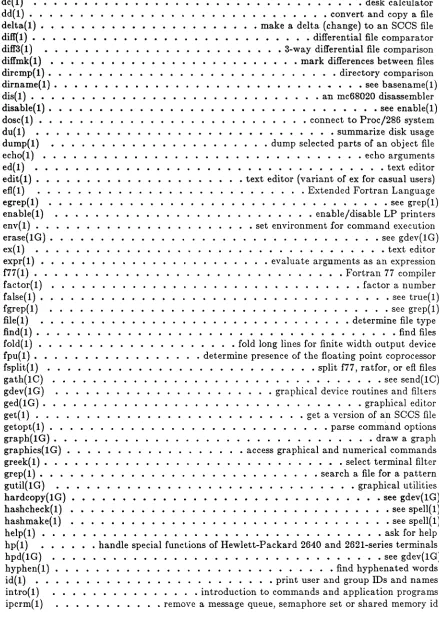
300(1). • • • • • • • • • • • • • • handle special functions of DASI 300 and 300s terminals
300s( 1) . . . • . • . . . • . . . see 300( 1)
4014(1) • • • • • • • • • • • • • • • • • • paginator for the TEKTRONIX 4014 terminal 450(1) • • • • • • • • • • • • • • • • • handle special functions of the DASI 450 terminal acctcom(1) • • • • • • • • • • • • • • • • • • • search and print process accounting file(s) admin(1). • • • • • • • • • • • • • • • • • • • • • • • create and administer SOOS files
apid(1) • • • • • • • • print the process id of designated process
ar(1) • • • • • • • • • • • • • • • • • archive and library maintainer for portable archives
as( 1) . . . • . . . • . . . . common assembler
asa( 1) • • • • • • • • • • • • • • • • • • • • • interpret ASA carriage control characters at(1) • • • • • • • • • • • • • • • • • • • • • • • • • execute commands at a later time awk(1) • • • • • • • • • • • • • • • • • • • • • pattern scanning and processing language banner( 1) • • • • • • • • • • • • . • • • • • • • • • • • • • • • • • • • make posters basename(1) • • • • • • • • • • • • • deliver portions of path names batch(1) • • • • • • • • • • • • • • • • • • • • • • • • • • • • • • • • • • • see at(!) bc(1) • • • • • • • • • • • • • • • • • • • • • • arbitrary-precision arithmetic language bdiff( 1) • • • • • • • • • • • • • . • • • • • • • • • • • • • • • • • • • • • • big diff bfs(!) • • • • • • • • • • • • • • • • • • • • • • • • • • • • • • • • • big file scanner bs(1) • • • • • • • • • • • • • • • • • • a compiler/interpreter for modest-sized programs
cal(1) • • • • • • • • • • print calendar
calendar(!) • • • • • • • • • • • • • • • • • • • • • • • • • • • . • • reminder service
cancel( 1) . . . • . . . • see Ip( 1)
cat(1) • • • • • • • • • • • • • • • . • • • • • • • • • • • • concatenate and print files cb(1). • • • • • • • • • • • • • • • • • • • • • • • • • • • • • • 0 program beautifier cc( 1) • • • • • • • • • • • • • • • • • • • • • • • • • • • • • • • • • • • 0 compiler cd( 1) • • • • • • • • • • • • • • • • • • • • • • • • • • • • • change working directory cdc(l) • • • • • • • • • • • • • • • • • • change the delta commentary of an SOOS delta cflow( 1) • • • • • • • • • • • • • • • • • • • • • • • • • • • • • generate 0 flowgraph chgrp( 1). • • • • • • • • • • • • • • • • • • • • • • .' • • • • • • • • • change group chgrp( 1) . . . • . . . • • • . . . • . see chown( 1) chmod( 1) . . . . . change mode chown(l) • • • • • • • • • • • • • • • • • • • • • • • • • • • • change owner or group cmp(1) • • • • • • • • • • • • • • • • • • • • • • • • . • • • • • • con1pare t,vo files col( 1) • • • '.' • • • • • • • • • • • • • • • • • • • • • • • • • filter reverse line-feeds comb(1) • • • • • • • • • • • • • • • • • • • • • • • • • • • • • combine SOOS deltas comm(!) • • • • • • • • • • • • • • • • • select or reject lines common to two sorted files convert(1) • • • • • • • • • • • • • • • convert object and archive files to common formats cp( 1) • • • • • • • • • • • • • • • • • • • • • • • • • • • • • • copy, link or move files cpio(1). • • • • • • • • • • • • • • • • • • • • • • • • • • copy file archives in and out cpp( 1) • • • • • • • • • • • • • • • • • • • • • • • • • • • the 0 language preprocessor crontab(l) • • • • • • • • • • • • . • • • • • • • • • • • • • • • • • user crontab file csh(1) • • • • • • • • • • • • • • • • • • a shell (command interpreter) with O-like syntax csplit(1) • • • • • • • • • • • • • • • • • • • • • • • • • • • • • • • • • context split ct(10) • • • • • • • • • • • • • • • • • • • • • • • • spawn getty to a remote terminal ctrace( 1) • • • • • • • • • • • • • • • • • • • • • • • • • • • • • 0 program debugger
cu(lO) • • . • . • . • • • call another UNIX system
cut(1) • • • • • • • • cut out selected fields of each line of a file
cxref(l) • • • • • generate 0 program cross-reference
date(1) • • • • • • • • • • . • print and set the date
Table oj Contents
xii
dc(I) . . . • • . • • . • • . . . • . . . desk calculator
dd( I) • • • • • • • • • • • • • • • • • • • • • • • • • • • • • • convert and copy a file delta(l). • • • • • • • • • • • • • • • • • • • • • make a delta (change) to an SOOS file diff(I) • • • • • • • • • • • • • • • • • • • • • • • • • • •• differential file comparator diff3( I) • • • • • • • • • • • • • • • • • • • • • • • • 3-way differential file comparison diffmk(I) • • • • • • • • • • • • • • • • • • • • • • • • • mark differences between files dircmp( I}. • • • • • • • • • • • • • • . • • • • • • • • . • • • • directory comparison
dirname( 1). • . . . • . . . .. . . . see basename( 1)
dis(I} • • • • • • • • • • • • • • • • • • • • • • • • • an mc68020 disassembler
disable(l). . . . see enable{l)
dosc(I} • • • • . • • • • • • • • • . • • • • • • • • • • • • connect to Proc/286 system du(I}
dump(I)
. . . • . • . • . . . . summarize disk usage
• • • • • • • • • • • • • . • • • • • • . • dump selected parts oC an object file
echo( 1) . . . • . . . • • . . . • . . . . • . . . echo arguments ed( 1 ) . . . • . . . . . • . . . . text editor
edit(I) • • • • • • • • • • • • text editor (variant oC ex Cor casual users)
efl(l) • • • • • • • . • • • . • Extended Fortran Language
egrep( I) • • • • • • • • • • • • • • • • see grep( I)
enable(l) • • • • • • • • • • • • . . . • • • • • • • • . • • ena.ble/disable LP printers env(I) • • • • • • • • • . • • • • • • • • • • • • set environment for command execution erase(IG). • • • • • • • • • • • • . . • • • • • • . • . . . • . • • • • • see gdev(lG)
ex( 1) • . . . . • . . . . • . . . • . . • . . text editor
expr(l) • • • • • • • • • • • • • • . • • • • . • • • evaluate arguments as an expression f77(1) • • • • • • • • • • • • • • • . • • • . • • • • • . . • • • • Fortran 77 compiler
Cactor( l) • • • • • • • • • • • factor a number
false(I) • • • • • • • • •• • • • • • • • • • • • • • see true(l) fgrep( 1) • • • • • • • • • • • • • • • • • • • . . see grep( l) file( l) • • • • • • • • • • • • • • • • • • . determine file type
find( 1). . . . . . . . . . . • . . . find files
Cold(l) • • • • • . • • • • • • • • • • • • • • fold long lines for finite width output device Cpu(I). • • • • • • • • • • • . • . . . determine presence of the floating point coprocessor Csplit(l) • • • • • • • • • • • • • • • • • • • • • • • • • • • split f77, ratfor, or efl files
gath(10) • • • • • • • • . . • • • • • • • • see send(IO)
gdev(IG) • • • • • • • • • • • • • • • • • • • graphical device routines and filters
ged(IG). • • • • • • • • • • . • • • • • graphical editor
get(I) • • . . • • • • • • • • • • • • • • • • • • • • • . • get a version of an
seos
file getopt( I) • • • • • • • • • • • • • . . • • • • • . . • . • • • • parse command options graph(IG). • • • • • • • • • • • • • • • . • . • • • • • • • • • draw a graph graphics(lG) • • • . • • • • • • • . . . • • • • access graphical and numerical commands greek( I). • • • • • • • • • • • . • . • • • • • • • • • . • • • • • select terminal filter grep( l). • • • • • • • • • • • • • . • • • • • • • • • • • • • search a file for a pattern gutil(lG) • • • • • • • • • • • • • . • • • • • • • • • . • • • • • • graphical utilitieshardcopY(IG) • • • • • see gdev(lG)
hashcheck( l) • • • • • • • •• • • • • • • • • see spell( l)
hashmake(I) • • • • • • • • • • see spell(l)
help(l) • • • • • • • ask Cor help
hp(I) • handle special functions of Hewlett-Packard 2640 and 262l-series terminals hpd(IG) • • • • • • • • • • • • • • • • . • • • • • • • • • • • • • see gdev(lG) hyphen(I) • • • • • • • • • • • • • . • • • • • • • • • • • • • • find hyphenated words id(l) • • • • • • • • • • • • • • • . • • • • . • • • print user and group IDs and names intro(l} • • • • • • • • • • • • • . • introduction to commands and application programs ipcrm(l) • • • • • • • • • • • remove a message queue, semaphore set or shared memory id
Icon International, Inc.
[image:14.612.116.555.88.711.2](
Table of Oontents
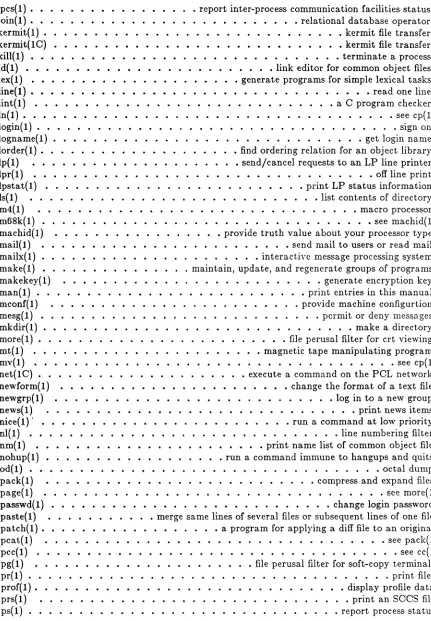
ipcs(I). • • • • • • • • • • • • • • • • report inter-process communication facilities status join(I). • • • • • • • • • • • • • • • • • • • • • • • • • • relational database operator
kermit(l) • • • • •• •• kermit file transfer
kermit(IC) • • • • • • • • • • • • • • • • • • • • • • • • • • • • • kermit file transfer kill(l) • • • • • • • • • • • • • • • • • • • • • • • • • • • • • • • terminate a process Id(l) • • • • • • • • • • • • • • • • • • • • • • • • • link editor for common object files lex(l) • • • • • • • • • • • • • • • • • • • • • generate programs for simple lexical tasks line( 1). . . read one lille
lint(l) • • • • • • • • • • a C program checker
In( 1). . . see cp( 1)
login( 1) . . . ". . . sign on
logname( 1) • • • • • • • • • • • • • • get login name
lorder(I). • •• • • • • • find ordering relation for an object library
Ip(l) • • • • • • • • send/cancel requests to an LP line printer
lpr( 1) • • • • • • • • • • • • • • off line print
Ipstat(l) • • • • • • • • print LP status information
Is(l) • list contents of directory
m4( 1) . . . macro processor
m68k( 1) . . .. . . . . . . . see machid( 1) machid(l) • • • • • • • • • • • • • • provide truth value about your processor type mail(l) • • • • • • • • • • • • • • • • • • send mail to users or read mail
mailx{l) • • • • • • • • • • • interactive message processing system
make{l) • • • • • • • . maintain, update, and regenerate groups of programs makekeY(I) . • • • • • • • • • • • • • generate encryption key man( 1) • • • • • • • • • • • • • • • • • • • • • • • • • • • print entries in this manual
mconf{l) • • • • • provide machine configurtion
mesg{l) • • • • • • • • • • • • • • • • • • • • • • • • • • • • permit or deny messages mkdir( 1) • • • • • • • • • • • • • • • • • • • • • • • • • • • • • • • make a directory more( 1) • • • • • • • • • • • • • • • • • • • • • • • • . file perusal filter for crt viewing mt(l) • • • • • • • • • • • • • • • • • • • • • • • magnetic tape manipulating program
mV(l} . . . see cp(l)
net(IC) • • • • • • • • • • • • • • . • • • • • • execute a command on the PCL network newform{ 1) • • • • • • • • • • • • • • • • • • • • • • • change the format of a text file newgrp(l) • • • • • • • • • • • • • • • • • • • • • • • • • • • • log in to a new group news( 1) • • • • • • • • • • • • • • • • • • • • • • • • • • • • • • • print news items nice( 1)' • • • • • • • • • • • • • • • • • • • • • • • • • run a command at low priority nl(l) • • • • • • • • • • • • • • • . • • • • • • • • • • • • • • • line numbering filter nm(l) • • • • • • • • • • • • • • • • • • • • • • • print name list of common object file nohup(l) • • • • • • • • • • • • • • • • • • run a command immune to hangups and quits od( 1) • • • • • • • • • • • • • • • • • • • • • • • • • • • • . • • • • • • octal dump pack(l) • • • • • • • • • • • • • • • • • • • • • • • • • • • compress and expand files
page( 1) . . . .. .. .. .. . . .. . . .. . . .. . . see more{ 1)
passwd(l) • • • • • • • • • • • • • • • • • • • • • • • • • • • • change login password paste(l) • • • • • • • • • • • merge same lines of several files or subsequent lines of one file patch(I). • • • • • • • • • • • • • • • • • a program for applying a diff file to an original
pcat(l) • • • • • • • • • • • • • • • see pack(l)
pcc(l) . . . see cc(l) pg( 1) • • • • • • • • • • • • • • • • • • • • • • file perusal filter for soft-copy terminals pr( 1) • • • • • • • • • • • • • • • . • • • • • • • • • • • • • • • • • • • • print files prof{ 1). • • • • • • • • • • • • • • • • • • • • • • • • • • • • • • display profile data
prs{l) • • • • • • • • • • • • print an SCCS file
ps(l) • • • • • • • • • • • • • • • . • • • • • • • • • • • • • • • report process status
[image:15.612.112.543.98.719.2]Table of Oontent8
xiv
ptx(l). . . . • . . . • . . . permuted index
pWd(l) • • • working directory name
ratfor(l) • • • • • • • • • • • • • • • • • rational Fortran dialect
red(l) . . . . . . . . . . . . see ed(l)
regcmp(l) • • • • • regular expression compile
reten(l) • • • • • • • program to cha.nge the autoJetension flag for quarter-inch cartridges.
rm( 1) • . . . . • • • • • . • . • . . . • • • . • . • . • . . remove files or directories
rm( 1) . • • • • . • . • • . . . • . • • • • • . • . . • . • . • . . . • . • see rmdir( 1) rmail( 1) . . . see mail( 1)
rmdel(l) •• remove a delta from an
sees
filermdir{ 1) • • • • • • • • • • • • • • • • • • • • • • • remove (unlink) directories or files
rmdir{ 1) • • . . • . • . . . • . . • . . . • . . • • see rm( 1)
rsh(l) . . . see sh{l} sact{l) • • • • • • • • • • • • • print current SOOS file editing activity sag(lG) • • • • • • • • • • • • • • • • • • • system activity graph
sar{l) • • • • • • • • • • • • • system activity reporter
scc(l) • • • • • • . • • • • . • • . • • • • • • • • 0 compiler for stand-alone programs sccsdiff(l) • • • • • • • • • • • • • • • • • • • • • compare two versions of an
sees
file sdb(l) • • • • • • • • • • • • • • . • • • . • • • • • • • • • • • • symbolic debugger sdiff( 1). • • • • • • • • • • • • • . • . • • • • • • . • • side-by-side difference program sed( 1). . • . . . stream editor send(10) • • • . • • • • • • • • • gather files and/or submit RJE jobs sh(l) • • • • shell, the standard/restricted command programming language shl( 1) • • • • • • • • • • • • • • • • • • • • • • • • • • • • • shell layer manager size(l) • • • • • • • • • • • • • • . • • • • . • print section sizes of common object files sleep(l) • • • • • • • • • • • • • • • • • • • • • • • • suspend execution for an intervalsno(l) • • • • • • • • • . • SNOBOL interpreter
sort(l) • • • • • • . • • • • • • • . • • • • • • • • • • . • . • sort and/or merge files
spell( 1) • • • • • • • • • • find spelling errors
speUin( 1) • • • • • • • • • • • • • • • • • • • • . • • • • • • • • • • . . • see spell( 1) spline(IG). • • • • • • • • • • • • . . • • • . . • • • • . • . interpolate smooth curve split(I). • • • • • • • • • • • • • • • • • • • . • • • • . • • • • split a file into pieces stat(IG). • • • • • • • • • • • • • • • statistical network useful with graphical commands strip(I) • • • • • • • • • strip symbol and line number information from a common object file sttY(I) • • • • • • • • • • • • • • • • • . • set the options for a terminal sU(l) • • • • • • • • • • • • • • • . • . • . • • • • • become super-user or another user sum(l) • • • • • • • • • • • . • • • • . • . • . print checksum and block count of a file sync(l) • • • • • • • • • • • • • • • • • • • • • • • • • • . • • update the super block
tabs(l) • • • • • • • • • • • • • set tabs on a terminal
tail(l) • • • • • • • • • • • • • • • • • • • • • • • • • • • deliver the last part of a file tar{l) . . . tape file archiver td(IG) • • • • • . • • • • • • • • . • • • • • • • . • • • • • • . • • • • see gdev{lG) tee{l) . . . pipe fitting tekset(IG) • • • • • • • • • • • • • • • • • • • • • • • • • • • • • • • • see gdev(lG) test(l) • • • • • • • • • • • • • • • • • • • • . • condition evaluation command time( 1). • • • • • • • • • • • • • • • • • • • • • • • . • time a command timex(l} • • • • • • • time a command; report process data and system activity toc(IG) • • • • • • • • • • . . • . . • • • • • • • • graphical table of contents routines touch(l) • • • • • • • • • • • • • • • . • • upda.te access and modification times of a file tplot( 1 G) • • • • • • • • • • • • • • • • • • • • • • • . • • . • . • • graphics filters
tput(l) • • • • • • query terminfo database
tr( 1) • • • • . • • • • . • • • . • • • • • . • • . . .. • • • • translate characters
[image:16.612.115.558.91.698.2]Table of Contents
true(l) • • • • • • • • • • • • • • provide truth values
tsort(l) • • • • • • • • • topological sort
ttY(l) • • • • • • • get the name of the terminal
umask(l) • • • • • • • • • . • • • • • • • set file-creation mode mask
uname(l) • • • • • • • • • print name of current UNIX system
unget(l) • • • • • • • • undo a previous get of an SCCS file
uniq(l) • • • • • • report repeated lines in a file
units( l) • • • • • • • • • • • • • conversion program
unpack(l) • • • • • • • • • • • • • • • • • • • • • • • • • • see pack(l)
uucp(lC) • UNIX system to UNIX system copy
uulog(IC). • • • • • • • • • • • • •• • • • • •• see uucp(IC)
uuname(IC) • • • • • • • • • • • . • • • • • • • • • • • • • • • • • • • see uucp(IC) uupick( 1 C) . .. . . .. . .. . . .. . . • . . . see uuto( 1 C) uustat(IC) • • • • • • • • • • • • • • • • • • • • • • uucp status inquiry and job control
uuto(IC) • • • • • • • public UNIX-to-UNIX system file copy
uux(IC). • • • • • • • • • • • • • • • • • • • UNIX-to-UNIX system command execution val( 1) • • • • • • • • • • • • • • • • • • • • • • • • • • • • • • • validate SCCS file
ve(!} . . . .. version control
vers(I) • • • • • • • • • • • • • print version number of the kernel and utilities viti) • • • • • • • • • • • • • • • . • • screen-oriented (visual) display editor based on ex vpr(l) • ~ • • • • • • • • • • • • . • 4 • • • • • • • • • • • • Versatec printer spooler w( l) • • • • • • • • • • • • • • • • . • • • • • • • • who is on and what they are doing waitt!) • • • • • • • • • • • • •• • • • • • • • • • • • await completion of process
we{ 1) . . . . . . . . . word count
what( 1) • • • • • • • • • • • • • • • • • • • • • • identify SCCS files which(l) • • • locate a program file including aliases and paths (csh only)
who(l) • • • • • • • • • • • • • • who is on the system
whodos(I) • • • • • • • • • • • • display information about dosc users write(I) • • • • • • • • • • • • • • • • • • write to another user
xargs(I) • • construct argument list(s) and execute command
yacc(l) • • • • • • • • • • • • yet another compiler-compiler
Table of Contents
c
PERMUTED INDEX
of Hewlett-Packard 2640 and /functions of Hewlett-Packard functions of DASI 300 and 300&/
handle special functions or DASI of DASI 300 and
300&/
300,special functions or DASI 300 and eomparison dill'3
TEKTRONIX 4014 terminal paginator for the TEKTRONIX
the DASI 4SO terminal special functions of the DASI f77 Fortran a file toucb update commands graphics search and print proeellS procellS accounting flle(s) print current
sees
file editing report procellS data and system 8ag system sar systemsees
files admin create and sort sort send, gath gather files designated procellS introduction to commands and maintainer ror portable archives language bc for portable archives ar convert convert object and tar tape IIle library maintainer for portable cpio copy file command xargs construct echo echo expr evaluate bc arbitrary-precision control characters asa interpret help las common later time reten program to change the wait proeellSing language(visual) display editor portions or path names later time at, arithmetic language
262l-series terminals ,functions 0 0 hp(l)
2640 and 2821-aer~s termiJlals 0 0 hp(l)
300,300& handle special • • • 300(1) 300 and 300s terminals , . , . 0 • • • • • 0 0 0 0 0 300(1)
300& handM special functioaa 0 0 • 0 00 300(11)
300& terminals /300& ..hUdM 300( )
~way dill'erential file 0 0 • _ • dill'3(l)
4014 paginator ror the • • • • 0 4014(1) 4014 terminal 4014 • 0 • • • 0 0 • 0 0 4014(1) 4SO handle special functions of 0 0 4SO(I) 4SO terminal 4SO handle 0 0 • • 450(1)
77 compiler • • • • • • • • • 0 0 0 f77(1)
access and modification times or • 0 • toucb(l)
accellS grapbical and numerical •• 0 • • • • grapbics(lg)
accounting IIle(s) acctcom • • • • • • • aectcom(l) acdeom search and print 0 acctcom(l)
activity sact • • • • • • • • • • • • • • ... ct(l) activity timex time a command; • • • • • • timex(l) activity graph • • • 0 • • 0 • 0 0 0 0 • • 0 sag(lg)
activity reporter 0 • 0 • • • 0 • • r(l)
admin create and administer admin(l) administer
sees
files 0 admin(l)and/or merge files • • • • • • • • • • • • • •• sort(l) and/or submit RJE jobs 0 send(lc)
apid print the procellS id or • • • • • • • apid(l) application programs intro 0 • • • 0 intro(l)
ar arcbive and library • 0 _ • 0 0 • ar(l)
arbitrary-precision aritbmet.h: 0 • • • 0 bc(l)
archive and library maintainer • • • ar(l) arcbive files to eommon rorDDt8 0 • • • convert(l)
ar'tbiver • • 0 0 • • • • • tar(l)
arebives ar archive and • • • • • • • ar(l) archives in !Lnd out • • • • • cpio(l) argument list(s) and execute • 0 0 xargs(l)
arguments • • • • • • • • • • •• eeho(l) arguments as an exprellSion 0 • expr(l)
arithmetic language 0 bc(l)
asa interpret ASA carriage • 0 • 0 • • 0 • • asa(l)
ASA carriage control characters • • 0 0 • • asa(l)
asHor help 0 0 • • • • • • • 0 help(l)
assembler • • • • • • • • • • • • • • • • • u(l)
at, batcb execute commands at a • 0 0 at(l)
auto..retension fiag forI 0 • _ • • • reten(l)
await completion or procellS •• 0 wait(l)
awk pattern scannill& a.nd •• • • 0 awk(l)
banner make posters banner(l) based on ex vi screen-orient~d 0 • vi(l)
basename, dirname deliv~ 0 • • 0 0 basename(l)
batch execute commaJlds~.. • •• 0 0 • • • at(l)
bc arbitrary-precision •• 0 • • • 0 0 • 0 • bc(l)
bdill' big dill • 0 • 0 0 • 0 • • bdilf(l)
cb
e
program beautifier • • • • • • • • • • • • • 0 cb(l)su become super-user or anotber De!' sU(l) bdilf
bfs sync update the super sum print checksum and modest-sized programs cc, pcc programs scc cllow generate cpp the cb lint a cxrer generate ctrace
brs big file scanner bfs(l)
big dilf bdilJ(l)
big file scanner • • • • bfs(l) block • • • • • • • • 0 • 0 sync(l)
block count or a file • 0 0 • sum(l)
bs a compiler/interpreter ror • 0 0 bs(l)
C eompiler • • • • • • • • • • • • • cc(l)
e
compiler for stand-alone • scc(l)e
fiowgrapb •• 0 0 0 0 • • 0 • 0 cfiow(l)e
language preprocessor • cpp(l)e
program beautifier • • cb(l)e
program cheeker • • • • • Iint(l)e
program cross-rererence cxrer(l)e
program debugger • • • • • • • ctrace(l) cal print calendar • • • • • • • • • • cal(l)Permu'ed l,.de~
Xl'iii
de desk cal print
eu an LP line printer Ip, ua interpret ASA
Bag ror quarter-inch text editor (variant or ex ror
of an
sees
delt.a cbarp paaswd chmod chown, chgrp for / reten program tosees
delta cdc newform delta make a delta cd interpret ASA carriage control tr trl.nsll.te lint ae
program 61e sum printcbown,
group sbell (comma.nd interpreter) with
comb common to two sorted 61es test condition evaluation time time a argument Iist(s) and execute niee run a env set environment for uux UNIX-to-UNIX system quits nobup run a syntax csh a shell net execute a getopt parse /sbell, the standard/restricted system I.ctivity timex time a a.ccess graphicl.l and numerica.l network uieful with araphical intro introduction to at, batch execute cdc change tbe delta
las
object and arcbive 61es to /nm print name list of line number information from a /Id link editor for /size print section sizes of comm select or reject lines ipes report inter-process dill' dill'erential Ille emp IIle scesdill' dilr3 3-way differential IIle dircmp directory regcmp regular expression cc, peee
r77
Fortran 77scc
e
yaee yet another modest-sized programs bs a wa.it awaitcalcwat.or • • • • • • • • • • • • • • • dc(l) caleadar • • • • • • • • • • • • • • • • • eaJ( 1)
calendar reminder service • • • • • • • • • • calendar(l) eaJl anot.ber UNIX eyltem • • • cu(lc) cancel send/cancel requests to Ip(l) carriaae control characters •• asa(l) cartridges. /the autoJetension • reten(l) casual users) edit • • • • • • • edit(l) cat conc .. ten .. t.e I.nd prillt lies • • • • • • • cl.t(l) cb
e program bel.utiller • • • •
cb(l) cc, pcce compiler • •• • • • •
cc(l) cd change working directory •• • cd(l) cdc cbange the delta commentary • cde(!) dow gentrate e lowgrapb • clow(l)change aroup •• cbarp(l)
chanae login puaword • • • • • • paawd(l} change mode • • • • • chmod(l)
cbange owner or aroup chown(l)
change the autoJetension lag • reten(l} cbnge tbe delta commentary of an • cdc(l) change tbe form .. t or a text file • newform(l) (change) to an
sees
file • • • • • • delt .. (l) cbange working directory • cd(l) cbar .. cters asa • • • • • • asa(l) characters • • • • • • • • • tr(l)cbecker • • • • • • • • • • • • • • " • liDt,(l)
cbecksum and block count or a • • • • • lum(l) chgrp cbange group •• • • • • • • • • chgrp(l) chgrp change owner or group • • • • • • cbown(l) cbmod cbange mode • • • • • chmod(l) chown, cbgrp change owner or • • • cbown(l)
Oolite syntax csh a esb(l)
cmp compare two files • • • • • cmp(l) col filter reverse line-feeds • • col(l) comb combine
sees
deltas • comb(l) combinesees
delt.as • • • • • eomb(l) comm select or reject lines • • • • • comm(l) command • • • • _ • • • • test(l)cornman d • • • • • • • • • • • • • time( 1)
command xargs construct • • • • • • xargs(l) comma.nd at low priority nice(l)
comma.nd execution env(l)
command execution • uux(lc)
command immune to hangups a.nd nohup(l) (command interpreter) with Oolike • • • csb(l) command on the peL network net.(lc) comma.nd options • • • • • • • • getopt(l) command programming Ia.nguage •• sh(l} command; report process data a.nd • • • timex(l) commands grapbics • • • • • • • • • • • • • graphics(lg) comma.nds stat statistica.l • • • • • • • stat(lg) commands and applica.tion progra.ms •• intro(l)' commands at a later time • • at(l} commentary or an
sees
delta • • • • • cdc(l)common aasembler • • • aa(l)
common formats convert convert convert(l) common object file • • • • • • • • • • • • • nm(l) eommon object IIle /symbol and strip(l) common object files • • • • • • Id(l) common ohject files • • • • • • • • • • • • • • size(l) common to two sorted files • • • • • • • comm(l) communication facilities status ipcs(l) comparator • • • • • • • • • • dill'(l) compare two Illes • • • • • • • • cmp(l) compare two versions of a.n
sees
..
sccsdill'(l) comparison • • • • • • • • dilr3{l)comparison • • • • • dircmp(l)
compile • • • • regcmp(l)
compiler • • • ee(l)
compiler • • • f'77(1)
compiler ror stand·alone programs Ice(l) compiler-compiler • • • • • • ya.cc(l)
compiler/interpreter for bs(l)
completion or process • wait(l)
o
pack, peat, unpack eat t.est mconf provide machine dose execute command xargs 1& list toe graphical t.able ofcsplit uucp st.atus inquiry and job vc version ua int.erpret ASA carriage units archive 81es to common format.s dd to common formats convert. presence of the 80at.ing point UNIX system to UNIX system public UNIX-ta-UNIX system 81e dd convert and cpio cp, In, mv we word sum print checksum and block files out admin cron ta.b user exref genera.te e progra.m page 81e perusal filter for interpreter) with e-like synta.x
terminal
activity sact print uname print name of spline interpolate smooth each line of a. file line of a file cut cross-reference /handle special functions of handle special functions of the prof display profile time a. comma.nd; report process tput query terminfo join relational dat.e print and set tbe
ctrace e program sdb symbolic basename, dirname tail the delta commentary of an sees an sees file delta make a cdc change the rmdel remove a comb combine sees mesg permit or apid print the process id of dc file floating point coprocessor fpu
Icon International, Inc.
lines for finite width output /hardcopy, tekset, td graphical ratfor ra.tional Fortran bdiff big comparator compa.rison
Permuted Indez
compress and expand 8les • • • pack(l) concatenate and print 81es • • • • • • • • • cat(l) condition evaluation command • test(l) conBlurtion • • • • • • • • • • • • • • • meonf{l)
connect to Proc/286 system • dosc(l) construct a.rgument list(a) and • • • • • • • • • • • • xargs(l) contents of directory • • • • • • • • I&(ll contents routines toc 19) context split • • • • • • • • • • • espUt(l) control uuatat • • • • • uustat(lc) control • • • • • vC(l) cont.rol characters • • • • • • ua(l) conversion program •
convert convert object and convert and copy a 81e convert object and archive 81es coprocessor fpu determine copy uucp, uulog, uuna.me copy uuto, uupick
unit.s(l) convert(l)
• • • • • • • dd(l)
• • • • • • • cODvert(l)
fPU(ll uucp lC) uut.o(lc) copy a 81e • • • • • • • •
copy 81e a.rchives in and out copy, link or move 81es ••
• • • • • • dd(l)
count • • • • • • • • • • count of a file • • • • • • cp, In, mv copy, link or move.
cpio copy 81e archives in a.nd • • • • • cpp t.he e langua.ge preprocessor
• • • • • cpio(l) cp(l) • wC(l) sum(l) • cp(l)
create and administer sees 81es • • • • ••
• • cpio(l) cpp(l) admin(l) crontab(l) crontab user crontab 81e
crontab file • crontab(l) • exrer(l) cross-reference • • • •
crt viewing more, • • • • • • • • • • • more(l) csh a shell (command
csplit context split ct spawn get.ty to a. remote ctra.ce e program debugger cu ca.l1 another UNIX system current sees file editing current UNIX system • • • •
curve • • • • • • • . • • •
• • csh(l) • • csplit(l)
ct(lc) • • ctrace(l) • • cu(lc) • • sact(l) • • uname(l) cut cut out selected fields of • • • • • • • •
cut out selected fields of each
• • apline(lg) cut(l) • • cut{l} cxrer(l) cxref genera.te e program
DASI 300 a.nd 300s termina.ls DASI 450 termina.l 450
data • • • . • • • . • • • • data and system activity timex da.tabase • • • • • • database operator
da.te • • • • • • da.te print a.nd set the da.te dc desk calculator • • • • dd convert and copy a file
• • 300(1)
• • 450(1)
pror(l) • timex(l) • • tput(l) • • join(l)
date(l) • date(l) dc(l) • • • • • dd(l) • • • • • • ctrace(l) debugger • • • • • • • •
debugger • • • • • • • •
deliver portions of path names • sdb(l) buename(l) deliver the lut. part of a file ••
delta cdc change • • • • • • • delta make a delta (change) to delta (change) to an sees file •• delta commentary of an sees delt.a.
• tail(l) cdc(l) • delta(l) • • • • • • • • • delta{l) • • cdc(l) delt.a from an sees 81e • • • • • • • • • rmdel(l) deltas • • • • • • •
deny messa.ges • • •
designated process • • • • • • • desk calculator • •
determine file type determine presence of the device fold fold long device routines a.nd filters dialect • • • • • • diff • • • • • • • • • • diff differential file diff3 3-way differential file
'.
• comb(l) mesg(l) • apid(l)
dc(l) • 8le(1)
fpu(l) fold(l) • gdev(lg)
ratfor(!) bdiff(l) diff(l) diff3(1)
Permuted 1 .. 4"
sdiff side-by-side dillmk mark diff dilf3 3-way Illes rm, rmdir remove Illes or rmdir, rm remove (unlink) cd cbange working Is list CODteDts of mkdir make a dircmp pwd working path Dames basename,
printers enable, dis an mc88020 du summarize vi screen-oriented (visual) users whodos prof display informat.ion about grapb
od octal object 61e 61e /dump
ecbo for casual users) sact print current sees file ed, red text ex text ged grapbical sed stream screen-oriented (visual) display /Id link users) edit text fsplit split (77, ratror, or a p&ttern grep, LP printers enable, disable makekey generate man print execution env set graphical device/ gdev, hpd, basbcbeck find spelling expression expr test condition (visual) display editor based on edit text editor (variant of network net const.ruct argument list.(s) and at, batcb env set environment for comma.nd uux UNIX-to-UNIX system command sleep suspend pack, pca.t, unpack compress a.nd expression expr eva.luate arguments as a.n regcmp regular
ell
fsplit split inter-process communica.tion
fa.ctor true, pattern grep, egrep,
dillerence program • • • • • • • • • • • sdill(l) differences between files • • • • • • • • • • • • dillmk(l) dilrereDtiai lIe comparator • dilf(l) dilrerentlalille comparison • • • • dilf3{l) dillmk mark differences between • diffmk(l) dircmp directory comparison • dlrcmp(l) directories • • • • • • • • rm(l) directories or Illes • • • • • • • • • • • • • • • rmdir(l)
directory cd(l)
directory • • • • • • 11( 1)
directory • • • • • • • • • • • mkdir(l) directory compa.rison • • • • • • dircmp( I) directory name • • • • • • pWd(l) dirname deliver portions of basename(l) dis an mc88020 dilUllembler • dis(l) disable enable/disable LP • • • enable(l) diS&l8tmbler • • • • • • • • • • • • dis(l)
disk ulrle • • • • • . • • • • • • • • • du(l)
display editor based on ex • • • • • • • vi(l) display information about dose • • • • • • • •• whodos(l) display prolle data • • • • • • • pror(l) dosc connect to Proc/286 system • • • • • dosc(l) dose usera wbodos •• whodos(l) drawl. graph • • • • • • • • graph(lg) du summarize disk uaage •• duel)
dump • • • • • • • • • • od(l)
dump dump selected pa.rts or an • • • • • • dump(l) dump selected parts of an object dump(l) echo echo arguments etho(l) echo arguments • • • • • • • • • echo(l) ed, red text editor • • • • • • • • • ed(l) edit text editor (varia.nt of ex edit(l) editing activity • • • • • • • • • • • sact(l) editor • • • • • • • ed(l)
editor •• eX(I)
editor ged(lg)
editor • • • • • • • • • • • • • • • • sed(l) editor based on ex vi • • • • • • • • • vi(l) editor for common object files • • • • • • • • • Id(l) editor (variant of ex ror casua.l edit(l) eft Extended Fortran Language • eft(l} eft ftles • • • • • • • • • • • • • fsplit(l) egrep. fgrep search a file for • • • • • • • grep(l} ena.ble. disable enable/disa.ble • • • • • • • • • enable(l) enable/disable LP printers ena.ble(l) encryption key • • .'. • • • • • • • • • • • • makekeY(l} entries in this manual ma.n(l) env set environment for command env(l) environment for command execution env(l} erase, hardcopy, tetaet, td • ,dev(lg} errors spell, hashma.ke. spellin, • • • • • • • spell(l} evaluate arguments as an expr(l) eva.luation command • • • • • • test(l) ex vi screen-oriented • • • • • • • •• vi(l) ex text editor • • • • • • • • • ex(1)
ex for casual users) • • • • • • • edit(l) execute a comma.nd on the peL net(lc) execute command xargs •• xargs(l) execute commands at a Ia.ter time •• at(l}
execution • • • • . • • • • • • • • • env{l}
execution • • • • • • • uux(lc) execution for an interval • • • • • • • • sleep(l) expand files • • • • • • • patk(l} expr evalua.te arguments as an • • • • • expr(l)
expression ••• • . • • • • • • • • • • • • expr(l)
expression compile • • • regcmp(l) Extended Fortran La.nguage • • • • • • • etI(l) (77 Fortra.n 77 compiler • • • • • • (77(1) (77, ratror, or etI ftles • • • • • • • • • • • • fsplit(l) fa.cilities sta.tus ipcs report • ipes(l) fa.ctor fa.etor a number factor(l) factor a number • • • • • • • • • • • fa.ctor(l) false provide truth values true(l}
fgrep search a file for a • • • • • grep(l)