Topic Models and Metadata for Visualizing Text Corpora
Justin Snyder, Rebecca Knowles, Mark Dredze, Matthew R. Gormley, Travis Wolfe Human Language Technology Center of Excellence
Johns Hopkins University Baltimore, MD 21211
{jsnyde32,mdredze,mgormley,twolfe3}@jhu.edu, [email protected]
Abstract
Effectively exploring and analyzing large text corpora requires visualizations that provide a high level summary. Past work has relied on faceted browsing of document metadata or on natural language processing of document text. In this paper, we present a new web-based tool that integrates topics learned from an unsuper-vised topic model in a faceted browsing expe-rience. The user can manage topics, filter doc-uments by topic and summarize views with metadata and topic graphs. We report a user study of the usefulness of topics in our tool.
1 Introduction
When analyzing text corpora, such as newspaper ar-ticles, research papers, or historical archives, users need an intuitive way to understand and summa-rize numerous documents. Exploratory search (Mar-chionini, 2006) is critical for large corpora that can easily overwhelm users. Corpus visualization tools can provide a high-level view of the data and help di-rect subsequent exploration. Broadly speaking, such systems can be divided into two groups: those that rely on structured metadata, and those that use infor-mation derived from document content.
Metadata Approaches based on metadata include visualizing document metadata alongside a domain ontology (Seeling and Becks, 2003), providing tools to select passages based on annotated words (Cor-rell et al., 2011), and using images and metadata for visualizing related documents (Cataldi et al., 2011). A natural solution for exploring via metadata is faceted browsing (English et al., 2002; Hearst, 2006;
Smith et al., 2006; Yee et al., 2003), a paradigm for filtering commonly used in e-commerce stores. This consists of filtering based on metadata like “brand” or “size”, which helps summarize the con-tent of the current document set (K¨aki, 2005). Stud-ies have shown improved user experiences by facil-itating user interactions through facets (Oren et al., 2006) and faceted browsing has been used for aid-ing search (Fujimura et al., 2006) and exploration (Collins et al., 2009) of text corpora.
However, facets require existing structured meta-data fields, which may be limited or unavailable. An alternative is to use NLP to show document content.
Content Topic modeling (Blei et al., 2003), has become very popular for corpus and document un-derstanding. Recent research has focused on aspects highlighted by the topic model, such as topic distri-butions across the corpus, topic distridistri-butions across documents, related topics and words that make up each topic (Chaney and Blei, 2012; Eisenstein et al., 2012), or document relations through topic compo-sitions (Chuang et al., 2012; Gardner et al., 2010).
Newer work has begun to visualize documents in the context of their topics and their metadata, such as topics incorporated with keywords and events (Cui et al., 2011). Other examples include displaying topic prevalence over time (Liu et al., 2009) or help-ing users understand how real events shape textual trends (Dou et al., 2011). While interfaces may be customized for specific metadata types, e.g. the top-ical map of National Institutes of Health funding agencies (Talley et al., 2011), these interfaces do not incorporate arbitrary metadata.
2 Combining Metadata and Topics
We present MetaToMATo (Metadata and Topic Model Analysis Toolkit), a visualization tool that combines both metadata and topic models in a single faceted browsing paradigm for exploration and anal-ysis of document collections. While previous work has shown the value of metadata facets, we show that topic model output complements metadata. Provid-ing both in a sProvid-ingle interface yields a flexible tool.
We illustrate MetaToMATo with an example adapted from our user study. Consider Sarah, a hypothetical intern in the New York Times archive room who is presented with the following task.
Your boss explains that although the New York Times metadata fields are fairly compre-hensive, sometimes human error leads to over-sights or missing entries. Today you’ve been asked to keep an eye out for documents that mention the New York Marathon but do not include descriptors linking them to that event. This is corpus exploration: a user is asked to dis-cover relevant information by exploring the corpus. We illustrate the tool with a walk-through.
Corpus Selection The corpus selection page (tool home page) provides information about all available corpora, and allows for corpora upload and deletion.
Sarah selects the New York Times corpus.
Corpus Overview After selecting a corpus, the user sees the corpus overview and configuration page. Across four tabs, the user is presented with more detailed corpus statistics and can customize her visualization experience. The first tab shows general corpus information. The second allows for editing the inferred type (date, quantity, or string) for each metadata attribute to change filtering be-havior, hide unhelpful attributes, and choose which attributes to “quick display” in the document col-lapsed view. On the remaining two tabs, the user can customize date display formats and manage tags.
She selects attributes “Date” and “Byline” for quick display, hides “Series Name”, and formats “Date” to show only the date (no times).
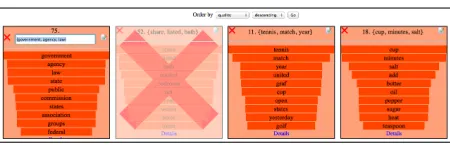
[image:2.612.314.539.54.127.2]Topics View Each topic is displayed in a box con-taining its name (initially set to its top 3 words) and a list of the top 10 words. Top words within a topic are words with the highest probability of appearing in the corpus. Each topic word is highlighted to show a
Figure 1: Topics PageA view of the first row of top-ics, and the sorting selector at the top of the page. The left topic is being renamed. The second topic has been marked as junk.
normalized probability of that word within the topic. (Figure 1) Clicking a topic box provides more infor-mation. Users can rename topics, label unhelpful or low-quality topics asJUNK, or sort them in terms of frequency in the corpus,1predicted quality,2or junk.
Sarah renames several topics, including the topic “{running, athletes, race}” as SPORTS and marks
the “{share, listed, bath}” topic asJUNK.
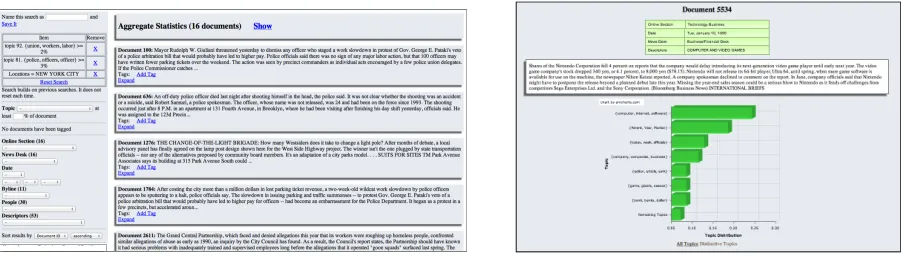
Documents View The document view provides a faceted browsing interface of the corpus. (Figure 2) The pane on the right side displays the set of docu-ments returned by the current filters (search). Each document is summarized by the first 100 words and any quick view metadata. Users can expand doc-uments to see all document metadata, a graph of the distribution of the topics in this document, and a graph of topics distinctive to this document com-pared to corpus-wide averages.3
Sarah begins by looking at the types of documents in the corpus, opening and closing a few documents as she scrolls down the page.
The facets pane on the left side of the page dis-plays the available facets given the current filters. Topics in a drop-down menu can be used to filter given a threshold.
Sarah selects the value “New York City” for the Location attribute and a threshold of 5% for the
SPORTStopic, filtering on both facets.
Values next to each metadata facet show the num-ber of documents in the current view with those at-tribute values, which helps tell the user what to
ex-1Frequency is computed using topic assignments from a Gibbs sampler (Griffiths and Steyvers, 2004).
2Topic quality is given by the entropy of its word distribu-tion. Other options include Mimno and Blei (2011).
Figure 2: Left: Documents Page. The left pane shows the available facets (topics and metadata) and the right pane shows the matching documents (collapsed view.) Right: Expanded Document. An expanded collapsed document is replaced with this more detailed view, showing the entire document as well as metadata and topic graphs.
pect if she refines her query.
Sarah notices that the News Desk value of “Sports” matches a large number of documents in the current view. She adds this filter to the current facet query, updating the document view.
At the top of the document pane are the cur-rent view’s “Aggregate Statistics”, which shows how many documents match the current query. An ex-pandable box shows graphs for the current docu-ments topic distribution and distinctive topics.4
Looking at the topic graph for the current query, Sarah sees that another topic with sports related words appears with high probability. She adds it to the search and updates the document view.
Any document can be tagged with user-created tags. Tags and their associated documents are dis-played in the corpus overview on the configuration page. If a user finds a search query of interest, she can save and name the search to return to it later.
Sarah sees many documents relevant to the New York City Marathon. She tags documents of interest and saves the query for later reference.
2.1 Implementation Details
Our web based tool makes it easy for users to share results, maintain the system, and make the tool widely available. The application is built with a JSP front-end, a Java back-end, and a MongoDB database for storing the corpus and associated data. To ensure a fast UI, filters use an in-memory meta-data and topic index. Searches are cached so incre-mental search queries are very fast. The UI uses
4Computed as above but with more topics displayed.
Ajax and JQuery UI for dynamic loading and inter-active elements. We easily hosted more than a dozen corpora on a single installation.
3 Evaluation
Our primary goal was to investigate whether incor-porating topic model output along with document metadata into a faceted browser provided an effec-tive mechanism for filtering documents. Participants were presented with four tasks consisting of a ques-tion to answer using the tool and a paragraph provid-ing context. The first three tasks tested exploration (find documents) while the last tested analysis (learn about article authors). At the end of each task, the users were directed to a survey on the tool’s useful-ness. We also logged user actions to further evaluate how they used the tool.
3.1 Participants and Experimental Setup
Twelve participants (3 female, 9 male) volunteered after receiving an email from a local mailing list. They received no compensation for their participa-tion and they were able to complete the experiment in their preferred environment at a convenient time by accessing the tool online. They were provided with a tool guide and were encouraged to familiarize themselves with the tool before beginning the tasks; logs suggest 8 of 12 did exploration before starting.
The study required participants to find informa-tion from a selecinforma-tion of 10,000 documents from the New York Times Annotated Corpus (Sandhaus, 2008), which contains a range of metadata.5 All
ac-documents in the corpus were published in January of 1995 and we made no effort at deduplication. Topics were generated using the Latent Dirichlet Al-location (LDA) (Blei et al., 2003) implementation in MALLET (McCallum, 2002). We used 100 top-ics trained with 1500 Gibbs iterations and hyper-parameter optimization.
3.2 Quantitative Results
The length of time required to complete individual tasks ranged from 1 minute and 3 seconds to 24 min-utes and 54 seconds (average 9 minmin-utes.)6
Within the scope of each task, each user initi-ated on average 5.75 searches. The time between searches was on average 1 minute and 53 seconds. Of all the searches, 21.4% were new searches and 78.6% built on previous searches when users chose to expand or narrow the scope of the search. When users initiated new search queries, they began with queries on topics 59.3% of the time, with queries on metadata 37.3% of the time, and queries that used both topics and metadata 3.4% of the time. This lends credence to the claim that the ability to access both metadata and topics is crucial.
We asked users to rate features in terms of their usefulness on a Likert scale from 1 (not helpful at all) to 5 (extremely helpful). The most preferred fea-tures were filtering on topics (mean 4.217, median 5) and compacted documents (mean 3.848, median 5) The least preferred were document graphs of topic usage (mean 1.848, median 1) and aggregate statis-tics (mean 1.891, median 1).7 The fact that filtering
on topics was the most preferred feature validates our approach of including topics as a facet. Addi-tionally, topic names were critical to this success.
3.3 Surveys
Users provided qualitative feedback8 by describing
their approaches to the task, and offering sugges-cess in the study was: online section, organization, news desk, date, locations, series name, byline (author), people, title, fea-ture page, and descriptors.
6These times do not include the 3 instances in which a user felt unable to complete a task. Also omitted are 11 tasks (from 4 users) for which log files could not provide accurate times.
7Ratings are likely influenced by the specific nature of the sample user tasks. In tasks that required seeking out metadata, expanded document views rated higher than their average.
8The survey results presented here consist of one survey per participant per task, with two exceptions where two participants
tions, the most common of which was an increase in allowed query complexity, a feature we intend to enhance. In the current version, all search terms are combined using AND; 7 of the 12 participants made requests for a NOT option.
Some users (6 of 12) admitted to using their browser’s search feature to help complete the tasks. We chose to forgo a keyword search capability in the study-ready version of the tool because we wanted to test the ability of topic information to provide a way to navigate the content. Given the heavy us-age of topic searches and the ability of users to com-plete tasks with or without browser search, we have demonstrated the usefulness of the topics as a win-dow into the content. In future versions, we envision incorporating keyword search capabilities, including suggested topic filters for searched queries.
As users completed the tasks, their comfort with the tool increased. One user wrote, “After the last task I knew exactly what to do to get my results. I knew what information would help me find docu-ments.” Users also began to suggest new ways that they would like to see topics and metadata com-bined. Task 4 led one user to say “It would be in-teresting to see a page on each author and what top-ics they mostly covered.” We could provide this in a general way by showing a page for each metadata at-tribute that contains relevant topics and other meta-data. We intend to implement such features.
4 Conclusion
A user evaluation of MetaToMATo, our toolkit for visualizing text corpora that incorporates both topic models and metadata, confirms the validity of our approach to use topic models and metadata in a sin-gle faceted browser. Users searched with topics a majority of the time, but also made use of metadata. This clearly demonstrates a reliance on both, sug-gesting that users went back and forth as needed. Additionally, while metadata is traditionally used for facets, users ranked filtering by topic more highly than metadata. This suggests a new direction in which advances in topic models can be used to aid corpus exploration.
References
David M. Blei, Andrew Y. Ng, and Michael I. Jordan. 2003. Latent dirichlet allocation. J. Mach. Learn. Res., 3:993–1022, March.
M. Cataldi, L. Di Caro, and C. Schifanella. 2011. Im-mex: Immersive text documents exploration system.
InContent-Based Multimedia Indexing (CBMI), 2011
9th International Workshop on, pages 1–6. IEEE. A.J.B. Chaney and D.M. Blei. 2012. Visualizing topic
models. InAAAI.
J. Chuang, C.D. Manning, and J. Heer. 2012. Ter-mite: visualization techniques for assessing textual topic models. In Proceedings of the International
Working Conference on Advanced Visual Interfaces,
pages 74–77. ACM.
Christopher Collins, Fernanda B. Vi´egas, and Martin Wattenberg. 2009. Parallel tag clouds to explore and analyze faceted text corpora. In Proc. of the IEEE Symp. on Visual Analytics Science and Technology (VAST).
M. Correll, M. Witmore, and M. Gleicher. 2011. Explor-ing collections of tagged text for literary scholarship.
Computer Graphics Forum, 30(3):731–740.
W. Cui, S. Liu, L. Tan, C. Shi, Y. Song, Z. Gao, H. Qu, and X. Tong. 2011. Textflow: Towards better un-derstanding of evolving topics in text.
Visualiza-tion and Computer Graphics, IEEE TransacVisualiza-tions on,
17(12):2412–2421.
W. Dou, X. Wang, R. Chang, and W. Ribarsky. 2011. Paralleltopics: A probabilistic approach to exploring document collections. InVisual Analytics Science and
Technology (VAST), 2011 IEEE Conference on, pages
231–240. IEEE.
Jacob Eisenstein, Duen Horng ”Polo” Chau, Aniket Kit-tur, and Eric P. Xing. 2012. Topicviz: Interactive topic exploration in document collections. InCHI.
Jennifer English, Marti Hearst, Rashmi Sinha, Kirsten Swearingen, and Ka-Ping Yee. 2002. Flexible search and navigation using faceted metadata. InACM SIGIR Conference on Information Retrieval (SIGIR). Ko Fujimura, Hiroyuki Toda, Takafumi Inoue, Nobuaki
Hiroshima, Ryoji Kataoka, and Masayuki Sugizaki. 2006. Blogranger - a multi-faceted blog search engine.
InWorld Wide Web (WWW).
Matthew J. Gardner, Joshua Lutes, Jeff Lund, Josh Hansen, Dan Walker, Eric Ringger, and Kevin Seppi. 2010. The topic browser: An interactive tool for browsing topic models. InNIPS Workshop on Chal-lenges of Data Visualization.
T.L. Griffiths and M. Steyvers. 2004. Finding scien-tific topics. Proceedings of the National Academy of
Sciences of the United States of America, 101(Suppl
1):5228–5235.
Marti Hearst. 2006. Clustering versus faceted categories for information exploration. Communications of the ACM, 49(4).
Mika K¨aki. 2005. Findex: search result categories help users when document ranking fails. InProceedings of the SIGCHI Conference on Human Factors in
Com-puting Systems, CHI ’05, pages 131–140, New York,
NY, USA. ACM.
S. Liu, M.X. Zhou, S. Pan, W. Qian, W. Cai, and X. Lian. 2009. Interactive, topic-based visual text summariza-tion and analysis. In Proceedings of the 18th ACM conference on Information and knowledge manage-ment, pages 543–552. ACM.
G. Marchionini. 2006. Exploratory search: from find-ing to understandfind-ing. Communications of the ACM, 49(4):41–46.
Andrew Kachites McCallum. 2002. Mal-let: A machine learning for language toolkit. http://mallet.cs.umass.edu.
D. Mimno and D. Blei. 2011. Bayesian checking for topic models. In Proceedings of the Conference on
Empirical Methods in Natural Language Processing,
pages 227–237. Association for Computational Lin-guistics.
Eyal Oren, Renaud Delbru, and Stefan Decker. 2006. Extending faceted navigation for rdf data. In
Interna-tional Semantic Web Conference (ISWC).
Evan Sandhaus. 2008. The new york times annotated corpus.
Christian Seeling and Andreas Becks. 2003. Exploit-ing metadata for ontology-based visual exploration of weakly structured text documents. InProceedings of the 7th International Conference on Information Visu-alisation (IV03, pages 0–7695. IEEE Press, ISBN. Greg Smith, Mary Czerwinski, Brian Meyers, Daniel
Robbins, George Robertson, and Desney S. Tan. 2006. FacetMap: A Scalable Search and Browse Visualiza-tion. IEEE Transactions on Visualization and Com-puter Graphics, 12(5):797–804.
E.M. Talley, D. Newman, D. Mimno, B.W. Herr II, H.M. Wallach, G.A.P.C. Burns, A.G.M. Leenders, and A. McCallum. 2011. Database of nih grants using machine-learned categories and graphical clustering.
Nature Methods, 8(6):443–444.