Abstract — The complex and abstract theory of routing protocols can be clarified by doing some laboratories in testbeds. However, it is not always possible to setup an entire testbed containing multiple computers, switches and routers to strengthen student skills for time and cost reasons. Using GUI-based applications is an alternative way to improve the understanding of the complex algorithms involved in routing protocols, because graphics, images and animations can be easily transformed into knowledge. With a visual didactic approach, students can understand how routing protocols really work in a more intuitive and friendly way than using traditional approaches. In this paper, we focused on the teaching and learning of EIGRP, an advanced distance-vector routing protocol developed by Cisco Systems, using visual educational tools. To do so, we present well-known computational tools (Packet Tracer, Dynamips/GNS3 and OPNET IT Guru) and a new application that we developed (Easy-EIGRP), and discuss how they can be used to strengthen the teaching and learning of EIGRP.
Index Terms — EIGRP, Routing Protocols, Didactic
Applications, Simulation, Visual Learning, Virtual Labs.
I. INTRODUCTION
Visual learning is the use of graphics, images and animations to enable and enhance learning. It is a proven method in which ideas, concepts, data and other information are associated with images and animations, resulting in an easier and more effective method of transmitting skills. Students can understand theoretical concepts much easier if they can see them, or interact with them as in the real life. Visual learning uses methods that help students to open their minds and think graphically.
For these reasons, the GUI (Graphical User Interface) is one of the most important parts of any didactic tool. It is the boundary between the application and users. It can be seen, it can be heard, and it can be touched. The piles of software code are invisible, hidden behind the screen, speaker, keyboard, and mouse. According to Galitz [10], the goal of interface design is to make the working with a computer easy, productive, and enjoyable. These characteristics present in a
Manuscript received June 22, 2010. This work was supported in part by the Universidad Central de Venezuela and the CNTI (Centro Nacional de Tecnologías de Información).
J. Expósito is with the School of Computer Science, Universidad Central de Venezuela, Facultad de Ciencias, Los Chaguaramos, Caracas, Venezuela (e-mail: [email protected]).
V. Trujillo is with the School of Computer Science, Universidad Central de Venezuela, Facultad de Ciencias, Los Chaguaramos, Caracas, Venezuela (e-mail: [email protected]).
E. Gamess is with the Laboratory of Communications and Networks, Universidad Central de Venezuela, Facultad de Ciencias, Caracas, Venezuela (phone: +58-212-6051296; e-mail: [email protected]).
teaching and learning application makes it extremely powerful and efficient to bring knowledge to end-users.
As networking systems are becoming more complex, new curricula and learning tools are needed to help students to acquire solid skills about networking technology. In this paper, we discuss our teaching and learning experiences of routing protocols, specifically with EIGRP [5][14] (Enhanced Interior Gateway Routing Protocol), using visual educational applications, and we report how these applications can enhance, ease, and make the experience much more natural.
To do so, we present some well-known tools (Packet Tracer, Dynamips/GNS3 and OPNET IT Guru) and a new application (Easy-EIGRP). We focus on those tool’s support to teach some advanced EIGRP concepts, such as: successors, feasible successors, composed metric, routing table, and topology table.
The rest of the paper is organized as follows. In Section II, we briefly introduce the Enhanced Interior Gateway Routing Protocol. Section III presents the CLI, a popular method to configure Cisco’s routers. Sections IV, V, VI and VII present visual applications (Packet Tracer, Dynamips/GNS3, OPNET IT Guru and Easy-EIGRP, respectively), for the teaching and learning of EIGRP. Conclusions and future work are discussed in Section VIII.
II. ENHANCED INTERIOR GATEWAY ROUTING PROTOCOL
As its name suggests, EIGRP is an enhanced version of IGRP (Interior Gateway Routing Protocol), an obsolete routing protocol that was developed by Cisco Systems. EIGRP [5][14] is an advanced distance-vector protocol that implements some characteristics similar to those of link-state protocols. Some Cisco documentation refers to EIGRP as a hybrid protocol. EIGRP advertises its routing table to its neighbors as distance-vector protocols do, however it uses the hello protocol and forms neighbor relationships similar to link-state protocols. EIGRP sends partial updates when a metric or the network topology changes. It does not send fully routing-table updates in periodic fashion as distance-vector protocols do. EIGRP is a classless protocol that permits the use of VLSMs (Variable Length Subnet Masks) and supports CIDR [9] (Classless Inter-Domain Routing) for a scalable allocation of IP addresses.
EIGRP used five types of packets (Hello, Acknowledgment, Update, Query, and Reply) identified by the protocol number 88 in the IP header:
• Hello: EIGRP sends hello packets in the neighbor
discovery and recovery process. These packets are multicast to 224.0.0.10 and use unreliable delivery.
• Acknowledgment (ACK): This packet acknowledges the reception of an update, query, or reply packet. It is a
Using Visual Educational Tools
for the Teaching and Learning of EIGRP
hello packet with no data. ACKs are unicast and use unreliable delivery.
• Update: EIGRP uses update packets to propagate routing information about subnets. A router unicasts update packets to newly discovered neighbors; otherwise, it multicasts update packets to 224.0.0.10 when a link or metric changes.
• Query: EIGRP sends query packets to find an alternate
route to a subnet. Query packets can be unicast or multicast.
• Reply: EIGRP sends reply packets to respond to query packets. Reply packets usually provide a feasible successor to the sender of the query. They are always unicast to the sender of the query packet.
EIGRP uses a composite metric where bandwidth, delay, load and reliability are weighted by scale values, also known as K-values (K1, K2, K3, K4, and K5). It is one of the most complex routing protocol´s metric, and it is seldom understood by students. K-values are integer values that can vary between 0 and 255. For K5=0:
256 1 2 256 3
For K5≠0:
256 1 2 256 3 4 5
DUAL (Diffusing Update Algorithm) is the algorithm used to obtain loop-freedom at every instant throughout a route computation. This allows all routers involved in a topology change to synchronize at the same time. Routers that are not affected by topology changes are not involved in the recomputation. The DUAL finite state machine tracks all subnets advertised by all neighbors. DUAL selects routes to be inserted into a routing table based on feasible successors. A successor is a neighboring router used for packet forwarding that has a least cost path to a destination that is guaranteed not to be part of a routing loop. When there are no feasible successors but there are neighbors advertising reachability to the affected destination, a recomputation must occur. This is the process where a new successor is determined. When a topology change occurs, DUAL will check for feasible successors. If there are feasible successors, it will use the best it finds in order to avoid any unnecessary recomputation.
III. CISCO COMMAND-LINE INTERFACE
The CLI (Command-Line Interface) is the oldest user interaction style. It requires users to type commands into a terminal emulator (see Figure 1) where all results are shown in plain text. The command-line style is powerful, and it is the preferred methods used by expert administrators to configure Cisco’s devices. However, the CLI is not very useful to teach routing concepts to novice students since (1) they will have to remember the commands, (2) the syntax of commands can be complex, and (3) it is not possible to visualize dynamic changes in real-time (e.g. the variation of the throughput or the discovery/recovery of neighbors). It is also very prone to typing errors that can lead to novice user frustration, resulting in an application with poor usability and pedagogy to teach and learn.
It is obvious that the CLI is not focused on the teaching and learning of networking topics. It just works as an intermediary in the managing of Cisco’s devices, therefore, it
[image:2.612.312.544.126.310.2]does not possess the necessary features to ease the teaching and learning of routing protocols like EIGRP. Important concepts, such as the finite state machine, are not present in the CLI to study the operational details of the protocol. Warnings about new and lost adjacencies to neighbors are limited to a screen printing without animations, icons, maps and clouds, as in other visual applications.
Figure 1: Cisco Command-Line Interface
IV. CISCO PACKET TRACER
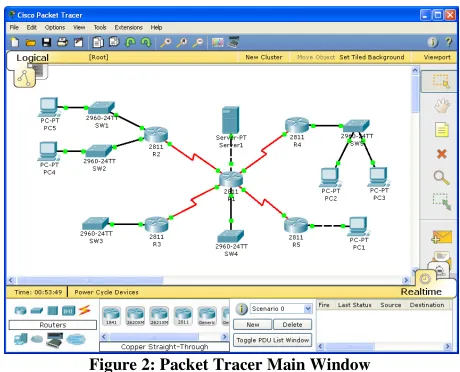
Cisco Packet Tracer is a powerful didactic application that allows students to experiment with networking concepts through a virtual laboratory. It is freely distributed to CCNA [3] (Cisco Certified Networking Associate) and CCNP [6] (Cisco Certified Networking Professional) students as an integral part of the Cisco Networking Academy comprehensive learning experience. Packet Tracer provides simulation, visualization, authoring, assessment, and collaboration capabilities to facilitate the teaching and learning of complex networking technologies by visually simulating virtual networking environments [8][13].
Figure 2: Packet Tracer Main Window
[image:2.612.312.542.437.623.2]off the router before performing the change, just to remind them that they can damage the router if they do not follow a strict procedure. To connect virtual networking devices, Packet Tracer offers a wide variety of connections, such as straight-through and cross-over UTP cables. If students do not use the correct connection, the experiment will not work properly and troubleshooting will be necessary. Network devices (switches or routers) can be configured by students just by double-clicking their icon and entering the commands (in the same way they will enter them in real devices) in the CLI tab of the window that will appear.
At the moment of the writing of this paper, the last version of Packet Tracer (version 5.3) supports RIP, OSPF, EIGRP and BGP (limited to basic EBGP). Not all the EIGRP commands are implemented in this version, but most of the usual ones are. For example, users can verify which interfaces of a router are running EIGRP (show ip eigrp interfaces), or can see the important tables maintained by the protocol such as the neighbor table (show ip eigrp neighbors), the topology table (show ip eigrp topology), and the complete topology table (show ip eigrp topology all-links). Packet Tracer also supports the customization of the K-values (metric weights 0 K1 K2 K3 K4 K5) of the metric, but authentication and most of the EIGRP debugging commands are not implemented for now.
Starting with the release of Packet Tracer 5.0, the Multiuser Capability [15] was introduced which allows students to cross-connect their Packet Tracer applications together and create one big topology. So now it is possible to create a challenging EIGRP scenario where each student is responsible for its own part of the topology, while they are trying to achieve a goal together – a working big EIGRP simulated network. This kind of practice will be almost impossible with real routers for reasons of cost.
Packet Tracer has two operational modes: real-time and simulation mode. The real-time mode simulates a real environment, with the same speed of the simulated networks and protocols, in a similar way of real situations. In simulation mode, Packet Tracer displays the actual data exchange between devices. Each packet, or frame, that carries some data is displayed as a small envelop moving on links between devices. Users can set a filter to limit the study to a particular protocol such as EIGRP and can see all the relevant information of the EIGRP packets (Hello, Acknowledgment, Update, Query, and Reply) based on the different layers of the OSI model, similarly to using a packet analyzer (sniffer) in a real network.
V. DYNAMIPS AND GNS3
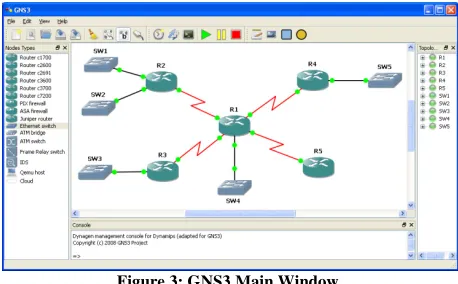
Dynamips1 is a free open-source emulator for Cisco Systems routers than run on traditional PC with Windows, Linux or MacOS X. It can emulate Cisco 1700 series, 2600 series (2610 to 2650XM, 2691), 3600 series (3620, 3640 and 3660), 3700 series (3725, 3745), and 7200. In other words, Dynamips allows students to create virtual routers that run a real Cisco IOS (Internetwork Operating System) by using the PC resources. Since the IOS is a commercial product, students will have to legally get an IOS copy to use Dynamips. GNS32 is a front-end for Dynamips, that is, it is a graphical application (see Figure 3) that allows users to visually create their network topology based on Cisco
1
http://www.ipflow.utc.fr/index.php/Cisco_7200_Simulator
2
http://www.gns3.net
Systems routers just by dragging and clicking as they do in Packet Tracer. Most of the WICs (WAN Interface Cards) and NMs (Network Modules) are emulated by Dynamips, so students can customized their virtual routers as needed.
[image:3.612.313.542.236.378.2]Since Dynamips runs true IOSs, it supports all the EIGRP commands that are implemented in the IOS. That is, it does not have the limitations of Packet Tracer, however users are restricted to smaller topologies due to the resources needed by each virtual router. In general, to run a network scenario with ten Cisco 3745 routers, a PC with an up-to-date processor and at least 4 GB of RAM is recommended. With Dynamips, virtual routers can interact with real routers allowing students to expand their testbed to a bigger topology by adding virtual routers. Similarly to Packet Tracer, it is possible to create a challenging EIGRP scenario based on virtual routers that run on different PCs, and where each student is responsible for its own part of the topology.
Figure 3: GNS3 Main Window
Another important feature for the training of students that offers Dynamips is the capture of network traffic. To do so, from GNS3, students just have to right click the link where they want to capture and choose the Capture item in the context menu. Immediately, Wireshark [1] (a popular free packet analyzer) will appear and students will get a copy of all the EIGRP packets (Hello, Acknowledgment, Update, Query, and Reply) sent by routers in the link.
VI. OPNETITGURU
Network simulators are widely used by network administrators and researchers to plan, design, secure, analyze, test, debug, improve and fine-tune networks. There are many network simulators around and Andrea Rizzoli3 and Sally Floyd4 are maintaining up-to-date lists of such tools. Some network simulation tools (ns-2, QualNet Developer and OPNET IT Guru) are very popular in the academic world, for their type of license and their abundant documentation [11]. ns-2 [12] (Network Simulator 2) is an open source network simulator that is mainly used in the simulation of TCP variants and ad-hoc networking research. However, ns-2 does not support EIGRP and only offers a limited GUI (called nam) that allows users to start, stop, and step forward and backward the simulation. QualNet Developer and OPNET IT Guru are commercial network simulation tools developed by Scalable Network Technologies5 and OPNET Technologies6, respectively. Both tools support EIGRP and have an excellent GUI. Their
3
http://www.idsia.ch/~andrea/sim/simnet.html
4
http://www.icir.org/models/simulators.html
5
http://www.scalable-networks.com
6
prices can be very high and vary depending on the extra modules required for the simulation. With the QUP (QualNet University Program), researchers and professors can acquire 1-seat research licenses and multi-seat teaching licenses of QualNet Developer at substantially reduced prices. There is a limited edition of OPNET IT Guru (called OPNET IT Guru Academic Edition) that can be downloaded free of charge by students and professors at OPNET Technologies6 website. Due to the free OPNET IT Guru Academic Edition, we will limit our study to this network simulation tool.
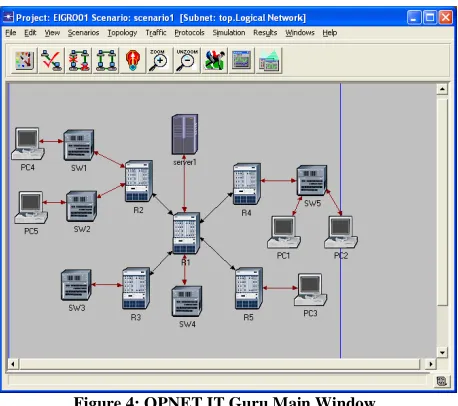
[image:4.612.72.301.375.578.2]Similarly to Packet Tracer and Dynamips/GNS3, OPNET IT Guru users can easily build their network topologies in a visual way by dragging, placing, connecting, and clustering virtual network devices (see Figure 4). Almost all network setting and EIGRP commands are supported by OPNET IT Guru. That is, once the simulated network has been visually drawn, users can specify the IP address and subnet mask of each interface of routers. OPNET IT Guru also offers a method to auto-assign IP addresses and subnet masks. Then, users can create different EIGRP processes to manage several ASs (Autonomous Systems), and specify the EIGRP interfaces and the passive interfaces. Also, users can enable or disable auto-summarization, change the K-values used in the computation of the metric (K1, K2, K3, K4 and K5), specify the variance, generate a default-route, redistribute other routing protocols (RIP, OSPF, ISIS, Static, Directly Connected, etc) into EIGRP, establish input or output filters for route filtering, etc. OPNET IT Guru Academic Edition do not use the CLI to configure routers, instead users do it through menus and dialog boxes. Once the setting is finished, the simulation can be run and results (routing table, EIGRP topology table, etc) are collected.
Figure 4: OPNET IT Guru Main Window
To verify connectivity or to draw the path followed by packets between two devices, users can simulate ping commands or visualize the path used by packets in an easy-way. OPNET IT Guru Academic Edition is seldom used by CCNA or CCNP students, since the configuration is not done through the CLI. Moreover, users can not interact with the simulator during simulation time, so they must define all the simulated evens before running the simulation and study the effect of the events with the collected results at the end of the simulation. However, with OPNET IT Guru, users can make a deep study of the performance of the network under a specified load, which is not possible with Packet Tracer and Dynamips/GNS3.
VII. EASY-EIGRP
Easy-EIGRP [7] is an implementation of the EIGRP protocol developed in Java. It can be installed in a PC with several NICs (Network Interface Cards) to transform it in an EIGRP router. Even if it is a true, but limited implementation of the EIGRP protocol, its main goal is to be used as a didactic application in introductory and advanced network courses to support the teaching and learning of EIGRP.
Unlike the previous studied tools (Packet Tracer, Dynamips/GNS3, and OPNET IT Guru), this application is totally focused on the teaching and learning of EIGRP through very intuitive and interactive GUIs, and gives students all the necessary feedback to know what actually happens at any given time, which results in a more effective and natural way to get or transmit the skills.
To ease the teaching and learning process, Easy-EIGRP provides a set of five modules briefly described below.
A. EIGRP Settings
[image:4.612.312.543.438.611.2]This module offers users an interface for setting and configuring the network attributes of the PC as well as the environment variables of EIGRP. Figure 5 shows how the module is divided in three main sections: one that lists all the NICs detected in the PC, another section for setting network interfaces attributes (like IP address, subnet mask, bandwidth, delay, etc) and a third one for configuring router variables such as ASN (Autonomous System Number), Maximum Retransmission Allowed, K-values (K1, K2, K3, K4 and K5), etc. This module offers images, icons and warning messages that guide users in the settings, preventing them from typing incorrect values. It is a much easier and attractive way to specify the setting than the traditional CLI where users will have to memorize a large amount of commands to configure devices, and therefore, it is more adequate for novice students.
Figure 5: Easy-EIGRP’s Settings Module
B. DUAL Finite State Machine
Tracer, Dynamips/GNS3 and OPNET IT Guru)
information of the DUAL finite state machine, so Easy-EIGRP is a strong candidate to teach advanced EIGRP concepts. In this module, users can pick the affected prefix and interact with its finite state machine. They can witness animation composed of each state change with its own natural message, allowing understanding the internal process of messages exchange and decisions which were carried out that usually is a fairly abstract task for students.
shows the layout of these sections and how they interact with each other. For example, the log section and the animation of the finite state machine are synchronized,
changing from one state to another the respective message highlighted in the log section to show student
and who answered the query sent.
Figure 6: Easy-EIGRP's DUAL Finite State Machine Module
C. Partial Network Map
This component provides a graphic and live updated view of the network obtained from the knowledge gained f neighbors. This module also has a log
describes events that occur in the network and is particularly well suited for the teaching and learning of the EIGRP metric since it shows details of its computation using the information advertised by neighbors (see Figure
Figure 7: Easy-EIGRP’s Partial Network Map
The simple GUI in this module was designed dramatically improve the learning curve by providing immediate feedback after any change in the network configuration. For example, when Easy-EIGRP discovers a Tracer, Dynamips/GNS3 and OPNET IT Guru) do not offer information of the DUAL finite state machine, so EIGRP is a strong candidate to teach advanced EIGRP can pick the affected prefix achine. They can witness an animation composed of each state change with its own the internal process of messages exchange and decisions which were carried out ract task for students. Figure 6 shows the layout of these sections and how they interact with and the animation of , that is, when changing from one state to another the respective message is students when, how
Finite State Machine Module
his component provides a graphic and live updated view ned from the knowledge gained from . This module also has a log section which d is particularly teaching and learning of the EIGRP metric since it shows details of its computation using the
Figure 7).
EIGRP’s Partial Network Map
e GUI in this module was designed to improve the learning curve by providing in the network or EIGRP discovers a
neighbor, a new router icon will appear in the Partial Network Map with the learnt subnets. When Easy
neighbor, the corresponding router icon will disappear.
D. EIGRP Tables
EIGRP handles four main tables
Neighbor Table, Topology Table and Complete Topology Table) that are fundamental for the functionality to the entire protocol. These tables are available
Easy-EIGRP and they maintain the sa Cisco CLI, to facilitate user migration. H
are displayed with different colors to distinguish each of the entries and allow a more pleasant viewing to users
that for the visualization of these tables remember or enter any command, f
updated automatically in real time with the loss or arrival of new neighbors or any metric change.
E. Logger
The main goal of this module is to collect and summarize all the information processed by Easy
student’s ability to predict the responses of
configuration and to learn much more quickly. This panel like all the previous ones, is automatically updated in real time offering new users valuable information to quickly lea the protocol. Figure 8 displays how t
powerful debugging panel can keeps track of every packet exchange for troubleshooting and learning purposes. Similar to a packet sniffer, users can see all the
EIGRP packets in a more detailed form, which can be expanded and collapsed.
observed in the packet bytes panel that shows the data of de current packet (selected in the messages/packets pane hexdump style. In addition, system debugging messages are also added by the module.
Figure 8: Easy-EIGRP’s Logger Module
The computation of the packet checksum can simple task by network specialists, but
for beginner students. In this module, users can get the step-by-step process to get a packet checksum
clicking on checksum’s field (for both, the IP and EIGRP headers).
neighbor, a new router icon will appear in the Partial Network Map with the learnt subnets. When Easy-EIGRP loses a neighbor, the corresponding router icon will disappear.
es (IP Routing Table, ble and Complete Topology the functionality to the entire protocol. These tables are available in this module of the same format used by the . However, these tables displayed with different colors to distinguish each of the low a more pleasant viewing to users. It is clear that for the visualization of these tables, users do not have to remember or enter any command, furthermore, they are with the loss or arrival of
The main goal of this module is to collect and summarize Easy-EIGRP to develop ability to predict the responses of the actual more quickly. This panel, is automatically updated in real valuable information to quickly learn how this complete and keeps track of every packet exchange for troubleshooting and learning purposes. Similar to a packet sniffer, users can see all the information of the in a more detailed form, presented as a tree . The same behavior is that shows the data of de current packet (selected in the messages/packets panel) in a In addition, system debugging messages are
EIGRP’s Logger Module
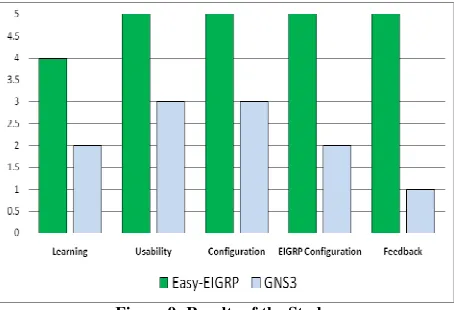
After the implementation phase of Easy-EIGRP, an exploratory study was conducted to measure the level of acceptance of this tool in a group of 50 students with different knowledge in terms of networking concepts, ranging from no knowledge at all to advanced skills. The study was carried out in the School of Computer Science of our University (Universidad Central de Venezuela), and consisted in setting up some simple topologies with GNS3 (using the Cisco CLI) on one side, and with Easy-EIGRP on the other side. After doing the experiments, the students filled a survey to assess certain features of the tools like learning, usability, ease of configuration, application feedback, etc, in a range of 1-5 marks, where 1 mark was the lowest score acceptance and 5 marks the highest.
Figure 9: Results of the Study
After analyzing the survey, we obtained quite positive results (see Figure 9) indicating that Easy-EIGRP is well accepted by students and greatly facilitates the teaching and learning of EIGRP. Additionally, we evaluated each of the five modules of Easy-EIGRP separately, and received a very positive feedback from students (grades ranged between 4 and 5 marks).
VIII. CONCLUSIONS AND FUTURE WORK
Networks are becoming more and more important in today’s life. Then, it is an essential area in the training of computer science students. With the needs and trends of new networking technologies, routing protocols are using complex algorithms and concepts that are not easy to understand at first glance. To facilitate the teaching and learning process of EIGRP (a Cisco Systems routing protocol), visual tools can be used. In this paper, we presented three well-known tools (Packet Tracer, Dynamips/GNS3 and OPNET IT Guru) and a new application (Easy-EIGRP) that can significantly help students to master EIGRP.
All these tools allow users to do labs with several simulated routers in a single PC, that is, without the need of a real and expensive testbed. They have advanced GUIs to ease settings, and animations to facilitate the understanding of ideas. Most of these tools enable a direct look inside of a “wire” that is interconnecting devices and carrying the PDUs of the protocols. So students can visually see and therefore more easily understand what is really going on in the network. Packet Tracer and Dynamips/GNS3 are focused to Cisco’s devices configuration, so CCNA and CCNP students are more likely to use them. With OPNET IT Guru, students
can also learn how EIGRP works by doing simulations. These are no real-time interactions between users and the virtual devices, but OPNET IT Guru allows users to make a deep study of the performance of the network. Easy-EIGRP is an advanced solution for the teaching of EIGRP. It shows a significant quantity of information to students and assists them in the configuration and learning of EIGRP. With Easy-EIGRP, all the information are shown dynamically and the Partial Network Map Module is well-suited for novice students to learn concepts such as the metric, successors, and feasible successors. Unlike the other applications, Easy-EIGRP does have a module for the EIGRP finite state machine, which makes it one of the strongest tools for the teaching and learning of EIGRP.
For future work, we plan to further develop Easy-EIGRP to support IPv6 (Internet Protocol version 6) [2][4], since IPv6 will become the predominant layer-3 protocols in tomorrow’s networks. We also plan to develop a didactic visual version of OSPF and BGP, and study how animations and graphics can also support the learning process of these two complex routing algorithms.
REFERENCES
[1] L. Chappell and G. Combs. Wireshark Network Analysis: The Official Wireshark Certified Network Analyst Study Guide. Laura Chappell University. March, 2010.
[2] J. Davies. Understanding IPv6. Microsoft Press. Second Edition. January, 2008.
[3] R. Deal. Cisco Certified Network Associate Study Guide. McGraw-Hill Osborne. Third Edition. April, 2008.
[4] S. Deering and R. Hinden. Internet Protocol, Version 6 (IPv6) Specification. RFC 2460. December, 1998.
[5] J. Doyle and J. Carrol. Routing TCP/IP. Volume I. Cisco Press, Second Edition. October, 2005.
[6] W. Edwards, T. Jack, T. Lammle, T. Skandier, R. Padjen, A. Pfund, and C. Timm. CCNP: Complete Study Guide. Sybex. May, 2005. [7] J. Expósito, V. Trujillo, and E. Gamess. Easy-EIGRP: A Didactic
Application for Teaching and Learning of the Enhanced Interior Gateway Routing Protocol. The Sixth International Conference on Networking and Services (ICNS 2010). Cancun, Mexico. March, 2010. [8] D. Frezzo, J. Behrens, R. Mislevy, P. West, and K. DiCerbo. Psychometric and Evidentiary Approaches to Simulation Assessment in Packet Tracer Software. The Fifth International Conference on Networking and Services (ICNS 2009). Valencia, Spain. April, 2009. [9] V. Fuller and T. Li. Classless Inter-domain Routing (CIDR): The
Internet Address Assignment and Aggregation Plan. RFC 4632. August, 2006.
[10] O. Galitz. The Essential Guide to User Interface Design: An Introduction to GUI Design Principles and Techniques. Third Edition. Wiley Publishing. June, 2007.
[11] E. Gamess and C. Veracoechea. A Comparative Analysis of Network Simulation Tools. The 2010 International Conference on Modeling, Simulation and Visualization Methods (MSV'10). Part of WORLDCOMP'10. Las Vegas, Neveda, USA. July, 2010.
[12] T. Issariyakul and E. Hossain. Introduction to Network Simulator NS2. Springer. November, 2009.
[13] J. Janitor, F. Jakab, and K. Kniewald. Visual Learning Tools for Teaching/Learning Computer Networks. The Sixth International Conference on Networking and Services (ICNS 2010). Cancun, Mexico. March, 2010.
[14] I. Pepelnjk. EIGRP Network Design Solutions: The Definitive Resource for EIGRP Design, Deployment, and Operation. Cisco Press. January, 2000.