Natural Interaction with Garment
By Niels Kortenbout
S1004689
Supervisors: dr. A. H. Mader & dr. A. M. Schaafstal
Abstract 5 1 Introduction and motivation 6
1.1 Approach 7
1.1.1 Main Research Question 7
1.1.2 Sub Questions 8
2 Related research 9
2.1 Natural Interaction 9
2.1.1 The design of natural interaction 10
2.2 Nonverbal Communication 11
2.2.1 Kinesics 11
2.3 Wearable interaction 11
2.4 State of the art technology 12
2.4.1 Virtual reality 12
2.4.1.1 HTC VIVE 12
2.4.2 MYO gesture control armband 13
2.4.3 LEAP motion 13
2.4.4 Machina Midi controller with garment 14
2.4.5 Theremin 14
2.5 Related products 15
2.5.1 Smart Garments 15
2.5.1.1 HexoSkin 15
2.5.1.2 Mimo baby 15
2.5.1.3 VITALI Smart Bra 15
2.5 Technologies of interest 16
2.5.1 Google project Jacquard 16
2.5.2 Stretchable Microsystems 16
2.5.3 EEONYX 17
2.5.4 HoverFlow: Expanding the Design Space of Around-Device Interaction 17
2.5.5 Skintrack 17
2.5.6 Viband 17
2.5.7 XSens 18
3 Ideation 19
3.1 Ideation requirements 19
3.2 Ideation approach 20
3.3 Mindmaps 20
3.4 Idea framework 24
3.5 Two ideas 25
3.5.1 The system monitors the user’s head movements 25
3.5.2 The user reacts to music on the system 25
3.5.3 Combination of both ideas 25
3.6 Gestures 26
3.6.1 “Yes” as an answer to the system 26
3.6.2 ”No” as an answer to the system 26
3.6.3 Left - “Go back” 27
3.6.4 Right - “Next” 27
3.6.5 Shoulders - “I don't know” or “Ai, thats loud!” 27
3.6.6 Shoulder shake - “volume up” 28
3.7 From ideation to the prototype 28
4 Prototype 29
4.1 Intentions with prototype 29
4.2 Prototype requirements 29
4.2.1 Prototype decisions 31
4.3 Prototype pictures 32
4.4 Sensors 33
4.4.1 Accelerometers 33
4.4.2 Sensor locations 33
4.4.3 Data 33
4.5 Microcomputer 34
4.5.1 Raspberry Pi 34
4.5.2 Programs 34
4.6 Main system 35
4.6.1 Proof of concept 35
4.6.2 Overview of the system 35
4.7 Movement interpretation 36
4.7.1 Yes - gesture 36
4.7.2 No - gesture 36
4.7.3 Left - gesture 37
4.7.4 Right - gesture 37
4.7.5 Shoulders up and down 3 times 38
4.7.6 Shoulders Up 38
4.7.7 Shoulders Down 39
4.8 Algorithms 39
4.9 System 40
4.9.1 First time tutorial 40
4.9.2 System simulation 42
5 User evaluation 43
5.1 Evaluating the prototype 43
5.1.1 Target user 43
5.1.2 Context 43
5.1.3 Evaluation procedure 43
5.1.4 Survey 44
5.2 Evaluation results 45
5.2.1 Important remarks and recommendations by the users 46
6 Conclusion 47
7 Future work 48
7.1 Machine learning 48
7.2 Sensor placement 48
7.3 Potential 48
8 REFERENCES 49
9 Appendix 51
Abstract
Wearable technology is taking a more prominent role in our lifestyle. Technology in garment is not a common thing as of yet. This technology looks promising and has high expectations. The most common computer interaction is one with buttons and sliders, the motivation for this study is to change that. The goal of this study was to find novel
possibilities for meaningful interaction with garment. This was done using exploration, ideation, and prototype evaluation. Several concepts were created and documented. A proof of concept prototype was developed and evaluated by 5 users. The prototype is a hoodie which catches 6 different gestures including shaking and nodding. This allows the user to control a music application, without use of buttons or sliders. The prototype scored an average system usability scale (SUS) score of 75.5. The concept developed in this thesis successfully moves away from the current computer interaction paradigm. Future work includes the addition of machine learning to improve recognition of gestures.
1 Introduction and motivation
Wearable technology is taking a more prominent role in our lifestyle. Technology in garment, however, does not seem to be a common thing as of yet. This technology looks promising and has high expectations. Until now, the technology is within its niche, other than smartwatches, wristbands and smart glasses, ‘smart’ clothing has not yet taken a big leap in popularity. Lighter materials and shrinking technologies allow for new options in making clothing facilitate the ‘sensing’ and ‘recording’ of (natural) interactions as
performed by human beings.
Technology in our clothing can be seen as an environment in between the technology in the user’s outside peripheral and the technology implemented inside of the user’s body. With technology in garment, users can choose whether to wear it whenever they feel like it, and they can get out of the clothing whenever they want. If the technology would be in our body, opting out would be a different issue.
Wearable technology that is accepted by the public at this moment, looks like it is mainly focussed on the wrist. However, the wrist might not be the best place for sensors. There are many more locations on the body and in clothing to put sensors or technology for physical feedback. The smart clothing sector has enough unexplored territory and a lot of room to innovate. The expectation of the garment which facilitates wearable technology is that the interaction required to have a system do what you want it to do is simpler to learn, requires less cognitive load, is more pleasant and increases the technology acceptance. Another advantage of technology laden clothing is that a user can get dressed into it in the morning, without deviating from our normal routine, a change in behaviour is not needed.
The most common interaction paradigm comes from computer interaction. Typically with a mouse and keyboard as input and limited to buttons and sliders. However, the interaction with technology laden garment could be much more physical and intuitive, resulting in capturing a more ‘natural’ interaction with a system. It will be a challenge to develop a prototype which is wearable, is comfortable for long-term wearing. If needed, for this project certain technologies can be simulated and different solutions can approach functions of futuristic technologies.
The overall goal of this research is to identify useful natural interactions with use of technology in garment, that will have logical applications. How this goal will be achieved, is described in the following section.
1.1 Approach
1.1.1 Main Research Question
It is the goal in this research to identify useful natural interaction and capture this with technology in garment. As guidance through the process, the following research question is used;
“What are novel possibilities for meaningful interaction with garment?”
Before we start our search for novel applications with technology laden garment, we must define what natural interaction is. Which brings us to our first sub question;
RQ 1. What is natural interaction with garment?
Then, we define the current functions of the human body movements, to get a clear view on the possibilities of different kinds of gestures and nonverbal communicative movements and kinesics. We will then jump into the current functions of clothing. Can we perhaps add function, or enhance the garment’s function?
RQ 2. What are possible interactions with garment?
As an inspiration for the ideation which follows, a short literature review and related work will be given. This will describe what is measurable in or around clothing by using existing technology. This way, we can deduce how we can technically realize the applications that will be listed in this report. It is important to remind ourselves that in order for something to be applicable for the use in clothing, that technology in garment should be small and unobtrusive to the user who should be able to wear the garment comfortably.
● RQ 3. What technologies are suitable for detecting interactions?
○ RQ 3.1 What are current technologies used in garment or wearables?
We can then deduce a set of active intuitive movements with each their own meaningful application with garment. A technology in garment senses the movement or action by the user to be followed by a meaningful reaction from the system.
● RQ 4. What are meaningful applications for natural interaction with wearables?
Our natural movements already contain a lot of communication, a lot of which we perform without thinking. In this research, we will try to capture nonverbal natural interaction and use it for the communication with a technological system. For example, a seemingly simple distinction between ‘yes’ or ‘no’ can be approached for the purpose of catching the answer to a request the system has at a certain moment of time. There are points in time where the system gives the user a choice, whether the user is aware of it or not. It is our intention to have the user react to that request. Be it an intended answer to that choice, or an
intuitively formed answer, a satisfaction or annoyance. The language to communicate with the system, should be very easy to learn and almost come intuitively.
To sum up, the list of sub questions is presented here.
1.1.2 Sub Questions
● RQ 1. What is natural interaction with garment?
○ RQ 1.1 What are current natural interaction sensing mechanisms?
● RQ 2. What are possible interactions with garment?
● RQ 3. What technologies are suitable for detecting interactions?
○ RQ 3.1 What are current technologies used in garment or wearables?
● RQ 4. What are meaningful applications for natural interaction with wearables?
2 Related research
Our first sub question is ‘What is natural interaction with garment?’. In the following section, we dive into the search for an answer to this question.
2.1 Natural Interaction
We rely on natural interaction in our day to day life. The slightest of body movements already contain a lot of communication. Also with a technological system, we
communicate. Be it with a keyboard and mouse or with a system which senses the user’s presence or needs.
Human expressions that are meaningful for a system can be divided in two main categories, implicit expressions and explicit expressions.
Explicit or voluntary expressions include: touch, deictics, manipulation of physical objects, manipulation of virtual objects and mutual or reciprocal actions on more than one object. Implicit or unconscious expressions include gaze (as a sign of interest, not as a source for visual control), stopping in front of something, getting near something, and affective states, such as calmth and anxiety, talking to a fellow or listening to the artifact. (Valli, 2008)
[image:9.596.58.444.514.742.2]An automatic door for example, senses the user’s proximity, after which it ‘assumes’ that the user wants to walk through the door. Without using his hands, the user then opens the doors by just expressing the need to walk through by walking close to the door. After this, the door’s system knows that the user is away from the door, and closes the door. By analyzing these simple interactions with systems, Wendy Ju presented an Implicit Interaction framework to make it easier to map out interaction trajectories. (Ju, 2015) These trajectories can then be used to better understand the interactions we have with systems around us.
Figure 1 - Implicit interaction framework (Ju, 2015)
User experience is another important aspect in the search for applications with garments. I. Pfab explored the question “Which factors influence wearable user experience?” (Pfab, 2016). She found that the dimensions were area of application, human aspects,
wearability, technology and design process. The application areas can be divided in the following areas; Sport/fitness, Wellness, Medical, Lifestyle computing, Business
operations, Security/Safety, Communication and Glamour. Our applications will most certainly also be within these application areas.
2.1.1 The design of natural interaction
(Valli, 2008)
Common people interact with complex systems. Yet, interfaces should be easy to
understand. Content is in most cases very easy to be understood by common people and user interfaces should be designed with the intended user in mind. Valli wrote a paper which is centered on the need of conceiving computer sensing and information
presentation as different aspects of the same interaction design problem, instead of separate research entities.
Valli has written a clear description of Natural interaction;
“Natural interaction is defined in terms of experience: people naturally communicate
through gestures, expressions, movements, and discover the world by looking around and manipulating physical stuff; the key assumption here is that they should be allowed to interact with technology as they are used to interact with the real world in everyday life, as evolution and education taught them to do.” (Valli, 2008)
2.2 Nonverbal Communication
People naturally communicate through spoken language but also gestures and body movements. Designing a system which understands these communicative body movements would be a good starting point for capturing the natural interaction with a system. In order to find out what nonverbal communication is, we dive into existing papers on the matter.
2.2.1 Kinesics
(P Ekman, WV Friesen, 1969)
Nonverbal body movements are to be divided into the following categories.
● Emblems - Body movements or gestures that are directly translatable into a word or phrase
● Illustrators - Accompany or reinforce verbal messages
◦ Batons - Temporally accent or emphasize words or phrases
◦ Ideographs - Trace the paths of mental journeys
◦ Deitic movements - Point to a present object ◦ Kinetographs - Depict a bodily action
◦ Spatial movements - Depict a spacial relationship ◦ Pictographs - Draw a picture of their referent
◦ Rhythmic movements - Depict the rhythm or pacing of an event
● Affect Displays - Show emotion
● Regulators - Control the flow and pace of communication ● Manipulators - Release physical or emotional tension
Kinesic behaviors are an important part of nonverbal communication. Body movements convey information, but interpretations vary by culture. As many movements are carried out at a subconscious or at least a low-awareness level, kinesic movements carry a significant risk of being misinterpreted in an intercultural communication situation.
Therefore, it is important that a system is to be designed for a specific culture, in order to interpret certain communication correctly.
2.3 Wearable interaction
Schneegass has explored how smart garments can enrich mobile interaction
(Schneegass, 2016). He has investigated the following interaction centered subjects; How to structure a design space for wearable interaction, how to realize input methods using garment based sensors and how to realize output methods using smart garments. He also researched the following technology centered subjects; How to integrate sensors and actuators in mobile platforms and how to represent sensor data for developers and end-users. His work is a good inspiration for the ideation in this research.
Schneegass has identified two core levels at which sensor data can be accessed. First, there is the data level, where raw data is interpreted by a system, but users do not have to understand this data at all. Therefore a second layer is proposed, the information layer. This is where actual information is provided to the end-user and also supports the
application developer. This is important to remind when interpreting data as a developer. What data to interpret and why is is it meaningful to both, application and end-user.
2.4 State of the art technology
In this section a selection of products and current technologies will be given. For each of these references to existing work, a description will be given why this specific reference is of interest to our current search.
In order to learn about current developments on interaction capturing technologies, we shall observe a few state of the art technologies in this chapter. First off, we will take a look at a few methods or technologies that are moving away from the current interaction
paradigm (keyboard, mouse, buttons and sliders).
2.4.1 Virtual reality
An important growing technology is virtual reality, this is one way of interaction that moves away from the interaction paradigm. Virtual reality is a way of interacting with a system and it moves away from the buttons and sliders paradigm. Virtual reality takes the three
dimensions of the physical body into account. Virtual reality has the user’s body immersed in a digital world, with a digital character moving and acting accordingly to the body
movements in the real world. The interaction the user has when experiencing an
immersion in a digital 3 dimensional character, is very intuitive. The methods of capturing the user's movements differ from product to product.
Most current products in this field of computing, typically consist of the following:
Sight - A set of glasses, through which the user can see into the digital world created by the system the user is communicating with.
Audio - Headphones, for the audio stimuli, created by the system in order to complete the immersive experience.
Hand movements and actuators - Controllers, to follow the hands and interact with the system by the use of buttons.
Other possibilities for an even better immersion are;
- Camera which follows the user’s complete body - Accelerometers in requisites in the real world
2.4.1.1 HTC VIVE
HTC VIVE ™ is a state of the art in virtual reality. It is developed by HTC and Valve. 1 Designed for room-scale Virtual reality, vive allows true-to-life interactions and immersive experiences thanks to graphics presented in the glasses, haptic feedback and 360° motion tracking.
1 https://www.vive.com
HTC Vive is useful in this research to see what is possible with current sensor
technologies. Also, we might learn from the applications that are being developed for controllers as such, since this is a product out of its niche. Developers have long started developing applications for this and we might find some creative applications that might prove useful in our search for meaningful applications.
For a product as such, it is a choice of the user to interact with a system, by picking up physical controllers and putting on glasses. Imagine if all what was needed for this, was to wear the piece of garment which you would wear in any way. The system would then notice the piece of garment and interaction would start immediately.
2.4.2 MYO gesture control armband
2This is an armband placed around the arm and has sensors that monitor the muscles. This armband is able to detect certain hand gestures, arm movements and even finger
movement. This is done by EMG muscle sensors and a highly sensitive motion sensor.
This EMG muscle sensor is an excellent way to track even the smallest of movements in the body. EMG muscle sensors have to be tight on the body in order to detect detailed movements, also it should be on the right location in order to capture the right contraction. A technology as such might therefore not be useful to use in clothing.The hand recording allows for unique gestures to be
captured that are otherwise not seen by a system
other than by use of a camera. The wearable controller in this case, translates our muscle movements to the gestures we are trying to convey to the system. Of course, one can also capture non verbal communication with this technology, which exactly what we are looking for.
2.4.3 LEAP motion
3With a mission to remove the barriers between people and technology, this team came up with a controller that enables it to control your device without touching anything, just (hand) gestures in the air. An external sensor which captures gestural input, so precise that it is able to read sign language. This technology tracks mainly the hands and most motion in between the virtual borders that are monitored in the system.
This is not a wearable technology, this sensor is part of the environment of the user. However, it is
possible to wear the leap motion sensor on the upper body to track the user’s arms. Still, for the user to communicate with the system, he needs to be aware of the boundaries of the sensor’s vision before
performing a gesture or movement of some kind. This takes away a portion of the natural aspect of the
2 https://www.myo.com 3 https://www.leapmotion.com/
user’s interaction with the system. The user can not just at any place perform a gesture. If the movement is performed outside of the peripheral of the system, it would not record the movement and nothing would happen. Yet, from the developments in this field we could learn about the gestures that are used and also the tracking of body movements. It is an approach of a system that records ‘natural’ movements performed by the user who is controlling the system.
2.4.4 Machina Midi controller with garment
4The MIDI controller jacket DK1 is a jacket that allows you to create music through body movements and body sensors. It includes an accelerometer, a gyroscope, two push buttons and one piezoelectric. The user can map the jacket to play different notes, raise his arms to raise the volume and tempo of your music or tap his chest to make sound. With an accompanying application on the apple Ipad or on the phone, users can use this jacket as input for their music creation.
The freedom of movements with each their own logical application, is a good example of the capturing of natural movements that have meaningful applications. For example the pitch that differs according to the user’s arm. Or the tapping of the tempo on the chest. Something we already do anyway when we enjoy the music that we hear.
2.4.5 Theremin
5The Theremin is a unique instrument which is played without being touched. The distance of the hands make the different tones and volume. This is done using proximity sensors. The player has to naturally find the right tones, by adjusting the hand’s proximity to the device (much like a fretless guitar). Playing an instrument like this, looks to be very intuitive. The hand’s proximity to the instrument is what influences the tone and the volume, which feels logical after the first encounter with the instrument, also because the feedback is direct in the form of sound. The user is naturally interacting with the technological instrument in order to have the right sounds come out.
This example of an user- instrument interaction is in our scope of interest because of the direct feedback it gives. The system just starts outputting sounds as soon as a user comes close to it. The user can quickly figure out how it works without a manual. This does not mean that the sounds that come out sound good, that is completely up to the user in charge of the system.
4 https://www.machina.cc
5http://www.theremin.info/-/viewpub/tid/10/pid/45
2.5 Related products
2.5.1 Smart Garments
We will now have a look at a selection of products from the current ‘smart’ garment
market. When we look at smart clothing up until today, it looks like most applications are in the sports sector. Below, one can find representative products from the wearable sector, most products are passively monitoring the user. Although we are looking for active interaction with a system, passive interactive technology might inspire us in the search for an application that relies on active interaction. The ‘information level’ (Schneegass, 2016) of the following products is also what makes these products good candidates to add to the exploration.
2.5.1.1 HexoSkin
Hexoskin6 is a piece of garment used for sporting. It gives insights about your physical training, sleep and personal daily activities. The measured values are heart rate, breathing rate, breathing volume and amount of steps the user takes. This is done by cardiac
sensors, breathing sensors and movement sensors.
Since the sport sector is quite interesting in terms of detailed logging of movements, this product is a nice insight in what is possible with technology in garment. Cardiac sensors could be of use in differentiating between certain movements. The user could be active, his heart would beat a bit faster. But the user could also be relaxed, the user would then have a slower heartbeat.
2.5.1.2 Mimo baby
Mimo baby 7is a onesie for babies, equipped with a small sensor. The sensor is able to track sleep status, breathing, body position, and also allows for the guardian to listen in on the baby. This product is an example which shows that it is possible to monitor without being obtrusive. The sensor can remain small and still be enough for the capturing of interesting data. In this particular product, the technology monitors the baby inside of the clothing, there is no active interaction involved.
2.5.1.3 VITALI Smart Bra
The VITALI Smart Bra tracks a user’s breathing, posture and heart rate variability, all key 8 indicators of the balance between stress and your wellbeing. The biofeedback gives you guidance at the time when an unbalance is first detected, so small actions such as taking a deep breath can effectively take you back on track. Follow the cues to sync your breath with your heart's rhythm, to mindfully train your reaction to be always in-control.
6 Hexoskin http://www.hexoskin.com/ 7 Mimo Baby http://mimobaby.com/ 8 https://vitaliwear.com/
2.5 Technologies of interest
The third sub question “What are current technologies used in garment or wearables?” will be answered in this section. Other than the input technologies that were in other products, below are some state of the art technologies that are used in clothing.
2.5.1 Google project Jacquard
9Project Jacquard makes it possible to weave touch and gesture interactivity into any textile using standard, industrial looms. Everyday objects such as clothes and furniture can be transformed into interactive surfaces.
This could be useful to use in the interactivity with a system by using this integrated mesh in garment. However, by mimicking a touch screen on fabric, it does not move away from our current computer interaction paradigm.
2.5.2 Stretchable Microsystems
It is important that the technology in clothing is stretchable. Stretchable Microsystems 10 developed by the Center for Microsystems Technology from the University of Gent, is an example which is perfect for the integration into textiles. Sensor have wires which are very vulnerable and are agitated continuously inside garment. Using wiring which can
outstand the wear and tear of clothing are important in an end product in this sector.
9https://atap.google.com/jacquard/
10 http://www.cmst.be/groups/stretchablemicrosystems.html
2.5.3 EEONYX
11Eeonyx, a company focussed on wearable sensors and technology. They make electroactive triggers like;
● Piezoresistive sensors for measuring and mapping pressure, bend and stretch ● EMI absorbers for protecting electronics and lowering radar cross section ● Capacitive fabrics for touchscreen compatible apparel
● Resistive fabrics for radiant heating ● Conductive textiles for filters
● Anti-static fibers for needle punch carpets
In order to find out what is possible with current technology, it is companies like this that are state of the art considering technology developed for use in garment. This is a great inspiration source for this research and the ideation that will follow.
2.5.4 HoverFlow: Expanding the Design Space of Around-Device
Interaction
(Kratz. S. , 2009)
In this paper, a way of interaction with a small device is presented. Input is captured via coarse gestures detected by an array of proximity sensors extending in radial direction from the device. This technology is of interest to us, because it captures a natural interaction, namely to swipe above the device which results in a swipe through the on-device catalog, much like a swipe in a real life catalog.
2.5.5 Skintrack
(Zhang et al. , 2016)
Called SkinTrack and developed by the
Human-Computer Interaction Institute’s Future Interfaces Group, the new system allows for continuous touch tracking on the hands and arms. It also can detect touches at discrete locations on the skin, enabling functionality similar to buttons or slider controls. This system uses a signal emitting ring to be
captured by the wearable device equipped with phase-differential sensors.
2.5.6 Viband
(Laput, Xiao, & Harrison, 2016)
By boosting a simple accelerometer from 100 hz to 4000 hz, a whole range of movements can be distinguished and used for applications. To capture any kind of specific movement, is a task of distinguishing between detailed movement graphs and recognizing similar graphs. The boost in accelerometer frequency allow a system to record movements with significantly more detail and precision.
11http://eeonyx.com/
2.5.7 XSens
12Xsens is a company that originated at the University of Twente, they are innovators in 3D motion tracking technology and products. They combine sensors in garment to enable seamless interaction between physical and digital world. These technologies are mostly used for capturing movements for 3d animation. The way they add accelerometers and microcomputers to garment, is almost invisible. Able to withstand extreme movement and record flawlessly is an absolute achievement.
12https://www.xsens.com/
3 Ideation
3.1 Ideation requirements
Before we can start on the divergence of all possible meaningful applications with natural interaction, we must identify the requirements. The system should not be merely passively monitoring a user. For example tracking the amount of steps a user takes, is not part of this search for meaningful natural interaction. In that case, a step would be the user’s input into the system, after which the system adds +1 to the total step count. In our case, the input to the system should be one that is intended for the system, or active interaction.
The system must be sure that the user’s interaction which it is sensing, is intended for the system and not the user’s environment. Therefore, the system should make itself known with the user. Also, the user should be aware of the system and the system should not be out of sight for the user. When the user’s interaction is needed, the system must make that known to the user.
Therefore, we can say that the user needs knowledge about the system and how to
interact with it. The user needs a small dictionary to communicate in the language that the system understands. The dictionary should be very easy to learn, as we will try to find interactions that are very close to the natural communication between human beings, like the kinesics that were described earlier. The language with the system should need low cognitive function and come seemingly natural to the user.
How can the system be sure that the interaction it senses from the user, is intended for the user? How can the user be sure, that the interaction it sends to the system, is catched by the system?
3.2 Ideation approach
The ideation phase will be presented in the following way;
First, we will go over all the different mind maps, where the researcher has tried to identify as many as possible different ideas. These mind maps will cover the following aspects: Input, value and meaning of input, meaningful contexts, interactions in their context. After this framework of mindmaps, we will try to find a framework to logically order a hand full of ideas. Then, from this list of ideas, a selection of ideas will be made.
[image:20.596.57.570.261.627.2]3.3 Mindmaps
Figure 2 - Mind map on ‘What could these functions and locations mean to a system?’
In order to create an overview of possibilities, we can think about different aspects of the body and clothing. The function of these aspects and the role they play. What can we learn from their functions, what could be of interest in an interaction? Where would an
application find value? The mind map above shows all the different input locations and body functions, followed by their possible meaning to a system, corresponding meaning on the informational level.
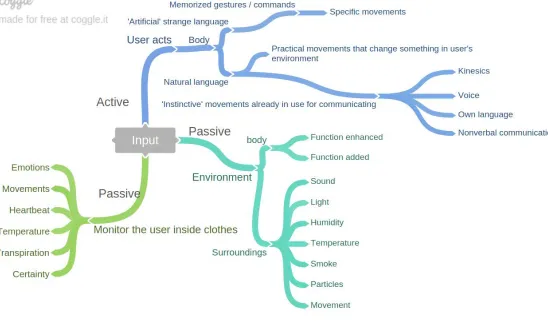
Figure 3 - Mind map on different types of input.
The figure above shows different types of input. It is safe to say on this point though, that we will head for the user who acts with his body, which is the ‘active’ interaction. Rather than the user’s environment as input, which is merely passively monitoring the user’s environment. Passive interaction will not be our main focus. Yet, we can still use some passive interaction to be more certain about our active interaction. We can add certainty to the information gathered by the system. We can also be inspired by the different kinds of passive input, to recreate intended interaction. For example; while the system is
measuring emotion, the user can deliberately act in such a way that he mimics that emotion, triggering the system to do something.
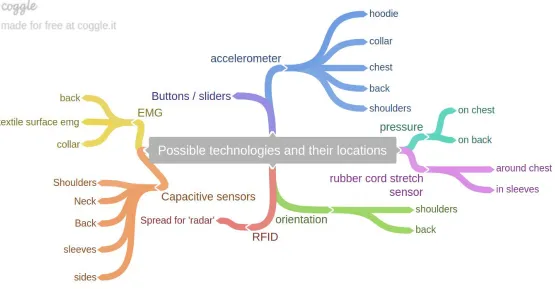
Figure 4 - Mind map on possible technologies and their locations to add meaning to the informational level.
This mind map shows the different locations where a certain piece of technology can be placed in order to capture something possibly meaningful. Most technologies can be placed on more locations, however, in this mind map the goal was to find locations where they could transfer meaning on the informational level to an application.
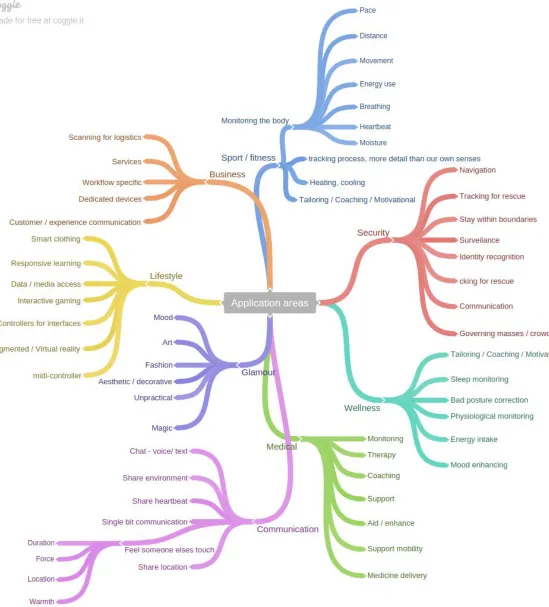
Figure 5 - Mind map on all the different application areas
The application areas mapped out, to get an overview of all areas in which interaction with garment could mean something valuable. A lot of application areas were discussed by I. Pfab (Pfab 2016). This mind map has some additions that came to mind and might be interesting to help us find an application area to develop our application for.
3.4 Idea framework
The divergence of possible input locations, input sensors, application areas and bodily function lead us towards a final idea. First we go over a couple of ideas. Below, a framework is presented which covers a selection of ideas. First, a context is given, then the user’s interaction that follows before the system has an application for that specific interaction. Note that the user is a human being interacting with the technological system.
Context Interaction Application
User starts music on his headset, music is too loud.
User reacts to loud music with fright, his shoulders go up.
System lowers volume because of shoulder movements at the time of music playing.
User is relieved that the volume went down and is content with the current volume
User lowers his shoulders back to normal position
System stops the lowering of sound
User listening to music on headset
User can't help but move his head to the music
System gives the current track a +1 in the music application User is busy and gets a call The user shakes his head,
meaning “No, I do not want to take that call.”
System mutes phone call
The user is cold in his living room
User lowers his sleeves System turns up the heating
The user is warm in his living room
User rolls up his sleeves System turns off the heating
User has lost his way around town
User is looking around somewhat desperately
System asks to be of
assistance in navigating to the destination
The user wants to skip current song playing on headset
User moves his head to the right twice
System skips current song
3.5 Two ideas
After the divergence of ideas, we converge into a subset of ideas. Below, two ideas that came out of the ideation phase are presented.
3.5.1 The system monitors the user’s head movements
It would be very interesting to have a system that can recognize whether the user wants something or not. The user answers a question by either head shaking “No” or nodding “Yes”. For example, when the user’s phone goes off and the user is busy at that moment, the user can shake for “no, I do not want to take that call” and the system can then mute the call. This is convenient and is a natural interaction, we already naturally shake our head when we say ‘no’. If we can monitor the user’s head in any way, we might be able to ‘capture’ more active interactions too.
3.5.2 The user reacts to music on the system
In a context where the user starts music on his headset and the music is played by the system, but it is too loud. The user’s shoulders move up in fright and the system monitors the user’s shoulders. The system then lowers the volume until the user’s shoulders are back down. User keeps shoulders up until the volume is right. In order to move up the volume, another gesture could be made with the shoulders, for example moving them up twice sets the volume higher with +1, stopping with raising the volume at a safe level.
3.5.3 Combination of both ideas
If we combine the two ideas, we could end up with a system with 6 gestures and in order to showcase them, we can have the user control the music. For the user to control the music, he does not need anything else than the technology which recognizes yes, no, volume up and down, left and right. This way, the user would be in full control of the system, without the use of buttons and sliders.
3.6 Gestures
In order to capture movements that have possible meaning on an informational level, we differentiate between movement recordings by declaring gestures and later compare the user’s movements to one of these gestures. For each gesture, possible technologies that can be used to capture the movement will also be given.
3.6.1 “Yes” as an answer to the system
[image:26.596.358.546.444.595.2]To capture this, we could monitor the neck movements in the collar, or shoulders. Or ultimately, from the top of the head with an accelerometer or gyroscope. The system could ‘ask’ the user a polar question, to which the user can then reply with either nodding yes, or shaking no. In order to differentiate from any other movement, the gesture will only be complete when moving the head up, then down, at least three times.
Figure 6 - ‘Yes’ movement illustrated
3.6.2 ”No” as an answer to the system
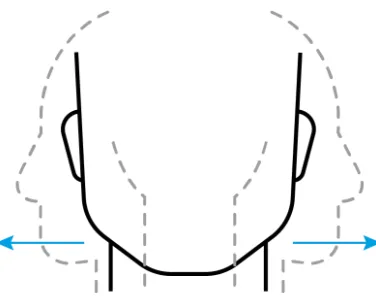
This movement could also be monitored from the top of the head or neck. Same as for the yes gesture, a friction sensor could be used in the collar. But it seems most likely that an accelerometer or gyroscope will be used to find the gesture that matches the movement most, nodding or shaking. The gesture is complete when the user moves his head to the righ, then left, three times, this is in order to differentiate from any other movement that is similar to shaking no.
Figure 7 - ‘No’ movement illustrated
3.6.3 Left - “Go back”
This gesture could be to control the music playing system, to go the last track playing, or to go back in the browser on the screen. It is important to capture
deliberate movement of the user and not just any head movement to the left. The user has to make a relatively excessive and quick movement to the left. The same as for the yes and no gestures, an accelerometer on the head would be best to capture this gesture.
Figure 8 - Left - movement illustrated
3.6.4 Right - “Next”
[image:27.596.359.526.302.453.2]When the user quickly moves his head to the right, this could indicate that the user wants to go to the next thing, a next song or a next item on the system.
Figure 9 - Right - movement illustrated
3.6.5 Shoulders - “I don't know” or “Ai, thats loud!”
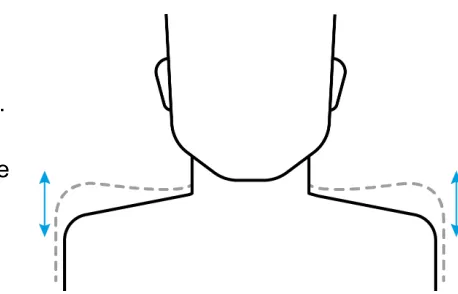
As an intuitive reaction to loud sound, a user might feel the tendency to be frightened by it, and might raise his shoulders. We could capture this with movement sensors on the shoulders. This gesture can then be used to lower the volume. The user keeps his
[image:27.596.58.277.557.707.2]shoulders up, until the volume is lowered to the right level. In order to rise the volume, we can have another gesture, like moving the shoulders up and down three times in a row.
Figure 10 - Shoulders up - movement
3.6.6 Shoulder shake - “volume up”
[image:28.596.319.548.78.225.2]When the user shakes his shoulders three times, this could trigger the system to higher the volume. This gesture would be added in order to make a complete controller, so that no keyboard or mouse is necessary in general music control.
Figure 10.1 - Shoulder shake movement
3.7 From ideation to the prototype
First, by programming and combining technology with the goal to make the distinction between ‘yes’ and ‘no’ - movements is one to start from. A prototype can be built that distinguishes these gestures from one another. Then later on, more gestures can be added, such as the shoulder movements.
To ‘capture’ movements, a couple of sensor technologies come to mind after our exploration phase;
- Surface EMG
- Accelerometer / Gyroscope
- Proximity sensors
- Stretchable resistance wire
Surface EMG is difficult to implement in clothing because these sensors need to be tight to the skin. Proximity sensors need ‘aim’ and measure proximity of an object, in our example gestures, we could measure distance between shoulder and head. To use proximity sensor to capture the head gestures though is difficult since we need to have at least 4 proximity sensors that ‘know’ where the head is. North, east, south and west of the collar.
A better solution to the problem of capturing these movements, is to have an
accelerometer inside of a hood and additionally, accelerometers on the shoulders. If we have an accelerometer inside the hood, we can monitor whether the hood is on the head. The requirement that we set in the ideation phase, that we have to be sure that the user is trying to interact with the system, is then met. Whenever the user wears the hood of this particular technology laden sweatshirt, the user is interacting with the system. Only then gestures are being recorded by the system. Of course, the wearer of the sweatshirt should still be able to use the hood without necessity to interact with the system, this should be taken into account when designing the final product.
Other solutions can be to have a sensor on the user’s head; Inside a cap, a hat or inside headphones. For this project though, where our focus is on technology laden clothing, we will most likely choose for technology inside clothing other than accesories.
4 Prototype
4.1 Intentions with prototype
By building a prototype, the final idea which came out of the ideation can be tested by real life users. We can then find out whether the product really is as intuitive and natural as it was intended to be. Of course, the prototype will not be a fully functional device. It is rather a first iteration of the technology, in order to test whether there is potential in this
technology. A proof of concept.
4.2 Prototype requirements
Since there is limited time to build a prototype, we must set some requirements and prioritize these. This is done using the MoSCoW method (Clegg & Barker 1994). Where we break down the requirements in the following four categories. Must have, should have, could have and would have. Each requirement will have a small explanation why they are there.
Must have
1. The prototype must be able to capture and analyze the user’s head movements
In order to be able to capture and analyze the user’s head movements that were described in the gestures-section, we must have system which is able to do both record and analyze. Without the movement recognition, there is nothing to test. (apart from wizard-of-oz prototyping (Hanington, 2012))
2. The prototype must be able to capture and analyze shoulder movements
For the same reasons as our first requirement, the shoulder parts of the clothing must be able to capture and analyze shoulder movements. This is also added in order to make a complete controller for music. Shoulder movements for volume should be present.
3. The prototype must show the interaction with a system, back and forth
The prototype must give some kind of feedback that it received and analyzed the gesture correctly. Would it not do this, the user can not know whether a gesture was performed correctly or whether the interaction with the system is a two way interaction.
4. The prototype must be wearable and portable
Because we are dealing with a piece of garment, it is very important to at least try and make the prototype as wearable as possible.
Should have
1. The clothing should be unobstructed by wiring or technology placement
The user should not be overwhelmed by the wiring or complexity of the piece of garment. This only distracts the user from the main purpose of the prototype.
2. Wireless connection between system and controller
For the same reason that the wiring has to be unobstructive, the system should be wirelessly connected to a network. This is something which only needs very little extra effort in modern times.
3. An intended user experience
The user should experience a complete experience, since that is what will be evaluated near the end of this research.
4. A nicely stylized interface
To give a complete picture of a possible system, the layout and style of the on-screen feedback system should look professional.
5. Detachable technology in order for the garment to be washed
The clothing should be able to be washed. The technology should therefore be detachable, yet remain stationary in the same place in order to correctly catch the right gestures. This can be done using velcro.
Could have
1. More than one method to recognize a gesture in movement data
Movements are never exactly the same. Distinguishing between set gestures can be done in different ways. To add certainty to the algorithms which determine the gesture, we could have more than one algorithm for one gesture.
2. Vibration in the controller (the piece of garment) to acknowledge the start and end of recording a movement
As an additional layer of feedback (other than the feedback on the screen of the user) we could use vibration when a movement is being recorded and when it stops the recording
3. Feedback through speech
As another additional layer of feedback (other than the feedback on the screen of the user) we could have the system’s audible speech through a speaker. System: “Playing music” or “Rising volume”.
Would have, but Won’t for now
1. A machine learning approach to recognizing gestures.
Training a machine to recognize movements could be very valuable in a project like this. This is because a movement is never the same, but yet very much alike. We won’t go into machine learning because of the short time span available for this project.
2. Dynamic gesture recognition, more than just two gestures
When we would use machine learning there can be infinite possibilites with the recognition of gestures. As long as it is a unique movement, we can have an a reaction from the system.
3. Dynamic sensor placement, more than one set place on the garment
With machine learning, we would be able to place more than two motion sensors over the body, each their own gestures or movements to recognize.
4.2.1 Prototype decisions
The prototype that will be built for this research will be a hooded sweatshirt with zipper which has accelerometers implemented in the hood and on one of the shoulders. A hooded sweatshirt will be used so that there is a hood to implement the sensors for the head movements in. A second advantage is that the user can quite easily get the sweatshirt on and off because of the zipper.
As we wanted our prototype to have wireless connection with the main system, we will use a Raspberry Pi Zero W. In the coming section, each component will be explained in more detail.
Hoodie which will be used for the prototype
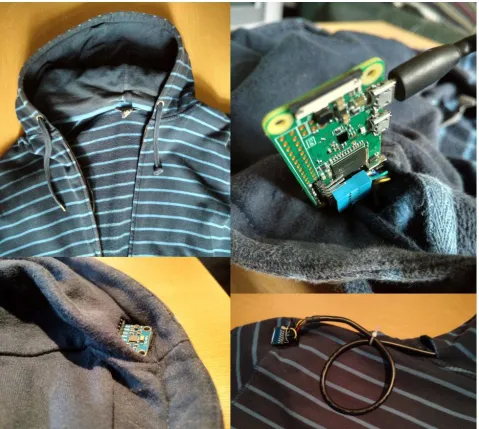
4.3 Prototype pictures
Figure 11 - Pictures of the prototype - Upper left: The overview of the prototype sweater, with the two sensors and the Raspberry Pi hidden inside. There is a 5volt power supply hidden in the pocket for easy access. This is also where the user can turn on or off the system.
Upper right: The Raspberry Pi. Normally hidden inside the hood as seen in the picture above. Here, exposed for the picture.
Lower left: Sensor in the hood, exposed for picturing purpose. Hidden in the hood and secured in position using velcro.
Lower right: Second sensor on the shoulder. Most of the wiring is hidden through the hood, part of it exposed because we mount the sensor on the outside of the shoulder, not the inside. This is done so that the sensor would not annoy the wearer.
Each part will be explained in more detail in the following sections.
4.4 Sensors
4.4.1 Accelerometers
In order to capture gestures we will use sensors which have an accelerometer and a gyroscope inside. The MPU6050 has both on 13 board and can be hooked up to a raspberry Pi over the i2c-protocol . If 14 we want to hook up several sensors to the i2c protocol, we must add them in parallel, since the i2c protocol is a bus. The second sensor would have its address changed with a HIGH signal to the AD0 pin.
4.4.2 Sensor locations
We will place one sensor in the hood, using velcro so that it always is secure in the same orientation inside the hood. Velcro will be used instead of sewing the sensors into the garment so that the technology can be removed from the garment in order to be able to wash the hoodie.
The hood is the designated location for the sensor, because we can monitor the user’s head movements. Also, it is possible for the user to choose not to interact with the system. This can be done by taking off the hood. On a piece of clothing, there is no other location to capture a user’s head movements using an accelerometer.
Another sensor will be located on the shoulder of the sweatshirt. This is also secured in position using velcro. This sensor will be used to capture the shoulder gestures that were described earlier.
4.4.3 Data
The data received is DMP-processed yaw/pitch/roll and rotation data from the MPU6050. This data will be acquired
by using the NodeJS module mpu6050-dmp , more on this 15
later. In order to make the raw data visually interpretable we can plot the the raw sensor data as a real-time time series graph. For viewing purposes, each of the axes will have their own color in the plots.
13https://www.invensense.com/products/motion-tracking/6-axis/mpu-6050/ 14http://i2c.info/
15https://github.com/mattcarpenter/mpu6050-dmp
4.5 Microcomputer
4.5.1 Raspberry Pi
If we want to read sensor data, we need a microcomputer. One that is small enough to be mounted on or inside clothing. The Raspberry Pi Zero W has wifi integrated on the board, and the sensors can easily be 16
connected to the GPIO pins (two pins dedicated for the i2c
communication). With the wireless internet we can set up the raspberry pi as an access point, or we can connect it to the same access point as the user is connected to.
With a set up like this, we can host a website on the raspberry pi, which transfers the sensor data to any system we want. Be that a mobile phone, laptop or any other device that is able to retrieve a web page and interpret the javascript on it.
Then the sensor data needs to be interpreted and see when a movement is started, so that we can create a method to recognize movements and couple them with the
corresponding gesture. Whenever the sensor is moved and acceleration reaches above an average high, we can start recording movement. Then the recorded movement or gesture, can be analyzed. This will be done taking into account the gestures that were discussed in the gesture section.
Each gesture has some characteristics that we can program in and recognize using simple algorithms. By analyzing the sensor data in a plotted time series, we can distinguish
movements from one another. This way, we can be fairly certain what gesture the user is performing, which is enough for this prototype.
4.5.2 Programs
In order to be able to quickly and directly get results from programming, javascript was chosen to get communication and presentation done. Using javascript we can ‘simulate’ user-system interaction. On the Raspberry Pi, NodeJS will be 17 installed. This is a JavaScript runtime built on Chrome's V8 JavaScript engine. Using this in combination with NPM , a node 18
package manager, we can install modules needed to work with our sensor data. Currently, we use Express to provide a web page over the http protocol. We use Socket.io to set 19 20 up a client-server connection so we can transfer all the sensor data.
16https://www.raspberrypi.org/products/pi-zero-w/ 17https://nodejs.org/en/
18https://www.npmjs.com/ 19https://expressjs.com/ 20https://socket.io/
4.6 Main system
4.6.1 Proof of concept
A framework which listens to gestures at command will be created for this prototype. This will be a proof of concept where a system will be simulated. The interactions that were described earlier are realized here. The system provides a mock up simulation of a system and records the user’s movements. It must be able to make the calculations needed to differentiate between gestures.
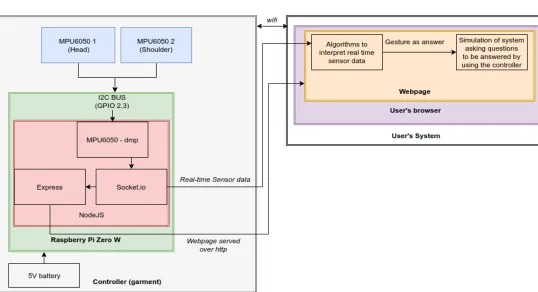
The system is written in NodeJS and uses the express module to serve a website over the HTTP protocol. Through socket.io we then serve the sensor data to the website. The website contains javascript which is executed in the user’s browser, which can be displayed on any device.
Currently, the prototype works as follows;
We first check the current movements, with a time window of 1 second. If within that one second the average amount of acceleration is above a threshold, we continue to record and include the window as a backtrace. We stop recording if this average amount of acceleration is below that threshold. We end up with a neat time series visualisation that represents the last movement. We can then check what gesture that particular movement represented, if it represented one at all.
Below, one can observe the overview of the system. After this, the sensor data for each movement will be given and analyzed.
[image:35.596.30.568.445.737.2]4.6.2 Overview of the system
Figure 12 - System architecture, on the left side the microcomputer inside the garment, on the right side the system’s output to the user.
4.7 Movement interpretation
The following gestures were found and characterized. This sensor data is acquired by use of the gyroscope and accelerometer. We plotted the acceleration which is computed by the MPU6050 and the following plots were acquired for each gesture;
In the following sensor plots, red, green and blue represent yaw, pitch and roll of the accelerometer respectively. Basically, that means that upwards movement results in a green peak, sideways movement results in a blue peak and turning your head results in red peaks. No acceleration means that they will remain around zero.
[image:36.596.59.543.288.411.2]4.7.1 Yes - gesture
Figure 13 - Plot acquired by nodding ‘yes’. The total length is 2 seconds. We can see peaks in the green (pitch) axis.
Above plot is acquired by nodding yes. A ‘yes’ gesture is characterized by peaks and troughs in the pitch data, with the yaw and roll axes remaining close to zero. Typically, a nodding movement is done three times in a row. For this system to capture the gesture, the user must perform the movement of nodding three times. This will be made clear when the gestures are explained to the user in the tutorial.
4.7.2 No - gesture
Figure 14 - Plot acquired by shaking ‘no’. The total length is 2 seconds. We can see peaks and troughs in the blue (roll) axis.
[image:36.596.62.544.596.721.2]This plot is acquired by a user shaking his head. A ‘no’ - gesture is characterized by peaks and troughs in the roll data. The acceleration in the yaw and pitch axes remain very close to zero, this means that it is possible to write algorithms that detect the peaks. Same as for the yes movement, a no -movement consists of a three time shake.
[image:37.596.59.543.174.297.2]4.7.3 Left - gesture
Figure 15 - Plot acquired by a user moving his head to the left quickly. The total length is 2 seconds, but the movement is less than one second. We can see a negative peak in the blue (roll) axis, followed by a small peak in positive direction.
Here, we had a test subject move his head to the left rather quickly. Typically, a sudden movement to the left is characterized by a single negative peak, which is higher than the opposite peak. The gesture should be as outstanding as possible, in order not to catch too many false positives.
4.7.4 Right - gesture
Figure 16 - Plot acquired by moving head to the right quickly. The total length is 2 seconds, but the movement is less than one second.
A user performed the sudden right movement with his head and this plot was acquired. As for the sudden left movement, the sudden right movement is characterized by a single high (positive) peak, higher than the negative peak.
[image:37.596.56.546.456.589.2]4.7.5 Shoulders up and down 3 times
Figure 17 - Plot acquired by moving shoulders up and down three times. The total length is 2 seconds, we can see peaks in the roll data, like the ‘no’ gesture.
As for the ‘no’ gesture, this movement is characterized by its peaks in the roll direction. To capture this, we can use the same algorithm we use to capture the ‘no’- gesture.
4.7.6 Shoulders Up
Figure 18 - Plot acquired by moving shoulders up quickly. Peak in the roll data, just like it was with the ‘Right’ Movement.
Since we read the acceleration of the shoulder, we can not be certain whether the shoulder is already in upwards position, or not. By making it a quite sudden and momentary upwards movement, staying up after performing this movement, we can distinguish this movement from other movements. Characterized by a single peak in the roll movement. We can use the algorithm we used for the ‘right’-gesture to capture this gesture.
[image:38.596.59.542.376.498.2]4.7.7 Shoulders Down
Figure 19 - Plot acquired by shoulder moving down. Looks a lot like the ‘left’ gesture.
Now the shoulder was moved back down, to its default position. Characterized by a single negative peak in the roll movement. We can use the algorithm we used for the
‘left’-gesture to capture this gesture.
4.8 Algorithms
The analyzing script which is executed in the user’s browser works as follows; A movement is recorded when the average amount of movement inside a window [-10,+10] is above a certain threshold. And stopped when the average movement inside this window is below that threshold. This way, the recording contains the beginning of a movement, since it contains a backtrace of the last 10 frames. When a movement is recorded, the recording can be analyzed to see whether or not it contains one of the gestures.
All of the gestures can be analyzed and captured using peak detection. Ordering these peaks in height and then depending on which direction the peaks are, we categorize the peaks and decide with some certainty which gesture the particular movement belongs to.
The code snippets of the algorithms can be found in the appendix.
4.9 System
4.9.1 First time tutorial
First, we will get the user familiar with the different possibilities of the ‘smart garment’. The system will start with a tutorial, where the system asks the user to perform a certain movement and confirms whether the user performed it correctly. Below, the first time tutorial is shown.
Figure 20 - Screenshots of the entire tutorial that the test participants walked trough. The system’s simulation will use the same style in it’s pop ups.
After the first two evaluations, it was found that users prefered a confirmation that they performed the right movement and that the system captured it correctly. The following screen was added after a correct movement was performed. Disappearing after 5 seconds after which it continues with the next part of the tutorial.
Figure 21 - Confirmation screen which was added after remarks of first two test users.
After the first two test users, it was found that there was a learning curve to mastering the gestures. The tutorial would be repeated several times on request of the participant and the participants got better at performing the gestures successfully at command. It is possible to create a system for this that checks how fast a user correctly performs the intended gesture and if this is within a certain time span, only then the user would move on to the next gesture, finalizing the tutorial only when the user has mastered each gesture.
[image:41.596.67.285.340.482.2]4.9.2 System simulation
[image:42.596.32.588.227.580.2]For this prototype, we will simulate the interaction with a system. Eventually, we will present a series of polar questions to the user, which the user can then answer using the controller (technology laden hoodie). The user is able to control the music’s volume with the shoulders and also navigate through tracks using his or her head (left and right gestures), even when the system does not ask a question. Below, one can observe the state diagram that will partly be used as the sequence that the system will walk through when the test participants evaluate the prototype.
Figure 22 - System’s interaction sequences showing all possible interactions the test participants can run into.
These questions will be asked without disturbing the users from their work. The questions will appear in a small popup on the screen the user is currently working on. The popup will disappear after 10 seconds, no matter the answer from the user. There will be no buttons, the user can only answer using the garment controller. Like stated in the could have section of our requirements, another possibility is to have the questions as audible speech through the speakers. However, this was not used in the final prototype.
5 User evaluation
In order to learn whether the product design provides the user experience intended, the prototype was evaluated by test users. Three to five test users are sufficient to identify the main issues and value the product design and user experience (Virzi, 1992).
5.1 Evaluating the prototype
5.1.1 Target user
Our target users are people who are familiar with technology, people who would be
interested in novel applications and are aged from 18 - 40. These people are found on the University of Twente at the faculty of electrical engineering, mathematics and computer science.
5.1.2 Context
First, the users were given a context. A small scenario was described by the researcher; “You are working on your computer and listening to music through your headphones, as you are typing on your computer, pop ups come up, you answer them using the hoodie, since you have your hands full of work.”
They were also told that they should imagine that the piece of clothing was one of their own, this was so that the aspect of the unfamiliarity or size of the clothing would not play a role in their judgement.
5.1.3 Evaluation procedure
The participants were helped into the technology laden prototype by the researcher. A laptop in front of them which represented the system was stationed in front of them. First, they were shown the tutorial, where they could get familiar with the gestures. This tutorial was then repeated until they felt like they mastered the gestures enough to proceed. Then, when they felt confident that they mastered the movements enough, the simulation of the system is started by the researcher.
A series of ‘popups’ with polar questions are then shown, to be answered by the user using the hoodie. Starting off with the question “Would you like to hear some music?”. If the participant would answer with ‘no’, this question would repeat itself until they answer with nodding yes and then the music would start. For a more detailed overview of the system, one can review figure 22 where an overview of the interaction with the system is given.
Throughout the simulation, the researcher was observing the participant. If the user is getting stuck in the process, the researcher could get involved and help out the user. Also, the user’s reactions and suggestions were written down by the researcher. Some time was left in between participants, so that there was room to make small improvements. After the successful walkthrough of the simulation, the participants were given a small System usability survey.
5.1.4 Survey
To evaluate the prototype, the System Usability Scale (SUS; Brooke, 1996) was used. This is an instrument that allows us to measure the subjective usability of the prototype. By asking ten questions that the participants scale from 1 through 5, disagree strongly to agree strongly. The participants were asked to imagine that the technology is in a piece of clothing of their own, which they would wear in any way.
SUS Questions:
1. I think that I would like to use this system frequently 2. I found the system unnecessarily complex
3. I thought the system was easy to use
4. I think that I would need the support of a technical person to be able to use this system
5. I found the various functions in this system were well integrated 6. I thought there was too much inconsistency in this system
7. I would imagine that most people would learn to use this system very quickly 8. I found the system very cumbersome to use
9. I felt very confident using the system
10.I needed to learn a lot of things before I could get going with this system
[image:44.596.70.537.520.662.2]The resulting score will be one between 0-100. This is a relative judgement score. We can derive an absolute judgement of the score from the following scale; (Bangor, 2014)
Figure 23 - SUS score absolute judgement from Bangor 2014.