Selenium with Support of both TestNG and Cucumber
Frameworks
Shivkumar Goel
Deputy HOD, Dept. of MCA
VESIT, Chembur, Mumbai
Kshitija Vartak
Dept. of MCA
VESIT, Chembur, Mumbai
ABSTRACT
Today, there are many web applications being developed and testing each of them so that the end-user gets maximum user-friendly experience with utmost efficiency is very important. To test these applications and their functionalities, Manual testing is not always feasible. For testing minute details and lowest level scenarios, manual testing is very time-consuming and tedious. To overcome this, Automation testing is used in which testing process is automated with minimal manual intervention. Also, repetition of tests is possible which is cost-effective. Automation is very useful in Regression testing and testing the common flow of an application which must be tested when enhancements or new features are added to it.
Nowadays, there are many testing frameworks available. We have used Selenium Webdriver. Selenium supports various testing frameworks such as JUnit, NUnit, TestNG, etc. Mostly these frameworks are used in isolation along with Selenium. But we have developed a framework which integrates two testing frameworks (TestNG and Cucumber) into a single framework/project. In this way, leveraging benefits of both the frameworks is possible. Users have flexibility to choose their preferred framework for testing.
General Terms
Selenium, Automation, Testing, Testing frameworks
Keywords
Cucumber, TestNG, parallel testing, POM
1.
INTRODUCTION
Automation Testing has become very crucial these days as there are number of web applications to be tested so that the usage, efficiency and effectiveness of an application can be increased. Each application has many workflows, both at the higher and lower level. Test cases written to test these applications, define each of these workflows, even at the lowest level. Testing such scenarios with Manual Testing is very tedious, time-consuming and increases cost. Manual Testing also requires manual intervention and it is not possible to cover all the scenarios. Hence, Automation is the beneficial way of executing test cases against an application without much manual intervention.
Automation testing involves use of Automation tool which is capable of recording and replaying the cases, comparing results, producing reports, execute cases overnight, repeating cases, etc.Test automation plays a very important role in continuous delivery and testing.[1] Test automation increases Reusability of code, code coverage, decreases cost and human efforts.[2] There are many Testing Frameworks available such as Selenium, UFT, TestComplete, etc. We have opted for Selenium.
Selenium is a testing framework for web applications. Selenium supports different programming languages such as
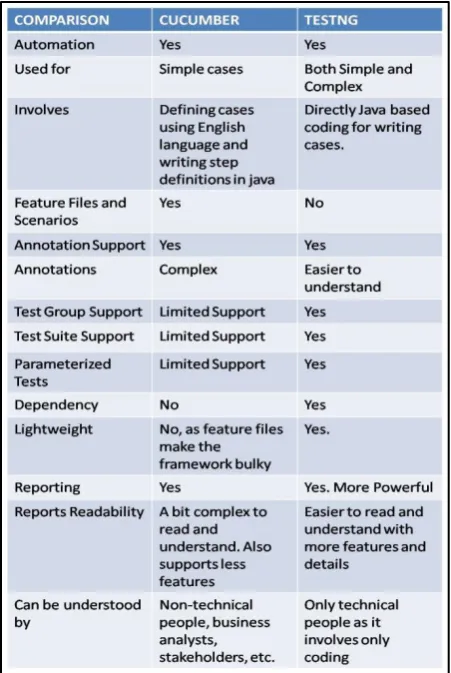
C#, Groovy, Java, Perl, PHP, Python, Ruby and Scala.[3] Once the test cases are written in any of these languages, they can be executed on web browsers like Chrome, Internet Explorer, Firefox, Safari, etc. We have used java as a language for scripting. Along with Selenium, many testing frameworks are available. We have integrated TestNG and Cucumber with Selenium. Mostly, either TestNG or Cucumber are integrated to support automation. But we have designed a framework in which, TestNG and Cucumber have been integrated with Selenium (See Table 1 for their comparison). In this way, the benefits and advantages of both the testing frameworks can be leveraged under a single framework. For Selenium, we have not used Selenium IDE. Instead, we have used Selenium WebDriver and imported required jars into the framework and worked on them.
Section 2 describes what TestNG and Cucumber frameworks along with their comparison (See Table 1) and drawbacks. Section 3 describes the requirements. Section 4 describes how we have integrated both under a single framework along with Selenium. It also gives details about our framework .Section 5 Concludes this paper. Section 6 contains references.
2.
TESTNG AND CUCUMBER TESTNG
FRAMEWORKS
Comparison of TestNG and Cucumber frameworks is given in Table 1.
2.1
TestNG Framework
TestNG isan open source automated testing framework and is inspired from JUnit and NUnit. But it introduces new functionality making it more powerful. It is also easier to use.NG of TestNG means Next Generation. It is used by the developers and gives them the ability to write more flexible and powerful tests as it uses easy annotations, grouping, sequencing & parameterizing [4].TestNG also provides powerful reporting than JUnit. Also, the reports are easily readable and understandable.
TestNG doesn’t involve creation of feature files and writing scenarios into it. This avoids making framework bulky and saves time.
2 Table 1: Comparison of TestNG and Cucumber
2.2
TestNG Framework
TestNG isan open source automated testing framework and is inspired from JUnit and NUnit. But it introduces new functionality making it more powerful. It is also easier to use.NG of TestNG means Next Generation. It is used by the developers and gives them the ability to write more flexible and powerful tests as it uses easy annotations, grouping, sequencing & parameterizing [4].TestNG also provides powerful reporting than JUnit. Also, the reports are easily readable and understandable.
TestNG doesn’t involve creation of feature files and writing scenarios into it. This avoids making framework bulky and saves time.
One important feature of TestNG is multithreaded support i.e. running tests inparallel and support for grouping using which the test cases could be grouped and run according to the groups specified. [5]
2.2.1
TestNG Annotations
TestNG uses annotations to write test cases where each annotation identifies a method wherein some logic is written. The methods execute according to the annotations specified- before or after classes/suites/methods. The main test case is identified by @Test annotation. Other annotations are:@BeforeSuite, @AfterSuite, @BeforeClass, @AfterClass, @BeforeMethod, @AfterMethod, @DataProvider, etc.
We have written the logic of opening a database connection, opening and reading a file, reading test data, opening a browser, reading URLs, etc. in @Before methods. The logic of closing all the connections and files, closing browser,
clearing cookies, cleanup, etc. is written in @After methods.
Writing proper logic in relevant annotations is very crucial as these annotations get picked up while test case is running and helps the test to run successfully.
2.3
Cucumber Framework
Cucumber is one such open source tool, which supports Behavior Driven Development(BDD). Cucumber can be defined as a testing framework, driven by plain English text. It serves as documentation, automated tests, and a development aid – all in one.Cucumber reads the code written in plain English text (Language Gherkin) in the feature file.It finds the exact match of each step in the step definition (a code file). [6]
2.3.1
Feature Files
This gives information about the business functionality and consists of requirements specified in a plain-text format using a series of Scenarios. These files are then reviewed by the teams before starting actual development.
2.3.2
Scenario
These Scenarios are written in a language known as ―Gherkin‖ in Given-When-Then format. Given-When-Then basically describes what the pre-conditions and conditions are and what the expected outcome is.They are easily readable and understandable.
Basically, a scenario represents a functionality of an application which is under test.A feature file can contain many scenarios, which are then developed by writing step definitions.
Example:
Feature: Login Functionality
Scenario: Login Functionality Given user navigates to abc.com When user logs in using Username And password Then login should be successful
2.4
Drawbacks of Cucumber
Cucumber involves writing test cases in the form of Scenarios in Feature files where each Scenario represents a specific feature/functionality. There can be many scenarios in one feature file. Since, the scenarios are written in plain English, translating them into code is one task.
2.5
Drawbacks of TestNG
There are not many drawbacks of TestNG. But TestNG only supports Java based languages. As compared to Cucumber, test cases cannot be written in plain English. TestNG involves only coding the steps (Preferably in Java). In Cucumber, Business Analyst can help in writing test cases which is not possible in TestNG.
3.
REQUIREMENTS
IDE: Eclipse
Java Version: 1.8
Build Tool: Maven
3.1.1
Pom.xml
Since the project is a Maven project, pom.xml file is by default created in which dependencies, suite files, project details, etc. could be added. Once the dependencies are added, jars and packages are automatically downloaded from Maven repository into the project. Hence, corresponding dependencies for Selenium, JUnit and TestNG needs to be added. We have added following dependencies:
<dependencies>
<dependency><groupId> junit</groupId>
<artifactId>junit</artifactId>
<version>4.11</version>
</dependency>
<dependency>
<groupId>org.testng</groupId>
<artifactId>testng</artifactId>
<version>6.8.21 </version>
</dependency>
<dependency>
<groupId>org.seleniumhq.selenium</groupId>
<artifactId>selenium.java</artifactId>
<version>2.53.1</version>
</dependency>
</dependencies>
4.
LEVERAGING TESTNG AND
CUCUMBER UNDER ONE
FRAMEWORK
Even though TestNG and Cucumber have their own limitations, their benefits could be leveraged and provided under a single framework along with Selenium WebDriver. We have developed a framework which leverages benefits of both. We wanted to provide flexibility to the users to use any framework they prefer along with Selenium.
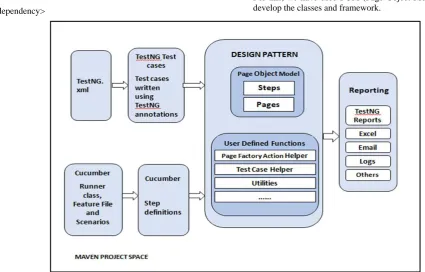
[image:3.595.62.488.384.656.2]The test cases, regardless whether they are written in Cucumber or TestNG, extend common classes which are a part of different packages in the framework (See Figure 1). For this, we have used POM (Page Object Model) pattern to develop the classes and framework.
FIGURE 1: Integrating TestNG and Cucumber under one Framework, which extend common classes.
4.1 POM
Page Object Model is a design pattern to create Object
Repository for web UI elements. Under this model, for each web page in the application, there should be corresponding page class. [7] These POM classes contain the code to find WebElements such as buttons, text, links, etc. on the web page. The methods in these classes perform operations or
actions on the web elements such as click, input text into a textbox, etc.
4.2 Framework explanation
4 ability to support both TestNG and Cucumber using same set
of classes. Some of the classes are:
1. TestCaseHelper: This is the main and crucial class that helps the test cases to execute properly. It contains methods to open a file, read data, open a database connection, and initialize some variables. To get the WebDriver instance, open the browser and launch the URL, it calls BrowserHelper’s methodsand passes the necessary arguments. Similarly, it also contains methods to close all the open connections, files, browsers, etc. once the test case has been executed.
2. BrowserHelper: This class gets the browser name we want to launch the application with like Chrome, Internet Explorer, Firefox, Safari, etc. It has methods to set the capabilities of the browser, maximize the browser window, able/disable the cookies, gets the URL name. opens the application, etc. and returns the web driver instance back to TestCaseHelper.
3. PageFactoryActionHelper: This class contains methods that perform actions of the web elements such as button clicks, inputting text, finding item in drop down list, selecting checkbox/radio buttons, etc. The test cases directly call these methods to simulate the events on the application.
4. Wait: This class contains various wait events such as wait- until element is visible, for page to load, until element is clickable, etc. Since different applications have various times at which the page/elements are loaded, these methods need to be called accordingly.
5. ReadTestData: This class contains various
methods that read the test data from an excel sheet, xml, csv, etc. We had saved our test data into an excel sheet, therefore the methods were to read data from a workbook, sheet, based on rows/columns, etc. Only TestNG test cases extend this class to read data from as Cucumber tests reads data from feature files.
6. TestDataProvider: Apart from ReadTestData, we have also implemented DataProvider functionality that is used only by TestNG. The excel data is returned as an Object array which is much easier to retrieve, manipulate and handle. It uses @DataProvider annotation.
7. Reporter: This class contains methods that report the test case outcomes/results into the database and gives details at the test step level i.e. step, it’s description, what was the expected outcome, what is the actual outcome, result(Pass/Fail), reason for failure, etc. We had also one class for TestNG reports as TestNG reports are much powerful are readily available. These reports are also readable and easily understandable as they are in HTML format.
8. Hooks: This class is specifically for Cucumber test cases as it is necessary for the scenarios to execute. It contains the code that runs before or after the test case. It contains methods to get the scenario name, Hooks also calls methods of TestCaseHelper class for other operations.
9. Actual Test cases:
a. Cucumber test cases: The step definitions are written that specify what actions need to be performed according to the Given-When-Then
scenarios. The steps read values from feature files and pass to the corresponding methods implemented using @Given, @When and @Then annotations. Each annotated method calls relevant methods from one of the above-mentioned classes.
b. TestNG test cases: The cases are written using TestNG annotations such as @BeforeClass,@BeforeSuite, @AfterSuite, @BeforeClass, @AfterClass,@BeforeMethod, @AfterMethod, @DataProvider, etc. The test case in identified by @Test annotation. These cases read data from ReadTestData class as TestNG doesn’t involve feature files and writing scenarios into it. The cases execute based only on annotations.
c. TestNG test cases: The cases are written using TestNG annotations such as @BeforeClass,@BeforeSuite, @AfterSuite, @BeforeClass, @AfterClass,@BeforeMethod, @AfterMethod, @DataProvider, etc. The test case in identified by @Test annotation. These cases read data from ReadTestData class as TestNG doesn’t involve feature files and writing scenarios into it. The cases execute based only on annotations.
10. PropertiesFileReader: We have saved the URL of web application, browser name, database name, etc into a properties file. The test cases call the methods of this class to access this data and initialize variables accordingly.
4.3 Test case Execution
1.
Cucumber test cases:Once the feature files and scenarios are in place, test cases can now be executed. Cucumber uses JUnit framework to run. As Cucumber uses JUnit, we need to have a Test Runner class.[8] Other necessary functionalities are introduced by extending the relevant above-mentioned classes.1.1
Runner class:
This class uses @RunWith annotation which helps JUnit to identify the runner class. Example [9]:
import org.junit.runner.RunWith;
import cucumber.api.CucumberOptions;
import cucumber.api.junit.Cucumber;
@RunWith(Cucumber.class)
@CucumberOptions(
features = "Feature"
,glue={"stepDefinition"}
)
public class TestRunner {
}
based on tags using @Tags annotations whose values could be @Run, @Fail, etc. These annotations should be specified at the top of every scenario. Once the Runner class is set, the test case can be executed as JUnit by right
clicking on Runner class Run as JUnit.
2. TestNG test cases: The test cases in TestNG are identified by @Test annotation. Any separate class such as Runner, is not needed in TestNG as there are no feature files. TestNG just uses annotations to execute test cases. TestNG scans for its annotations while executing test cases. The execution could be done in 2 ways:
a. By creating testng.xml: This xml file contains name of the classes to execute, name of the test suite, parameters if any, etc. Parallel execution b. By right clicking on any particular test and
selecting Run As
TestNG, the test is executed.5.
CONCLUSION
As Given in Table 1, there are certain benefits and limitations of both the frameworks, but we have used benefits of them together to make our framework more powerful and flexible. Our framework supports both TestNG and Cucumber frameworks along with Selenium Webdriver. We have given flexibility to the users to choose whichever framework they prefer. Each of them has its own benefits and drawbacks but we have tried to leverage benefits of both.
Cucumber is recommended when the functionality to test is simple and straight-forward as testing complex functionalities involves writing multiple feature files thereby leading to multiple scenarios in each. This would require combinations of files in one test which is time-consuming and tedious.
TestNG supports both types of functionalities, simple as well as complex. But for simple scenarios, to provide unnecessary coding, it is recommended to use Cucumber. Even if TestNG and Cucumber are used in a single framework, test cases written using their annotations do not conflict with each other. While executing Cucumber test cases, TestNG annotations are ignored and same is the case while executing TestNG cases. Both extend common classes and are written using POM pattern, for execution. They also access common files and test data.
We can test the application using both testing frameworks and check various aspects of the steps and result specific to each. The way both display results step-wise is different. In this way we can see the reasons for failures if, if any, in multiple ways. This gives us more flexibility to analyze the results which are generated in the form of reports. Using these results, the tests could be improved and modified accordingly.
6.
REFERENCES
[1] "Testautomation", En.wikipedia.org.
[Online].Availableat:https://en.wikipedia.org/wiki/Test_a utomation. [Accessed: 29- Mar- 2018]
[2] "Most Popular Test Automation Frameworks with Pros and Cons of Each – Selenium Tutorial #20 — Software Testing Help", Softwaretestinghelp.com. [Online]. Available:
https://www.softwaretestinghelp.com/test-automation-frameworks-selenium-tutorial-20/. [Accessed: 06- Apr- 2018]
[3] "Selenium (software)", En.wikipedia.org. [Online]. Availableat:https://en.wikipedia.org/wiki/Selenium_(soft ware). [Accessed: 10- Apr- 2018]
[4] "Maven Information", Docs.seleniumhq.org. [Online]. Available:https://docs.seleniumhq.org/download/maven.j sp. [Accessed: 10- Apr- 2018]
[5] "TestNG Introduction | Selenium Tutorials for Starters | ToolsQA", Toolsqa.com. [Online]. Available:
http://toolsqa.com/selenium-webdriver/testng-introduction/. [Accessed: 17- Apr- 2018]
[6] "TestNG Overview", www.tutorialspoint.com. [Online]. Availableat:https://www.tutorialspoint.com/testng/testng _overview.htm. [Accessed: 23- Apr- 2018]
[7] "TestNG - Welcome", Testng.org. [Online]. Available: http://testng.org/doc/. [Accessed: 23- Apr- 2018]
[8] "Cucumber Overview", www.tutorialspoint.com.
[Online]. Available:
https://www.tutorialspoint.com/cucumber/cucumber_ove rview.htm. [Accessed: 01- May- 2018]
[9] Guru99.com. [Online]. Available: https://www.guru99.com/using-cucumber-selenium.html. [Accessed: 01- May- 2018]
[10]"Why Selenium and Cucumber Should Not Be Used Together", Testing Excellence. [Online]. Available: https://www.testingexcellence.com/selenium-and-cucumber-ui-automation-challenges/. [Accessed: 01- May- 2018]
[11]Guru99.com. [Online]. Available: https://www.guru99.com/junit-vs-testng.html. [Accessed: 01- May- 2018]
[12]"Introduction of TestNG framework - Advantages of TestNG over Junit framework", Software Testing Class. [Online].Available:https://www.softwaretestingclass.com /introduction-of-testng-framework-advantages-of-testng-over-junit-framework/. [Accessed: 01- May- 2018]
[13]"TestNG Basic Annotations", www.tutorialspoint.com. [Online].Available:
https://www.tutorialspoint.com/testng/testng_basic_anno tations.htm. [Accessed: 04- May- 2018]
[14]"Page Object Model (POM) & Page Factory in Selenium: Complete Tutorial", Guru99.com. [Online]. Available: https://www.guru99.com/page-object-model-pom-page-factory-in-selenium-ultimate-guide.html. [Accessed: 04- May- 2018]
[15]"Introduction to Page Object Model Framework", Selenium Easy. [Online]. Available: http://www.seleniumeasy.com/selenium-tutorials/page-object-model-framework-introduction. [Accessed: 04- May- 2018]