© 2019, IRJET | Impact Factor value: 7.34 | ISO 9001:2008 Certified Journal
| Page 1548
MOTION ACTIVATED SECURITY SYSTEM
Bhakti Jadhav
1, Parth Deshmukh
2, Nikhil Bajaj
31,2,3
Students, Department of ENTC Engineering, PICT, Pune, India.
---***---Abstract -
In recent times we tend to use a number ofsurveillance systems for monitoring the targeted area. This requires an enormous amount of storage space along with a lot of human power in order to implement and monitor the area under surveillance. This is supposed to be costly and not a reliable process .In this proposed project we will build a simple application that detects motion and sends notifications to the smart phone using a Raspberry Pi and camera module. If there is something or someone moving in the camera setup's field, you will get notified to your phone or web application. The notification comes with text, still image, and video that you can view it right on iOS or Android. It utilizes the free software and services such as picamera, ffmpeg, and pushbullet.
Key Words: Raspberry Pi, iOS, picamera, ffmpeg,
pushbullet.
1. INTRODUCTION
A home security and surveillance system is an essential part of any modern automated home for such purpose CCTV camera and other monitoring equipment’s are used. As House break-ins and thefts are not reported in real time using the current CCTV surveillance systems and also a lot of memory is wasted in storing the redundant data our system is more efficient and reliable.This proposed system serves to be beneficial to any person who can incur a secure and cheap product which could provide alert features to any device that carries an active internet Network. Home security systems are becoming popular along with prominent features on mobile devices [9][10].
2. Literature Survey
Among the existing surveillance techniques, CCTV is the most commonly used one. But it has its own limitations. It is a passive monitoring device and it needs continuous human intervention for monitoring. The investigation is a little bit hectic thing since all the previously recorded videos need to be watched manually. Moreover files can be corrupted very easily and this technique is costly too. These limitations lead to the development of active surveillance system. Several researchers have come up with the idea of active surveillance systems in various papers. Most of the papers utilize the advantage of Wireless Sensor Networks (WSN) for surveillance. Since the sensor nodes being wireless, they can be placed anywhere inside the building, thus it achieves portability in deployment. The paper describes the WSN based surveillance system monitored by Programmable System on Chip (PSOC) devices. Here Zigbee module is used for wireless transmission. The system mainly concentrates
on sensor based alerts and it lacks improved techniques like camera, web server for uploading files etc.[1]
1. The paper describes an improved real time home security system using Beagle Board and Zigbee Remote alert on fire and intruder detection are the main features of the system. It uses improved techniques such as camera, GSM, FTP server etc. But it is not utilizing the advantage of live streaming and alerting techniques such as phone calls, SMS and email etc.[2]
2. The paper describes the Internet of Things approach for motion detection using Raspberry Pi. It utilizes FTP server for camera feeds and it alerts user through email. The system does not have SMS and phone call alerts and other sensor alerts such as detection of fire, gas etc.[3]
3. The paper explains a WSN based fire alarm system using Arduino. The system is purely based on sensor alerts and it lacks other features like camera, web server etc .[4]
4. The paper describes the surveillance technique using IP camera and Arduino board. In this paper, user can view remote desktop using team viewer application whenever he needs to monitor his home from outside. This system is not sending any notification to user whenever any event occurs in his home. User has to monitor his home continuously and also it lacks sensor based alerts.[5]
5. The paper describes the security surveillance system using raspberry pi. It utilizes the advantage of live streaming. But we need to type the IP address every time to watch the live video which is placed in webpage.[6]
Most of the previous papers are utilizing Zigbee based WSN. But it has limited range and bandwidth. Some of the papers describe sensor alerts and it lacks the video surveillance, web servers, live streaming etc.
3. THEORETICAL DESCRIPTION OF PROJECT
The “MOTION ACTIVATED SECURITY SYSTEM” project activities are organized considering three cases that guide the development of the project framework and methodology. 1. Camera Module for capturing the unusual motions. 2. Cloud platform PUSHBULLET APP for storing information
from controller.
© 2019, IRJET | Impact Factor value: 7.34 | ISO 9001:2008 Certified Journal
| Page 1549
3.1 Block Diagram
Figure 3.1: Block diagram of system
3.2 Explanation
There are two major pillars in the block diagram: 1. Hardware
2. Software
The hardware consists of the camera v2.0, Raspberry pi 3B+ along with the sd card and power supply. The software part consists of the motion detection algorithm and the communication of the information through internet to the android application.
Initially the camera is used to monitor the specific area, if any motion/event occurs camera will capture the images and start recordings from that moment until the motion is going on. This information is sent to the controlling unit i.e R-pi in this case which act as the processing unit to transfer the information to the android application(Pushbullet) through internet anywhere with an image along with the video. Smart surveillance system operated via android device by owner can be operated remotely as well as locally.
Controller Circuit: Raspberry-pi is used as controller circuit for interfacing camera and data handling. Camera module: To capture images and record videos. Power Supply: To provide power to the controllercircuit.
SD card:To bootload RapbianOs to RaspberryPi. Android App: Interface between user and controller.
3.3 General Flowchart
When the script launches, it takes 2 seconds to warm up the camera to make sure everything works properly. Then it jumps right into motion scanning. If moving happens, the Pi will capture a still image and send notifications to the phone immediately. At the same time, Pi keeps recording the
[image:2.595.311.564.194.339.2]moment for a few more seconds. After that amount of time, if movement is still there, Pi re-captures a new image and sends a new notification. Until there is no more motion, the recorded videos will be pushed to mobile to confirm the motion has ended. The system goes into motion scanning state. The program loops again and again as in this flowchart.
Figure 3.2: Flow chart of system
3.4 Application Structure
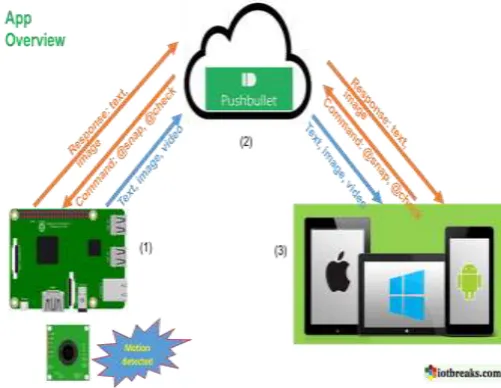
There are 3 factors that play together to build up the application:
1. Raspberry Pi & camera module as the data source that continuously scan for motion and recording video at the same time.
2. Pushbullet as the message-broker to send messages (text, still image, and videos) back and forth between Raspberry Pi and Mobile/Web.
Figure 3.3: Overview of system
[image:2.595.310.561.523.717.2]© 2019, IRJET | Impact Factor value: 7.34 | ISO 9001:2008 Certified Journal
| Page 1550
ways though. It means you can send a command frommobile or web to Raspberry Pi for particular action such as “@snap” (for instantly take a photo) or “@check” (to get current system information of Pi).
4. The above figure 2.3 gives the complete overview of system which shows how the communication takes place between the R-pi controller and the android app named pushbullet.
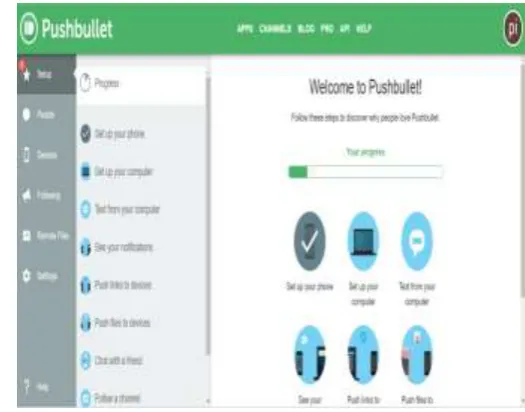
5. The pushbullet app is Chrome to Phone on steroids. It can be installed on Android, iOS, Chrome, and Firefox. Every device which install it becomes a destination where you can “push” things to. You can send links, photos, videos, files.
4.
SYSTEM DESIGN
4.1
Raspberry
Pi:
[image:3.595.336.531.165.291.2]The Raspberry Pi [1, 5] is a low cost single board,packing considerable computer power in a size of a creditcard. The Raspberry Pi board contains many features like camera connector, Ethernet port, GPIO pins for interfacingsensors and switches, USB ports to connect to externaldevices (like keyboard, mouse, Wi-Fi adapter etc.,), HDMIport to interface to monitors (like LCD screens, projectors, TVs etc.) and an audio jack also available. By all theseembedded on a single board. The Raspberry Pi has nointernal mass storage or built-in operating system and hence it requires an SD card preloaded with a version of the Linux Operating System. Refer the fig 2.1.This system proposed here uses Raspberry Pi [9] Model B+, shown in Fig2.1. This model board is a microcontroller kit with in-built ARM11 processor provided with internet/Ethernet connectivity, dual USB connector, 512MB memory and supports Linux operating systems like Raspbian, Pidora, Raspbmc etc.
Figure 4.1: Raspberry pi B+ board
4.2 USB
Camera:
USB Cameras are imaging cameras that use USB 2.0 or USB 3.0 technology to transfer image data. USB cameras are designed to easily interface with dedicated computer
systems by using the same USB technology that is found on most computers. The camera model used here isUSB Camera model 2.0. The accessibility of USB technology in computer systems as well as the 480 Mb/s transfer rate of USB 2.0
[image:3.595.300.563.466.672.2]makes USB Cameras ideal for many imaging applications.
Figure 4.2: Raspberry pi camera module
4.3 Pushbullet App:
Pushbullet is Chrome to Phone on steroids. It can be installed on Android, iOS, Chrome, and Firefox. Every device which install it becomes a destination where you can “push” things to. You can send links, photos, videos, files.
In our project pushbullet is being used for receiving notifications after camera senses a motion within the camera field and also for sending commands like “@snap” & “@check” to the controller for sending the captured video.
[image:3.595.42.275.527.674.2]© 2019, IRJET | Impact Factor value: 7.34 | ISO 9001:2008 Certified Journal
| Page 1551
5. RESULTS
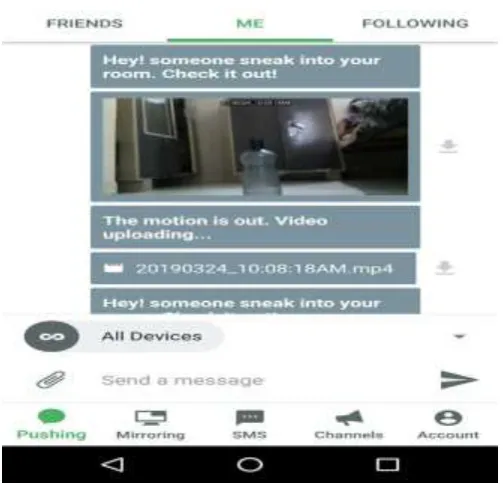
Figure 5.1: App screen when event takes place in camera field
The above figure shows the app screen when the user is notified on his/her mobile application after the motion takes place in camera field. It first sends the notification in the form of text message along with an image and there after a video.
Figure 5.2: Image captured by pi-camera
The above figure shows the image captured by the camera when event occurred and the same image is send to android app along with the video.
6. CONCLUSION
In this proposed project we have develop a real time surveillance system using Raspberry Pi camera module. It is an active surveillance system which will alert the user when the event happens. The camera being an infrared night-vision camera captures near clear pictures and has a still picture resolution of 3280 × 2464 and consists of Sony IMX219 8-megapixel sensor. The Raspberry Pi controller is used for camera interfacing and data handling which has Broadcom BCM2837B0 quad-core A53 (ARMv8) 64-bit @ 1.4GHz processor and also inbuilt Gigabit Ethernet (via USB channel), 2.4GHz and 5GHz 802.11b/g/n/ac WiFi and Bluetooth 4.2. At the user end android app i.e. PUSHBULLET is used for receiving notifications in the form of image, text, video.
REFERENCES
[1] Zhao, Yanbo, and Zhaohui Ye, “A low cost GSM/GPRS based wireless home security system”, IEEE Transactions on Consumer Electronics 54, no. 2 (2008).
[2] Rakesh, V. S., P. R. Sreesh, and Sudhish N. George, “An improved real-time surveillance system for home security system using BeagleBoard SBC, Zigbee and FTP webserver,” IEEE Int.Con, 2012, pp. 1240-1244.
[3] Ansari, Aamir Nizam, Mohamed Sedky, Neelam Sharma, and Anurag Tyagi, “An Internet of things approach for motion detection using Raspberry Pi,” IEEE Int.Con. Intelligent Computing and Internet of Things, 2014, pp. 131-134.
[4] Muheden, Karwan, Ebubekir Erdem, and Sercan Vanin, “Design and implementation of the mobile fire alarm system using wireless sensor networks,” IEEE Int.Symp.Computational Intelligence and Informatcs, 2016, pp. 000243-000246.
[5] Kumar, Sushant, and S. S. Solanki, “Remote home surveillance system,” IEEE Int. Con. Advances in Computing, Communication, and Automation, 2016, pp. 1-4.
[6] S. Sruthy, Sudhish N George “Wi-Fi enabled home security surveillance system using Raspberry Pi and IOT module”.
[7] Akash V. Bhatkule, Ulhas B. Shinde, “ Home Based Security Control System using Raspberry Pi and GSM”,International Journal of Innovative Research in Computer and Communication Engineering Vol. 4, Issue 9, September 2016.
[image:4.595.37.288.465.664.2]© 2019, IRJET | Impact Factor value: 7.34 | ISO 9001:2008 Certified Journal
| Page 1552
[9] K.N Karthick Kumar, H.Natraj, “Motion Activated SecuritySystem using Raspberry Pi”, International Conference on Communication and Signal Processing, April 6-8, 2017.
[10] V.Jacintha, S.Agnes Shifani, “Security System Using R-Pi” , 2017 Third International Conference on Science Technology Engineering & Management (ICONSTEM).
[11] Dhvani Shah, Vinayak haradi,“IoT Based Biometrics Implementation on Raspberry Pi”, Elsevier Procedia Computer Science Volume 79,2016.
[12] Khushbu H Mehta, Niti P Gupta, “Vision Based – Real Time Monitoring Security System for Smart Home” IOSR Journal of Electronics and Communication Engineering, Volume 9, Issue 5, Ver. V (Sep - Oct. 2014).
[13] Vamsikrishna, Patchava; Sonti Dinesh Kumar; Shaik Riyaz Hussain; Rama Naidu, K., "Raspberry PI controlled SMS-Update-Notification (Sun) system," Proceeding of IEEE International Conference on Electrical, Computer and Communication Technologies (ICECCT 2015), pp.1-4, 5-7 March 2015
[14] Gamba, M.; Gonella, A.; Palazzi, C.E., "Design issues and solutions in a modern home automation system," Proceedings of International Conference on Computing, Networking and Communications (ICNC 2015), pp.1111-1115, 16-19 Feb. 2015
[15] Eben Upton and Gareth Halfacree, Raspberry Pi User Guide. A John Wiley and Sons Ltd., 2012.
[16] Python Software Foundation [US], https://pypi.python.org/pypi
[17] Raspberry Pi Foundation, http://www.raspberry.org
[18] Laur I., “Microcontroller based home automation system with security,” International Journal of Advanced Computer Science and Applications, vol. 1, no. 6, pp. 60-65, 2010.
[19] S. R. Khan, A. Al Mansur, A. Kabir, S. Jaman, and N. Chowdhury, "Design and Implementation of Low Cost Home Security System using GSM Network," International Journal of Scientific & Engineering Research, vol. 3, p. 1, 2012.