$3.00
TABLE OF CONTENTS
BB II EPROM Program ... 4
Big Board Fixes ... 8
Relocating Your CP/M .... "
... 9
The Disk is the Media ... : ... 12
Serial Print Driver ... 14
Talking Serially ...
" ... " ... 15
Pascal/Z Review ... ' ... 19
Bringing Up WordStar .... " ... 23
A Cheap RAM Disk for the BB I ... 24
REGULAR FEATURES
Letters ... 2
Xerox 820 Notes ... 10
FORTHwords ... 14
C'ing Clearly .... " ... 22
Technical Tips ... 25
On Your Own ... 27
UNI FORTH is the best implementation of the FORTH language available at any price--and it is now available specifically customized for the Big Board, Big Board II, and other single-board computers! Just look at these standard features: • All source code is supplied except for a small kernel.
You can easily modify, add or delete functions. Adheres to the FORTH-79 international standard. Fully optimzied for the Z-80.
• Stand-alone. No operating system is needed. Excep-tionally reliable disk I/O with error checking and
fast access. CP/M version is also available.
• Full IEEE-compatible single-precision floating point software. All functions are included, such as square roots, sines and logarithms.
• Versatile cursor-addressed editor. Menu driven, with tabulation, word delete, multi-line transfer, string search/delete/replace.
• Full Z-80 assembler using Zilog/Mostek mnemonics. Structured programming constructs and support for the undocumented index register instructions are included.
• A completely revised 160-page User's Manual. Broken into logical function divisions, it includes many ex-amples and its intended as a complete tutorial. Options include: fast disk copy, formatting (variable sector size), MetaFORTH cross-compiler, games, Programmer's Manual, source code listings/disks, and much more.
Prices: Version 1 (no floating point) $ 50 Version 2 (floating point) $ 85 Version 3 (multitasking) $150 Beat the February 1 price increase!
All versions distributed on IBM 3740 standard eight-inch single-density floppy disk. Postage paid within the continental U.S., foreign orders slightly more.
Unified Software Systems P.O. Box 2644 New Carrollton, MD 20784
(301) 552-1295
Goodbye BASIC, PLl1, COBOL-hello PASCAL! Now, to make this most advanced language available to more micro users, we're slashing our price-to an amazing $29.95! This astonishing price includes the complete JRT Pascal system on 8" SSSD diskette and the comprehensive new user manual. Not a subset, it's a complete Pascal for CP/M.'" Check the features:
Separate compilation of external procedures • Auto-loading
• 14 digit FLOATING POINT arithmetic • True dynamic storage • Verbal error messages • Fast one-step compiler: no link needed • Graphing procedures • Statistic procedures • Activity analyzer prints histogram of program use • Advanced assembler interface. •
THIS IS THE SAME SYSTEM WE SOLD FOR $295!
So how can we make this offer?-why the unbelievable deal? Very simply, we think all software is overpriced. We want to build volume with the booming CP/M market, and our overhead is low, so we're passing the savings on to you.
AND AT NO RISK!
When you receive JRT Pascal, look it over, check it out. We invite you to compare it with other systems costing ten times as much. If you're not completely satisfied, return the system-with the sealed diskette unopened-within 30 days and your money will
GUARANTEED OR YOUR MONEY BACK!
In addition, if you want to copy the diskette or manual-so long as it's not for resale-it's O.k. with us. Pass it on to your friends! BUT ACT TODAY-DON'T DELAY ENJOYING PASCALS ADVANTAGES-AT $29.95, THERE'S NO REASON TO WAIT!
••••••••••••••••••••••••••••••••••••••••••••••••
1891-23rd Avenuem
To: JRT SystemsSan Francisco, CA 94122
O.K. You've sold me-I can't resist your unbelievable offer. Send me JRT Pascal by return mail. I understand that if I'm not completely satisfied, I can return it within 30 days-with the sealed diskette unopened-for a full refund. Payment is enclosed by:
D Check D Mastercharge D VISA Amount: $ _ _ _ _ _ _ _
(Shipping outside North America, $6. CA residents add sales tax.)
MICRO CORNUCOPIA
P.O. Box 223
Bend, Oregon 97709
503-382-8048
Editor
&Publisher
David J.
Thompson
Technical Editor
Ruth Fredine-Burt
Graphic Design
Sandra Thompson
Typography
Patti Morris
&Martin White
Irish Setter
Staff Assistant
Anna Berry
Cover Illustration
Gerald Torrey
MICRO CORNUCOPIA is the sin-gle board systems journal support-ing systems programmsupport-ing lan-guages and single board systems-including the Big Board, the Big Board II, and the Xerox 820. MICRO CORNUCOPIA is pub-lished six times a year by Micro Cor-nucopia of Oregon, P.O. Box 223 Bend, Oregon 97709
SUBSCRIPTION RATES: 1 yr. ( 6 issues)
1 yr.(Canada & Mexico) 1 yr. (other foreign)
$16.00 $20.00 $26.00 All subscription orders payable in U.s. funds on a U.s. bank, please. ADVERTISING RATES: Available on request.
CHANGE OF ADDRESS: Please send old label and new address. SOFTWARE, HARDWARE, AND BOOK VENDORS: We would very much like to review your CP/M compatible products for Micro C. Please send material to the Review Editor, Micro Cornucopia.
LETTERS TO THE EDITOR: Please sound off.
CPI M is a trademark of Digital Research, Inc. Copyright 1982 by Micro Cornucopia
All rights reserved
IICID CDIRUCD.II
December 1982
The Single Board Systems Journal
No.9
We're
In
(All In!!)
Moving is no trivial matter unless, of course, you live out of a burlap sack (a bum wrap). But we moved over 10 tons of "necessities" and now have shifted from dump mode (toss it, sell it, or at last resort keep it) to search mode (if we kept it, which box did we put it in).
I've seen those glowing reports about the computer cottage industry. You know, those articles and TV features produced by the NY City jet set describ-ing some mystical group of freaks who don't commute to work every morn-ing-they just live where they want; be it a beach town, a rural farm community, or (like us) in a skiing community nestled against the Ca~cade Range.
We'll see what it is really like, and in the meantime we'll see if we can't en-courage others to join us. (You maybe?) There's no work here to speak of (the guy who cuts, delivers, and stacks fire-wood for $45 per cord is a TV technician when there are TVs to repair), but if you can bring your business with you as we did, then a small community like Bend appears ideal.
The local community college offers very good two-year computer hardware and software programs. That means that there is a pool of technically trained peo-ple-both instructors and students. Plus there is an unusually large community of artists, musicians, and other creative sorts who live here because of the quality oflife.
I'll keep you all posted on how this grand experiment is working but I may be a little biased by all the friendliness and trust the local people have shown us. (This is the first post office I've visited that accepts out-of-town checks from strangers without asking for any ID.)
Prices of New Products
After you're involved in computers for a while you get pretty good at predicting what things are going to sell for, and I pride myself with being as astute as the next guy. However I've been delightful-ly surprised latedelightful-ly.
First, the hard disk interface that Andy Bakkers put together for the Big Board I is definitely one of those surprises. It
connects up and works with so little muss and fuss that it is easy to forget you are adding an incredible amount of memory to your system. With five mega-bytes on drive A, the big board is ready to take its place with heavyweight busi-ness systems. When you look at $240 for the interface (with software!) and $995 for both the drive and the controller, how can you go wrong.
See the "On Your Own" column in this issue for some thoughts about doing your own trip based on the Big Board (I or II) and 5 or 10 megabytes.
The second delightful surprise has been the power supply sold by BG Micro of Dallas. I did some snooping around on the circuit board after it arrived and I must say, the quality is first class. Every-thing their ad says is true!
Billy Gage (owner) didn't mention who manufactured the supply but I noticed a small metal tag which read "mfg. by Teletype Corp."
Two of us got these supplies along with the 24V mod kits. We are changing the + 12 to +24 and then using the 12V mod from issue #1 (page 4) to reduce a little of the + 24 to + 12. You can use a 7812 3-terminal regulator in place of the LM317.
We had only two problems with the supplies. First, Billy threw in a couple of specialll0V connectors for the supplies (a nice surprise) but he sent male pins for the connectors rather than the female pins that we needed, so we just soldered in the AC cord. Second, the heat sensor on the master oscillator had opened dur-ing shippdur-ing and we spent several hours with volt meters locating the problem. When we found the cause, all we had to do is push the little reset button on the sensor and everything worked fine.
LBTTBRS
Dear Editor,
I am interested in adding graphics to my system. Thomas Hameenaho (issue #7, page 2) said that only half the charac-ter generator chip is being used. Could the other half be used for simple graphic characters? If you were to offer this in an EPROM with instructions I would be your first customer. This would become the graphics standard so that us users could swap graphics programs.
The only problem I see is switching back and forth between alpha and graphics.
John Appleton
702-101-14th Avenue SE
Calgary, Alberta, Canada T2G 1C6 Editor's note:
The problem you face when trying to gen-erate graphics on the BB I is that the charac-ters do not connect unless you do a fairly sub-stantial modification to the video generation circuit. The disconnection means that you can't paste simple characters together to make graphic displays.
A number of readers are working on solu-tions to the graphics problem. Some are building daughter boards, others are trying to find ways to modify the original circuit with a minimum of effort and destruction. The classier the display, the more trouble it is to do. More information about that is coming up.
Dot graphics are obviously the most de-manding. Simple, connected block graphics (similar to the TRS-80) are much easier. In fact, some folks are working on adding a 6845 and 8002A (blockgraphics) to the Big Board I so that both it and the BB II would run the same graphics software.
Dear Editor,
I bought an Apple II enclosure and lid from the Computer-Center which is next door. It cost only $60 and I thought it would give my BB a professional appear-ance.
The enclosure holds the board, the power supply, and most keyboards. You may have to adjust the cabinet to your keyboard with a saw and file but it is easy to do.
I also have a Shugart 801R (R stands for rackmount; it is the standard model
and is slightly shorter than the 801) in a drive cabinet. The second 801 I pur-chased was the non-R version. When I discovered that it was too large to fit into the cabinet, I cut some aluminum off the top of the drive chassis and offboth sides of the front panel.
The new drive fit the enclosure but I could not get it to work. Obviously the metal work was too much of a shock to the mechanism. I just got it back from the disk drive service and hopefully it's OK now.
If your BB controls the AC to the drive motors, here's a hint. Break the board run to pin 2 on BB J1 (floppy interface) and then connect pin 2 to pin 7 on the power connector. Now you can pick up the power control signal at the disk drive rather than having to run an extra wire to the drive cabinet.
Question. Has anyone connected an electronic Olivetti or IBM typewriter to the BB? I would like to hear from that person. (Perhaps someone in Ger-many?)
S. Seiffert Uhlgasse43
5309 Meckenheim-Merl West Germany
Dear Editor,
Thanks for sending Tiny Basic so quickly. I ended up not using it in the prototype of the gizmo I was working on but intend to use it on the next version (if they order any more).
Now, about adding additional memo-ry to the BB-I have only done a paper design so far (I have to get the paying projects done first) but here are some de-tails.
1. Change the high 16K of RAM to 5V only parts.
2. Use the WR/NOT signal path through the 74157 as the mux for the two bank select bits.
3. Replace the lower 48K of RAM with 64K chips.
4. Use the "bell" and the "spare" PIO bits to handle selection of the proper 48K bank.
5. Add an additional SIO/DART chip and baud rate generator.
6. Add a DMA chip for the floppy in-terface so that a 2.5 MHz system can run double density and so that interrupts don't have to be turned off during disk reads.
7. Bring up a 4-user MP/M bios for the whole mess.
I'm also working on the first segment
of "Karl's Korner" on how to stuff a BB along with a schematic for a Z80 stunt box that will single-step the BB, display registers, RAM, and trap on I/O or mem-ory address match.
Karl-Wilhelm Wacker 100 Rockaway Street Islip Terrace, NY 11752 516-581-2932
Editor's note:
It's going to be Christmas for a lot of folks when Karl finds the time to get these projects out. Sounds like each of us should write a "Karl-Wilhelm Wacker appreciation letter" and send it to him. (How could money pos-sibly compete with a mailbox full of letters like that?)
Dear Editor,
The KayPro II portable microcomputer manufactured by Non-Linear Systems is based on the Big Board. They made a few changes to the board. They used 4164 RAMs, the keyboard outputs serial data to port B of the SIO, and they changed the 1771 to a 1791 for double density (5"). The board has space for the CTC timer and for all four EPROMs but there is a socket for monitor ROM only.
The KayPro documentation shows that the memory map is identical to the BB. Very interesting.
The SCBIOS on User's Disk #2 brought life to my parallel printer! I use the Daisy Wheel II made by Ricoh and sold by Radio Shack. However, for this printer, the jumper instructions from Micro C #7 (page 2) aren't quite right. For the Ricoh, don't jumper pins 1-2 on
J3.
Jack Phillips
Suite 222, Park-Cherry Bldg 114 East Park
Olathe, Kansas 66061
Dear Editor,
I got a call this weekend about my Tan-don CBIOS on user disk #4. It looks like I forgot to mention that the CTC must be jumpered for the disk drive auto time-out. This is described in the Big Board addenda, but I'll repeat it here.
Jumper pin 3 to pin 4 and pin 7 to pin 8 (on JB2).
Bob Edison Kronos Inc 355 Western Ave Boston, MA 02135
.. BIG BOARD II"
4 MHz Z80·A SINGLE BOARD COMPUTER WITH "SASI"
HARD·DISK INTERFACE
$895 ASSEMBLED
&
TESTED *
$695 FU LL KIT*
Jim Ferguson, the designer of the "Big Board" distributed by Digital Research Computers, has produced a stunning new computer that Cal-Tex Computers began shipping in June. Called "Big Board II". it has the following features:
• 4 MHz Z80-A CPU and Peripheral Chips
The new Ferguson computer runs at 4 MHz. Its Monitor code is lean. uses Mode 2 interrupts. and makes good use of the ZSO·A DMA chip.
• 64K Dynamic RAM + 4K Static CRT RAM + 24K E(E)PROM or Static RAM
"Big Board II" has three memory banks. The first memory bank has eight 4164 DRAMs that provide 60K of user space and 4K of monitor space. The second memory bank has two 2KxS SRAMs for the memory·mapped CRT display and space for six 2732As. 2KxS static RAMs. or pin·compatible EEPROMS. The third memory bank is for RAM or ROM added to the board via the STD bus. Whether bought as a bare board. a full kit. or assembled and tested. it comes with a 250 nS 2732 EPROM containing Russell Smith's superb Monitor.
• Multiple·Density Controller for SSfDS Floppy Disks
The new Cal·Tex single·board computer has a multiple·density disk controller. It can use 1793.1797. or SS77 controller chips since it generates the side signal with TIL parts. The board has two connectors for disk signals. one with 34 pins for 5.25" drives. the other with 50 pins for S" drives.
• Vastly Improved CRT Display
The new Ferguson SBC uses a 6S45 CRT controller and SMC S002 video attributes controller to produce a display rivaling the display of quality terminals. There are three display modes: Character. block·graphics. and line·graphics. The board emulates an ADM·31 with 24 lines of SO characters formed by a 7x9 dot matrix.
• STD Bus
The new Ferguson computer has an STD Bus port for easy system expansion.
• DMA
The new Ferguson computer has a ZSO·A DMA chip that will allow byte·wise data transfers at 500 KBytes per second and bit·serial transfers via the ZSO·A SIO at SSO Kbits per second with minimal processor overhead. When a hard·disk subsystem is added. the DMA chip makes impressive disk performance possible.
CAL·TEX COMPUTERS, INC.
780 E. TRIMBLE ROAD #504 • SAN JOSE. CA 95131 • (408) 942·1424$245 PC· BOARD WITH EPROM
&
PALS*
SIZE: 8.7S" X 1S.S"
POWER: + SV @ 3A, + -12V @ O.1A
• "SASI" Interface for Winchester Disks
Our "Big Board II" implements the Host portion of the "Shugart Associates Systems Interface." Adding a Winchester disk drive is no harder than atlaching a floppy·disk drive. A user simply 1) runs a fifty·conductor ribbon cable from a header on the board to a Xebec controller that costs only $295 and implements the con· troller portion of the SASI interface. 2) cables the controller to a Seagate Technology ST·506 hard disk or one compatible with it. and 3) providfS power for the controller·card and drive. Since our CBIOS contains code for communicating with hard·disks. that's all a user has to do to add a Winchester to a system!
• Two Synchronous/Asynchronous Serial Ports
With a ZSO·A SIOIO and a ZSO·A CTC as a baud·rate generator. the new Ferguson computer has two full RS232·C ports. It autobauds on both.
• A Parallel Keyboard Port + Four Other Parallel Ports for User 110
The new Cal·Tex single·board computer has one parallel port for an ASCII keyboard and four others for user·defined 1/0.
• Two Z80·A CTCs
=
Eight Programmable Counters/TimersThe new Ferguson computer has two ZSO·A CTCs. One is used to clock data into and out of the ZSO·A SIO/O. while the other is for systems and applications use.
• PROM Programming Circuitry
The new Cal·Tex SBC has circuitry for programming 2716s. 2732(A)s. or pin· compatible EEPROMs.
• CP/M**
CPIM with Russell Smith's CBIOS for the new Cal·Tex computer is available for $150. The CBIOS is available separately for $25.
·SINGLE QUANTITY PRICE. ATIRACTIVE DISCOUNTS FOR DEALERS AND OEMs. • ·CP/M IS A REGISTERED TRADEMARK OF DIGITAL RESEARCH.
~
n°
>-t0
n
0 >-t
~ ~
( j
0 "'0
:?i-Z
~S
0'" ro
>-t
,\D 0
ro
( j
ro
S
0'" ro
>-t ~
\D
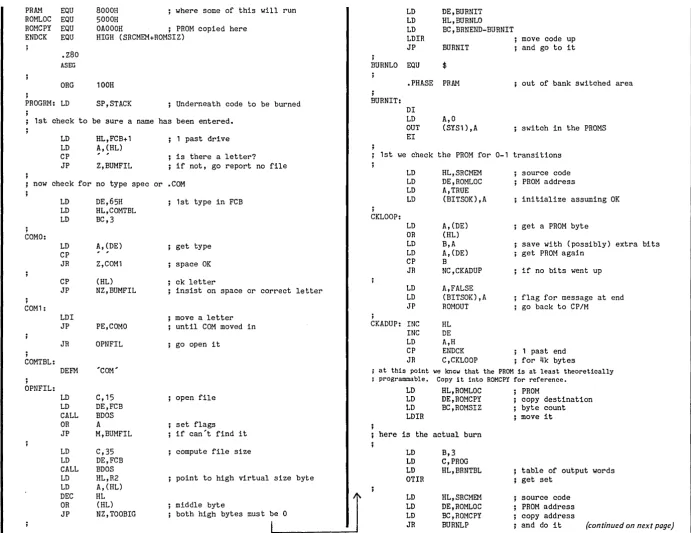
BB II EPROM PROGRAM LISTING
TITLE PROGRAMMER, 2732
This routine reads a CP/M .COM file of maximum size 4k bytes and burns it in a 2732 installed in U80 of BIGBOARD II. The 2732 is 1st checked against te code to be burned in to be sure no '0' levels are to be programmed to '1'. Note that the 2732 need not be blank. To achieve maximum speed, only those loca-tions needing to be programmed actually receive the 50 ms prog-ramming pulse. Following progprog-ramming, the 2732 is verified, and any errors reported. The program can possibly be modified to burn other PROMS, but the reader should proceed with caution. Programming requirements vary considerably.
jumpering for U-80 is as follows: pin 18 to.REC5
pin 20 to /OE/VPP5 pin 21 TO RA 11 D. H. DURLAND 663 Georgia Ave. Palo Alto, CA 94306 (415)493-4984
edit 11-1-82 to remove reference to 2716's edit 10-21-82 tO'include jumper information
the program is intended to be assembled using MACRO-80 Instructins for use:
FALSE TRUE BOOT FCB BDOS CR LF R2 SYS1 PROG CTCB3 SRCMEM STACK ROMSIZ
Your code should be stored in a CP/M .COM file. To program; for example, EXAMPROG.COM
Turn on your programming power supply. Insert the PROM to be programmed in U-80
Boot up CP/M to access PROGRAM.COM and EXAMPROG.COM (the usual drive access rules apply)
Type '<x:)PROGRAM <y:)EXAMPROG.COM'<CR)(the .COM is The rest is automatic
EQU 0 EQU OFFH EQU 0 EQU 5CH EQU 5 EQU ODH EQU OAH EQU 7FH EQU OC8H EQU OCOH EQU 08BH
EQU 9000H park source here EQU SRCMEM
EQU 4096 size of a 2732
optional)
; \ fill ",. ;
now DEC LD CP JP
•
•
•
HL
A,MAXR~C ... (HL) C,TOOBIG with FF 1st
LD HL,SRCMEM LD DE,SRCMEM+1 LD OIL) ,OFFH LD BC,ROMSIZ LDIR.
the actual read
LD DE,SRCMEM-128
least significant byte MAXREC records maximum
byte count do it
RDLP: LD ADD
EX
PUSH LD CALL LD LD CALL POP OR JR CP JP
HL,128 HL,DE DE,HL DE C,26 BDOS C,20 DE,FCB BDOS DE A Z,RDLP NZ,BUMRD
update DMA ADDR save DMA ADDR set DMA ADDR read sequential read a record recover DMA ADDR successful?
if not past end of file end of file?
anything else is an error now we move the next section to 8000 and jump to it,
as we are going to bank switch in the PROMS and can't operate
PRAM EQU ROMLOC EQU ROMCPY EQU ENDCK EQU .Z80
ASEG
8000H where some of this will run 5000H
OAOOOH ; PROM copied here HIGH (SRCMEM+ROMSIZ)
ORG 100H
;
PROGRM: LD SP,STACK Underneath code to be burned 1st check to be sure a name has been entered.
LD LD CP JP HL,FCB+1 ~, ~HL) Z,BUMFIL
1 past drive is there a letter? if not, go report no file now check for no type spec or .COM
;
COMO:
COM1 :
; COMTBL: ; OPNFIL: LD LD LD LD CP JR CP JP LDI JP JR DEFM LD LD CALL OR JP LD LD CALL LD LD DEC OR JP DE,65H HL,COMTBL BC,3
A, (DE) Z,COM1 (HL) NZ,BUMFIL PE,COMO OPNFIL 'COM' C,15 DE,FCB BDOS A M,BUMFIL C,35 DE,FCB BDOS HL,R2
A, (HL) HL (HL) NZ,TOOBIG
; 1st type in FCB
get type space OK ck letter
insist on space or correct letter move a letter
until COM moved in go open it
open file set flags if can't find it compute file size
point to high virtual size byte middle byte
both high bytes must be 0
J
LD DE,BURNIT LD HL,BURNLO LD BC,BRNEND-BURNIT
LDIR move code up
JP BURNIT and go to it BURNLO EQU $
;
BURNIT:
• PHASE PRAM DI LD OUT EI A,O (SYS1),A
out of bank switched area
switch in the PROMS 1st we check the PROM for 0-1 transitions
CKLOOP: ; LD LD LD LD LD OR LD LD CP JR LD LD JP CKADUP: INC
INC LD CP JR HL,SRCMEM DE, ROMLOC A,TRUE (BITSOK) ,A
A, (DE) (HL) B,A
A, (DE) B NC,CKADUP A,FALSE (BITSOK) ,A ROMOUT HL DE A,H ENDCK C,CKLOOP
source code PROM address
initialize assuming OK get a PROM byte
save with (possibly) extra bits get PROM again
if no bits went up flag for message at end go back to CP/M
; 1 past end ; for 4k bytes
at this point we knew that the PROM Is at least theoretically programmable. Copy it into ROMCPY for reference.
LD LD LD LDIR HL,ROMLOC DE, ROMCPY BC,ROMSIZ here is the actual burn
LD LD LD OTIR LD LD LD JR B,3 C,PROG HL,BRNTBL HL,SRCMEM DE, ROMLOC BC,ROMCPY BURNLP PROM
copy destination byte count move it
table of output words get set
source code PROM address copy address
[image:7.795.37.728.31.564.2]~
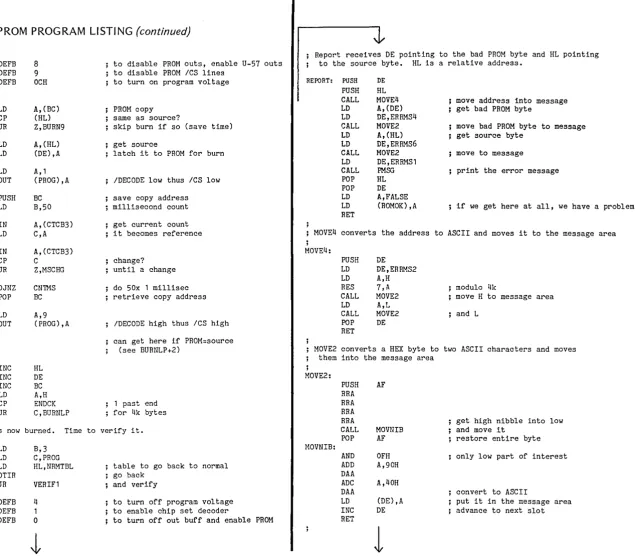
BB II EPROM PROGRAM LISTING
(continued)
BRNTBL: BURNLP: CN1MS: MSCHG: BURN9: DEFB DEFB DEFB LD CP JR LD LD LD OUT PUSH LD IN LD IN CP JR DJNZ POP LD OUT 8 9 OCHA, (BC) (HL) Z,BURN9
A, (HL) (DE) ,A
A,l (PROG),A BC B,50 A, (CTCB3) C,A A, (CTCB3) C Z,MSCHG CN1MS BC A,9 (PROG) ,A
INC HL INC DE INC BC LD CP JR A,H ENDCK C,BURNLP
to disable PROM outs, enable U-57 outs to disable PROM ICS lines
to turn on program voltage PROM copy
same as source?
skip burn if so (save time) get source
latch it to PROM for burn IDECODE low thus ICS low
save copy address millisecond count get current count it becomes reference change?
until a change do 50x 1 millisec retrieve copy address
IDECODE high thus ICS high
can get here if PROM=source (see BURNLP+2)
1 past end for 4k bytes PROM is now burned. Time to verify it.
NRMTBL: LD LD LD OTIR JR DEFB DEFB DEFB B,3 C,PROG HL,NRMTBL VERIFl 4 1
o
table to go back to normal go back
and verify
to turn off program voltage to enable chip set decoder
to turn off out buff and enable PROM
; Report receives DE pointing to the bad PROM byte and HL pointing to the source byte. HL is a relative address.
REPORT: PUSH
PUSH CALL LD LD CALL LD LD CALL LD CALL POP POP LD LD RET DE HL MOVE4 A, (DE) DE,ERRMS4 MOVE2
A, (HL) DE,ERRMS6 MOVE2 DE,ERRMSl PMSG HL DE A,FALSE (ROMOK) ,A
move address into message get bad PROM byte
move bad PROM byte to message get source byte
move to message
print the error message
; if we get here at all, we have a problem MOVE4 converts the address to ASCII and moves it to the message area
; MOVE4: PUSH LD LD RES CALL LD CALL POP RET DE DE , ERRMS2 A,H 7,A MOVE2 A,L MOVE2 DE
modulo 4k
move H to message area and L
MOVE2 converts a HEX byte to two ASCII characters and moves them into the message area
MOVE2: MOVNIB: PUSH RRA RRA RRA RRA CALL POP AND ADD DAA ADC DAA LD INC RET AF MOVNIB AF OFH A,90H A,40H (DE) ,A
DE
1
get high nibble into low and move it
restore entire byte only low part of interest
convert to ASCII
[image:8.794.92.727.24.582.2]~ VERIF1 : ; this area contains abort routines and messages
n"
"'"I
0 1st we copy the burned PROM into ROMCPY
BITNG:
n
0 LD DE,BIlMSG
"'"I
LD HL,ROMLOC ; PROM CALL PMSG
::s
e
LD DE , ROMCPY ; copy destination JP FINIS(J
0 LD BC,ROMSIZ ; byte count BIlMSG:
'"CI
Ei-
LDIR ; move i t DEFM CR,LF,'Bits not all blank. Not programmable. ,Z
DEFM ' Aborting',CR,LF,'$'e
Now switch out the PROMS and go back to CP/M for verification.S
BUMFIL:Ci' ROMOUT:
LD DE,FILMSG
/'tI
"'"I DI
CALL PMSG
~ LD A,8
JP FINIS
0 OUT (SYS1),A switch out the PROMS FILMSG:
/'tI
(J
EI
CR,LF,'Improper file specification',CR,LF,'$'
/'tI DEFM
S
JP VERIFY go do the verification ;Ci' ;
TOOBIG:
/'tI
"'"I
BRNEND EQU $ LD DE,BIGMSG
...
\0 CALL PMSG
00
tv BITSOK: DEFS goes false on
o
to 1 transition request JP FINIS ROMOK: DEFS goes false on bad verify BIGMSG:DEFM CR,LF,'Too big for PROM',CR,LF,'$'
.DEPHASE ;
BUMRD:
VERIFY: LD DE,RDMSG
LD A, (BITSOK) CALL PMSG
OR A JP FINIS
JP Z,BITNG go report no try RDMSG:
DEFM CR,LF,'Bad read, aborting',CR,LF,'$' . LD DE,CRLF ; else do the verification
CALL PMSG put crlf PMSG:
LD C,9
LD A,TRUE CALL BDOS
LD (ROMOK),A assume ok RET
LD HL,SRCMEM source start ;
LD DE,ROMCPY PROM copy ERRMS1 :
DEFM 'Relative '
VLP: ERRMS2:
LD A, (DE) get a PROM byte DEFS 4 will hold address
CP (HL) match? ERRMS3:
CALL NZ,REPORT if not DEFM
INC HL ERRMS4:
INC DE DEFS 2 will hold bad PROM byte
LD A,H ERRMS5:
CP ENDCK 1 past end DEFM , shOUld:'
JR C,VLP catch all bytes ERRMS6:
DEFS 2 will hold source byte
LD A, (ROMOK) CRLF:
OR A DEFM CR,LF, '$'
JP Z,FINIS if not ok, no reporting to be done VERMSG:
DEFM 'PROM verifies OK',CR,LF,'$' LD DE, VERMSG else report success, and quit
CALL PMSG FINIS: JP BOOT
JP FINIS
J
ENDEND
Big Board Fixes
By Ewing Waymire
Not all Big Boards work when first powered up, so the purpose of this arti-cle is to help those who don't get that sometimes elusive "system monitor 3.3."
Background
First, a little information about the PFM monitor. At power-up, the proc-essor starts executing code from location OOOOH in the ROM bank. The first 16 in-structions in the ROM move the rest of the monitor to high memory starting at FOOOH. Following the move, control is transferred to FOOOH.
If PFM is copied correctly, if the RAM at FOOOH is good, and if there are no oth-er basic problems in this part of the sys-tem, then PFM will start its tasks.
PFM does a number of things before it can accept an input and sign on. It dese-lects the ROM bank, clears the video RAM, initializes the system PIa, 510, CTC, and 1771. Next it checks to see if you have an 510 and if so, it starts poll-ing both the 510 and the PIa to see which receives a carriage return charac-ter first.
You can watch this polling process by checking the chip enables of the PIa and 510 to see if the processor is alternating selecting one and then the other. If the monitor finds that an 510 is not in-stalled, then it goes ahead and signs on and waits for characters from the PIa.
Let's go down the list of the most com-mon problems and see what usually works.
Is It a Dead Processor?
The first thing you need to check on a bad board is whether the processor is running. Check the M1 line (is pin 27 wiggling up and down?) to see if the processor is fetching opcodes. If it is not running, then either it is not receiving a good clock signal (pin 6) or it is being held in a constant reset (pin 26 stays low).
If you find either of these problems, recheck all the related components to make sure they are in their proper places and not interchanged with others or in-stalled in a feed-through hole. R43 is the most often misplaced component in this part of the board and people often inter-change Q1 and Q2: Q2 helps make the
rise time of the clock short enough to meet 280 specs. It must be a 2N2907. Alternating Character Display
If the processor is running you will find that the on-board video is a very powerful debugging tool. A repeating pattern of boxes and colons is called a stack crash. It usually means that the processor is running but it is not able to execute PFM. Usually this is caused by a bent pin on a RAM chip (this is hard to find so look carefully) or it happens when someone substitutes 74LS157s for the 74157s in U58 and U59. The LS parts won't work here.
Other common mistakes include un-soldered or badly un-soldered pins, switched parts, or defective RAM (espe-cially the top 16K). You only need RAM chips U1 through U8 installed in order for PFM to sign on. Also, the 280 is the only 40-pin chip that has to be installed in order to get the magic prompt. Other Visible Problems
If you are getting more than one prompt or the screen hasn't been com-pletely cleared at sign on, then the trou-ble most likely is in the 74LS157 area. Again, look for bent pins or switched parts. If you move parts and the trouble changes, that should give you a clue.
If the characters on the screen slowly swim back and forth, check the video crystal. The documentation calls for 14.31818 MHz but the proper crystal is 13.9776 MHz. This provides a true 60 Hz vertical sync rate. If the new crystal causes the characters to tear, then re-place C24 with a 10 pf capacitor or reduce R2 to 470 ohms.
If the dots on your screen jitter, then you probably have some noise leaking into the video. Add some bypass capaci-tors to the +5 V line near the video sec-tion. (Editor'S note: try some 50 mfd 10V tantalums between the +5 V line and ground.) Also, swapping or changing U38 and U51 will sometimes clean up the problem.
If the first half of each video character is missing then you may have mis-in-stalled the 1.5K resistor at R21. It is easy to mistake a feedthru for the component pad on this part.
Keyboard
Digital Research Computers PO Box 401565 Garland, TX 75040
If your keyboard is not hooked up properly (bit 7 is not grounded or driven low) the BB will answer all or some of the commands with "what." Also, a defec-tive 74LS14 (Ul12 or U114) can lead to a bad case of "what."
Disk Drives
If you have two drives jumpered as drive 0 (LEOs turn on together) then you may destroy the system tracks (0 and 1) on your disk.
SIO
A lot of people don't realize that there is a difference between an 510/0 and an 510/1 or 2. By the way, aD ART will work just as well as an 510 as long as you do not plan any synchronous communica-tions. (And who wants to do synchro-nous work anyway?)
Other Thoughts
If your -12 V supply fails while a disk is loaded, the 1771 will write garbage on the track where the head is, destroying both the data and the formatting. If your -5 V supply goes positive, your 4116 RAMs may be damaged. So, you should double-check your power supplies if problems occur.
Although our customers are some of the best computer whizzes around, 9 out of 10 boards we get back for repair have at least one IC pin bent under or out, or have bad solder joints.
The memory test is not infallible. We have seen cases where bad memory chips have passed the test. If your pro-grams act weird and your power sup-plies and software are OK, then suspect the RAM. Swap rows of memory around to see if the problem changes.
Finally
About 19 out of 20 BBs work on the first try. I hope the above hints will help with the other lout of 20.
Relocating Your CP
1M
By Pseud O. Nym
In Micro C #2, Dave notes that in the CP/M distributed with the Big Board, the BIOS starts at E800, while most 60K ver-sions start at EAOO. You can modify the BIAS definition and reassemble the CBIOS but it is still necessary to relocate CP/M to accommodate this CBIOS. Many of you with the BB version may, like myself, want to return to the stand-ard CP/M EAOO BIOS to recover the wasted space and be compatible with the majority of 60K CP/M systems. (I had to laugh at the note about maintaining con-sistency-we would have been consis-tent if we'd stayed with the CP/M stand-ard.)
MOVCPM contains a relocatable copy of CP/M, a BOOT, and a BIOS. When-ever you run MOVCPM, it modifies all of these. If your MOVCPM includes a BOOT and BIOS suitable for you hard-ware, fine. Otherwise you have to over-lay the relocated system with suitable programs. However, MOVCPM only al-lov.7s relocation in steps of 1k bytes-so you can set up the BIOS at EAOO, E400, DAOO, etc.
The version of MOVCPM distributed with the Big Board has been modified to deposit the code 512 bytes lower than the standard version. Thus, MOVCPM 60 gives you a 59.5K system! You can dupli-cate this feat or defeat it by adding a patch to your MOVCPM program.
This patch modifies MOVCPM's size calculation. When execution reaches lo-cation 016FH, the HL registers contain the specified system size (e.g. FOOOH for a 60K system). If you add anything to or subtract anything from HL at this point, the resulting system will be larger or smaller.
Voila! To make the BB MOVCPM work like the standard version all we have to do is add 200H to HL here.
This is how I patched MOVCPM. DDT MOVCPM.COM
L16F check that 16F is JP lAS A16F
JMP 2AOO jump to patch A2AOO
PUSHB LXI B,200
DADH,B POPB JMP1A5
(don't forget this period) assemble code at 2AOOH save BC
to convert E800 to EAOO or LXI B,FEOO to subtract 200H
add BC toHL restore BC
where it was heading end of assembly GO "go zero" SAVE 42
MOVCPMX.COM
I should note that I have only tested this for converting the BB MOVCPM to standard. Also, your MOVCPM may not be the same length as mine. I put the patch at 2AOO because DDT reported that as NEXT when I loaded MOVCPM.
After this, you can follow the CP/M documentation for "Second Level Sys-tem Generation." (See page 6 of the CP/ M Alteration Guide.) Note that when using the BB MOVCPM you must add 200 to the read offset for the BIOS. This makes the offset 3780.
Editor's note:
This is one of those really significant pieces of information which gives us all a chance to org at EAOO. You can reassemble your present BIOS (use the SD Systems assembler on the original source) or go ahead and install an updated BIOS such as the one from user disk
#2 or #9.
Also, the author asked not to be identified
so I gave him the best pseudonym I could think of. Sorry if I was too obvious. • • •
CATCH US AT THE FAIRE
We are planning to have
a Big Board Users Group Booth
and meeti ng at
THE WEST COAST COMPUTER FAIRE
March 18th to 20th
in San Francisco
Micro Cornucopia, Number 9, December 1982
LOW COST DISK CONTROLLER
- LESS THAN $10
COMPLETE-SAVE WEAR AND TEAR ON YOUR DISK DRIVES AND FLOPPIES WITH THE MODEL 3801 ALL SOLID STATE RELAY. SMALL RNOUGH TO FIT EASILY INSIDE YOUR DISK DRIVE, THE 3801 CAN BE INSTALLED IN MINUTES. YOUR BIG BOARD WILL THEN TURN YOUR DRIVES ON AND OFF AUTOMATICALLY AS THEY ARE NEEDED.
FEATURES
-* SMALL SIZE - 1.75 X 1.40 X 0.35
* FAST INSTALLATION - DIAGRAM INCLUDED
* ZERO CROSSING - ELHIINATES ALL SWITCHING NOISE
* TRIAC OUTPUT - NO MECHANICAL PARTS
* DVDT FILTER - INCLUDED
* LOW COST - ONLY $8.80 EACH
* 1 YEAR WARRANTY
* 30 DAY MONEY BACK GUARANTEE
lIJBg1f/BZ
COMPANY OF CALIFORNIA
16UI SOUTH MINNIE STR~;ET
SANTA ANA, CALIFORNIA !1~7117
(714) 541-4316
CALIF. RES. ADD 6% SALES TAX ADD $1.00 POSTAGE & HANDLING
GEFAS
NOW
Get the BIG BOARD
in
G E R MAN Y
oGerman Documentation
OMi cro
c
Software
OProm Programmer etc.
GEFAS
GesellschaftfUr
angewandte Systemtechnik
Pariser Str. 44
0-1000 Berlin 15
030-883 24 74
Xerox 820 Notes
Column
by
John P. Marlin, Jr
As promised, I'm back again, and the Xerox 820-11 (R) board has been dis-sected, also as promised. What a differ-ence! I scarcely know where to begin. I'll refer to the old board as an 820, and the new one as an 820-11.
It looks like Xerox has gotten serious about the microcomputer market. They have done a lot of the "Personal Com-puter" stuff but this one is definitely a Business Machine.
Appearances
The 820-11 has the same old 4 connec-tors and reset button across the back edge, and same good RFI-EMI attention, but now, all of a sudden, there are a cou-ple of edge connectors on the mother board, and one of them has a PCB in it! Also, fewer ICs, and more space be-tween them. Removing the disk control-ler made a lot of space on the mother board.
There are two different boards avail-able for the controller slot, a floppy con-troller, and a hard disk controller.
The other slot is an expansion connec-tor, nearly one-for-one with the control-ler slot, but obviously intended for mem-ory, or like that.
The hard disk board is only a SASI in-terface, since Xerox now has a box (the U07) which contains a Shugart SA1403-E Intelligent Controller, an SA1004 8-inch, 8-meg (formatted) Winchester, an SA801 SSDD floppy drive and an extra connector for another 2-drive cabinet. Thus you can connect three floppies and a Winchester!
The Controller
The controller is a 1797 which allows double-sided double-density floppies, with side checking on address headers. However, the chip is limited to 256-byte sectors.
John MacFarland, of Software Pub-lishers, tells me he has one running 1K sectors with a 1793. He is using essential-ly the same double density software he supplies with the double density kit for the Big Board. The rest of the floppy con-troller is pretty much the same as the old 820, with the addition of a write precom-pensation circuit (a double density ne-cessity).
The Kemel
CPU: 4.0 MHz Z80-A with 8.0 and 16.0 MHz clocks available on the board. As with the old version, nothing significant here.
CTC, SIO, and PIOs are the same as on the 820.
MEMORY: Now we see some differ-ences. For instance, Bank Select (bit-7) turns off everything up through BFFFH. The second edge connector (memory ex-pansion) has *MEM4 and *MEM8 signals which are decodes of the second and third 16K segments when the second memory bank is selected. CP/M 3.0, anyone? Additionally, the expansion slot has *RFSH, and all the other normal bus signals almost like STD-BUS. A pity they didn't use the STD-BUS pinout.
There are the usual 4 2716 sockets, but the upper two have jumpers to feed the WR (write) signal to pin 21 for 6116-type RAM. Currently, 3 sockets are occupied by ROMs. All 4 sockets run with wait states.
CRT RAM: is a 2016 2Kx8 chip running with a wait state.
The ROMWAT (ROM wait) can also be accessed from both the Disk Controller slot and the Expansion slot, as needed.
Lots of new 110 ports defined. SYNC/ ASYNC select, SGL/DBL density, CHARGEN1/CHARGEN2, set DIMVI-DE 0, and (at last!) SET/RESET ALARM. Yes, Virginia, there really is a beeper!
Slight changes to the System PIO bit definitions. Bit 5, not needed for the bell, now senses double-sided floppies. Monitor
Here there is a real difference! On re-set, the following happens:
1. SP, HL, and last word of stack are stored beginning at FFEO.
2. The Copyright disclaimer is execu-ted. You heard me, they actually execute the copyright characters. And, since they have eliminated the spaces in the text (you know, those troublesome JR NZ's) the result is a bunch of harmless LD's. Saves 2 bytes not to JR around it! This, it turns out, is the beginning of some of the tightest code ever written by mortals!
3. Clear and initialize the CRT; 4. Non-destructive test of RAM from FOOO-FFFF;
NUF Computer Company, Inc. 99 Pennsylvania A venue Newton, MA 02164 (617) 964-8041
5. Checksum test on 3 of the 4 ROMs; 6. Initialize FFOO-FFFF data (the old LDIRloop);
7. Initialize the 110 ports (ditto OTIR); 8. Initialize CPU. Mode 2, FFXX vec-tors;
9. Move the FOOO-FEFF image into place;
10. Checksum test on fourth ROM. Fail says jump to entry in HIMEM;
11. Test for 55AA just below checksum in fourth ROM. Fail says jump;
12. Load HL with Command Address Table;
13. Load DE with DSKMAP;
14. Load BC with HIMEM entry ad-dress;
15. Call ROM4;
16. Jump to HIMEM entry address (FC55).
ROM or RAM errors detected move appropriate message to CRTMEM di-rectly, time out, and re-jump to 0000.
After all this, the SIO is initialized. (Even Parity with DTR and RTS set on both channels.) Channel A is set for 300 BPS, Bat 1200. The PIa is initialized for a Centronics interface.
High Memory
HIMEM entry. After we finally get here, we still have bits 6 and 7 of the Sys-tem PIa as outputs, and all others are inputs, for the moment. Bit 0 is held low by the SASI IIF, so we start moving stor-age addresses and driver addresses around. Bit 4 is held low by 51/4" drives, so we move some OPE's and modify DPH's. Finally, we display the startup message and wait for keystrokes.
Oops! new message! "H Host Ter-minal" Yes, we can look like an ADM3A. Better yet, from the KBD we can do local copy for those pesky IBM systems, or, still better yet, remote echo to look like a CPU to some remote dumb terminal. In-novation! As each line scrolls off the top of the screen, it is written to RAM in 80 byte chunks, starting at OlOOH, just like in CRTMEM. No CR's, no LF's, just an image of CRTMEM. Holds about 700 lines. Do one of those, then boot CP/M and SAVE 220 FILENAME.EXTand you got it!
... - - - NEED A HOME FOR YOUR BIG BOARD I OR II? - - - -...
ALL ALUMINUM DISK AND COMPUTER ENCLOSURE
GK.lALITY
CON:~;TF::t.JCTEDOF 1 j:;:: INC:H
M{:)TERIALCOMES WITH 150 WATT
SWI1CHING
PRS~+~5V
..
@:=: •
5
~~I'1PS+12\).
@.::.
PIMP::;
I15
::;EC:~::
.
5
(~MP::::TYP
··-l:2V. @
:300
M(4.+24V.
~~ ... ... .:.
r~MPS,IF D.C. DRIVES ARE USED,
ENTIRE
SYSTEM
CANRUN
ON
SINGLE
36V.
BATTERY"
NOW
YOU CAN GENERATE SOFTWARE
INDEPENDENT OF THE POWER CO.
! !
!
ENCLOSURE WITH POWER
SUPPLY -
$325uOO
CABLES AND CONNECTORS AVAILABLE -
INQUIRE
FAN OPTION - PRESSURIZES INTERIOR OF BOX WITH FILTERED AIR -
$35.00
TAN DON
DISK DRIVES AVAILABLE - HARD
ANDSOFT -
INQUIREMANY
FRONT
PANEL
CONFIGURATIONS
AVAILABLE FOR FLOPPYS ANDIOR HARD DISKS
XEROX 820 BOARDS7
TESTED
AND
GUARANTEED
CONNECTORS AND CABLE SETS
AVAILABLE
$ :~:7~3.
00
LITTLEBOARD
SINGLE
BOARD COMPUTER -
2.5,
4.0,
OR 6.0 MHZ
OPERATION
DUAL RS232 SERIAL
110
W/CURRENT LOOP
OPTIONPF:OGR(4MM;~BLE BAUD F~ATE~:::: ON BOTH CHANNEI ... ~::;
:32 BITS BUFFEHED P{ ... R,:."LLEL I /0
4 CHANNFI....:~:; OF COUNTEr~:-·T I rIEF~
ACCOMMODATES 16K RAM/ROM IN 2716 OR 2016
2 It :~: II X 1011 PF~OTOTYP I NO ~"REA B~\RE BOARD gl. DOC. $ 75 II 00
DEVELOPED FOR Z80 CONTROLLER APPLICATIONS
2.5 MHZ
KIT
$250.00
J.B.
FERGUSON, INC.
::::07
1\1.
I ND I (41'.ln
ARLINGTON,
TEXAS
76011
The Disk is the Media
By
David Thompson
Researching this article was a real learning experience for me. It was partic-ularly enjoyable both because I'm inter-ested in the subject and because I got a chance to chat with some very interest-ing people. I found that the magnetic media market has its own language, its own pecking order, its own hype, its own secrets, and its own technical gurus.
My technical sources include Tektronix, Colin Thompson of BASF, Marilyn Gilman of Memorex, and Dale Isaacs of Dysan.
Background
There are two ways of putting record-ing material on a disk. The oldest and most common way is called knife coating and everyone but Maxell appears to be using this method. The method Maxell now uses is called roto gravure, and is a very similar to the precision printing technique of the same name.
The roto gravure technique is new to disk manufacturing and though it
Pro-(820 Notes continued)
However, we type "LAret>" and more happens in HIMEM. Overlays! The first letter brings in an overlay from ROM into the aforementioned HIMEM EMTRY address and is executed there. Sooner or later we get a very sheepish, one-line greeting from CP/M. We're up!
DIR brings back strange files. CONFIGUR.COM. WHATSA.COM. BACKUP. COM. A bunch of funny oth-ers. What are they?
CONFIGUR allows a disk image or a memory image to be patched in many wonderful ways.1I0BYTE, 7/8-bit KBD, floppy step rate, auto-restart filenames, video attributes, hard-disk partitions. Several tables are stored in HIMEM to make CONFIGUR work, including ad-dresses of " AND A,7F" (reset keyboard bit 7) instructions and such.
By the way, we don't call FOOO-jumps for SETDMA, SETSEC, SETTRK, SELDSK, READ, and WRITE from BIOS. Now we request "Execute Physi-cal Device Driver", specifying a 9-byte table in HL. That's all. The table has logi-cal drive, sector, track, DMA, and
com-vides the best control over emulsion thickness, Maxell hasn't figured out how to produce a smooth, non-abrasive sur-face. (They are working on it night and day.) It turns out that the thinner the coating, the higher the data density be-cause the magnetic information written onto the disk surface cannot fan out as far when the coating is very thin. And this new coating method makes it possi-ble for Maxell to make their coatings thinner because they are so consistent.
Meanwhile, they are having a problem with abrasion. The tiny particles of iron oxide that store the information are quite abrasive, so it's important to make the disk surface as smooth as possible and impregnated with lubricant. It's also im-portant that any particles kicked loose by the head be picked up immediately by the fabric envelope liner because these particles can damage the head and dam-age the disks that follow.
Media life
I asked Colin Thompson, the BASF
mand. HIMEM code equates logical drive to physical drive, finds the appro-priate driver, and does it. Almost magic.
CONST, CONIN, CONOUT are re-placed with logical CONST, etc. which, in turn, is steered with the contents of 1I0BYTE. Same for LIST.
In addition to all these magical en-trances, all the old ones are still where we expect them, so 820 BIOS runs on 820-11 hardware. Single density, only, of course. Code's all there to fake them. Back to the 820.
Seems as though the surplus 820 boards became available after I wrote the last column, but before it got printed, so you have the word on the Rondure (Dal-las) offerings at $435.00. Even at $399.00 for the BB kit, if you add the SIO and CTC options, as well as the pre-soldered socket option, the 820 board is cheaper, and, has been tested as a running sys-tem. Hard to beat!
It should fit into nearly any old CRT case in place of the old logic (especially the single-board designs) and use the old keyboard and CRT monitor assem-bly, as well as the power supply. Also, as
technical rep, about differences between brands in terms of media life. He said that all the manufacturers have ad-vanced to the point where the media would last practically forever if users would handle the disks properly. Bend-ing, dust, and fingerprints are now the primary determinants of disk life. (You should see how folks ship disks to me. Shame! Shame! You must keep them in their envelopes and mail them in real boxes.)
Occasionally a manufacturer will go off on a tangent. An example of this is Verbatim's attempt to use aluminum ox-ide (doesn't sound very magnetic does it?) in place of iron oxide. Those disks haunted Verbatim for a long time. In fact, I had some and they were so bad that I still don't trust Verbatim (though from what I've found out, I really shouldn't distrust them now).
During the time when Verbatim was having its problems I bought a number of BASFs. I had absolutely no problems with them. However, this spring I had
mentioned last month, the 820 board supports 51/4" floppies. Rondure has schematics for the 820 at $5.00 apiece, al-though I don't know if the prints are available separately. If not, I have prints for the same price.
Coming Up
Next issue I will talk about the slick non-destructive RAM test used in the 820-11, as well as the improved CRT han-dler and the new monitor entry points. See you then ...
About the last column:
I made an error on last issue's info. It's the RIGHT ARROW, not the DOWN ARROW, which sends ~c. Sorry. Editor's note:
John caught an error I added while editing his last column. He pointed out that 5" drives do not do their own data separation, as there is no line on the interface for FDCLK. The 8" separator is used just as on the BB, and the internal separator of the 1771 is used for 5" just like Radio Shack did, to their eternal em-barrassment.
problems with two batches in a row. I had a marginal drive but the BA5Fs were the only disks that it threw up on.
According to Colin Thompson the BASF technical rep, the disks produced in 1981 (the last character of the ID # on the back is a 1) had problems. I checked, and all my flakey disks ended in ilL" He says they have done a major re-engi-neering for 1982 (the number ends in
"2") and they have not had any of the new ones returned.
Drive problems
Colin also mentioned that many of the complaints that disk manufacturers are now seeing are a result of drive prob-lems. He noted that the drive manufac-turers are not taking the time to align the drives as precisely as they used to (be-cause of the volume of drive orders) and that OEMs and dealers are not set up to do it.
Similarities
All manufacturers start out with es-sentially the same raw materials. They all use the same type of mylar base and use nearly identical materials to formu-late the coating.
First the manufacturers mix the raw materials into a slurry (the recipe is pre-cisely dictated by an ANSI standard) and then they coat the mylar base with the slurry. They wind up with large rolls of coated material from which they cut the disks. The disks are polished and then tested. It is only during the testing proc-ess that disks are separated into single or double sided and single or double den-sity.
Differences
The differences between brands ap-pear primarily to be differences in the lu-bricant, the polishing, the testing, and in the envelopes.
All of the manufacturers have full time labs to keep on top of changes in the quality of the product. The manufactur-ers are: Athana, BASF, CDC, Dysan, IBM, Maxell, Memorex, Nashua, Scotch, Verbatim, and Wabash. All other brands use material made by one or more of these folks. (And even the above folks fill out their own product lines by purchas-ing finished and unfinished product from other manufacturers.)
Dysan, for instance, buys coated rolls (called tape) of raw 8" material from Scotch because they haven't perfected the coating process for this size. How-ever, they have perfected the burnishing and it's only been recently that other manufacturers have figured out how to match Dysan's high quality finish. Meanwhile Dysan is trying to increase its production substantially. It'll be inter-esting to see whether they can maintain their high quality during the expansion. Vague Conclusion
50 the question still comes down to whose disks are best and whose are the best deal for the money. Dysans are pre-mium disks but you definitely pay for that quality. Maxell is trying to compete with Dysan in the quality market but they are going to have to get their finish-ing worked out and they aren't cheap. Maxells probably will never be cheap be-cause their marketing agents cut off sup-plies to anyone caught discounting too much.
Beyond that, it's up for grabs, and various brands of disks have done well or poorly depending more on the phase of the moon (or so it appears) than on brand name. Slight changes in one of the raw materials or in one of the manufac-turing processes can have a significant effect on the quality of the product.
Most manufacturers strive to keep the number of defective disks down to one percent. (This is the percentage of disks that customers return, which is not nec-essarily a. good indication of the actual percentage which are bad.) Between two and four percent of my Scotch disks are bad. Colin has said that he hasn't seen any returns of the 1982 BASF disks (the last digit of the number on the back is a 2). They had lots of returns of their ear-lier product.
It sounds to me as if most of the disk manufacturers have gotten their trips to-gether. If so, there are some real bargains available in the disk market. I've started testing a batch of the new BASFs and haven't had any problems so far. If you want to try some of their latest disks, look for the boxes with "qualimetric" stickers on them. ("Qualimetric" must be another word for 1982.)
•••
, Micr,v Cornucopia, Number 9, December 1982
XEROX
820
CABLES
XEROX 820 cable harness
assemblies for:
J5 - Power
J6 -
Monitor Power
J7 -
Monitor Signal
- Ground Connector
All cables have Xerox
speci-fied AmP connectors on one
end. The other end is open.
Schematics of cables
included
$20.00
per set
ppd. U.S.
FULL
SET
XEROX 820
SCHEMATICS
$5.00
NUF Computer Co .• Inc.
99 Pennsylvania Ave.
Nexton, MA 02164 (617) 964-8041
VISA & MASTERCARD ACCEPTED
FORTHwords
Column
by
Arne A. Henden
A
lot has happened in the FORTH world over the last couple of months and we may have passed a new milestone. This month's column includes informa-tion from two new contributors, Philip Plumbo and Ward Harold. We welcome user contributions, especially when they are of this quality!Dr. Dobb'sJoumal
In case you haven't been following the computer magazines closely, each mag-azine tends to have a monthly theme. The first issue devoted to FORTH was the August 1980 issue of BYTE. This sin-gle issue probably doubled the number of FORTH users!
Since then, Dr. Dobb's Journal (DDJ) has had two FORTH issues, first in Sep-:, tember 1981, and again in September 1982. This latest FORTH spectacular is one of the best mix of applications I have seen.
They have included Joe Barnhart's bi-nary, relocating, linking FORTH loader (mentioned in the last column); a com-plete floating point package, in both high-level and assembler; an H-19 screen editor; a Z-8000 FORTH; and a programming style article. Almost as good as the articles are the numerous ads. I suggest ordering a copy before
DDJ runs out. '
Correction
In the last column there was a typo in Hampton's screen. For ?TERMINAL the 2BCD should have been 2BC3.
The FIG National Convention-by Philip Plumbo
The FORTH Interest Group presented its fourth annual National Convention on Saturday, October 9, in San Jose, Cal-ifornia. The turnout was impressive (over 500 people), as was this year's ex-panded schedule of seminars. For the first time in FIG's history, the number of lectures exceeded the time available, and so lectures ran in parallel throughout the day. (Unfortunately, they were all top-notch, making it difficult to choose which to attend).
The Standards Committee gave an up-date on its work of the past year, report-ing that the'task of definreport-ing FORTH-83 was proceeding smoothly and without
the squabbling that marred past efforts. Other seminar topics included energy control applications, a multi-tasking FORTH system, debugging and devel-opment tools, and the latest video games (from Atari of course).
Charles Moore and Elizabeth Rather chaired a seminar on the use of FORTH in digital image processing.
Other panels discussed the use of FORTH in industrial and process con-trol, business applications, computa-tion, video mixers and television com-mercial production, university engineer-ing courses, and data transmission via amateur radio packet switching net-works.
SCF< # 255
7415 Leahy Road New Carrollton, MD 20784
The commercial display area was a busy spot, and the vendors were out in force with their latest FORTH language systems and various development tools. FORTH, Inc. demonstrated its poly-FORTH II for the IBM-PC, a multi-task-ing FORTH that includes hardware floating-point support for the 8087 nu-meric processor, and on-line system documentation.
Their floating-point implementation uses a separate floating-point stack, and their floating-point words operate only on that stack. Their demonstration in-cluded a set of matrix multiplications which appeared to run almost instantly. If you've ever done any matrix algebra
o ( FORTH DIMENSIONS INTERRU~T HANDLER )
1 VARIABLE SPTMP NEXT-LINK 4 - CONSTANT RETP 2
3 (PDP. REG) (registers
4 ASSEMBLER HL PDP, DE PDP, BC PDP, AF PDP, FORTH 5
6 7 8 9
PDP. REG (registers-HL PDP, HL RETP ) LD, AF' AF EX, (PDP. REG) 10 CODE RTI (registers-11
ASSEMBLER SPTMP) SP LD, IY PDP, IX POP, (PDP. REG) FORTH ;
PDP. REG EI, RETI, END-CODE 12 INTERRUPT ( - ) NooP RTI ;
13
14 (SAVE. REG) - registers)
EXX,
15 ASSEMBLER AF PUSH, BC PUSH, DE PUSH, HL PUSH, FORTH
SCR # 256
o ( FORTH DIMENSIONS INTERRUPT HANDLER COMMENTS )
1
2 SPTMP holds the stack pointer 3 during interrupt service
RETP is the address of the return 'stack pointer 4
5 (PDP. REG) is a macro which generates code to restore a reg set 6
7 PDP. REG is a macro which generates code to restore the machine 8
9 RTI is the return from interrupt word, it restores the machine, 10 enables interrupts and returns
11
12 INTERRUPT is the high level interrupt word, NooP is a place 13 holder for the high level service routine
14
15 (SAVE. REG) is a macro which generates code to save a reg set
SCR # 257
o ( FORTH DIMENSIONS INTERRUPT HANDLER ) 1
2 SAVE. REG ( - registers) ASSEMBLER (SAVE. REG)
~, AF" AF EX, EXX, (SAVE. REG) IX PUSH, IY PUSH, HL DE EX, 4 RETP ) HL LD, HL PUSH, HL DE EX, SP SPTMP ) LD,
5 S0 @ 128 - SP LD, FORTH
6
7 CODE INTERRUPT. SERVICE ( - )
8 SAVE. REG • INTERRUPT HL LD, NEXT-LINK 1+ JP, END-CODE
9 1 i1l 11 12 13 14 15
>INTERRUPT ( - ) VECTOR. INTERRUPT
[COMPILE] • CFA • INTERRUPT I ,
,
•with your micro, you know how im-pressive that is.
Creative Solutions, Inc. showed a FORTH for the Hewlett Packard 68000-based computers. Their demonstration included various animations, high-reso-lution graphics routines, music-synthe-sis, and a FORTH interpreter all running "simultaneously." You could shift from one task to another with a few simple commands.
C. H. Ting displayed a Chinese-char-acter generator/symbol processor capa-ble of creating and manipulating any ideogram interactively.
The friendly people of Mountain View Press were there with a long table
SCR tt 258
stacked high with the latest FORTH pub-lications. The 1982 Proceedings of the Rochester FORTH conference (on data-base and process-control applications), Haydon's All About FORTH, The FORTH Encyclopedia by Derick and Baker, and Huang's And So FORTH attracted lots of stand-up readers to the MVP booth.
Mr. Kogge, a senior engineer in ad-vanced system architecture for IBM and adjunct professor at SUNY-Bingham-ton, gave the keynote address titled "On Removing the Magic from FORTH." Mr. Kogge cautioned the FORTH communi-ty that "If we wish to avoid being con-fined to the dustbins of technology we must make a conscious effort to
de-mys-o ( FORTH DIMENSIONS INTERRUPT HANDLER COMMENTS )
1
2 SAVE. REG is a macro which generates code to save the machine
3
4 INTERRUPT. SERVICE is the code word which the interrupt is 5 vectored to; it saves the machine, loads the IP with the PFA 6 of INTERRUPT and jumps to the inner interpreter
7
8 >INTERRUPT installs a word as the high level service routine in 9 INTERRUPT e.g. >INTERRUPT TEST, where TEST is the high 10 level service routine
11
12 VECTOR. INTERRUPT sets INTERRUPT.SERVICE up as the service 13 routine for the vector address on the stack
14
15
SCR tt 259
o VARIABLE CNTR 0 CNTR
1 2 HEX
3
4 0FF12 VECTOR. INTERRUPT
5
VARIABLE INTERVAL 0 INTERVAL
6 INITCTC
7
027 18 PC! 069 18 PC! 0C7 19 PC! 05D 19 PC!
8 KILLCTC
9
1111 DECIMAL
11
003 18 PC! 003 19 PC! ;
12 : TEST ( - ) CNTR @ INTERVAL @
=
13 IF 1 CNTR 7 EMIT ELSE 1 CNTR +! THEN
14
15 >INTERRUPT TEST
SCR tt 26121
o ( FORTH DIMENSIONS INTERRUPT HANDLER EXAMPLE COMMENTS ) 1
2 0FF12 VECTOR. INTERRUPT sets INTERRUPT.SERVICE up as the service
~ routine for vector address 0FF12
4
5, INITCTC sets CTC channels 0 and 1 up to do 1 sec. interrupts
6
7 KILLCTC stops the generation of CTC interrupts
8
9 TEST increments CNTR until it equals INTERVAL and then resets 10
11
it and emits a beep
12 >INTERRUPT TEST installs TEST as the high level service routine 13 in INTERRUPT, the high level interrupt word
14
15
Micro Cornucopia, Number 9, December 1982
tify what we have." He urged the audi-ence to spread the FORTH word widely, especially in "recognized" literature, re-minding us that FORTH is virtually un-known in industry and academia. Those few people that have heard of FORTH often know it only as a "write-only lan-guage" or "a variant of assembler." A High-Level Interrupt Handler-by Ward Harold
The March/ April FORTH Dimensions (vol. 4, no. 2) published an interrupt handler designed to allow the use of high-level FORTH words. When the in-terrupt occurs, the machine state is saved, the high-level word's code field address is loaded into the interpreter pointer, the word is executed, and the machine state is restored.
Ward Harold of E. R. Squibb & Sons, Inc. has modified the Fig version to work with UNIFORTH. Ward's version is pre-sented here as an excellent example of well-documented FORTH. He has used CTC 0 and 1 as a one-second interrupt counter for an example of the handler. Several Macros (POP. REG, SAVE.REG and their parent versions) are used to clean up the source code. If you still have any questions then read the original FORTH Dimension article or check with one of us.
A high-level interrupt handler buys you transportability and ease of coding. You lose speed because all registers have to be saved and restored, and a high-lev-el word executed. For slow interrupts (spaced more than 0.01 second apart), the high-level handler will work fine. Next Month
The FORTH-83 preliminary standard is just about ready to be released, and the next column will include a summary of the changes. Plus, we'll cover new com-mercial versions of FORTH and exam-ples of FORTH in OEM instrumentation.
Future subjects include a label maker, Epswriter (using your MX-80 as a type-writer), and hard disk interface. Best holiday wishes to all!
•••
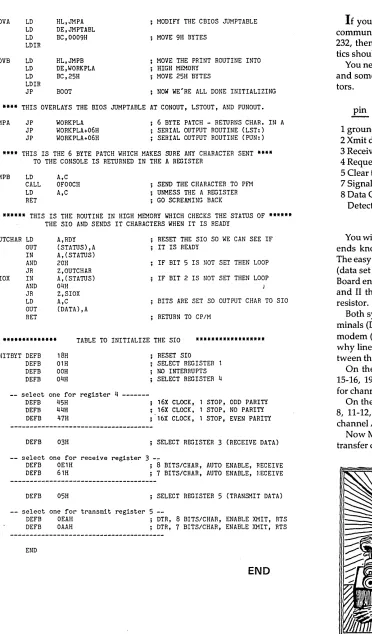
Serial Print Driver
By
David Thompson
The following is the much-requested general purpose serial printer driver for the BB I. It was written for the Crowe Assembler. Use your text editor to move the semi-colons around and change the baud rate and BIOS bytes to set it up for your system.
Then assemble it and you are on your way. Those of you writing software for others might look at the heading. This is the kind of information that I like to get with a new piece of source.
•••
(Letters continued)
Dear Editor,
Oh Where, Oh Where has my Micro C gone?
Oh Where, Oh Where can it be? If it's ready, dear Dave,
will you send it along?
Or has Oregon dropped into the Sea?
PhilPlumbo
1128 Dayton
5t Paul MN 55104
Editor's note:
OK Phil, we were late with issue #8 (and we'll be late again with this issue). But since you're so well versed, I feel I have to reply. Though there is no rhyme nor reason for it.
There once was a journal so witty, that it didn't belong in the city,
so it packed up its kit, moved even the wit,