Tennece:rnp SYShSdY,S, Inc.
Installation and Operating Instructions
TENNECOMP TP-1346-8/e
AUTOf-AATIC LOADER
August I 1971
INTRODUCTION
OPERATION
INSTALLATION
ATTACHlv\ENTS
TABLE OF CONTENTS
CONTENTS OF AUTOLOADER
2
3
4
TENNECOfv\P TP-1346-8/e AUTOMATIC LOADER
INTRODUCTION
The TP-1346-8/e "TENNELOADERII is intended for use with the PDP";'S/e computer. In order to prepare this'; computer to read binary programs, it is necessary first to read in a binary loader program. Because this program is too long to key in conveniently by hand, a shorter program, known as the RIM (for "read in mode"} loader, is usually keyed in. The binary loader is then loaded from the Teletype or from a high-speed paper-tape reader. The TENNELOADER removes the necessity for keying in a program manually. By placing the console switches in the 0 position and pushing the "go" button on the TENNELOADER, the TENNELOADER will simulate the manual keying in of d program •. Any program which requires up to 128 manual steps may be
loaded. Disk or tape bootstrap loaders or an abbreviated version of the binary loader may be load~d rather than the RIM loader.
Besides removing the necessity for keying in the RIM loader manually, the TENNELOADER may be used for completely automatic loading and starting of a program. This is useful if the system is to be operated by production workers, or if the rapid recovery from an error or system failure is desirable. The simplest method of automatically reloading a system program is to arrange the program into a continuous foopand keep it in the Teletype reader. The TENNELOADER can then load in a short program which wi
II
search for the 'beginning of the system program, read it in, and then start it up.2
OPERATION
The TP-1346-8/e is a solid-state device which automatically ,loads a program into the PDP-8!e and optionally starts it. The loading may
be
actuatedby liHing
the"SW
Key" onthe
front panelof
thePDP-ale,
or itmo)'be ac!"uated remotelyby
the addif'ion of a SPDT switch.The TENNELOADER simulates the way in which an operator would load a short program from the console. The circuits are similar to those on the front panel controls, except that a 128-word, 16.:.bit read-only memory contro
Is
the operation of the switches.When the TENNELOADER is actuated, the read-only memory steps up to 128 positions. Sixteen output bits at each location have the" following function:
BITS 0-11 "D A T A 0-11
BIT 12 LOAD ADDRESS
BIT 13 DEPOSIT
BIT
14
CLR&
STARTBIT
-15
INHIBIT(Corresponding to the 12
PDP-8!e front panel Key switches.)
(Corresponding to the Load Address Key) (Correspondi to the Deposi t
Key.)
(Corresponding to the Clear
&
Start Key - also resets Tenneloader for the next operation .)
Use for conditional loading under the control of a switch or iumper.
The loading process starts with momentarily hitting the "SW Key" on the front panel of the PDP-8/e or actuating a remote SPDT switch. The position of the front panel switches is immaterial as they are duplicated by the autoloader. When the loading switch is actuated, the autoloader generates a HALT command to stop the computer action (if it is running) and then loads the program stored in its ROM. (The loadi n9 process takes tf;}ssthanO.2'sec.) When theJooding is completed, the program just loaded is executed
3
INSTALLATION
The TF)-1346-8/e is __ ~onstrlJctcd on a stcmdard PDP-8/e card which plugs into the OMNIBUSQ-;. When your TENNELOADER arrives, inspect the board corefully to see if i-here are any dam<'lged components or any loose material clinging to the board.
Plug the board into any spare slot of the PDP-B/e, making sure
not to pI U9 the board i nbackwards. (e.g., Make sure that the components ore on the same side as 0
I
J the other PD P-8/ e boards.)There are several jumpers on the TENNELOADER board which may be positioned at the time of installation. The options are:
External Start SV/itch:
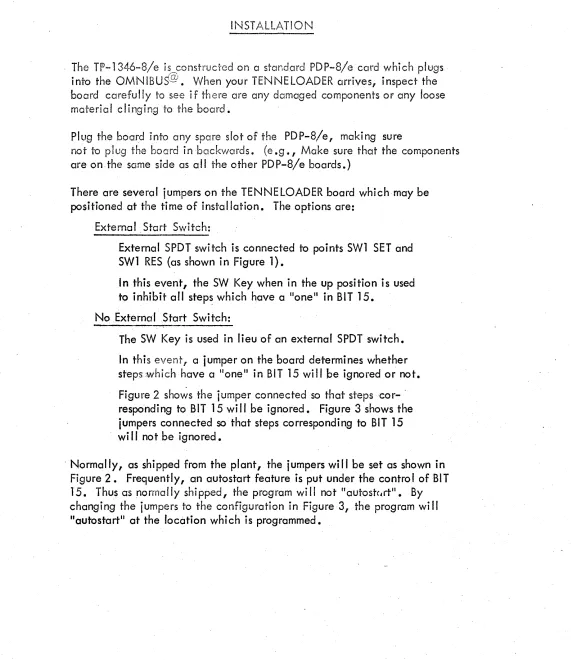
External SPDT switch is connected to points SW1 SET and SW1 RES (as shown in Figure 1).
In this event, the SW Key when in the up position is used to inhibit all step~ which have a "one" in BIT 15.
No External Start Switch:
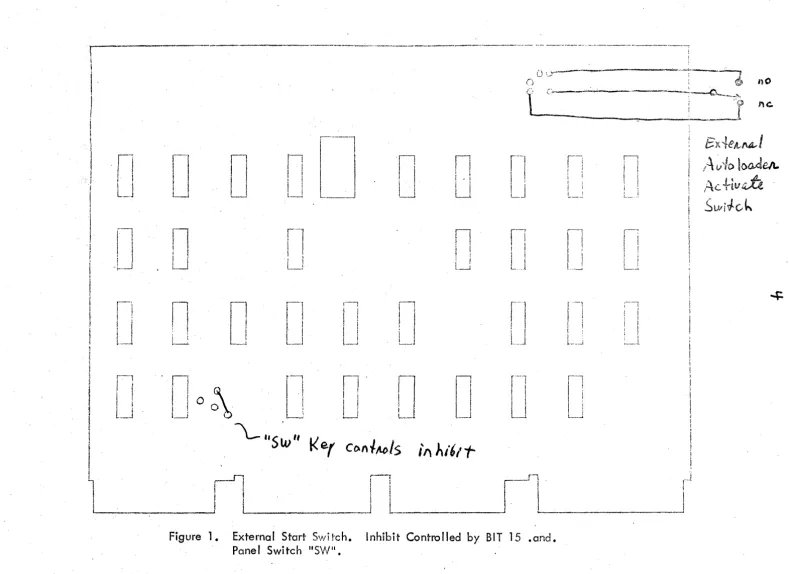
The SW Key is used in lieu of an external SPDT switch.
In this event 1 a iumper on the board determines whether steps which have a 1I0neli
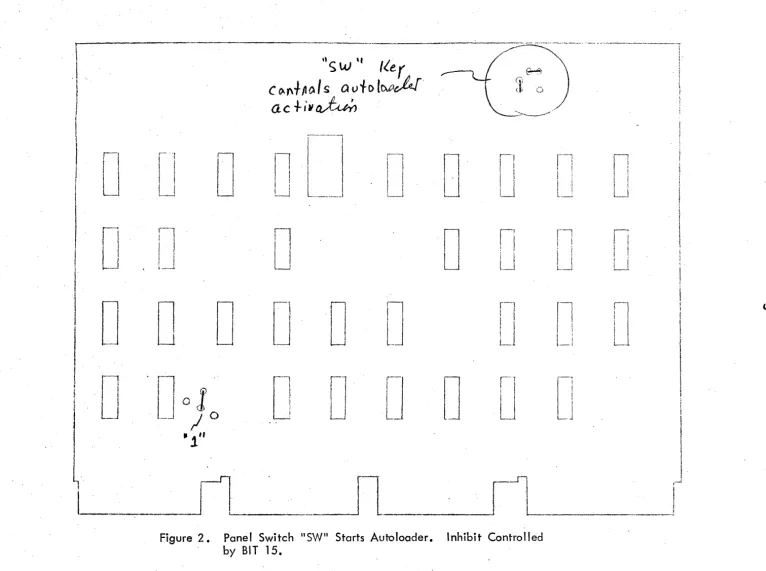
[image:5.612.31.602.89.749.2]in BIT 15 will he ignored or not. Figure 2 sho~s the jumper connected so that steps cor- . responding to BIT 15 wi II be ignored. Figure 3 shows the iumpers connected so that steps corresponding to BIT 15 wi II not be ignored •
I \
I
]
i
I \I ,-:
, I
I
• I ' I I I I I I
I
L_.JI
i
I
I
,1'1
II
I
!
;
1I J I I ! - - . J
!
I
I I t !I
Ii
Ij
i
I
i
,
I
,-'"!I
i
i i
! :
I 1
L_J
I '
I
I
U
1
'I
1 I
l
!U
' !
I '
!
I
: i
i ~
I ,
' < r---j
1 I
I
10
i_J
n
~ I 'I I
I !
I
~ Ii
l---.J
I
r--l
r
!
I
! I It~i
o
[1
L-l
~.
,0
~
"Sw"
i
1
r1
.---,
I
I
IL_-1
r---,
i I
i I ! !
l-J
n
I
I
I '
I I
i...--J
'n
I
!
!
l,i !
I~, __ !
n
I '
l
I
I
I
L_l
rl
L_l
n
i -iI i
U
n
I ,
1 •
; I
I ,
l----,
II
I
I
Ll
Ke.f
C()nlM/s
j'"
}..i6l
tr
-t i
I
I
~I __ ~ ____________ ~II
'---
1L __
o
\.~~;-. " L '-'-~---,(} ; @ nO
{.'[' .{-:~~---~ - ~...:,\>~
"~I'
"
;
"'''''~--~'''_
-'~~,nCo
- - -_ _ _
~---:-.-...~I
r--'
I l
1 '
!_J
fl
I iI !
I '
, ! I .
I I
L- __ 1
r-'-l
!
!I
{\ ,
I I
L .. J
r-
1I
I
I
I
U
,Jl
iI
t'
I
r-
1
I
L
r i
!
!
I \
L-..1r-l !
J
-'"
13
x{eA~NL-1
/\ v
~/o
loa,deA.
" a t .4-. {4; G TtV 4',A...t
Sl.viJc-h
...;:
Figure 1. External Start Switch. Inhibit Controlled
by
BIT 15.and.
[image:6.794.2.791.15.588.2]i --~----~-.
J,'
~,
""-" -'-,-,--~--"---"-'---~-~ (t j
I
iI
I
I
I
! II
I - I
i
I
I
ILJ
n
LJ
o
n
~
~ I
LJ
r
J
o
n
~"5
w"
Iler
c~1\tJ1()ls Qvf{)(w~~
ac+i~J~
r---l
fl
I
I
I I 1
I
. : I
I ; I '
U
L
In
I I
L--lD
o
_~ _____ l
·fl
U
o
r - - - - ,
i !
I I
I i
I I I , j I
L--1
n
1
I
L-1
r-]
L.
...---, H ) '
! '
.'
\ . : £ o , !
~>-
_ _ / iII
U
o
o
r-!
I
i: I
!
il~
II
!
I
I
I
l_i11
~ I
!
ILl
11
!
I
I
I
L
r----; I !
1 i 1 ~
!
~_.--lI
fl
I l I ; I .
1_1
11
I \
L-~ . ...!
I'
! !L_J
!
i jI ' ~~,
n
I I
Ll
J~
I
I
. __ ~_1
Figure 2. Panel Switch "SW" Starts Autoloader. Inhibit Controlled
by BIT 15.
[image:7.801.11.777.14.585.2]G
.... _ , . , _ , - . , ... _ ... "' .... "'_"~ _ _ " ".~ . _ . • • • ~~ ,~_~~ ... ~ •• ,,"'_.'"~, ~ ••• ~ . _ . _ .... "~ • • w ... ¥. _ _ _ ,...-••• ~ .. ,., •• ~" .. _ _ . . . _ • • _ _ ~~, • • _ ... " •• "I' . . . . ~ . . . ~,, _ _ _ _ • ~_"""""'''''''~_'''_''' _ _ ... , ... _ . . . .-•. . . ,..._""_.""._.~ ... , . " _ . ~._ . . . n_".'_ ... , •. ..." .. ~-.... - -... .
'';.~
~
.:::;.
\.J
\.1'
-_
.• -.-... ~.-,L. __ ... _
..
..i
!
'--"'~---'-lL_ ... _._-'
~
... '---'1
t._." ... __ .. __ .J
r-·---·_···,--·
i
I
i. _____ .. __ ... __ .
.J
[--"--"'J
.~.-...-
...[
_ ... __ .•.•.. __ . J _ .._
.._--,
c·_-_·· .. -",
..
_~.___ ._.J
,-
---_
... --.. _ (1
I
I ______ .... ___ . ..J
r---'-"--]
L..~_. _ _
[
--_. _· .. -····-1
- - -..., ... -- """--'--"1
l-_ .. __ ... __
J
['---'-J
~-....-~---r·· ..
-·~~·-lL ... _._ .. _.J
r·-··---·J
L __ .... " ... __ J
[--_
....".]
" ..
..,.I::'
'---,
7
ATTACHMENTS
8
.
\,'.':~r ,\ 7
l~:"
\'
i-i A\.
i· ~ J. '\" ~'~.' ~."
rit
. 1.
7(' ~:i '/ \ '/ -.,:,;
'I':, 6', i \ :.~ (:\ ::i
. '/ ,-:~,,;:~ 1. \ . / fl r'~:.-l
f/ {~, r:~<:;~ \~ () .'3 "} 5 7f, 6 :5 \ l~ ::: 1 (:
7f~ ,~~ .C) '\ ~ :-~ ~) 1
7667\/! '?, 16
76 '/!, \ 7 S ';> 1
76 'f9, \ 1 '7 :~":1
767/1. \;~ ~J ~:I(;
'I('~ 7 .":, \ ~") l.? 1 76 7 6 '\ ~)? S 7 7677 ", h ~~ 1 (; 77 (:1
n \
:1 ~3 3 '1?7 1\7;l;:~5 77'~':')\h~~'f'5
77:-;) 3\ '"I ~~n; 3 77'1 It \ (-, :'iq 7 5\77. 1 77 '7; ;; \. 7 ;"'; I' 1 '17 :':) 'I \ 1 ~~:3 (]
771 \7'<I~i
Ti 1. 1 \:) '7 ~.:~ 7
771 '?\ 1·~~1')/)
77', ~\-;~~ 1. 1.
77 ll~ \ 7 J:? ;;
7715\ 5~?()i)
7,/ 1 7 \ '.' 7 ~~
7', ' :,,,} \. .::~::~ 1 7 77 :-~ 1 \ .':) ::::: l!)
77 (~ ;"~ \ 'i ,; 5: J 'It' ~:) ::~ \ I:) ~i 1 :~: