Abstract—One of the most important areas of artificial intelligence is computer vision-based objects recognition and perception of the environment in general. It is known that the artificial neural networks (ANN) training process is a rather complicated, delicate and time-consuming process. Collecting the data needed for training and giving it such form that will be required for a given moment makes this process even more complicated. The achievement of the desired goal requires a large amount of work and, accordingly, takes much time. Since the tasks related to the training process in the majority of cases must be performed by a human, and in the case of process automation, human intervention is to some extent still required. For this reason, we suggest a new approach implementing the software which makes possible to detect unknown object independently by computer vision, and then automatically carry out the steps necessary for the training process. In other words, by means of this algorithm, detection of unknown object in the frame occurs and then automatic search of materials necessary for training via the Internet (or elsewhere) and after collecting the desired amount of information, the training of artificial neural networks starts. As a result, we get a perfect file of Haar Cascade type format and the given object is added to the list of the known objects. In our opinion, this approach is convenient and gives artificial intelligence a greater degree of autonomy provided by computer vision.
Index Terms—Artificial neural networks, computer vision, haar cascade, object recognition, training process, unknown object detection.
I. INTRODUCTION
HE software created by realization of our approach is
based on a better solution of two main problems. They are: independent detection of unknown object by means of
Manuscript received February 25, 2018.
I. Kardava is with Sokhumi State University and the Research Laboratory of Computer Innovations and Communication Technologies at the Sokhumi State University, Politkovskaia 61, Tbilisi, 0186, Georgia (corresponding author to provide phone: +995 599 336867; e-mail: [email protected]).
N. Gulua is with Sokhumi State University and the Research Laboratory of Computer Innovations and Communication Technologies at the Sokhumi State University, Politkovskaia 61, Tbilisi, 0186, Georgia (phone: + 995 322 541 405; e-mail: [email protected]).
B. Toklikishvili is with Sokhumi State University and the Research Laboratory of Computer Innovations and Communication Technologies at the Sokhumi State University, Politkovskaia 61, Tbilisi, 0186, Georgia (phone: +995 597 018391; e-mail: [email protected]).
J.Antidze is with Sokhumi State University and the Scientific Research Institute Of Informatics at the Sokhumi State University, Politkovskaia 61 Tbilisi, 0186, Georgia (phone: +995 555 231237; e-mail: [email protected]).
computer vision [1-3] and automatic search of the materials on the Internet or in special stores, necessary for training and creating of the shape of a figure. In other words, using our approach, the program itself must recognize which of the objects located in the frame is unknown to it. Then it must create their contours, define the regions of interest (ROI) and cut them out from the main image. As a result, we obtain the data that represents visual information as to what content of files are to be searched and collected for successive implementation of the training processes. If the number of unknown objects is more than one (the training processes can be conducted in parallel mode, but the computer resources given at a particular moment should allow to do this. Therefore, despite the duration of training process, we recommend a serial mode by default).
Let us consider our principles for unknown object detection. In order for computer vision to detect the existence of this unknown object in the frame, it is necessary to arrange appropriate external conditions [4-5]. In our case, first of all, it is necessary that the background color of the frame to which the camera is directed should be white. Then, we insert the desired object or objects to the frame. In parallel with this original video signal, we receive a corresponding signal transformed into a black and white color. A black-and-white signal is a convenient condition for creating the necessary contours. In its turn, the contours provide information on where the area of our interest is located and also what its area is. Thus, we can detect where the object is in the picture, and what size should be cut out from the image of the original signal.
The successful completion of the above-mentioned stages means that the unknown object has already been given in the form of a cropped image and an independent file (we keep unknown objects in the "jpg" format).
At the next stage, the program should search and collect the files containing a certain number of visual content based on images of unknown object or objects and store them in separate folders in the computer memory. We use Google’s search engine and one of its possibilities that is image-search on the Internet based on the given input image. The number of collected pictures is possible to indicate a person. In general, it is desirable to have as many images as possible in order to get a high level of quality in Haar cascade format [6-7].
In addition to the above listed, we carried out the collection of existing software modules into one and complete automation of each step that is necessary for the successful operation of haartraining.
As soon as we receive the results of the trainings in the
Training Process Automation for Computer
Vision
Irakli Kardava, Member, IAENG, Nana Gulua, Member, IAENG, Beka Toklikishvili and Jemal Antidze
form of “xml” file types, we can check the results of the work carried out independently by the program in the dynamics. The software that switches on computer vision is based on the OpenCV libraries [8-9]. Due to the content of the problem we have put forward, it is important to know the name of the object already studied. If the name has not yet been assigned, the program allows us to call [10] the identified object, i.e. semantic meaning.
This issue will be important for our next goals, where we plan to construct sentences according to the names of the identified objects. Then, we will make syntactic and morphological analysis of the obtained sentences [11-13]. However, this issue is not considered in this paper.
It should be emphasized that for establishment of the contours of the unknown object and then their scales after several attempts, the best result was given by white color of the background. Therefore, we have chosen the white color. After successful completion of the training, the recognition of the given object is possible both on a single-color background and video frames with any number of colors. The main thing is that the discernibility should be of good quality.
That is when the program works in dynamics, then the white color is no longer necessary to identify the already known objects object(s). Here are both, static and moving objects.
II. DESCRIPTION OF THE SOFTWARE
For detailed description of the software and principles of its operation, it is convenient to start the explanation with a graphical interface.
A. Software Interface
[image:2.595.306.550.158.417.2]Due to the fact that the software is composed of several modules, the visual sides of its sections differ from each other. The main window of the program is shown in Fig 1.
Fig 1. The main window of the software.
As shown in Fig 1, the program has two main sections.
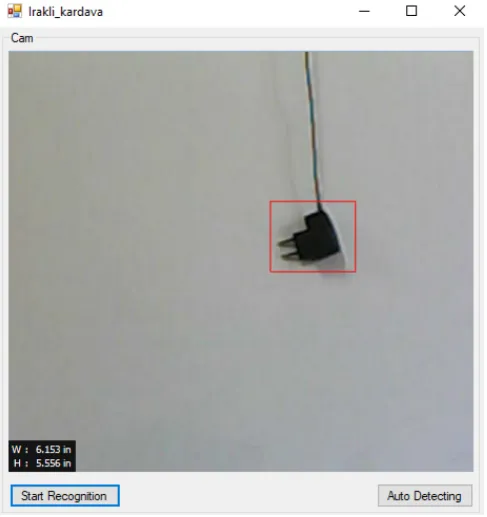
The first one is designed to detect the objects already studied in the dynamics of video signal. It should be also noted here that several objects can be recognized immediately. As long as they are in the frame, the areas of interest will be marked with special indicators (in our case with red rectangles). See Fig 2. Actually, the purpose of this section is to show the results of the works carried out in advance.
Fig 2. Section of the earlier studied objects recognition by computer vision.
[image:2.595.59.546.516.768.2]The second section (see Fig 3) is intended directly for the implementation of the approach that is offered by us. It is just here that the algorithm for detection of unknown objects and then cutting them out and searching the data required for training and training automation process is implemented.
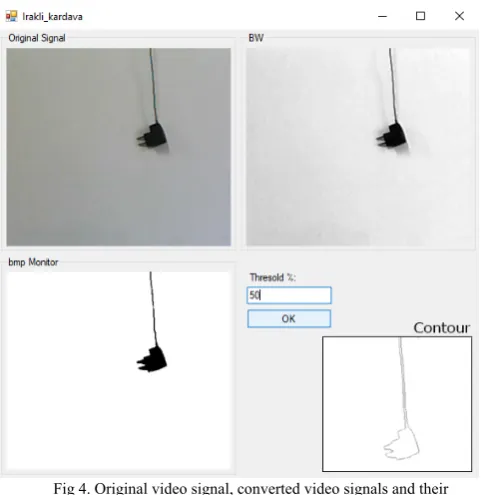
[image:2.595.299.549.521.763.2]Besides program code and video camera, for achievement of the desired software results it is essential to arrange mini studio. The main requirement for setting up a studio is a good light and existence of a white color background. The argument further confirming the optimality of the existence of white color background is the following fact: when we transform the original signal, which is colorful, into black and white and on its base create "bmp" type files, we get a matrix consisting of zeros and ones (grayscale system is meant). Threshold percentage indicator can be changed by a human if needed. Then manipulation will be easier to get contours and coordinates. This means we have improved the quality of the results by this approach.
[image:3.595.331.524.51.431.2]If the computer is equipped according to our requirements, the given camera will be turned on. A colored signal will come from it and right here in real time we will get the converged signal and the appropriate frames that can be monitored on the same window. See Fig 4.
Fig 4. Original video signal, converted video signals and their monitoring.
At the initial stage, our algorithm does not react to the white color because it is known to it in advance that when the image consists only of white color, it means that other object is not yet given. As soon as the other colors are also added to the white color, i.e. the object will enter the object, its detection occurs. The above mentioned steps start action. After the program starts operation independently for obtaining the desired results, a human does not have to take part in it. Therefore, in order to have information about the current stages, a special area is created on a graphical interface where the texts concerning the progress of the ongoing works will be released.
III. DESCRIPTION OF THE PROGRAM PART
[image:3.595.48.290.282.530.2]To describe the program part, it will be convenient to observe the scheme of its operation principle. See Fig 5.
Fig 5. The structure of the software operation given schematically.
After successful downloading of the software and all its modules, in order to start work the given camera should be directed to the mini studio. On the basis of the input signal, we can operate the first section where the identification of already known objects is possible. Also, we can operate the same signal for the second section that is designed for training process automation. As shown in Fig 5 the second section has three main modules. They are:
1. Automatic identification of unknown object; 2. Searching and collecting the necessary files; 3. Automation training.
Let’s consider each of them in succession:
A. Automatic Detection of an Unknown Object
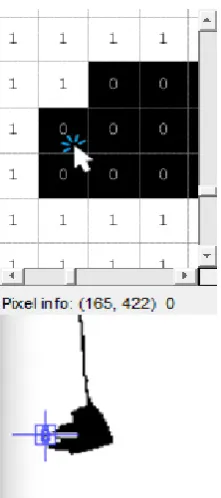
coordinates where the number different from one occurs, i.e. the black color. When the cycle is over, the points constructing a contour will be given [14-15]. See Fig 6.
Fig 6. Binary matrix corresponding to the graphical data, its elements, pixels and coordinates.
As for the size of the object according to which the object given on the original picture must be cut off, it will be a rectangle area consisting of the contour height and width. These data are enough to get the required graphic information from the video signal and store it as a separate file.
B. Search and Collection of the Necessary Files
When we obtain the cut off images and the previous module returns information on successful completion of the process, the second module is automatically activated and receives an image as incoming file that was transferred to it from the previous module. After this, the search of the pictures in the Internet or the special stores and downloading in the local memory occurs. At this stage, we use Google's known function to find images on the Internet. See the fragment of our program code that sends a picture of the studied object to Google and stores the results on the hard drive. See the code fragment:
$strings =
(get_web_page('https://www.google.com/search?q='.$searc
h.'&gbv=2&start=0&hl=en&ie=UTF-8&safe=off&sa=N&tbm=isch&gws_rd=ssl')) ; $linkString = implode(" ",$strings);
$resImage = preg_match('/<td style="width:25%;word-wrap:break-word">(.*)<\/td>/siU', $linkString,
$price_matches);
$resImage = preg_replace('/\s+/', ' ', $price_matches[1]); preg_match_all('/<img[^>]+>/i',$linkString, $img); for ($i = 0; $i < count($img[0]); $i++) {
preg_match('/src="([^"]+)/i',$img[0][$i], $imgage); $RezultImageSrc[] = str_ireplace( 'src="', '', $imgage[0]); }
$rezultViewArray = $RezultImageSrc;
for ($i=0; $i < count($rezultViewArray) ; $i++) { $view = "<img src='".$rezultViewArray[$i]."' />".$rezultViewArray[$i]."<br/>";
echo $view;
C. Automation Training
To begin with, let us bring the existing possibilities and discuss the approaches to them in a succession [16].
Training Steps to Create a Haar-like Classifier:
1. Collection of positive and negative pictures required for training;
2. Marking the region of interest on positive pictures using objectmarker.exe;
3. Creation of “vec” (vector) file (on the base of the regions marked on the positive files) using the Createsamples.exe;
4. Classifier training using haartraining.exe;
5. The use of the classifier by means of software (on the basis of Open CV-libraries).
The performance of each member of the existing list requires human control. Our idea is that a result the obtained *.xml file independently connect with the software. It should be noted that not only automation of the first two members of the list occurred but it can be said that we managed to offer their alternative versions (see subparagraphs 2.1 and 2.2). This means that the listed members 1 and 2 are replaced by our approaches. As for createsamples.exe and haartraining.exe, we are giving them arguments from our program (of course the parameters will be different at each time, more specifically, they will be in correspondence with the number and size of the given graphical files) that are necessary for the successful completion of the relevant processes.
An example of the list of parameters required for Createsamples.exe:
-info path1/inf.txt - Path for positive info file;
-vec path2/facvect.vec - Path for the output vector file;
-num 250 - Number of positive files to be packed in a vector file;
-w 50 - Width of objects; -h 50 - Height of objects.
The list of the required parameters for Haartraining.exe: -data - Cascades Path and for storing the cascade of classifiers;
-vec data/vector.vec - Path which points the location of vector file;
-bg negative/bg.txt - Path which points to background file
-npos 250 - Number of positive samples ≤
no. positive bmp files;
-nstages 15 - Number of intended stages for training;
-mem 2048 - Quantity of memory assigned in MB;
-mode ALL - Look literatures for more info about this parameter;
-w 50 -h 50 - Sample size;
-nonsym - Use this if your subject is not horizontally symmetrical.
As shown in the examples, the syntax and sequence required by these programs are preserved. This means that we do not change the principles of operation of already existing programs. But we have formulated an approach the use of which the existing software capabilities can operate independently.
IV. CONCLUSION
If the color of the given object and background color (white) almost coincide with each other, naturally, achieving the high quality contour will be complicated. In this case, it is necessary to create three matrixes from each layer of RGB file which will have a much better result for the next segmentation steps.
Therefore, we can state that the software implementation of the task set by us has been successfully realized. Its application provides good quality results. If we compare the time required by similar processes, we will see that the proposed system is faster. Also, the involvement of a man is reduced to a minimum. Besides the local perspective, on a global scale, the program has a positive effect during operation with other areas of artificial intelligence. During its creation, it was taken into account that its integration with other modules may become necessary in a parallel regime. For example: text reader, speech recognition and other systems. In our view, the present work deals with one of the most interesting problems and describes our vision of its solution that results in greater independence ability for computer vision. During creation of software we mainly made use of: Visual Studio 2012, programming language C#, php, html, OpenCV libraries and modules of Matlab R2015a - Image Processing tools.
ACKNOWLEDGMENT
We greatly appreciate the assistance provided by the Sokhumi State University administration throughout this study.
Also, we greatly appreciate the assistance provided by the Scientific Research Institute of Informatics.
REFERENCES
[1] T. Joachims, T. Finley, and C. Yu. Cutting-plane training of structural svms. In Machine Learning, 2009.
[2] Irakli Kardava, Krzysztof Tadyszak, Nana Gulua, Stefan Jurga, "The software for automatic creation of the formal grammars used by speech recognition, computer vision, editable text conversion systems, and some new functions," Proc. SPIE 10225, Eighth International Conference on Graphic and Image Processing (ICGIP 2016), 102251Q (8 February 2017); doi: 10.1117/12.2267687.
[3] Scott E. Umbaugh. Computer Vision and Image Processing: A Practical Approach Using Cviptools with Cdrom, Prentice Hall PTR Upper Saddle River, NJ, USA ©1997, ISBN:0132645998.
[4] B. Heisele, P. Ho, T. Poggio, "Face Recognition with Support Vector Machines: Global versus Component-based Approach", Proceedings. of the Eighth IEEE International Conference on Computer Vision (ICCV’01), Vol. 2, 09-12 July 2001, Vancouver, Canada, pp. 688-694.
[5] R. Padilla, C. F. F. Costa Filho and M. G. F. Costa. Evaluation of Haar Cascade Classifiers Designed for Face Detection, World Academy of Science, Engineering and Technology International Journal of Computer and Information Engineering Vol:6, No:4, 2012. [6] Mahdi Rezaei, Hossein Ziaei Nafchi, Sandino Morales, “Global Haar-like Features: A New Extension of Classic Haar Features for Efficient Face Detection in Noisy Images”, 6th Pacific-Rim Symposium on Image and Video Technology, PSIVT 2013.
[7] Mahdi Rezaei, Reinhard Klette, “Adaptive Haar-like Classifier for Eye Status Detection Under Non-Ideal Lighting Conditions”, Proceedings of the 27th Conference on Image and Vision Computing New Zealand (IVCNZ), pp. 521- 526, 2012.
[8] Gary Bradski, Adrian Kaehler, Learning OpenCV: Computer vision with the OpenCV library, " O'Reilly Media, Inc.",2008/9/24. [9] Richard Szeliski, Computer Vision: Algorithms and Applications,
Springer Science & BusinessMedia, Sep 30, 2010 - Computers – p. 812.
[10] Rautaray, S.S. & Agrawal, A. Vision based hand gesture recognition for human computer interaction: a survey. Artif Intell Rev (2015) 43: 1. https://doi.org/10.1007/s10462-012-9356-9, Springer Netherlands. [11] D. Klein and C. Manning. Accurate Unlexicalized Parsing. In
Association of Computational Linguistic, 2003.
[12] A. Acho and J. Ulman, The Theory of Parsing, Translation and Compiling, USA: Englewood Cliffs, 1, (1972).
[13] J.Antidze, N.Gulua, I.Kardava, The Software for Composition of Some Natural Languages’ Words, Lecture Notes on Software Engineering, vol.1, #3, Singapure, p.p. 295-297, August 2013. [14] Szymczyk, Magdalena and Piotr Szymczyk. "Matlab and Parallel
Computing"Image Processing & Communications, 17.4 (2013): 207-216. Retrieved 20 Dec. 2017, from doi:10.2478/v10248-012-0048-5. https://www.cs.auckland.ac.nz/~m.rezaei/Tutorials/Creating_a_Casca de_of_Haar-Like_Classifiers_Step_by_Step.pdf
[15] Fares Jalled, Ilia Voronkov. Object Detection Using Image Processing. Moscow Institute of Physics & Technology, Department of Radio Engineering & Cybernetics, arXiv:1611.07791v1 [cs.CV] 23 Nov 2016.