RASTER TECHNOLOGIES MODEL ONE
RASTER TECHNOLOGIES MODEL ONE
ALPHANUMERIC TERMINAL EMULATION PROGRAMMING GUIDE
Alphanumeric Terminal Emulation Programming Guide
ALPHANUMERIC TERMINAL EMULATION PROGRAMMING GUIDE June 24, 1983
Copyright 1983 by Raster Technologies, Inc. All rights reserved. No part of this work covered by the copyrights herein may be reproduced or copied in any form or by any means--electronic, graphic, or mechanical, including photocopying, recording, taping, or infonnation and retrieval systems--without written permission.
NOTICE:
The information contained in this document is subject to change without notice.
RASTER TECHNOLOGIES DISCLAIMS ALL WARRANTIES WITH RESPECT TO THIS MATERIAL (INCLUDING WITHOUT LIMITATION WARRANTIES OF MEHCHANTIBILITY AND FITNESS FOR A PARTICULAR PURPOSE), EITHER EXPRESS 'OR IMPLIED. RASTER TECHNOLOGIES SHALL NOT BE LIABLE FOR DAMAGES RESULTING FROM ANY ERROR CONTAINED HEREIN, INCLUDING, BUT NOT LIMITED TO, FOR ANY SPECIAL, INCIDENTAL, OR CONSEQUENTIAL DAMAGES ARISING OUT OF OR IN CONNOCTION WITH THE USE OF THIS MATERIAL.
This document contains proprietary information Which is protected by copyright.
Alphanumeric Terminal Emulation Programming Guide
Table of Contents
1.0 INTRODUCTION 4
2.0 ALPHANUMERIC TERMINAL EMULATION COMMANDS 6 3.0 WINDOW DEFINITION, SELECTION, AND D.ELETION 7 4.0 MOVING AROUND THE WINIX.M 9 5.0 WINDOW AND TEXT CHARACTERISTICS 10
6.0 ERROR MESSAGES 11
7.0 ALPHABETICAL COMMAND REFERENCE 12
ALPHEM 13
BOLD 14
DEEWIN 15
DELWIN 17
DIRCUR 18
GETCUR 19
GETPOS 20
GE'lWIN 21
HOME 22
MOVCUR 23
OVRSTK 24
SCROLL 25
SELWIN 26
SETCUR 27
SETSIZ 28
WRAP 29
8.0 INDEX 30
Alphanumeric Terminal Emulation Programming Guide
1.0 INTRODUCTION
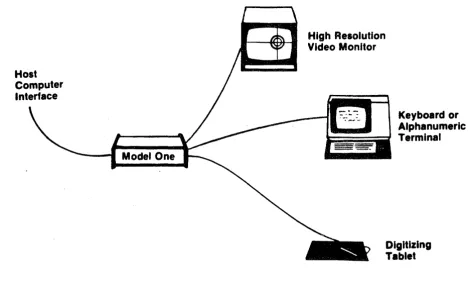
This manual describes the alphanumeric terminal emulation commands. These commands use the Model One monitor as an alphanumeric tenminal, thus allowing a Model One workstation to be operated with the Model One, a local keyboard, and a monitor. Under these circumstances, no local tenminal is needed.
This manual includes 7 sections, as described below. Section 2.0 Alphanumeric Tenminal Emulation Commands This section describes this command:
ALPHEM Enables or disables terminal emulation; keyboard and host to the selected window. Section 3.0 Window Definition, Selection, and Deletion
routes text from the
This section describes the commands to set up the scrolling text windows as desired.
DEEWIN Defines the size and position of up to 9 scrolling text windows. SELWIN Selects a previously defined window.
DELWIN Deletes a previously defined window.
GE'lWIN Returns the number of the currently selected window. Section 4.0 Moving Around the Window
This section describes the commands for moving around the selected text window:
DIRCUR Moves the cursor to a specified character position. GETPOS Returns the character position of the cursor.
MOVCUR Moves the cursor to a specified Model One coordinate position. GETCUR Returns the Model One coordinate position of the cursor.
HOME Moves the cursor to character position (0,0). SETCUR Enables or disables drawing of the cursor. Section 5.0 Window and Text Characteristics
This section describes the commands used to define the window attributes, such as color and text size:
BOLD Enables or disables drawing of bold text.
Alphanumeric Terminal Emulation Progranming Guide
OVRSTK Enables or disables overstriking of text.
SCROLL Enables or disables text scrolling. SETSIZ Sets x and y scaling of text.
WRAP Enables or disables text wraparound.
Section 6.0 Error Messages
This section lists the possible error messages. Section 7.0 Alphabetical Command Reference
This section provides complete details of all commands associated with the alphanumeric windows.
Alphanumeric Terminal Emulation Programming Guide
2.0 ALPHANUMERIC TERMINAL EMULATION COMMANDS
A single command is used to start and stop the alphanumeric terminal emulator; it is described in this section. Use of the windows is described in detail in the following sections. When the Model One is factory-configured for a keyboard attached to the KEYBSIO port, the Model One coldstarts with window 0 . defined and selected; all window attributes, such as bolding and text size, are set to their defaults. No other windows are defined. Any text that is typed at the keyboard will go to the text window.
The command ALPHEM ON is also executed during coldstart. This instructs the Model One to send all text from the keyboard to the window; if you wish to turn off the alphanumeric text emulation environment, you can use the command ALPHEM 0 or ALPHEM OFF.
Alphanumeric Terminal Emulation Programming Guide
3.0 WINDOW DEFINITION, SELECTION, AND DELETION
Up to nine scrolling text windows may be defined and used for alphanumeric terminal emulation. Window 0 is the hardware-scrolled window; it always uses the entire monitor area. The screen origin register (CREG 4) is used for scrolling, so that changes to CREG 4 will also affect window O.
Up to eight software-scrolled windows-~windows 1 through 8--may also be
defined and used for alphanumeric text. These windows may be any size.
Each alphanumeric window is defined by number. When the window is defined, two diagonal corners are specified, thus giving the window size. (Of course, window 0 always occupies the entire screen, and so these corners are ignored for window 0.) The x and y scaling of the text for the window can also be
defined.
Finally, each window has an associated write mask, which is specified the same way as with the WRMASK command.
The DEFWIN window,xl,yl,xl,y2,x size,y size,bitm,bankm command defines the text window specified by window. Any parameter with a value of zero (0) instructs the DEFWIN command to use the default or existing value. (There is no default for the window corners.) (This is shown in the examples below.) xl,yl and x2,y2 specify the corners of the text window. Windows 1 through 8 can be any size; window 0 will always use the entire screen. x size and y size specify the text size. x_size and y_size are normally set to 1,1 (2,2 for the Model One/40 and the Model One/25 in lK mode); this is equivalent to specifying a text size of 16 with the TEXTC command. x_size and y_size of 2,2 are equivalent to a text size of 32 with the TEXTC command. x size and y size may be different, allowing tall skinny text or short fat text.- -bibn and bankm specify the write mask and are used exactly as they are used in the WRMASK command. Note: because a value of zero for any parameter instructs the DEFWIN command to use the default or existing value, it is impossible to specify a write mask of 0,0. This means, of course, that the write mask can never be set so that no information can be written in the alphanumeric windows.
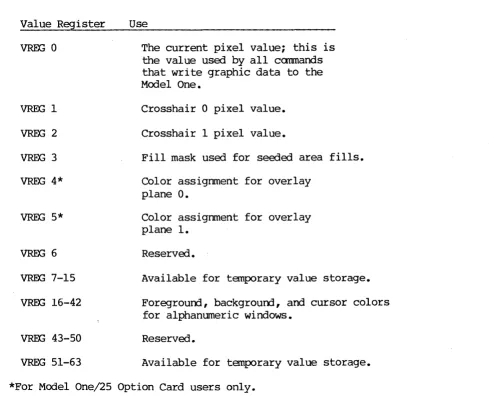
Each window has a foreground, baCkground, and cursor color. A set of three value registers is used for each window to specify these colors. Window 0 uses value registers 16, 17, and 18; window 1 uses value registers 19, 20, and 21; and so on through window 8, which uses value registers 40, 41, and 42.
The foreground color is used for text; the background color occupies the rest of the window. The cursor is an XOR cursor, so that the color in the value register is XORed with the background color to display the cursor. For example, if the background color is red and the foreground color is black, the cursor color value register must be set to cyan for the user to see a white cursor.
For example, to define window 1 to occupy the lower area of the monitor, use all bit planes and banks for text, and have a normal text size, you would use the command:
Alphanumeric Terminal Emulation Programming Guide
DEFWIN 1 -512,-512 512,-450 2,2 0,0
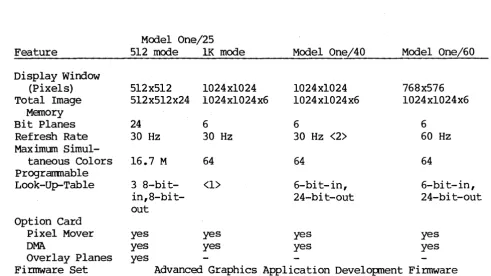
for a Model One/40 or a Model One/25 in 1K mode. could use this command:
DEFWIN 1 -389,-288 389,-240 2,2 0,0
For a Model One/60, you
Then, to set up the desired colors for background, foreground and cursor, you would set value registers 19, 20, and 21.
Now, if you wish to redefine the area of window 1, you can use the command: DEFWIN 1 -100,-100 -50,-50 0,0 0,0
which redefines the area of the window, and sets the text size and write mask back to the default values.
Once a window has been defined, it must be selected before information can be wri tten to the window. Only one window can be selected at a time, and selection of the window "unselects" the previously selected window. The corrmand SELWIN window selects a window; for example, SELWIN 2 selects window 2.
DELWIN window deletes the definition of a window. The window to be deleted cannot be selected.
GE'IWIN returns the number of the selected window. -1 is returned if no window -is selected.
Alphanumeric Tenminal Emulation Programming Guide
4.0 MOVING AROUND THE WINDOW
The alphanumeric·text windows include a cursor. This cursor can be moved to any character position--row and column--or to a Model One coordinate position. For windows 1 through 8, the Model One coordinate position is rounded to the nearest character position; in window 0, the coordinate position is not rounded.
The commands DIRC~~ and ~OME are used to move the cursor to character positions. DIRCUR will move the cursor to an arbitrary position; if it is outside the window, it will move the cursor as far as possible in the right direction. HOME always moves the cursor to character position (O,O)--the first row and first column. GETPOS returns the character position of the cursor.
MOVCUR moves the cursor to a Model One coordinate position; the Model One coordinate position of the cursor.
SETCURenables or disables the cursor.
9
Alphanumeric Tenninal Emulation Programming Guide
5.0 WINDOW AND TEXT CHARACTERISTICS
In using the scrolling text windows, the boldness of the text, the size of the text, whether the text can be overstruck, and whether the text will wrap or scroll can all be set as desired.
BOLD ON or BOLD 1 turns on bolding of text. The boldness of text proportion to its size, as detennined by the SETSIZ or DEFWIN commands. text is the default. BOLD OFF or BOLD 0 disables bolding of text.
is in Bold
SETSIZ xscale,yscale specifies the x and y scaling of text. The default is 1,1. The new size overrides whatever was defined by the DEFWIN command; for windows 1 through 8, the entire window is re-initialized and any text currently in the window is lost. If either ~scale oryscale is zero, the current value will be used.
OVRSTK ON or OVRSTK 1 enables overstriking of characters on the line. Previous characters in the line may then be overstruck without erasing that character. OVRSTK OFF or OVRSTK 0 disables overstriking; this is the default. For windows 1 through 8, only the last character in a given position will renain after the window is scrol,led.
SCROLL ON and WRAP ON enables scrolling and wraparound of text. If scrolling is off--SCROLL OFF or SCROLL O--characters wrap from the end of the bottom line to the beginning of the top line. If wraparound is off, the cursor stays in the last character position on the line until a carriage return in typed. The default is scrolling and wraparound of text.
In addition to these commands, a set of control characters can be used to move around the window and perfonn line functions. These are:
[CTRL-B] [CTRL-E] [CTRL-H] [CTRL-I] [CTRL-J] [CTRL-K] [CTRL-L] [CTRL-M] [CTRL-T] [CTRL-V] [CTRL-Y] [CTRL-\] [CTRL-] ] [CTRL-_]
Clear entire current line
Move cursor up one pixel (window 0 only) Backspace
Horizontal tab to next multiple of 8 characters Linefeed
vertical tab one line (upward linefeed) Fonmfeed: clears entire window
Carriage return Clear to end of line
Move cursor down one pixel (window 0 only) Move cursor left one pixel (window 0 only) Home (move to character position 0,0) Move cursor right one character position Move cursor right one pixel (window 0 only)
Alphanumeric Terminal Emulation Programming Guide
6.0 ERROR MESSAGES
These error messages are generated by the alphanumeric terminal emulation comnands:
7. Illegal parameter: this message indicates that an illegal value for a parameter has been entered. This message will be given for a bad write mask in DEFWIN.
17. Not enough space for definition: this message will be given by DEFWIN or SETSIZ if all available window buffer space has been used. Delete unneeded windows before proceeding.
72. Window not yet defined: this message will be given by SELWIN if the user attempts to select a window that has not been defined by DEEWIN.
73. Bad character size: this message will be given by SETSIZ if an Invalid size has been entered.
74. Bad window size: this message will be given by DEEWIN if an invalid size has been given by the'two window corners.
75. Illegal window number: this message will be given by DEEWIN, SELWIN, and DELWIN if an invalid window number (not 0 through 8) has been entered.
76. No window selected: this message will be given by the commands ALPHEM, BOLD, DIRCUR, GETCUR, GETPOS, HOME, MOVCUR, OVRSTK, SCROLL, SETCUR, SETSIZ, and WRAP if no window has been selected and an attempt is made to execute one of these commands.
78. Cannot delete selected window: this message will be given by DELWIN if the user tries to delete the currently selected window.
Alphanumeric Tenminal Emulation Programming Guide
7 • 0 ALPHABETICAL COMMAND REFERENCE
This section lists, one command to a page, every Model One alphanumeric windowing command. These subsections are included for each command:
SYNTAX: this section gives the command syntax.
FUNCTION: this section describes the function of the command.
PARAMETERS: this section lists the parameters for the command, gives their ranges, and supplies any other needed infonmation on the command para~eters. HOST BINARY COMMAND STREAM: this section gives the host binary command stream and the hexadecimal, octal, and decimal opcodes for the canmand.
FORTRAN CALL: this section describes the FORTRAN call for the command, including the variable names.
EXAMPLE: this section gives an example of how the command is used. RELATED COMMANDS: this section lists any related commands.
The following pages present the Model One commands in alphabetical order.
Alphanumeric Tenminal Emulation Programming Guide
ALPHEM SYNTAX
ALPHEM flag FUNCTION
The ALPHEM command turns the alphanumeric terminal emulator on or off. When the alphanumeric tenninal emulator is on, the selected window of the display monitor is used as a scrolling text window. Any characters typed at the Raster Technologies keyboard are sent to the window. The window must be
defined (see DEEWIN) and selected (SELWIN) before it can be used. PARAMETERS
flag flag=l or ON enables alphanumeric terminal emulator; flag=O or OFF disables alphanumeric tenninal emulator
HOST BINARY COMMAND STREAM
[C2H] [flag] (2 bytes) C2H=302(octal)=194 (decilnal)
FORTRAN SUBROUTINE CALL CALL ALPHEM (FLAG) EXAMPLE
DEFWIN 2 110,110 220,220 1,1 0,0 SELWIN 2
ALPHEM ON
RELATED COMMANDS
Defines window 2 with default write mask Selects window 2
Turn on alphanumeric tenminal emulator. Subsequent characters typed at the local keyboard are sent to window 2
all alphanumeric tenminal emulation canmands
Alphanumeric Terminal Emulation Prograrrming Guide
BOLD SYNTAX
BOLD flag FUNCTION
The BOLD command controls the drawing of text. BOLD ON or BOLD I (the default) draws bold text, in proportion to the scaling factor. BOLD OFF or BOLD 0 draws normal (thin) text.
PARAMETERS
flag flag=l or ON draws bold text; flag=O or OFF draws no~al text HOST BINARY COMMAND STREAM
[CCH] [flag] (2 bytes)
CCH=314 (octal) =204 (decimal) FORTRAN SUBROUTINE CALL CALL BOLD (flag)
EXAMPLE
BOLD ON Enables drawing of bold text RELATED COMMANDS
all alphanumeric terminal emulation commands ALPHEM
BOLD DEEWIN DELWIN DIRCUR GE'lCUR GETPOS GE1.WIN
HOME
MOVCUR OVRSTK SCROLL SELWIN SE'lCUR SETSIZ
WRAP
Alphanumeric Tenminal Emulation Programming Guide
DEFWIN
SYNTAX
DEFWIN window,xl,yl,x2,y2,x_size,y_size,bitm,bankm
FUNCTION
The DEFWIN command is used to define the parameters for the alphanumeric windows: the corners, the size of the text within the window, and the writemask. window gives the window number. window=O specifies the hardware-scrolled window, which uses the entire screen of the monitor. This window uses the screen origin register for scrolling; changes to creg 4 will affect window O. In addition, eight other windows are available (window=l to ~). These windows are software-scrolled, and may be any size.
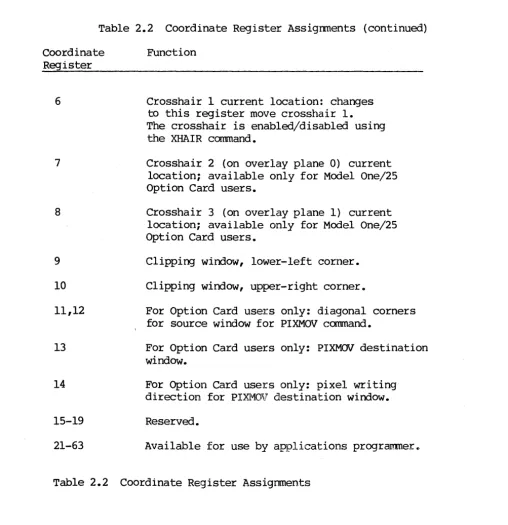
The corners are defined by the Model One coordinate pair (xl,yl) and (x2,y2), where the two points specify diagonally opposite corners. For window 0, these corners are ignored, as the window always occupies the full screen. Windows may overlap and the selected window (for windows 1 through 8) will always be
on top of the other windows.
x size and y size specify the x andy scaling of all text for that window. The scale is equivalent to that specified with the SETSIZ command.
bitm and bankm set the write mask for the specified window. Details of these parameters can be found in the WRMASK command. The default write mask is all bit planes of all banks.
If the size or write mask parameters have a value of zero, the default value is used.
Three value registers are associated with each window: the first specifies the text color, the second the background color, and the third the cursor color. Note that this cursor color is then XORed with the background color to produce the color that is actually seen; for example, if the background is red and the user wants a white cursor, the value register for the cursor color would hold cyan. Window 0 uses value registers 16, 17, and 18; window 1 uses value registers 19, 20, and 21; and so on through window 8, which uses value registers 40, 41, and 42.
For windows 1 through 8, any changes to attributes of the window do not affect the entire window until the window is scrolled. However, changes to the attributes will take place on the current line immediately. For example, a change in the value register for the background color will not change the window until the window is scrolled.
PARAMETERS
window xl,yl
x2,y2
the window number; the range is 0 to 8.
the first corner of the window (ignored for window 0); must be given in Model One coordinates.
the diagonally opposite corner of the window (ignored
bitm,bankm
Alphanumeric Terminal Emulation Programming Guide
for window 0); must be given in Model One coordinates. the x and y scaling of text within the window; range is fram 1,1 (where each character uses a 16-pixel square). The default is 1,1 for a 5l2x5l2 or 768x576 system, and 2,2 for a 1024xl024 system (including lK mode).
specify the write mask, as detailed in the WRMASK command. HOST BINARY COMMAND STREAM
[COH] 1 window] [highxl] [lowxl] [highyl] [lowyl] [highx2] [lowx2] [highy2] [lowy2] [x size] [y size] [bi tIn] [bankm] (14 bytes)
COH=300Joctal) =192 (decimal) FORTRAN SUBROUTINE CALL
CALL DEEWIN (WINDOW,Xl,Yl,X2·,Y2,X_SIZE,Y_SIZE,BITM,BANKM) EXAMPLE
DEFWIN 1 20,20 50,50 1,1 0,0 This command defines window 1 with a lower-left corner of (20,20), an upper right corner of (50,50), a text size of 1,1 and the default write mask of all bit planes and banks.
RELATED COMMANDS
all alphanumeric terminal emulation commands ALPHEM
BOLD DELWIN DIRCUR GE'lCUR GETPOS GE'lWIN HOME MOVCUR OVRSTK SCROLL SELWIN SE'lCUR SETSIZ
"WRAP
Alphanumeric Terminal Emulation Progranming Guide
DELWIN SYNTAX
DELWIN window FUNCTION
The DELWIN command deletes a previously defined window, freeing the buffer space for use. The currently active window cannot be deleted.
PARAMETERS
window the window number, from 0 to 8 HOST BINARY COMMAND STREAM
[C3H] [window] (2 bytes) C3H=303 (octal) =195 (hexadecimal) FORTRAN SUBROUTINE CALL
CALL DELWIN (WINDOW) EXAMPLE
Select window 2
Deletes window 3 SELWIN 2
DELWIN 3
DELWIN 2 Window 2 cannot be deleted; it is selected Error 075
DELWIN: Illegal window number RELATED COMMANDS
all alphanumeric terminal emulation commands ALPHEM
BOLD DEEWIN DELWIN DIRCUR GETCUR GETPOS GETWIN HOME MOVCUR OVRSTK SCROLL SELWIN SETCUR SETSIZ
WRAP
Alphanumeric TeDninal Emulation Programming Guide
DIRCUR SYNTAX
DIRCUR x,y EUNCTION
The DIRCUR command moves the cursor to character position (x,y) within the alphanumeric window. The character positions are defined as (0,0) in the upper~left corner of the window, moving positive in x and y toward the lower-right corner, as shown:
(0,0)
+---+
+---+
(28,3)Note that the first row is row 0 and the first column in column O.
If an attempt is made to move the cursor beyond the window boundaries, the cursor will be moved to the edge of the window but not beyond. The largest character position on the Model One/20 (assuming a full-screen window) is
(84,50); for the Model One/40 and Model One/60, it is (169,101). PARAMETERS
x,y x,y specify the character position within the window. HOST BINARY COMMAND STREAM
[C4H] [x] [y] (3 bytes) C4H=304(octal)=196 (decimal) FORTRAN SUBROUTINE CALL CALL DIRCUR (X,Y)
EXAMPLE
DIRCUR 3,4 Moves the cursor to character position (3,4), which is the fourth row, fifth column.
RELATED COMMANDS
all alphanumeric terminal emulation commands
Alphanumeric Terminal Emulation Programming Guide
GETCUR
SYNTAX
GETCUR FUNCTION
The GETCUR command returns the Model One coordinate position of the cursor within the currently selected window. Note that the Model One coordinate position is rounded to the nearest character position for windows 1 through 8. HOST BINARY COMMAND STREAM
[C9H] (1 byte)
C9H=3ll(octal}=20l(decimal) FORTRAN SUBROUTINE CALL CALL GE'ICUR (IX, IY) EXAMPLE
tJDVCUR 100,100 GETCUR
Moves cursor to coordinate position (100,100) Gets cursor coordinate position
00100 00100 Current coordinate position RELATED COMMANDS
all alphanumeric terminal emulation commands ALPHEM
BOLD
DEEWIN DELWIN DIRCUR GETCUR GETPOS GE'lWIN
HOME
MOVCUR OVRSTK SCROLL SELWIN SETCUR SETSIZ
WRAP
Alphanumeric Terminal Emulation Programming Guide
GETPOS SYNTAX
GETPOS FUNCTION
The GETPOS command returns the character position of the cursor within the currently selected window.
HOST BINARY COMMAND STREAM
[C5H] (1 byte)
C5H=305(octal)=197 (decirnal) FORTRAN SUBROUTINE CALL CALL GETPOS (I COL, IROW) EXAMPLE
DIRCUR 3,4 GETPOS
Moves cursor to character position (3,4) Gets cursor character position
003 004 CUrrent character position RELATED COMMANDS
all alphanumeric tenninal emulation commands ALPHEM
BOLD DEFWIN DELWIN DIRCUR GETCUR GETPOS GE'lWIN HOME MOVCUR
OVRS1'K
SCROLL SELWIN SETCUR SETSIZ
WRAP
Alphanumeric Terminal Emulation Programming Guide
GETWIN SYNTAX
GE'IWIN FUNCTION
The GETWIN command returns the number of the currently selected alphanumeric window. The value (-1) is returned if no window is active.
HOST BINARY COMMAND STREAM
[CEH] (1 byte)
CEH=316 (octal) =207 (decimal) FORTRAN SUBROUTINE CALL CALL GETWIN (NOM)
EXAMPLE GE'IWIN -001 SELWIN 7 GE'IWIN 007
Returns number of selected window No window is active
Window 7 is now active
RELATED Ca1MANDS
all alphanumeric tenminal emulation commands ALPHEM
BOLD
DEEWIN DELWIN DIRCUR GETCUR GETPOS GETWIN HOME MOVCUR OVRSTK SCROLL SELWIN SETCUR SETSIZ
WRAP
Alphanumeric Tenminal Emulation Programming Guide
HOME SYNTAX
HOME FUNCTION
The HOME command moves the cursor within the alphanumeric window to character position (0,0), which is the upper-left corner of the window. Note that the command DIRCUR 0,0 and HOME are equivalent.
HOST BINARY COMMAND STREAM [CFH] (1 byte)
CFH=317 (octal) =207 (decimal) FORTRAN SUBROUTINE CALL
CALL HOME
EXAMPLE DIRCUR 1,1 HOME
Moves cursor to character position (1,1) Moves cursor to character position (0,0)
RELATED COMMANDS
all alphanumeric terminal emulation commands ALPHEM
BOLD DEEWIN DELWIN DIRCUR
GETCUR
GETPOS GE'IWIN HOME MJVCUR OVRSTK OCROLL SELWIN SETCUR SETSIZ WRAP
Alphanumeric TeDninal Emulation Programming Guide
MOVCUR SYNTAX
MOVCUR x,y FUNCTION
The MOVCUR command moves the alphanumeric window cursor to Model One coordinate (x,y) , within the boundaries of the window. For windows 1 through 8, the cursor position will be rounded to the nearest character position; for window 0, the precise Model One coordinate is used.
PARAMETERS
x,y the Model One (x,y) coordinate HOST BINARY COMMAND STREAM
[C8H] [highx] [lowx] [highy] [lowy] C8H=3l0(octal)=200(decimal) FORTRAN SUBROUTINE CALL CALL MOVCUR (X,Y)
EXAMPLE
(5 bytes)
MOVCUR 100,100 Moves the cursor to Model One coordinate (100 ,100)
RELATED COMMANDS
all alphanumeric teDninal emulation commands ALPHEM
BOLD
DEEWIN DELWIN DIRCUR GETCUR GETPOS GE'lWIN HOME MOVCUR
OVRSTK
SCROLL SELWIN SETCUR SETSIZ
WRAP
Alphanumeric Te~inal Emulation Programming Guide
OVRSTK SYNTAX
OVRSTK flag EUNCTION
The OVRSTK command enables or disables overstriking of text. If overstriking is enabled, previous characters in the line may be overstruck without being erased. flag=l or ON will enable overstriking; _~lag=O or OFF (the default) disables overstriking.
In windows 1 through 8, only the last character in a given position will remain after the window is scrolled.
PARAMETERS
flag flag=O or OFF disables overstriking; overstriking
HOST BINARY COMMAND STREAM
[CDH] [flag] (2 bytes) COH=3l5(octal)=207(decimal) FORTRAN SUBROUTINE CALL CALL OVRSTK (FLAG) EXAMPLE
OVRSTK ON Enables overstriking of characters RELATID COMMANDS
all alphanumeric te~inal emulation commands ALPHEM
BOLD DEEWIN DELWIN
01 RCUR GETCUR GETPOS GE'IWIN HOME MOVCUR OVRSTK OCROLL SELWIN SETCUR SETSIZ
WRAP
24
Alphanumeric Ter.minal Emulation Programming Guide
SCROLL
SYNTAX
SCROLL flag EUNCTION
The SCROLL command controls whether the window scrolls when the text reaches the bottom of the window. If flag=l or ON (the default), scrolling is done; if flag=O or OFF, scrolling is not done.
When scrolling is disabled, characters wrap from the end of the bottom line to the beginning of the top line.
PARAMETERS
flag flag=l or ON enables scrolling; flag=O or OFF disables scrolling HOST BINARY COMMAND STREAM
[CAH] [flag] (1 byte)
CAH=3l2(octal)=202(decirnal) FORTRAN SUBROUTINE CALL CALL SCROLL (FLAG) EXAMPLE
SCROLL ON Enables scrolling of the text window
all alphanumeric terminal emulation commands ALPHEM
BOLD DEEWIN DELWIN DIRCUR
GETCUR
GETPOS GE'IWIN HOME MOVCUR OVRSTK SCROLL SELWIN
SETCUR
SETSIZ
WRAP
Alphanumeric Tenminal Emulation Programming Guide
SELWIN SYNTAX
SELWIN window FUNCTION
The SELWIN command selects the current window for use as a scrolling text window. If the alphanumeric emulator is in use, all alphanumeric data is sent to the currently selected window. The window must be defined (see DEFWIN) before it can be selected. SELWIN redraws the entire window, for windows 1 through 8, leaving the selected window on top of the other windows.
PARAMETERS
window window number: range is 0 to 8. HOST BINARY COMMAND STREAM
[CIH] [window] (2 bytes) CIH=301(octal)=193 (decimal)
FORTRAN SUBROUTINE CALL
CALL SELWIN (WINDOW) EXAMPLE
DEFWIN 7 100,100 150,150 1,1 0,0
Defines window number 7 using the default write mask SELWIN 7 Selects window number 7 as the current window
RELATED C<M1ANDS
all alphanumeric terminal emulation commands ALPHEM
BOLD DEEWIN DELWIN DIRC:UR GETCUR GETPOS GE'lWIN
HOME
MOVCUR OVRSTK SCROLL SELWIN SETCUR SETSIZ
WRAP
Alphanumeric Tenninal Emulation Programming Guide
SETCUR SYNTAX
SETCUR flag FUNCTION
The SETCUR command detennines whether or not the cursor will be displayed. PARAMETERS
flag flag=l or ON displays the cursor; cursor.
HOST BINARY COMMAND STREAM
[C7H] [flag] (2 bytes) C7H=307 (octal)=199 (decnnal) FORTRAN SUBROUTINE CALL CALL SETCUR (FLAG) EXAMPLE
SETCUR ON Cursor is displayed RELATED COMMANDS
all alphanumeric ter:minal emulation commands ALPHEM
BOLD DEEWIN DELWIN DIRCUR GETCUR GETPOS GETWIN HOME MOVCUR OVRSTK SCROLL SELWIN SETCUR SETSIZ
WRAP
27
Alphanumeric Ter:minal Emulation Programming Guide
SET S I Z SYNTAX
SETSIZ xscale,yscale EUNCTION
The SETSIZ command sets the width and height of all text written into the alphanumeric windows. xscale detennines the width (scaling in the x dlinension); yscale detennines the height.
If a value of zero is given .for either parameter, the current value is retained. The default value for the Model One/25 in 512 mode and for the ModelOne/60 is (1,1); otherwise, the default is (2,2), for lK mode and the Model One/40. An xscale and yscale of (1,1) create a lO-pixel-high by 6-pixel-wide character.
For windows 1 through 8, this canmand will reinitialize the entire window, erasing the text buffer and placing the cursor in character position (0,0). PARAMETERS
xscale determines the width of the text yscale detennines the height of the text HOST BINARY COMMAND STREAM
[C6H] [xscale] [yscale]
C6H=306 (octal)=l98 (decnnal) FORTRAN SUBROUTINE CALL
CALL SETSIZ (XSCALE, YSCALE) EXAMPLE
(3 bytes)
SETSIZ 3,3 Sets the x and y text scaling to three times nonnal size
RELATED COMMANDS
all alphanumeric terminal emulation commands
Alphanumeric Ter.minal Emulation Programming Guide
WRAP SYNTAX
WRAP flag FUNCTION
The WRAP command controls whether the cursor will wrap around to the next line when the end of the line is reached. flag=l or ON (the default) enables wraparound; flag=O or OFF disables wraparound.
If wrap is disabled, line until a carriage overwritten repeatedly.
the cursor. stays in the last character position on the return is typed, so that the last character is
PARAMETERS
flag flag=l or ON enables wraparound; flag=O or OFF disables wraparound HOST BINARY COMMAND STREAM
[CBH] [flag] (2 bytes) CBH=313(octal)=203(decimal) FORTRAN SUBROUTINE CALL CALL WRAP (FLAG)
EXAMPLE
WRAP OFF Disables wrapping of the cursor when the end of the text line is reached
RELATED, COM'1ANDS
all dlphanumeric terminal emulation commands ALPHEM
BOLD
DEEWIN DELWIN DIRCUR GETCUR GETPOS GE1WIN
HOME
MOVCUR OVRSTK SCROLL SELWIN SETCUR SETSIZ
WRAP
Alphanumeric TeDminal Emulation Programming Guide
8.0 INDEX
Alphabetical command reference 12
ALPHEM 13 ALPHEM 6
BOLD 10 BOLD 14 COLDstart 6
Command Reference 12
CTRL commands for window movement 10 Cursor 7
Cursor, moving 9 Default window 6 DEEWIN 15
DEEWIN 7 DELWIN 17
DELWIN 8 DIRCUR 18 DIRCUR 9
Error messages 11 GETCUR 19
GETCUR 9 GETPOS 20 GETPOS 9 GE'lWIN 21 GE'lWIN 8 HOME 22 HOME 9
Introduction 4
KEYBSIO 6 MOVCUR 23 MOVCUR 9 OVRSTK 10 OVRSTK 24 SCROLL 10 SCROLL 25 SELWIN 26 SELWIN 8 SETCUR 27 SETCUR 9 SETSIZ 10 SETSIZ 28
Text characteristics 10
Value registers and window colors 7 Window characteristics 10
Window colors 7 Window definition 7 Window deletion 7 Window selection 7 Window, moving around 9
WRAP 29
Write mask 7
RASTER TECHNOLOGIES MODEL ONE
DISPLAY LIST FIRMWARE PROGRNMMING GUIDE
Display List Progranming Guide
DISPLAY LIST FIRMWARE PROGRAMMING GUIDE May 17, 1983
Copyright 1983 by Raster Technologies, Inc. All rights reserved. No part of this work covered by the copyrights herein may
be
reproduced or copied in any form or by any means--electronic, graphic, or mechanical, including photocopying, recording, taping, or information and retrieval systans--without written pennission.NOTICE:
The information contained in this document is subject to change without notice.
RASTER TECHNOLOGIES DISCLAIMS ALL WARRANTIES WITH RESPECT TO THIS MATERIAL (INCLUDING WITHOUT LIMITATION WARRANTIES OF MERCHANTIBILITY AND FITNESS FOR A PARTICULAR PURPOSE), EITHER EXPRESS OR IMPLIED. RASTER TECHNOLOGIES SHALL NOT BE LIABLE FOR DAMAGES RESULTING FROM ANY ERROR CONTAINED HEREIN, INCLUDING, BUT NOT LIMITED TO, FOR ANY SPECIAL, INCIDENTAL, OR CONSEQUENTIAL DAMAGES ARISING OUT OF OR IN CONNECTION WITH THE USE OF THIS MATERIAL.
This document contains proprietary information which is protected by copyright.
Display List Programming Guide
Table of Contents
1.0 2.0
3.0 4.0 5.0 6.0
7.0
INTRODUCl?ION. • • • • • • • • • • • • • • • • • • • • • • • • • • • • • • • • • •• 4· CREATING AND UPDATING SEGMENTS •••••••••••••••••• 5 2.1 The World Coordinate System •••••••••••••••• 5 2.2 Defining Segments •••••••••••••••••••••••••• 5 2.3 Segment Manipulation ••••••••••••••••••••••• 5 VIEW SPECIFICATION •••••••••••••••••••••••••••••• 6 SEGMENT ATTRIBUTES •••••••••••••••••••••••••••••• 7
PICKING GRAPHICS PRIMITIVES ••••••••••••••••••••• 8 ALPHABETICAL COMMAND REFERENCE •••••••••••••••••• 9
DEEVW' ••••••••••••••••••••••••••••••••••••••••••• 10
DELPID •••••••••••••••••••••••••••••••••••••••••• 13
HILITE •••••••••••••••••••••••••••••••••••••••••• 14 PICKCR •••••••••••••••••••••••••••••••••••••••••• 15
RDPID •••••••••••••••••••••••••••••••••••• " ••••••• 16 IDREX3 . . . 18 -RDTREE •••••••••••••••••••••••••••••••••••••••••• 19 RIDRAW' •••••••••••••••••••••••••••••••••••••••••• 21
SEGAPP •••••••••••••••••••••••••••••••••••••••••• 22
S.EGQ)P •••••••••••• " ••••••••••••••••••••••••••••• 23
SEGDEF •••••••••••••••••••••••••••••••••••••••••• 24 SEGDEL •••••••••••••••••••••••••••••••••••••••••• 25 SEGEND •••••••••••••••••••••••••••••••••••••••••• 26
SEGINI •••••••••••••••••••••••••••••••••••••••••• 27 SEGINQ •••••••••••••••••••••••••••••••••••••••••• 28
SEGPID •••••••••••••••••••••••••••••••••••••••••• 29
SEGREF •••••••••••••••••••••••••••••••••••••••••• 30
SEGREN •••••••••••••••••••••••••••••••••••••••••• 31
SET ••••••••••••••••••••••••••••••••••••••••••• " •• 32 SETATR •••••••••••••••••••••••••••••••••••••••••• 34 SYSTAT •••••••••••••••••••••••••••••••••••••••••• 35 QUICK COMMAND REFERENCE ••••••••••••••••••••••••• 36
Display List Programming Guide
1.0 INTRODUCTION
This manual describes the Display List Firmware for the Model One/25, Model One/40, and Model One/60. The same Firmware can be used on any Model One; no changes are necessary to move the firmware between Model Ones.
There are seven sections in this manual: 1.0 Introduction
2.0 Creating and Updating Segments: this section describes the command used Iorcreating-and uPdating segments.
3.0 View Specification: this section describes and explains the DEFVW
canmand~ .
4.0 Segment Attributes: this section describes the possible attributes of segments and the commands used to set those attrbutes.
5.0 Picking Graphics Primitives: this section describes the commands used to pick graphics primitives. In addition, the commands used to manipulate picked primitives are explained.
6.0 AIEhabetical_~amm~~~_Refer~: this section lists the available Display List Firmware commands in alphabetical order, providing a complete reference. 7.0 Quick Command Reference: this section lists and very briefly describes the available Display List Firmware commands.
Display List Programming Guide
2.0 CREATING AND UPDATING SEGMENTS
This section outlines the Display List Firmware commands used for creating and updating segments.
The command SEGINI initializes the Display List Firmware and should be used whenever an entirely new set of segments is to be defined. SYSTAT returns the Display List Firmware memory usage and availability.
2.1 The World Coordinate System
Segments are composed of graphics primitives which are defined in a 16-bit World Coordinate System' ranging fram (-32767,-32767) to (32766,32766). The
graphics primitives are defined by the Model One command set, including MOVEs, DRAWs, CIRCLEs, ARCs, POLYGONs, and so on.
Views are defined by the DEFVW command (see section 3); views specify the portion of the World Coordinate System (weS) which is currently visible and how that portion is displayed.
2.2 Defining Segments
A segment is a collection of graphics primitives which are stored and reterenced together. The command SEGDEF begins definition of a segment; each segment may include:
1. Model One graphics primitives: MOVE corrmands, DRAW carnmands, TEXT comnand, CIRCLE, ARC, POLYGN, RECTAN, etc.
2. Changes to the current pixel value: VALUE, VAL8, VALIK, etc. 3. Changes to primitive generation attributes: PRMFIL, VECPAT, etc. To end segment definition, the SEGEND command is used.
2.3 ~ent Manipulation
Once defined, a segment may be deleted (SEGCOP), or expanded (SEGAPP--segment segment, the SEGEND command is also used.
(SEGDEL) , append) •
renamed To end
(SEGREN) , copied an append to a
To nest a segment within another segment--up to eight levels deep-- the command SEGREF is used.
To change the current pick identification number of a segment (see section 4 for details), the SEGPID comnand is used.
Display List Programming Guide
3.0 VIEW SPECIFICATION
Up to eight views into the World Coordinate System may be defined and displayed. These are defined with the D~ command; the view can then be drawn with the REDRAW command.
Each view is defined by:
1. its window coordinates in the World Coordinate System
2. the viewport coordinates in the Display Coordinate System. The Display Coordinate System is defined by the monitor window: for example, the Model One/40 has a maximum display viewport fram (~512,-512) to (511,511). 3. the UP vector: this vector is defined by its two endpoints, and may be at
any angle. It specifies the rotation of the view as it is displayed on the screen.
4. the transformation type: four types of transformation may be done. are: no transfonnation; translation and scaling; rotation only; rotation, translation, and scaling.
5. the background color for the view.
6. the write mask for the view.
7. the highest level segment to be displayed.
These and
The REDRAW command is used to display a window after it is defined; erase the viewport to the background color if desired.
you can
Display List Programming Guide
4.0 SEGMENT ATTRIBUTES
Each segment has a set of attributes associated with it; these attributes may be used when picking or editing segments.
A Qick _identificatio~ number can be associated with primitives within a segment. The SEGPID command assigns a pick identification number which is assigned to all the graphics primitives until a SEGEND command is executed or another SEGPID command is encountered, whichever comes first.
The SETATR command is used to set the visibility or pickability of an entire segment; these are useful for the PICKCR and REDRAW commands.
The SET command is used to set the search attributes for the PICKCR command. See section 5 for details of picking.
The command SEGINQ returns information about the attributes of a given segment; the pickability and visibility are indicated.
Display List Programming Guide
5.0 PICKING GRAPHICS PRIMITIVES
In PICKING, an (x,y) coordinate in the Display Coordinate System is given. This coordinate is then used to find both the segment number and the graphics primitive which intersects that point. The error margin (aperture) can be set as desired.
The PICKCR command initiates the pick search. coordinate register for picking.
PICKCR also specifies the
When the PICKCR command is executed, the PIDREG (pick identification number register) is updated, as is the SEGREG (segment register). The PIDREG and SEGREG are set with the value of the picked primitives. The PIDREG and SEGREG may be set with the SET command, as well. (See DELPID and HILITE for more details of how this would be used.) PICKCR uses the picking error margin
(PICKAP) set with the SET command.
The HILITE and DELPID commands can be used to highlight or delete primitives with a specified pick identification number (as found in PIDREG) or segment
number (SEGREG).
Display List Programming Guide
6.0 ALPHABETICAL COMMAND REFERENCE
This section lists, one command to a page, every Model One Display List Finmware command. These subsections are included for each command:
SYNTAX: this section gives the command syntax.
FUNCTION: this section describes the function of the command.
PARAMETERS: this section lists the parameters for the command, gives their ranges, and supplies any other needed infonmation on the command parameters. HOST BINARY COMMAND STREAM: this section gives the host binary command stream and the hexadecimal, octal, and decimal opcodes for the command.
FORTRAN CALL: this section describes the FORTRAN call for the command, including the variable names.
EXAMPLE: this section gives an example of how the cammand is used. RELATED COMMANDS: this section lists any related commands.
The following pages present the Model One commands in alphabetical order.
Display List Programming Guide
DEFVW
SYNTAX
DEFVW view wcsregl,wcsreg2 dcsregl,dcsreg2 upregl,upreg2 rotate xform backvreg bitm,bankm hiseg
FUNCTION
The DEFVW command defines the view into the Display List world coordinate system (wes) and how it is displayed in the display coordinate system (DCS). The UP vector, rotation, and transformation are defined. The background color for the view is specified, as are the writemask and the highest level segment to be included in the view.
To explain the DEFVW command further: the user defines graphics primitives in a 64,000 by 64,000 world coordinate system (WCS). The view specifies the portion of the WCS that is to be displayed, and describes~e display in detail. Up to eight views--numbered from 0 to 7--can be simultaneously defined and displayed. Two coordinate registers wcsregl and wcsreg2 specify
the corners of the window within the world coordinate system.
Each view includes a window of the WCS that is to be displayed on the screen. This window specifies a rectangle which may present a squeezed or stretched view of the WCS window. The screen display system is called the device coordinate system (DCS); the DCS has coordinates corresponding to the screen size. The Model One/25 has a window from (-256,-256) to (255,255); the Model One/40 DCS goes from (-512,-512) to (511,511) as does the Model One/60 image memory, although the actual display window is from (-384,-288) to (383,287). The two coordinate registers dcsreg~ and dcsreg2 specify the display window. To specify rotations of the WCS as it is displayed in the DCS window, a vector which defines UP is used. The two endpoints of this UP vector are defined by the registers upregl andupreg2. rotate then gives the center around which the window is rotated. rotate is a coordinate register containing an x,y point.
xform gives the type of transformation that is desired when the W:::S window is mapped into the DCS window. xform=O specifies that no transformation is done
for display; this is especially useful for menus and other primitives that should not be changed before display. xform=l indicates that translation and scaling should be done; the UP vector is ignored. xform=2 specifies that only rotation should be done. xform=3 specifies translation, rotation, and scaling should be done. The default value is xform=l.
A background color for the window can be specified, using backvreg. When REDRAWs are done, using the RED~ command, the window can be cleared to this background value first, if desired.
bitm and bankm specify the writemask for the image memory. parameters function exactly as they do in the WRMASK command and used in the same way.
10
hiseg specifies the number of the highest level segment that is included in the view. For a to~level view, for example, the user would define the view to reference the highest level segment only. Then, unwanted detail fram lower~level segments could be controlled with the SETATR command, which can make selected segments "invisible".
PARAMETERS
view the view number; range is 0 to 7.
wcsregl,wcsreg2
this pair of coordinate registers specifies the diagonal corners of the WCS window. The range is 0 to 63 (although same cregs are reserved) ..
dcsregl,dcsreg2
this pair of coordinate registers specifies the diagonal corners of the DCS window. The range is 0 to 63 (although sane cregs are reserved).
upregl, upreg2
this pair of coordinate registers specifies the two ends of the UP vector.
rotate the number of the coordinate register containing the WCS
x,y
center of rotationxfonm transfonmation
type;
the range is 0 to 3, as follows: 0: notransformation;l: translate and scale; 2: rotate; 3: translate, rotate, and scale.
backvreg the number of the value register containing the background color. bitm,bankm
the writemask for the view; see the WRMASK command for details. hiseg the highest level of nested segments to be included in the view.
HOST BINARY COMMAND STREAM
[EBH] [view] [wcsregl] [wcsreg2] [dcsregl] [dcsreg2] [upregl] [upreg2] [rotate] [xfonm] [backvreg] [bitm] [bankm] [hiseg] (14 bytes) EBH=353 (octal) =235 (decimal)
FORTRAN SUBROUTINE CALL
CALL DEEVW (VIEW ,~SREGl ,WCSREG2 ,OCSREGl, OCSREG2, UP REG 1 , UPREX32 , ROTATE,XFORM,BACKVR~,BITM,BANKM,HISmG)
EXAMPLE
~.ij> . . ,,'I',t:\l' . t~,?-:.:'i7 -J" we~", rf::' ~? ~'ll-'C''\' <0"'" \(,,{i.:';\'-" \~.t>'
DEFVW 2 ~~ ~~~?, ~~.l~} 6~~~ 3 ,~~1. ~~?~,7 3
CR'S:{,., e~'1.("I. Tn~-S cOOiltanCl defines view 2 wi th WCS window
corners specifed by cregs 22 and 23, DCS
window corners specified by cregs 24 and 25,
UP vector corners given by cregs 26 and 27,
RELATED COMMANDS
all Display List commands
DEL P I D
SYNTAX
DELPID FUNCTION
The DELPID command deletes all graphics primitives with a pick identification number equal to PIDREG and a segment number equal to SEGREG. The graphics primitives are deleted from the current pickid to the next pickid or to the end of the segment, whichever comes first.
PARAMETERS None.
HOST BINARY COMMAND STREAM
[OCH] (1 byte)
OCH=354 (octal) =236 (decimal) FORTRAN SUBROUTINE CALL
CALL DELPID EXAMPLE SET SEGREG 1 SET PIDREG 15 DELPID
Set the segment register id Set the pickid to 15
Delete all primitives with pickid of 15 in segment 1 RELATED COMMANDS
all Display List commands
H I LIT E
SYNTAX
HILITE view,flag,vreg
FUNCTION
The HILITE command highlights all graphics primitives with the current pickid and segment number, using PIDREG and SEGREG (see the SET command). The view to be highlighted is given by view; the highlight color is given by value register vreg. If ~lag=l or ON, the corresponding primitives are highlighted; if flag=O or OFF, the primitives are drawn normally. This option can be used to unhighlight previous highlighted segments.
PARAMETERS
view the view number (see DEFVW)
flag if flag=l or ON, graphics primitives are highlighted in color specified by ~. If flag=O or OFF, graphics primitives are drawn normally.
vreg value register containing the highlight color. The default is value register 0 (the current color).
HOST BINARY COMMAND STREAM
[DFH] [view] [flag] [vreg] DFH=337 (octal) =223 (decimal)
(4 bytes)
FORTRAN SUBROUTINE CALL
CALL HILITE (VIEW,FLAG,VREG)
EXAMPLE
SET SEGREG 1 SET PIDREG 15 HILITE 1 1 4
HILITE 1 0
RELATED COMMANDS
Set the segment register id Set pickid to 15
Highlight all primitives with pickid of 15 in segment 1, view 1, using the color in vreg 4 Returns highlighted primitives to original color. Note that vreg is not needed here.
all Display List commands
P I C K C R SYNTAX
PICKCR view dcsreg searchflag FUNCTION
The PICKCR command is used in pick searches of a view. view gives the view number to be picked. dcsreg specifies the coordinate register containing the DCS coordinates for the pick. searchflag specifies the conditions of the search. If searchflag is ON or
1,
the search is continued from the current location (allowing continuing searches through a tree to pick among multiple overlapping objects: see the RDTREE command). If searchflag is OFF or 0, the search is started fram the top of the segment.PARAMETERS
view the view number (see DEFVW); range is 0 to 7.
dcsreg the coordinate register containing the DCS coordinates for the pick. searchflag
If 1 or ON, pick search is from current location; if 0 or OFF, pick search is fram top of segment.
HOST BINARY COMMAND STREAM [E3H] [view] [dcsreg] [searchflag] E3H=343 (octal) =227 (decbnal) FORTRAN SUBROUTINE CALL
CALL PICKCR (VI EW, WCSREG, SEARCHFLAG) EXAMPLE
(4 bytes)
PICKCR 2 24 ON Performs search from current location of view 2, using coordinate register 24 for DCS coordinates.
RELATED COMMANDS
all Display List commands
R D P I D
SYNTAX RDPID FUNCTION
The RDPID command reads and returns the graphics primitives with a pickid equal to PIDREG and a segment number equal to SEGREG. A list of primitives is returned: the format is (n,nray). n gives the number of words; !tray is a
vector of n words.
-For RDPID, a graphics primitive is defined as all the graphics primitives between two SEGPID commands (see SEGPID for more details). n thus gives the number of words; nray gives the words defining the graphics primitives in raw fonm--opcodes and parameters.
PARAMETERS None.
HOST BINARY COMMAND STREAM
[EDH] (1 byte)
EDH=355 (octal) =237 (decimal) FORTRAN SUBROUTINE CALL CALL RDPID (BYTESRAY (m, n) )
BYTESRAY is an array of size m,n where m is the number of bytes and n is the raw data.
EXAMPLE SEGDEF 1 SEGPID 4 MOVABS 10,-10 SEGPID 5 SEGEND
Define segment 1
SET SEGPID 1 Set SEGPID to 1 SET PIDREG 4 Set PIDREG to 4 RDPID
00003
00004 00010 -00010 00000
(Indicates command MOVABS 10,-10)
RELATED COMMANDS
all Display List commands
RDREG
SYNTAX
ROREX:;
FUNcrION
The RDREG command returns the current segment number and the current pick identification number, as set by the SET SEGREG and SET PIDREG commands.
PARAMETERS
None.
HOST BINARY CC>t-t1AND STREAM
[EOH] (1 byte)
EOH=340(octal)=224(decimal)
FORTRAN SUBROUTINE CALL CALL RDREG (SEX3MENT ,PICKID)
EXAMPLE
SET PIDREG 46 SET SEGROO 10 RDREG
Set current pickid to 46 (load PID register) Set current segment to 10 (load segment register)
00010 00046 Segment is 10, pickid is 46
RELATED COMMANDS
all Display List commands
RDTREE SYNTAX
RDTREE FUNCTION
The RDTREE command returns the hierarchical history generated by the PICKCR command. The nesting level (plus 1) and an 9x2 array of the segment and pickid numbers are returned.
PARAMETERS None.
HOST BINARY COMMAND STREAM
[EEH] (1 byte)
EEH=356 (octal) =239 (decimal) FORTRAN SUBROUTINE CALL CALL RDTREE (NESTING,SEGPID)
SEGPID is an 9x2 array of segment and pickid numbers. EXAMPLE
SEGDEF 5 SEGPID 1 SEGREF 1 SEGEND SEGDEF 1 SEGPID
a
SEGREF 13
SEGEND SEGDEF 13 SEGPID 100 DRWREL 100 100 SEX.;END
PICKCR 0,2,0 RDTREE
00003
00005 00001 00001 00000
Begin view data structure definition
End view definition
CREG 2 contains the DeS coordinates of a point on or near (see SET PICKAP) the DRWREL 100,100 vector Set up search through view 0
Execute RDTREE command
U0013 00100 00000 00000 00000 00000 00000 00000 00000 00000 00000 00000 00000 00000 RELATED COMMANDS
all Display List commands
REDRAW SYNTAX
REDRAW view, flag FUNCTION
The REDRNW command redisplays all segments associated with the specified view. If the flag is ON or 1, the window of the display is cleared to the backg-round color before the display is done. All views can be erased by giving a view of -1.
PARAMETERS
view the view number; range is -1 to 7. If the view is -1, all views are redisplayed.
flag flag=ON or 1, erase before display; flag=OFF or 0, do not erase before display.
HOST BINARY COMMAND STREAM
[E2H] [view] [flag] (3 bytes) E2H=342 (octal) =226 (decimal) FORTRAN SUBROUTINE CALL CALL REDRAW (VIEW,FLAG) EXAMPLE
REDRAW 2 ON REDRAW -1 OFF
Redraw view 2; erase before redrawing. Redraw all views; do not erase first. RELATED COMMANDS
all Display List commands
SEGAPP SYNTAX
SEGAPP segment FUNCTION
The SEGAPP command is used to append graphics primitive commands to an existing segment definition. The specified segment is reopened; after all desired commands are added, the SEGEND command closes the opened segment. PARAMETERS
segment the segment to which commands will be appended HOST BINARY COMMAND STREAM
[DBH] [segment] (2 bytes) DBH=333 (octal) =219 (decimal)
FORTRAN SUBROUTINE CALL CALL SEGAPP (SEGMENT) EXAMPLE
SEGDEF 10
SEGEND SEGAPP 10
SEGEND
RELATED COMMANDS
Begin definition of segment 10
Model One graphics primitives commands End definition of segment 10
Re-open segment 10 to append commands Additional Model One commands
Re-close segment 10 after appending commands
all Display List commands
SEGCOP SYNTAX
SEGCOP segment2, segmentl FUNCTION
The SEGCOP command copies segmentl into segment2, leaving segmentl unchanged. If segment2 already exists, it' is overwritten.
PARAMETERS segmentl segment2
the segment to be copied; range is 0 to 32,767.
the name of the segment into which segmentl is copied. HOST BINARY COMMAND STREAM
[EAH] [segment2] [segmentl] EAH=352 (octal) =234 (decimal) FORTRAN SUBROUTINE CALL
(3 bytes)
CALL SEGCOP (SEGMENT2 , SEGMENTl) EXAMPLE
SEGDEG 10 Begin definition of segment 10
SEGEND
SEGCOP 12 10
RELATED COMMANDS
Model One graphics primitive commands
Copy segment 10 into segment 12
all Display List commands
SEGDEF SYNTAX
SEGDEF segment FUNCTION
The SEGDEF command begins the definition of a Display List segment. ~nent
gives the segment number; while its range is fram 0 to 32,767, only roughly 500 segments may be simultaneously defined. It may be useful, however, to number the segments in increments of ten, like program statements, to allow room for expansion.
A Display List segment may only include these· commands:
1. Graphics primitive commands: the move commands, the draw commands, POLYGN, the text commands, the circle commands, the rectangle commands, ~
and other graphics primitives.
2. The pixel value commands: VALUE, VALlK, VALSe Note that each byte of a command takes up Display List space, so it may be deSirable' to use VALIK or VALS corrmands if minimal space use is desired. VMOVE may be used for dynamic color control.
3. Changes to primitive generation attributes: VECPAT, PRMFIL, etc. PARAMETERS
segment the segment number; range is from 0 to 32,767. HOST BINARY COMMAND STREAM
[DCH] [segment] (2 bytes) DCH=334 (octal) =220 (decimal) FORTRAN SUBROUTINE CALL CALL SEGDEF (SEGMENT) EXAMPLE
SEGDEF 10 Begin definition of segment 10.
Model One graphics primitive commands SEGEND End definition of segment 10
RELATED COMMANDS
all Display List commands
S E G DEL SYNTAX
SEGDEL segment FUNCTION
The SEGDEL command deletes the specified Display List segment.~egment gives the number of the segment.
PARAMETERS
segment Display List segment number HOST BINARY COMMAND STREAM
[DEH] [segment] (2 bytes) DEH=336 (octal) =222 (decimal) FORTRAN SUBROUTINE CALL CALL SEGDEL (SEGMENT) EXAMPLE
SEGDEL 10 Delete the definition 6f segment 10.
RELATED COMMANDS
all Display List commands
S E GE NO
SYNTAX
SEGEND
FUNCTION
The SEGEND command ends the definition of a Display List segment. See SEGOEF for details of segment definition.
PARAMETERS
None.
HOST BINARY COMMAND STREAM
[DOH] (1 byte)
DDH=335 (octal) =221 (decbnal)
FORTRAN SUBROUTINE CALL
CALLSEGEND
EXAMPLE
SEGDEF 10 Begin definition of segment 10.
Model One graphics primitive commands
SEGEND End definition of segment 10. RELATED COMMANDS
all Display List commands
S E G I N I SYNTAX
SEGINI words FUNCTION
The SEGINI command initializes the Display List Firmware and deletes any existing segments and view definitions. words assigns the number of data words to each segment block. The default is 254 words (invoked by setting words=O)i however, if the segments will be small, it may be desirable to define a smaller block size.
PARAMETERS
words minimum number of data words per segment block; the segment may be
continued fram block to block HOST BINARY COMMAND STREAM
[E1H] [words] (2 bytes) E1=341 (octal) =225 (decDnal) FORTRAN SUBROUTINE CALL CALL SEGINI (WORDS) EXAMPLE
SEGINI 128 Initializes Display List Firmware with a segment block size of 128 data words
RELATED COMMANDS
all Display List commands
SYNTAX
SEGINQ segment FUNCTION
The SEGINQ command returns the attributes of the specified segment. One word is returned (16 bits) with the two least significant bits (LSBs) indicating the attributes of the segment. The least significant bit indicates whether the visibility of the segment is ON (1) or OFF (0); the next least significant bit indicates whether the pickability of the segment is ON (1) or OFF (0). Thus, a returned value of zero indicates that both are OFF; 1 indicates visibility is ON; 2 indicates pickability is ON; and 3 indicates both are ON.
PARAMETERS
segment the segment number whose attributes are being queried; range is 0 to 32,767.
HOST BINARY COMMAND STREAM
[E5H] [segment] (2 bytes) E5H=345 (octal) =229 (decbnal)
FORTRAN SUBROUTINE CALL CALL SEGINQ (SEGMENT ,STATUS) EXAMPLE
SETATR 10 VIS ON SETATR 10 PICK OFF SEGINQ 10
Set segment 10 visibility ON Set segment 10 pickability OFF Query attributes of segment 10
00001 Value of 1 indicates visibility ON, pickability OFF RELATED COMMANDS
all Display List commands
S E G P I D SYNTAX
SEGPID pickid FUNCTION
The SEGPID command defines the pick identification number for the graphics
pr~itives--vectors, circles, rectangles, and so on--immediately following the SEGPID command until another SEGPID command is reached or until the end of the segment (SEGEND) is reached.
All Model One graphics primitives will be assigned that eickid. Thus, a RDPRM, HILITE, or DELPID conmand will find all the primi ti ves associated with the pickid. (Note: these commands use a pick identification number register set with SET PIDREG to determine which primitives to pick.)
PARAMETERS
pickid pick identification number; range is 0 to 32,767. HOST BINARY COMMAND STREAM
[D9H] [pickid] (2 bytes) D9H=331 (octal) =217 (decimal) FORTRAN SUBROUTINE CALL CALL SEGPID (PICKID) EXAMPLE
SEX:;DEF 10 SEGPID 46 CIRCLE 50 RECTAN 0,0 SEGPID 47 TEXTI pickid SEGEND
Begin definition of segment 10
Model One graphics