Development and operational experience of the web based
application to collect, manage, and release the alignment
and calibration configurations for data processing at CMS
HasbuddinMd1,∗,ArunKumar2,,GiacomoGovi3,,GiovanniFranzoni4,,LucaPernie5,, and SverreHerland6,
1Department of Physics and Astrophysics, University of Delhi, India 2Rice University, Houston, USA
3Fermi National Accelerator Laboratory, Batavia, USA 4CERN, Geneva, Switzerland
5Texas A&M University, USA
6Norwegian University of Science and Technology, Norway
Abstract.
The alignment and calibration workflows at the Compact Muon Solenoid (CMS) experiment are fundamental to provide a high quality physics data and to maintain the design performance of the experiment. To facilitate the oper-ational efforts required by the experiment, the alignment and calibration team
has developed and deployed a set of web-based applications to search, navigate and prepare a consistent set of calibrations to be consumed in reconstruction of data for physics, accessible through the Condition DB Browser. The Con-dition DB Browser hosts also various data management tools, including a vi-sualization tool that allows to easily inspect alignment an calibration contents, an user-defined notification agent for delivering updates on modification to the database, a logging service for the user and the automatic online-to-offline
con-dition uploads. In this paper we report on the operational experience of this web application from 2017 data taking, with focus on new features and tools incorporated during this period.
1 Introduction
The CMS is a multipurpose detector operated at the CERN Large Hadron Collider (LHC)[1]. The primary goal of the CMS experiment is to explore physics at the TeV energy scale. The CMS experiment features a two-level trigger architecture whose purpose is to reduce the event rate. The first Level (L1) Trigger is implemented in hardware and the second High Level Trigger (HLT)[2] in software. Calibration and alignment data are fundamental to maintain the design performance of the experiment. Dedicated workflows have been put in place to compute and validate the alignment and calibration sets and insert them in the conditions database before the (re-construction)[2] process starts. There are several different workflows at CMS which consume non-event data:
• The processing of the data of recorded collisions
• The production of Monte Carlo simulated events, used for comparison with data, or for studies of detector upgrades
2 Conditions Data in CMS experiments
2.1 Conditions Overview
While event data contain information about physics collisions, alignment and calibration con-ditions are non-event data which describe the evolving status and performance of the several detector components of CMS. Conditions are stored in relational databases as a set of binary objects (BLOBs)[3], serialised using boost libraries within the CMS offline software frame-work. The population of condition databases with calibration constants must be fast and reliable, since these data are not only used in the offline reconstruction chain and for physics analysis, but also in the online data-taking algorithms. A dedicated service allows experts to update the alignment and calibration sets on the master production database, and provides immediate feedback on the outcome of the upload.
2.2 Conditions data model
A proper reconstruction of collision events makes use of non-event data (the so-called condi-tion data), such as alignment and calibracondi-tion constants, that are stored in the Oracle database and are accessed during the execution of reconstruction applications. The condition data in-clude data from any detector subsystem describing its state and constants of calibrations; they are mainly determined offline. Conditions data (payloads) are accompanied by tags (speci-fying the subsystem and the payload version) and IOVs (the temporal range over which the data is valid).
PayloadThe "atom" of every conditions is called the Payload. It represents the set of parame-ters consumed in the workflows of the event data processing. It is associated to a user-defined C++class in CMS software categorised as CondFormat (Payload Type)[4], each CondFor-mat is specific to one detector and contains alignment and calibration variables for it. The payload data is exchanged and stored as an unstructured binary array, with no assumption on its internal layout.
RecordIn the CMS software framework, a dedicated C++class (the Record) acts as entry point for a Payload by importing the database content during CMS software Run time. Every processing workflow for event data involves a specific set of Records, each of which required valid conditions.
Interval Of Validity (IOV)is the time interval during which the constants held by a Payload apply. In this context, time is represented by a Run number (identifier of the event data set collected in a given time span), luminosity section value, or an universal timestamp.
TagA fully defined sequence of conditions comprising a set of Payloads and their associate IOVs covering the time span required by the workload.
• The processing of the data of recorded collisions
• The production of Monte Carlo simulated events, used for comparison with data, or for studies of detector upgrades
2 Conditions Data in CMS experiments
2.1 Conditions Overview
While event data contain information about physics collisions, alignment and calibration con-ditions are non-event data which describe the evolving status and performance of the several detector components of CMS. Conditions are stored in relational databases as a set of binary objects (BLOBs)[3], serialised using boost libraries within the CMS offline software frame-work. The population of condition databases with calibration constants must be fast and reliable, since these data are not only used in the offline reconstruction chain and for physics analysis, but also in the online data-taking algorithms. A dedicated service allows experts to update the alignment and calibration sets on the master production database, and provides immediate feedback on the outcome of the upload.
2.2 Conditions data model
A proper reconstruction of collision events makes use of non-event data (the so-called condi-tion data), such as alignment and calibracondi-tion constants, that are stored in the Oracle database and are accessed during the execution of reconstruction applications. The condition data in-clude data from any detector subsystem describing its state and constants of calibrations; they are mainly determined offline. Conditions data (payloads) are accompanied by tags (speci-fying the subsystem and the payload version) and IOVs (the temporal range over which the data is valid).
PayloadThe "atom" of every conditions is called the Payload. It represents the set of parame-ters consumed in the workflows of the event data processing. It is associated to a user-defined C++class in CMS software categorised as CondFormat (Payload Type)[4], each CondFor-mat is specific to one detector and contains alignment and calibration variables for it. The payload data is exchanged and stored as an unstructured binary array, with no assumption on its internal layout.
RecordIn the CMS software framework, a dedicated C++class (the Record) acts as entry point for a Payload by importing the database content during CMS software Run time. Every processing workflow for event data involves a specific set of Records, each of which required valid conditions.
Interval Of Validity (IOV)is the time interval during which the constants held by a Payload apply. In this context, time is represented by a Run number (identifier of the event data set collected in a given time span), luminosity section value, or an universal timestamp.
TagA fully defined sequence of conditions comprising a set of Payloads and their associate IOVs covering the time span required by the workload.
Global Tagis a complete set of Tags assigned to the Records involved in a given workflow. Because of that the production managers can handle specific collections of Tags and configure various jobs to access different subsets of them for large-scale data production.
3 Overview of the CMS Conditions Browser
The CMS conditions database browser is a web service (cmsDbBrowser)[5] which was cre-ated to streamline and structure the management of alignment and calibration. A complete alignment and calibration scenario is factored in (∼500) of records, which are updated inde-pendently and can have a time-dependent content, to reflect the evolution of the detector and data taking conditions. Given the complexity of the CMS condition scenarios and the large number of experts (∼50) who actively measure and release calibration data, in 2015 a novel web-based service was developed to structure and streamline their management. It does so by:
1. Providing an intuitive and easy way to inspect, navigate and search the existing condi-tions data and metadata to any CMS member;
2. Easing the bookkeeping and management of the condition metadata by condition man-agers;
3. Handling the workflow for the update requests of the Global Tags, submitted by detec-tor expert;
4. Providing monitoring information for tracing the changes in the Condition data used for the production workflows.
3.1 Service Architecture
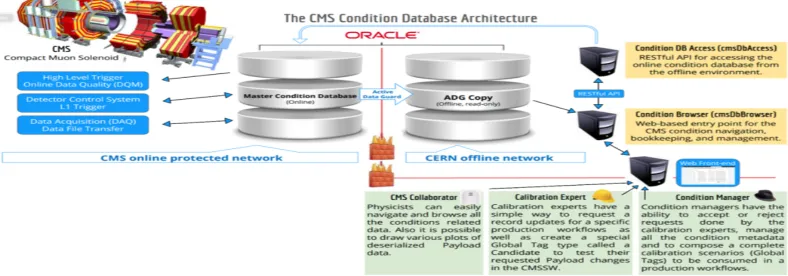
The CmsDbBrowser was designed to work with condition data, using the Oracle read-only Active Data Guard(ADG) copy which stores replicated content of the master condition database. For security and reliability reasons, calibration data can be written in the condi-tion database only from within the technical network of the experiment which is protected by a firewall separating it from the general purpose CERN network.
Figure 1.The CMS Condition Browser Service Architecture
3.2 Design and Implementation choices
The Browser is able to search a user keyword in all the metadata. The result of the search is presented in a categorized way per Tag, Global Tag and Payloads. It is also possible to list the content of the Tag, Global Tag and Payloads selected in query results. The backend of cmsDbBrowser is implemented in Python programming language using the Flask web framework. An Object Relational Mapper (ORM) SQLAlchemy is used which handles all the database transactions. For the frontend the Bootstrap CSS framework is used together with the jQuery and Highcharts JavaScript libraries, which allow the creation of a modern user interface with advanced functionality. This set of technologies have proven to be reliable, efficient and secure. It meets our end-users requirements and provides our infrastructure with good performance and stability.
3.3 CMSDbBrowser Monitoring functionalities
Monitoring and fast error detection in real time systems is a very challenging task, since spot-ting a faulty situation requires strict timing constraints and a fast reaction, in order to recover the system and to put it into a correct state. Here we monitor the status of job consumption by online and offline processes. If any jobs fail we get notification which help experts to take action quickly.
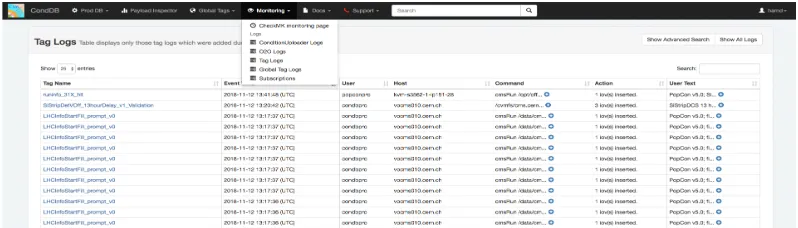
Figure 2.CmsDbBrowser Monitoring Service
As shown in Figure 2, Monitoring section in the cmsDbBrowser displays various different log pages:
• ConditionUploader logs, showing information about the ConditionUploader service; • O2O logs, displaying O2O job details and job run information;
• Tag logs, showing recent changes to Tags;
• Global Tag logs, showing recent changes to Global Tags.
4 CMS Conditions Browser As a Service
3.2 Design and Implementation choices
The Browser is able to search a user keyword in all the metadata. The result of the search is presented in a categorized way per Tag, Global Tag and Payloads. It is also possible to list the content of the Tag, Global Tag and Payloads selected in query results. The backend of cmsDbBrowser is implemented in Python programming language using the Flask web framework. An Object Relational Mapper (ORM) SQLAlchemy is used which handles all the database transactions. For the frontend the Bootstrap CSS framework is used together with the jQuery and Highcharts JavaScript libraries, which allow the creation of a modern user interface with advanced functionality. This set of technologies have proven to be reliable, efficient and secure. It meets our end-users requirements and provides our infrastructure with good performance and stability.
3.3 CMSDbBrowser Monitoring functionalities
Monitoring and fast error detection in real time systems is a very challenging task, since spot-ting a faulty situation requires strict timing constraints and a fast reaction, in order to recover the system and to put it into a correct state. Here we monitor the status of job consumption by online and offline processes. If any jobs fail we get notification which help experts to take action quickly.
Figure 2.CmsDbBrowser Monitoring Service
As shown in Figure 2, Monitoring section in the cmsDbBrowser displays various different log pages:
• ConditionUploader logs, showing information about the ConditionUploader service; • O2O logs, displaying O2O job details and job run information;
• Tag logs, showing recent changes to Tags;
• Global Tag logs, showing recent changes to Global Tags.
4 CMS Conditions Browser As a Service
In 2017 we incorporated a few new tools to our Condition Browser service which has turned out very useful for detector expert to easily inspect their data and get notified when changes are made to there data.
4.1 Subscription Service
The cmsDbBrowser service provides users with a customizable way to receive updates about modification and creation of data in the conditions database. This service allows the user to subscribe to events in the Tag Log and Global Tag Log. The server will periodically fetch the latest events from the logs, match them to subscriptions, and for each subscriber generate a personalized activity digest which will be sent by email.
• Subscription Entities: A subscription also has a set of subscribed entities. These will de-termine which events go into the activity digest email. Subscribed entities may be provided when the subscription is created, but can also be added or removed later by selecting the given subscription.
• Subscription Emails: Activity digest emails generated by this service works in such a way that each email will always contain all relevant events that has happened since the last automatic email was sent. An additional feature allows you to request an instant email from the browser page.
4.2 Payload Inspector
The Payload Inspector was designed in order to allow detector experts to easily inspect, monitor and share the alignment and calibration constants stored in the CMS conditions database by generating interactive plots from user selected data. Condition proponents can choose and develop the display format depending on their needs in the CMS software frame-work(CMSSW) as Payload Inspector plugins in the CondCore package. The plots are devel-oped in C++by the experts of each system following a schema of templated C++classes, and thus the browser can discover the monitoring plots by discovering dynamically from CMS Software (CMSSW) releases. The tool consists of two separate layers:
• Deserialisation layer: Dedicated plugins in the CMSSW load and deserialise payloads from the conditions database, extract the relevant information, and compute the quantities to be displayed; such quantities are packaged in a json format which holds all the informa-tion necessary for rendering of the plots.
• Visualisation layer: Receives the information necessary for rendering of the plots and generates interactive views for the actual inspection of conditions. This layer is integrated in the cmsDbBrowser web-based application, which is the main entry point accessible for all CMS members to browse and manipulate conditions data and metadata.
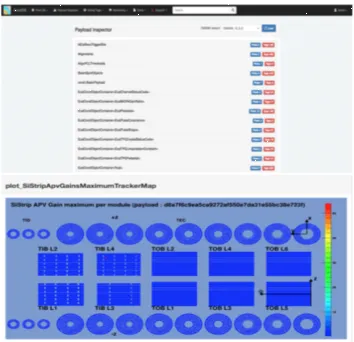
As shown in Figure 3, this design allows users to select the data they want to visualize. The CmsDbBrowser fetches the user selected data and displays it in the form of a plot dy-namically. A user can easily inspect and monitor selected calibration measurements and see the time evolution of the data.
5 Conclusions
Figure 3.Data Visualisation using Payload Inspector
application has been proven vital in catching the problems and there have been incidents which we have solved because of quick notifications from this service which basically results in maintaining the good quality of data for physics analysis.
References
[1] CMS COLLABORATION,The CMS experiment at the CERN LHC, JINST 3 S08004, doi: https://iopscience.iop.org/article/10.1088/1748-0221/3/08/S08004 (2008)
[2] CMS COLLABORATION, CMS High Level Trigger , CERN/LHCC 2007-021 doi: https://iopscience.iop.org/article/10.1088/1742-6596/664/8/082044(2007)
[3] S.Di Guida, G.Govi, M.Ojeda and A.Pfeiffer, Multi-threaded Object Streaming , J. Phys.: Conf. Ser. 664 042044 (2015), doi: https://iopscience.iop.org/article/10.1088/ 1742-6596/664/4/042044 (2015)
[4] S.Di Guida, G.Govi, M.Ojeda and A.Pfeiffer,The CMS Condition Database system, J. Phys.: Conf. Ser. 664 042024 (2015), doi: https://iopscience.iop.org/article/10.1088/ 1742-6596/664/4/042024 (2015)