273 Branchport Avenue Long Branch, N.J. 07740 (908) 222-6880
INSTALLATION INSTRUCTIONS MODEL ZC-312 MODULAR ZONE CONTROL (3 ZONES EXPANDABLE TO 12 ZONES)
- AND - MODEL ZEM-3 ZONE EXPANSION MODULE
(3 ZONES)
FCC REGULATIONS
This equipment complies with Part 68 of the FCC Rules. On the top of this equipment is a label that contains, among other information, the FCC Registration Number and the Ringer Equivalence Number (REN) for this equipment. You must, upon request provide this information to your telephone company.
The REN is also useful to determine the quantity of devices that you may connect to your telephone line and still have all of those devices ring when your telephone number is called. In most, but not all areas, the sum of the REN's of all devices connected to one line should not exceed five (5.0). To be certain of the number of devices that you may connect to your line, you may want to contact your local telephone company.
Should the equipment cause harm to the telephone network, the telephone company shall, if possible, notify the customer that temporary discontinuance of service may be required. However, where prior written notice is not possible, the telephone company may temporarily discontinue service without notice, if such action is necessary under the circumstances. The telephone company may make changes in its communication facilities, equipment and operations procedures, where such action is reasonably required in the operation of its business and is not inconsistent with the rules and regulations of the Federal Communications Commission.
Do not attempt to repair or modify this equipment. Repairs to this product will be performed by Wheelock Inc. 273 Branchport Ave, Long Branch, NJ 07740 in accordance with Wheelock Inc.'s published Terms and Conditions of Sale. This equipment should not be used on coin telephone lines. Connection to party line service is subject to state tariffs.
If trouble is experienced, disconnect this equipment from the telephone line to determine if it is causing the malfunction. If the equipment is determined to be malfunctioning, its use shall be discontinued until the problem has been corrected.
APPLICATION INFORMATION
WARNING: ANY MATERIAL EXTRAPOLATED FROM THIS DOCUMENT OR FROM WHEELOCK MANUALS OR OTHER DOCUMENTS DESCRIBING THE PRODUCT FOR USE IN PROMOTIONAL OR ADVERTISING CLAIMS, OR FOR ANY OTHER USE, INCLUDING DESCRIPTION OF THE PRODUCT'S APPLICATION, OPERATION, INSTALLATION AND TESTING IS USED AT THE SOLE RISK OF THE USER AND WHEELOCK WILL NOT HAVE ANY LIABILITY FOR SUCH USE.
The ZC-312 is an expandable Zone Control that performs the central control, switching and signaling required to provide selective zone paging, zone group paging, all call, talkback, background music mute, and page alert tone signaling. The ZC-312 provides 3 separate zones of paging, and can be expanded to 12 zones by installing up to 3 ZEM-3 Zone Expansion Modules. Each ZEM-3 provides a zone group consisting of 3 zones. Each ZEM-3 provides a background music input for its 3 zone group.
Containing its own (centralized) talkback control circuit, the ZC-312 can be programmed to accommodate both one-way and talkback paging zones. It can also be programmed to be used with a wide variety of system amplifier configurations which can include various combinations of 25V/70V central and zone amplifiers and amplified one-way paging speakers.
Copyright 1989, 1990, 1991, 1992, 1993 Wheelock Inc. All rights reserved.
Paging is accessed from any telephone by pressing the CO line button (EKSU & KSU), or dialing the number assigned to paging. Twelve (12) individual zones are selected by dialing 01 thru 12. All Call is selected by dialing 00. The four (4) zone groups are selected for group paging, by dialing 21 thru 24.
When any zone, zone group, or all call selection is made, a page alert tone will be heard at all the speakers in the selected zone, zone group, or all zones (if all call is selected). The tone will also be heard at the paging telephone to provide verification of connection to the selected speakers.
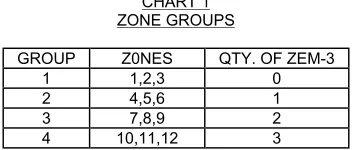
The ZC-312 provides one zone group (3 zones) and can be expanded to 4 zone groups (12 zones), by adding up to 3 plug-in ZEM-3 zone expansion modules as shown in Chart 1 and Figure 1.
CHART 1 ZONE GROUPS
GROUP Z0NES QTY. OF ZEM-3
1 1,2,3 0
2 4,5,6 1
3 7,8,9 2
4 10,11,12 3
INTERFACE INFORMATION:
The ZC-312 can be connected directly to:
A. A telephone for stand alone paging.
B. A telephone system's unused CO line/trunk port.
C. A telephone system's 600 ohm audio page port (See Figure 12, page 19).
Using a Wheelock TPI -100 Telephone Paging Interface, the ZC-312 can be interfaced to ring start telephone paging applications such as: A. An analog station level line.
Each zone may be accessed individually by dialing 01 thru 12. All zones can be accessed simultaneously for an all call by dialing 00. Each 3 zone group can be accessed by dialing 21 thru 24. Chart 2 illustrates the two digit dial access codes.
CHART 2 DIAL ACCESS CODES
TO ACCESS DIAL
All Zones (All Call) 00
Zone 1 01
Zone 2 02
Zone 3 03
Zone 4 04
Zone 5 05
Zone 6 06
Zone 7 07
Zone 8 08
Zone 9 09
Zone 10 10
Zone 11 11
Zone 12 12
Zone Group 1 (Zones 1, 2 & 3) 21 Zone Group 2 (Zones 4, 5 & 6) 22 Zone Group 3 (Zones 7, 8 & 9) 23 Zone Group 4 (Zones 10, 11 & 12) 24
P81982 K Sheet 3 of 21 Each zone group can be individually programmed with group selector switches for the following group functions.
The amplifier type (central or zone) is programmed for each zone group as described in Chart 3.
CHART 3 AMPLIFIER TYPE
GROUP FUNCTION CHOICES - PER GROUP Amplifier Type
1. Central Amplifier:
25V or 70V audio output switched to one-way and/or talkback speakers with line matching transformers.
2. Zone Amplifier:
600 ohm audio input switched to separate zone amplifiers connected to one-way paging speakers with 25V/70V line matching transformers; or switched to PRM-150 line preamplifiers or connected to one-way paging speaker amplifiers.
If any of the zone groups require central amplification, then the choice of one or two central amplifiers is programmed for each of those groups, as described in Chart 4.
CHART 4
1 OR 2 CENTRAL AMPLIFIERS GROUP PROGRAMMABLE FUNCTION
GROUP FUNCTION CHOICES - PER GROUP
1 or 2 Central Amplifiers
1. One central amplifier for both paging and background music. Paging in any zone will mute music in all zones.
2. Two central amplifiers, one for paging and one for background music. For one-way paging, music is muted only in the zone paged. For talkback paging, music is muted in all zones. The speech direction function is programmed on a per zone basis, as described in Chart 5.
CHART 5 SPEECH DIRECTION ZONE PROGRAMMABLE FUNCTION
FUNCTION CHOICES - PER ZONE
Speech 1. One-way paging.
Direction 2. Talkback (two-way communication with hands-free reply).
NOTE
Talkback may be chosen only for zones within central amplifier groups.
Additionally, the ZC-312 can be programmed for use with a Wheelock TPI-100 Interface which produces paging from a Station Level, or Centrex line, as shown in Chart 7.
CHART 7
TPI-100 INTERFACE FOR STATION LEVEL, CO, OR CENTREX PAGING SYSTEM PROGRAMMABLE FUNCTION
FUNCTION CHOICES FOR SYSTEM
Station level, CO or Centrex line paging
"LO" with Wheelock TPI-100 Interface. (Wheelock TPI-100
Interface is required).
"HI" without Wheelock TPI-100 Interface.
Depending upon system amplifier configuration, the amplifier functions and background music mute operation will vary, as shown in Chart 8.
CHART 8
AMPLIFIER CONFIGURATIONS, FUNCTIONS, AND MUSIC MUTE OPERATION
AMPLIFIER CONFIGURATION FUNCTION MUSIC MUTE OPERATION
(A) One (1) Central Amplifier Paging & Music Paging any zone will mute music in all zones.
(B) Two (2) Central Amplifiers One for Paging and One for Music
Music is muted only in the paged zone(s).
(C) Zone Amplifiers, Line Preamplifiers Speaker Amplifiers
Paging & Music Music is muted only in the paged zone(s) (D) Mixed
(A) & (C) Above
Paging & Music
1. Central Amplifier Zones: Paging mutes music in all zones.
2. Zone Amplifier Zones: Music is muted only in the paged zone(s). (E) Mixed
(B) & (C) Above
Paging & Music Music is muted only in the paged zone(s).
NOTES
1. The talkback function is centrally controlled in the ZC-312, and can be selected per Zone for Configurations (A) and (B), as well as the (A) and (B) segments of mixed systems (D) and (E). 2. Mixed amplifier configurations (D) and (E) cannot be applied within the same zone group.
3. When 2 central amplifiers are used, music will be muted in All Zones only when a Talkback Zone is accessed.
FIGURE 2
ONE CENTRAL AMPLIFIER WHICH HAS MUSIC MUTE, PAGE INPUT AND MUSIC INPUT
(ONE-WAY PAGING AND/OR TALKBACK)
In this application, the one central amplifier for both paging and background music has music muting and separate inputs (volume controls) for paging and music. The system uses speakers with built-in line matching transformers for both one-way paging, and paging with talkback.
NOTE
1. If the central amplifier does not provide music mute, then the background music source is connected as shown in Figure 3.
FIGURE 3 ONE CENTRAL AMPLIFIER WHICH DOES NOT HAVE MUSIC MUTE,
AND WHICH HAS ONLY ONE INPUT (ONE-WAY PAGING AND/OR TALKBACK)
In this application, the one central amplifier for both paging and background music does not provide music muting, and has only one input (one, or no volume control). The system uses speakers with built-in line matching transformers for both one-way paging, and paging with talkback.
NOTE
1. If the background music source has no volume control, then the optional PRM-150 must be connected between the background music source and the ZC-312 MUSIC input, as shown.
2. In systems with talkback paging, install one background music source only as shown. DO NOT connect background music source directly to zone group music inputs.
FIGURE 4
TWO CENTRAL AMPLIFIERS, ONE FOR PAGING AND ONE
FOR BACKGROUND MUSIC (ONE-WAY PAGING ONLY)
In this application, two central amplifiers are used, one for paging and one for background music. The system uses speakers with built-in line matching transformers for one-way paging.
NOTES
1. If both the music central amplifier and the background music source have no volume controls, then a PRM-150 must be connected between the background music source output and the music central amplifiers input.
FIGURE 5
TWO CENTRAL AMPLIFIERS, ONE FOR PAGING AND ONE FOR BACKGROUND MUSIC (ONE-WAY AND/OR TALKBACK PAGING)
In this application, two central amplifiers are used, one for paging and one for background music. The system uses speakers with built-in line matching transformers for both one-way paging, and paging with talkback.
NOTES
1. If both the music central amplifier and the background music source have no volume controls, then a PRM-150 must be connected between the background music source output and the music central amplifiers input.
2. In systems with talkback paging, install one background music source only as shown. DO NOT connect background music source directly to zone group music inputs.
FIGURE 6 AMPLIFIED SPEAKERS
(ONE-WAY PAGING)
In this application, amplified speakers are used for one-way paging and for background music. A PRM-150 preamplifier is used with the background music source.
NOTE
FIGURE 7 ZONE AMPLIFIERS WHICH HAVE MUSIC MUTE, PAGE INPUTS AND MUSIC INPUTS
(ONE-WAY PAGING)
In this application, the zone amplifiers for both one-way paging and background music have music muting, and separate inputs (volume controls) for paging and music. The system uses speakers with line matching transformers.
NOTE
One music source may be used for all zones, or different music sources can be used for different zones.
FIGURE 8 ZONE AMPLIFIERS
WHICH DO NOT HAVE MUSIC MUTE, AND WHICH HAVE ONE INPUT
(ONE-WAY PAGING)
In this application, the zone amplifiers for both one-way paging and background music do not provide music muting, and have only one input (with or without volume control). The system uses speakers with line matching transformers.
NOTE
Existing system renovations and expansions often require different amplifier configurations in different zone groups. For example, an existing central amplifier paging system may be zoned, and then expanded by adding amplified speakers or zone amplifiers. With the appropriate programming switch selections, the following are some examples of mixed system possibilities.
A. FIGURE 2 AND FIGURE 6 B. FIGURE 2 AND FIGURE 7 C. FIGURE 2 AND FIGURE 8 D. FIGURE 3 AND FIGURE 6 E. FIGURE 3 AND FIGURE 7 F. FIGURE 3 AND FIGURE 8 G. FIGURE 4 AND FIGURE 6 H. FIGURE 4 AND FIGURE 7 I. FIGURE 4 AND FIGURE 8 J. FIGURE 5 AND FIGURE 6 K. FIGURE 5 AND FIGURE 7 L. FIGURE 5 AND FIGURE 8
In mixed systems, the different amplifier configurations must be installed in different zone groups. It is not possible to mix different amplifier configurations within the same zone group.
Maximum amplifier and speaker capacity for each zone group and the total system is shown in Chart 9.
CHART 9: MAXIMUM AMPLIFIER AND SPEAKER CAPABILITY
MAXIMUM CAPACITY
AMPLIFIER CONFIGURATION TOTAL SYSTEM EACH ZONE GROUP
CENTRAL AMPLIFIER(S) 150W @ 70V 100W @ 25V
70W @ 70V 25W @ 25V (SEE NOTE 1) ZONE AMPLIFIERS OR
SPEAKER-AMPLIFIERS 150 AMPLIFIERS INPUTS 75 AMPLIFIER INPUTS (SEE NOTE 2)
NOTES
1. The Zone Control can switch an audio input from a central amplifier of up to 150W @ 70V, or 100W @ 25V. This TOTAL SYSTEM audio input can be distributed to up to 4 zone groups, provided no single zone group exceeds:
(A) 70W @ 70V, leaving 80W for the remaining 3 groups. - or -
(B) 25W @ 25V, leaving 75W for the remaining 3 groups.
2. The Zone Control can switch its preamplifier audio output to the 600 ohm inputs of up to 150 zone amplifiers or speaker-amplifiers. This TOTAL SYSTEM audio output can be distributed to up to 12 zones, provided no SINGLE ZONE exceeds 25 amplifier inputs, which would leave 125 amplifier inputs for the remaining 11 zones.
P81982 K Sheet 13 of 21 MOUNTING INSTRUCTIONS:
hardware suitable for mounting surface.
FIGURE 9 MOUNTING DIAGRAM
SPECIFICATIONS
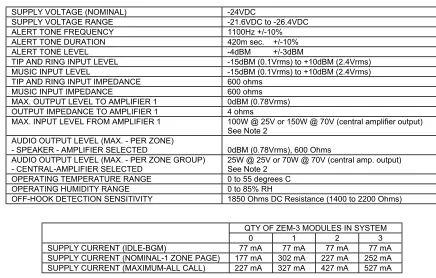
SUPPLY VOLTAGE (NOMINAL) -24VDC
SUPPLY VOLTAGE RANGE -21.6VDC to -26.4VDC
ALERT TONE FREQUENCY 1100Hz +/-10%
ALERT TONE DURATION 420m sec. +/-10%
ALERT TONE LEVEL -4dBM +/-3dBM
TIP AND RING INPUT LEVEL -15dBM (0.1Vrms) to +10dBM (2.4Vrms)
MUSIC INPUT LEVEL -15dBM (0.1Vrms) to +10dBM (2.4Vrms)
TIP AND RING INPUT IMPEDANCE 600 ohms
MUSIC INPUT IMPEDANCE 600 ohms
MAX. OUTPUT LEVEL TO AMPLIFIER 1 0dBM (0.78Vrms)
OUTPUT IMPEDANCE TO AMPLIFIER 1 4 ohms
MAX. INPUT LEVEL FROM AMPLIFIER 1 100W @ 25V or 150W @ 70V (central amplifier output) See Note 2
AUDIO OUTPUT LEVEL (MAX. - PER ZONE)
- SPEAKER - AMPLIFIER SELECTED 0dBM (0.78Vrms), 600 Ohms AUDIO OUTPUT LEVEL (MAX. - PER ZONE GROUP)
- CENTRAL-AMPLIFIER SELECTED
25W @ 25V or 70W @ 70V (central amp. output) See Note 2
OPERATING TEMPERATURE RANGE 0 to 55 degrees C
OPERATING HUMIDITY RANGE 0 to 85% RH
OFF-HOOK DETECTION SENSITIVITY 1850 Ohms DC Resistance (1400 to 2200 Ohms)
ZONE CONTROL ACCESS (See Note 1)
PRESS CO LINE BUTTON, OR DIAL NUMBER ASSIGNED TO PAGE.
PAGE ZONE 1 DIAL 01
PAGE ZONE 2 DIAL 02
PAGE ZONE 3 DIAL 03
PAGE ZONE 4 DIAL 04
PAGE ZONE 5 DIAL 05
PAGE ZONE 6 DIAL 06
PAGE ZONE 7 DIAL 07
PAGE ZONE 8 DIAL 08
PAGE ZONE 9 DIAL 09
PAGE ZONE 10 DIAL 10
PAGE ZONE 11 DIAL 11
PAGE ZONE 12 DIAL 12
PAGE ZONE GROUP 1 (ZONES 1, 2 & 3) DIAL 21
PAGE ZONE GROUP 2 (ZONES 4, 5 & 6) DIAL 22
PAGE ZONE GROUP 3 (ZONES 7, 8 & 9) DIAL 23
PAGE ZONE GROUP 4 (ZONES 10, 11 & 12) DIAL 24
PAGE ALL ZONES (ALL CALL) DIAL 00
NOTES
1. Press CO line button: For EKSU & KSU (1A2) key telephone systems. Dial number assigned: For PBX telephone systems.
Dial telephone number: For CO/Centrex Line (Requires TPI-100 Interface, see Figure 13). Dial extension number: For analog station level (Requires TPI-100 interface, see Figure 13).
2. The ZC-312 can switch a TOTAL SYSTEM central amplifier audio input of up to 150W @ 70V, or 100W @ 25V. The TOTAL SYSTEM audio input can be distributed to up to 4 zone groups, provided no single zone group exceeds:
(A) 70W @ 70V, leaving 80W for the remaining 3 zone groups. -OR-
(B) 25W @ 25V, leaving 75W for the remaining 3 zone groups.
FIGURE 10
SIMPLIFIED SINGLE LINE BLOCK DIAGRAM
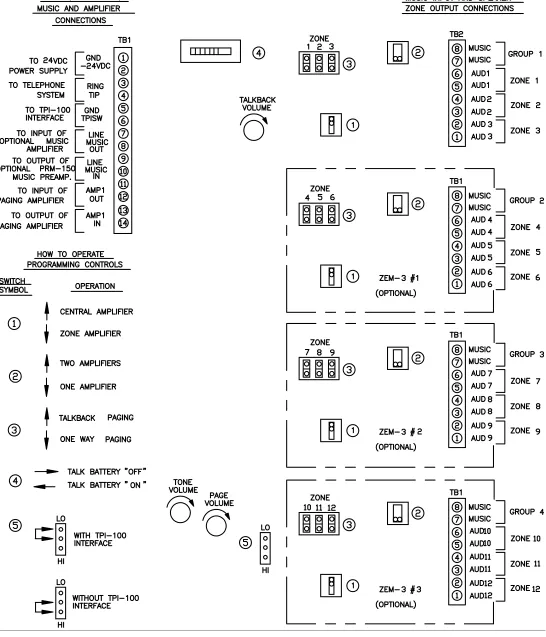
WIRING INSTRUCTIONS (SEE FIGURE 11)
1. Make sure 24VDC power supply is disconnected from the 115VAC power source. 2. Connect tip and ring from:
A. Stand along telephone, or
B. Telephone system's unused CO line/trunk port, or
C. Telephone system's 600 ohm, audio page port (See Figure 12), or
D. Wheelock TPI-100 Interface for CO/Centrex line or analog station level line (See Figure 13),To TB1 terminals 4 and 3 respectively, on the ZC-312.
3. Connect the background music source to TB1, terminals 9 and 10, on the ZC-312.
4. Connect the 24VDC power supply to the (-)24V and GND(+) terminals on TB1, terminals 2 and 1 respectively.
5. Connect the zone amplifier, speaker amplifiers, or speakers with transformers to the audio pair for zones 1 thru 12 on TB2 of the ZC-312 and TB1 of each ZEM-3 module as required.
6. If one Central Amplifier is used for paging and background music:
A. Connect the input of central amplifier to AMP1 OUT, terminals 11 and 12 of TB1 on the ZC-312. Connect the output of central amplifier to AMP1 IN, terminals 13 and 14 of TB1 on the ZC-312.
B. Connect the output of central amplifier to MUSIC, terminals 7 and 8 of TB2 on ZC-312 and TB1 on ZEM-3 modules, as required. 7. If separate central amplifiers are used, one for paging and one or more for background music:
A. Connect paging amplifier as described in 6A, above.
B. Connect output of background music amplifier(s) as described in 6B, above. 8. Connect the 24VDC power supply to the 115VAC source.
1. Set the "Zone Amplifier/Central Amplifier" select switches for each group as required. See switch symbol 1 . If a group is using a zone amplifier or speaker amplifier, then that group's switch should be in the down position. If a group is using a central amplifier, then that group's switch should be in the up position.
2. Set the "Central Amplifier" select switch for each group, as required. See switch symbol 2 . If one central amplifier is used for both paging and background music, then the switch should be in the down position. If two or more central amplifiers are used, one for paging and one or more for background music, then the switch should be in the up position. If central amplifiers are not used, then the switch should be in the up position.
3. Set the "One-Way/Talkback" select switches for each zone as required. See Switch symbol 3 . If a zone is to have talkback paging, then that zone's switch should be in the up position. If a zone is to have one-way paging, then that zone's switch should be in the down position.
NOTE: All zones in groups using (selected for) zone amplifiers or speaker amplifiers are one-way paging zones. Hence, the individual zone switches should be in the down position. Zones selected for talkback paging must be in groups selected for central amplifiers - See switch symbol 1 .
4. Set the "Talk Battery" selector switch, symbol 4 :
A. To the "ON" position when connected to a telephone systems, unused CO line/trunk port, 600 ohm audio page port, or directly to a telephone. B. To the "OFF" position when connected to a Wheelock TPI-100 Telephone Paging Interface for CO/Centrex line, or analog station level line paging.
5. Set the "TPI-100 Interface" selector jumper, symbol 5 :
A. To the "LO" position when connected to a Wheelock TPI-100 Telephone Paging Interface for CO/Centrex line, or analog station level line paging.
B. To the "HI" position when the Wheelock TPI-100 Telephone Paging Interface is not used.
CAUTION: These devices are not intended for use in hazardous locations as defined by the National Electrical Code (NEC) and by the National Fire Protection Association (NFPA).
WARNING: CUSTOMER ASSUMES ALL RESPONSIBILITY FOR PROPER INSTALLATION OF INTEGRATED CIRCUIT CHIP(S) AND ACKNOWLEDGES THAT THE UNIT SHOULD BE FULLY TESTED IN ACCORDANCE WITH THE PROCEDURE IN THE ORIGINAL INSTALLATION MANUAL OR INSTRUCTIONS AS THOUGH THE FULL UNIT WERE NEWLY INSTALLED WITH THE NEW INTEGRATED CIRCUIT CHIP(S) BEFORE BEING PLACED IN SERVICE. WHEELOCK INC. ASSUMES NO RESPONSIBILITY IN CONNECTION WITH THE PROPER INSTALLATION OR TESTING OF THE NEW INTEGRATED CIRCUIT CHIP(S).
IMPORTANT: Read separate "ZC-312 chip replacement" installation instructions for information on the installation of new integrated circuit chip(s). (see P82456 A)
AUDIO PAGE PORT INSTALLATION INSTRUCTIONS:
The ZC-312 can be connected to an audio page port only if the audio page port provides: (A) A 600 ohm, low power page output, capable of passing DC loop current. (B) Transmission of DTMF touch tone, or rotary dial pulses.
(C) A dry contact that is normally open, closes when paging and reopens when the page is completed. If these conditions are met, then connect Tip and Ring as shown in Figure 12.
FIGURE 12
CONNECTING TO A 600 OHM AUDIO PAGE PORT
CO/Centrex and Analog Station Level Paging Installation Instructions:
The ZC-312 can be interfaced to ring start paging applications such as a CO/Centrex line or analog station level line, by using Wheelock's TPI-100 Telephone Paging Interface. Connect the ZC-312 to the TPI-100 as shown in Figure 13.
FIGURE 13
CONNECTION TO TPI-100 INTERFACE
NOTES 1. Place talk battery selector switch in the "OFF" position.
2. Place "TPI Interface" selector jumper in the "LO" position.
3. If TPI-100 and ZC-312 use separate power supplies, then install wire between GND (TB1, terminal 5) on TPI-100 and GND (TB1, terminal 5) on ZC-312.
4. For additional information on TPI-100 refer to its installation instructions.
P81982 K Sheet 19 of 21 OPERATING INSTRUCTIONS:
NOTE
1. Pick up the telephone handset and press the CO line button (EKSU, KSU), or number assigned to paging (PBX) to access the port assigned to paging. (Port to which the ZC-312 has been connected).
2. To initiate a zone page, dial "01" thru "12" to select zones 1 thru 12, respectively. 3. To initiate a group page, dial "21" thru "24" to select zone groups 1 thru 4, respectively. 4. To initiate an all-call page, dial "00".
5. When paging, background music will be muted. At the conclusion of the page (i.e., phone "hangs-up"), the background music will automatically be restored.
6. When any page is initiated, an alert tone is heard both in the telephone receiver, and in all selected zones. Adjust the tone volume control in the ZC-312 to the desired level. Note the minimum setting turns the tone off.
7. If talkback is used, adjust the talkback volume control in the ZC-312 to the desired level.
8. At the conclusion of the page, simply hang-up the telephone handset; or press the hook switch before dialing the next number.
TROUBLE SHOOTING
CONDITION CHECK
1. Zone page or all call page cannot be
accessed 1. Telephone system must have touch tone (DTMF) or rotary (pulse) dialing
2. Check presence and polarity of voltage on (-) 24VDC and GND (+) terminals on TB4. 2. No background music. 1. Verify unit has released from last page.
2. Check program source, and adjust its volume control, as desired.
3. Check presence of line level music input (if used) at terminals on TB1 of ZC-312. Check for presence of music at terminals on TB2 of ZC-312 and TB2 of ZEM-3 modules. If necessary also at speaker amplifier, or central or zone amplifier inputs. 3. No sound or low page volume. 1. Check presence and level of audio input at Tip and Ring terminals on TB1 of the ZC-
312, and if necessary also at the CO Port. (or the Audio Page Port)
2. Check presence and level of audio at the zone AUDIO output terminals on TB2 of the ZC-312 and TB1 of the ZEM-3 modules. If necessary also at speaker amplifier inputs, and central or zone amplifier inputs.
4. The page alert tone is too high or too low.
1. Set the page alert Tone Volume Control in the ZC-312, to the desired level.
personnel for proper operation in accordance with all of the latest National Fire Protection Association (NFPA), Underwriters' Laboratories (UL), Underwriters’ Laboratories of Canada (ULC), National Electrical Code (NEC), Occupational Safety and Health Administration (OSHA), local, state, county, province, district, federal and other applicable building and fire standards, guidelines, regulations, laws and codes including, but not limited to, all appendices and amendments and the requirements of the local authority having jurisdiction (AHJ). Wheelock products when properly specified, applied, installed, operated, maintained and operationally tested as provided above are warranted against mechanical and electrical defects for a period of three years from date of manufacture (as determined by date code). Correction of defects by repair or replacement shall be at Wheelock's sole discretion and shall constitute fulfillment of all obligations under this warranty. THE FOREGOING LIMITED WARRANTY SHALL IMMEDIATELY TERMINATE IN THE EVENT ANY PART NOT FURNISHED BY WHEELOCK IS INSTALLED IN THE PRODUCT. THE FOREGOING LIMITED WARRANTY SPECIFICALLY EXCLUDES ANY SOFTWARE REQUIRED FOR THE OPERATION OF OR INCLUDED IN A PRODUCT. WHEELOCK MAKES NO REPRESENTATION OR WARRANTY OF ANY OTHER KIND, EXPRESS, IMPLIED OR STATUTORY WHETHER AS TO MERCHANTABILITY, FITNESS FOR A PARTICULAR PURPOSE OR ANY OTHER MATTER.
USERS ARE SOLELY RESPONSIBLE FOR DETERMINING WHETHER A PRODUCT IS SUITABLE FOR THE USER'S PURPOSES, OR WHETHER IT WILL ACHIEVE THE USER'S INTENDED RESULTS. THERE IS NO WARRANTY AGAINST DAMAGE RESULTING FROM MISAPPLICATION, IMPROPER SPECIFICATION, ABUSE, ACCIDENT OR OTHER OPERATING CONDITIONS BEYOND WHEELOCK'S CONTROL.
SOME WHEELOCK PRODUCTS CONTAIN SOFTWARE. WITH RESPECT TO THOSE PRODUCTS, WHEELOCK DOES NOT WARRANTY THAT THE OPERATION OF THE SOFTWARE WILL BE UNINTERRUPTED OR ERROR-FREE OR THAT THE SOFTWARE WILL MEET ANY OTHER STANDARD OF PERFORMANCE, OR THAT THE FUNCTIONS OR PERFORMANCE OF THE SOFTWARE WILL MEET THE USER'S REQUIREMENTS. WHEELOCK SHALL NOT BE LIABLE FOR ANY DELAYS, BREAKDOWNS, INTERRUPTIONS, LOSS, DESTRUCTION, ALTERATION, OR OTHER PROBLEMS IN THE USE OF A PRODUCT ARISING OUT OF OR CAUSED BY THE SOFTWARE.
THE LIABILITY OF WHEELOCK ARISING OUT OF THE SUPPLYING OF A PRODUCT, OR ITS USE, WHETHER ON WARRANTIES, NEGLIGENCE, OR OTHERWISE, SHALL NOT IN ANY CASE EXCEED THE COST OF CORRECTING DEFECTS AS STATED IN THE LIMITED WARRANTY AND UPON EXPIRATION OF THE WARRANTY PERIOD ALL SUCH LIABILITY SHALL TERMINATE. WHEELOCK IS NOT LIABLE FOR LABOR COSTS INCURRED IN REMOVAL, REINSTALLATION OR REPAIR OF THE PRODUCT BY ANYONE OTHER THAN WHEELOCK OR FOR DAMAGE OF ANY TYPE WHATSOEVER, INCLUDING BUT NOT LIMITED TO, LOSS OF PROFIT OR INCIDENTAL OR CONSEQUENTIAL DAMAGES. THE FOREGOING SHALL CONSTITUTE THE SOLE REMEDY OF THE PURCHASER AND THE EXCLUSIVE LIABILITY OF WHEELOCK.
IN NO CASE WILL WHEELOCK'S LIABILITY EXCEED THE PURCHASE PRICE PAID FOR A PRODUCT.
Limitation of Liability
WHEELOCK'S LIABILITY ON ANY CLAIM OF ANY KIND, INCLUDING NEGLIGENCE AND BREACH OF WARRANTY, FOR ANY LOSS OR DAMAGE RESULTING FROM, ARISING OUT OF, OR CONNECTED WITH THIS CONTRACT, OR FROM THE MANUFACTURE, SALE, DELIVERY, RESALE, REPAIR OR USE OF ANY PRODUCT COVERED BY THIS ORDER SHALL BE LIMITED TO THE PRICE APPLICABLE TO THE PRODUCT OR PART THEREOF WHICH GIVES RISE TO THE CLAIM. WHEELOCK'S LIABILITY ON ANY CLAIM OF ANY KIND SHALL CEASE IMMEDIATELY UPON THE INSTALLATION IN THE PRODUCT OF ANY PART NOT FURNISHED BY WHEELOCK. IN NO EVENT SHALL WHEELOCK BE LIABLE FOR ANY CLAIM OF ANY KIND UNLESS IT IS PROVEN THAT OUR PRODUCT WAS A DIRECT CAUSE OF SUCH CLAIM. FURTHER, IN NO EVENT, INCLUDING IN THE CASE OF A CLAIM OF NEGLIGENCE, SHALL WHEELOCK BE LIABLE FOR INCIDENTAL OR CONSEQUENTIAL DAMAGES. SOME STATES DO NOT ALLOW THE EXCLUSION OR LIMITATION OF INCIDENTAL OR CONSEQUENTIAL DAMAGES, SO THE PRECEDING LIMITATION MAY NOT APPLY TO ALL PURCHASERS.
6/93