International Journal of Research in Advent Technology, Vol.2, No.4, April 2014
E-ISSN: 2321-9637
A Study on Security for Mobile Devices
Zameshkumar J. Balhare
1, Vijay S. Gulhane
2 M.E (Pursuing) 1, Associate Professor3Computer Engineering1, Computer Science and Engineering2 Sipna C.O.E.T., Amravati, India1, 2
Abstract- At the present period of time, mobile devices are playing important role in our everyday lives since
they enable us to access a large variety of different services from any place. The era is long gone when mobile devices were just a use for voice communication. They have to develop gradually into a full-fledged computing platform. Smartphone’s increasing popularity raises several security issues. Their central information management makes them very easy targets for hackers. Therefore, Smartphone’s may now represent a perfect target for malware maker. With this paper we like to provide a structured and comprehensive summary of the research on security solutions for mobile devices. This is study paper that describes the all types of threats and latest security solutions over the period 2000-2014, by specializing in high-level attacks. We have a tendency to group existing approaches aimed toward protective mobile devices against these categories of attacks.
Index Terms- Mobile Security Technologies, Mobile Malware, Security Solution.
1. INTRODUCTION
Present mobile devices (henceforth, referred to as
Smartphone’s) offer various capabilities of
traditional personal computers (PCs) and in additionally provide a large selection of connectivity options like IEEE 802.11, Bluetooth, GSM, GPRS, UMTS, EDGE, 3G, 4G, HSDPA, HSPA (plus) and LTE. As smart phones get less expensive, more people are using the devices which run sophisticated operating systems that offer Internet access and Web browsers, provide e-mail, instant-messaging and multimedia- messaging capabilities and contain flash memory, card readers and short-range Bluetooth radios. These features provide entryways for hackers to install malware or for users to run it inadvertently on a device [1]. Smartphone’s provide many more functions as compare to ancient mobile phones. Additionally to a preinstalled mobile operating system like Blackberry OS, Symbian OS, iOS, Android and Windows Mobile, most Smartphone’s additionally support Wi-Fi connectivity, carrier networks and Bluetooth in order that users can access the Internet to download and run numerous third-party applications. The many Smartphone’s supports Multimedia Message Service (MMS) and
embodies embedded sensors like GPS,
accelerometers, and gyroscopes still as a high-resolution camera, a speaker and a microphone [8]. Still if global sales of Smartphone’s will pass 420 million devices in 2011 (according to a recent report by IMS research [10]). Worldwide sales of Smartphone’s to end users totaled 968 million units in 2013 an rise of 42.3 percent from 2012 (see fig 1) according to a Gartner, Inc. Sales of Smartphone’s accounted for 53.6 percent of overall mobile sale in 2013 and exceeded annual sales of
feature phones for the first time [12]. IMS Research to foretell that annual Smartphone sales will surpass 1 billion devices at the end of 2016. The quantity of mobile malware is still small as compared to that of PC malware [6]. In the next incoming years we are going to face a growing variety of malware. As an example, as lot of users download and install
third-party applications for Smartphone are the
probabilities of installing malicious programs. Furthermore, users progressively exploit
Smartphone’s for sensitive transactions, like on-line looking and banking, there are likely to be lot of threats designed to come up with profits for the attackers. As a symbol that attackers are setting out to totally focus their efforts on mobile platforms, there has been a pointy rise within the variety of reported new mobile OS vulnerabilities [7]: This
Study provide a higher understanding of the motivations behind mobile malware “in the wild”— the malicious applications available in any mobile app markets. This information can help to mobile-security researchers for develop the novel techniques required to protect Smartphone’s from security threats. We will review threats, vulnerabilities and attacks specific to Smartphone’s and ability of many security solutions to protect them. In particular, we will study the history over the period 2000-2014, by focusing our notice on high-level attacks.
platform technologies. Finally, in Section 6 we give some conclusions.
2. MOBILE TECHNOLOGIES
In this section, we will discuss about Mobile Technologies and recall some background notions wireless and networking technologies
mobile communication.
2.1. Wireless Telecommunication Technologies
The most types of wireless technologies for communications are GSM, GPRS, EDGE LTE [11].
2.1.1. GSM:
GSM (Global System for Mobile communications
a standard developed by
Telecommunication Standard Institute (ETSI) second generation (2G) cellular network which is used by Mobile phones. It is available over in 219 countries. This standard allows
cellular networks where mobile phones
with each other through base stations, networks and switching subsystems. These technologies
following services like data transmission, digital fax, email, calls forwarding, teleconferencing service and Short Message Service (SMS).
2.1.2. GPRS and EDGE:
General Packet Radio Service (GPRS), additionally referred as 2.5 generation, was developed to boost performances of GSM network to allow
achieve higher data rates and at lower compared with previous GSM stan
system allow user to transmit data at speeds of up to 60 Kbits per second. GPRS uses packet switchin mechanism to provide the exchange of data between
Fig 1: Worldwide Smartphone Vendor
in Section 6 we give
discuss about Mobile some background notions on networking technologies that is use for
Telecommunication Technologies
reless technologies for mobile GSM, GPRS, EDGE, UMTS and
Global System for Mobile communications) is
a standard developed by European
Telecommunication Standard Institute (ETSI) for second generation (2G) cellular network which is It is available over in 219 the creation of rks where mobile phones communicate with each other through base stations, networks and These technologies provide data transmission, digital fax, email, calls forwarding, teleconferencing service and
(GPRS), additionally ation, was developed to boost rmances of GSM network to allow users to at lower time interval as compared with previous GSM standard. GPRS system allow user to transmit data at speeds of up to GPRS uses packet switching the exchange of data between
users. Moreover, services like
Protocol (WAP) and Multimedia Messaging Service (MMS) are also introduced.
Enhanced Data rates for GSM Evolution (EDGE) standard were developed in 2000
based on GPRS system. It
offered by GPRS by supporting higher transmission rate as well as higher reliability.
2.1.3. UMTS:
The Universal Mobile Telecommunications (UMTS) was introduced in Europe i standards represent the third
cellular system. The transmission rate is greater 2G and 2.5G by provide a transmission speed up to 2Mbps. 3G was initially marketed as a way to make video calls on the mobile network and
a highly efficient way of browsing the internet and communicating on your Smartphone
IP, by email and instant messaging.
2.1.4. LTE:
Long Term Evolution (LTE)
approaching true 4G technologies. technology having downloaded
and 1Gb/s should be available from moving (i.e. in a car).
2.2. Networking Technologies
Wireless Local Area Network
very popular during the past two year technology allows devices to be connected through wireless distribution
users to move in a local coverage
sers. Moreover, services like Wireless Application Protocol (WAP) and Multimedia Messaging Service
Enhanced Data rates for GSM Evolution (EDGE) standard were developed in 2000 which is improves the features ing higher transmission higher reliability.
Universal Mobile Telecommunications System UMTS) was introduced in Europe in 2002. These the third-generation (3G) on The transmission rate is greater than a transmission speed up to 3G was initially marketed as a way to make calls on the mobile network and it also provide a highly efficient way of browsing the internet and Smartphone using voice over by email and instant messaging.
is the take first step ue 4G technologies. Truly 4G downloaded speeds of 100 Mb/s le from moving (i.e. in a
Network (WLAN) has become during the past two year. This allows devices to be connected along
strategies and permits
International Journal of Research in Advent Technology, Vol.2, No.4, April 2014
E-ISSN: 2321-9637
any network connection. In the mobile environment, the most popular are Bluetooth and IEEE 802.11.
2.2.1. Bluetooth (IEEE 802.15.1):
Bluetooth is a standard that allow devices to exchange data over a little space through short wavelength radio transmissions. Bluetooth may be a personal networking technology that enables the creation of Personal Area Networks with high levels of security. This Bluetooth standard was developed by Bluetooth Special Interest Group (SIG) in 1999 and it’s aimed to providing communication between two or more devices having features like Lower consumptions, short range of communications (1-100 meters) and small production costs.
2.2.2. Wireless LAN IEEE 802.11:
IEEE 802.11 is a standard for WLAN that includes
several protocols for communicating at different frequencies like 2.4, 3.6, 5 and 60 GHz. These standards can be used in two operation mode
:
a) In the infrastructure mode a device is referred as Access Point (AP) plays the role of the central control that regulates network access and coordinates the devices that are part of the network.
b) In the infrastructure-less mode (ad hoc mode), no referee exists and devices monitor the spectrum to gain network access
3. MOBILE MALWARE
In this section we offer a comprehensive summary of latest mobile malware and few predictions on future threats.
3.1. Evolution of Mobile Malware
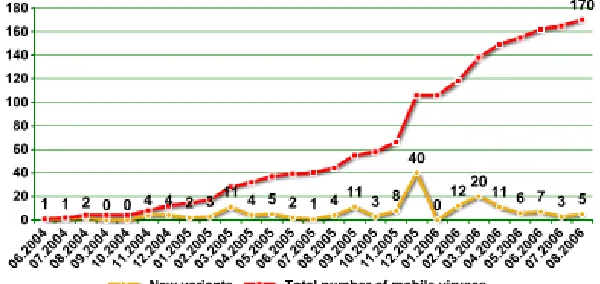
We describe the evolution of malware on Smartphone’s. Experts have talked about the hazard of mobile malware since the first Palm Pilot Trojan horse, known as Liberty, was reported in 2000, and also the initial mobile-phone virus, Cabir, was reported in 2004. In the period 2004-2008, the so many of types of mobile malware have enhanced significantly: as of March 2008. In the period 2004-2010, 517 families of mobile viruses, worms and Trojans have been classified by F-Secure [4]. The first worm that could spread through mobile phones with Symbian OS appeared: this worm, called Cabir [9], was only a prototype developed by the 29A Eastern European hacker group. Cabir is taken the first example of malicious code.
3.2. Different Types of Malware
Malware is any type of malicious, intrusive software or program code that is specifically built to attack mobile phone or Smartphone. Malware is commonly distributed as a spam among a malicious attachment or a link in an infected websites. According to its feature, Malware may be grouped in the following main categories:
3.2.1. Virus:
A mobile virus is malicious software that targets mobile phones or wireless-enabled Personal digital assistants (PDA) that causing the collapse of the system and loss of confidential information. The virus can infect different program, boot sector or file by inserting or attaching itself to them.
3.2.2. Worm:
A worm is also a program that produces copies of itself generally from one device to another one, using completely different transport mechanisms through an existing network without any user interaction. A worm doesn’t attaches to existing programs of the infected host but it may damage and compromise the security of the device or consume network bandwidth.
3.2.3. Trojan:
A Trojan is software that appears to provide some functionality but instead, it contains a malicious program. A Trojan horse always requires user interaction to be activated.
3.2.4. Rootkits:
Rootkits gain their malicious goal by infecting the OS. Sometime, they can hide malicious user-space processes and files. It also installs Trojans that disable anti-virus and firewalls. Rootkits can also operate stealthily since they directly apply changes to the OS. Hence, it can use longer control over the infected devices.
3.2.5. Botnet:
A botnet is a collection of internet-conneted devices that are infected by a virus. That provides an attacker the ability to remotely manage them. Botnets represent a danger security threat on the Internet and most of them are developed for organized crime doing attacks to achieve money.
Fig 2: Evolution of Mobile Malware
4. ATTACKS ON MOBILE DEVICES
In the following sections, we discuss much kind of attacks against Smartphone’s. We will also describe the some methodologies to perform an attack in a mobile environment.
4.1. Methodologies of the Attacks
The different methodologies to perform attacks against Smartphone’s are grouping using the following classes:
4.1.1. Wireless Attacks:
There are many different types of wireless attacks against Smartphone’s, particularly those targeting personal as well as sensitive data. The foremost common attack is eavesdropping on wireless transmissions to take out confidential information, like usernames and passwords. Wireless attacks can also abuse the distinctive hardware identification for chase owner of device.
Example - Cabir is a worm that propagates by
Bluetooth. This worm consists of a message which includes an application file, caribe.sis that appears like a Security Manager utility. If installed, the worm it uses the device’s native Bluetooth functionality to Search for another Bluetooth-discoverable device. Then, this worm tries to send infected SIS files to the discovered devices furthermore.
4.2.2. Break-in Attacks:
Break-in attacks enable the attacker to obtain control over the targeted device by exploiting either programming errors. Typically, these types of attacks are used as a stepping stone for performing more attacks, like data/identity theft or overbilling attack.
Example - Doomboot.A: This Trojan installs
corrupted system binaries into the C:\ drive of the mobile device. The depraved binaries contain
additional Trojans, as CommWarrior, which are also installed on the mobile device.
4.2.3. Infrastructure-based Attacks:
The services provided by the infrastructure are the basis for essential Smartphone functionalities, like receiving calls, SMS and e-mail services, the economic and social impact of those attacks may be very large, such as the one discussed in [5]. As an example, if an attacker is able to simultaneously send messages through the many offered portals into the SMS network, the resulting total load can move to the control channels and, hence, block legitimate voice as well as SMS communications. The authors try to demonstrate that an attacker that injects text messages from the Internet.
4.2.4. Worm-Based Attacks:
The main features that characterize attacks based upon worms are:
(1) Transmission Channel: Smartphone’s are usually equipped with many connectivity options and, hence, supply many possible routes for infection vectors, which is given as:
• Downloading infected files during surfing the Internet.
• transferring malicious files in between Smartphone’s
• When we using the Bluetooth function.
• synchronizing of Smartphone with an
corrupt computer
• Access an infected memory card.
• Opening infected files add to MMS
messages.
(2) Spreading Parameters: Additionally to infecting
the device, worms may also attack the
International Journal of Research in Advent Technology, Vol.2, No.4, April 2014
E-ISSN: 2321-9637
not only accord user’s ability to use their Smartphone’s however the networks as well Worms
Table1: Mobile Malwares
Name Time Type Method of Infection Effects OS
Liberty Crack 2000 Trojan Pretend to be a hack Remove third-party software Palm OS Cabir 2004 Worm Bluetooth connection and
copies itself
Continuous scan of Bluetooth, drain phone’s battery
Symbian OS
Dust 2004 Virus File Infector Infect all executables in root DIR Windows Mobile Brador 2004 Trojan Copy itself in to the startup
folder
Open a backdoor Windows Mobile
Mosquitos 2004 Trojan Embedded in a game Send SMS to premium-rate numbers
Symbian OS
Skulls 2004 Trojan Vulnerability in overwriting system files
DoS Symbian OS
MetalGear 2004 Trojan Vulnerability in overwriting system files
Disable virus scanner Symbian OS
CommWarrior 2005 Worm Replicates via Bluetooth and MMS
MMS charging Symbian OS
Doomboot 2005 Trojan horse Doom 2 video game Prevents booting and installs Cabir and CommWarrior
Symbian OS
Lasco 2005 Virus File infection Add itself to install packages Symbian OS Blankfont 2005 Trojan Replace font files Fonts not displayed Symbian OS Cardblock 2005 Virus Fake SIS application Encrypt memory card with a
random password
Symbian OS
Crossover 2006 Cross –
Platform Virus
CIL vulnerabilities Copy to/from mobile/PC Windows/Mobile OS
Letum 2006 Worm E-Mail spreading Infect registry Windows Mobile
Fontal 2006 Trojan Vulnerability in overwriting system files
Device not restart after reboot Symbian OS
Mobler 2006
Cross-Platform Worm
Dropping Mechanisms Disable antivirus and infect removable storage
Symbian/Windows OS
Redbrowser 2006 Trojan Fake Browser Send SMS continuously OS-Independent (J2ME) Acallno 2006 Spyware Fake Commercial Software Gather and send information
about user’s activities
Symbian OS
Lasco 2007 Worm A worm that spreads over Bluetooth networks
Searching and infecting other phones
Symbian OS
Feak 2007 Worm Proof-of-concept worm Sending SMS to contact list with URL
Symbian OS
Flocker 2007 Trojan It claims to be an ICQ application to trick the user
Sending SMS to a hard coded phone number
Symbian OS
Beselo 2008 Worm Via MMS and Bluetooth fake application
MMS charging Symbian OS
InfoJack 2008 Trojan Attach itself to installation packages
Disable security settings Windows Mobile
Pmcryptic 2008 Worm Memory card spreading Dialing premium-rate numbers Windows Mobile Yxe & Yxes 2009 Worm SMS containing malicious
URL
Send contact lists to external server
Symbian OS
Ikee 2009 Worm Scanning a IP ranges and SSH Alter wallpaper iPhone FlexiSpy 2009 Spyware Fake Application Tracking/log of device’s usage Symbian Curse of Silence 2009 SMS Exploit Vulnerabilities in e-mail
parsing
Disable SMS functionalities Symbian OS
ZeuS MitMo 2010 Worm Fake SMS Steal bank account information Cross-Plafrom ANDROIDOS_DROISNAKE.A 2010 Spyware Secretly reporting GPS
coordinates back to a server.
access to the victim’s uploaded data
Android OS
FakePlayer 2010 Trojan Fake SMS Sends 2 SMS messages to short codes, at the end-user’s expense
Android OS
iSAM 2011 Multifarious
malware
Scanning IP and connecting to SSH
Collect private information, send malicious SMS, DoS
iPhone
Android.Geinimi 2011 Trojan allow the owner of that server to control the phone
The specific information it collects includes location coordinates and unique identifiers
Android OS
Android.Walkinwat 2011 Trojan modifies certain permissions on the compromised device
Access contacts, network information, vibrator on the phone, find the phone’s location
Android OS
FakeGuard.A 2012 Trojan Steals information from the device.
Check the phone's current state Android OS
GeoFake.A 2012 Trojan unnecessary permissions Access and use the account’s authentication credentials
Android OS
GinMaster.A 2013 Backdoors accepts commands from the attacker
access to a user’s phone Android OS
ANDROIDOS_FLEXLEAK.HBT 2014 Trojan Information Stealer, Malicious Downloader
Access Contact details, Email address, Device information
Android OS
ANDROIDOS_TORBOT.A 2014 Trojan Information Stealer Start/stop steal sms, Make phone call
Android OS
Dendroid 2014 Trojan Hit Smartphomes and control remotely
Delete call logs, dial any number, intercept sms
that exploit messaging services (SMS/MMS). As their most popular infection routes, are potentially a lot of virulent, in terms of speed and space of propagation than Bluetooth. In fact, these worms can be simply sent out using just one click and can infect any Smartphone in any part of the world.
(3) User Mobility Models: As Compared with the Internet, mobile phone networks have terribly completely different characteristics in terms of services, topologies, provisioning and capability. These options additionally characterize the way new varieties of mobile worms propagate. The most important one is that they do not require Internet connectivity for their propagation and, hence, they can increase without being detected by existing security systems. Hence, mobile worms can infect many devices using proximity attacks against vulnerable devices that are physically nearby.
4.2.5. Botnets:
A type of botnet that targets mobile devices such as Smartphone’s, making an attempt to achieve complete access to the device and its contents as well as providing control to the botnet creator. Mobile botnets take advantage of un-patched exploits to provide hackers with root permissions over the compromised mobile device. It enables hackers to send e-mail or text messages, access contacts and photos, make phone calls, and more. Most mobile botnets go undetected and are able to spread by sending copies of themselves from compromised devices to other devices via text messages or e-mail messages.
Examples of mobile botnets contain the iPhone SMS attack that affected iPhone and iPad devices, the DreamDroid malware that compromised Google Android devices, the ZeuS variant (Zitmo) that targeted Blackberry users, and CommWarrior and Sexy Space, both of which affected Symbian Series mobile devices [13].
5. SECURITY SOLUTIONS FOR MOBILE DEVICES
In this section we will like to discuss existing mechanisms that are developed to prevent different form of threats for Smartphone’s. We present all, intrusion detection systems for Smartphone’s. After that, we present trusted mobile-based solutions. All the solutions are presented in historical order according to rating.
5.1. Intrusion Detection Systems
In this section, we present the state of the art of models and different type of tools that implement
Intrusion Detection Systems (IDSes) on
Smartphone’s. IDSes can be primarily based upon two complementary approaches [2]:
5.1.1 Prevention-based approaches:
By using cryptanalytic algorithms, hash functions, digital signatures and important properties like confidentiality, integrity or authentication may be during this state of affair. IDSes got to be running online and also in real-time.
5.1.2. Detection based approaches:
IDSes provide a first line of defense by effectively recognize malicious activities. Furthermore, there are some main types of detection:
(1) Anomaly Detection: An anomaly detection system compares the normal behavior of the Smartphone with the real behavior. The best solutions included in this section is either monitor distinct activities on the mobile, e.g. SMS or MMS services, Bluetooth connections, or analyses the power consumption model of the phone to discover anomalies.
(2) Signature-Based: In this mechanisms that find anomaly on Smartphone using signatures. The signature-based approach checks if every signature derived from an application matches any signature in a malware database. The database of malware signature can be automatically or manually outlined.
(3) Measurements: A collection of measurements includes several performance indicators of a Smartphone, like CPU activity, file I/O activity, memory consumption and network I/O activity. Therefore, we can extract activity profiles and use them for comparison with normal behaviors in order to discover anomalies. Some of these features such that RAM free, user inactivity time, process count, CPU usage, SMS sent count, which are used for anomaly detection.
International Journal of Research in Advent Technology, Vol.2, No.4, April 2014
E-ISSN: 2321-9637
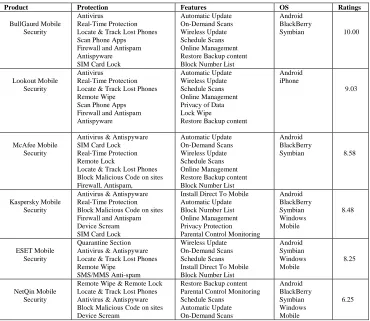
Table 2: Latest Security Software for Mobile Devices
5.2. Smartphone Protection Tips
Although many tools and techniques are present for
detecting malware attacks and protecting
Smartphone’s however users must be aware of potential security threats and their consequences. It’s widely accepted that user having lack of awareness regarding potential threats contribute to the success of security attacks. Following a few good tips that can help to protect Smartphone’s from potential threats [3]:
• Always install a trusted mobile security application that can protect the Smartphone from attacks and alert the user when a suspicious event occurs.
• Download all mobile applications from trusted, official application supplier. Avoid downloading anything from un-trusted third-party app stores.
• Before downloading an app, observe the reviews and the ratings carefully, even if the application author is well-known.
• During installation, always read the permissions requested by the application. If one thing seems suspicious then don’t install that application.
• Always Turn off Wi-Fi, Bluetooth, and infrared when they are not in use. Take care when connecting to unsecured public Wi-Fi network.
• Always keep applications up to date and check that firmware is updated immediately when it becomes available for the mobile phone.
• Encrypt all confidential data stored in the mobile phone and back it up continuously. Ensure sensitive information isn’t cached domestically.
• Whenever attainable, set a password for confidential files and applications.
• Don’t click on Internet links that appear suspicious or unfaithful. And also don’t copy and paste links into the browser. This
Product Protection Features OS Ratings
BullGaurd Mobile Security
Antivirus
Real-Time Protection Locate & Track Lost Phones Scan Phone Apps Firewall and Antispam Antispyware SIM Card Lock
Automatic Update On-Demand Scans Wireless Update Schedule Scans Online Management Restore Backup content Block Number List
Android BlackBerry
Symbian 10.00
Lookout Mobile Security
Antivirus
Real-Time Protection Locate & Track Lost Phones Remote Wipe
Scan Phone Apps Firewall and Antispam Antispyware
Automatic Update Wireless Update Schedule Scans Online Management Privacy of Data Lock Wipe
Restore Backup content
Android iPhone
9.03
McAfee Mobile Security
Antivirus & Antispyware SIM Card Lock Real-Time Protection Remote Lock
Locate & Track Lost Phones Block Malicious Code on sites Firewall, Antispam, Automatic Update On-Demand Scans Wireless Update Schedule Scans Online Management Restore Backup content Block Number List
Android BlackBerry
Symbian 8.58
Kaspersky Mobile Security
Antivirus & Antispyware Real-Time Protection Block Malicious Code on sites Firewall and Antispam Device Scream SIM Card Lock
Install Direct To Mobile Automatic Update Block Number List Online Management Privacy Protection Parental Control Monitoring
Android BlackBerry Symbian Windows Mobile 8.48 ESET Mobile Security Quarantine Section Antivirus & Antispyware Locate & Track Lost Phones Remote Wipe
SMS/MMS Anti-spam
Wireless Update On-Demand Scans Schedule Scans Install Direct To Mobile Block Number List
Android Symbian Windows Mobile 8.25 NetQin Mobile Security
Remote Wipe & Remote Lock Locate & Track Lost Phones Antivirus & Antispyware Block Malicious Code on sites Device Scream
helps defend mobile phones from drive-by download attacks.
• Always monitor the SMS, call charges and battery life. Any uncommon behavior ought to prompt an intensive check on recently installed applications. There’s a possibility that the mobile phone is under a security attack.
• Finally, if the mobile phone is stolen then delete all the apps, contacts, and confidential data remotely, and use the unique device ID to block the stolen mobile phone.
6. CONCLUSIONS
In this work, first of all we have mentioned the present scenario of all mobile malware, by summarizing its evolution, along with some notable examples. We have also classified known attacks against Smartphone’s, particularly at the application level, focusing on how the attack is carried out. Finally, we have reviewed current security solutions for Smartphone’s focusing on existing mechanisms based upon intrusion detection and trusted mobile platforms. Our aim to growing awareness about Mobile Security to the Mobile users and also provide defense methodology against the Mobile attacks.
REFERENCES
[1] G. Lawton, “Is It Finally Time to Worry about Mobile Malware?” Computer, vol. 41, pp. 12–14, May 2008.
[2] Mariantonietta La Polla, Fabio Martinelli, and Daniele Sgandurra IEEE Communication Survey and Tutorial, “A Survey on Security for Mobile Devices” by VOL. 15, NO. 1, FIRST QUARTER 2013.
[3] M.Chandramohan and Hee Beng Kuan Tan,
“Detection of Mobile Malware in Wide”, Sep 2012.
[4] M. Hypponen, “Mobile Security Review
September 2010,”F-Secure Labs,
HelsinkiFinland, Tech. Rep. September 2010. [5] P. Traynor, M. Lin, M. Ongtang, V. Rao, T.
Jaeger, P. McDaniel, and T. La Porta, “On cellular botnets: measuring the impact of malicious devices on a cellular network core,” in
CCS ’09: Proceedings of the 16th ACM conference on Computer and communications security. New York, NY, USA: ACM, 2009, pp.
223–234.
[6] Q. Yan, Y. Li, T. Li, and R. Deng, “Insights into Malware: Detection and Prevention on Mobile Phones,” in Security Technology, D. ´Slzak, T.-h. Kim, W.-C. Fang, and K. P. Arnett, Eds. Springer Berlin Heidelberg, 2009, vol. 58, ch. 30, pp. 242–249.
[7] S. Coorporation, “Symantec Internet Security Threat Report Volume XVI,” Whitepaper, vol. 16, Apr 2011.
[8] Yong Wang, Kevin Streff, and Sonell Raman, IEEE Journal, “Smartphone Security Challenge”, December 2012.
[9] “Bluetooth-Worm:SymbOS/Cabir,” Jun 2004.
[Online]. Available: http://www.f-secure.com/v-descs/ cabir.shtml
[10] IMS Research, “Global Smartphone’s Sales Will Top 420 Million Devices in 2011, Taking 28 Percent of all Handsets, According to IMS Research,” July 2011. [Online]. Available: http://imsresearch.com/ press-release/Global Smartphone’s Sales Will Top 420 Million Devices in 2011 Taking 28 Percent of all Handsets According to IMS Research.
[11]http://www.gartner.com/newsroom/id/2665715 [12]http://www.clove.co.uk/viewtechnicalinformatio n.aspx?content=3B2BD491-6465-4C70-ABDB-5A12A06C3D8D