Technology
-enhanced Translator Training
Jarmila FICTUMOVA
Department of English and American Studies
Faculty of Arts
Masaryk University
Arna Nováka 1
602 00 Brno
Czech Republic
[email protected]
Abstract
The aim of the paper is to present an Open Source Learning Management System for creating courses in translation theory and practice. Some of its most important characteristics are:
• Choice of course formats such as by week, by topic or social format
• Flexible array of course activities - Forums, Journals, Quizzes, Resources, Choices, Surveys, Assignments
• Full user logging and tracking - activity reports for each student are available • Mail integration - copies of forum posts
and teacher feedback can be mailed
• Assignment Module with due date and grade requirements
The training includes the use of corpora (mono- and bilingual) and TM tools, with tasks ranging from alignment of texts and creating a translation memory, to terminology extraction from specialized comparable language corpora and other translation projects.
1
Introduction
In the last decade the practice of translating and therefore also training of translators, like many other features of our lives, have undergone a major change. Is it a change for the better or for the worse? To answer this question we have to consider several aspects and characteristics of present-day translation and translator training. The title of this paper uses the attribute “technology-enhanced”. I will explain what is meant by this adjective and how indispensable technology has become for translators nowadays. I will touch upon problems of translating into L2 and the resources and tools available for dealing with this sort of translation. Finally, the personality of the teacher of translation and his/her background will be considered.
2
History and New Developments
Fifteen years ago, before the Velvet Revolution1,
a teacher of translation under the communist regime was left to his/her own devices as to what to do. The access to foreign language press and broadcasts was limited due to political reasons, rather than technical ones, and so were the copying facilities. The authorities required registration of all copied materials, trying to prevent the inevitable – spreading of information on “forbidden” topics.
Typing with a number of carbon papers to produce enough copies for the class used to be a standard procedure. Extracts from fiction, written by dead or “approved” authors, were the most easily accessible sources of language materials. Magazines, journals and newspapers were difficult to get hold of but much more popular with the students. The same was true about any authentic video material, TV recordings or films showing life beyond the Iron Curtain, i.e. in the West. Using news items in lessons sometimes meant risking a clash with the official version of reports on public radio and TV channels.
But after 1989 sweeping changes occurred. Copiers, news broadcasts, newspapers and an abundance of books in foreign languages became reality – with more to come: computers and the Internet. We have been flooded with information and technologies. It did not happen overnight, and all the technological paraphernalia are not easy or cheap to get. However, they are here, they are available and furthermore, we are expected to use them efficiently.
2.1 Translators
For translators the advent of computers has meant a revolutionary change. All the shelves of reference materials, encyclopaedias and dictionaries are now inside the computer and there
is much more in there (Harold, 2003). The situation is now reversed: instead of the lack of resources and technology, there is too much for a person to be able to come to grips with. Translators are required to be at the cutting edge of technological endeavour. They are expected to be linguistic geniuses and translate into and from their mother tongue. “Mother tongue” is sometimes no longer so easy to establish and is therefore called the “language of habitual use”.
2.1.1 Training of Translators
Training of translators, like translation itself, has become computer-bound. No translator can do without mastering the basics of text processing and looking up information on the Internet. But this is by no means all of it. Translator training should make it possible for the students to use the computer with ease and confidence. It should teach them how to use all the necessary tools that are supposed to make translation more efficient and that, hopefully, also guarantee better quality of translation.
Translation teachers have the option to use new Learning Management Systems to provide direct access to links on the Internet and familiarize the students with the reality of working with electronic texts in the virtual environment. For a comparison of the various systems, use the link provided in the footnote at the bottom of this page2.
However, as Anthony Pym explains in his paper on E-Learning and Translator Training, we should
“work with people as well as technology, since the people, not the tools, are the ones who are going to solve your problems and achieve progress in learning. This (…) point perhaps deserves special emphasis. As translation itself becomes an increasingly technical concern, much of our teaching inevitably concerns techniques, skills, tools, procedures, in fact anything except people. An exclusive focus on the technicalities of e-learning is likely to take us even further down that road. And yet, when all is said and done, all our communication is human-to-human, be it face-to-face or across the planet. If the social principles of learning communities and teaching teams can be maintained and developed, there is no overwhelming reason why technology should not extend rather than restrict the humanity of our task.” My experience has shown that a combination of e-classes with traditional classes taking place every week is very effective. That explains the title of this article. I use technology to
2 http://www.edutools.info/course/compare/index.jsp
enhance the teaching rather than substitute the teacher-student and student-student interaction in the classroom.
3
The Learning Environment
3.1 Background on Open Source Software The following information is from the Corporate University Enterprise (CUE) White Paper: “The history of open source software is very closely related to the history of the Internet itself. It can be traced to post-Sputnik initiatives during the Eisenhower administration. Because the Eisenhower administration did not want to concentrate technology research in the Pentagon, money was provided to universities and new non-military government entities such as NASA and the Advanced Research Projects Agency (ARPA). These agencies and universities became heavily involved in developing computing and communications technologies.”
Like so much of the open source applications that are available, the tools have been conceptualised and created to fill a need in the university setting. Learning management systems in the university setting are focused on online collaboration, often as a supplement to classroom education. This was a major criterion for our choosing Moodle (i.e. Modular Object-Oriented Dynamic Learning Environment). Moodle is in many ways a one-man campaign by the Australian Martin Dougiamas. As he himself says: ‘Moodle is my perpetual work in progress.’
3.1.1
Availability
Moodle3 is a course management system (CMS) -
a software package designed to help educators create quality online courses. Such e-learning systems are sometimes also called Learning Management Systems (LMS) or Virtual Learning Environments (VLE). One of the main advantages of Moodle over other systems is a strong grounding in social constructionist pedagogy. This means that the role of the teacher changes – he or she is no longer the only source of knowledge but more of a mediator of information and moderator of discussions.
Moodle is Open Source4 software, which
means that you are free to download it, use it, modify it and even distribute it under the terms of the General Public License (GNU)5. Moodle runs
without modification on Unix, Linux, Windows,
3http://moodle.org/
Mac OS X, Netware and any other system that supports PHP, including most web host providers. Data is stored in a single database: MySQL and PostgreSQL are best supported, but it can also be used with Oracle, Access, Interbase, ODBC and others.
3.2
How does it work?
Once Moodle has been installed on the server, the teacher has a chance to develop an electronic course totally independently of the technician. It is true that problems resulting from the very nature of computer technology do occur, but apart from these, teachers can work on their own and use all the creativity and resources they desire. The teaching takes place in a classroom equipped with a data projector and a screen and has access to the Internet. Students are asked to print out their version after submitting them and bring the hard copy to class. It is necessary to have something to fall back upon when there is a technical problem and the data projector in the classroom does not work or if there is another technical problem and no assignments can be displayed on the screen.
First of all there is the option to choose between a weekly format, a topics format or even the social format. The weekly and topics formats are very similar in structure. The main difference is that each box in the weekly format covers exactly one week and has the date, whereas in the topics format each box can cover whatever you like. The social format doesn't use much content at all and is based around just one forum - this is displayed on the main page (hence it is not suitable for our purposes).
In a practical translation class each topic can be devoted to a different type of text (letters – business and personal, articles, contracts etc.). The teacher can include resources for the study of the topic by uploading files. See the description under Resources.
Creating a course involves adding course activity modules to the main page in the order that students will be using them. They can be shuffled any time. To turn on editing, the toggle switch "Turn on editing" under Administration must be on. It shows or hides the extra controls necessary to manipulate the main course page. To add a new activity, the type of activity is selected from a pop-up menu. After adding activities the teacher can move them up and down in the course layout by clicking on arrow icons next to each one. They can also be deleted by using the cross icon, and re-edited by using the edit icon.
Within each topic or week the teacher can use an array of course activities: forums – to present students’ contributions and stimulate discussion, journals to make the students describe the procedure when fulfilling a more complex or difficult task, or quizzes to test the students’ progress in mastering the basics of translation theory (a multiple-choice or true-false test) or the pitfalls of interference (translating sentences from the mother tongue – short-answers test). The questions are kept in a categorised database, and can be re-used within courses and even between courses. Quizzes can allow multiple attempts. Each attempt is automatically marked, and the teacher can choose whether to give feedback or to show correct answers or both. All answers can be evaluated later and more options can be added to the “correct answers”.
Resources are the content of the course. Teachers may have existing content that they want to add to the course, such as web pages, audio files, video files (e.g. tutorials), Word documents, flash animations or even TM-tool files (.pxf and .txf). Any type of file that exists can be uploaded into the course and stored on the server. While the files are on the server they can be moved, renamed, edited or deleted. Updating materials is therefore very easy and can be done fairly quickly.
An assignment is usually set with a due date and a maximum grade. Students are able to upload one file. The date they upload their file is recorded. Afterwards, there is a single page on which each file (and how late or early it is) can be viewed, including the date and feedback. Half an hour after the teacher grades any particular student, Moodle will automatically email that student a notification. If the teacher corrects the student’s assignment using “track changes” in Word, the student can then access the corrections in a feedback file that is uploaded in Moodle. This feature was added by our administrator at the teachers’ request and was named echo-assignment.
Before the actual class takes place class members can view all the echo-assignments. After the deadline for submitting the assignment has expired, students can read their peers’ translations and prepare for the discussion based on their translations.
It is also possible for the student, if the teacher allows it, to re-submit assignments after the class, making the necessary changes or improvements.
(next to each name in the list of all people, or from any user profile page) provide the teacher with a comprehensive overview of what any particular person has been up to in the course.
According to the CUE report, features are the main strength of Moodle. The features listed above are only a sample. Language support is another strength. Currently, Moodle is available in 34 languages6, with more under development. The
Czech version is currently being prepared at our department. Moodle is the only open source LMS to truly address the issue of human resource information systems (HRIS) integration. The latest release has a graphical user interface (GUI) tool to hook into various external database formats.
3.3 Courses
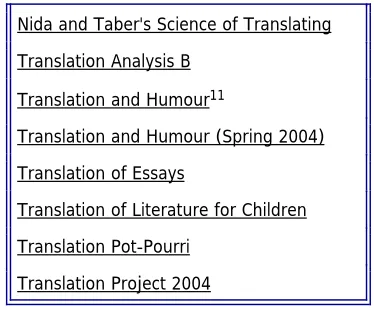
Now I would like to show you what translation courses have been taught at our department7 using
Moodle:
Courses
Becoming a Translator B8
Translation Analysis A
Borderline Cases in Translation9
Introduction to Translation (Spring 2004)10
6 http://moodle.org/download/lang/ 7
http://www.phil.muni.cz/angl/e-learn/course/category.php?id=2
8 Jarmila Fictumova: Practical translation exercises, using
the computer. Students will employ the Internet, language corpora and CAT tools in translating non-literary texts. They will deal with translations from and into English, create their own glossaries of terms and try to revise translations.
9 Jiri Rambousek : The course examines texts and
language phenomena that represent borderline cases in translation and cannot therefore be dealt with by means of translation proper. These instances should lead us to some general observations about systemic differences between languages and cultures, as well as about translation. We shall concentrate on short isolated texts (e.g. public signboards and announcements, advertisement texts), short literary texts strongly dependant on language (anecdote, limerick...) or some specific forms that hardly meet the standards of textuality (crossword puzzles, secret codes). The students will be asked to (a) translate/transfer these texts into Czech, (b) collect and compare original texts in both languages, (c) define systemic differences between the two languages and cultures and rules for handling these instances, both from literature and from their own experience.
10Simona Mazacova, Jiri Rambousek: The students will be
acquainted with the basic terms in the field of translation and translation studies and with a brief outline of the development of approaches to translation. At the beginning of the course,
Nida and Taber's Science of Translating
Translation Analysis B
Translation and Humour11
Translation and Humour (Spring 2004)
Translation of Essays
Translation of Literature for Children
Translation Pot-Pourri
[image:4.595.331.518.55.210.2]Translation Project 2004
Table 1: List of Courses
4
Other Tools and Resources
As mentioned earlier, translators are frequently asked to translate into L2, rather than into their mother tongue. This can bring about problems even for very competent non-native users of the target language (TL). Educated native speakers not being available all the time, the translator is left with a choice: either to refuse the job or to learn about ways of coping with this challenge.
The use of electronic corpora, monolingual and both parallel and comparable, together with the relevant corpus managers or Internet search engines can provide considerable help. In their book Working with Specialized Language, A practical guide to using corpora, Lynne Bowker
and Jennifer Pearson explain in detail how LSP corpora can be used as a translation resource. Students can follow their explanations and create small ad hoc corpora to investigate usage, style
the importance of competence in the target language will be stressed and a short test in Czech will inform the students of the level of their Czech. The core of the course consists of the translation of various types of texts and the discussion of different translation procedures and techniques. The theoretical basis will be supplied. Literature: J. Levý, Umění překladu; S. Bassnett, Translation Studies; P. Newmark, Textbook of Translation
11 Simona Mazacova : Translating humour can be an
and search for explanatory contexts in dealing with terminology. Here are some key points they give:
• “A corpus can provide you with both linguistic and conceptual information. • You can consult a parallel corpus in
much the same way as you consult a bilingual dictionary, but a corpus will provide more collocational and stylistic information than a dictionary.
• A monolingual corpus can also be used as a translation resource, but you have to be more creative in devising strategies to find equivalents.
• You can also use monolingual corpora to help you choose between synonyms, identify usage information and determine what style is appropriate for your translation.”
Although more time is devoted to translations into Czech, students also translate into English and get acquainted with the above-mentioned techniques. They are assigned tasks in terminology extraction and management. To work on these projects they used MultiTrans12 and Bonito13.
Bonito is a corpus manager developed by Pavel Rychly of the Faculty of Informatics, Masaryk University in Brno. The students have been using Bonito to search corpora, including a Czech-English parallel Corpus that was developed at the Faculty of Arts14.
Another part of the training in “Becoming a Translator” was to simulate a translation agency. The students were asked to work with the free Personal Edition (PE) version of Transit15 to
translate a text into English. I used Transit Professional and Term Star to prepare translation projects for them. These projects (.pxf format) were based on revised translations and included reference material for concordance searches and also the required terminology. The students uploaded their translations in .txf format in Moodle.
Apart from language skills and mastering new technologies, working as a translator also involves dealing with clients, agencies, employers; networking, research, use of technology; and generally an awareness of the roles translation plays in society and society plays in translation (Robinson, 1997). Students were therefore exposed to real-life situations and met experienced translators who told them about their work. They
12 http://www.multicorpora.ca/multitransoverview_e.html 13 http://nlp.fi.muni.cz/projects/bonito/
14 http://www.phil.muni.cz/angl/
15
http://www.star-solutions.net/html/eng/support/Transit-SAT-PE.html
also followed discussions on the Internet on various lists for translators and attended lectures, directly or on-line. Recently Power-Point presentations of such lectures have been uploaded in Moodle.
It follows from what has been said that translation teachers should be educated as translators and teachers as well. This background should make it possible for them to pass on the knowledge and skills they have acquired. It helps if the translation teacher is an IT expert as well. To mention some personal qualities – I believe that teachers in general, but translation teachers in particular, should be open to discussion, definitely not dogmatic, and willing to learn all their lives. On the other hand, patience and pedantry, up to a certain degree, is a must to be able to instil basic rules and responsibilities of the profession in the students.
5
Conclusion
The aim of this paper was to provide information on courses in translation theory and practice, based on current teaching experience, using the course management system called Moodle.
I think that the instruction has changed for the better due to the new technologies. Other questions spring to mind – how is it possible that the quality of translations is not getting better, too? Is there a limit to what can be learned? We will have to wait and see to be able to make a statement about that.
In conclusion I would like to say that creating web-based materials and using authentic materials is an exciting and rewarding activity but also a never-ending adventure likely to “swallow” most of the teachers’ leisure time. There is some hope, however, that once this groundbreaking work has been done, more time can be devoted to improving the courses and making them work without a hitch.
6
Acknowledgements
My thanks go to all my colleagues, friends and family who have contributed to the creation of my courses and to Dan Miksik, the Moodle administrator in particular. Last but not least, also to past and present students for their patience when they have to put up with the whimsical nature of computer technology and their teacher’s enthusiasm, rather than mastery of its various ins and outs.
References
Somers Harold (ed.). 2003. Computers and Translation: A Translator’s Guide.
Learning Management Systems for the Rest of Us; An assessment of open source learning management systems. A research report presented by CUE (Corporate University Enterprise, Inc.), May 1, 2003.
Pym Anthony, Fallada Carmina, Biau José Ramón, Orenstein Jill (eds). 2003. Innovation and E-Learning in Translator Training. Tarragona:
Intercultural Studies Group.
Pym Anthony. E-Learning and Translator Training.
http://www.ice.urv.es/trans/future/cttt/research/el earning.pdf
Bowker Lynne, Pearson Jennifer. 2002. Working with Specialized Language, A practical guide to using corpora. p.193, Routledge.
Robinson Douglas. 1997. Becoming a Translator,
p.146, 192. Routledge.
Neunzig Wilhelm. 2002. How to educate students without coming face to face with them or Information technologies in the teaching of translation on a distance-learning basis.