IJEDR1402242
International Journal of Engineering Development and Research (www.ijedr.org)2805
Cognitive and Expressive based Search Algorithm for
Goggle Search using BCI
1
Ms. Nidhi Vala,
2Prof. Kiran Trivedi
1M.E. Scholar, 2Associate Professor1Information Technology Engineering Department, 2E.C. Engineering Department Shantilal Shah Engineering College, Bhavnagar, India
________________________________________________________________________________________________________ Abstract—Generally Brain Computer Interfaces (BCI) require both the hardware and software support for making real
communication alive. Emotiv Epoc Neuroheadset is one of those devices present in the market which provides this kind of communication through electroencephalograph (EEG) signals and is also used to explain the brain activities. By analysing the recorded EEG signals, characteristic patterns for various facial expressions, human emotions and cognitive actions can be identified. These patterns are very useful for the analysis of human behaviour in different situations & environment and for developing any real-time application. Here through analysis we have found the characteristic patterns for the expressive features eye blink and left smirk. Generally these BCI products are being used by the physically disable people as a tool replacing their immortal body element. But now non-invasive BCI products are gaining popularity among healthy people for their amusement and curiosity. We have developed an application which make use of the continuous raw EEG data captured from human brain through Emotiv Epoc Neuroheadset and the gained results of the two facial expressions for searching a particular string on Google. BCI virtual speller was one of the important application for severely disable people. But in this paper, it has been spotted that, the main challenge of designing a larger matrix based BCI speller can be solved in a different way. Here we have made use of the 5x10(RC) matrix where 41 symbols have been mapped in it. This matrix will use the expressive feature eye blinking as its left-to-right shift focus controller and left smirk as its top-to-bottom focus controller. As this technology is very new for the most of people we need to provide training before actual experiment. And that session was called cognitive training for the subjects. In our experiment we got the average accuracy up to 66.66% but in final session accuracy was 80%, plus typing speed was average 5 characters per 45.67 sec during the experiment. Performance got increased with sessions and it has been shown by graphical representation.
Index Terms— Brain Computer Interface(BCI), Electroencephalograph(EEG), BCI Speller, RC Matrix - Row Column Matrix
________________________________________________________________________________________________________
I.INTRODUCTION
Generally target BCI users are mainly the patients from severe motor disabilities like progressive muscular dystrophy, cerebral palsy (CP) and spinal cord injuries (SCI)[1]. A BCI system based on electroencephalograph(EEG) signals can be used to control the external devices such as computer, wheelchairs, virtual environment etc. One of the most popular and very important BCI application is a spelling device which aid severely disabled individuals with communication, for example people disabled by amyotrophic lateral sclerosis (ALS)[2]. It has been observed by Guger et al. that more than 80% healthy people can use such a BCI.[2] BCI application areas have been expanded largely in wheelchair navigation, communication, web browser navigation, and also in the detection and use of human emotions, facial expressions and cognitive states of mind. Before P300 based speller was used largely by the researcher for assisting the disabled people in communication. A typical ERP (Event Related Potential) based P300 row/column paradigm (RCP) speller was first introduced by Farwell and Donchin in 1988. Although, P300 speller was initially designed to spell Latin characters later Chinese character was proposed in 2010.[1]
In current market there are certain BCI devices available which can change the paradigm of BCI applications and its number of users. Emotiv is one of those devices present in the market which is low cost, wireless and non-invasive. Duvinage et al. compared with a medical device and showed that it records real EEG data [3]. Their study shows that, performance is not better than a medical device but it is not recording only muscular or ocular data criticized by some BCI researchers. Licensed emotiv headset comes with several in-built software development tools like EmoKey which translates human emotion detection results to previously defined sequences of keystrokes according to logical rules defined by the user through the EmoKey user interface[4], EmoComposer which will enable you to send the user defined EmoStates to any BCI application or control panel who make use of the Emotiv API. Along with these two main SDK tools there exist others which can be used directly without any external support.
IJEDR1402242
International Journal of Engineering Development and Research (www.ijedr.org)2806
II.EEGDATAPROCESSINGIn this section we will take a brief note on real time eeg data acquisition process. Then we will perform analysis of those recorded eeg signals for using them in our future application. Analysis is a very important part in our research because through analysis only we will be able to find the useful results which can drive any BCI application. Processing will be done in two sections as discussed before:
Data Acquisition
Real time EEG data direct from the human brain can be captured using the TestBench panel available with the Emotiv headset suite. This is the only utility we are going to used throughout our research. Through this TestBench panel eeg signals can be captured and it can also be saved for future analysis. Figure 1 shows the real time eeg data from each of the 14 channels of Emotiv headset.
Figure 1: Real Time EEG data Data Analysis
After capturing the eeg signals, analysis of those signals has been done using EEGLAB toolbox of MATLAB. Here in analysis we wanted to find out the characteristic patterns for the two facial expressions eye blink and left smirk. For that we have recorded several .edf files which contains the real time eeg signal values of those two expressions and now we can use those files for our actual analysis.
Figure 2: AF3 channel`s electrode position on human Figure 3: AF4 channel`s electrode position on human scalp scalp and its activity spectrum and its activity spectrum
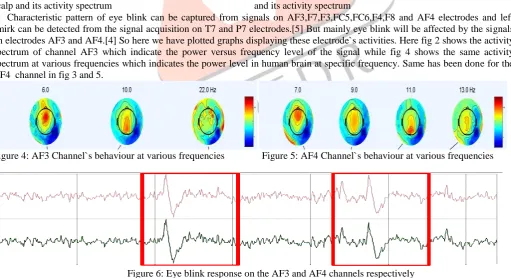
Characteristic pattern of eye blink can be captured from signals on AF3,F7,F3,FC5,FC6,F4,F8 and AF4 electrodes and left smirk can be detected from the signal acquisition on T7 and P7 electrodes.[5] But mainly eye blink will be affected by the signals on electrodes AF3 and AF4.[4] So here we have plotted graphs displaying these electrode`s activities. Here fig 2 shows the activity spectrum of channel AF3 which indicate the power versus frequency level of the signal while fig 4 shows the same activity spectrum at various frequencies which indicates the power level in human brain at specific frequency. Same has been done for the AF4 channel in fig 3 and 5.
Figure 4: AF3 Channel`s behaviour at various frequencies Figure 5: AF4 Channel`s behaviour at various frequencies
Figure 6: Eye blink response on the AF3 and AF4 channels respectively
IJEDR1402242
International Journal of Engineering Development and Research (www.ijedr.org)2807
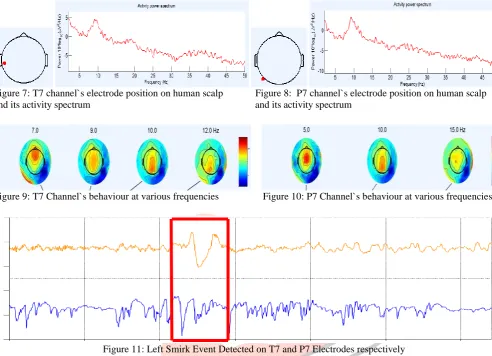
After getting eye blinking facial expressions` characteristic patterns, now we will perform analysis for the left smirk facial expression which get affected by the T7 and P7 electrode`s signals. Fig 7 and 8 show the activity spectrum of channel T7 and P7 respectively. Both of these electrodes have been placed left side of the brain which can be shown in below figures.Figure 7: T7 channel`s electrode position on human scalp Figure 8: P7 channel`s electrode position on human scalp and its activity spectrum and its activity spectrum
Figure 9: T7 Channel`s behaviour at various frequencies Figure 10: P7 Channel`s behaviour at various frequencies
Figure 11: Left Smirk Event Detected on T7 and P7 Electrodes respectively
We had noted that left smirk event can be detected on the T7 and P7 electrodes. But it has also seen that this event usually being affected by only change in T7 electrodes signals[5]. So in Figure 7 and 8 we analyzed both the channels but when we analyze the actual real time data as shown in Figure 9 it got cleared that left smirk can be affected just by change in T7 electrode`s data. So thus we found out another facial expression`s characteristic pattern and also found out the value range in which this left smirk event occurs actually. We will use these measured actual values in our application to test its correctness. Now we will build a BCI application which will make use of our analysis results and perform search operation on Google search engine just by eye blinking and left smirking facial expressions. No other muscular or vocal action is involved in it.
III.EXPERIMENTANDRESULTS
Here the experiment is being performed to understand the performance of the English speller keyboard by using the analyzed values of eye-blink and left smirk. To understand the approximate performance of the first English speller Keyboard, 3 different subjects attended the experiment arranged at my home in a very peaceful environment. No more than one subject and me were there in the experimental area so that any kind of disturbance or noise can be avoided. All the subject`s age limit was from 22-25. Experimental Setup
BCI system is always new to most of the subjects. They don`t have any detail information about the usability or related functions of the BCI products.
For this experiment healthy and normal three female subjects were selected and they were given some preliminary introduction about how the whole system works. So, it was a very new experience for all of them. This action was perform as a cognitive task because new subjects need to be trained to use the developed BCI application.
For the current experiment expressive features eye blinking and left smirking were comfortable and preferable to all the subjects. So eye blinking and left smirking have been taken as a command to select any particular column or row respectively.
Total three different training sessions and one final session were arranged for the subjects so that their performance can be improved gradually as they become familiar with the interface.
IJEDR1402242
International Journal of Engineering Development and Research (www.ijedr.org)2808
This keyboard interface was differently mapped for the used matrix algorithm. Actually there was a matter of synchronization of user intended command and application’s response.
In this design, user advantage was given much priority. The application is designed in Microsoft Visual Studio 2008 with Visual C++ for windows OS.
Design of an Application
For getting started with the application first user need to wear the Emotiv EPOC neuroheadset. Because this application runs by the continuous data from the human brain which controls the keyboard character selection.
Any locked-in patients or youngster can use this application by just wearing the Emotiv EPOC neuroheadset and using eye blinking and left smirking as their external control command.
Figure 12: Main Screen of the application
Figure 13: Character “I” get selected
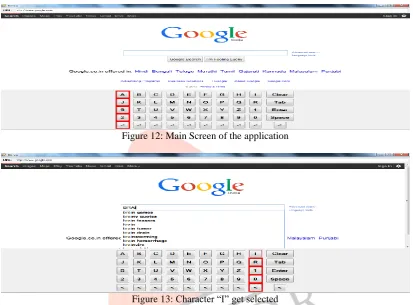
Generally Google search does not need any punctuation symbols for searching a string so here we have made a customized typing keyboard, which contains necessary symbols in the keyboard layout. Clear, enter button, space and tab symbols are also being added in this interface. Moreover, symbol of “<” will give an extra advantage to return from the error selected column/row. Along with that the necessary alphabetic characters from A-Z and the numbers 0-9 have been added to the key board.
The algorithm works in order to highlight only the column by vertical flashing from left to right side for selecting necessar y character. Then it starts to flash again from top to bottom and letter by letter for selecting the user’s desired character in the specific column selected before. The Keyboard repeats these two steps again to write another character. Desired column will get selected when subject performs eye-blink for the currently focused column. After the column get selected focus will start shifting from top to bottom in the previously selected column and on left smirk event detection particular character will get selected. If any user wishes to get out of the wrong selected column, there is “<” symbol in each column to start from the beginning. A trick can also be applied if any user miss the expected column then again the keyboard will pass through all other non target columns. So, to skip this or not to pass through all non target columns in the right side, any random column can be selected and then restart symbol will start flashing from the very first column.
Results
We gave training to all the participants before starting the actual experiment. So that the participants get familiar with the application`s graphical user interface and can perform well in selecting the desired character in lesser time.
Here we perform the experiment 3 times per subject and then performed the final experiment for that subject and measured their accuracy of selecting the correct latter.
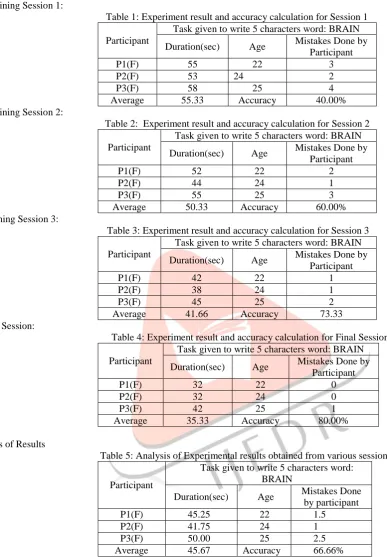
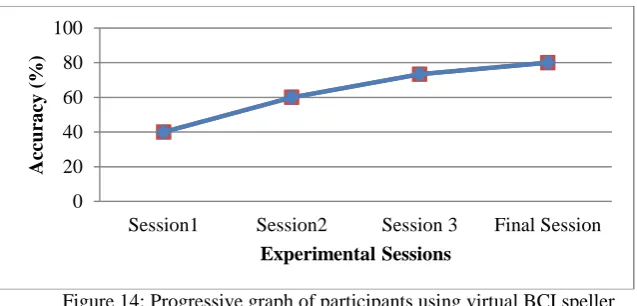
Three different experimental sessions were designed for a subject to observe their progress. If the subject has no idea about BCI, then after certain session, performance will be better. And their performance can be seen by the graph in figure 12. The subject had given a task to write 5 character`s word “BRAIN” in the Google search box.
Ideally it has been set that, when the application does get started, focus will start its shifting after the 12 seconds because
IJEDR1402242
International Journal of Engineering Development and Research (www.ijedr.org)2809
Experimental Session Results:1) Training Session 1:
Table 1: Experiment result and accuracy calculation for Session 1 Participant
Task given to write 5 characters word: BRAIN Duration(sec) Age Mistakes Done by
Participant
P1(F) 55 22 3
P2(F) 53 24 2
P3(F) 58 25 4
Average 55.33 Accuracy 40.00%
2) Training Session 2:
Table 2: Experiment result and accuracy calculation for Session 2 Participant
Task given to write 5 characters word: BRAIN Duration(sec) Age Mistakes Done by
Participant
P1(F) 52 22 2
P2(F) 44 24 1
P3(F) 55 25 3
Average 50.33 Accuracy 60.00%
3) Training Session 3:
Table 3: Experiment result and accuracy calculation for Session 3 Participant
Task given to write 5 characters word: BRAIN Duration(sec) Age Mistakes Done by
Participant
P1(F) 42 22 1
P2(F) 38 24 1
P3(F) 45 25 2
Average 41.66 Accuracy 73.33
4) Final Session:
Table 4: Experiment result and accuracy calculation for Final Session Participant
Task given to write 5 characters word: BRAIN Duration(sec) Age Mistakes Done by
Participant
P1(F) 32 22 0
P2(F) 32 24 0
P3(F) 42 25 1
Average 35.33 Accuracy 80.00%
Analysis of Results
Table 5: Analysis of Experimental results obtained from various sessions
Participant
Task given to write 5 characters word: BRAIN
Duration(sec) Age Mistakes Done by participant
P1(F) 45.25 22 1.5
P2(F) 41.75 24 1
P3(F) 50.00 25 2.5
Average 45.67 Accuracy 66.66%
Here from the table 5 we can see that, the average time for writing 5 characters was 45.67 sec and we get average accuracy up to 66.66%. As a BCI speller it was nearly successful to write at a rate of 7.43 char/min. Higher performance can be found in case of different words writing. The matrix of 10 columns will take a bit more time if desired character is placed in the last columns. Moreover, it was reported by Davide that writing speed were 6-8 char per minute for the Emotiv’s Minkeyboard application[7]. It was approximately similar to the result we found in our experiment for current study.
IJEDR1402242
International Journal of Engineering Development and Research (www.ijedr.org)2810
Figure 14: Progressive graph of participants using virtual BCI spellerMostly in all training sessions error is common and accuracy level is lower. But it improves with the time and it has been shown in the fig 12. The graph indicates all subjects accuracy in different sessions for the same task. It is clearly improving in Final session.
IV.CONCLUSION
Efforts are being made to identify the characteristics patterns of EEG signals. And in this task we got success in the identification of the eye-blink and left smirk facial expression`s characteristic patterns. This analysis provides vast scope for developing different mechanisms for various machine or device control. Along with just identification of these patterns it was also very important and necessary to check their correctness with real time eeg data. So our developed BCI application tested the analyzed results of eye blink and left smirk and also get very promising results. So it has been proved that the patterns we found are correct. In our experiment we got performance increase at each level. With 4 sessions accuracy also got increased. So here our aim of reducing the use of inbuilt software utilities of Emotiv get achieved. But there exist certain limitations for this application like to run this application you need continuous internet connection. For different words accuracy may be vary and performance can also be differ. But it is pretty sure that with more and more sessions these parameters will get stable and will give good results.
V.FUTUREWORK
Like eye blink and left smirk facial expressions` characteristic patterns other expressions such as right smirk, laugh, left wink, right wink, smile etc`s characteristic patterns can be identified by analysis. And can be used in various BCI applications as an external control.
REFERENCES
[1] S M Abdullah Al Mamun, “Emotiv EPOC Bengali brain computer interface controlled by single emokey”, International Conference on Emerging of Networking, Communication and Computing Technologies ( ICENCCT 2014 ) Co-jointed with International Conference on Emerging Trends of Computer Science with Educational Technology (ICETCSET 2014 ) – Zurich, Switzerland on February 22-23, 2014
[2] Christoph Guger, Shahab Daban, Eric Sellers, Clemens Holzner, Gunther Krausz, Roberta Carabalona, Furio Gramatica, Guenter Edlinger, “How many people are able to control a P300-based brain–computer interface (BCI)?”, Elsevier Neuroscience Letters, Volume 462, Issue 1, 18 September 2009, Pages 94-98
[3] Matthieu Duvinage and Thierry Castermans and Thierry Dutoit, M. Petieau and T. Hoellinger and C. De Saedeleer and K. Seetharaman and G. Cheron, “A P300-Based Quantitative Comparison Between The Emotiv Epoc Headset And A Medical Eeg Device”, BioMedical Engineering OnLine 2013, doi:10.1186/1475-925X-12-56, June, 2013
[4] Emotiv Software Development Kit, User Manual for Release 1.0.0.5
[5] Liberios Vokorokos - Branislav Mados - Norbert Adam - Anton Balaz; “Data Acquisition in Non-Invasive Brain- Computer Interface Using EMOTIV EPOC Neauroheadset”, Acta Electrotechnica et Informatica, Vol. 12, No. 1, Pages 5–8; 2012
[6] Non-Invasive Brain Computer Interface, “http://braincomputer.webs.com”.
[7] Davide,"Mindkeyboard", reviews, 27 sept, 2012, retrieved from:
http://www.emotiv.com/store/apps/applications/130/9246
[8] B. Blankertz, M. Krauledat, G. Dornhege, J. Williamson, R. M. Smith, and K. R. Müller, "A Note on Brain Actuated Spelling with the Berlin Brain- Computer Interface Universal Access in Human-Computer Interaction, "Ambient Interaction Lecture Notes in Computer Science Volume 4555, pp. 759-768, 2007.
0 20 40 60 80 100
Session1 Session2 Session 3 Final Session
Acc
ura
cy
(
%)