Volume 4, No. 8, May-June 2013
International Journal of Advanced Research in Computer Science
RESEARCH PAPER
Available Online at www.ijarcs.info
ISSN No. 0976-5697
Image Based Authentication Using Steganography Technique
Satish Kumar Sonker*1, Sanjeev Kumar2, Amit Kumar3 and Dr. Pragya Singh4 IMS2011028*, IMS2011042, IMS2011036 and Asst. Professor
Cyber Law and Information Security Division,
Indian Institute of Information Technology Allahabad, U. P. -211012, India
,
Abstract: In the world of Information Security we are generally using Traditional (Text based) or multi factor Authentication Approach. Through which we are facing a lot of problems and it’s also less secure too. In these types conventional method attacks like brute-force attack, Dictionary Attack etc., are possible. This paper proposes the Image Based Authentication Using Steganography Technique considering the advantage of steganography technique along with the image. Including steganography in images will make a robust authentication mechanism.
Keywords- Steganography, Image based Authentication, Data hiding, Stegno image.
I. INTRODUCTION
A. Image Based Authentication:
Image based authentication is an emerging method of authentication technique. In which Authentication Server deals with image Instead of text. So that user chooses the set of image in a random manner or creates a specific image pattern. While creating a pattern ever y image has a unique Identification Number, when a user creates any specific image pattern Server creates set of Identification number according to selected images. Moreover we can say that the server creates a set of identification number with the help of user selected image pattern and store set of identification number along with user login ID in the server side database. During the login time server provides the same set of image in random fashion and user has to choose an appropriate image to log in.
B. Steganography:
Steganography comes from the Greek word Steganos, and means concealed writing. It is an important research subject in the field of cr yptography and information security [1]. Steganography is a technique of writing hidden messages in such a manner that no one can suspect the message existence, apart from the sender and receiver [2]. It does provide security and integrity as well between sender and Intended recipient. Steganography hides the text message in various objects such as image, audio, video etc. Generally people use the image to hide text message because it’s very light weighted for transmission, storage as well as processing rather than audio and video files. We use the particular software of steganography that convert Text message into low level machine language that is a binary format and image as well. When both Text and image convert into binary form software merge text binary into the image binary matrix.
C. Image Based Authentication using Steganography:
We are giving a different dimension of authentication using Steganography in this paper. That can enhance the level of security of authentication from traditional text based
authentication. Generally text based authentication method uses the encrypted password that transmits from the client to the authentication server via a channel. That tempts to hacker easily and there is many attacks are possible. Using this authentication approach we mitigate the risk and enhance the security level at certain levels.
II. PROBLEM IN CURRENT AUTHENTICATION
SYSTEM
a. Sometimes user faces the problem to remember alphanumeric password.
b. Every domain has certain criteria to create a password
c. Password length should be 8-20 character long. d. The password must contain at least one lowercase
letter and one uppercase letter [7] [8].
e. The password must contain at least one special character [7] [8].
f. The password must be changed periodically or on certain frequencies.
g. People often dealing with multiple IDs and each ID has different password so this the cause that people generally forget their password. And if the user creates the same password for multiple IDs then it is more harmful because if any one ID compromised by Malicious person then it can give more severe impact to the user.
Our proposed model is an attempt to solve some scenario listed above with the help of Steganography. Steganography is used to embed text based encrypted password into image. That will silently transmit encrypted password over the transmission channel to the authentication server.
Our model is light weighted in processing and very convenient to use because there is no need to remember a password. Users only have to register their account only one time with the help of password embedded image. And retain that image for further authentication. No can easily identify the image that contains the password.
and embedded are looking quite similar.
Figure. 1 Input Figure. 2 Output
Steganography is a very powerful tool because, as the above example exemplifies, it can be very difficult to detect. The hidden message can be recovered using the appropriate keys without any knowledge of the original image. A message embedded by Lower Order LSB Algorithm (Image) methods can be in the form of text. Whenever a user wishes to access their account he has to provide image instead text based password. The Signup process for the account creation is very easy, user must have to provide some basic detail related to use personal information along with security question and answer for future use to reset or recover the password
III. RELATED WORK
In the current scenario of authentication an embedded image created by the user. This image will replace text password transmit by the user. Basically at the first step user create a strong password; it must contain a set of Alphanumeric and special symbol (~! @#$%^&*.) And select an image; image size must not exceed 30 Kb,(we can use various image representation techniques to reduce image size that makes the image more light weighted such as 8 bit gray-scale, 16 bit gray-scale or 24 bit RGB format) now the user has to hide text based password into selected image through Steganography technique. There are lot of software’s available on the internet that provides this feature or user can perform steganography using Microsoft windows Command Prompt (cmd).
After that user has to create a login account on authentication server using Sign-up forms
IV. PROPOSED MODEL
Image based authentication using steganography is a proposed model which is very helpful to the user in many ways.
a. There is no need for users to remember password only user has to identify the embedded image.
b. User can retain password secretly in the form of an image.
c. No need for user to type the password because the user has to browse the image using the mouse.
d. This method prevents social engineering (on password)
In user side there will 3interfaces as follows. A. SIGNUP INTERFACE
B. LOGIN INTERFACE
C. PASSWORD RECOVERY INTERFACE
A. Signup Interface:
This is simple and traditional Sign-up interface through which the user can create a new account. The user has to fill all mandatory fields. But according to our propose model
there is one extra field called “browse image” that will be used to select embedded image.
Figure. 3 Signup Interface
B. Login Interface:
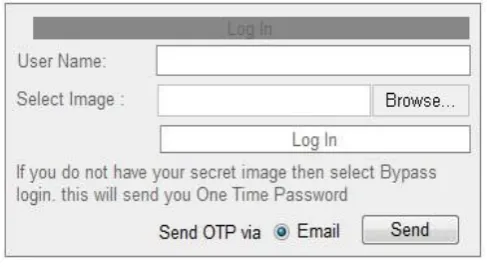
[image:2.595.313.555.82.212.2]This login interface is just similar to conventional login forms but it includes an extra field named select image. This field helps user in selecting the image which embedded text password. In this form user has to provide a login name along with the image. It also includes the optional field like send One Time Password OTP via Email. This field helps when user lost the secret image in case. After applying option OTP an email will be reached to user email account. That email contains OTP link which will bypass the image authentication and user can login as well. But we recommend to use this option in emergency case if user unable to provide image instantly.
Figure. 4 Login Interface
C. Password Recovery Interface:
This interface asks for their registered email along with security question and answer. When a user provides appropriate information and click submit then authentication server send back a link that redirect to password reset form.
a. Server Procedure:
When a user creates a Signup form and provides details along with Image to the server, after that store all information in the server side database. If a user wishes to access their account, he has to use User Login Interface and fill related user name and select secret image. When user goes for the Log In the main process start from there, the user login interface will send the user name in the form of plain text as usual, and transmit the image as a bit stream. That’s mean our proposed model can transmit passwords
Different format, this is the main beauty of our proposed model.
[image:2.595.313.557.385.519.2]intention to sniff passwords over public networks.
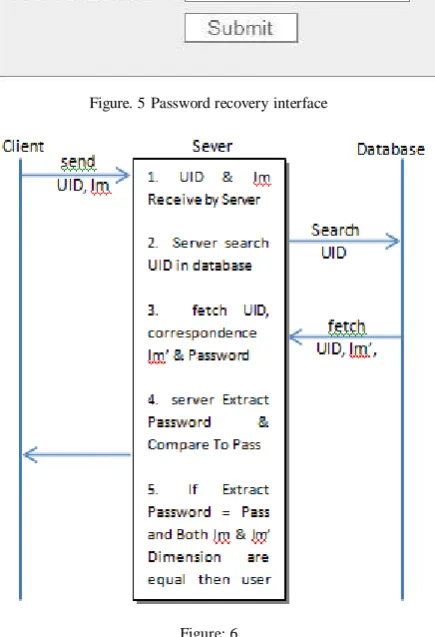
Authentication server will work on following five steps. a) The user completes the login form and sends all login
related information to the server. Information contain user name (UID) and image (Im). It will receive by the concern sever. Server holds this data as a temporary file in the buffer memory for further operation.
[image:3.595.55.273.286.605.2]This interface will be used by the user if he accidentally misses the image or image got deleted or misplaced in the case. It’s very common human tendency to forget their credential due to multiple IDs. Password Recover y Interface will help user to retrieve their
Figure. 5 Password recovery interface
Figure: 6
Credential. But according to our proposed model this interface used to reset their Image and password as well.
a) The server starts searching UID details in the database with the help of user provided UID. UID treated as a primary key in the database.
b) When the server found the appropriate UID in the database, server fetches the Image (Im’) and store password (pass). These files also store in the server buffer memory.
c) Server extract password from the image (im) and server will compare extracted password with the database password pass and also compare the dimension of both image (im) and image (im’). We are comparing image dimension because this will provide more secure authentication.
d) If the extracted password from the image (im) and database password (pass) as well as dimension of both image (im) and database image (im’) got compare successfully then user will authenticate successfully.
V. METHODOLOGY
A. Signup Process:
Signup process is ver y simple and traditional. There is nothing like a new concept, but we add 1 extra field “select image”. This field will helps user to attach an image in Signup form.
a. Steganography Operation:
This Steganography operation is the heart of our proposed model. This operation is not too complex. We are using Lower Order LSB Algorithm (Image). It can also use for Audio and video as well. It is a simple and lightweight algorithm for its purpose. Bit plane tools encompass methods that apply LSB insertion and noise manipulation. These approaches are generally used in steganography and are relatively easy to apply in image and audio. A surprising amount of information can be hidden with little, if any, perceptible impact to the carriers .Sample tools used in this group include StegoDos, S-Tools, Mandelsteg , EzStego, Hide and Seek, White Noise Storm. The image formats typically used in such steganography methods are lossless and the data can be directly manipulated and recovered.
Algorithm:
Embedding process: least significant bit [LSB] substitution
(LSB Image) For i = 1, l(c) do si ← ci
end for
for i = 1 ...,l(m) do
compute index ji where to store ith message bit sji ← cji mi
end for
Algorithm:
Extraction process: least significant bit [LSB]
substitution for i = 1,...,l(M) do
compute index ji where the ith message bit is stored[6] mi =LSB(Cij)
end for
This algorithm will help to user to embedded password in the cover image or there is a simpler process using Windows Xp or above version. There is a command prompt command which abilities to perform steganography.
Open Command Prompt or Go to Start > Run, type cmd.
Now type copy /B original.jpg + archive.rar new.jpg In the above command Original.jpg is any image in Which we are going to embed archive.rar file
b. Image Quality:
image size is very sufficient to hide maximum 40 character text password. We are considering some different type of image representation technique that occupy less space on the storage disk and take less time in process as well as in transmission.
There are three recommended image representation technique
a) 8-BIT GRAYSCALE
b) 16-BIT GRAYSCALE
c) 24-BIT RGB IMAGE
a) 8-Bit Grayscale:
A grey-scale or grey-scale digital image is an image in which the value of each carries only intensity information [9]. Picture of this sort, also well known as shades of [5] to white at the strongest [3]. In the 8-bit gray-scale image use 8 bit values to represent 1 pixel. Then maximum dimension of image 150x150 pixel therefore, total no. of pixel 150*150 = 22500 pixel, total size of the image 22500*8 = 180000 bits or approx. 21.97 KB.
b) 16-Bit Grayscale:
Same as the 8-bit scale image format, 16-bit gray-scale image format using 16 bit to represent 1 pixel. So maximum size of the image 22500*16 = 360000 bits or approx. 43.94 KB
c) 24-Bit Rgb Image:
The RGB color model is an additive color model in which blue, green, and red light are added together in several ways to reproduce a broad array of colors? The nomination of the model comes from the three additiveprimary colors, green, red, and blue. The general purpose of the RGB color model is for the representation, display, and sensing of images in electronic systems, such as computers and televisions, though it has also been used in general photography [4]. Same as the 8-bit gray-scale image format and 16-bit gray-scale image format, 24 bit RGB image format using 24 bit to represent 1 pixel. So maximum size of the image 22500*24 = 540000 bits or approx. 65.91 KB
[image:4.595.312.545.60.311.2]The above recommended image format can reduce image size that would be better for image transmission. But a user can select any image format scheme depend on his choice. Now the user has to create a secret image with the help of steganography. When user creates a secret image, he has to retain that for further signup, login and as well as password recovery process.
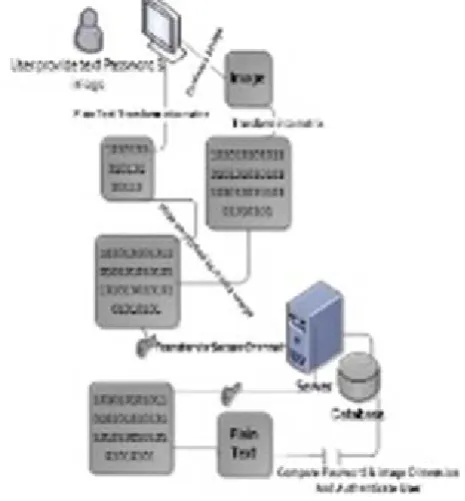
Figure. 7 overall procedures of model
The steps involve in overall authentication process
(a). Create A Secret Image:
To create a secret image user has to select any image that fulfills our recommended criteria (image dimension must not be exceeded by 150x150 pixel and size should be less than 80KB & image file extension can be .jpg, .jpeg,.png, .bmp, etc.), and create a text file with extension .txt and write our 10 – 40 character long passwords in the text file. Now embed text file into the image using Lower order LSB algorithm or using Windows Command prompt command. After creating the secret image retain it for future use.
(b). Signup Procedure:
There is a simple form that the user has to fill their details and there one extra field that is used to browse the secret image to attach in the signup form.
(c). Login Process:
There is a very simple login procedure. The user has to provide a user name and select secret image instead of text based password. When the user submits their detail to the concern server, user name and secret image silently transmit over the open public network and server temporary buffer memory
(d). Authentication Process:
User is a genuine
(e). Login Bypass Method:
This is an optional method used in case of emergency. There might be a change user accidently miss the secret that user can use this method twice in a day to prevent misuse of this method.
(f). Password Recovery Method:
[image:5.595.59.272.250.546.2]Password recover y method is used to recover the password. When a user forgets their password and he needs to recover it, user can use this password recovery interface. Simple user has to provide email id that he provides at Signup time, and give a secret answer. After that server sends a password reset link in the user email Inbox, when user click on that link it will redirect to the password reset form.
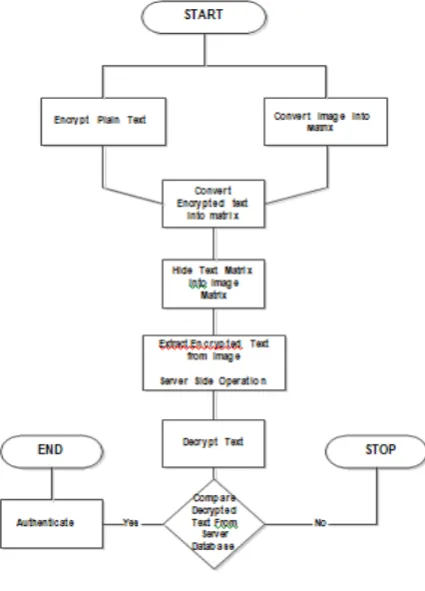
Figure. 8 Flowchart of overall process
Those entire thing that are used in the SQL injection command or any special script that contain < > + ““these special symbols. And server also rejects that password whose length is greater than maximum length of password. And there is one more efficient control that prevent from SQL injection is input validation.
Attack Scenario:
A. Sql Injection:
SQL injection is most commonly used by the ethical hacker. In our proposed model it can be possible so we are deploying a control to prevent from it. While our concern server extract password from the secret image it will reject Those entire thing that are used in the SQL injection command or any special script that contain < > + ““these special symbols. And server also rejects that password whose length is greater than maximum length of password. And there is one more efficient control that prevent from SQL injection is input validation.
B. Copy Secret Image:
This is the most possible attack in our propose model. User can then self- prevent form this attack. User should be maintaining privacy while selecting image. Or there is a way that prevent user from this type of attack. User should create a multiple copy of the secret image with different dimension because our proposed model compare password as well as compare both secret image and database dimension. Means user can create a multiple copy of the image that has different but most close dimension such as one image has 80x89 dimension and another has 79x87 etc. These images will looks quite similar and no one can easily identify that which one is secret image.
C. Password Known By Attacker:
We are supposing that password is known by attack so there is a change that attacker can create a secret image by embedding password. But our proposed model compare password as well as compare both secret image and database dimension. So attacker can never guess the dimension of secret image. So there is very less change that attacker can misuse the genuine password.
This is the greater advantage of our proposed model.
Benefits:
There is a great advantage of our proposed model
a. Password can silently transmit over open public network. Because secret image contain password, while we transmit the password in the form of image, only image transmit in the form of bit stream. If anyone sniffing the open network then he only found the transmitting image and never guess that this image contain any password
b. This roposed is applicable anywhere, where Authentication is required. We can use this proposed model in web authentication as well as windows authentication or we can use in application authentication.
c. It is needless to say that there is no need to remember text based complex password.
d. Less chance to user password recovery module
e. This model can be as logically two factored authentication technique
f. There is no need to periodically change the password.
VI. CONCLUSION
This model proposes radical change in authentication operation and user experience. The secret image is created by the user used for smooth and faster authentication of user. Secret image contain text based password and this password in not visible to any one, it main cause is stenography. Only user has to browse secret image from local computer to login, user can carry the secret in the portable media. When use submit their login detail to the concern server store all login credential in the temporary buffer memory and start searching the username in its local database.
successful else not. The main purpose of comparing image is that provide logically two factor authentication. It can also prevent that attacker who knows about password. But attacker never guesses the correct image dimension. Sever only authenticate when both image has same dimension.
VII. REFERENCES
[1]. Ching-Nung Yang, Jin-Fwu Buying, Lein Harn, Steganography and authentication in image sharing without parity bits 1 (2012)
[2].
accessed on 5-February-2013)
[3].
February-2013)
[4].
February-2013)
[5].
February-2013)
[6]. wydział informatyki politechnika białostocka 2010
[7].
22-February-2013)
[8].
accessed on 22-February-2013)