Smart Control of Electronic and Electrical
Appliances by Hand Gestures
L.Meghana1,M.Ramya2, G.Sai Babu3, D.Manikanta4, G.Gopi Krishna5, B.Naga Jyothi6
B.Tech, Department of Electronics and Communication Engineering, DMS SVH College of Engineering
Machilipatnam, Andhra Pradesh, India1,2,3,4,5
Professor, Department of Electronics and Communication Engineering, DMS SVH College of Engineering
Machilipatnam, Andhra Pradesh, India6
ABSTRACT: With the increase in development of science and technology, there is a need for every individual to be updated with the latest innovations. In the present scenario, several softwares came into existence which are totally controlled by our body gestures. Gesture recognition mainly focuses at identifying and recognizing gestures that are emanating from our body especially from hand. In other words, gesture recognition allows humans to interact directly with the machines without any mechanical devices. At present controlling electronic devices by means of hand gestures is gaining more importance. Hand gesture recognition aims on the image processing algorithm and corresponding user interface. Hand gesture recognition provides a possible solution to control electronic and electrical appliances especially for physically impaired people.
KEYWORDS: Arduino UNO R3, Open CV, Hand Gesture, EMGU, C sharp .Net, PC camera, Gesture Recognition.
I.INTRODUCTION
Gesture recognition allows Human-machine interaction by eliminating mechanical devices [1], thereby helping the physically impaired people to meet their basic needs [2]. This paper proposes a unique way to control electronic and electrical appliances by hand gesture recognition using camera. Here gesture itself acts as remote controller for controlling home appliances in houses such as fan, bulb, T.V, A.C, PC and mouse based applications like zooming and shrinking the screen, slide change.
For controlling devices we have used PC, Micro controller board Arduino UNO R3 [8], TIP 122 transistor as amplifier [9] and Relays. For PC based applications, the process is carried out within the PC itself and for controlling external devices the signal is transferred from PC to the microcontroller through serial communication. The softwares which are used here for controlling devices are Open CV, C sharp.Net and EMGU.
This project uses image processing technique for hand gesture recognition using Open CV software [3]. Open CV uses some standard libraries for real time computer vision applications. Actual coding is done in C sharp .Net [7]. EMGU software is used as wrapper to link Open CV and C Sharp .Net [6].
II.RELATED WORK
III. PROPOSED SYSTEM
A.BLOCK DIAGRAM
Fig1.Block diagram of the system
Fig 1 gives information about controlling devices, taking gestures as input through PC which is connected to the microcontroller board ATMEGA 328 for controlling external devices. Here TIP 122 is used in amplification section for amplification purpose and relays are used for switching the external devices. The process of controlling and the way in which Gesture recognition process takes place is explained the later sections.
B. OPEN CV SOFTWARE FOR GESTURE RECOGNITION
Open CV is open source computer vision software which is a library of programming functions mainly aimed at real time computer vision applications [4]. It was introduced by Intel research centre in the year 1999.Open CV is released under BSD License and for this reason it is open for both academic and commercial usage. The library has more than 2500 optimized algorithms which include a set of classic, computer vision and machine learning algorithms. These algorithms are used to detect and recognize faces, identify objects and tracking camera movements etc., Open CV is written natively in C++ and it has bindings in Python, Java and Mat lab. It can be linked to other Softwares such as C#, Perl, Ch, Haskell and Ruby by means of wrapper. Open CV can run on various platforms.
C.IMAGE RECOGNITION PROCESS
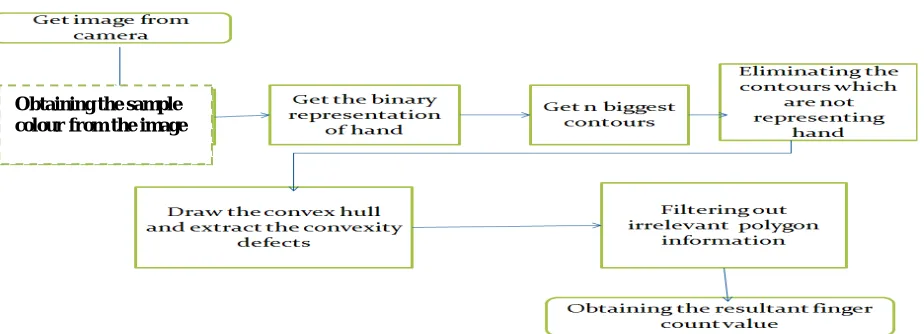
Fig 2. Gesture recognition flowchart
ARDUINO
UNO R3
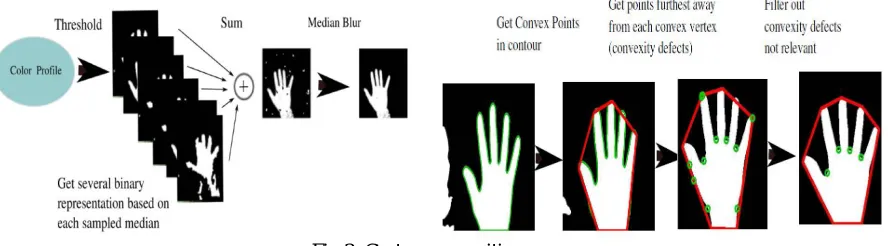
In this paper Open CV Software is used to track the gestures by means of camera in PC. Fig 2 shows how hand tracking is done based on colour recognition process [5]. Thresholding technique is used to extract the hand from the background using sampled colour profile and based on pixel variation. The binary images produced from the each colour profile are summed together. The resultant image is passed through a nonlinear median filter to get a smooth and noise free image. Thus obtained image is checked for convexity defects and the process is shown in Fig 3.
Fig 3: Gesture recognition process
The convexity defects are the points which are not representing hands but are present inside the contours. These convexity defects are to be dismissed if the length < 0.4lbb(length of the bounding box) and angle >80 degrees as shown in Fig 4. Thus the resultant image gives information about finger tip positions, number of fingers and area of hands.
Fig 4: Elimination of convexity defects
Fig:5 Fig:6 Fig:7 Fig:8
Finger count recognition
The above figure 5,6,7,8 gives the count of fingers obtained after the completion of gesture recognition process.
D.EMGU SOFTWARE
Some of the standard DLL’s used to link C# and Open CV are using Emgu.CV;
using Emgu.Util;
using Emgu.CV.Structure;
E.C SHARP(C #)
C# is an object-oriented programming language developed by Microsoft. Within it .NET initiative is led by Anders Hejlsberg. C# is designed for Common Language Infrastructure (CLI), which consists of the executable code and runtime environment that allows use of various high-level languages on different computer platforms [7]. Actual coding is written in c#.
F.NET FRAME WORK
C# is part of .Net framework and is used for writing .Net applications. The .Net framework applications are multi-platform applications.
The .Net framework helps you to write the following types of applications: 1. Windows applications
2. Web application 3. Web services.
Fig 9: Dot Net Frame work architecture [7]
The code written in c# is converted to intermediate language (IL) by means of c# compiler. The IL code and resources such as bitmaps and strings are stored in an executable file called an assembly with .exe or .dll extension when the c# program is executed; the assembly is loaded in the common language runtime (CLR) [7]. The CLR performs just in time (JIT) compilation to convert intermediate language to native machine code. The above Fig 9 illustrates the compile-time and run-time relationships of c# source code files, the.net framework class libraries, assemblies and the CLR.
H.ARDUINO UNOR3
connected to the external devices through power amplification section. If the gesture is related to the PC the processing is carried out within the PC itself. If the gesture is related to the external devices then the data is sent to the microcontroller through serial communication.
Fig 10: Arduino UNO R3
I.DARLINGTON TRANSISTOR
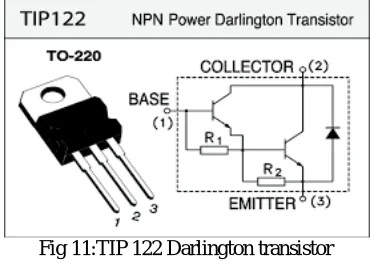
The signal coming from the microcontroller is very weak and is not sufficient enough to drive larger circuits. So, Tip122 Darlington transistor is used for amplification purpose [9]. TIP122 consists of two NPN transistors as shown in Fig 11 in which the collector of one transistor is connected to the base of another transistor. This results in high gain and one end of the transistor is connected to the relays which is used for switching external devices.
Fig 11:TIP 122 Darlington transistor
IV.HARDWARE IMPLEMENTATION
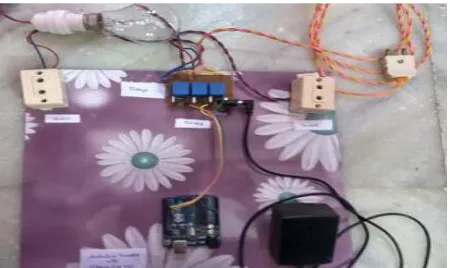
Fig 12: Hardware connections
V.RESULTS
Controlling of PC based applications is shown below in Fig 13 and Fig 14. Three and four gesture signs are used as mouse left and right pointer control.
Fig 13 Mouse Pointer
The image shown in Fig13 is for mouse right click control.
Fig 14 Slide Change
Fig 14 shows the results of slide change by means of gesture signs one and two. These one and two gesture signs can replace left and right arrows in the key board.
Fig 15 Fan On
In Fig 15 gesture sign two is used for controlling fan.
Fig 16 Bulb On
Gesture sign three is used for controlling bulb as shown in Fig 16.
Fig 17 Mobile charging
Gesture sign four is used for charging devices as shown in Fig 17.
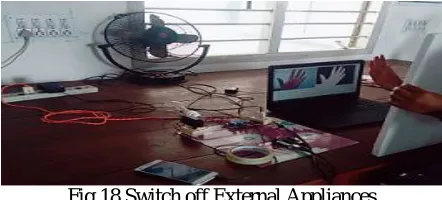
Fig 18 Switch off External Appliances
VI. CONCLUSION
In this technology, camera captures the movement of human body and sends the data to the computer that uses gestures as input to control devices or applications. The computer processes the images by means of Open Source Computer Vision Software (CV) which works on Dot net framework. If the gesture is related to the PC itself, the processing is carried out within the PC according to code which is written in C# Dot Net and corresponding output appears. If the gesture is related to the external devices then the data is sent through serial communication to microcontroller. Then microcontroller receives information through serial communication and the data will be automatically stored in the buffer. The signal coming from the processor is very weak, so there is a need to amplify the signal which is done by Darlington amplifier TIP122 in the amplifying section. Then the signal is transferred to the corresponding devices and is controlled by relays for switching ON /OFF of the devices.
Hence this paper presents a new technique by avoiding mechanical devices such as mouse, remote, keyboard etc., and thereby allowing humans to interact directly with machines by means of hand gestures. In one way, gesture recognition allows physically impaired people to control devices from their position itself, thereby finding a new way to interact machines directly by making hand gesture itself as a controller for controlling devices.
REFERENCES
[1] Dhanashree pannase “To analyze hand gesture recognition for electronic device control: Review” International Journal of Advance Research in Computer Science and Management Studies,Volume 2, Issue 1, January 2014
[2] Apoorva Bharambel, Divya Chanekar, Divya Naik, Prof.A.B.Vitekar, “Automatic Hand Gesture Based Remote Control for Home appliances”, International Journal of Advanced Research in Computer Science and Software Engineering Research Paper, volume 5,Issue 6, February 2015. [3] Utpal V. Solanki, Nilesh H. Desai,” Hand gesture based remote control for home appliances: Handmote”, IEEE , World Congress on Information and Communication Technologies,2011
[4]About open CV software, http://opencv.org/about.html
[5] Simen Andresen “Hand Tracking and Recognition with OpenCV”,http://simena86.github.io/blog/2013/08/12/hand-tracking-and-recognition-with-opencv/ Posted Aug 12th, 2013
[6] “ setting up EMGU C sharp”, http://www.emgu.com/wiki/index.php/Setting_up_EMGU_C_Sharp, last modified on 2 April 2012, Content is available under GNU Free Documentation License 1.2.
[7] “Introduction to the C# Language and the .NET Framework”, Visual Studio 2015,https://msdn.microsoft.com/en-IN/library/z1zx9t92.aspx, Updated: July 20, 2015.
[8] Arduino Uno R3,https://learn.sparkfun.com/tutorials/what-is-an-arduino
![Fig 9: Dot Net Frame work architecture [7]](https://thumb-us.123doks.com/thumbv2/123dok_us/1414851.1174040/4.595.70.495.345.611/fig-dot-net-frame-work-architecture.webp)