CSEIT17266 | Received : 16 Oct 2017 | Accepted : 31 Oct 2017 | September-October-2017 [(2)5: 1015-1022]
International Journal of Scientific Research in Computer Science, Engineering and Information Technology © 2017 IJSRCSEIT | Volume 2 | Issue 5 | ISSN : 2456-3307
1015
Cloud-Based Free Services for Educational Institutes
Maroof Naieem Qadri
*1, S M K Quadri
2*1Department of Computer Science, University of Kashmir, Srinagar, J &K, India 2
Department of Computer Science, Jamia Millia Islamia, New Delhi, India
ABSTRACT
Internet has changed the way computing through network model can take place from off-site locations without the need for the organizations to heavily invest on building its own infrastructure. The advent of cloud computing has made it possible, an innovative technology with dynamic scalability and usage of virtualized resources that can be shared by the users as a service through internet. The pay-as-you-use service model is one of the key factors for the success of cloud computing paradigm: resources are used only when needed and charged on basis of their actual usage. Some of the ICT services through cloud are even provided free to educational institutions and they can benefit from these services. Universities necessarily do not have enough resources to spend on subscribing or establishing ICT facilities but these facilities are essential for improving the way faculty & student interact, communicate, and carry research activities. Faculty, staff and students have access to services like institutional email, 1 TB drive space, Office applications free which otherwise require purchased licenses. In this paper, the different free cloud services provided for educational use are discussed, analysed for perception of its adoption. Adopting these services will give operational ease, high reliability, ease of accessibility with no financial implications. The cloud services for education guarantees the desired performance level and minimises the expenditure otherwise to be incurred on setting up or subscribing to such services.
Keywords : Cloud Computing; Cloud Services; Hybrid Computing; educational cloud; Universities; Mapped Computing.
I.
INTRODUCTION
Technology transforms the way information is disseminated and knowledge is shared between students, researchers, and faculty. The tendency observed during the last few years within the higher education level (Mircea, 2010; Bozzelli, 2009), is the Universities' transition to research Universities and ongoing update of the IT (Information Technology) infrastructure as foundation for educational activities and science research. With the evolution of technology, the number of services which migrate from traditional form to the online form grows as well. Faculty-student interaction is not limited to class room only. Achieving transparency and efficiency in academic processes particularly in activities pertaining to teaching, learning and continuous assessment with high reliability and accessibility is must in todays’ times, in such scenario use of cloud computing becomes a necessity and not an
II.
CLOUD COMPUTING
Cloud computing seems to have many definitions around. A study by McKinsey (the global management consulting firm) found that there are 22 possible separate definitions of cloud computing. In fact, no common standard or definition for cloud computing seems to exist (Grossman,2009; Voas & Zhang, 2009). A more commonly used definition described it as cluster of distributed computers (largely vast data centres and server farms) which provide on-demand resources and services over a networked medium (usually the internet) as cloud image in order to conceal the complexity that lies behind them (Nabil Sultan, 2010).
Computing has had tremendous shifts, from the era of mainframe to client server model to the network model. Internet has changed the way computing through network model can take place from off-site locations without the need for the organizations to heavily invest on building its own infrastructure. The advent of cloud computing has made it possible, an innovative technology with dynamic scalability and usage of virtualized resources that can be shared by the users as a service through internet. It is regarded as potential solutions to advancing modern organizations’ IT competitiveness and performance (catteddu and Hogben, 2009; Ercan, 2010; Goscinski and Brock, 2010; Wu and W.W. , 2011; Thomas, 2011). Users need not have in-depth background knowledge of the services. User can communicate with many computing servers at the same time and exchange of information can take place among themselves. Compute power, storage, memory resources can be shared among different servers without the need to physically relocate them. Resources are dynamically provided on a self-service basis over internet via web self-services from an offsite third-party provider.
III.
CHARACTERISTICS OF CLOUD
COMPUTING
Cloud computing reduces the inefficient tendency of network architectures to over compensate client-server capacity during implementation phase to ensure acceptable performance at peak periods (Cadregari,C and Cutaia, 2011).
National Institute of Science and Technology (NIST) accepted five general characteristics of cloud
computing (Buyya et al,2009; Furht, 2010;Marston et al.,2011;Mell and Grance,2009;Qian et al.,2009;wang et al., 2010;Yuvaraj,2015):
Automated self-service setup: Users can run and configure their own computing resources as required.
Broad network accessibility: Cloud computing resources are universally available through internet and accessible via various devices.
Pooled resources: Users do not have their own dedicated hardware and multiple users can work on the same hardware and resources.
Scalability: Users can keep control over the availability of computing power to them.
Metered services: Use of cloud resources is monitored and users have to pay for the amount of computing resources used.
IV.
CLOUD COMPUTING SERVICE MODELS
According to the capabilities of cloud computing, cloud computing is divided into three service models (Rajaraman,2014; Nabil Sultan, 2010; Yuvaraj, 2015)
Infrastructure as a Service (IaaS): this service model offers the remote delivery of a full computer infrastructure consisting of processing, storage, networks, and other fundamental computing resources. Consumer is able to deploy and run arbitrary software, which can include operating systems and applications but does not manage or control the underlying cloud infrastructure.
Platform as a Service (PaaS): virtual developing environment for application deployment is provided under this service model which otherwise under traditional computing model required each application to be managed locally by having own hardware, an operating system, a database, middleware, web servers and other software together with a team of network, database, and system management experts to keep everything up and running.
ranges from productivity (e.g., office-type) to programs such as Enterprise Resource Planning (ERP) or Enterprise-Resource Management and are accessible from various client devices through a thin client interface such as a web browser (e.g., web-based email).
V.
CLOUD BASED SERVICES FOR ACADEMIC
INSTITUTIONS
Cloud based services offers integration management with automated problem resolution, manages security end-to-end, and helps expenditure control based on actual usage of data. Cloud architectures can benefit institutions to reduce duplicate efforts and increase utilization of resources. This will in-turn enable to go green, reducing pollution and effective waste management.
Academic institutions otherwise have to establish their own services that caters to the needs of students, researchers, faculty and management and all these requirements need continuous upgrades, patches while incurring recurring operational expenditure. However, this can be reduced drastically by migrating most of the services to cloud and these services will be ideally accessed through web. Some of the providers for cloud-based productivity tools offer great variety of services for academic use. Specifically, Google offers its platform to education providers as Google Apps for Education. Microsoft offers its Microsoft Office 365 for education.
i) Google apps for education (G suite for education) is a cloud-based productivity suite that integrates many applications and provides services to educational institutions free. Google under the G suite for education provide the following services:
Google Classroom: Google Classroom is a mission-control for lessons. It allows teachers and students to have immediate conversations and collaborate on assignments. Create lessons, distribute assignments, send feedback and see everything in one place. Instant, paperless & easy.
Google Gmail: Professional email under institutional domain (e.g. @uok.edu.in) with
spam protection, no ads, powerful search and integrated calendars.
Google Drive: This service allows saving and sharing in the cloud, accessing them from any device and sharing them instantly. No more sending attachments or merging different versions.
Google Calendar: Google Calendar is a time-management and scheduling calendar service by Google. It allows users to create and edit events. Reminders can be enabled for events, with options available for type and time. Event locations can also be added, and other users can be invited to events.
Google Docs: Google docs lets create, edit and share documents, spreadsheets, presentations, forms and drawings. One can even upload Microsoft office files directly into docs, or download docs files in Microsoft office formats. Google Sites: Google sites makes it simple to
exhibit team’s work, with easy access to all content from G Suite –whether it’s a drive folder, doc, or even shared calendar. Sites makes collaborating easy with real time co-editing and the same powerful sharing controls one is used to in drive and docs.
Google Hangouts: Google hangouts is Google’s free video-conferencing tool that is available for teachers to use as part of Google Apps for Education. Up to 10 participants can join a Google hangout at a time. It's a great way to connect your classroom with other classrooms anywhere in the world.
The G Suite for education service provided by Google is with no advertisement, 24/7 phone and email support, 99.9% guaranteed uptime, enhanced security features, full administration of all user accounts and your data is yours. It also saves money and time since developing and maintaining software to provide all of these services and applications is a time consuming and an expensive process.
academic institution. Under the Microsoft’s Office 365 for education following services are provided:
Office Online: It allows teachers, staff and students to have online access to office apps (Word, PowerPoint, Excel, and OneNote). Faculty, staff and students can create, edit, save and delete their document work using these office apps and invite others to review and co-author in real time.
Class Notebook: Provides a personal workspace for every student, a content library for handouts, and a collaboration space for lessons and creative activities. Enables organize class materials and prepare assignments with handwritten text, web content, even audio and video from your devices. Then, easily collaborate with students and colleagues.
Forms: Quickly assess student progress and get
feedback with easy-to-create surveys,
registrations, quizzes, and more.
File sharing and drive storage: Provides online file sharing facility and unlimited OneDrive storage for subscriptions of five or more users. Microsoft will provide initial 5 TB of OneDrive storage per user and on demand Microsoft provides unlimited storage. Subscriptions for less than five users receive 1 TB OneDrive storage per user. Email: Provides business class email, calendar and
contact with a 50 GB inbox. Educational institutions can setup their email service on their institutional domain name.
Online meetings: Provides unlimited online meetings, IM and audio, HD video, and web conferencing.
Inform and engage: Provides employees with a SharePoint intranet, and connect teams to content, enterprise and process with SharePoint team sites.
Social Network: Provides students, faculty and staff the facility to collaborate across departments and locations.
VI.
SELECTING THE RIGHT CLOUD SERVICEGoogle Apps for Education vs Microsoft Office 365 for Education
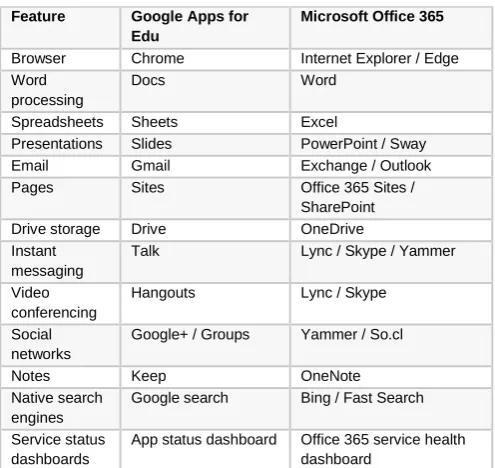
There are many similarities down the line with each of the primary features, table 1 gives an insight about their similarities:
Table 1: Google Apps for Edu and Microsoft Office 365 features.
i. Some of the key features & differences
In this section, some of the key differences between the ‘G Suite for education’ and ‘Microsoft Office 365 for education’ are discussed and analyzed. This will certainly play a vital role in an institutions decision making for selecting the appropriate one for their use.
ii. Mac vs. Windows Operating System
At one point, Google could claim it was better in this category because it could offer the applications across both operating systems as a browser-based solution. Google was able to offer very consistent features as a browser-based platform. When Microsoft launched Office 365, they added seamless, browser-based application compatibility that worked well on Mac. But the downloadable local installable versions of the software weren’t current between Mac and Windows. Only recently has Microsoft launched Office 2016 with native versions for local Mac installation. Up until recently, Mac users were relegated to Office 2011 versions. Now the discrepancy between versions of Office applications has been resolved between Mac and Windows, which opens up the real competitive
Feature Google Apps for
Edu
Microsoft Office 365
Browser Chrome Internet Explorer / Edge Word
processing
Docs Word
Spreadsheets Sheets Excel
Presentations Slides PowerPoint / Sway Email Gmail Exchange / Outlook Pages Sites Office 365 Sites /
SharePoint Drive storage Drive OneDrive Instant
messaging
Talk Lync / Skype / Yammer
Video conferencing
Hangouts Lync / Skype
Social networks
Google+ / Groups Yammer / So.cl
Notes Keep OneNote
Native search engines
Google search Bing / Fast Search
Service status dashboards
discussion: offline use of productivity apps. With locally installed versions of the productivity software, a user is able to work with local Microsoft tools – even without having internet access. Google simply does not provide offline application support, as everything runs in the browser.
iii. Directory services
Microsoft clearly has an edge with its lengthy tenure as an enterprise environment. This starts with Active Directory and directory services for identity and permission management at a very granular policy level. Many academic institutions are considering productivity in the cloud as a migration from existing on-premises legacy IT stack. When Microsoft launched Office 365 as a cloud environment, the company anticipated the issues with legacy AD environments. They provide a hybrid Active Directory approach where directory services can still be managed on-premises while moving to the cloud for application functionality. Google, of course, has never experienced life as a traditional IT infrastructure layer within enterprise, and launched as a cloud service outgrowth from the original search services stack.
iv. Information architecture
When Office 365 launched, Microsoft incorporated SharePoint as a core information management framework. SharePoint permits a lot of flexibility in structuring an organization’s information architecture to meet the specific needs at a department, or even specific function level. While Google indeed has a strong search capability combined with rudimentary Google Drive storage for document storage and support, Microsoft’s legacy enterprise IT expertise brings an interesting edge. Microsoft’s advanced usage of managed metadata services permits organizations to design their information architecture at the very top by creating organization-specific taxonomies, which can then be further applied to everything from site tree navigation to document tagging and indexing. Managed metadata services are among the least-known, but most powerful aspects of the entire Microsoft platform.
v. Workflow automation
Because of this SharePoint foundation, Microsoft opens up ad hoc database development, data connectivity
services, and in particular, workflow automation capabilities for customization. Designing a SharePoint list that connects with different aspects of information management creates a powerful platform for advanced users without requiring a lot of heavy lifting from deep software development engineers. Power users are able to take control of their document flow, approvals, and integrations into other applications. Approvals, case-based routing, and other deep operational workflow automations are the result of Microsoft being a true business process automation development platform.
vi. Cloud hosting / application services
Additionally, the direct interface between Office 365 and Microsoft’s Azure cloud hosting framework provides a platform for unlimited scalability and application integration as a native technology stack. Whereas Google has yet to launch cloud host services in the same vein as Microsoft or Amazon AWS. With Google, you’re fairly limited to what you see is what you get, and any customization will require a software engineer with cloud API connectivity experience and a third-party host environment upon which to run the application itself.
vii. Mobile access
viii. Forms
Another area where Google may have an advantage is an ad hoc form builder with Forms. Forms are a great tool for academic institutions to use in gathering and sharing information. From in-class applications like creating cheat-proof quizzes, to results or student elections or parent surveys, forms have far-reaching uses in and around the academic environment. On the other hand, some say Google Forms are also fairly limited in what you can do with the data, as well as the security options associated with the form. Microsoft has abandoned InfoPath as an Office form builder platform. The issue was InfoPath not being mobile-responsive or mobile friendly. With the Microsoft has now a strong Forms supported by PowerApps and SharePoint and Google Forms are still fairly basic, only allowing a narrow set of data types and form layout features.
ix. Education-specific third-party extensions
Another comparison is the way each platform can be tailored to meet the use cases of education-specific customization through third-party extensions of the native platform. These extensions are usually offered by a third-party development partner of each platform. Some examples of third-party extensions to the native platforms are:
x. Google Classroom / Hapera
Google offers Google Classroom as a native feature to the Google Apps for Education suite. It has features like collaboration, assignment tracking, and many more features useful to teachers within the classroom environment. A specific customization for the Google Classroom environment is a third-party extension from Hapera. Hapera further extends Google Classroom to add a teaching rubric wrapper and management system for other 3rd-party resources as exercises and assignments within the Google Classroom environment
xi. Teacher Dashboard for Office 365
Microsoft has a rich tradition of building and maintaining a third-party partner ecosystem of developers around vertical market-specific applications of the native platforms. One such partner is Axis, who offers a fairly robust extension to Office 365 called Teacher Dashboard. Teacher Dashboard provides its
own suite of robust collaboration offerings designed specifically for teachers to use in classrooms. It also provides direct connectivity to many SIS systems, which could be valuable to institutions IT teams.
xii. Weighing more than just the features
Determining which cloud productivity application to deploy for your academic institution is very complex, and based on many factors. The decision of Google vs Microsoft will likely come down to a few key issues:
An academic institutions existing approach to user account management and identity services within the IT network;
Existing email infrastructure and services;
Existing document management methodologies;
User adoption and skill level in using Microsoft productivity applications versus Google productivity applications;
Institutions administration / IT team skills, resources, and philosophy towards IT and automation in general.
VII.
CONCLUSIONThe features and differences discussed were compared to give a clear insight for adopting the right one fitting the internal requirements of the academic institute.
The cloud for education services offered free to educational institutions allows achieve reliability, availability and cost effectiveness with the following:
99.9% uptime;
Apps work on any computer, tablet or phone;
No advertisements; .
Cost of using ‘Google suite for education’ and ‘Microsoft office for education’ is free;
Support at no cost;
Eliminating the need to invest on building & upgrading IT infra for email, drive, vault etc. solutions for staff, faculty, students and researchers;
No need of having on-premise man power for maintaining and supporting these services.
VIII.
REFERENCES[1] Abhishek, & Gagandeep (2013). Benefits and security issues in cloud computing. International Journal of Emerging Research in Management &
Technology, 2(1), 108-114.
[2] Aleem, A., & Ryan Sprott, C. (2012). Let me in the cloud: analysis of the benefit and risk assessment of cloud platform. Journal of Financial Crime, 20(1), 6-24.
[3] Buyya, R., Yeo, C. S., Venugopal, S., Broberg, J., & Brandic, I. (2009). Cloud computing and emerging IT platforms: Vision, hype, and reality for delivering computing as the 5th utility. Future
Generation computer systems, 25(6), 599-616.
[4] Cadregari, C., & Cutaia, A. (2011). Every Silver Cloud Has a Dark Lining: A Primer on Cloud Computing, Regulatory and Data Security Risk. ISACA Journal, 3, 12.
[5] Catteddu, D. & Hogben, G. (2009).Cloud Computing: Benefit, Risks and Recommendations for information security.European Network and
Information Security Agency(ENISA), pp. 1-125.
[6] Mukundha, C., Gayathri, P., & Prabha, I. S. (2016). Load Balance Scheduling Algorithm for Serving of Requests in Cloud Networks Using Software Defined Networks. International Journal of
Applied Engineering Research, 11(6), 3910-3914.
[7] Wyld, D. C. (2010). The cloudy future of government IT: Cloud computing and the public sector around the world. International Journal of
Web & Semantic Technology, 1(1), 1-20.
[8] Gupta, D. K.,Mishra, A., Dr. Sahoo, G. (2013).Cloud Computing: Solving Availability Problem in Future Framework for e-Governance,
International Journal of Computer Applications &
Information Technology, Vol.2, Issue 11, pp.16-20.
[9] Shin, D. H. (2013). User centric cloud service model in public sectors: Policy implications of
cloud services. Government Information
Quarterly, 30(2), 194-203.
[10] Ercan, T. (2010). Effective use of cloud computing in educational institutions. Procedia-Social and Behavioral Sciences, 2(2), 938-942.
[11] Furht, B. (2010). Cloud computing fundamentals.
In Handbook of cloud computing (pp. 3-19).
Springer US.
[12] Goscinski, A., & Brock, M. (2010). Toward dynamic and attribute based publication, discovery and selection for cloud computing. Future generation computer systems, 26(7), 947-970. [13] Grossman, R. L. (2009). The case for cloud
computing. IT professional, 11(2), 23-27.
[14] Hashemi, S., Monfaredi, K., & Masdari, M. (2013). Using cloud computing for e-government: challenges and benefits. International Journal of Computer, Information, Systems and Control Engineering, 7(9), 596-603.
[15] Hussein, A., & Mohamed, O. (2015). CLOUD
COMPUTING AND ITS EFFECT ON
PERFORMANCE EXCELLENCE AT HIGHER EDUCATION INSTITUTIONS IN EGYPT (AN
ANALYTICAL STUDY). European Scientific
Journal, ESJ, 11(10).
[16] Kaur, I., & Bala, K.(2015). E-governance: Benefits
and Challenges of cloud based
architecture.,International Journal of Computer
Science and Technology, 6(3), 35-37.
[17] Mukherjee, K., & Sahoo, G. (2010). Cloud
computing: future framework for
e-Governance. International Journal of Computer Applications, 7(7), 31-34.
[18] KPMG (2011).The Cloud changing the business
ecosystem.Survey report, available at:
https://www.kpmg.com/IN/en/IssuesAndInsights/T houghtLeadership/The_Cloud_Changing_the_Busi ness_Ecosystem.pdf (accessed 13 November,2016).
[19] Vats, K., Sharma, S., & Rathee, A. (2012). A
review of cloud computing and
e-governance. International journal of Advanced Research in Computer science and Software engineering, 2(2).
Development in Engineering and Technology, 2(2), 13-15.
[21] Marston, S., Li, Z., Bandyopadhyay, S., Zhang, J., & Ghalsasi, A. (2011). Cloud computing—The
business perspective. Decision support
systems, 51(1), 176-189.
[22] Yuvaraj, M. (2015). Problems and prospects of implementing cloud computing in university libraries: A case study of Banaras Hindu University library system. Library Review, 64(8/9), 567-582.
[23] Mell, P., & Grance, T. (2011). The NIST definition
of cloud computing., available at:
http://nvlpubs.nist.gov/nistpubs/Legacy/SP/nistspec ialpublication800-145.pdf (accessed 11 November, 2016).
[24] Microsoft (2011).Cloud Computing: What is Infrastructure as a Service. TechNet Magazine
2011, available at:
https://technet.microsoft.com/en-us/library/hh509051.aspx(accessed 12 November, 2016).
[25] Sultan, N. (2010). Cloud computing for education: A new dawn?. International Journal of Information
Management, 30(2), 109-116.
[26] Parnia Samimi, Youness Teimouri,Muriati Mukhtar (2016), "A combinatorial double action resource allocation model in cloud computing",Information
Sciences 357, pp. 201-216.
[27] Prodan, R., & Ostermann, S. (2009, October). A survey and taxonomy of infrastructure as a service and web hosting cloud providers. In Grid Computing, 2009 10th IEEE/ACM International Conference on (pp. 17-25). IEEE..
[28] Qadri, E. M. N. (2014). e-Governance at University
of Kashmir: Bringing Efficiency &
Transparency. International Journal of Information
and Computation Technology, 4(2), 119-126.
[29] Zhang, Q., Cheng, L., & Boutaba, R. (2010). Cloud computing: state-of-the-art and research challenges. Journal of internet services and applications, 1(1), 7-18.
[30] Qian, L., Luo, Z., Du, Y., & Guo, L. (2009). Cloud computing: An overview. Cloud computing, 626-631.
[31] Rajaraman, V .(2014).Cloud computing.Resonance, 19(3),242-258.
[32] Quadri, S. M. K., Zaman,M., Qadri, M. N.,
(2014).E-governance development: Agile
Perspective.
[33] Okai, S., Uddin, M., Arshad, A., Alsaqour, R., & Shah, A. (2014). Cloud computing adoption model for universities to increase ICT proficiency. SAGE Open, 4(3), 2158244014546461.
[34] Paquette, S., Jaeger, P. T., & Wilson, S. C. (2010). Identifying the security risks associated with governmental use of cloud computing. Government information quarterly, 27(3), 245-253.
[35] Smitha, K. K., Thomas, T., & Chitharanjan, K. (2012). Cloud based e-governance system: A survey. Procedia Engineering, 38, 3816-3823. [36] Thomas, P. Y. (2011). Cloud computing: A
potential paradigm for practising the scholarship of
teaching and learning. The Electronic
Library, 29(2), 214-224.
[37] Voas, J., & Zhang, J. (2009). Cloud computing:
New wine or just a new bottle?. IT
professional, 11(2), 15-17.
[38] Wang, L., Von Laszewski, G., Younge, A., He, X., Kunze, M., Tao, J., & Fu, C. (2010). Cloud computing: a perspective study. New Generation Computing, 28(2), 137-146.
[39] Wu, W. W., Lan, L. W., & Lee, Y. T. (2013). Factors hindering acceptance of using cloud services in university: a case study. The Electronic Library, 31(1), 84-98.
[40] Lin, W., Wang, J. Z., Liang, C., & Qi, D. (2011). A threshold-based dynamic resource allocation
scheme for cloud computing. Procedia
Engineering, 23, 695-703.
[41] Wu, W. W. (2011). Mining significant factors affecting the adoption of SaaS using the rough set approach. Journal of Systems and Software, 84(3), 435-441.
[42] Wu, W. W., Lan, L. W., & Lee, Y. T. (2011). Exploring decisive factors affecting an
organization's SaaS adoption: A case
study. International Journal of Information
Management, 31(6), 556-563.