
SD-Unbanked.pdf
61
0
0
Full text
(2) CP/M PLUS 3.0 NONBANKED CONFIGURATION FOR SBC-300. SD #7140177 REVISION C OCTOBER 12, 1983.
(3) ). ) ,,.
(4) CP/M SOFTWARE NOTES After the software distribution diskettes are copied and archived, diskette data transfer speeds can be significantly increased us ing the disk utiliti e s to change disk step rates and sector sizes . The disk utilities to use depend upon which disk controller board is be ing used in the system. - For VERSAFLOPPY II , use FLOPSET and FORMAT. - For VFW-III, use INITDISK . If a bootable IBM format copy is desired, use the (F) routine selection while for ma tting with INITDISK . Whe n prompted for source drive, filename or current drive, input filename "COLD.COM" instead of a drive selection. If a non-bootable IBM format copy is desired, use the (N) r outine selection while fo r matting with INITDISK.. VFW-III OPERATIONAL NOTE Western Digital Corporation re comme nds a 1 to 2 minute wait a f t er s y stern pow e r on to a 11 ow th e f 1 op py di s k co n t r o 11 e r circuit to stabilize prior to use..
(5) ). ). ).
(6) TABLE OF CONTENTS Subsection Number. Title. Page No.. SECTION I OPERATING SYSTEM OVERVIEW 1.0 1.1. 1.2 1.2 . 1 1.2.2 1.2.3 1.2 . 4 1.2.5 1.2.6 1.2.7 1.3 1.3.1 1 .3. 2 1.3.3. ). 1.3.4 1.4 1.4.1 1.4.2. GENERAL FEATURES SYSTEM REQUIREMENTS AND OS INFORMATION MEMORY DISK DRIVES AUTO CONSOLE SENSING FULL CHARACTER I/0 REDIRECTION SIGN ON MESSAGE PROFILE.SUB GENCPM AND BOOTABLE DISKETTES STARTUP, BACKUP, AND CUSTOM CONFIGURATION STARTUP AND INITIAL BACKUP COPYING DISTRIBUTION DISKETTES ONTO DSDD DISKETTES INSTALLING SDSYSTEMS I/0-4 OR I/0-8 IN CP/M 3.0 SINGLE DRIVE BACKUP REMARKS COMMAND SYNTAX SETDEF: DEFINING THE DRIVE SEARCH ORDER. 1-1 1-1. 1-2 1-2 1-2 1-3 1-3 1-4 1-5 1-6 1-8 1-8 1-11. 1-13 1-15 1-16. 1-16 1-17. SECTION II UTILITIES 2.0 2.1 2.2 2.3 2.4 2.5 2.6 2.7 2.8. GENERAL MCOPY FORMAT VERIFY DSET FLOPS ET SYSGEN INITDISK DISK COPY. 2-1. 2-1 2-3 2-3 2-3 2-6 2-11 2-12 2-14. SECTION III VFW-III CONTROLLER 3.0 3.1 3.2. GENERAL FEATURES PROCEDURAL EXCEPTIONS WHEN USING THE VFW-III INSTEAD OF THE VERSAFLOPPY II CONTROLLER. 3-1 3-1. 3-1.
(7) TABLE OF CONTENTS--Continued Subsection Number. Title. Page No .. APPENDICES A B. c. D. STEP RATES DIRECTORY PATCHES CONVERSION TO DMA OPERATION. A-1 B-1 C-1 D-1. ILLUSTRATION Figure No. 1-1. Title SBC-3 00 MEMORY MAP. Page No. 1-2. TABLE Table No .. Title. Page No .. A-1. STEP RATE RECOMMENDED SETTINGS. A-1. ). J.
(8) SECTION I OPERATING SYSTEM OVERVIEW 1.0. GENERAL. CP/M Plus 3.0 for the SDSystems SBC-300 is a nonbanked configuration of CP/M Plus 3.0* designed for use with a SBC300 microcomputer board and a Versaf loppy II or VFW-III floppy disk controller. Optionally, a VDB-8024 Video Display Board, an I/0-4, or an I/0-8 can also be supported. It utilizes the SBC-300's 64K bytes of parity checked memory. Up to four floppy disk drives can be supported for up to 4 megabytes of on line storage. (See Section III.) CP/M Plus 3.0 for the SDSystems SBC-300 is supplied on three single sided, single density distribution diskettes. After the distribution diskettes are copied and archived, additional copies should be made and all unwanted utilities deleted before work files are opened or transferred from existing diskettes to the new CP/M 3.0 diskettes as detailed in Subsection 1.3. 1.1. FEATURES. Important user interface features include: - New capabilities: 1. 2. 3. 4. 5. 6.. User profile initiated at cold boot Screen paging control System files on User 0 available to all users I/O redirection Password protection of files and diskettes System clock. - User friendly commands: 1. 2. 3.. Prompts for missing information required for execution Shows syntax error location and waits for correction Improved HELP facilities. - Enhanced command structure: 1. 2. 3. 4.. *. ~P/M. Multiple Multiple Improved Improved. commands per line drive command search batch facility error handling. Plus 3.0 is a trademark of Digital Research Inc. 1-1.
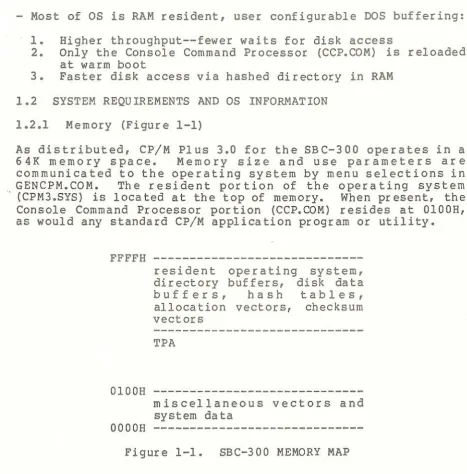
(9) - Most of OS is RAM resident, user configurable DOS buffering : 1. 2.. 3. 1.2 1.2.1. Higher throughput--fewer waits for disk access Only the Console Command Processor (CCP.COM) is reloaded at warm boot Faster disk access via hashed directory in RAM SYSTEM REQUIREMENTS AND OS INFORMATION Memory (Figure 1-1). As distributed, CP/M Plus 3.0 for the SBC-300 operates in a 64K memory space. Memory size and use parameters are communicated to the operating system by menu selections in .. GENCPM.COM. The resident portion of the operating system (CPM3.SYS) is located at the top of memory. When present, the Console Command Processor portion (CCP.COM) resides at OlOOH, as would any standard CP/M application program or utility. FFFFH ----------------------------resident operating system, directory buffers, disk data buffers, hash tables, allocation vectors, checksum vectors. ). TPA. OlOOH ----------------------------misc ell an eo us vectors and system data OOOOH ----------------------------Figure 1-1.. SBC-300 MEMORY MAP. The TPA area is available to the user for programs and data. The size of the TPA is dependent on how much buffering space is allocated to CP/M in GENCPM.COM. With a minimal number of buffers, there is 48K or more of TPA a~ea. 1.2.2. Disk Drives. The CP/M Plus 3.0 Operating System will support up to sixteen (A-P) disk drives and disk drive look alikes. CP/M Plus 3.0 for the SBC-300 is configured for four (A-D) floppy drives using a SDSystems Versafloppy II controller board.. 1-2.
(10) Several diskette densities are supported with the 8" standard of 26 sectors/track and the 5.25" standard of 18 sectors/track:. B" single and double sided, density) 8" single and double sided, density) 5.2 5" single and double sided, density) 5 . 2 5" single and double sided, density). 128 byte/sector. (single. 256 byte/sector. (double. 128 byte/sector (single 256 byte/sector (double. Th e curren t configuration will allow all file and data transfers to and from a mini-floppy as well as execution of commands and all other features including cold boot. Advanced users can implement additional drivers via the DRVTBL.ASM/DRVTBL.REL files using LINK.COM and GENCPM.COM. See Digital Research, Inc.'s CP/M 3.0 System Guide. 1.2.3. Auto Console Sensing. CP/M Plus 3.0 for the SBC-300 will automatically determine the type of user console. The Operating System determines whether the user console is a video display board (VDB - 8024) or the SBC-300 serial port B. 1.2.4. Full Character I/O Redirection. Plus 3 . 0 for the SBC-300 has full character I/O redirection supporting the VDB-8024, the two SBC-300 serial ports, the SBC-300 parallel port and, optionally, an SDSystems I/0-4 or I/0-8 board. One of the serial ports, SERCRT (SBC300 port b), is configured as a serial port without handshake (i.e. a crt), and the other, SERLPT (SBC-300 port a), a s a s e r i a 1 po r t w i th h a n d sh a k e ( i • e • a c r t or pr i n t e r ) • Th e SBC-300 parallel port is configured for a Centronics type parallel printer. The DEVICE command will display the currently available logical and physical device n am es and associated parameters. Note that the physical device names available may or may not be identf cal to those listed in Dig ital Research, Inc.'s CP/M Pl us 3.0 User's Guide. CP/M. EXAMPLE : To alter the current as signmen t s to include a serial printer on the LST: device.. Phy si cal Devices: I = Input, O = Output , S=Serial, X VDB SERL PT. NONE 96 00. IO OS. SERCRT 9600. 1-3. =. IOS. Xon - Xoff PARLPT. NONE. 0.
(11) Cur rent Assignments: CONIN: CONOUT: AUXIN: AUXOUT: LST:. = = = = =. ). VDB VDB SERCRT SERCRT PARLPT. Enter New Assignment or hit RETURN •LsT:=SERLPT.. <er>. Physical Devices: I = Input, O = Output, S=Serial, X = Xon - Xoff VDB SERL PT. NONE 96 00. IO OS. SERCRT 960 0. IOS. PARLPT. NONE. 0. Current Assignments: CON IN: CONOUT: AUXIN: AUXOUT: LST:. VDB VDB SERCRT SER CRT = SERL PT. = = = =. Enter New Assignment or hit RETURN. ). <er>. A> NOTE:. Any reassignment of logical devices CONIN:, CONOUT:, AUXIN: , AUXOUT:, or LST: using the DEV ICE command can and will be made permanent with the SYSGEN command. Therefore, you may want to check the current device assignments before executing SYSGEN.. 1.2.5. Sign On Message. At cold boot, CP/M 3.0 displays one line: SDSysterns CP/M PLUS Ver 3.0 FOR SBC-30 0 (VERSAFLOPPY II) SDSystems CP/M PLUS Ver 3.0 Rel 2.1 FOR SBC-300 (VFW-I II) NOTE:. Release number changes with each release.. The second line may be anything the user desires. Immediately after cold boot, CP/M 3.0 searches for a file called SIGNON.DAT and displays whatever is in that file as the second, third, fourth, etc. lines (as many lines as are in the file). To create that file, use ED, WORD-MASTER*, WordStar*,. *. WORD-MASTER and WordStar are trademarks of MicroPro International Corp. 1-4. ).
(12) J. or any other editor to build a screen exactly as it is to appear at sign on. The last character in the file MUST be $ or the system will continue writing memory to the screen until reset or until a $ is encountered. NOTE:. A <er>, LF should precede $ as the system prompt A> will appear in the location immediately after the $ .. If there is no SIGNON. DAT file on the default logon drive, the system displays the default message: NON-BANKED Release 1.1 July 25,1983 NON-BANKED VFW-III Oct 11,1983. (VERSAFLOPPY II) . (VFW-III) I. NOTE:. Release number and date change with each release.. 1.2.6. PROFILE.SUB. At cold boot, CP/M 3.0 searches the logon disk (i.e. the initial default drive as specified in the GENCPM utility--this is drive A: as distributed) for a file with the name PROFILE.SUB. CP/M expects the content of this file to be a sequence of commands and, optionally, user responses such as would be used with the CP/M utility SUBMIT. COM. The presence of a PROFILE . SUB file produces the same result in the system as if the user were to enter the command • soB MIT PROFILE • immediately after cold boot . PROFILE . SUB is a standard CP/M ASCII text file and can be built using ED, WORD-MASTER, WordStar , o r any other CP/M compatible text editor. Put into the file the commands to be exe c uted as one wo uld enter them in real time in response to the CP/M system prompts. A typical PROFILE.SUB might be: SETDEF A: ,B: DEVICE LST:=SERLPT[l200J An example for heavy WordStar users who keep both WS and text files on the same diskette in drive B: might be : SETDEF *,A: ,B: DEVICE LST:=SERLPT[l200J B:. ws. Note that SUB M IT. COM mu st ex i s t on th e 1 o go n di s k in or de r f o r the syst em to execute the commands in PROFILE.SUB. For more information on the use of the PROFILE.SUB file, see the explanation of the SUBMIT command in Digital Research, Inc.'s CP/M Plus 3.0 User's Guide.. 1-5.
(13) 1.2.7. GENCPM And Bo otable Diskettes (If VFW-III, See Sec. III). ). To perform a cold boot, a minimum of three files must be available: Boot Loader CPM3.SYS CCP. COM The Boot Loade r is a program resid ing on the system tracks of a bootable diskette. It is placed there by the utility COPYSYS.COM or by the SDSystems utility MCOPY. CO M (if the Boot Loader existed on the source dis kette). COPYSYS can copy the Boot Loader onto a destination diskette from either the system tracks of a source diskette or from the distribution file COLD .COM, which holds an image of the Boot Loader program. COPYSYS. X:COLD.COM<cr>. COPYSYS <er>. Copies the file COLD.COM from the source drive "X" to the system tracks on destination d r iv e. ( COPY s Ys w i 11 ask w h at the destina ti'on drive is . ). Copies the system tracks of the source diskette to the destination diskette. COPYSYS will prompt user for source and destination diskette. (See Digital Research, Inc. 's CP/M Plus 3.0 User's Guide, p. 38.). COP YSYS will also offer the us e r the option of copying CPM3.SYS and CCP.COM. The CP/M utility PIP.COM, however, is a faster way to transfer these two files. NOTE :. Using COPYSYS . COM to copy the system tracks from a source diskette to a destination diskette will preserve any custom configuration which the user has establ ished on the source diskette using the SDSystems utilities SYSGEN.COM, FLOPSET.COM, DSET.COM, etc.. CPM3 .SYS contains the CP/M 3.0 BDOS and BIOS. It is loaded by the Boot Loader and must be p re sent on the same diskette as the Boot Loader. The distributed version of CPM3 . SYS is the standard release version and should be suitable for many users; however, it might be desirable, at times, to create a new CPM3 . SYS . For example, one might want to alter the way buffer space has been allocated or link in a different version of one of the BIOS modules . The CP/M utility GENCPM.COM is used to do this . ). 1-6.
(14) To use GENCPM.COM, the following files must be available on the default dri ve (i.e.the current logged drive) : BIOS3 . SPR BDOS3 . SPR GENCPM . DAT. bios module - either as distributed or as created using NBLINK. SUB or other linking process bdos module - as distributed data file containing the current gencprn defaults - optional. The distributed version of GENCPM.DAT reflects the parameters used to create the distributed version of CPM3 . SYS. For more information on using GENCPM.COM, Research, Inc.' s CP/M Pl us Sy st em Gui de.. see Digital. After the Boot Loader has loaded the CP/M Plus operating system from CPM3.SYS and transferred control to it, CP/M loads the Console Command Processor from the file CCP.COM. CP/M looks for CCP.COM on the initial default drive as specified when CPM3 . SYS was created using the GENCPM.COM utility. As distributed, this is drive A:. If CCP.COM is no t found on the initial default drive, CP/M 3.0 for the SBC-300 will prompt for a drive where CCP. COM may be found. Once CCP . COM is fo und, CP/M 3.0 will cont i nue loading CCP.COM f r om that drive at warm boots until it no longer finds CCP . COM present, at which time CP/M 3.0 for the SBC-300 will again prompt for a dri ve . The cold boot is essentially complete once CCP.COM is loaded and, until the next cold boot, only CCP.COM is needed for warm boots. NOTE:. CP/M 3.0 for the SBC-300 will boot off any available drive using the SBC-300 Monitor command .C n where n=O, 1, 2, or 3 and represents the unit number of the disk drive on which to boot. A diskette containing the Boot Loader and CPM3.SYS must be present in this drive . Once CPM3.SYS is loaded, CP/M will always look, initially, for its remaining cold boot files (SIGNON.DAT, PROFILE.SUB, and ·ccP.COM) on the initial default drive as assigned using the GENCPM utility. To alter the initial default drive assignment, one must use the GENCPM utility. As distributed, the CP/M logical drive A: corresponds to physical drive unit O, B: to unit 1, C: to unit 2, and D: to unit 3. The user can alter these assignments temporarily using the SDSystems utility DSET.COM and make these alterations permanent using the SDSysterns utility SYSGEN.COM.. 1-7.
(15) 1.3. STARTUP, BACKUP, AND CUSTOM CONFIGURATION. 1.3.1. ). Startup And Initial Backup. The following procedure details the recommended procedure for making copies of the distribution diskette, making room for work files, and if necessary, transferring existing CP/M 2.2* files to the new CP/M 3.0 diskettes.. * * *. CAUTION. * * *. DO NOT TRABSFER CP/M 2.2 UTILITIES TO CP/M 3.0 DISKETTES. 1.. Power on the system. The console will display: SDSYSTEMS SBC-300 MONITOR. V2.0. •. 2.. Insert disk 1 of 3 of CP/M 3.0 for the SBC-300 into drive A:•. 3.. Enter the Monitor boot command:. .c. ). <er>. The drive should start up immediately. Momentarily, the console should display the CP/M Loader message while the Loader continues reading the CPM3.SYS file. The screen will then clear and the sign on message SD Sy s tems CP/M Plus Ver 3.0 For SBC-300 will be printed followed by the contents of the file SIGNON.DAT. Finally, the CP/M system prompt will be displayed: A> 4.. Run the FLOPSET utility to set the disk drive stepping rates for the type of drive being used. (Some suggested stepping rates are listed in the Step Rates Appendix.) To ru n FLOPSET, enter: A>FLOPSET<cr > The FLOPSET program will then prompt you for your answers. ). *. tP/M 2.2 is a trademark of Digital Research, Inc. 1-8.
(16) See Section II, Subsection 2.5 for more information on the FLOPS ET utility. 5.. Insert a new diskette in drive B: .. 6.. Enter the FORMAT command to begin formatting of diskette in drive B: A>FORMAT<cr>. 7.. In response to the prompts of the FORMAT command [or INITDISK, if VFW-III (see Section I I) J , format the diskette in drive B: to Single sided, and if using 5" disk drives, to Double density, 80 tracks or if using 8" disk drives, to Single density, 77 tracks After formatting is complete, the FORMAT program will give you the option of formatting another diskette. To format another diskette, answer "Y", replace the diskette in drive B: with a new blank diskette and repeat step 7. Format enough diskettes to make at 1 east one copy of each of the distribution diskettes. See Section II, Subsection 2.2 for more information on FORMAT.. 8.. After the formatting is complete, run MCOPY to copy the distribution diskettes to the newly formatted blank diskettes [if VFW-III, use DISKCOPY (see Section II) J. A>MCOPY<cr>. 9.. In response to the prompts of the MCOPY program, set up to copy from A: to B:.. 10 .. Insert one of the newly formatted diskettes into drive B:, if there isn't one already in it, and proceed with the copy. If MCOPY f ind s a bad 1 o ca ti on on th e di s k et t e in B : , i t will cease the copy in progress and reprompt the operator. If this happens, put a different formatted diskette in B: and redo the copy.. 11.. ). When the copy is complete, remove the new copy from . B:, label it, and repeat step 10 for as many sets of copies of the distribution diskettes as desired. See Section II, Subsection 2.1 for more information on MCOPY.. 1-9.
(17) 12.. 13.. Remove the distribution diskette from drive A:, and put it away.. ). Insert distribution diskette 2 of 3 into drive A: and repeat steps 10 through 12 . Insert distribution diskette 3 of 3 into drive A: and repeat steps 10 through 12 .. 14 •. Ins er t a co PY of a i s k e t t e 1 of 3 in to d r iv e A: , and ex i t the MCOPY utility.. 15.. If desired, run DEVICE to check if the distributed configuration meets your needs and make any necessary changes in the device assignments.. 16.. With the COPY of diskette 1 of 3 still in drive A:, run SYSGEN. A>SYSGEN<cr> In response to SYSGEN's prompt, enter "A". This will make permanent the step rates which were set with FLOPSET and the device changes which were made with DEVICE.. 17.. Reset the system and boot the system again using the diskette which has just been SYSGEN'd, in the same manner as in step 3.. ,. This will check that the copy which you have just made is good. If the CP/M fails to boot, repeat steps 1 through 17. 18.. If so desired, update diskette 1 of 3 from each of the other sets of COPIES of the distribution set by inserting the diskette to be updated into drive A: and following step 16.. 19.. If so desired, erase unwanted files from one or more of the COPY sets by using the eras~ command. For example: A>ERASE DIR.DOC<cr>. (erase DIR.DOC from diskette in drive A:). or A>ERASE B:DIR.DOC<cr> NOTE:. (erase DIR.DOC from diskette in drive B:). CCP.COM and CPM3.SYS are required for cold boot pe r s u b s e ct i on 1 • 2 • 7. 1-10. ).
(18) Recommended utilities/f il es: COPYSYS.COM (VF-II only) DATE.COM DEVICE.COM DISKCOPY.COM (VFW-III . only) DIR.COM ERASE. COM FORMAT.COM {VF-II only) GET.COM HELP.COM HELP.HLP INITDISK.COM (VFW-II I only) 20 .. MCOPY.COM (VF-II only) PIP.COM PUT.COM RENAME.COM SET.COM SETDEF.COM SHOW. COM SUBMIT. COM TYPE. COM VERIFY . COM. If so desired , individual files can be moved fr om one diskette to another using the CP/M 3.0 utility PIP.COM. For example: A>PIP B:=A:PIP.COM<cr>. (copy PIP.COM fr om di ske tte in dr i ve A: to diskette in drive B:, using the PIP.COM utility on the diskette in drive A: .). or A>B:PIP A:=B : PIP.COM<cr>. 21.. (copy PIP. COM from diskette in drive B : to diskette in drive A:, using the PIP.COM utility on the diskette in drive B:.). To copy CP/M 2.2 fil es to CP/M 3.0 diskettes, insert the 2.2 di s kette in one drive and the diskette created under CP/M 3 . 0 in another . Copy the files desired using the CP/M 3.0 version of PIP. COM. For example : (copy the file DATA.FIL from the 2.2 diskette in drive B: to the CP/M 3.0 diskette in drive A:, using th e PI P. COM u t i 1 i t y on the diskette in. drive A:).. A>PIP A:=B:DATA.FIL<cr>. CLEAR. COM, EOP. COM, and EDIT.COM are the only 2.2 utilities that can be run und er CP/M 3.0 . To check utility version i, call utility without an argument and the version i will be displayed (e . g. PIP <er>). 1.3 .2. Copying Distribution Diskettes Onto DSDD Diskettes. If supported by the drives in use, a diskette which is formatted Double sided , Doubl e density (DSDD) will hold all. 1-11.
(19) the files from the set of three distribution diskettes on one diskette. To copy the files from the three distribution diskettes to a single DSDD diskette: 1.. ). Insert a blank diskette in drive B:, insert diskette l of 3 into drive A: and run FORMAT [if VFW-III, use INITDISK (see Section II)]: A>FORMAT<cr>. 2.. In response to the prompts of the FORMAT command, format the diskette in drive B: to Double sided, and if using 5" disk drives, to Double density, 80 tracks or if using 8" disk drives, to Double density, 77 tracks After formatting is complete, the FORMAT program will give the operator the option of formatting another diskette. To format another diskette, answer "Y", replace the diskette in drive B: with a new blank diskette and repeat step 2. Format enough diskettes to make at least one copy of the set of distribution diskettes. See Section II, Subsection 2.2 for more information on FORMAT.. 3.. ). Assuming the FLOPSET, DEVICE and SYSGEN utilities have already been run per steps 4, 15 .and 16 of Section I, Subsection 1.3.1, run the COPYSYS utility [if VFW-III, use INITDISK (see Section II)]: A: COPYSYS <er> In response to the prompts of the COPYSYS utility, copy the system tracks from A: (i.e. source) to B: (i.e. destination). (Do not copy. 4.. CPM3.SYS.). Copy all files from diskette l of 3 in drive A: to the new DSDD diskette in drive B: using the CP/M 3.0 PIP utility: A>PIP B:=A:*.*[VJ<cr>. 5.. (the V option will verify that the files copy error free.) Remove distribution diskette 1 of 3 from drive A: and then move the new DSDD diskette from drive B: to drive A:•. 6.. Insert distribution diskette 2 of 3 (or a copy of it) into drive B:.. 1-12. ).
(20) 7.. PIP all files from B: to A: as follows : B>PIP A:=B:*.*[V]<cr>. 8.. Insert distribution diskette 3 of 3 (or a copy of it) into drive B:.. 9.. Repeat step 7.. 10.. If so desired, erase unwanted files, similarly to step 19 in Section I, Subsection 1.3 .1, fr om the diskette in A:.. 11 .. To make multiple DSDD copies, either repeat steps 1-10 or follow steps 5-11 in Section I, Subsection 1.3.1, substituting a Double sided, Double Density format for the distribution formats in step 7 and the DSDD diskette just made for the distribution diskettes in steps 8-11.. 1.3.3. Installing SDSystems I/0-4 Or I/0-8 In CP/M 3.0. To install an SDSystems I/0-4 or I/0-8 board. 1.. Create a COPY of distribution diskettes 1 of 3 and 2 of 3 following steps 1-4 (if needed) and steps 5-17 of Section I, Subsection 1.3.l.. *** Do NOT use the original distribution diskettes in the remainder of this procedure. The distributed version of CPM3.SYS is going to be replaced by a newly created CPM3.SYS. If something was to go wrong, you might need the original CPM3.SYS to recover. Use the COPIES ONLY for the rest of this procedure. *** 2.. Place the COPY of diskette 1 of 3 in drive A: and the COPY of diskette 2 of 3 in drive B:.. 3.. Log on to drive B: as follows: A>B:<cr> The system will respond: B>. 4.. Run the CP/M utility SUBMIT to automatically create a new CP/M 3.0 configuration supporting the I/0-4 or I/0-8: If installing an I/0-4 board: B>A:SUBMIT BI04<cr> If installing an I/0-8 board: B>A:SUBMIT BI08<cr> 1-13.
(21) The SUBMIT utility will execute the commands in the file BI04.SUB or BIOS.SUB which will create the new CPM3.SYS needed to use the I/0-4 or I/0-8 board. The process will be automatic, needing NO response from the operator, and will require several minutes to complete. When the process is complete, the system will display the message:. ). : PROCESS COMPLETE : CPM3 . SYS ON DISKETTE IN DRIVE A: NOW INCORPORATES THE !Ox BOARD DRIVERS. where IOx is I/0-4 or I/0-8 accordingly. The system will then display the system prompt and return control to the operator. 5.. Reset the system and boot up the new CP/M 3.0 per step 3 of Section I, Subsection 1.3.1.. 6.. Run the DEVICE utility to verify that the new I/0-4 or I/0-8 are now available : A>DEVICE<cr> The system will display all available device names and their attributes . The I/0-4 will use !08-1 through IOB-4 . The I/0-8 will use !08-1 through !08-8.. 7.. If desired, update the attributes of the I/0-4 and I/0-8 devices: For example, in response to the DEVICE prompt: Enter new assignment or hit RETURN IO 8-1 [ 4 80 0] <c r >. (change the baud rate of port 1 of the I/0-4 or I/0-8 board to 4800). or in response to the system prompt: A>DEVICE I08-2[XON]<cr>. (change port 2 of the I/0-4 or I/0-8 board to use Xon/Xof f protocol). 8.. If desired, run SYSGEN to make the changes from step 7 permanent on the diskette in drive A:.. 9.. Insert distribution diskette 3 of 3 into drive B: and run the CP/M 3.0 DATE utility to set the time on the I/0-4 or I/0-8 board: B:DATE SET<cr>. ). Set the date and time in response to the DATE utility's pr empts. 1-14.
(22) Verify that the clock on the I/0-4 or I/0-8 is functional by running the DATE utility again:. 10.. B:DATE The system should display the correct date and time. If de s i r e d , th e n e w c PM 3 • s Ys f i 1 e and th e n e w d ev i c e attributes (from step 8 and 9) can be copied to another diskette using PIP and COPYSYS [if VFW-III, use INITDISK (see Section II)]:. 11 •. Insert a formatted diskette to be copied TO in drive B:. A>ERASE B:CPM3.SYS. (first erase any existing CPM3.SYS file from B:). A>PIP B:=A:CPM3.SYS[V]. (copy the new CPM3.SYS file and verify the copy). A>COPYSYS. (and the system tracks). In response to the prompts by COPYSYS (or INITDISK), copy the system tracks, only, from the diskette in A: to the diskette in drive B: . (If the system tracks already exist on the diskette in drive B: , the SYSGEN utility can be used to simply update them instead of rewriting them with the COPYSYS utility : A>SYSGEN and then answer "B" to the sysgen utility's prompt.) If desired, also PIP CCP.COM from A: to B:. A>PIP B:=A:CCP . COM[V] 1.3.4. Single Drive Backup. Us~ r s w i th on 1 y one di s k d r iv e ca n ma ke b a c k ups by copying one file at a time using the CP/M utility · SID.COM.. To start up SID, insert a copy of diskette l of 3 (or any o t her diskette on which the SID.COM utility is present) into the drive and start up SID: A>SID<cr> The system will respond: CP/M SID - Version 3.0. t ("i" is SID's prompt) 1-15.
(23) To copy a file, insert the d iskette containing the file to be copied into th e drive and read the file into memory using the SID "R" command. Then insert the diskette onto which the file is to be copied and write the file from memory to disk using the SID "W" command.. ). For example, to copy the file CCP.COM from one diskette to another: 1.. Star t up SID as described above.. 2.. Insert the disket te containing CCP.COM into the dr ive .. 3.. Read the CCP.COM file in to memory wi th the "R" command: #RCCP . COM<cr>. The system will display :. read the file off th e curr en t. drive and. NEXT MSZE PC END OD80 OD80 0100 DOFF #. 4.. Insert the diskette to be copied to into the drive and write the file from memory using the "W" command:. ). #WCCP.COM<cr> The system will write the file from memory onto the diskette and display: 0019h records written. t. s.. Repeat steps 2 thru 4 for whatever files are desired.. 6.. To leave SID, insert a diskette containing the file CCP.COM and enter the command GO (i.e. "G" and zero}: tGO<cr> The system will return to th e command prompt: A>. Note that the diskettes to be copied to must have been already formatted using the SDSystems FORMAT utility [or INITDISK (see Section II}] .. ). 1-16.
(24) 1.4 1.4.1. REMARKS Command Syntax. For experienced users of CP/M there will likely be no problems making CP/M 3.0 command lines run first time, almost every time. However, for those new to CP/M who must consult the DIGITAL RESEARCH CP/M PLUS (CP/M VERSION 3) OPERATING SYSTEM USER'S GUIDE for instructions and examples of command lines, there might be some trouble with syntax. In the current edition of the guide, there are several command line examples that could cause some confusion. Generally the problem seems to be in the spacing between the different elements of the command 1 ine: An inspection of page 45 in the Digital Research, Inc.'s CP/M Plus 3.0 User's Guide reveals the sample command line: A>DEVICE LPT [XON,9600] This example line indicates that the following command line syntax should be used to set the serial printer baud rate to 1200: A>DEVICE SERLPT [1200] It turns out that the space between the physical device name SERLPT and its option [1200] causes an INVALID DELIMITER error to be displayed. The command line should read : A>DEVICE SERLPT[l200J Again, these syntax problems are not likely to trouble the experienced CP/M user because the command syntax for CP/M 3.0 is consistent with that of 2.2. Those just starting out might find some difficulty making some of the examples in the user's guide work for their application. It is recommended that when the INVALID DELIMITER message is displayed, the space in the command line above the caret in the error message be removed and the command tried again. If that does not work, try removing all spaces from the command line and then retry the command, adding one space back at a time until the command will execute. NOTE:. Do not confuse the Logical Devices (CONIN, CONOUT, AUXIN, AUXOUT, LST} with the Physical Devices such as VDB, SERLPT, PARLPT, etc.. 1.4.2. SETDEF: Defining The Drive Search Order. A very useful new feature of CP/M 3.0 allows the user to specify the order that the system searches disk drives to 1-17. *.
(25) locate a COM or SUB file. Some consideration as to what order is specified might be worthwhile to prevent some potential nuisances.. ). For example, if a user specifies the drive search as follows: A>SETDEF *,B:. (check default first, then B:). and is logged on A:, the system will search default drive (A:) and then B:. If, however, the user is logged on B:, the system will search default drive (B:) and then B: and will never search A: because the default drive is the currently logged drive. A solution is to specify each drive by name: A>SETDEF A:, B:. (search A: then B:). Reasons not to have the order B: then A: include the situation where new diskettes are to be formatted. Suppose the system diskette is customarily kept in the left (A:) drive • If a new (blank) diskette is inserted in drive B: and the FORMAT utility called, the system will search drive B: first as specified and, finding nothing there, will come to a stop. The system only searches multiple drives for COM and SUB files. For those users who do a lot of WordStar work, this means that the system will not get the message or overlay files from any but the currently logged drive even though the WS.COM file is retrieved from another disk and executed. 1.5. ). MEMORY ERRORS. CP/M 3.0 for the SBC-300 recognizes PARITY error interrupts from the SBC-300's parity detection circuitry via vectored interrupt 1 on the S-100 bus. Upon acknowledgement of a parity error interrupt, program execution, if any, is suspended, and the operator is notified and then prompted for the action to be taken. The following message/prompt is displayed at the console: **PARITY ERR, EXIT TO MONITOR OR CONTINUE (E/C)? _ ** The system will then wait for a single character response by the operator, either E (or e) to exit CP/M and return to the SBC-300 Monitor program, or C (or c) to continue with program execution, if any, or CP/M. No other response is accepted. If the operator chooses to continue, the system will resume execution of whatever was in progress at the time of the error. Further parity error interrupts, however, will be ignored until the next warm start (i.e. the end of the program if one was in progress or a "'c if not). NOTE:. It is completely at the user's discretion and risk to continue execution of any program. The program could 1-18. ).
(26) hang or the user's data could be corrupted. No other recovery from the error has been performed by the system other than resetting the hardware interrupt line, notifying the operator and disabling further interrupts. Note that the disabling of further interrupts does not mean that no more errors are occurring, but only that they are not being reported if they do occur. This allows the user to exit a program in an orderly manner if he has chosen to take that risk and if the error which has occurred does not prevent it. If the operator chooses to exit to the SBC-300 Monitor, a reset of the SBC-300 will, in effect, be performed. Thus the Monitor cold start memory test of the SBC-300 on-board memory will execute and the operator will have the Monitor memory tests available in order to attempt further trouble shooting. The SBC-300's on-board parity error interrupt will always use vectored interrupt 1. Jumper Wl 4-4 must be in place, however, in order for the interrupt to be acknowledged. When an interrupt occurs on VIl, the hardware is reset by reading from and writing back location 0000 on the SBC-300. The action of writing to the SBC-300 memory resets its parity err or latch. ). Note that removing jumper Wl4-4 on the SBC-300 will disable interrupts from the parity detection circuitry.. 1-19.
(27) ) THIS PAGE INTENTIONALLY LEFT BLANK. ). 1 - 20.
(28) SECTION II UTILITIES 2.0. GENERAL. The following new utilities are now available from SDSystems: (1) MCOPY, (2) FORMAT, (3) VERIFY, (4) DSET, (5) FLOPSET, (6) SYSGEN, (7) INITDISK, and (8) DISKCOPY . These enhancements to CP/M 3.0 provide the user with expanded capabilities when using CP/M 3.0. In the examples below, a Carriage Return is signified by <er>. All operator responses appear in boldface type inside quota ti on mar ks. 2.1. MCOPY. The MCOPY utility (FOR VERSAFLOPPY II ONLY) permits the user to make diskette copies. There are two drives involved in the copy procedure; one drive is the source and the other drive is the destination. Place the diskettes in the proper drive and begin the diskette copy process. The MCOPY utility now recognizes the number of tracks on mini-drives. EXAMPLE: In the example below, the source drive is A and the destination drive is B. Upon completion the MCOPY utility returns to the system prompt unless the user has an unbanked system, in which case the following message may appear on the screen: BIOS Err on A: No CCP. COM file Enter Drive for CCP.COM Replace the diskette in drive A with the CP/M 3.0 Operating System diskette. Enter •A• and the system will retry loading CCP. COM from the 'A' drive. A> •Mcopy•. <er>. SDSystems MCOPY for CP/M Plus V3.5 Multiple copy routine Copy FROM drive (A - P) or Q to QUIT Copy to drive (A - P). 2-1. •a•. ·A·.
(29) SDSystems MCOPY for CP/M Plus V3.5 Multiple copy routine. ). SOURCE diskette in drive A: DESTINATION diskette in drive B: Enter • • • • C - to CONTINUE F to FORMAT diskette in drive B: R - to REDEFINE Source/Destination Q - to QUIT and RETURN to CP/M Your Selection • •. •c•. SDSystems MCOPY for CP/M Plus V3.5 Multiple copy routine Copying From Drive A: Copying Track i. To Drive B: [ XX ]. where XX increases from 1 to last track of data with the track t.. ) Diskette Copied and Verified. SDSystems MCOPY for CP/M Plus V3.5 Multiple copy routine SOURCE diskette in drive A: DESTINATION diskette in drive B: Enter • • • • C F R Q. -. to to to to. CONTINUE FORMAT diskette in drive B: REDEFINE Source/Destination QUIT and RETURN to CP/M. Your Selection • •. •o•. A> NOTE:. MCOPY quits when 10 empty tracks are encountered or at the physical end of the diskette, whichever comes first.. 2-2. ).
(30) 2.2. FORMAT. The FORMAT utility (FOR VERSAFLOPPY II ONLY) has a series of q u es ti on s to be ans we r e d r e g a r ding wha t i s to be done. Al 1 responses except one have a default which may be selected with a <er>. The Number Of Tracks To Be Formatted question must have two digits entered as a response. The number 77 is displayed in the selection location as a reminder of the standard number of tracks for an 8" floppy. Any number of tracks may be formatted as directed by the response to that question. There aust be a tvo digit entry at this point for the process to continue. A capital letter must be used for any alphabetic default that is changed. 2.3. VERIFY. The VERIFY utility checks the floppy or hard disk for bad blocks. The message "No Bad Blocks Found" appears if the diskette or disk is good. If bad blocks are present, the VERIFY utility locates and maps out these bad blocks. EXAMPLE: Check Drive A for bad blocks. A> .VERIFY.. <er>. Disk Verify for CP/M Plus V3.4 Which Drive is to be Verified? (A - P) or (Q)uit: Verifying Track i. •A•. [ XX J. where XX increases from 1 to last track of data with the Track i. No Bad Blocks Found A> 2 .4. DSET. The DSET utility allows the user to swap or change drive assignments. For example, Drive A may be renamed Drive C. The possible drive assignments to be replaced are limited by the CP/M 3.0 Operating System to Drives A-P. NOTE:. Wh en u s i n g VFW - I I I , ' F1 op py Di s k ' i s r e p 1 aced w it h ' 8" Floppy' or '5" Floppy,' and 'Winchester' is replaced with 'Winch il,' 'Winch #2,' or 'Winch #3' to let the user know what physical type of drive is assigned.. 2-3.
(31) EXAMPLE:. ). In the following example, the DSET utility replaces Drive A with Drive C and Drive B with Drive c. After the Drive Assignments are made the DSET utility prompts the user to Abort, return to Original list, accept More changes, or permanently change the drive assignments by Writing the new list of drive assignments . This example returns to the original list and then aborts.. A> •nsET•. <er>. DSET - Drive CHANGE Routine V3.5 Drives are defined as follows:. Drive Drive Drive Drive Drive Drive. A: B: C: D: E: F:. Floppy Disk, Floppy Disk, Floppy Disk, Floppy Disk, Not Used Not Used. Unit Unit Unit Unit. # i i #. 0 1 2 3. ) Drive P: Not Used Replace Which Drive? {A - P) or {Q)uit: A with which Drive? (A - P) or (Q)uit:. •A•. •c•. DSET - Drive CHANGE Routine V3.5 Drives are defined as follows:. Drive Drive Drive Drive Drive Drive. A: B: C: D: E: F:. Floppy Disk, Floppy Disk, Floppy Disk, Floppy Disk, Not Used Not Used. Unit Unit Unit Unit. i i # #. 2 1 0. 3. I I I Drive P: Not Used Replace Which Drive? (A - P) or {Q)uit: B with which Drive? {A - P) or (Q) uit:. 2-4. ).
(32) DSET - Drive CHANGE Routine V3.5 Drives are defined as follows:. Drive Drive Drive Drive Drive Drive. A: B: C: D: E: F:. Floppy Disk, Floppy Disk, Floppy Disk, Floppy Disk, Not Used Not Used. Unit Unit Unit Unit. # # # #. 2 3. 0 1. Drive P: Not Used Replace Which Drive? (A - P) or (Q)uit:. •o•. (A)bort, (O)riginal list, (M)ore changes, (W)rite new list:. •o•. DSET - Drive CHANGE Routine V3.5 Drives are defined as follows:. Drive Drive Drive Drive Drive Drive. A: B: C: D: E: F:. Floppy Disk, Floppy Disk, Floppy Disk, Floppy Disk, Not Used Not Used. Unit Unit Unit Unit. # i # #. 0 1. 2 3. Drive P: Not Used Replace Which Drive? (A - P) or (Q)uit:. •o•. (A)bort, (O)riginal list, (M)ore changes, (W)rite new list: •A•. A>. 2-5.
(33) 2. 5. FLOPS ET. ). The FLOPSET uti li ty provides a method of changing the step rates for 8" and 5 .25" drives and se tting the number of tracks for mini-drives . The fo llo wing exa mpl es illustrat e the capability of the FLOPSET utility when used with VERSAFLOPPY II. The changes made by the FLOPSET utility will be made permanent when SYSGEN is run. EXAMPLE 1: To change the step rate from 3 to 6 milliseconds on an 8" drive.. FLOPPYSET - Floppy Drive Parameter Change Routine. V4.l. Current Floppy Drive parameters are set as follows:. 8" Single Density: 8" Double Density: 5" Single Density: 5" Double Density:. 77 77 35 80. Tracks, Tracks, Tracks, Tracks,. Step Step Step Step. Rate= Rate= Rate= Ra te=. 3 3 20 20. ms. ms. ms. ms.. Do you want to: (A) Change Step Rate (B) Change Number of Tracks on 5" Drive {C) Exit Select:. •A•. 8" or 5" Drive?. •a•. The following step rates are available for 8" drives : (A) (B) (C) (D}. 3 6 10 15. milliseconds milli s econds milliseconds milliseconds. SELECT:. •s•. FLOPPYSET - Floppy Drive Parameter Change Routine. V4.l. Cur ren t Fl oppy Drive parameters are set as follows: 8" 8" 5" 5". Single Double Single Double. Density : Density : Density: Density:. 77 Tracks, 77 Tracks, 35 Tracks, 80 Tracks,. Step Step Step Step. Rate= Rate= Rate= Rate=. 6 6 20 20. ms . ms . ms . ms.. Do you want to : (A) Change Step Rate (B) Change Nurnbe r of Tracks on 5" Drive (C) Exit. 2-6. ).
(34) Select:. •c•. A> EXAMPLE 2 : To change the step rate from 20 to 30 milliseconds on a 5" drive.. FLOPPYSET - Floppy Drive Parameter Change Routine. V4.l. Current Floppy Drive parameters are set as follows: 8" Single Density: 8" Double Density: 5" Single Density: 5" Double Density:. 77 Tracks, 77 Tracks, 35 Tracks, 80 Tracks,. Step Step Step Step. Rate= Rate= Rate= Rate=. 3 3 20 20. ms. ms. ms. ms.. Do you want to: (A) Change Step Rate (B) Change Number of Tracks on 5" Drive (C) Exit. 8" or 5" Drive?. •s•. The following step rates are available for 5" drives : (A) (B). (C) (D). 6 milliseconds milliseconds 20 milliseconds 30 milliseconds. 12. SELECT:. •o•. FLOPPYSET - Floppy Drive Parameter Change Routine. V4 . l. Current Floppy Drive parameters are set as follows : 8" Single Density: 8" Double Density: 5" Single Density: 5" Double Density:. 77 Tracks, 77 Tracks , 35 Tracks,. 80 Tracks,. Step Step Step Step. Rate= Rate= Rate= Rate=. 3 ms. 3 ms. 3 0 ms. 3 0 ms.. Do you want to: (A) Change Step Rate (B) Change Number of Tracks on 5" Drive (C) Exit Select:. •c•. A> 2-7.
(35) EXAMPLE 3 :. ). To change the number of tracks on a 5" single density drive from 35 to 40.. A> •FLOPSET•. <er>. FLOPPYSET - Floppy Drive Parameter Change Routine. V4.l. Current Floppy Drive parameters are set as follows: 8" 8" 5" 5". Single Double Single Double. Density: Density: Density: Density:. Do you want to:. Select :. 77 Tracks, 77 Tracks, 35 Tracks, 80 Tracks,. Step Step Step Step. Rate= Rate= Rate= Rate=. 3 ms. 3 ms.. 20 ms. 20 ms.. Change Step Rate Change Number of Tracks on 5" Drive ( C) Exit. (A) (B). •s•. How Many Tracks for 5" Drives? (A) 35 Tracks (B) 40 Tracks (C) 80 Tracks SELECT: •a• (S)ingle or (D)ouble Density?. •s•. FLOPPYSET - Floppy Drive Parameter Change Routine. V4.l. Current Floppy Drive parameters are set as follows: 8" Single Density: 8" Double Density: 5" Single Density: 5" Double Density: Do you want to:. 77 77 40 80. Tracks, Tracks, Tracks, Tracks,. Step Step Step Step. Rate= Rate= Rate= Rate=. 3 ms. 3 ms.. 20 ms. 20 ms.. Change Step Rate (B) Change Number of Tracks on 5" Drive (C) Exit. (A). Select: •c•. A> ). 2-8.
(36) When used with VFW-III, the FLOPSET utility provides a method for changing: 1) 2). Step rates for floppy and Winchester Drives Size of floppy drives {8" or 5") Track density for 5" floppy (48 or 96 tpi) Motor control on or off for 5" floppy. 3). 4). The following example illustrates the capability of the FLOPSET utility when used with VFW-III. The changes made by the FLOPSET utility will be made permanent when SYSGEN is run. EXAMPLE: To change (a) the step rate from 16 to 40 milliseconds for 5" floppy drive c, (b) the step rate from 3 to 5 milliseconds for Winchester drive E, and (c) the number of tracks per inch from 96 to 48 for 5" floppy drive D. CAUTION When changing the step rate for a drive, make sure the selected step rate is within the aanufacturer's specifications for that drive. An improper step rate could result in a catastrophic loss of data. NOTE:. Changing the step rate for a specific physical Winchester drive results in changing the step rate for all drives associated with that physical Winchester. (In the example below, changing the step rate for Winchester drive E, F, G, or H results in all of them having the new step rate.). A> 8 PLOPSET•. <er>. FLOPPYSET - Floppy Drive Parameter Change Routine V4.l Current Parameters for VFW-III are as follows : DRIVE. TYPE. ------ ------. Drv Drv Drv Drv. 8" Flp C: 5" Flp E: Win il G: Win #1 A:. UNIT 0 2. 0 2. SRA TE. -------. TPI MTR. 3.0 ms.. 16 ms. 96 3.0 ms. 3.0 ms.. Do You Want to: (A) Change (B) Change (C) Change (D) Change {E) Exit. off. DRIVE. TYPE. ------ ------. Drv Drv Drv Drv. B: 8" Flp D: 5" Flp F: Win il H: Win il. UNIT 1 3 1. 3. Step Rate Size of Drive (Floppy only) Tracks/inch (5" Floppy only) Motor Cntrl (5" Floppy only). 2-9. SRATE. ------3.0 ms.. TPI MTR. 16 ms. 96 3.0 ms. 3.0 ms.. off.
(37) Select:. •A•. Which Drive?. ). •c• FLOPPY DRIVE STEP RATES:. (A) (B). -15 1.0 (C) 2.0 (D) 3 .0. us ms ms ms. Select:. •p•. (E) 4.0 ms {F) 5 . 0 ms ( G) 6.0 ms (H) 8.0 ms. (I) 10 12 14 (L) 16. (J) ( K). 18 (N) 20 (O) 25 (P) 40. ms ms ms ms. (M). ms ms ms ms. FLOPPYSET - Floppy Drive Parameter Change Routine V4.l Current Parameters for VFW-III are as follows: DRIVE. TYPE. ------ ------. Drv A: 8" Flp Drv C: 5" Flp Drv E: Win il Orv G: Win il. UNIT 0 2 0. 2. SRA TE. TPI MTR. ------3.0 40 3.0 3.0. ms. ms. 96 ms. ms.. Do Yo·u Want to: (A) Change (B) Change ( c) Change (D) Change (E) Exit. off. DRIVE. TYPE. ------ ------. Drv Orv Drv Drv. UNIT. 8" Flp D: 5" Flp F : Win il H: Win il. 1 3. B:. 1. 3. SRA TE. ------3.0 16 3.0 3.0. TPI MTR. ms. ms. 96 ms . ms.. off. Step Rate Size of Drive (Floppy only) Tracks/inch (5" Floppy only) Motor Cntrl (5" Floppy only). ). •A•. Select:. Which Drive?. •E•. Selecting drive E, F, G, or produces the same result). (NOTE:. H. WINCH ESTER STEP RATES: (A) -35 0.5 ( C) 1 .0 (D) 1.5. us ms ms ms. Select:. •x•. (B). (E) 2.0 ms (F) 2.5 ms ( G) 3.0 ms (H) 3.5 ms. (I) 4.0 4.5 5.0 5.5. (J) ( K) (L). ms ms ms ms. 6.0 6.5 (O) 7.0 (P) 7 . 5. (M) (N). ms ms ms ms. FLOPPYSET - Floppy Drive Parameter Change Routine V4.1 Current Parameters for VFW-III are as follows: DRIVE. TYPE. UNIT. 8" Flp 5" Flp Win i l Win #1. 0 2 0 2. ------ ------. Orv Orv Orv Drv. A: C: E: G:. SRA TE. -------. TPI MTR. 3.0 ms. 40 ms. 96 s.o ms. s.o ms.. 2-10. off. DRIVE. TYPE. ------ ------. Drv B: 8" Flp Orv D: 5" Flp Drv F: Win il Drv H: Win tl. UNIT 1 3 1 3. SRATE. -------. TPI MTR. 3.0 ms. 16 ms. 96 5.0 ms. s.o ms.. off. ).
(38) Do You Want to: (A) Change (B) Change (C) Change (D) Change (E) Exit. Step Rate Size of Drive (Floppy only) Tracks/inch (5" Floppy only) Motor Cntrl (5" Floppy only). •c•. Select:. •o•. Which Drive?. FLOPPYSET - Floppy Drive Parameter Change Routine V4.l Current Parameters for VFW-III are as follows: DRIVE. TYPE. ------ -----Drv Drv Drv Drv. A: C: E: G:. UNIT. 8" Flp 5" Flp Win il Win #1. Do You Want to:. Select:. SRATE. -------. TPI MTR. 0. 3.0 ms .. 2. 40 ms. 96 5.0 ms. s.o ms .. 0 2. Change Change Change (D) Change (E) Exit. (A) ( B) ( c). off. DRIVE. TYPE. ------ ------. Drv Drv Drv · Drv. B: D: F• H:. .. 8" Flp 5" Flp Win il Win #1. UNIT 1 3 1. 3. SRA TE. -------. 16 ms . 48 5.0 ms. s.o ms.. Step Rate Size of Drive (Floppy only) Tracks/inch (5" Floppy only) Motor Cntrl (5" Floppy only). •E•. SYSGEN. Any assignments or parameters that were set with the FLOPSET, DSET or DEVICE utilities will be lo st when the sy stem is coldbooted. The SYSGEN utility permanently updates these parameters on the system disk so they remain in effect after a cold boot. The Operating System diskette to be updated is placed in any drive. Enter the letter of the drive to be updated. After successful completion of the SYSGEN, the message "System Updated" should appear on the screen. AC will abort the program. EXAMPLE:. A> •sYSGEN·. <er>. SYSGEN Utility V3.3 BY SDSystems Inc. Destination Drive name (or return to reboot): System Updated .. 2-11. •A•. MTR. 3.0 ms.. A>. 2.6. TPI. <er>. off.
(39) 2.7. INITDISK. }. The INITDISK command initializes the VFW-III controller board drives for subsequent reading and writing to both the floppy diskettes and the Winchester disks. INITDISK will copy the CP/M3 (tm) loader from a source diskette or a file designated by the user to another diskette or disk designated by the user. You may choose to only copy the system, copy the sy stern and label, or format and copy the system . (System means CP/M3 loader.) You may also label a diskette with this utility . With the VFW-III controller board, you must have a label on the diskette you wish to use or it will be treated as a single sided, single density 128 bytes per sector diskette. For comparison with the VERSAFLOPPY II FORMAT and COPYSYS programs, see the examples below. Option "N" (no system, format and label only) is equivalent to FORMAT. Option "S" (system and label) is equivalent to COPYSYS. Option •F" (format, copy system and label) is equivalent to doing both FORMAT and COPYSYS. You can set an optional skew in order to pick the optimum speed for your equipment. This skew is put on the diskette with the format option; then, when reading or writing, you use no skew . The optimum seems to be 2 or 3 . Only with a labeled diskette will multi-I/O operate under this implementation. The VFW-III will handle the 1024 bytes per sector format for normal use, giving increased transfer speed and flexibility. The masters are still distributed on single sided, single density 128 bytes per sector diskettes for compatability. EXAMPLE FOR 8" FLOPPY:. A> •DIITDISK• <er> !nit-Disk Routine for VFW-III Ver 1.6 Drive to Initialize. ••• (A,B • • P) :•s•. Initialize (F) loppy or (H)ard disc :•F• Select the type of floppy disc to format 1. 8 2. 8 3. 8 4. 5 s. 5. in. in. in. in. in.. single single double single double. sided sided sided sided sided. single double double double double. density density density density density. enter the desired selection :•3•. 2-12. ).
(40) Init-Disk Routine for VFW-III Ver 1.6 1 - Drive to Initialize B: 2 Drive Size 8 in. 3 - Bytes/Sector 1024 4 - Block Size 4 k 5 - Number Heads/Drive 2 6 - Tracks per Head 77 7 - Number Directory Entries 256 2 8 - Reserved Tracks 9 Sector Interleave factor 2 incr . 10 - Label vfw-iii 11 - starting cylinder 0 Total Disk Storage Available 1,216 kbytes Line To Edit,'Q' to Quit, or <Return> to Continue !nit-Disk Routine for VFW-III Ver 1.6 (F)orrnat, copy system, & label (N)o Systern,Forrnat and Label Only (S)ystern & label (L)abel only. !nit-Disk Routine for VFW-III Ver 1.6 Formatting •• Unit 1 Cylinder 001 Head O Do Again, (Y/N). :•N•. EXAMPLE FOR WINCHESTER: A> •1BITDisK• <er> !nit-Disk Routine for VFW-III Ver 1.6 Drive to Initialize. ••• (A,B •• P) :•E•. Initialize (F)loppy or (H)ard disc :•e• Select the type of hard disc to f orrnat : 1. 2. 3. 4.. st506 (153 trks) st512 (256 trks) st406 (306 trks) st506/atasi (645 trks). enter the desired selection :•1•. 2-13. <er>.
(41) !nit-Disk Routine for VFW-III Ver 1 . 6. ). E: 1 - Drive to Initialize 2 - Drive Size winchester 3 - Bytes/Sector 1024 4 - Block Size 2 k 5 - Number Heads/Drive 4 6 - Tracks per Head 153 7 - Number Directory Entries 512 8 - Reserved Tracks 2 9 Sector Interleave factor 3 incr. 10 - Label vfw-iii 11 - start cyls 1 -1 -1 -1 Total Disk Storage Available 5,490 kbytes Line To Edit, 'Q' to Quit, or <Return> to Continue. <er>. !nit-Disk Routine for VFW-III Ver 1.6 (F)ormat, copy system, & label (N)o System,Format and Label Only (S)ystem & label (L)abel only F, N, S, or L. : •N•. ) Init-Disk Routine for VFW-III Ver 1 . 6 Formatting •• Unit 0 Cylinder 001 Head 0 Do Again' (Y/N) 2.8. : .N.. DISKCOPY. The DISKCOPY command allows the user to generate a track for track copy of a diskette with optional formatting and copying of system tracks. The output diskette must be of the same format as the original diskette. If the output diskette has not been previously formatted or is of an incorrect format, the "F" option will format the output diskette to the same format as the original. Option •N" allows the copying of the non-system tracks (usually 3 and higher) without copying the system tracks. This is useful where the user has an existing system on the output diskette that he does not wish to have overlayed from the original. Option "C" copies the entire diskette.. 2-14. ).
(42) Option "R" allows the user to reset his selections. Option "S" allows the user to set up copies between diskettes for formats which are not usually supported. Parameters which can be set are: Bytes per sector Number of tracks Sectors per track Number of heads Option "X" returns control to CP/M. EXAMPLE:. A> •nrsKCOPY• <er> Disk-copy Routine for VFW-III Ver 1.0 Drive to copy. *** FROM***. (A,B •• P) :•c•. Drive to copy*** TO*** •• (A,B •• P) :•F• Disk-copy Routine for VFW-III Ver 1.0 (F)ormat F: (N)o system (C)opy all C: (R)eset drive (S)et special e(X)it. copy from C: to F: to F: selections parameters for subsequent copy. Enter the desired function :•c• Disk-copy Routine for VFW-III Ver 1.0 Reading disk C: Cylinder 0 writing disk F: Cylinder O verifying disk F: Cylinder 0 Operator Interrupt, Abort = Ctrl - C : Data compare error from sector 1 track 40 Do you wish to (C)ontinue or (A)bort :•A•. A>. 2-15.
(43) ) THIS PAGE INTENTIONALLY LEFT BLANK. ). 2-16.
(44) SECTION III VFW-III CONTROLLER 3.0. GENERAL. The VFW-III controller board adds the capability of accessing Winchester disk drives to the SDSystems S-100 board product line. Up to four 8 inch or 5 1/4 inch floppy disk drives can be supported for up to 4.8Mbytes of on-line storage, and up to three 5 1/4 inch Winchester disk drives can be supported with up to 16 heads and 1000 cylinders per drive. (Total storage will vary depending on type and capacity of Winchester drive used.) 3.1. FEATURES. Capabilities unique to the VFW-III controller include:. 3.2. 1.. 128, 256, 512, or 1024 byte sectors for greater ease of drive configuration management.. 2.. Reads and writes "standard" 8 inch SSSD formats.. 3.. Multiple sector I/O for faster throughput.. PROCEDURAL EXCEPTIONS WHEN USING THE VFW-III INSTEAD OF THE VERSAFLOPPY II CONTROLLER. INITDISK.COM for the VFW-III controller has incorporated the functions of FORMAT.COM and COPYSYS.COM used with the VERSAFLOPPY II controller. Wherever reference is made to FORMAT or COPYSYS in Section I, note that INITDISK will accomplish the same functions if the system has been configured with VFW-III. A full description of INITDISK is given in Section II. FLOPSET will run with either type of controller but changes slightly to incorporate the new features of the VFW-III. Note the FLOPSET example in Section II using the VFW-III. DISKCOPY.COM for the VFW-III controller has incorporated some of the functions of the MCOPY.COM used with the VERSAFLOPPY II controller. Wherever ieference is made to MCOPY in Section I , note that DISKCOPY will accomplish the same functions if the system has been configured with VFW-III. A full description of DISKCOPY is given in Section II .. 3-1.
(45) ) THIS PAGE INTENTIONALLY LEFT BLANK. ). 3-2.
(46) APPENDIX A STEP RATES Step Rates are set for CP/M 3.0 for the SBC-300 by using the FLOPSET utility. For VERSAFLOPPY II, the FLOPSET utility permits the user to change the current floppy drive parameters or change the number of tracks on the 5" drive. Using the VFW-I I I, additional parameter changes may be made with FLOPSET: 1. 2. 3.. Winchester stepping rates Floppy drive size (8" or 5 1/4") Motor control and track density on 5 1/4" floppies. The changes made by FLOPSET are temporary and are only effective until the system is rebooted unless the SYSGEN utility is used to make the changes permanent. Table A-1 contains the recommended parameter settings for step rates for Qume, Tandon, Shugart, and MFE 8" and 5.25" Drives.. Table A-1 .. STEP RATE RECOMMENDED SETTINGS (Milliseconds). Mfg. Name. 8" Drive. 5.25" Drive. Qurne. 3 ms.. 20 ms.. Tandon. 3 ms.. 6 ms.. Shugart. 10 ms.. 20 ms.. MFE. 6 ms.. NOTE:. Values in Table A-1 are typical. Check manufacturer's product specifications for step rate settings regarding specific model types.. A-1.
(47) ) THIS PAGE INTENTIONALLY LEFT BLANK. ). ) A- 2.
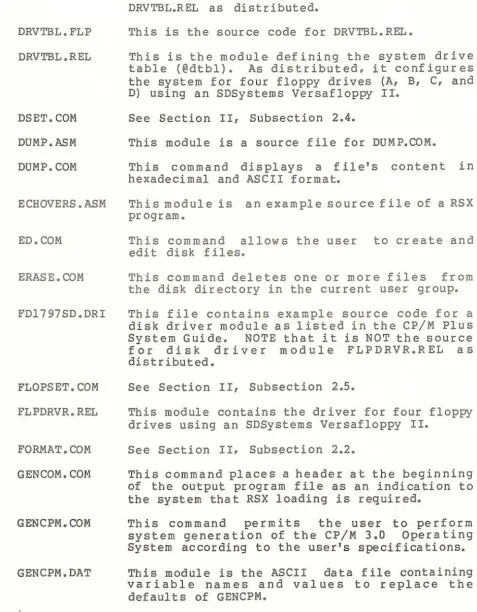
(48) APPENDIX B DIRECTORY BDOS3 .SPR. The Basic Disk Operating System is a System Page Relocatable (.SPR) file. BDOS3 . SPR is used by GENCPM to build the CP/M 3.0 Operating System.. BIOS3.SPR. The Basic Input Output System is a System Page Relocatable ( . SPR) file. BIOS3.SPR handles all physical input/output routines used by the CP/M Operating System.. BIOSKRNL.DRI. This file contains example source code for a BIOSKRNL module as listed in the CP/M Plus System Guide. It is al s o the source for BIOSKRNL.REL as distributed.. BIOSKRNL.REL. This module is used with the NBLINK.SUB file to create the BIOS3.SPR file.. BOOT.ASM. This is the source code for BOOT.REL .. BOOT.DR!. This file contains example source code for a BOOT module as listed in the CP/M Plus System Guide. NOTE that it is NOT the source for BOOT.REL as distributed.. BOOT.REL. This module loads the CCP during cold starts and reloads the CCP during warm starts.. CALLVERS.ASM. This module is pr ograrns.. CCP.COM. The Console Command Processor (CCP) is the program that allows the user to interact with the operating system. The commands that make up CCP.COM are: DIR, DIRS, ERASE, RENAME, TYPE, and USER. (Must be on disk for cold boot and warm boot per Section I, Subsection 1.2.7 .). CHARIO.ASM. This is the source code for CHARIO.REL.. CHARIO.DRI. This file contains example source code for a CHARIO module as listed in the CP/M Plus System Guide. NOTE that it is NOT the source for CHARIO.REL as distributed.. CBARIO.REL. This module performs all character input/output routines.. CLEAR.COM. This command clears miscellaneous attributes that were set on the VDB-8024 board and on some CRTs.. B-1. an. example source file of RSX.
(49) COLD.COM. This file contains an image of the Boot Loader on the system tracks.. COND.DMA. See Appendix D.. COND.PIO. See Appendix D.. COND.N4. This is a file containing the conditionals necessary to reassemble BOOT.ASM and CHARIO.ASM to produce a nonbanked system incorporating the SDSystems I/0-4 board. It is used by the submit file NBI04.SUB.. COND.N8. This is a file containing the conditionals necessary to reassemble BOOT .ABM and CHARIO.ASM to produce a nonbanked system incorporating the SDSystems I/0-8 board. It is used by the submit file NB IO 8.SUB.. COPYSYS. COM. This command allo.w s the user to copy the CP/M 3.0 Operating System from a system disk to another disk. Both disks need not be of the same format.. CPM3.LIB. This file contains miscellaneous macro definitions associated with a BIOS disk driver, as discussed in the CP/M Plus System Guide.. CPM3.SYS. This file contains the CP/M 3.0 Operating System. (Must be on disk for cold boot per Section I, Subsection 1.2.7.). CPMLDR.REL. This module, when combined with a custom loader BIOS, loads the BDOS and BIOS system components into memory as specified by CPM3.SYS, the file generated by GENCPM.. DATE.COM. This command reads time.. DEVICE.COM. This command permits the user to reassign devices and display. and change the current device assignments.. DIR .COM. This command shows all files located in the disk directory along with other information concerning these files.. DIR.DOC. This data file contains a listing of directory of the release disk.. DIRLBL.RSX. This module enables the user to password protect directory labels.. DISK COPY. COM. and sets. See Section II, Subsection 2.8. B-2. ). '. the date and. the. ).
(50) DMA. SUB. See Appendix D.. DRVTBL.DRI. This file contains example source code for a DRVTBL module as listed in the CP/M Plus System Guide. NOTE that it is NOT the source for DRVTBL.REL as distributed.. DRVTBL.FLP. This is the source code for DRVTBL.REL.. DRVTBL.REL. This is the module defining the system drive table (@dtbl). As distributed, it configures the system for four floppy drives {A, B, C, and D) using an SDSystems Versaf loppy II.. DSET.COM. See Section II, Subsection 2.4.. DUMP.ASM. This module is a source file for DUMP.COM.. DUMP.COM. This command displays a file's hexadecimal and ASCII format.. ECHOVERS.ASM. This module is program.. ED.COM. This command allows the user edit disk files .. ERASE . COM. Th is comm and deletes one or more files fr om the disk directory in the current user group.. FD1797SD.DRI. This file contains example source code for a disk driver module as listed in the CP/M Plus System Guide. NOTE that it is NOT the source for disk driver module FLPDRVR.REL as distributed.. FLOPSET.COM. See Section II, Subsection 2.5.. FLPDRVR.REL. This module contains the driver for four floppy drives using an SDSystems Versafloppy II.. FORMAT.COM. See Section II, Subsection 2.2.. GENCOM.COM. This command pl aces a header at the beg inning of the output program file as an indication to the system that RSX loading is required.. GENCPM.COM. This command permits the user to perform system generation of the CP/M 3.0 Operating System according to the user's specifications.. GENCPM.DAT. This module is the ASCII data file containing variable names and va lues to replace the defaults of GENCPM.. B-3. content. in. an example source file of a RSX to create and.
(51) GENCPM.N. This is a data file used by the submit files NBI04. SUB and NBI08.SUB.. GET. COM. This command enables the CP/M 3.0 Operating System to accept console input from a file.. HELP.COM. This command discusses in detail the execution of all commands in the CP/M 3 . 0 Operating System.. HELP.HLP. This module is the data file for the HELP.COM file.. HEXCOM.COM. This command converts a command file.. HIST.UTL. This module illustrates (by using a bar graph) the relative frequency of execution for code within selected segments of the test program. HIST.UTL is used with SID.. INITDIR.COM. This command initializes time and date stamping in a disk directory.. INITDISK.COM. See Section II, Subsection 2.7 .. LIB . COM. This command performs the following functions: creation, appending, replacement, selection, or deletion of modules in an existing library .. LINK.COM. This command prepares object (.REL) modules for execution. LINK.COM will search the library for all external referenced modules and include them in the output file.. MAC.COM. The CP/M Macro Assembler will read the assembly language statements from an ASM file, assemble the statements, and generate three output files with the same name as the input file and an extension of HEX, PRN, or SYM.. MCOPY.COM. See Section II, Subsection 2.1.. MODEBAUD. LIB. This module is a library file containing the equates and baud rates for the Mode Byte fields.. MOVE.DR!. This file contains example source code for a MOVE module as listed in the CP/M Plus System Guide. NOTE that it is NOT the source for MOVE.REL as distributed.. MOVE.REL. This module performs block moves.. B-4. ). a hexadecimal file into. ). J.
(52) NBI04 .SUB. This is a submit file which will build a new CPM3.SYS incorporating an SDSystems I/0-4 board. See Subsection 1.3.3.. NBIOB.SUB. Th i s i s a sub mi t f i 1 e wh i ch w i 11 bu i 1 d a new CPM3.SYS incorporating an SDSystems I/0-8 board. See Subsection 1.3.3.. NBLINK.SUB. This module is a submit file combining BIOSKRNL.REJ,.., IWOT.RE.L, ~OVE.REL, ~HARIO.REL, .FLPDRV..R-. REL, DRVTBL.REL, and SCB.REL to create BIOS3 .SPR. - - -- --..:------. PATCH.COM. This command enables the user to record and verify patches to the CP/M 3.0 Operating System.. PIO.SUB. See Appendix D.. PIP.COM. This command allows the user to copy one or more files from one disk and/or user number to another disk and/or user number.. PORTS.DR!. This file contains example source code for a PORTS . LIB file as listed in the CP/M Plus System Guide. NOTE that it is NOT the source for the PORTS.LIB file which defines the ports for CP/M 3.0 for the SBC-30 O.. PORTS .LIB. This file has the I/O port addresses and equates for the SBC-300 CP/M 3.0 Operating System.. PUT.COM. This command permits the user to send output from the console or the printer to a file.. RANDOM.ASM. This module is a source file example for reading and writing random records on command from the terminal.. RENAME.COM. This command enables the user to change the n am e of a f i 1 e th at· i s ca ta 1 o g u e d i n th e dis k directory.. RMAC.COM. The Relocatable Macro Assembler will assemble ASM files into REL files used by the LINK.COM command in the creation of COM files.. SAVE. COM. This command will copy the memory content and pl ace it in a file.. SCB.ASM. This module has definitions for the fields found in the System Control Block. SCB.ASM is the source file for SCB.REL.. B-5.
(53) SCB.REL. The System Control Block module contains all of the field definitions, flags, and data used by the CP/M 3.0 Operating System.. SET.COM. This command permits the user to password protect files and set file attributes. SET.COM also enables time stamping of files after running INITDIR.. SETDEF.COM. See Section I, Subsection 1.4.2.. SHOW.COM. This command supplies the user with the following disk drive information: (1) access mode and free disk space, (2) disk label. (3) current user number, (4) number of files on disk, (5) free directory entries for disk, and ( 6) drive character is tics.. SID.COM. The Symbolic Instruction Debugger permits users to test programs developed for the 8080 microprocessor. The Symbolic Instruction Debugger has real-time breakpoints, fully monitored execution, symbolic disassembly, assembly, and memory display and f i l l functions.. SIGNON.DAT. This module is the data file for the sign on message.. SUBMIT.COM. This command permits the user to execute a group of commands from a SUB file.. SYSGEN.COM. See Section II, Subsection 2.6.. TRACE.UTL. This utility lists the executable instructions down to a particular breakpoint. TRACE.UTL is used with s ID.. TYPE.COM. This command displays a listing of the content of an ASCII file.. VERIFY.COM. See Section II,. VFWCONF.LIB. This file is needed to assemble VFWDRVR.ASM. It defines the number and types of disks.. VFWDRVR.ASM. This is the source code for VFWDRVR.REL.. VFWDRVR.REL. This module contains the driver for VFW-III as configured with VFWCONF.LIB.. XREF.COM. This command builds a cross reference listing using the .PRN and .SYM files produced by MAC and RMAC.. B-6. Subs~ction. 2.3.. •.
(54) zao .LIB. The Z80.LIB file contains the Z-80 instruction macros for use with MAC and RMAC .. B-7.
(55) ). THIS PAGE INTENTIONALLY LEFT BLANK. ). B- 8.
(56) APPENDIX C PATCHES The following patches have been patches have been made to CP/M 3.0 the PATCH utility. All .SPR files CP/M 3.0, although they cannot be utility.. included in CP/M 3.0 . These and may be verified using exist on the new version of verified by using the PATCH. EXAMPLE: In the example below a Carriage Return is signified by <er>. All operator responses appear in boldface type inside quotation marks.. 1. RESBDOS 1, 01/27/83 Program: RESBDOS.SPR The BDOS function number is saved by RESBDOS in SCB variable @FX. 2. HELP 1, 01/27 /83. Program: HELP.COM HELP incorrectly tests for errors when writing to the HELP.DAT file or the HELP.HLP file. As a result, write errors are not always detected. 3. PIP 1, 0 2/07 I 83. Program: PIP. COM PIP reports an invalid device when an EOF: is specified as input. 4. PATCH 1, 02/17/83 Program: PATCH.COM PATCH performs a check of the patch field in the wrong location and in the wrong field. This patch corrects the error. 5. INITDIR 1, 02/14/83 Program: INITDIR.COM INITDIR refuses to allow reformatting of directory when there is exactly the correct number of directory elements left. For example, if the disk allows 64 directory elements and 48 of. C-1.
(57) them are used by the existing files, then INITDIR does not create the time-date elements to do so. However, if 47 or less are used then INITDIR successfully allocates the time-date elements.. ). INITDIR loses one physical record of a f iles's directory when the high water mark falls in the last sector and there is not enough preceding empty directory elements to account for the new time-date elements. INITDIR fails to reset the time-date stamp flags in the directory label if the label occurs in one of the first three directory elements and the directory is already formatted for time-date stamps. 6. PIP 2, 02/07/83 Program: PIP.COM A problem occurs when using PIP to · ambiguously copy archived, multiextent files. PIP copies the last extent only. 7 . BNKBDOS3, BDOS3, 02/17/83 Program: BNKBDOS3.SPR, BDOS3 . SPR In some cases the BDOS file system writes directory information from the old disk to the directory of the new disk if a user removes a disk from a drive and inserts a new disk while a program is performing wri t e operations to an open file on the drive. NOTE: Changing disks while a program is performing read and write operations on the disk is an error situation under CP/M 3.0. Usually, any records that were written after the switch can destroy data records on the new disk. This situation continues to exist until the BDOS file system reads a directory record from the disk and thereby detects that the media has changed. This patch protects the new disk's directory and reduces the potential damage to the new disk's data area when the user accidentally changes disks while a program is running. 8. HELP 2, 02/19/83 Program: HELP.COM This patch forces HELP to pick up its HELP.HLP file off the drive from which it was loaded. Usually, HELP accesses only the HELP.HLP file that is on the default disk.. C-2. ).
(58) If further information is needed concerning patches to CP/M 3.0, contact SDSystems Customer Services or Digital Research Corporation.. C-3.
(59) ) THIS PAGE INTENTIONALLY LEFT BLANK. ). C-4.
(60) APPENDIX D CONVERSION TO DMA OPERATION As supplied by SDSystems, CP/M 3.0 for the SBC-300/VFW-III board set is configured to operate in Programmed I/0 (PIO) mode. This configuration can be changed to operate in Direct Memory Access (DMA) mode by modifying the COND.LIB file, reassembling, relinking and running GENCPM. To simplify conversion to and from DMA and PIO modes, four additional files have been included: 1). COND.DMA--Library file used during assembly of VFWDRVR.ASM to select various system parameters. This file has been modified to select DMA mode.. 2). COND.PIO--Same as COND.DMA except modified to select PIO mode.. 3). DMA.SUB--A submit file written to automatically assemble, link and run GENCPM to convert to DMA mode.. 4). PIO . SUB--Same as DMA. SUB except converts to PIO mode .. In addition to the above four files , the following files must be present on the same disk before running OMA. SUB or PIO. SUB : BDOS3 . SP.EV BIOSKRNL . REL BOOT.REL CHARIO.REL DRVTBL.REL GENCPM.COM GENCPM.DAT LINK.COM MOVE.REL. NBLINK . SUB PIP . COM PORTS.LIB RMAC.COM SCB.REL SUBMIT.COM VFWCONF.LIB VFWDRVR. ASM Z80 .LIB. After verifying that all of the above files are on the disk, simply SUBMIT DMA or SUBMIT PIO to generate the desired system configuration . After completion of the SUBMIT procedure, replace CPM3.SYS on your boot disk with the new CPM3.SYS just generated and reboot. Your system. will now be operating in the selected mode. NOTE:. Before performing this procedure, make sure your system disks are properly backed up so that you may recover if difficulty is encountered.. D-1.
(61) ) THIS PAGE INTENTIONALLY LEFT BLANK. ). ) D-2.
(62)
Figure
Related documents