Computational Linguistics for Mere Mortals
Powerful but Easy-to-use Linguistic Processing for Scientists in the Humanities
R ¨udiger Gleim, Alexander Mehler
Department for Computing in the Humanities, Goethe University, Georg-Voigt Straße 4, Frankfurt, Germany Texttechnology/Applied Computer Science, Bielefeld University, Universit¨atsstraße 25, Bielefeld, Germany
[email protected], [email protected]
Abstract
Delivering linguistic resources and easy-to-use methods to a broad public in the humanities is a challenging task. On the one hand users rightly demand easy to use interfaces but on the other hand want to have access to the full flexibility and power of the functions being offered. Even though a growing number of excellent systems exist which offer convenient means to use linguistic resources and methods, they usually focus on a specific domain, as for example corpus exploration or text categorization. Architectures which address a broad scope of applications are still rare. This article introduces the eHumanities Desktop, an online system for corpus management, processing and analysis which aims at bridging the gap between powerful command line tools and intuitive user interfaces.
1.
Introduction
With the availability of tools, resources and standards for annotating and processing data in the humanities, we are in need of frameworks that integrate information objects and corresponding operations for handling these objects. More-over, systems are needed with interfaces that provide a low barrier to their use. The reason is that humanists look at these systems not as experts in computational linguistics or machine learning, but as non-experts, that is, as users not as researchers. Thus, versatility of easy-to-use methods in the humanities is a major criterion beyond expressiveness of the underlying data model and the efficiency of algorithms that operate on this data.
Humanists have an integrated view on text-technology and related disciplines as they want to use resources (e.g., text, image or video corpora as well as lexica and ontologies) together with machine learning facilities in such a way that they can abstract from the underlying data formats and any restrictions of their transformation and further processing. This makes the development of text-technological frame-works for eHumanities a challenging task as one needs both high-level processing routines for handling linguistic and, more generally, semiotic data as well as information sys-tems that encapsulate these routines by versatile interfaces. Moreover, these systems should be open in the sense of not only being completely web-based (such that any installa-tion effort can be disregarded). Rather, they should allow for linking system-internal data with the web and its nu-merous knowledge resources (as part, for example, of the Wikimedia foundation).
In this paper, we describe the eHumanities Desktop as such a system for corpus management, processing and analysis which aims at bridging the gap between powerful command line tools and intuitive user interfaces. More specifically, in Section (1.1.) we discuss related work in this field of research. In Section (2.) we describe the Architecture of the eHumanities Desktop while in Section (3.) we describe several (linguistic) applications that can be used with this desktop. Finally, we conclude and give a prospect on future work in Section (4.).
1.1. Related Work
In the past there has been much effort to develop environ-ments and frameworks for managing corpora and machine learning facilities in computational linguistics and related disciplines. Amongst others, this relates to the GATE sys-tem, the WEKA framework and the TextGrid environment.
• GATE (Cunningham et al., 2002) has been
devel-oped as a framework for deploying and developing programs in language engineering (LE) including, amongst others, tokenizers, sentence splitters, taggers, named entity recognizers and many related modules. That is, as adevelopment environment, GATE does not only provide facilities in text technology, but also ad-dresses the development of systems for solving tasks in LE such as, information extraction or text summa-rization. GATE includes modules for representing, editing and using ontologies (Bontcheva et al., 2004) as well as for processing of multimedia data (Dowman et al., 2005). Moreover, GATE integrates machine
learning modules as based, for example, onSupport
Vector Machines (SVM) (Li et al., 2009). From the point of view of a humanist, GATE offers an over-whelming range of tools and development facilities that actually demand an expertise in computational linguistics and machine learning. This may discour-age humanists to adapt GATE to their research needs whenever they look for easy-to-use tools that address some task in eHumanities. Therefore, a framework is needed which basically encapsulates the underlying text-technology and machine learning while providing tools on a level of understanding that is accessible to humanists. The eHumanities Desktop approaches this goal.
• WEKA (Hall et al., 2009) is a widespread workbench
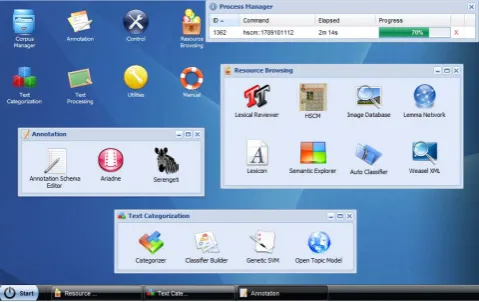
Figure 2: Screenshot of a typical working scenario.
to check upon the processes and review the results once they are ready. In order to minimize system requirements the eHumanities Desktop can be accessed platform inde-pendently via common web browsers. There is no need for installation whatsoever. The client is implemented in Java Script and relies on the ExtJS1Framework to offer the desk-top look and feel. Some applications need a Flash or Java Plugin to be installed to allow for more complex operations such as interactive graph visualization. All computations are performed on the server, that is the client is purely used for user interaction. The processing of user requests is dis-cussed in the next section.
2.2. Server
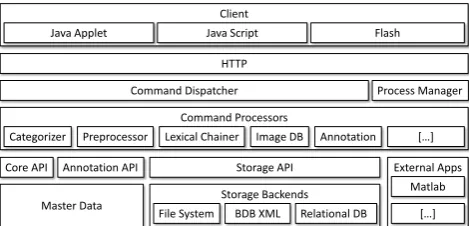
The server architecture is hierarchically structured into lay-ers which build upon another as illustrated in figure 1. Its primary task is to receive requests from the clients and per-form computations on resources or the master data accord-ingly. Request handling and execution to start with is based
on an adaption of the command pattern (Freeman et al.,
2004): The client sends a command and its parameters to the server and waits for it to respond with the results or feedback on an operation being done. Commands are rep-resented as JSON2objects and exchanged with the server
via HTTP requests.
Incoming commands, such as to fetch the annotation of a
document are handled by theCommand Dispatcherwhich
checks well formedness and user authentication. The exe-cution of the command constitutes a newprocesswhich is registered in theProcess Managerso that the user can mon-itor and abort it if necessary. The set of commands which are understood by the system are grouped according to their function and managed in a registry. This registry is used
by the dispatcher to decide whichCommand Processorhas
to be called in order to execute the command. The Com-mand Processor performs the actual computation according to the specific command which usually incorporates at least one of the following components: (i) TheMaster Database
which represents users, resources and their interrelations; (ii) theStorage API which manages access to the underly-ingStorage Back ends; or (iii) an external application such
1http://extjs.com 2http://www.json.org
as MATLAB. After having completed the computation con-trol is handed back to the dispatcher which returns the re-sults to the client.
The servlet provides several APIs which abstract from tech-nical details of the underlying layers. That way developers of new functions (i.e. Command Processors) can concen-trate on the specific task rather than to reinvent the wheel over and over again by coding user management, storage handling and so on. Because of the modular approach the system is easily extensible as new demands for features arise.
2.3. Storage Back Ends
A foundation of the eHumanities Desktop is to offer means to upload documents, organize them in repositories and share those resources with other users. On this basis ap-plication modules can then operate to perform analysis on the data. Therefore it is important to offer efficient means to access and process such documents. When a document is newly inserted into the system a file format (or mime type) detection is performed in order to determine which stor-age back end should be used. Currently three back ends are supported: XML documents are stored using Oracle
BerkeleyDB XML3, a native XML database management
system (DBMS). This allows for performing XQuery state-ments over stored docustate-ments and entire collections. Also transactional updates of existing documents are supported. Relational databases can be managed as documents as well: They can either be newly created by uploading an appropri-ate SQL script or by specifying authentication information to include an existing database. Relational databases are for example used to efficiently represent and query lexicons. Binary data and any other file formats which do not fit in the former categories are stored as files. TheStorage API
helps abstracting from the details of how contents of a spe-cific document are stored. From the users perspective the distinction between the storage back ends is transparent.
2.4. Master Data Model
The master data model basically serves the representation of users, resources and their access permissions. The de-mands on this data model need to meet the requirements of typical research project settings: Some resources should only be accessible by certain users. Some users should be able to edit documents, while others should not. Users should be organizable into groups etc.
The basic idea behind the data model used in the eHu-manities Desktop (see figure 3) is a mixture of concepts from unix operating systems and relational database sys-tems. The model basically distinguishes between Authori-tieswhich have a certain degree (read, write, delete, grant) ofAccess PermissiononResources. An authority is either aUseror aGroup. A user can be member of an arbitrary number of groups and thus inherits their respective privi-leges. A group has a designated owner (for example the head of a research project) who can add or remove users
from the group. Resourceson the other hand are
primar-ily distinguished into Documents, Repositories and
Fea-3http://www.oracle.com/database/berkeley-db/xml/
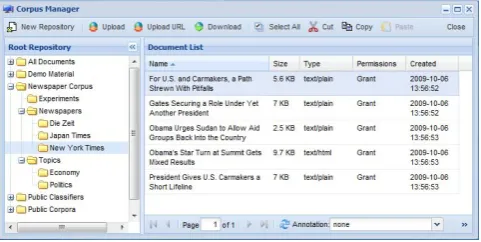
load resources as well as sharing them with other users and groups. The graphical user interface (see figure 6) offers a look and feel similar to the Windows Explorer. A tree on the left side of the window shows the hierarchy of the repositories visible to the user. The center part of the win-dow shows the documents of the currently selected repos-itory. The list of documents can be filtered and sorted in many ways to help users quickly find the resources they are looking for. Besides the basic fields like size, mime type, date of creation and alike which are available for all docu-ments it is also possible to add fields to the view which stem from annotations of the respective documents. If for exam-ple documents were annotated based on a schema which provides an attribute for category information, this could be displayed seamlessly in the Corpus Manager. A virtual repository called All Documentsgives access to all docu-ments the user has access to. The docudocu-ments and reposito-ries can quickly be re-structured using common drag&drop or cut&paste operations. Finally the corpus manager of-fers means to annotate resources according to previously defined annotation schemata.
A researcher who wishes to construct a newspaper corpus would start here by creating an initial structure of reposi-tories, for example as shown in figure 6. In this example there are some PDF documents which have to be uploaded from the local computer and some HTML documents which shall directly be taken from the web. The former can be
up-loaded using theUpload Managerwhich provides means to
uploads single files or an entire directory into a designated repository. The latter can be accomplished by an URL up-load assistant which based on a given URL downup-loads a resource from the web and inserts it as new document into a selected repository. The advantage for the user here is that the download is being done by the server and does not affect the users bandwidth.
The eHumanities Desktop offers a conversion matrix which allows users to convert uploaded documents online into other formats, for example from PDF to plain text.
Figure 6: Screenshot showing the Corpus Manager.
3.2. Preprocessor
A common task in NLP is the preprocessing of input
texts. The Preprocessor module enables users to
prepro-cess their uploaded documents. Besides language detec-tion, sentence boundary detecdetec-tion, tokenizadetec-tion, lemmati-zation, stemming and name entity recognition, the prepro-cessing system includes a trigram HMM-Tagger (Mehler
et al., 2008). The currently released implementation sup-ports English, German and Latin texts. The tagging mod-ule was trained and evaluated based on the German Ne-gra Corpus (Uszkoreit et al., 2006) (F-score of.975), the T¨ubinger Spoken Language Corpus (0.982) and the En-glish Penn Treebank (Marcus et al., 1994) (0.956). The lan-guage identification component was successfully evaluated against samples from Wikipedia articles, proving that only a small amount of input data is needed (F-score of 0.956 for 50 characters and 0.97 for 100 characters). The output of the preprocessor can be displayed directly in the browser or saved as a new TEI P5 (Burnard, 2007) document in the Oracle BDB XML database.
The preprocessor supports ad hoc preprocessing of texts which have been inserted via cut & paste into a form as well as batch processing of documents which have already been uploaded into the system. To follow the exemplary research project the user would now select all collected documents and let them be transformed into TEI P5 XML documents. Since the preprocessor attempts to automatically convert in-put documents as required, usually no explicit conversion from PDF, HTML and so on is necessary.
3.3. Annotation
The TEI P5 documents which have been created in the pre-ceding step are the artifacts on which all subsequent stud-ies are based. Now the annotation subsystem can be used to annotate these documents to help improve later analysis.
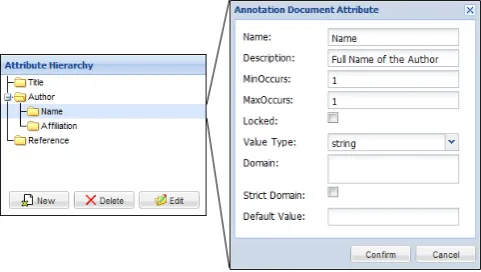
The researcher uses the Annotation Schema Editor to
de-fine a schema to be used for annotating newspaper articles. Based on this schema the articles can now be annotated as shown in figure 7.
Figure 7: Screenshot showing the annotation of a newspa-per article.
3.4. HSCM
of chronologically layered corpora. A prominent instance is thePatrologia Latina4which has been tagged and con-verted into the TEI P5 format. The system has been in-tegrated into the eHumanities Desktop and extended to be usable with arbitrary corpora. Using the HSCM enables users to search for texts which contain a certain phrase, for exampleeconomic crisis. Subsequently all sentences con-taining this phrase with a selected number of neighbors can be listed. Figure 8 shows a screenshot of the HSCM with quotes of the phrase “Helmut Schmidt” in a German news-paper. The corpus on which the query was based contained 87761 articles which have been searched to identify 165 quotes.
Figure 8: Screenshot of the HSCM showing quotes of the phrase “Helmut Schmidt” in a German newspaper.
3.5. XML Query Interface
The browsing and querying functions which the HSCM of-fers are quietly transformed into XQuery statements which are executed on the XML document collections. Since the HSCM can only offer a set of queries which are commonly used there may be the need to ask more specific questions which are not covered per default. In such cases it is possi-ble to enter and execute XQueries directly via the Desktops
XML Query Interface. Since XQueries can be very expen-sive in terms of computation time this feature is currently restricted to single documents.
3.6. Categorizer
The eHumanities Desktop offers an approach for automatic text categorization based on a set of predefined classifiers. The current release of the eHumanities Desktop supports
Dewey-Decimal Classification (DDC) classifiers (Mehler and Waltinger, 2009) for English and German as well as
a classifier based on the German newspaper S¨uddeutsche
Zeitung(Waltinger et al., 2009) using support vector
ma-chines (Joachims, 2002). However these classifiers are
not implemented statically but defined using a light-weight
XML based Classifier Definition Language. Such a
defi-nition defines which algorithm to use, its parameters and which additional files are needed (e.g. model files in the case of SVMs). In order to use the categorizer a user selects the classifier to be applied and specifies either an input doc-ument or plain text via cut&paste. The result is presented
4http://pld.chadwyck.co.uk/
in a list of category labels which is ordered according to the respective relevance. Figure 9 shows the categorization result of a newspaper articles based on the English DDC. In the line of the newspaper research projects a user can ap-ply the categorizer to perform an automatic categorization of articles. It is also possible to let the categorizer annotate the processed documents based on the annotation system of the eHumanities Desktop.
Figure 9: Screenshot showing the categorization of a news-paper articles based of the DDC.
3.7. Lexical Chainer
As a further linguistic application module a lexical chainer (Waltinger et al., 2008; Teich and Fankhauser, 2004) has been included in the online desktop environment. That is, semantically related tokens of a given text are tracked and connected by means of a lexical reference system. The sys-tem currently uses two different terminological ontologies – WordNet (Fellbaum, 1998) and GermaNet (Kunze and Lemnitzer, 2002) – as chaining resources which have been mapped onto the database format. The list of resources for chaining can easily be extended. The lexical chainer can generate HTML output which offers intuitive means to ex-amine the results.
3.8. Lexicon Browser
Lexicon documents can be organized in the corpus manager and shared with other users. But in order to browse and query lexica the eHumanities Desktop offers a decicated
module: TheLexicon Browserenables users to query
lex-cial resources and apply various filters which include sup-port for wildcards, part of speech and numerical constraints like frequency, inverse document frequency (based on on a specified reference corpus) and alike. The measures which are based on a reference corpus are not fixed but can be computed online by selecting a lexicon and a collection of TEI P5 documents which serve as reference.
4.
Conclusion
We presented the eHumanities Desktop, an online system for resource management, processing and analysis in the humanities. The architecture puts emphasis on an easy us-ability of linguistic resources and methods. However it is not restricted to linguistics- there are other applications as
for example theImageDB which have not been presented
here. The Desktop is in ongoing development and feedback is always welcome. Currently emphasis is put on enabling users to build custom classifiers to help them automatically annotate their resources as well as improving management of lexical resources. Researchers interested in testing the system are welcome to contact5 us in order to get an ac-count.
5.
Acknowledgements
Support of the German Federal Ministry of Education
(BMBF) through the research projectLinguistic Networks
at Bielefeld University is gratefully acknowledged.
6.
References
K. Bontcheva, V. Tablan, D. Maynard, and H. Cunning-ham. 2004. Evolving GATE to Meet New Challenges in
Language Engineering. Natural Language Engineering,
10(3/4):349—373.
Lou Burnard. 2007. New tricks from an old dog: An
overview of tei p5. In Lou Burnard, Milena
Do-breva, Norbert Fuhr, and Anke L¨udeling, editors,Digital Historical Corpora- Architecture, Annotation, and Re-trieval, number 06491 in Dagstuhl Seminar Proceedings. Schloss Dagstuhl.
Chih-Chung Chang and Chih-Jen Lin, 2001. LIBSVM: a
library for support vector machines.
Hamish Cunningham, Diana Maynard, Kalina Bontcheva, and Valentin Tablan. 2002. GATE: an architecture for development of robust hlt applications. InIn Recent Ad-vanced in Language Processing, pages 168–175. M. Dowman, V. Tablan, H. Cunningham, C. Ursu, and
B. Popov. 2005. Semantically Enhanced Television News through Web and Video Integration. InSecond Eu-ropean Semantic Web Conference (ESWC’2005). Christiane Fellbaum, editor. 1998. WordNet: An Electronic
Lexical Database. MIT Press, Cambridge.
Elisabeth Freeman, Eric Freeman, Bert Bates, and Kathy Sierra. 2004. Head First Design Patterns. O’ Reilly & Associates, Inc.
5http://www.hucompute.org/hudesktop
R¨udiger Gleim, Paul Warner, and Alexander Mehler. 2010. eHumanities Desktop — an architecture for flexible an-notation in iconographic research. InProceedings of the 6th International Conference on Web Information Sys-tems and Technologies (WEBIST ’10), April 7-10, 2010, Valencia.
Mark Hall, Eibe Frank, Geoffrey Holmes, Bernhard Pfahringer, Peter Reutemann, and Ian H. Witten. 2009.
The weka data mining software: an update. SIGKDD
Explor. Newsl., 11(1):10–18.
Thorsten Joachims. 2002. Learning to classify text using support vector machines. Kluwer, Boston.
Bernhard Jussen, Alexander Mehler, and Alexandra Ernst. 2007. A corpus management system for historical se-mantics. Sprache und Datenverarbeitung. International Journal for Language Data Processing, 31(1-2):81–89. Martina Kerzel, Jens Mittelbach, and Thorsten Vitt.
2009. Textgrid. KI – Zeitschrift K¨unstliche Intelligenz, 4/09:36–39.
Claudia Kunze and Lothat Lemnitzer. 2002. GermaNet – representation, visualization, application. In Proc. of LREC 2002, pages 1485–1491.
Y. Li, K. Bontcheva, and H. Cunningham. 2009. Adapting SVM for data sparseness and imbalance: A case study on information extraction. Natural Language Engineering, 15(2):241–271.
Mitchell P. Marcus, Beatrice Santorini, and Mary A. Marcinkiewicz. 1994. Building a large annotated corpus of english: The penn treebank. Computational Linguis-tics, 19(2):313–330.
Alexander Mehler and Ulli Waltinger. 2009. Enhancing document modeling by means of open topic models: Crossing the frontier of classification schemes in digi-tal libraries by example of the DDC. Library Hi Tech, 27(4).
Alexander Mehler, R¨udiger Gleim, Alexandra Ernst, and Ulli Waltinger. 2008. WikiDB: Building interoperable wiki-based knowledge resources for semantic databases.
In Sprache und Datenverarbeitung. International Jour-nal for Language Data Processing.
Elke Teich and Peter Fankhauser. 2004. WordNet for lexi-cal cohesion analysis. InProc. of the 2nd Global Word-Net Conference, January 20-23, 2004, pages 326–331.
Hans Uszkoreit, Thorsten Brants, Sabine Brants,
and Christine Foeldesi. 2006. NEGRA Corpus.
http://www.coli.uni-saarland.de/projects/
sfb378/negra-corpus/.
Ulli Waltinger, Alexander Mehler, and Gerhard Heyer. 2008. Towards automatic content tagging: Enhanced web services in digital libraries using lexical chaining. InProc. of WEBIST’08, Funchal, Portugal. Barcelona. Ulli Waltinger, Alexander Mehler, and R¨udiger Gleim.
2009. Social semantics and its evaluation by means of closed topic models: An SVM-classification approach using semantic feature replacement by topic
generaliza-tion. InProceedings of the GSCL-Conference, Potsdam