Available Online atwww.ijcsmc.com
International Journal of Computer Science and Mobile Computing
A Monthly Journal of Computer Science and Information Technology
ISSN 2320–088X
IMPACT FACTOR: 5.258
IJCSMC, Vol. 5, Issue. 9, September 2016, pg.51 – 56
Image Password Based Authentication
in an Android System
Shrutika S. Yande
1, Renuka C. Walimbe
21
Master of Engineering in Computer Science and Engineering (BAMU, Aurangabad), India 2
Master of Engineering in Computer Science and Engineering (BAMU, Aurangabad), India 1
[email protected]; 2 [email protected]
Abstract: Authentication is one the most important security primitive. Generally authentication performed using textual passwords. Textual passwords are vulnerable to eaves dropping, dictionary attacks, social engineering and shoulder surfing. Graphical passwords are introduced as alternative techniques to textual passwords. Most of the graphical schemes are vulnerable to shoulder surfing. To address this problem, images can be combined with colors to generate session passwords for authentication. This is the most important feature of image password; the password is set through a set of multiple images. Purpose of implementing image password based authentication for an android mobile system is only because of today’s market covered by Smartphone, especially android smart phones. So that securing such smart phones is one the major task of today’s generation. Alphanumerical passwords are not able to protect Smartphone as compared to graphical password. Here, we propose graphical password authentication system for android mobiles.
Keywords—―Image password, security, authentication, android system, textual password, recognition based system‖
I. INTRODUCTION
Android is a mobile operating system that is based on a modified version of Linux. Moreover, vendors (typically hardware manufacturers) can add their own proprietary extensions to Android and customize Android to differentiate their products from others. This simple development model makes Android very attractive. Android mobiles has many advantages, they covered large area of mobile market and used by peoples. Android phones can run many applications; it means you can browse, Facebook while listened to the song, easy access to thousands of applications via the Google Android Android App Market. When you love to install applications or games, through Google‟s Android App Market, again can download applications for free. If you are a loyal user of Google services ranging from Gmail to Google Reader, Android phone has integrated with Google services, so you can quickly check e-mail from Gmail. Maintaining security of such highly customized android phones is necessity. Generally phones that uses different password schemes through multiple patterns and textual format that may be easily hacked or prone to get accessed by unauthorized person. A graphical password is easier to remember than a text based password, an image as a password may offer better security than a text based password because many people in an attempt to memorize text based passwords, use plain words (rather than recommended jumble of characters).
2. Authentication
Authentication ensures that system's resources are not obtained fraudulently by illegal users. Password authentication is one of the simplest and the most convenient authentication mechanisms over insecure networks.Authentication methods can be divided into three main areas:
Token based authentication
Biometric based authentication
Knowledge based authentication
Token based techniques, such as key cards, bank cards and smart cards are widely used. Biometric based authentication techniques, such as fingerprints, iris scan, or facial recognition, are not yet widely adopted. Knowledge based techniques are the most widely used authentication techniques and include both text-based and picture-based passwords. It is divided into:
a) Recognition-based graphical techniques b) Recall-based graphical techniques
Using recognition-based techniques, a user is presented with a set of images and the user passes the authentication by recognizing and identifying the images he or she selected during the registration stage. Using recall-based techniques, a user is asked to reproduce something that he or she created or selected earlier during the registration stage based which is quite difficult. Recognition techniques are best techniques and provide much more advantage over re call based techniques. It reduces the overhead of remembering password. So that in our application we also make use of recognition based graphical technique.
3. Existing system
Types of recognition based technique are as follows:
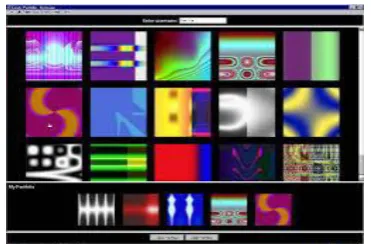
Figure 1: Random images used by Dhamija and Perrig
ii) Passface : This method is developed in 2000. In this human faces used as a password. Where user is presented with set of human faces and user have to select on face images pre-selected in registration for several such rounds. Drawbacks of this scheme are the probability of a guessing attack is high with few authentication rounds easily guessable. And passface scheme is vulnerable to shoulder surfing attacks.
Figure 2: Example of Pass faces
III. PROPOSED SYSTEM
We introduce the system that is an android app which provides the set of images from where the users have to select any 3 images as password and also provide username. The set of images provided through the system will be common to all the users who will use this application. Through this system user will be able to set password for their applications of android mobile and whenever user wants to open these locked apps, he/she has to enter graphical password that they have selected only. Phases of system are as follows.
A) Registration :
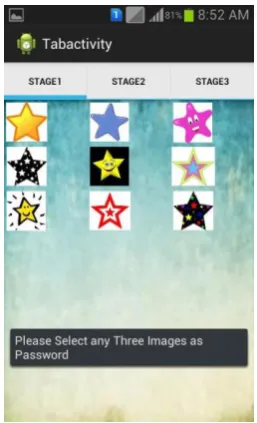
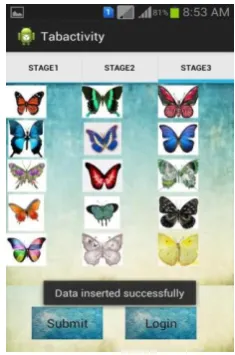
In the registration phase, user has to set the username as Login-id.If the user is using the system or app for the first time then he/she has to set the series of images as a password by clicking on set password button. Once the user proceeds towards the password selection, the application provides the subset of images in three stages namely: stage1, stage2, stage3.Three images selected by user from any of these stages will be stored as password. The next time whenever the user signs in to the Application he/she has to type series of images as password, if the password is incorrect, the user cannot login into the Application.
Figure 4: image selection from Stage1
Figure 5: image selection from stage 2
Figure 6: Submit selected username and password C) Add account :
This is the next activity appears after successful login of a user. This is the phase in which user selects the personalized applications provided in the list and fetched from mobile itself. A checklist is provided in the „Add Accounts‟ activity, user has to check the apps which he/she wish to locked through this system or application. Once it is done user will access apps by clicking on them and entering the graphical password
Figure 7: App selection for locking
Going through all these phases or steps users will be able to create their account in system using password and username. Whenever user will wants open the apps through their android mobile which has been locked using this system, then user has to enter the graphical password to open these apps.
IV. CONCLUSION
-1938.
[4] W. Jansen, "Authenticating Mobile Device User through Image Selection," in Data Security , 2004.
[5] S. Man, D. Hong, and M. Mathews, "A shoulder surfing resistant graphical password scheme," in Proceedings of International conference on security and management. Las Vegas, NV, 2003.
[6] X. Suo, Y. Zhu and G. Owen, “Graphical Passwords: A Survey”. In Proc. ACSAC'05.
[7] Z. Zheng, X. Liu, L. Yin, Z. Liu “A Hybrid password authentication scheme based on shape and text” Journal of Computers, vol.5, no.5 May 2010.
[8] Sonia Chiasson1, Alain Forget1, Elizabeth Stobert2, P.C. Van Oorschot1, Robert Biddle1 “Multiple Password Interference in Text Passwords and Click Based Graphical Passwords” 1School of Computer Science, 2 Department of Psychology Carleton University, Ottawa, Canada.
[9] XiaoyuanSuo, Ying Zhu, and G. Scott Owen. Graphical passwords: A survey. In Proceedings of Annual Computer Security Applications Conference, pages 463– 472, 2005.
[10] Antonella De Angeli, Lynne Coventry, Graham John- son, and Karen Renaud. Is a picture really worth a thousand words? Exploring the feasibility of graphical authentication systems. International Journal of Human-Computer Studies, 63:128–152, July 2005.
[11] A.DeAngeli, L. Coventry, G. Johnson, and K. Renaud, “Is a picture really worth a thousand words? Exploring the feasibility of graphical authentication systems,” International Journal of Human-Computer Studies, vol. 63, no. 1-2, pp. 128– 152, 2005.
[12] K. Renaud, “Guidelines for designing graphical authentication mechanism interfaces,” International Journal of Information and Computer Security, vol. 3, no. 1, pp. 60– 85, June 2009.
[13] K.-P. L. Vu, R. Proctor, A. Bhargav-Spantzel, B.-L. Tai, J.Cook, and E. Schultz, “Improving password security and memorability to protect personal and organizational information,” International Journal of Human-Computer Studies, vol. 65, pp. 744–757, 2007.
[14] F. Craik and J. McDowd, “Age differences in recall and recognition,” Journal of Experimental Psychology: Learning, Memory, and Cognition,vol. 13, no. 3, pp. 474– 479, July 1987.
[15] Garima Pandey.” Android Mobile Application Build on Eclipse”, International Journal of Scientific and Research Publications, Volume 4, Issue 2, February 2014 1 ISSN 2250-3153.
[16] Li ma, “Research and development of mobile application for android platform”, International Journal of multimedia and ubiqultous engineering, vol.9, no. 4(2014), pp. 187-198.