
V-2000 INTEGRATED SINGLE ZONE PAGE CONTROL UNIT
6
0
0
Full text
(2) VALCOM ONE-WAY AMPLIFIED SPEAKERS V-2000 E-KEY OR PABX. INTEGRATED SINGLE ZONE PAGE SYSTEM. NOTE; Additional power supplies required for large numbers of speakers.. FIGURE 1 - TYPICAL INSTALLATION. Dimensions/Weight • •. 1) 1 - V-2000 Integrated Single Zone Page Control Unit 2) 1 - C. O. Line Circuit (Electronic key system) or 1 Loop Start Trunk Circuit (PABX) 3) Valcom One-Way Amplified Speaker Assemblies (quantity and style determined by specific installation).. 7.75"H x 5.8"W x 2.6"D (19.69cm H x 14.73cm W x 6.6cm D) 2.6 lbs. (1.18 kg). Nominal Power Requirements • •. Voltage: Current:. 115 Vac .35 Amp. Operation: Press the appropriate line key (electronic key system) or dial the appropriate trunk access code (PABX). You will immediately be connected to the paging speakers. Make announcement. The V-2000 will automatically disconnect when you hang up.. Environment • •. Temperature: Humidity:. 0 to 40 Degrees C 0-85% non-precipitating. Nominal Specifications Input Impedance: Input Level: Music Source Input Impedance: Voice Switch Sensitivity: Music Input Level: Output Impedance: Output Level: DC Output:. Page Port Access 600 Ohms -10dBm nominal 8 to 600 Ohms -21dBm -10dBm nominal 8 Ohms -10dBm nominal -24 Vdc at 600 mA. When accessing the V-2000 from a page port the following equipment will be required: 1) 1 - V-2000 Integrated Single Zone Page Control Unit 2) Telephone system page card (if required for external page outputs). 3) Valcom One-Way Amplified Speaker Assemblies (quantity and style determined by specific installation).. SYSTEM DESIGN General. Operation: Follow the telephone manufacturers directions on how to access external paging. You will immediately be connected to the paging speakers. Make announcement. The V-2000 will automatically disconnect when you hang up.. The Valcom V-2000 Integrated Single Zone Page Control Unit provides access to paging from a standard PABX loop start trunk port, an Electronic Key System C. O. line button, or a 1A2 Key System C. O. line button (a 400 type line card is required). In most cases access is also possible from a PABX or Electronic Key System page port.. Background Music Background music may be connected to the V-2000 when using any of the above configurations. The background music will cut off automatically when the party making the page is speaking.. Electronic Key or PABX Access When using the V-2000 with an electronic key system or PABX the following equipment will be needed:. 2. 947200.
(3) INSTALLATION. __ a.. Precautionary Designations CAUTION RISK OF ELECTRIC SHOCK. DO NOT OPEN. __ b. CAUTION: To reduce the risk of electric shock, Do not remove cover. No user serviceable parts inside. Refer servicing to qualified service personnel.. Page Level: During initial system set up, it is recommended that the individual speaker volume controls on the amplified speaker assemblies be adjusted to 1/2 volume first. Then, adjust the volume control on the V-2000 to the desired page level. Background music level: Adjust this control to give the desired background music level on the paging speakers.. Wiring Instructions (For Electronic Key System Line Button Access or PABX Loop Start Trunk Access). This symbol indicates that dangerous voltage constituting a risk of electric shock is present within this unit.. NOTE: The telephone system referred to in the following instructions is the customer premise equipment such as an electronic key system or a PABX. The V-2000 CANNOT be connected directly to a public telephone network (a central office line).. This symbol indicates that there are important operating and maintenance instructions in the literature accompanying this unit.. Mounting. If a modular cord is used for Tip and Ring connections start at step ONE. For screw terminal connections start at step TWO. (See Figure 2).. The V-2000 was designed for wall or table mounting. The intended mounting orientation will render the text on the enclosure lid legible when the unit is viewed. When wall mounting this unit, secure it to wall studs or a suitable brace. (A plywood backboard 2' square and at least 1/2" thick attached to wall studs would be considered a suitable brace). Make certain the unit is not mounted near heat sources or strong magnetic fields. Ascertain control and terminal strip accessibility.. __ 1.. __ 2.. Four #10 x 3/4" cross-tip round head wood screws are included for mounting. Fasten the top two screws at the appropriate location on the mounting surface (approximately 3.65" apart and parallel to the floor), allowing the screwheads to protrude 1/8" to 1/4". Place the chassis of the unit onto the screwheads at the mounting slots. Position the two remaining screws and fasten through the remaining mounting slots. Complete the mounting by tightening all screws.. __ 3.. __ 4.. __ 5.. __ 6.. Power Connections The V-2000 is provided with a three conductor line cord. After all required connections have been made, plug the cordset into appropriate AC wall outlet.. __ 7.. Connect one end of a modular telephone cord to the V-2000 RJ11 and the other end to a vacant C. O. line position or vacant loop start trunk on the customer premise equipment. Go to step 4. Connect Tip of the vacant key system line position or PABX loop start trunk to the Tip screw terminal of the V-2000. Connect Ring of the vacant key system line position or PABX loop start trunk to the Ring screw terminal of the V-2000. Connect Tip of the one-way amplified speakers to one of the screw terminals marked Signal Out on the V-2000. Connect Ring of the one-way amplified speakers to the remaining Signal Out screw terminal on the V-2000. Connect the –24 Vdc terminal or lead of the one-way amplified speakers to the –24 Vdc screw terminal of the V-2000. Connect the GND terminal or lead of the one-way amplified speakers to the GND screw terminal of the V-2000.. NOTE: The Valcom V-2000 provides external power of 12 power units (600 mA of –24 Vdc) to operate Valcom one-way amplified speakers. Additional power supplies are required for a quantity of speakers using power over the 12 power units. When using additional power supplies, make certain:. Volume Adjustments Located on the front cover of the V-2000 are the screwdriver adjustable volume controls for regulating the page and background music level. Each volume control is set by turning it clockwise to increase the volume and counterclockwise to decrease the volume.. 3. 947200.
(4) 1) 2). Each one-way amplified speaker connected to only one power source.. __ 8.. Set battery feed slide switch to the "ON" position on the V-2000. Plug in the power cord.. __ 9.. OPERATION. The –24 Vdc outputs are not connected to each other;. General When the V-2000 is connected to a C. O. line position or a loop start trunk port, a Tip and Ring battery feed is provided when the battery feed switch is in the "ON" position. The voice switching circuit is turned on when the person making the page begins to speak. Background music, if connected, will be turned off and the persons voice will be present on the output. The voice switching circuit remains on as long as the person is speaking. When the page is completed or the person stops speaking for more than 3 seconds, the paging circuit is turned off and background music is restored to the output. Note: When the V-2000 is connected to a telephone system page port, the battery feed switch should be in the "OFF" position. The operation of the unit is the same.. is. Wiring Instructions (For connection to a Telephone System Page Port) (See Figure 3) __ 1.. __ 2.. __ 3.. __ 4.. __ 5.. __ 6.. Connect one side of the page port audio output of the telephone system to the Tip screw terminal of the V-2000. Connect the other side of the page port audio output to the Ring screw terminal of the V-2000. Connect Tip of the one-way amplified speakers to one of the screw terminals on the V-2000 marked Signal Out. Connect Ring of the one-way amplified speakers to the remaining Signal Out screw terminal on the V-2000. Connect the –24 Vdc terminal or lead of the one-way amplified speakers to the –24 Vdc screw terminal of the V-2000. Connect the GND terminal or lead of the one-way amplified speakers to the GND screw terminal of the V-2000.. TECHNICAL ASSISTANCE General When trouble is reported, verify that power is being supplied to the unit and there are no broken connections. Check voltages for proper polarity to the one-way amplified speakers. Table 1 identifies symptoms of some possible problems with solutions. If a spare unit is available, continue to troubleshoot by substituting the spare unit for the suspected defective unit. Assistance in troubleshooting is available from the factory. When calling, you should have a VOM, several clip leads and a telephone test set available and be calling from the job site. Call (540) 427-3900 and ask for Technical Support, or call (540) 427-6000 for Valcom 24-hour Automated Support or visit our website at http://www.valcom.com.. NOTE: The Valcom V-2000 provides external power of 12 power units (600mA of –24 Vdc) to operate Valcom one-way amplified speakers. Additional power supplies are required for a quantity of speakers using power over the 12 power units. When using additional power supplies, make certain: 1) The -24 Vdc outputs are not connected; 2) Each one-way amplified speaker is connected to only one power source. __ 7. __ 8.. The V-2000 is not field repairable. Valcom, Inc. maintains service facilities in Roanoke, VA. Should repairs be necessary, attach a tag to the unit clearly stating your company name, address, phone number, contact person and the nature of the problem. Send the unit to: Valcom, Inc. Repair and Return Dept. 5614 Hollins Road Roanoke, VA 24019-5056. Set the battery feed slide switch to the "OFF" position on the V-2000. Plug in the power cord.. Optional Connections Music Connections - Connect the output of a low level music source to the screw terminals marked Music on the input terminal strip on the V-2000. Adjust the music volume control on the V-2000 to the appropriate level.. 4. 947200.
(5) RJ11. RJ11. TIP & RING. BATTERY FEED. TELEPHONE SYSTEM C. O. LINE POSITION OR LOOP START TRUNK PORT. OFF. OR. ON. TIP RING. RING TIP. OPTIONAL BACKGROUND MUSIC SOURCE. MUSIC. GND. VALCOM ONE-WAY AMPLIFIED SPEAKERS. GND. -24VDC. -24VDC. SIGNAL OUT. RING TIP. FIGURE 2 - ELECTRONIC KEY SYSTEM LINE BUTTON ACCESS OR PABX LOOP START TRUNK ACCESS. RJ11 TIP & RING. BATTERY FEED. OFF ON. TIP RING. RING TIP. OPTIONAL BACKGROUND MUSIC SOURCE. MUSIC. GND. VALCOM ONE-WAY AMPLIFIED SPEAKERS. GND. -24VDC. -24VDC. SIGNAL OUT. RING TIP. FIGURE 3 - PAGE PORT ACCESS. 5. 947200.
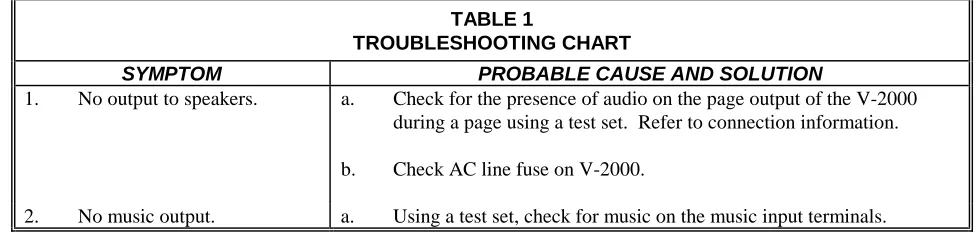
(6) TABLE 1 TROUBLESHOOTING CHART 1.. 2.. SYMPTOM No output to speakers.. No music output.. a.. PROBABLE CAUSE AND SOLUTION Check for the presence of audio on the page output of the V-2000 during a page using a test set. Refer to connection information.. b.. Check AC line fuse on V-2000.. a.. Using a test set, check for music on the music input terminals.. VALCOM LIMITED WARRANTY Valcom, Inc. warrants its products to be free from defects in materials and workmanship under conditions of normal use and service for a period of one year from the date of shipment. The obligation under this warranty shall be limited to the replacement, repair or refund of any such defective device within the warranty period, provided that: 1. 2. 3. 4. 5.. inspection by Valcom, Inc. indicates the validity of the claim, the defect is not the result of damage, misuse, or negligence after the original shipment. the product has not been altered in any way or repaired by others and that factory sealed units are unopened (A service charge plus parts and labor will be applied to units defaced or physically damaged), freight charges for the return of products to Valcom are prepaid, all units ‘out of warranty’ are subject to a service charge. The service charge will cover minor repairs (Major repairs will be subject to additional charges for parts and labor).. This warranty is in lieu of and excludes all other warranties, expressed or implied, and in no event shall Valcom, Inc. be liable for any anticipated profits, consequential damages, loss of time or other losses incurred by the buyer in connection with the purchase, operation, or use of the product. This warranty specifically excludes damage incurred in shipment. In the event a product is received in damaged condition, the carrier should be notified immediately. Claims for such damage should be filed with the carrier involved in accordance with the F.O.B. point. Headquarters: Valcom, Inc. 1111 Industry Avenue Roanoke, VA 24013 Phone: (540) 427-3900 FAX: (540) 427-3517. In Canada CMX Corporation 35 Van Kirk Drive #11 and 12 Brampton, Ontario L7A1A5 Phone: (905) 456-1072 FAX: (905) 456-2269. 6. 947200.
(7)
Figure
Related documents
Experimental lines of Drosophila rnelanogaster derived from a natural population, which had been isolated in the laboratory for -70 generations, were crossed to
In the recipient cell, Erf can promote both generalized plasmid transduction (which requires the circularization of plasmids transduced as linear multimers) and
Previous work has demonstrated that opl yeast strains rapidly become inviable when mtDNA is lost (KOVA- COVA et al. As shown in Figure 1, the loss of mtDNA as
The statistical properties of the process describing the genealogical history of a random sample of genes at a selectively neutral locus which is linked to a locus
The stage 1 survey, which addressed mode choice behaviour, had two purposes: to determine the potential trip mode choices of visitors from different departure areas and the
The proposed design multiple sensor systems for water quality monitoring using WSNs based on a case study at Siak river in Riau Province Indonesia.. The river is very long with
• The Trust Services privacy framework of the AICPA and CICA lists ten internationally recognized best practices for protecting the privacy of customers’ personal information:..
The Counselor Education Unit’s Assessment System provides a framework for the quarterly faculty-led review of curriculum, program procedures and policy, and learner development for
