Technical Writer’s Checklist
August 22, 2007“…editors spend 90 percent of their time crossing out words … and shifting around those that are left. … It’s hard to remember this when you are your own editor … those words you liked so well when you wrote them will probably have to be cut in half and completely rearranged.” Rudolf Fleisch
Getting Started—First Level Edit
• Use this checklist for every writing assignment.
• Prepare all exhibits—imagine that you will make a presentation before the class. Put the exhibits in an order that ‘tells the story.’ Then write the document about the exhibits.
• After you finish the document, perform a first level edit using this checklist.
1. Set Microsoft Word’s spelling and grammar checker correctly with the steps stated in the next section.
2. “Find” every apostrophe (‘) and replace all contractions with the fully spelled out words, for example, “don’t” becomes “do not.”
3. “Find” every ‘which’ and make it conform to the which/that/what/who rule. That is, edit the punctuation or sentence structure to present ‘which’ in the strong form, to replace ‘which’ with the appropriate alternate word, or to remove ‘which.’
4. “Find” every comma and use them correctly OR delete them and edit the sentence. 5. “Find” every semicolon and use them correctly OR delete them and edit the sentence. 6. “Find” every colon and use the strong form OR delete them and edit the sentence. 7. “Find” all parentheses and remove them except when introducing acronyms1, numbering
equations2, and presenting alternate measurement units3.
8. Search for en dash -, em dash --, and noun groups, use them correctly.
9. Find “, and” “, or” “:” —that is, all lists—and establish parallelism in each list.
1
Example: National Aeronautics and Space Administration (NASA)
2
Second Level Editing
Second level editing works best when you read each sentence as an independent item. If you skim or speed-read the document you cannot perform a second level edit. You can use Word’s find tool with forward or backward searching and correct many problems. However, the best method for correcting some problems is to read each sentence slowly and remove words until the sentence is correct.
1. Search for ‘of.’ ‘Of’ often occurs in wordy constructions—the * of, a * of, an * of, all of the—that you can improve.
2. Remove redundant technical and non-technical words—* of, time of, total of, in size, in shape, type of, kind of, in order, actually, very, and etc.
3. Remove small redundant words: by, for, of, so, as. 4. Remove redundant verbs.
5. Discharge all ions.
6. Be positive—remove ‘not.’ ‘Not successful’ becomes ‘unsuccessful.’ ‘Not conclusive’ becomes ‘inconclusive.’
7. Use the wildcard * and search for “the * of” and “a * of”.
8. Run the Word spell checker and make sure that you spelled all words correctly. 9. Run the Word grammar checker. Keep all passive sentences and find the passive
sentence content. Use the Tools/Options menu to recheck the document. Run the grammar check again and make the passive sentences active until you have the right passive sentence amount. Memos must have 9-to-11 % passive sentences and letters must have 14-to-16 % passive sentences. Edit reports until passive sentences are 18-to-20 %. We remove points for assignments with more—or fewer—passive sentences than these targets. If you have zero passive sentences you are either an excellent writer or you are writing some silly sentences.
10. Activate Verbs Be/Is, Do/Does, Make/Made.
11. Strengthen other weak verb forms. Perform, Carry Out, Conduct, Result in, Obtain, Yield, Give, Furnish, Provide.
12. Use lean verbs, use lean words, avoid circumlocutions, and avoid clichés. 13. Read the document and make sure that you use the correct words.
Settings for Spelling and Grammar Checker
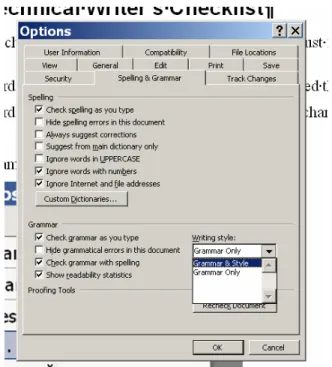
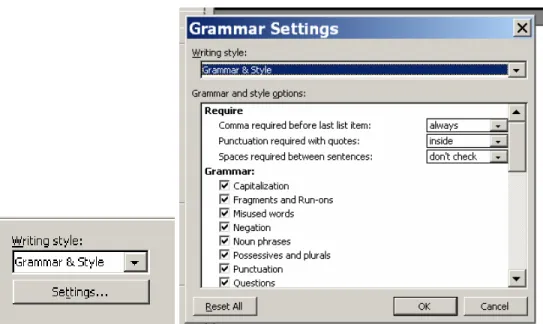
Perform each step specified in the captions for Figure 1 through Figure 3.
Figure 1. From the Tools menu select Options.
Figure 2. Check these items on the Spelling & Grammar tab. Also, switch Writing Style to Grammar & Style.
Figure 3. Click on the Settings button and require a comma—always—before the last list item, require punctuation inside the quotes, do not check the spaces between sentences, and put a check in every box under the Grammar heading. Scroll down to see and to check all the boxes.
How To Write Good4
1) Avoid run on sentences that are hard to read and contain more than one idea that confuses your reader when they lose the train of thought that you tried to convey carefully and efficiently.
2) No sentence fragments.
3) It behooves us to avoid archaicisms. 4) Also, avoid awkward, affected alliteration. 5) Don’t use no double negatives.
8) Verbs has to agree with their subjects.
9) Writing carefully, dangling participles should not be used. 10) Kill all exclamation points!!!
11) Never use a fancy word when a diminutive one will do. 12) Proofread carefully and do not any words out.
13) Take the bull by the hand, throw your writing in the well to see who salutes, and do not mix metaphors.
14) Do not verbize nouns.
15) Never, ever, ever, use repetitive redundancies. 16) Last, but not least, avoid cliches like the plague.
Adapted from “How to Write Good” by William Safire, Amer author, columnist, and speechwriter.