vShield API Programming
Guide
vShield 5.1.3
vShield App 5.1.3
vShield Edge 5.1.3
vShield Endpoint 5.1.3
This document supports the version of each product listed and
supports all subsequent versions until the document is replaced
by a new edition. To check for more recent editions of this
document, see
http://www.vmware.com/support/pubs
.
VMware, Inc.
3401 Hillview Ave.
Palo Alto, CA 94304
www.vmware.com
You can find the most up-to-date technical documentation on the VMware Web site at:
http://www.vmware.com/support/
The VMware Web site also provides the latest product updates.
If you have comments about this documentation, submit your feedback to:
[email protected]
Copyright © 2010 - 2014 VMware, Inc. All rights reserved. This product is protected by U.S. and international copyright and
intellectual property laws. VMware products are covered by one or more patents listed at
http://www.vmware.com/go/patents
.
VMware is a registered trademark or trademark of VMware, Inc. in the United States and/or other jurisdictions. All other marks
and names mentioned herein may be trademarks of their respective companies.
Contents
About This Book 11
1
Overview of VMware vShield 13
vShield Components 13
vShield Manager 13
vShield App 13
vShield Edge 14
vShield Endpoint 14
vShield Data Security 14
Compatibility Between Different REST API Versions 14
REST API Version 2.0 in vShield 5.0 14
Multitenancy 15
An Introduction to REST API for vShield Users 15
How REST Works 15
Using the vShield REST API 16
Ports Required for vShield REST API 16
About the REST API 16
RESTful Workflow Patterns 17
For More Information About REST 17
2
vShield Manager Management 19
Synchronizing vShield Manager with vCenter Server, SSO, and DNS 19
Querying vShield Manager Global Configuration 21
Resetting the Local Account Password 21
Add Security Profile 21
Get Security Profile 22
Get Password Hint Questions 22
Reset Password 22
Monitoring vShield Manager reachability 23
Working with vShield Manager Syslog Server Configuration 23
Configure vShield Manager Syslog Server 23
Get vShield Manager Syslog Server Configuration 23
Delete vShield Manager Syslog Server Configuration 23
Querying vShield Manager Logs 24
Get vShield Manager System Events 24
Get vShield Manager Audit Logs 24
Querying vShield Manager Tech Support Log 24
User Management 24
Get Information About a User 25
Create a Local User on vShield Manager 25
Update a Local User Account 26
Enable or Disable a User Account 26
Delete a User Account 26
Role Management 28
Get Role for a User 28
Get Role for a vShield Manager Roles 28
Add Role and Resources for a User 29
Change User Role 29
Get List of Possible Roles 30
Get List of Scoping Objects 30
Delete User Role 31
Creating IPset and MACset Containers 31
List IPsets Created on a Scope 31
Create an IPset on a Scope 31
Get Details of an IPset 32
Modify an Existing IPset 32
Delete an IPset 32
List MACsets Created on a Scope 33
Create a MACset on a Scope 33
Get Details of a MACset 33
Modify an Existing MACset 34
Delete a MACset 34
Security Group Scope and Members 34
List Security Groups Created on a Scope 34
Create Security Group on a Scope 35
Get Members for a Scope 35
Get Security Group Details 35
Modify a Security Group 36
Delete a Security Group 37
Add Member to Security Group 37
Delete Member from Security Group 37
Transport Set for Services 37
Working with Service Groups 37
List Service Groups on a Scope 37
Add Service Group to a Scope 38
Get Details of a Service Group 40
Modify Service Group Details 40
Delete Service Group from Scope 41
Working with Services 41
List Services on a Scope 41
Add Service to a Scope 41
Get Details of a Service 43
Modify Service Details 43
Delete Service from Scope 43
Working with the Members of a Service 44
Query Service Members 44
Add a Member to the Service 45
Delete a Member from the Service 45
Querying Object IDs 45
Query Datacenter MOID 45
Query Datacenter ID 45
Query Host ID 46
Query Portgroup ID 46
3
ESX Host Preparation for vShield App, vShield Endpoint, and vShield Data Security 47
Installing Licenses for vShield Edge, vShield App, and vShield Endpoint 47
Installing vShield App and vShield Endpoint Services on an ESX Host 47
Installing vShield Data Security 49
Upgrading vShield Data Security 49
Getting the Installation Status of vShield Services on an ESX Host 50
Uninstalling vShield Services from an ESX Host 50
Contents
4
vShield Edge Installation and Upgrade 51
Installing a vShield Edge 51
Running Queries on all vShield Edges 53
Upgrading vShield Edge 55
Deleting a vShield Edge 55
5
vShield Edge Management 57
Running Queries on a Specific vShield Edge 58
Query vShield Edge Details 58
Query vShield Edge Summary 62
Querying vShield Edge Status 64
Working with Appliances 66
Query Appliance Configuration 66
Modify Appliance Configuration 67
Change Appliance Size 67
Manage an Appliance 67
Query Appliance 68
Modify Appliance 68
Delete Appliance 69
Working with Interfaces 69
Add Interfaces 69
Retrieve Interfaces for a vShield Edge 70
Delete Interfaces 71
Manage a vShield Interface 71
Retrieve Interface with Specific Index 71
Delete Interface Configuration 71
Modify an Interface 71
Query Interface Statistics 72
Query Statistics for all Interfaces 72
Query Statistics for Uplink Interfaces 73
Query Statistics for Internal Interfaces 73
Query Dashboard Statistics 74
Configuring Edge Services 74
Configure Firewall 75
Add Firewall Configuration 75
Query Firewall Configuration 76
Delete Firewall Configuration 77
Append Firewall Rules 78
Add a Firewall Rule Above a Specific Rule 78
Query Specific Rule 79
Modify Firewall Rule 79
Delete a Firewall Rule 80
Manage Default Firewall Policy 80
Query Firewall Statistics 81
Query Firewall Statistics For a Rule 81
Configure NAT 81
Retrieve NAT Rules for a vShield Edge 82
Delete all NAT Rules 83
Add a NAT Rule above a Specific Rule 83
Append NAT Rules 84
Change a NAT Rule 84
Delete a Rule 84
Configure Routing 85
Configure Static and Default Routes 85
Query Static and Default Routes 85
Delete Static and Default Routes 86
Change Static Routes 86
Append Static Routes 86
Delete Static Routes 87
Configure Default Routes for vShield Edge 87
Delete Default Routes 87
Configure DNS Servers 87
Configure DNS 87
Retrieve DNS Configuration 88
Delete DNS Configuration 88
Retrieve DNS Statistics 89
Configure DHCP 89
Query DHCP Configuration 91
Delete DHCP Configuration 91
Retrieve DHCP Lease Information 92
Append IP Pool to DHCP Configuration 92
Append Static Binding to DHCP Configuration 92
Delete DHCP Pool 93
Delete DHCP Static Binding 93
Configure Certificates 93
Working with Certificates 93
Working with Certificate Signing Requests (CSRs) 94
Working with Certificate Revocation List (CRL) 95
Configure IPSEC VPN 96
Retrieve IPSec Configuration 97
Retrieve IPSec Statistics 98
Query Tunnel Traffic Statistics 99
Delete IPSec Configuration 100
Managing SSL VPN 100
Enable or Disable SSL VPN 100
Query SSL VPN Details 100
Manage Server Settings 100
Configure Private Networks 101
Configure Web Resource 103
Configure Users 105
Configure IP Pool 107
Configure Network Extension Client Parameters 110
Configure Network Extension Client Installation Package 110
Configure Portal Layouts 114
Configure Authentication Parameters 116
Configure SSL VPN Advanced Configuration 118
Working with Active Clients 119
Manage Logon and Logoff scripts 120
Reconfigure SSL VPN 122
Query SSL VPN Configuration 125
Delete SSL VPN Configuration 128
Query SSL VPN Statistics 128
Configure Load Balancer 129
Query Load Balancer Configuration 131
Query Statistics 132
Contents
Manage all Backend Pools 133
Manage all Virtual Servers 136
Retrieve Load Balancer Statistics 138
Enable Layer-4 Mode for Load Balancer 140
Configure High Availability (HA) 140
Retrieve High Availability Configuration 141
Delete High Availability Configuration 141
Force Syncing vShield Edge 141
Configuring Advanced Options for vShield Edge 141
Change AESNI Setting for a vShield Edge 141
Change FIPS Setting for a vShield Edge 142
Change Logging Level for vShield Appliance 142
Manage Auto Configuration Settings 142
Modify Auto Configuration Settings 142
Query Auto Configuration Settings 142
Change TCP Loose Setting 143
Replacing the Configuration of a vShield Edge 143
Redeploying vShield Edge Appliances 147
Managing CLI Credentials and Access 147
Change CLI Credentials 147
Change CLI Remote Access 147
Managing the Remote Syslog Server 148
Query Remote Syslog Server 148
Reconfigure Remote Syslog Server 148
Delete Remote Syslog Server 148
Debugging and Support 149
Query Technical Support Log 149
Query vShield Edge Service Statistics 149
6
Working with VXLAN Virtual Wires 153
Preparing for VXLAN Virtual Wires 153
Configuring Switches 154
Prepare Switch 154
Edit Teaming Policy 154
Query Configured Switches 154
Query Configured Switches on Datacenter 155
Query Specific Switch 155
Delete Switch 156
Working with Cluster Switch Mappings 156
Map a Cluster to a Switch 156
Synchronize hosts 156
Query all Cluster Mappings 157
Query Mappings by Switch 157
Query Specific Cluster 158
Delete Cluster Swtich Mapping 158
Working with EAM Agencies 158
Install EAM Agency 159
Synchronize Agency State 159
Replace Agency Scope 159
Query Agency by Cluster 159
Query Agency Status 160
Query Agency ID for Cluster 160
Delete Agency 160
Uninstall Agency Status 160
Working with Segment IDs 160
Add a new Segment ID Range 160
Query all Segment ID Ranges 161
Query a Specific Segment ID Range 161
Update a Segment ID Range 162
Delete a Segment ID Range 162
Working with Multicast Address Ranges 162
Add a new Multicast Address Range 162
Query all Multicast Address Ranges 162
Get a Specific Multicast Address Range 163
Update a Multicast Address Range 163
Delete a Multicast Address Range 163
Working with Network Scopes 164
Create a Network Scope 164
Edit a Network Scope 164
Update Attributes on a Network Scope 164
Query existing Network Scopes 165
Query a Specific Network Scope 165
Delete a Network Scope 166
Working with Virtualized Networks 166
Create a VXLAN Virtual Wire 166
Query all VXLAN Virtual Wires on a Network Scope 166
Query all VXLAN Virtual Wires on all Network Scopes 167
Query a Specific VXLAN Virtual Wire 168
Delete a VXLAN Virtual Wire 168
Managing the VXLAN Virtual Wire UDP Port 168
Get UDP Port 168
Update UDP Port 168
Querying Allocated Resources 169
Testing Multicast Group Connectivity 169
Test Multicast Group Connectivity in a Network Scope 169
Test Multicast Group Connectivity in a VXLAN Virtual Wire 170
Performing Ping Test 170
7
vShield App Management 171
Modifying the State of a Datacenter 171
Retrieve Datacenter State 171
Modify Datacenter State 172
Configuring Firewall Rules for vCenter 172
Configuring the vShield App Firewall 172
Query Firewall Configuration 172
Add a Firewall Rule 178
Modify a Firewall Rule 180
Delete a Firewall Rule 182
Revert to Default Firewall Configuration 183
Configuring Fail-Safe Mode for vShield App Firewall 183
Configure Fail-Safe Mode for vShield App Firewall 183
Query Fail-Safe Mode Configuration for vShield App Firewall 184
Working with SpoofGuard 184
Get SpoofGuard Settings at Context Level 184
Replace SpoofGuard Settings 184
Get SpoofGuard IP Settings 185
Change SpoofGuard IP Settings 185
Working with Namespaces 186
Add Namespace in a Datacenter 186
Get Namespace Details 186
Contents
Delete a Namespace 186
Show Namespaces in a Datacenter 186
Getting Flow Statistic Details 187
Get Flow Statistics 187
Get Flow Meta-Data 189
Configure Addresses to be Ignored by Flow Parser 190
Query Addresses Ignored by Flow Parser 190
Excluding Virtual Machines from vShield App Protection 190
Add a Virtual Machine to the Exclusion List 190
Get Virtual Machine Exclusion List 190
Delete a Virtual Machine from Exclusion List 191
Configuring Syslog Service for a vShield App 191
Synchronizing vShield App 192
Querying vShield App Technical Support Log 192
Querying vShield App Status 193
Upgrading vShield App 193
8
vShield Endpoint Management 195
Overview of Solution Registration 195
Registering a Solution with vShield Endpoint Service 195
Register a Vendor 196
Register a Solution 196
Altitude of a Solution 196
IP Address and Port for a Solution 196
Activate a Solution 197
Querying Registration Status of vShield Endpoint 197
Get Vendor Registration 197
Get Solution Registration 197
Get IP Address of a Solution 198
Get Activation Status of a Solution 198
Querying Activated Security Virtual Machines for a Solution 198
Query Activated Security Virtual Machines 198
Query Activation Information 199
Unregistering a Solution with vShield Endpoint 199
Unregister a Vendor 199
Unregister a Solution 199
Unset IP Address 199
Deactivate a Solution 200
Status Codes and Error Schema 200
Return Status Codes 200
Error Schema 200
9
vShield Data Security Configuration 203
vShield Data Security User Roles 203
Defining a Data Security Policy 204
Query Regulations 204
Enable a Regulation 204
Query Classification Value 205
Configure a Customized Regex as a Classification Value 205
View the List of Excludable Areas 205
Exclude Areas from Policy Inspection 206
Specify Security Groups to be Scanned 207
Query Security Groups Being Scanned 207
Configure File Filters 208
Query Saved Policy 209
Query Published Policy 210
Publish the Updated Policy 210
Data Security Scanning 210
Start, Pause, Resume, or Stop a Scan Operation 211
Query Status for a Scan Operation 211
Querying Scan Results 211
Get List of Virtual Machines Being Scanned 211
Get Number of Virtual Machines Being Scanned 212
Get Summary Information about the Last Five Scans 213
Get Information for Virtual Machines Scanned During Previous Scan 213
Retrieve Information About Previous Scan Results 213
Get XML Representation of Policy Used for Previous Scan 213
Querying Violation Details 215
Get List of Violation Counts 215
Get List of Violating Files 216
Get List of Violating Files in CSV Format 217
Get Violations in Entire Inventory 217
218
10
Task Framework Management 219
About Task Framework 219
Query Job Instances for Job ID 220
Query Latest Job Instances for Job ID 221
Block REST Thread 221
Query Job Instances by Criterion 221
Appendix 223
vShield Manager Global Configuration Schema 223
ESX Host Preparation and Uninstallation Schema 228
vShield App Schemas 229
vShield App Configuration Schema 229
vShield App Firewall Schema 229
vShield App SpoofGuard Schema 232
vShield App Namespace Schema 234
Error Message Schema 235
This manual, the
vShield API Programming Guide
, describes how to install, configure, monitor, and maintain the
VMware
®vShield™ system by using REST API requests. The information includes step-by-step configuration
instructions and examples.
Intended Audience
This manual is intended for anyone who wants to use REST API to install or use vShield in a VMware vSphere
environment. The information in this manual is written for experienced system administrators who are
familiar with virtual machine technology, virtualized datacenter operations, and REST APIs. This manual also
assumes familiarity with vShield.
VMware Technical Publications Glossary
VMware Technical Publications provides a glossary of terms that might be unfamiliar to you. For definitions
of terms as they are used in VMware technical documentation go to
http://www.vmware.com/support/pubs
.
Document Feedback
VMware welcomes your suggestions for improving our documentation. If you have comments, send your
feedback to
[email protected]
.
vShield Documentation
The following documents comprise the vShield documentation set:
vShield Administration Guide
vShield Quick Start Guide
vShield API Programming Guide
, this guide
Technical Support and Education Resources
The following sections describe the technical support resources available to you. To access the current version
of this book and other books, go to
http://www.vmware.com/support/pubs.
Online and Telephone Support
To use online support to submit technical support requests, view your product and contract information, and
register your products, go to
http://www.vmware.com/support
.
Customers with appropriate support contracts should use telephone support for the fastest response on
priority 1 issues. Go to
http://www.vmware.com/support/phone_support
.
Support Offerings
To find out how VMware support offerings can help meet your business needs, go to
http://www.vmware.com/support/services
.
VMware Professional Services
VMware Education Services courses offer extensive hands-on labs, case study examples, and course materials
designed to be used as on-the-job reference tools. Courses are available onsite, in the classroom, and live
online. For onsite pilot programs and implementation best practices, VMware Consulting Services provides
offerings to help you assess, plan, build, and manage your virtual environment. To access information about
education classes, certification programs, and consulting services, go to
http://www.vmware.com/services
.
1
VMware vShield™ is a suite of network edge and application-aware firewalls built for VMware vCenter Server
integration. vShield inspects client-server communications and inter-virtual-machine communications to
provide detailed traffic analytics and application-aware firewall protection. It is a critical security component
to protect virtualized datacenters from attacks and misuse, and helps achieve compliance-mandated goals.
This chapter includes the following topics:
“vShield Components”
on page 13
“Compatibility Between Different REST API Versions”
on page 14
“Ports Required for vShield REST API”
on page 16
“An Introduction to REST API for vShield Users”
on page 15
This guide assumes you have administrator access to the entire vShield system. If you are unable to access a
screen or perform a particular task, consult your vShield administrator.
vShield Components
vShield includes components and services essential for protecting virtual machines in a virtualized datacenter.
vShield can be configured with a Web-based user interface, a command line interface (CLI), or a REST API.
To run vShield, you need one vShield Manager virtual appliance and at least one vShield App or vShield Edge
virtual appliance. The vShield Manager virtual appliance can run on a different ESX host than the vShield App
and vShield Edge virtual appliances.
vShield Manager
vShield Manager is the centralized management component of vShield. You install it as a virtual appliance by
deploying an OVA from the vSphere Client. Using vShield Manager’s user interface or vSphere Client plug-in,
you can install, configure, and maintain vShield appliances. The vShield Manager user interface leverages the
vSphere Web Services SDK to display tabs within the vSphere Client inventory panel. For details about the
user interface, see the
vShield Administration Guide
.
vShield App
A vShield App virtual appliance monitors all traffic into and out of an ESX host, and between virtual machines
on the host. vShield App provides application-aware traffic analysis and stateful firewall protection, and it
regulates traffic based on a set of rules, similar to an access control list (ACL).
As traffic passes through a vShield App, each session header is inspected to catalog the data. The vShield App
creates a profile for each virtual machine detailing the operating system, applications, and ports used for
network communication. Based on this information, the vShield App allows ephemeral port use by permitting
dynamic protocols such as FTP or RPC to pass through, while maintaining lockdown on ports 1024 and higher.
You cannot protect the ESX Service Console, ESXi direct console user interface (DCUI), or the VMkernel with
vShield App because these components are not virtual machines.
vShield Edge
vShield Edge provides network edge security and gateway services to isolate a virtualized network, or virtual
machines in a port group, vDS port group, or Cisco Nexus 1000V port group. You install a vShield Edge at a
datacenter level and can add up to ten internal or uplink interfaces. The vShield Edge connects isolated, stub
networks to shared (uplink) networks by providing common gateway services such as DHCP, VPN, NAT, and
Load Balancing. Common deployments of vShield Edge include in the DMZ, VPN Extranets, and multi-tenant
Cloud environments where the vShield Edge provides perimeter security for Virtual Datacenters (VDCs).
vShield Endpoint
vShield Endpoint offloads antivirus and anti-malware agent processing to a dedicated secure virtual appliance
delivered by VMware partners. Since the secure virtual appliance (unlike a guest virtual machine) doesn't go
offline, it can continuously update antivirus signatures thereby giving uninterrupted protection to the virtual
machines on the host. Also, new virtual machines (or existing virtual machines that went offline) are
immediately protected with the most current antivirus signatures when they come online.
vShield Data Security
vShield Data Security provides visibility into sensitive data stored within your organization's virtualized and
cloud environments. Based on the violations reported by vShield Data Security, you can ensure that sensitive
data is adequately protected and assess compliance with regulations around the world.
Compatibility Between Different REST API Versions
Each release of the vShield REST API represents a new version of the REST API code with new and changed
features. If you are running a previous version of vShield component software, you might not be able to use
all of the features of the latest release of the vShield REST API.
REST API Version 2.0 in vShield 5.0
Release 5.0 of vShield introduces version 2.0 of the REST API. Many URLs changed from version 1.0 to 2.0.
You can determine the API version of a vShield component (such as Edge or App) with the following example
REST calls. In the
GET
request syntax,
<vsm-ip>
represents the IP address or host name of vShield Manager.
Example 1-1.
Determine the API version of the vShield Manager or vShield Endpoint
GET https://<vsm-ip>/api/versions <versions>
<version value="2.1">
<module name="VshieldAppGlobal" baseUri="/api/2.1/app" version="2.1"/> <module name="Flow" baseUri="/api/2.1/app/flow" version="2.1"/> </version>
<version value="2.0">
<module name="Dlp" baseUri="/api/2.0/dlp" version="2.0"/>
<module name="Endpoint" baseUri="/api/2.0/endpointsecurity" version="2.0"/> <module name="MACSet" baseUri="/api/2.0/services/macset" version="2.0"/> <module name="SystemEvent" baseUri="/api/2.0/systemevent" version="2.0"/> <module name="AuditLog" baseUri="/api/2.0/auditlog" version="2.0"/>
<module name="UserMgmt" baseUri="/api/2.0/services/usermgmt" version="2.0"/> <module name="Application" baseUri="/api/2.0/services/application" version="2.0"/> <module name="IPSet" baseUri="/api/2.0/services/ipset" version="2.0"/>
<module name="SyslogServer" baseUri="/api/2.0/services/syslog/config" version="2.0"/> <module name="SecurityGroup" baseUri="/api/2.0/services/securitygroup" version="2.0"/>
N
OTEvShield App and vApp are not the same thing. A vApp is a grouping of virtual machines in vSphere,
for example a management appliance and a database appliance working together.
C
AUTIONThe REST APIs described in this document can change over time. At this point, vShield does not
guarantee forward compatibility.
Chapter 1 Overview of VMware vShield
</version> </versions>
Example 1-2.
Determine the API version of a vShield App
GET https://<vsm-ip>/api/versions/app/<datacenter-id> <versions>
<version version="2.0">
<module version="2.0" baseUri="/api/2.0/app" id="datacenter-21" name="app"/> </version>
</versions>
Example 1-3.
Determine the API version of a vShield Edge
GET https://<vsm-ip>/api/versions/edge/dvportgroup-63 <versions>
<version version="2.0">
<module version="2.0" baseUri="/api/2.0/networks" id="dvportgroup-63" name="edge"/> </version>
</versions>
The API version for vShield App is governed by the state of the datacenter in relation to a vShield component.
If the datacenter state is in
backwardCompatible
mode, then it supports only version 1.0 REST calls. If the
datacenter state is in regular mode, then it supports only 2.0 REST calls. These API versions are mutually
exclusive – only one REST API version is supported at a time.
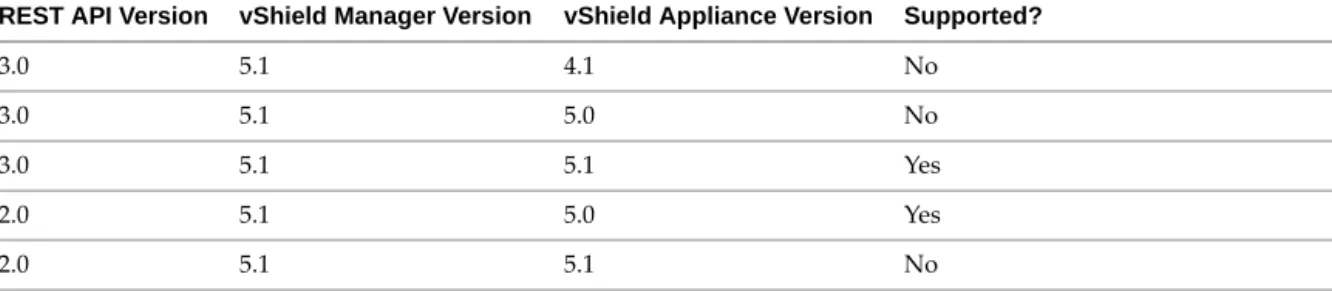
Table 1-1
lists compatibility between different versions of the REST API, vShield Manager, and the vShield
virtual appliances: vShield App, vShield Endpoint, and vShield Edge.
Multitenancy
In vShield 5.0, the vShield App firewall configuration supports multitenancy. A single IP address can show up
in multiple places in the network (different IP address namespaces) associated with different virtual machines.
Only 2.0 REST APIs support multitenancy. In backward compatibility mode, vShield 5.0 supports the old APIs
and does not enforce rules with awareness of multitenancy.
If you have written programs using 1.0 REST APIs, you should reconsider whether their design works as
intended in the multitenancy scenario. If not, change your programs to use the API 2.0 calls.
An Introduction to REST API for vShield Users
REST, an acronym for Representational State Transfer, is a term that has been widely employed to describe an
architectural style characteristic of programs that rely on the inherent properties of hypermedia to create and
modify the state of an object that is accessible at a URL.
How REST Works
Once a URL of such an object is known to a client, the client can use an HTTP GET request to discover the
properties of the object. These properties are typically communicated in a structured document with an HTTP
Content-Type of XML or JSON, that provides a representation of the state of the object. In a RESTful workflow,
documents (representations of object state) are passed back and forth (transferred) between a client and a
Table 1-1.
REST API Compatibility Matrix
REST API Version vShield Manager Version vShield Appliance Version Supported?
3.0 5.1 4.1 No
3.0 5.1 5.0 No
3.0 5.1 5.1 Yes
2.0 5.1 5.0 Yes
service with the explicit assumption that neither party need know anything about an entity other than what is
presented in a single request or response. The URLs at which these documents are available are often “sticky,”
in that they persist beyond the lifetime of the request or response that includes them. The other content of the
documents is nominally valid until the expiration date noted in the HTTP Expires header.
Using the vShield REST API
You have several choices for programming the vShield REST API: using Firefox, Chrome, or
curl
. To make
XML responses more legible, you can copy and paste them into
xmlcopyeditor
or
pspad
.
To use the REST API in Firefox
1
Locate the RESTClient Mozilla add-on, and add it to Firefox.
2
Click
Tools > REST Client
to start the add-on.
3
Click
Login
and enter the vShield login credentials, which then appear encoded in the Request Header.
4
Select a method such as GET, POST, or PUT, and type the URL of a REST API. You might be asked to accept
or ignore the lack of SSL certificate. Click
Send
.
Response Header, Response Body, and Rendered HTML appear in the bottom window.
To use the REST API in Chrome
1
Search the Web to find the Simple REST Client, and add it to Chrome.
2
Click its globe-like icon to start it in a tab.
3
The Simple REST Client provides no certificate-checking interface, so use another Chrome tab to accept
or ignore the lack of SSL certificate.
4
Type the URL of a REST API, and select a method such as GET, POST, or PUT.
5
In the Headers field, type the basic authorization line, as in the Important note above. Click
Send
.
Status, Headers, and Data appear in the Response window.
To use the REST API in curl
1
Install
curl
if not already installed.
2
In front of the REST URL, the -k option avoids certificate checking, and the -u option specifies credentials.
curl -k -u admin:default https://<vsm-ip>/api/2.0/services/usermgmt/user/admin
Ports Required for vShield REST API
The vShield Manager requires port 443/TCP for REST API requests.
About the REST API
REST APIs use HTTP requests (often sent by script or high-level language) as a way of making idempotent
remote procedure calls that create, modify, or delete objects defined by the API. A REST API is defined by a
collection of XML documents that represent the objects on which the API operates. The HTTP operations
themselves are generic to all HTTP clients. To write a RESTful client, you should understand HTTP protocol
and the semantics of standard HTML markup. For vShield REST API, you must know three things:
The set of objects that the API supports, and what they represent. For example, what are vDC and Org?
I
MPORTANTAll vShield REST requests require authorization. The default vShield Manager login credentials
are user
admin
password
default
. Unless you changed these, you can use the following basic authorization,
where
YWRtaW46ZGVmYXVsdA==
is the Base 64 encoding of the default credentials
admin:default
.
Chapter 1 Overview of VMware vShield
How the API represents these objects. For instance, what is the XML schema for the vShield Edge firewall
rule set? What do the individual elements and attributes represent?
How the client refers to an object on which it wants to operate. For example, what is a managed object ID?
To answer these questions, you look at vShield API resource schemas. These schemas define a number of XML
types, many of which are extended by other types. The XML elements defined in these schemas, along with
their attributes and composition rules (minimum and maximum number of elements or attributes, or the
prescribed hierarchy with which elements can be nested) represent the data structures of vShield objects. A
client can “read” an object by making an HTTP GET request to the object’s resource URL. A client can “write”
(create or modify) an object with an HTTP PUT or POST request that includes a new or changed XML body
document for the object. Usually a client can delete an object with an HTTP DELETE request.
This document presents example requests and responses, and provides reference information on the XML
schemas that define the request and response bodies.
RESTful Workflow Patterns
All RESTful workflows fall into a pattern that includes only two fundamental operations, which you repeat in
this order for as long as necessary.
Make an HTTP request (GET, PUT, POST, or DELETE). The target of this request is either a well-known
URL (such as vShield Manager) or a link obtained from the response to a previous request. For example,
a GET request to an Org URL returns links to vDC objects contained by the Org.
Examine the response, which can be an XML document or an HTTP response code. If the response is an
XML document, it may contain links or other information about the state of an object. If the response is
an HTTP response code, it indicates whether the request succeeded or failed, and may be accompanied
by a URL that points to a location from which additional information can be retrieved.
For More Information About REST
For a comprehensive discussion of REST from both client and server perspectives, see
RESTful Web Services
by
Leonard Richardson and Sam Ruby, published 2007 by O'Reilly Media.
There are also many sources of information about REST on the Web, including:
http://www.infoq.com/articles/rest-introduction
http://www.infoq.com/articles/subbu-allamaraju-rest
2
The vShield Manager requires communication with your vCenter Server and services such as DNS and NTP
to provide details on your VMware Infrastructure inventory.
The chapter includes the following topics:
“Synchronizing vShield Manager with vCenter Server, SSO, and DNS”
on page 19
“Querying vShield Manager Global Configuration”
on page 21
“Resetting the Local Account Password”
on page 21
“Monitoring vShield Manager reachability”
on page 23
“Working with vShield Manager Syslog Server Configuration”
on page 23
“Querying vShield Manager Logs”
on page 24
“Querying vShield Manager Tech Support Log”
on page 24
“User Management”
on page 24
“Role Management”
on page 28
“Creating IPset and MACset Containers”
on page 31
“Security Group Scope and Members”
on page 34
“Transport Set for Services”
on page 37
“Querying Object IDs”
on page 45
Synchronizing vShield Manager with vCenter Server, SSO, and DNS
You can synchronize the vShield Manager with the vCenter Server, add DNS servers to the vShield Manager
for IP address and hostname resolution, configure time, and zone and add an NTP server. Synchronizing with
vCenter Server enables the vShield Manager user interface to display your VMware Infrastructure inventory,
and requires its IP address (or URL) and administrator login credentials. For the
vcInfo
schema, and the
dnsInfo
schema, see
“vShield Manager Global Configuration Schema”
on page 223.
Example 2-1.
Synchronize the vShield Manager with vCenter server and SSO and identify DNS services
Request:
POST https://<vsm-ip>/api/2.0/global/config
Request Body:
<vsmGlobalConfig xmlns="vmware.vshield.edge.2.0">
vShield Manager Management
2
I
MPORTANTAll vShield REST requests require authorization. See
“Using the vShield REST API”
on page 16
for details about basic authorization.
<ssoInfo>
<lookupServiceUrl>https://<SSO IP or Host name>:7444/lookupservice/sdk</lookupServiceUrl> <ssoAdminUserName>admin@System-Domain</ssoAdminUserName>
<ssoAdminPassword></ssoAdminPassword> </ssoInfo>
<vcInfo>
<ipAddress>VC_IP</ipAddress> <userName>admin</userName> <password></password> </vcInfo>
<dnsInfo>
<primaryDns>10.112.192.1</primaryDns> <secondaryDns>10.112.192.2</secondaryDns> </dnsInfo>
</vsmGlobalConfig>
Specifying DNS information is optional. You can synchronize vShield Manager with just vCenter Server.
Example 2-2.
Synchronize the vShield Manager with vCenter server and SSO
Request:
POST https://<vsm-ip>/api/2.0/global/config
Request Body:
<vsmGlobalConfig xmlns="vmware.vshield.edge.2.0"> <ssoInfo>
<lookupServiceUrl>https://<SSO IP or Host name>:7444/lookupservice/sdk</lookupServiceUrl> <ssoAdminUserName>admin@System-Domain</ssoAdminUserName>
<ssoAdminPassword></ssoAdminPassword> </ssoInfo>
<vcInfo>
<ipAddress>VC_IP</ipAddress> <userName>admin</userName> <password></password> </vcInfo>
</vsmGlobalConfig>
Example 2-3.
Synchronize the vShield Manager with vCenter Server
Request:
POST https://<vsm-ip>/api/2.0/global/config
Request Body:
<vsmGlobalConfig xmlns="vmware.vshield.edge.2.0"> <vcInfo>
<ipAddress>10.112.196.22</ipAddress> <userName>administrator</userName> <password>123</password>
</vcInfo> </vsmGlobalConfig>
Example 2-4.
Configure NTP server
Request:
POST https://<vsm-ip>/api/2.0/global/config
Request Body:
<vsmGlobalConfig xmlns="vmware.vshield.edge.2.0"> <
t
imeInfo>Chapter 2 vShield Manager Management
</timeInfo> </vsmGlobalConfig>
Querying vShield Manager Global Configuration
You can query the current vCenter, SSO, DNS, and time/zone or NTP server configuration for the vShield
Manager.
Example 2-5.
Get vShield Manager configuration
Request:
GET https://<vsm-ip>/api/2.0/global/config
Response Body:
<vsmGlobalConfig xmlns="vmware.vshield.edge.2.0"> <ssoInfo>
<vsmSolutionName>VSM_SOLUTION_963bf981-02c7-4037-bb86-763b7ff2fa8b</vsmSolutionName> <lookupServiceUrl>https://<SSO IP or host name>:7444/lookupservice/sdk</lookupServiceUrl> </ssoInfo>
<vcInfo>
<ipAddress><VC IP></ipAddress> <userName>root</userName> </vcInfo>
<dnsInfo>
<primaryDns>10.112.0.1</primaryDns> <secondaryDns>10.112.0.2</secondaryDns> </dnsInfo>
<timeInfo>
<clock>2012-10-16 13:17:27</clock> <ntpServer>time.vmware.com</ntpServer> <zone>GMT</zone>
</timeInfo> </vsmGlobalConfig>
Resetting the Local Account Password
You can specify up to two pairs of hint questions and answers, which are saved as your security profile. You
can reset your password by providing a hint question and answer along with a new password.
Add Security Profile
You can specify up to two pairs of hint questions and answers.
Example 2-6.
Add security profile
Request:
PUT https://<vsm-ip>/api/2.0/services/usermgmt/securityprofile
Request Body:
<securityProfile>
<passwordHintQuestionAnswer> <question></question> <answer></answer> </passwordHintQuestionAnswer> ...
<passwordHintQuestionAnswer> <question></question> <answer></answer>
</passwordHintQuestionAnswer> </securityProfile>
Get Security Profile
You can retrieve the hint questions and answers for the logged in user.
Example 2-7.
Get security profile
Request:
GET https://<vsm-ip>/api/2.0/services/usermgmt/securityprofile
Response Body:
<?xml version="1.0" encoding="UTF-8"?> <securityProfile>
<passwordHintQuestionAnswer> <question>q1</question> <answer>a1</answer> </passwordHintQuestionAnswer> </securityProfile>
Get Password Hint Questions
You can retrieve the hint questions.
Example 2-8.
Get password hint questions
Request:
GET https://<vsm-ip>/api/2.0/services/usermgmt/passwordhint/userId
Response Body:
<?xml version="1.0" encoding="UTF-8"?> <securityProfile>
<passwordHintQuestionAnswer> <question>q1</question> </passwordHintQuestionAnswer> </securityProfile>
Reset Password
You can reset the password for a user by specifying the hint questions and answers for verification along with
a new password.
I
MPORTANTThis URL does not require an authorization header. Hint questions and answers are used here
for verification.
Example 2-9.
Reset password
Request:
PUT https://<vsm-ip>/api/2.0/services/usermgmt/passwordhint/admin
Request Body:
<securityProfile>
<newPassword>ca$hc0w</newPassword> <passwordHintQuestionAnswer>
<question>q1</question> <answer>a1</answer> </passwordHintQuestionAnswer>
Chapter 2 vShield Manager Management
</securityProfile>
Monitoring vShield Manager reachability
You can verify that the vShield Manager is reachable.
Example 2-10.
Verify that the vShield Manager is reachable
Request:
GET https://<vsm-ip>/api/2.0/global/heartbeat
Working with vShield Manager Syslog Server Configuration
You can configure vShield manager to send system events and audit logs to a syslog server, retrieve current
configuration, or delete the current configuration.
Configure vShield Manager Syslog Server
You can configure vShield Manager to send logs to a syslog server. If a syslog server configuration exists, this
call updates the configuration.
Example 2-11.
Configure vShield Manager syslog server
Request:
PUT https://<vsm-ip>/api/2.0/services/syslog/config Request Body:
<?xml version="1.0" encoding="UTF-8"?> <syslogServerConfig>
<serverInfo>10.112.200.100:1000</serverInfo> </syslogServerConfig>
Get vShield Manager Syslog Server Configuration
You can get the vShield Manager syslog server configuration.
Example 2-12.
Get vShield Manager syslog server configuration
Request:
GET https://<vsm-ip>/api/2.0/services/syslog/config
Delete vShield Manager Syslog Server Configuration
You can delete the vShield Manager syslog server configuration.
Example 2-13.
Delete vShield Manager syslog server configuration
Request:
Querying vShield Manager Logs
You can retrieve vShield Manager system event and audit logs.
Get vShield Manager System Events
You can retrieve vShield Manager system events.
Example 2-14.
Get
vShield Manager system events
Request:
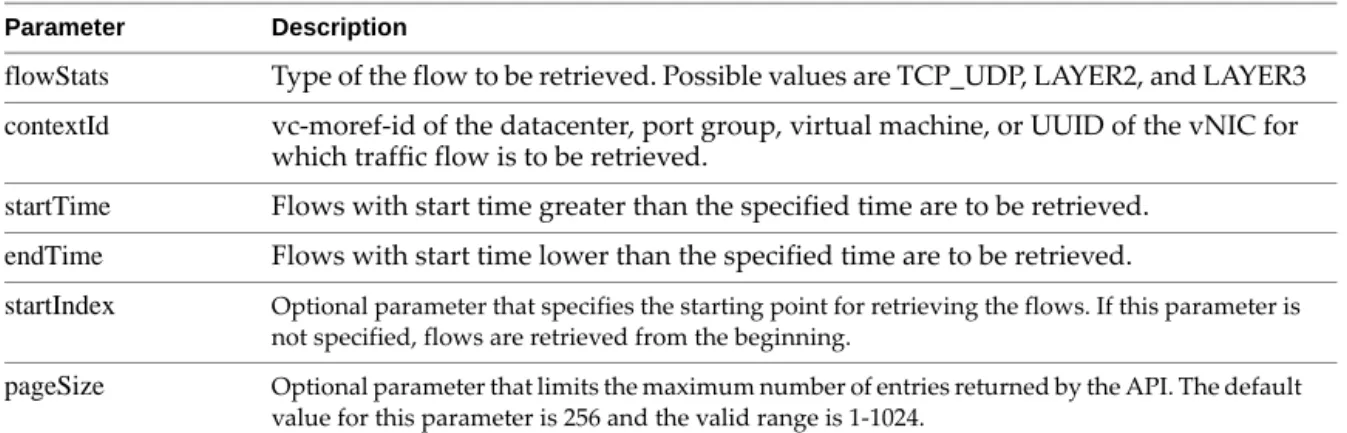
GET https://<vsm-ip>/api/2.0/systemevent?startIndex=0\&pageSize=10
Where
start index
is an optional parameter which specifies the starting point for retrieving the logs. If this
parameter is not specified, logs are retrieved from the beginning.
page size
is an optional parameter that limits the maximum number of entries returned by the API. The
default value for this parameter is 256 and the valid range is 1-1024.
Get vShield Manager Audit Logs
You can get vShield Manager audit logs.
Example 2-15.
Get vShield Manager audit logs
Request:
GET https://<vsm-ip>/api/2.0/logging/auditlog?startIndex=0\&pageSize=10
Where
start index
is an optional parameter which specifies the starting point for retrieving the logs. If this
parameter is not specified, logs are retrieved from the beginning.
page size
is an optional parameter that limits the maximum number of entries returned by the API. The
default value for this parameter is 256 and the valid range is 1-1024.
Querying vShield Manager Tech Support Log
You can get the path to the diagnostic log file for the vShield Manager. You can then send the diagnostic log to
technical support for assistance in troubleshooting an issue.
Example 2-16.
Get Tech Support Log File Path for a vShield Manager
Request:
GET https://<vsm-ip>/api/2.0/global/techSupportLogs
The technical support log is placed in a file at the following path, however the REST API has no provision for
downloading it, and
wget
and
curl
do not have permission to download it, either. You can retrieve the log with
vShield Manager by clicking
Settings & Reports > Configuration > Support > [Log Download] Initiate
.
/tech_support_logs/vsm/vshield_mgr_support_<date_time>GMT.log.gz
User Management
Chapter 2 vShield Manager Management
Get Information About a User
You can retrieve information about a user.
Example 2-17.
Get information about a user
Request:
GET https://<vsm-ip>/api/2.0/services/usermgmt/user/<userId>
Request Body:
<userInfo>
<objectId></objectId> <type>
<typeName></typeName> </type>
<name></name> <revision></revision>
<objectTypeName></objectTypeName> <userId></userId>
<fullname></fullname> <email></email> <isLocal></isLocal> <isEnabled></isEnabled> <isGroup></isGroup>
<hasGlobalObjectAccess></hasGlobalObjectAccess> <accessControlEntry>
<role></role> <resource>
<objectId></objectId> <type>
<typeName></typeName> </type>
<name></name> <revision></revision>
<objectTypeName></objectTypeName> <scope>
<id></id>
<objectTypeName></objectTypeName> <name></name>
</scope> </resource> ...
</accessControlEntry> </userInfo>
User information includes user name, full name, email address, whether local or not, whether enabled,
resource objects, roles, and scope.
Create a Local User on vShield Manager
You can create a local vShield Manager user.
Example 2-18.
Create a local user
Request Header:
POST https://<vsm-ip>/api/2.0/services/usermgmt/user/local
Request Body:
<userInfo>
<userId>somebody</userId> <password>123</password>
<fullname>Person Somebody</fullname> <email>[email protected]</email>
<accessControlEntry>
<role>security_admin</role> <resource>
<resourceId></resourceId> ...
</resource </accessControlEntry> </userInfo>
Update a Local User Account
You can update a local user account including password. If a password is not provided, the existing password
is retained. The
<userId>
variable in the request header should be same as the one specified in XML. The API
returns updated information for the user.
Example 2-19.
Update a local user account
Request Header:
PUT https://<vsm-ip>/api/2.0/services/usermgmt/user/local/<userId>
Request Body:
<userInfo>
<userId>somebody</userId> <password>123</password>
<fullname>Person Somebody</fullname> <email>[email protected]</email>
<accessControlEntry>
<role>security_admin</role> <resource>
<resourceId>datacenter-312</resourceId> ...
</resource> </accessControlEntry> </userInfo>
Enable or Disable a User Account
You can disable or enable a user account, either local user or vCenter user. When a user account is created, the
account is enabled by default.
Example 2-20.
Enable or disable a user account
Request:
PUT https://<vsm-ip>/api/2.0/services/usermgmt/user/<userId>/enablestate/<value>
The
<value>
can be 0 (zero) to disable the account, or 1 (one) to enable the account.
This API returns “204 No Content” if successful.
Delete a User Account
The first API removes a local user account, or removes the VSM role assignment for a vCenter user, without
affecting the vCenter account. The second API removes a vCenter user’s roles but is not allowed for local users.
Example 2-21.
Delete a user account
Chapter 2 vShield Manager Management
DELETE https://<vsm-ip>/api/2.0/services/usermgmt/user/<userId>
Example 2-22.
Delete a user role
Request:
DELETE https://<vsm-ip>/api/2.0/services/usermgmt/role/<userId>
Role Management
When assigning or retrieving the role for a user, you cannot use a backslash (\) in the user name (
userID
parameter). Instead of specifying
Domain\user1
as the user name, say
user1@Domain
.
Get Role for a User
You can retrieve information about the role assigned to this user.
Example 2-23.
Get user role
Request:
GET https://<vsm-ip>/api/2.0/services/usermgmt/role/<userId>
Request Body:
<?xml version="1.0" encoding="UTF-8"?> <accessControlEntry>
<role></role> <resource>
<objectId></objectId> <type>
<typeName></typeName> </type>
<name></name> <revision></revision>
<objectTypeName></objectTypeName> <scope>
<id></id>
<objectTypeName></objectTypeName> <name></name>
</scope> </resource>
<resource>...</resource> ...
...
</accessControlEntry>
Possible roles are
super_user
,
vshield_admin
,
enterprise_admin
,
security_admin
, and
auditor
.
Get Role for a vShield Manager Roles
You can retrieve information about users who have been assigned a vShield Manager role (local users as well
as vCenter users with the vShield Manager role).
Example 2-24.
Get user role
Request:
GET https://<vsm-ip>/api/2.0/services/usermgmt/users/vsm
Response Body:
<?xml version="1.0" encoding="UTF-8"?> <users>
<userInfo>
<objectId></objectId> <type>
<typeName></typeName> </type><name></name> <revision></revision>
<objectTypeName></objectTypeName> <userId></userId>
<fullname></fullname> <email></email>
Chapter 2 vShield Manager Management
<isLocal></isLocal> <isEnabled></isEnabled> <isGroup>false</isGroup>
<hasGlobalObjectAccess></hasGlobalObjectAccess> <accessControlEntry>
<role></role> <resource>
<objectId></objectId> <type>
<typeName></typeName> </type>
<name></name> <revision></revision>
<objectTypeName></objectTypeName> <scope>
<id>group-d1</id>
<objectTypeName></objectTypeName> <name></name>
</scope> </resource> </accessControlEntry> </userInfo>
<userInfo> ... </userInfo> </users>
Possible roles are
super_user
,
vshield_admin
,
enterprise_admin
,
security_admin
, and
auditor
.
Add Role and Resources for a User
You can add role and accessible resources for the specified user. It affects only vCenter users, not local users.
For local vShield Manager users, it displays the error “400: User already present.”
You cannot use a backslash (\) in the user name (
userID
parameter). Instead of specifying
Domain\user1
as the
user name, say
user1@Domain
.
Set
isGroup=trueto assign a role to a group
isGroup=falseto assign a role to a user.
Example 2-25.
Update user role
Request Header:
POST https://<vsm-ip>/api/2.0/usermgmt/role/userId??isGroup=true|false
Request Body:
<accessControlEntry> <role>new_role</role> <resource>
<resourceId>resource-num</resourceId> ...
</resource> </accessControlEntry>
This API returns “204 No Content” if successful.
Change User Role
You can update the role assignment for a given user. The API returns an output representation specifying a
new
<accessControlEntry>
for the user.
Example 2-26.
Change user role
PUT https://<vsm-ip>/api/2.0/services/usermgmt/role/<userId>
Request Body:
<accessControlEntry> <role>new_role</role> <resource>
<resourceId>resource-num</resourceId> ...
</resource> </accessControlEntry>
Possible roles are
super_user
,
vshield_admin
,
enterprise_admin
,
security_admin
, and
auditor
.
Get List of Possible Roles
You can retrieve the possible roles in vShield Manager.
Example 2-27.
Get possible roles
Request:
GET https://<vsm-ip>/api/2.0/services/usermgmt/roles
Response Body:
<list>
<string></string> <string></string> ...
</list>
Get List of Scoping Objects
You can retrieve a list of objects that can be used to define a user’s access scope.
Example 2-28.
Get scoping objects
Request:
GET https://<vsm-ip>/api/2.0/services/usermgmt/scopingobjects
Response Body:
<?xml version="1.0" encoding="UTF-8"?> <scopingObjects>
<object>
<objectId></objectId> <type>
<typeName></typeName> </type>
<name></name> <revision></revision>
<objectTypeName></objectTypeName> <scope>
<id></id>
<objectTypeName></objectTypeName> <name></name>
</scope> </object> <object>
<objectId></objectId> <type>
<typeName></typeName> </type>
Chapter 2 vShield Manager Management
<revision></revision>
<objectTypeName></objectTypeName> <scope>
<id></id>
<objectTypeName></objectTypeName> <name></name>
</scope> </object> ... ...
</scopingObjects>
The scoping objects are usually managed object references or vCenter Server names of datacenters and folders.
Delete User Role
You can delete the role assignment for the specified vCenter user. Once this role is deleted, the user is removed
from vShield Manager.
You cannot delete the role for a local user.
Example 2-29.
Delete role
Request:
DELETE https://<vsm-ip>/api/2.0/usermgmt/role/<user Id>
Creating IPset and MACset Containers
You can create vShield containers based on IP addresses and MAC addresses. These APIs control two types of
resources: vShield Manager scope object (global root, datacenter, or portgroup) and the IPset or MACset
addresses.
List IPsets Created on a Scope
You can retrieve all the IPsets that were created on the specified scope.
Example 2-30.
List IPsets on a scope
Request:
GET https://<vsm-ip>/api/2.0/services/ipset/<scope-moref>
The
<scope-moref>
can be global root, or a datacenter or portgroup of the vCenter to which vShield Manager
is connected.
Create an IPset on a Scope
You can create a new IPset on the specified scope.
Example 2-31.
Create IPset on a scope
Request:
POST https://<vsm-ip>/api/2.0/services/ipset/<scope-moref>
Request Body Example:
<ipset>
<objectId>IPSet-1</objectId> <type>
<typeName>IPSet</typeName> </type>
<description>Test Description</description> <name>Test IPSet</name>
<inheritanceAllowed>true</inheritanceAllowed> <revision>2</revision>
<objectTypeName>IPSet<objectTypeName> <value>10.112.201.8-10.112.201.14</value> </ipset>
The
<scope-moref>
can be global root, or a datacenter or portgroup of the vCenter to which vShield Manager
is connected. In the request body example, inheritance is allowed (
inheritanceAllowedis set to true
). A range of IP
addresses on the 10.112 net is specified (201.8 to 201.14).
Get Details of an IPset
You can retrieve details about an IPset.
Example 2-32.
Get details of an IPset
Request:
GET https://<vsm-ip>/api/2.0/services/ipset/<ipset-id>
The
<ipset-id>
is as returned by listing the IPset on a scope.
Modify an Existing IPset
You can modify an existing IPset and retrieve details about the modified IPset.
Example 2-33.
Modify an IPset
Request:
PUT https://<vsm-ip>/api/2.0/services/ipset/<ipset-id>
Request Body Example:
<ipset> <objectId /> <type> <typeName /> </type> <description> New Description </description>
<name>TestIPSet2</name> <revision>0</revision> <objectTypeName />
<value>10.112.201.8-10.112.201.21</value> </ipset>
The
<ipset-id>
is as returned by listing the IPset on a scope. In the request body example, the IP address range
is doubled.
Delete an IPset
You can delete an IPset. The trailing boolean flag indicates forced or unforced delete. With forced delete, the
object is deleted even if used in other places such as firewall rules, causing invalid referrals. For unforced
delete, the object is deleted only if it is not used by other configuration; otherwise the delete fails.
Chapter 2 vShield Manager Management
Example 2-34.
Delete an IPset
Request:
DELETE https://<vsm-ip>/api/2.0/services/ipset/<ipset-id>?force=<true|false>
No input representation is needed. On success, this request returns 200 HTTP OK.
List MACsets Created on a Scope
You can retrieve all the MACsets that were created on the specified scope.
Example 2-35.
List MACsets on a scope
Request:
GET https://<vsm-ip>/api/2.0/services/macset/<scope-moref>
The
<scope-moref>
can be global root, or a datacenter or portgroup of the vCenter to which vShield Manager
is connected.
Create a MACset on a Scope
You can create a MACset on the specified scope. On success, the API returns a string identifier for the new
MACset.
Example 2-36.
Create MACset on a scope
Request:
POST https://<vsm-ip>/api/2.0/services/macset/<scope-moref>
Request Body Example:
<macset> <objectId /> <type> <typeName /> </type>
<description>Some description</description> <name>TestMACSet1</name>
<revision>0</revision> <objectTypeName />
<value>22:33:44:55:66:77,00:11:22:33:44:55,aa:bb:cc:dd:ee:ff</value> </macset>
The
<scope-moref>
can be global root, datacenter or portgroup of the vCenter to which vShield Manager is
connected. In the request body example, a comma-separated list of MAC addresses is specified.
Get Details of a MACset
You can retrieve details about a MACset.
Example 2-37.
Get details of a MACset
Request:
GET https://<vsm-ip>/api/2.0/services/macset/<macset-id>
Modify an Existing MACset
You can modify an existing MACset and retrieve details about the modified MACset.
Example 2-38.
Modify details of a MACsets
Request:
PUT https://<vsm-ip>/api/2.0/services/macset/<MACset-id>
Request Body:
<macset> <objectId /> <type> <typeName /> </type>
<description>Some description</description> <name>TestMACSet1</name>
<revision>1</revision> <objectTypeName />
<value>22:33:44:55:66:77,00:11:22:33:44:55</value> </macset>
The
<MACset-id>
is as returned by listing the MACset on a scope. In the request body example, one MAC
address fewer is specified.
Delete a MACset
You can delete a MACset. The trailing boolean flag indicates forced or unforced delete. With forced delete, the
object is deleted even if used in other places such as firewall rules, causing invalid referrals. For unforced
delete, the object is deleted only if it is not used by other configuration; otherwise the delete fails.
Example 2-39.
Delete a MACset
Request:
DELETE https://<vsm-ip>/api/2.0/services/macset/<macset-id>
No input representation is needed. On success, this request returns 200 HTTP OK.
Security Group Scope and Members
APIs are available for two types of resources:
Scope – This identifies a vShield Manager scope object, which can either be a vCenter datacenter or a
PortGroup (standard or distributed virtual switch). Security groups can only be created on valid scopes.
Members – The security group object contains members.
List Security Groups Created on a Scope
You can retrieve all the security groups that have been created on a specific scope.
Example 2-40.
Get existing security groups
Request:
GET https://<vsm-ip>/api/2.0/services/securitygroup/scope/<scope-moref>