AN11767
PN7120 Windows IoT Porting Guidelines
Rev. 1.0 — 13 October 2015
349610
Application note
Document information
Info
Content
Keywords
Windows, Internet of Things, NFC, NXP, NCI
Abstract
This notes describes how to add support for PN7120 to a Windows IoT
system
NXP Semiconductors
AN11767
PN7120 Windows IoT Porting Guidelines
Contact information
For more information, please visit: http://www.nxp.com
Revision history
Rev
Date
Description
1.0
20151013
First released version
0.1
20150921
Creation of the document
NXP Semiconductors
AN11767
PN7120 Windows IoT Porting Guidelines
1. Introduction
This document provides guidelines for the integration of PN7120 NXP’s NFC Controller
to a platform running Windows for IoT operating system.
It first describes how to add the PN7120 hardware support into the ACPI table and how
to install the PN7120 as device peripheral.
Then it provides a tutorial of this integration on a Raspberry Pi 2 platform and finally
shows how to verify integration is successful.
NXP Semiconductors
AN11767
PN7120 Windows IoT Porting Guidelines
2. PN7120 integration into Windows IoT platform
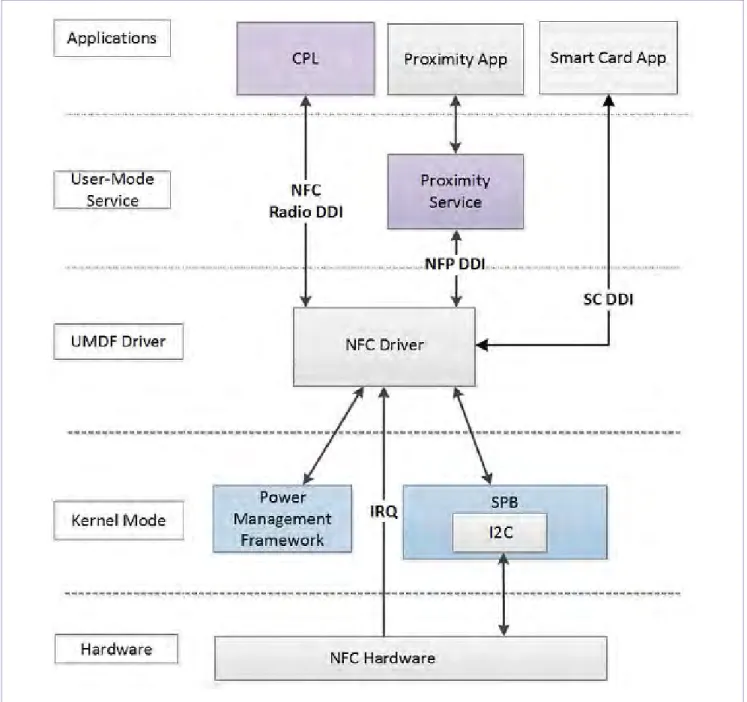
The PN7120 is natively supported as Proximity platform device by Win10 IoT OS through
the universal NFC device driver model, more details can be found in relative pages on
Microsoft website (refer to [1]).
NXP Semiconductors
AN11767
PN7120 Windows IoT Porting Guidelines
2.1 Hardware support step
This step relates to indicates to the platform how the PN7120 is connected (I2C
bus/address, GPIOs …). This is done by defining the device PN7120 inside the platform
ACPI table.
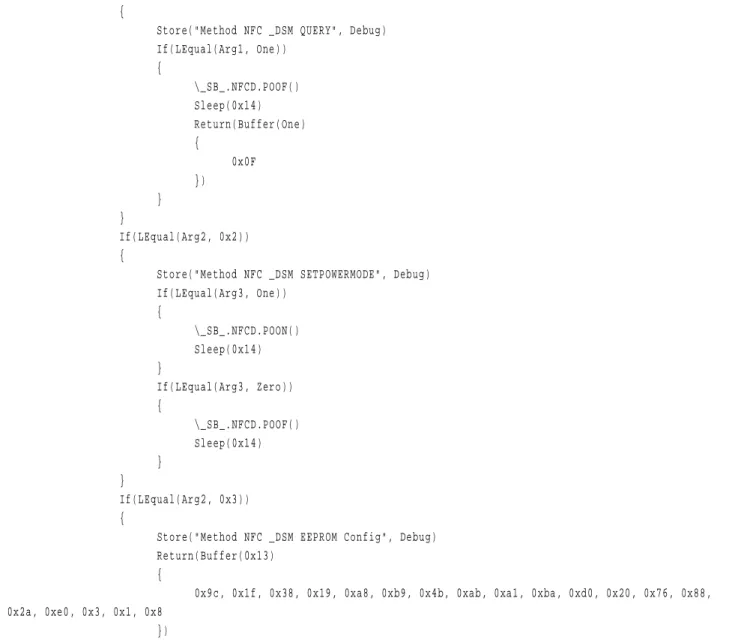
Here is an example of such definition. It relates to the OM5577/PN7120S demo kit
plugged on Raspberry Pi 2 platform (see xxx for more details):
Device(NFCD)
{
Name(_HID, "PN7120")
Name(_CID, "ACPI\PN7120")
Name(_CRS, ResourceTemplate()
{
I2CSerialBus(0x28, ControllerInitiated, 0x61a80, AddressingMode7Bit, "\\_SB.I2C1", 0,
ResourceConsumer,,)
GpioInt(Edge, ActiveHigh, Exclusive, PullDefault, 0, "\\_SB.GPI0", 0, ResourceConsumer,,) {23}
})
Name(NFCP, ResourceTemplate()
{
GpioIO(Exclusive, PullDefault, 0, 0, IoRestrictionNone, "\\_SB.GPI0", 0, ResourceConsumer,,) {24}
})
Scope(GPI0)
{
OperationRegion(NFPO, GeneralPurposeIO, Zero, One)
}
Field(\_SB_.GPI0.NFPO, ByteAcc, NoLock, Preserve)
{
Connection(\_SB_.NFCD.NFCP), MGPE, 1
}
Method(POON, 0x0, NotSerialized)
{
Store(One, MGPE)
}
Method(POOF, 0x0, NotSerialized)
{
Store(Zero, MGPE)
}
Method(_DSM, 0x4, NotSerialized)
{
Store("Method NFC _DSM begin", Debug)
If(LEqual(Arg0, Buffer(0x10)
{
0xc4, 0xf6, 0xe7, 0xa2, 0x38, 0x96, 0x85, 0x44, 0x9f, 0x12, 0x6b, 0x4e, 0x20, 0xb6, 0x0d,
0x63
}))
NXP Semiconductors
AN11767
PN7120 Windows IoT Porting Guidelines
{
Store("Method NFC _DSM QUERY", Debug)
If(LEqual(Arg1, One))
{
\_SB_.NFCD.POOF()
Sleep(0x14)
Return(Buffer(One)
{
0x0F
})
}
}
If(LEqual(Arg2, 0x2))
{
Store("Method NFC _DSM SETPOWERMODE", Debug)
If(LEqual(Arg3, One))
{
\_SB_.NFCD.POON()
Sleep(0x14)
}
If(LEqual(Arg3, Zero))
{
\_SB_.NFCD.POOF()
Sleep(0x14)
}
}
If(LEqual(Arg2, 0x3))
{
Store("Method NFC _DSM EEPROM Config", Debug)
Return(Buffer(0x13)
{
0x9c, 0x1f, 0x38, 0x19, 0xa8, 0xb9, 0x4b, 0xab, 0xa1, 0xba, 0xd0, 0x20, 0x76, 0x88,
0x2a, 0xe0, 0x3, 0x1, 0x8
})
}
}
}
Fig 2.
Example of PN7120 device inclusion into Raspberry Pi 2 ACPI table
2.2 Device installation step
This step relates to link the device added into the ACPI table to the related driver already
present into Windows IoT OS.
This can be done using “devcon” tool on the targeted platform (usually remotely
accessed via PowerShell) allowing to add a new peripheral according to the definition
given as parameter file.
NXP Semiconductors
AN11767
PN7120 Windows IoT Porting Guidelines
[Version]
Signature = "$WINDOWS NT$"
Class = Proximity
ClassGuid = {5630831C-06C9-4856-B327-F5D32586E060}
Provider = %NXP%
DriverVer = 07/23/2013,1.0.0.0
[SourceDisksNames]
1 = %MediaDescription%
[SourceDisksFiles]
[DestinationDirs]
NxpCopyFileList = 11
; ================= Device section =====================
[Manufacturer]
%NXP% = NXP,NTarm.6.3
[NXP.NTarm.6.3]
%NXPPN7120_HWID.DeviceDesc% = NXPPN7120_HWID, ACPI\PN7120
[NXPPN7120_HWID.NT]
Include = msnfci2c547.inf
Needs = msnfci2c547.NT
[NXPPN7120_HWID.NT.Services]
Include = msnfci2c547.inf
Needs = msnfci2c547.NT.Services
[NXPPN7120_HWID.NT.Wdf]
Include = msnfci2c547.inf
Needs = msnfci2c547.NT.Wdf
[NXPPN7120_HWID.NT.HW]
;================= Strings section =====================
[Strings]
;
; Localizable
;
NXP = "NXP Semiconductors"
NXPPN7120_HWID.DeviceDesc ="NXP PN7120 NFC Controller I2C Transport Driver"
MediaDescription = "NXP PN7120 NFC Controller Installation Media"
NXP Semiconductors
AN11767
PN7120 Windows IoT Porting Guidelines
3. Tutorial for PN7120 integration on Windows IoT Raspberry Pi platform
Purpose of this Chapter is to describe step by step how to add PN7120 support to a
Raspberry Pi 2 platform running Windows IoT OS.
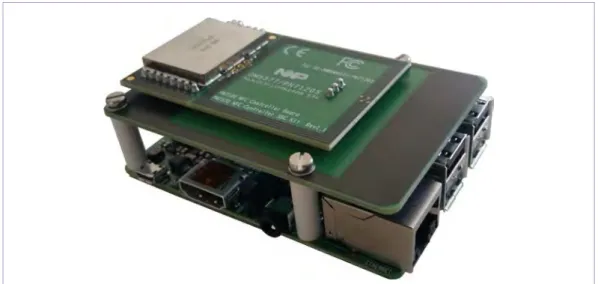
Fig 4.
OM5577/PN7120S demo kit stacked on Raspberry Pi 2 board
3.1 Pre-requisites
•
Raspberry Pi 2 board running Windows IoT (see [2])
•
Windows laptop (with related SDK installed) to remotely access the Raspberry Pi
•
OM5577/PN7120S demo kit (see [3])
3.2 Delivered SW package details
For this integration, a few items are delivered as part of a SW package (see [4]).
Those are:
acpitable.dat: ACPI table for Raspberry Pi 2 including PN7120 support as
described in chapter 2.1.
NXPPN7120.inf: Definition file to be used for PN7120 installation as described in
chapter 2.2.
Proximity_BasicTest.appx: Test application installer package for NFC functionality
check.
NXP Semiconductors
AN11767
PN7120 Windows IoT Porting Guidelines
3.3 PN7120 device installation procedure
The Raspberry Pi platform running Windows IoT OS, connect to it remotely from the
windows laptop:
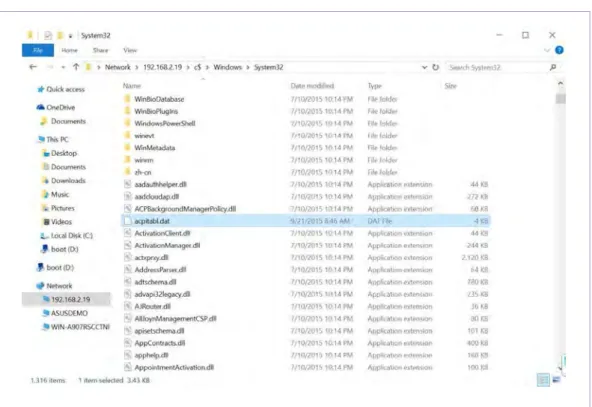
1. Copy provided acpitabl.dat and NXPPN7120.inf files to C:\Windows\System32
directory on the Raspberry Pi platform
Fig 5.
Raspberry Pi file system
2. Open a PowerShell session with the Raspberry Pi, browse to
C:\Windows\System32 directory, and install the PN7120 device using “devcon”:
> cd c:\windows\system32
> devcon –dp_add .\NXPPN7120.inf
NXP Semiconductors
AN11767
PN7120 Windows IoT Porting Guidelines
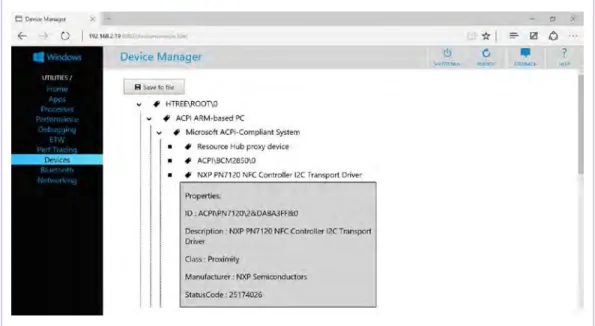
3. Reboot the Raspberry Pi platform, the PN7120 should then be seen in the
Device Manager web page
Fig 7.
PN7120 device seen in Device Manager
3.4 Verifying NFC functionality
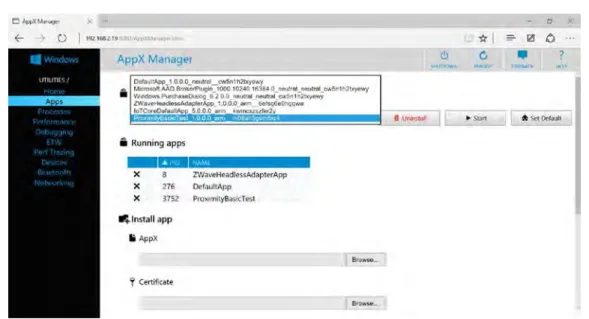
Install the provided test application through the Apps page of the web interface:
NXP Semiconductors
AN11767
PN7120 Windows IoT Porting Guidelines
Then, still through the Apps page of the web interface, run the Test application:
Fig 9.
Running Test application via Apps web page
The application consists of a simple graphical interface, displayed on the HDMI output of
the Raspberry Pi. It will react when NFC devices or tags are made proximate to the
PN7120 antenna by displaying short messages:
NXP Semiconductors
AN11767
PN7120 Windows IoT Porting Guidelines
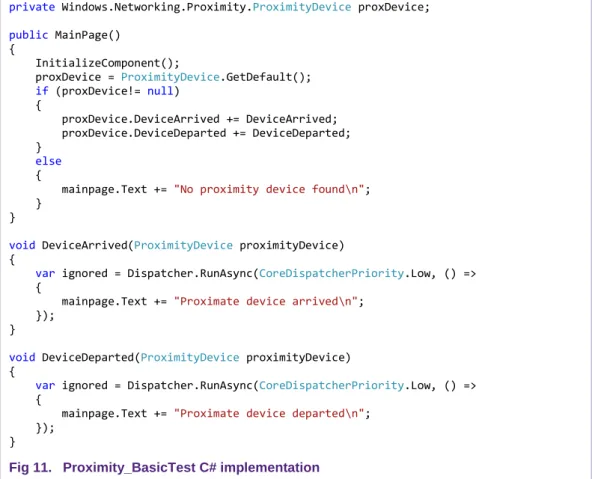
This application makes use of events “DeviceArrived” and “DeviceDeparted” of
“ProximityDevice” class in “Windows.Networking.Proximity” namespace. Refer to [5] for
more details.
private
Windows.Networking.Proximity.
ProximityDevice
proxDevice;
public
MainPage()
{
InitializeComponent();
proxDevice =
ProximityDevice
.GetDefault();
if
(proxDevice!=
null
)
{
proxDevice.DeviceArrived += DeviceArrived;
proxDevice.DeviceDeparted += DeviceDeparted;
}
else
{
mainpage.Text +=
"No proximity device found\n"
;
}
}
void
DeviceArrived(
ProximityDevice
proximityDevice)
{
var
ignored = Dispatcher.RunAsync(
CoreDispatcherPriority
.Low, () =>
{
mainpage.Text +=
"Proximate device arrived\n"
;
});
}
void
DeviceDeparted(
ProximityDevice
proximityDevice)
{
var
ignored = Dispatcher.RunAsync(
CoreDispatcherPriority
.Low, () =>
{
mainpage.Text +=
"Proximate device departed\n"
;
});
}
Fig 11. Proximity_BasicTest C# implementation
NXP Semiconductors
AN11767
PN7120 Windows IoT Porting Guidelines
4. References
[1]
NFC Devices in Windows
www.nxp.com/redirect/msdn.microsoft.com/en-us/library/windows/hardware/dn
[2]
Getting started with Windows IoT devices
www.nxp.com/redirect/ms-iot.github.io/content/en-US/GetStarted.htm
[3]
OM5577 PN7120 NFC Controller SBC Kit
http://www.nxp.com/board/OM5577.html
[4]
PN7120 on Windows IoT SW package
http://www.nxp.com/documents/software/SW349710.zip
[5]
Windows.Networking.Proximity namespace
www.nxp.com/redirect/msdn.microsoft.com/en-us/library/windows/apps/windows.networking.proximity.aspx
[6]
Proximity sample
www.nxp.com/redirect/code.msdn.microsoft.com/windowsapps/Proximity-Sample-88129731
NXP Semiconductors
AN11767
PN7120 Windows IoT Porting Guidelines
5. Legal information
5.1 Definitions
Draft — The document is a draft version only. The content is still under internal review and subject to formal approval, which may result in modifications or additions. NXP Semiconductors does not give any representations or warranties as to the accuracy or completeness of information included herein and shall have no liability for the consequences of use of such information.
5.2 Disclaimers
Limited warranty and liability — Information in this document is believed to be accurate and reliable. However, NXP Semiconductors does not give any representations or warranties, expressed or implied, as to the accuracy or completeness of such information and shall have no liability for the consequences of use of such information. NXP Semiconductors takes no responsibility for the content in this document if provided by an information source outside of NXP Semiconductors.
In no event shall NXP Semiconductors be liable for any indirect, incidental, punitive, special or consequential damages (including - without limitation - lost profits, lost savings, business interruption, costs related to the removal or replacement of any products or rework charges) whether or not such damages are based on tort (including negligence), warranty, breach of contract or any other legal theory.
Notwithstanding any damages that customer might incur for any reason whatsoever, NXP Semiconductors’ aggregate and cumulative liability towards customer for the products described herein shall be limited in accordance with the Terms and conditions of commercial sale of NXP Semiconductors.
Right to make changes — NXP Semiconductors reserves the right to make changes to information published in this document, including without limitation specifications and product descriptions, at any time and without notice. This document supersedes and replaces all information supplied prior to the publication hereof.
Suitability for use — NXP Semiconductors products are not designed, authorized or warranted to be suitable for use in life support, life-critical or safety-critical systems or equipment, nor in applications where failure or malfunction of an NXP Semiconductors product can reasonably be expected to result in personal injury, death or severe property or environmental damage. NXP Semiconductors and its suppliers accept no liability for inclusion and/or use of NXP Semiconductors products in such equipment or applications and therefore such inclusion and/or use is at the customer’s own risk.
Applications — Applications that are described herein for any of these products are for illustrative purposes only. NXP Semiconductors makes no representation or warranty that such applications will be suitable for the specified use without further testing or modification.
Customers are responsible for the design and operation of their applications and products using NXP Semiconductors products, and NXP
Semiconductors accepts no liability for any assistance with applications or customer product design. It is customer’s sole responsibility to determine whether the NXP Semiconductors product is suitable and fit for the customer’s applications and products planned, as well as for the planned application and use of customer’s third party customer(s). Customers should provide appropriate design and operating safeguards to minimize the risks associated with their applications and products.
NXP Semiconductors does not accept any liability related to any default, damage, costs or problem which is based on any weakness or default in the customer’s applications or products, or the application or use by customer’s third party customer(s). Customer is responsible for doing all necessary testing for the customer’s applications and products using NXP
Semiconductors products in order to avoid a default of the applications and the products or of the application or use by customer’s third party customer(s). NXP does not accept any liability in this respect.
Export control — This document as well as the item(s) described herein may be subject to export control regulations. Export might require a prior authorization from competent authorities.
Translations — A non-English (translated) version of a document is for reference only. The English version shall prevail in case of any discrepancy between the translated and English versions.
Evaluation products — This product is provided on an “as is” and “with all faults” basis for evaluation purposes only. NXP Semiconductors, its affiliates and their suppliers expressly disclaim all warranties, whether express, implied or statutory, including but not limited to the implied warranties of non-infringement, merchantability and fitness for a particular purpose. The entire risk as to the quality, or arising out of the use or performance, of this product remains with customer.
In no event shall NXP Semiconductors, its affiliates or their suppliers be liable to customer for any special, indirect, consequential, punitive or incidental damages (including without limitation damages for loss of business, business interruption, loss of use, loss of data or information, and the like) arising out the use of or inability to use the product, whether or not based on tort (including negligence), strict liability, breach of contract, breach of warranty or any other theory, even if advised of the possibility of such damages.
Notwithstanding any damages that customer might incur for any reason whatsoever (including without limitation, all damages referenced above and all direct or general damages), the entire liability of NXP Semiconductors, its affiliates and their suppliers and customer’s exclusive remedy for all of the foregoing shall be limited to actual damages incurred by customer based on reasonable reliance up to the greater of the amount actually paid by customer for the product or five dollars (US$5.00). The foregoing limitations, exclusions and disclaimers shall apply to the maximum extent permitted by applicable law, even if any remedy fails of its essential purpose.
5.3 Licenses
Purchase of NXP ICs with NFC technology
Purchase of an NXP Semiconductors IC that complies with one of the Near Field Communication (NFC) standards ISO/IEC 18092 and ISO/IEC 21481 does not convey an implied license under any patent right infringed by implementation of any of those standards. Purchase of NXP
Semiconductors IC does not include a license to any NXP patent (or other IP right) covering combinations of those products with other products, whether hardware or software.
5.4 Trademarks
Notice: All referenced brands, product names, service names and trademarks are property of their respective owners.
NXP Semiconductors
AN11767
PN7120 Windows IoT Porting Guidelines
6. List of figures
Fig 1.
PN7120 device architecture in Windows ... 4
Fig 2.
Example of PN7120 device inclusion into
Raspberry Pi 2 ACPI table ... 6
Fig 3.
Example of definition file for PN7120 peripheral
addition ... 7
Fig 4.
OM5577/PN7120S demo kit stacked on
Raspberry Pi 2 board ... 8
Fig 5.
Raspberry Pi file system ... 9
Fig 6.
PN7120 device installation ... 9
Fig 7.
PN7120 device seen in Device Manager ... 10
Fig 8.
Installing Test application via Apps web page. 10
Fig 9.
Running Test application via Apps web page . 11
Fig 10.
Proximity_BasicTest application interface ... 11
NXP Semiconductors
AN11767
PN7120 Windows IoT Porting Guidelines
Please be aware that important notices concerning this document and the product(s) described herein, have been included in the section 'Legal information'.
© NXP Semiconductors N.V. 2015. All rights reserved.
For more information, visit: http://www.nxp.com