59
Integrating Virtual Reality and Augmented Reality in
a Collaborative User Interface
Muhammad Nur Affendy Nor’a & Ajune Wanis Ismail
Mixed and Virtual Reality Research Lab, VicubelabSchool of Computing Universiti Teknologi Malaysia 81310 UTM Johor Bahru, Johor, Malaysia Email: [email protected], [email protected]
Submitted: 29/07/2019. Revised edition:16/10/2019. Accepted: 20/10/2019. Published online: 28/11/2019 DOI: https://doi.org/10.11113/ijic.v9n2.242
Abstract—Application that adopts collaborative system allows
multiple users to interact with other users in the same virtual space either in Virtual Reality (VR) or Augmented Reality (AR). This paper aims to integrate the VR and AR space in a Collaborative User Interface that enables the user to cooperate with other users in a different type of interfaces in a single shared space manner. The gesture interaction technique is proposed as the interaction tool in both of the virtual spaces as it can provide a more natural gesture interaction when interacting with the virtual object. The integration of VR and AR space provide a cross-discipline shared data interchange through the network protocol of client-server architecture.
Keywords—Augmented reality, virtual reality, collaborative user
interface, gesture recognition, handheld augmented reality
I.INTRODUCTION
Augmented Reality (AR) is known with the ability to superimpose virtual element onto the real environment and able to combine real and virtual element together into its own setup and in real-time. Next, Virtual Reality (VR) is an immersive computing technology that is unique in a digital workspace and enables the user to interact with it [1]. The technology of VR aims to substitute our reality with a virtual environment completely. A suitable metaphor of interaction is crucial to manipulate the virtual content in both VR and AR workspace.
Interaction in AR according to [2], needs to convey its own path when virtual objects are manipulated by a real object. According to Kaiser [3], one of research topic in VR and AR research is interaction. Moving from only a single user
interaction recently looking forward to invites more than one user to manipulate virtual objects in real-time, the researcher and developer aim to support the idea of a collaborative environment. Over the last ten years, where designing user interfaces only focus on a single user at a time, an increasing number of paper focus on potential collaborative scenario arise [4].
Implementation of multi-user interaction in VR and AR spaces promotes collaborative work that encourages for creative learning technique in a specific task of a particular subject domain. Subsequently, in a collaborative user interface in multiple types of interfaces encourage a cross-discipline collaboration of shared data in a single shared space context.
II.LITERATURE REVIEW
Previously, interaction research topic in the reality-virtuality continuum focus on a single type of user interaction, a single user with unimodal interaction input. The way the user conveys this type of interaction is far from satisfactory although the objectives to execute the work can be done with ease [5]. The unnaturalness of the interaction causes the bottleneck that relies on user interaction [3]. Due to these issues and practical reason, interaction technique modalities evolves to multimodal interaction that invites more than one input as an interaction medium such as gesture and speech.
60 other party promoting collaboration. The collaborative interface used different viewpoints in VR or AR to support different collaborative roles [7]. Researchers have begun to explore the collaborative technology on how it can help facilitate communication and improve user’s shared understanding [8]. Most research in VR and AR space that focused on collaboration between users in either only VR or AR settings.
Various research in AR and VR technology embrace the collaborative system that allows multiple users to collaboratively work on a specific task as a medium of interaction. Collaboration in the research field is not a strange thing anymore in AR and VR domain. It is crucial to take into account several aspects for designing the interaction technique in a collaborative system. The aspect includes the form of collaboration either co-located or remote, asynchronous or synchronous type of interaction, same interaction capabilities among the user and network latency [9].
Numerous number of previous work research in collaboration system can be found. BoatAR as in [10] is a collaborative AR system that adopts a face-to-face form of collaboration with multi-user interaction that interacts in a single shared space of the boat component. While MedicalVR focuses on remote collaboration where recorded data of digital breast imaging are shared through the network to the remote user in VR [11]. Multi-user VR collaborative system [12], Multi-A-Painter a browser VR supported that incorporate WebVR as well as WebGL. Empty space can be design collaboratively in a session creating a whole new virtual shared world.
In AR that focuses on remote collaboration, 3D Jigsaw AR puzzle [13], is based on a jigsaw puzzle to be played collaboratively in AR space. Users in the same network work collaboratively from other places. Collaboration form that supports both remote and co-located are versatile. VR simulator that works in remote as well as co-located collaboration, focus to help human motor rehabilitation as in [14], that focus on collaboration between therapist and the patient. SimCEC [15], a basic surgical routine of VR simulator consider task perform by a group of undergraduate students individually and collaboratively.
The most recent works by other researchers that combine VR and AR space for the collaborative system is CoVAR [16]. CoVAR a remote collaboration of collaborative virtual and AR system. CoVAR uses the depth data of the real environment captured on AR space are shared to the remote collaborator in VR. The reconstruction of the AR space in VR space is believed to achieve the experience to be in the same exact space.
Collaborative aspect in the early works that apply in AR space was incorporated by Billinghurst and Kato [8]. MagicBook [17], enable user to experience the full reality-virtuality continuum. The VR and AR space can be experienced in the MagicBook as it is capable of changing the mode between the two. Through AR display the user able to see a scene they like and could change to the VR mode to experience an immersive virtual environment.
III.DESIGNING VIRTUAL WORKSPACE
There are two phases that have been carried out to design the virtual workspace in areas described in the following subsections.
A. Phase 1: Setting up VR space
This phase focus on the setup of the VR workspace. The setup for VR workspace consists of several parts that include user positional tracking in a 3D space, display device, and the virtual environment. A head-mounted display (HMD) as the display device is the fundamental device to be used to visualise the VR environment. Oculus Rift HMD device is chosen as the display device for viewing the virtual environment in VR as it provides a robust tracking of user position in 3D space.
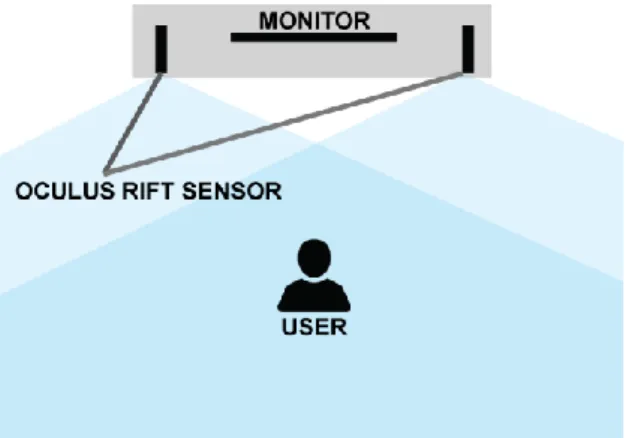
The Oculus Rift tracking sensor tracks user movement and translates it to the virtual 3D space. Fig. 1 illustrate the floor plan device setup of the VR workspace. The tracking sensor, track the position and rotation of the Oculus Rift HMD wear by the user and translate it to the virtual world. The tracking sensor needs to be calibrated using the provided software for it to work properly and provides better tracking performances of user position tracking relative to the head position tracking of the HMD. Later, the virtual environment is setup using the Oculus SDK provided by Oculus for it to work properly.
Fig. 1. Oculus Rift sensor tracking setup
B. Phase 2: User Interaction
61 setting is taken into account to provide a seamless and immersive user experiences in the VR world.
Oculus Touch controller allows the user to directly interact with the virtual object with their hand through the controller that acts as an interaction tool. Fig. 2 demonstrated the user interaction in VR space where user can move around interacting with the virtual object with their both hands. The Oculus Touch controller is tracked the same way as the Oculus Rift HMD by the Oculus Rift sensor. The sensor tracked the user position and rotation in the 3D space. This allows the user to freely move their hands around and rotate them through a full range of motion.
Fig. 2. User Interaction in VR space
IV.DESIGNING ARWORKSPACE
This phase is conducted to design the AR Workspace. There are several components that are crucial in designing the workspace. Several aspects involved in this phase are determining the display technique, tracking technique and interaction technique. Handheld device was chosen as the display technique as it is portable, lightweight, wireless, and ubiquitous [18].
A. Phase 1: Setting up AR tracking
This phase focuses on the AR tracking method as an anchor point of the real world for the virtual object to be displayed in correct alignment.
The tracking technique presented is feature-based tracking technique. The tracking technique involves the registration of the virtual object on top of the real marker in the real world. Fig. 3 shows the feature-based tracking technique, a natural feature tracking (NFT) process.
(a) (b) (c)
Fig. 3. Natural Feature Tracking process
The original RGB image is captured and converted to feature so it will be recognised by the camera as the target
image. Printed coloured image in Fig. 3 (a) shows the original state of the marker. The marker then will be converted into grayscale using image processing to grayscale format as in Fig. 3 (b) before it is processed as an image target in the form of features as in Fig. 3 (c). The features were recognized by the system as a unique identification. The system will detect the marker and register the marker with a virtual element. A virtual cube, for example, will appear on the top of the marker after the camera recognises the marker. The AR user interface was using this tracking process to display the virtual environment the same as in the VR space but in the AR mode.
B. Phase 2: Implementing Hand Gesture Interaction
In this stage, the gesture interaction is explored in order for the user to interact with AR virtual space. A natural type of interaction can be achieved using hand gesture interaction to interact with virtual object. User can use their bare hand to directly contact with the virtual elements. User can perform a gestural interaction such as touch and grab to directly manipulate the virtual object as if they manipulating the object in the real world using their hands.
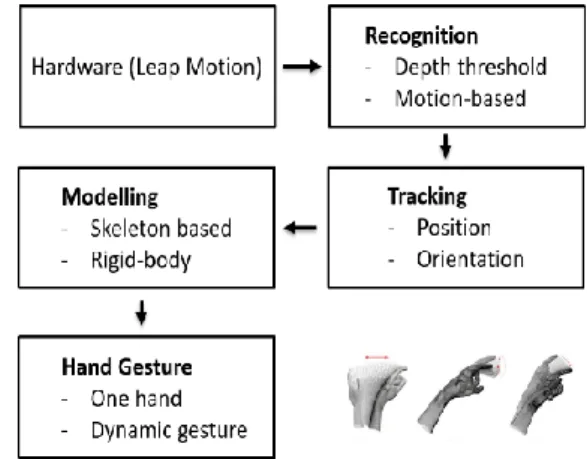
Therefore, the hand gesture recognition method as a metaphor for input is essential in the project for the user to perform interaction on the virtual object in AR space. Leap Motion as a tracking device, allows the application to read depth data hence able to detect the user hand position in the real world and mapping it into the virtual world [19]. As shown in Fig. 4, sensor-based tracking device, Leap Motion allows the application to read depth data during recognition. Then, the device produces positions and orientations. It runs to track the position of user hand in the real world and mapping it into the virtual world. To display a virtual hand skeleton, the modelling process is required and to enable interaction cues the rigid body was applied to the 3D model of virtual hands. Once this process was completed, the gesture input will be produced as well as dynamic gestures.
62 V.PROPOSED COLLABORATIVE USER INTERFACE
The proposed collaborative system that allows multiple users from different interfaces to interact with the virtual object in a single shared space manner is the aim of this project. The hand gesture interaction technique is proposed as the interaction tool for the user in both VR and AR space to interact with the virtual object as it feels more natural. The project is later applied in an urban planning design prototype in order to test the proposed method of the project. The methodology to develop the proposed collaborative user interface is divided into several phases as follow.
A. Phase 1: Acquiring Gesture Inputs from Users
In this stage, two gesture inputs are defined that is touch and grab gesture. Touch gesture represents when a virtual object defined as a menu is being touched as it will trigger an event that will spawn virtual building in the prototype application. The grab gesture represents when the virtual building being grabbed, the user can manipulate the virtual object by placing it anywhere in the 3D space according to the user desired location.
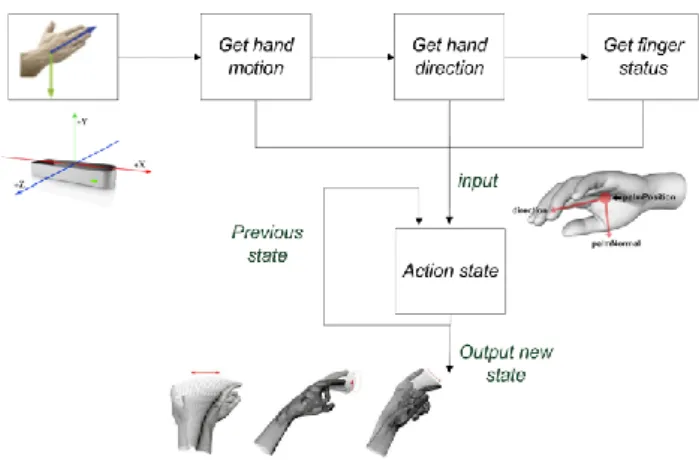
Fig. 5.Flow of acquiring gesture inputs in AR space
Fig. 5 shows the flow of acquiring gesture inputs using Leap Motion in AR space. The process starts when a Leap Motion device detects the hand interaction from the user using the sensor and the gestures are identified in the pose detection. Then, the signal is sent to start the skeleton calibration that later leads to the skeleton tracking. Both VR and AR space gestures used are grabbing to grasp the object and touch to select menu. In AR space, the hand gestures were tracked by Leap Motion device, and recognition process was executed to obtain depth data from Leap Motion sensor-based tracking system, while in VR space the gesture interaction was captured based on the tracking of the Oculus Touch controller motion in 3D space.
The GrabGesture define as gestural input of grabbing by the user using their hand in the shared virtual environment in order to interact with the virtual object. In AR space the
gesture is recognised through the Leap Motion recognition module, while in VR space the gesture is recognized through the Oculus Touch controller module that activates through key trigger on parts of the controller that mimic the grab gesture. The Fig. 6 is the flowchart to acquire GrabGesture input.
Fig. 6.Flow of acquiring GrabGesture inputs
The TouchGesture is define as gestural input when user
touches the virtual object using their hand to trigger an event in both VR and AR environment and interact with the virtual object. The collision detection happens when the user hand collider collides with the interact able virtual in the shared virtual environment.
B. Phase 2: Integrate AR and VR users
In this phase, the integration of VR and AR space is carried out using the internet protocol. In order to combine both VR and AR space to work collaboratively in a single shared 3D space, interact able virtual object in both 3D spaces need to be shared through the network. The position and rotation data of the virtual object will be shared through the network and will be updated on the receiving end. The tracking data of Leap Motion device connected to desktop that runs the VR environment, are also transferred to the handheld device as in AR space for visualization purpose. The user in AR space able to see the reconstructed virtual hand projected in AR on the handheld device. To actualize this we enable the multiplayer networking as shown in Fig. 7. The network protocol in PUN (Photon Unity Networking) [20] is used so we can send and receive gesture inputs to the AR handheld application and the position and rotation of the interact able shared virtual object in both spaces.
63 In this phase PUN network protocol is being implemented, the user hand data (position and rotation) is being sent by Desktop (sender) to the Handheld device (client or receiver). Photon Network always uses a master server and one or more game servers. The master server manages the currently available games and does matchmaking. Once a room is found or created, the actual gameplay is done on a game server. All servers run on dedicated machines. The Leap Motion is attached at the back of the smartphone and Leap Motion needs to be triggered and well-connected.
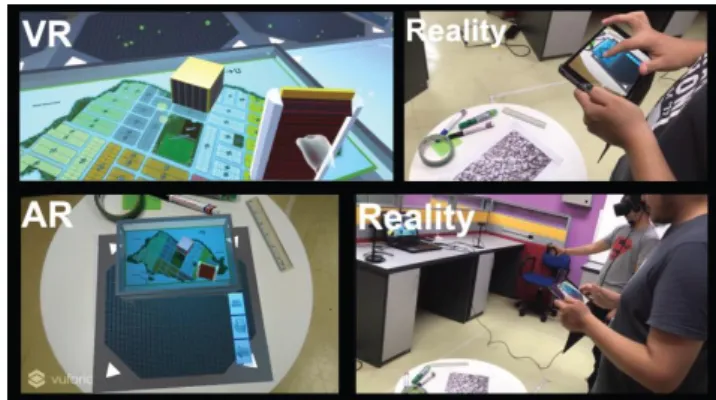
In the integration phase also, there are other features applied to the interactable virtual object. The virtual object will be assigned a unique colour to represent the current user currently manipulating it. This act as visual feedback to other users to give them understanding and visual cues of either the other user are interacting with the object or not. This can really help the user, especially in VR space because they cannot see the other user in a face-to-face manner of collaboration. Fig. 8 shows the integration of both VR and AR space where (a) and (b) the environment in VR space, (c) the environment in AR space while (d) the real world.
VI.PRELIMINARY RESULTS
Based on the results, this paper focuses on integrating VR and AR in a Collaborative User Interface. This project enables users in both spaces to collaborate on a shared content in a single shared space supporting the idea of cross-discipline and interchanging data between different type of interfaces.AR user can perform interaction on the same shared virtual object that is seen by the user in VR space and vice versa. This project supports the hand gesture method to encourage a more natural interaction technique while at the same time provides visual cues or feedback applied on the virtual object to improve user’s awareness on the virtual object status. The urban planning design prototype concept was used in order to test the integration method the both VR and AR space. In this preliminary result, the integration of the Leap Motion device with handheld and the integration of VR and AR space are done separately using the same approach of client-server
architecture. The hand gesture tracked by Leap Motion which is attached with handheld device presented in Fig. 9.
The preliminary result of the integration of VR and AR space are based on gesture interaction in VR while screen touch interaction on the handheld in AR. Other aspect that take into account other than to provide a natural way of interaction using gesture is user familiarity with the device way of interaction. The appropriate arrangement setup is conducted for the project in order for user to test the project immersive and seamlessly as in Fig. 10 below.
Fig. 8. Integration of VR and AR in single shared space.
Fig. 9. Gesture signal transferred to handheld device
Fig. 10. User interaction in the integrated VR and AR space
Fig. 11. (a) and (b) Visual feedback of selected object in the environment. In (c) and (d) Multi-user interaction manipulating same
64 The Fig. 11 shows a multi-user interaction in a collaborative user interface. In (a) and (b) demonstrate the visual feedback of user selected object derived in different colour object representation. User in VR that manipulate object will change its colour to red while the user in AR will change it to blue. As in (c) and (d) shows multi-user interaction that performs collaboration in manipulating the same object in shared space. The preliminary result provides this project research with an insight into the capability to merge VR and AR space to work together. Such knowledge allows researchers to continually explore the uniqueness and capability especially in the realm of interaction field for multiple user in different type of interfaces.
ACKNOWLEDGMENT
We would like to express our appreciation to Mixed and Virtual Reality Laboratory (mivielab) in Vicubelab at Universiti Teknologi Malaysia (UTM). This work was funded by UTM-GUP Funding Research Grants Scheme (Q.J130000.2628.14J85).
REFERENCES
[1] Berg, L. P., & Vance, J. M. (2017). Industry Use of Virtual Reality in Product Design and Manufacturing: A Survey.
Virtual Reality, 21(1), 1-17.
[2] Zhou, F., Duh, H. B. L., & Billinghurst, M. (2008, September). Trends in Augmented Reality Tracking, Interaction and Display: A Review of Ten Years of ISMAR.
Proceedings of the 7th IEEE/ACM International Symposium
on Mixed and Augmented Reality (pp. 193-202). IEEE
Computer Society.
[3] Kaiser, E., Olwal, A., McGee, D., Benko, H., Corradini, A., Li, X., ... & Feiner, S. (2003, November). Mutual Disambiguation of 3D Multimodal Interaction in Augmented and Virtual Reality. Proceedings of the 5th international
conference on Multimodal interfaces (pp. 12-19). ACM.
[4] Kim, K., Billinghurst, M., Bruder, G., Duh, H. B. L., & Welch, G. F. (2018). Revisiting Trends in Augmented Reality Research: A Review of the 2nd Decade of ISMAR (2008– 2017). IEEE Transactions on Visualization and Computer
Graphics, 24(11), 2947-2962.
[5] Ismail, A. W., & Sunar, M. S. (2015). Multimodal Fusion: Gesture and Speech Input in Augmented Reality Environment. Computational Intelligence in Information
Systems (pp. 245-254). Springer, Cham.
[6] Ismail, A. W., & Sunar, M. S. (2009, August). Survey on Collaborative AR for Multi-user in Urban Studies and Planning. International Conference on Technologies for
E-Learning and Digital Entertainment (pp. 444-455). Springer,
Berlin, Heidelberg.
[7] Piumsomboon, T., Day, A., Ens, B., Lee, Y., Lee, G., & Billinghurst, M. (2017, November). Exploring Enhancements
for Remote Mixed Reality Collaboration. SIGGRAPH Asia
2017 Mobile Graphics & Interactive Applications (p. 16).
ACM.
[8] Billinghurst, M., & Kato, H. (2002). Collaborative Augmented Reality. Communications of the ACM,45(7), 64-70.
[9] Grandi, J. G., Debarba, H. G., Bemdt, I., Nedel, L., & Maciel, A. (2018, March). Design and Assessment of a Collaborative 3D Interaction Technique for Handheld Augmented Reality.
2018 IEEE Conference on Virtual Reality and 3D User
Interfaces (VR) (pp. 49-56). IEEE.
[10] Liu, Y., Zhang, Y., Zuo, S., & Fu, W. T. (2018, November). BoatAR: A Multi-user Augmented-reality Platform for Boat.
Proceedings of the 24th ACM Symposium on Virtual Reality
Software and Technology (p. 74). ACM.
[11] Luxenburger, A., Prange, A., Moniri, M. M., & Sonntag, D. (2016, September). MedicaLVR: Towards Medical Remote Collaboration Using Virtual Reality. Proceedings of the 2016 ACM International Joint Conference on Pervasive and
Ubiquitous Computing: Adjunct (pp. 321-324). ACM.
[12] Knispel, J., & Bullock, F. (2017, November). Collaborative VR Painting in Web Browsers. SIGGRAPH Asia 2017 VR
Showcase (p. 4). ACM.
[13] Boonbrahm, P., Kaewrat, C., & Boonbrahm, S. (2016, July). Interactive Augmented Reality: A New Approach for Collaborative Learning. International Conference on
Learning and Collaboration Technologies (pp. 115-124).
Springer, Cham.
[14] Elvezio, C., Ling, F., Liu, J. S., & Feiner, S. (2018, October). Collaborative Virtual Reality for Low-Latency Interaction.
The 31st Annual ACM Symposium on User Interface
Software and Technology Adjunct Proceedings (pp.
179-181). ACM.Elvezio, C., Sukan, M., Oda, O., Feiner, S., & Tversky, B. (2017, July).
[15] Paiva, P. V., Machado, L. S., Valença, A. M. G., Batista, T. V., & Moraes, R. M. (2018). SimCEC: A Collaborative VR-Based Simulator for Surgical Teamwork Education.
Computers in Entertainment (CIE), 16(2), 3.
[16] Piumsomboon, T., Lee, Y., Lee, G., & Billinghurst, M. (2017, November). CoVAR: A Collaborative Virtual and Augmented Reality System for Remote Collaboration.
SIGGRAPH Asia 2017 Emerging Technologies (p. 3). ACM.
[17] Billinghurst, M., Kato, H., & Poupyrev, I. (2001). The MagicBook: A Transitional AR Interface. Computers &
Graphics, 25(5), 745-753.
[18] Grandi, J. G., Debarba, H. G., Nedel, L., & Maciel, A. (2017, May). Design and Evaluation of a Handheld-based 3d User Interface for Collaborative Object Manipulation. Proceedings of the 2017 CHI Conference on Human Factors in
Computing Systems (pp. 5881-5891). ACM.
[19] Guna, J., Jakus, G., Pogačnik, M., Tomažič, S., & Sodnik, J. (2014). An Analysis of the Precision and Reliability of the Leap Motion Sensor and Its Suitability for Static and Dynamic Tracking. Sensors,14(2), 3702-3720.