SOAP Web Services Attacks
Part 1 – Introduction and Simple Injection
Are your web applications vulnerable?
by Sacha FaustTable of Contents
Introduction ... 1
Background ... 1
Limitations ... 1
Understanding SOAP Communication ... 1
Request Envelope... 1
Response Envelope ... 2
Overview of the Fault Response Message ... 4
Anatomy of a SOAP Web Service... 5
Web Service Description Language... 5
Attacking SOAP Web Services ... 8
Test Application... 8
Parameter Tampering ... 8
Testing for Input Validation ... 9
GetProductInformationByName Test Faultstring Analysis ... 10
Prevention ... 17
Incoming Data Validation ... 18
Outgoing Data Validation ... 18
Appendix A: References... 19
Appendix B: Further Reading ... 19
Appendix C: Test Application WSDL ... 19
Appendix D: Test Application Source Code... 19
The Business Case for Application Security ... 20
About SPI Labs... 20
About SPI Dynamics ... 20
About the WebInspect Product Line ... 21
About the Author... 21
Introduction
The World Wide Web is being used increasingly for application-to-application communication, thanks to programmatic interfaces known as web services. In
conjunction with current technology, web services are ideal for companies clamoring to join the e-commerce revolution.
Background
Simple Object Access Protocol (SOAP) was defined jointly by Microsoft and DevelopMentor, and has become a World Wide Web Consortium (W3C) recommendation. The purpose of SOAP is to allow various components to
communicate using remote functionality as if they were local. SOAP messages consist of XML-formatted data and are described in Understanding SOAP Communication (below).
Limitations
This white paper discusses various types of attacks based on the SOAP implementation of Web services over HTTP and describes how you can shield your applications from these assaults. Other types of attacks are possible and detailed descriptions of those will be available in upcoming white papers. This paper is not intended to fully describe SOAP, but rather to present a brief overview of key web services concepts. For in-depth information about web services, visit the links cited in Appendix A: References and Appendix B: Further Reading.
Understanding SOAP Communication
SOAP is a lightweight and simple XML-based protocol designed to exchange structured and type information on the Web. In the XML schema, the envelope element is always the root element of a SOAP message. There are two types of envelopes: Request and Response.
Request Envelope
The Request envelope contains the information required to process the remote call. Each request message contains a message header and a message body. The header stores processing information such as message routing, requirements information, and security information. The body of the message stores the information required to process the call. The payload contains the following items:
Name of the service called Location of the service
Figure 1 shows a simple request envelope for the BabelFish web service defined at http://www.xmethods.net/sd/2001/BabelFishService.wsdl (see Anatomy of a SOAP Web Service for instructions on reading WSDL definitions). The request specifies the translation mode to be English to French (as defined by the en_fr value) and asks the service to translate the word “hi” to its French equivalent. The request does not specify any special server handling, so it has no data in the Header field.
Figure 2 displays the raw request over HTTP.
Figure 1: Simple SOAP Request Envelope
Figure 2: Simple SOAP Request over HTTP
Response Envelope
The method called Return value type Return data
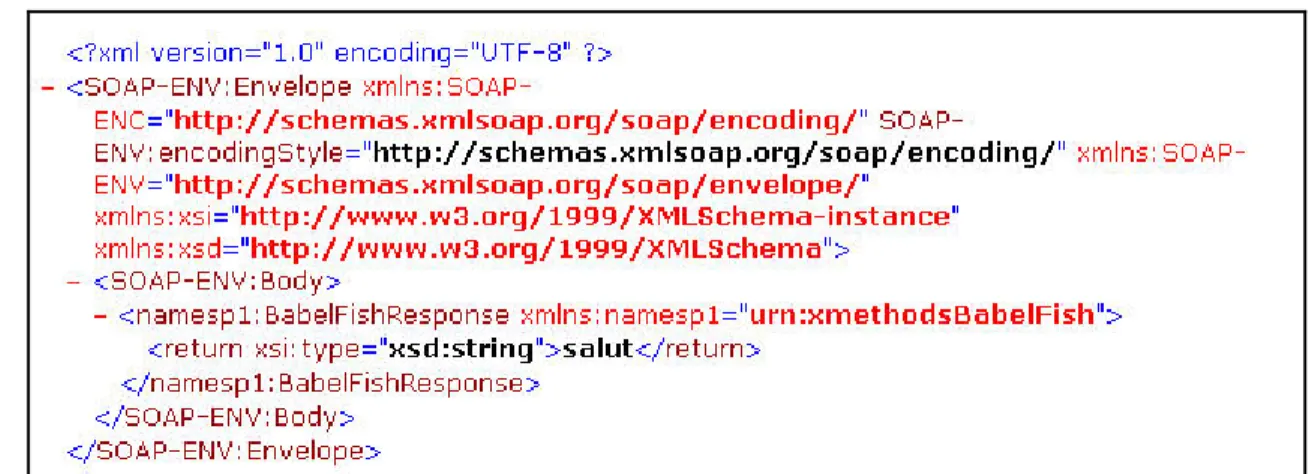
Note: For unsuccessful requests, refer to Overview of the Fault Response Message. To make things a bit more clear, Figures 3 and 4 illustrate the server’s response to the request depicted in Figures 1 and 2.
Figure 3: Simple SOAP Response Envelope
Overview of the Fault Response Message
The previous section demonstrated how an application interacts with a SOAP web service, including the response generated under normal conditions. But what happens if an error occurs on the server side? How can the client know that an error occurred? What type of information does the server return to the user?
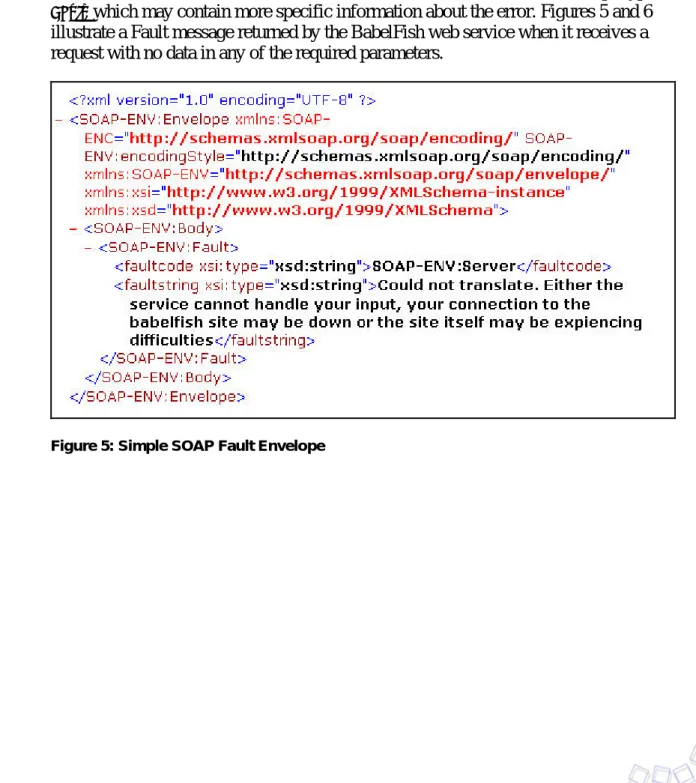
When an error occurs on the server side, the SOAP service returns an envelope type of
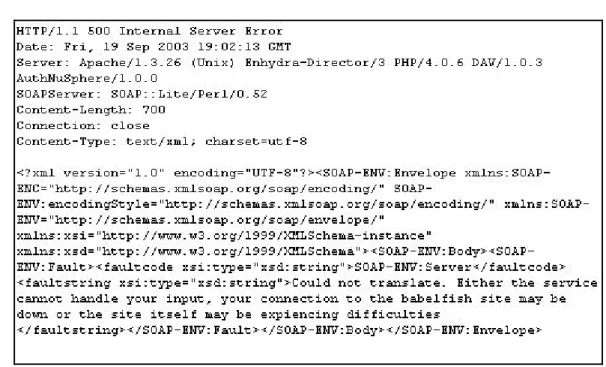
Fault, which may contain more specific information about the error. Figures 5 and 6 illustrate a Fault message returned by the BabelFish web service when it receives a request with no data in any of the required parameters.
Figure 6: Simple SOAP Fault Envelope over HTTP
As we can see, the service gives us a quick description of what went wrong. We will see later how we could benefit from services that could generate too much information. A great way to experiment with various types of web services is by browsing through the list provided by Xmethods at http://www.xmethods.com/.
Anatomy of a SOAP Web Service
Now that we have a better understanding of SOAP communication structure, we need to know how to get the initial information, such as the various methods the server is exposing and the method parameters and types. The following section describes one technique for discovering the information required to access different web services provided by a server.
Web Service Description Language
The Web Service Description Language (WSDL) describes, in a few words, the structure of a specific service using XML-formatted data. The information provided includes, but is not limited to, the following:
Service name and location
Methods name and argument type Return value and type
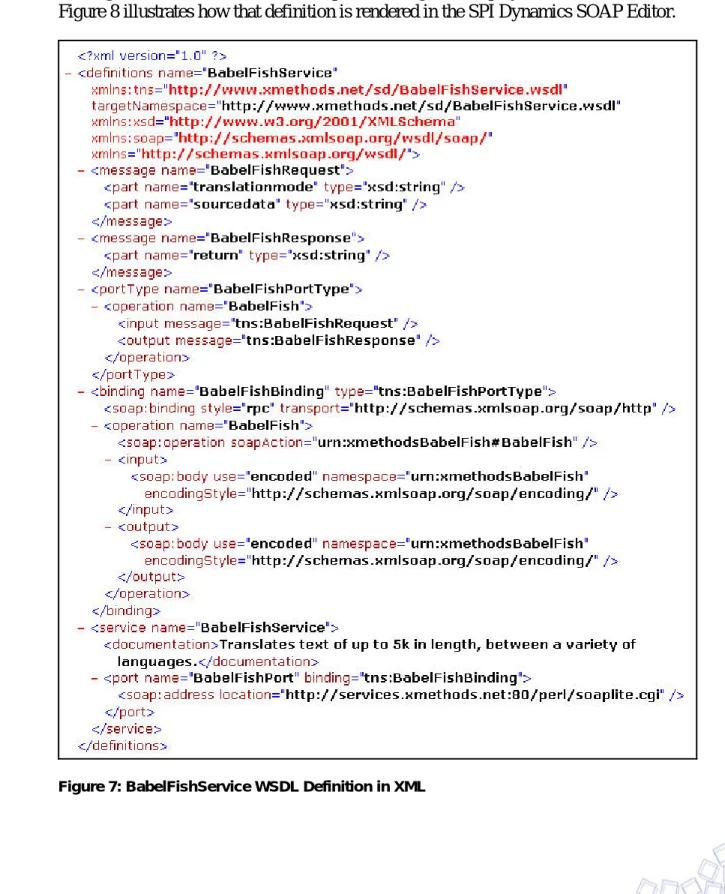
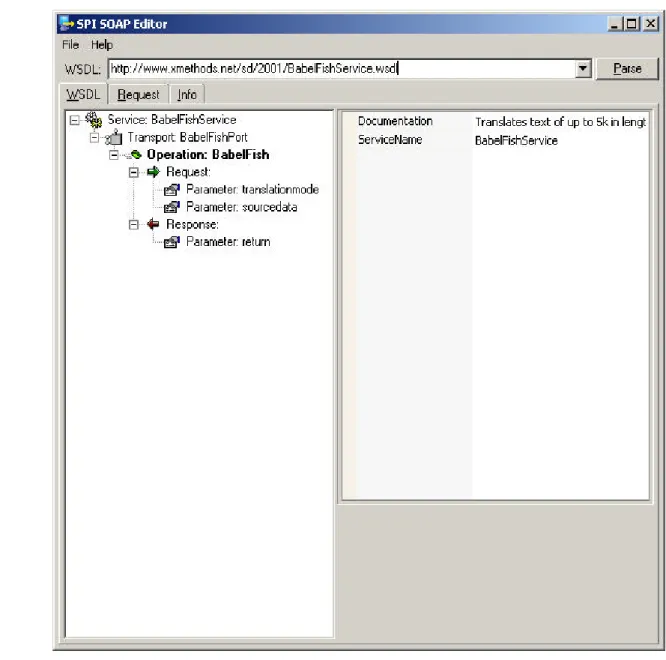
Figures 7 and 8 show the WSDL definition of the BabelFishService we used to translate the English word “Hi” to its French equivalent. Figure 7 displays the WSDL file and Figure 8 illustrates how that definition is rendered in the SPI Dynamics SOAP Editor.
Figure 8: BabelFishService WSDL Graphical View
By obtaining a copy of the WSDL definition file for a specific web service, we are now able to get a clear view of how we can interact with the web service and what type of response data to expect. By reviewing the information we received about the BableFish web service, we now know that the service has one method called BabelFish, the method requires two parameters, and both parameters are of type string. In addition, we can see that the return type of the method is a string.
Attacking SOAP Web Services
Having described how to communicate with SOAP services and how to reveal the structure of the services, we can now turn our attention to the service itself.
Test Application
The test application is a simple SOAP service written in C# and running under Microsoft Information Server 5.0 with ASP.NET support. The test web service simulates a simple product inventory system with provider information and discount given by the provider. The service exposes the following methods to the users:
GetProducts
GetProductInformationByID GetProductInformationByName GetProviderInfo
For a complete WSDL definition of the web service, refer to Appendix C: Test application WSDL. By reviewing the WSDL, we see that a user ID and password parameter is required for every call. For our testing, the user ID is 551-457-4487 and the password is 123456.
Parameter Tampering
SQL injection and cross-site scripting are two types of attacks that use parameter tampering. Refer to Appendix B: Further Reading for more information about these types of attacks.
Standard web applications receive client parameters as string data. Before performing any functions with this input, the application must validate the string and, if necessary, sanitize it. Programs that do not rigorously examine input strings are extremely
susceptible to parameter tampering. For example, if an attacker adds a single quotation mark to the input string and the application accepts the input and passes the
user-supplied data unsanitized to a SQL statement, then the application is susceptible to SQL injection.
Web services, however, require somewhat less rigor because the web service methods specify the data type for each of their arguments. For example, if an attacker tries to perform SQL injection on a web services method that expects an integer as an argument, adding a single quotation mark will cause the SOAP implementation to return a client error and the data will not reach the actual method called.
Testing for Input Validation
The first step in a parameter tampering attack is to determine if the web service
application is performing any type of input validation. To generate a good set of inputs to use for testing, look at the WSDL document. In addition to specifying the data type of each parameter, it will often contain comments about the purpose of those
parameters. The application’s name or ID may give us some information about the products. We can also deduce that the service will get its information from a data repository (a database or LDAP server), so the service might well be vulnerable to SQL or LDAP injection.
Now that we have more information about the server and parameters, let’s send to the
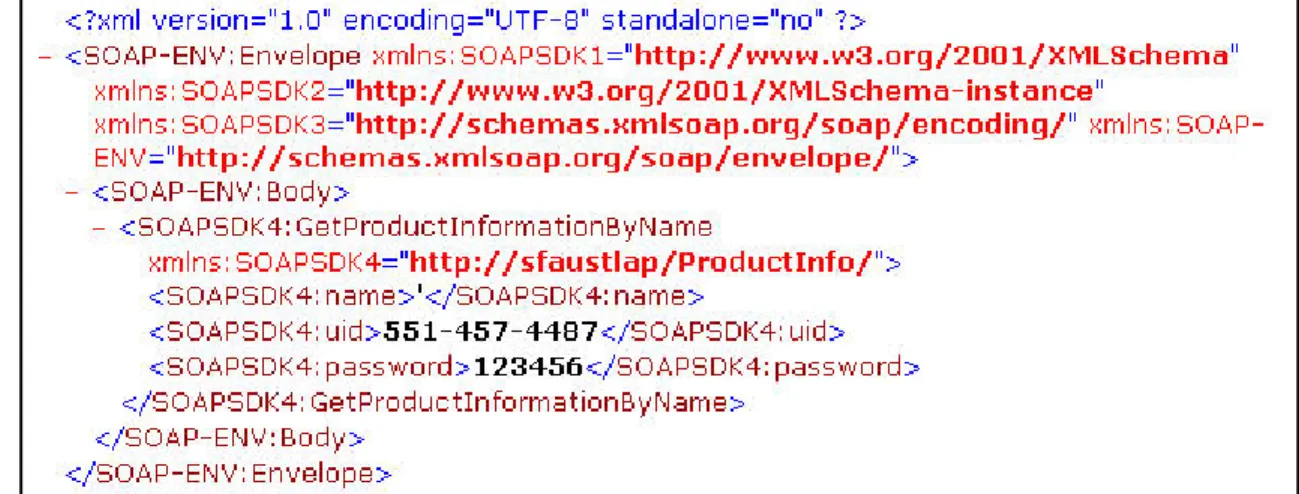
GetProductInformationByName method a few characters that are known to be in most input validation code and see how the server responds. This is a good method to use for initial testing because its name argument is a string, which is more susceptible to parameter injection. Figures 9 through 11 demonstrate how the server reacts to some of the characters.
Figure 9: Sending Single-Quote Test for Input Validation on
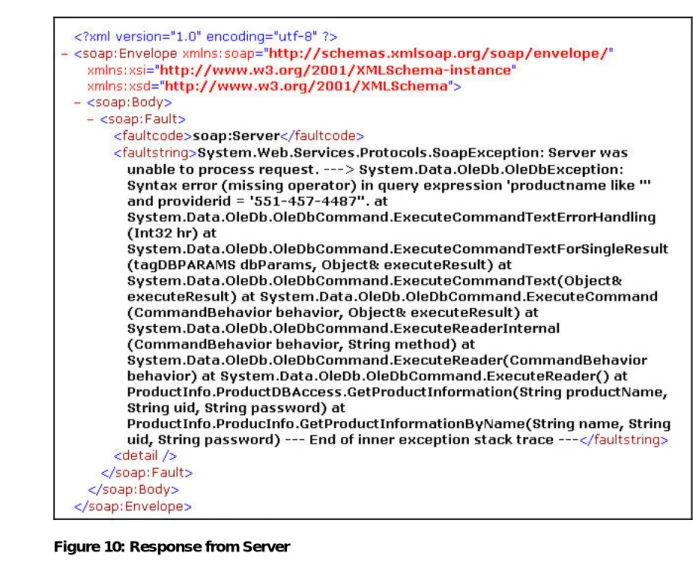
Figure 10: Response from Server
It is clear that the methods do not perform even the simplest input validation on the
productName argument. We can also confirm, by looking at the faultstring returned by the server, that the information accessed by the web service is stored in a backend database. A closer look at the faultstring reveals more information about some of the internal processing the web service performs and where the problem occurs. Let’s review the faultstring the server returned.
GetProductInformationByName Test Faultstring Analysis
The faultstring is a representation of the exception thrown by one of the controls used by the web service. To trace the exception and see how the application handled our data, we must read the faultstring from bottom to top. As illustrated in Figure 10, the last line shows the web service method that we called represented by
ProductDBAccess.GetProductInformation(String productName, String uid, Stringpassword) that seems to be handling the communication with the backend database. If we trace the calls up to the first line, we see where the error happened; it indicated that there is a syntax error in the SQL query sent to the database. The syntax error line,
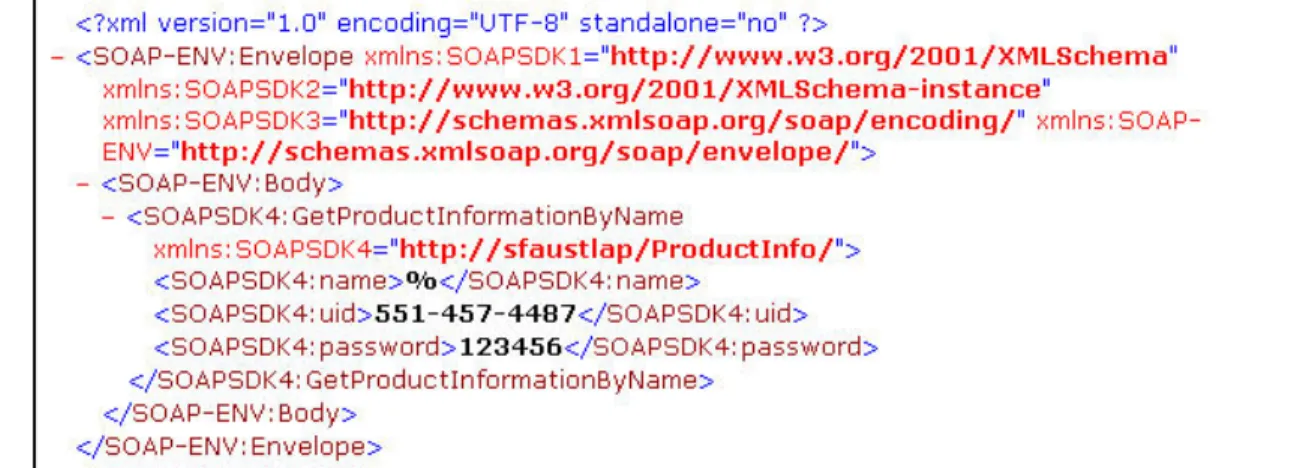
System.Data.OleDb.OleDbException: Syntax error (missing operator) in query expression 'productname like ''' and providerid = '551-457-4487'' also tells us that the internal query used the SQL LIKE statement and we can actually see the single quotation mark ( ‘ ) we sent (refer to http://www.w3schools.com/sql/sql_where.asp for more information about the LIKE statement). We can also see some of the names used and how the application constructed the query using the value we provided. Let’s test our assumptions by sending something that is likely to return at least one record. Since the web service is using LIKE, we will send the % wildcard character and see if the application accepts it.
Figure 11: Sending % to Test Assumptions on the GetProductInformationByName Method
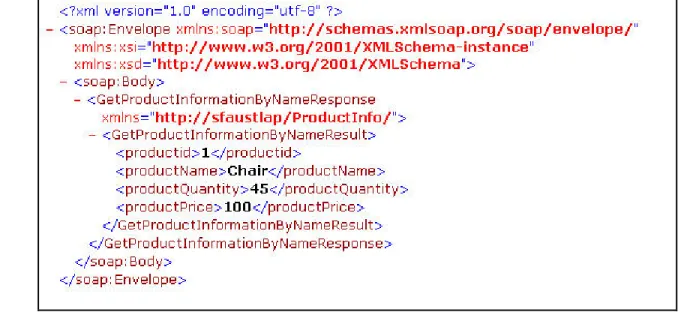
Figure 12: Response from Server
As expected, the server returned a record. Another interesting observation is that we received only one record instead of all of them. Logically, in response to the % wildcard character, the internal query should have returned all product information. However, if we take another look at the WSDL definition for this web service (refer to Appendix C: Test Application WSDL), we see the definition for the GetProductInformationByName
method clearly defines the return type as a string and not ArrayOfString. This is another area where SOAP type enforcement imposes some level of sanity checking and proper coding on the application’s data input and output.
Now we know that the name parameter of the GetProductInformationByName method, because of the LIKE statement, will possibly allow us to see more information then we are supposed to see but that doesn’t mean we can. The web service is validating the credentials provided and technically will not display products that are not related to the
providerid specified. We need to find a way to get more product information out of the application by using the only credentials we have. Let’s take a closer look at how the application is performing authentication for the GetProductInformationByName method. We will use the same testing technique we used for the name argument and send a single quotation mark to see if it breaks the SQL statement used for authentication and/or product information retrieval.
Figure 13: Sending Single-Quote Test for Authentication Input Validation
In this test scenario, the faultstring we receive from the server tells us exactly how the application uses the uid and password to validate our credentials. It passes the
authentication data to the ProductInfo.ProductDBAccess.VerifyAuthentication(String uid, String password) method. It does not perform sanity checking on the data because the single quotation mark we appended to the uid parameter was directly used in the SQL query and generated a syntax error. The faultstring also gives us most of the query used for validating credentials by returning userid = ‘551-457-4487’’ and password = ‘1123456’ in the syntax error. From the query portion returned by the server, we can quickly generate a valid SQL injection to bypass the password verification. We simply force a true condition after the password value.
The newly formatted SQL should internally look like select something from sometable where userid = ‘551-457-4487’ and password = somevalue or true. The injection value for our test will be ' or 1=1 or password = ' ; this should force the web service to generate a query that will look like select something from sometable where userid = ‘551-457-4487’ and password = ‘’ or 1=1 or password = ‘’.
Figure 16: Response from Server
It works! We received data from the server without providing a valid password. With that knowledge in mind, let’s try to steal a password from other providers and see what discount rate they give. To get that information, we need to make calls to the
GetProviderInfo(String uid, String password) method and see if we can bypass the password section just like we did on the GetProductInformationByName method. Let’s send the same injection string and see what results we get from the server.
Figure 18: Response from Server
The same injection worked fine. We received our user information, including our password and the discount we give to the company. What could be interesting is to get the same information from another uid, either one we might know already or one we could acquire through brute force by forcing a LIKE statement on the uid. For the sake of brevity, let’s say we have prior knowledge that there is a uid 787-457-1154. Now our injection would look something like select something from sometable where uid = ‘’or ‘’ = ‘’ and password = ‘’ or uid =’787-457-1154’. To force that SQL query format, we will inject ' or ''=' in the uid parameter and ' or providerid = '787-457-1154 in the password parameter.
Figure 19: Getting Other Provider Information
Figure 20: Response from Server
Everything worked as expected and we managed to get another provider information including the password and the discount he gives. There are many more examples that could be created with this application. Anyone interested in learning more about other types of injections should visit the SPI Labs white paper pages at
http://www.spidynamics.com/whitepapers.html.
Prevention
Protecting web services requires the collaboration of developers, system administrators, and management. Though effective at reducing the risk of such an attack, the
approaches discussed in the next section are not complete solutions. It is best to remember that web application security must be a continually evolving process. As
hackers change their methodologies, so must those who want to implement a secure Web application.
Incoming Data Validation
All client-supplied data must be cleansed of any characters or strings that could possibly be used maliciously. Under SOAP, the implementation and type checking performs most of the standard data verification, but that doesn’t mean that data should not be verified. In fact, validating string type arguments and stripping quotes or putting backslashes in front of them is nowhere near enough. The best way to filter data is to use a default-deny rule and include only the type of content you want to accept and to perform logical checking on the data received.
Outgoing Data Validation
The application should also validate the data that is ready to be returned to the user. You can use SOAP type checking to make sure that you return only a specific amount of data, but you still need to perform logical validation and ensure that the data
contained in the objects that you return is clean. The application should validate that the format is valid and should use generic error reporting instead of the default that may give too much information to the user.
Appendix A: References
For more information on web services, refer to these additional resources. http://www.w3.org/TR/SOAP/
Web Services Description Language (WSDL) 1.1 http://www.w3.org/TR/wsdl
Appendix B: Further Reading
SQL Injection: Are You Web Applications Vulnerable?http://www.spidynamics.com/whitepapers/WhitepaperSQLInjection.pdf LDAP Injection: Are Your Web Applications Vulnerable?
http://www.spidynamics.com/whitepapers/LDAPinjection.pdf
Complete Web Application Security: Phase1-Building Web Application Security into Your Development Process.
http://www.spidynamics.com/whitepapers/Webapp_Dev_Process.pdf
Appendix C: Test Application WSDL
Download the application WSDL from here.Appendix D: Test Application Source Code
Download the test application source code from here.The Business Case for Application Security
Whether a security breach is made public or confined internally, the fact that a hacker has accessed your sensitive data should be a huge concern to your company, your shareholders and, most importantly, your customers. SPI Dynamics has found that the majority of companies that are vigilant and proactive in their approach to application security are better protected. In the long run, these companies enjoy a higher return on investment for their e-business ventures.
About SPI Labs
SPI Labs is the dedicated application security research and testing team of SPI Dynamics. Composed of some of the industry’s top security experts, SPI Labs is
focused specifically on researching security vulnerabilities at the web application layer. The SPI Labs mission is to provide objective research to the security community and all organizations concerned with their security practices.
SPI Dynamics uses direct research from SPI Labs to provide daily updates to WebInspect, the leading Web application security assessment software. SPI Labs engineers comply with the standards proposed by the Internet Engineering Task Force (IETF) for responsible security vulnerability disclosure. SPI Labs policies and
procedures for disclosure are outlined on the SPI Dynamics web site at: http://www.spidynamics.com/spilabs.html.
About SPI Dynamics
SPI Dynamics, the expert in web application security assessment, provides software and services to help enterprises protect against the loss of confidential data through the web application layer. The company’s flagship product line, WebInspect, assesses the security of an organization’s applications and web services, the most vulnerable yet least secure IT infrastructure component. Since its inception, SPI Dynamics has focused exclusively on web application security. SPI Labs, the internal research group of SPI Dynamics, is recognized as the industry’s foremost authority in this area.
Software developers, quality assurance professionals, corporate security auditors and security practitioners use WebInspect products throughout the application lifecycle to identify security vulnerabilities that would otherwise go undetected by traditional measures. The security assurance provided by WebInspect helps Fortune 500 companies and organizations in regulated industries — including financial services, health care and government — protect their sensitive data and comply with legal mandates and regulations regarding privacy and information security.
About the WebInspect Product Line
The WebInspect product line ensures the security of your entire network with intuitive, intelligent, and accurate processes that dynamically scan standard and proprietary web applications to identify known and unidentified application vulnerabilities. WebInspect products provide a new level of protection for your critical business information. With WebInspect products, you find and correct vulnerabilities at their source, before attackers can exploit them.
Whether you are an application developer, security auditor, QA professional or security consultant, WebInspect provides the tools you need to ensure the security of your web applications through a powerful combination of unique Adaptive-Agent™ technology and SPI Dynamics’ industry-leading and continuously updated vulnerability database, SecureBase™. Through Adaptive-Agent technology, you can quickly and accurately assess the security of your web content, regardless of your environment. WebInspect enables users to perform security assessments for any web application, including these industry-leading application platforms:
IBM WebSphere
Macromedia ColdFusion Lotus Domino
Oracle Application Server Macromedia JRun
BEA Weblogic Jakarta Tomcat
About the Author
Sacha Faust is a senior research and development engineer at SPI Dynamics, where his responsibilities include managing the SPI Labs team, researching new techniques for Web auditing, conducting source code reviews to find vulnerabilities, and securing Web applications.
Contact Information
SPI Dynamics Telephone: (678) 781-4800
115 Perimeter Center Place Fax: (678) 781-4850
Suite 270 Email: [email protected]