AC 2008-604: PERFORMANCE ANALYSIS OF SOFTWARE BASED VIDEO
LECTURE CAPTURE AND DELIVERY SYSTEM
Alfred Ducharme, University of Central Florida Ali Mehrabian, University of Central Florida Diala Gammoh, University of Central FLorida
© American Society for Engineering Education, 2008
P
Performance Analysis of Software Based Video Lecture Capture and Delivery
System
Abstract
The trend towards distance learning has been increasing over the last few years, especially in the academic institutions. This increase is due to enabling technology that made learning materials accessible by students and professors at any location. Distance learning has different modes that can be applied according to the institution’s needs. The two main modes of delivery are
synchronously (all parts communicate at the same time) and asynchronously (delay in communications).
The College of Engineering and Computer Science at the University of Central Florida (UCF) has been a leader in distance learning for the last 25 years. This was initiated by the Florida legislature by the creation of the Florida Engineering Education Delivery System. The goal of this system was to promote engineering education in the State of Florida. The early delivery system utilized video tapes and transitions to the internet in 2000. In spring 2007, the College of Engineering and Computer Science purchased a software based lecture recording and delivery system. This system was used to completely replace all existing recording hardware and software. The system launch included 90 faculty delivering 100 courses to 2300 engineering students.
A study was conducted by the Center for Online and Virtual Education (COVE) at UCF. The primary purpose of this study was to assess the performance of the new system. The data was captured using an online questionnaire and it was analyze statistically by the center. The study was conducted on a population of students and faculty who had used the old and the new delivery systems. This paper shows the results of each category and gives an indication of the effect of using the new system on the students and the faculty performance. In this way we can address the critical factors that have a major impact on our students and faculty performance. In this paper, we describe the legacy system used for the past 25 years by UCF in addition to the requirements of a modern delivery system. The paper addresses the implementation and success of the new system.
Introduction
Distance learning has been increasing over the last few years in both industrial training and higher-learning. This increase was due to the growing need and subsequent market for education that delivered at the students pace and convenience. The enabling technology has made the production of online learning materials possible by individuals and large institutions. The concept of distance learning has been changed too, it was mainly taking place through “learning by correspondence” programs; many universities started depending on teaching by mail indicating that it allows them to reach large number of students regardless of the
Initial use of the internet was to transition paper mail to email correspondence, unfortunately, this lead to criticism since the general perception was that this led to a lack of interaction between the instructors and the students. The speed of correspondence was increased but availability of additional learning materials was limited.
In spring 2007, the College of Engineering and Computer Science purchased a software based lecture recording and delivery system, Tegrity Campus 2.0. The purpose of it was to completely replace all existing recording hardware and software. The system launch included 90 faculty delivering 100 courses to 2300 engineering students. At the University of Central Florida, lecture videos were transitioned from VHS video tapes to downloadable digital videos. This was a reasonable first step towards online delivery of lectures. The initial system utilized aging NTSC based video production equipment. The video was then digitized for delivery on the internet. Essentially, VHS quality video was being delivered at a less than 640 x 480 resolution. This was adequate until about 2005 when higher quality digital video was quickly becoming
commonplace.
At this point, the online delivery system had two modes: synchronous and asynchronous. The synchronous mode allowed students and professors to interact with each other while being in different locations. The asynchronous mode allowed students and professors to interact but not instantly; this could be done through several approaches such as e-mail and comprehensive web-based courses2. The ability to stream the video during the class was implemented in 2004 along with an in-class instant messaging system.
In 2006, UCF was lacking the ability to deliver high-quality online lecture materials. Other institutions were beginning to utilize newer technology to record and deliver lecture video. The College of Engineering and Computer Science made the decision to overhaul the existing system with new software based recording and delivery system called Tegrity Campus 2.0
History of Distance Education in Florida and the Legacy Recording Model
The beginning was in the 1963 when the University of Florida established the Graduate
Engineering Education System (GENESYS) by a legislative bill. This system provided graduate courses for working engineers in Daytona Beach, Orlando and Cape Kennedy via a television network between GENESYS Centers at these three locations and the GENESYS program at the University of Florida. Course delivery was approximately 70% live using the conventional classroom approach and 30% instruction via live broadcast video and two-way audio. The
system was terminated in 1972 because of the expensive live broadcasts in addition to the budget cuts in aerospace industry3.
The Florida legislature recognized that continued economic growth required engineering expertise. A decision was made to create a system to deliver graduate engineering education state-wide. In 1982, a budget amendment was enacted to grant the initial funding to create the Florida Engineering Education Delivery System (FEEDS). Funding was provided to establish four primary FEEDS centers with an additional four cooperating partners. The State System
Operations Committee (SSOC) was established to oversee the FEEDS network of universities. P
The SSOC served as a conduit between industry and the individual universities and reported to the Board of Regents4.
Providing a non-degree seeking enrollment at the university where the course was offered while maintaining the student’s enrollment in the degree granting university, allowed the graduate students to enroll in courses offered at any of the member universities. Video tape was the mode of delivery for all FEEDS courses from 1982 to 2000. Each day FEEDS courses were recorded, duplicated and then delivered by currier to the student’s home university or branch campus. At the time, state-of-the-art video recording and editing equipment was utilized to generate standard NTSC (National Television System Committee) VHS (Video Home System) tapes. Typical delay was anywhere from 1-3 days from recording to availability at the viewing site. Figure 1 shows the legacy FEEDS system.
Figure1. Legacy FEEDS recording system.
During the 1990’s, FEEDS had delivered over 5000 graduate and undergraduate engineering courses to numerous FEEDS sites through Florida, and more than 2,000 working engineers and technical managers had earned their Master’s degrees using FEEDS. In 20 years, over 50,000 students have registered for FEEDS courses.
The way the information was delivered was changed after the entry of the World Wide Web in the mid-1990. It was not initially utilized for distance education in Florida. From 1995-2000, bandwidth limitations by end-users or students did not allow for video download and delivery as a viable means of delivering lecture video. In 2000, UCF and several other FEEDS partners decided to transition from video tape to online video streaming. This imposed a broadband connection requirement on FEEDS students. The availability of broadband was quickly becoming common amongst graduate students and this requirement was determined to be a reasonable one.
Thus, in 2000 the delivery of video tapes was halted. Instead, the NTSC video was captured using Osprey video capture cards residing in personal computers remotely located outside the classroom. A software scheduling program was developed by UCF graduate students and faculty to automate the recording process. As a backup system, the legacy video tape production system
P
was used. In the event that the video was not captured digitally, the video tape was used to recreate the digital video. Around 2004, the ability to stream the videos in near real-time was added as an enhancement to the system. An embedded instant messaging system allowed students watching the video stream of the live classroom to ask questions. The instructor could then answer the question as if it had originated in the face-to-face classroom.
Students that had previously used the video tape method of delivery could now watch lectures live or within a few hours after the class was recorded. This was a significant improvement over the system that had been utilized for nearly 20 years.
However, even though the delay had been lessened another problem was beginning to be evident. In 2000, the 640 x 480 resolution of the NTSC video was considered tolerable. Shift ahead only a few years to 2006 and this resolution was considered below standard. A deeper problem was that the video was generated using aging out-dated equipment. The actual resolution of the digitally encoded video was closer to 320 x 240 simply because of signal degradation. The mode of delivery on the internet was sound but the quality of the video needed to be increased to at least DVD (Digital Versatile Disc) quality of 720 x 480.
The conversion to the New Recording Model
The College of Engineering and Computer Science at UCF realized that the old equipment needed to be replaced. A deep research on the latest available technology was started in fall 2006. The technology was offering hardware and software based system in addition to the two main categories of online delivery system: the synchronous and asynchronous mode. Based on past experience with the number of students actually utilizing the synchronous mode, the decision was made to implement an asynchronous system initially with the hope of offering synchronous delivery in the future. The decision to whether purchase hardware or software based asynchronous recording system was taken after re-evaluating the traditional recording model. Our research showed the majority of available solutions were hardware based and consisted of video capture and encoding hardware. Only two companies offered a software only solution. Historically, distance learning courses whose goal is to deliver video recordings of the live classroom experience do so in multi-media classrooms. These classrooms are outfitted with expensive input devices such as video cameras, document cameras, etc. In addition, they are typically staffed with a full-time person to maintain and/or adjust in real-time the various input systems as described in figure. 2.
Distance learning courses are scheduled at various times in the classroom studio. Each studio includes a hardware based capture and encoding system. The final version of the videos are uploaded to a media server and made available on the internet (signified by the stream of 1’s and 0’s).
In this case, the college records approximately 300 courses each year (total number of FEEDS courses) utilizing 6 multi-media classrooms. As is the case with many universities at the present time, we are striving to expand and even double our online courses available each year.
Currently, the 6 multi-media classrooms are scheduled from morning till night each week to accommodate the current online offerings. This posses several problems for scheduling courses
P
Class1 Class2 Class3
Classroom Studios
Video Server
10010010110111011000100110101010100100101101
each semester. Another complication is the inability to enable instructors to pre-record courses for travel preparation. The only way that we could double our online courses is to build 6 more multi-media classrooms. At the same time our college has several more classrooms already outfitted with instructor computers and projectors. These classrooms would require additional equipment to accommodate the model shown previously in figure. 2. Thus, a new model for distance education that has been termed “mini-studios.” was proposed to overcome these
problems. In this model, the needed expense of hardware would be reduced and recording would depend on a software based system. The valuable advantage of the mini-studio model is that it enables all classrooms to be used for recording. This mitigates the problem of scheduling online courses in only multi-media classrooms. Our main goals were:
1- Minimizing the needed hardware to the point where each instructor could be furnished with their own mini- studio.
2- Eliminating the need for scheduling an entire classroom for pre-recording. Instructors could use their mini-studio in their office, home, or any location.
Figure2: Legacy Model - Multi-Media Room
Figure3: New Model - Mini-Studio Model
Successful Implementation of the Mini-Studio
The successful implementation of the mini-studio model relied on the availability of a software based recording solution for asynchronous delivery of video lectures. UCF continued research on available technologies and finally rested on the decision to test the Tegrity Campus 2.0 software produced by Tegrity, Inc.
Class1 Class2 Class3
Video Server
10010010110111011000100110101010100100101101 Mini
Studio
Mini Studio
Mini Studio
P
One of the major positive attributes of Tegrity Campus 2.0 is that it is actually two systems. The first is a software program that records the instructor’s computer screen. The second is a content management solution that resides on a media server and delivers the lecture videos. The video server can be integrated with existing Course Management Systems (CMS) such as WebCT, Blackboard, Angel, and Moodle. These are all widely used CMS platforms by higher learning institutions. This is a significant part of the Tegrity solution because it automates the
authentication and linking of the lecture delivery.
The decision of using Tegrity Campus 2.0 was lit by the important features that the Tegrity system has. These features are automated capture and storage, minimal input device requirement, does not require high-end recording computer, web based software deployment, low training required by instructors and students, keyword searching for students, integration with CMS and other IMS-compliant systems, iPod casting and Cell casting, digital student notes, and recording of native resolution. The mini-studio model required that the input devices would be low-cost. This would enable the min-studio model to be deployed to all faculty and instructors. Tegrity is essentially a screen recording program. Anything that is displayed on the instructor’s computer is recorded as video. This includes digital slides, text documents, engineering software, videos, and anything else that the instructor decides is pertinent for the lesson. Along with the screen
recording a recording of the instructor’s voice is made using either a built-in microphone or external microphone. To enhance the presence of the instructor it is also advisable to record video of the instructor which was accomplished using a low-cost webcam.
Breakdown of Mini-studio
♦ Personal Computer or Apple
♦ Webcam
♦ Microphone
♦ Content displayed on computer
♦ Handwriting input device
All engineering instructors have at the very least a desktop computer in their office and at home. Most also have a notebook computer for use on travel and away from the office. With addition of approximately a $100 for a webcam and microphone the instructor can create a mini-studio. Recently accumulated data on instruction methods utilized by our instructors showed that approximately 50% use digital slides. The use of Tegrity with a webcam and microphone is well suited to the recording of digital slides. The other 50% of our engineering faculty choose to handwrite their derivations, problem solutions, and notes. This requires an additional input device. The two standard technologies are digital tablets and document cameras. Digital tablets are available from $100-$300. Document cameras are slightly more expensive and are available from $600-$2000. An alternative is the Tegrity Instructor Pen that is priced at approximately $200. The advantage of this pen is that it allows the instructor to write directly on any paper with an actual ink pen. The pen and base station are battery powered and easily portable.
Initial testing of Tegrity Campus 2.0 was conducted by instructors towards the end of the fall 2006 semester. During this time several lectures were recorded using the basic mini-studio set-up consisting of a webcam and microphone. The recordings were evaluated by administration,
P
faculty and a selected number of students. The major improvement noticed when using Tegrity was the recordings made at a better than DVD quality and nearly high-definition (1920x1080). This is highly valuable to our engineering students since many of the instructors utilize
engineering software in their lectures. Tegrity provided the required resolution so that students could read fine text inherent in these types of software. An example would be a computer programming course where the lines of code could be read clearly.
Launching Tegrity
The College of Engineering and Computer decided to license Tegrity Campus 2.0 and implement the mini-studio model for all online courses at the end of fall 2006 semester. Our intention was to overhaul the existing Legacy FEEDS recording system and server with the new Tegrity system for spring 2007. Installation of the software and required webcam, microphones, and Tegrity Instructor Pens in the 6 multi-media classrooms was completed over the semester break. The decision was also made to purchase new document cameras to make the transition to the new system easier for instructors. This was primarily because 50% of the faculty relied on this input method. Figure. 4 and 5 are examples of our mini-studios showing instructor desk and projection screen.
Figure4: Example mini-studio implementation (student view)
Figure5: Example mini-studio implementation (instructor view)
P
Training on the new Tegrity system was provided to instructors in two phases. First, instructors were encouraged to attend a 1 hour seminar overview of the system. Second, hands-on
instructions were given face-to-face to each instructor approximately 10 minutes before their first class using the system. One of the pros of the new system was minimal training required by instructors. Most instructors were familiar enough with the Tegrity software with only a few minutes of hands-on training that they were able to teach their first class without any problems. Some instructors required additional “coaching” while giving their first few lectures.
The Tegrity lecture videos are viewed by students in the same way that other online web based video streaming is accessed and controlled. Most students were able to view their class lectures without any trouble. However, some students did have trouble accessing the lectures. This was due primarily to pop-up blocking software, software firewalls, and general computer software conflicts. Information about how to solve most of these problems was provided using any of the following methods:
Forums
A forum website was created to answer many of the students viewing questions. The forum was created and maintained by the UCF Tegrity team. This is a familiar means, for the students, to find answers and post questions. This method of information dissemination worked well in our experience.
Emails
Although email is the fast way to get a message out a large number of students, it is perhaps not the best way to disseminate information. Most students receive numerous emails each day. Many of these emails go unread or only partially read.
Internet Videos
A video on “How to View Tegrity Lectures” was uploaded to YouTube. A message was then placed within each course WebCT portal with a link to the video. This method also worked well since it was familiar to most students and summarized the problems and solutions in a few short minutes.
Telephone Support
UCF Tegrity Staff answered many support telephone calls in the first few weeks of the semester. Even though this is the least efficient method for solving simple problems, it was still the most utilized support method.
At the beginning of the spring 2007 semester approximately 87 instructors were teaching 95 courses serving 2300 FEEDS students. The ease of making recordings with Tegrity made adoption for non-FEEDS classes an easy transition. As a result by the end of the semester the number of instructors increased to nearly 100 teaching approximately 120 classes with Tegrity. Tegrity is now being used for tutoring problem solving sessions, meetings, symposium archival, and other engineering demonstrations.
P
Surveys Data Gathering
COVE conducted two surveys to listen to the voice of our customers, since UCF believes in its students and faculty constructive compliments. The student survey was distributed through COVE website where the students view their online lectures using old FEEDS or Tegrity. It was available for the last two weeks of Fall 07 semester and targeting all engineering students who used both systems. To encourage students to take the survey, the survey enables the students to enter their email address upon completing their survey to enter a drawing for Xbox, PS3, or iPod touch, the students were notified that their email address were not associated with their
responses.
The survey consisted of both closed (multiple choice items) and open-ended questions. The closed questions were twenty six connected with certain logic and two open-ended questions that allow students to enter their comments about things they liked the most about Tegrity and any recommendations for improvements in the new online course delivery system. The logic behind the questions were mainly classifying students who are undergraduates or graduates, master or PhD student, the type of platform they use whether it is PC, MAC or Linux to address all the problems encountered while using different platforms, how often does the student use the old FEEDS or Tegrity, students who use FEEDS all the time and never used Tegrity were directed to the end of the survey since their responses will not be based on the awareness of the two
systems. The student survey was structured to collect data and information in the following major areas:
1. How often do the students watch their classes online?
2. How often do the students use the old FEEDS system in comparison to Tegrity?
3. How much relevant are the features
provided by Tegrity to the students who prefer watching their classes online? 4. How much important the quality resolution of an online course especially when
professors use a certain software in class?
5. Does the College of Engineering and Computer Science move in the right directionwith
online lectures by utilizing the Tegrity system according to the student opinion? The faculty survey link was emailed to all engineering faculty who are almost 100 faculty members, and the survey was available for the last two weeks in Fall 07 semester. The survey structured to have both closed (multiple choice items) and open-ended questions. Instructors who never used Tegrity to record their lectures were directed to the end of the survey. The faculty survey was directed to collect feedback from faculty in the following areas:
1. How much do the recording features provided by Tegrity increase the teaching effectiveness?
2. How much do professors care about recording a class anywhere and anytime instead of
being physically in a class room?
3. Does the College of Engineering and Computer Science move in the right directionwith
online lectures by utilizing the Tegrity system according to the instructor opinion?
Data Analyses
The analyses were performed based on the students and faculty survey results. The center was able to get a real feedback from students and faculty about the two online course delivery systems, identify the bottlenecks, and listen to the voice of the customers. COVE was serious about all the constructive compliments that lead to improve the quality of distance learning at the school of engineering. The percentage of faculty responses was 36% and students responses was 40% which indicates that it is a valid survey on which COVE can rely on to analyze data.
Student Survey
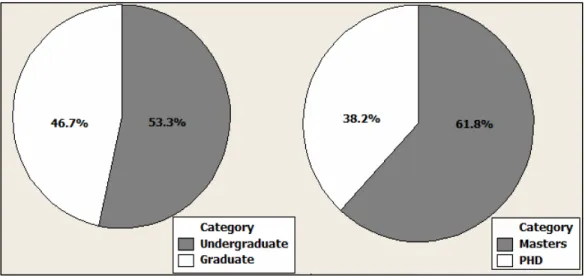
Statistics shows that 53.3% of the students who answered the survey were undergraduate students and 46.7% were graduates while 61.85% of the graduate students were masters and 38.2% were PHD students. 91.2% of the students use PC, 5.5% use Mac, and 3.1 use Linux platform to watch their classes online. It was also interesting to know that 91.4 % of the engineering students watch their classes online while 8.6% only of the engineering students prefer watching a class in a classroom. Figure 6 illustrates these results.
Figure 6: Pie Chart represents a classification of students who filled out the survey
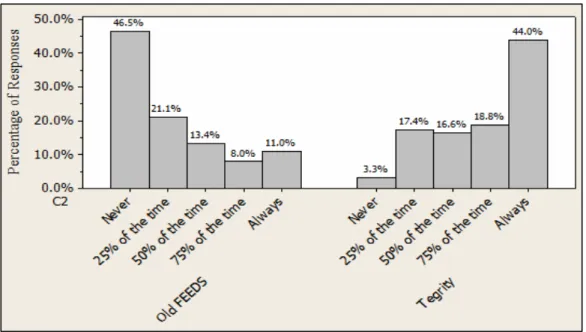
As shown in figure 7 46.5% of the engineering students never used the Legacy FEEDS system to watch their classes online while 53.5% of them use the old FEEDS system 25%, 50%, 75% or 100% of the time with the existence of both systems. On the other hand 3.3% only of the
students never used the Tegrity system to watch their classes online while 96.7% of the students use the Tegrity system 25%, 50%, 75% or 100% of the time with the existence of both systems. It is interesting to notice that some students use both systems to watch their classes online and this might be due to certain problems in both systems that will let them navigate between the Legacy FFEDS and the Tegrity system. The students were able to identify these problems in the open-ended questions in the survey.
P
Figure 7: The percentage of students who use the Legacy FEEDS (called Old FEEDS in the figure) and Tegrity systems
The major improvements that students found in the Tegrity system over the Legacy FEEDS system were identified as follows:
1. The ability to watch the professor while he/she is teaching a class using the Picture-in-Picture feature of the Tegrity.
2. The ability to easily review and learn the material presented through the search feature in Tegrity, watch the lecture in a slow or fast speed, and view all the slides in one window.
3. The improvement in quality resolution in PowerPoint slides, PDFs and software using
Tegrity system.
4. The ability to print written notes by the professor when he/she uses the Tegrity Pen. While the students believe that the Tegrity is an improvement over the Legacy FEEDS system in delivering online courses, they still think that the Tegrity system needs more improvement. These improvements were identified as follows:
1. The ability to watch the classes LIVE although results show that 63.3% of the students never used it using the Legacy FEEDS system.
2. The ability to have live chat with professor while he is teaching a class.
3. The Tegrity system is till not reliable as the Legacy Feeds system although it has improved a lot. Sometimes the system freezes while the professor uses the Tegrity Digital Pen, this might be due to hardware incompatibility.
4. Hard compatibility with internet browsers other than the internet explorer. Students gave recommendations regarding the classroom environment like having more
microphones that capture the students’ questions or discussions, it allows the students who watch the class online to listen clearly to any discussion held in the classroom, changing the instructor camera position in the classrooms, the current camera takes a profile picture of the instructor, they prefer having a camera that faces the instructor while he is teaching in a classroom.
P
Faculty Survey Results
The percentage of faculty who used Tegrity to record their classes is 80% while 20% of faculty members never used Tegrity to record their classes. On the other hand, Instructors liked the ability to record a class at any place rather than being physically in a classroom to teach an online class. With addition of approximately a $100 for a webcam and microphone the instructor can create a mini-studio for himself anywhere and anytime as shown in figure 8.
Figure 8: Percentage of faculty who like to record a class anywhere and anytime
Results show that some professors are not aware of this option of recording and they recommend having more training on the features provided by the new system. Instructors believe that the improvement in quality and resolution is so important for them and for their students. Things that need improvement in the current system were identified by professors as follows:
1- The live broadcast and chat with the students which will create an environment similar to a classroom for students who watch their classes online.
2- More stability especially when they use the digital pen.
3- Smart White Board will be an important tool to increase the teaching effectiveness. The analyses highlight several improvement suggestions:
1- Provide training sessions prior to the start of the semester on the new system
2- Provide internet videos on “How to Use Tegrity” on the COVE website or within each
WebCT course.
3- Create a forum website to answer many of the students viewing questions. This is a famous method that students use to find answers and post questions.
4- Provide a telephone support that help students or faculty in fixing problems that are encountered while they are not on campus.
5- Provide Smart Whiteboards in the classrooms.
P
6- Increase the number of microphones in the classroom so as to capture students’ discussions and questions.
Conclusion
The College of Engineering and Computer Science has successfully modernized our existing distance learning recording and delivery system. The Tegrity Campus 2.0 solution in conjunction with our mini-studio model has enabled the transition from older technology recording to high-quality better than DVD resolution high-quality engineering video lectures. The new system will allow UCF to expand and scale the current online offerings to our goal of a 200% increase in the next year. Our mini-studio model allows instructors to create education content anywhere from the classroom to their own home. We believe that this will significantly impact the potential achievement of our students and will ultimately further the economic growth of the State of Florida.
References
[1] Dr. Gaytan, J. (2007). Visions Shaping the Future of Online Education: Understanding its Historical Evolution, Implications, and Assumptions, Online Journal of Distance Learning Administration, 10(2).
[2] Marsh II, G. Ed.D, McFadden, A. PhD, Jo Price, B. Ed.D (1999). An Overview of Online Educational Delivery Applications, Online Journal of Distance Learning Administration, 2(3).
[3] Smathers, G. (1946-1967), Libraries History: Resurgence and Growth, (December 2007) http://www.uflib.ufl.edu/msl/LibHist1946-1967.html
[4] Morse, L. (2007). Distance Education Tools for Engineering, International Conf. on Eng. Education (ICEE).
P