BEA
WebLogic
Server
™
and
WebLogic
Express
®Administration Guide
Release 7.0
Restricted Rights Legend
This software and documentation is subject to and made available only pursuant to the terms of the BEA Systems License Agreement and may be used or copied only in accordance with the terms of that agreement. It is against the law to copy the software except as specifically allowed in the agreement. This document may not, in whole or in part, be copied photocopied, reproduced, translated, or reduced to any electronic medium or machine readable form without prior consent, in writing, from BEA Systems, Inc.
Use, duplication or disclosure by the U.S. Government is subject to restrictions set forth in the BEA Systems License Agreement and in subparagraph (c)(1) of the Commercial Computer Software-Restricted Rights Clause at FAR 52.227-19; subparagraph (c)(1)(ii) of the Rights in Technical Data and Computer Software clause at DFARS 252.227-7013, subparagraph (d) of the Commercial Computer Software--Licensing clause at NASA FAR supplement 16-52.227-86; or their equivalent.
Information in this document is subject to change without notice and does not represent a commitment on the part of BEA Systems. THE SOFTWARE AND DOCUMENTATION ARE PROVIDED “AS IS” WITHOUT WARRANTY OF ANY KIND INCLUDING WITHOUT LIMITATION, ANY WARRANTY OF
MERCHANTABILITY OR FITNESS FOR A PARTICULAR PURPOSE. FURTHER, BEA Systems DOES NOT WARRANT, GUARANTEE, OR MAKE ANY REPRESENTATIONS REGARDING THE USE, OR THE RESULTS OF THE USE, OF THE SOFTWARE OR WRITTEN MATERIAL IN TERMS OF CORRECTNESS, ACCURACY, RELIABILITY, OR OTHERWISE.
Trademarks or Service Marks
BEA, Jolt, Tuxedo, and WebLogic are registered trademarks of BEA Systems, Inc. BEA Builder, BEA Campaign Manager for WebLogic, BEA eLink, BEA Manager, BEA WebLogic Commerce Server, BEA WebLogic Enterprise, BEA WebLogic Enterprise Platform, BEA WebLogic Express, BEA WebLogic Integration, BEA WebLogic Personalization Server, BEA WebLogic Platform, BEA WebLogic Portal, BEA WebLogic Server, BEA WebLogic Workshop and How Business Becomes E-Business are trademarks of BEA Systems, Inc.
All other trademarks are the property of their respective companies. Administration Guide
Part Number Date Software Version
N/A June 28, 2002 BEA WebLogic Server Version 7.0
Administration Guide iii
Contents
About This Document
Audience...xx
e-docs Web Site...xx
How to Print the Document ... xxi
Contact Us! ... xxi
Documentation Conventions ... xxii
1. Overview of WebLogic System Administration
Introduction to System Administration ... 1-2 WebLogic Server Domains ... 1-2 System Administration Infrastructure ... 1-5 The Administration Server and Managed Servers... 1-6 Failover for the Administration Server ... 1-6 Failover for Managed Servers ... 1-7 Domain-Wide Administration Port ... 1-7 Service Packs and WebLogic Server Instances... 1-8 System Administration Tools ... 1-8 Security Protections for System Administration Tools... 1-8 System Administration Console... 1-9 Command-Line Interface ... 1-10 JMX ... 1-11 Configuration Wizard... 1-11 Java Utilities ... 1-11 Node Manager ... 1-12 SNMP ... 1-12 Logs ... 1-12 Editing config.xml... 1-13
Clusters ... 1-14 Machines... 1-15 Network Channels ... 1-15 JDBC ... 1-15 JMS... 1-16 WebLogic Messaging Bridge ... 1-16 Web Servers and Web Components ... 1-17 Applications... 1-17 Application Formats ... 1-17 Editing Deployment Descriptors Using the Administration Console1-18 Editing and Creating Deployment Descriptors with WebLogic Builder .
1-19
Startup and Shutdown Classes... 1-19 JNDI ... 1-19 Transactions... 1-20 XML ... 1-20 Security... 1-20 WebLogic Tuxedo Connector ... 1-21 Jolt ... 1-21 Mail... 1-22 Starting and Using the Administration Console ... 1-22 Browser Support for the Administration Console ... 1-22 Starting the Administration Console ... 1-22 Using the Administration Console ... 1-23 Navigating in the Administration Console... 1-24 Configuring Objects or Resources ... 1-25 Using the Administration Console to Manage Multiple Domains .... 1-26 Monitoring a Domain Using the Administration Console ... 1-26 Monitoring Administration Console Tasks ... 1-26 Getting Help for Using the Administration Console... 1-26 Using WebLogic Server with Web Servers... 1-27 Monitoring ... 1-28 Licenses ... 1-29
Administration Guide v
2. Starting and Stopping WebLogic Servers
The Server Lifecycle ... 2-1 Controlling the Server Lifecycle ... 2-4 Timeout Period for LifeCycle Operations ... 2-5 Providing Usernames and Passwords to Start a Server ... 2-6 Specifying an Initial Administrative Username ... 2-6 Bypassing the Prompt for Username and Password... 2-7 Creating a Boot Identity File... 2-8 Using a Boot Identity File ... 2-9 Removing a Boot Identity File After Startup... 2-9 Alternate Method: Passing Identity Information on the Command Line..
2-10
Starting an Administration Server ... 2-10 Starting an Administration Server from the Windows Start Menu ... 2-11 Starting an Administration Server Using a Script ... 2-12
Using the Configuration Wizard Scripts to Start an Administration Server ... 2-12 Creating Your Own Script to Start an Administration Server ... 2-13 Using a Non-Default JVM with WebLogic Server... 2-15 Using the weblogic.Server Command... 2-16 Setting the Classpath ... 2-17 Command Syntax for weblogic.Server ... 2-17 Required Arguments ... 2-18 Frequently Used Optional Arguments ... 2-19 Other Optional Arguments... 2-25 Development Mode vs. Production Mode ... 2-26 Startup Arguments for the Administration Port and the weblogic.Admin
Utility ... 2-27 A Server’s Root Directory ... 2-27 Using the Default Configuration to Start a Server ... 2-29 Starting a Managed Server ... 2-30 Adding a Managed Server to a Domain ... 2-31 Starting a Managed Server from the Windows Start Menu ... 2-32 Starting a Managed Server Using a Script ... 2-32 Using the Configuration Wizard Scripts to Start a Managed Server 2-33
Configuring a Connection to the Administration Server... 2-35 Specifying the Default Startup State ... 2-37 Starting a Remote Managed Server... 2-37 Starting and Killing All WebLogic Servers in a Domain or Cluster... 2-38 Starting All Managed Servers in a Domain ... 2-38 Starting All Managed Servers in a Cluster... 2-39 Killing All Servers in a Domain... 2-39 Killing All Servers in a Cluster ... 2-40 Shutting Down WebLogic Servers ... 2-40 Configuring Startup and Shutdown Classes ... 2-41 Setting Up a WebLogic Server as a Windows Service... 2-42 Setting Up a Windows Service... 2-43 Using a Non-Default JVM with a Windows Service ... 2-46 Verifying the Setup... 2-46 Using the Control Panel to Stop or Restart the Service... 2-47 Removing a Server as a Windows Service... 2-47 Changing Startup Credentials for a Server Set Up as a Windows Service ...
2-49
The WebLogic Server Windows Service Program (beasvc.exe) ... 2-50
3. Protecting System Administration Operations
Operations Available to Each Role ... 3-2 Default Group Associations ... 3-3 Protected User Interfaces ... 3-4 Overlapping Permissions for System Administration MBeans and Policies on
Resources... 3-5 Resources and Policies ... 3-6 Working with Policies ... 3-7 Maintaining a Consistent Security Scheme ... 3-8 Permissions for Starting and Shutting Down a WebLogic Server ... 3-8 Permissions for Using the weblogic.Server Command ... 3-9 Permissions for Using the Node Manager... 3-9 Shutting Down a WebLogic Server... 3-10
Administration Guide vii
4. Using Log Messages to Manage WebLogic Server
WebLogic Server Log Messages... 4-2 Message Attributes ... 4-2 Message Severity ... 4-3 Message Output... 4-4 Exceptions and Stack Traces ... 4-4 WebLogic Server Log Files... 4-5 Local Log Files and Domain Log Files... 4-6 Log File Names and Locations... 4-8 Log File Rotation ... 4-8 WebLogic Log File Viewer... 4-9 Output to Standard Out... 4-11 JVM Messages ... 4-11 Additional Log Files... 4-12
5. Deploying Applications
Supported Formats for Deployment ... 5-1 Deploying a Web Application Using the (deprecated) weblogic.deploy Utility...
5-2
Deployment Documentation... 5-3
6. Configuring WebLogic Server Web Components
Overview ... 6-2 HTTP Parameters ... 6-2 Configuring the Listen Port ... 6-4 Web Applications ... 6-5 Web Applications and Clustering ... 6-6 Designating a Default Web Application ... 6-6 Configuring Virtual Hosting... 6-7 Virtual Hosting and the Default Web Application... 6-8 Setting Up a Virtual Host ... 6-9 How WebLogic Server Resolves HTTP Requests ... 6-10 Setting Up HTTP Access Logs... 6-14 Log Rotation... 6-14 Common Log Format ... 6-14
Supported Field identifiers ... 6-16 Creating Custom Field Identifiers ... 6-18 Preventing POST Denial-of-Service Attacks ... 6-22 Setting Up WebLogic Server for HTTP Tunneling... 6-23 Configuring the HTTP Tunneling Connection... 6-23 Connecting to WebLogic Server from the Client... 6-24 Using Native I/O for Serving Static Files (Windows Only)... 6-25
7. Managing Transactions
Overview of Transaction Management ... 7-1 Configuring Transactions ... 7-3 Configuring Domains for Inter-Domain Transactions ... 7-4 Inter-Domain Transactions for WebLogic Server 7.0 Domains ... 7-4 Inter-Domain Transactions Between WebLogic Server 7.0 and WebLogic
Server 6.x Domains ... 7-5 Monitoring and Logging Transactions ... 7-6 Transaction Monitoring ... 7-7 Transaction Log Files ... 7-7 Heuristic Log Files ... 7-9 Handling Heuristic Completions ... 7-9 Abandoning Transactions ... 7-11 Moving a Server to Another Machine ... 7-11 Transaction Recovery After a Server Fails... 7-12 Transaction Recovery Service Actions After a Crash ... 7-13 Recovering Transactions for a Failed Non-Clustered Server... 7-14 Recovering Transactions for a Failed Clustered Server ... 7-15 Limitations of Migrating the Transaction Recovery Service ... 7-16 Preparing to Migrate the Transaction Recovery Service ... 7-16
8. Managing JDBC Connectivity
Overview of JDBC Administration ... 8-1 About the Administration Console ... 8-2 About the Command-Line Interface... 8-2
Administration Guide ix
About the JDBC API... 8-2 Related Information... 8-3 Administration and Management... 8-3 JDBC and WebLogic jDrivers ... 8-3 Transactions (JTA)... 8-3 JDBC Components—Connection Pools, Data Sources, and MultiPools ... 8-4 Connection Pools... 8-5 Application-Scoped JDBC Connection Pools... 8-6 MultiPools ... 8-7 Data Sources... 8-7 JDBC Data Source Factories... 8-8 Security for JDBC Connection Pools ... 8-8 Security for JDBC Connection Pools in Compatibility Mode ... 8-8 Configuring and Managing JDBC Connection Pools, MultiPools, and
DataSources Using the Administration Console ... 8-10 JDBC Configuration ... 8-11 Creating the JDBC Objects ... 8-11 Assigning the JDBC Objects... 8-11 Configuring JDBC Connectivity Using the Administration Console8-13 Database Passwords in Connection Pool Configuration... 8-15 JDBC Configuration Tasks Using the Command-Line Interface ... 8-16 Managing and Monitoring Connectivity ... 8-17 JDBC Management Using the Administration Console ... 8-17 JDBC Management Using the Command-Line Interface ... 8-18 JDBC Configuration Guidelines for Connection Pools, MultiPools, and
DataSources... 8-19 Overview of JDBC Configuration ... 8-19 When to Use a Tx Data Source ... 8-21 Drivers Supported for Local Transactions ... 8-21 Drivers Supported for Distributed Transactions Using XA... 8-22 Drivers Supported for Distributed Transactions without XA ... 8-22 Configuring a JDBC Connection Pool ... 8-22 Avoiding Server Lockup with the Correct Number of Connections 8-22 Configuring JDBC Drivers for Local Transactions ... 8-22 Configuring XA JDBC Drivers for Distributed Transactions ... 8-26
Configuring Non-XA JDBC Drivers for Distributed Transactions .. 8-34 Increasing Performance with the Prepared Statement Cache ... 8-37 Usage Restrictions for the Prepared Statement Cache ... 8-38
Calling a Stored Prepared Statement After a Database Change May Cause Errors ... 8-38 Using setNull In a Prepared Statement ... 8-39 Prepared Statements in the Cache May Reserve Database Cursors.. 8-39 Determining the Proper Prepared Statement Cache Size ... 8-39 Using a Startup Class to Load the Prepared Statement Cache ... 8-40
9. Managing JMS
JMS and WebLogic Server... 9-1 Configuring JMS ... 9-2 Starting WebLogic Server and Configuring JMS ... 9-3 Starting the Default WebLogic Server ... 9-3 Starting the Administration Console ... 9-4 Configuring a Basic JMS Implementation ... 9-4 Configuring JMS Servers ... 9-7 Configuring Connection Factories ... 9-8 Configuring Destinations... 9-10 Configuring JMS Templates... 9-11 Configuring Destination Keys ... 9-12 Configuring Stores... 9-13 About JMS JDBC Stores... 9-13 About JMS Store Table Prefixes ... 9-15 Recommended JDBC Connection Pool Settings for JMS JDBC Stores..
9-16
Configuring Session Pools ... 9-16 Configuring Connection Consumers ... 9-17 Monitoring JMS... 9-17 Monitoring JMS Objects ... 9-18 Monitoring Durable Subscribers ... 9-18 Monitoring Distributed Destination System Subscriptions and Proxy Topic
Administration Guide xi
Tuning JMS ... 9-20 Persistent Stores ... 9-20 Configuring a Synchronous Write Policy for JMS File Stores ... 9-20 Using Message Paging ... 9-24 Configuring Paging ... 9-24 JMS Paging Attributes ... 9-29 Establishing Message Flow Control... 9-35 Configuring Flow Control... 9-35 Flow Control Thresholds ... 9-37 Tuning Distributed Destinations ... 9-38 Configuring Message Load Balancing... 9-38 Configuring Server Affinity... 9-39 Configuring Distributed Destinations... 9-40 Steps for Configuring Distributed Destinations ... 9-41 Creating a Distributed Topic and Creating Members Automatically 9-41 Creating a Distributed Topic and Adding Existing Physical Topics as
Members Manually ... 9-44 Creating a Distributed Queue and Creating Members Automatically ...
9-46
Creating a Distributed Queue and Adding Existing Physical Queues as Members Manually ... 9-48 Monitoring Distributed Destinations... 9-50 Recovering from a WebLogic Server Failure ... 9-51 Programming Considerations ... 9-51 Migrating JMS Data to a New Server ... 9-51
10. Using the WebLogic Messaging Bridge
What Is a Messaging Bridge?... 10-2 Configuring a Messaging Bridge... 10-3 Using the Bridge Adapters ... 10-3 Deploying the Bridge Adapters... 10-5 Configuring the Bridge Destinations... 10-6 Configuring a JMS Bridge Destination... 10-6 Configuring a General Bridge Destination ... 10-8 Configuring a Messaging Bridge ... 10-11 Bridge Interoperability Checklists... 10-17
or to Another Remote 7.0 Domain... 10-17 Bridging from WebLogic Server 7.0 to a Version 6.0 Domain ... 10-18 Bridging from WebLogic Server 7.0 to a Version 5.1 Domain ... 10-19 Bridging to a Third-Party Messaging Provider ... 10-20 Managing a Messaging Bridge ... 10-20 Stopping and Restarting a Messaging Bridge ... 10-21 Monitoring Messaging Bridges ... 10-21 Configuring the Execute Thread Pool Size ... 10-22
11. Managing JNDI
Overview of JNDI Management... 11-1 What Do JNDI and Naming Services Do? ... 11-1 Viewing the JNDI Tree... 11-2 Loading Objects in the JNDI Tree... 11-2
12. Managing the WebLogic J2EE Connector Architecture
Overview of WebLogic J2EE Connectors... 12-2 Configuring Resource Adapters (Connectors) for Deployment ... 12-2 Configuring a Connector to Display a Connection Profile... 12-4 Deploying Resource Adapters (Connectors) ... 12-4 Viewing Deployed Resource Adapters (Connectors)... 12-5 Undeploying Deployed Resource Adapters (Connectors)... 12-6 Updating Deployed Resource Adapters (Connectors)... 12-6 Monitoring Connections ... 12-7 Getting Started... 12-7 Viewing Leaked Connections... 12-8 Viewing Idle Connections ... 12-9 Deleting Connections ... 12-10 Deleting a Connector ... 12-10 Editing Resource Adapter Deployment Descriptors... 12-11
13. Managing WebLogic Server Licenses
Installing a WebLogic Server License... 13-1 Updating a License ... 13-2
Administration Guide xiii
A. Using the WebLogic Java Utilities
AppletArchiver... A-3 Syntax... A-3 CertGen ... A-4 Syntax... A-4 Example ... A-4 Conversion ... A-6 der2pem... A-7 Syntax... A-7 Example ... A-7 dbping... A-8 Syntax... A-8 Example ... A-9 Deployer... A-11 Syntax... A-11 Actions (select one of the following) ... A-11 Options ... A-12 Examples ... A-14 EJBGen ... A-16 getProperty ... A-17 Syntax... A-17 Example ... A-17 ImportPrivateKey... A-18 Syntax... A-18 Example ... A-18 logToZip... A-20 Syntax... A-20 Examples ... A-20 MulticastTest... A-21 Syntax... A-21 Example ... A-22 myip ... A-23 Syntax... A-23 Example ... A-23 pem2der... A-24
Schema ... A-25 Syntax... A-25 Example... A-25 showLicenses ... A-26 Syntax... A-26 Example... A-26 system... A-27 Syntax... A-27 Example... A-27 t3dbping... A-28 Syntax... A-28 verboseToZip ... A-29 Syntax... A-29 UNIX Example... A-29 NT Example ... A-29 version ... A-30 Syntax... A-30 Example... A-30 writeLicense ... A-31 Syntax... A-31 Examples ... A-31
B. WebLogic Server Command-Line Interface Reference
About the Command-Line Interface... B-1 Before You Begin... B-2 Using WebLogic Server Administration Commands ... B-3 Syntax... B-3 Arguments ... B-3 WebLogic Server Administration Command Reference... B-4 CANCEL_SHUTDOWN ... B-7 Syntax... B-7 Example... B-7 CONNECT ... B-8
Administration Guide xv
Syntax...B-8 Example ...B-8 FORCESHUTDOWN ...B-9 Syntax...B-9 Example ...B-9 GETSTATE ...B-11 Syntax...B-11 Example ...B-11 HELP...B-12 Syntax...B-12 Example ...B-12 LICENSES ...B-13 Syntax...B-13 Example ...B-13 LIST ...B-14 Syntax...B-14 Example ...B-14 LOCK...B-15 Syntax...B-15 Example ...B-15 MIGRATE ...B-16 Syntax...B-16 Examples ...B-17 PING ...B-18 Syntax...B-18 Example ...B-18 RESUME ...B-19 Syntax...B-19 Example ...B-19 SERVERLOG ...B-20 Syntax...B-20 Example ...B-20 SHUTDOWN...B-21 Syntax...B-21 Example ...B-22
Example... B-24 STARTINSTANDBY ... B-25 Syntax... B-25 Example... B-26 THREAD_DUMP ... B-27 Syntax... B-27 UNLOCK ... B-28 Syntax... B-28 Example... B-28 VERSION... B-29 Syntax... B-29 Example... B-29 WebLogic Server Connection Pools Administration Command Reference... B-30 CREATE_POOL... B-32 Syntax... B-32 Example... B-33 DESTROY_POOL ... B-35 Syntax... B-35 Example... B-35 DISABLE_POOL... B-36 Syntax... B-36 Example... B-36 ENABLE_POOL... B-37 Syntax... B-37 Example... B-37 EXISTS_POOL ... B-38 Syntax... B-38 Example... B-38 RESET_POOL ... B-39 Syntax... B-39 Example... B-39 MBean Management Command Reference... B-40 Specifying MBean Types ... B-40
Administration Guide xvii
Specifying Servers...B-41 CREATE ...B-43 Syntax...B-43 Example ...B-44 DELETE...B-45 Syntax...B-45 Example ...B-45 GET ...B-47 Syntax...B-47 Example ...B-48 INVOKE ...B-49 Syntax...B-49 Example ...B-49 SET...B-50 Syntax...B-50 Example ...B-51
Administration Guide xix
About This Document
This document explains the management subsystem provided for configuring and monitoring your WebLogic Server implementation. It is organized as follows:
! Chapter 1, “Overview of WebLogic System Administration,”describes the architecture of the WebLogic Server management subsystem.
! Chapter 2, “Starting and Stopping WebLogic Servers,”explains the procedures for starting and stopping WebLogic Servers.
! Chapter 4, “Using Log Messages to Manage WebLogic Server,”describes the use of the WebLogic Server local log and the domain-wide log for managing a WebLogic Server domain.
! Chapter 5, “Deploying Applications,”describes installation of applications on the WebLogic Server and the deploying of application components.
! Chapter 6, “Configuring WebLogic Server Web Components,”explains the use of WebLogic Server as a Web Server.
! Chapter 7, “Managing Security Compatibility,”discusses WebLogic Server security resources and how to manage them.
! Chapter 7, “Managing Transactions,”explains how to manage the Java Transaction subsystem within a WebLogic Server domain.
! Chapter 8, “Managing JDBC Connectivity,”discusses the management of Java Database Connectivity (JDBC) resources within a WebLogic Server domain.
! Chapter 9, “Managing JMS,”discusses the management of Java Message Service within a WebLogic Server domain.
! Chapter 10, “Using the WebLogic Messaging Bridge,”discusses how to configure a store and forward mechanism between any two JMS providers.
binding objects to the JNDI tree.
! Chapter 12, “Managing the WebLogic J2EE Connector Architecture,”describes how extensions to the WebLogic J2EE platform that allow connections to other Enterprise Information Systems are managed.
! Chapter 13, “Managing WebLogic Server Licenses,”describes how to update your BEA license.
! Appendix A, “Using the WebLogic Java Utilities,”describes a number of utilities that are provided for developers and system administrators.
! Appendix B, “WebLogic Server Command-Line Interface Reference,”describes the syntax and usage of the command-line interface for managing a WebLogic Server domain.
Audience
This document is intended mainly for system administrators who will be managing the WebLogic Server application platform and its various subsystems.
e-docs Web Site
BEA product documentation is available on the BEA corporate Web site. From the BEA Home page, click on Product Documentation.
Administration Guide xxi
How to Print the Document
You can print a copy of this document from a Web browser, one main topic at a time, by using the File→Print option on your Web browser.
A PDF version of this document is available on the WebLogic Server documentation Home page on the e-docs Web site (and also on the documentation CD). You can open the PDF in Adobe Acrobat Reader and print the entire document (or a portion of it) in book format. To access the PDFs, open the WebLogic Server documentation Home page, click Download Documentation, and select the document you want to print. Adobe Acrobat Reader is available at no charge from the Adobe Web site at
http://www.adobe.com.
Contact Us!
Your feedback on BEA documentation is important to us. Send us e-mail at
[email protected] you have questions or comments. Your comments will be reviewed directly by the BEA professionals who create and update the documentation. In your e-mail message, please indicate the software name and version you are using, as well as the title and document date of your documentation. If you have any questions about this version of BEA WebLogic Server, or if you have problems installing and running BEA WebLogic Server, contact BEA Customer Support through BEA WebSupport athttp://www.bea.com. You can also contact Customer Support by using the contact information provided on the Customer Support Card, which is included in the product package.
When contacting Customer Support, be prepared to provide the following information:
! Your name, e-mail address, phone number, and fax number
! Your company name and company address
! Your machine type and authorization codes
Documentation Conventions
The following documentation conventions are used throughout this document.
Convention Usage
Ctrl+Tab Keys you press simultaneously.
italics Emphasis and book titles.
monospace text
Code samples, commands and their options, Java classes, data types, directories, and file names and their extensions. Monospace text also indicates text that you enter from the keyboard.
Examples:
import java.util.Enumeration; chmod u+w *
config/examples/applications .java
config.xml float monospace
italic text
Variables in code.
Example:
String CustomerName;
UPPERCASE TEXT
Device names, environment variables, and logical operators.
Examples:
LPT1 BEA_HOME OR
Administration Guide xxiii
[ ] Optional items in a syntax line. Example:
java utils.MulticastTest -n name -a address [-p portnumber] [-t timeout] [-s send] | Separates mutually exclusive choices in a syntax line. Example:
java weblogic.deploy [list|deploy|undeploy|update] password {application} {source}
... Indicates one of the following in a command line:
! An argument can be repeated several times in the command line.
! The statement omits additional optional arguments.
! You can enter additional parameters, values, or other information
. . .
Indicates the omission of items from a code example or from a syntax line.
Administration Guide 1-1
C
HAPTER1
Overview of WebLogic
System Administration
The following sections provide an overview of system administration for WebLogic Server:
! “Introduction to System Administration” on page 1-2 ! “WebLogic Server Domains” on page 1-2
! “System Administration Infrastructure” on page 1-5
! “The Administration Server and Managed Servers” on page 1-6 ! “System Administration Tools” on page 1-8
! “Resources You Can Manage in a WebLogic Server Domain” on page 1-13 ! “Starting and Using the Administration Console” on page 1-22
! “Using WebLogic Server with Web Servers” on page 1-27 ! “Monitoring” on page 1-28
Introduction to System Administration
WebLogic Server system administration tools allow you to install, configure, monitor, and manage one or more WebLogic Server installations. You also use the tools to manage and monitor the applications hosted on WebLogic Server. A WebLogic Server installation can consist of a single WebLogic Server instance or multiple instances, each hosted on one or more physical machines.
Using the system administration tools, which include an Administration Console, command line utilities, and an API, you manage services such as security, database connections, messaging, and transaction processing. The tools also include capabilities for monitoring the health of the WebLogic Server environment to ensure maximum availability for your applications.
WebLogic Server Domains
The basic administrative unit for WebLogic Servers is called a domain. A domain is a logically related group of WebLogic Server resources that are managed as a unit by a WebLogic Server instance configured as the Administration Server. A domain includes one or more WebLogic Servers and may also include WebLogic Server
clusters. Clusters are groups of WebLogic Servers that work together to provide
scalability and high-availability for applications. Applications are also deployed and managed as part of a domain.
You can organize your domains based on criteria such as:
! Logical divisions of applications. For example, a domain devoted to end-user
functions such as shopping carts and another domain devoted to back-end accounting applications.
! Physical location. Domains for different locations or branches of your business. ! Size. Domains into organized in small units that can be managed more
WebLogic Server Domains
Administration Guide 1-3 Note: All WebLogic Server instances in a domain must run the same version of the
WebLogic Server software. The Administration Server must also have the same or later service pack installed as the Managed Servers in its domain. For example, the Administration Server could be running version 7.0, Service Pack 1 while the Managed Servers are running version 7.0 without Service Pack 1.
For more information about domains, seeCreating and Configuring WebLogic Server Domainsathttp://e-docs.bea.com/wls/docs70/admin_domain/index.html.
Figure 1-1depicts a possible configuration of a WebLogic Server Domain—one of many possible configurations.
In the depicted domain, there are three physical machines.
Machine A is dedicated as the Administration Server and hosts one instance of WebLogic Server. The System Administration Tools communicate with the Administration Server to perform configuration and monitoring of the servers and applications in the domain. The Administration Server communicates with each of the Managed Servers on behalf of the System Administration Tools. The configuration for all the servers in the domain is stored in the configuration repository, theconfig.xml
file, which resides on the machine hosting the Administration Server.
Machines B and C each host two instances of WebLogic Server, WebLogic Servers 1 through 4. These instances are called Managed Servers. The Administration Server communicates with an instance of Node Manager running on each machine to control startup and shutdown of the Managed Servers.
WebLogic Servers 2 and 4 are part of a WebLogic Cluster (outlined in red). This cluster is running an application that responds to HTTP requests routed to the cluster from a hardware load balancer. (You could also use an instance of WebLogic Server to provide load balancing.) The load balancer processes HTTP requests from the Internet after they have passed through a firewall. The load balancer and firewall are not part of the domain. A replicated copy of objects such as HTTP sessions is passed between the two cluster members to provide failover capability.
WebLogic Server 1 runs an application that uses JDBC to access a database server running on another physical machine that is not part of the WebLogic Domain.
Note: The pictured domain is only intended to illustrate the concepts of a WebLogic Server domain and how you manage the domain. Many possible
configurations of servers, clusters, and applications are possible in a WebLogic Server domain.
System Administration Infrastructure
Administration Guide 1-5
System Administration Infrastructure
System administration infrastructure in WebLogic Server is implemented using the Java Management Extension (JMX) specification from Sun Microsystems. The JMX API models system administration functions with Java objects called MBeans. Knowledge of this implementation as described in this discussion of system
administration infrastructure is not necessary to manage a WebLogic Server domain. There are three types of MBeans used to manage a WebLogic Server domain:
administration, configuration, and runtime Mbeans.
Administration Mbeans contain a set of attributes that define configuration parameters
for various management functions. All attributes for administration MBeans have pre-set default values. When the Administration Server starts, it reads a file called
config.xmland overrides the default attribute values of the administration MBeans with any attribute values found in theconfig.xmlfile.
Theconfig.xmlfile, located on the machine that hosts the Administration Server, provides persistent storage of Mbean attribute values. Every time you change an attribute using the system administration tools, its value is stored in the appropriate administration MBean and written to theconfig.xmlfile. Each WebLogic Server domain has its ownconfig.xmlfile.
If you set any configuration attributes on the command line when you start the Administration Server using the-Darguments, these values override the values set by the defaults or those read from theconfig.xmlfile. These overridden values are also persisted toconfig.xmlfile by the Administration Server. For more information about these command-line arguments, see“Using the weblogic.Server Command” on page 2-16.
Configuration Mbeans are copies of Administration Mbeans that each Managed Server
uses to initialize its configuration. When you start a Managed Server, the server receives a copy of the of all the administration MBeans from the Administration Server and stores them in memory as configuration MBeans. If you override any
configuration attributes when starting a Managed Server, those values override the values received from the Administration Server but are not written to theconfig.xml
file. For more information about starting a Managed Server, see“Starting a Managed Server” on page 2-30.
Runtime Mbeans contain sets of attributes consisting of runtime information for active
WebLogic Servers instances and applications. By retrieving the values of attributes in these runtime MBeans, you can monitor the running status of a WebLogic Server domain.
Mbeans may also contain operations used to execute management functions. Although users with a knowledge of these Mbeans and the JMX API can create their own customized management system, most users prefer to use the system
administration tools provided with WebLogic Server to perform these tasks. These tools do not require knowledge of the JMX API. For more information, see“System Administration Tools” on page 1-8.
The Administration Server and Managed
Servers
One instance of WebLogic Server in each domain is configured as an Administration
Server. The Administration Server provides a central point for managing a WebLogic
Server domain. All other WebLogic Server instances in a domain are called Managed
Servers. In a domain with only a single WebLogic Server instance, that server
functions both as Administration Server and Managed Server.
For a typical production system, BEA recommends that you deploy your applications only on Managed Servers. This practice allows you to dedicate the Administration Server to configuration and monitoring of the domain.
For more information, see“Starting and Stopping WebLogic Servers” on page 2-1.
Failover for the Administration Server
To prevent the Administration Server from becoming a single point of failure, Managed Servers can always function without the presence an Administration Server, but an Administration Server is required to manage and monitor the domain. By maintaining backups of theconfig.xmlfile and certain other resources for a domain, you can replace a failed Administration Server with a backup WebLogic Server
The Administration Server and Managed Servers
Administration Guide 1-7
instance that can assume the role of Administration Server. For more information, see
“Starting an Administration Server” on page 2-10andRecovering Failed Serversat
http://e-docs.bea.com/wls/docs70/admin_domain/failures.html.
Failover for Managed Servers
When a Managed Server starts, it contacts the Administration Server to retrieve its configuration information. If a Managed Server is unable to connect to the specified Administration Server during startup, it can retrieve its configuration directly by reading a configuration file and other files located on the Managed Server’s file system.
A Managed Server that starts in this way is running in Managed Server Independence mode. In this mode, a server uses cached application files to deploy the applications that are targeted to the server. You cannot change a Managed Server's configuration until it is able to restore communication with the Administration Server. For more information, seeRecovering Failed Serversat
http://e-docs.bea.com/wls/docs70/admin_domain/failures.html.
Domain-Wide Administration Port
You can enable an administration port for use with servers in a domain. The administration port is optional, but it provides two important capabilities:
! It enables you to start a server in standby state. While in the standby state, the administration port remains available to activate or administer the server. However, the server’s other network connections are unavailable to accept client connections. SeeStarting and Stopping WebLogic Serverfor more information on the standby state.
! It enables you to separate administration traffic from application traffic in your domain. In production environments, separating the two forms of traffic ensures that critical administration operations (starting and stopping servers, changing a server’s configuration, and deploying applications) do not compete with high-volume application traffic on the same network connection.
For more information, seeConfiguring a Domain-Wide Administration Portin
http://e-docs.bea.com/wls/docs70/admin_domain/network.html#admi nistration_port_and_administration_channel.
Service Packs and WebLogic Server Instances
All WebLogic Server instances in a domain must run the same version of the WebLogic Server software. The Administration Server must also have the same or later service pack installed as the Managed Servers in its domain. For example, the Administration Server could be running version 7.0, Service Pack 1 while the Managed Servers are running version 7.0 without Service Pack 1.
System Administration Tools
Using JMX as the underlying architecture, system administration tools are provided for a variety of management functions. An Administration Server must be running when you use system administration tools to manage a domain.These tools are discussed in the next sections.
Security Protections for System Administration Tools
All system administration operations are protected based on the user name used to access a system administration tool. A user (or the group a user belongs to) must be a member of one of four security roles. These roles grant or deny a user access to various sets of system administration operations. The roles are Admin, Operator, Deployer, and Monitor. You can also set a security policy on WebLogic Server instances in a domain. For more information, see“Protecting System Administration Operations” on page 3-1.
System Administration Tools
Administration Guide 1-9
System Administration Console
The Administration Console is a Java ServerPages (JSP)-based tool hosted by the Administration Server. You can access the Administration Console using a Web browser from any machine on the local network that can communicate with the Administration Server (including a browser running on the same machine as the Administration Server). The Administration Console allows you to manage a WebLogic Server domain containing multiple WebLogic Server instances, clusters, and applications. The management capabilities include:
! Configuration
! Stopping and starting servers
! Monitoring server health and performance
! Monitoring application performance
! Viewing server logs
! Editing deployment descriptors for Web Applications, EJBs, J2EE Connectors, and Enterprise Applications.
Using the Administration Console, system administrators can easily perform all WebLogic Server management tasks without having to learn the JMX API or the underlying management architecture. The Administration Server persists changes to attributes in theconfig.xmlfile for the domain you are managing.
For more information, see:
! “Starting and Using the Administration Console” on page 1-22 ! Administration Console Online Helpat
http://e-docs.bea.com/wls/docs70/ConsoleHelp/index.html. (The online help is also available from the Administration Console by clicking on the “?” icons.)
Command-Line Interface
The command-line interface allows you to manage a WebLogic Servers domain when using the Administration Console is not practical or desired—such as when you want to use scripts to manage your domain, when you cannot use a Web browser to access the Administration Console, or if you prefer using the command-line interface over a graphical user interface. You can use only the command-line interface to manage your domain, or you may use the command-line interface in combination with other system administration tools such as the Administration Console to manage you domain. The command line interface invokes a Java class calledweblogic.Admin. Arguments for this class provide the ability to perform many common management functions without the need to learn the JMX API. For more information, see:
! “WebLogic Server Administration Command Reference” on page B-4 ! WebLogic Server API Reference (Javadocs)at
http://e-docs.bea.com/wls/docs70/javadocs/index.html. (See the
weblogic.managementpackages.)
If you require more fine-grained control than theweblogic.Adminmanagement functions provide you can also use the command line interface to performsetorget
operations directly on Mbean attributes. This feature requires knowledge of the WebLogic Server Mbean architecture. For more information, see the following resources:
! “MBean Management Command Reference” on page B-40provides a guide to using the command-line interface
! Javadocsfor WebLogic Server Classes at
http://e-docs.bea.com/wls/docs70/javadocs/index.html.
" Select theweblogic.management.configurationpackage for configuration MBeans (to configure a WebLogic Domain)
" Select theweblogic.management.runtimepackage for runtime MBeans (for monitoring).
! A reference of Mbeans and attributes is provided in theBEA WebLogic Server Configuration Referenceat
http://e-docs.bea.com/wls/docs70/config_xml/index.html. This reference is correlated with the elements representing MBeans in the
System Administration Tools
Administration Guide 1-11
JMX
Advanced Java programmers with knowledge of the JMX API from Sun Microsystems Inc. and WebLogic Server Mbeans can write their own management components as a Java class.
For more information, see:
! Programming WebLogic JMX Servicesat
http://e-docs.bea.com/wls/docs70/jmx/index.html.
! WebLogic Server API Reference (Javadocs)at
http://e-docs.bea.com/wls/docs70/javadocs/index.html. (See the
weblogic.managementpackages.)
Configuration Wizard
Use the Configuration Wizard to create a new WebLogic Server domain. This tool can create domain configurations for stand-alone servers, Administration Servers with Managed Servers, and clustered servers. The Configuration Wizard creates the appropriate directory structure for your domain, a basicconfig.xmlfile, and scripts you can use to start the servers in your domain.
You can run the Configuration Wizard either using a graphical user interface (GUI) or in a text-based command line environment. You can invoke the wizard as an optional part of the installation process or independently after installation. You can also create user-defined domain templates for use by the Configuration Wizard.
For more information, seeCreating New Domains Using the Configuration Wizardin
Creating and Configuring WebLogic Server Domains at
http://e-docs.bea.com/wls/docs70/admin_domain/configwiz.html.
Java Utilities
Utility programs are provided for common tasks such as deploying an application and testing DBMS configurations. For more information, see“Using the WebLogic Java Utilities” on page A-1.
Node Manager
Node Manager is a Java program provided with WebLogic Server that enables you to start, shut down, restart, and monitor remote WebLogic Server instances. To enable these capabilities, you run an instance of Node Manager on each physical machine in your domain.
For more information, seeManaging Server Availability with Node Managerat
http://e-docs.bea.com/wls/docs70/admin_domain/nodemgr.html.
SNMP
WebLogic Server includes the ability to communicate with enterprise-wide management systems using Simple Network Management Protocol (SNMP). The WebLogic Server SNMP capability enables you to integrate management of WebLogic Servers into an SNMP-compliant management system that gives you a single view of the various software and hardware resources of a complex, distributed system.
For more information, see:
! WebLogic SNMP Management Guideat
http://e-docs.bea.com/wls/docs70/snmpman/index.html.
! WebLogic SNMP MIB Referenceat
http://e-docs.bea.com/wls/docs70/snmp/index.html.
Logs
Many WebLogic Server operations generate logs of their activity. Each server has its own log as well as a standard HTTP access log. These log files can be configured and used in a variety of ways to monitor the health and activity of your servers and applications.
For more information, see:
Resources You Can Manage in a WebLogic Server Domain
Administration Guide 1-13
! “Setting Up HTTP Access Logs” on page 6-14 ! Using WebLogic Logging Servicesat
http://e-docs.bea.com/wls/docs70/logging/index.html.
You can also configure a special domain log that contains a definable subset of log messages from all WebLogic Server instances in a domain. You can modify which logged messages from a local server appear in the domain log using the system administrating tools. You can view this domain log using the Administration Console or a text editor/viewer.
For more information, seeDomain Log Filtersat
http://e-docs.bea.com/wls/docs70/ConsoleHelp/domain_log_filters.h tml.
Editing config.xml
You can manage a WebLogic Server domain by manually editing the persistent store for configuration, theconfig.xml. (Other system administration tools automatically save the configuration to theconfig.xmlfile.) Because of the difficulty of correctly editing the XML syntax required in this file, this method of configuration is not recommended but may provide advantages in limited situations.
Note: Do not edit theconfig.xmlfile while the Administration Server is running. For more information, seeBEA WebLogic Server Configuration Referenceat
http://e-docs.bea.com/wls/docs70/config_xml/index.html.
Resources You Can Manage in a WebLogic
Server Domain
This section discusses the domain resources you manage with the system administration tools.
Servers
The administrative concept of a server represents an instance of WebLogic Server in your domain. Using the system administration tools you can:
! Start and stop servers. (To start and stop servers on a remote machine, you must have Node Manager installed on the remote machine.) For more information see
“Node Manager” on page 1-12.
! Configure a server’s connections: ports, HTTP settings, jCom settings, and time outs.
! Configure HTTP server functionality and Virtual Hosts
! Configure logging and view logs
! Deploy applications to specific servers
! Configure WebLogic Server resources active on the server, such as JDBC Connection Pools and startup classes.
Clusters
WebLogic Server clusters allow you to distribute the work load of your application across multiple WebLogic Server instances. Clusters can improve performance and provide fail-over should a server instance become unavailable. For example, clusters provide several ways to replicate objects used in your applications so that data is not lost in the event of hardware failure.
You can architect combinations of clusters to distribute the work load in a way that provides the best performance for your applications.
Some services that are hosted on a single instance of WebLogic Server can be migrated from one server to another in the event of server failure. The system administration tools allow you to control these migrations.
For more information, seeUsing WebLogic Server Clustersat
Resources You Can Manage in a WebLogic Server Domain
Administration Guide 1-15
Machines
The administrative concept of a machine represents the physical machine that hosts an instance of WebLogic Server. WebLogic Server uses machine names to determine the optimum server in a cluster to which certain tasks, such as HTTP session replication, are delegated.
Using the system administration tools you can define one or more machines, configure Node Manger for those machines, and assign servers to the machines. For UNIX machines, you can configure UID and GID information.
For more information, seeUsing WebLogic Server Clustersat
http://e-docs.bea.com/wls/docs70/cluster/setup.html.
Network Channels
Network channels are an optional feature that you can use to configure additional ports with one or more WebLogic Server instances or clusters. All servers and clusters that use a network channel inherit the basic port configuration of the channel itself. You can also customize a channel's port settings on an individual server using channel fine-tuning. This fine-tuning process creates an additional network resource called a Network Access Point.
For more information, seeConfiguring Network Resourcesat
http://e-docs.bea.com/wls/docs70/admin_domain/network.html.
JDBC
Java Database Connectivity (JDBC) allows Java programs to interact with common DBMSs such as Oracle, Microsoft SQL Server, Sybase, and others.
Using the System Administration tools you can manage and monitor connectivity between WebLogic Server and your database management system. Connectivity is usually established through connection pools.
JMS
The Java Message Service (JMS) is a standard API for accessing enterprise messaging systems that allow communication between applications.
Using the system administration tools, you can define configuration attributes to:
! Enable JMS
! Create JMS servers
! Create and/or customize values for JMS servers, connection factories, destinations (physical queues and topics), distributed destinations (sets of physical queue and topic members within a cluster), destination templates, destination sort order (using destination keys), persistent stores, paging stores, session pools, and connection consumers.
! Set up custom JMS applications.
! Define thresholds and quotas.
! Enable any desired JMS features, such as server clustering, concurrent message processing, destination sort ordering, persistent messaging, message paging, flow control, and load balancing for distributed destinations.
For more information, see“Managing JMS” on page 9-1.
WebLogic Messaging Bridge
A Messaging Bridge transfers messages between two messaging providers. The providers may be another implementation of WebLogic JMS or a 3rd party JMS provider.
Resources You Can Manage in a WebLogic Server Domain
Administration Guide 1-17
Web Servers and Web Components
WebLogic Server can perform as a fully functional Web server. WebLogic Server can server both static files such as HTML files and dynamic files such as Java servlets or Java ServerPages (JSP). Virtual hosting is also supported.
For more information on managing Web server functionality in WebLogic Server, see
“Configuring WebLogic Server Web Components” on page 6-1.
Applications
Application deployment tools, including the Administration Console allow you to deploy, manage, update, and monitor your applications. The application deployment tools also allow you to deploy and update applications in a cluster of WebLogic Servers.
WebLogic Server 7.0 includes a new, two-phase deployment model that gives you more control over the deployment process. For more information, seeWebLogic Server Deploymentat
http://e-docs.bea.com/wls/docs70/programming/deploying.html. Using the system administration tools you can:
! Deploy applications to one or more WebLogic Servers or clusters in a domain.
! Configure runtime parameters for the applications.
! Monitor application performance
! Configure security parameters
! Protect access to an application based on security roles or a security policy. For more information seeSetting Protections for WebLogic Resourcesat
http://e-docs.bea.com/wls/docs70/ConsoleHelp/security_7x.html#s ecuritypolicies.
Application Formats
! Web Applications
! Enterprise JavaBeans (EJB)
! Enterprise Applications
! J2EE Connectors
! Web Services. Web services are deployed as a Web Application that includes a special deployment descriptor that configures the Web Service.
For more information, see:
! WebLogic Server Deployment
! WebLogic Server Application Packaging ! Assembling and Configuring Web Applications ! “Deploying Applications” on page 5-1
! Developing WebLogic Server Applications ! Programming WebLogic Enterprise Java Beans ! Programming WebLogic J2EE Connectors ! Programming WebLogic Web Services ! Defining a Security Policy
! Setting Protections for WebLogic Resources
Editing Deployment Descriptors Using the Administration Console
You can use the Administration Console to edit the deployment descriptors for your J2EE applications. For more information, see:
! Application Deployment Descriptor Editorat
http://e-docs.bea.com/wls/docs70/ConsoleHelp/application_dde.ht ml
! Resource Adaptor Deployment Descriptorat
http://e-docs.bea.com/wls/docs70/ConsoleHelp/connector_dde.html ! EJB Deployment Descriptor Editorat
Resources You Can Manage in a WebLogic Server Domain
Administration Guide 1-19
! Web Application Deployment Descriptor Editorat
http://e-docs.bea.com/wls/docs70/ConsoleHelp/web_application_dd e.html
Editing and Creating Deployment Descriptors with WebLogic Builder
In addition to using the Administration Console to edit deployment descriptors you can also use the more robust WebLogic Builder tool that is included with your WebLogic Server distribution. WebLogic Builder is a stand-alone graphical tool for assembling a J2EE application, creating and editing deployment descriptors, and deploying an application on WebLogic Server. For more information, seeWebLogic Builder Online Helpathttp://e-docs.bea.com/wls/docs70/wlbuilder/index.html.
Startup and Shutdown Classes
A startup class is a Java program that is automatically loaded and executed when a WebLogic Server is started or restarted and after other server initialization tasks have completed. A shutdown class is automatically loaded and executed when a WebLogic Server is shut down either from the Administration Console or using the
weblogic.Adminshutdown command.
You use the system administration tools to register and manage startup and shutdown classes.
For more information, see“Starting and Stopping WebLogic Servers” on page 2-1.
JNDI
The Java Naming and Directory Interface (JNDI) API enables applications to look up objects—such as Data Sources, EJBs, JMS, and MailSessions—by name. You can view the JNDI tree through the Administration Console.
For additional information, see:
! “Managing JNDI” on page 11-1 ! Programming WebLogic JNDIat
Transactions
You use the system administration tools to configure and enable the WebLogic Server Java Transaction API (JTA). The transaction configuration process involves
configuring:
! Transaction time outs and limits
! Transaction Manager behavior For more information, see:
! “Managing Transactions” on page 7-1 ! Programming WebLogic JTA
XML
The XML Registry is a facility for configuring and administering the XML resources of an instance of WebLogic Server. XML resources in WebLogic Server include the parser used by an application to parse XML data, the transformer used by an
application to transform XML data, external entity resolution, and caching of external entities.
For more information, seeAdministering WebLogic Server XMLat
http://e-docs.bea.com/wls/docs70/xml/xml_admin.html.
Security
Security functionality has been completely re-written for WebLogic Server version 7. The new security system allows you to plug in third-party security solutions and also provides out-of-the box implementations for many common security systems. You can also create your own security solution and implement it in WebLogic Server. For backwards compatibility, the security functionality available in version 6.0 and 6.1 of WebLogic Server is also supported when running in Compatibility Mode.
Resources You Can Manage in a WebLogic Server Domain
Administration Guide 1-21
Using the administration tools, you can define realms, users, groups, passwords, ACLs and other security features.
For more information, see:
! Managing WebLogic Securityat
http://e-docs.bea.com/wls/docs70/secmanage/index.html.
! Using Compatibility Securityin Managing WebLogic Security at
http://e-docs.bea.com/wls/docs70/secmanage/security6.html.
! “Security” in the Administration Console Helpat
http://e-docs.bea.com/wls/docs70/ConsoleHelp/security_7x.html.
! Security Index Page
WebLogic Tuxedo Connector
WebLogic Tuxedo Connector provides interoperability between WebLogic Server applications and Tuxedo services. The connector allows WebLogic Server clients to invoke Tuxedo services and Tuxedo clients to invoke WebLogic Server Enterprise Java Beans (EJBs) in response to a service request.
For more information seeWebLogic Tuxedo Connectorat
http://e-docs.bea.com/wls/docs70/wtc.html.
Jolt
Jolt is a Java-based client API that manages requests to BEA Tuxedo services via a Jolt Service Listener (JSL) running on a Tuxedo server.
For more information, seeBEA Joltat
WebLogic Server includes the JavaMail API version 1.1.3 reference implementation from Sun Microsystems.
For more information, see “Using JavaMail with WebLogic Server Applications” underProgramming Topicsat
http://e-docs.bea.com/wls/docs70/programming/topics.html.
Starting and Using the Administration
Console
This section contains instructions for starting and using the Administration Console.
Browser Support for the Administration Console
To run the Administration Console, use one of the following Web browsers:
! Microsoft Internet Explorer, version 5 on Windows
! Microsoft Internet Explorer, version 6 on Windows
! Netscape, version 4.7 on Windows or SunOS
! Netscape, version 6, on Windows or SunOS
If you use a Web browser that is not on the above list you may experience functional or formatting problems.
Starting the Administration Console
1. Start a WebLogic Administration Server. For more information, see“Starting an Administration Server” on page 2-10.
Starting and Using the Administration Console
Administration Guide 1-23
2. Open one of the supported Web browsers and open the following URL:
http://hostname:port/console
Wherehostnameis the DNS name or IP address of the Administration Server andportis the address of the port on which the Administration Server is listening for requests (7001 by default). If you started the Administration Server using Secure Socket Layer (SSL), you must addsafterhttpas follows:
https://hostname:port/console
For more information about setting up SSL for system administration, seeServer --> Connections --> SSL Portsat
http://e-docs.bea.com/wls/docs70/ConsoleHelp/domain_server_conn ections_ssl-ports.html.
3. When the login page appears, enter the user name and the password you used to start the Administration Server (you may have specified this user name and password during the installation process) or enter a user name that belongs to one of the following security groups: Administrators, Operators, Deployers, or Monitors. These groups provide various levels of access to system administration functions in the Administration Console. For more information, see“Protecting System Administration Operations” on page 3-1.
Using the security system, you can add or delete users to one of these groups to provide controlled access to the console. For more information, see“Protecting System Administration Operations” on page 3-1.
Note: If you have your browser configured to send HTTP requests to a proxy server, then you may need to configure your browser to not send Administration Server HTTP requests to the proxy. If the Administration Server is on the same machine as the browser, then ensure that requests sent tolocalhostor
127.0.0.1are not sent to the proxy.
Using the Administration Console
This section provides instructions for using the Administration Console to manage and monitor a WebLogic Server domain.
Navigating in the Administration Console
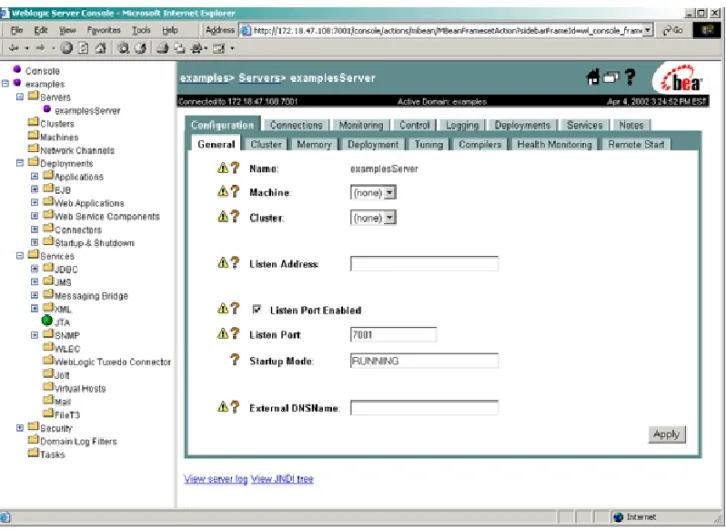
Figure 1-2 Administration Console
The left pane in the Administration Console contains a navigation tree that you use to navigate to tables of data, configuration pages, monitoring pages, or log files. By selecting (left-clicking) a node in the domain tree, you can display a table of data for a resource or configuration and monitoring pages for a selected resource. If a node in the tree is preceded by a plus sign, you can click on the plus sign to expand the tree to access additional resources.
A variety of operations are also accessible by right clicking on a node.
Once you select a node from the navigation tree, in the right pane you will either see a tabular listing of configured resources or objects or a tabbed interface.
Starting and Using the Administration Console
Administration Guide 1-25
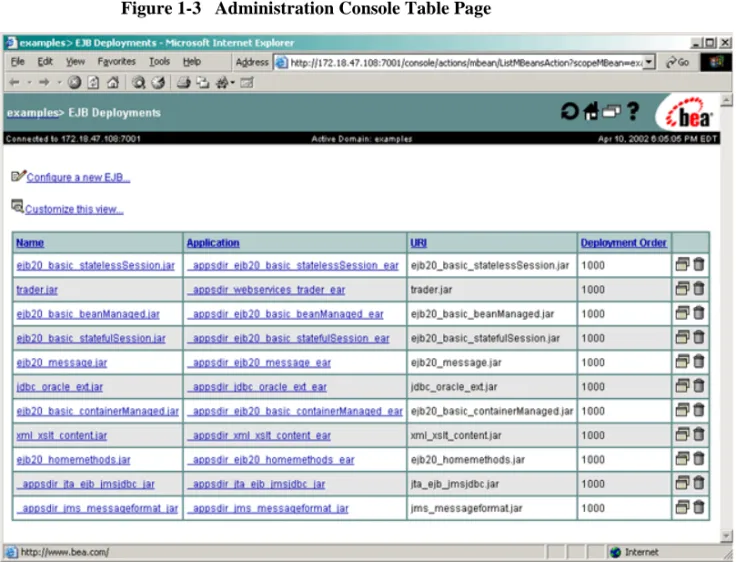
When the data displayed is a table of data about resources or objects of a particular type, you can customize the table by adding or subtracting columns. You can also sort the data tables by clicking on the column headers. To customize a table, click on the Customize this view link at the top of the table.
Figure 1-3 Administration Console Table Page
Configuring Objects or Resources
To configure the object or resource, click on its name. A tabbed screen will appear in the right panel that you can use to navigate through configuration or monitoring screens for the resource or object.
To edit your configuration, change values of the fields displayed in the right pane. After you edit the configuration, click the Apply button to execute the change and persist it to theconfig.xmlfile. Fields labeled with the icon require you to restart any servers affected by the change before the change goes into effect.
Using the Administration Console to Manage Multiple Domains
Because an Administration Server can manage only a single active domain, you can access only that domain using the Administration Console. If you have separate Administration Servers running, each with its own active domain, you can switch from managing one domain to the other only by invoking the URL of the Administration Console on the Administration Server that you want to access.
For more information, seeAbout the Administration Consoleat
http://e-docs.bea.com/wls/docs70/ConsoleHelp/console.html.
Monitoring a Domain Using the Administration Console
To monitor a domain resource either right click on the resource in the navigation tree and select a monitoring option, or navigate to the resource and select the monitoring tab from the right pane. The data displayed represents the current state of the resource. To update the information click the icon in the upper right section of the screen. The data will refresh regularly until you click the icon again. The icon displays a circular animation to indicate when auto-refresh is active. By default, the data refreshes every 10 seconds. You can alter the refresh interval by selecting the Console node and changing the value of Auto-refresh every field.
Monitoring Administration Console Tasks
You can monitor the progress of many operations you initiate from the console by clicking the Tasks node in the navigation tree of the Administration Console.
Getting Help for Using the Administration Console
Online help containing overviews, procedures, and information about configuration attributes is always available from the Administration Console. You can access the online help by clicking one of the following icons:
Using WebLogic Server with Web Servers
Administration Guide 1-27
!Clicking this icon, located in the upper right corner of the console opens another browser window containing information about the console page you are viewing. You can also browse to other Administration Console topics from this window.
!Clicking this icon, located next to a field, opens a small browser window containing information about that field.
Using WebLogic Server with Web Servers
You can proxy requests from popular Web servers to an instance of WebLogic Server or a cluster of WebLogic Servers by using one of the Web server plug-ins. Plug-ins are available for the following Web servers:
! Netscape Enterprise Server or IPlanet
! Microsoft Internet Information Server
! Apache
Because these plug-ins operate in the native environment of the Web server, management of the plug-ins is done using the administration facilities of that Web server.
For more information, seeUsing WebLogic Server with Plug-insat
http://e-docs.bea.com/wls/docs70/plugins/index.html.
Special servlets are also available to proxy requests from an instance of WebLogic Server to another instance of WebLogic Server or to a cluster of WebLogic Servers. For more information, see:
! Configure Proxy Plug-insat
http://e-docs.bea.com/wls/docs70/plugins/http_proxy.html.
! Proxying Requests to a WebLogic Clusterat
http://e-docs.bea.com/wls/docs70/cluster/setup.html#proxyplugin s.
Monitoring
The system administration tools contain extensive capabilities for monitoring WebLogic Servers, domains, and resources. Using the tools you can monitor:
! Server health and performance:
" Execute Queues
" Connections
" Sockets
" Threads
" Throughput
" Memory Usage
! Security:
" Locked-out users
" Invalid Logins
" Login attempts
! Transactions:
" Committed transactions
" Rolledback transactions
! JMS connections and servers
! WebLogic Messaging Bridge
! Applications:
" Servlet sessions
" Connector connection pools
" EJB performance
Licenses
Administration Guide 1-29
For more information, seeMonitoring a WebLogic Server Domainat
http://e-docs.bea.com/wls/docs70/admin_domain/monitoring.html
Licenses
WebLogic Server requires a valid license to function.
An evaluation copy of WebLogic Server is enabled for 30 days so you can start using WebLogic Server immediately. To use WebLogic Server beyond the 30-day
evaluation period, you will need to contact your salesperson about further evaluation or purchasing a license for each IP address on which you intend to use WebLogic Server. All WebLogic Server evaluation products are licensed for use on a single server with access allowed from up to three unique client IP addresses.
If you downloaded WebLogic Server from the BEA Web site, your evaluation license is included with the distribution. The WebLogic Server installation program allows you to specify the location of the BEA home directory, and installs a BEA license file,
license.bea, in that directory.
Administration Guide 2-1
C
HAPTER2
Starting and Stopping
WebLogic Servers
The following sections describe procedures for starting and stopping Administration Servers and Managed Servers:
! The Server Lifecycle
! Providing Usernames and Passwords to Start a Server ! Starting an Administration Server
! Starting a Managed Server ! Shutting Down WebLogic Servers
! Configuring Startup and Shutdown Classes
! Setting Up a WebLogic Server as a Windows Service
The Server Lifecycle
A WebLogic Server can be in one of several states at any given time, and it follows a set of rules that determine how and when it can transition between those states. The series of states through which a server transitions is called the server lifecycle. (See
Figure 2-1 The Server Lifecycle
The most common pattern of transitions is as follows:
1. SHUTDOWN. In this state, the server is configured but inactive. 2. STARTING. When you start a server, it takes the following actions:
a. Retrieves its configuration data.
An Administration Server retrieves the configuration data (including security configuration data) from the domain’s configuration files. A Managed Server contacts the Administration Server for its configuration and security data. If you set up SSL, a Managed Server uses its own set of certificate files, key