Protocol-Independent Features
•Protocol-Independent Features, on page 1
Protocol-Independent Features
Distributed Cisco Express Forwarding
Information About Cisco Express Forwarding
Cisco Express Forwarding (CEF) is a Layer 3 IP switching technology used to optimize network performance. CEF implements an advanced IP look-up and forwarding algorithm to deliver maximum Layer 3 switching performance. CEF is less CPU-intensive than fast switching route caching, allowing more CPU processing power to be dedicated to packet forwarding. In a switch stack, the hardware uses distributed CEF (dCEF) in the stack. In dynamic networks, fast switching cache entries are frequently invalidated because of routing changes, which can cause traffic to be process switched using the routing table, instead of fast switched using the route cache. CEF and dCEF use the Forwarding Information Base (FIB) lookup table to perform destination-based switching of IP packets.
The two main components in CEF and dCEF are the distributed FIB and the distributed adjacency tables. • The FIB is similar to a routing table or information base and maintains a mirror image of the forwarding
information in the IP routing table. When routing or topology changes occur in the network, the IP routing table is updated, and those changes are reflected in the FIB. The FIB maintains next-hop address information based on the information in the IP routing table. Because the FIB contains all known routes that exist in the routing table, CEF eliminates route cache maintenance, is more efficient for switching traffic, and is not affected by traffic patterns.
• Nodes in the network are said to be adjacent if they can reach each other with a single hop across a link layer. CEF uses adjacency tables to prepend Layer 2 addressing information. The adjacency table maintains Layer 2 next-hop addresses for all FIB entries.
Because the switch or switch stack uses Application Specific Integrated Circuits (ASICs) to achieve Gigabit-speed line rate IP traffic, CEF or dCEF forwarding applies only to the software-forwarding path, that is, traffic that is forwarded by the CPU.
How to Configure Cisco Express Forwarding
CEF or distributed CEF is enabled globally by default. If for some reason it is disabled, you can re-enable it by using theip ceforip cef distributedglobal configuration command.
The default configuration is CEF or dCEF enabled on all Layer 3 interfaces. Entering theno ip route-cache cefinterface configuration command disables CEF for traffic that is being forwarded by software. This command does not affect the hardware forwarding path. Disabling CEF and using thedebug ip packet detail privileged EXEC command can be useful to debug software-forwarded traffic. To enable CEF on an interface for the software-forwarding path, use theip route-cache cefinterface configuration command.
Although theno ip route-cache cefinterface configuration command to disable CEF on an interface is visible in the CLI, we strongly recommend that you do not disable CEF or dCEF on interfaces except for debugging purposes.
Caution
To enable CEF or dCEF globally and on an interface for software-forwarded traffic if it has been disabled:
Procedure
Purpose Command or Action
Enters global configuration mode. configure terminal
Example: Step 1
Device# configure terminal
Enables CEF operation on a non-stacking switch. ip cef Example: Step 2 Go to Step 4. Device(config)# ip cef
Enables CEF operation on a active switch. ip cef distributed
Example: Step 3
Device(config)# ip cef distributed
Enters interface configuration mode, and specifies the Layer 3 interface to configure. interface interface-id
Example: Step 4
Device(config)# interface gigabitethernet 1/0/1
Enables CEF on the interface for software-forwarded traffic. ip route-cache cef
Example: Step 5
Device(config-if)# ip route-cache cef
Protocol-Independent Features How to Configure Cisco Express Forwarding
Purpose Command or Action
Returns to privileged EXEC mode. end
Example: Step 6
Device(config-if)# end
Displays the CEF status on all interfaces. show ip cef
Example: Step 7
Device# show ip cef
(Optional) Displays CEF-related interface information on a non-stacking switch. show cef linecard[detail]
Example: Step 8
Device# show cef linecard detail
(Optional) Displays CEF-related interface information on a switch by stack member for show cef linecard[slot-number] [detail]
Example: Step 9
all switches in the stack or for the specified switch.
Device# show cef linecard 5 detail
(Optional) Forslot-number, enter the stack member switch number.
Displays detailed CEF information for all interfaces or the specified interface. show cef interface[interface-id]
Example: Step 10
Device# show cef interface gigabitethernet 1/0/1
Displays CEF adjacency table information. show adjacency
Example: Step 11
Device# show adjacency
(Optional) Saves your entries in the configuration file.
copy running-config startup-config
Example: Step 12
Device# copy running-config startup-config
Load-Balancing Scheme for CEF Traffic
Restrictions for Configuring a Load-Balancing Scheme for CEF Traffic
Protocol-Independent Features
CEF Load-Balancing Overview
CEF load balancing allows you to optimize resources by distributing traffic over multiple paths. CEF load balancing works based on a combination of source and destination packet information.
You can configure load balancing on a per-destination. Because load-balancing decisions are made on the outbound interface, load balancing must be configured on the outbound interface.
Per-Destination Load Balancing for CEF Traffic
Per-destination load balancing allows the device to use multiple paths to achieve load sharing across multiple source-destination host pairs. Packets for a given source-destination host pair are guaranteed to take the same path, even if multiple paths are available. Traffic streams destined for different pairs tend to take different paths.
Per-destination load balancing is enabled by default when you enable CEF. To use per-destination load balancing, you do not perform any additional tasks once CEF is enabled. Per-destination is the load-balancing method of choice for most situations.
Because per-destination load balancing depends on the statistical distribution of traffic, load sharing becomes more effective as the number of source-destination host pairs increases.
You can use per-destination load balancing to ensure that packets for a given host pair arrive in order. All packets intended for a certain host pair are routed over the same link (or links).
Load-Balancing Algorithms for CEF Traffic
The following load-balancing algorithms are provided for use with CEF traffic. Select a load-balancing algorithm with theip cef load-sharing algorithmcommand.
• Original algorithm—The original load-balancing algorithm produces distortions in load sharing across multiple devices because the same algorithm was used on every device. Depending on your network environment, you should select the algorithm.
• Universal algorithm—The universal load-balancing algorithm allows each device on the network to make a different load sharing decision for each source-destination address pair, which resolves load-sharing imbalances. The device is set to perform universal load sharing by default.
How to Configure a Load-Balancing for CEF Traffic
The following sections provide information on configuring load-balancing for CEF traffic.
Enabling or Disabling CEF Per-Destination Load Balancing
To enable or disable CEF per-destination load balancing, perform the following procedure:
Procedure
Purpose Command or Action
Enters global configuration mode. enable
Example: Step 1
Device# enable
Protocol-Independent Features CEF Load-Balancing Overview
Purpose Command or Action
Enters global configuration mode. configure terminal
Example: Step 2
Device# configure terminal
Enters interface configuration mode, and specifies the Layer 3 interface to configure. interface interface-id
Example: Step 3
Device(config-if)# interface gigabitethernet 1/0/1
Enables per-destination load balancing for CEF on the interface.
[no]ip load-sharing per-destination
Example: Step 4
Theno ip load-sharing per-destination command disables per-destination load balancing for CEF on the interface.
Device(config-if)# ip load-sharing per-destination
Exits interface configuration mode and returns to privileged EXEC mode.
end
Example: Step 5
Device(config-if)# end
Selecting a Tunnel Load-Balancing Algorithm for CEF Traffic
Select the tunnel algorithm when your network environment contains only a few source and destination pairs. The device is set to perform universal load sharing by default.
To select a tunnel load-balancing algorithm for CEF traffic, perform the following procedure:
Procedure
Purpose Command or Action
Enters global configuration mode. enable
Example: Step 1
Device# enable
Enters global configuration mode. configure terminal
Example: Step 2
Device# configure terminal
Protocol-Independent Features
Purpose Command or Action
Device(config)# ip cef load-sharing algorithm universal
algorithm, based on a source IP and destination IP hash.
• Theuniversalkeyword sets the
load-balancing algorithm to one that uses a source IP, destination IP, Layer 3 Protocol, Layer 4 source port, Layer 4 destination port and IPv6 flow label (for IPv6 traffic).
• Theidargument is a fixed identifier. Returns to privileged EXEC mode. end
Example: Step 4
Device(config)# end
Configuration Examples for CEF Traffic Load-Balancing
The following sections provide configuration examples for CEF traffic load-balancing.
Example: Enabling or Disabling CEF Per-Destination Load Balancing
Per-destination load balancing is enabled by default when you enable CEF. The following example shows how to disable per-destination load balancing:
Device> enable
Device# configure terminal
Device(config)# interface Ethernet1/0/1
Device(config-if)# no ip load-sharing per-destination Device(config-if)# end
Number of Equal-Cost Routing Paths
Information About Equal-Cost Routing Paths
When a router has two or more routes to the same network with the same metrics, these routes can be thought of as having an equal cost. The term parallel path is another way to see occurrences of equal-cost routes in a routing table. If a router has two or more equal-cost paths to a network, it can use them concurrently. Parallel paths provide redundancy in case of a circuit failure and also enable a router to load balance packets over the available paths for more efficient use of available bandwidth. Equal-cost routes are supported across switches in a stack.
Even though the router automatically learns about and configures equal-cost routes, you can control the maximum number of parallel paths supported by an IP routing protocol in its routing table. Although the switch software allows a maximum of 32 equal-cost routes, the switch hardware will never use more than 16 paths per route.
Protocol-Independent Features Configuration Examples for CEF Traffic Load-Balancing
How to Configure Equal-Cost Routing Paths
ProcedurePurpose Command or Action
Enables privileged EXEC mode. enable
Step 1
Example: Enter your password if prompted.
Device> enable
Enters global configuration mode. configure terminal
Example: Step 2
Device# configure terminal
Enters router configuration mode. router{rip|ospf|eigrp}
Example: Step 3
Device(config)# router eigrp
Sets the maximum number of parallel paths for the protocol routing table. The range is from 1 maximum-paths maximum
Example: Step 4
to 16; the default is 4 for most IP routing protocols, but only 1 for BGP.
Device(config-router)# maximum-paths 2
Returns to privileged EXEC mode. end
Example: Step 5
Device(config-router)# end
Verifies the setting in theMaximum pathfield. show ip protocols
Example: Step 6
Device# show ip protocols
(Optional) Saves your entries in the configuration file.
copy running-config startup-config
Example: Step 7
Device# copy running-config startup-config
Protocol-Independent Features
Static Unicast Routes
Information About Static Unicast Routes
Static unicast routes are user-defined routes that cause packets moving between a source and a destination to take a specified path. Static routes can be important if the router cannot build a route to a particular destination and are useful for specifying a gateway of last resort to which all unroutable packets are sent.
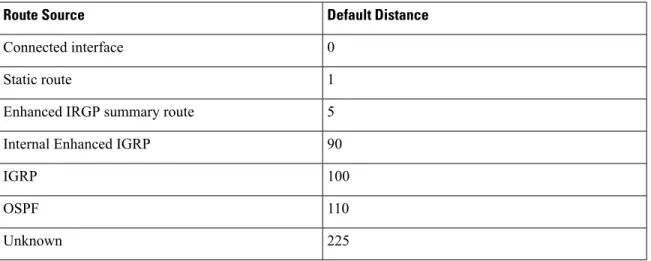
The switch retains static routes until you remove them. However, you can override static routes with dynamic routing information by assigning administrative distance values. Each dynamic routing protocol has a default administrative distance, as listed in Table 41-16. If you want a static route to be overridden by information from a dynamic routing protocol, set the administrative distance of the static route higher than that of the dynamic protocol.
Table 1: Dynamic Routing Protocol Default Administrative Distances
Default Distance Route Source 0 Connected interface 1 Static route 5 Enhanced IRGP summary route
90 Internal Enhanced IGRP
100 IGRP 110 OSPF 225 Unknown
Static routes that point to an interface are advertised through RIP, IGRP, and other dynamic routing protocols, whether or not staticredistributerouter configuration commands were specified for those routing protocols. These static routes are advertised because static routes that point to an interface are considered in the routing table to be connected and hence lose their static nature. However, if you define a static route to an interface that is not one of the networks defined in a network command, no dynamic routing protocols advertise the route unless aredistributestatic command is specified for these protocols.
When an interface goes down, all static routes through that interface are removed from the IP routing table. When the software can no longer find a valid next hop for the address specified as the forwarding router's address in a static route, the static route is also removed from the IP routing table.
Configuring Static Unicast Routes
Static unicast routes are user-defined routes that cause packets moving between a source and a destination to take a specified path. Static routes can be important if the router cannot build a route to a particular destination and are useful for specifying a gateway of last resort to which all unroutable packets are sent.
Follow these steps to configure a static route:
Protocol-Independent Features Static Unicast Routes
Procedure
Purpose Command or Action
Enables privileged EXEC mode. enable
Step 1
Example: • Enter your password if prompted.
Device> enable
Enters global configuration mode. configure terminal
Example: Step 2
Device# configure terminal
Establish a static route. ip route prefix mask{address|interface}
[distance]
Step 3
Example:
Device(config)# ip route prefix mask gigabitethernet 1/0/4
Returns to privileged EXEC mode. end
Example: Step 4
Device(config)# end
Displays the current state of the routing table to verify the configuration.
show ip route
Example: Step 5
Device# show ip route
(Optional) Saves your entries in the configuration file.
copy running-config startup-config
Example: Step 6
Device# copy running-config startup-config
What to do next
Use theno ip route prefix mask{address|interface} global configuration command to remove a static route. The device retains static routes until you remove them.
Protocol-Independent Features
Default Routes and Networks
Information About Default Routes and Networks
A router might not be able to learn the routes to all other networks. To provide complete routing capability, you can use some routers as smart routers and give the remaining routers default routes to the smart router. (Smart routers have routing table information for the entire internetwork.) These default routes can be dynamically learned or can be configured in the individual routers. Most dynamic interior routing protocols include a mechanism for causing a smart router to generate dynamic default information that is then forwarded to other routers.
If a router has a directly connected interface to the specified default network, the dynamic routing protocols running on that device generate a default route. In RIP, it advertises the pseudonetwork 0.0.0.0.
A router that is generating the default for a network also might need a default of its own. One way a router can generate its own default is to specify a static route to the network 0.0.0.0 through the appropriate device. When default information is passed through a dynamic routing protocol, no further configuration is required. The system periodically scans its routing table to choose the optimal default network as its default route. In IGRP networks, there might be several candidate networks for the system default. Cisco routers use administrative distance and metric information to set the default route or the gateway of last resort.
If dynamic default information is not being passed to the system, candidates for the default route are specified with theip default-networkglobal configuration command. If this network appears in the routing table from any source, it is flagged as a possible choice for the default route. If the router has no interface on the default network, but does have a path to it, the network is considered as a possible candidate, and the gateway to the best default path becomes the gateway of last resort.
How to Configure Default Routes and Networks
ProcedurePurpose Command or Action
Enters global configuration mode. configure terminal
Example: Step 1
Device# configure terminal
Specifies a default network. ip default-network network number
Example: Step 2
Device(config)# ip default-network 1
Returns to privileged EXEC mode. end
Example: Step 3
Device(config)# end
Displays the selected default route in the gateway of last resort display.
show ip route
Example: Step 4
Protocol-Independent Features Default Routes and Networks
Purpose Command or Action
Device# show ip route
(Optional) Saves your entries in the configuration file.
copy running-config startup-config
Example: Step 5
Device# copy running-config startup-config
Route Maps to Redistribute Routing Information
Information About Route Maps
The switch can run multiple routing protocols simultaneously, and it can redistribute information from one routing protocol to another. Redistributing information from one routing protocol to another applies to all supported IP-based routing protocols.
You can also conditionally control the redistribution of routes between routing domains by defining enhanced packet filters or route maps between the two domains. Thematchandsetroute-map configuration commands define the condition portion of a route map. Thematchcommand specifies that a criterion must be matched. Thesetcommand specifies an action to be taken if the routing update meets the conditions defined by the match command. Although redistribution is a protocol-independent feature, some of thematchandset route-map configuration commands are specific to a particular protocol.
One or morematchcommands and one or moresetcommands follow aroute-mapcommand. If there are nomatchcommands, everything matches. If there are nosetcommands, nothing is done, other than the match. Therefore, you need at least onematchorsetcommand.
A route map with nosetroute-map configuration commands is sent to the CPU, which causes high CPU utilization.
Note
You can also identify route-map statements aspermitordeny. If the statement is marked as a deny, the packets meeting the match criteria are sent back through the normal forwarding channels (destination-based routing). If the statement is marked as permit, set clauses are applied to packets meeting the match criteria. Packets that do not meet the match criteria are forwarded through the normal routing channel.
How to Configure a Route Map
Although each of Steps 3 through 14 in the following section is optional, you must enter at least onematch route-map configuration command and onesetroute-map configuration command.
The keywords are the same as defined in the procedure to control the route distribution. Note
Protocol-Independent Features
Procedure
Purpose Command or Action
Enters global configuration mode. configure terminal
Example: Step 1
Device# configure terminal
Defines any route maps used to control redistribution and enter route-map configuration mode.
route-mapmap-tag[permit|deny] [sequence number]
Example: Step 2
map-tag—A meaningful name for the route map. Theredistributerouter configuration
Device(config)# route-map rip-to-ospf
permit 4 command uses this name to reference this route
map. Multiple route maps might share the same map tag name.
(Optional) Ifpermitis specified and the match criteria are met for this route map, the route is redistributed as controlled by the set actions. Ifdenyis specified, the route is not
redistributed.
sequence number(Optional)— Number that indicates the position a new route map is to have in the list of route maps already configured with the same name. Matches a BGP AS path access list. match as-path path-list-number
Example: Step 3
Device(config-route-map)#match as-path 10
Matches a BGP community list. match community-list community-list-number
[exact]
Step 4
Example:
Device(config-route-map)# match community-list 150
Matches a standard access list by specifying the name or number. It can be an integer from 1 to 199.
match ip address{access-list-number| access-list-name} [...access-list-number| ...access-list-name] Example: Step 5 Device(config-route-map)# match ip address 5 80 Protocol-Independent Features How to Configure a Route Map
Purpose Command or Action
Matches the specified route metric. The metric-valuecan be an EIGRP metric with a specified value from 0 to 4294967295. match metricmetric-value
Example:
Device(config-route-map)# match metric 2000
Step 6
Matches a next-hop router address passed by one of the access lists specified (numbered from 1 to 199).
match ip next-hop{access-list-number| access-list-name} [...access-list-number| ...access-list-name] Example: Step 7 Device(config-route-map)# match ip next-hop 8 45
Matches the specified tag value in a list of one or more route tag values. Each can be an integer from 0 to 4294967295.
match tag tag value [...tag-value]
Example:
Device(config-route-map)# match tag 3500
Step 8
Matches the specified next hop route out one of the specified interfaces.
match interfacetype number [...type-number]
Example: Step 9
Device(config-route-map)# match interface gigabitethernet 1/0/1
Matches the address specified by the specified advertised access lists.
match ip route-source{access-list-number| access-list-name} [...access-list-number| ...access-list-name] Step 10 Example: Device(config-route-map)# match ip route-source 10 30
Matches the specifiedroute-type: match route-type{local|internal|external
[type-1|type-2]}
Step 11
•local—Locally generated BGP routes.
Example:
•internal—OSPF intra-area and interarea routes or EIGRP internal routes.
Device(config-route-map)# match route-type local
•external—OSPF external routes (Type 1 or Type 2) or EIGRP external routes. Sets BGP route dampening factors. set dampening halflife reuse suppress
max-suppress-time Step 12
Example:
Protocol-Independent Features
Purpose Command or Action
Assigns a value to a local BGP path. set local-preference value
Example: Step 13
Device(config-route-map)# set local-preference 100
Sets the BGP origin code. set origin{igp|egp as|incomplete}
Example: Step 14
Device(config-route-map)#set origin igp
Modifies the BGP autonomous system path. set as-path{tag|prepend as-path-string}
Example: Step 15
Device(config-route-map)# set as-path tag
Sets the level for routes that are advertised into the specified area of the routing domain. The set level{level-1|level-2|level-1-2|
stub-area|backbone}
Step 16
stub-areaandbackboneare OSPF NSSA and backbone areas.
Example:
Device(config-route-map)# set level level-1-2
Sets the metric value to give the redistributed routes (for EIGRP only). Themetric valueis an integer from -294967295 to 294967295. set metric metric value
Example:
Device(config-route-map)# set metric 100
Step 17
Sets the metric value to give the redistributed routes (for EIGRP only):
set metricbandwidth delay reliability loading mtu
Step 18
Example: •bandwidth—Metric value or IGRP
bandwidth of the route in kilobits per second in the range 0 to 4294967295
Device(config-route-map)# set metric 10000 10 255 1 1500
•delay—Route delay in tens of microseconds in the range 0 to 4294967295.
•reliability—Likelihood of successful packet transmission expressed as a number between 0 and 255, where 255 means 100 percent reliability and 0 means no reliability.
•loading—Effective bandwidth of the route expressed as a number from 0 to 255 (255 is 100 percent loading).
Protocol-Independent Features How to Configure a Route Map
Purpose Command or Action
•mtu—Minimum maximum transmission unit (MTU) size of the route in bytes in the range 0 to 4294967295.
Sets the OSPF external metric type for redistributed routes.
set metric-type{type-1|type-2}
Example: Step 19
Device(config-route-map)# set metric-type type-2
Sets the multi-exit discriminator (MED) value on prefixes advertised to external BGP set metric-type internal
Example: Step 20
neighbor to match the IGP metric of the next hop.
Device(config-route-map)# set metric-type internal
Sets the BGP weight for the routing table. The value can be from 1 to 65535.
set weight number
Example: Step 21
Device(config-route-map)# set weight 100
Returns to privileged EXEC mode. end
Example: Step 22
Device(config-route-map)# end
Displays all route maps configured or only the one specified to verify configuration. show route-map
Example: Step 23
Device# show route-map
(Optional) Saves your entries in the configuration file.
copy running-config startup-config
Example: Step 24
Device# copy running-config startup-config
How to Control Route Distribution
Although each of Steps 3 through 14 in the following section is optional, you must enter at least onematch route-map configuration command and onesetroute-map configuration command.
Protocol-Independent Features
The metrics of one routing protocol do not necessarily translate into the metrics of another. For example, the RIP metric is a hop count, and the IGRP metric is a combination of five qualities. In these situations, an artificial metric is assigned to the redistributed route. Uncontrolled exchanging of routing information between different routing protocols can create routing loops and seriously degrade network operation.
If you have not defined a default redistribution metric that replaces metric conversion, some automatic metric translations occur between routing protocols:
• RIP can automatically redistribute static routes. It assigns static routes a metric of 1 (directly connected). • Any protocol can redistribute other routing protocols if a default mode is in effect.
Procedure
Purpose Command or Action
Enters global configuration mode. configure terminal
Example: Step 1
Device# configure terminal
Enters router configuration mode. router{rip|ospf|eigrp}
Example: Step 2
Device(config)# router eigrp 10
Redistributes routes from one routing protocol to another routing protocol. If no route-maps redistribute protocol[process-id] {level-1|
level-1-2|level-2} [metric metric-value]
Step 3
are specified, all routes are redistributed. If the [metric-type type-value] [match internal|
keywordroute-mapis specified with no map-tag, no routes are distributed. external type-value] [tag tag-value]
[route-map map-tag] [weight weight] [subnets]
Example:
Device(config-router)# redistribute eigrp 1
Cause the current routing protocol to use the same metric value for all redistributed routes (RIP and OSPF).
default-metric number
Example:
Device(config-router)# default-metric 1024
Step 4
Cause the EIGRP routing protocol to use the same metric value for all non-EIGRP redistributed routes.
default-metricbandwidth delay reliability loading mtu
Example: Step 5
Device(config-router)# default-metric 1000 100 250 100 1500
Returns to privileged EXEC mode. end
Example: Step 6
Protocol-Independent Features How to Control Route Distribution
Purpose Command or Action
Device(config-router)# end
Displays all route maps configured or only the one specified to verify configuration.
show route-map
Example: Step 7
Device# show route-map
(Optional) Saves your entries in the configuration file.
copy running-config startup-config
Example: Step 8
Device# copy running-config startup-config
Policy-Based Routing
Restrictions for Configuring PBR
• Policy-based routing (PBR) is not supported to forward traffic into GRE tunnel. This applies to PBR applied on any interface and forwarding traffic into GRE tunnel (by means of PBR next-hop or default next-hop or set interface).
• PBR is not supported on GRE tunnel itself (applied under the GRE tunnel itself).
Information About Policy-Based Routing
You can use policy-based routing (PBR) to configure a defined policy for traffic flows. By using PBR, you can have more control over routing by reducing the reliance on routes derived from routing protocols. PBR can specify and implement routing policies that allow or deny paths based on:
• Identity of a particular end system • Application
• Protocol
You can use PBR to provide equal-access and source-sensitive routing, routing based on interactive versus batch traffic, or routing based on dedicated links. For example, you could transfer stock records to a corporate office on a high-bandwidth, high-cost link for a short time while transmitting routine application data such as e-mail over a low-bandwidth, low-cost link.
With PBR, you classify traffic using access control lists (ACLs) and then make traffic go through a different path. PBR is applied to incoming packets. All packets received on an interface with PBR enabled are passed through route maps. Based on the criteria defined in the route maps, packets are forwarded (routed) to the appropriate next hop.
• Route map statement marked as permit is processed as follows:
Protocol-Independent Features
For example: match length A B
match ip address acl1 acl2 match ip address acl3
A packet is permitted if it is permitted by match length A B or acl1 or acl2 or acl3
• If the decision reached is permit, then the action specified by the set command is applied on the packet .
• If the decision reached is deny, then the PBR action (specified in the set command) is not applied. Instead the processing logic moves forward to look at the next route-map statement in the sequence (the statement with the next higher sequence number). If no next statement exists, PBR processing terminates, and the packet is routed using the default IP routing table.
• For PBR, route-map statements marked as deny are not supported.
You can use standard IP ACLs to specify match criteria for a source address or extended IP ACLs to specify match criteria based on an application, a protocol type, or an end station. The process proceeds through the route map until a match is found. If no match is found, normal destination-based routing occurs. There is an implicit deny at the end of the list of match statements.
If match clauses are satisfied, you can use a set clause to specify the IP addresses identifying the next hop router in the path.
How to Configure PBR
• Multicast traffic is not policy-routed. PBR applies only to unicast traffic. • You can enable PBR on a routed port or an SVI.
• The switch supports PBR based on match length.
• You can apply a policy route map to an EtherChannel port channel in Layer 3 mode, but you cannot apply a policy route map to a physical interface that is a member of the EtherChannel. If you try to do so, the command is rejected. When a policy route map is applied to a physical interface, that interface cannot become a member of an EtherChannel.
• You can define a mazimum of 128 IP policy route maps on the switch or switch stack.
• You can define a maximum of 512 access control entries(ACEs) for PBR on the switch or switch stack. • When configuring match criteria in a route map, follow these guidelines:
• Do not match ACLs that permit packets destined for a local address.
• VRF and PBR are mutually exclusive on a switch interface. You cannot enable VRF when PBR is enabled on an interface. The reverse is also true, you cannot enable PBR when VRF is enabled on an interface. • Web Cache Communication Protocol (WCCP) and PBR are mutually exclusive on a switch interface.
You cannot enable WCCP when PBR is enabled on an interface. The reverse is also true, you cannot enable PBR when WCCP is enabled on an interface.
• The number of hardware entries used by PBR depends on the route map itself, the ACLs used, and the order of the ACLs and route-map entries.
Protocol-Independent Features How to Configure PBR
• PBR based on TOS, DSCP and IP Precedence are not supported.
• Set interface, set default next-hop and set default interface are not supported.
•ip next-hop recursiveandip next-hop verify availabilityfeatures are not available and the next-hop should be directly connected.
• Policy-maps with no set actions are supported. Matching packets are routed normally. • Policy-maps with no match clauses are supported. Set actions are applied to all packets.
By default, PBR is disabled on the switch. To enable PBR, you must create a route map that specifies the match criteria and the resulting action. Then, you must enable PBR for that route map on an interface. All packets arriving on the specified interface matching the match clauses are subject to PBR.
Packets that are generated by the switch (CPU), or local packets, are not normally policy-routed. When you globally enable local PBR on the switch, all unicast packets that originate on the switch are subject to local PBR. The protocols that are supported for local PBR are NTP, DNS, MSDP, SYSLOG and TFTP. Local PBR is disabled by default.
Procedure
Purpose Command or Action
Enables privileged EXEC mode. enable
Step 1
Example: Enter your password if prompted.
Device> enable
Enters global configuration mode. configure terminal
Example: Step 2
Device# configure terminal
Defines route maps that are used to control where packets are output, and enters route-map configuration mode.
route-map map-tag[permit] [sequence number]
Example: Step 3
•map-tag — A meaningful name for the route map. The ip policy route-map
Device(config)# route-map pbr-map permit
interface configuration command uses this name to reference the route map. Multiple route-map statements with the same map tag define a single route map. • (Optional) permit — If permit is
specified and the match criteria are met for this route map, the route is policy routed as defined by the set actions. • (Optional) sequence number — The
sequence number shows the position of
Protocol-Independent Features
Purpose Command or Action
Matches the source and destination IP addresses that are permitted by one or more match ip address{access-list-number|
access-list-name} [access-list-number |...access-list-name]
Step 4
standard or extended access lists. ACLs can match on more than one source and destination IP address.
Example:
Device(config-route-map)# match ip
address 110 140 If you do not specify amatchcommand, the
route map is applicable to all packets. Matches the length of the packet. match length min max
Example: Step 5
Device(config-route-map)# match length 64 1500
Specifies the action to be taken on the packets that match the criteria. Sets next hop to which set ip next-hop ip-address[...ip-address]
Example: Step 6
to route the packet (the next hop must be adjacent).
Device(config-route-map)# set ip next-hop 10.1.6.2
Returns to global configuration mode. exit
Example: Step 7
Device(config-route-map)# exit
Enters interface configuration mode, and specifies the interface to be configured. interface interface-id
Example: Step 8
Device(config)# interface gigabitethernet 1/0/1
Enables PBR on a Layer 3 interface, and identify the route map to use. You can ip policy route-map map-tag
Example: Step 9
configure only one route map on an interface.
Device(config-if)# ip policy route-map
pbr-map However, you can have multiple route map
entries with different sequence numbers. These entries are evaluated in the order of sequence number until the first match. If there is no match, packets are routed as usual.
(Optional) Enables fast-switching PBR. You must enable PBR before enabling
fast-switching PBR. ip route-cache policy
Example:
Device(config-if)# ip route-cache policy
Step 10
Returns to global configuration mode. exit
Example: Step 11
Device(config-if)# exit
(Optional) Enables local PBR to perform policy-based routing on packets originating at ip local policy route-map map-tag
Example: Step 12
Protocol-Independent Features How to Configure PBR
Purpose Command or Action
the switch. This applies to packets generated by the switch, and not to incoming packets.
Device(config)# ip local policy route-map local-pbr
Returns to privileged EXEC mode. end
Example: Step 13
Device(config)# end
(Optional) Displays all the route maps configured or only the one specified to verify configuration.
show route-map[map-name]
Example:
Device# show route-map
Step 14
(Optional) Displays policy route maps attached to the interface.
show ip policy
Example: Step 15
Device# show ip policy
(Optional) Displays whether or not local policy routing is enabled and, if so, the route map being used.
show ip local policy
Example:
Device# show ip local policy
Step 16
Filtering Routing Information
You can filter routing protocol information by performing the tasks described in this section.
When routes are redistributed between OSPF processes, no OSPF metrics are preserved. Note
Setting Passive Interfaces
To prevent other routers on a local network from dynamically learning about routes, you can use the passive-interfacerouter configuration command to keep routing update messages from being sent through a router interface. When you use this command in the OSPF protocol, the interface address you specify as passive appears as a stub network in the OSPF domain. OSPF routing information is neither sent nor received through the specified router interface.
In networks with many interfaces, to avoid having to manually set them as passive, you can set all interfaces to be passive by default by using thepassive-interface defaultrouter configuration command and manually setting interfaces where adjacencies are desired.
Use a network monitoring privileged EXEC command such asshow ip ospf interfaceto verify the interfaces that you enabled as passive, or use theshow ip interfaceprivileged EXEC command to verify the interfaces that you enabled as active.
Protocol-Independent Features
Procedure
Purpose Command or Action
Enters global configuration mode. configure terminal
Example: Step 1
Device# configure terminal
Enters router configuration mode. router{rip|ospf|eigrp}
Example: Step 2
Device(config)# router ospf
Suppresses sending routing updates through the specified Layer 3 interface.
passive-interface interface-id
Example: Step 3
Device(config-router)# passive-interface gigabitethernet 1/0/1
(Optional) Sets all interfaces as passive by default. passive-interface default Example: Step 4 Device(config-router)# passive-interface default
(Optional) Activates only those interfaces that need to have adjacencies sent.
no passive-interface interface type
Example: Step 5
Device(config-router)# no
passive-interface gigabitethernet1/0/3 gigabitethernet 1/0/5
(Optional) Specifies the list of networks for the routing process. Thenetwork-addressis an IP address.
network network-address
Example:
Device(config-router)# network 10.1.1.1
Step 6
Returns to privileged EXEC mode. end
Example: Step 7
Device(config-router)# end
(Optional) Saves your entries in the configuration file.
copy running-config startup-config
Example: Step 8
Device# copy running-config startup-config
Protocol-Independent Features Setting Passive Interfaces
Controlling Advertising and Processing in Routing Updates
You can use thedistribute-listrouter configuration command with access control lists to suppress routes from being advertised in routing updates and to prevent other routers from learning one or more routes. When used in OSPF, this feature applies to only external routes, and you cannot specify an interface name. You can also use adistribute-listrouter configuration command to avoid processing certain routes listed in incoming updates. (This feature does not apply to OSPF.)
Procedure
Purpose Command or Action
Enables privileged EXEC mode. enable
Step 1
Example: Enter your password if prompted.
Device> enable
Enters global configuration mode. configure terminal
Example: Step 2
Device# configure terminal
Enters router configuration mode. router{rip|eigrp}
Example: Step 3
Device(config)# router eigrp 10
Permits or denies routes from being advertised in routing updates, depending upon the action listed in the access list.
distribute-list{access-list-number|
access-list-name}out[interface-name|routing process|autonomous-system-number]
Example: Step 4
Device(config-router)# distribute 120 out gigabitethernet 1/0/7
Suppresses processing in routes listed in updates. distribute-list{access-list-number| access-list-name}in[type-number] Example: Step 5 Device(config-router)# distribute-list 125 in
Returns to privileged EXEC mode. end
Example: Step 6
Device(config-router)# end
Protocol-Independent Features
Purpose Command or Action
Device# copy running-config startup-config
Filtering Sources of Routing Information
Because some routing information might be more accurate than others, you can use filtering to prioritize information coming from different sources. An administrative distance is a rating of the trustworthiness of a routing information source, such as a router or group of routers. In a large network, some routing protocols can be more reliable than others. By specifying administrative distance values, you enable the router to intelligently discriminate between sources of routing information. The router always picks the route whose routing protocol has the lowest administrative distance.
Because each network has its own requirements, there are no general guidelines for assigning administrative distances.
Procedure
Purpose Command or Action
Enables privileged EXEC mode. enable
Step 1
Example: Enter your password if prompted.
Device> enable
Enters global configuration mode. configure terminal
Example: Step 2
Device# configure terminal
Enters router configuration mode. router{rip|ospf|eigrp}
Example: Step 3
Device(config)# router eigrp 10
Defines an administrative distance. distance weight{ip-address{ip-address
mask}} [ip access list]
Step 4
weight—The administrative distance as an integer from 10 to 255. Used alone,weight Example:
specifies a default administrative distance that
Device(config-router)# distance 50 10.1.5.1
is used when no other specification exists for a routing information source. Routes with a distance of 255 are not installed in the routing table.
(Optional)ip access list—An IP standard or extended access list to be applied to incoming routing updates.
Returns to privileged EXEC mode. end
Example: Step 5
Protocol-Independent Features Filtering Sources of Routing Information
Purpose Command or Action
Device(config-router)# end
Displays the default administrative distance for a specified routing process.
show ip protocols
Example: Step 6
Device# show ip protocols
(Optional) Saves your entries in the configuration file.
copy running-config startup-config
Example: Step 7
Device# copy running-config startup-config
Managing Authentication Keys
Key management is a method of controlling authentication keys used by routing protocols. Not all protocols can use key management. Authentication keys are available for EIGRP and RIP Version 2.
Prerequisites
Before you manage authentication keys, you must enable authentication. See the appropriate protocol section to see how to enable authentication for that protocol. To manage authentication keys, define a key chain, identify the keys that belong to the key chain, and specify how long each key is valid. Each key has its own key identifier (specified with thekey numberkey chain configuration command), which is stored locally. The combination of the key identifier and the interface associated with the message uniquely identifies the authentication algorithm and Message Digest 5 (MD5) authentication key in use.
How to Configure Authentication Keys
You can configure multiple keys with life times. Only one authentication packet is sent, regardless of how many valid keys exist. The software examines the key numbers in order from lowest to highest, and uses the first valid key it encounters. The lifetimes allow for overlap during key changes. Note that the router must know these lifetimes.
Procedure
Purpose Command or Action
Enters global configuration mode. configure terminal
Example: Step 1
Device# configure terminal
Identifies a key chain, and enter key chain configuration mode.
key chain name-of-chain
Example: Step 2
Protocol-Independent Features
Purpose Command or Action
Identifies the key number. The range is 0 to 2147483647.
key number
Example: Step 3
Device(config-keychain)# key 2000
Identifies the key string. The string can contain from 1 to 80 uppercase and lowercase
key-string text
Example: Step 4
alphanumeric characters, but the first character cannot be a number.
Device(config-keychain)# Room 20, 10th floor
(Optional) Specifies the time period during which the key can be received.
accept-lifetime start-time{infinite|end-time |duration seconds}
Step 5
Example: Thestart-timeandend-timesyntax can be either
hh:mm:ss Month date yearorhh:mm:ss date
Device(config-keychain)# accept-lifetime 12:30:00 Jan 25 1009 infinite
Month year. The default is forever with the defaultstart-timeand the earliest acceptable date as January 1, 1993. The defaultend-time anddurationisinfinite.
(Optional) Specifies the time period during which the key can be sent.
send-lifetime start-time{infinite|end-time| duration seconds}
Step 6
Example: Thestart-timeandend-timesyntax can be either
hh:mm:ss Month date yearorhh:mm:ss date
Device(config-keychain)# accept-lifetime 23:30:00 Jan 25 1019 infinite
Month year. The default is forever with the defaultstart-timeand the earliest acceptable date as January 1, 1993. The defaultend-time anddurationisinfinite.
Returns to privileged EXEC mode. end
Example: Step 7
Device(config-keychain)# end
Displays authentication key information. show key chain
Example: Step 8
Device# show key chain
(Optional) Saves your entries in the configuration file.
copy running-config startup-config
Example: Step 9
Device# copy running-config startup-config
Protocol-Independent Features How to Configure Authentication Keys