HVAC_System:1 Device Template
For UPnP™ Device Architecture V 1.0
Status: Standardized DCP
Date: May 13
th, 2003
This Standardized DCP has been adopted as a Standardized DCP by the Steering Committee of the UPnP Forum, pursuant to Section 2.1(c)(ii) of the UPnP Membership Agreement. UPnP Forum Members have rights and licenses defined by Section 3 of the UPnP Membership Agreement to use and reproduce the Standardized DCP in UPnP Compliant Devices. All such use is subject to all of the provisions of the UPnP Membership Agreement.
THE UPNP FORUM TAKES NO POSITION AS TO WHETHER ANY INTELLECTUAL PROPERTY RIGHTS EXIST IN THE STANDARDIZED DCPS. THE STANDARDIZED DCPS ARE PROVIDED "AS IS" AND "WITH ALL FAULTS". THE UPNP FORUM MAKES NO WARRANTIES, EXPRESS, IMPLIED, STATUTORY, OR OTHERWISE WITH RESPECT TO THE STANDARDIZED DCPS INCLUDING BUT NOT LIMITED TO ALL IMPLIED WARRANTIES OF MERCHANTABILITY, NON-INFRINGEMENT AND FITNESS FOR A PARTICULAR PURPOSE, OF REASONABLE CARE OR WORKMANLIKE EFFORT, OR RESULTS OR OF LACK OF NEGLIGENCE.
© 2001-2003 Contributing Members of the UPnP™ Forum. All Rights Reserved
Authors Company
Larry Stickler Honeywell
© 2001-2003 Contributing Members of the UPnP™ Forum. All Rights Reserved.
Contents
1. OVERVIEW AND SCOPE...3
1.1. CHANGE LOG...3
2. DEVICE DEFINITIONS ...4
2.1. DEVICE TYPE...4
2.2. DEVICE MODEL...4
2.2.1. Description of Device Requirements ...4
2.2.2. Relationships Between Services...2
2.3. THEORY OF OPERATION...2
3. XML DEVICE DESCRIPTION...3
4. TEST...5
List of Tables
Table 1: Device Requirements ...4© 2001-2003 Contributing Members of the UPnP™ Forum. All Rights Reserved.
1.
Overview and Scope
This device template is compliant with the Universal Plug and Play Architecture, Version 1.0. HVAC_System:1 provides the following functionality:
• 1 to n ZoneThermostats are part of this device. If ZoneThermostats are added (or removed) a new device description is established and advertised.
• The ability to set or get system level operating and fan modes. This information can be different from similar information found in the ZoneThermostats
• Optionally an outdoor temperature sensor service Add drawing here
1.1. Change Log
7/27/2000 Changes per 7/17/2000 meeting and conversion to .996 template 8/18/2000 Clean-up
8/30/00 v0.8 Clean-up following 8/27/00 meeting, advance to 0.8, add xml.
2/21/01 Move to 1.1 template, update to latest service versions, updated Theory of Operation and XML
5/1/2001 v0.87 Updated to v0.87
8/6/2001 v0.88 Spelling of “Setpoint” adjusted v0.88 [31 May 2002] v0.9 Revision marks removed. Test chapter added. [13 May 2003] v1.0 Converted to Approved Standard.
© 2001-2003 Contributing Members of the UPnP™ Forum. All Rights Reserved.
2. Device
Definitions
2.1. Device
Type
The following device type identifies a device that is compliant with this template: urn:schemas-upnp-org:device:HVAC_System:1
2.2. Device Model
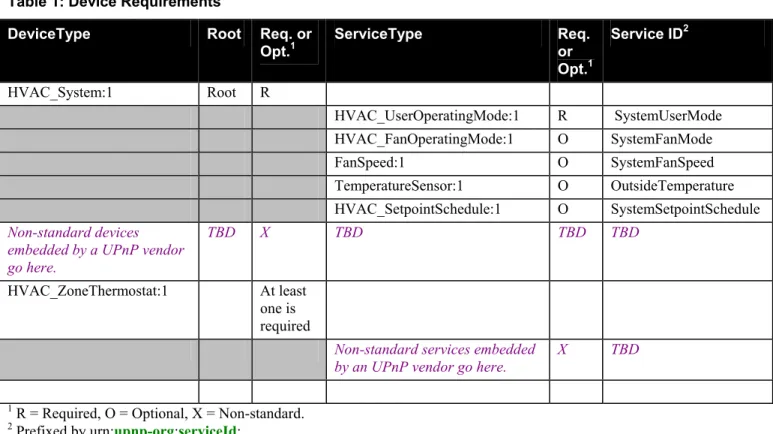
Products that expose devices of the type urn:schemas-upnp-org:device:HVAC_System:1 must implement minimum version numbers of all required embedded devices and services specified in the table below. Table 1: Device Requirements
DeviceType Root Req. or
Opt.1 ServiceType Req. or Opt.1 Service ID2 HVAC_System:1 Root R HVAC_UserOperatingMode:1 R SystemUserMode HVAC_FanOperatingMode:1 O SystemFanMode FanSpeed:1 O SystemFanSpeed TemperatureSensor:1 O OutsideTemperature HVAC_SetpointSchedule:1 O SystemSetpointSchedule Non-standard devices
embedded by a UPnP vendor go here.
TBD X TBD TBD TBD
HVAC_ZoneThermostat:1 At least one is required
Non-standard services embedded by an UPnP vendor go here.
X TBD
1 R = Required, O = Optional, X = Non-standard. 2 Prefixed by urn:upnp-org:serviceId: .
2.2.1. Description of Device Requirements
Any number of HVAC_ZoneThermostats may be included in the system device. Each time a ZoneThermostat is added the System device must go bye-bye and then re-advertise its existence via normal UPnP protocols. HVAC_UserOperatingMode, HVAC_FanOperatingMode, FanSpeed, and HVAC_SetpointSchedule services are used in both the System device and the ZoneThermostat device. Their use is differentiated by use of the Service ID. In the System device these services indicate the system level operating modes.
© 2001-2003 Contributing Members of the UPnP™ Forum. All Rights Reserved.
2.2.2. Relationships Between Services
N/a
2.3. Theory of Operation
A HVAC system includes all the heating and cooling equipment necessary to independently condition a whole house or a region of a house. Large homes may include several independent systems. Small homes may only have one system. Individual systems may be zoned.
A forced air system may typically include a furnace with heat exchangers and a fan or a blower, an air conditioning compressor unit, filters, duct work, temperature sensors, temperature setpoints, mode controls and in zoned systems electrically controllable valve or dampers.
Hydronic systems are usually zoned and may typically include a boiler, cooler, pumps, valves, radiators, temperature sensors, temperature setpoints and mode controls.
HVAC_Systemis a container for all the elements of a system. It is not necessarily a recognizable single physical device. All the elements are not necessarily exposed. This DCP is targeted at user control and does not expose operational details.
HVAC system may include independent controls for sub-regions or zones. This is called a Zoned HVAC System. HVAC_System is the root device and includes system level services and one or more HVAC_ZoneThermostat Devices. The Thermostats provide the zone level controls. Binding of the Thermostats to the System is implied by the hierarchical design of the System device.
© 2001-2003 Contributing Members of the UPnP™ Forum. All Rights Reserved.
3.
XML Device Description
<?xml version="1.0"?>
<root xmlns="urn:schemas-upnp-org:device-1-0"> <specVersion>
<major>1</major> <minor>0</minor> </specVersion>
<URLBase>base URL for all relative URLs</URLBase> <device>
<deviceType>urn:schemas-upnp-org:device:HVAC_System:1</deviceType> <friendlyName>short user-friendly title</friendlyName>
<manufacturer>manufacturer name</manufacturer>
<manufacturerURL>URL to manufacturer site</manufacturerURL> <modelDescription>long user-friendly title</modelDescription> <modelName>model name</modelName>
<modelNumber>model number</modelNumber> <modelURL>URL to model site</modelURL>
<serialNumber>manufacturer's serial number</serialNumber> <UDN>uuid:UUID</UDN>
<UPC>Universal Product Code</UPC> <iconList>
<icon>
<mimetype>image/format</mimetype> <width>horizontal pixels</width> <height>vertical pixels</height> <depth>color depth</depth>
<url>URL to icon</url> </icon>
XML to declare other icons, if any, go here
</iconList> <serviceList> <service>
<serviceType>urn:schemas-upnp-org:service:
HVAC_UserOperatingMode:1</serviceType>
<serviceId>urn:upnp-org:serviceId:SystemUserMode</serviceId> <SCPDURL>URL to service description</SCPDURL>
<controlURL>URL for control</controlURL> <eventSubURL>URL for eventing</eventSubURL> </service>
<service>
<serviceType>urn:schemas-upnp-org:service:
HVAC_FanOperatingMode:1</serviceType>
<serviceId>urn:upnp-org:serviceId:SystemFanMode</serviceId> <SCPDURL>URL to service description</SCPDURL>
<controlURL>URL for control</controlURL> <eventSubURL>URL for eventing</eventSubURL> </service>
<service>
<serviceType>urn:schemas-upnp-org:service:FanSpeed:1</serviceType> <serviceId>urn:upnp-org:serviceId:SystemFanSpeed</serviceId>
<SCPDURL>URL to service description</SCPDURL> <controlURL>URL for control</controlURL> <eventSubURL>URL for eventing</eventSubURL> </service>
© 2001-2003 Contributing Members of the UPnP™ Forum. All Rights Reserved.
<serviceType>urn:schemas-upnp-org:service:TemperatureSensor:1</serviceType> <serviceId>urn:upnp-org:serviceId:OutdoorTemperature</serviceId> <SCPDURL>URL to service description</SCPDURL>
<controlURL>URL for control</controlURL> <eventSubURL>URL for eventing</eventSubURL> </service>
<service>
<serviceType>urn:schemas-upnp-org:service:HVAC_SetpointSchedule:1
</serviceType>
<serviceId>urn:upnp-org:serviceId:SystemSetpointSchedule</serviceId> <SCPDURL>URL to service description</SCPDURL>
<controlURL>URL for control</controlURL> <eventSubURL>URL for eventing</eventSubURL> </service>
Declarations for other services defined by a UPnP Forum working
committee (if any) go here
Declarations for other services added by UPnP vendor (if any) go here
</serviceList> <deviceList>
Implementors shall insert one or more HVAC_Thermostats here
Description of embedded devices added by UPnP vendor (if any) go here
</deviceList>
<presentationURL>URL for presentation</presentationURL> </device>
© 2001-2003 Contributing Members of the UPnP™ Forum. All Rights Reserved.
4. Test
Testing of the UPnP functions Addressing, Discovery, Description, Control (Syntax) and Eventing are performed by the UPnP Test Tool v1.1 based on the following documents:
UPnP Device Architecture v1.0
The Device Definitions in chapter 2 of this document
The XML Device Description in chapter 3 of this document
The UPnP Test Tool device template test file: HVAC_System1.xml
The template documents for the services referenced by this device, together with their respective UPnP Test Tool service template test files.