2
C H A P T E R
Operating
-System
Structures
An operating system provides the environment within which programs are executed. Internally, operating systems vary greatly in their makeup, since they are organized along many different lines. The design of a new operating system is a major task. It is important that the goals of the system be well defined before the design begins. These goals form the basis for choices among various algorithms and strategies.
We can view an operating system from several vantage points. One view focuses on the services that the system provides; another, on the interface that it makes available to users and programmers; a third, on its components and their interconnections. In this chapter, we explore all three aspects of operating systems, showing the viewpoints of users, programmers, and operating-system designers. We consider what services an operating system provides, how they are provided, and what the various methodologies are for designing such systems. Finally, we describe how operating systems are created and how a computer starts its operating system.
CHAPTER OBJECTIVES
• To describe the services an operating system provides to users, processes, and other systems.
• To discuss the various ways of structuring an operating system.
• To explain how operating systems are installed and customized and how they boot.
2.1
Operating-System Services
An operating system provides an environment for the execution of programs. It provides certain services to programs and to the users of those programs. The specific services provided, of course, differ from one operating system to another, but we can identify common classes. These operating-system services are provided for the convenience of the programmer, to make the programming task easier.
One set of operating-system services provides functions that are helpful to the user.
•
User interface. Almost all operating systems have a user interface (UI). This interface can take several forms. One is a command-line interface (CLI), which uses text commands and a method for entering them (say, a program to allow entering and editing of commands). Another is abatch interface, in which commands and directives to control those commands are entered into files, and those files are executed. Most commonly, a graphical user interface (GUI) is used. Here, the interface is a window system with a pointing device to directI/O, choose from menus, and make selections and a keyboard to enter text. Some systems provide two or all three of these variations.•
Program execution. The system must be able to load a program into memory and to run that program. The program must be able to end its execution, either normally or abnormally (indicating error).•
I/Ooperations. A running program may requireI/O, which may involve a file or anI/Odevice. For specific devices, special functions may be desired (such as recording to a CD orDVD drive or blanking aCRT screen). For efficiency and protection, users usually cannot controlI/Odevices directly. Therefore, the operating system must provide a means to doI/O.•
File-system manipulation. The file system is of particular interest. Obvi-ously, programs need to read and write files and directories. They also need to create and delete them by name, search for a given file, and list file information. Finally, some programs include permissions management to allow or deny access to files or directories based on file ownership.•
Communications. There are many circumstances in which one process needs to exchange information with another process. Such communication may occur between processes that are executing on the same computer or between processes that are executing on different computer systems tied together by a computer network. Communications may be imple-mented viashared memoryor throughmessage passing,in which packets of information are moved between processes by the operating system.•
Error detection. The operating system needs to be constantly aware of possible errors. Errors may occur in theCPUand memory hardware (such as a memory error or a power failure), inI/Odevices (such as a parity error on tape, a connection failure on a network, or lack of paper in the printer), and in the user program (such as an arithmetic overflow, an attempt to access an illegal memory location, or a too-great use ofCPUtime). For each type of error, the operating system should take the appropriate action to ensure correct and consistent computing. Debugging facilities can greatly enhance the user’s and programmer’s abilities to use the system efficiently. Another set of operating-system functions exists not for helping the user but rather for ensuring the efficient operation of the system itself. Systems with multiple users can gain efficiency by sharing the computer resources among the users.•
Resource allocation. When there are multiple users or multiple jobs running at the same time, resources must be allocated to each of them. Many different types of resources are managed by the operating system. Some (such asCPUcycles, main memory, and file storage) may have special allocation code, whereas others (such asI/Odevices) may have much more general request and release code. For instance, in determining how best to use theCPU, operating systems haveCPU-scheduling routines that take into account the speed of theCPU, the jobs that must be executed, the number of registers available, and other factors. There may also be routines to allocate printers, modems,USBstorage drives, and other peripheral devices.•
Accounting. We want to keep track of which users use how much and what kinds of computer resources. This record keeping may be used for accounting (so that users can be billed) or simply for accumulating usage statistics. Usage statistics may be a valuable tool for researchers who wish to reconfigure the system to improve computing services.•
Protection and security. The owners of information stored in a multiuser or networked computer system may want to control use of that information. When several separate processes execute concurrently, it should not be possible for one process to interfere with the others or with the operating system itself. Protection involves ensuring that all access to system resources is controlled. Security of the system from outsiders is also important. Such security starts with requiring each user to authenticate himself or herself to the system, usually by means of a password, to gain access to system resources. It extends to defending externalI/Odevices, including modems and network adapters, from invalid access attempts and to recording all such connections for detection of break-ins. If a system is to be protected and secure, precautions must be instituted throughout it. A chain is only as strong as its weakest link.2.2
User Operating-System Interface
There are two fundamental approaches for users to interface with the operating system. One technique is to provide a command-line interface orcommand interpreter that allows users to directly enter commands that are to be performed by the operating system. The second approach allows the user to interface with the operating system via a graphical user interface orGUI. 2.2.1 Command Interpreter
Some operating systems include the command interpreter in the kernel. Others, such as Windows XP and UNIX, treat the command interpreter as a special program that is running when a job is initiated or when a user first logs on (on interactive systems). On systems with multiple command interpreters to choose from, the interpreters are known asshells. For example, on UNIX and Linux systems, there are several different shells a user may choose from including theBourne shell,C shell,Bourne-Again shell, theKorn shell, etc. Most shells provide similar functionality with only minor differences; most users choose a shell based upon personal preference.
The main function of the command interpreter is to get and execute the next user-specified command. Many of the commands given at this level manipulate files: create, delete, list, print, copy, execute, and so on. TheMS-DOSandUNIX shells operate in this way. There are two general ways in which these commands can be implemented.
In one approach, the command interpreter itself contains the code to execute the command. For example, a command to delete a file may cause the command interpreter to jump to a section of its code that sets up the parameters and makes the appropriate system call. In this case, the number of commands that can be given determines the size of the command interpreter, since each command requires its own implementing code.
An alternative approach—used byUNIX, among other operating systems —implements most commands through system programs. In this case, the command interpreter does not understand the command in any way; it merely uses the command to identify a file to be loaded into memory and executed. Thus, theUNIXcommand to delete a file
rm file.txt
would search for a file calledrm, load the file into memory, and execute it with the parameterfile.txt. The function associated with thermcommand would be defined completely by the code in the filerm. In this way, programmers can add new commands to the system easily by creating new files with the proper names. The command-interpreter program, which can be small, does not have to be changed for new commands to be added.
2.2.2 Graphical User Interfaces
A second strategy for interfacing with the operating system is through a user-friendly graphical user interface orGUI. Rather than having users directly enter commands via a command-line interface, aGUIallows provides a mouse-based window-and-menu system as an interface. AGUIprovides adesktopmetaphor where the mouse is moved to position its pointer on images, oricons, on the screen (the desktop) that represent programs, files, directories, and system functions. Depending on the mouse pointer’s location, clicking a button on the mouse can invoke a program, select a file or directory—known as afolder— or pull down a menu that contains commands.
Graphical user interfaces first appeared due in part to research taking place in the early 1970s at Xerox PARCresearch facility. The first GUI appeared on the Xerox Alto computer in 1973. However, graphical interfaces became more widespread with the advent of Apple Macintosh computers in the 1980s. The user interface to the Macintosh operating system (Mac OS) has undergone various changes over the years, the most significant being the adoption of the Aqua interface that appeared with Mac OS X. Microsoft’s first version of Windows—version 1.0—was based upon a GUI interface to the MS-DOS operating system. The various versions of Windows systems proceeding this initial version have made cosmetic changes to the appearance of theGUIand several enhancements to its functionality, including the Windows Explorer.
Traditionally,UNIXsystems have been dominated by command-line inter-faces, although there are variousGUIinterfaces available, including the Com-mon Desktop Environment (CDE) and X-Windows systems that are common on
commercial versions ofUNIXsuch as Solaris and IBM’sAIXsystem. However, there has been significant development in GUI designs from various open-sourceprojects such asK Desktop Environment(orKDE) and theGNOMEdesktop by the GNU project. Both the KDE and GNOME desktops run on Linux and various UNIX systems and are available under open-source licenses, which means their source code is in the public domain.
The choice of whether to use a command-line orGUI interface is mostly one of personal preference. As a very general rule, many UNIX users prefer a command-line interface as they often provide powerful shell interfaces. Alternatively, most Windows users are pleased to use the Windows GUI environment and almost never use the MS-DOS shell interface. The various changes undergone by the Macintosh operating systems provides a nice study in contrast. Historically, MacOShas not provided a command line interface, always requiring its users to interface with the operating system using itsGUI. However, with the release of MacOS X(which is in part implemented using a UNIXkernel), the operating system now provides both a new Aqua interface and command-line interface as well.
The user interface can vary from system to system and even from user to user within a system. It typically is substantially removed from the actual system structure. The design of a useful and friendly user interface is therefore not a direct function of the operating system. In this book, we concentrate on the fundamental problems of providing adequate service to user programs. From the point of view of the operating system, we do not distinguish between user programs and system programs.
2.3
System Calls
System callsprovide an interface to the services made available by an operating system. These calls are generally available as routines written in C and C++, although certain low-level tasks (for example, tasks where hardware must be accessed directly), may need to be written using assembly-language instructions.
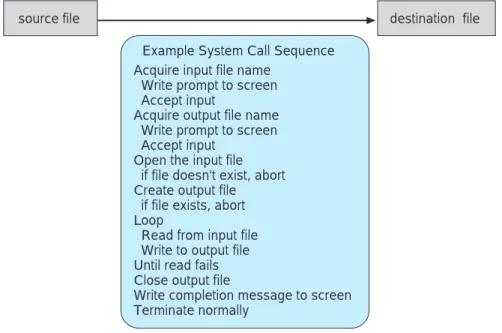
Before we discuss how an operating system makes system calls available, let’s first use an example to illustrate how system calls are used: writing a simple program to read data from one file and copy them to another file. The first input that the program will need is the names of the two files: the input file and the output file. These names can be specified in many ways, depending on the operating-system design. One approach is for the program to ask the user for the names of the two files. In an interactive system, this approach will require a sequence of system calls, first to write a prompting message on the screen and then to read from the keyboard the characters that define the two files. On mouse-based and icon-based systems, a menu of file names is usually displayed in a window. The user can then use the mouse to select the source name, and a window can be opened for the destination name to be specified. This sequence requires manyI/Osystem calls.
Once the two file names are obtained, the program must open the input file and create the output file. Each of these operations requires another system call. There are also possible error conditions for each operation. When the program tries to open the input file, it may find that there is no file of that name or that
the file is protected against access. In these cases, the program should print a message on the console (another sequence of system calls) and then terminate abnormally (another system call). If the input file exists, then we must create a new output file. We may find that there is already an output file with the same name. This situation may cause the program to abort (a system call), or we may delete the existing file (another system call) and create a new one (another system call). Another option, in an interactive system, is to ask the user (via a sequence of system calls to output the prompting message and to read the response from the terminal) whether to replace the existing file or to abort the program.
Now that both files are set up, we enter a loop that reads from the input file (a system call) and writes to the output file (another system call). Each read and write must return status information regarding various possible error conditions. On input, the program may find that the end of the file has been reached or that there was a hardware failure in the read (such as a parity error). The write operation may encounter various errors, depending on the output device (no more disk space, printer out of paper, and so on).
Finally, after the entire file is copied, the program may close both files (another system call), write a message to the console or window (more system calls), and finally terminate normally (the final system call). As we can see, even simple programs may make heavy use of the operating system. Frequently, systems execute thousands of system calls per second. This system-call sequence is shown in Figure 2.1.
Most programmers never see this level of detail, however. Typically, appli-cation developers design programs according to anapplication programming interface (API). The API specifies a set of functions that are available to an application programmer, including the parameters that are passed to each
source file destination file
Example System Call Sequence Acquire input file name
Write prompt to screen Accept input
Acquire output file name Write prompt to screen Accept input
Open the input file if file doesn't exist, abort Create output file if file exists, abort Loop
Read from input file Write to output file Until read fails Close output file
Write completion message to screen Terminate normally
EXAMPLE OF STANDARD API
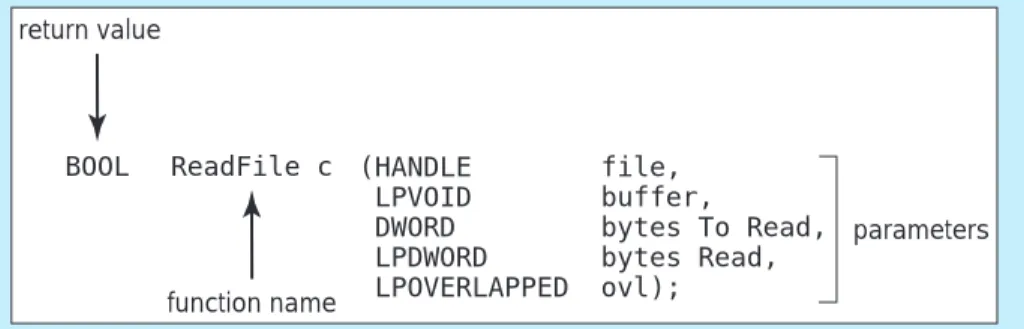
As an example of a standard API, consider the ReadFile() function in the Win32 API— a function for reading from a file. The API for this function appears in Figure 2.2.
(HANDLE file, LPVOID buffer,
DWORD bytes To Read, LPDWORD bytes Read, LPOVERLAPPED ovl); return value ReadFile c function name BOOL parameters
Figure 2.2 The API for the ReadFile() function.
A description of the parameters passed to ReadFile() is as follows:
•
HANDLEfile — the file to be read.•
LPVOID buffer — a buffer where the data will be read into and written from.•
DWORDbytesToRead— the number of bytes to be read into the buffer.•
LPDWORDbytesRead— the number of bytes read during the last read.•
LPOVERLAPPEDovl— indicates if overlappedI/Ois being used.function and the return values the programmer can expect. Three of the most common APIs available to application programmers are the Win32 API for Windows systems, the POSIX API for POSIX-based systems (which includes virtually all versions of UNIX, Linux, and Mac OS X), and the Java API for designing programs that run on the Java virtual machine.
Note that the system-call names used throughout this text are generic examples. Each operating system has its own name for each system call.
Behind the scenes, the functions that make up anAPItypically invoke the actual system calls on behalf of the application programmer. For example, the Win32 function CreateProcess() (which unsurprisingly is used to create a new process) actually calls theNTCreateProcess() system call in the Windows kernel. Why would an application programmer prefer programming according to anAPIrather than invoking actual system calls? There are several reasons for doing so. One benefit of programming according to anAPIconcerns program portability: An application programmer designing a program using anAPIcan expect her program to compile and run on any system that supports the same API(although in reality, architectural differences often make this more difficult than it may appear). Furthermore, actual system calls can often be more detailed
and difficult to work with than theAPIavailable to an application programmer. Regardless, there often exists a strong correlation between invoking a function in theAPIand its associated system call within the kernel. In fact, many of the POSIX and Win32APIs are similar to the native system calls provided by the UNIX, Linux, and Windows operating systems.
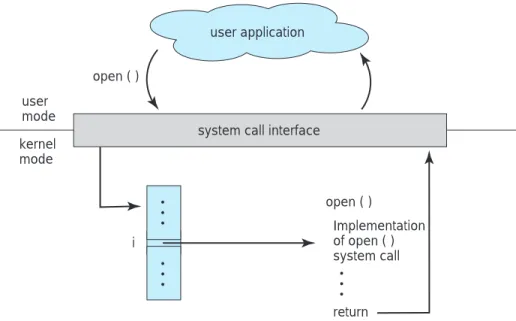
The run-time support system (a set of functions built into libraries included with a compiler) for most programming languages provides a system-call interfacethat serves as the link to system calls made available by the operating system. The system-call interface intercepts function calls in the API and invokes the necessary system call within the operating system. Typically, a number is associated with each system call, and the system-call interface maintains a table indexed according to these numbers. The system call interface then invokes the intended system call in the operating system kernel and returns the status of the system call and any return values.
The caller needs to know nothing about how the system call is implemented or what it does during execution. Rather, it just needs to obey the API and understand what the operating system will do as a result of the execution of that system call. Thus, most of the details of the operating-system interface are hidden from the programmer by theAPIand are managed by the run-time support library. The relationship between an API, the system-call interface, and the operating system is shown in Figure 2.3, which illustrates how the operating system handles a user application invoking the open() system call.
System calls occur in different ways, depending on the computer in use. Often, more information is required than simply the identity of the desired system call. The exact type and amount of information vary according to the particular operating system and call. For example, to get input, we may need to specify the file or device to use as the source, as well as the address and
Implementation of open ( ) system call open ( ) user mode return user application
system call interface kernel
mode
i open ( )
code for system call 13 operating system user program use parameters from table X register X X: parameters for call load address X system call 13
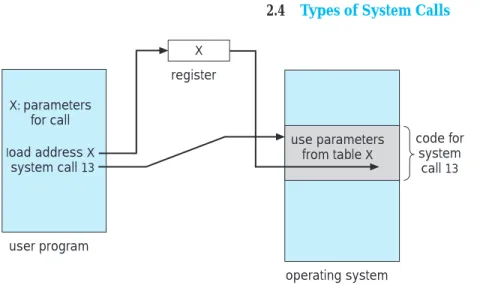
Figure 2.4 Passing of parameters as a table.
length of the memory buffer into which the input should be read. Of course, the device or file and length may be implicit in the call.
Three general methods are used to pass parameters to the operating system. The simplest approach is to pass the parameters in registers. In some cases, however, there may be more parameters than registers. In these cases, the parameters are generally stored in ablock,or table, in memory, and the address of the block is passed as a parameter in a register (Figure 2.4). This is the approach taken by Linux and Solaris. Parameters also can be placed, orpushed, onto thestackby the program andpoppedoff the stack by the operating system. Some operating systems prefer the block or stack method, because those approaches do not limit the number or length of parameters being passed.
2.4
Types of System Calls
System calls can be grouped roughly into five major categories: process control,file manipulation,device manipulation,information maintenance, andcommunications. In Sections 2.4.1 through 2.4.5, we discuss briefly the types of system calls that may be provided by an operating system. Most of these system calls support, or are supported by, concepts and functions that are discussed in later chapters. Figure 2.5 summarizes the types of system calls normally provided by an operating system.
2.4.1 Process Control
A running program needs to be able to halt its execution either normally (end) or abnormally (abort). If a system call is made to terminate the currently running program abnormally, or if the program runs into a problem and causes an error trap, a dump of memory is sometimes taken and an error message generated. The dump is written to disk and may be examined by a debugger—a system program designed to aid the programmer in finding and correcting bugs—to determine the cause of the problem. Under either normal or abnormal circumstances, the operating system must transfer control to the
•
Process control◦ end, abort
◦ load, execute
◦ create process, terminate process
◦ get process attributes, set process attributes
◦ wait for time
◦ wait event, signal event
◦ allocate and free memory
•
File management◦ create file, delete file
◦ open, close
◦ read, write, reposition
◦ get file attributes, set file attributes
•
Device management◦ request device, release device
◦ read, write, reposition
◦ get device attributes, set device attributes
◦ logically attach or detach devices
•
Information maintenance◦ get time or date, set time or date
◦ get system data, set system data
◦ get process, file, or device attributes
◦ set process, file, or device attributes
•
Communications◦ create, delete communication connection
◦ send, receive messages
◦ transfer status information
◦ attach or detach remote devices
Figure 2.5 Types of system calls.
invoking command interpreter. The command interpreter then reads the next command. In an interactive system, the command interpreter simply continues with the next command; it is assumed that the user will issue an appropriate command to respond to any error. In aGUIsystem, a pop-up window might alert the user to the error and ask for guidance. In a batch system, the command interpreter usually terminates the entire job and continues with the next job.
EXAMPLE OF STANDARD C LIBRARY
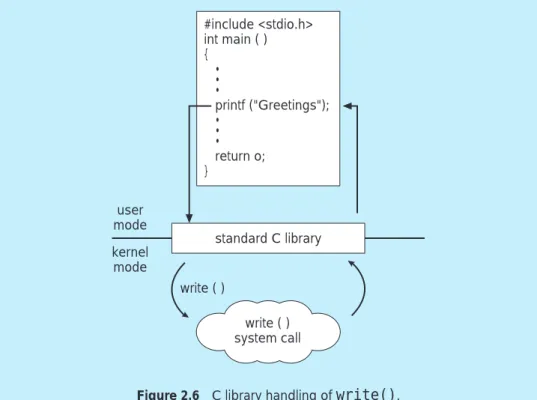
The standard C library provides a portion of the system-call interface for many versions ofUNIXand Linux. As an example, let’s assume a C program invokes the printf() statement. The C library intercepts this call and invokes the necessary system call(s) in the operating system — in this instance, thewrite()system call. The C library takes the value returned bywrite() and passes it back to the user program. This is shown in Figure 2.6.
write ( ) system call user mode kernel mode #include <stdio.h> int main ( ) { • • • printf ("Greetings"); • • • return o; } standard C library write ( )
Figure 2.6 C library handling ofwrite().
Some systems allow control cards to indicate special recovery actions in case an error occurs. Acontrol cardis a batch system concept. It is a command to manage the execution of a process. If the program discovers an error in its input and wants to terminate abnormally, it may also want to define an error level. More severe errors can be indicated by a higher-level error parameter. It is then possible to combine normal and abnormal termination by defining a normal termination as an error at level 0. The command interpreter or a following program can use this error level to determine the next action automatically.
A process or job executing one program may want toloadandexecute another program. This feature allows the command interpreter to execute a program as directed by, for example, a user command, the click of a mouse, or a batch command. An interesting question is where to return control when the loaded program terminates. This question is related to the problem of whether the existing program is lost, saved, or allowed to continue execution concurrently with the new program.
If control returns to the existing program when the new program termi-nates, we must save the memory image of the existing program; thus, we have effectively created a mechanism for one program to call another program. If both programs continue concurrently, we have created a new job or process to be multiprogrammed. Often, there is a system call specifically for this purpose (create processorsubmit job).
If we create a new job or process, or perhaps even a set of jobs or processes, we should be able to control its execution. This control requires the ability to determine and reset the attributes of a job or process, including the job’s priority, its maximum allowable execution time, and so on (get process attributesandset process attributes). We may also want to terminate a job or process that we created (terminate process) if we find that it is incorrect or is no longer needed.
Having created new jobs or processes, we may need to wait for them to finish their execution. We may want to wait for a certain amount of time to pass (wait time); more probably, we will want to wait for a specific event to occur (wait event). The jobs or processes should then signal when that event has occurred (signal event). System calls of this type, dealing with the coordination of concurrent processes, are discussed in great detail in Chapter 6.
Another set of system calls is helpful in debugging a program. Many systems provide system calls to dump memory. This provision is useful for debugging. A program trace lists each instruction as it is executed; it is provided by fewer systems. Even microprocessors provide aCPUmode known as single step,in which a trap is executed by theCPU after every instruction. The trap is usually caught by a debugger.
Many operating systems provide a time profile of a program to indicate the amount of time that the program executes at a particular location or set of locations. A time profile requires either a tracing facility or regular timer interrupts. At every occurrence of the timer interrupt, the value of the program
(a) (b) free memory command interpreter kernel process free memory command interpreter kernel
counter is recorded. With sufficiently frequent timer interrupts, a statistical picture of the time spent on various parts of the program can be obtained.
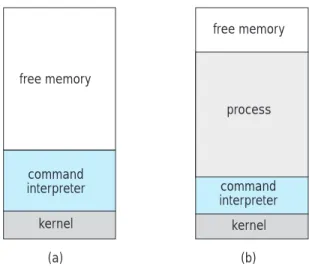
There are so many facets of and variations in process and job control that we next use two examples—one involving a single-tasking system and the other a multitasking system—to clarify these concepts. TheMS-DOSoperating system is an example of a single-tasking system. It has a command interpreter that is invoked when the computer is started (Figure 2.7(a)). BecauseMS-DOS is single-tasking, it uses a simple method to run a program and does not create a new process. It loads the program into memory, writing over most of itself to give the program as much memory as possible (Figure 2.7(b)). Next, it sets the instruction pointer to the first instruction of the program. The program then runs, and either an error causes a trap, or the program executes a system call to terminate. In either case, the error code is saved in the system memory for later use. Following this action, the small portion of the command interpreter that was not overwritten resumes execution. Its first task is to reload the rest of the command interpreter from disk. Then the command interpreter makes the previous error code available to the user or to the next program.
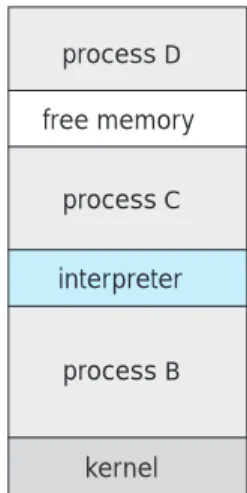
FreeBSD (derived from Berkeley UNIX) is an example of a multitasking system. When a user logs on to the system, the shell of the user’s choice is run. This shell is similar to the MS-DOS shell in that it accepts commands and executes programs that the user requests. However, since FreeBSD is a multitasking system, the command interpreter may continue running while another program is executed (Figure 2.8). To start a new process, the shell executes a fork() system call. Then, the selected program is loaded into memory via anexec()system call, and the program is executed. Depending on the way the command was issued, the shell then either waits for the process to finish or runs the process“in the background.”In the latter case, the shell immediately requests another command. When a process is running in the background, it cannot receive input directly from the keyboard, because the shell is using this resource.I/Ois therefore done through files or through aGUI interface. Meanwhile, the user is free to ask the shell to run other programs, to monitor the progress of the running process, to change that program’s priority,
free memory interpreter kernel process D process C process B
SOLARIS 10 DYNAMIC TRACING FACILITY
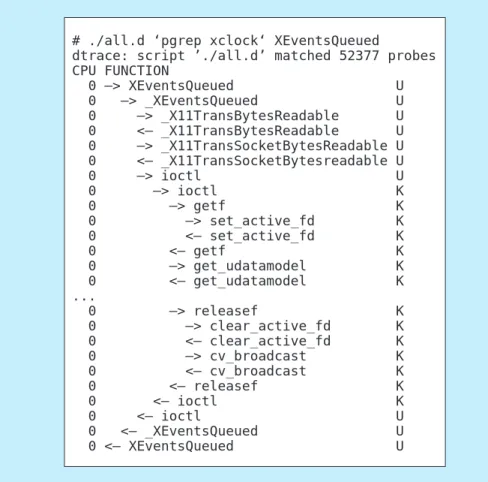
Making running operating systems easier to understand, debug, and tune is an active area of operating system research and implementation. For example, Solaris 10 includes thedtracedynamic tracing facility. This facility dynamically adds probes to a running system. These probes can be queried via theDprogramming language to determine an astonishing amount about the kernel, the system state, and process activities. For example, Figure 2.9 follows an application as it executes a system call (ioctl) and further shows the functional calls within the kernel as they execute to perform the system call. Lines ending with“U”are executed in user mode, and lines ending in “K”in kernel mode.
# ./all.d ‘pgrep xclock‘ XEventsQueued
dtrace: script ’./all.d’ matched 52377 probes CPU FUNCTION 0 –> XEventsQueued U 0 –> _XEventsQueued U 0 –> _X11TransBytesReadable U 0 <– _X11TransBytesReadable U 0 –> _X11TransSocketBytesReadable U 0 <– _X11TransSocketBytesreadable U 0 –> ioctl U 0 –> ioctl K 0 –> getf K 0 –> set_active_fd K 0 <– set_active_fd K 0 <– getf K 0 –> get_udatamodel K 0 <– get_udatamodel K ... 0 –> releasef K 0 –> clear_active_fd K 0 <– clear_active_fd K 0 –> cv_broadcast K 0 <– cv_broadcast K 0 <– releasef K 0 <– ioctl K 0 <– ioctl U 0 <– _XEventsQueued U 0 <– XEventsQueued U
Figure 2.9 Solaris 10 dtrace follows a system call within the kernel. Other operating systems are starting to include various performance and tracing tools, fostered by research at various institutions, including the Paradyn project.
and so on. When the process is done, it executes an exit() system call to terminate, returning to the invoking process a status code of 0 or a nonzero error code. This status or error code is then available to the shell or other programs. Processes are discussed in Chapter 3 with an program example using thefork()andexec()system calls.
2.4.2 File Management
The file system will be discussed in more detail in Chapters 10 and 11. We can, however, identify several common system calls dealing with files,
We first need to be able tocreate and delete files. Either system call requires the name of the file and perhaps some of the file’s attributes. Once the file is created, we need toopenit and to use it. We may alsoread,write, or reposition(rewinding or skipping to the end of the file, for example). Finally, we need toclosethe file, indicating that we are no longer using it.
We may need these same sets of operations for directories if we have a directory structure for organizing files in the file system. In addition, for either files or directories, we need to be able to determine the values of various attributes and perhaps to reset them if necessary. File attributes include the file name, a file type, protection codes, accounting information, and so on. At least two system calls,get file attribute andset file attribute, are required for this function. Some operating systems provide many more calls, such as calls for filemoveandcopy. Others might provide anAPI that performs those operations using code and other system calls, and others might just provide system programs to perform those tasks. If the system programs are callable by other programs, then each can be considered anAPI by other system programs.
2.4.3 Device Management
A process may need several resources to execute—main memory, disk drives, access to files, and so on. If the resources are available, they can be granted, and control can be returned to the user process. Otherwise, the process will have to wait until sufficient resources are available.
The various resources controlled by the operating sysstem can be thought of as devices. Some of these devices are physical devices (for example, tapes), while others can be thought of as abstract or virtual devices (for example, files). If there are multiple users of the system, the system may require us to first requestthe device, to ensure exclusive use of it. After we are finished with the device, werelease it. These functions are similar to theopenand closesystem calls for files. Other operating systems allow unmanaged access to devices. The hazard then is the potential for device contention and perhaps deadlock, which is described in Chapter 7.
Once the device has been requested (and allocated to us), we canread, write, and (possibly)repositionthe device, just as we can with files. In fact, the similarity betweenI/O devices and files is so great that many operating systems, includingUNIX, merge the two into a combined file–device structure. In this case, a set of system calls is used on files and devices. Sometimes, I/O devices are identified by special file names, directory placement, or file attributes.
TheUIcan also make files and devices appear to be similar, even though the underlying system calls are dissimilar. This is another example of the many design decisions that go into building an operating system and user interface. 2.4.4 Information Maintenance
Many system calls exist simply for the purpose of transferring information between the user program and the operating system. For example, most
systems have a system call to return the currenttimeanddate. Other system calls may return information about the system, such as the number of current users, the version number of the operating system, the amount of free memory or disk space, and so on.
In addition, the operating system keeps information about all its processes, and system calls are used to access this information. Generally, calls are also used to reset the process information (get process attributes and set process attributes). In Section 3.1.3, we discuss what information is normally kept.
2.4.5 Communication
There are two common models of interprocess communication: the message-passing model and the shared-memory model. In themessage-passing model, the communicating processes exchange messages with one another to transfer information. Messages can be exchanged between the processes either directly or indirectly through a common mailbox. Before communication can take place, a connection must be opened. The name of the other communicator must be known, be it another process on the same system or a process on another computer connected by a communications network. Each computer in a network has a host name by which it is commonly known. A host also has a network identifier, such as an IP address. Similarly, each process has a process name, and this name is translated into an identifier by which the operating system can refer to the process. Theget hostidandget processid system calls do this translation. The identifiers are then passed to the general-purpose open and close calls provided by the file system or to specific open connection and close connection system calls, depending on the system’s model of communication. The recipient process usually must give its permission for communication to take place with anaccept connectioncall. Most processes that will be receiving connections are special-purposedaemons, which are systems programs provided for that purpose. They execute await for connectioncall and are awakened when a connection is made. The source of the communication, known as theclient,and the receiving daemon, known as aserver,then exchange messages by usingread messageandwrite message system calls. Theclose connectioncall terminates the communication.
In theshared-memory model, processes useshared memory createand shared memory attachsystem calls to create and gain access to regions of memory owned by other processes. Recall that, normally, the operating system tries to prevent one process from accessing another process’s memory. Shared memory requires that two or more processes agree to remove this restriction. They can then exchange information by reading and writing data in the shared areas. The form of the data and the location are determined by the processes and are not under the operating system’s control. The processes are also responsible for ensuring that they are not writing to the same location simultaneously. Such mechanisms are discussed in Chapter 6. In Chapter 4, we look at a variation of the process scheme—threads—in which memory is shared by default.
Both of the models just discussed are common in operating systems, and most systems implement both. Message passing is useful for exchanging smaller amounts of data, because no conflicts need be avoided. It is also easier to implement than is shared memory for intercomputer communication. Shared
memory allows maximum speed and convenience of communication, since it can be done at memory speeds when it takes place within a computer. Problems exist, however, in the areas of protection and synchronization between the processes sharing memory.
2.5
System Programs
Another aspect of a modern system is the collection of system programs. Recall Figure 1.1, which depicted the logical computer hierarchy. At the lowest level is hardware. Next is the operating system, then the system programs, and finally the application programs. System programs provide a convenient environment for program development and execution. Some of them are simply user interfaces to system calls; others are considerably more complex. They can be divided into these categories:
•
File management. These programs create, delete, copy, rename, print, dump, list, and generally manipulate files and directories.•
Status information. Some programs simply ask the system for the date, time, amount of available memory or disk space, number of users, or similar status information. Others are more complex, providing detailed performance, logging, and debugging information. Typically, these pro-grams format and print the output to the terminal or other output devices or files or display it in a window of theGUI. Some systems also support a registry, which is used to store and retrieve configuration information.•
File modification. Several text editors may be available to create and modify the content of files stored on disk or other storage devices. There may also be special commands to search contents of files or perform transformations of the text.•
Programming-language support. Compilers, assemblers, debuggers and interpreters for common programming languages (such as C, C++, Java, Visual Basic, andPERL) are often provided to the user with the operating system.•
Program loading and execution. Once a program is assembled or com-piled, it must be loaded into memory to be executed. The system may provide absolute loaders, relocatable loaders, linkage editors, and overlay loaders. Debugging systems for either higher-level languages or machine language are needed as well.•
Communications. These programs provide the mechanism for creating virtual connections among processes, users, and computer systems. They allow users to send messages to one another’s screens, to browse web pages, to send electronic-mail messages, to log in remotely, or to transfer files from one machine to another.In addition to systems programs, most operating systems are supplied with programs that are useful in solving common problems or performing common operations. Such programs include web browsers, word processors and text formatters, spreadsheets, database systems, compilers, plotting and
statistical-analysis packages, and games. These programs are known assystem utilitiesorapplication programs.
The view of the operating system seen by most users is defined by the application and system programs, rather than by the actual system calls. ConsiderPCs. When his computer is running the MacOS Xoperating system, a user might see theGUI, featuring a mouse and windows interface. Alternatively, or even in one of the windows, he might have a command-lineUNIXshell. Both use the same set of system calls, but the system calls look different and act in different ways.
2.6
Operating-System Design and Implementation
In this section, we discuss problems we face in designing and implementing an operating system. There are, of course, no complete solutions to such problems, but there are approaches that have proved successful.
2.6.1 Design Goals
The first problem in designing a system is to define goals and specifications. At the highest level, the design of the system will be affected by the choice of hardware and the type of system: batch, time shared, single user, multiuser, distributed, real time, or general purpose.
Beyond this highest design level, the requirements may be much harder to specify. The requirements can, however, be divided into two basic groups:user goals andsystemgoals.
Users desire certain obvious properties in a system: The system should be convenient to use, easy to learn and to use, reliable, safe, and fast. Of course, these specifications are not particularly useful in the system design, since there is no general agreement on how to achieve them.
A similar set of requirements can be defined by those people who must design, create, maintain, and operate the system: The system should be easy to design, implement, and maintain; it should be flexible, reliable, error free, and efficient. Again, these requirements are vague and may be interpreted in various ways.
There is, in short, no unique solution to the problem of defining the requirements for an operating system. The wide range of systems in existence shows that different requirements can result in a large variety of solutions for different environments. For example, the requirements for VxWorks, a real-time operating system for embedded systems, must have been substantially different from those forMVS, a large multiuser, multiaccess operating system forIBMmainframes.
Specifying and designing an operating system is a highly creative task. Although no textbook can tell you how to do it, general principles have been developed in the field of software engineering, and we turn now to a discussion of some of these principles.
2.6.2 Mechanisms and Policies
One important principle is the separation ofpolicyfrommechanism. Mecha-nisms determinehowto do something; policies determinewhatwill be done.
For example, the timer construct (see Section 1.5.2) is a mechanism for ensuring CPUprotection, but deciding how long the timer is to be set for a particular user is a policy decision.
The separation of policy and mechanism is important for flexibility. Policies are likely to change across places or over time. In the worst case, each change in policy would require a change in the underlying mechanism. A general mechanism insensitive to changes in policy would be more desirable. A change in policy would then require redefinition of only certain parameters of the system. For instance, consider a mechanism for giving priority to certain types of programs over others. If the mechanism is properly separated from policy, it can be used to support a policy decision thatI/O-intensive programs should have priority overCPU-intensive ones or to support the opposite policy.
Microkernel-based operating systems (Section 2.7.3) take the separation of mechanism and policy to one extreme by implementing a basic set of primitive building blocks. These blocks are almost policy free, allowing more advanced mechanisms and policies to be added via user-created kernel modules or via user programs themselves. As an example, consider the history ofUNIX. At first, it had a time-sharing scheduler. In the latest version of Solaris, scheduling is controlled by loadable tables. Depending on the table currently loaded, the system can be time shared, batch processing, real time, fair share, or any combination. Making the scheduling mechanism general purpose allows vast policy changes to be made with a singleload-new-tablecommand. At the other extreme is a system such as Windows, in which both mechanism and policy are encoded in the system to enforce a global look and feel. All applications have similar interfaces, because the interface itself is built into the kernel and system libraries. The MacOS X operating system has similar functionality.
Policy decisions are important for all resource allocation. Whenever it is necessary to decide whether or not to allocate a resource, a policy decision must be made. Whenever the question ishowrather thanwhat,it is a mechanism that must be determined.
2.6.3 Implementation
Once an operating system is designed, it must be implemented. Traditionally, operating systems have been written in assembly language. Now, however, they are most commonly written in higher-level languages such as C or C++.
The first system that was not written in assembly language was probably the Master Control Program (MCP) for Burroughs computers.MCPwas written in a variant of ALGOL. MULTICS, developed at MIT, was written mainly in PL/1. The Linux and WindowsXPoperating systems are written mostly in C, although there are some small sections of assembly code for device drivers and for saving and restoring the state of registers.
The advantages of using a higher-level language, or at least a systems-implementation language, for implementing operating systems are the same as those accrued when the language is used for application programs: The code can be written faster, is more compact, and is easier to understand and debug. In addition, improvements in compiler technology will improve the generated code for the entire operating system by simple recompilation. Finally, an operating system is far easier toport—to move to some other hardware—
if it is written in a higher-level language. For example,MS-DOSwas written in Intel 8088 assembly language. Consequently, it is available on only the Intel family ofCPUs. The Linux operating system, in contrast, is written mostly in C and is available on a number of differentCPUs, including Intel 80X86, Motorola 680X0,SPARC, andMIPSRX000.
The only possible disadvantages of implementing an operating system in a higher-level language are reduced speed and increased storage requirements. This, however, is no longer a major issue in today’s systems. Although an expert assembly-language programmer can produce efficient small routines, for large programs a modern compiler can perform complex analysis and apply sophisticated optimizations that produce excellent code. Modern processors have deep pipelining and multiple functional units that can handle complex dependencies that can overwhelm the limited ability of the human mind to keep track of details.
As is true in other systems, major performance improvements in operating systems are more likely to be the result of better data structures and algorithms than of excellent assembly-language code. In addition, although operating sys-tems are large, only a small amount of the code is critical to high performance; the memory manager and theCPUscheduler are probably the most critical rou-tines. After the system is written and is working correctly, bottleneck routines can be identified and can be replaced with assembly-language equivalents.
To identify bottlenecks, we must be able to monitor system performance. Code must be added to compute and display measures of system behavior. In a number of systems, the operating system does this task by producing trace listings of system behavior. All interesting events are logged with their time and important parameters and are written to a file. Later, an analysis program can process the log file to determine system performance and to identify bottlenecks and inefficiencies. These same traces can be run as input for a simulation of a suggested improved system. Traces also can help people to find errors in operating-system behavior.
2.7
Operating-System Structure
A system as large and complex as a modern operating system must be engineered carefully if it is to function properly and be modified easily. A common approach is to partition the task into small components rather than have one monolithic system. Each of these modules should be a well-defined portion of the system, with carefully defined inputs, outputs, and functions. We have already discussed briefly in Chapter 1 the common components of operating systems. In this section, we discuss how these components are interconnected and melded into a kernel.
2.7.1 Simple Structure
Many commercial systems do not have well-defined structures. Frequently, such operating systems started as small, simple, and limited systems and then grew beyond their original scope.MS-DOSis an example of such a system. It was originally designed and implemented by a few people who had no idea that it would become so popular. It was written to provide the most functionality in
ROM BIOS device drivers application program
MS-DOS device drivers resident system program
Figure 2.10 MS-DOS layer structure.
the least space, so it was not divided into modules carefully. Figure 2.10 shows its structure.
InMS-DOS, the interfaces and levels of functionality are not well separated. For instance, application programs are able to access the basic I/O routines to write directly to the display and disk drives. Such freedom leavesMS-DOS vulnerable to errant (or malicious) programs, causing entire system crashes when user programs fail. Of course,MS-DOSwas also limited by the hardware of its era. Because the Intel 8088 for which it was written provides no dual mode and no hardware protection, the designers ofMS-DOShad no choice but to leave the base hardware accessible.
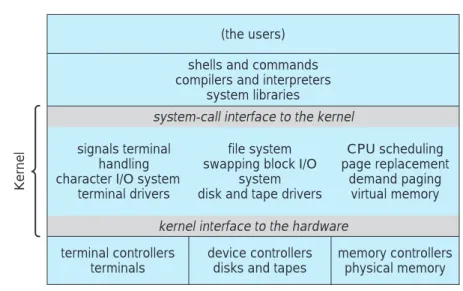
Another example of limited structuring is the original UNIX operating system.UNIXis another system that initially was limited by hardware function-ality. It consists of two separable parts: the kernel and the system programs. The kernel is further separated into a series of interfaces and device drivers, which have been added and expanded over the years asUNIXhas evolved. We can view the traditionalUNIXoperating system as being layered, as shown in Figure 2.11. Everything below the system call interface and above the physical hardware is the kernel. The kernel provides the file system,CPU scheduling, memory management, and other operating-system functions through system calls. Taken in sum, that is an enormous amount of functionality to be com-bined into one level. This monolithic structure was difficult to implement and maintain.
2.7.2 Layered Approach
With proper hardware support, operating systems can be broken into pieces that are smaller and more appropriate than those allowed by the original MS-DOSorUNIXsystems. The operating system can then retain much greater control over the computer and over the applications that make use of that computer. Implementers have more freedom in changing the inner workings of the system and in creating modular operating systems. Under the top-down approach, the overall functionality and features are determined and are
Kernel
(the users) shells and commands compilers and interpreters
system libraries
system-call interface to the kernel signals terminal
handling character I/O system
terminal drivers
file system swapping block I/O
system disk and tape drivers
CPU scheduling page replacement
demand paging virtual memory kernel interface to the hardware
terminal controllers terminals
device controllers disks and tapes
memory controllers physical memory
Figure 2.11 UNIX system structure.
separated into components. Information hiding is also important, because it leaves programmers free to implement the low-level routines as they see fit, provided that the external interface of the routine stays unchanged and that the routine itself performs the advertised task.
A system can be made modular in many ways. One method is thelayered approach, in which the operating system is broken up into a number of layers (levels). The bottom layer (layer 0) is the hardware; the highest (layerN) is the user interface. This layering structure is depicted in Figure 2.12.
An operating-system layer is an implementation of an abstract object made up of data and the operations that can manipulate those data. A typical operating-system layer—say, layerM—consists of data structures and a set of routines that can be invoked by higher-level layers. LayerM,in turn, can invoke operations on lower-level layers.
The main advantage of the layered approach is simplicity of construction and debugging. The layers are selected so that each uses functions (operations) and services of only lower-level layers. This approach simplifies debugging and system verification. The first layer can be debugged without any concern for the rest of the system, because, by definition, it uses only the basic hardware (which is assumed correct) to implement its functions. Once the first layer is debugged, its correct functioning can be assumed while the second layer is debugged, and so on. If an error is found during the debugging of a particular layer, the error must be on that layer, because the layers below it are already debugged. Thus, the design and implementation of the system is simplified.
Each layer is implemented with only those operations provided by lower-level layers. A layer does not need to know how these operations are implemented; it needs to know only what these operations do. Hence, each layer hides the existence of certain data structures, operations, and hardware from higher-level layers.
The major difficulty with the layered approach involves appropriately defining the various layers. Because a layer can use only lower-level layers, careful planning is necessary. For example, the device driver for the backing
layer N user interface • • • layer 1 layer 0 hardware
Figure 2.12 A layered operating system.
store (disk space used by virtual-memory algorithms) must be at a lower level than the memory-management routines, because memory management requires the ability to use the backing store.
Other requirements may not be so obvious. The backing-store driver would normally be above theCPUscheduler, because the driver may need to wait for I/O and the CPU can be rescheduled during this time. However, on a large system, the CPU scheduler may have more information about all the active processes than can fit in memory. Therefore, this information may need to be swapped in and out of memory, requiring the backing-store driver routine to be below theCPUscheduler.
A final problem with layered implementations is that they tend to be less efficient than other types. For instance, when a user program executes anI/O operation, it executes a system call that is trapped to theI/Olayer, which calls the memory-management layer, which in turn calls theCPU-scheduling layer, which is then passed to the hardware. At each layer, the parameters may be modified, data may need to be passed, and so on. Each layer adds overhead to the system call; the net result is a system call that takes longer than does one on a nonlayered system.
These limitations have caused a small backlash against layering in recent years. Fewer layers with more functionality are being designed, providing most of the advantages of modularized code while avoiding the difficult problems of layer definition and interaction.
2.7.3 Microkernels
We have already seen that as UNIX expanded, the kernel became large and difficult to manage. In the mid-1980s, researchers at Carnegie Mellon University developed an operating system called Mach that modularized the kernel using the microkernel approach. This method structures the operating system by removing all nonessential components from the kernel and
implementing them as system and user-level programs. The result is a smaller kernel. There is little consensus regarding which services should remain in the kernel and which should be implemented in user space. Typically, however, microkernels provide minimal process and memory management, in addition to a communication facility.
The main function of the microkernel is to provide a communication facility between the client program and the various services that are also running in user space. Communication is provided by message passing, which was described in Section 2.4.5. For example, if the client program wishes to access a file, it must interact with the file server. The client program and service never interact directly. Rather, they communicate indirectly by exchanging messages with the microkernel.
One benefit of the microkernel approach is ease of extending the operating system. All new services are added to user space and consequently do not require modification of the kernel. When the kernel does have to be modified, the changes tend to be fewer, because the microkernel is a smaller kernel. The resulting operating system is easier to port from one hardware design to another. The microkernel also provides more security and reliability, since most services are running as user—rather than kernel—processes. If a service fails, the rest of the operating system remains untouched.
Several contemporary operating systems have used the microkernel approach. Tru64 UNIX (formerly Digital UNIX) provides a UNIX interface to the user, but it is implemented with a Mach kernel. The Mach kernel maps UNIXsystem calls into messages to the appropriate user-level services.
Another example isQNX.QNXis a real-time operating system that is also based on the microkernel design. The QNX microkernel provides services for message passing and process scheduling. It also handles low-level net-work communication and hardware interrupts. All other services inQNXare provided by standard processes that run outside the kernel in user mode.
Unfortunately, microkernels can suffer from performance decreases due to increased system function overhead. Consider the history of WindowsNT. The first release had a layered microkernel organization. However, this version delivered low performance compared with that of Windows 95. WindowsNT 4.0 partially redressed the performance problem by moving layers from user space to kernel space and integrating them more closely. By the time Windows XPwas designed, its architecture was more monolithic than microkernel. 2.7.4 Modules
Perhaps the best current methodology for operating-system design involves using object-oriented programming techniques to create a modular kernel. Here, the kernel has a set of core components and dynamically links in additional services either during boot time or during run time. Such a strategy uses dynamically loadable modules and is common in modern implementations ofUNIX, such as Solaris, Linux, and MacOS X. For example, the Solaris operating system structure, shown in Figure 2.13, is organized around a core kernel with seven types of loadable kernel modules:
1. Scheduling classes 2. File systems
core Solaris kernel file systems loadable system calls executable formats STREAMS modules miscellaneous modules device and bus drivers scheduling classes
Figure 2.13 Solaris loadable modules.
3. Loadable system calls 4. Executable formats 5. STREAMSmodules 6. Miscellaneous
7. Device and bus drivers
Such a design allows the kernel to provide core services yet also allows certain features to be implemented dynamically. For example, device and bus drivers for specific hardware can be added to the kernel, and support for different file systems can be added as loadable modules. The overall result resembles a layered system in that each kernel section has defined, protected interfaces; but it is more flexible than a layered system in that any module can call any other module. Furthermore, the approach is like the microkernel approach in that the primary module has only core functions and knowledge of how to load and communicate with other modules; but it is more efficient, because modules do not need to invoke message passing in order to communicate.
The Apple Macintosh MacOS Xoperating system uses a hybrid structure. Mac OS X (also known as Darwin) structures the operating system using a layered technique where one layer consists of the Mach microkernel. The structure of MacOS Xappears in Figure 2.14.
The top layers include application environments and a set of services providing a graphical interface to applications. Below these layers is the kernel environment, which consists primarily of the Mach microkernel and theBSD kernel. Mach provides memory management; support for remote procedure calls (RPCs) and interprocess communication (IPC) facilities, including message passing; and thread scheduling. TheBSDcomponent provides aBSDcommand line interface, support for networking and file systems, and an implementation of POSIX APIs, including Pthreads. In addition to Mach and BSD, the kernel environment provides an I/O kit for development of device drivers and dynamically loadable modules (which MacOS Xrefers to askernel extensions). As shown in the figure, applications and common services can make use of either the Mach orBSDfacilities directly.
application environments and common services
BSD kernel
environment
Mach
Figure 2.14 The Mac OS X structure.
2.8
Virtual Machines
The layered approach described in Section 2.7.2 is taken to its logical conclusion in the concept of avirtual machine. The fundamental idea behind a virtual machine is to abstract the hardware of a single computer (the CPU, memory, disk drives, network interface cards, and so forth) into several different execution environments, thereby creating the illusion that each separate execution environment is running its own private computer.
By using CPU scheduling (Chapter 5) and virtual-memory techniques (Chapter 9), an operating system can create the illusion that a process has its own processor with its own (virtual) memory. Normally, a process has additional features, such as system calls and a file system, that are not provided by the bare hardware. The virtual-machine approach does not provide any such additional functionality but rather provides an interface that isidenticalto the underlying bare hardware. Each process is provided with a (virtual) copy of the underlying computer (Figure 2.15).
There are several reasons for creating a virtual machine, all of which are fundamentally related to being able to share the same hardware yet run several different execution environments (that is, different operating systems) concurrently. We will explore the advantages of virtual machines in more detail in Section 2.8.2. Throughout much of this section, we discuss theVMoperating system forIBMsystems, as it provides a useful working example; furthermore IBMpioneered the work in this area.
A major difficulty with the virtual-machine approach involves disk sys-tems. Suppose that the physical machine has three disk drives but wants to support seven virtual machines. Clearly, it cannot allocate a disk drive to each virtual machine, because the virtual-machine software itself will need substantial disk space to provide virtual memory and spooling. The solution is to provide virtual disks—termed minidisks inIBM’sVM operating system —that are identical in all respects except size. The system implements each minidisk by allocating as many tracks on the physical disks as the minidisk needs. Obviously, the sum of the sizes of all minidisks must be smaller than the size of the physical disk space available.
Users thus are given their own virtual machines. They can then run any of the operating systems or software packages that are available on the underlying
(a) processes hardware kernel (b) programming interface processes processes processes kernel kernel kernel VM2 VM1 VM3 implementation hardware virtual-machine
Figure 2.15 System models. (a) Nonvirtual machine. (b) Virtual machine.
machine. For the IBM VMsystem, a user normally runs CMS—a single-user interactive operating system. The virtual-machine software is concerned with multiprogramming multiple virtual machines onto a physical machine, but it does not need to consider any user-support software. This arrangement may provide a useful way to divide the problem of designing a multiuser interactive system into two smaller pieces.
2.8.1 Implementation
Although the virtual-machine concept is useful, it is difficult to implement. Much work is required to provide anexactduplicate of the underlying machine. Remember that the underlying machine has two modes: user mode and kernel mode. The virtual-machine software can run in kernel mode, since it is the operating system. The virtual machine itself can execute in only user mode. Just as the physical machine has two modes, however, so must the virtual machine. Consequently, we must have a virtual user mode and a virtual kernel mode, both of which run in a physical user mode. Those actions that cause a transfer from user mode to kernel mode on a real machine (such as a system call or an attempt to execute a privileged instruction) must also cause a transfer from virtual user mode to virtual kernel mode on a virtual machine.
Such a transfer can be accomplished as follows. When a system call, for example, is made by a program running on a virtual machine in virtual user mode, it will cause a transfer to the virtual-machine monitor in the real machine. When the virtual-machine monitor gains control, it can change the register contents and program counter for the virtual machine to simulate the effect of the system call. It can then restart the virtual machine, noting that it is now in virtual kernel mode.
The major difference, of course, is time. Whereas the realI/Omight have taken 100 milliseconds, the virtual I/O might take less time (because it is
spooled) or more time (because it is interpreted). In addition, the CPU is being multiprogrammed among many virtual machines, further slowing down the virtual machines in unpredictable ways. In the extreme case, it may be necessary to simulate all instructions to provide a true virtual machine. VM works forIBMmachines because normal instructions for the virtual machines can execute directly on the hardware. Only the privileged instructions (needed mainly forI/O) must be simulated and hence execute more slowly.
2.8.2 Benefits
The virtual-machine concept has several advantages. Notice that, in this environment, there is complete protection of the various system resources. Each virtual machine is completely isolated from all other virtual machines, so there are no protection problems. At the same time, however, there is no direct sharing of resources. Two approaches to provide sharing have been implemented. First, it is possible to share a minidisk and thus to share files. This scheme is modeled after a physical shared disk but is implemented by software. Second, it is possible to define a network of virtual machines, each of which can send information over the virtual communications network. Again, the network is modeled after physical communication networks but is implemented in software.
Such a virtual-machine system is a perfect vehicle for operating-systems research and development. Normally, changing an operating system is a difficult task. Operating systems are large and complex programs, and it is difficult to be sure that a change in one part will not cause obscure bugs in some other part. The power of the operating system makes changing it particularly dangerous. Because the operating system executes in kernel mode, a wrong change in a pointer could cause an error that would destroy the entire file system. Thus, it is necessary to test all changes to the operating system carefully.
The operating system, however, runs on and controls the entire machine. Therefore, the current system must be stopped and taken out of use while changes are made and tested. This period is commonly called system-development time. Since it makes the system unavailable to users, system-development time is often scheduled late at night or on weekends, when system load is low.
A virtual-machine system can eliminate much of this problem. System programmers are given their own virtual machine, and system development is done on the virtual machine instead of on a physical machine. Normal system operation seldom needs to be disrupted for system development.
2.8.3 Examples
Despite the advantages of virtual machines, they received little attention for a number of years after they were first developed. Today, however, virtual machines are coming back into fashion as a means of solving system compatibility problems. In this section, we explore two popular contemporary virtual machines: VMware and the Java virtual machine. As we will see, these virtual machines typically run on top of an operating system of any of the design types discussed earlier. Thus, operating system design methods—