Development of a Live Virtual Classroom Environment for Blended Learning
K. S. Lasith Gunawardena,
Department of IT, University of Sri Jayewardenepura, Gangodawila, Nugegoda, Sri Lanka.
Dr. Champa Hewagamage,
Department of IT, University of Sri Jayewardenepura, Gangodawila, Nugegoda, Sri Lanka.
Dr. K.P. Hewagamage,
University of Colombo School of Computing,
Colombo, Sri Lanka. [email protected]
Abstract
Live Virtual Classroom (LVC) software has emerged as separate category of learning software which aims to cater to synchronous learning needs. They are used to bridge the distance gap in distance learning environments. This paper addresses the application of the LVC concepts in a blended learning environment, as a solution to a limited skilled human resource problem. The objective was to create an environment at a Government University in Sri Lanka through which a single lecturer could simultaneously instruct a large student group numbering over two hundred. The developed solution incorporates the essential features of LVCs through the fusing of existing technologies and software. The paper outlines the phases in the development of the environment, and operational aspects of the environment. Results of a comparison study performed to determine the effectiveness of the system are discussed in this paper. We conclude by revealing avenues to further fine tune the environment to create a more fulfilling experience to the students.
Keywords
Blended Learning, Virtual Classrooms, Synchronous Learning, Learning Management Systems
1.
Introduction
Higher Education Institutes are increasingly spending on IT infrastructure, with the aim of enhancing the quality of graduates produced by them. Separately, many universities are extending their courses to a far greater audience by the use of Technology enhanced distance learning. Web based or online content is also being used by many institutions to supplement their traditional courses. In the United States, 96% of the very large (over 15,000 total enrolments) degree awarding institutions have an online component in their programmes [1].
The Higher Education Sector in Sri Lanka has also exhibited different efforts to infuse information technology into its programs. In 2005, 2.9 % of the Sri Lankan Gross Domestic Product was spent Education, and 17.24% of Education Expenditure was spent on Higher Education[2]. The main beneficiary of Higher education funding are the state Universities. Sri Lanka has 15 State (Government) Universities, which admitted 14520 students in 2005 [3].
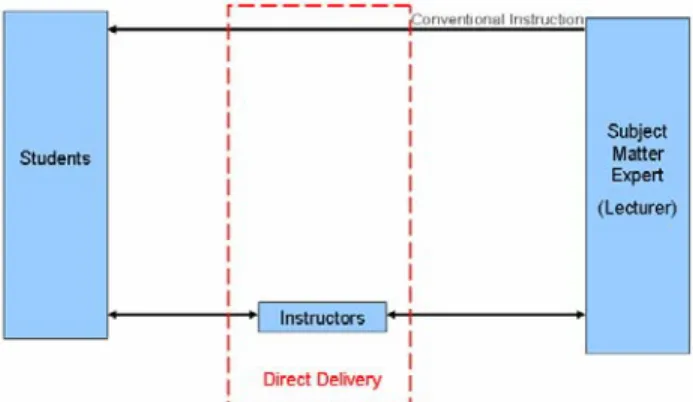
When one considers the total Undergraduate population in Sri Lankan Universities as of 2007, the University of Sri Jayewardenepura has the largest internal student population [4]. The Faculty of Management Studies & Commerce is the largest of the five faculties of this University with nearly four thousand students on roll. All students entering the faculty follow a two year common programme, which includes an exposure to common office productivity application software, such as the Microsoft Office© Suite. The followed course of action in the delivery was to conduct practical sessions, in which a subject expert (Lecturer) explained the procedure using a multimedia projector, and the students could follow the instructions. The lecturer would generally not visit the students individually. The task of assisting the students in an individual basis is usually carried out by Instructional staff (Instructors) - recently passed out graduates with exceptional results in related subject areas.
This form of teaching could be extended, but when the class participants reached a figure close to one hundred, the physical dimensions of the class made it impossible for all students to get a clear view of the lecturer, as well as the projection screen. In addition it makes it difficult for the lecturer to monitor individual student performances - if required. Most degree programs at the faculty catered to over on hundred students, and in such situations alternatives were required.
Limiting the class size inevitably meant that either the lecturer had to either repeat the class at a separate time, or consider the services of an additional lecturer with a similar teaching capacity. In certain situations both of the above could not be considered as viable – due to the hiring cost / availability of the lecturer and the
scarcity of suitably qualified lecturers. This was especially true when considering Software Packages which were used in specialized domains viz Sage® Accounting Range, AutoCAD®, Arcview® GIS. The need for a technological solution was born out of this problem. The proposed solution needed to be cost effective, as technology introduction involved significant financial commitments
2.
Learning Concepts
2.1. Blended Learning
The term “Blended Learning” has been defined in several ways by different authors. In a strict interpretation, one could consider it as simply usage of more than one method for delivery of instructions. Other terms used by authors when referring to a course that mixes traditional face to face learning with online delivery is “hybrid” or “mixed” Learning [5,6].
“Blended Learning” as a term, has been made popular during the past decade or so, although the underlying concepts have been used long before. The phases in which technology based training has evolved can be listed as follows. [7]
1. Instructor Led Training (ILT)
2. Mainframe Based, Computer Based Training (1960 – 1970s)
3. Via Satellite transmission of ground based Video (Distance Learning : 1980-90s)
4. PC Based CD ROM, (CBT: 1980's-1990"s) 5. First Generation Web-based Training/ Virtual
Classrooms (e-Learning : 1998-present )
6. Integrated Blended Learning: (Web, Video, Audio, Simulations, ILT : 2000 - present)
A further explanation for blended learning is listed in table 1, and is based on a classification of courses according to the delivery method [1].
Table 1 - Types of Courses
Proportion of Content Delivered
Online
Type of
Course Typical Description
0% Traditional
Course with no online technology used – content is delivered in writing or orally.
1 to 29% Web Facilitated
Course that uses web based technology to facilitate what is essentially a face-to-face course. Uses a course management system (CMS) or web pages to post the syllabus and assignments for example.
30% to 79% Blended / Hybrid
Course that blends online and face to face delivery. Substantial
proportion of the content is delivered online, typically uses online discussions, and typically has some face to face meetings. 80%+ Online
A course where most or all of the content is delivered online. Typically have no face to face meetings.
Implementation of Blended learning initiatives have resulted in varied experiences. The opportunity to fathom new and unique teaching and instructional experiences is one which has generated interest[8].
The requirement at the University and the nature of the course allows the authors to experiment with a blended learning solution to the problems mention in the Introduction.
2.2. Live Virtual Classrooms
Depending on the time component of distance learning, it can be categorised as synchronous learning and asynchronous learning. The use of Internet Technologies have matured significantly as at present for synchronous learning to be considered as valid for distance learning [9]. Synchronous learning requires teachers and students to interact with each other at the same time (even from remote locations).
The terminology “ Live Virtual Classrooms(LVC)” is a relatively new term while the underlying concept has been in discussions for nearly a decade. Other terms identified with a similar context in mind are[10]:
a. Live e-learning systems b. Virtual classrooms
c. Synchronous training systems d. Live online learning systems e. Web conferencing systems
The features found in LVC Software includes : a. Application file sharing
b. Live demonstrations and guided practice c. Live audio/video
d. virtual office hours e. student workgroups
f. guided problem-solving sessions g. text chat
h. quizzing and polling i. virtual labs
The authors identified several products catering to this market. Adobe Acrobat Connect[11], and Elluminate Live![12], are examples for proprietary software sold under this category. Only one Open Source alternatives was identified during the study – WebHuddle[13].
The licensing costs for the service were mostly based on monthly payments, and this was a not a viable solution for the university. Another issue of concern for the university, was the Operational Model used by them. Most of the LVCs did not provide a facility to host the server locally, and required the clients to connect to the providers server – a feature which required high bandwidth internet connections. The existing bandwidth the university had were not sufficient, and ensuring the uninterrupted voice and desktop delivery (minimum) was of concern to the university. Developing prototype LVC was one option which the authors identified as attempted by previous researchers to overcome limitations of existing products [14].
In terms of the features provided by the LVCs, they were sufficient for most of the Universities basic requirements– Live Video of the Lecturer, Text Chat, Live Audio, Desktop or Application Sharing. Yet the cost factor was one which deterred the university from utilising these services.
2.3. Learning Management Systems
Learning Management Systems (LMS) were meant to simplify the administration of learning and training needs of an organisation, especially organisations in the education domain. LMSs are often viewed as being the starting point (or critical component) of any elearning or blended learning program, but this perspective is valid only from a management and control standpoint – it is anti ethical to the way in which most people learn today [15]. The main features of a LMS includes;
a. Learner – Centered Content
b. The ability to manage students, teachers, courses, and course contents.
c. A platform for Assessments and displaying results.
d. Monitor student participation,
e. Provide students with the ability to use interactive features such as threaded discussions f. Adherence to standards
Some of the features presented in an LMS, are more suitable for organisational contexts, and need to be carefully evaluated. Course Management Systems (CMS) is another term which is closely associated with LMSs. Although terms are often considered equally, some consider CMS to be online systems that were originally designed to support classroom learning in academic settings, such as universities and high schools, while LMS refers to software that primarily acts as an electronic registrar by electronically performing various enrolment and related tasks[16]. From a participant perspective, an
LMS provides a central point from which learners access activities.
In selecting a suitable LMS an organisation has three options – to build a system, to use a hosted solution or to buy a solution, the latter being the most popular choice [17]. The choice further narrows down into buying proprietary software or using open source solutions.
Studies reveal that in Hong Kong, schools are rapidly taking up the use of LMSs, and that student and teachers need the skills to incorporate using LMSs into their teaching and learning [18]. The same study shows a partial preference for Moodle, a Open Source LMS over Blackboard, the popular proprietary LMS. The Moodle user community lists sites registered by nine of the fifteen Sri Lankan Government Universities in its website [19]
3.
Methodology
The learning environment under investigation was the IT Resource Centre (ITRC) of the faculty of Management Studies & Commerce.
A combination of both qualitative (inductive) and quantitative (deductive) methods were employed. The task of studying the human computer interactions within the existing environment was achieved by employing Ethnographic Methods, using qualitative approach. By living in the environment the authors were able to focus on identifying student(user) needs and interactions between the Subject Matter Expert (lecturer), Student and Instructor. This was instrumental in creating a user centered design. The Case study method was also utilized in explaining the design and development of the new learning environment. The deductive (quantitative) method was used to carry out the sampling survey by administering a questionnaire to find out the student satisfaction.
Figure 1 - Conceptual Framework : Traditional Setup
The teaching and learning process at the ITRC facilitates synchronous learning in it’s traditional setup (figure 1). Therefore it was decided that the proposed learning environment should contain a major component to
support synchronous learning. A supplementary asynchronous learning environment was incorporated to address student support requirements. A LVC emulation was planned to support synchronous learning, and implementing an LMS was decided to address the asynchronous learning activities at large (figure 2).
Figure 2 - Conceptual framework : Implemented
4.
Implementation
The IT Resource Centre (ITRC) of the faculty of Management Studies & Commerce, University of Sri Jayewardenepura was established in 2001 with a view to enhance the IT related programmes run by the faculty. Originally having a capacity of 100 computers, spread over 2 labs, it was expanded to accommodate nearly 250 computers over 4 labs in 2006. A feature which was integrated into the expansion at it’s initial proposal stage was the need to accommodate broadcasting of lectures from one lab to another - providing a virtual classroom environment.
The Lecture Session had three distinct elements which had to be addressed:
a. The Lecturer’s Voice and Student Replies (When Required)
The initial approach carried out was to have an Audio Broadcast system which could enable the lecturer to address any of the 4 labs, or all of them. This was facilitated by an audio matrix designed by an audio equipment supplier to match the requirement of the ITRC. This was basically a one way system, although it had the option of a student in the remote class being handed over a (wireless) microphone on request to pose questions to the lecturer in a different lab.
b. The Actions Performed by the Lecturer on Screen (Desktop)
The initial strategy adopted was to use transmission via the network using the Software known as RealVNC, which was supplemented by a internally developed interface. However this software in it’s native form suppored only a very basic set of features. The current solution which gained the positive response from the Lecturers is a commercial software known as Net Support School. The requirement is to broadcast the lecture from the lecturer’s machine in one lab to the lecturer machines (unoccupied) in the remaining labs.
c. The Lecturer’s Physical Appearance
The Final Element required is the Broadcasting of the Video depicting the lecturer and his poses. This requires a separate multi media projector to be installed at each location, or the use of a switch to switch the single available multimedia projector between the Desktop (RGB) and Lecturer View (RCA Video). A video amplifier is used in the central location to ensure the signal does not degrade due to cable length. At the transmitting lecture lab, a Standard Video camera is used to lock on to the front of the lecture hall. Separate cables have been laid (5C2V) to provide the video signal. The Video solution was designed and implemented by the staff of the ITRC, without any third party support, and most of the material used (Apart from the Video Amplifier, Cameras and Projectors) were locally designed.
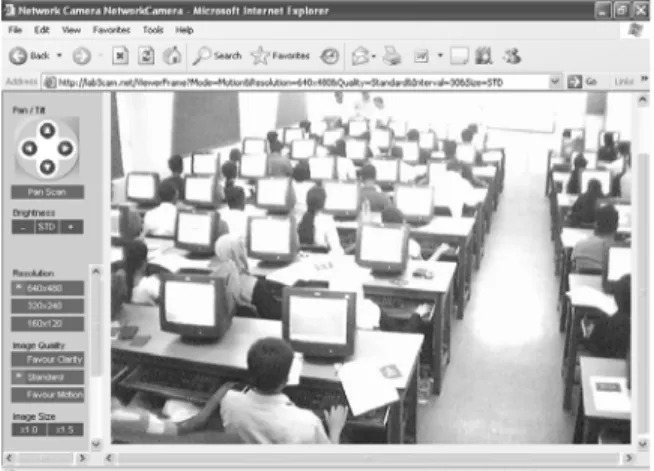
An obvious question that one could pose is the how to maintain the interactive nature required in a regular lecture. One feature currently installed is the use of network cameras with remote pan and tilt to monitor the remote locations. (See figure 3) This will enable the lecturer to observe the remote classroom(s).
Although the lecturer was stationed at the front of the pilot classroom, using the previously discussed Commercial Software – Net Support School, it was possible to allow the lecturer to monitor all student desktops, from a single location. (See figure 4). The system was designed with a view to support further extension for additional labs in the future.
Figure 4 - View of Student Desktops from the Lecturer
Apart from the Microphone facility (student feedback) mentioned in 4.a, the main feature that could be used by students to connect with the lecturer was the Net Meeting Software, which is bundled with Microsoft Windows XP Professional. The students could use this to connect with the lecturer and/or other students. Although Net meeting included the voice communication facility it was not used in the initial experimentations.
5.
Evaluation Approach
Out of the courses conducted at the ITRC, Two Courses viz, ACC 3305 - Financial Modelling with MS Excel (Sample A, 70 Students), BEC 3305 - Project Management using MS Project (Sample B, 230 Students) were selected as focus groups for evaluation. The rationale of selection was the fact that these two were the only classes which utilised the LVC environment. A contributory factor to this was the fact that they had prior experience in the learning environment
The traditional whiteboard was not used as a part of these courses. An 8 Item survey instrument was used to gather the information. The survey attempted to determine the students expectation in learner in achieving learning outcomes , and the problems faced by students. The data was analysed using SPSS Version 13.0. The response sheet provided room for the students to give their own views. The authors also interviewed the Lecturer and Instructors to get their feedback.
6.
Results / Findings
6.1. Composition of the Sample
The response rate was 64% and 85% respectively. In comparison, the Medium of instruction was English, and 97.2% sample A and 96.5% sample B of indicate they have a Fair or better working knowledge of the language. In this blended learning environment, the familiarity of using Computers by the students, can create a positive impact. The findings reveal that 72.2% of sample A and 83.9% of sample B consider their usage of computers to be average or better.
6.2. Comparison of the Learning Environment Features
As the final step of the analysis the Learning Environments were compared under each Learning Support Feature for both Samples. The average of the Likert Scale value within each feature was taken into consideration. In both Sample A & B the we observe that the students indicate a sense of satisfaction since all the mean values are above 3.
The satisfaction levels observed were less in the second group, but in the second group, more students were in the remote location.
Table 2 - Comparison of the level of expectation in learner support
Learning Support Feature Sample A Sample B
With Lecturer Without Lecturer With Lecturer Without Lecturer Understandability - Screen Explanations 4.33 4.08 3.77 3.58 Audibility of Lecturer 4.46 4.00 3.60 3.50 Visibility of Demonstration 4.11 3.92 3.77 3.66 Physical Presence of Lecturer 4.17 3.83 3.71 3.54 Concentration 4.12 3.80 3.53 3.42 Involvement of Instructors 4.42 4.25 3.86 3.66 Technical Difficulties 3.58 3.42 3.29 3.29 Overall Satisfaction 4.50 3.67 3.82 3.56
Based on the additional comments given by students, and the above data, the students in the remote location indicated a lesser overall satisfaction level than in the live classroom for all variables. The Majority preferred to be in a situation where the lecturer was “live”, some had provided reasons for their preference – as one student mentioned, the information was the same, but the lecturer is not continuously observing the remote location, and as such opportunities to pause the lecturer
(for clarifications or other requirements) were less in the remote class.
However there were comments which were promising as well – as one student pointed out, it is better to be in the front row in the remote location rather than being in the last row of the “live” classroom, as it provides a better screen visibility. The involvement of instructors was important, especially to students at the remote location.
Although the lecturer had access to the individual desktops of students (via Net Support School), this feature was not used heavily by the lecturer, and as such this could have contributed to the students feeling that the lecturer was actively involved with them. This was a welcome solution from the lecturer’s viewpoint, in near perfect solution rather than conducting several sessions of the same subject. Instructor’s comments were indicating no major difference in either environment.
7.
Conclusion
Based on the additional comments given by students, and the above data, the students in the remote location indicated a lesser overall satisfaction level, the student perception was lower than the live classroom for all variables. The Majority preferred to be in a situation where the lecturer was “live”, some had provided reasons for their preference – as one student mentioned, the information was the same, but the lecturer is not continuously observing the remote location, and as such opportunities to pause the lecturer (for clarifications or other requirements) were less in the remote class. However there were comments which were promising as well – as one student pointed out, it is better to be in the front row in the remote location rather than being in the last row of the “live” classroom, as it provides a better screen visibility. The involvement of instructors was important, especially to students at the remote location.
Although the lecturer had access to the individual desktops of students (via Net Support School), this feature was not used heavily by the lecturer, and as such this could have contributed to the students feeling that the lecturer was not with them.
From the Lecturer’s viewpoint, this was a welcome solution to having several sessions, which enabled all students to receive the same set of instructions. However, the lecturer was in a habit of moving around in the class – periodically to check on student progress.
8.
Limitations of the Current System and
Future Improvements
Based on the feedback received, the authors list below several limitations of the current system and the suggested remedial actions to be taken.
a. Capturing movement of the lecturer.
This solution further needs to be refined as the current setup does not permit capture of the lecturer view if he/she is moving around the class. In such situations, the currently adopted strategy requires a human operator to man the camera. Another strategy which could be adopted with the necessary infrastructure is use of a camera with remote pan and tilt control.
b. Software for Desktop Sharing and Broadcasting Since the current software used is a Commercially sold one, the cost of licensing increases with the addition of each desktop, Exploring the availability of open sourced solutions for the Desktop Sharing and Monitoring Solution is a need.
c. Usage of Network Connection for Audio and Video Broadcast.
With additional bandwidth and bandwidth management, it should be possible to send the Voice and Video Elements via the network too. However the need to ensure that the Quality of Service was not affected is a primary concern here. In the ultimate scenario, data pertaining to the Lecturers Movement & Voice (Video & Audio), the Lecturer’s Desktop Screen, and the Files Saved on the Remote File Servers will be using the network bandwidth.
d. Demand on Access for the teaching Material.
Using a dedicated video server, it is possible to recoding the video/voice/data elements, to allow on demand access for students, via the LAN. (even if student miss a important segment of the current lecturer, they should be able to replay it) This flexible learning approach is yet infeasible for students to access this information from a remote location (For example if a student misses the class, to access the lesson from their internship locations)
e. Capturing of Whiteboard Notes
The present system is that it has no provision to capture the whiteboard text and transmit it to the remote location and/or store for future use. This was a factor that had to be either covered by the Video Camera, or by an electronic whiteboard mechanism.
f. Forum and Chat features
The Use of a forum will enable the students to post problems which they face in using the software(s). The Currently used Net Support School Software has a Chat feature, but usage of a Standalone Instant Messenger (IM) client has more features, such as the ability to create chat rooms.
g. Commitment from Lecturer to address the remote students.
The Students in the remote class, need periodic attention directed at them to keep their interest at times. This required the lecturer to be aware, and the lesson flow had to contain ingredients which assured the remote students that they were active participants of the session as well.
h. Increasing the Instructor to Students Ratio
In the remote class, since students cannot pause the lecturer, they need assistance via instructors, much more than in the live lecturer session.
In providing computer based instructional training to large groups of students, limited resource footprint is a reality we have to address in the Sri Lankan context. Addressing a large student group can lead to loss of individual attention, while splitting the group can lead to unbalanced delivery between sessions, cost of skilled trainer and other resources. Our approach was aimed in overcoming the associated problems with an economical mindset focus.
The results indicate the students still prefer a live lecturer over the virtual classroom, but generally the students can follow the lesson without major hindrances even from the remote location in the blended learning environment implemented. The only significant additional cost factor in this system lies in the procurement of desktop sharing software. There are no monthly licensing fees, and bandwidth costs. The authors are confident that the system can be further refined to provide an improved LVC Environment.
References
1. Allen, I. E. & Seaman, J. (2006) “Making the Grade – Online Education in the United States, 2006 Sloan-C. ISBN 0-9766714-5-X.
2. University Grants Commission, Sri Lanka (2006) “Sri Lanka University Statistics 2006” ISBN 978-955-583-093-5.
3. University Grants Commission, Sri Lanka “Undergraduate Enrolment and Output” retrieved from
http://www.ugc.ac.lk/statistics/General/indicators.htm [14th July 2008].
4. IRQUE Project - Statistics of Academic Staff and Students in Public Universities in Sri Lanka – 2007 retrieved from http://www.irque.lk [10th July 2008].
5. Brown D.G., “Hybrid Courses are best” retrieved from http://www.wfu.edu/~brown/Syllabus%20Articles/ SylHybrid%20Courses.htm [10th July 2008].
6. Young, J.R. “’Hybrid' Teaching Seeks to End the Divide Between Traditional and Online Instruction” The Chronicle of Higher Education. retrieved from http://chronicle.com/weekly/v48/i28/28a03301.htm [08th July 2007].
7. Bersin J. “The Blended Learning Book: Best Practices, Proven Methodologies, and Lessons Learned” ISBN: 978-0-7879-7296-7 Pfeiffer 2004
8. Mortera-Gutiérrez, F. (2006). Faculty Best Practices Using Blended Learning in E-Learning and Face-to-Face Instruction. International Journal on E-Learning. 5 (3), pp. 313-337. Chesapeake, VA: AACE.
9. Chen N.-S., Kinshuk, Ko H.-C. & Lin T. (2004)
"Synchronous Learning Model over the Internet."
Proceedings of ICALT 2004 IEEE Computer Society (ISBN 0-7695-2181-9), pp 505-509
10. Nantel R. et al(2006), "Live E-Learning 2006 - Introduction" retrieved from http://www.brandon-hall.com /publications/lelkb/lelkb.shtml [10th September 2007]
11. Adobe Acrobat Connect retrieved from
http://www.adobe.com/products/acrobatconnectpro [14th July 2008]
12. Elluminate Live!. retrieved from
http://www.elluminate.com [14th July 2008]
13. Webhuddle retrieved from https://www.webhuddle.com [14th July 2008]
14. Halse M, Mallinson B, Foster G. (2007) "A Prototype Live Virtual Classroom for Shared Tertiary Instruction" Proceedings of ICALT 2007. IEEE Computer Society (ISBN 0-7695-2916-X) pp 117 – 119
15. Siemens G. (2004). Learning Management Systems: The Wrong Place to Start Learning. retrieved from http://www.elearnspace.org/Articles/lms.htm [01st December 2007]
16. Carliner, S. (2005) "Course Management Systems Versus Learning Management Systems" Learning Circuits, Nov.
2005 Retrieved from http://www.learningcircuits.org/2005/nov2005/carliner.htm
[20th October 2007]
17. Learning Circuits (2006) Survey of Learning Management
Systems Retrieved from http://www.learningcircuits.org/2006/August/2006LMSres
ults.htm [7th July 2007]
18. Kennedy, D. (2005) "Challenges in evaluating Hong Kong students' perceptions of Moodle". In Proceedings of ASCILITE 2005. Retrieved from
http://www.ascilite.org.au/conferences/brisbane05/blogs/pr oceedings/38_Kennedy.pdf [10th August 2007]
19. Moodle Retrieved from http://www.moodle.org [10th November 2007]