Chapter
2
Configuring Lenel OnGuard LNVR
Version 6.4.50
Configuring Third-Party Programs
SightLogix devices are used with two types of third-party programs: VMS programs, which display video, GPS coordinates, and alarm and other information from SightLogix devices, and command and control systems (C2), which are integrated systems for monitoring multiple types of sensors. Currently, SightLogix supports a range of VMS programs and control systems. Additional programs and systems will be supported in the future.
In order for a VMS program to display the video and alarms received from SightLogix devices, the program must be configured properly, both to open communication with devices and to respond appropriately to alarm information. The actual configuration steps differ, depending on the program. However, most programs require the following:
> Setting web authentication between the SightLogix device and the VMS. This includes entering the username and password (the default username is sightlogix or root, and the default password is push2edg). It is recommended that you change both defaults.
It also includes changing to digest web authentication if this more secure web authentication is supported by the individual VMS program. (By default, SightSensors are set up for basic authentication, which is supported by all VMS programs.)
You set both the web username/password and the authentication type from the Web Server dialog (right-click a device icon in the SightMonitor camera treeÆConfigure ÆWeb Server):
Adding SightSensors as AXIS-211 devices (except when indicated); adding SightTrackers as AXIS 213.
>
> Specifying the actions (or events) that occur when an alarm is received. This can include, depending on the program: audio alerts, automatic recording during an alarm, bookmarks inserted into recorded video to signal the start or end of an alarm, etc.
> Testing that alarm information is relayed from a SightLogix device to the VMS program. The Alarm Test option on the Camera (right-click device iconÆConfigure) simulates an alarm.
The following sections provide general guidance on how to configure the VMS programs that have been tested with SightLogix devices. However, for detailed, specific information, see the
documentation that came with the particular VMS program.
Lenel OnGuard 2010 LNVR version 6.4.50
Before You Begin
Request the Add-on software package from Lenel. It contains two files: an XML file (Sightlogix.xml) and a Readme text file. Add the Sightlogix.xml file to the OnGuard system by following the
instructions in the Readme file.
Before adding the camera to the Lenel system, follow these steps to prepare:
1. HTTP Pipelined requests must be disabled from the SightLogix SightMonitor application. To do so, right-click on the camera icon, and then select Configure. Select the Web Server tab, and then clear (disable) the HTTP 1.1 Pipelined Requests checkbox. Click OK.
Adding SightLogix devices
This procedure assumes you have defined a video recorder.
1. Open the OnGuard 2008 System Administration program and log in.
2. Click the Camera tab and click Add at the bottom of the screen to enter add mode.
3. While in add mode, do the following: − Select the appropriate recorder. − Enter a name to assign to the camera.
− Select SightSensor as the camera type for a SightSensor or SightTracker for a SightTracker. − Enter the camera’s IP address and the port to use.
− Enter the default username and password (root and push2edg). You can change this
information (see Configuring Web Authentication in the SightLogix Enterprise Security System Guide).
− Click OK.
4. Open the Normal Mode tab and do the following:
a. Change the video frame rate: The default frame rate is 4 frames/sec. For smoother video, it is recommended that you increase it to 30 frames/sec.
b. Deselect the Allow Direct Connect After checkbox.
Increase the frame rate (optional but recommended)
Creating alarms
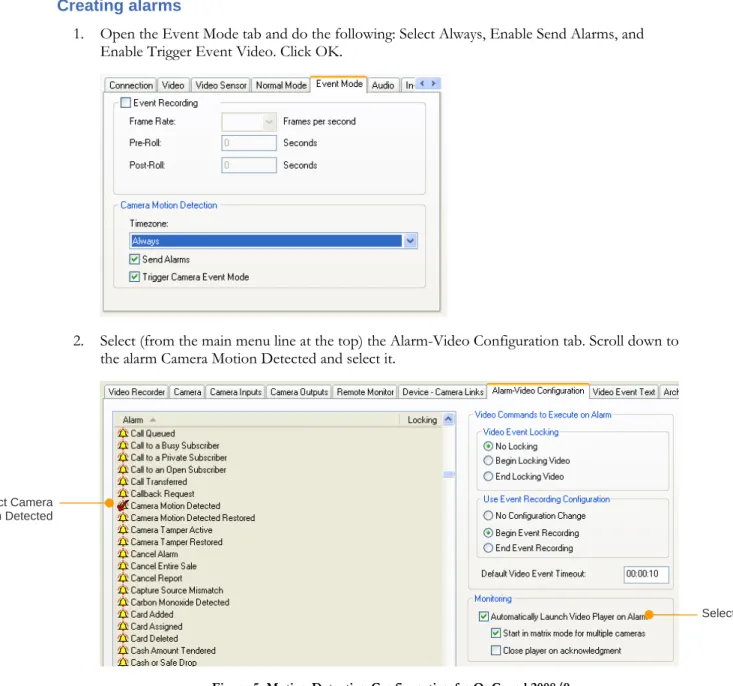
1. Open the Event Mode tab and do the following: Select Always, Enable Send Alarms, and Enable Trigger Event Video. Click OK.
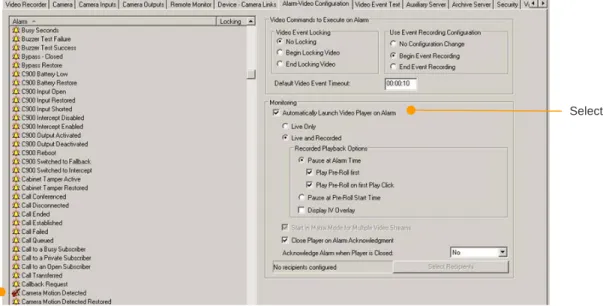
2. Select (from the main menu line at the top) the Alarm-Video Configuration tab. Scroll down to the alarm Camera Motion Detected and select it.
Figure 5: Motion Detection Configuration for OnGuard 2008/9
Select Camera Motion Detected
Figure 6: Motion Detection Configuration OnGuard 2010
Select
Select Camera Motion Detected
It’s generally recommended that you enable the option to Automatically Launch Video Player on Alarm so that video automatically opens to show an alarm in progress when you’re open to the Alarm Monitoring program.
3. Click OK.
Viewing video and testing alarms
To view video, open the Video Viewer and drag the camera icon to a tile. To monitor alarms, open Alarm Monitoring.
To test that alarms are received at the VMS, go to SightMonitor’s Camera dialog for the device (right‐
click the appropriate iconÆConfigureÆCamera) and then click Alarm Test.
Copyright © 2011 SightLogix. All rights reserved.
www.sightlogix.com
SightLogix, SightSensors, and SightTrackers are trademarks of SightLogix, Inc. DiBos and AutoDome are registered trademarks of Bosch Security Systems, inc. DVTel is a registered trademark of DVTel, Inc.
Genetec is a registered trademark and Omnicast is a trademark of Genetec Inc. GOOGLE is a trademark of Google Inc.
Lenel and OnGuard are registered trademarks of Lenel Systems International, Inc. NetDVMS is a registered trademark of On-Net Surveillance Systems, Inc.
NICE is a trademark of NICE Systems Ltd. Pelco is a trademark of Pelco.
Proximex Surveillint™ is a trademark of Proximex Corporation. Symmetry is a registered trademark of Group 4 Technology Ltd. Verint is a registered trademark of Verint Systems Inc.
XProtect is a registered trademark of Milestone Systems A/S. All other trademarks are the property of their respective owners.
SightLogix is a licensee of the GNU General Public License (GPL). You can request a copy of the GPL-licensed source code used in this product from a SightLogix sales office.
No part of this document may be reproduced or transmitted in any form or by any means, electronic or mechanical, for any purpose, without the express written permission of SightLogix.
The information in this document is distributed on an “As is” basis and without warranty. While every precaution has been taken in the preparation of this document, SightLogix assumes no responsibility for errors or omissions or for any damages resulting from the use of the information contained herein.