Research Article
a
June
2018
Computer Science and Software Engineering
ISSN: 2277-128X (Volume-8, Issue-6)
Data Analysis of the Moxtra Application
1
Navninderjit Singh*, 2Crystaal Tng, 3Karlla Martinz
1
Department of Commerce, Punjabi University, Patiala, Punjab, India
2, 3
Department of Info. Tech. Florida Polytechnic University, United States
Email- [email protected]
Abstract— This paper will explain the importance of a digital forensic analysis and the different sections that it contains. This is to highlight the importance of the information that can be discovered through performing a digital forensic analysis. There is also a description of the Moxtra application to explain what the application is used for and its different capabilities. Following that, the paper will dive into the problem statement that it will research. Then, it will describe the methodology used to solve the problem statement. It will provide details of the test cases and results that were retrieved after performing the cases. Finally, it analysis the results and provides a conclusion.
Keywords—Digital Forensics, Digital Forensic Analysis, Moxtra, Mobile Application, Android device, Collaboration companion.
I. INTRODUCTION
Computer forensics is a relatively new concept that is still young. The book Crime by Computer in 1976 was one of the first literatures that referenced the idea of digital forensic analysis (2). According to A History of Digital Forensics the stages are of topic is as follows: the Infancy occurred in the years 1985-1995, the Childhood in the years 1995-2005, and the Adolescence in the years 2005-2010 (2). Research advances allows for a better understanding of how to perform a digital forensic analysis. It, also, provides analysers more knowledge and a sense of direction of where to seek when looking for a specific file in an applications that has had a digital forensic analysis. Finally, it is important for the users of applications to know what data can be traced in that specific application.
1.1 What is a digital forensics?
According to a research paper name A Road for Digital Forensic Research the definition the definition of digital forensic science is “The use of scientifically derived and proven methods towards the preservation, collection, validation, identification, analysis, interpretation, documentation and presentation of evidence derived from digital sources for the purpose of facilitating or furthering the reconstruction of events found to be criminal...” (1) The elements indicated above are extremely important for the entire process of conducting the analysis because it divides it to smaller sections to assure that no step is overlooked. The preservation can refer to making a copy of everything that is contained in a device. The collection can either refer to physically obtaining the custody of the device or collecting the files and all data regarding the analysis. Validation refers to demonstrating a purpose, which might require the need the use of tools. Identification is the efforts of constructing a plan of how to approach the search. Analysis is the process of executing the plan of analysis. Interpretation is the understanding of the results that in the analysis process. Documentation is writing everything that occurred during the previous steps in detail and in order so that other individuals who desire to review it can. Presentation of evidence demonstrating the entire forensic analysis.
Computer crimes can be seen today on both small scale and large scale (6). These crimes have shifted from innocent and juvenile cases to crimes that have caused high monetary lost. Criminals can steal data
1.2 What is Moxtra?
ISSN(E): 2277-128X, ISSN(P): 2277-6451, pp. 36-44
Figure 1: The above is the Moxtra logo. The application was developed in 2014 and now is available for Android and iOS devices.
There were multiple factors that made this application an interesting application to perform a digital forensics analysis. Moxtra is used by the business sector. This application is one of the better known collaboration applications that business use for their teams to communicate and exchange documents. Moxtra does not currently have any other previous digital forensic analysis performed such as other application like Whatsapp or Slack. Also, since Moxtra is an application that be used to exchange messages and data test cases can be perform to trace certain messages and/or files.
II. RELATED WORK
In order to understand what a digital forensic analysis contained there was researched that needed to be performed to view forensic reports for other applications and understand how to approach it. The next sections will explain three other analysis that were conducted in Skype, Snapchat, OneDrive, Box, GoogleDrive, and Dropbox. The set-up of each was different, however, they all had common themes that were used in the Moxtra digital forensics analysis.
2.1 Skype Forensics
For the Skype Analysis the research first located the Skype’s file location and user directories. The file location was Windows Vista and later: C:\Users\WINDOWS-USER\AppData\Roaming\Skype\SKYPE-USER\. Then using the XML file named shared opened in Notepad++ it was analyzed. Then, it seeks the timestamp and HostCache tag and it uses online tools to converts both. Through this it can find specific values. It then moves through the user’s directory and it uses SQLite to go through the user’s account. This contains more in detail information about such as chats, calls, and voicemails logs. The full chat history in*.dat files can also be viewed.
2.2 Snapchat Analysis on Android Phone
The tools used for this analysis are Windows 7, Samsung Galaxy Note GT-N7000 (running Android 4.1.2) with Snapchat application (version 9.21.0 1), Magnet AXIOM forensic tool trial version (version 1.0.8.3142), Autopsy (version 4.2.0) and USB data cables.
A test account was created for Snapchat. It received and automated chat messages from Snapchat. Five friends were added to the test account and sent story images and photos from the test account to the other five friends.
2.3 Forensic investigations of OneDrive, Box, GoogleDrive, and Dropbox application on Android and iOS
device.
This investigation has forensic analysis done on Android and iOS devices. There is a block diagram of the research scope. Each scenario has the following: Installation of artefacts, login analysis, upload analysis, download analysis, delete analysis, and share analysis. An easy way to comply with the conference paper formatting requirements is to use this document as a template and simply type your text into it.
III. PROBLEM STATEMENT
The problem statement researched in this paper is, How protected is the user’s data on the Moxtra application? In order to test this, a test case was created where the Moxtra application was used as a means of communication between the parties within the case.
3.1 Test Case
ISSN(E): 2277-128X, ISSN(P): 2277-6451, pp. 36-44
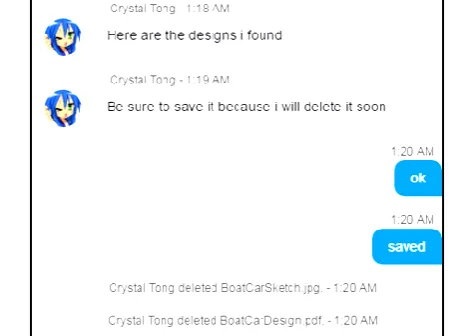
the Moxtra application. The project manager alerts his employees that the documents will be coming their way and prompts them to save the documents as he will remove the documents from the message chats shortly afterwards. The employee, MoxtraUser1, receives the files in a one-to-one message chat with the project manager. The employee sends a confirmation message that the documents were received and saved. The project manager then deletes the documents from the chat in attempt to remove the evidence that he ever had the documents to begin with.
Figure 2: A screenshot of the chat between the project manager (Crystaal Tng) and the employee (the blue speech bubbles). This screenshot was taken from the employee’s point of view.
The project manager is using an Android tablet with the Moxtra application and the employee is using a Windows 7 Laptop with the Desktop Moxtra application in this test case. The employee saved the documents on an 8GB flash drive and later deleted the documents off the flash drive when an investigation on the stolen documents came up. The competing company offers to share the stolen documents with the investigation team in hopes that it will help the investigation.
IV. METHODOLOGY
The goal for the investigation team is to be able to gather enough evidence to prove that Company 1 has had possession of the stolen documents in any given point in time. The main tool used in this investigation for this test case is the FTK Imager program within the Forensics Toolkit (FTK).
4.1 What is the Forensics Toolkit (FTK)?
The FTK is a computer forensics software made by AccessData. The FTK software can scan for various information in a hard drive and can gather the data so it could be better organized for evidence. The FTK processes and indexes data upfront and culls through many different data sources. (4)
4.2 About the FTK Imager
For digital evidence to be valid, it must be preserved in its original form. (5) Thus, it’s important to not touch the original source, but instead make an evidence image that is not altered in any way and is identical to the original in every way. The data cannot be modified by the acquisition method used. The FTK Imager is a software acquisition tool. Acquisition tools create a software duplication of the evidence called a disk image. The imager lets you choose the image file format, the compression level, and the size of the data segments to use. (5) FTK Imager can quickly preview evidence and render a forensic disk image identical to the original, including the file slack and allocated or free space. (5) When using software acquisition tools, a write-blocking device should be used to not make any changes to the drive data as the FTK Imager reads the data to be imaged.
The FTK Imager can process static evidence, and acquire live data from local network machines for processing. (5) It can view and preview evidence on remote drives, including CDs, DVDs, and flash drives. The FTK Imager can also create images of computers, go through a computer’s registry, decrypt hash files, reveal recent activity of the machine since it was last turned on.
4.3 Plan of Investigation
ISSN(E): 2277-128X, ISSN(P): 2277-6451, pp. 36-44
the project manager’s Android tablet. The competitor has offered to share their files with the investigation team to aid the investigation.
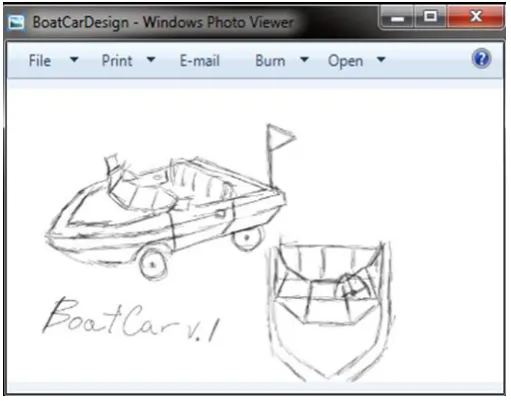
Figure 3: The two files the investigation team is looking for, a .pdf file and a .jpg file.
In part one of the plan, the investigation team would copy the contents of the Android tablet and search through the files for relative information by putting the files into a hexdump to see what the files may reveal. As for the employee’s flash drive, the investigation team plans on creating a disk image of the flash drive using the FTK Imager as to not alter the flash drive in any way in part two of the plan. Still using the FTK Imager, the team will scan through the unallocated space and attempt to locate the .jpg file and the .pdf file. The investigation team’s goal here is to attempt to find and restore the deleted files from the unallocated space. Once that is done, the team will re-evaluate the evidence gathered in order to draw conclusions on this case.
V. RESULTS AND ANALYSIS
5.1 Part One of the Investigation
The investigation team searches through the Android tablet and finds the main folder, “com.moxtra.binder”, where the Moxtra application stores all its related files on the device. The folder and all of its contents are copied over to the investigation team’s laptop. Searching through the main folder, there are .pb files and three folders. One .pb file named, “lastuser.pb”, has the email of the last user that logged into the Moxtra application.
Figure 4: lastuser.pb file opened in an online hexdump.
The text on the right side in Figure 4 shows the project manager’s email in plain text, which confirms that the Android tablet may have been used to send the stolen files to his employees.
With further searching, the team found a .pb file named “BSXI6BYApPC3P8i2zZQUJBG.pb” in the folder named “Ujhk3fryZKqDSSslvpPYzl8”, which contained history of chats that save the most recent chat logs.
Figure 5: The BSXI6BYApPC3P8i2zZQUJBG.pb file opened in an online hexdump.
ISSN(E): 2277-128X, ISSN(P): 2277-6451, pp. 36-44
5.2 Part Two of the Investigation
The investigation team uses the FTK Imager and creates a disk image of the employee’s flash drive. The following were steps on adding the flash drive as evidence in the FTK Imager.
Figure 6: After “Add Evidence item” is selected, the window above pops up and “Physical Drive” is selected.
Figure 7: “PHYSICALDRIVE1” is selected from the drop down box, this corresponds to the employee’s flash drive.
Once the flash drive has been added as evidence, an evidence tree appears to the left side of the FTK Imager window.
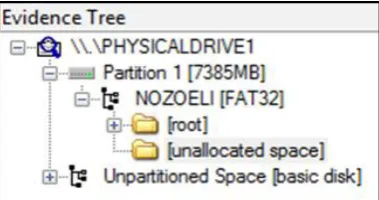
Figure 8: The evidence tree after the flash drive has been added as evidence for the case.
In Figure 8, the important folder to look at is the “unallocated space” folder. This folder contains files that have been hidden on the flash drive which makes it seem like the files have been deleted. Those hidden files turn into unallocated space and will be overwritten eventually when the flash drive starts to run out of space. Upon opening the unallocated folder, the right side shows a list of files that are named with numbers.
ISSN(E): 2277-128X, ISSN(P): 2277-6451, pp. 36-44
The investigation team would look over all the files in the file list until they could find the .jpg file. In FTK Imager, .jpg files will display pictures on the bottom of the window instead of text. Since .jpg file size is not that big to begin with, it is easier to spot when comparing the “102,400” sizes as shown in Figure 9.
Figure 10: The unallocated space file that displays an image.
The unallocated space file 000125 has the size of 160, the icon turned into a blue grid, and the .jpg file displayed in the bottom window. Once located, the file is exported onto the investigation team’s desktop.
Figure 11: Exporting the file from the unallocated space folder.
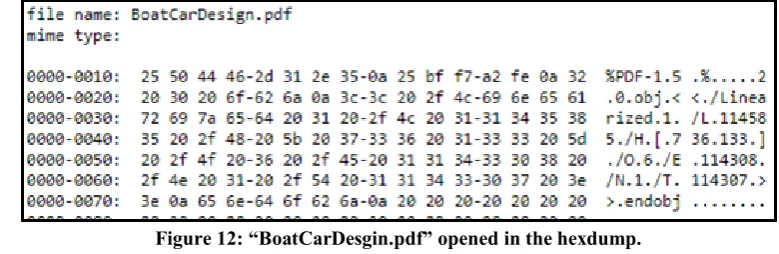
The same search was done to find the .pdf file, however .pdf files do not open in the FTK Imager. The .pdf file only comes up in text and hex values similar to all the other unallocated space files within the folder. In order to narrow down the search, the investigation team would use the “BoatCarDesign.pdf”, given to the team by the competitor’s company, and put in an online hexdump.
Figure 12: “BoatCarDesgin.pdf” opened in the hexdump.
The team would scan through the unallocated space files looking for the first five rows of the hex values and text on the side as the text reads “$PDF-1.5.%...”, which indicates that the file is a .pdf file.
ISSN(E): 2277-128X, ISSN(P): 2277-6451, pp. 36-44
Comparing the hex values and text found in the file “001163” in Figure 13, to the hex values and text shown in Figure 12, they are identical with the exception that the text is just slightly different. The unallocated space file for the .pdf file was also exported to the investigation teams desktop.
On the desktop, the exported files have blank sheet icons, no extensions, and the Windows computer does not know how to open the files. The names of the files are changed to their respective file names and extensions.
Figure 14: Changing the file names to their respective file names and file extensions.
After the change, the icons of the files have changed according to the file extensions and program the files open up in.
Figure 15: File properties of the .pdf file.
Figure 16: Icon change and File properties of the .jpg file.
Although the file for the .pdf file changed, the file was unable to open up in any .pdf viewer such as Google Chrome or Adobe PDF Viewer. The unallocated file must have not been fully recovered since the .pdf file was unable to open up.
For the .jpg file, the icon changed into a preview of the image file and was able to open up correctly.
ISSN(E): 2277-128X, ISSN(P): 2277-6451, pp. 36-44
VI. CONCLUSION
In conclusion, the evidence gathered has demonstrates that the chat between the project manager and the employee was able to be linked among both parties. The images were able to be tracked to the sender and the receiver. Project manager is guilty in stealing competitor’s files. Judging from the unencrypted chat history, the Moxtra application on the Android tablet does not fully secure the user’s data in this case. User email and user’s contact emails are also unencrypted and can be seen in between jumbled letters.
REFERENCES
[1] http://dfrws.org/sites/default/files/session-files/a_road_map_for_digital_forensic_research.pdf [2] https://pdfs.semanticscholar.org/0d15/132439fc1de82724dd06effff5a782eefeac.pdf
[3] http://moxtra.com/
[4] https://accessdata.com/products-services/forensic-toolkit-ftk [5] https://ad-pdf.s3.amazonaws.com/ftk/6.4.x/FTK_UG.pdf [6] http://resources.infosecinstitute.com/skype-forensics-2/
[7] https://www.justice.gov/sites/default/files/criminal-ccips/legacy/2015/01/14/ssmanual2009.pdf
[8] Du Xiaojiang, Gagneja K. K., and Nygard K., “Enhanced routing in Heterogeneous Sensor Networks”, IEEE Computation World’09, pp. 569-574, Athens, Greece, Nov. 15-20, 2009.
[9] Evanoff Lauren, Nicole Hatch, Gagneja K.K., “Home Network Security: Beginner vs Advanced”, ICWN, Las Vegas, USA, July 27-30, 2015.
[10] Gagneja K.K. and Nygard K., "Heuristic Clustering with Secured Routing in Heterogeneous Sensor Networks", IEEE SECON, New Orleans, USA, pages 9-16, June 24-26, 2013.
[11] Gagneja K.K., “Knowing the Ransomware and Building Defense Against it - Specific to HealthCare Institutes”, IEEE MobiSecServ, Miami, USA, Feb. 11-12, 2017.
[12] Gagneja K.K., “Secure Communication Scheme for Wireless Sensor Networks to maintain Anonymity”, IEEE ICNC, Anaheim, California, USA, Feb. 16-19, 2015.
[13] Gagneja K.K., "Pairwise Post Deployment Key Management Scheme for Heterogeneous Sensor Networks", 13th IEEE WoWMoM 2012, San Francisco, California, USA, pages 1-2, June 25-28, 2012.
[14] Gagneja K.K., “Global Perspective of Security Breaches in Facebook”, FECS, Las Vegas, USA, July 21-24, 2014.
[15] Gagneja K., James L., “Computational Security and the Economics of Password Hacking”, Future Network Systems and Security. FNSS 2017. Communications in Computer and Information Science, vol. 759. Springer. 2017.
[16] Javier Campos, Slater Colteryahn, Gagneja Kanwal, “IPv6 transmission over BLE Using Raspberry PI 3", International Conference on Computing, Networking and Communications, Wireless Networks (ICNC'18 WN), Maui, USA, 5, Mar, 2018.
[17] Kanwal G, "Pairwise Key Distribution Scheme for Two-Tier Sensor Networks", IEEE ICNC, Honolulu, Hawaii, USA, pages 1081-1086, Feb. 3-6, 2014.
[18] K. Hill and K. Gagneja, "Concept network design for a young Mars science station and Trans-planetary communication," 2018 Fourth International Conference on Mobile and Secure Services (MobiSecServ), Miami Beach, FL, 2018, pp. 1-8.
[19] Luis James, Gagneja K. K., Mustapha Akbbas, Idalldes VergaraLaurens, “Future Stress, Forecasting Physiological Signals”, IEEE CCWC, Las Vegas, USA, Jan. 9-10, 2017.
[20] Nygard K., Gagneja K., "Energy Efficient Approach with Integrated Key Management Scheme for Wireless Sensor Networks", ACM MOBIHOC, Bangalore, India, pages 13-18, July 29, 2013.
[21] Nygard K, and Gagneja K.K., "A QoS based Heuristics for Clustering in Two-Tier Sensor Networks", IEEE FedCSIS 2012, Wroclaw, Poland, pages 779-784, Sept. 9-12, 2012.
[22] Nygard K., Gagneja K.K., "Tabu-Voronoi Clustering Heuristics with Key Management Scheme for Heterogeneous Sensor Networks", IEEE ICUFN 2012, Phuket, Thailand, pages 46-51, July 4-6, 2012.
[23] Nygard K. and Gagneja K.K., "Key Management Scheme for Routing in Clustered Heterogeneous Sensor Networks", IEEE NTMS 2012, Security Track, Istanbul, Turkey, pp. 1-5, 7-10 May, 2012.
[24] Runia Max, Gagneja K.K., “Raspberry Pi Webserver”, ESA, Las Vegas, USA, July 27-30, 2015.
ISSN(E): 2277-128X, ISSN(P): 2277-6451, pp. 36-44
[26] Singh Arvinderpal, Gagneja K. K., “Mobile Health (mHealth) Technologies”, IEEE HealthCom, Boston, USA, Oct. 14-17, 2015.
[27] Gagneja K.K. Ranganathan P., Boughosn S., Loree P. and Nygard K., "Limiting Transmit Power of Antennas in Heterogeneous Sensor Networks", IEEE EIT2012, IUPUI Indianapolis, IN, USA, pages 1-4, May 6-8, 2012. [28] Nygard K., Bender L., Walia G., Kong J., Gagneja K., and LeNoue M., “Collaboration Using Social Networks