Proceedings of the
Fourth International Workshop on Formal Methods
for Interactive Systems
(FMIS 2011)
Dependable keyed data entry for interactive systems
Harold Thimbleby & Andy Gimblett
16 pages
Guest Editors: Judy Bowen, Steve Reeves
Managing Editors: Tiziana Margaria, Julia Padberg, Gabriele Taentzer
Dependable keyed data entry for interactive systems
Harold Thimbleby & Andy Gimblett
Future Interaction Technology Lab, Swansea University, Wales — www.fitlab.eu [email protected]&[email protected]
Abstract: Keyed data entry is fundamental and ubiquitous, occurring when fill-ing data fields in web forms, enterfill-ing burglar alarm pass-codes, usfill-ing calculators, entering drug delivery rates in infusion pumps, making cash withdrawals from cash machines, setting destinations for GPS navigation, to name but a few of its applica-tions. Unfortunately data entry is often implemented poorly.
We introducedivergence, a loss of predictability in a user interface, and show that it is in general unavoidable in data entry, and therefore a systematic approach is called for. This paper presents one such an approach. Many inter-related ideas “fall into place”—e.g., autocompletion, prompting, automatic color coding—through the approach. The approach contrasts with conventional systems that are generally in-consistent and unhelpful to users, particularly after errors.
Keywords:keyed data entry, divergence, FSM, dependability
1
Introduction
What are appropriate formal properties for dependable user interfaces, and how can they be used to help practice? This paper explores the area of dependable keyed data entry: an area in need of formalisation (as we shall see) and in need of tools for correct implementations, but tools sufficiently easy to use and sufficiently flexible for developers that the approach is adopted and hence delivers benefits to users and their work.
The original motivation for the work reported here was the discovery that medical devices, such as drug delivery systems, usead hoc number entry methods, with the result that user in-terfaces that should be dependable are unpredictable. Some infusion pumps parse numbers in several ways depending on their mode, and thus provide an unpredictable experience for the user, particularly in syntax error handling [15]—potentially with the result that patients are given in-correct drug doses. There are examples where devices claiming to log “user actions” have been used to assign blame to users, but where the devices may in fact have logged their responses to user input, not the actual input, which had been incorrectly parsed [16] so that the logged actions were not the actions the user requested.
general, and allows consistent user interfaces to be generated with a variety of well-defined properties as appropriate to the needs of the application. Static checks on the user interface and design trade-offs can be made, including raising issues of feature interaction, and these checks ensure a more dependable outcome appropriate to the task domain.
Dependability is the trustworthiness of a computing system that allows a user to justifiably rely on the service it delivers [3]; this breaks down into predictability (for the user), rigor (for the developer), and appropriate integration between the two—software engineering that results in systems consistent with their documentation (requirements, help, training, manuals, etc). Other criteria include maintainability, since a design will be modified (iterative design requires it).
A “dependable user interface,” then, means that developers have indeed implemented the user interface (UI)theyintendedandusers can interact with the UI to dependably achievetheirgoals. Both developers and users make errors, and dependable systems should be fault tolerant or re-silient in the face of these and other faults. Humans will always eventually make errors, and dependable UIs must therefore be fault tolerant to human error.
2
A research programme on dependable user interface design
It is a widely-accepted idea to specify syntax in a well-defined language. We extend that idea to include formalising interaction properties and features, in order to provide a flexibly-defined, de-pendable user interface. The ideas naturally lead into providing tool support for dede-pendable user interfaces. However, the present paper is a work in progress. Some of the ideas and claims are not adequately formalised and various concepts and theorems not spelt out. Clearly, for depend-able user interfaces it is especially important to have a secure grounding in appropriate formal methods. Our concepts of “divergence” and other ideas indicate areas that need developing, and moreover that this is no easy task.
Here is a typical problem. When the user input field is full, what should be done, and what are the consequences of doing so? For example if the user interface accepts input that completely fills the display, what does the next keystroke do? The user cannot see it, yet pressing it is an error. If the keystroke is rejected, the display does not change (it is already full) and therefore either there is no error, or a historical mode has to be introduced. It is not obvious what to do in general; it may be that the right answers depend on the application domain—and if so, how?
3
Previous work
Data entry validation is generally driven by the desire to provide as rich and responsive an inter-active user experience as possible while trapping data entry errors before passing data over to an application. PowerForms [7], devised in 2001, use regular expressions (henceforth, regex) and a constraint language to specify forms for web applications. Fields can be marked with status icons, typically traffic lights, much as we propose. PowerForms allows forms to be dynamic: for example, only if the user is married is the field for entering the spouse name shown. See [18] for a review of web data entry validation techniques.
applicationsexceptthe low level interaction details need to be well-defined and appropriate, and as we will show below they fail to do so. Recent standards work [5] ignores dependability and managing user error per se—but is adding user experience (UX) issues like pleasure and comfort. ISO standard 14977 [11] says there is a large diversity of meta-languages for specifying languages but that these too are often badly or incompletely designed (as epitomized by the W3C case study in section5.1).
It is remarkable that these problems persist. Most likely, programmers find it easier to use general-purpose programming languages and then they naturally makead hocimplementations— since data entry is deceptively trivial. Instead, arguably, we need an approach where a dependable UI is constructed automatically from a specification; this is an example of “correct by construc-tion” (C×C) [12]. For such an approach to be widely accepted in place ofad hoc methods, it must be generally and easily applicable; we propose that the approach described in this paper is indeed both sufficiently general to handle most realistic keyed data entry situations, and suffi-ciently well-defined that it could be packaged into libraries and languages for easy deployment.
4
How is keyed data entry problematic?
Many devices have a display and a keyboard, where the user can enter values into the display that are then processed in some way. Common examples include handheld calculators, online forms, medical devices, and cash machines. Best practice is to validate the user’s input and only process correct values, but few UIs follow this best practice; anyway this is only part of the story. The handheld calculator provides a few examples of the possible problems:
1 Handheld calculators rarely validate user input. If a user keys1 • 2 • 3 , probably 1.23 is displayed and processed. Put charitably, calculatorscorrectthe user input but do so silently—and different calculators correct errors in different ways. Explicit correction (DEL) is rarely supported.
2 Most calculators display a value (e.g. 0.) before the user keys anything, causing ambiguities and
hence problems. For example, if the user keys1 when the display shows 0., the display could
become either 1. or 0.1. Very few calculators display nothing when the user has keyed nothing.
3 Calculators frequently overload the display: it is used to show the result of a calculation and the number being entered (depending on the mode). In general, the display can show any number (say
42) and the user keying a digit can either start a new number or extend the displayed number.
4 Calculators rarely detect overflow in number entry. Suppose we wish to divide 6,800,000,000 by 308,000,000 (say); most calculators handle this poorly. The Apple iPhone calculator (v 3.1.3) gives 0.45 (incorrect), having silently discarded user input because the display only shows 9 digits. Rotated to landscape, the calculator can handle 16 digits, yielding the correct answer. Evidently the iPhone contains code toexplicitly and silentlydiscard and ignore excess digits from the user.
5 Keys on calculators rarely “key click” so that the user can be sure whether (and how often) they have been successfully pressed. A few calculators have key clicks, but the clicks indicate that the keys have been pressed, not that they have had any effect (e.g., as happens when the display is full)!
subject to many stresses such as interruption during their operation of a device; incorrect values used by the infusion pump may kill patients.
Data validation is only part of the problem—for example, how should the device continue to interact with the user after an error is detected? Data validation is often treated as a “validate the dataafterthe user has entered it” problem, with no connection to the user’s error recovery, data editing, and interaction generally whatsoever.
The point is that while keyed data entry seems simple (“justkey in what you want”), it conceals many design choices and constraints, typically implemented in many places (in every sense: geographically, software versions, libraries, application code), and beyond the full control of most designers. Worse, design choices are frequently implicit in the source code structure and feature interactions are unexplored and undefined (we will give examples later). Implicitness also makes reuse harder, of course. With modern development methodologies, the design itself will be a moving target; with a process following ISO 13407:1999 (Human-centred design processes for interactive systems) the design issupposedto iterate and improve—and thus a consistent user experience gets even harder to deliver.
The chance that the user experience is consistent, integrated and predictable, especially during error management after a key-slip when consistency is crucial, is low. In addition, as we discuss next, some problems are unavoidable in principle: which means programmers, if they do not realise the problems are intractable, will tend to invent “quasi-solutions” that impose arbitrary boundary conditions on users that, most likely, have not been fully analysed or tested.
4.1 Predictability & divergence
A dependable UI should be predictable. Abowd et al define predictability as the ability to “de-termine the effect of future action based on past interaction history” [1]—we call this history-predictable; whereas Dix requires the ability to determine the effect of future action based on current output (i.e., visible state) [8]—which we calldisplay-predictable; for keyed data entry both are needed in general. There are several ways in which a user might expect a keyed data entry UI to be predictable; for example:
• The same sequences of keystrokes always result in the same results (the user need not pay full attention to the display). In particular if the display shows UVW, thenDELremoves the last
character (changing it to UV) andCLEARclears it to .
• If the display shows some sequence UVW, thenX (not one of the special keysDELetc) changes
the display to UVWX. We would expect display-predictability for this and the previous examples.
• If the display shows something, thenOK submits it so the device or system acts on the displayed
value; again, we would expect display-predictability in this situation. Conversely,RESETresets to an
earlier accepted value (or blank if none exists); achieving display-predictability here means displaying the earlier value elsewhere, thus history-predictability might be more reasonable.
However, even these basic expectations can easily fail, for example:
• If the display is full, say showing VW (a small display), then pressingX may have no effect—since
the display is full it remains showing VW; then pressingDELmay remove the last character from the
display, resulting in V. Here,X DEL, which might be expected to do nothing, has the effect of
DEL
• If the value shown has a syntax error or is semantically invalid (out of range, say) future behaviour may be undefined or unpredictable. For example, pressingOK when the display shows 1000 could cause the device to act on 500 if this is the largest allowed value. A case in point [15] is where a user keyed1 3 0 • 1 but the device, finding the input exceeded 99, ignored the decimal point and
displayed and acted on 1301.
• If pressing a key would cause a syntax error, the key might be ignored or have some other effect. Thus1 • • 3 may appear as 1•3, and, more interestingly,1 • 2 • 3 may appear on
different systems (or in different modes on the same system) as 1•23, 12•3 or as 1•3 [13,15].
• If the display has already overflowed, deleting the last character may or may not reveal an earlier character. Thus pressingDELwith the display showing UVW (supposing this to be full) could change it to TUV or to UV, say.
• Time can be problematic, e.g. when the user is slow or walks away and is replaced by another user. If the device times out, the display may change on its own, typically as if a user keyedCLEAR; time
outs can create race conditions: the user reads 1 and they wish to change it to 15: they press5
OK and are surprised when 5 is displayed, not 15. A user reading the operator’s manual while trying to use the device may read one thing about the device and experience another behavior!
• Autocompletion is widely used to reduce user keying effort, but usually confuses the usual relation between display and input. Thus ifJ autocompletes to JANUARY thenJ DELwould not
(normally) change the display to JANUAR but to —what it showed beforeJ was keyed.
Similarly, does keyingJ K change the display to JK or to JANUARYK or is it an error and
leaves the display as JANUARY?
When a UI fails to be predictable, we say its behavior divergesfrom the user’s reasonable predictions. More specifically, we could formalise the laws illustrated above and formalise di-vergence, though in different ways for different systems. Divergence is a property of the behavior of a UI and the laws of behavior the user has been told (e.g., from documentation). Clearly for a dependable UI, we want to reduce divergence and ensure, so far as possible, that the user is made aware of it when it occurs. In general, UI divergence is unavoidable even by good design; it also happens because users make slips or are unaware of the limitations of the design.
We propose that a dependable UI should:
1 Explicitly define its laws of normal behavior. For example:
• Each key pressed provides audible feedback (key click): one press, one click, and a distinctive key click (e.g., a warning beep) if the key fails to operate as normal. (Thus the user has confirmation that the key is pressed hard enough to operate, that it hasn’t bounced, and that it has had, or has not had, the intended effect.)
• Pressing a normal key appends it to the display. • PressingDELdeletes the previous normal key.
• In a security application such as entering a password or PIN, pressing any keys (say, 4 7 9 1 ) would display an unrelated mask such as **** so other people cannot read the
password the user is keying. In a high security application, there may not even be per-key feedback that indicates how many keys have been pressed.
• If a key press has been processed, nothing retrospectively changes the meaning of the key press. For example, if the display is full (say showing 1234) then pressing a further key (say
2 Define exceptions to its laws. For example, if the display is full, extra keys may be ignored. Perhaps pressingDELdeletes the last key in the display, not necessarily the last key pressed.
3 The user need not be aware of specific exceptions to the laws. Hence, a dependable UI ensures exceptions, including timeouts, arealwaysvery clear to the user, for example, through color changes (for instance, by dimming invalid key presses; we know this also speeds up users [14] since it shows users what their options are), physical/tactile key feedback, and sound. Conversely, it must provide feedback on valid key presses (that they have been hit, that they haven’t bounced, etc).
4 In particular, indicate whenOK would enter invalid data for the application. For example, the user
has pressedCLEAR• —a digit is required before this can be submitted.
5 If a key press would cause divergence (in the current state), it does nothing other than inform the user of divergence. In particular,OK can only pass well-formed data to the application.
Devices have different sorts of keyboards. On a PC or other device with a general-purpose keyboard, very little can be done to provide key-specific feedback before a key is pressed. Keys should beep distinctively if pressing them causes divergence, and otherwise click (to confirm that they have been pressed, and if so, how many times). On special purpose hardware or on semi-soft keypads (where there are physical keys adjacent to dynamic key legends), keys can be lit if they are enabled, and dimmed and even physically locked if pressing them would cause divergence. On soft keypads (e.g., on touch screens), diverging keys need not even be displayed. We want a UI where a user paying sufficiently close attention to it will always be able to obtain their intended effects. We want a UI where the sequenceCLEAR. . . any non-diverging sequence
. . . OK enters what the user predicts without confirming with the display. Since this law of
behavior may be learnt by the user even if not explicitly stated, it is imperative that divergence is indicated audibly and using tactile feedback through the keys themselves, in addition to any visual indication (to which the user may not be paying attention). We thus aim for a UI that is either predictable or beeps (where “beeps” means to make attention-getting feedback, typically a sound)andif it beeps the user action causing the beep is otherwise completely ignored.
Divergence can be detected by the system, and a dependable system should alert the user of a divergence to enable timely and appropriate action. Of course, in some situations, alerts may counter-productively escalate the error rate by stressing the user, or perhaps by causing bystanders to intervene and cause different sorts of problem.
5
A new approach to keyed data entry
Our particular approach is based on finite state machines (FSM) using regular expressions (regex) as a notation to specify them. The use of FSMs as machines which test for membership of particular regular languages is widespread, well understood, standard textbook material [2]. The classic setting is offline parsing, to produce an accept/reject decision. We propose that this simple and familiar idea be extended into the online, that is to sayinteractivesetting—and that doing so permits a formal, rigourous and replicable approach to handling many features which are ordinarily treatedad hoc, e.g. prompting and autocompletion.
Since keyed data entry retains a history of at least some of a user’s keystrokes (e.g. as displayed on a calculator screen), a purely FSM-based approach to interactive data entry would need a number of states exponential on the length of the history; hence following [17], we factor our machine into a simple FSM-like part, and a separate memory. For our purposes of dependable keyed data entry, it is sufficient for the memory to be the display, and moreover for this to behave like a stack. (In the case that the display is allowed to overflow, we consider the display to be a window onto the stack in a way that is determined by design requirements.) The underlying FSM is then essentially a “classic” accept/reject machine, and its state is thus determined only by the contents of the display.
Given an FSM and a stack, then, we have something very like a PDA: this combination is the virtual machine which interprets our input; however, PDAs only examine the topmost stack symbol, whereas our machine may examine, e.g., the length of the stack. Within such a setting (and by labelling FSM states with extra information) we may formally define several useful notions such as prompting and autocompletion, as described below. We note that FSMs and PDAs are simple, well understood and easy to analyse [14]. Following Peter Ladkin, we assert thatif it is possible to use a FSM, then there are overwhelming reasons to use one.FSMs can be compiled to simple provably-correct hardware to build UI controllers, and they can be shown to have no run-time errors. Of course, FSMs of non-trivial systems tend to become large and for practical use in interaction—where a user is expected to model the UI—we do not just want an FSM, but asimpleFSM, for some meaning of simple. We assert that a user will find systems based on simpler FSMs simpler to understand, and our approach here fits that ideal.
There are many ways to represent FSMs concretely; our implementation exports the JavaScript object notation, JSON (see www.json.org; [14]) as this is very portable, and it naturally allows the FSM to be combined with other parameters we need that the UI VM implements.
5.1 The regex notation
Formally, we might think that the concrete syntax of a notation has little impact on dependability arguments, and that syntactic issues are of little concern; we argue that this is not the case: specifications must be clear if developers are to be confident in them. We now explore our concrete choices and the rationale for them.
Con-ciseness, driving such design decisions, can conflict with redundancy, clarity and ambiguity. Similarly, comments are frequently poorly supported in conventional regex languages—despite how unreadable regex can be! (Perl has regex comments, but then the comment symbol#itself has to be escaped to be used.)
Our regex notation clearly distinguishes between four sorts of symbols: variables, operators, literals, and comments. White space (outside of literal strings) is ignored, except for separating adjacent variable names. Thus one writes"ab" "c"*or"abc*", etc, depending on intention. We introduce and motivate our regex notation by re-engineering the HTML 5 “microsyntax” the World Wide Web Consortium (W3C) uses to define “floating point numbers” for user input. The W3C should be in a leading position to use best practice, but their approach is manifestlyad hocand arbitrary. They repeatedly re-implement very similar parsing strategies; they interleave syntax, semantics and error detection in obscure ways. They use words, including “fail” and “abort,” in undefined ways,andthe approach fails with input errors. It is particularly surprising that the W3C did not take advantage of any formal notation. Regardless of these issues, the purpose of this section is a case study to illustrate our notation. That the W3C is by no means the only source of bad number parsing specifications is discussed at greater length elsewhere [13,15,16]. Translated into our notation, the W3C specification becomes:
1: whitespace* (-: skip any whitespace 2: [ minus ]
3: digit+
4: [ dot digit+ ] 5: [ exponent-symbol
6: [ (-: W3C number can end after exponent! 7: [ plus | minus ]
8: digit+
9: ]
10: ]
11: garbage-characters* (-: ignore anything
This is notably short and easy to read, and does not rely onad hocphrasings—in fact, it does not permit any. Line numbering is provided by the online demonstrator (see section9).
Line 1 useswhitespace, a variable defined elsewhere, to represent blank text. The name whitespaceis followed by the postfix operator*, the conventional Kleene star. The final part of line 1 is comment, everything from(-to the end of the line—chosen as it allows emotionally-annotated comments :-) In summary, line 1 corresponds to W3C’s English, “Skip white space.”
Line 2 uses the brackets[]to makeminusoptional. This brief declarative line corresponds to W3C’s prolix and mechanistic, “If the character indicated by position is a ‘–’: advance position to the next character. If position is past the end of input, return an error.” Line 3 shows the+ operator, similar to*but matching at least once. Line 7 shows alternation, represented by the| operator:[plus | minus]will match nothing, matchplus, or matchminus.
Strings represent characters concatenated; thus the literal"abc"is the same as writing"ab" "c", etc. The empty string is not permitted. Definitions such as exponent-symbol = "e"|"E"can be placed anywhere. Here ”e” is a literal, of course.
/pattern/modifiers; often the regex may be parameterized programmatically as well, so its prop-erties are distributed around the program and may even be dynamic. Thus behaviour is implicit, more likely to vary between parts of the program (and UI), and not obvious from the static code. In our approach, semantic behavior is parameterized with features (e.g., masking for password entry; whether there is an delete character key; etc)onlyintroduced statically in the specification by a list of fully explicit names and values. For example, the featurevalue-display-size sets the size of the display. In our implementation, when user input exceeds the display length, the UI goes red and the display shows (say) >>>>>>; the UI then counts keystrokes to ensure
DEL
operates consistently (n key presses followed by DELis always equivalent to the prefix
ofn−1 key presses). Compiling a specification produces a summary of features and feature interaction, if any; for example combining autocompletion and masking is unusual and should be flagged. In the case of errors (e.g., that no input is ever required from the user, perhaps because of autocompletion), the compiler rejects the specification.
What have we achieved?
• Brevity and clarity—bringing their usual advantages.
• Making explicit some things that are only implicit in the W3C English: we have to explicitly say that a number can be followed by anything (line 11), whereas the W3C implicitly accepts nonsense like 2.2.4. A better definition wouldomitline 11: when parsing a number, we should forbid anything (other than blanks, perhaps) following it, surely.
• Lines 6–9 show that a number can end withE, as in2.3E: the W3C does not require a number with Eto have an exponent. As it happens, it treats2.3Eas 2.3E1.
• On the other hand, as lines 7 and 8 make clear, if theEis followed by+or-it must be followed by a digit. This is clearer in our language than in the W3C specification.
• The language compiles into a simple finite state PDA, which can run the UI specified. The W3C has to be converted (unreliably!) by hand. Naturally, in general we can also statically check for recursion, redefined names, unusued names, etc. in the usual manner.
Having criticised the W3C definition’s inscrutability and weak error management, we now propose a better specification:
blank* [sign]digit+ [dot digit+] [exponent-symbol [sign]digit+] blank*
Of course we still require definitions for the lexical terms, blank, sign, etc (not shown here), and once a number has been accepted as correctly formed, it has to be converted to the value it represents. (The W3C convert characters to a number valueasthe number is parsed, making it even more obscure.) In contrast to W3C: our treatment of signs isobviouslyconsistent for the mantissa and exponent; an exponent is required if the exponent symbol is present; blanks are ignored before and after a number; and the number cannot finish with “anything” and so cannot finish, confusingly, with more numbers—this avoids the W3C mess of permitting data like2.3E.4,1EE8and2.3.4.
5.2 Autocompletion
chang-ing mode of the UI (increaschang-ing user uncertainty in how much to key) increases error rate. In some cases, keying something that is autocompleted might lead the next keystroke to do some-thing unexpected—thus potentially offsetting the benefit gained by keying less. Autocompletion reduces redundancy: rather than having to get, say, ten keystrokes correct, maybe only two are re-quired; one might then enter the wrong data accidentally more easily, and ironically the “wrong” data would now be well-formed and harder to detect by the application.
Formally, the basic implementation technique is to compute, for each FSM state, the number of outward transitions; if there is only one, follow it immediately upon entering the state, pushing its label onto the stack, recursively until terminating on a state where this is no longer possible. Several variants are possible, however.
Suppose the regex is "MONDAY" | ... then the user has to type exactly M O N D
A Y , . . . to enter data. If strict autocompletion is on, then whenever the only option is
determined, the user need not do it. Thus, the user need only keyM ,T U , etc; effectively the
language has been changed to"M" | "TU" | "W" |... Withrelaxed autocompletion, the system also allows the user to key in the full data. Thus M is sufficient, but M O , M
O N and so on are also allowed; the language has been changed to"M" ["O" ["N" ["D"
["A" ["Y"]]]]] |...
Both forms of autocompletion may create an inconsistency depending on the language: here, a unique abbreviation for Monday or Friday has become a single key, but a unique abbreviation for Tuesday or Saturday requires two keys. Henceminimal autocompletionsets a lower bound on the abbreviation length. With a value of 3, the user must key 3 keys: M O N ,T U E ,
etc. If relaxed autocompletion is also permitted, then the user can keyM O N,M O N D,
M O N D A orM O N D A Y too, but the sequencesM andM O are too short.
Minimal autocompletion is be set byvalue-minautocomplete=n, and its implementation is a guard on the stack length (plus the obvious static checks, e.g., that nothing is excluded by too large a minimum).
Withend autocompletion, the UI only autocompletes when it can complete to the very end of the input; this gives the property that if autocompletion occurs, the user can always successfully pressOK.
Autocompletion raises the possibility of a variety of errors that can be detected statically at compile time. For example:
• If set,value-minautocompletemust be in range (if set too small, some autocompletions may not be unique; if too long, it may be longer than some complete input strings). Thus, for English month names, the minimum validvalue-minautocompleteis 3, because of June and July—if it is set to less, it cannot autocomplete for these cases; and the maximum is 9, because of
September—if it is set to be larger, it will never do anything.
• Sometimes autocompletion makes no sense at all; section7presents an example—for entering an arbitrary number, the system cannot know what number is intended and so cannot autocomplete it.
5.3 Prompting—generalizing relaxed autocompletion
Many interactive systems provide the user with prompting about what they should key. This is closely related to autocompletion: if an autocompletion would be -, then this could be dis-played as a prompt and the user has to key it to proceed (assuming autocompletion is not actually enabled); where there’s more than one possibility a generic continuation, such as is used.
Thus we can automatically generate prompts. Given the regexdigit digit "/" digit digit "/20" digit digit, the initial prompt would be / /20 , and as the user keys digits, the display would change to 1 / /20 , 12/ /20 , and so on.
In general we want more display flexibility, particularly to permit prompts that are explanatory rather than literal presentations of what the user has to enter anyway. Also, there is no reason to display prompts just inline within the display the user is keying into: other positions, such as above the display or as a tooltip are also possible.
In our language, a regex prefixed by p >>is prompted byp (a string or a variable). Thus "d" >> ("0"|..."9") prompts any digit by d. Thus if we wanted a DD/MM/20YY style prompt, this could be achieved by("D" >> digit digit) "/" ("M" >> digit digit) "/20" ("Y" >> digit digit). Autocompletion switched on would ensure that the slashes and 20 are provided automatically.
Prompts can be applied to regex in various ways and prompts can override each other to create powerful combinations. Thus"Date?" first >> none >> datedefines a prompt that is Date? if the user has keyed nothing, and then changes to nothing (no prompt at all) when the user keys anything. A more complex example is:
"Date?" first >> day "/" month "/" year day = "Day" only >> digit [digit] month = "Month" only >> digit [digit]
year = "Year" only >> digit digit digit digit
Here, the initial display will be Date?, but as soon as the user keys a digit, 1 , say, the
display will change to the more specific 1/Month/Year, and so on.
Prompting raises interesting issues. First, errors are possible, and they are detected by the C×CUI. For example,("a" >> "x") | ("b" >> "y")has inconsistent prompts—the prompt cannot beboth a and b. If prompting is combined with autocompletion, this may be confusing, and the C×CUI warns of the potential feature interaction.
5.4 Time-outs and interruptions
Users may be interrupted when entering data. The most common approach to handling interrup-tions is to time-out the UI in some way, but perhaps subtly in a way that a user may not notice, as done in the Graseby syringe pump that silently times-out without any warning [13].
5.5 Error correction
The number regex of section7, below, does not permit a number to start with a decimal point. If the user keysCLEAR• 1 2 then the C×CUI treats this as an error. Instead, the C×CUI could
error correct the user’s input to 0•12 by inserting the missing zero.
In our view, in a dependable UI, if the user makes a slip, it is better to tell the user that a slip has been made and allow the user to reflect and correct the error, rather than to make a correction that is potentially the wrong one. For example, if the user keysCLEAR• 1 2 a prioriwe do not
know whether a zero was omitted or that the decimal point is an error, possibly a transposition with a later key—the user might have intended to keyCLEAR1 • 2 , or any number of other
things. A dependable UI should not attempt to mindread especially after a recognized error, which is a symptom of the user not doing what they intended.
5.6 Other features
Evaluating a UI requires users to operate a system, and observation of their error rates, speeds, and opinions. Unfortunately keying errors are infrequent, so features are provided by the C×CUI to inject errors. Thusvalue-inject-error = n(n6=0) randomly remaps keystrokes with probability 1/n, simulating a “wrong key” slip; similarly,value-bounce-errorinjects a key bounce slip. The approach automates the experimental methods of [10], and shows that the approach can help not just specify C×CUIs but also help evaluate them.
Many other features could be supported, for instance to help perform A/Busability tests. A simple question: are displays better left- or right-aligned? The current approach allows a devel-oper to specify either choice, and makes controlled experiments much easier, since it guarantees that it can generate exactly equivalent user interfaces differing only in the controlled properties.
Display right-alignment is the default, anddisplay-left-alignmay be set to require left alignment. With left alignment, the change to the display when a user presses a key is always the key that the user pressed. With right alignment, every key press causes the entire display to change, in fact, to shift left. In the case of displaying 111 if the user next keys1 ,
the display appears to put a 1 on the left of the 111 as only that part of the display changes, but in fact it was appended on the right. Thus if the user keys1 1 1 1 2 while looking at
the display, they may expect it to show 21111 since it appears to be building up from the left as they key! In contrast, left alignment supports the principle ofdisplay inertia[9] and appears to raise no predictability problems—it always appears to build from the right, as in fact it does. Nevertheless, we do not know which is better or under what circumstances, even for entering conventional left-to-right Arabic numerals.
6
Formal summary
LetL be the language specified by the regex; for example if the regex is"a"["b"]"c"then
L ={abc,ac}. Even though Kleene star may be used, all strings in the language are no longer than a defined constant,max. Define℘L to be the set of all prefixes ofL; in particularL ⊆ ℘L. Hence forL ={abc,ac},℘L ={ε,a,ac,ab,abc}. The empty string,ε, is a prefix of
The display shows what the user has keyed, which we can represent as σ . Divergence occurs if|σ|>max. Pressing a keyk (not DEL,CLEAR, OK), if the key is highlighted, changes the
display to σK. PressingDEL, ifDELis highlighted, changes the display σK to σ . Pressing
CLEAR
, ifCLEARis highlighted, changes the display to , i.e.,σ =ε, nothing.
The following keys are highlighted (enabled): {c|σc∈℘L}; equivalently, these keys are in the first set of the language. TheDELandCLEARkeys are highlighted iffσ6=ε. TheOK key is
highlighted ifσ ∈L; i.e., the display is blue or green—see below. PressingOK never changes
the display (unless it changes from blue to green). The display is colored as follows:
Amber ifσ ∈℘L ∧σ6∈L (more input is required)
Blue ifσ ∈L (input is syntactically well-formed but may or may not be accepted by the application)
Green ifσ ∈L and the input has been accepted by the application
Red ifσ 6∈℘L (input is not a prefix of any possible string), or if the input string length exceeds the display size
Our coloring derives from [15], independently proposed in 2001 [7]; by being more aware of keying errors users should be able to enter data more reliably. Thus if the user’s input is syntactically incorrect, the color is red; if it is correct, it is blue; if it is a prefix of a correct form, it is amber. Finally, if the user’s input has been accepted by the application, the color is green. Colors are also augmented with sound and icons. A slightly simpler approach is to combine the green and blue colors, but it is usually useful to distinguish between syntactically correct input (blue) with actually accepted input (green), and using green alone would potentially give the user the incorrect impression that syntactically correct input was semantically correct—when the display goes green, the user might be tempted to pressOK. In the chosen design, blue does
not tempt the user, and the display goes greenafterthe user has pressedOK with syntactically
correct data. As usual, colors are not pure, to accommodate for common color blindness issues. Optionally, the UI could be re-colored by the application on each keystroke—for example, the regex specifies well-formed numbers, but the application additionally requires the numbers to lie within a certain range. (Such a restriction can be specified in a regex but it is tedious, and does not allow the dynamic behavior of responding to the application’s context.) However, the application should be only allowed to make the color “redder” as it is not allowed to correct errors the user has made. In the present paper, we only consider “incorrect” to mean syntactically incorrect, but the application can be passed blue data every time it changes and possibly colors the UI red if the data is out of range or invalid for any other reason.
The UI beeps when the display changes to red or when a non-highlighted key is pressed.
7
Example: Dependable keyed number entry
0 1-9
0-9
•
0-9
1-9
Figure 1: A “railroad” syntax diagram automatically generated from and visualizing ISMP num-bers. For many tasks, railroad diagrams may be more readable and more suitable for users than transition diagrams (which for readers of this paper are presumably quite familiar).
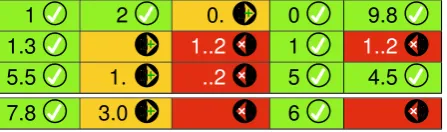
1 2 0. 0 9.8
1.3 1..2 1 1..2
5.5 1. ..2 5 4.5
7.8 3.0 6
Figure 2: How traffic lights and cell coloring (possibly not very clear in monochrome reproduc-tion in this paper!) might be used in a spreadsheet, here for totalling columns of three numbers. In case of color blindness, the green light is shown distinctively, and, in fact, the “green” is a teal (green-blue) to help common green-confusing color deficits. Coloring and traffic light choice here is as defined by ISMP rules.
name: "ISMP numbers"
features: no-display-prompt display-left-align value-buffer-length = 6 (-! 6 for demo
input: (zero-digit | nonzero-digit any-digit*) [dot fraction-part]
any-digit = zero-digit | nonzero-digit fraction-part = any-digit* nonzero-digit zero-digit = "0" dot = "."
nonzero-digit = "1" | "2" | "3" | "4" | "5" | "6" | "7" | "8" | "9"
Thename string is required to allow the C×CUI compiler to generate several UIs. The regex compiles into a FSM. It is helpful to generate clearer visualizations than FSMs (see, e.g., figure 1); such visualization helps developers see their specifications more clearly, and hence helps detect typos or other mistakes or misunderstandings in them [6].
8
Future work
We are currently working on packaging these ideas into programming language libraries, in order to explore them in detail and support their wider dissemination.
A regex specifies what is accepted, so it cannot distinguish between different sorts of error, since errors are not explicitly specified. If we labeled regex with (say) error we could use prompts to discriminate between different sorts of error. For example: error: "Can’t have more than one decimal point" >> dot [!dot] dot.
Reading keyed data is generally only one part of a UI; buffer automata [17] are a generalised form of state machine where states can be buffers, such as those as specified in this paper, and they thus provide a more general approach to implementing dependable UIs while retaining the benefits discussed in this paper.
Despite evaluation being routine and proper in UI design, reporting and fixing bugs in safety-critical or potentially safety-safety-critical domains, as here, does not need evaluation! However the proposal to use traffic lights and time-outs, while apparently sensible, does need empirical eval-uation before deployment in safety critical environments. What can be evaluated is the use of the traffic light indicators to raise perceptual awareness, to see whether it reduces undetected er-rors. Since features are variables, they may be used for experimental controls (e.g., [4] explores lock out), not just for evaluation; also, it is trivial to generate sets of UIs differing in details for comparative evaluation of features. Parameters are also provided for injecting errors, which can simulate key bounce, transpositions and so forth.
9
Conclusions
UI design involves trade-offs, but this paper has shown that even a simple domain has irrecon-cilable trade-offs. There are no easy solutions to dependable keyed input, and designs have to consider user error balanced against the goals and invariants of the tasks the design is intended to be relied on to support. The corollary is that when explicit formal trade-offs are not made— sadly, almost all the time—UIs will (eventually) induce adverse incidents as a result of heedless mismanagement of error.
The approach presented in this paper generates an unusually convenient and consistent UI for dependable keyed data entry. The traffic light scheme is optional, but provides a consistent way of helping users notice and manage errors. The C×CUIs presented in this paper together provide an unusually convenient and consistent UI for dependable keyed data entry.
A prototype implementation is at harold.thimbleby.net/regex. The examples in this paper work on HTML5 compliant browsers, including the iPad, where it looks and feels like a device.
Acknowledgements
Bibliography
[1] G. D. Abowd, J. Coutaz, L. Nigay. “Structuring the space of interactive system properties,”IFIP TC2/WG2.7 Working Conference on Engineering for Human-Computer Interaction, 113–129, 1992.
[2] A. V. Aho, R. Sethi & J. D. Ullman,Compilers: Principles, Techniques and Tools, Addison-Wesley, 1986.
[3] A. Aviˇzienis, J-C. Laprie, B. Randell, C. Landwehr, “Basic concepts and taxonomy of dependable and secure computing,”IEEE Trans. Dependable and Secure Computing,1(1):11–33, 2004.
[4] J. Back, D. P. Brumby, A. L. Cox, “Locked-out: Investigating the effectiveness of system lockouts to reduce errors in routine tasks,” ACM CHI, 3775–3780, 2010.
[5] N. Bevan, “Extending quality in use to provide a framework for usability measurement,” Lecture Notes in Computer Science,5619:13–22, 2009.
[6] A. F. Blackwell, “SWYN: A visual representation for regular expressions,” in H. Lieberman, ed., Your wish is my command: Giving users the power to instruct their software, pp245–270, Morgan Kauffman, 2001.
[7] C. Brabrand, A. Møller, M. Ricky, M. I. Schwartzbach, “PowerForms: Declarative client-side form field validation,”World Wide Web Journal,3(4):205–214, 2001.
[8] A. J. Dix,Formal Methods for Interactive Systems, Academic Press, 1991.
[9] W. J. Hansen, “User engineering principles for interactive systems,” AFIPS Fall Joint Computer Conference,39:523–532, 1971.
[10] A. Johnson, A. R. Pritchett, “Experimental Study Of Vertical Flight Path Mode Awareness,” Pro-ceedings 6th IFAC/IFIP/IFORS/IEA Symposium On Analysis, Design And Evaluation Of Man-Machine Systems, 1995. MIT Aeronautical Systems Laboratory Report ASL-95-3.
[11] ISO/IEC Standard 14977,Information technology—Syntactic metalanguage—Extended BNF, 1996.
[12] C. Jones, P. O’Hearn, J. Woodcock, “Verified software: A grand challenge,” IEEE Computer,
39(4):93–95, 2006.
[13] H. Thimbleby, “Interaction Walkthrough: Evaluation of safety critical interactive systems,” Lecture Notes in Computer Science,4323:52–66, 2007.
[14] H. Thimbleby,Press On, MIT Press, 2007.
[15] H. Thimbleby, P. Cairns, “Reducing number entry errors: Solving a widespread, serious problem,” Journal Royal Society Interface,7(51):1429–1439, 2010.
[16] H. Thimbleby, “Interactive systems need safety locks,” IEEE ITI International Conference on Infor-mation Technology Interfaces, pp29–36, 2010.
[17] H. Thimbleby, A. Gimblett, A. Cauchi, “Buffer Automata: A UI architecture prioritising HCI con-cerns for interactive devices,” ACM Engineering Interactive Computer Systems, 2011, in press.
[18] Tripwire Team, Truly useful form validation scripts for front end development,