All Your Droid Are Belong To Us: A Survey of Current Android Attacks
Timothy Vidas
ECE/CyLab
Carnegie Mellon University
Daniel Votipka
INI/CyLab
Carnegie Mellon University
Nicolas Christin
INI/CyLab
Carnegie Mellon University
Abstract
In the past few years, mobile devices (smartphones, PDAs) have seen both their computational power and their data connectivity rise to a level nearly equivalent to that available on small desktop computers, while be-coming ubiquitous. On the downside, these mobile de-vices are now an extremely attractive target for large-scale security attacks. Mobile device middleware is thus experiencing an increased focus on attempts to mitigate potential security compromises. In particular, Android incorporates by design many well-known security fea-tures such as privilege separation. The Android security model also creates several new security sensitive con-cepts such as Android’s application permission system and the unmoderated Android market. In this paper we look to Android as a specific instance of mobile com-puting. We first discuss the Android security model and some potential weaknesses of the model. We then pro-vide a taxonomy of attacks to the platform demonstrated by real attacks that in the end guarantee privileged access to the device. Where possible, we also propose mitiga-tions for the identified vulnerabilities.
1
Introduction
Today’s smartphone has as much processing power and memory as a high end laptop computer only a few years old. The additional capabilities of a smartphone also in-troduce a range of issues that are not present in either the security models for portable computers or traditional mobile phones. Modern smartphones are always-on de-vices which combine phone network connectivity with high-speed data networking capabilities and geolocation services (e.g., GPS). Further, the vast array of mobile ap-plications that extend the feature set of a smartphone en-ables the user to keep considerable amounts of (private) information on the device. All of these factors pose a host of security and management problems.
The current management models employed by the major smartphone systems make them to a large extent more similar to corporate-managed devices, rather than personal machines. For instance, phones are by default not “rooted” (i.e., the user does not have administrative privileges). This management model introduces secu-rity side-effects that users are unlikely to consider. Se-curity issues that plague typical computing (e.g.,
priv-ilege abuse resulting in unauthorized network access) now also apply to mobile devices. However, common security measures deployed on personal computers (e.g., rapid patch cycles and anti-virus software) are made more difficult by the managed security model, leaving the user fundamentally unprotected.
Until recently, mobile devices used to present high operating system heterogeneity, as each device had a rather unique operating system variant. Such hetero-geneity created a difficult management situation for car-riers, but also made the devices more difficult to attack, as a given vulnerability and subsequent exploit would apply to a relatively small set of devices. With Android, the iPhone and Windows Mobile now making up a sig-nificant portion of the 31% of all users that own a smart phone [7, 18], the situation has markedly changed to-ward a more homogeneous deployment, which makes for more efficient management, while simultaneously fa-cilitating large-scale attacks [28].
The ubiquity and increasing power of so many mobile devices poses a number of security challenges that must be addressed. In this survey paper, we focus on Android security. Specifically, we provide a taxonomy of mobile platform attack classes with specific, concrete examples as each class applies to the Android environment. Where possible we also provide attack mitigations that can be added to the current security model. The rest of this pa-per is organized as follows. In Section 2, we provide relevant background of Android’s security model and in Section 3, we analyze new challenges that result from this model. In Section 4, we detail specific attacks ap-plicable to different parts of Android. These attacks ul-timately provide privileged access for a determined ad-versary. In Section 5, we provide possible mitigations for some of the attacks considered. We offer concluding remarks in Section 6.
2
Android Security Model
Android was created with certain security design prin-ciples, such as privilege separation, in mind [38]. At its core, Android is a Linux-based open-source oper-ating system, with a layered structure of services [14] including core native libraries and application frame-works. Android natively separates applications and pro-vides safety through operating system primitives and
en-vironmental features such as type safety [38]. At the ap-plication level, each software package is sandboxed by the kernel, making Android a widely deployed system that employs privilege separation as a matter of course. This sandboxing is intended to prevent many types of in-formation disclosure such as one application accessing sensitive information stored on the system or in the pri-vate space of another application, performing unautho-rized network communication, or accessing other hard-ware features such as the camera or GPS. Applications instead request access to system resources via special ap-plication level permissions, such asREAD SMS, which must be granted by the user.
Android’s permission model requires each applica-tion to explicitly request the right to access protected resources. The permission model is intended to prevent the unwarranted intrusion by an application on the user’s data and the data of other applications, as well as limit access to features that directly or indirectly cause finan-cial harm (e.g. a mobile phone plan that charges for each SMS message). Before installing an application, the user is presented with a list of all1the permissions requested by that application which they must accept before instal-lation begins. Not only is the permission set so confus-ing that it is difficult for users to read and understand, but it is also a binary decision where the user must accept all requested permissions or not install the application [38]. The semantics of these application level permissions may be difficult for most users to understand [21, 40], but this understanding is further complicated with im-plementation details and design choices. For exam-ple, a method of inter-process communication employed by Android known asIntentscan be broadcast to sev-eral software handlers existing in multiple applications. Each application has the option of registering a handler for an Intent, and for some Intents, an associated prior-ity. When pondering permissions at install time, a user has no way of knowing what priorities are assigned to a given handler or what effects installation will have in conjunction with already installed applications when a particular event occurs.
Applications are made available to users through an unmoderated venue, the Android Market. Any entity can create an Android Market account for a modest fee, and immediately make software available to the pub-lic. While mobile applications on Android must be signed, they are typically self-signed without employ-ing any kind of central authority or any means for a user to validate the authenticity of a certificate. This open policy can actually make the market a means for propa-gating malware [34]. Attackers can easily publish mali-cious applications to a venue with over 4 billion
down-1We show later that this list is not necessarily comprehensive
loads [4], needing only an appealing facade to convince users to install the malicious code.
The open nature of the Android market requires a management model that facilitates reactive malware management after applications have been installed. The malware issue is currently addressed with remote [un]install capabilities maintained by Google via the Google Talk and Google Services software present on every Android device. Following the identification of malicious applications, possibly through Android users rating an application negatively, Google may remove ap-plications from the market and remotely kill and unin-stall the applications from devices known to have down-loaded the application [34]. Interestingly, while Android is largely considered to be open-source, the sources for software such as Google Talk, Google Services, the An-droid market app (Vendor.apk), and carrier-specific up-date software are not readily available. In this model the user only maintains control of applications found in the restricted user space, and even this can be over-ridden via remote uninstall.
3
Android Security Model Analysis
Even with the inclusion of security as part of the original design, the new security features create new opportuni-ties for attack, and the growth of the platform provides incentive. In this section we discuss several features of the Android model that may make it vulnerable to attack. Application model. Unprivileged application attacks can take advantage of the complexity of the Android per-mission model and the Android market to persuade users to install malicious software and grant applications the permissions required to deliver a harmful payload. Ap-plications advertised in the Market must be signed by the author, but the user has no means of verifying that a sig-nature is associated with any particular entity [27]. Even users that carefully monitor permission requests may not fully understand the semantics of a particular sion or the framework behavior surrounding a permis-sion. Many common users may simply not understand the security trade-offs that surround permissions like ACCESS SURFACE FLINGERorBIND APPWIDGET. Other permissions, such asSEND SMSare more likely to be recognized by users, and yet the framework imple-mentations may cause undesired behavior. For example, the receipt of an SMS on a device causes an Android
ordered-broadcastto be sent system wide. Applications can register the ability to take action when the broad-cast is observed by the application and can assign them-selves a priority over the broadcast. Thus, an applica-tion that registers a higher priority will receive and have the ability to act upon this broadcast before any other
Vulnerability Discovered Vulnerability Disclosed Component Patch Available Google Releases Patch Manufacturer Makes Patch Carrier Releases Patch User Applies Patch D E F G A B C
Not Android Specific Android specific
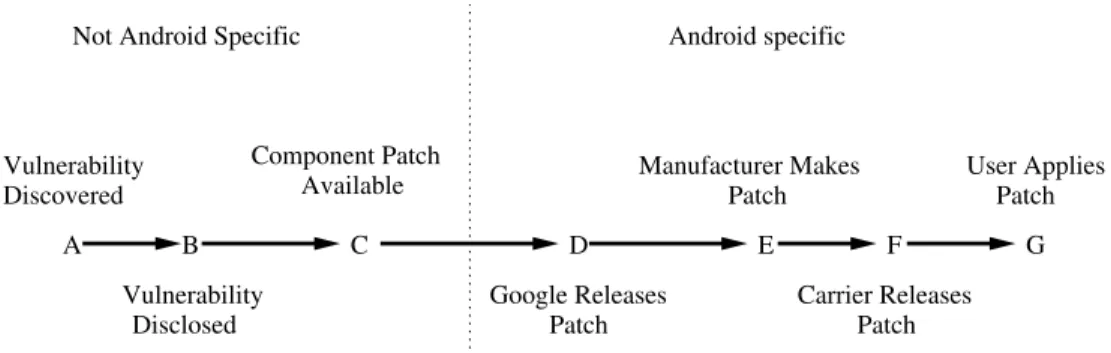
Figure 1:Android patch cycle: Lifecycle of an Android patch from vulnerability identification until a patch reaches the user device
Xpreia X10 1/10 2/10 3/10 4/10 5/10 6/10 7/10 8/10 9/10 10/10 11/10 12/10 1/11 2/11 3/11 4/11 Time X Google 2.1 (Eclair) X X Motorola Droid Samsung Moment HTC Hero X Google HTC Evo Motorola Droid X X Droid X X HTC Legend X X Samsung Captivate X Samsung Fascinate 2.2 (Froyo) OS Version Motorola Cliq myTouch 3G X myTouch 3G X
Figure 2:Android version timeline: Google [3] and Manufacturer releases of Android 2.1 [25,29,30,43] and 2.2 [36]
application at a lower priority.2 In regard to SMS, this
means that any application with a priority higher than the standard SMS application will have the ability to process the incoming SMS message first, including the ability to prevent the broadcast from being observed by any other application. Malware employing covert communication channels in this manner has already been seen [31, 39]. When a user grants permissions based on prompts that show a RECEIVE SMS permission, such behavior is likely unexpected.
Similarly, the only means a user has of understand-ing the capabilities of an application is through the list of permissions presented at install time. In addition to the framework implementation issue mentioned above, additional ambiguity is introduced via new permissions that existing in later versions of the SDK. For example the STORAGE permission group relates to accessing an external SD Card. The STORAGE permission was not available until API version 4, so the behavior of an older application on a newer device is ambiguous. Current devices simply do not display a comprehensive list of permissions to the user. An older application that does not request the STORAGE permission, it should not as
2Applications at the same priority receive the broadcast in an order
undefined by the Android API [2]
the permission is not defined for the older API, will still implicitly have access to the SD Card [10].
In a stronger form of abuse of application permis-sions, the attacker may craft malicious applications to gain privileged (“root”) access to the user’s device. Typ-ically a privilege escalation attack takes advantage of Android’s slow patch cycle, explored below. When de-ployed as a malicious application, the attack uses the un-moderated market’s weaknesses as a vector to propagate the malware to the user’s device.
Patch cycles. In an effort to increase adoption of the Android OS, Google created the Open Handset Al-liance to build cooperation between hardware manufac-turers to facilitate implementation on their devices [9]. Through this cooperation, Google provides the base open source operating system then device manufactur-ers and telecommunications carrimanufactur-ers modify this base to differentiate their offerings from other Android devices and provide added value to their customers. Figure 1 shows the patch cycle from a vulnerability’s initial dis-covery until the patch eventually reaches the user’s An-droid device. Patch cycle eventsAthroughCare typical of any software product. The software fix represented byC is typically the end of the vulnerability window introduced atA. When considering one of the re-used components in Android, such as WebKit,D-Gare
ap-pended to the patch cycle. The additional states added to the cycle come from Google’s cooperation with mul-tiple manufacturers and carriers. Whenever a patch to Android becomes necessary, Google provides an update through their open source forum and manufacturers then proceed to port the update to their customized version of the operating system.
Google’s standard major release cycle is approxi-mately four months, with minor patches released inter-mittently [3]. However, this is not the date on which these updates are actually available to users. Once Google releases its patch, the manufacturer must then update it to work with their custom hardware [23]. These updates may actually never be made available to the user if the carrier deems deployment too costly [44]. Af-ter the manufacturer modifies the patch to work with their custom device, there can be a delay before the patch is released by the carriers. An example of a de-lay between the manufacturers release of a patch and the patch’s eventual release to the public can be seen in [33] where AT&T postponed the release of Android 2.2 to the Dell Streak creating a three month gap between statesE andF in Figure 1.
Examples of the disparity between Google’s release of Android updates and their eventual release to specific devices can be seen in Figure 2. It is not uncommon to observe at least two months (and sometimes much more) of delay between an Android update and an ac-tual deployment of the update by the major manufactur-ers. As a case in point, 2.1 only became available on certain devices (e.g., Xperia X10) after Google had al-ready superseded it with Android 2.2. With such a large vulnerability window and the separate release dates for Google and each manufacturer, attackers can use reverse engineering techniques to identify and exploit a vulnera-bility on a device using information available in the orig-inal released patch or any other manufacturer that adopts the patch earlier [22]. Platforms that exhibit slow patch cycles regularly are at even greater risk since the patches made available to comparable systems can be analyzed in order to determine the vulnerable conditions making the still un-patched devices easy targets.
Because of Android’s slow patch cycles, the standard re-use of common software components that underline the Android framework can cause increased vulnera-bility. Within the Android framework, common open-source components such as WebKit and the Linux kernel are re-used to reduce the cost of system design. Com-ponent re-use is a common practice among large sys-tems such as Android. Apple’s iPhone similarly employs WebKit [5] and a BSD kernel derivative (Darwin) [13]. The re-use of common software components itself is not detrimental, but the additional delay introduced by An-droid’s patching model is. Once a vulnerability in
We-bkit or Linux is discovered, it is generally patched and released quickly by the open-source community, how-ever the corresponding Android patch may not be avail-able to users for months. The imbalance between the Android patch cycle and the software components it is built upon leaves a longer attack window for Android devices. Similarly, due to Android’s Linux foundation, lower level attacks are simpler when compared to less ubiquitous OSes, as attackers do not need to learn a new kernel [20]. For Android to provide a secure platform it must not only strive for a secure framework, but also provide timely updates to minimize the attack window. Trusted USB connections. With local USB access a developer can interact with an ADB (Android Developer Bridge)-enabled device. The ADB is a development tool provided by Android intended to gather debugging in-formation from an emulator instance or USB-connected phone [1]. The ADB provides further benefit to the user by facilitating direct installation and removal of appli-cations, bypassing the Android Market, and providing access to an unprivileged interactive remote shell. Us-ing the ADB interface, attackers can add and execute malicious tools that exploit vulnerabilities in the device. Such malware does not need to be present in the An-droid market and will not be tracked for possible remote uninstall by Google. With ADB access an attacker can again take advantage of Android’s slow patch cycle to gain privileged access to the device. However, this at-tack could be carried out via ADB without installing any application.
Recovery mode and boot process. Android devices employ a special recovery boot mode that enables device maintenance. The recovery mode allows the user to boot to a separate partition on the device circumventing the standard boot partition [41]. Android’s default recov-ery mode image facilitates maintenance features such as applying a system update to standard system and data areas, cleansing a device of user data ostensibly for re-sale, or software repair to restore life to corrupted (or “bricked”) devices. Because there is no trusted compo-nent to the boot system, attackers can utilize the separate recovery partition by loading in their own malicious im-age to gain privileged access to the user’s information without affecting user data.
Uniform privilege separation. Users can download applications marketed for security, however the effec-tiveness of such applications is extremely limited. On a typical computer, security software, such as anti-virus, may require privileged access in order to secure per-mission to scan all files. Security applications on An-droid are limited to the same restricted environment as every other Android application. Even applications that claim to “block malware, spyware and phishing apps”
(e.g., [8]) require a rooted device in order to obtain the necessary permissions to perform these functions.
Likewise, most Android applications that claim fire-wall capabilities only provide call and SMS filtering. In-deed, adequate network firewall features require a rooted device [38]. Without security tools available, users can-not identify malicious content and the burden falls on the device manager.
4
Attack Classes
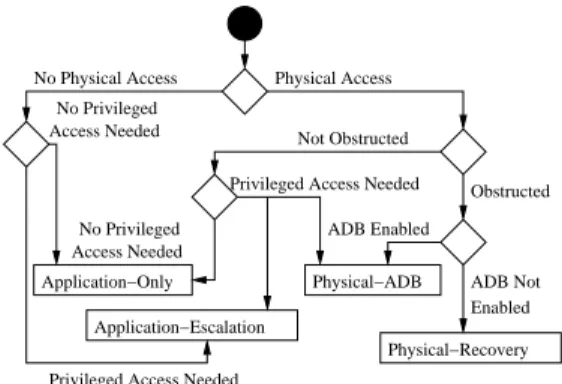
Perhaps unsurprisingly, full privileged device access is guaranteed given physical access. Perhaps less surpris-ing is the relative ease with which privileged access can be obtained and the amount of nefarious activity that is possible without privileged access. In this section we describe unprivileged malicious applications and the cir-cumstances and methods necessary to gain privileged ac-cess to an Android device with respect to the following attacker capabilities.
No physical access: Attack circumstances where it is impossible to gain physical access to a user’s device. Then the attacker must get the user to perform actions on the attackers behalf. Such remote attacks commonly rely heavily on social engineering [16]. To achieve the appropriate initial access to the user’s device an attacker must get some malicious software running on the device. To run code remotely on a user’s device, the attacker typ-ically must convince the user to either download a ma-licious application or access mama-licious content via one of the applications already installed on the device. If the attacker can exploit a vulnerability on the user’s device, then this access may be used further to gain privileged access.
Physical access with ADB enabled: If the attacker finds a device left unattended, yet obstructed via a password or screen lock, the attacker may be able to exploit the device through the Android Developer Bridge.
Physical access without ADB enabled: If the attacker finds an obstructed Android device left unattended, but is unable to use the ADB service, the attacker may still gain privileged access via recovery boot.
Physical access on unobstructed device. In some cases the attacker may actually have access to a device with-out a password protected screen lock. Such a situation allows the attacker to actually leverage any other attack method since the attacker can choose to install applica-tions, visit malicious websites, enable ADB on the de-vice, etc.
We next detail specific attacks that demonstrate the real threats present in the cases enumerated above. Note that we do not include physically destructive attacks such as opening the casing in order to access debugging ports (e.g. JTAG). The last case is included for complete-ness, but not specifically detailed since all of the
men-tioned attacks would also be applicable in the case of physical access to an unobstructed device.
4.1
Unprivileged Attacks
Much like a user that will install an application inse-curely downloaded from the Internet despite any oper-ating system warnings, a user may easily install applica-tions that request dozens of Android permissions with-out a second thought. Applications that are restricted via Android’s typical application sandbox, but that have co-pious access to resources through permissions, can per-form many of the same functions of malware common on the personal computer platform [26]. For example the Zeus botnet architecture has been ported to most mobile platforms [15], worms such as Yxe have been seen on SymbianOS [17], and Trojan malware has been found in applications present in the legitimate Android Market [12, 27]. Users that completely disregard, or are tricked into accepting prompts from the device regard-ing install time permissions effectively permit negative actions completely at the application level.
In some cases, misleading the user may not even be required. Some software handlers (AndroidReceivers) may be registered by an application at install time. In-tents expected to occur regularly or those that can be remotely invoked can be used to achieve remote code execution without requiring user action. Users may in-stall applications from the Android Market web inter-face, which initiates a remote install. Thus, an attacker that has somehow obtained a user’s authentication to-ken to the web interface can remotely install applica-tions to a user’s device. To achieve remote code ex-ecution the attacker simply has to perform an action that results in the device generating an Intent that the app for which the application has a receiver. Even se-curity related features, such as the screen lock may be remotely bypassed, by registering a receiver (for exam-plePACKAGE ADDED) and using the legitimate API for KeyguardManager to disable the screen lock upon appli-cation installation [24].
Applicationre-packinghas proven to be an effective means to entice users enough to download malicious ap-plications. Entire families of Trojan software have been classified in third party black markets as well as the offi-cial Android market. Families such as Geinimi [35] and DroidDream [32] have been found in dozens of applica-tions in the Android market. Many of these applicaapplica-tions offer no additional value to the consumer, they are sim-ply existing, popular applications that have been reverse engineered enough that the attacker can augment the ex-isting application with the malware and re-package the application. The attacker then signs the new application with a new key and makes the application available in the market for victims to download.
The fact that malware can successfully operate within Android’s restricted application environment signifi-cantly lightens the attacker’s burden to achieve privi-leged access through escalation. Applications executing in an isolated environment simply obtain the appropri-ate permissions from the user at install time and perform nefarious activity from within the confines of the appli-cation sandbox. Even so, attackers may wish to obtain elevated privileges in order to perform actions for which no application level permission exists, or in order to have guaranteed persistence.
4.2
Remote Exploitation
When turning to privileged access, an attacker may rely on convincing the user to install a malicious applica-tion. Such an application may present an enticing fea-ture to the consumer but contain software that executes a privilege escalation attack. Oberheide [34] demon-strated such an attack. Oberheide’s seemingly benign application received more than 200 downloads within 24 hours [34]. In the background this application would routinely make remote requests for new payloads to ex-ecute. Whenever a new privilege escalation exploit was discovered for the current running version of Linux, the application could obtain the exploit to gain root access. These exploits must be delivered to the application be-fore the vulnerability is patched, which is generally easy to do considering the long patch cycles discussed above. Similar privilege escalation methodologies can be found in legitimate device “rooting” applications such as Root Tools [11], Easy Root [6], and Unrevoked [45], which take advantage of vulnerabilities in the phone to gain privileged access. Users can then use this access to circumvent carrier controls over the use of a specific software or upgrade to a newer version of Android that their carrier has yet to release [41].
Deploying malicious applications with a benign fa-cade through the Android Market takes advantage of Google’s reactive philosophy toward malicious applica-tions. Once on the Android Market, the attacker’s ap-plication can now reach a global audience. Because there is no screening of applications, attackers are given a pedestal from which to entice the user.
A remote attack may not even require the installation of a new application. Android’s use of commodity soft-ware components, such as the web browser and Linux base can be leveraged for an attack that requires no phys-ical access [38]. A concrete example of such an attack was deployed by Immunity Inc. for the penetration test-ing tool CANVAS 6.65 [20]. In this attack the user visits a malicious website using the device’s built-in browser. The attacker then uses this request to take advantage of a vulnerability in the WebKit browser [46] (CSS rule dele-tion vulnerability) to obtain a remote shell access to the
device with the level of privilege given to the browser. The attacker can then copy a Linux privilege escalation exploit to an executable mount point on the device, run the secondary exploit, and gain privileged access to the whole device.
4.3
Physical Access with ADB Enabled
Similar to the previous case, it is possible for an attacker to obtain privileged access through physical access to a device that has ADB enabled [19]. Given physical access, an attacker can easily determine if ADB is en-abled, by connecting the device via USB and executing adb get-serialnoon the attached computer. If the device’s serial number is returned, then ADB is enabled. Once the attacker knows that ADB is enabled on the device, a privilege escalation only requires the attacker to use ADB’spushfeature to place an exploit on the device, and use ADB’sshell feature to execute the exploit and gain privileged access.
Different from most remote attacks, an attack on an ADB enabled device does not require any action from the user. Privilege escalation using ADB does rely heav-ily on the availability of an enabled debug bridge, which is only usually the case on devices used by developers and not the typical user. However, if the device is not password-protected, the attacker could simply interact with the common device interface and enable ADB.3
An example usage of this method for gaining priv-ileged access is the Super One-Click desktop applica-tion [42]. Super One-Click requires users to first enable ADB debugging in the device. Once enabled, the appli-cation exploits the device using the previously defined method to give the user privileged access.
The main advantage of ADB-based attacks is the min-imal observable footprint left on the device: no new ap-plication needs to be installed on the device and a reboot is not necessary. The lack of device modification in this method makes it is much harder to trace than other at-tacks, and is unlikely to be detected by security applica-tions on unrooted devices.
4.4
Physical Access without ADB Enabled
On an obstructed device that does not have ADB en-abled, the attacker may still take advantage of the de-vice’s recovery mode [41]. Since the attack does not rely on a software vulnerability specific particular to a version of Android, the attack has more longevity than other exploits such as the WebKit and Linux exploits mentioned above. The deployment method is device-specific leading to extensive fragmentation based on de-vice model and/or manufacturer.
To use the recovery mode, the attacker must first cre-ate a customized recovery image. The main
tion necessary for this image is to theinit.rc and default.propfiles in theinitrdsection of the im-age. To give the attacker the necessary privileges, the init.rcfile must list the executables that they wish to add with the rights necessary to be executed. Any exe-cutables necessary for the attack must also be added to theinitrdsection of the image.
Once the image is built and the attacker is able to gain physical access to the device, the attacker must then at-tach the device to a computer through a USB connec-tion and run a manufacturer specific tool (e.g., fastboot for HTC, RSDLite for Motorola, Odin for Samsung) to flash the image to the recovery partition of the phone. After the device has been flashed, the attacker then can access the recovery image using a device specific key combination (e.g., Power button while holding X for Motorola Droid). When the device loads into the recov-ery partition theinit.rcfile is executed. init.rc can be modified to run any malicious code added to the recovery image by the attacker, such as auto-installing a root-kit without attacker interaction. Alternatively, the attacker could update the default.propfile to en-able ADB, craftinginit.rcto give executable rights to ansuexecutable (added previously to the custom re-covery image initrd). When the rere-covery image loads the attacker opens an interactive shell on the device us-ing ADB. The attacker can now simply execute the su
executable to gain root access.
Installing a malicious recovery image takes advantage of the absence of any trusted boot system on Android systems, so that it is possible to make changes to the devices boot image and gain privileged access without the need to provide any authentication to the device.
If an attacker is able to create a custom malicious re-covery image, it is feasible for this attacker to gain priv-ileged access on any device for which physical access can be obtained. Installing a new recovery image and re-booting the device is not a perfect vector as it can leave an extensive footprint sans subsequent attacker cleanup. However, the recovery image replacement has negligi-ble effect on the user’s experience. While an attacker would almost certainly have a malicious payload, this technique is similar to methods described in [41].
4.5
Physical access to unobstructed device
If the device user has elected to not employ any kind of obstruction, whether or not ADB is enabled on the device is irrelevant, as any of the techniques described above are possible if physical access to the device is available. The attacker need only turn the device on, download their malicious code, enable ADB on the de-vice, etc. The method of attack that the attacker chooses now depends upon other metrics, such as overtness. For
example, a malicious application remains observable by the user and may potentially be uninstalled in the future.
5
Mitigations
We propose six possible mitigations to the attacks seen in the previous section. Our proposals include reduc-ing the patch cycle for Android updates, creatreduc-ing a trusted class of applications with privileged access, en-abling authentication on Android Market downloads and the ADB, leveraging existing host security technologies, and deploying a Trusted Platform Module (TPM) on An-droid enabled devices.
5.1
Reduce the Patch Cycle Length
In all but one of the exploits show in Section 4, attackers exploit some flaw in the operating system to gain root privileges. Reducing the patch cycle length would mit-igate these threats with greater effectiveness. Zero-day exploits would still be possible, however the common lingering threat will be reduced.
While Google has already demonstrated willingness to act quickly with out of band patch releases in reaction to certain attacks (e.g., [34]), reducing complete patch cycles is a more difficult problem. Indeed, manufac-turers make changes to the Android source to create a competitive advantage. To reduce patch cycles, manu-facturer modifications should not fundamentally change the core components of Android, and thus should not re-quire a lengthy time to port the patch. A fundamental separation between the core of Android and manufac-turer modifications should be established.
5.2
Privileged Applications
To mitigate application attacks that take advantage of Android’s permission model many solutions have been proposed.
Barrera et al. suggest a restructuring of Android per-missions into a hierarchy to allow for finer grained permissions that can be simpler for users to under-stand [21]. Under a hierarchy, an application dis-playing advertisements that would traditionally re-quire INTERNET permission would need to have INTERNET.ADVERTISING.adsite.com permis-sion, which would limit its connection to a specific site and let the user know exactly what the permission is used for.
In [27] Enck et al. propose lightweight application certification comparing the requested permissions of an application to a set of security rules. If the application does not pass any of the security rules, then possible ma-licious activity is brought to the attention of the user. Adding a certification mechanism to the Android frame-work would require modification of the Android security framework.
Android’s application model could also be adjusted to allow certain applications to obtain additional, priv-ileged device access. For example, Google could vali-date that certain software vendors create security soft-ware and grant applications created by these vendors additional API functionality. Applications signed by such a vendor could, for example, have read access to the filesystem in order to facilitate anti-virus scanning beyond limited scope typically granted to applications. Such a configuration would allow users to install secu-rity related applications without having to first root their device. Because privileged applications will have unre-stricted access to the device, these applications should be certified by some governing entity before they can be downloaded. This certification process could also help mitigate some weaknesses of an unmoderated market. With access to trusted security tools, users would be able to monitor untrusted applications and provide appropri-ate feedback. With a market model split into trusted and untrusted applications, Google could provide enhanced security with minimal administrative overhead and min-imal reduction in the openness of the platform.
5.3
Leveraging Existing Security
Tech-nologies
There are several existing operating system security en-hancements that could be ported to Android. In [37], Shabtai et al. experiment with adding SELinux to An-droid. An information-flow tracking system, Taint-Droid, has been created by Enck et al. instrumenting An-droid [26] to monitor applications and understand how they interact with the user’s sensitive information. A re-alized implementation of TaintDroid could gives users real-time information about how an application uses the permissions it is granted. Generally, operating system level software modifications such as adding a firewall or SELinux to Android involve porting existing technology to the Android kernel and creating an application to fa-cilitation administration.
5.4
Authenticated Downloads
Once an attacker has physical access to a device, adding malicious applications becomes simple and quick by posing as the legitimate user and downloading them from the Android Market. To ensure downloads are made only by the user, the market should require authen-tication before every transaction, similar to the model currently used by the iPhone.
5.5
Authenticated ADB
Because of the power given through the ADB, it should not be accessible to unauthorized users. Android should require the device to be unlocked before ADB can be used. Any legitimate user should be able to unlock the
ADB Not Enabled Physical−ADB Application−Only Access Needed No Privileged Application−Escalation Physical−Recovery Access Needed No Privileged
No Physical Access Physical Access
Not Obstructed
Obstructed ADB Enabled
Privileged Access Needed
Privileged Access Needed
Figure 3: Attack chart: Android attack goals and re-quirements.
device and once the connection is made, the session could be maintained by preventing the screen from lock-ing while it is connected via USB. With ADB authenti-cation, the attacker no longer has a backdoor to bypass the lock mechanism’s authentication process, mitigating the ADB attack against obstructed devices.
5.6
Trusted Platform Module
To secure a device in a managed model scenario a root of trust must be established. Using a Trusted Platform Module (TPM) provides a ground truth on which device security could be built, providing authentication of de-vice state. Using a TPM would mitigate the recovery image attack, which relies on the ability to change the boot image. Assuming signed bytecode and authenti-cation of the boot image, updates running unauthorized code would become extremely difficult.
6
Conclusion
Android was designed with a focus on security, however, as new security features are added, new vulnerabilities become available for exploitation. This paper builds a taxonomy of attacks on the Android OS. Figure 3 shows how an attacker could rely on this taxonomy to decide which attack path to pursue, given their own capabilities (e.g., physical access available or not, ADB available or not, etc).
We hope the present paper can further the discussion on the security properties modern mobile operating sys-tems such as Android should possess. Mobile security is becoming a pressing challenge indeed.
Acknowledgments
This work is supported in part by CyLab at Carnegie Mellon under grant DAAD19-02-1-0389 from the Army Research Office, and by the National Science Founda-tion under ITR award CCF-0424422 and IGERT award DGE-0903659, as well as a hardware donation by Google Inc.
References
[1] Android debug bridge. http://developer. android.com/guide/developing/tools/
adb.html.
[2] Android developers. http://developer.
android.com/.
[3] Android developers sdk. http://developer.
android.com/sdk/android-1.1.html.
[4] Android market statistics. http://www.
androlib.com/appstats.aspx.
[5] Applications using webkit - webkit. http: //trac.webkit.org/wiki/Applications\
%20using\%20WebKit.
[6] Easy root. http://www.unstableapps.com/
buyme.html.
[7] Factsheet: The U.S. media universe|nielsen wire.
http://blog.nielsen.com/nielsenwire/
online_mobile/factsheet-the-u-s-media-universe/.
[8] Lookout mobile security - android market.
https://market.android.com/details?
id=com.lookout.
[9] Open handset alliance. http://www.
openhandsetalliance.com/.
[10] Permission list is incorrect for apks built with an-droid 1.6 sdk. https://code.google.com/p/
android/issues/detail?id=4101.
[11] Root tools. https://market.android.com/
details?id=com.jrummy.roottools.
[12] Trojanized apps root android devices. http:
//blog.trendmicro.com/trojanized-apps-root-android-devices/.
[13] Unix system family tree: Research and bsd.
http://www.freebsd.org/cgi/cvsweb.
cgi/˜checkout˜/src/share/misc/bsd-family-tree?rev=HEAD.
[14] What is android. http://developer.
android.com/guide/basics/what-is-android.html.
[15] Zeus targets mobile users. http://blog.
trendmicro.com/zeus-targets-mobile-users/.
[16] Just because it’s signed doesn’t mean it isn’t spying on you. http://www.f-secure.com/weblog/
archives/00001190.html, May 2007.
[17] Worm:symbos/yxe. http://www.f-secure.
com/v-descs/worm_symbos_yxe.shtml, May
2007.
[18] Android most popular operating system in U.S. among recent smartphone buyers | nielsen wire. http://blog.nielsen.com/ nielsenwire/online\_mobile/android-
most-popular-operating-system-in-u-s-among-recent-smartphone-buyers/, Oct.
2010.
[19] Rooting the droid without rsdlite. http: //androidforums.com/droid-all-things-
root/171056-rooting-droid-without-rsd-lite-up-including-frg83d.html,
Dec. 2010.
[20] Canvas: Owning android. http://partners. immunityinc.com/movies/Lightning\
_Demo\_Android.zip, Jan. 2011.
[21] D. Barrera, H. Kayacik, P. van Oorschot, and A. Somayaji. A methodology for empirical analy-sis of permission-based security models and its ap-plication to android. In Proceedings of the 17th ACM conference on Computer and communica-tions security, pages 73–84. ACM, 2010.
[22] D. Brumley, P. Poosankam, D. Song, and J. Zheng. Automatic patch-based exploit generation is possi-ble: Techniques and implications. InIEEE Symp. S.& P. 2008, pages 143–157, May 2008.
[23] J. V. Camp. Only 36.2 percent of android devices run froyo. http://www.digitaltrends.com/
mobile/only-36-2-percent-of-android-devices-run-froyo/, Nov. 2010.
[24] T. Cannon. Android lock screen bypass.
http://thomascannon.net/blog/2011/
02/android-lock-screen-bypass.
[25] C. Davies. Sprint htc hero android 2.1 update released. http://www.slashgear.com/
sprint-htc-hero-android-2-1-update-released-1986138/, May 2010.
[26] W. Enck, P. Gilbert, B. Chun, L. Cox, J. Jung, P. McDaniel, and A. Sheth. TaintDroid: an information-flow tracking system for realtime pri-vacy monitoring on smartphones. InProceedings of OSDI, 2010.
[27] W. Enck, M. Ongtang, and P. Mcdaniel. On lightweight mobile phone application certification.
In ACM Conference on Computer and
Communi-cations Security, pages 235–245. ACM, 2009. [28] D. Geer, R. Bace, P. Gutmann, P. Metzger,
C. Pfleeger, J. Quarterman, and B. Schneier. Cy-berinsecurity: The cost of monopoly. Computer and Communications Industry Association, 2003. [29] E. Hardy. Andoird OS 2.1 upgrade for T-Mobile
in August. http://www.brighthand.com/
default.asp?newsID=16767, July 2010.
[30] J. Herrman. Android 2.1 update finally live for Motorola Droid. http://gizmodo.com/\#
!5505520/android-21-update-finally-live-for-motorola-droid, Mar. 2010.
[31] K. J. Higgins. Researcher to release smartphone botnet proof-of-concept code.
http://mobile.darkreading.com/9287/ show/54cc009853e3f863244c0b267a73ae86, Jan. 2011. [32] K. Mahaffey. http://blog.mylookout. com/2011/03/security-alert-malware- found-in-official-android-market-droiddream/, Mar. 2011.
[33] L. Menchaca. AT&T sim-locked units and the Froyo update - direct2dell. http: //en.community.dell.com/dell-blogs/ Direct2Dell/b/direct2dell/archive/
2010/12/09/at-amp-t-sim-locked-units-and-the-froyo-update.aspx, Dec.
2010.
[34] J. Oberheide. Remote kill and install on google android. http://jon.oberheide.org/blog/
2010/06/25/remote-kill-and-install-on-google-android/.
[35] B. Prince. Google android trojan, fbi raid linked to operation payback lead security news. http: //www.eweek.com/c/a/Security/Google-
Android-Trojan-FBI-Raid-Linked-to-Operation-Payback-Lead-News-406931/,
Jan. 2011.
[36] J. Raphael. Android 2.2 upgrade list: Is your phone getting Froyo? - Computerworld Blogs. http://blogs.computerworld.com/
16310/android\_22\_upgrade\_list, June
2010.
[37] A. Shabtai, Y. Fledel, and Y. Elovici. Securing Android-powered mobile devices using SELinux.
Security & Privacy, IEEE, 8(3):36–44, 2010. [38] A. Shabtai, Y. Fledel, U. Kanonov, Y. Elovici,
S. Dolev, and C. Glezer. Google android: A com-prehensive security assessment. Security Privacy, IEEE, 8(2):35 –44, march-april 2010.
[39] T. Vennon. Android malware. A study of known and potential malware threats. Technical report, Technical Report White paper, SMobile Global Threat Center, Feb. 2010.
[40] T. Vidas, N. Christin, and L. Cranor. Curbing an-droid permission creep.W2SP 2011, May 2011.
[41] T. Vidas, C. Zhang, and N. Christin. Towards a general collection methodology for android de-vices. DFRWS 2011, Aug. 2011.
[42] A. Waqas. Root any android device and samsung captivate with super one-click app.
http://www.addictivetips.com/mobile/
root-any-android-device-and-samsung-captivate-with-super-one-click-app/,
Oct. 2010.
[43] T. Wimberly. Sprint releases android 2.1 for sam-sung moment. http://androidandme.com/
2010/05/news/sprint-releases-android-2-1-for-samsung-moment/, May 2010.
[44] T. Wimberly. Top 10 android phones, best selling get software updates first. http: //androidandme.com/2010/11/news/top-
10-android-phones-best-selling-get-software-updates-first/, Nov. 2010.
[45] J. Wise. Unrevoked3 recovery reflash tool.
http://unrevoked.com/rootwiki/doku.
php/public/unrevoked3, Jan. 2011.
[46] B. Woods. Researchers expose android webkit browser exploit. http://www.zdnet.co. uk/news/security-threats/2010/11/08/